
HPH-W300 - Earphones YAMAHA - Free user manual and instructions
Find the device manual for free HPH-W300 YAMAHA in PDF.


| Product Type | Bluetooth wireless over-ear headphone |
| Brand | Yamaha |
| Model | HPH-W300 |
| Wireless Technology | Bluetooth with Qualcomm aptX support |
| Bluetooth Version | Not specified (estimated: 4.0 or later) |
| Bluetooth Range | Approximately 10 m (open field) |
| Headphone Type | Closed-back over-ear |
| Battery Life | Up to 24 hours of continuous playback |
| Charging Time | Approximately 3 hours |
| Battery Type | Built-in rechargeable lithium-ion |
| Battery Capacity | Not specified (estimated: 500 mAh) |
| Microphone | Built-in for calls and voice commands |
| Touch Control | Tap and swipe on earcups |
| Wired Connectivity | External 3.5 mm input jack (cable included) |
| Weight | Approximately 250 g |
| Dimensions (W x H x D) | Approximately 200 x 180 x 80 mm (estimated) |
| Included Accessories | USB cable, 3.5 mm audio cable, quick start guide, safety brochure |
| Key Features | Multipoint pairing (up to 2 devices), voice command (Siri, etc.) |
| Cleaning | Wipe with a soft, dry cloth. Do not use solvents. |
| Safety | Read the safety brochure before use. Do not use at high volume in public places. |
| Repairability | Contact an authorized Yamaha technician for any repairs. Do not disassemble. |
Frequently Asked Questions - HPH-W300 YAMAHA
User questions about HPH-W300 YAMAHA
0 question about this device. Answer the ones you know or ask your own.
Ask a new question about this device
Download the instructions for your Earphones in PDF format for free! Find your manual HPH-W300 - YAMAHA and take your electronic device back in hand. On this page are published all the documents necessary for the use of your device. HPH-W300 by YAMAHA.
USER MANUAL HPH-W300 YAMAHA
natural_image
Black multi-band headphones with earbuds and black headband (no visible text or symbols)Owner's Manual
Mode d'emploi
Bedienungsanleitung
Bruksanvisning
natural_image
Black multi-band headphones with earbuds and black headband, no visible text or symbolsContents
Introduction 2
Features 2
Accessories 3
Part names 4
Preparation 6
Charging....6
Turning on 7
Turning off 7
Pairing with a Bluetooth device 8
Establishing a Bluetooth connection 9
Ending a Bluetooth connection....9
Connecting to an external device with the included cable 9
Using the headphones.... 10
Listening to music 10
Using the phone 11
Operating the connected Bluetooth device by voice commands 12
Troubleshooting 13

Bluetooth
Qualcomm® aptX™

EN
Introduction
Thank you for selecting for the Yamaha HPH-W300 Headphones. The HPH-W300 is a pair of headphones specifically designed for use with a portable audio player or smartphone via Bluetooth connection.
This manual explains preparations and operations for everyday users of the unit.
Features
- Enjoy music wirelessly via Bluetooth connection to a portable audio player or smartphone.
- A built-in internal microphone lets you answer phone calls and carry on conversations.
■ About content in this manual and the “Safety Brochure”
- To ensure optimum performance, please read this manual carefully.
- Please read the included "Safety Brochure" before using the device.
- The illustrations in this manual are for instructional purposes only.
- Bluetooth is a registered trademark of the Bluetooth SIG and is used by Yamaha in accordance with a license agreement.
- Qualcomm aptX is a product of Qualcomm Technologies International, Ltd. Qualcomm is a trademark of Qualcomm Incorporated, registered in the United States and other countries, used with permission. aptX is a trademark of Qualcomm Technologies International, Ltd., registered in the United States and other countries, used with permission.
- The company names and product names in this manual are the trademarks or registered trademarks of their respective companies.
- The “ ⚠️ WARNING” icon indicates points that may lead to death or serious injury if not properly observed.
- The “CAUTION” icon indicates points that may lead to injury if not properly observed.
- The “NOTICE” sections contain points that you must observe to prevent product failure, damage or malfunction and data loss.
- The “Note” sections contain important or detailed supplementary information.
Responsible Use
Do not use the headphones at high volume in a public place. Sound leakage from the headphones may be a nuisance to people around you.
This product includes the following accessories.
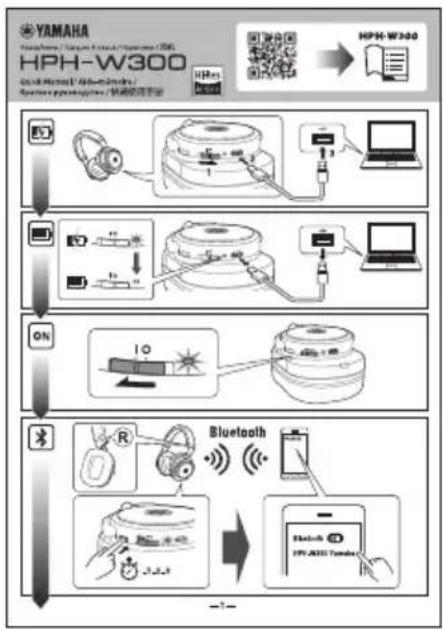
- Quick Manual
flowchart
graph TD
    A["Hyundai Headset"] --> B["Headset with headphones"]
    B --> C["Analog/USB Interface"]
    C --> D["Analog/USB Interface"]
    D --> E["Analog/USB Interface"]
    E --> F["Analog/USB Interface"]
    F --> G["Analog/USB Interface"]
    G --> H["Analog/USB Interface"]
    H --> I["Analog/USB Interface"]
    I --> J["Analog/USB Interface"]
    J --> K["Analog/USB Interface"]
    K --> L["Analog/USB Interface"]
    L --> M["Analog/USB Interface"]
    M --> N["Analog/USB Interface"]
    N --> O["Analog/USB Interface"]
    O --> P["Analog/USB Interface"]
    P --> Q["Analog/USB Interface"]
    Q --> R["Analog/USB Interface"]
    R --> S["Analog/USB Interface"]
    S --> T["Analog/USB Interface"]
    T --> U["Analog/USB Interface"]
    U --> V["Analog/USB Interface"]
    V --> W["Analog/USB Interface"]
    W --> X["Analog/USB Interface"]
    X --> Y["Analog/USB Interface"]
    Y --> Z["Analog/USB Interface"]
    Z --> AA["Analog/USB Interface"]
    AA --> AB["Analog/USB Interface"]
    AB --> AC["Analog/USB Interface"]
    AC --> AD["Analog/USB Interface"]
    AD --> AE["Analog/USB Interface"]
    AE --> AF["Analog/USB Interface"]
    AF --> AG["Analog/USB Interface"]
    AG --> AH["Analog/USB Interface"]
    AH --> AI["Analog/USB Interface"]
    AI --> AJ["Analog/USB Interface"]
    AJ --> AK["Analog/USB Interface"]
    AK --> AL["Analog/USB Interface"]
    AL --> AM["Analog/USB Interface"]
    AM --> AN["Analog/USB Interface"]
    AN --> AO["Analog/USB Interface"]
    AO --> AP["Analog/USB Interface"]
    AP --> AQ["Analog/USB Interface"]
    AQ --> AR["Analog/USB Interface"]
    AR --> AS["Analog/USB Interface"]
    AS --> AT["Analog/USB Interface"]
    AT --> AU["Analog/USB Interface"]
    AU --> AV["Analog/USB Interface"]
    AV --> AW["Analog/USB Interface"]
    AW --> AX["Analog/USB Interface"]
    AX --> AY["Analog/USB Interface"]
    AY --> AZ["Analog/USB Interface"]
    AZ --> BA["Analog/USB Interface"]
    BA --> BB["Analog/USB Interface"]
    BB --> BC["Analog/USB Interface"]
    BC --> BD["Analog/USB Interface"]
    BD --> BE["Analog/USB Interface"]
    BE --> BF["Analog/USB Interface"]
    BF --> BG["Analog/USB Interface"]
    BG --> BH["Analog/USB Interface"]
    BH --> BI["Analog/USB Interface"]
    BI --> BJ["Analog/USB Interface"]
    BJ --> BK["Analog/USB Interface"]
    BK --> BL["Analog/USB Interface"]
    BL --> BM["Analog/USB Interface"]
    BM --> BN["Analog/USB Interface"]
    BN --> BO["Analog/USB Interface"]
    BO --> BP["Analog/USB Interface"]
    BP --> BQ["Analog/USB Interface"]
    BQ --> BR["Analog/USB Interface"]
    BR --> BS["Analog/USB Interface"]
    BS --> BT["Analog/USB Interface"]
    BT --> BU["Analog/USB Interface"]
    BU --> BV["Analog/USB Interface"]
    BV --> BW["Analog/USB Interface"]
    BW --> BX["Analog/USB Interface"]
    BX --> BY["Analog/USB Interface"]
    BY --> BZ["Analog/USB Interface"]
    BZ --> CA["Analog/USB Interface"]
    CA --> CB["Analog/USB Interface"]
    CB --> CC["Analog/USB Interface"]
    CC --> CD["Analog/USB Interface"]
    CD --> CE["Analog/USB Interface"]
    CE --> CF["Analog/USB Interface"]
    CF --> CG["Analog/USB Interface"]
    CG --> CH["Analog/USB Interface"]
    CH --> CI["Analog/USB Interface"]
    CI --> CJ["Analog/USB Interface"]
    CJ --> CK["Analog/USB Interface"]
    CK --> CL["Analog/USB Interface"]
    CL --> CM["Analog/USB Interface"]
    CM --> CN["Analog/USB Interface"]
    CN --> CO["Analog/USB Interface"]
    CO --> CP["Analog/USB Interface"]
    CP --> CQ["Analog/USB Interface"]
    CQ --> CR["Analog/USB Interface"]
    CR --> CS["Analog/USB Interface"]
    CS --> CT["Analog/USB Interface"]
    CT --> CU["Analog/USB Interface"]
    CU --> CV["Analog/USB Interface"]
    CV --> CW["Analog/USB Interface"]
    CW --> CX["Analog/USB Interface"]
    CX --> CY["Analog/USB Interface"]
    CY --> CZ["Analog/USB Interface"]
- Safety Brochure
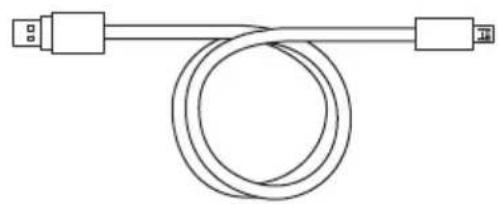
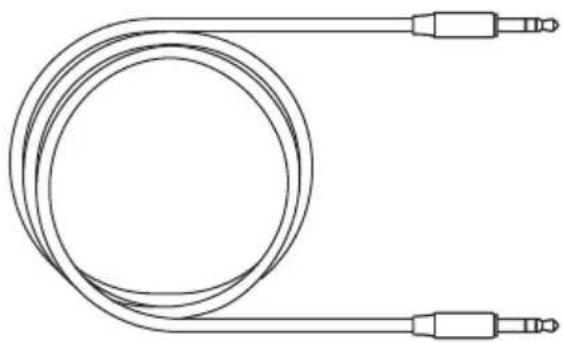
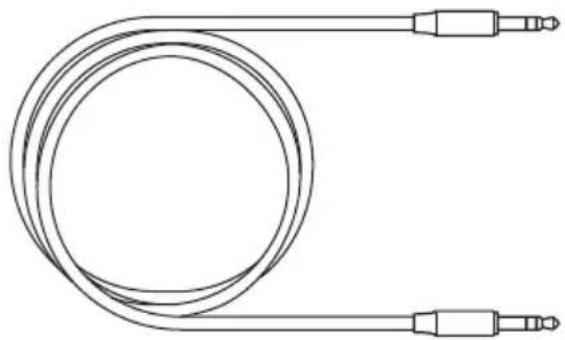
- USB power cable
natural_image
Pure electrical circuit lines without any symbolsnatural_image
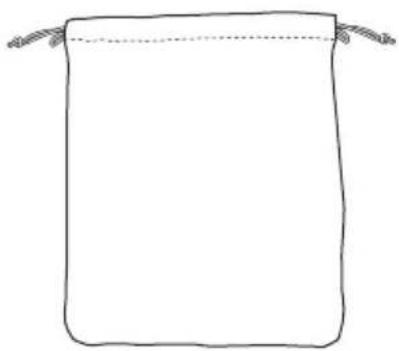
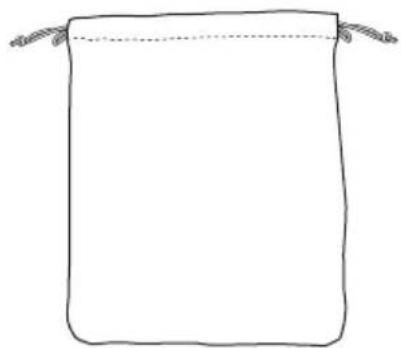
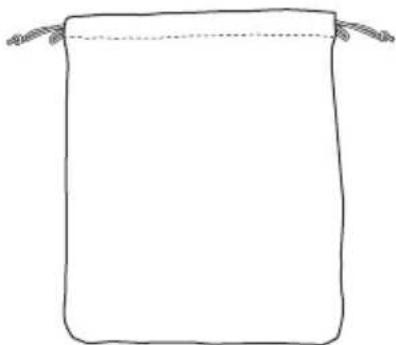
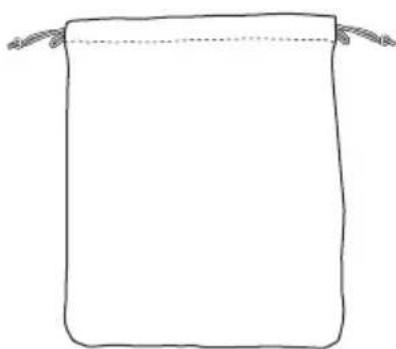
Line drawing of a coiled cable with two connectors (no text or symbols)- Carrying case
natural_image
Simple line drawing of a rectangular bag with two handles, no text or symbols presentPart names
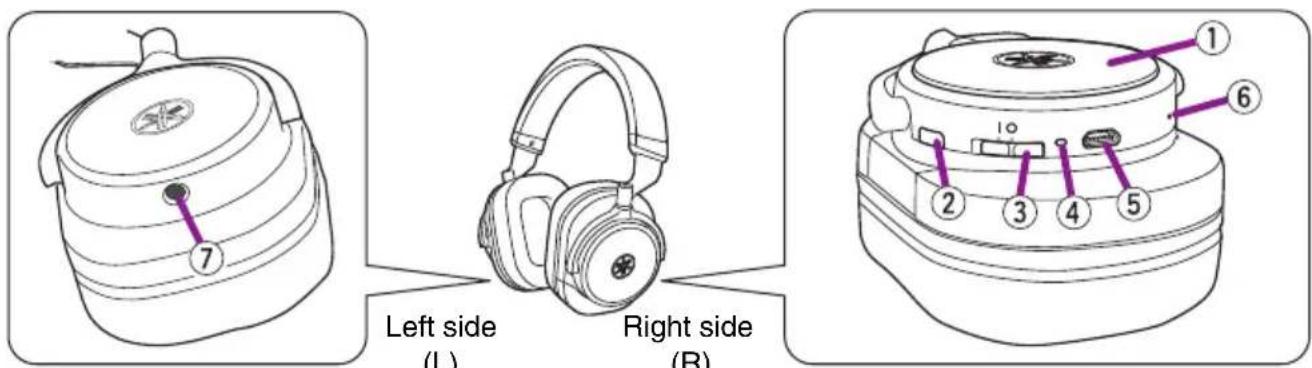
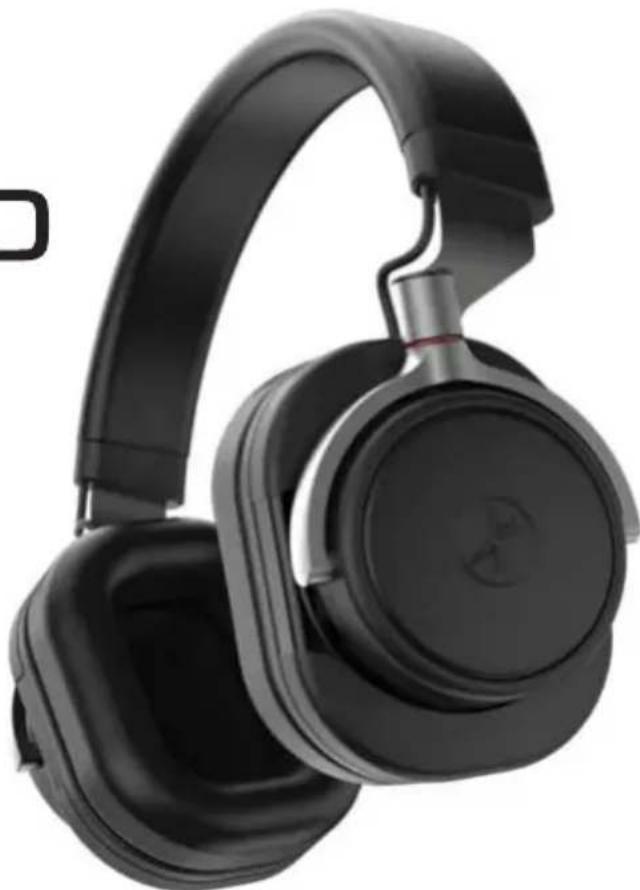
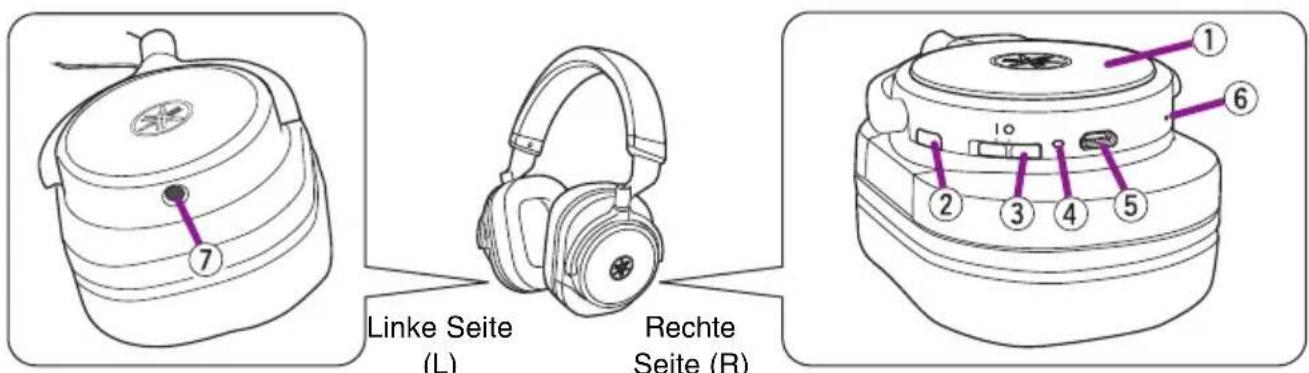
①Housing
Tapping or swiping the outside of the right housing enables you to operate playback, volume control, etc.
②Bluetooth button
To start pairing with a Bluetooth device, press and hold more than three seconds.
③Power switch
Slide to turn on/off.
④Indicator
Indicates the status of the device by lighting or flashing.
| Status Indicator | Reference page | ||
| When turning on |  | Flashes in blue (turns off in twenty seconds) | Page 7 |
| When turning off |  | Lights in orange (turns off in one second) | Page 7 |
| During Bluetooth pairing |  | Flashes in blue and orange alternately | Page 8 |
| When Bluetooth pairing is completed |  | Lights in blue (turns off in 20 seconds) | Page 8 |
| When the battery is less than 10% charged |  | Flashes in orange Page 6 | |
| During battery charging |  | Lights in orange (turns off when the charging is completed) | Page 6 |
| An abnormality has occurred in the battery. (*) |  | Flashes rapidly in red. — | |
*: Discontinue use immediately and have it inspected by qualified Yamaha service personnel.
⑤Charging connector
Connects the included USB power cable for charging. This is on the underside of the right housing.
⑥Microphone
Used in conversation or voice controls. This is on the underside of the right housing.
⑦External input jack
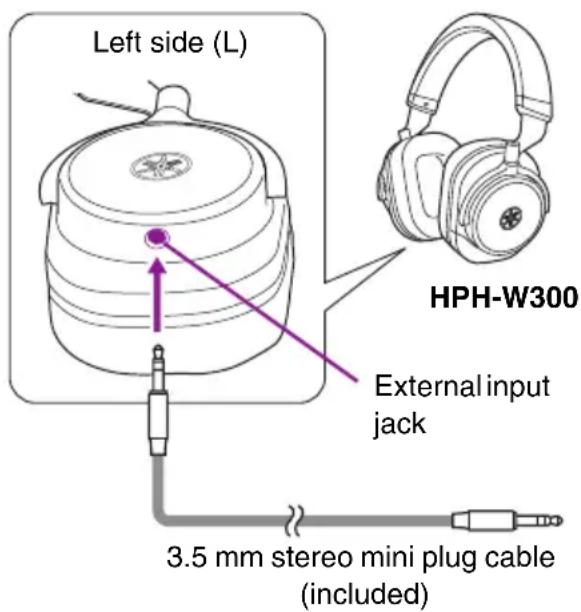
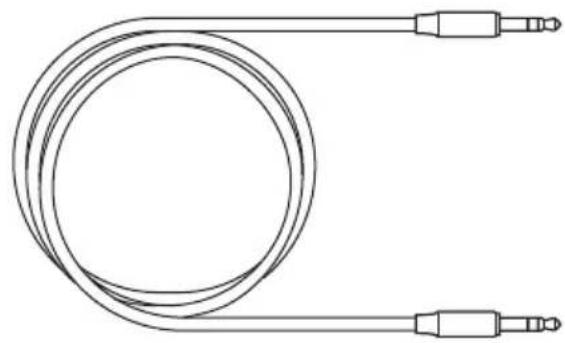
Inputs audio signals by connecting to a portable audio player or a smartphone with the included 3.5 mm stereo mini plug cable. This is a mini plug jack located on the underside of the left housing.
Note
When a cable is connected to the external input jack, the headphone turns off automatically. Bluetooth functions such as conversation and voice control cannot be used.
Preparation
Charging
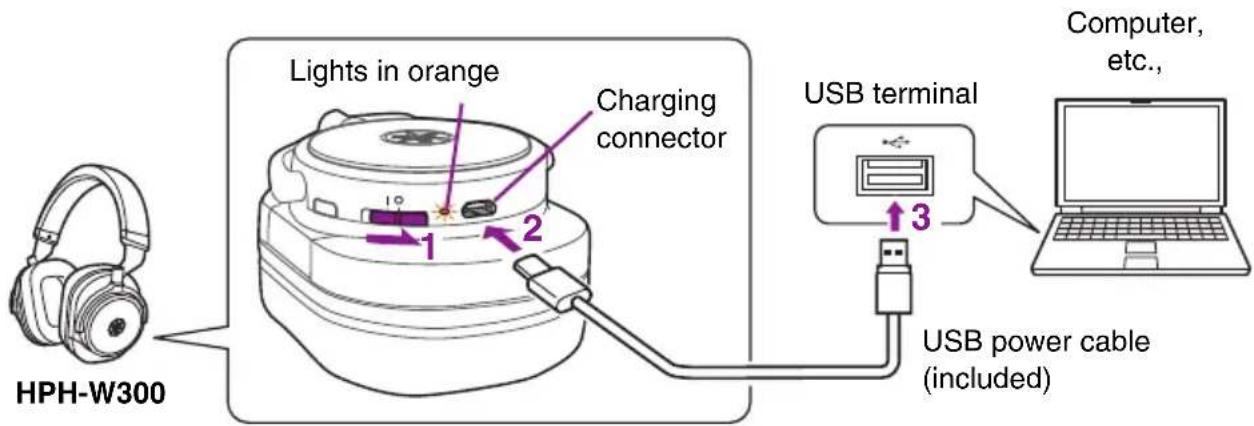
Connect the charging connector to a computer, etc., with the included USB power cable.
The indicator lights in orange.
Note
- A full charge cycle takes about three hours. After a full charging, the headphones can play back continuously for approximately twenty-four hours. (The time may depend on the conditions of use.)
- Make sure to charge the headphones before using them for the first time.
- When charged in a place where the temperature is extremely high or low, charging may be completed quickly or charging may not be possible.
• To maintain optimum performance, charge the headphones at least once every six months. - Batteries have a finite lifetime. The battery capacity is reduced gradually by the number of times it is used and the elapsed time of use.
- The actual lifetime of a battery differs depending on how it is stored, how it is used, the surrounding environment, etc.
- When the battery is charging, the indicator lights in orange. When charging is completed, the indicator turns off.
Turning on
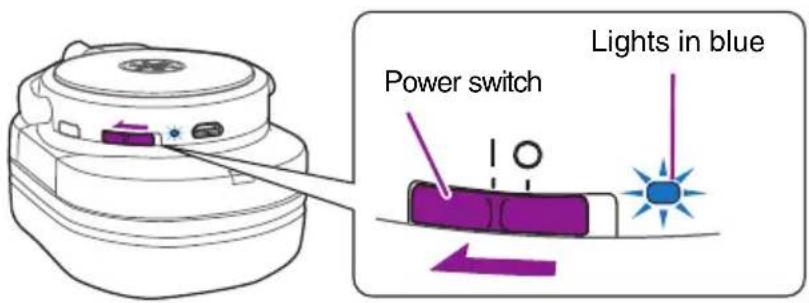
Slide the power switch to the "I" position.
The indicator flushes in blue for twenty seconds.
Note
If the headphones are automatically paired, the indicator lights in blue.
Note
If the headphones are left with no Bluetooth connection for ten minutes, they automatically turn off. To turn on again, slide the power switch to the off position once and turn on again.
Turning off
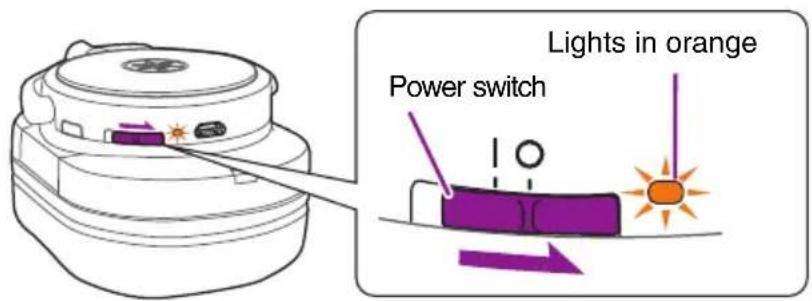
Slide the power switch to the "O" position.
The indicator lights in orange for one second.
Note
After turning the headphones off, make sure to wait more than three seconds before turning them on again.
Pairing with a Bluetooth device
"Pairing" is the process of registering Bluetooth devices each other. Pairing must be performed when you use a Bluetooth connection for the first time, or if the pairing data has been deleted.
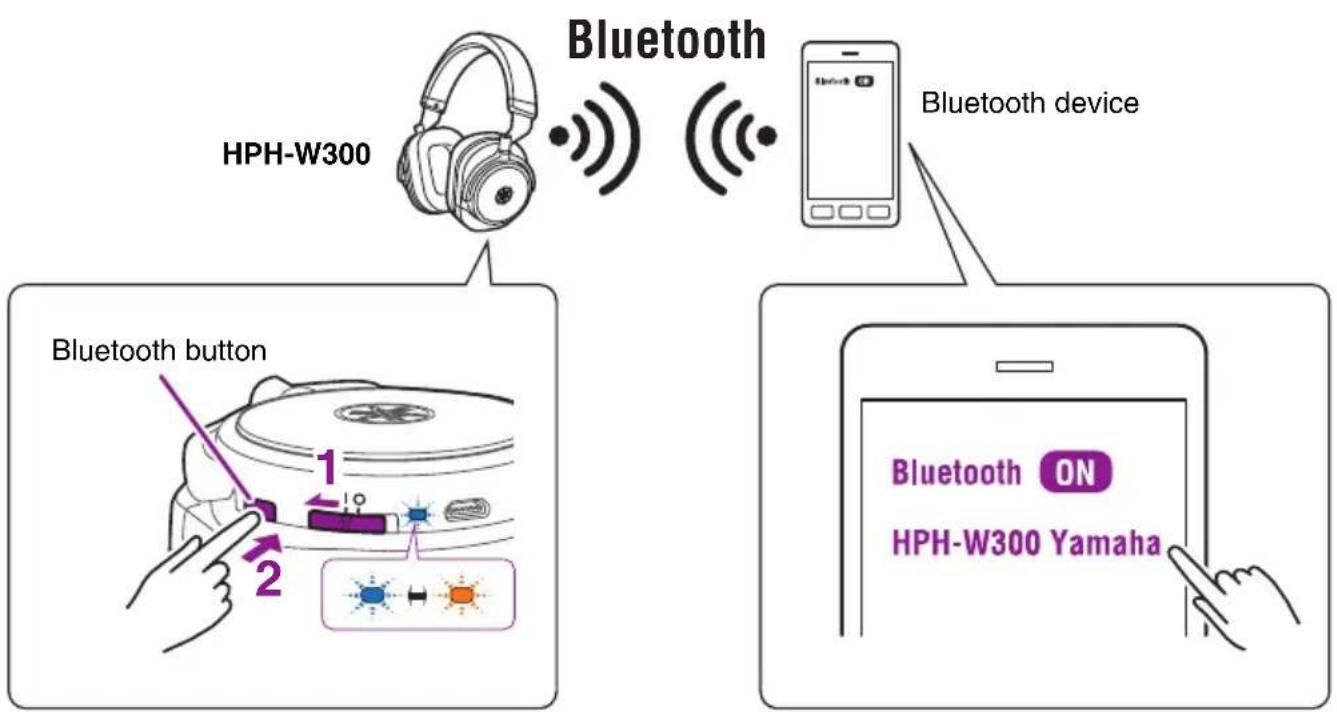
flowchart
graph TD
    A["HPH-W300"] -->|Bluetooth| B["Bluetooth device"]
    C["Bluetooth button"] -->|1| D["Device with icons"]
    C -->|2| E["Device with icons"]
    D --> F["Smart display"]
    E --> G["Smart display"]
    F --> H["Hand pointing to a device icon"]
    G --> I["Hand pointing to a device icon"]
    J["Bluetooth ON"] --> K["Smart display icon"]
    L["HPH-W300 Yamaha"] --> M["Smart display icon"]
1 Turning on the headphones.
2 Press and hold the Bluetooth button until the indicator flashes in blue and orange alternately. (more than three seconds)
The headphones are waiting for pairing.
3 Perform the pairing process on the Bluetooth device.
For details, refer to the owner's manual of the Bluetooth device.
3-1. Access the Bluetooth setting screen on the Bluetooth device.
3-2. If the Bluetooth setting is disabled, enable it.
3-3. In the list of detected devices, tap "HPH-W300 Yamaha" to select it.
Pairing is completed.
When pairing is completed, the indicator lights in blue for twenty seconds.
Note
- These headphones can be paired with up to eight Bluetooth devices. When pairing has succeeded with the ninth device, pairing data is deleted for the oldest paired device.
- If two minutes elapse before pairing is completed, the headphone stop waiting for pairing.
- If you are asked to enter a pass key, enter the numerals "0000."
Turn on the headphones.
A Bluetooth connection is established with the most-recently connected Bluetooth device.
Note
- Some Bluetooth devices may not connect automatically.
- If the Bluetooth device does not connect to the headphones automatically, operate the device to connect to the headphones.
- After you turn off the Bluetooth setting of the Bluetooth device, a Bluetooth connection is not automatically established with that device when you turn on the power of the headphones.
- The headphones can establish a Bluetooth connection with two devices simultaneously (multi-point connection). To establish a Bluetooth connection with the second device, perform the process also on that Bluetooth device. Audio from the connected Bluetooth devices can be switched by playing or stopping music from the connected Bluetooth devices.
Ending a Bluetooth connection
If a Bluetooth connection exists, you can end it in either of the following ways.
- Turn off the power of the headphones.
- End the Bluetooth connection on the Bluetooth device.
Connecting to an external device with the included cable
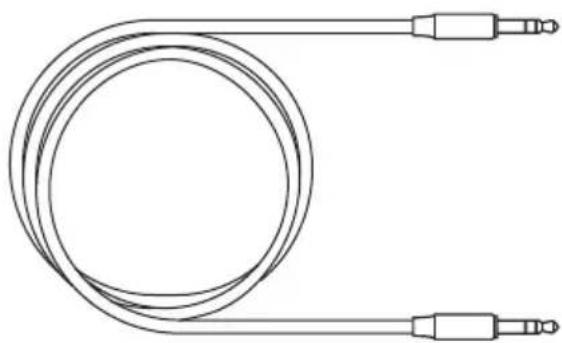
The headphones feature an input connector on the left housing, allowing you to connect an external device (with the included 3.5 mm stereo mini plug cable) and use the headphones as you would conventional ones.
NOTICE
Be sure to use the included 3.5 mm stereo mini plug cable to connect an external device.
Note
If a cable is connected to the input connector while the headphones are being turned on, the headphones automatically turn off. To turn on again after disconnecting the cable, slide the power switch to the off position once and turn on again.
Using the headphones
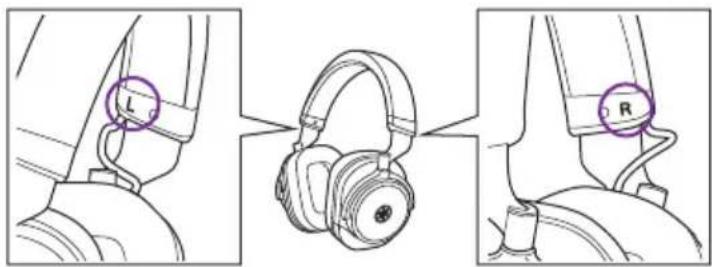
Wear the housing with the L mark to your left ear, and the one with the one with the R mark to your right ear.
Listening to music
The following operations to the right housing enable playback operation of the connected Bluetooth device.
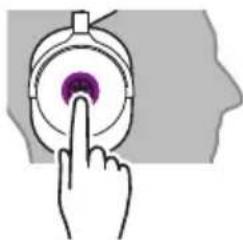
| Play Tap the center briefly. If you want to select a specific song and play it, perform the appropriate operations on the Bluetooth device. | 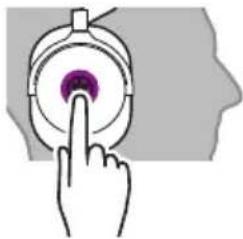 | |
| Pause While the song is playing, tap the center briefly. | ||
| Skipping forward to the next song | Swipe forward. | 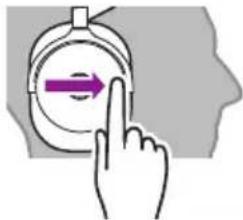 |
| Skipping back to the previous song | Swipe backward. | 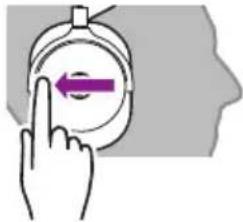 |
| Raising the volume | Swipe clockwise. | 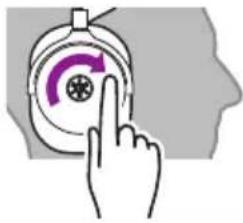 |
| Lowering the volume | Swipe counterclockwise. | 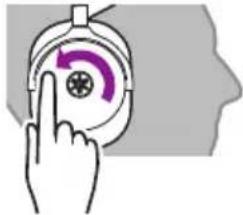 |
Using the phone
The following operation to the right housing of the headphones enables each control.
| Receiving a phone call | When a call comes in, tap the center briefly. | 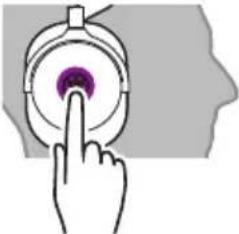 |
| Ending a call During the conversation, tap and hold the center more than three seconds. | 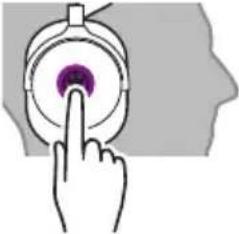 | |
| Ignoring a call When a call comes in, tap and hold the center more than three seconds. | 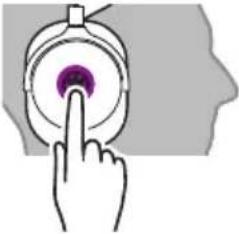 | |
| Rasing the con-versation volume | Swipe clockwise. | 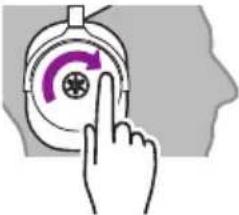 |
| Lowering the con-versation volume | Swipe counterclockwise. | 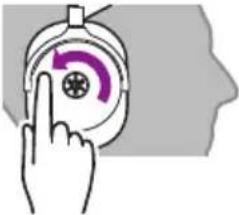 |
Operating the connected Bluetooth device by voice commands
If the connected Bluetooth device has a voice control feature/app (Siri, etc.), you can control the Bluetooth device from the headphones.
Tap the center of the right housing twice briefly.
Voice control (Siri, etc.) starts and the Bluetooth device can be operated by voice commands.
Note
This works only for devices that have Siri or another voice control feature.
natural_image
Hand pressing a button on a circular device with a purple button (no text or symbols visible)Troubleshooting
If the situation does not improve even after trying the following actions, or if any abnormalities not listed below are observed, contact the nearest authorized Yamaha dealer or service center.
| Symptom Action | |
| No sound • Make sure that the volume is not set too low on the portable audio player or smartphone.• Make sure that the portable audio player or smartphone is not paused.• Make sure that the portable audio player or smartphone is turned on.• Make sure that the Bluetooth connection with the portable audio player or smartphone is established.• Check that the plug is inserted all the way into the headphone jack of the portable audio player or smartphone (if the input connector is used). | |
| Sound is heard only from one channel | Check that the plug is inserted all the way into the headphone jack of a portable audio player or smartphone (if the input connector is used). |
| Cannot be operated | • Make sure that the Bluetooth connection with the portable audio player or smartphone is established.• An incompatible portable audio player or smartphone has been connected. |
| The headphones malfunction | An incompatible portable audio player or smartphone has been connected. |
| Unusual sounds are heard | Check the indicator. If the indicator flashes in orange, the battery is less than 10% charging. |
| Cannot establish a Bluetooth connection | • Make sure that the Bluetooth function of the portable audio player or smartphone is turned on.• If you can't establish a connection, try performing the pairing operation once again. |
Casques Arceaux
HPH-W300
Mode d'emploi
natural_image
Black outdoor headphones with earbuds and black headband, no visible text or symbolsTable des matières
Introduction ...... 2
Utilisation responsible
flowchart
graph TD
    A["Hybrid Headset"] --> B["Analog Devices"]
    B --> C["Brain Interface"]
    C --> D["Laptop"]
    D --> E["PC"]
    E --> F["Smart Speaker"]
    F --> G["Bluetooth"]
    G --> H["Smart Phone"]
    H --> I[Bluetooth 31/42/72/82/92/102/112/122/132/142/152/162/172/182/192/202/212/222/232/242/252/262/272/282/292/302/312/322/332/342/352/362/372/382/392/402/412/422/432/442/452/462/472/482/492/502/512/522/532/542/552/562/572/582/592/602/612/622/632/642/652/662/672/682/692/702/712/722/732/742/752/762/772/782/792/802/812/822/832/842/852/862/872/882/892/902/912/922/932/942/952/962/972/982/992
natural_image
Simple line drawing of a cable with two connectors and a central loop (no text or symbols)natural_image
Line drawing of a coiled cable with two connectors (no text or symbols)- Étui de transport
natural_image
Simple line drawing of a rectangular bag with two handles above it (no text or symbols)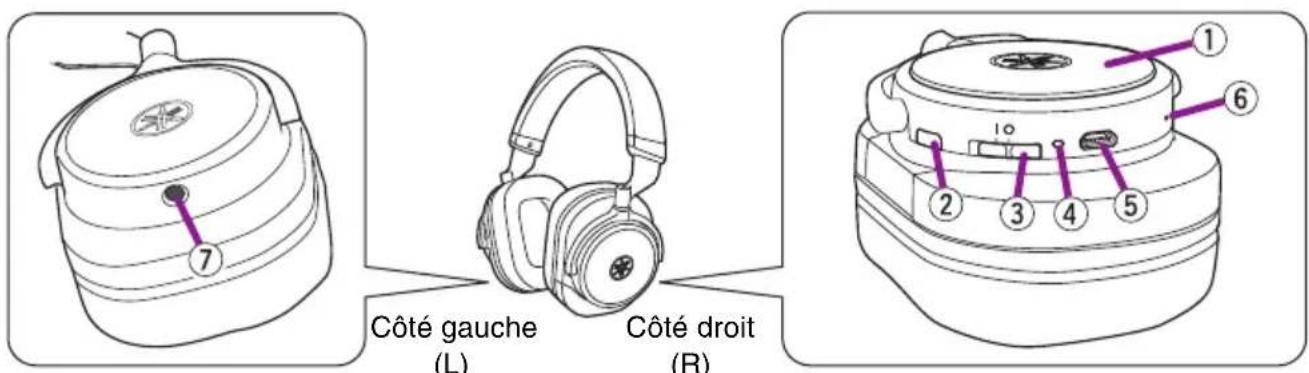
natural_image
Hand pressing a button on a circular device with purple indicator lights (no text or symbols visible)Note
natural_image
Black outdoor headphones with earbuds and black headband (no visible text or symbols)Inhalt
Einführung 2
Leistungsmerkmale 2
Zubehör.... 3
natural_image
Simple line drawing of a cable with two connectors and a central loop (no text or symbols)natural_image
Line drawing of a coiled cable with two connectors (no text or symbols)- Transporttäschchen
natural_image
Simple line drawing of a rectangular bag with two handles above it (no text or symbols)Teilebezeichnungen
natural_image
Hand pressing a button on a circular device with a purple icon (no text or symbols)Fehlerbehebung
natural_image
Black outdoor headphones with earbuds and black headband, no visible text or symbolsInnehåll
Inledning 2
Funktioner 2
Tillbehör.... 3
Delarnas namn 4
Förberedelser 6
Laddning....6
Slå på 7
Stänga av 7
Koppling till en Bluetooth-enhet.... 8
natural_image
Simple line drawing of a cable with two connectors and a central loop (no text or symbols)natural_image
Line drawing of a coiled cable with two connectors (no text or symbols)• Bärväska
natural_image
Simple line drawing of a rectangular bag with two handles above it (no text or symbols)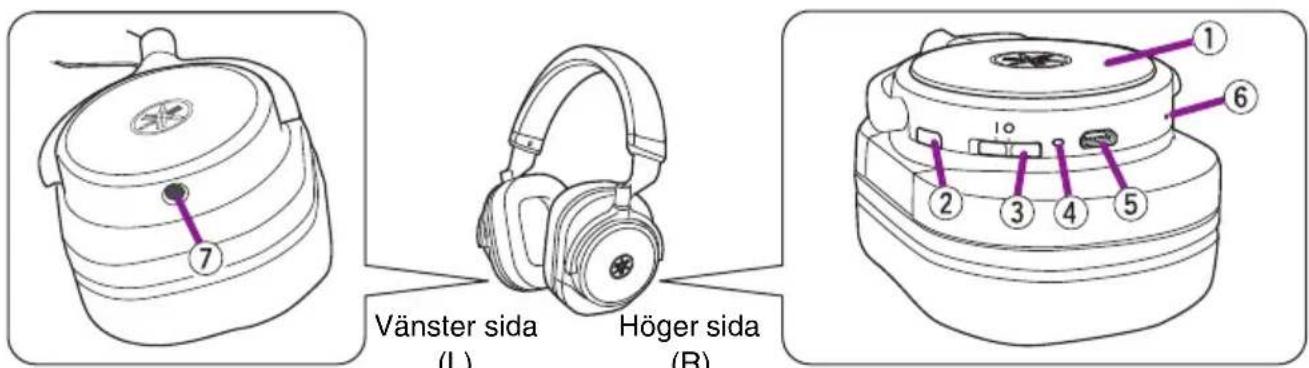
natural_image
Hand pressing a button on a circular device (no text or symbols visible)Felsökning
natural_image
Black outdoor headphones with earbuds and black headband (no visible text or symbols)Sommario
Introduzione.... 2
Caratteristiche 2
Accessori.... 3
Nomi delle parti 4
Preparazione....6
Carica 6
Accensione....7
Spegnimento 7
natural_image
Simple line drawing of a cable with two connectors and a central loop (no text or symbols)• Cavo audio con connettore mini jack da 3,5 mm
natural_image
Line drawing of a coiled cable with two connectors (no text or symbols)- Custodia
natural_image
Simple line drawing of a rectangular bag with two handles above it (no text or symbols)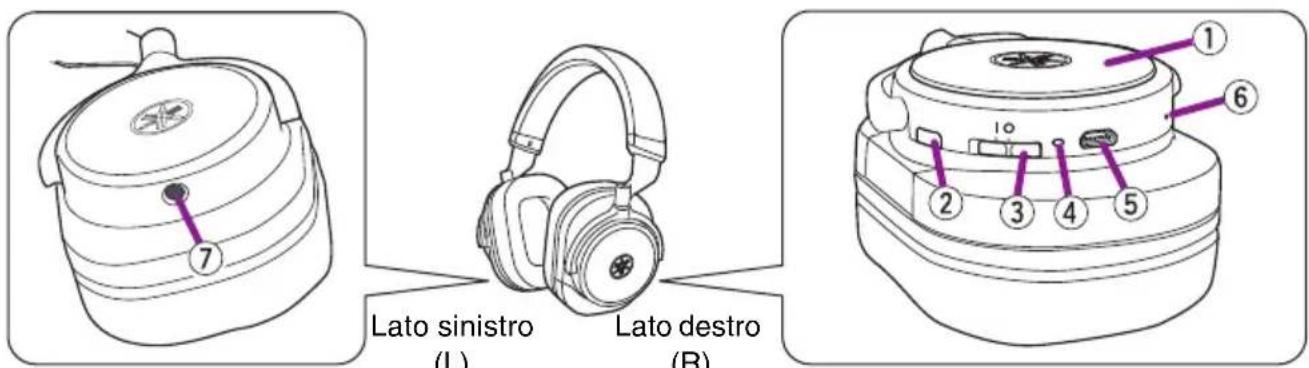
①Padiglione esterno
natural_image
Hand pressing a button on a circular device (no text or symbols visible)Nota
natural_image
Black outdoor headphones with earbuds and black headband (no visible text or symbols)Índice
Introducción.... 2
Características 2
Accesorios.... 3
natural_image
Simple line drawing of a cable with two connectors and a central loop (no text or symbols)natural_image
Line drawing of a coiled cable with two connectors (no text or symbols)natural_image
Simple line drawing of a rectangular bag with two handles, no text or symbols present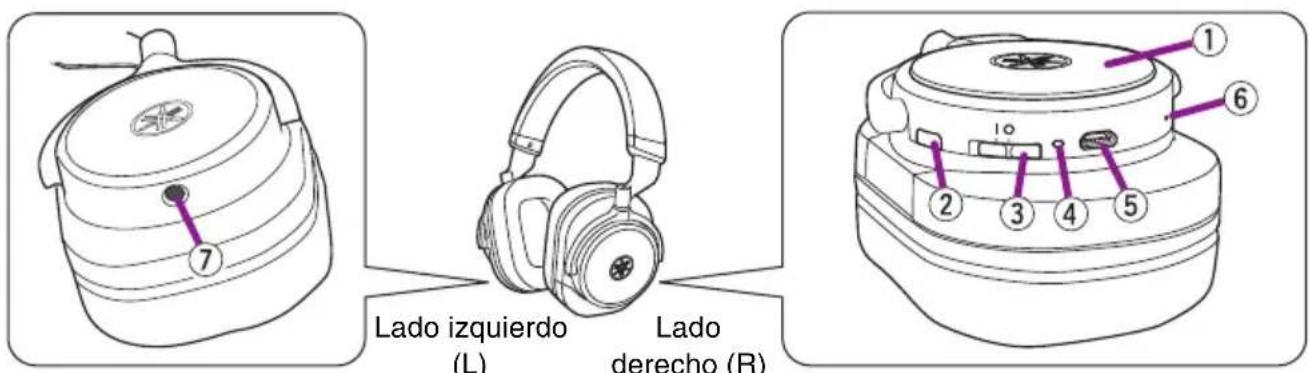
natural_image
Hand pressing a button on a circular device (no text or symbols visible)Nota
natural_image
Black multi-band headphones with earbuds and black headband, no visible text or symbolsInhoud
Inleiding....2
Functions.... 2
Accessoires .... 3
natural_image
Simple line drawing of a cable with two connectors and a central loop (no text or symbols)natural_image
Line drawing of a coiled cable with two connectors (no text or symbols)- Draagtas
natural_image
Simple line drawing of a rectangular bag with two handles, no text or symbols present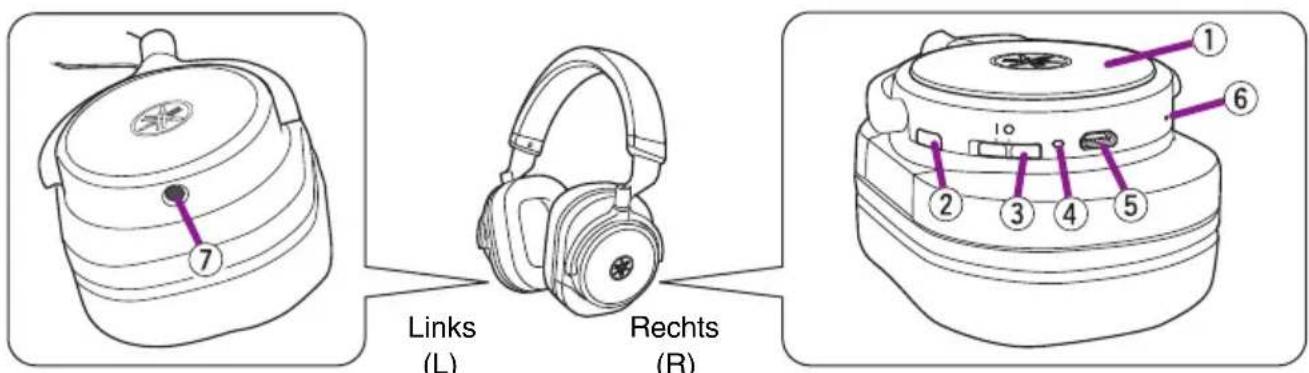
①Behuizing
natural_image
Hand pressing a button on a circular device with purple indicator lights (no text or symbols visible)Problemen oplossen
natural_image
Black outdoor headphones with earbuds and black headband (no visible text or symbols)Sumário
Introdução.... 2
Recursos ...... 2
Acessórios.... 3
Nomes das partes 4
Preparação....6
Carregamento 6
Ligar 7
Desligar 7
natural_image
Simple line drawing of a cable with two connectors and a central loop (no text or symbols)natural_image
Line drawing of a coiled cable with two connectors (no text or symbols)natural_image
Simple line drawing of a rectangular bag with two handles above it (no text or symbols)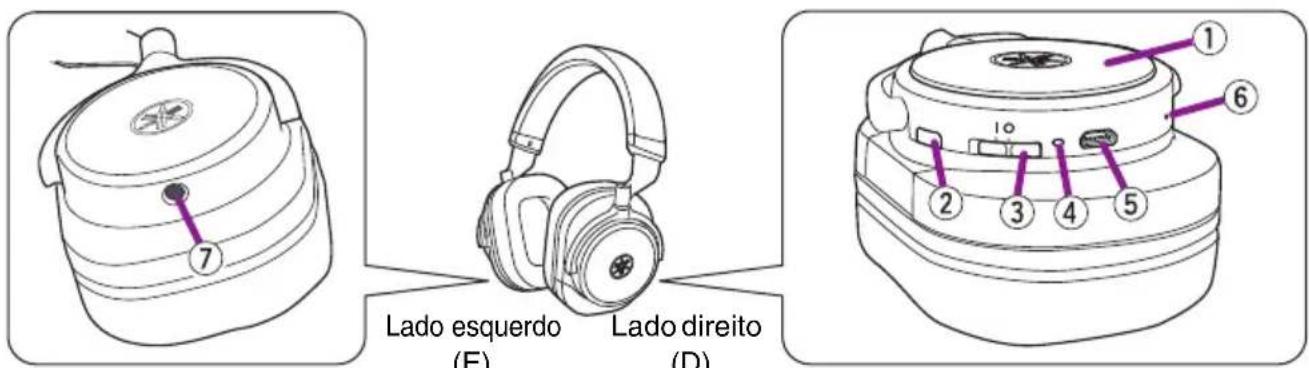
natural_image
Hand pressing a button on a circular device (no text or symbols visible)natural_image
Black outdoor headphones with earbuds and black headband (no visible text or symbols)Содержание
Введение.... 2
Свойства 2
Принадлежности 3
natural_image
Simple line drawing of a cable with two connectors and a central coil (no text or symbols)natural_image
Line drawing of a coiled cable with two connectors (no text or symbols)natural_image
Simple line drawing of a rectangular bag with two handles, no text or symbols present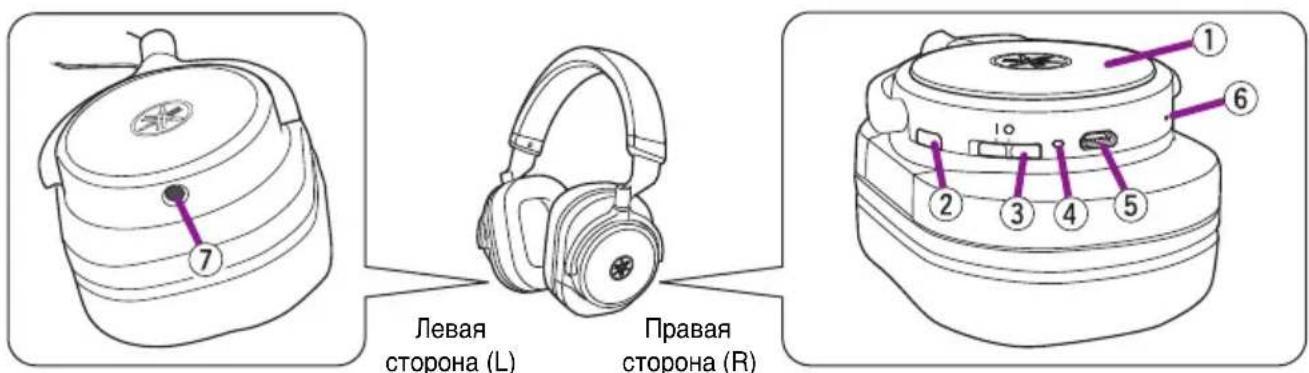
natural_image
Hand pressing a button on a circular device (no text or symbols visible)Примечание
natural_image
Black multi-band headphones with earbuds and black headband (no visible text or symbols)目录
简介 2
功能特点 2
配件 3
部件名称 4
准备工作 6
充电 6
开机 7
关机 7
与Bluetooth设备配对 8
natural_image
Simple line drawing of a USB cable with connector ports (no text or symbols)- 3.5 mm 立体声迷你插头线缆
natural_image
Line drawing of a coiled cable with two connectors (no text or symbols)- 收纳盒
natural_image
Simple line drawing of a rectangular bag with two handles, no text or symbols present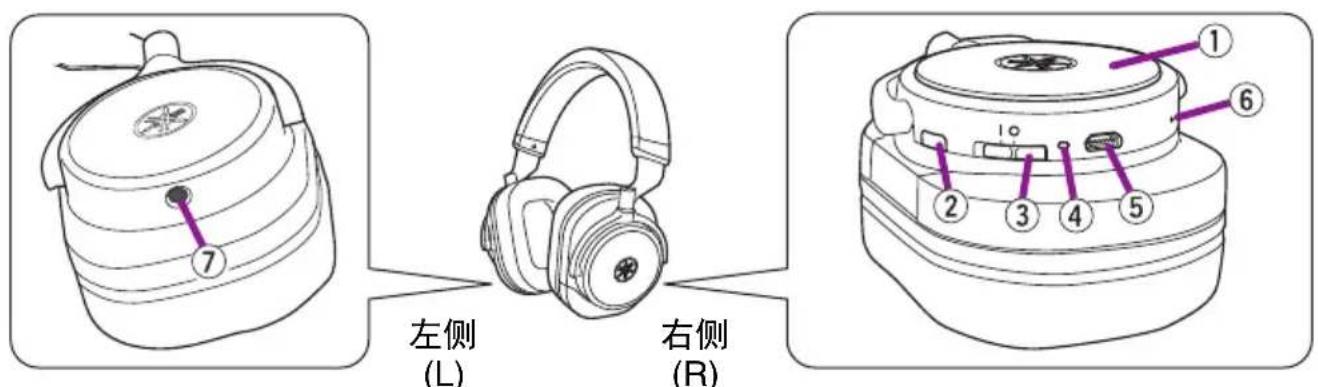
①耳罩
natural_image
Hand pressing a button on a circular device with a purple icon (no text or symbols)故障排除
natural_image
Black multi-band headphones with earbuds and black headband, no visible text or symbols目錄
簡介 2
特色 2
配件 3
零件名稱 …… 4
準備 6
充電 6
開啟電源 7
關閉電源 7
與藍牙裝置配對 8
建立藍牙連線 9
結束藍牙連線 9
natural_image
Pure electrical circuit lines without any symbols• 3.5 mm 立體聲迷你插頭連接線
natural_image
Line drawing of a coiled cable with two connectors (no text or symbols)- 攜帶盒
natural_image
Simple line drawing of a rectangular bag with a dotted line above it (no text or symbols)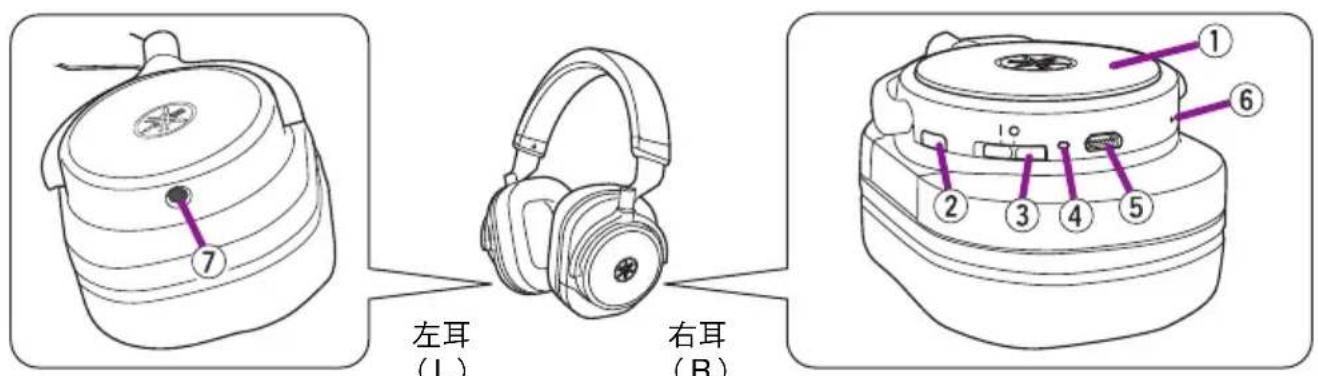
①罩體
聆聽音樂
natural_image
Hand pressing a button on a circular device (no text or symbols visible)疑難排解
natural_image
Black outdoor headphones with black earbuds and metallic head cover (no visible text or symbols)목차
소개 2
특징 2
부속품....3
부품명....4
준비 6
총전 6
켜기 7
丑기 7
블루투스 기기와 페어링 8
블루투스 연결 설정....9
블루투스 연결 종료....9
natural_image
Simple line drawing of a USB cable with two connectors and a coiled wire (no text or symbols)natural_image
Line drawing of a coiled cable with two connectors (no text or symbols)•운반 케이스
natural_image
Simple line drawing of a rectangular bag with two handles and a dotted line on the top (no text or symbols)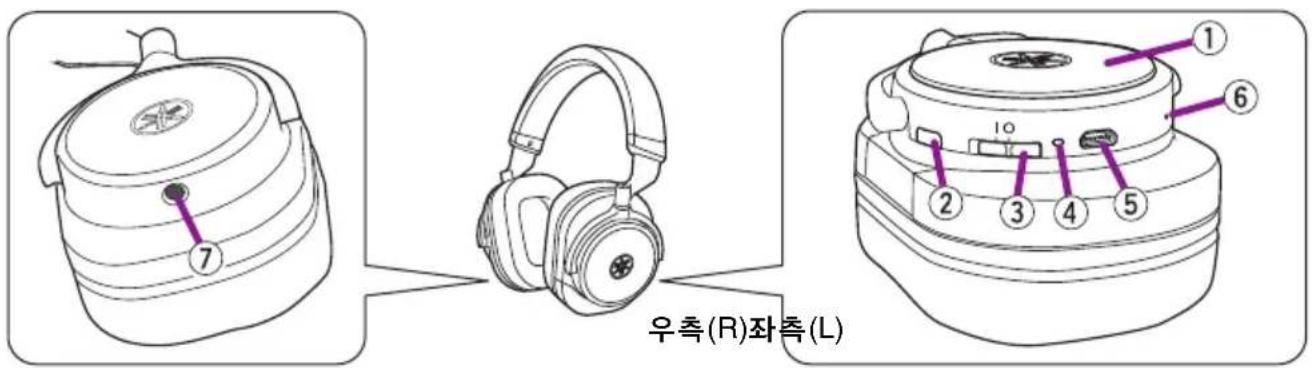
①하우징
natural_image
Hand pressing a button on a circular device (no text or symbols visible)문제 해결
natural_image
Black outdoor headphones with earbuds and black headband (no visible text or symbols)目次
はじめに……2
特長 2
付属品.... 3
各部の名称 4
準備....6
充電する 6
電源を入れる…… 7
電源を切る 7
natural_image
Pure electrical circuit lines without any symbols- 3.5mm ステレオミニプラグケーブル
natural_image
Line drawing of a coiled cable with two connectors (no text or symbols)- キャリングケース
natural_image
Simple line drawing of a rectangular bag with two handles and a dotted line above it (no text or symbols)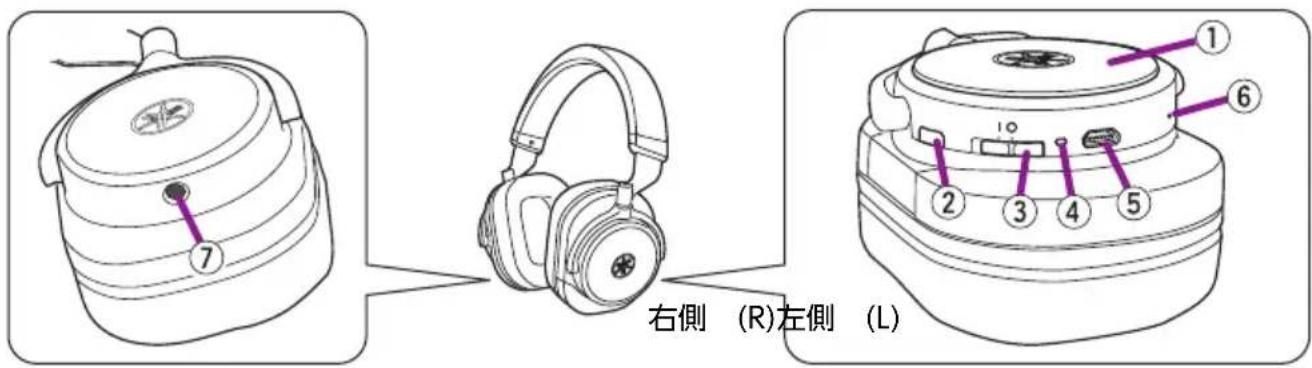
① ハウジング
音楽を聴く
natural_image
Hand pressing a button on a circular device (no text or symbols visible)故障かな?と思ったら
Manual Development Group
© 2017 Yamaha Corporation
- Contents
- Introduction
- Features
- ■ About content in this manual and the “Safety Brochure”
- Responsible Use
- - Quick Manual
- - Safety Brochure
- - USB power cable
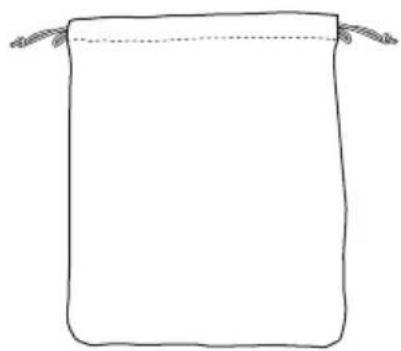
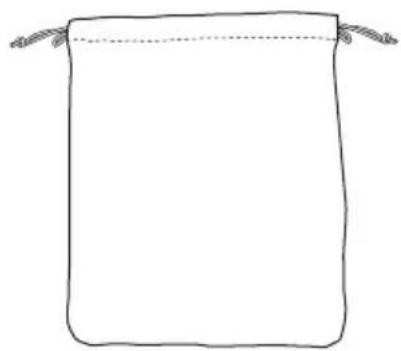
- - Carrying case
- Part names
- ①Housing
- ②Bluetooth button
- ③Power switch
- ④Indicator
- ⑤Charging connector
- ⑥Microphone
- ⑦External input jack
- Note
- Preparation
- Charging
- Turning on
- Turning off
- Pairing with a Bluetooth device
- Turn on the headphones.
- Ending a Bluetooth connection
- Connecting to an external device with the included cable
- NOTICE
- Using the headphones
- Listening to music
- Using the phone
- Operating the connected Bluetooth device by voice commands
- Tap the center of the right housing twice briefly.
- Troubleshooting
- Casques Arceaux
- HPH-W300
- Mode d'emploi
- Table des matières
- Utilisation responsible
- Inhalt
- Einführung 2
- - Transporttäschchen
- Teilebezeichnungen
- Fehlerbehebung
- Innehåll
- Felsökning
- Sommario
- Introduzione.... 2
- Preparazione....6
- ①Padiglione esterno
- Nota
- Índice
- Introducción.... 2
- Inhoud
- Inleiding....2
- Problemen oplossen
- Sumário
- Introdução.... 2
- Preparação....6
- Содержание
- Введение.... 2
- Примечание
- 目录
- 故障排除
- 目錄
- 聆聽音樂
- 疑難排解
- 목차
- 문제 해결
- 目次
- 音楽を聴く
- 故障かな?と思ったら
Brand : YAMAHA
Model : HPH-W300
Category : Earphones