
EPH-W53 - Earphones YAMAHA - Free user manual and instructions
Find the device manual for free EPH-W53 YAMAHA in PDF.


| Product type | Bluetooth wireless in-ear headset |
| Brand | Yamaha |
| Model | EPH-W53 |
| Category | Earphone |
| Battery life | Approximately 7 hours (after full charge) |
| Charging time | Approximately 2 hours |
| Power source | Rechargeable lithium-ion battery, charging via included USB cable |
| Connectivity | Bluetooth, compatible with Qualcomm aptX |
| Multipoint pairing | Up to 8 remembered devices, simultaneous connection to 2 |
| Microphone | Built-in for calls and voice commands |
| Controls | Play/pause, volume, track skip, call management, voice command (Siri, etc.) |
| Included accessories | Ear tips (LL, L, M, S, SS), ear stabilizers (L, M, S), USB cable, carrying case, safety booklet |
| Maintenance | Clean with a dry cloth, do not use solvents, replace ear tips and stabilizers if damaged |
| Safety | Do not use at high volume in public places, keep small parts out of reach of children, read safety booklet |
| Spare parts | Ear tips and ear stabilizers available in different sizes |
| Repairability | In case of malfunction, contact the dealer or an authorized Yamaha repair center |
| Compatibility | Portable audio players and Bluetooth compatible smartphones |
| Weight | Approximately 15 g (pair) |
Frequently Asked Questions - EPH-W53 YAMAHA
User questions about EPH-W53 YAMAHA
0 question about this device. Answer the ones you know or ask your own.
Ask a new question about this device
Download the instructions for your Earphones in PDF format for free! Find your manual EPH-W53 - YAMAHA and take your electronic device back in hand. On this page are published all the documents necessary for the use of your device. EPH-W53 by YAMAHA.
USER MANUAL EPH-W53 YAMAHA
natural_image
Three black audio earbuds with charging cable connectors, no visible text or symbolsOwner's Manual
Mode d'emploi
Bedienungsanleitung
Bruksanvisning
Earphones
EPH-W53
Owner's Manual
natural_image
Three black audio earbuds with charging case, no visible text or symbolsContents
Introduction 2
Features 2
Accessories ....3
Part names ....4
Preparation 7
Charging....7
Turning on 7
Turning off 7
Pairing with a Bluetooth device ....8
Establishing a Bluetooth connection .....9
Ending a Bluetooth connection....9
Using earphones 10
Listening to music....10
Using the phone 11
Operating the connected Bluetooth device by voice commands ....11
Troubleshooting 12

Bluetooth®
Qualcomm® aptX™

EN
Introduction
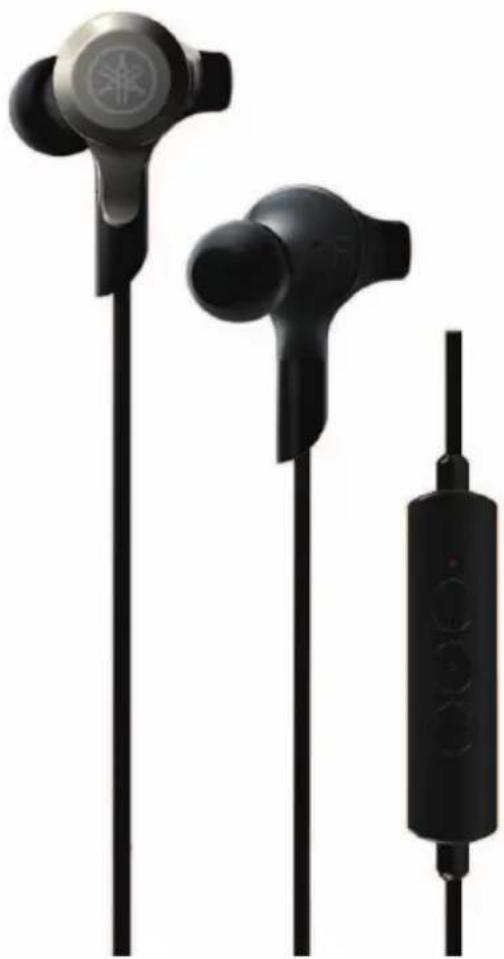
Thank you for selecting for the Yamaha EPH-W53 Earphones. The EPH-W53 is a pair of earphones designed for use with a portable audio player or smartphone via Bluetooth connection.
This manual explains preparations and operations for everyday users of the unit.
Features
- Enjoy music wirelessly via Bluetooth connection to a portable audio player or a smartphone.
- A built-in internal microphone lets you answer phone calls and carry on conversations.
■ About content in this manual and the “Safety Brochure”
- To ensure optimum performance, please read this manual carefully.
- Please read the included "Safety Brochure" before using the device.
- The illustrations in this manual are for instructional purposes only.
- Bluetooth is a registered trademark of the Bluetooth SIG and is used by Yamaha in accordance with a license agreement.
- Qualcomm aptX is a product of Qualcomm Technologies International, Ltd. Qualcomm is a trademark of Qualcomm Incorporated, registered in the United States and other countries, used with permission. aptX is a trademark of Qualcomm Technologies International, Ltd., registered in the United States and other countries, used with permission.
- The company names and product names in this manual are the trademarks or registered trademarks of their respective companies.
- The “WARNING” icon indicates points that may lead to death or serious injury if not properly observed.
- The “CAUTION” icon indicates points that may lead to injury if not properly observed.
- The “NOTICE” sections contain points that you must observe to prevent product failure, damage or malfunction and data loss.
- The “Note” sections contain important or detailed supplementary information.
Responsible Use
Do not use the earphones at high volume in a public place. Sound leakage from the earphones may be a nuisance to people around you.
This product includes the following accessories.

CAUTION
Keep small parts out of the reach of infants. Your children may accidentally swallow them.
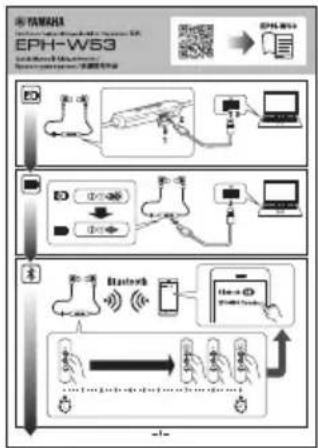
- Quick Manual
flowchart
graph TD
    A["Data Acquisition"] --> B["Data Processing"]
    B --> C["Network Processing"]
    C --> D["Mobile Access"]
    D --> E["Output Display"]
    style A fill:#f9f,stroke:#333
    style B fill:#ccf,stroke:#333
    style C fill:#cfc,stroke:#333
    style D fill:#fcc,stroke:#333
    style E fill:#ffc,stroke:#333
- Safety Brochure

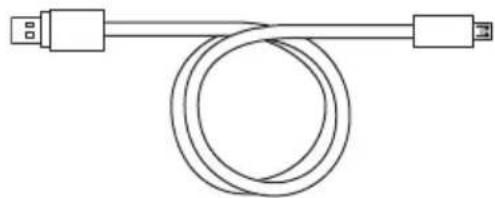
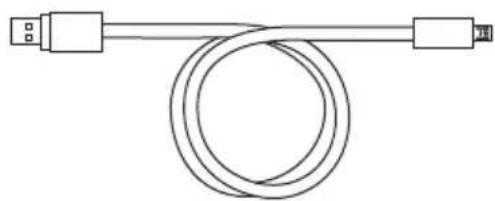
- USB power cable
natural_image
Pure electrical circuit lines without any symbols- Eartips
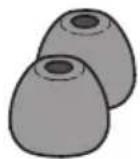
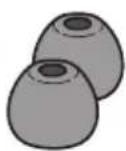
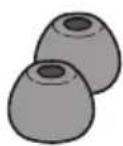
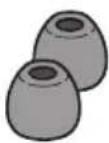
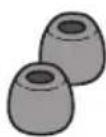
Included with the unit are pairs of eartips in various sizes (LL, L, M, S, and SS). The M-size eartips are already attached to the earphones when shipped from the factory.
LL SSL
S
- Ear stabilizers
Included with the unit are pairs of ear stabilizers in various sizes (L, M, and S). The M-size ear stabilizers are attached to the earphones when shipped from the factory.
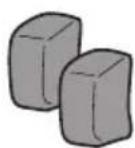
L
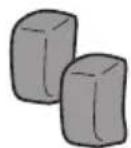
M
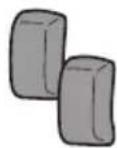
S
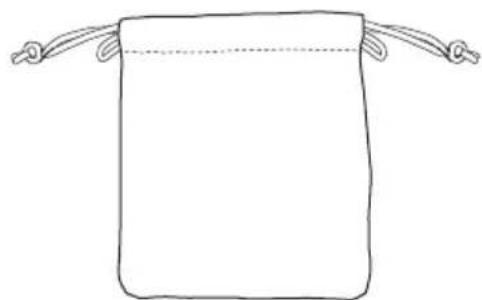
- Carrying case
natural_image
Simple line drawing of a rectangular bag with two handles and a dotted line indicating a horizontal band (no text or symbols)
CAUTION
- Do not use the earphones with detached or broken eartips or ear stabilizers. Doing so may cause injury or illness.
- Securely attach the eartips and ear stabilizers to the earphones. If the eartips or ear stabilizers detach from the earphones and lodge in your ears, they may cause injury or illness.
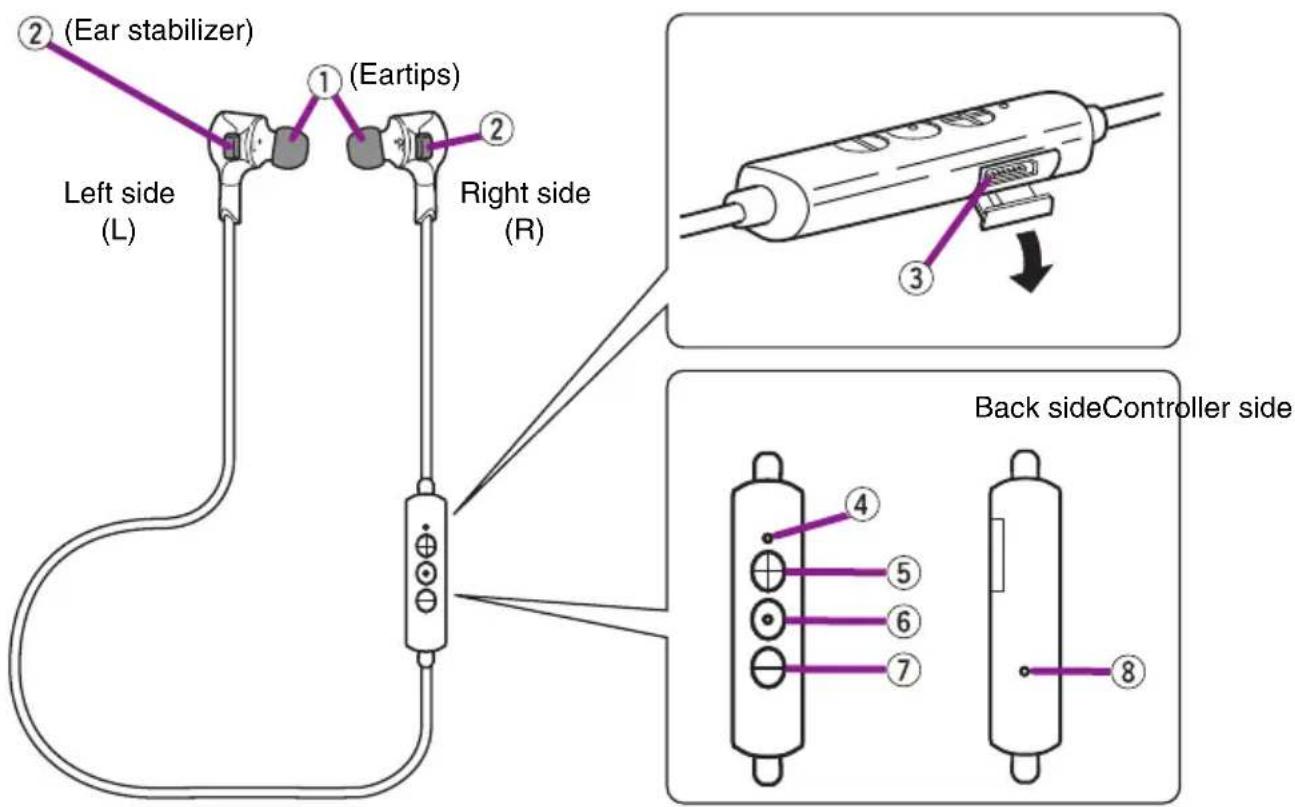
①Eartips
Attach eartips of the size that best fits your ears. The M-size eartips are already attached to the earphones when shipped from the factory.
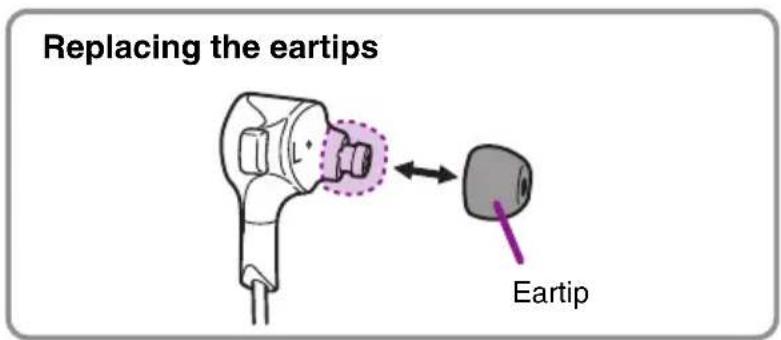
Note
- If the eartips are not securely positioned in your ears, you may not hear the bass range clearly. To enjoy optimum sound quality, adjust the eartips so they will fit in your ears perfectly. Also, try replacing poor-fitting eartips with eartips of an appropriate size.
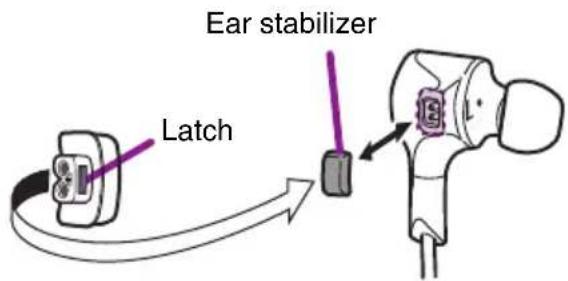
②Ear stabilizers
Attach ear stabilizers of the size that best fits your ears. The M-size ear stabilizers are attached to the earphones when shipped from the factory.
NOTICE
When attaching the ear stabilizers, do not reverse the front and back.
Replacing the ear stabilizers
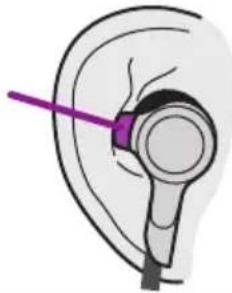
Recommended ear stabilizer position
Ear stabilizer
natural_image
Illustration of a human ear with a purple needle inserted, showing no text or symbols③Charging connector
Connect the included USB power cable to charge. Open the cover to connect the cable.
④Indicator
Indicates the status of the device by lighting or flashing.
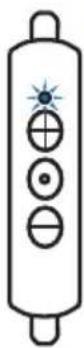
| Status Indicator | Reference page | ||
| When pushing the function key in the power-on state |  | Lights in blue (turns off in 0.5 seconds) | Page 8 |
| When turning on |  | Lights in blue (turns off in two seconds) | Page 7 |
| When turning off |  | Lights in orange (turns off in one second) | Page 7 |
| During Bluetooth pairing |  | Flashes in blue and orange alternately | Page 8 |
| When Bluetooth pairing is completed |  | Lights in blue (turns off in two seconds) | Page 8 |
| When the battery is less than 10% charged |  | Flashes in orange Page 7 | |
| During battery charging |  | Lights in orange (turns off when the charging is completed) | Page 7 |
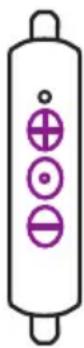
⑤+ key
Press to raise the volume.
Press and hold more than three seconds to forward one song.
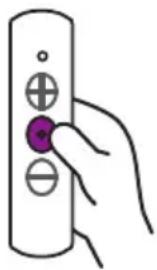
⑥Function key
Enables you to perform the following operations.
- Turning on (press and hold for approximately five seconds)
- Turning off (press and hold for approximately two seconds)
- Pairing with a Bluetooth device (press and hold more than eight seconds)
- Playing back music and pausing (press briefly)
⑦- key
Press to lower the volume. Press and hold more than three seconds to reverse to the top of the song. Press and hold more than three seconds immediately again to go back one song.
⑧Microphone
Used in conversation or voice controls.
Preparation
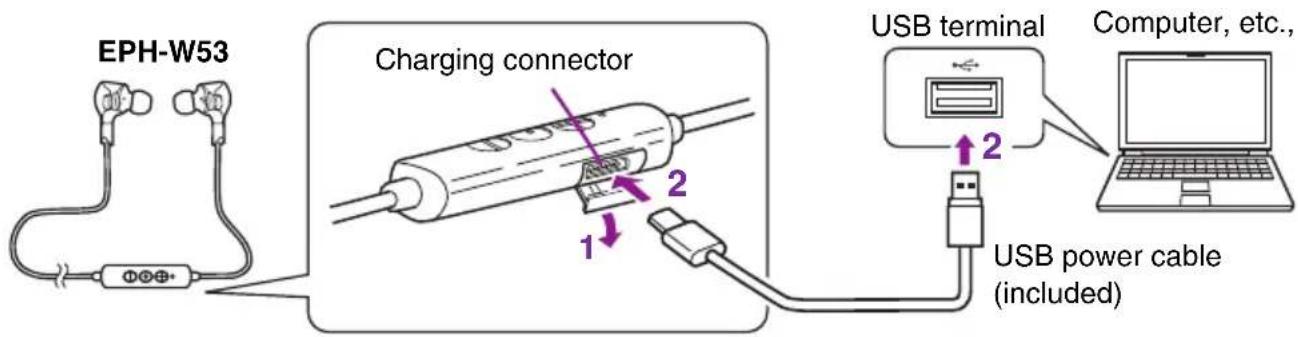
Charging
1 Open the cover of the controller section.
2 Connect the charging connector to a computer, etc., with the included USB power cable.
The indicator lights in orange.
Note
- A full charge cycle takes about two hours. After a full charging, the headphones can play back continuously for approximately seven hours. (The time may depend on the conditions of use.)
- Make sure to charge the earphones before using them for the first time.
- Do not use earphones while connecting the USB power cable.
- When charged in a place where the temperature is extremely high or low, charging may be completed quickly or charging may not be possible.
• To maintain optimum performance, charge the earphones at least once every six months.
- Batteries have a finite lifetime. The battery capacity is reduced gradually by the number of times it is used and the elapsed time of use.
- The actual lifetime of a battery differs depending on how it is stored, how it is used, the surrounding environment, etc.
- When the battery is charging, the indicator lights in orange. When charging is completed, the indicator turns off.
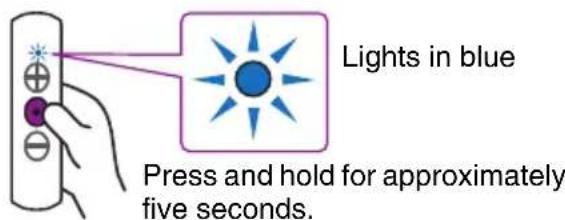
Turning on
Press and hold the function key for approximately five seconds.
When turning on, the indicator lights in blue for two seconds.
Note
If the earphones are left with no Bluetooth connection for ten minutes, they automatically turn off.
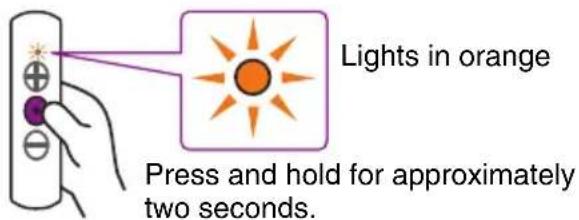
Turning off
Press and hold the function key for approximately two seconds.
When turning off, the indicator lights in orange for one second.
Note
After turning the earphones off, make sure to wait more than three seconds before turning them on again.
Pairing with a Bluetooth device
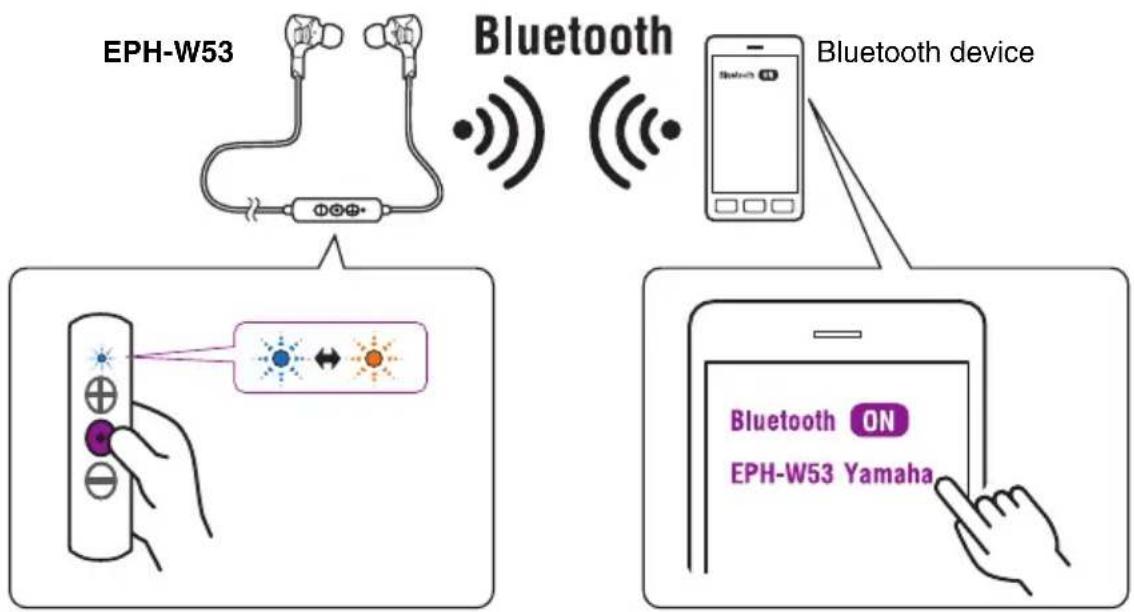
"Pairing" is the process of registering Bluetooth devices each other. Pairing must be performed when you use a Bluetooth connection for the first time, or if the pairing data has been deleted.
flowchart
graph TD
    A["EPH-W53"] -->|Bluetooth signal| B["Bluetooth device"]
    B --> C["Hand holding remote control with LED indicator"]
    D["EPH-W53 Yamaha"] -->|Bluetooth ON| E["Smartphone screen"]
    E --> F["Hand pointing at Bluetooth icon"]
1 If the earphones turn on, turn off to press and hold the function key until the indicator lights in orange.
Note
- When the earphones turn on, the indicator lights briefly when the function key is pressed briefly.
2 Press and hold the function key until the indicator flashes in blue and orange alternately. (more than eight seconds)
The earphones are waiting for pairing.
3 Perform the pairing process on the Bluetooth device.
For details, refer to the owner's manual of the Bluetooth device.
3-1. Access the Bluetooth setting screen on the Bluetooth device.
3-2. If the Bluetooth setting is disabled, enable it.
3-3. In the list of detected devices, tap "EPH-W53 Yamaha" to select it.
Pairing is completed.
When pairing is completed, the indicator lights in blue for two seconds.
Note
• These earphones can be paired with up to eight Bluetooth devices. When pairing has succeeded with the ninth device, pairing data is deleted for the oldest paired device.
- If two minutes elapse before pairing is completed, the earphones stop waiting for pairing.
- If you are asked to enter a pass key, enter the numerals "0000."
Press and hold the function key until the indicator lights in blue (for about five seconds).
The earphones turn on and a Bluetooth connection is established with the most-recently connected Bluetooth device.
Note
- If you continue to press and hold the function key, the earphones are waiting for pairing. If a pairing operation is not needed, immediately stop pressing after the indicator lights in blue.
- Some Bluetooth devices may not connect automatically.
- If the Bluetooth device does not connect to the earphones automatically, operate the device to connect to the earphones.
- After you turn off the Bluetooth setting of the Bluetooth device, a Bluetooth connection is not automatically established with that device when you turn on the power of the earphones.
- The earphones can establish a Bluetooth connection with two devices simultaneously (multi-point connection). To establish a Bluetooth connection with the second device, perform the process also on that Bluetooth device. Audio from the connected Bluetooth devices can be switched by playing or stopping music from the connected Bluetooth devices.
Ending a Bluetooth connection
If a Bluetooth connection exists, you can end it in either of the following ways.
- Turn off the power of the earphones.
- End the Bluetooth connection on the Bluetooth device.
Using earphones
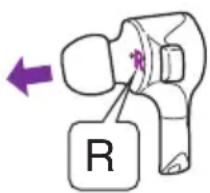
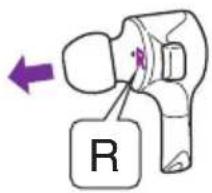
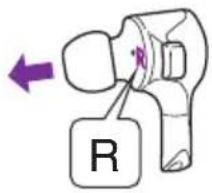
Wear the earphones with the L mark in your left ear, and the one with the R mark in your right ear.
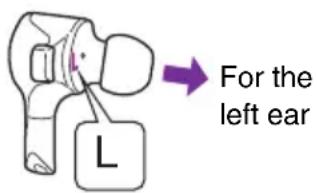
For the right ear
Listening to music
The controller section on the earphones enables playback operation of the connected Bluetooth device.
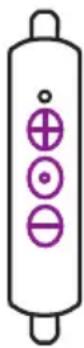
| Play Press the function key once briefly. | If you want to select a specific song and play it, perform the appropriate operations on the Bluetooth device. |
| Pause While the song is playing, press the function key once briefly. | |
| Skipping forward to the next song | Press and hold the + key more than three seconds. |
| Reversing to the top of the song (while in the middle of the song) / skipping back to the previous song (when at the beginning of the song) | Press and hold the - key more than three seconds. |
| Raising the volume Press the + key | once briefly. |
| Lowering the volume Press the - key | once briefly. |
Using the phone
The controller section on the earphones enables the following operations when a phone call comes in.
| Receiving a phone call | When a call comes in, press the function key once briefly. |
| Ending a call During the conversation | on, press the function key once briefly. |
| Ignoring a call | When a call comes in, press and hold the function key more than three seconds. |
| Raising the conversation volume Press the + key once briefly. | |
| Lowering the conversation volume Press the - key once briefly. | |
Operating the connected Bluetooth device by voice commands
If the connected Bluetooth device has a voice control feature/app (Siri, etc.), you can control the Bluetooth device from the earphones.
Press the function key twice briefly.
Voice control (Siri, etc.) starts and the Bluetooth device can be operated by voice commands.
Note
This works only for devices that have Siri or another voice control feature.
natural_image
Hand holding a remote control with a purple button (no text or symbols visible)Troubleshooting
If the situation does not improve even after trying the following actions, or if any abnormalities not listed below are observed, contact the nearest authorized Yamaha dealer or service center.
| Symptom Action | |
| No sound • Make sure that the volume is not set too low on the portable audio player or smartphone.• Make sure that the portable audio player or smartphone is not paused.• Make sure that the portable audio player or smartphone is turned on.• Make sure that the Bluetooth connection with the portable audio player or smartphone is established. | |
| Cannot be operated | • Make sure that the Bluetooth connection with the portable audio player or smartphone is established.• An incompatible portable audio player or smartphone has been connected. |
| The earphones malfunction | An incompatible portable audio player or smartphone has been connected. |
| Unusual sounds are heard | Check the indicator. If the indicator flashes in orange, the battery is less than 10% charging. |
| Cannot establish a Bluetooth connection | • Make sure that the Bluetooth function of the portable audio player or smartphone is turned on.• If you can't establish a connection, try performing the pairing operation once again. |
natural_image
Three black audio earbuds with charging case, no visible text or symbolsTable des matières
Introduction 2
Utilisation responsible
natural_image
Pure electrical circuit lines without any symbols- Embouts
natural_image
Simple line drawing of a rectangular bag with handles, no text or symbols present
ATTENTION
natural_image
Illustration of a human ear with a purple needle inserted, showing anatomical positioning (no text or symbols)natural_image
Hand holding a remote control with a purple button (no text or symbols visible)natural_image
Three black audio earbuds with charging case, no visible text or symbolsInhalt
Einführung 2
Funktionen....2
Zubehör....3
flowchart
graph TD
    A["User"] --> B["Network"]
    B --> C["User Interface"]
    C --> D["EPH-W53 System"]
    D --> E["Data Flow"]
    E --> F["User Interface"]
    F --> G["User Interface"]
    G --> H["User Interface"]
    H --> I["User Interface"]
    I --> J["User Interface"]
    J --> K["User Interface"]
    K --> L["User Interface"]
    L --> M["User Interface"]
    M --> N["User Interface"]
    N --> O["User Interface"]
    O --> P["User Interface"]
    P --> Q["User Interface"]
    Q --> R["User Interface"]
    R --> S["User Interface"]
    S --> T["User Interface"]
    T --> U["User Interface"]
    U --> V["User Interface"]
    V --> W["User Interface"]
    W --> X["User Interface"]
    X --> Y["User Interface"]
    Y --> Z["User Interface"]
    Z --> AA["User Interface"]
    AA --> AB["User Interface"]
    AB --> AC["User Interface"]
    AC --> AD["User Interface"]
    AD --> AE["User Interface"]
    AE --> AF["User Interface"]
    AF --> AG["User Interface"]
    AG --> AH["User Interface"]
    AH --> AI["User Interface"]
    AI --> AJ["User Interface"]
    AJ --> AK["User Interface"]
    AK --> AL["User Interface"]
    AL --> AM["User Interface"]
    AM --> AN["User Interface"]
    AN --> AO["User Interface"]
    AO --> AP["User Interface"]
    AP --> AQ["User Interface"]
    AQ --> AR["User Interface"]
    AR --> AS["User Interface"]
    AS --> AT["User Interface"]
    AT --> AU["User Interface"]
    AU --> AV["User Interface"]
    AV --> AW["User Interface"]
    AW --> AX["User Interface"]
    AX --> AY["User Interface"]
natural_image
Pure electrical circuit lines without any symbols- Ohrstücke
natural_image
Simple line drawing of a rectangular bag with handles, no text or symbols present
VORSICHT
natural_image
Hand holding a remote control with a purple button (no text or symbols)Fehlerbehebung
natural_image
Three black audio earbuds with charging case, no visible text or symbolsInnehåll
Inledning 2
Funktioner 2
Tillbehör....3
Delarnas namn 4
Förberedelser 7
Laddning....7
Slå på 7
Stänga av ....7
Koppling till en Bluetooth-enhet....8
natural_image
Pure electrical circuit lines without any symbols- Öronpluggar
natural_image
Simple line drawing of a rectangular bag with handles, no text or symbols present
FÖRSIKTIGT
Obs!
natural_image
Illustration of a human ear with a purple needle inserted, showing no text or symbols③ Laddningskontakt
natural_image
Hand holding a remote control with a purple button (no text or symbols visible)Felsökning
natural_image
Three black audio earbuds with charging case, no visible text or symbolsSommario
Introduzione.... 2
Caratteristiche 2
Accessori....3
natural_image
Pure electrical circuit lines without any symbols• Gommini
natural_image
Simple line drawing of a rectangular bag with handles, no text or symbols present
ATTENZIONE
natural_image
Diagram of a human ear with a purple needle inserted, showing anatomical structure without any text or symbols.natural_image
Hand holding a remote control with three buttons (no text or symbols)natural_image
Three black audio earbuds with charging case, no visible text or symbolsÍndice
Introducción.... 2
Características ......2
Accesorios....3
flowchart
graph TD
    A["User"] --> B["Network"]
    B --> C["User Interface"]
    C --> D["EPH-W53 System"]
    D --> E["Data Flow"]
    E --> F["User Interface"]
    F --> G["User Interface"]
    G --> H["User Interface"]
    H --> I["User Interface"]
    I --> J["User Interface"]
    J --> K["User Interface"]
    K --> L["User Interface"]
    L --> M["User Interface"]
    M --> N["User Interface"]
    N --> O["User Interface"]
    O --> P["User Interface"]
    P --> Q["User Interface"]
    Q --> R["User Interface"]
    R --> S["User Interface"]
    S --> T["User Interface"]
    T --> U["User Interface"]
    U --> V["User Interface"]
    V --> W["User Interface"]
    W --> X["User Interface"]
    X --> Y["User Interface"]
    Y --> Z["User Interface"]
    Z --> AA["User Interface"]
    AA --> AB["User Interface"]
    AB --> AC["User Interface"]
    AC --> AD["User Interface"]
    AD --> AE["User Interface"]
    AE --> AF["User Interface"]
    AF --> AG["User Interface"]
    AG --> AH["User Interface"]
    AH --> AI["User Interface"]
    AI --> AJ["User Interface"]
    AJ --> AK["User Interface"]
    AK --> AL["User Interface"]
    AL --> AM["User Interface"]
    AM --> AN["User Interface"]
    AN --> AO["User Interface"]
    AO --> AP["User Interface"]
    AP --> AQ["User Interface"]
    AQ --> AR["User Interface"]
    AR --> AS["User Interface"]
    AS --> AT["User Interface"]
    AT --> AU["User Interface"]
    AU --> AV["User Interface"]
    AV --> AW["User Interface"]
    AW --> AX["User Interface"]
    AX --> AY["User Interface"]
natural_image
Pure electrical circuit lines without any symbols- Almohadillas
natural_image
Simple line drawing of a rectangular bag with handles, no text or symbols present
ATENCIÓN
natural_image
Illustration of a human ear with a purple needle inserted, showing anatomical positioning (no text or symbols)③Conector de carga
natural_image
Hand holding a remote control with a purple button (no text or symbols visible)natural_image
Three black audio earbuds with charging case, no visible text or symbolsInhoud
Inleiding....2
Functies....2
Accessoires ....3
Onderdeelnamen....4
Voorbereiding....7
Opladen....7
Aanzetten 7
Uitzetten 7
flowchart
graph TD
    A["Data Input"] --> B["Sensor 1"]
    B --> C["Sensor 2"]
    C --> D["Sensor 3"]
    D --> E["Output"]
    F["Network Components"] --> G["Data Link"]
    G --> H["User Interface"]
    H --> I["User Interface"]
    I --> J["User Interface"]
    J --> K["User Interface"]
    K --> L["User Interface"]
    L --> M["User Interface"]
    M --> N["User Interface"]
    N --> O["User Interface"]
    O --> P["User Interface"]
    P --> Q["User Interface"]
    Q --> R["User Interface"]
    R --> S["User Interface"]
    S --> T["User Interface"]
    T --> U["User Interface"]
    U --> V["User Interface"]
    V --> W["User Interface"]
    W --> X["User Interface"]
    X --> Y["User Interface"]
    Y --> Z["User Interface"]
- Veiligheidsbrochure

natural_image
Pure electrical circuit lines without any symbols• Oordopjes
natural_image
Simple line drawing of a rectangular bag with handles, no text or symbols present
VOORZICHTIG
natural_image
Illustration of a human ear with a purple needle inserted, showing no text or symbols③Oplaadaansluiting
natural_image
Hand holding a remote control with a purple button (no text or symbols visible)Problemen oplossen
natural_image
Three black audio earbuds with charging case, no visible text or symbolsSumário
Introdução.... 2
Recursos ......2
Acessórios....3
natural_image
Pure electrical circuit lines without any symbols- Pontas dos fones de ouvido
natural_image
Simple line drawing of a rectangular bag with two handles and a dotted line indicating a horizontal band (no text or symbols)
CUIDADO
natural_image
Diagram of a human ear with a purple needle inserted, showing anatomical structure without any text or symbols.Acende na cor azul
Mantenha a tecla pressionada por aproximadamente 5 segundos.
Observação
natural_image
Hand holding a remote control with a purple button (no text or symbols visible)natural_image
Three black audio earbuds with charging case, no visible text or symbolsСодержание
Введение.... 2
Свойства 2
natural_image
Pure electrical circuit lines without any symbols- Ушные вкладыши
natural_image
Simple line drawing of a rectangular bag with handles, no text or symbols present
ВНИМАНИЕ
natural_image
Illustration of a human ear with a purple arrow pointing to the ear area (no text or symbols)③Разъем для зарядки
natural_image
Hand holding a remote control with three buttons (no text or symbols)natural_image
Black and white photo of two earbuds with a black cord, one with a circular logo and the other with three buttons (no visible text or symbols)目录
简介 2
功能特点 …… 2
配件.... 3
部件名称....4
准备工作 7
充电 7
开机....7
关机....7
与Bluetooth设备配对 8
natural_image
Pure electrical circuit lines without any symbols- 耳塞
natural_image
Simple line drawing of a rectangular bag with handles, no text or symbols present
注意
用于左耳 用于右耳
聆听音乐
natural_image
Hand holding a remote control with three buttons (no text or symbols)故障排除
natural_image
Three black audio earbuds with charging cables, no visible text or symbols目錄
簡介 2
特色 2
配件 3
零件名稱 4
準備 7
充電 7
開啟電源 7
關閉電源 7
與藍牙裝置配對 8
建立藍牙連線 9
結束藍牙連線 9
使用耳機 10
聆聽音樂 10
使用手機 11
以語音指令操作已連線藍牙裝置 ……11
疑難排解 12

Bluetooth®
Qualcomm® aptX™

ZH-TW
簡介
flowchart
graph TD
    A["Data Acquisition"] --> B["Network Processing"]
    B --> C["Computer"]
    D["Network Monitoring"] --> E["Bluetooth"]
    E --> F["Smart Phone"]
    F --> G["User Interface"]
    G --> H["User Interface"]
    H --> I["User Interface"]
    I --> J["User Interface"]
    J --> K["User Interface"]
    K --> L["User Interface"]
    L --> M["User Interface"]
    M --> N["User Interface"]
    N --> O["User Interface"]
    O --> P["User Interface"]
    P --> Q["User Interface"]
    Q --> R["User Interface"]
    R --> S["User Interface"]
    S --> T["User Interface"]
    T --> U["User Interface"]
    U --> V["User Interface"]
    V --> W["User Interface"]
    W --> X["User Interface"]
    X --> Y["User Interface"]
    Y --> Z["User Interface"]
- 安全手册

- USB 電源連接線
natural_image
Simple line drawing of a USB cable with connector port (no text or symbols)- 耳塞
natural_image
Simple line drawing of a rectangular bag with handles, no text or symbols present注意
natural_image
Illustration of a human ear with a purple probe inserted, showing ear structure without any text or symbols.③充電接頭
左耳 右耳
聆聽音樂
natural_image
Hand holding a remote control with three buttons (no text or symbols)疑難排解
natural_image
Black and white photo of an earless audio jack with a USB cable (no text or symbols visible)목차
소개 2
특징 2
부속품....3
부품명....4
준비 7
총전 7
켜기 7
卍기 7
블루투스 기기와 페어링 8
블루투스 연결 설정....9
블루투스 연결 종료....9
이어폰 사용 10
음악 듣기 10
전화 사용 11
natural_image
Simple line drawing of a USB cable with connector ports (no text or symbols)• 이어팀
natural_image
Simple line drawing of a rectangular bag with two handles and a dotted line indicating a horizontal band (no text or symbols)
주의
natural_image
Diagram of a human ear with a purple needle inserted, showing the ear structure (no text or labels)③충전 커넥터
natural_image
Hand holding a remote control with a purple button (no text or symbols visible)문제 해결
natural_image
Three black audio earbuds with charging case, no visible text or symbols目次
はじめに……2
特長 2
付属品.... 3
各部の名称 4
準備....7
充電する 7
電源を入れる…… 7
電源を切る 7
natural_image
Simple line drawing of a USB cable with connector port (no text or symbols)- イャピース
natural_image
Simple line drawing of a bag with two handles and a dotted line inside (no text or symbols)
注意
natural_image
Hand holding a remote control with a purple button (no text or symbols visible)故障かな?と思ったら
Manual Development Group
© 2017 Yamaha Corporation
- Earphones
- EPH-W53
- Owner's Manual
- Contents
- Introduction 2
- Preparation 7
- Using earphones 10
- Troubleshooting 12
- Introduction
- Features
- ■ About content in this manual and the “Safety Brochure”
- Responsible Use
- CAUTION
- - Quick Manual
- - Safety Brochure
- - USB power cable
- - Eartips
- - Ear stabilizers
- - Carrying case
- ①Eartips
- Note
- NOTICE
- Preparation
- Charging
- Turning on
- Press and hold the function key for approximately five seconds.
- Turning off
- Press and hold the function key for approximately two seconds.
- Pairing with a Bluetooth device
- Ending a Bluetooth connection
- Using earphones
- Listening to music
- Using the phone
- Operating the connected Bluetooth device by voice commands
- Press the function key twice briefly.
- Troubleshooting
- Table des matières
- Utilisation responsible
- - Embouts
- ATTENTION
- Inhalt
- Einführung 2
- - Ohrstücke
- VORSICHT
- Fehlerbehebung
- Innehåll
- Inledning 2
- Förberedelser 7
- - Öronpluggar
- FÖRSIKTIGT
- Obs!
- Felsökning
- Sommario
- Introduzione.... 2
- • Gommini
- ATTENZIONE
- Índice
- Introducción.... 2
- - Almohadillas
- ATENCIÓN
- ③Conector de carga
- Inhoud
- Inleiding....2
- Voorbereiding....7
- • Oordopjes
- VOORZICHTIG
- ③Oplaadaansluiting
- Problemen oplossen
- Sumário
- Introdução.... 2
- CUIDADO
- Observação
- Содержание
- Введение.... 2
- - Ушные вкладыши
- ВНИМАНИЕ
- 目录
- 注意
- 聆听音乐
- 故障排除
- 目錄
- 簡介
- 聆聽音樂
- 疑難排解
- 목차
- • 이어팀
- 주의
- 문제 해결
- 目次
- - イャピース
- 故障かな?と思ったら
Brand : YAMAHA
Model : EPH-W53
Category : Earphones