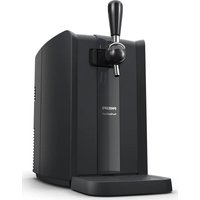
PerfectDraft HD3760 - Beer dispenser PHILIPS - Free user manual and instructions
Find the device manual for free PerfectDraft HD3760 PHILIPS in PDF.


| Product type | Beer dispenser |
| Brand | Philips |
| Model | PerfectDraft HD3760 |
| Keg capacity | 30 glasses of 20 cl or 18 glasses of 33 cl |
| Ideal serving temperature | 3 °C |
| Cooling time | 12 to 15 hours at 23 °C ambient |
| Display | LED indicators (red, orange, green) indicating status and temperature |
| Preservation function | 30 days after opening the keg |
| Cleaning | Tap, drip tray, and grid dishwasher safe; exterior with damp cloth |
| Safety | Indoor use only, do not cover, keep out of reach of children |
| Compatibility | PerfectDraft kegs from approved suppliers |
| Maximum keg pressure | 1.5 bar |
| Noise level | Lc < 70 dB(A) |
| Warranty | 2 years |
| Supplied accessories | Drip tray, pump handle, tube (with the keg) |
Frequently Asked Questions - PerfectDraft HD3760 PHILIPS
User questions about PerfectDraft HD3760 PHILIPS
0 question about this device. Answer the ones you know or ask your own.
Ask a new question about this device
Download the instructions for your Beer dispenser in PDF format for free! Find your manual PerfectDraft HD3760 - PHILIPS and take your electronic device back in hand. On this page are published all the documents necessary for the use of your device. PerfectDraft HD3760 by PHILIPS.
USER MANUAL PerfectDraft HD3760 PHILIPS
Warranty and support 6
Introduction 6
General description 7
Before first use 8
Preparations before first use 9
Removing the cooling element 20
Troubleshooting 21
Keg suppliers 25
Important
Read this important information carefully before you use the appliance and save it for future reference.
The appliance
Warning
- If the mains cord is damaged, you must have it replaced by Philips, a service centre authorised by Philips or similarly qualified persons in order to avoid a hazard.
- Check if the voltage indicated on the bottom of the appliance corresponds to the local mains voltage before you connect the appliance.
- Do not use the appliance if the plug, the cord or the appliance itself is damaged.
- This appliance can be used by persons with reduced physical, sensory or mental capabilities or lack of experience and knowledge if they have been given supervision or instruction concerning use of the appliance in a safe way and if they understand the hazards involved.
- This appliance shall not be used by children. Keep the appliance and its cord out of reach of children.
- Children should be supervised to ensure that they do not play with the appliance.
- Do not cover the appliance (e.g. with a towel) to prevent it from overheating.
- This appliance is only intended for indoor use. Do not use it outdoors.
- The appliance is not suitable for installation in an area where a water jet could be used.
Caution
- Keep the appliance out of the reach of children. The handle can be removed for extra safety.
- Put the appliance on a horizontal, even and stable surface. Leave at least 10 cm free space around the appliance for the best performance.
- In an environment with an ambient temperature of 23\ °C , it takes approximately 12 to 15 hours to chill an uncooled keg to the ideal drinking temperature of 3\ °C . At higher ambient temperatures, chilling the keg takes longer.
- To achieve the best performance, keep your appliance at or below 32°C.
- Do not expose the appliance to direct sunlight.
- Always clean the appliance before you store it for a longer period. Make sure you rinse the tap unit thoroughly. Beer residues may cause problems when you install the tap unit on the keg.
- Do not lift the appliance by the tap handle.
The keg
Warning
- Never store the keg in the freezer! Freezing may cause serious damage to the keg.
- To avoid the risk of explosion, do not expose the keg to direct sunlight or temperatures higher than 32 °C.
- The keg is under pressure. Do not remove the connection top or pierce the keg with a sharp object.
Caution
- Always read and follow the instructions and safety warnings on the keg before you install it in the appliance.
- Do not shake the keg.
- Store an open keg at the right temperature by leaving it in the appliance. Make sure the appliance is switched on. If you switch off the appliance because you are not going to use it for a longer period (e.g. a holiday), always remove the open keg from the appliance and put it in the fridge. Once a keg has been opened, the beer stays fresh for 30 days.
- Always check the expiry date on the keg when you buy it and before you install it.
- Do not use the keg if the connection top is damaged. If the connection top is damaged, the tap unit does not fit onto it.
- Unopened kegs keep best when you store them at a stable temperature. The cooler you store the keg, the better.
- Maximum working pressure: 1.5 bar.
- Use the keg only for the HD3715/HD3720/HD3760/HD3761/HD3770 PerfectDraft. Do not connect other equipment to the keg.
- Do not use kegs from other suppliers than the ones mentioned in this user manual (see chapter 'Keg suppliers').
- Do not use damaged kegs in this appliance, as this could harm the appliance Return a damaged keg immediately to the shop where you bought it.
- The kegs are not stackable.
- Noise level: Lc < 70 dB(A).
Electromagnetic fields (EMF)
This appliance complies with the applicable standards and regulations regarding exposure to electromagnetic fields.
Recycling
- This symbol means that electrical products shall not be disposed of with normal household waste.
- Follow your country's rules for the separate collection of electrical products.
Warranty and support
Versuni offers a two-year warranty after purchase on this product. This warranty is not valid if a defect is due to incorrect use or poor maintenance. Our warranty does not affect your rights under law as a consumer. For more information or for invoking the warranty, please visit our website www.philips.com/support.
Introduction
Congratulations on your purchase and welcome to Philips!
To fully benefit from the support that we offer, register your product at www.philips.com/welcome.
General description
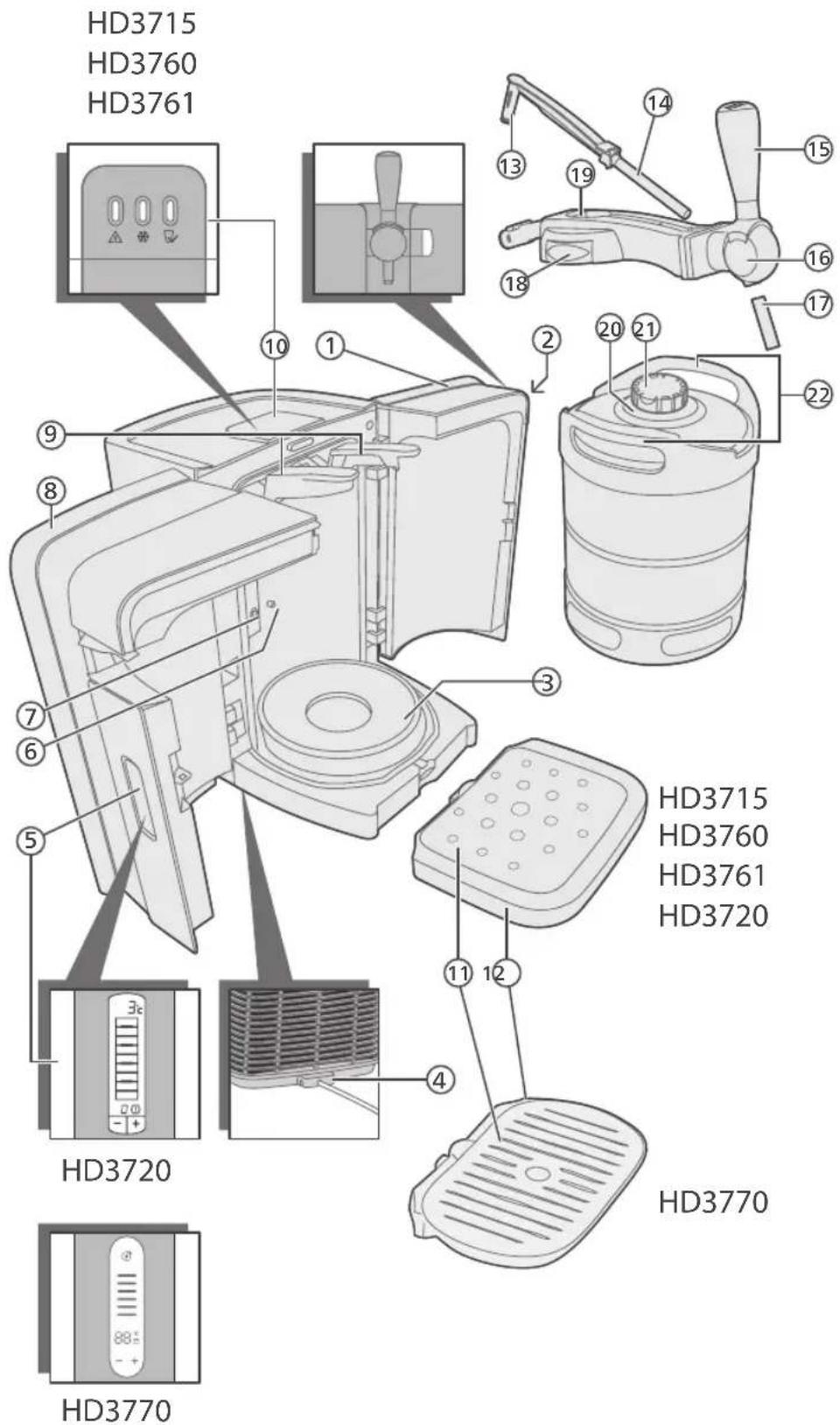
1 Right door
2 Release button
3 Cooling plate
4 Cord storage facility
5 LCD display: beer temperature, beer level & freshness indication (HD3720, HD3770)
6 Keg sensor
7 Temperature sensor
8 Left door
9 Locking levers
10 LED indicator lights to indicate the status of the appliance (HD3715, HD3761, HD3760)
11 Drip tray cover
12 Drip tray
Tube unit (supplied with keg)
13 Tube connector
14 Tube
Tap unit
15 Tap handle
16 Tap body
17 Spout
18 Release buttons
19 Tube release button
Keg
20 Connection top
21 Protection cap
22 Chimes
Before first use
Installing the appliance
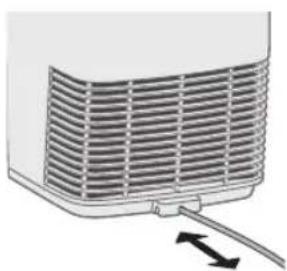
natural_image
Diagram of a heat exchanger or cooling unit with airflow direction indicated by arrows (no text or symbols)1 Put the appliance on a horizontal, even and stable surface. Leave at least 10cm free space around the appliance for the best performance.
Note: Do not put the appliance in a place where it is exposed to direct sunlight or to high temperatures (e.g. close to a cooker or an oven).
2 To store excess cord, push it into the storage compartment at the back of the appliance.
3 Insert the plug into the wall socket.
2 To store excess cord, push it into the storage compartment at the back of the appliance.
3 Insert the plug into the wall socket.
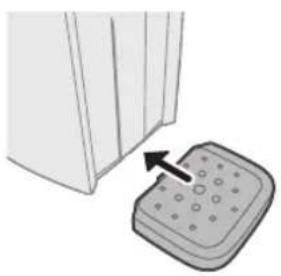
natural_image
Illustration of a door handle next to a button press (no text or symbols)4 Install the drip tray.
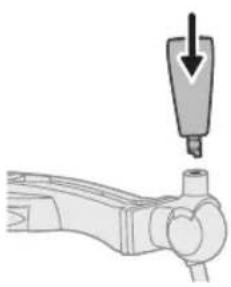
natural_image
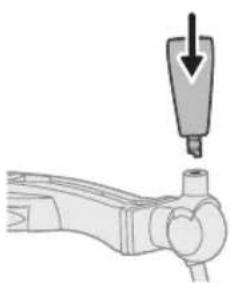
Diagram of a mechanical component with a downward arrow indicating force or direction (no text or symbols present)5 Attach the tap handle.
6 HD3720/HD3770: Place the preferred medallion on top of the handle.
Preparations before first use
Placing the tap unit onto the keg
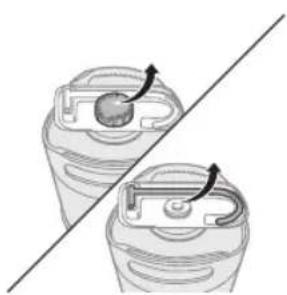
natural_image
Diagram showing two containers with arrows indicating rotation, separated by a diagonal line (no text or symbols)Always clean the tap unit with water and, if necessary, with some washing-up liquid before you place it on the keg and insert the tube.
1 Remove the protection cap and the tube from the keg.
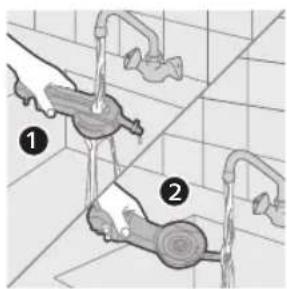
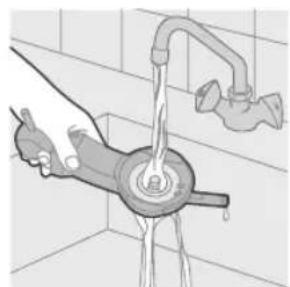
2 If present, remove the tube connector and the tube from the tap unit. Hold the tap unit under a running tap and rinse the tube connection hole (1) and the connection to the body of the appliance (2). If necessary, use some washing-up liquid.
natural_image
Illustration of a hand using a tool to clean or wash the showerhead on a tiled floor (no text or symbols)3 Then turn the tap unit upside down and rinse the keg connection in the bottom of the tap unit.
It is essential that all rubber parts of the tap unit are moist before you assemble the tap unit onto the keg.
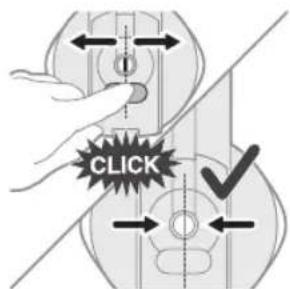
4 Check if the tube release button works properly. When you press the blue tube release button, the two clamps in the opening have to move.
Note: If the clamps fail to move when you press the blue tube release button, rinse the tube-connection hole under a running tap again.
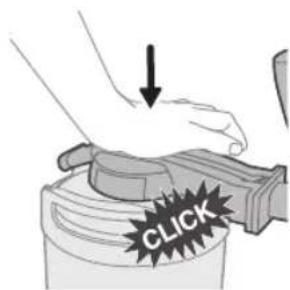
5 Put the tap unit onto the connection top of the keg by pushing it down firmly ('click').
When you assemble the tap unit properly, you hear two clicks in quick succession.
Tip: If you can move the arm of the connection top freely up and down, the tap unit is placed properly on the keg.
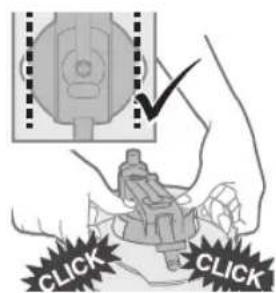
6 Make sure the release buttons on either side of the tap unit stick out equally far on both sides. If this is not the case, press the release buttons on both sides with your thumbs until you hear one click or two clicks in quick succession.
Placing the tube into the tap unit
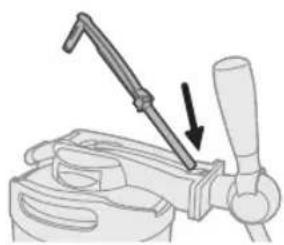
1 Insert the flexible tube into the tap body.
natural_image
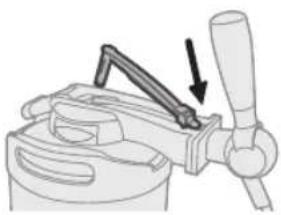
Diagram of a mechanical clamp or clamping device with a lever and handle, showing a downward force arrow (no text or symbols present)2 Slide the projections of the tube connector under the hinge points.
natural_image
Diagram of a mechanical clamp or clamping device with an arrow indicating force application (no text or symbols present)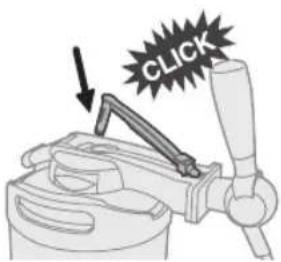
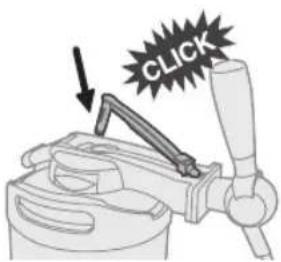
3 Push the tube connector into the opening in the tap unit ('click').
Placing the keg into the appliance
Never place the keg into the appliance if you have not assembled the tap unit and the tube properly. See sections 'Placing the tap unit onto the keg' and 'Placing the tube into the tap unit' in this chapter.
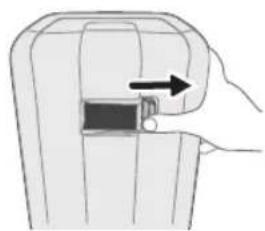
1 Slide the release button to the right to open the doors.
natural_image
Diagram of a hand inserting a component into a device (no text or symbols visible)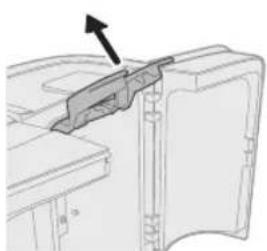
natural_image
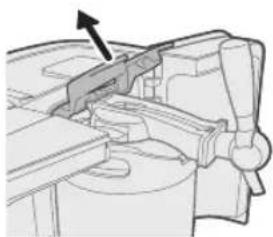
Technical line drawing of a mechanical component with an arrow indicating direction (no text or symbols)2 Lift the two blue locking levers completely.
English
natural_image
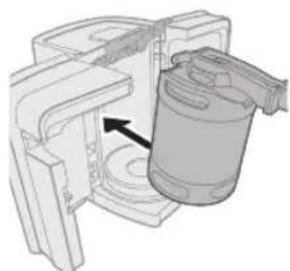
Mechanical assembly diagram showing a cylindrical component inserted into a housing with an arrow indicating direction (no text or symbols present)3 Tilt the keg with the assembled tap unit slightly forward and put it into the appliance.
First put the keg on the cooling plate of the appliance.
Then put the keg upright by sliding the tap unit between the blue locking levers.
natural_image
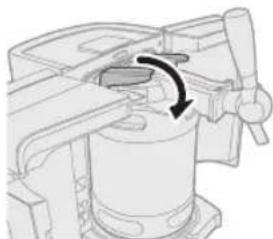
Mechanical assembly diagram showing a rotating component with a curved arrow indicating rotation (no text or symbols present)4 Push down the blue locking levers until they are in horizontal position.
If you are unable to put the locking levers in horizontal position, you have not put the keg into the appliance in the right position. Take out the keg and follow steps 1 to 3 again.
After you have installed the keg (even the first time), the pump runs for a few seconds.
natural_image
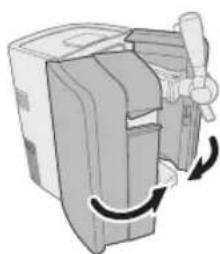
Illustration of a mechanical device with a handle and scroll, showing rotational motion (no text or symbols)5 Close the doors.
Note: If the pump goes on frequently when you are not pouring beer, reinstall the keg or repeat the instructions in section 'Placing the tap unit onto the keg' in this chapter.
Cooling
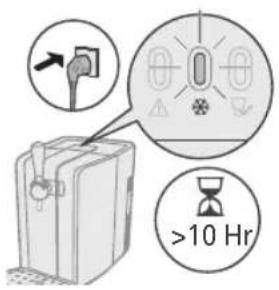
After you have installed the keg, the appliance automatically starts to cool the keg.
Note: At an ambient temperature of 23irc C, chilling an uncooled keg takes 12-15 hours.
Tip: If you want to pour beer shortly after placing the keg in the appliance, prechill the keg in upright position in the fridge for a while before you install it. For more tips, see chapter 'Troubleshooting'.
natural_image
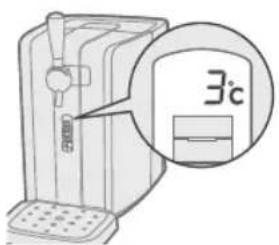
Pure electrical circuit lines without any symbols1 Wait until the beer has reached the right drinking temperature.
HD3720: The temperature is shown on the display in green (see section 'LCD display' in this chapter).
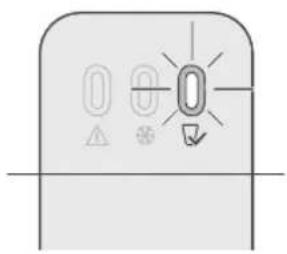
HD3715/HD3760/HD3761: The temperature light lights up green (see section 'LED indicator lights' in this chapter).
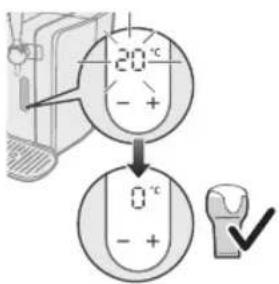
HD3770: The temperature is shown on the display stop breathing. (see section "LCD display (HD3770)").
The display stop breathing when the beer reaches to your desired temperature (0-12'C).
LCD display (HD3770 only)
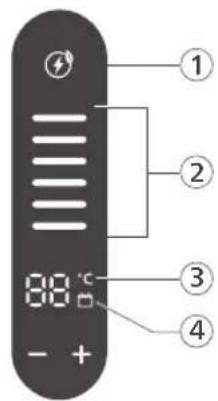
The display shows the temperature of the beer, the beer level inside the keg and the freshness of the beer.
1 Energy saving mode
2 Level indication
- The level indication on the display shows the amount of beer left in the keg in six steps.
Note: If you use 20cl glasses, you can pour approx. 30 glasses of beer from one keg. If you use 33cl glasses, you can pour approx. 18 glasses.
3 Temperature indication
- Set and adjust to your desired temperature by pressing "-" OR "+" buttons.
- Wait until the temperature of the keg has dropped to the desired temperature before you start to pour beer. Please refer to keg suppliers' recommendation on the ideal drinking temperature. The temperature display will keep breathing until your desired temperature is reached.
4 Freshness indication
The freshness indication tells you how long the beer is still fresh.
- When you place a new keg in the appliance, the freshness indication shows that the beer in the keg stays fresh for 30 days. The indication counts down from 30 to 0 days.
- Once the keg has been opened, the beer stays fresh for 30 days if the keg is stored in the appliance.
- Calendar indication is on in white colour = Keg freshness is above 1 week
Make sure the appliance is switched on all the time.
- When 30 days have passed, the display shows that the keg needs to be replaced. A dash and an exclamation mark appear on the display.
Adapting the freshness indication
- If you want to switch off the appliance for a longer period (e.g. a holiday), store the opened keg in the fridge. Disconnect the tap unit, rinse the top of the keg, rinse the tube and store the tube with the keg in the fridge.
Always write down the date and the number of days that the beer inside the keg is still fresh on the keg (see number of days on the display).
- When you reinstall the opened keg, you can set the freshness indicator to the correct number of days by (1) Pressing both "-" & "+" to enter adjustment mode. (2) Then press "-" OR "+" to adjust freshness days.
Tip: To calculate the correct number of days: compare the date with the one you have written on the keg and subtract the number of days the keg lay in the fridge from the number you wrote on the keg when you stored it.
Before you reinstall the opened keg, clean the tap unit and the tube again. Also check if dirty deposits have developed on top of the keg. If so, do not use the opened keg but use a new one.
Other indication
Calendar indication is on in amber colour = Keg freshness is less than 1 week. The display shows E1(HD3770) = Keg is not installed
The display shows E2(HD3770) = The tap unit and/or tube are not properly placed.
The display shows amber level indication at lowest segment (HD3770) = Empty of beer in keg
The display shows amber calendar indication (HD3770) = Keg freshness is less than 1 week
LCD display (HD3720 only)
The display shows the temperature of the beer, the beer level inside the keg and the freshness of the beer.
Temperature indication
Wait until the temperature of the keg has dropped below 4 °C before you start to pour beer. The ideal drinking temperature is 3 °C. The colour of the temperature displayed tells you if the beer has reached the right drinking temperature.
- Red = the beer temperature is not yet ideal for consumption (above 4 °C). The beer head may be too large.
- Green = the beer has reached the right temperature (4 °C or below) for consumption.
Level indication
The yellow-orange level indication on the display shows the amount of beer left in the keg in eight steps.
Note: If you use 20cl glasses, you can pour approx. 30 glasses of beer from one keg. If you use 33cl glasses, you can pour approx. 18 glasses.
Freshness indication
The freshness indication tells you how long the beer is still fresh.
- When you place a new keg in the appliance, the freshness indication shows that the beer in the keg stays fresh for 30 days. The indication counts down from 30 to 0 days.
- Once the keg has been opened, the beer stays fresh for 30 days if the keg is stored in the appliance.
Make sure the appliance is switched on all the time.
- When 30 days have passed, the display shows that the keg needs to be replaced. A dash and an exclamation mark appear on the display.
Adapting the freshness indication
- If you want to switch off the appliance for a longer period (e.g. a holiday), store the opened keg in the fridge. Disconnect the tap unit, rinse the top of the keg, rinse the tube and store the tube with the keg in the fridge.
Always write down the date and the number of days that the beer inside the keg is still fresh on the keg (see number of days on the display).
- When you reinstall the opened keg, you can set the freshness indicator to the correct number of days with the – and + buttons.
Tip: To calculate the correct number of days: compare the date with the one you have written on the keg and subtract the number of days the keg lay in the fridge from the number you wrote on the keg when you stored it.
Before you reinstall the opened keg, clean the tap unit and the tube again. Also check if dirty deposits have developed on top of the keg. If so, do not use the opened keg but use a new one.
Other indications
Besides the beer level and temperature, the display gives the following information:
- Green dash with no level indication visible = the tap unit is not present on the keg.
- Red dash with no level indication visible = no keg is installed.
- Red or green dash with flashing yellow-orange background light = the tap unit and/or tube are not properly placed. Remove the keg and check if the tap unit and the tube are properly placed. See chapter 'Preparing for use', sections 'Placing the tap unit onto the keg' and 'Placing the tube into the tap unit'. If this does not help, try another keg with a new tube.
LED indicator lights (HD3715/HD3760/HD3761 only)
- There are three indicator lights on top of the appliance that show the status of the appliance.
- Red indicator light = the appliance is switched on and you have to install a keg.
- Orange indicator light = the appliance is cooling the keg and the keg has not yet reached the right drinking temperature.
- Green indicator light = the beer has reached the right drinking temperature and is ready to be poured.
Other indications
- Red indicator light flashes = the tap unit and/or tube are not properly placed.
- Green indicator light flashes = Empty of beer in keg.
Cleaning beer glasses
Always use clean beer glasses when you tap beer.
1 Clean the glasses carefully in hot water with some washing-up liquid.
2 Rinse the glasses thoroughly with cold tap water.
In this way you remove all grease and soap residues, which allows you to pour a beer with a good head.
3 Hold the glasses upside down to the light to check if they are free of grease and soap residues.
The glasses are clean when the water runs down the surface evenly, without revealing any stains.
Tip: If you clean beer glasses in the dishwasher, do not use a rinse agent. Rinse agent residues may break down the foam head of the beer.
Pouring beer
1 You get the best results if you pour the beer in a cool, clean and wet glass!
Note: A cool glass ensures a more stable beer head. It also keeps freshly poured beer fresh longer and helps to retain its sparkling quality.
Note: For the best quality draft beer, always clean and rinse used glasses before you use them again. This prevents foam residues of previously poured beer from causing too much foam in freshly poured beer.
Note: When you have not poured beer for more than a week, it is recommended to let beer flow into the glass for 1 second. Then rinse the glass with cold water before you fill it with fresh beer.
2 Hold the glass by the bottom or in the middle to make sure it stays clean.
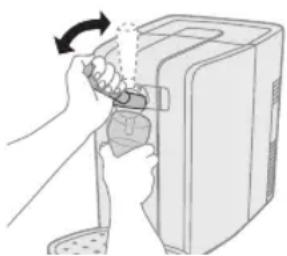
3 Open the tap in one quick, smooth movement.
The beer only flows properly into the glass if the tap is completely open. If the tap is only half open, the beer is forced through the tap, causing it to foam more strongly.
Let the beer to flow down the inside of the glass.
natural_image
Illustration of a hand inserting a device into a computer case, showing the arrow indicating rotation (no text or symbols present)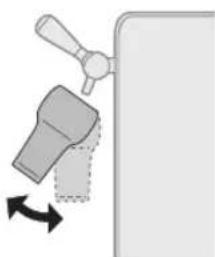
natural_image
Diagram of a faucet handle with directional arrow indicating rotation (no text or symbols)4 To vary the size of the beer head, vary the angle at which you hold the glass under the spout and vary the distance between the glass and the spout. The more upright and the closer to the spout you hold the glass, the more foam you obtain.
Note: Do not let the end of the spout touch the beer glass, the beer or the beer head. Any beer residues present on the spout affect the forming of the beer head.
5 Slowly move the glass to vertical position while you pour your beer.
6 Fill the glass until the foam almost flows over the rim of the glass.
7 Insert the flexible tube into the tap body.
Note: The pump may go on.
8 Europe (except Germany and the UK): For the best end result, remove excess foam from the glass by moving a skimmer over the rim of the glass at an angle of 45irc in one smooth movement.
Note: Never leave the skimmer lying on the worktop, but put it in a clean glass with fresh, cold water or rinse it right away. Only pass the skimmer over the glass once, as further skimming has a negative effect on the quality of the beer head.
You now have a perfect draft beer.
Serving a freshly poured beer
1 Dry the bottom of the glass by passing it over a cloth.
2 Use a clean beer mat for your guest.
3 Pick up the glass in the middle and serve the beer on the beer mat. Make sure the beer brand logo (if present on the glass) faces your guest.
3 different beer pouring traditions
Step European (except
Germany and UK)
German British
| 1 Rinse a glass and let it drain. | Rinse a glass and let it drain. | Rinse a glass and let it drain. |
| 2 Hold the glass next to the opening of the spout. | Hold the glass under the opening of the spout at an angle of approx. 45 °C. | Hold the glass under the opening of the spout at an angle of approx. 45 °C. |
| 3 Open the tap fully in one smooth movement. | Open the tap fully in one smooth movement. | Open the tap fully in one smooth movement. |
| 4 Move the glass under the spout at an angle of approx. 45 °C and let the beer flow down the inside of the glass. | Let the beer flow down the inside of the glass. | Let the beer flow down the inside of the glass. |
| 5 Do not let the spout touch theglass, the beer or the foam. | Do not let the spout touch the glass, the beer or the foam. | Do not let the spout touch the glass, the beer or the foam. |
| 6 The angle at which you | hold the glass while you pour beer determines the ultimate size of the foam head. The more upright you hold the glass, the higher the foam head becomes. | The angle at which you hold the glass while you pour beer determines the ultimate size of the foam head. The more upright you hold the glass, the higher the foam head becomes. | The angle at which you hold the glass while you pour beer determines the ultimate size of the foam head. The more upright you hold the glass, the higher the foam head becomes. |
| 7 Fill the glass until the | beer almost flows over the rim of the glass. | a. Let beer flow into the glass until it contains two-thirds beer and one-third foam. | Fill the glass until the beer almost flows over the rim of the glass. |
| b. Close the tap and put the glass down for 1 minute to allow the foam to settle. | |||
| c. Repeat steps 2 to 6 and fill the glass up to the rim. | |||
| 8 Close the tap in one | smooth movement. | Close the tap in one smooth movement. | Close the tap in one smooth movement. |
| 9 a. Move the glass away | from the spout to prevent drops of beer from falling onto the foam head. | Move the glass away from the spout to prevent drops of beer from falling onto the foam head. | Move the glass away from the spout to prevent drops of beer from falling onto the foam head. |
| b. Remove the foam that rises beyond the rim of the glass by passing a skimmer over the rim of the glass at an angle of 45°. | |||
| 10 Your beer is now ready to be served. | Your beer is now ready to be served. | Your beer is now ready to beserved. | |
Replacing the keg
The keg is empty when only foam comes out of the spout and no beer. HD3720 only: the display also indicates that the keg is empty.
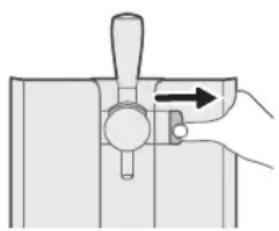
1 Press the release button to the right to open the doors.
Make sure you open the doors fully.
natural_image
Diagram of a hand operating a mechanical device with a lever and directional arrow (no text or symbols)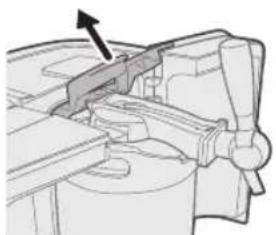
natural_image
Mechanical assembly diagram showing a bracket with an arrow indicating direction (no text or symbols present)2 Lift the blue locking levers completely.
natural_image
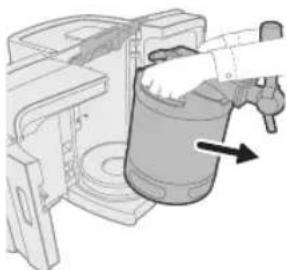
Diagram of a mechanical device with a hand operating a cylindrical component, showing motion direction (no text or symbols)3 Tilt the keg with the assembled tap unit towards you and take it out of the appliance.
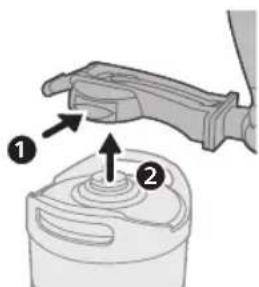
4 Press on the release buttons on both sides of the tap unit (1). The tap unit is released from the keg with a click and you can remove it (2).
You have to remove the tap unit from the keg before you can replace the tube.
Always replace the tube when you install a new keg. Never use a tube for more than 30 days.
5 See chapter 'Preparing for use' for instructions on how to place the tap unit on the keg and how to place the keg into the appliance.
Cleaning
Clean the appliance when you replace the keg or when you store the appliance for a longer period.
Never use scouring pads, scouring agents or aggressive liquids such as petrol or acetone to clean the appliance.
1 Always unplug the appliance before you clean it.
2 Clean the outside of the appliance with a damp cloth.
3 Always clean the tap unit as described in chapter 'Replacing the keg' to avoid sticky beer residues.
4 Remove and disassemble the drip tray and the drip tray cover.
5 You can remove the tap handle by pulling it out of the tap body.
6 Clean the tap unit, the drip tray and the drip tray cover with hot water and, if necessary, some washing-up liquid.
Hot water may cause burns. Always check if the water is not too hot before you clean these parts under the tap.
Only the drip tray, the drip tray cover and the spout are dishwasher-proof.
Removing the cooling element
The cooling element inside the appliance contains a substance that may pollute the environment. Therefore you must remove the cooling element before you discard the appliance.
You can also take or send the appliance to a Philips service centre. The staff of this centre will remove the cooling element for you and will dispose of it in an environmentally safe way.
Only remove the cooling element when you discard the appliance.
Be careful of the paste on the cooling element and adjacent parts. If this paste ends up on your clothes, it causes a permanent stain.
Remove the cooling element in the following way:
1 Unplug the appliance.
2 Slide the release button to the right to open the doors.
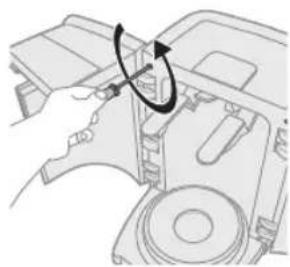
There are two holes near the hinges of the doors on either side.
3 Remove the four screws located in these holes with a screwdriver.
natural_image
Diagram of a hand operating a device with a circular arrow indicating rotation (no text or symbols present)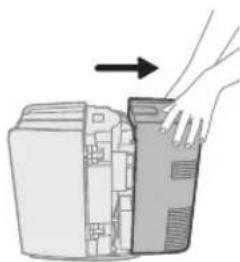
natural_image
Illustration of a hand inserting a device into a computer case (no text or symbols)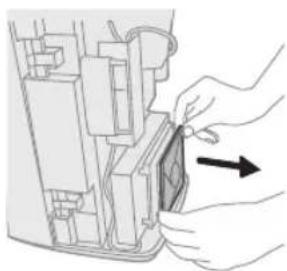
natural_image
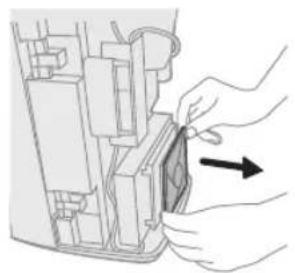
Illustration of hands installing or adjusting a component inside a device (no text or symbols visible)4 Remove the back cover from the appliance.
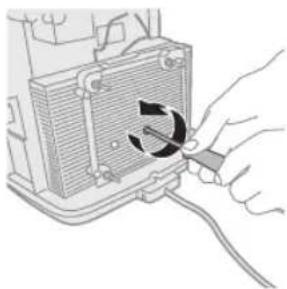
5 Pull the cooling fan out of the appliance. Now you see an aluminium plate with fins on it and with two screw holes.
natural_image
Hand inserting a cable into a device component with a circular arrow indicating rotation (no text or symbols)6 Undo the screws with a screwdriver.
natural_image
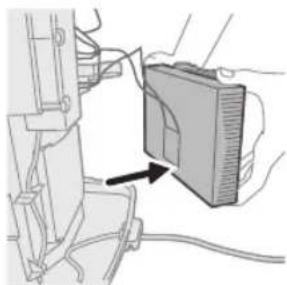
Diagram of a device with an arrow pointing to a component, no visible text or symbols7 Remove the aluminium plate.
After you have removed the aluminium plate, you see a white plate of approx. 4 x 4cm. This is the actual cooling element.
8 Place the shaft of a screwdriver against one side of the cooling element and push the cooling element off the back of the aluminium plate.
9 Cut the wires attached to the cooling element.
Do not connect the appliance to the mains again after you have removed the cooling element.
Never reassemble the cooling element once you have removed it.
10 Hand in the cooling element at an official collection point for chemical waste.
Troubleshooting
If you are unable to solve the problem with the information below, visit www.philips.com/support.
Problem Solution
| Appliance general | |
| It is not possible to close the doors. Make sure you push down the blue locking leversuntil they are in horizontal position before you close the doors. | |
| Make sure the tube is placed correctly in the tap unit and the tap handle is in upright position. See chapter 'Preparing for use', section 'Placing the tube into the tap unit'. | |
| Make sure the tap unit is placed correctly on the keg. | |
| There is frost on the keg or on the appliance. Unplug the appliance and let the keg or appliance defrost. Dry the appliance or keg with a cloth. | |
| Make sure that the doors are properly closed. For instructions on how to close the doors, see the chapter 'Preparing for use', section 'Placing the keg into the appliance'. It is normal for some frost to be present on the back of the keg. | |
| Beer leaks out of the appliance. Make sure that the tap unit and the tube are placed correctly (see chapter 'Preparing for use', sections 'Placing the tap unit onto the keg' and 'Placing the tube into the tap unit'). | |
| Remove the tap unit and tube and reinstall them. If the problem continues to occur, contact the PerfectDraft call centre in your country to obtain a new tube. | |
| The appliance makes a sound. Because the appliance chills constantly, the fan works continuously. | |
| The pump may go on while you pour beer to maintain the right pressure. When you are not pouring beer, the pump also goes on every now and then to keep the appliance at the right pressure. | |
| If the appliance makes a hissing sound, the tap unit may not be properly connected to the keg. Make sure you rinse the tap unit thoroughly. It is essential that all rubber parts of the tap unit are moist before you assemble the tap unit onto the keg. | |
| The pump goes on frequently when I am not pouring beer. | Reinstall the tap unit and the keg by following the instructions in sections 'Placing the tap unit onto the keg' and 'Placing the keg into the appliance' in chapter 'Preparing for use'. If this does not help, try another keg together with a new tube. If the problem continues to occur, contact the PerfectDraft call centre in your country. |
| Tap unit | |
| It is difficult to place the tap unit onto the keg. Make sure no old beer is left in the tap unit. Clean the entire tap unit with hot water and, if necessary, some washing-up liquid. | |
| It is difficult to press the release buttons to remove the tap unit. | First remove the keg from of the appliance. Then press the release buttons to remove the tap unit from the keg. |
| Beer residues may cause the tap unit to stick to the keg. Clean the tap unit with hot water and, if necessary, some washing-up liquid to dissolve beer residues. Then remove the tap unit from the keg. | |
| It is not possible to place the keg with the assembled tap unit in the appliance. | Make sure the tap unit is placed correctly on the keg. Push the tap unit down firmly when you place it onto the keg. See chapter 'Preparing for use', section 'Placing the tap unit onto the keg'. |
| Check if you have lifted the blue locking levers properly and push them down after you have installed the keg. | |
| The tube cannot be removed from the tap unit. Remove the tap unit first before you remove the tube. Rinse the tap unit with hot water. Press the tube release button and pull the tube out of the spout. | |
| It is difficult to place the tube into the tap unit. Make sure the tube is placed correctly (see chapter 'Preparing for use', section 'Placing the tube into the tap unit'). | |
| Make sure you clean the tap unit with hot water before you insert a new tube. | |
| The tube may be broken. Contact the PerfectDraft call centre in your country to obtain a new tube. | |
| LCD display/LED indicator lights | |
| The red indicator light flashes (HD3720). Remove the tap unit, clean it and reinstall the tap unit. If this does not help, try another keg with a new tube. | |
| If the problem continues to occur, please contact the PerfectDraft call centre in your country. | |
| There is a green dash on the display and the appliance does not work (HD3720). | Make sure that the tap unit is placed correctly (see chapter 'Preparing for use', section 'Placing the tap unit onto the keg'). |
| There is a green or red dash on the display and the background light flashes (HD3720). | Remove the tap unit, clean it and reinstall the tap unit. If this does not help try another keg with a new tube. |
| If the problem continues to occur, please contact the PerfectDraft call centre in your country. | |
| The display shows the wrong volume (HD3720). For proper functioning of the volume indication, it is crucial that you open the tap handle completely (see chapter 'How to pour a perfect beer'). | |
| In case of a power failure or if the appliance has been disconnected from the mains, the level indication will be accurate again after you have poured a few glasses of beer. | |
| The display shows E1(HD3770) Keg is not installed | |
| The display shows E2(HD3770) The tap unit and/or tube are not properly placed. | |
| The display shows amber level indication at lowest segment (HD3770) | Empty of beer in keg |
| The display shows amber calendar indication (HD3770) | Keg freshness is less than 1 week |
| Pouring beer | |
| No beer comes out when I pull the tap handle. Perhaps the keg is empty. Put a new keg into the appliance. | |
| Make sure the tube is fitted correctly in the tap unit (see chapter 'Preparing for use', section 'Placing the tube into the tap unit'). | |
| Make sure that the tap unit is placed correctly on the keg (see chapter 'Preparing for use', section 'Placing the tap unit onto the keg'). | |
| Too much foam comes out of the appliance. Make sure you open the tap completely when you pour beer (see chapter 'How to pour a perfect beer'). | |
| The beer is too warm. Wait until the beer is cold enough to be poured, i.e. when temperature on the display is green (HD3720 only) or when the green indicator light goes on (HD3760/HD3761/HD3715) or when the temperature display stop breathing (HD3770). | |
| The keg has been shaken too much. Wait half an hour for the beer to settle. | |
| The first glass can contain more foam than usual. Try pouring a second glass. | |
| The tube may not function properly. Contact the PerfectDraft call centre in your country to obtain a new tube. | |
| The foam head is too high. See chapter 'How to pour a perfect beer'. | |
| The beer that comes out of the appliance is flat. Check if the keg has been open for over 30 days and check if the expiry date of the keg has passed. | |
| Perhaps the glasses you used were not clean enough. Rinse the glasses with water and some washing-up liquid. Rinse them thoroughly with cold water to remove all grease and soap residues | |
| Pour beer as described on the keg and in this user manual (see chapter 'How to pour a perfect beer'). | |
| The foam head collapses very quickly. Perhaps the glasses you used were not clean enough. Rinse the glasses with water and some washing-up liquid. Rinse them thoroughly with cold water to remove all grease and soap residues. | |
| Make sure the beer is cold enough to be poured, i.e. when temperature on the display is green (HD3720) or when the green indicator light goes on (HD3760/HD3761/HD3715) or when the temperature display stop breathing (HD3770). | |
| The keg fell, can I still use it? When it is an unopened keg and it does not have any visual damage, you can try to use it. When the keg is already open, you cannot use the keg anymore and have to install a new keg. | |
| The beer tastes bad. Make sure you keep the appliance plugged in all the time. Once the keg has been opened and is kept cool, the beer stays fresh for 30 days. Check the expiry date on the keg before you install a new keg. | |
| Always clean the tap unit and place a new tube into it when you install a new keg. | |
| Make sure you use clean glasses. | |
| Cooling | |
| The temperature on the display goes up (HD3720). Make sure that the doors are properly closed (see chapter 'Preparing for use', section 'Placing the keg into the appliance'). | |
| During hot days, put the appliance in a cooler place. | |
| Place the appliance in an environment with an ambient temperature between 3 °C and 32 °C. Leave at least 10cm free space around the appliance. Do not expose the appliance to direct sunlight. | |
| Check if the fan outlet at the back of the appliance is free from dust and/ or other particles. | |
| The appliance does not chill the beer sufficiently. At an ambient temperature of 23 °C, chilling the keg takes approximately 12-15 hours. | |
| At higher ambient temperatures, chilling the keg takes longer. To achieve the best performance, keep your appliance at or below 32 °C. | |
| You can prechill the keg in upright position in the fridge for a while before you install the keg. | |
Keg suppliers
If you need information about the keg or if you have a problem with your keg, you can contact the supplier of the keg in your country.
Country Web address
| The Netherlands www.perfectdraft.com/nl-nl/ |
| Belgium www.perfectdraft.com/fr-be/ |
| Germany www.perfectdraft.com/de-de/ |
| Spain www.perfectdraft.com/es-es/ |
| France www.perfectdraft.com/fr-fr/ |
| Italy www.perfectdraft.com/it-it/ |
| Sweden www.perfectdraft.com/sv-se/ |
| UK www.perfectdraft.com/en-gb/ |
Inhalt
Wichtig! 26
Recycling 28
natural_image
Diagram of a heating element with heat exchanger and cooling fins (no text or symbols)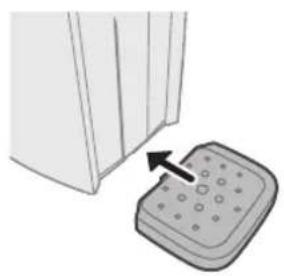
natural_image
Illustration of a door handle next to a control panel with an arrow indicating left motion (no text or symbols)natural_image
Diagram of a mechanical component with a downward arrow indicating force or direction (no text or symbols present)natural_image
Illustration of two beverage cans with a rotating lid, separated by a diagonal line (no text or symbols)natural_image
Illustration of a hand using a tool to lift a showerhead on a tiled wall (no text or symbols)natural_image
Diagram of a mechanical clamp or tool with a lever and handle, showing a downward arrow indicating motion (no text or symbols present)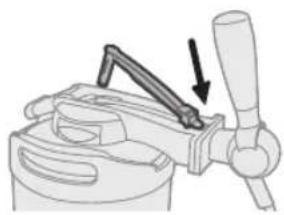
natural_image
Mechanical clamp or clamping device with a handle and lever mechanism (no text or symbols visible)natural_image
Illustration of a hand inserting a component into a device (no text or symbols visible)natural_image
Technical diagram of a mechanical component with an arrow indicating direction (no text or symbols present)natural_image
3D diagram of a mechanical device with an arrow indicating a component or assembly (no text or symbols present)natural_image
Mechanical assembly diagram showing a rotating component with a curved arrow indicating rotation (no text or symbols present)natural_image
Illustration of a mechanical device with a handle and scroll, showing rotational motion (no text or symbols)natural_image
Illustration of a hand inserting a device into a container with an arrow indicating rotation (no text or symbols)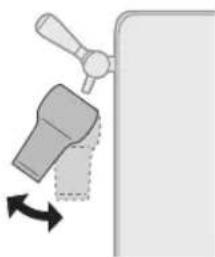
natural_image
Diagram of a faucet with a handle and arrow indicating rotation (no text or symbols)natural_image
Diagram of a hand operating a mechanical lever with an arrow indicating direction (no text or symbols present)natural_image
Mechanical assembly diagram showing a bracket with an arrow indicating direction (no text or symbols present)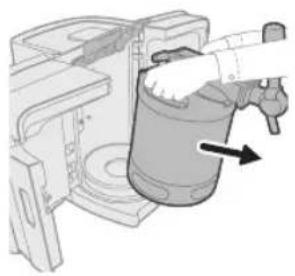
natural_image
Illustration of a hand pouring liquid into a cylindrical container with an arrow indicating flow (no text or symbols)natural_image
Diagram of a mechanical device with a hand holding a component and an arrow indicating rotation (no text or symbols present)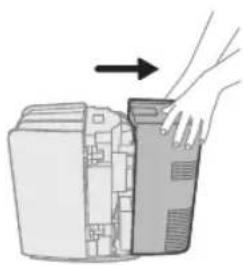
natural_image
Illustration of a hand opening a computer tower into a rack (no text or symbols)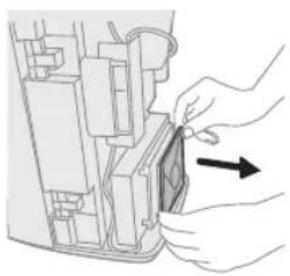
natural_image
Illustration of a hand inserting a component into a device casing (no text or symbols visible)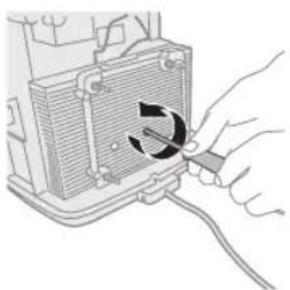
natural_image
Hand inserting a cable into a device component with a circular arrow indicating rotation (no text or symbols)natural_image
Diagram of a device with cable and a rectangular panel, no visible text or symbolsnatural_image
Diagram of a heat exchanger or heater with airflow direction indicated by arrows (no text or symbols)natural_image
Illustration of a door handle next to a control panel with an arrow indicating force (no text or symbols)natural_image
Diagram of a mechanical component with a downward arrow indicating force or direction (no text or symbols present)natural_image
Illustration of two stacked beverage cans with rotating ends, separated by a diagonal line (no text or symbols)natural_image
Illustration of a hand using a tool to lift a showerhead on a tiled wall (no text or symbols)natural_image
Diagram of a manual press tool with a lever and handle, showing a downward force (no text or symbols present)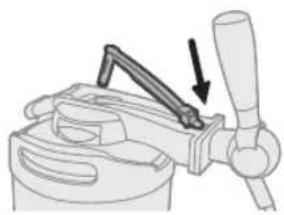
natural_image
Illustration of a manual presser with a handle and lever mechanism (no text or symbols)natural_image
Diagram of a hand inserting a component into a device (no text or symbols visible)natural_image
Technical line drawing of a mechanical component with an arrow indicating direction (no text or symbols)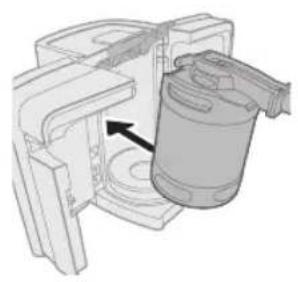
natural_image
3D diagram of a mechanical device with a cylindrical component inserted, showing internal components and an arrow indicating direction (no text or symbols)natural_image
Mechanical assembly diagram showing a rotating component with a curved arrow indicating rotation (no text or symbols present)natural_image
Diagram of a mechanical device with directional arrows indicating motion (no text or symbols)natural_image
Illustration of a hand inserting a device into a computer case (no text or symbols visible)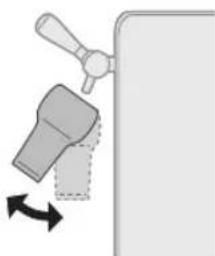
natural_image
Diagram of a faucet with a handle and arrow indicating rotation (no text or symbols)natural_image
Diagram of a hand operating a mechanical lever with a directional arrow (no text or symbols)natural_image
Mechanical assembly diagram showing a lever mechanism with an arrow indicating direction (no text or symbols present)natural_image
Illustration of a hand inserting a cylindrical component into a mechanical housing (no text or symbols visible)natural_image
Mechanical assembly diagram showing a rotating component with an arrow indicating rotation (no text or symbols present)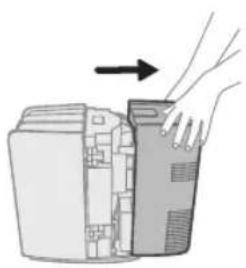
natural_image
Illustration of a hand inserting a device into a computer case (no text or symbols)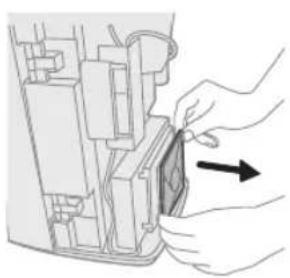
natural_image
Diagram of hands inserting a component into a device (no text or symbols visible)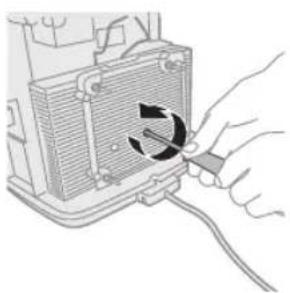
natural_image
Hand inserting a cable into a device component with a circular arrow indicating rotation (no text or symbols)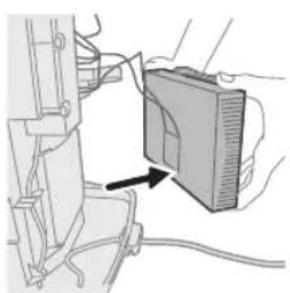
natural_image
Diagram of a device with a labeled component and cable, showing no readable text or symbols.natural_image
Diagram of a heat exchanger or cooling unit with airflow direction indicated by arrows (no text or symbols)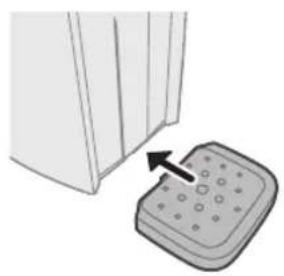
natural_image
Illustration of a door handle next to a control panel with an arrow indicating left motion (no text or symbols)natural_image
Diagram of a mechanical lever with a downward arrow indicating force or direction (no text or symbols present)natural_image
Illustration of two stacked beverage cans with rotating ends, separated by a diagonal line (no text or symbols)natural_image
Illustration of a hand using a tool to lift a showerhead on a tiled wall (no text or symbols)natural_image
Diagram of a mechanical clamp or tool with a lever and handle, showing a downward arrow indicating motion (no text or symbols present)natural_image
Diagram of a hand operating a clamping tool with an arrow indicating force (no text or symbols present)natural_image
Diagram of a hand inserting a component into a device (no text or symbols visible)natural_image
Technical line drawing of a mechanical component with an arrow indicating direction (no text or symbols)natural_image
3D diagram of a mechanical device with an arrow indicating a component or assembly (no text or symbols present)natural_image
Mechanical assembly diagram showing a rotating component with a curved arrow indicating rotation (no text or symbols present)natural_image
Diagram of a mechanical device with a handle and curved arrows indicating motion (no text or symbols)natural_image
Illustration of a hand inserting a device into a computer tower (no text or symbols visible)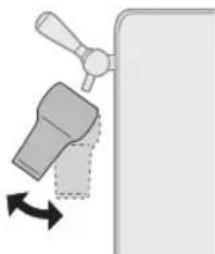
natural_image
Diagram of a faucet with a handle and arrow indicating rotation (no text or symbols)natural_image
Diagram of a hand operating a mechanical lever with an arrow indicating direction (no text or symbols present)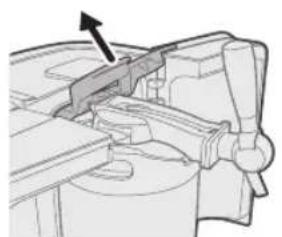
natural_image
Mechanical assembly diagram showing a lever mechanism with an arrow indicating direction (no text or symbols present)natural_image
Diagram of a mechanical device with a hand operating a cylindrical component, showing directional arrows (no text or symbols)natural_image
Diagram of a hand operating a device with an arrow indicating rotation (no text or symbols present)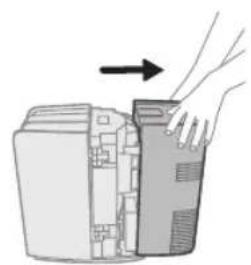
natural_image
Illustration of a hand inserting a device into a computer tower (no text or symbols)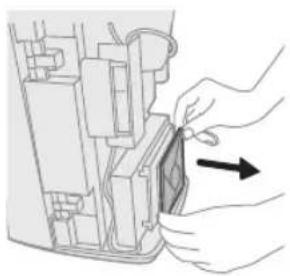
natural_image
Illustration of hands inserting a component into a device (no text or symbols visible)natural_image
Hand holding a tool interacting with a component, showing a circular arrow indicating rotation (no text or symbols present)natural_image
Diagram of a device with a labeled component and cable, showing no readable text or symbols.natural_image
Diagram of a heat exchanger or heater with airflow direction indicated by arrows (no text or symbols)natural_image
Illustration of a door handle next to a button press (no text or symbols)natural_image
Diagram of a mechanical component with a downward arrow indicating force or direction (no text or symbols present)natural_image
Diagram of two stacked beverage cans with arrows indicating rotation, no text or symbols presentnatural_image
Illustration of a hand using a tool to lift a showerhead on a tiled wall (no text or symbols)natural_image
Diagram of a mechanical clamp or clamping device with a lever and handle, showing a downward force arrow (no text or symbols present)natural_image
Mechanical clamp or clamping device with a handle and lever mechanism (no text or symbols visible)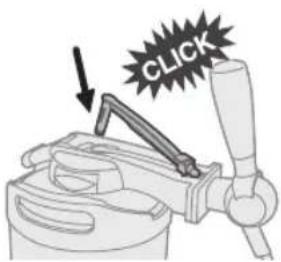
natural_image
Illustration of a hand inserting a component into a device (no text or symbols visible)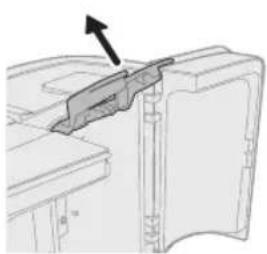
natural_image
Technical diagram of a mechanical component with an arrow indicating direction (no text or symbols present)natural_image
3D diagram of a mechanical device with an arrow indicating a component or assembly (no text or symbols present)natural_image
Mechanical assembly diagram showing a rotating component with no visible text or symbolsnatural_image
Illustration of a mechanical device with a handle and scroll, showing rotational motion arrows (no text or symbols)natural_image
Pure electrical circuit lines without any symbolsnatural_image
Illustration of a hand inserting a device into a computer case (no text or symbols visible)natural_image
Diagram showing a faucet handle and valve mechanism with directional arrows (no text or symbols)natural_image
Diagram of a hand operating a mechanical lever with a handle and arrow indicating direction (no text or symbols)natural_image
Mechanical assembly diagram showing a bracket and housing components (no text or labels)natural_image
Diagram of a hand operating a cylindrical device with an arrow indicating direction (no text or symbols present)natural_image
Diagram of a mechanical assembly with a hand holding a component and an arrow indicating rotation (no text or symbols present)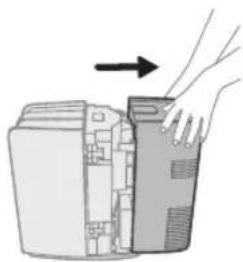
natural_image
Illustration of a hand inserting a computer into a device (no text or symbols visible)natural_image
Illustration of hands inserting a component into a device (no text or symbols visible)natural_image
Hand inserting a cable into a heat exchanger unit (no text or symbols visible)natural_image
Diagram of a device being inserted into a device, showing cable and wiring (no text or symbols)Display LCD/spie LED
natural_image
Diagram of a heating unit with heat exchanger and cooling element (no text or symbols)natural_image
Illustration of a door handle next to a button press (no text or symbols)4 Installeer de lekbak.
natural_image
Diagram of a mechanical component with a downward arrow indicating force or direction (no text or symbols present)5 Bevestig de taphendel.
natural_image
Two identical containers with arrows indicating rotation, separated by a diagonal line (no text or symbols)natural_image
Illustration of a hand using a tool to lift a showerhead on a tiled floor (no text or symbols)natural_image
Diagram of a mechanical clamp or clamping device with a lever and handle, showing a downward force arrow (no text or symbols present)natural_image
Diagram of a mechanical clamp or clamping device with an arrow indicating force application (no text or symbols present)3 Duw de slangconnector in de opening in de tapunit ('klik').
natural_image
Diagram of a hand inserting a component into a device (no text or symbols visible)natural_image
Technical line drawing of a mechanical component with an arrow indicating direction (no text or symbols)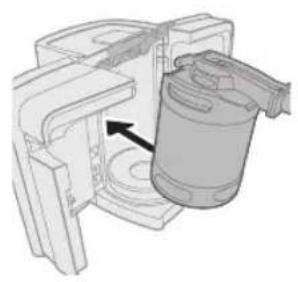
natural_image
3D diagram of a mechanical device with a cylindrical component inserted, showing internal components and an arrow indicating direction (no text or symbols)natural_image
Mechanical assembly diagram showing a rotating component with no visible text or symbolsnatural_image
Illustration of a mechanical device with a lever and curved arrows indicating motion (no text or symbols)5 Sluit de deuren.
natural_image
Pure electrical circuit lines without any symbolsnatural_image
Illustration of a hand inserting a device into a computer case (no text or symbols visible)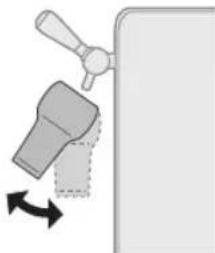
natural_image
Diagram of a faucet handle with directional arrow indicating rotation (no text or symbols)natural_image
Diagram of a hand operating a mechanical lever with a handle and arrow indicating direction (no text or symbols)2 Til de blauwe vergrendelingshendels helemaal op.
natural_image
Mechanical assembly diagram showing a lever mechanism with an arrow indicating direction (no text or labels)natural_image
Illustration of a hand inserting a cylindrical container into a machine (no text or symbols visible)Reinigen
natural_image
Diagram of a hand operating a device with an arrow indicating rotation (no text or symbols present)
natural_image
Illustration of a hand inserting a device into a computer case (no text or symbols)natural_image
Illustration of hands inserting a component into a device (no text or symbols visible)natural_image
Hand inserting a cable into a device component with a circular arrow indicating rotation (no text or symbols)natural_image
Diagram of a device with a computer monitor and cable, showing no text or symbolsTubo (fornecida com o barril)
13 Conector do tubo
14 Tubo
Torneira
15 Pega da torneira
natural_image
Diagram of a heat exchanger or cooling unit with airflow direction indicated by arrows (no text or symbols)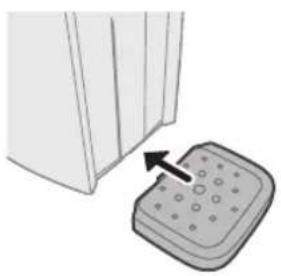
natural_image
Illustration of a door handle next to a button press (no text or symbols)natural_image
Diagram of a mechanical component with a downward arrow indicating force or direction (no text or symbols present)5 Encaixe a pega da torneira.
natural_image
Diagram showing two containers with arrows indicating rotation or movement, separated by a diagonal line (no text or symbols)natural_image
Illustration of a hand using a tool to lift a showerhead on a tiled wall (no text or symbols)natural_image
Diagram of a mechanical clamp or tool with a lever and handle, showing a force application (no text or symbols present)natural_image
Diagram of a mechanical clamp or clamping device with an arrow indicating force direction (no text or symbols present)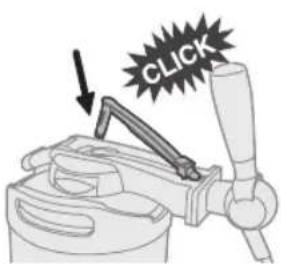
natural_image
Diagram of a hand inserting a component into a device (no text or symbols visible)natural_image
Technical line drawing of a mechanical component with an arrow indicating direction (no text or symbols)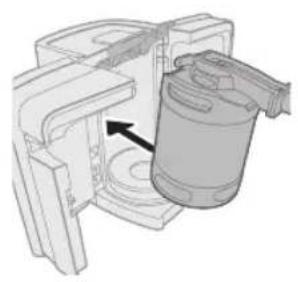
natural_image
3D diagram of a mechanical device with an arrow indicating a component or assembly (no text or symbols present)natural_image
Mechanical assembly diagram showing a rotating component with a curved arrow indicating rotation (no text or symbols present)natural_image
Illustration of a mechanical device with a knob and directional arrows indicating motion (no text or symbols)5 Feche as portas.
natural_image
Illustration of a hand inserting a device into a server rack (no text or symbols)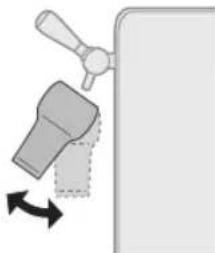
natural_image
Diagram of a faucet handle with directional arrow indicating movement (no text or symbols)natural_image
Mechanical assembly diagram showing a hand operating a lever with an arrow indicating motion (no text or symbols present)natural_image
Mechanical assembly diagram showing a lever mechanism with an arrow indicating direction (no text or labels)natural_image
Illustration of a hand inserting a cylindrical container into a machine (no text or symbols visible)natural_image
Diagram of a hand operating a device with an arrow indicating rotation (no text or symbols present)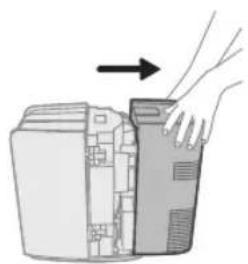
natural_image
Illustration of a hand inserting a device into a computer case (no text or symbols)4 Retire a tampa posterior do aparelho.
natural_image
Illustration of hands inserting a component into a device (no text or symbols visible)natural_image
Hand holding a cable with a circular arrow indicating rotation (no text or symbols)natural_image
Diagram of a device with a computer monitor and cable, showing no text or symbolsPHILIPS and the Philips Shield Emblem are registered trademarks of Koninklijke Philips N.V. and are used under license.
This product has been manufactured by and is sold under the responsibility of Versuni Holding B.V., and Versuni Holding B.V. is the warrantor in relation to this product.



- Important
- The appliance
- Warning
- Caution
- The keg
- Electromagnetic fields (EMF)
- Recycling
- Warranty and support
- Introduction
- General description
- Tube unit (supplied with keg)
- Tap unit
- Keg
- Before first use
- Installing the appliance
- Preparations before first use
- Placing the tap unit onto the keg
- Placing the tube into the tap unit
- Placing the keg into the appliance
- English
- Cooling
- LCD display (HD3770 only)
- Energy saving mode
- Level indication
- Temperature indication
- Freshness indication
- Other indication
- LCD display (HD3720 only)
- Temperature indication
- Level indication
- Freshness indication
- Other indications
- LED indicator lights (HD3715/HD3760/HD3761 only)
- Cleaning beer glasses
- Pouring beer
- Serving a freshly poured beer
- different beer pouring traditions
- Replacing the keg
- Cleaning
- Removing the cooling element
- Troubleshooting
- Keg suppliers
- Inhalt
- Reinigen
- Tubo (fornecida com o barril)
- Torneira
Brand : PHILIPS
Model : PerfectDraft HD3760
Category : Beer dispenser