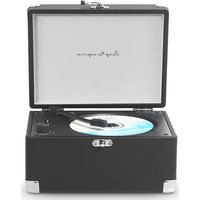
Boogie - Cd player/recorder Prixton - Free user manual and instructions
Find the device manual for free Boogie Prixton in PDF.


| Product type | CD player/recorder |
| Brand | Prixton |
| Model | Boogie |
| Dimensions (approx.) | 24.5 x 18.5 x 4.5 cm |
| Weight (approx.) | 520 g |
| Power supply | Built-in rechargeable 2000 mAh battery via USB-C (DC 5V, 1A) |
| Display | LED |
| Supported CD formats | CD, CD-R, CD-RW, MP3, WMA |
| Inputs | USB-A, AUX 3.5 mm, Bluetooth (reception) |
| Outputs | Headphone 3.5 mm, Bluetooth (transmission), built-in speaker |
| Wireless connectivity | Bluetooth 5.0 (input and output) |
| Playback functions | Play/Pause, previous/next track, fast forward/rewind, stop, repeat (1, all, normal) |
| Operating modes | CD, USB, AUX, Bluetooth (input and output) |
| Maintenance and cleaning | Clean with a soft dry cloth. Do not use chemicals. Remove the CD before transport. |
| Safety | Do not expose to water, extreme temperatures, or open flames. Do not touch the laser. Use only in a dry environment. |
| Included accessories | CD player, remote control, user manual, USB-C charging cable |
| Repairability | Do not attempt to repair yourself. Contact after-sales service via www.prixton.com |
| Usage | Household use only |
Frequently Asked Questions - Boogie Prixton
User questions about Boogie Prixton
0 question about this device. Answer the ones you know or ask your own.
Ask a new question about this device
Download the instructions for your Cd player/recorder in PDF format for free! Find your manual Boogie - Prixton and take your electronic device back in hand. On this page are published all the documents necessary for the use of your device. Boogie by Prixton.
USER MANUAL Boogie Prixton
natural_image
Line drawing of a vintage-style open compass with a circular dial and handle (no text or symbols)CD PLAYER REPRODUCTOR DE CD
INDEX
ES 3
EN 8
FR 13
IT 18
DE 23
PT 28
NL 33
ADVERTENCIA
natural_image
Illustration showing three hands holding a CD or DVD disc, with one being held and others holding the disc (no text or symbols present)-
Never play a cracked CD or a CD is NOT clean, that would damage the laser.
-
Please remove the protection paper CD from the CD Player before powering on, otherwise, the laser could be damaged.
-
Never touch the laser of the device. Always use the dust cover to prevent dust from collecting on the laser.
-
If the device is unable to scan discs properly, use a standard commercially available cleaner to clean the laser optics. Other cleaning methods may damage the laser optics.
NOTE: Please note that the rotation of the disc may slow down or even stop while the music is playing. This is normal as the product includes a buffer memory that stores the information read by the laser. This function, which is intended to prevent interruptions, will never stop the music playback.
Cleaning and Care
•Always turn the power off and unplug it from the outlet before cleaning.
- Never spray or pour liquids directly on the screen or plastic casing, and clean with a dry towel only.
- Do not clean the unit with strong chemical agents or abrasive cleaners.
- Do not allow residue or liquids to enter any part of the appliance as this may cause risk of electrocution.
- Be sure to remove the disc from the player before packing for moving.
Disc Care and Maintenance
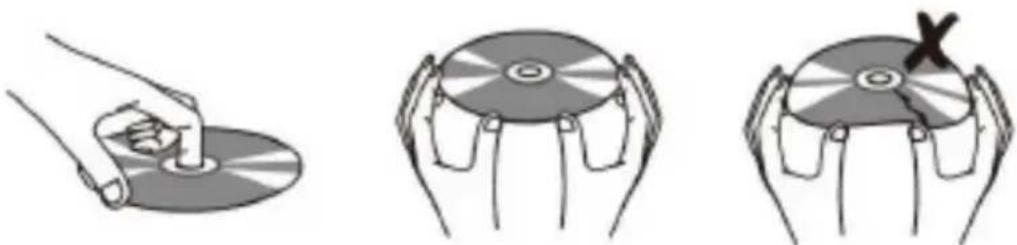
- Hold a disc by its edge.
- Avoid touching the recorded side of the disc. To remove a disc from its storage case, press down on the center retention mechanism of the case and lift the disc out.
- Do not subject discs to prolonged exposure to direct sunlight, high humidity, or high temperatures.
- Do not bend or press disc.
•To reduce the risk of scratches, always put disc back in its case after use. Store disc vertically in a cabinet.
- Do not place stickers or labels on either side of a disc.
natural_image
Illustration showing three hands holding a CD or DVD disc, with one hand using a tool to press the disc (no text or symbols present)- Use a dry, soft cloth to wipe off any fingerprints and dusts from the playing surface of the disc.
- Wipe in a straight line radically from the center to the outside edge of the disc. Small dust particles and light stains will not affect playback quality.
- Never use chemicals such as record sprays, anti-static sprays, benzene, or thinners to clean a disc. Doing so will damage the surface of the disc permanently.
Accessories:
1.CD Player x 1
2.Remote Control x 1
3.User Manual x 1
4.Type-C Charging Cable x 1
Main Features:
- LED Screen Display
2.USB Flash Reading/Playing
-
Bluetooth Input & Output
-
Built-in 2000 mAh battery.
5.3.5mm Audio Input & Output Port (Headphone jack)
-
Loop Playback modes: Repeat One, Repeat All, Normal, Cancel Repeat.
-
Supports multiple CD formats: CD, CD-R, CD-RW, MP3, WMA.
Operating Mode Conversion:
This CD player is auto-detect mode.
- Move the CD arm to the top of the CD to enter the CD playback mode (In this mode, other playback functions cannot be used; put the tone arm back before using other functions.).
- When a U-disk is inserted into the USB port, it can be transferred from other modes to USB playback.
- When the AUX port is connected to an audio source, it can be played from other modes to AUX.
- When CD/USB/AUX are all exited, it will automatically enter Bluetooth mode.
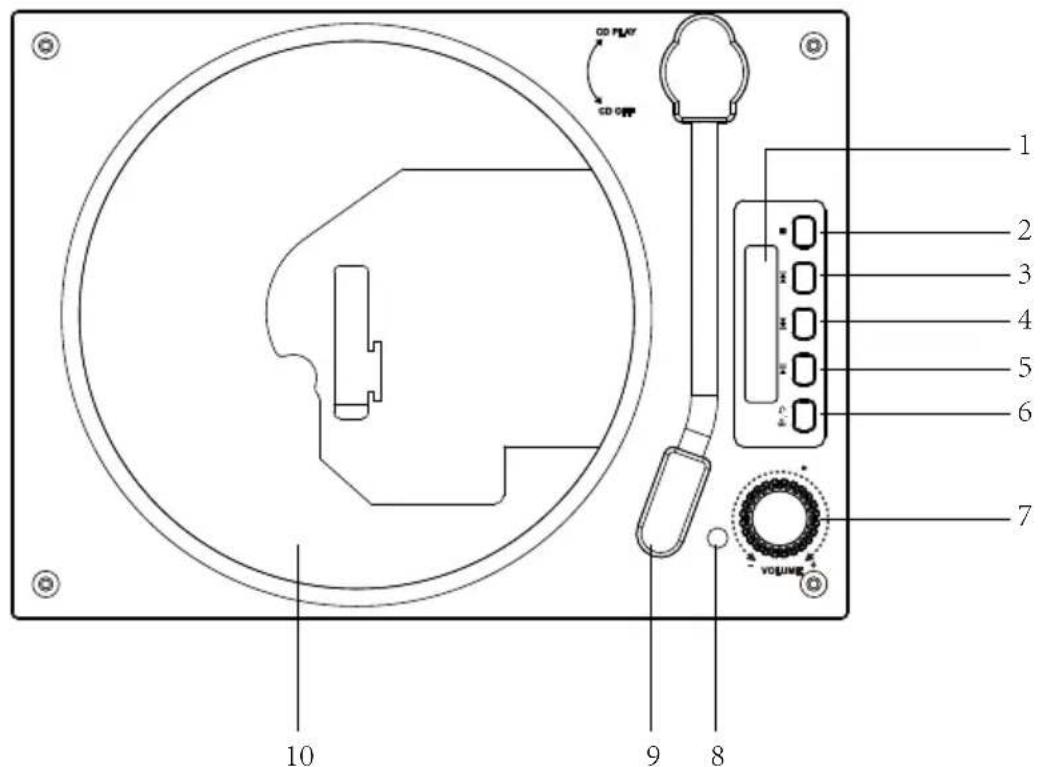
-
LED Display
-
Stop Button
-
Next Song
-
Previous Song
-
Pause/Play
-
Bluetooth Out/Repeat Key
-
Volume Knob
-
Remote Control Receiver
-
CD Mode Switch
-
Laser Pickup Head
-
Power Switch
-
Charging Indicator
-
Charging Port
-
USB Input Port
-
3.5mm AUX Out Port (Headphone jack)
-
3.5mm AUX-in Port

CD Mode Operation:
Move the CD arm to the top of the CD disk to enter the CD playback mode.
Tap the " " button to play or pause the current track.
Tap the " " key to go back one song. Press and hold the key to fast rewind the current track.
Tap the " " key to advance one track. Press and hold the key to fast forward the current track.
Tap " " to stop the current playback.
Tap " " button, you can modify it to repeat single song/repeat whole disk/close repeat play.
Bluetooth Mode Operation:
- The power on defaults to Bluetooth mode, or when CD/USB/AUX mode are all exited, BT is displayed, indicating that it is currently in Bluetooth mode.
- Operate the Bluetooth device correctly to pair and connect to the Bluetooth of the unit (Bluetooth name: Boogie Prixton).
- Tap the " " button to play or pause the current track.
•Tap the " " button to return to the previous song.
•Tap the " " button to play the next song.
To pair a new Bluetooth device, press and hold the " " key for 2 seconds.
USB Mode Operation:
After inserting the USB flash disk, the recognized audio files in the USB flash disk can be played automatically, and the screen displays USB, i.e. the current function is USB mode.
Tap the " " button to play or pau se the c current track.
Tap the " " key to go back one song. Press and hold the key to fast rewind the current track.
Tap the " " key to advance one track. Press and hold the key to fast forward the current track.
Tap " " to stop the current playback.
Tap " " button, you can modify it to repeat single song/repeat whole disk/close repeat play.
AUX-in Mode Operation:
- Plugging into the AUX port will automatically play AUX external audio; LINE is displayed to indicate that it is currently in AUX mode.
- Tap the “ ” button to pause playback. Tap the key again to resume play back.
Note: Plugging into the AUX port has no effect when the USB/CD is not exited.
Bluetooth Output Mode Operation:
The Bluetooth output function only supports CD/AUX/USB mode, which sends CD/AUX/USB audio wirelessly to other Bluetooth receiving devices for listening (Bluetooth speaker or Bluetooth headphones).
- In CD/AUX/USB mode, long press the " " button, the Bluetooth symbol " " starts to flash slowly, indicating that Bluetooth output mode is on.
- Turn on the receiving device (Bluetooth speaker or Bluetooth headset) in Bluetooth receiving mode and wait for pairing;
- When the pairing is successful, the Bluetooth symbol " " of the CD player becomes always on, and the receiving device can hear the songs or audio played by the CD player.
- You can use the playback control button on the transmitter side to realize the up and down song, play, pause and other controls.
Charging Mode Operation:
- When the battery voltage is low (3.4V), the CD player will show " [ZZI] " flashing, suggesting that the battery is about to be exhausted, and users should charge the unit in time.
- Insert the Type-C plug of the adapter into the DC 5V 1A power port of the unit, the indicator light is red to indicate that charging is in progress, when the indicator light turns green, it means charging is complete.
- When the battery voltage is as low as 3.3V, all functions of the unit will stop working.
Trouble shooting
- Cannot be turned on.
Reason 1: Switch is not turned on.
Solution 1: Please check if the switch is powered on.
Reason 2: The battery is dead.
Solution 2: Please use the product after charging it via the included charging cable.
- Cannot read CD discs.
Reason 1: The disc is installed incorrectly.
Solution 1: Make sure the label side of the disc is facing up; Ensure the disc is inserted fully into the place.
Reason 2: The disc cannot be re cognized.
Solution 2: The CD player is only compatible with CD form at.
Reason 3: The disc is dirty or damaged.
Solution 3: Make sure the disc is not heavily scratched or damaged; Wipe the disc gently from the center radially out to the edge with a clean & soft cloth; Try another new disc to check if the disc is faulty.
Reason 4: The loader is dirty.
Solution 4: Wipe the laser gently with a degreasing cotton swab.
Note: DO NOT TOUCH THE LASER WITH YOUR HANDS.
- Remote does not work.
Reason 1: The insulation sheet is not removed.
Solution 1: Check if the insulation sheet is removed from the battery slot.
Reason 2: The remote is out of power.
Solution 2: Check if the remote battery is running out.
Reason 3: The remote is too far from the CD player.
Solution 3: Make sure the remote is in the range of a reasonable distance (within 6 meters).
- Noisy and screaming when it plays.
Reason 1: The usage time of the disk may be too long, so the disk is not smooth.
Solution 1: Make sure the disc is not heavily scratched or damaged; Wipe the disc gently from the center radically out to the edge with a clean & soft cloth; Try another new disc to check if the disc is faulty.
Reason 2: If there is a "Jiji" sound inside the earphone, it may be caused by scratching of the disc.
Solution 2: Please change to another disc, and do not use the old one again to prevent the player from damage.
Safety caution
- The appliance is intended for household use only, and not for commercial or industrial use.
- This appliance shall not be exposed to dripping or splashing water and no object filled with liquids such as vases shall be placed on the appliance. Dry location uses only.
- Do not expose the appliance, batteries or discs to extreme temperatures, excessive moisture, rain or sand. Never use this device in high temperature or in high humidity. The best operating temperature is between 5°C\~40°C.
- No naked flame sources such as lighted candles should be placed on the appliance.
- Do not place the unit on unstable surface to prevent from falling. Do not place the unit on top of any other appliance.
- Do not place the appliance on or near a hot gas flame, electric element, and heaters or in areas subjected to direct sunlight.
- Place the appliance where there is good air ventilation. Any ventilation holes should not be impeded by covering with items, such as newspaper, tablecloths, curtains etc.
- Do not put the device near magnetic field, e.g. speaker. The normal function of the product may be disturbed by strong Elector-Magnetic Interference. If so, simply reset the product to resume normal operation by switching it off from the mains outlet and then switching it back on after several minutes.
- Do not operate the player if it is not working normally or has been damaged in any way. Turn the unit off, unplug it from the power source and consult service personnel. Do not attempt to service this unit yourself.
- Do not listen to headphones at high volumes. The excessive sound pressure from headphones can cause hearing loss.
- Please observe the local regulations regarding the disposal of packaging materials, exhausted batteries and old equipment.
Warranty policy
This product complies with the warranty law in force in the country of purchase. When you have a problem that you can not solve, you must access the web www.prixton.com and click on the contact option to send us your assistance form.
These technical and electrical specifications are those of typical units and may be changed without prior notice in order to provide improved equipment.
Simplified EU Declaration Of Conformity
We, La Trastienda Digital located in Avenida Cervantes 49, módulo 25, Basauri 48970, Bizkaia hereby declare that the following goods, imported and selling at European market:
| BRAND | MODEL NAME DESCRIPTION | CATEGORY | |
| Prixton | Boogie | CD Player | Audio |
Are in compliance with the EC Council Directive of 2014/53/EU (EM DIRECTIVE) and harmonized standards and with the board of the 16th of April 2014.
The complete text of the UE Declaration of conformity is available anytime at this website address:
www.prixton.com
LA TRASTIENDA DIGITAL