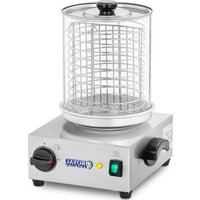
RCHW-800 - Hot dog maker Royal Catering - Free user manual and instructions
Find the device manual for free RCHW-800 Royal Catering in PDF.


| Product type | Hot dog machine |
| Brand | Royal Catering |
| Model | RCHW-800 |
| Supply voltage | 230 V |
| Power | 800 W |
| Temperature range | 0 to 95 °C |
| Material | Stainless steel and tempered glass |
| Cylinder dimensions | Diameter 241 mm |
| Number of heating elements | 0 |
| Delivery contents | Device, glass cylinder with lid, sausage basket, water container, instruction manual |
| Main functions | Cooking and keeping warm of sausages and hot dog buns |
| Adjustable thermostat | Yes |
| Heating indicator light | Yes (orange) |
| ON/OFF switch | Yes |
| Maintenance and cleaning | Clean with a soft damp cloth without detergent; empty and clean the water container after each use |
| Safety | Recommended to turn off after use; unplug before cleaning; do not use dry; minimum distance of 10 cm from walls |
| Weight (approx.) | Approx. 3 kg |
| Device dimensions (approx.) | 300 x 300 x 400 mm |
Frequently Asked Questions - RCHW-800 Royal Catering
User questions about RCHW-800 Royal Catering
0 question about this device. Answer the ones you know or ask your own.
Ask a new question about this device
Download the instructions for your Hot dog maker in PDF format for free! Find your manual RCHW-800 - Royal Catering and take your electronic device back in hand. On this page are published all the documents necessary for the use of your device. RCHW-800 by Royal Catering.
USER MANUAL RCHW-800 Royal Catering
natural_image
Line drawing of a stylized mythical creature with no text or symbols
Inhalt | Contenu | Content | Contenuto | Contenido | Treść | Obsah
Deutsch 3
English 10
Polski 18
Français 26
Italiano 34
Español 42
Česky 50

TECHNISCHES DATENBLATT
BEDIENUNGSANLEITUNG
natural_image
Line drawing of a stylized lion-like creature with no text or symbolsexpondo.de
Thank you for choosing this quality product by Royal Catering!
CAUTIONS
General safety information for the use of electrical devices:
To avoid injury from fire or electric shock, please ensure compliance with safety instructions when using this device. Please read the instruction carefully and make sure that you have understood it well. Keep the manual near the equipment to be able to read it at any time. Always use current sources connected to the ground and providing the necessary voltage (indicated on the label on the device). If you have any doubt, let an electrician check that your outlet is properly grounded. Never use a damaged power cable. Do not open the unit in damp or wet environment, or if you are wet yourself. Protect the unit of solar radiation. Use the device in a protected location to avoid damaging the equipment or endangering others. Make sure the device is able to cool and avoid placing it too close to other devices that produce heat. Before cleaning, disconnect it. Use a soft damp cloth for cleaning. Avoid using detergent and make sure that no liquid enters the unit.
No internal element of this device needs to be maintained by the user. An opening of the device without our approval leads to a loss of warranty.
General safety information for the use of our hot dog warmer:
- The user manual should be kept close to the device and should always be accessible for the users. Instruct your employees how to use the melting furnace properly.
- Make sure the hot air can circulate well and place the device more than 10cm away from walls and other electrical devices. Aerate well the working area.
- Do not place the device close to combustible materials.
- It may happen that by first use, the heating element produces a light smoke. This is absolutely normal. Simply check that the smoke can evaporate and that a good aeration is provided.
- Some parts of the device can get extremely hot. To avoid any injuries, be careful by every contact with the device.
- The meals and their recipients kept warm by the device can get really hot. Do not forget to use adapted protections (cooking gloves).
- Clean regularly the water container to avoid a durable encrustation of dirt.
TECHNICAL DETAILS
| Model RCHW 800 RCHW 2300 | ||
| Voltage (V) 230 | ||
| Power (W) 800 1100 | ||
| Range of heating (°C) 0-95°C | ||
| Material of the housing Stainless steel + tempered glass | ||
| Dimensions of the glass sock (mm) Q 241 | ||
| Number of heating rods 0 4 | ||
| Size of the heating rods (cm) - 25 | ||
CONTENT OF DELIVERY
- Hot dog machine
- 1x cylinder with cover
- 1x bucket
• 4x heating rod (only for model RCHW-2300) - lx water container
- 1x User manual
USAGE PURPOSE
The hot dog machine is exclusively designed to cook sausages and warm up hot dog breads.
Do not use the hot dog machine to:
I. warm up further aliments;
2. warm up liquids containing sugar, sweeteners, acids, bases or alcohols;
3. warm or warm up flammable, noxious, particularly volatile, or any other toxic substances.

Any damage resulting from a non-conform use of the device is pa-
e by the user.
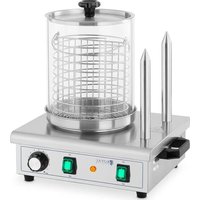
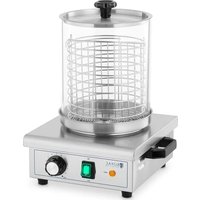
The device RCHW 800 is composed of:
- An ON/OFF switch,
- A thermostat to regulate the temperature at the level wished,
• An orange control light (for the heating), - A heating element in the base of the device, which is controlled by the thermostat.
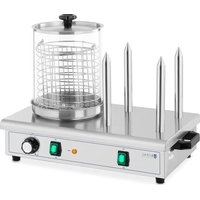
The device RCHW 2300 is composed of:
- Two ON/OFF switches for an independent use of the heating rods and of the glass sock,
- A thermostat to regulate the temperature in the glass sock at the level wished,
- Two orange control light (for the heating),
- A heating element in the base of the device, which is controlled by the thermostat and 4 heating rods.
RCHW 2300
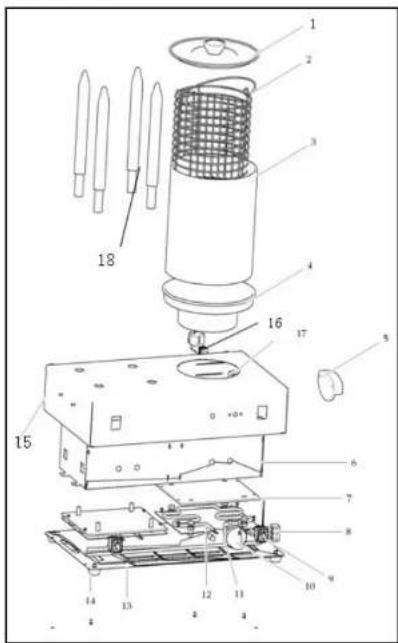
I. Cover
2 Bucket
3. Glass sock
4. Water container
5. Handle
6. Protector frame for elec-
tric part
7. Base plate
8. Ceramics connection terminals
9. Switch
10. Knob
11. Ring for knob
12. Heating element
13. Base bottom
14. Feet
15. Housing
16. Cord and plug
17. Cable connector
18. Heating rod
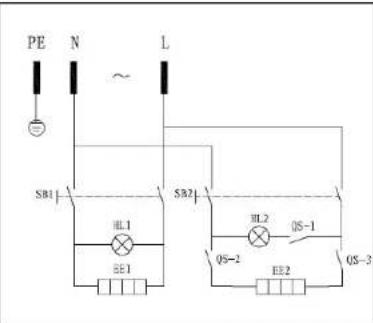
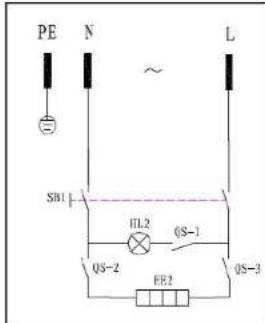
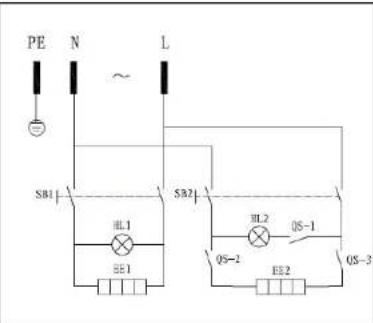
WIRING DIAGRAM
RCHW
800
RCHW
2300
OPERATION
I. Plug in the device.
2. Fill the water container with 650 ml water. Never use the device without water!
3. Place the cylinder with the filled bucket on the water container.
4. Turn on the device. The ON/OFF knob lights up, as well as the orange control light.
5. Regulate the thermostat on the chosen value.
6. The heating element starts to heat and the temperature of the device raises little by little.
7. By the model RCHW 2300; press the ON/OFF button to let the heating rods heat. The knob lights up, as well as the orange control light. The temperature of the heating rods raises little by little. It is recommended to let the rods heat up before use.
8. As soon as the set temperature is reached, the orange light turns off and the heating elements stops to heat.
- As soon as the temperature of the device decreases, the thermostat reacts to it; the orange light turns on again and the heating bar restarts to heat.
- After use, reset the thermostat on zero. When that is done, you can simply turn off the device by switching the ON/OFF knob.
II. Generally speaking, it is advisable to unplug the device while not used. - When the device cooled down, take out the water container, empty and clean it. This should be done after each use to keep the device in perfect hygienic condition.
- To clean the rest of the device, watch up to protect the electric parts from humidity and from direct water contact to avoid electric shocks and shortcircuits.
An impregnated cloth is easily enough if you regularly clean the device. - If you don't use the device for a longer time or stock it, check the humidity and temperature conditions: The air has to be dry and the device should be covered to be protected from dust deposits.
REGULAR CONTROL OF THE DEVICE
Control regularly that the device doesn't present any damage. If it should be the case, please contact your customer service to solve the problem.
WHAT TO DO IN CASE OF PROBLEM?
Please contact your customer service and join following information:
- Invoice number and serial number (the latest is to be found on the technical plate on the device).
- If relevant, a picture of the damaged, broken or defective part.
- It will be easier for your customer service clerk to determine the source of the problem if you make a detailed and precise description of the matter. Avoid formulations like "the device doesn't heat", which may mean that it doesn't heat enough or even not at all. Though, those two possibilities have a different causation!
- Still indicate the performance of the lights to facilitate the diagnosis: Is the light of the ON/OFF switch on when the rocker switch is in ON position? Does the orange light turn on when you set the temperature?
- Check with a thermometer that the device measures the temperature within the cabin properly. (Caution; do not set the thermostat on a value exceeding the maximal value of your thermometer!)
The more detailed your information, the quicker the customer service will be able to answer your problem rapidly and efficiently!
!AUTION: Never open the device without the authorization of your customer service. This can lead to a loss of warranty!
TROUBLESHOOTING
| Problem Cause Solution | ||
| Temperature control is set, the red power control lamp is off, the heating plate remains cold. | Power supply/lead is defect | Contact our customer service |
| Temperature control is set, the red power control lamp is off, but the heating plate is heated. | Control lamp is defect | Contact our customer service |
| Temperature control is set, the red power control lamp flashes up, but the heating plate is not heating up. | Heating element is defect | Contact our customer service |

INSTRUKCJA OBSŁUGI
Bedienungsanleitung | Manuel d'utilisation | Istruzioni per l'uso | Manual de instrucciones | Instrukcja
PODGRZEWACZ DO HOT DOGÓW
RCHW 800
RCHW 2300

natural_image
Line drawing of a stylized lion-like creature with no text or symbols
natural_image
Line drawing of a stylized mythical creature resembling a lion or dragon, with no text or symbols present.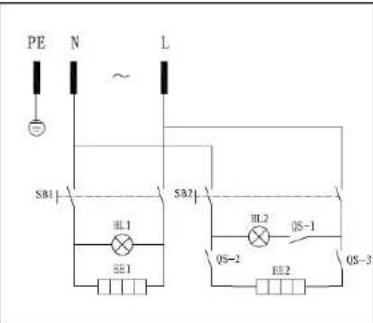
MODE D'EMPLOI
natural_image
Line drawing of a stylized mythical creature resembling a lion or dragon (no text or symbols)expondo.de
natural_image
Line drawing of stylized mythical creatures (no text or symbols)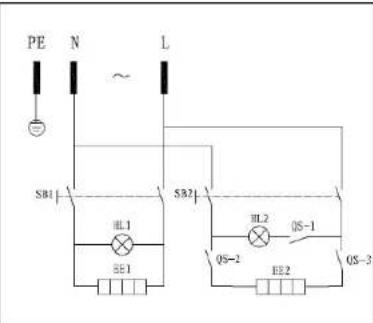
natural_image
Line drawing of a stylized lion-like creature with no text or symbolsFor the disposal of the device please consider and act according to the national and local rules and regulations.
CONTACT
expondo Polska sp. z o.o. sp. k.
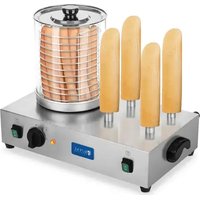
Brand : Royal Catering
Model : RCHW-800
Category : Hot dog maker