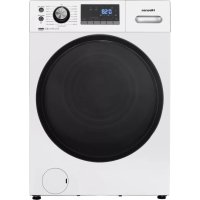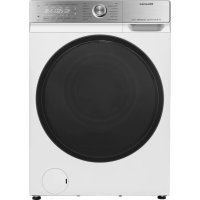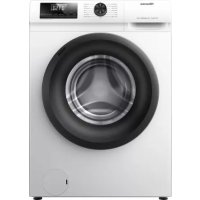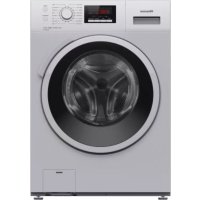
WF5V943BW/BLX - Washing machine HISENSE - Free user manual and instructions
Find the device manual for free WF5V943BW/BLX HISENSE in PDF.


| Product Type | Washing Machine |
| Brand | Hisense |
| Model | WF5V943BW/BLX |
| Power Supply Voltage | 220-240 V ~50 Hz |
| Water Pressure | 0.05 - 0.8 MPa (0.5 - 8 bar) |
| Max Spin Speed | 1200 rpm |
| Max Washing Temperature | 90 °C |
| Control Type | Electronic with display and touch buttons |
| Wash Programs | Cotton, Synthetics, Wool, Eco 40-60, Quick, BabyCare, Shirts, Sports, Anti-Allergy, Drum Clean, Rinse, Spin |
| Special Functions | Steam, Water+, Anti-crease, Delay Start, Super Quick, DoseAssist, Child Lock, AirDry |
| Connectivity | Wi-Fi 2.4 GHz, ConnectLife app |
| Door Type | Lockable with child safety |
| Pump Filter | Accessible from front, regular cleaning recommended |
| Detergent Drawer | Removable, with compartments for prewash, main wash, and fabric softener |
| Adjustable Feet | Yes, for leveling |
| Energy Efficiency Class | Check the rating plate |
Frequently Asked Questions - WF5V943BW/BLX HISENSE
User questions about WF5V943BW/BLX HISENSE
0 question about this device. Answer the ones you know or ask your own.
Ask a new question about this device
Download the instructions for your Washing machine in PDF format for free! Find your manual WF5V943BW/BLX - HISENSE and take your electronic device back in hand. On this page are published all the documents necessary for the use of your device. WF5V943BW/BLX by HISENSE.
USER MANUAL WF5V943BW/BLX HISENSE
natural_image
Simple line drawing of a washing machine with no text or symbols
ACHTERKANT
natural_image
Simple circular diagram with dashed inner ring and dotted centerline (no text or symbols)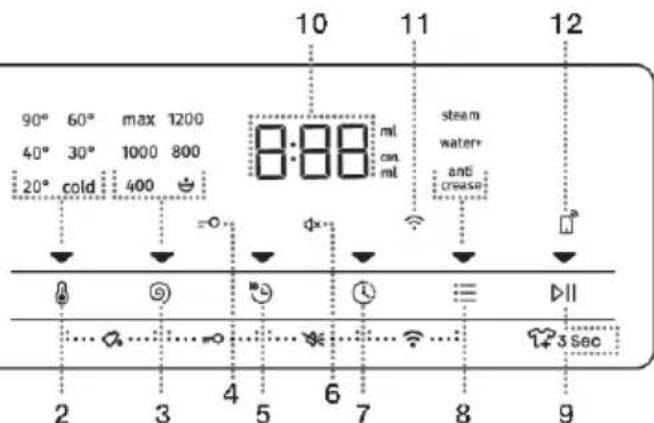
natural_image
Simple circular diagram with dashed inner rings and a vertical dotted line (no text or symbols)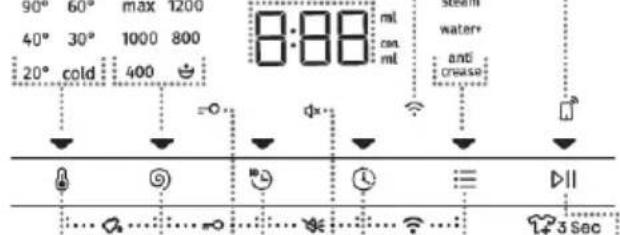
PLAATSINGENAANSLUITING

INFORMATIE!
A STANDAARDAANSLUITING
BAQUA- STOP-AANSLUITING
C TOTALAQUA- STOP-AANSLUITING(MET EENVLOTTER)

INFORMATIE!
natural_image
Diagram of a faucet and a valve assembly (no text or labels)TOTALAQUA-STOP-AANSLUITING(meteenvlotter)
natural_image
Diagram of a faucet with a valve inserted into a tap, labeled 'a' (no text or symbols on the diagram itself)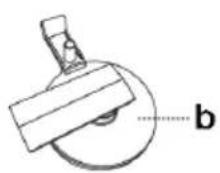
natural_image
Illustration of six different clothing items with directional arrows indicating movement or change (no text or symbols present)Inschakelingvandewasmachine
natural_image
Line drawing of a washing machine with hand and arrow indicating clockwise motion (no text or symbols)1
natural_image
Line drawing of a washing machine with a cloth inside, showing airflow around the door (no text or symbols)2
natural_image
Diagram of a washing machine with hand gesture and circular motion arrows indicating cycle (no text or symbols)3
Overlaaddetrommelniet!ZiePROGRAMMATABELenletopuwnominalebelastingzoalsaangegeven ophettypeplaatje.
Alsdetrommeltevolis,zalhetwasgoedslechterwordengewassen.
Stap3:Keuzevanhetwasprogramma

INFORMATIE!
Gaophetapparaatalsvolgttewerk:
DOSEASSIST
natural_image
Line drawing of a mechanical or architectural component with no visible text, numbers, or symbolsOPTIONS(EXTRA FUNCTIONS)
1 Reinighetfilter regelmatigonderstromend water.
1 Opende
natural_image
Line drawing of a washing machine with a drain cover and a bowl nearby (no text or symbols)PROBLEMENOPLOSSEN
Wattedoen...?
natural_image
Simple line drawing of a washing machine with no text or symbolsLespictogrammesfigurantdanscettenoticeontlessignificationssuivantes:

INFORMATION
Informations, conseils, astuces, ourecommandations

ATTENTION!
Attention-danger

RISQUDECHOCÉLECTRIQUE!
FACEARRIÈRE
| VoirlaplaquesignalétiqueChargemaximale | |||
| 600mm600mm600mm | |||
| 850mm850mm850mm | |||
| 610mm545mm465mm | |||
| 640mm577mm495mm | |||
| 1125mm1062mm980mm | |||
| Xkg(selonlemodèle)Poidsdulave-linge | |||
| VoirlaplaquesignalétiqueTensionnominale | |||
| VoirlaplaquesignalétiquePuissancenominale | |||
| VoirlaplaquesignalétiqueRaccordement | |||
| VoirlaplaquesignalétiquePressiondel'eau | |||
| VoirlaplaquesignalétiqueCourant | |||
| VoirlaplaquesignalétiqueFréquence | |||
Informationdeconformité
natural_image
Simple circular diagram with dashed inner ring and dotted centerline (no text or symbols)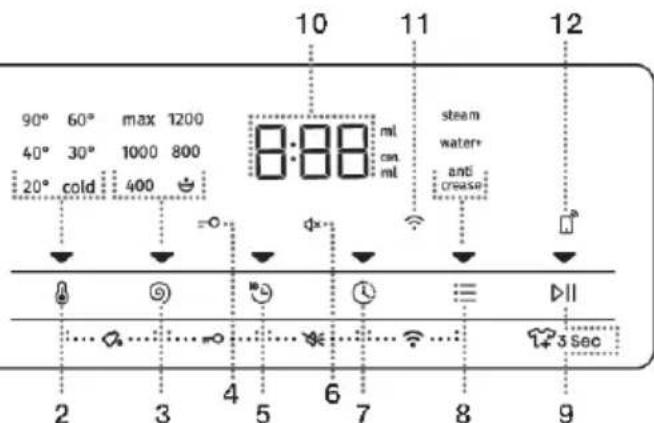
natural_image
Simple circular diagram with dashed inner rings and a vertical dotted line (no text or symbols)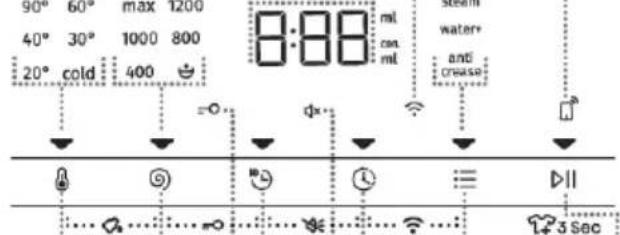
INSTALLATIONETRACCORDEMENT

INFORMATION
1 Mettezl'appareilà niveaudanslesens longitudinaletlesens transversalentournantles piedsréglables.
A CONNEXION STANDARD
BAQUA-ARRÊTERLA CONNEXION
C TOTALAQUA-ARRÊTERLACONNEXION (AVECFLOTTEUR)

INFORMATION
natural_image
Diagram of a faucet and a mechanical component labeled 'a' (no text or symbols on the diagram itself)TOTALAQUA-ARRÊTERLACONNEXION(AVECFLOTTEUR)
(selonlemodèle)
natural_image
Diagram of a faucet with a valve inserted into a connector, labeled 'a' (no text or symbols on the diagram itself)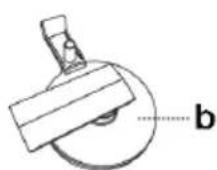
natural_image
Illustration of five different clothing items: hooded jacket, knitted jacket, pants, shirt, and woven basket (no text or symbols)Miseenmarchedulave-linge
natural_image
Line drawing of a washing machine with hand and arrow indicating clockwise motion (no text or symbols)1
natural_image
Line drawing of a washing machine with a cloth inside, showing internal components and a black arrow pointing to the cloth (no text or symbols)2
natural_image
Diagram of a washing machine with hand gesture and circular motion arrows indicating cycle (no text or symbols)3
Nesurchargezpasletambour!ConsultezleTABLEAUDESPROGRAMMESetrespectezlacharge nominaleindiquéesurlaplaquesignalétique.
Siletambouresttropplein, lelingeneserapaslavéenprofondeur.

INFORMATION
Surl'appareil:
TEMP. (TEMPÉRATUREDELAVAGE)
natural_image
Line drawing of a mechanical or architectural component with no visible text, numbers, or symbolsnatural_image
Line drawing of a washing machine with a drain cover and a bowl of liquid, next to an electrical outlet (no text or symbols)GUIDEDEDÉPANNAGE
natural_image
Simple line drawing of a washing machine with no text or symbolsPRODUKTDATENBLATT 66
HINTEN
natural_image
Simple circular diagram with dashed inner rings and a vertical dotted line (no text or symbols)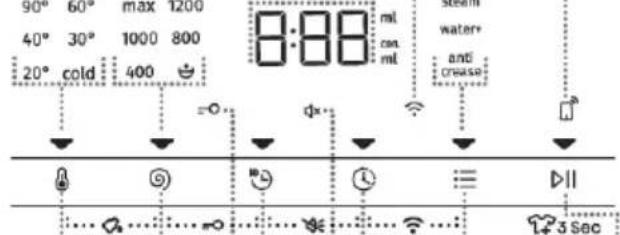
natural_image
Diagram of a faucet with a valve inserted into a container, labeled 'a' (no text or symbols on the diagram itself)natural_image
Diagram of a faucet with a valve inserted into a container, labeled 'a' (no text or symbols on the diagram itself)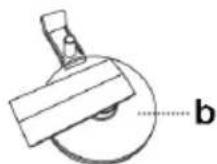
natural_image
Line drawings of five different clothing items: hooded jacket, hoodie, pants, shirt, and woven basket (no text or symbols)
INFORMATION!
AmGerät:
TEMP.(WASCHTEMPERATUR)
DOSEASSIST
1 Siekönnenden
1 ÖffnenSiedie
natural_image
Line drawing of a washing machine with a drain and a bowl nearby (no text or symbols)DETAILEDINSTRUCTIONS
FORUSEOFWASHINGMA- CHINE
natural_image
Simple line drawing of a washing machine with no text or symbolsThefollowingsymbolsareusedthroughoutthemanualandtheyhavethefollowingmeanings:

INFORMATION!
Information, advice, tip, or recommendation

WARNING!
Warning-general danger

ELECTRICSHOCK!
Warning-dangerofelectricshock

HOTSURFACE!
Warning-dangerofhotsurface

DANGEROFFIRE!
Warning-dangeroffire

It is important that you carefully read the instructions.
Contents
SAFETY PRECAUTIONS 5
Child safety 8
Danger of hot surface 9
Technical data 11
Control unit 12
Removing the blocking rods 14
Moving and transport after installation 15
Selecting the room 15
Adjusting the washing machine feet 16
Positioning the washing machine 17
Connection to water supply 19
Connecting to the power mains 22
WASHING PROCESS, STEP BY STEP (1-7) 27
Step 1: Heed the labels on the laundry 27
Step 2: Preparing the washing process 28
Switching on the washing machine 28
Loading the washing machine 29
Program chart 31
Washing programs with steam 34
AirDry function 34
Remote control of wash using the app 35
Step 4: Choosing the settings 36
Step 5: Selecting additional functions .... 42
Extra function table 43
Step 6: Starting the washing programme 45
Step 7: End of the washing programme 45
Manual interruption 46
Personal settings 46
AdaptTech 46
Personal settings menu 46
Pause button 47
47
Errors 47
Power supply failure 47
480
48D
49CLEANIN Cleaning the dispenser tray .... 49 50Cleaning Cleaning the pump filter .... 51 Cleaning the washing machine exterior .... 52
TROUBLE-SHOOTING .... 53 What to do ...? .... 53 Troubleshooting and error table .... 53 Service .... 59
RECOMMENDATIONSFORWASHINGANDECONOMICUSEYOURWASHING MACHINE 60 PRODUCT INFORMATION 62 Low standby mode 63 DISPOSAL 64

Carefullyreadtheinstructionsforusebeforeusing washingmachine.
Please, donotusethewashingmachinewithoutreading and understanding these instructions or use first.
Theseinstructionsforuseofawashingmachineare suppliedwithdifferenttypesormodelsofwashing machines.Therefore,theymayincludedescriptionsof settingsorequipmentthatarenotavailableinyourwashing machine.
Failuretoobservetheinstructionsforuseorinappropriate useofthewashingmachinemayresultindamagetothelaundry ortheappliance,orinjurytotheuser.Keeptheinstruction manualhandy,nearthewashingmachine.
This appliance is intended to be used in household and similar applications, such as:
- staffkitchenareasinshops, officesandotherworking environments;
- farmhouses;
- byclientsinhotels, motelsandotherresidentialtype environments;
• bedandbreakfasttypeenvironments.
Thewashingmachineisnotintendedforusebypersons (includingchildren)withphysicalormentalimpairments,or personswithlackingexperienceandknowledge.Thesepersons shouldbeinstructedabouttheuseofthewashingmachineby apersonresponsiblefortheirsafety.
WARNING!
Thewashingmachinemayonlybeusedwiththe suppliedpowercord.
ELECTRICSHOCK!
Toavoiddanger,adamagedpowercordmayonlybe replacedbythemanufacturer,aservicetechnician,oran authorizedperson.
WARNING!
Donotconnectthewashingmachinetopowermainsusing anexternalswitchingdevicesuchasaprogrammetimer, orconnectittopowermainsthatisregularlyswitchedon andoffbythepowersupplyprovider.
InstructionsforuseareavailablethroughHisensecustomer servicecenters.
FollowtheinstructionsforcorrectinstallationoftheHisense washingmachineandconnectiontothewaterandpowermains (seechapter»INSTALLATIONANDCONNECTION«).
Connection to water and powers supply hast to be executed by an adequately trained technician expert.
Anyrepairandmaintenancepertainingtosafetyorperformance shouldbedonebytrainedexperts.
Donotinstallthewashingmachineinaroomwherethe temperaturecandroptobelow5°C,aswashingmachine partsmaybedamagedincaseofwaterfreezing.
Theventilationopeningsinthebaseofwashingmachinemust notbeobstructedbyacarpet.
Toconnectthewashingmachinetowatersupply, make suretousethesuppliedwatersupplyhoseandgaskets. Water pressuremustbebetween0.05and0.8MPa(0.5–8bar).
Alwaysuseanewwatersupplyhosetoconnectthewashing machinetowatersupply;donotreuseanoldwatersupply hose.
The end of the water discharge hoses should reach into a water drain line.
Beforethestartofthewashingcycle,pressthedooronthe indicatedspotuntilillocksintoplace.Thedoorcannotbe openedduringwashingmachineoperation.
Werecommendremovinganyimpuritiesfromthewashing machinedrumbeforethefirstwashusingtheCotton90°C programme(seePROGRAMMETABLE).
Afterthewashingcycle,closethewatertapandpullout thewashingmachineplugfromthepowersocket.
Onlyusethewashingmachineforwashinglaundry,as describedintheinstructionmanual. Themachineisnot intendedfordrycleaning.
Nosilverionsarereleasedduringthewashingprogramme.
Onlyuseagentsformachinewashingandcareoflaundry.We shallnotberesponsibleforanydamagesordiscolourationof gasketsandplasticpartsresultingfromincorrectuseof bleachingorcolouringagents.
Whendescaling, only used descaling agents with added anti-corrosion protection. (Only usenon-corrosivedescaling agents.) Follow them an manufacturer's instructions. Finish the descaling process with several insecycles or by running the Drumclean (Self-cleaning programme) in order to remove any residual acid (e.g. vinegaretc.).

DANGEROFFIRE!
Donotusedetergentsthatcontainsolventsasthiscould leadtoreleaseofpoisonousgases,damagetothewashing machine,andriskoffireandexplosion.
Childsafety

WARNING!
Childrenoflessthan3yearsshouldbekeptawayunless continuouslysupervised.
Childrenshouldbesupervisedtoensurethattheydo notplaywiththeappliance.
Keepthedetergentandconditioneroutofreachof children.
Activatethechildlock.Seechapter»CHOOSINGTHE SETTINGS/Childlock«.
Beforeclosingthewashingmachinedoorandrunningthe programme,makesurethereisnothingexceptlaundryinthe drum(e.g.ifachildclimbedintothewashingmachinedrum andclosedthedoorfromtheinside).
Thewashingmachineismadeincompliancewithall relevantsafetystandards.
Thisappliancecanbeusedbychildrenagedfrom8yearsandaboveandpersonswithreducedphysical,sensoryormentalcapabilitiesorlackofexperienceandknowledgeiftheyhavebeingivensupervisionorinstructionconcerninguseoftheapplianceinasafewayandunderstandthehazardsinvolved.
Childrenshallnotplaywiththeappliance.
Cleaning and user maintenances shall not be made by children without supervision.
Dangerofhotsurface

HOTSURFACE!
Athigherwashingtemperatures,thedoorglasswillheat up.Becarefultoavoidburns.Makesurechildrendonot playnearthedoorglass.
WASHINGMACHINEDESCRIPTION
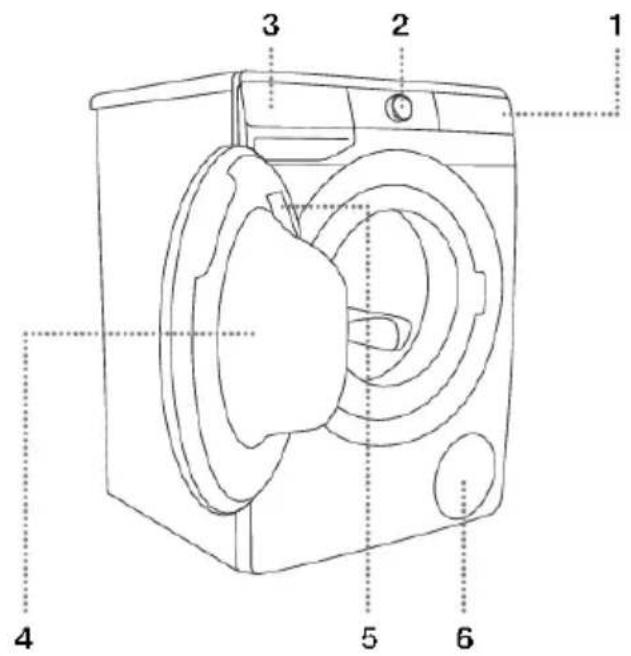
FRONT
- Touchcontrolunit
- Dryeron/offandprogramselectorknob
- Detergentcompartment
- Door
- Ratingplate
6.Pumpfilter
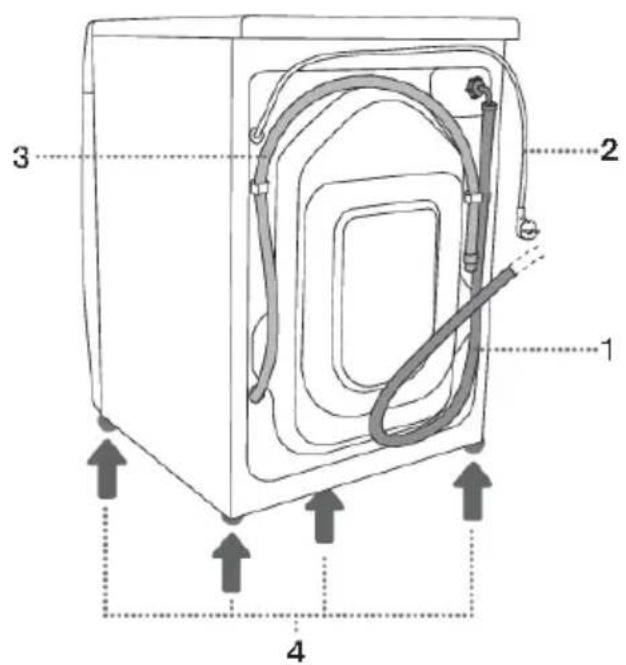
BACK
1.Watersupplyhose
2.Powercord
3. Waterdischargehose
4. Adjustable feet
Technicaldata
(dependingonthemodel)
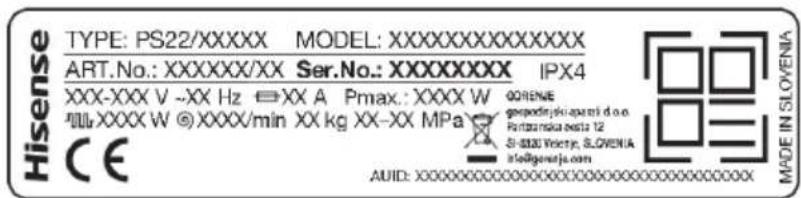
Ratingplatewithbasicinformationaboutthewashingmachineislocatedontheinnersideofthe washingmachinedoor(seechapter»WASHINGMACHINEDESCRIPTION«).
| SeeratingplateMaximumload | |||
| 600mm600mm600mm | |||
| 850mm850mm850mm | |||
| 610mm545mm465mm | |||
| 640mm577mm495mm | |||
| 1125mm1062mm980mm | |||
| Xkg(dependingonthemodel)Washingmachineweig | |||
| SeeratingplateRatedvoltage | |||
| SeeratingplateNominalpower | |||
| SeeratingplateConnection | |||
| SeeratingplateWaterpressure | |||
| SeeratingplateCurrent | |||
| SeeratingplateFrequency | |||
Complianceinformation
| HL3215STGRadioequipmenttypeHLW3215-TG(dependingonthemodel)HLW3215-TG01 | |
| Wi-Fi | |
| 2.4000GHz-2.4835GHzOperatingfrequencyrange | |
| ≤10dBm/MHz(EIRP)(Antennagain<10dBi)Maximumoutputpower | |
| Gain:0dBiMaximumantennagain | |
| Bluetooth | |
| 2.400GHz-2.4835GHzOperatingfrequencyrange | |
| 6dBm(≤10dBm)Carrieroutput | |
| F1DEmissiontype | |
Hisensestatesthattheequipmentdescribedabovecomplieswiththe2014/53/EUdirective.
Ratingplate
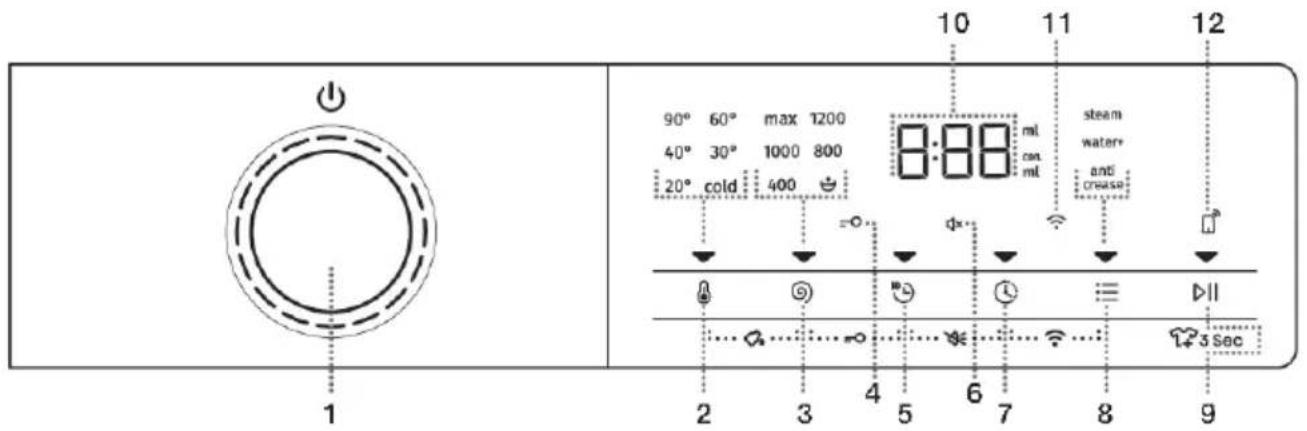
Controlunit
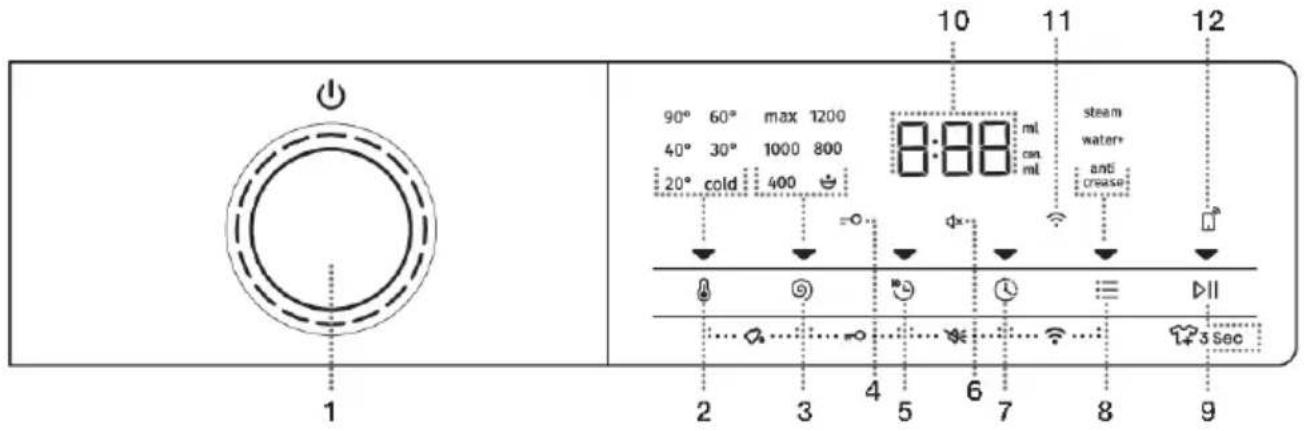
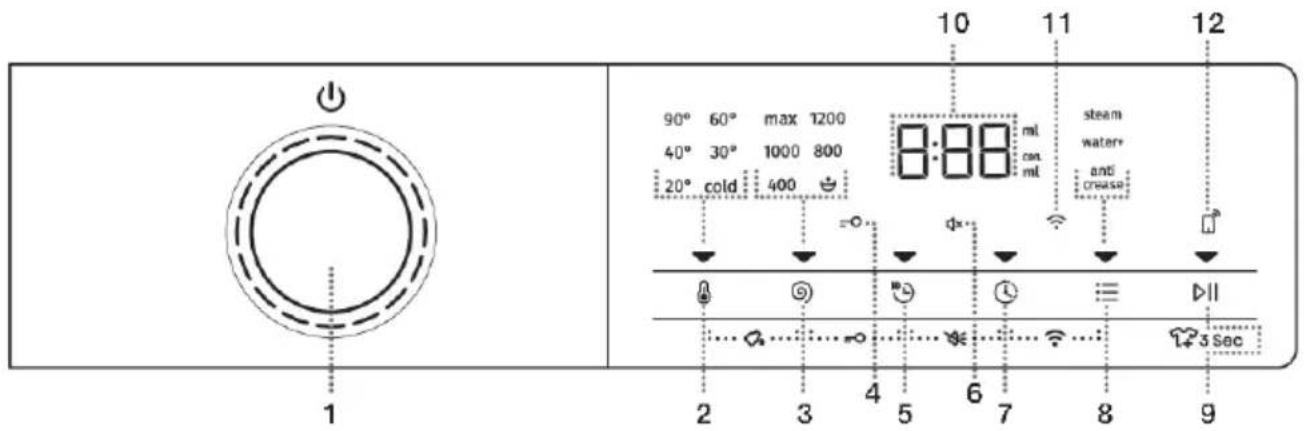
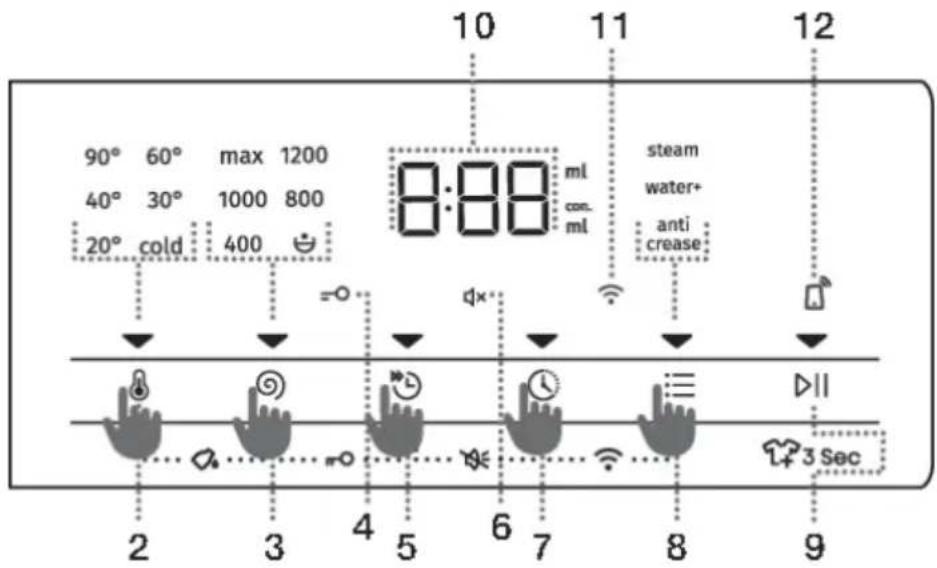
| 1 | WashingmachineON/OFFandPROGRAMSELECTORDIAL.ToTURNONthewashingmachine,rotatetheprogramselectorknobleftorright.To TURN OFF the washing machine, rotate the program selector knob to position OFF ⏻.ToSELECTawashingprogramme,rotatetheknobleftorright.Thesignallightnexttothe selectedprogramlightsup. |
| 2 | TEMP.(WASHINGTEMPERATURE)Optiontosetwashingtemperature.Whentheapplianceisturnedon,theindicatoronthebuttonlightsup. |
| 3 | SPIN(SPINNINGRATE)PUMPSTOPDRAIN- nolightingOptiontosetthespinningrate.Whentheapplianceisturnedon,theindicatoronthebuttonlightsup. |
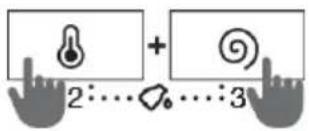
| 2+3 | DOSEASSISTInformationonrecommendedamountofpowderandliquiddetergent,accordingtothe selectedsettingsandtheamountPressthepositions2+3andholdthemfor3seconds. |
| CHILDLOCKsymbollighting4 | |
| 5 | QUICKER(FAST)Optiontosetashorterwashingprogrammetime.Whentheapplianceisturnedon,theindicatoronthebuttonlightsup. |
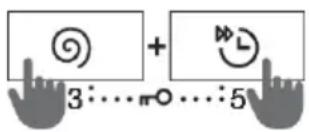
| 3+5 | ChildlockON/OFPressthepositions3+5andholdthemfor3seconds. |
| 6 | LightingoftheSOUNDOFFsymbol ✉ |
| 7 | DELAYEND(DELAYINGTHEENDOFTHEWASHINGPROGRAM)Optiontosetthetimeofwashingprogrammecompletion.Whentheapplianceisturnedon,theindicatoronthebuttonlightsup. |
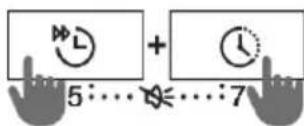
| 5+7 | SoundON/OFPressthepositions5+7andholdthemfor3seconds. |
natural_image
Simple circular diagram with dashed inner ring and dotted centerline (no text or symbols)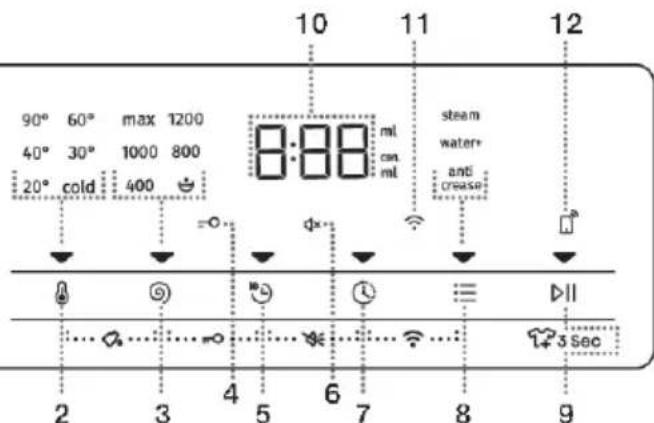
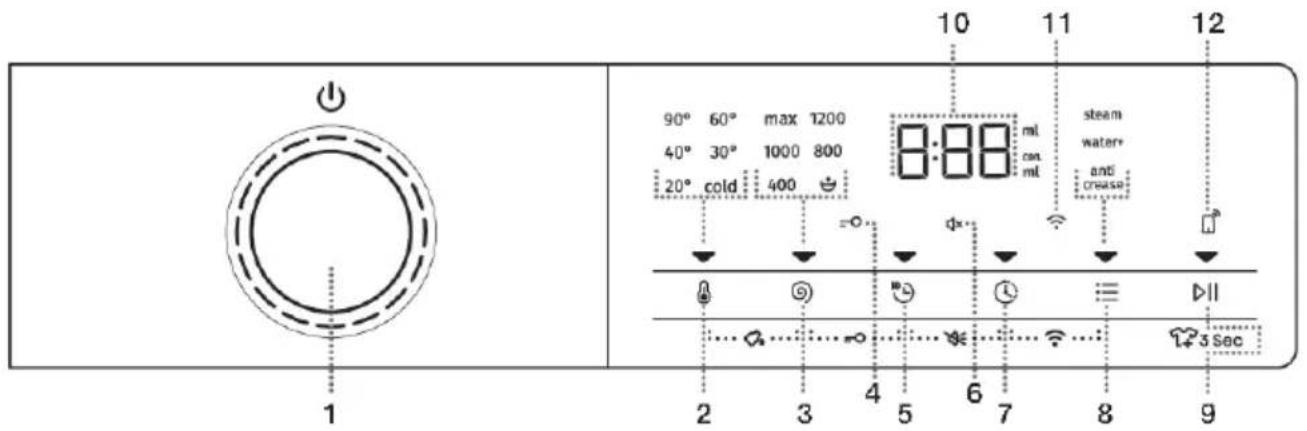
| 8 | OPTIONS(EXTRAFUNCTIONS)•STEAM(STEAM)Optiontoactivatethelaundryrefreshfunction;•WATER+(EXTRAWATER)Optiontosetahigherwaterlevel;•ANTICREASE(CREASEPREVENTION)Optiontoactivatethegentlewashfunction.Whentheapplianceisturnedon,theindicatoronthebuttonlightsup. |
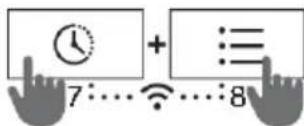
| 7+8 | MENUWi-Ficonnections(CONNECT)(CONNECTION)Pressthepositions7+8andholdthemfor3seconds. |
| 9 | START/PAUSEBUTTONThebuttonhas4functions:START– starting the washing programme (start the programme with a brief press on thebutton);PAUSE– pause the washing programme (if you briefly press the button again, you can temporarilystopapplianceoperation);ADD CLOTHES– adding clothes into the drum during the washing progress (hold the buttonfor3seconds);SAVINGPERSONAL SETTINGS(holdthebuttonfor5seconds).Whentheapplianceisturnedon,theindicatoronthebuttonlightsup. |
| ThefollowingisdisplayedontheDISPLAYUNIT:10•availablefunctions;timeremainingtoprogrammecompletion;informationfortheuser. | |
| 11 | LightingofthesymbolCONNECT(CONNECTION)ThesymbolislitatalltimeswhenREMOTESTART(REMOTESTART)isenabled,evenwhen theapplianceisnotinoperationorisinstandbymode. |
| 12 | LightingofthesymbolREMOTESTARTThesymbolislitatalltimeswhenREMOTESTARTisenabled,evenwhentheapplianceis notinoperationorisinstandbymode. |
natural_image
Simple circular diagram with dashed inner rings and a vertical dotted line (no text or symbols)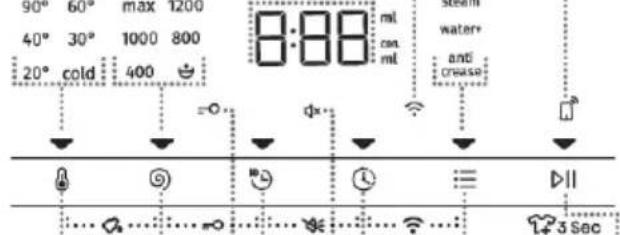
INSTALLATIONANDCONNECTION

INFORMATION!
Removeallpackaging.Whenremovingthepackaging,makesurenottodamagetheappliance withasharpobject.
Removingtheblockingrods

WARNING!
Before the first use of the appliance, transport drosmust beremoved. A blocked washing machine may be damaged when it is switched on for the first time. Warranty shall be void in cases of such damage!

flowchart
graph TD
    A["Device Opening"] --> B{Tool Application}
    B -->|Arrow 1| C["Component 1"]
    B -->|Arrow 2| D["Component 2"]
    B -->|Arrow 3| E["Component 3"]
    B -->|Arrow 4| F["Component 4"]
    B -->|Arrow 5| G["Component 5"]
    B -->|Arrow 6| H["Component 6"]
    B -->|Arrow 7| I["Component 7"]
    B -->|Arrow 8| J["Component 8"]
    B -->|Arrow 9| K["Component 9"]
    B -->|Arrow 10| L["Component 10"]
1 Movethehosesand undothescrewsontheback ofthewashingmachine. Removethetwoangular pieces.
2Slidetheangularpieces ontothegroveinthe blockingrod;beforedoing so,rotatetherightangular piecetotheoppositeside.
3 Usetheangularpieces torotatetheblockingrods by90°andpullthemout.
4 Coverthetwoholes throughwhichtheblocking rodswereinsertedwith plasticplugs,andredothe screwsthatyouundidin step1. Theplasticplugsare suppliedinthebagwiththe washingmachineinstruction manual.
Movingandtransportafterinstallation

INFORMATION!
If you wishtomovethewashing machine after it has been installed, the angular pieces and least one blocking rod shavetobere-installed to prevent vibration damage to the washing machine during transport (see chapter) INSTALLATION AND CONNECTION /Removing the blocking rods). If you lost the angular pieces and the blocking rods, they can be ordered from the manufacturer.
Selectingtheroom

INFORMATION!
Flooronwhichthewashingmachineisplacedmusthaveaconcretebase.Itshouldbeclean anddry;otherwise,thewashingmachinemayslide.Also,cleanthebottomsurfaceofadjustable feet.

INFORMATION!
Thewashingmachinemuststandlevelandstableonasolidbase.

INFORMATION!
If the washing machine is placed on an elevated stable base, the washing machine has to be additionally secured against tipping.
Adjustingthewashingmachinefeet
UseawaterscaleandspannerNo.32(forfeet)and17(forthenut).Thespannersarenotsupplied.
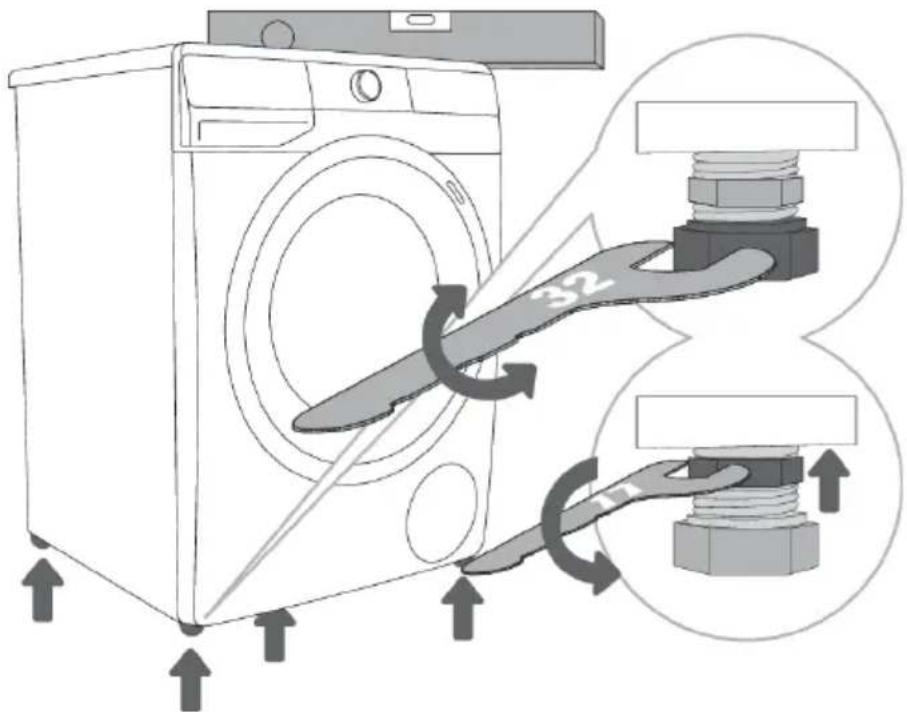
1 Levelthewashing machineinlongitudinaland traversedirectionbyrotating theadjustablefeet.
2 Afteradjustingtheheight ofthefeet, firmlytightenthe jamnuts(counternuts)using aspannerNo17, byturning themtowardsthebottomof thewashingmachine(see figure).

INFORMATION!
Incorrectlevellingofthewashingmachinewiththeadjustablelegsmaycausevibration, appliance slidingacrosstheroom,andloudoperation.Incorrectlevellingofthewashingmachineisnot subjecttowarranty.

INFORMATION!
Sometimes, unusualorloudernoisemayappearduringapplianceoperation; thesearemostly theresultofimproperinstallation.
Positioningthewashingmachine
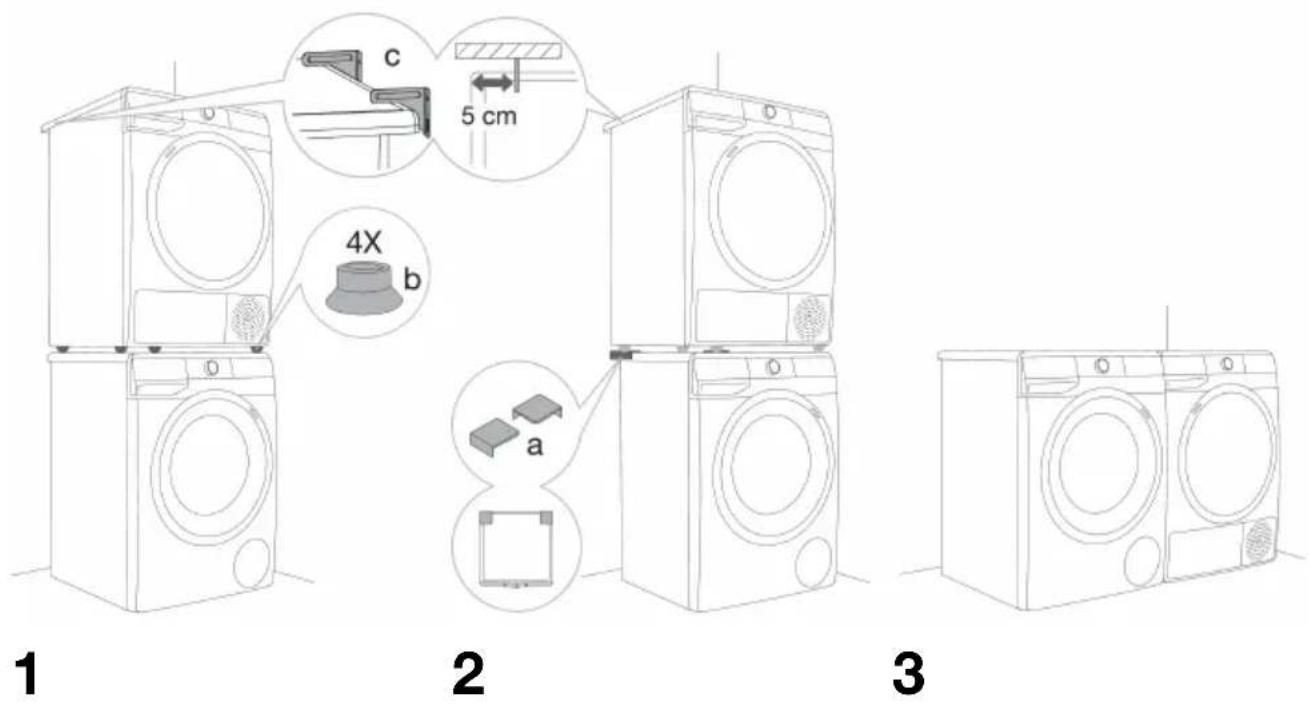
If you also have a Hisensed dryer of corresponding (same) dimensions, it can be placed on top of the Hisense washing machine (in this case, vacuum feet must be used) or next to it (figures 1 and 3).
IfyourHisensewashingmachineissmaller(min.depth545mm),thanyourHisensedryer,thenthe dryersupporthastobepurchasedextra(figure2).Thesuppliedvacuumfeetmustbeused;theyare designedtopreventthedryerfromslipping.
Additionalequipment(dryersupport(a), vacuumfeet(b) and wallfixingbracket(c)) can be purchased at the service centre.
Thesurfaceonwhichtheapplianceisplacedshouldbecleanandlevel.
HisensewashingmachineontowhichyouintendtoplacetheHisensedryershouldbeabletohold theweightoftheHisensedryer(seechapter»DESCRIPTIONOFTHEDRYER/Technicalinformation«).
Washingmachineinstallationclearances
1
2
INFORMATION!
Thewashingmachinemaynotbeincontactwithawalloradjacentfurniture. Foroptimum washingmachineoperation, were recommend observing the clearances from the walls as indicated in the figure. In case off failure to observ the minimum required clearances, safe and correct washing machine operation cannot be ensured. Moreover, overheating can also occur (figures 1 and 2).
INFORMATION!
Installingthewashingmachineunderacountertopisnotrecommended.
Openingthewashingmachinedoor(bird's-eyeview)
Seechapter»WASHINGMACHINE
DESCRIPTION/Technicalinformation«).
a=washingmachinedepth
b=depthwithdooropen
Connectiontowatersupply
Attachthehosetothewatertapbyscrewingitontothethread.
A STANDARD
CONNECTION
BAQUA-STOP
CONNECTION
CTOTALAQUA-STOP
CONNECTION(WITHA FLOAT)

INFORMATION!
Fornormalwashingmachineoperation, the pressure in the water main should be between 0.05 and 0.8 MPa (0.5–8 bar). Minimum dynamic water pressure can be determined by measuring the waterfall.
In30seconds,1.2litresofwatershouldflowfromafullyopentap.

INFORMATION!
Tightenthewatersupplyhosebyhand, firmlyenoughforthehosetohaveagoodseal(max.2Nm). Afterconnectingthehose, thesealmustbecheckedforanyleaks. Donotusepliersor similartoolswhenconnectingthehoseasthiscoulddamagethenutthread.

INFORMATION!
Only usethewatersupply hoses supplied with the appliance. Donot use any used or other hoses.

INFORMATION!
When connecting the watersupply hose, makes sure to connect it in a way that allows adequate and unobstructed watersupply.
AQUA-STOPconnection
(dependingonthemodel)
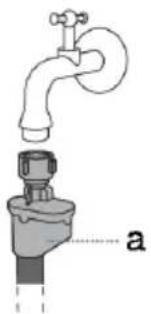
Ifaninternaltubeorhoseisdamaged,ashut-offsystemisactivatedthatcutsthowatersupplytothe washingmachine.Insuchcase,thecontrolglass(a)willturnred.Replaceewatersupplyhose.
natural_image
Diagram of a faucet with a valve inserted into a container, labeled 'a' (no text or symbols on the diagram itself)TOTALAQUA-STOPconnection(withafloat)
(dependingonthemodel)
Ifaninternaltubeorhoseisdamaged,ashut-offsystemisactivatedthatcutsthowatersupplytothe washingmachine.Insuchcase,thecontrolglass(a)willturnred.Replaceewatersupplyhose.
Ifthereiswateronthebottomofthewashingmachine,thefloat(b)willriseandtriggerashut-off systemtocutthewatersupplytothewashingmachine;washingprocessisstopped,watersupply isshutoff,theapplianceengagesthepump,andsignalsanerror.
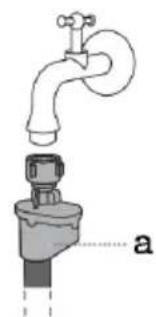
natural_image
Diagram of a faucet with a valve inserted into a container, labeled 'a' (no text or symbols on the diagram itself)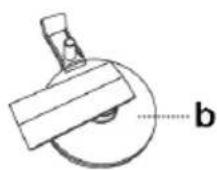
Connectingandsecuringthewaterdischargehose
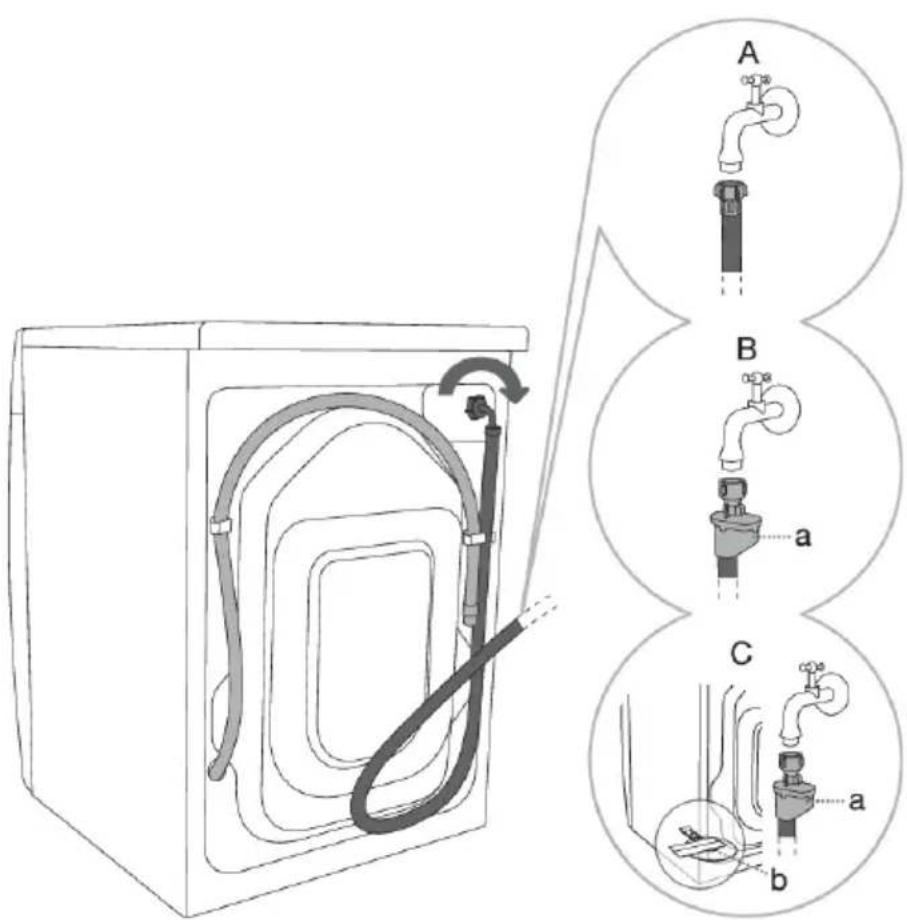
Feedthewaterdischargehoseintoawashbasinorabathtub,orconnectitdirectlytoadrain(minimum drainconnectiondiameteris4cm).Theverticaldistancefromthefloortotheendofthedischarge hosemaybenomorethan100cmandnolessthan60cm.Itcanbeattachedinthreeways(A,B,C).
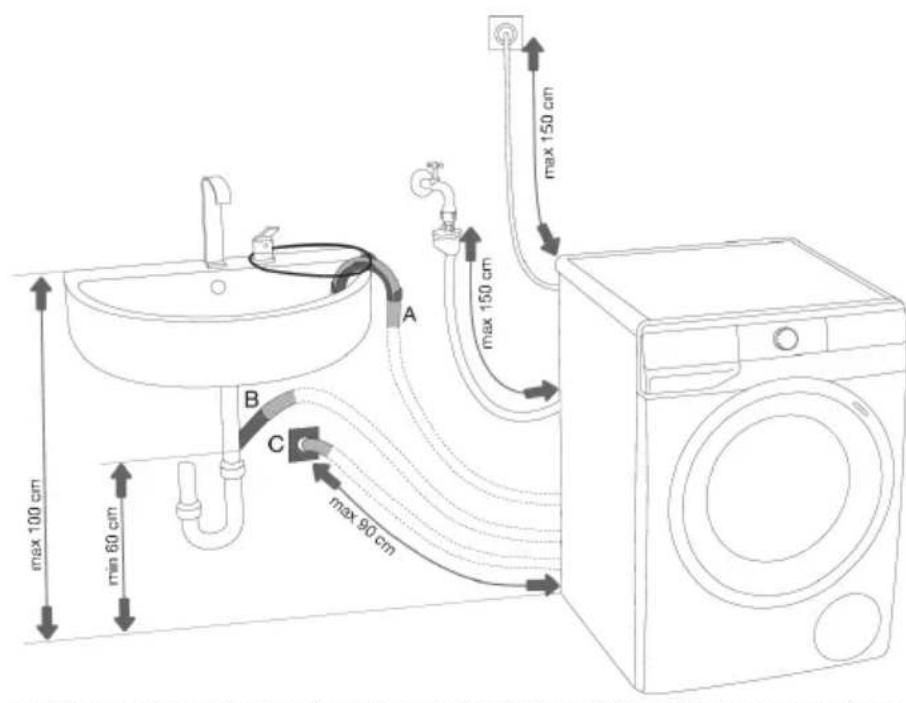
A Dischargehoseend maybeplacedovera washbasinorabathtub.B Useastringfedthroughthe openingintheelbow supporttoattachthehose andpreventitfromslipping tothefloor.
B Dischargehosemay also be attached directly to the washbasindrain.
C Dischargehosecan also be attached to a wall drain with atrap; such trap should be properly installed to allow cleaning.
D Thedischargehosehas tobeattachedandaffixed tothepinonthebackofthe washingmachine,asshown inthefigure.
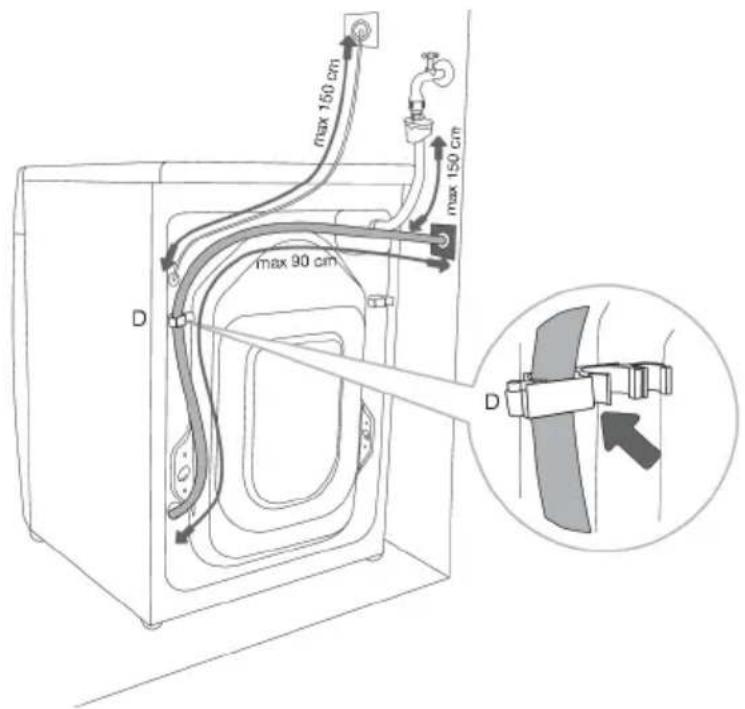

INFORMATION!
If the discharge hose is not correctly attached, safe and correct washing machine operation cannot be ensured.
Connectingtothepowermains
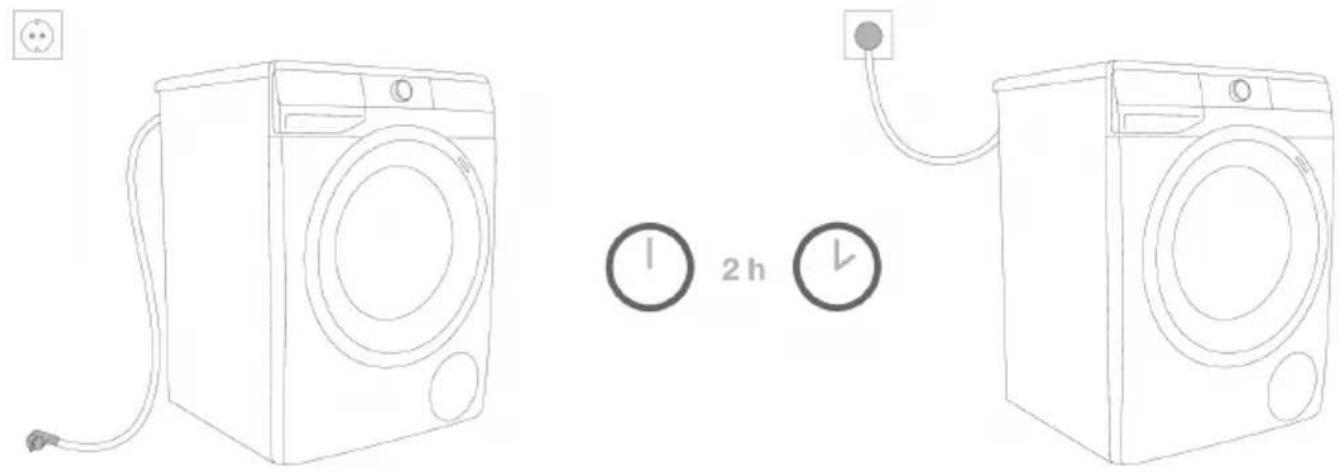

ELECTRICSHOCK!
Beforeconnectingthewashingmachinetothepowermains, waitforatleast2hoursuntil itreachesroomtemperature.
Connectthewashingmachinetoagroundedpoweroutlet. Afterinstallation, thewalloutletshouldbe freelyaccessible. Theoutletshouldbefittedwithanearthcontact(incompliancewiththerelevant regulations).
Information on your washing machine is indicated on the rating plate (see chapter » WASHING MACHINE DESCRIPTION/Technical information«).

ELECTRICSHOCK!
Werecommendusingover-voltageprotectiontoprotecttheapplianceincaseofalightning strike.

WARNING!
Thewashingmachinemaynotbeconnectedtothepowermainsusinganextensioncord.

INFORMATION!
Donotconnectthewashingmachinetoanelectricaloutletintendedforanelectricshaverorhair dryer.

INFORMATION!
Anyrepairandmaintenancepertainingtosafetyorperformanceshouldbedonebytrained experts.
BEFOREUSINGTHEAPPLIANCEFORTHE FIRSTTIME
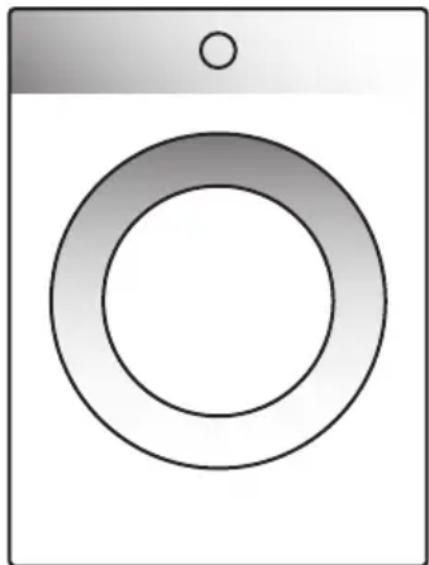
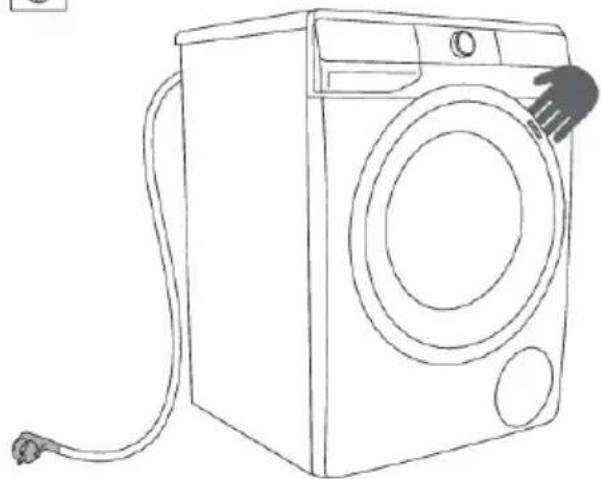
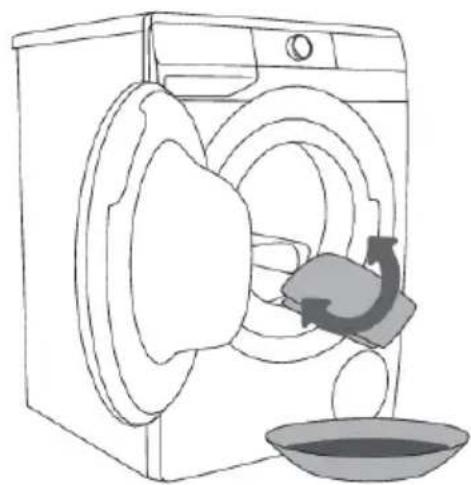
Makesurethewashingmachineisdisconnectedfromthepowermains;then,openthedoortowards you(figures1 and2).
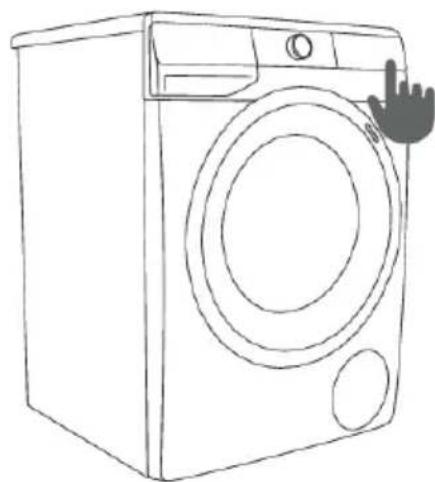
Beforefirstuse,cleanthewashingmachinedrumwithasoftmoistcottonclothandwater,orusethe Cotton90°Cprogramme. Thereshouldbenolaundryinthewashingmachinedrum;thedrumshould beempty(figures3and4).

natural_image
Line drawing of a washing machine with attached cable (no text or symbols)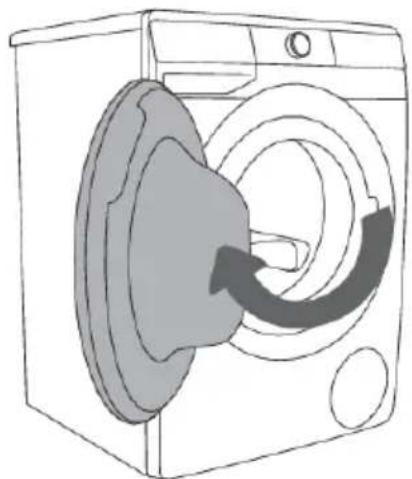
natural_image
Line drawing of a washing machine with a circular component and internal blades (no text or symbols)1
natural_image
Line drawing of a washing machine with a hand washing it, showing internal components and a basin (no text or symbols)2
natural_image
Line drawing of a front-loading washing machine with a hand cursor pointing at the top (no text or symbols)4
3

WARNING!
Donotuseanysolventsorcleaningagentsthatcoulddamagethewashingmachine(please observetherecommendationsandwarningsprovidedbythecleaningagentmanufacturers).
ConnectingtheappliancetotheConnectLifeapplication

ConnectLife is a smart home platform that connects people, devices and services. The ConnectLife application includes advanced digitalservices and carefreesolution that allow userstomonitor and control appliances, receive notifications from a smartphone, and updates software (supported features may vary depending on your appliance and theregion/country in which you are located).
Toconnectyoursmartdevice,youneedahomeWi-Finetwork(only2.4GHznetworksaresupported) andasmartphoneequippedwiththeapplicationConnectLife.

TodownloadtheConnectLifeapplication,scantheQRcodeorsearch forConnectLifeinyourfavouriteappstore.
- InstalltheConnectLifeapplicationandcreateanaccount.
- In the ConnectLife application, go to the »Add device« menu and select the appropriate type of device.ThenscantheQRcode(itcanbefoundonthenameplateoftheappliance;youcanalso entertheAUID/SNnumbermanually).
- The application thenguidesyouthroughtheentireprocessofconnectingtheapplianceto your smartphone.
- Afterasuccessful connection, the appliance can be operated remotely via the mobile application.
Usefultipsforyoursmartdevice
WheretofindtheQRcodeforthedevicesrequiredbytheappduringthe installationprocess?
TheQRcodecanbefoundonthewarrantycardandontheratingplateoftheappliance.
HowtoenableWi-Fionthedevice?

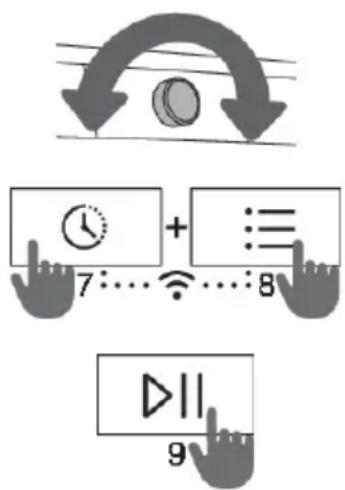
Check that the appliance is switched on; the programmeselection button can be in any position. Thendo the following:
- IntheConnectLifeapp, opentheadddevicemenu.
- FollowtheinstructionsintheapplicationConnectLife,whereyou willpairyourphoneandapplianceandaddtheappliancetoyour homeWi-Finetwork.
-Selectthetypeofappliance.
-ScantheQRcode(itcanbefoundonthewarrantycardoron theratingplateoftheappliance).
- Ontheappliance:
-Simultaneouslypressthepositions(7+8).Acountdownwillstart 3-2-1andwillappearontheappliance.
-Pressthebutton(8)toswitchonWi-Fi;thedisplaywillshow
- Pressthebutton(9)START/PAUSE.Thedisplaywillshow. -Pressagainthebutton(9)START/PAUSE.A5-minutecountdown willbeginontheappliance.

- IntheConnectLifeapp, instructions will guide you through the process of entering the appropriate data for your appliance to connect to your home network.
Howtoenableremotestartoftheappliance?
Move the programme selection button to ConnectLife/REMOTE CONTROL (remote control).
Pressthe(9)START/PAUSEbutton(thedoormustbeclosed).
Howtoaddauser?

Check that the appliance is switched on; the programmeselection button can be in any position. Then do the following:
- IntheConnectLifeapp, opentheadddevicemenu.
- Follow the instructions in the application ConnectLife where you will pair the phone and the appliance.
-Selectthetypeofappliance.
- Scan the QR code (it can be found on the warranty card or on the rating plate of the appliance).
- Ontheappliance:
- Simultaneously pressthepositions(7+8). A countdown will start 3-2-1 and will appear on the appliance.
- Pressthebutton(8);thedisplaywillshow.
-Pressthebutton(9)START/PAUSE.A3-minutecountdownwillstartontheappliance.
- Youcanthencompleteandconfirmthesettingintheapp.
Howtoremovetheusers(UnPair)?

Check that the appliance is switched on; the programmeselection button can be in any position. Then do the following:
Ontheappliance:
- Simultaneouslypressthepositions(7+8).Acountdownwillstart3-2-1andwillappearonthe appliance.
• Repeatedlypress(8);untilthedisplayshows.
- Pressthebutton(9)START/PAUSE.A1-minutecountdownwillstartontheappliance.

INFORMATION!
Thisstepwillremoveallactiveusersoftheappliance.Ifyouwanttooperatetheappliance remotelyagain,youwillneedtorepeattheprocessofaddingauser.
WhichWi-Firoutercanbeused?
Only2.4GHznetworksaresupported.Duringtheconnectionsetup,iftheConnectLifeappcannot findyourlocalnetwork,proceedasfollows:
- yourrouterisoperatingatthefrequencyof2.4GHz,
- yournetworkishidden, and
•yoursignalisstrongenough.
Doyouhavemorequestions?
Please visit us at www.connectlife.io or contact us at hello@connectlife.io.
Remotelyupgradingthesoftware
CheckthesoftwareupdateoptionsintheappConnectLife.
WASHINGPROCESS,STEPBYSTEP(1-7)
Step1:Heedthelabelsonthelaundry
| Normalwash;Sensitivelaundry | ||||||
 | Max.washingtemp.95°C |  | Max.washingtemp.40°C |  | Handwashonly | |
 | Max.washingtemp.60°C |  | Max.washingtemp.30°C |  | Donotwash | |
| Bleaching | ||||||
 |  | BleachingnotallowedBleachingincoolwater | ||||
| Drycleaning | ||||||
 |  | PetroleumsolventR11,R113Drycleaningwithallage | ||||
 | Drycleaninginkerosene,purealcohol,andR113 |  | Drycleaningnotallowed | |||
| Ironing | ||||||
 |  | Hotironing,max.110°CHotironing,max.200°C | ||||
 |  | IroningnotallowedHotironing,max.150°C | ||||
| Drying | ||||||
 |  | HightemperatureDryflat(placeonaflatsurface) | ||||
 |  | LowtemperatureDripdry | ||||
 |  | TumbledryingnotallowedLinedry | ||||
Step2:Preparingthewashingprocess
- Sortthelaundrybytypeoffabric, colour, soiling, and allowed washing temperature (see PROGRAMMETABLE).
2.Washthelaundrythatshedsalotoffibreorlintseparatelyfromotherlaundry.
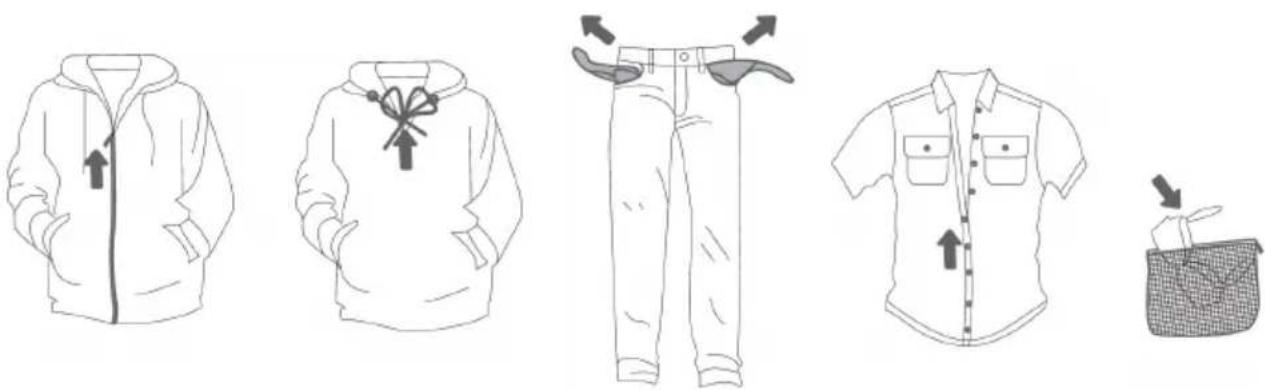
3.Closethebuttonsandzippers,tieanyribbons,andturnthepocketsinsideout;removeanymetalclipsthatcoulddamagethelaundryandwashingmachineinterior,orclogthedrain. - Placevery sensitive clothes and small items in a special-purpose laundry washing bag. (Thespecial-purpose laundry bag is available as an optional accessory.)
natural_image
Illustration of six different clothing items: hooded jacket, hoodie, pants, shirt, and woven basket (no text or symbols)Switchingonthewashingmachine
Usethepowercordtoconnectthewashingmachinetopowermains,andconnectthewashing machinetowatersupply.
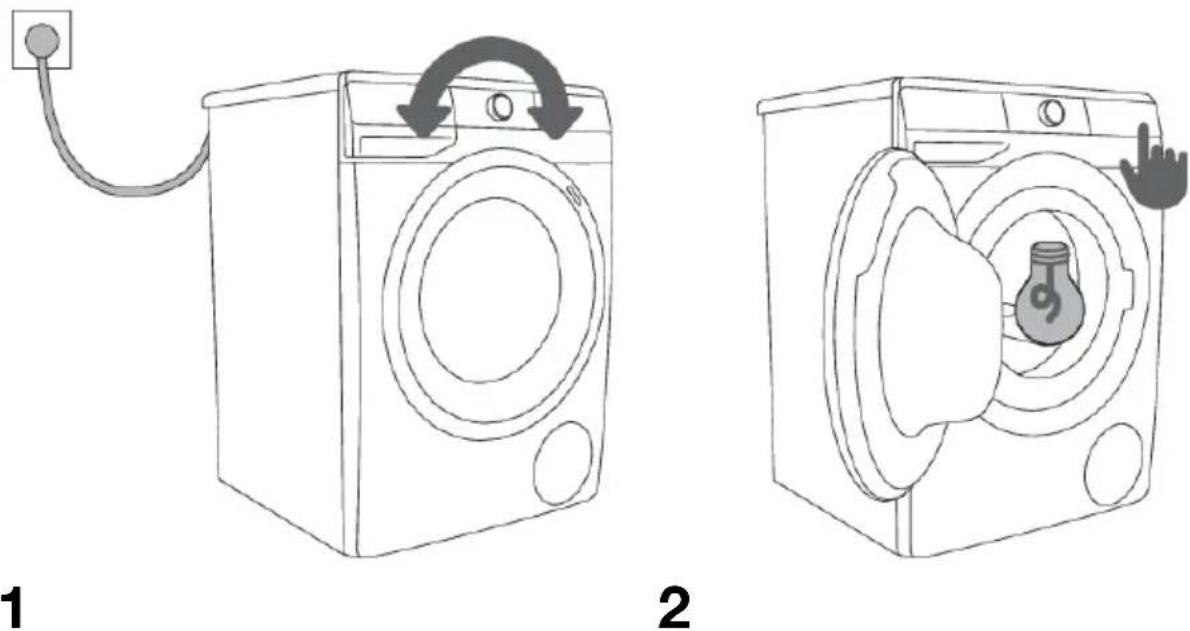
Toturnontheappliance,rotatetheprogramselectorknob(1)toanyposition.
Withsomemodels, the washingmachinedrumisalsolitfor5minuteswhenthewashingmachineis switchedon(figure2).
Thelightinthewashingmachinedrumcanalsoremainlitduringapplianceoperation,ifyoupress theSTART/PAUSE(9)button,aswellasafterthewashingprogrammeiscompleted.
(Thelampinthewashingmachinedrumisnotsuitableforanyotheruse.)
1

INFORMATION!
Thelampinthewashingmachinedrummayonlybereplacedbythemanufacturer,aservice technicianoranauthorizedperson.
Loadingthewashingmachine
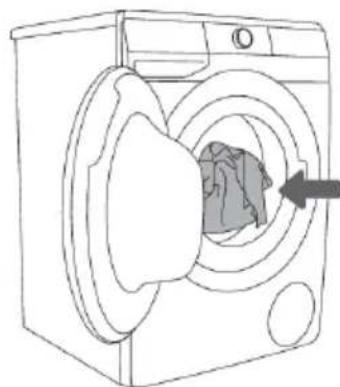
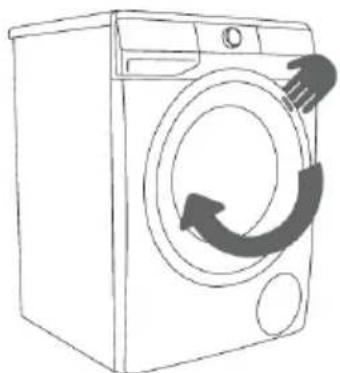
Openthewashingmachinedoorbypullingthehandletowardsyou(figure1).
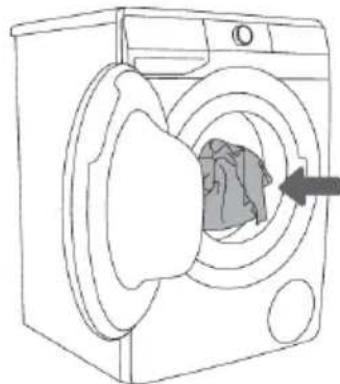
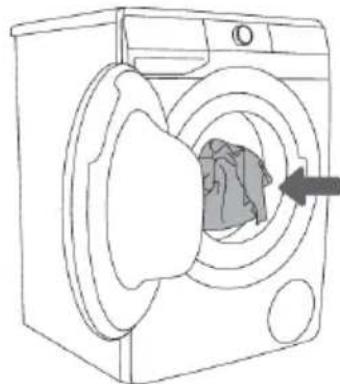
Insertthelaundryintothedrum(aftermakingsurethedrumisempty)(figure2).
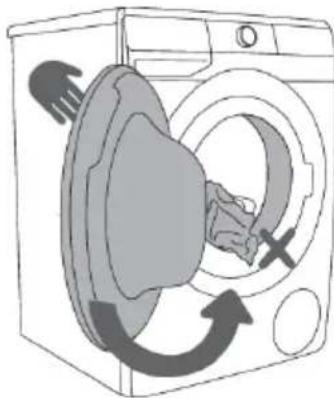
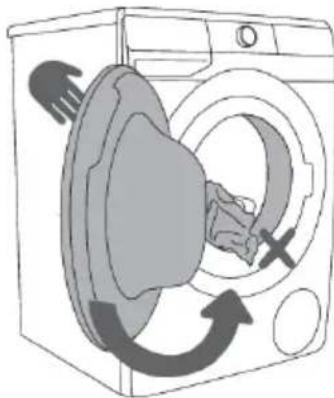
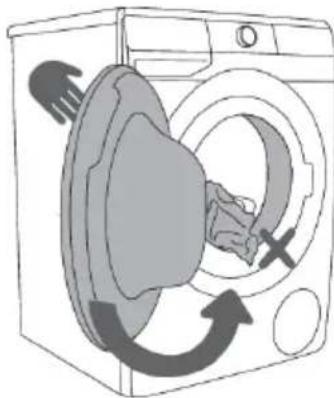
Makesurethatnogarmentisstuckbetweenthedoorandtherubbergasket.
Closethewashingmachinedoor(figure3).
natural_image
Line drawing of a washing machine with hand and arrow indicating clockwise motion (no text or symbols)1
natural_image
Line drawing of a washing machine with a cloth inside, showing airflow around the door (no text or symbols)2
natural_image
Diagram of a washing machine with hand gesture and circular motion arrows indicating cycle (no text or symbols)3
Donotoverloadthedrum!SeePROGRAMMETABLEandobserveyournominalloadasindicatedontheratingplate.
Ifthewashingmachinedrumistoofull,thelaundrywillnotbewashedasthoroughly.
Step3: Choosing the washing programme
Choose the programme by rotating the program selector knob (1) to the left or to the right (depending onthetypeoflaundryandhowheavilysoileditis).SeePROGRAMMETABLE.
Thesignallightnexttotheselectedprogramlightsup.
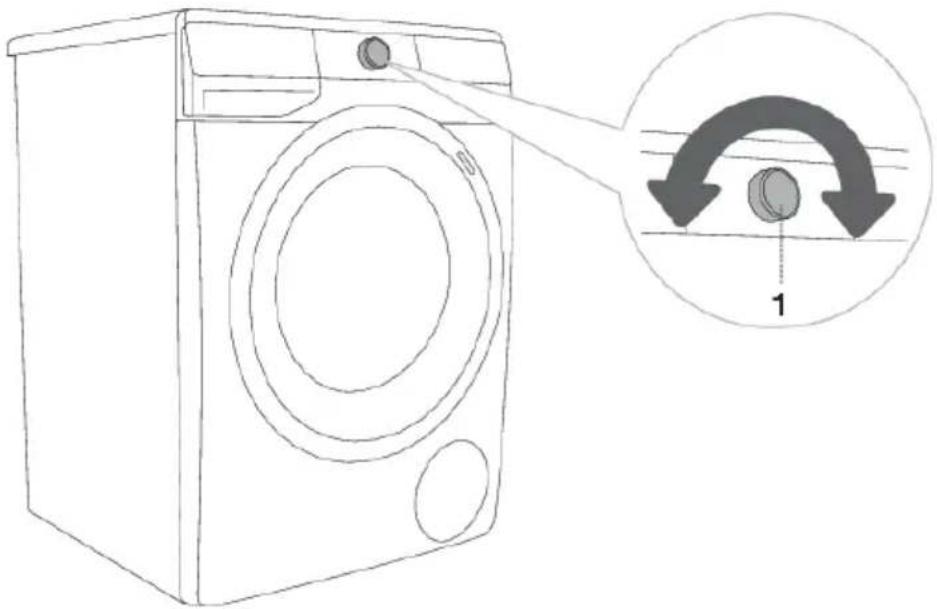

INFORMATION!
Duringoperation, theprogramselectorknob(1) will not rotate automatically.

INFORMATION!
Washingprogrammesarecomprehensiveprogrammesthatincludeallwashingstages,including softeningandspinning(thisdoesnotapplytoPartialprogrammes).

INFORMATION!
Partialprogrammesareindependentprogrammes.Usethemwhenyoufeelyoudonotneedtheentirewashingprogramme.
Programchart
| Program | Max. load | Max. 3) | Programmedescription |
| KatoenWitCotonBlanc(Cottonwhite)40°C-90°C | *MAX | MAX ^1) | Programmeforwashingwhitecottonlaundry,towels,bedlinen,T-shirts...Thetemperaturecanbesetseparately;therefore,observetheinstructionsindicatedontheclothing.Spinningspeedcanbesettoyourpreference.Programmedurationandamountofwaterwillbeadjustedtotheamountoflaundry.Toreducecreasing,pressthe(8)OPTIONS(EXTRAFUNCTIONS)buttonbeforethestartofthewashingprogramme,andselecttheSTEAM(STEAM)and/orANTICREASE(CREASEPREVENTION)function. |
| CotonCouleurs(Cottoncolour)cold-60°C | *MAX | MAX ^1) | Programmeforcolouredlaundrymadeofcotton.Thetemperaturecanbesetseparately;therefore,observetheinstructionsindicatedontheclothing.Spinningspeedcanbesettoyourpreference.Programmedurationandamountofwaterwillbeadjustedtotheamountoflaundry. |
| (Mixedlaundry/Synthetics)cold-60°C | 3,5kgMix | 1200 ^2) | Washingprogrammefordelicateclothingmadeofsyntheticandmixedfibresorviscose,andforsimplecareofcotton. Observetheinstructionsindicatedontheclothing. |
| Laine/Lavageàmain(Wool&Handwash)cold-40°C | 8002kg | Weikhandwaringprogrammeforwashingwoollens,silk,andclothesthatrequiremanualwashing.Maximumtemperatureis40°C.Thisprogrammehasashortspinningcycle.Topspinningspeedavailableis800rpm. | |
| 40°C | *MAXEco40A60 ^1) | Washingcycle,whichisabletocleannormallysoiledcottonlaundrydeclaredtobewashableat40°Cor60°C. | |
| 4kgPowelWash59/82 | Grammeforsmalleramountsoflightlysoiledlaundry. Thewashingprogrammeincludesintensivetumblingandmaximumspinningrate.Theprogrammelasts59minutes. WhenusingtheQUICKER(FAST)function,theprogrammelasts32minutes. | ||
| Rapide20'(Speed20')30°C | 2,5kgSnel2000 ^2) | Quickwashingprogrammeforlaundrythatonlyneedsrefreshing. | |
| NettoyageTambour (Self-cleaning programme) | 0kg | melreinig | Thisprogrammeisusedforcleaningthedrumand removingtheresidueofdetergentandbacteria.To selecttheprogramme,rotatetheprogramselector knobtotheleftortotherighttotheDrumclean (Self-cleaningprogramme)position.Otherextra functions cannot be selected.hedrumhastobeempty.Do not add detergent and softener! Youcanaddsomedistilled(spirit) vinegar(approx.2dl)orsodiumbicarbonate(1 tablespoon,or15g).Werecommendrunningthe programmeatleastonceamonth.Youcanaddtheagentstothemainwash compartmentortothedrum. |
| Essorage (Spinningrate|Drain)(Partialprogramme) | /CentrifugMAX1) | Usetheprogrammewhenyouonlywishtospin thelaundry.Ifyouwishtoonlydrainthewaterfrom thewashingmachine,withoutspinning,pressthe (3)SPIN multipletimes,untilnoindicator(light)ison. | |
| Rinçage (Rinse&Softening)(Partialprogramme) | /Spoel&MAX1) | Forsoftening,starching,orimpregnatingthe washedlaundry.Itcanalsobeusedasarinse programme,butwithoutaddedsoftener.Itis completedwithanadditionalrinse.YoucanalsochooseWATER+(EXTRAWATER) byselectingtheextrafunction(pressthe (8)OPTIONS (EXTRAFUNCTIONS)buttonbefore thestartofthewashingprogramme). | |
| Baby Care (Babyclothes)40°C-90°C | *MAX | MAX1) | Forwashingclothesrequiringspecialcare,such asinfantgarments.Werecommendturningthegarmentsinsideoutas thiswillalsothoroughlywashouttheskinscales orresiduesofskintreatmentproducts.The programmeisacombinationofaprolongedheating andanextrarinsethatremovesanydetergent residue.Trewashingprogrammeincludesan automaticprewashandadditionalrinses.Totreatlaundrywithsteam,pressthe(8)OPTIONS (EXTRAFUNCTIONS)buttonandselecttheSTEAM function. |
| Overhemden Chemises (Shirtswithsteam)cold-40°C | 3,5kg | 12002) | Thisprogramisintendedforwashinggarments madeofcotton,microfibresandsynthetics;for washingcollarsandcuffs.Thewashtakesplace atalowtemperature,withagreateramountof waterandgentletumbling.Presetspinningspeed is800rpm.Totreatlaundrywithsteam,pressthe(8)OPTIONS (EXTRAFUNCTIONS)buttonandselecttheSTEAM function. |
| TextilesSport(Sportswear)cold-40°C | 3,5kg | 200g | Sportswearmadeofcotton,microfibresand syntheticfibres,atlowerspinningratesandabrief finalspinningcycle. |
| Anti-Allergy 40°C-90°C | *MAX | MAX1) | Thiswashingprogrammeisusedforwashing cottongarmentsthatrequirespecialcare,suchas clothesforpeoplewithhighlysensitiveskinor allergies.Werecommendturningthegarments insideout,asthiswillalsothoroughlywashoutthe skinandotherresidues.Totreatlaundrywithsteam,pressthe(8)OPTIONS(EXTRAFUNCTIONS)buttonandselecttheSTEAM function. |
| StartupafstandDépartàdistance(Remotecontrol) | UsetheRemotecontrolprogrammetoremotely controyourappliance(usingyourphone).Youcan selectallprogrammesavailableonyourappliance (seechapters»BEFOREUSINGTHEAPPLIANCE FORTHEFIRSTTIME/Connectingtheppliance toaWi-Finetwork«and»WASHINGPROCESS, STEPBYSTEP(1-7)/Step3:Remotecontrol of washusingtheapp«).Youcanalsoselectadditionalprogramsintheapp. | ||
Maximumdeclaredload(MAX)-seeratingplate*
Anyload(0kg-MAXkg)/
1) Maximumspinningrate(MAX)-seeratingplate
2) Dependingonthemodel
cold Coldwash
③) Maximumspinningrate

INFORMATION!
Addpowderorliquiddetergentsaccordingtothemanufacturer'sinstructions,consideringthe washingtemperature,washingprogram,howsoiledthelaundryis,andwaterhardness.
In caseofexcessivefoaminginthewashingmachineorleakoffoamthroughthedetergent dispensertray,thewashedlaundrymustberinsedthoroughlywithalargeamountofwater.
Chooseawashingprogram, butdonotaddanydetergent.

INFORMATION!
Maximumamountoflaundryinkg(fortheCottonprogramme)isindicatedonthewashing machineratingplate(seechapter»WASHINGMACHINEDESCRIPTION/Technicalinformation«).

INFORMATION!
MaximumornominalloadappliestolaundrypreparedpursuanttotheIEC60456standard.

INFORMATION!
Forbetterwashingeffect, were recommend loading the drum to 2/3 when using the cotton programmes.

INFORMATION!
Lowwatertemperature, lowmainsvoltage and different washing loads may affect the washing time; theremaining timed displayed is adjusted accordingly during the washing process.
Timeoptimizationduringtheprogrammeprogress
In the early stage of the washing programme, the washing machine uses advanced technology to detect the amount of laundry. After load detection, the washing machine adjusts the programme duration.
Washingprogramswithsteam
Addingsteam during the last washing step loosen the laundry, slightly disinfects it, and eliminates some allergens. After us such a program, the laundry will be soft, supple, and fresh, and it will require less ironing.
Theuseofsteam(presstheposition8)alsoallowsomittingorreducingtheamountofconditioner.
Forabettersteameffectonthelaundry, were recommendhalfload.
AirDryfunction
(dependingonthemodel)
AIRDRYisafunctionintendedfordryingthewashingmachineinterioranddispenserwithoutany laundryintheappliance. The purpose of dryingistoreduce and prevent the conditions for occurrence of mould and development of microbesthat cause unpleasant odoursof the washed clothes.
Werecommendrunningthisfunctiononceperweek. Thedryingproceduretakesseveralhoursbut useslittleelectricity.
When the AIRDRY process is completed, water droplets may still be present in the appliance or parts thereof. This is completely normal. Efficiency of appliance interiordrying depends on their relative humidity in the room, amount of humidity remaining from the most recent wash, amount of clothes in them most recent wash etc.
AIRDY function can only be activated using the ConnectLife app on your phone. (See chapter »WASHINGPROCESS,STEPBYSTEP(1-7)/Step3:Remotecontrolofwashusingtheapp«.)
Remotecontrolofwashusingtheapp

INFORMATION!
SeechapterWASHINGPROCESS,STEPBYSTEP(1-7)andobservesteps1and2.
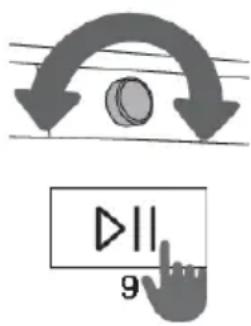
Ontheappliance:
- Closethewashingmachinedoorandclosethedetergent compartment.
- Rotate the program selector knob to position ConnectLife/REMOTE CONTROL(Remotecontrol)
3.Pressthebutton(9)START/PAUSE.Theappliancedoorwilllock, andtheREMOTESTART(REMOTESTART)remotecontrol indicatorwilllightup.
Remotecontrolisavailableforthenext24hours,evenwhentheapplianceentersstandbymode.The doorislockedduringthistime,soitcannotbeopened.Remotecontrolcanbecancelledbypassing (9)START/PAUSE.
Continue operating the appliance in the ConnectLife app, where you can choose from several options (selection, launch, and monitoring and stopping of the programme, amongst other additional settings)

INFORMATION!
Thewashingprocesscanbecontrolled/monitoredfromtheapp.

INFORMATION!
WashingmachineoperationcanbepausedorstoppedbychoosingSTOP/ADDCLOTHES/PAUSE ...
Someoptionscanbeimplementedremotelyinfull,andsomerequireyourphysicalpresence, suchasaddinglaundryduringawashingcycle(ADDCLOTHES).

INFORMATION!
YoucanalsocontrolyourappliancefromyourphoneifyouarenotconnectedtothesameWi-Fi networkasyourappliance(thephoneonlyneedsanactiveinternetconnection).Thismeansyou canalsocontrolyourappliancewhenyouareawayfromhome.

INFORMATION!
Youcanoperatetheappliancewithmupliledevices.Youcanalsocontrolandmonitorthe operationoftheappliancewithanyphoneconnectedtotheappliance,regardlessofwhichuser hasinitiatedthewashingcycle.Theappliancecanbeconnectedto/controlledsimultaneously withseveralConnectLifeuseraccounts.

INFORMATION!
Afteryouhavestartetheappliancefromyourphone,apersonlocatednexttotheappliance cantakeoverandmanuallyturnofforcontroltheappliance;theappwillnotifyyouinsuchcase. Insuchcase,controllingtheapplianceremotelyfromyourphoneisnolongerpossible.Ifyou wishtocontroltheappliancefromyourphoneagain,allrequiredstepsmustberepeated.
Step4: Choosing these settings
Mostprogrammesfeaturebasicsettings, butthesesettingscanbechanged.
Adjustthesettingsbypassingtherelevantfunctionbutton(beforepressingthe(9)START/PAUSE button).Functionsthatcannotbechangedwiththeselectedwashingprogrammearepartlylit(dimmed).
Certainsettingscannotbeselectedwithsomeprogrammes.Suchsettingswillnotbelit,andthe buttonwillflashwhenpressed(seeFUNCTIONTABLE).
Descriptionoffunctionindicatorsforselectedwashingprogramme:
-lit(Basic/presetsetting);
-dimmed(Functionsthatcanbeadjusted)and
-unlit(Functionsthatcannotbeselected).
Changing the temperature for these selected programs.
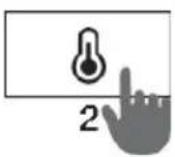
Eachprogramhasapresettemperaturethatcanbechangedbypressing theposition(2)TEMP.(WASHINGTEMPERATURE).
Theselectedtemperatureislit.
SPIN(SPINNINGRATE/PUMPSTOP/DRAIN)
Toadjustthespinningrate.Everyprogramme(exceptforDrumClean(Self-cleaningprogramme))hasapresetspinningratethatcanbe adjustedbypassingonposition(3)SPIN(SPINNINGRATE/PUMP STOP/DRAIN)
If you select the Drain function without spinning, then no indicator (light) will beliton the display unit. Washing time will be accordingly shorter.
Ifyouselect»Pumpstop«,thesymbolwillappearonthedisplayunit.
Selectthe»Pumpstop«functionwhenyouwishthelaundrytostay soakedinthewaterfromthelastrinsecycleinordertopreventitfrom creasingwhenyouareunabletotakeitfromthewashingmachine immediatelyafterthewashingprogrammeiscomplete.Youmaysetthe desiredspinningrate.Tocontinuetheprogram,pressthe (9)START/PAVZAbuttonthatislit.Waterwillbedrained(pumpedout) andthefinalspincyclewillberun.
QUICKER (FAST)
When the QUICKER (FAST) function is activated, the washing programme will be carried out with a shorter washing duration. There are two available choices (depending on these selected washing programme).
If you choose the QUICKER (FAST) function, the function indicator (light) will turn from a partly lit to fully lit symbol, and the total programme time on the display unit will be adjusted accordingly.
Tofurthershortenthewashingprogramme, pressthebutton(5)FAST (FAST)again.
If you press the button once again, these setting is reset back to default.
Firstpress-QUICKER (FAST) Secondpress-SUPER QUICKER (SUPERFAST) Thirdpress-DEFAULT (DEFAULT)
Werecommendahalf-loadfortheCottonprogramme.
DELAY END (DELAYEND)
Pressontheposition(7)DELAY END (DELAYEND)todelaythe programmecompletiontimebyupto24hours.
Settingsprocedure:
- Selectthedesiredprogrammeandextrafunctions.
- Presstheposition(7)DELAY END (DELAYEND)toactivate the function.
- Repeatedlypressthispositiontosetthedesiredprogramme completiontime(with30-minuteincrementsupto6hours,and1-hour incrementsthereafter,upto24hours.)
- Toactivatethefunction, pressthe(9)START/PAUSEbutton.
Washingmachinestartscountingdownthesetime.Whenthecountdown reachestheprogrammeduration(e.g.2:30),thewashingprogramme startsautomatically.
Tocancelorchangethedelayedendofthewashingprogramme, rotate theprogramselectorknob(1)topositionOFF for at least twoseconds.
Toquicklycanceltheprogrammecompletiondelay, presstheposition (7) DELAY END (DELAYEND) and holditfor3 seconds. Thewashing programmewillresume.
Exampleoffunctionsetting:
Itisnow9PM, and you wish the washing program met to be completed at 6 AM then next morning then set the DELAYEND (DELAYEND) time to 9 hours.

INFORMATION!
Somesettingscannotbeselectedwithcertainprogrammes.Suchfunctionswillnotbelitonthe displayunit,andwhenthecorrespondingbuttonispressed,anacousticsignalwillbeemitted andthelightonthebuttonwillflash(seeFUNCTIONTABLE).

INFORMATION!
Activate/deactivate the functions by pressing the desired function (before pressing the (9) START/PAUSEbutton). An indicator will lightup next to these selected functions.

INFORMATION!
If you have set the DELAYEND (DELAYING THE ENDOFTHEWASHING PROGRAM) function and you are using liquiddetergent, wedonot recommend setting a program without a pre-wash.
Settingsusingacombinationoftwobuttonspressed simultaneously
DOSEASSIST
WiththeDOSEASSISTfunction,thewashingmachinewillrecommend theoptimumamountofpowderorliquiddetergentaccordingtothe selectedsettings.
Recommendedamountofpowderorliquiddetergentdependson:
- Waterhardness(thefollowingsettingsareavailable:soft, medium, hard.Defaultsettingisthemediumlevel,buttheusermayadjustit. Seechapter»INTERRUPTIONSANDCHANGINGTHE PROGRAMME/Personalsettingsmenu).«Forcorrectfunctioningof theDOSEASSISTfunction,werecommendsettingthecorrectwater hardnesslevel.
•Selectedwashingprogrammeand - Amountoflaundry(load)-thewashingmachinemeasuresthe laundryloadeverytimeyouusetheDOSEASSISTfunction.
InorderfortheDOSEASSISTfeaturetofunctioncorrectly,theSTEP2 (preparingthelaundry,switchingon,andloadingthewashingmachine) andSTEP3(selectingthewashingprogramme)havetobecarriedout first.
- Activatethefunctionbysimultaneouslypressingonpositions(2)TEMP. (WASHINGTEMPERATURE)in(3)SPIN(SPINNINGRATE/PUMP STOP/DRAIN)andholdingthemforatleast3seconds.
Countdowntimerisdisplayedonthedisplayunit.
Indicator(light)lightsupwhenthefunctionisactivated.
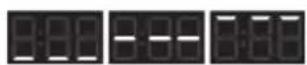
- Pressthe(9) START/PAUSEbutton. Thewashingmachinewillstart measuring the amount of laundry in the drum.
Measuringprocessisindicatedwithalternatingflashingoftheindicator lightsonthedisplayunit.
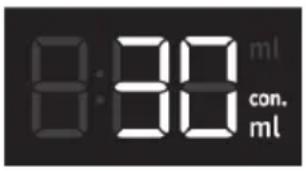
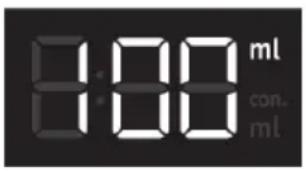
- Based on the measured amount of laundry in the drum and other settings, there recommended amount of concentrated/nonconcentrated powder or liquiddetergent will be displayed alternately on the display unit.
INFORMATION!
Todeterminewhetheryourpowderorliquiddetergentis concentratedornot,checkthepackagingofyourdetergent.
INFORMATION!
Tore-checktheamountofconcentratedornon-concentrated powderorliquiddetergent,simultaneouslypressthe(2)TEMP. (WASHINGTEMPERATURE)and(3)SPIN(SPINNINGRATE/PUMP STOP/DRAIN)buttonsonceagain.
natural_image
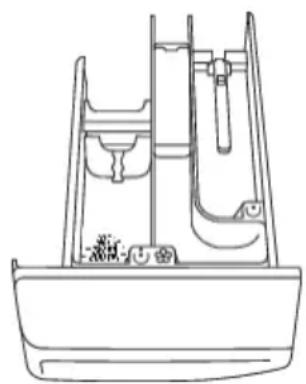
Line drawing of a mechanical or architectural component with no visible text, numbers, or symbols4.Addtherecommendedamountofpowderorliquiddetergentintothe dosingtank.Forguidance,observethedetergentamount/level indicationinthewashingdetergentcompartment(seechapter »RECOMMENDATIONSFORWASHINGANDECONOMICUSEYOUR WASHINGMACHINE«).
Tostartthewashingprogramme, pressthe(9)START/PAUSEbutton.
CHILDLOCK
Toensuresafety.Turnitonbysimultaneouslypressing(3)SPIN (SPINNINGRATE/PUMPSTOP/DRAIN)and(5)QUICKER(FAST)forat least3seconds.Thedisplaywillshowthetimecountdown.Theselection isconfirmedbyanacousticsignalandbytheactivationoftheindicator lamp(thesymbolwilltightup(4)).Youcanalsodeactivatethechild lockusingthesameprocedure.Aslongasthechildlockisactivated, youcannotchangetheprogramme,settingsoradditionalfunctions.
Childlockremainsactiveevenafterthewashingmachineisswitched off.Forsafetyreasons,thechildlockdoesnotpreventthewashing machinefrombeingswitchedoffbyturningthewashingprogramme selectorbutton(1)tothepositionOFF.If,whenthechildlockis activated,thebuttonisturnedtothepositionOFF,thewashing programmegoesintopausemode.Youcanresumetheprogrammeby changingthepositionofthebuttonandpressing(9)START/PAUSE.To selectanewprogramme,youneedtoturnoffthechildlock.
SOUNDON/OFF
Toturnoffthesounds,simultaneouslypressthepositions(5)QUICKER (FAST)and(7)DELAYEND(DELAYINGTHEENDOFTHEWASHING PROGRAM)andholdthemforatleast3seconds.
Theselectionwillbeconfirmedbyanacousticsignalandbyanindicator light(thesymbol(6)willbelit).
Toturnthesoundbackon, hold(5)and(7)foratleast3seconds. If you turnoffthesound, therewillbenoacoustic warning at the end of the washing programme.
Wi-FiMENU
TheWi-Fimenuisusedforconnectingtheapplianceandforremote control.
Rotatetheprogrammeselectorknob(1)toanyposition,exceptposition OFF.
For3seconds, simultaneously pressthepositions(7) DELAYEND (DELAYINGTHEENDOFTHEWASHINGPROGRAM) and (8) OPTIONS (EXTRAFUNCTIONS). You havenowenteredthesetupmenuforWi-Fi.
Youcantakeonestepbackbysimultaneouslypressingthepositions (7)and(8)andholdingthemfor3seconds.
Bypressing(8)OPTIONS(EXTRAFUNCTIONS)youcanselectthe availablefunctions.Bypressing(9)START/PAUSE,youconfirmyour selection.
Availablesettings:
• OFF/On/turning applianceconnectivityofforon.
- Con-the-applianceisreadyforconnectingtoaWi-Finetwork for5minutes.
- PAr PR – the appliance can be connected to the ConnectLife app for3minutes. The function will only be active if you have already connected the appliance to your Wi-Finet work.
• UnP-Remove(unpair)allusers.

INFORMATION!
Whenthewashingmachineisswitchedoff,alleextrafunctionsreturntotheirbasicorcustom settings,exceptfortheacousticsignalsetting.
Step5:Selectingadditionalfunctions

INFORMATION!
Activate/deactivatethefunctionsbypassingthedesiredfunction(beforepressingthe (9)START/PAUSEbutton).
OPTIONS(EXTRAFUNCTIONS)
Pressthe(8)OPTIONS(EXTRAFUNCTIONS)buttononceormultiple timestochoosebetweentheeightdifferentfunctions(dependingonthe selectedwashingprogramme):
- Firstpress:ANTICREASE(CREASEPREVENTION);
•Secondpress:WATER+(EXTRAWATER);
•Thirdpress:STEAM(STEAM); - Fourthtoeighthpress:differentcombinationsofthesethree functions.
ANTICREASE(CREASEPREVENTION)
Topreventcreasing,selecttheANTICREASE(CREASEPREVENTION) function.Gentletumblingwillcontinueaftertheendofthewashing programme.
Thisfunctionisrecommendedfordelicatelaundry.
RE willappearonthedisplayunit(10).
Afunctioncanbedeactivatedatanytimebypassingthe (9)START/PAUSEbuttonorbyrotatingtheprogramselectorknobto positionOFF.
WATER+(EXTRAWATER)
Use this function to wash with a larger amount of water on some programmes.
STEAM(STEAM)
Addinga20-minutesteamcycleattheendoftheprogramwillsoften anddisinfectyourgarments,andreduceordoawaywiththeneedfor ironingandusingsoftener/conditionerforyourlaundry.
Extrafunctiontable
| Programmes | QUICKER | SUPERQUICKER | DELAYEND | DOSEASSIST | PREWASH * | ANTICREASE | WATER+ | STEAM | SPIN | RINSE&HOLD |
| KatoenWitCotonBlanc(Cottonwhite)40°C-90°C | ...... | |||||||||
| KatoenKleurCotonCouleurs(Cottoncolour)cold-60°C | ...... | |||||||||
| Mix(Mixedlaundry/Synthetics)cold-60°C | ...... | |||||||||
| Wol/HandwasLaine/Lavageàmain(Wool&Handwash)cold-40°C | ...... | |||||||||
| ......Eco40-6 | ||||||||||
| PowerWash59'/32'40°C | ...... | |||||||||
| Snel20'Rapide20'(Speed20')30°C | ...... | |||||||||
| Trommelreiniging/NettoyageTambour(Self-cleaningprogramme) | • | • | ||||||||
| CentrifugerenEssorage(Spinningrate|Drain)(Partialprogramme) | • | • | ||||||||
| Spoel&Impreg.Rinçage(Rinse&Softening)(Partialprogramme) | ...... | |||||||||
| BabyCare(Babyclothes)40°C-90°C | ...... | |||||||||
| OverhemdenChemises(Shirtswithsteam)cold-40°C | ...... | |||||||||
| SportkledingTextilesSport(Sportswear)cold-40°C | ...... | |||||||||
| Anti-Allergy40°C-90°C | ...... |
Additionalfunctionscanbeused•
* PREWASH function can only be activated using the ConnectLife app on your phone. (See chapter»WASHINGPROCESS,STEPBYSTEP(1-7)/Step3:Remotecontrolofwashusingthe app«.)
Step6: Startingthewashingprogramme
Pressthe(9)START/PAUSEbutton.
TIME REMAINING TO PROGRAMME COMPLETION or DELAY END time (if set) will appear on the display.
Symbolswillbelitontheselectedfunctions.
After pressing the (9) START/PAUSE button, the spinning rate (except in the case of the Drum clean (Self-cleaningprogramme) and SPIN(SPINNINGRATE/PUMPSTOP/DRAIN)), the Childlock and the Soundoff functions can be adjusted/changed, while others settings cannot be changed.
INFORMATION!
If the TIMEREMAINING UNTILPROGRAMMECOMPLETION flashesthreetimesonthedisplay unit, and there is an audiblesignal, this mean that the washing machinedoor is open or not closed tightly. Closethewashing machinedoor and press the (9) button START/PAUSE again to resumethewashing programme.
Step7: Endofthewashingprogramme
Thewashingmachinewillindicatetheendofthewashingprogrammewithanacousticsignaland willappearonthedisplayuntilthewashingmachineswitchesintolowstandbymodeorswitchesoff. After5minutes,thesignwillnolongerbedisplayed.
- Openthewashingmachinedoor.
- Takethelaundryfromthedrum.
- Wipetherubberdoorgasketandthedoorglass.
4.Closethedoor!
5.Shutoffthewatersupplytap. - Switchoffthewashingmachine(rotatetheprogramselectorknob(1)totheOFFposition.
- Unplugthepowercordfromtheoutlet.
INTERRUPTIONSANDCHANGINGTHE PROGRAMME
Manualinterruption
Tostopandcancelawashingprogramme, rotate the program selector knob (1) to the OFF position. Signal lights will flash on the display. At the same time, the washing machine pumps the water out of the washing machine drum. When the water is pumped out, washing machine door will be unlocked. If the water in the washing machine is hot, the washing machine will automatically cool it and pump/drain it out.
Personalsettings
Basic or default settings for each washing programme can also be changed. When you select the washing programme and Additional functions, the combination can be stored by pressing the ((9) START/PAUSE button and holding it for 5 seconds (the time is counted down on the display unit). The sign »SAVED«(»saved«) will appear on the display.
The programme will remain stored until it is changed using the same procedure.
Personal settings can also be reset to factory settings in the user menu.
AdaptTech
When a washing programme setting is used three times in a row, this setting is stored as default and will always be suggested when you select that washing programme – this is called the ADAPTTECH function. If you manually store the settings of a washing programme, the ADAPTTECH function on this washing programme is deactivated.
Personalsettingsmenu
To turn on the washing machine, rotate the program selector knob (1) to any position. Simultaneously press the (2) TEMP. (WASHING TEMPERATURE) and (5) QUICKER (FAST) positions to open the Personal Settings Menu. The lights in the upper row of the display unit will light up, and number 1 will appear to indicate the setting function. Rotate the program selector knob (1) to the left or to the right to choose the function to change. Number 1 indicates sound settings, 2 indicates Water hardness setting (DOSE ASSIST), and number 3 indicates resetting of Personal programme settings to factory defaults. If the desired settings are not selected in 20 seconds, the programme will automatically return to main menu.
Press the (3) SPIN(SPINNING RATE/PUMP STOP/DRAIN) position to confirm the desired functions and their settings; press the (2) TEMP.(WASHING TEMPERATURE) position to go back one step.
Acoustic signal volume can be set at four levels (0 means the sound is off; 1 means that the button sound is activated; 2 means low volume, and 3 means high volume). Choose the volume level by rotating the program selector knob (1) to the left or to the right. The lowest setting means that the acoustic signal is switched off.
Pausebutton
Thewashingprogrammecanalwaysbestoppedbypressingthe(9)START/PAUSEbutton. The washingprogrammeistemporarilypausedwhenthetimeremaininguntilprogrammecompletionis flashingonthedisplayunit.Ifthereisnowaterinthedrumandwatertemperatureisnottoohigh, thenthedorwillunlockafteracertainperiodoftime,andtheycanbeopened.Toresumethewashing program,firstclosethedoorandthenpressthekey(9)START/PAUSEbutton.
Adding/removinglaundryduringwashingmachineoperation
Afteracertainperiodoftime, the washingmachinedoorcanbeopenedifthewaterleveland temperaturearebelowapredefinedthreshold.
If the conditions below are met, then the electronic door lock is released and the washing machine door can be opened; will appear on the display unit:
- watertemperatureinthedrumhastobesuitable,
- waterlevelinthedrumhastobebelowacertainvalue.
Inordertoaddorremovelaundryfromthewashingmachineduringprogrammeoperation,proceed asfollows:
- Pressthe(9) START/PAUSE button and hold it for 3 seconds.
- If all conditions for release of electronic door lock are met, then you can open the washing machine door and add or remove laundry from the drum.
- Closethewashingmachinedoor!
4.Pressthebutton(9)START/PAUSE
Thewashingprogramwillresume.

INFORMATION!
If you add a considerable amount of laundry during the wash, the laundry could be washed less effectively, sincethewashing machine initially sensed lower weight of the load of laundry and added a smaller amount of water. Insufficient amount of water relative to the amount of laundry could also cause damage to the laundry (rubbing of dry laundry), and washing time can be longer.

INFORMATION!
Washingtimewillresumefromthepointatwhichthewashingprogrammewasinterrupted.
Errors
Incaseofanerrororfault, theprogrammewillbeinterrupted.
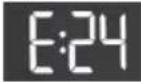
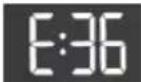
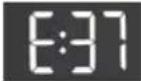
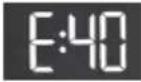
Anacousticsignalwillwarnaboutsuchoccurrence(seeTROUBLESHOOTINGANDERRORTABLE), andtheerrorwillbeindicatedonthedisplayunit(E:XX).
Powersupplyfailure
In case of a powersupply failure, the washing programme is interrupted. When powersupply is restored, the washing programme is resumed from the point at which it was interrupted. Upon completion of the washing cycle, will alternate on the display unit. This inform the user about powersupply failure and the effect on the execution of the washing programme.
Washingtimewillresumefromthepointatwhichthewashingprogrammewasinterrupted.
Openingthedoor(pause/cancel/changeprogramme)
Washingmachinedoorcanbeopened,ifthewaterlevelinthemachineislowenoughandifththewater temperatureisnotexcessivelyhigh.

INFORMATION!
If the washing machine is not connected to the power mains or in case of a powers supply failure during the programme execution, then the washing machine cannot be opened. In such case, the washing machine has to be properly connected, or as servicetechnicians should be contacted.
Displayingthenumberofcompletedwashcycles
(dependingonthemodel)
If you disconnect the appliance from the powers supply, wait for 10 seconds, and then reconnect the power cord, information on the number of completed wash cycles is displayed on the display unit for 3 seconds. After 3 seconds, the appliances switch to standby by mode.
CLEANINGANDMAINTENANCE

ELECTRICSHOCK!
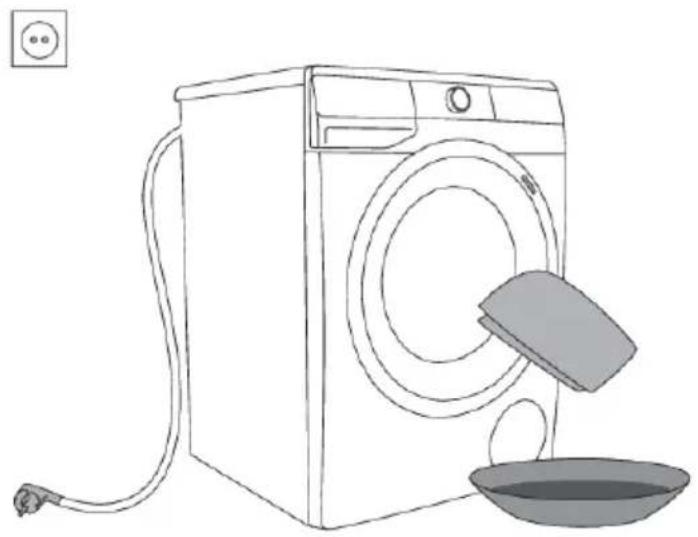
Beforecleaning, unplugthewashingmachine from the power mains.
Cleaningthedispensertray

INFORMATION!
Thedispensertrayshouldbecleanedatleasttwicepermonth.
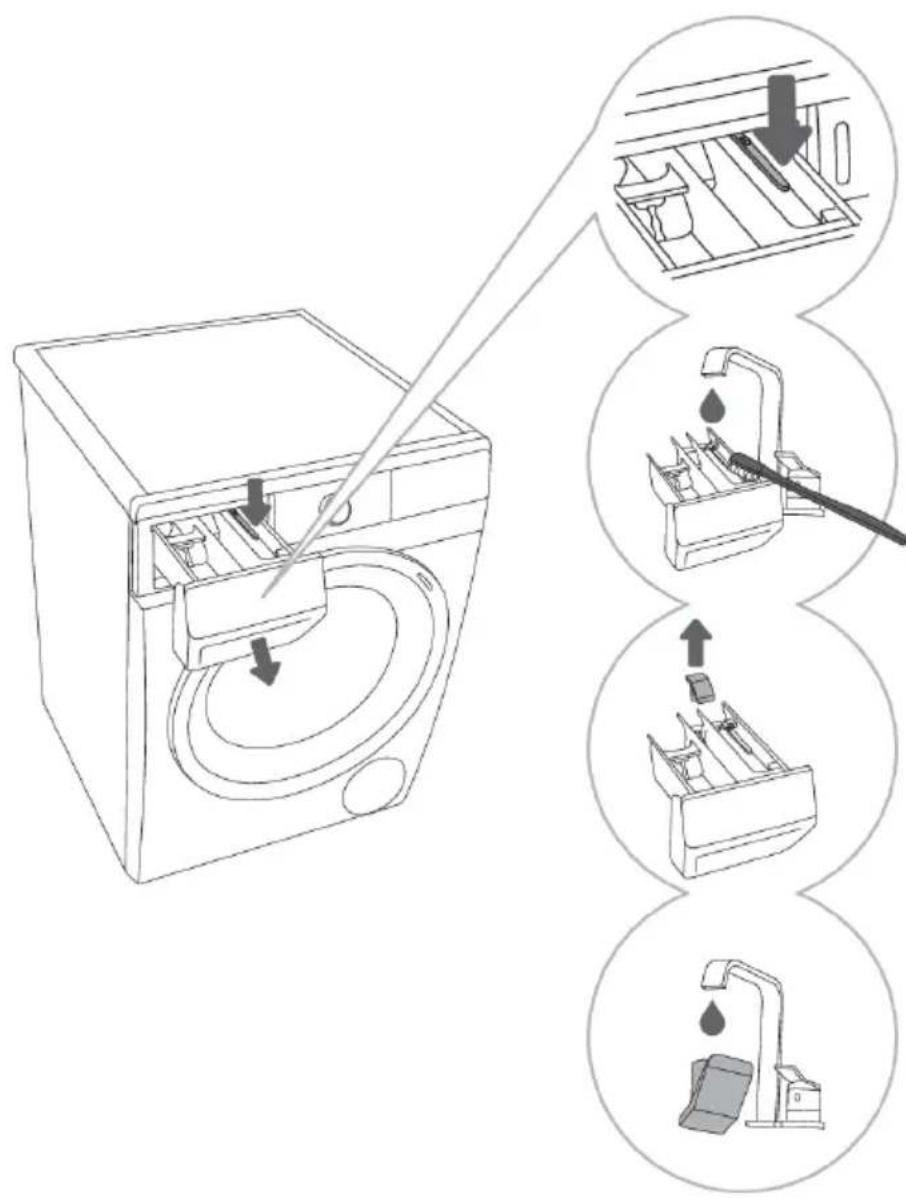
1 Toremovethedispenser trayfromthehousing,press thesmalltab.
2 Cleanthedispensertray underrunningwaterusinga brush, and dry it. Also, remove any detergent residue from the bottom of the housing.
3 Ifrequired,remove and cleantheplugcap.
4Cleantheplugcapunder runningwaterandreplaceit.

INFORMATION!
Donotwashthedetergentcompartmentinthedishwasher!
Cleaningthewatersupplyhose,detergentdispenser housing,andrubberdoorgasket
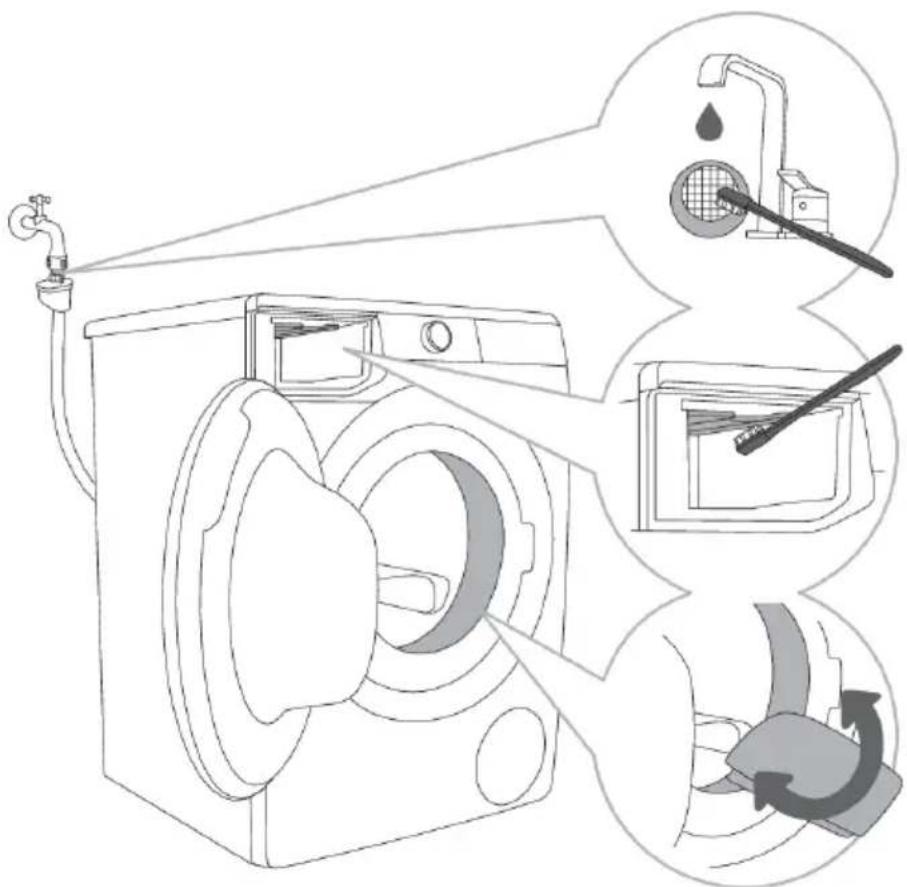
1 Cleanthenetfilteroften underrunningwater.
2 Useabrushtocleanthe entirewashingmachine rinsingsection,especially thenozzlesontheupper sideoftherinsingchamber.
3 After every wash, wipe therubber doorsealto extend its usefull life.
Cleaningthepumpfilter

INFORMATION!
Duringcleaning, somewhat may be spilled. It is therefore recommended to place an absorbent cloth on the floor.
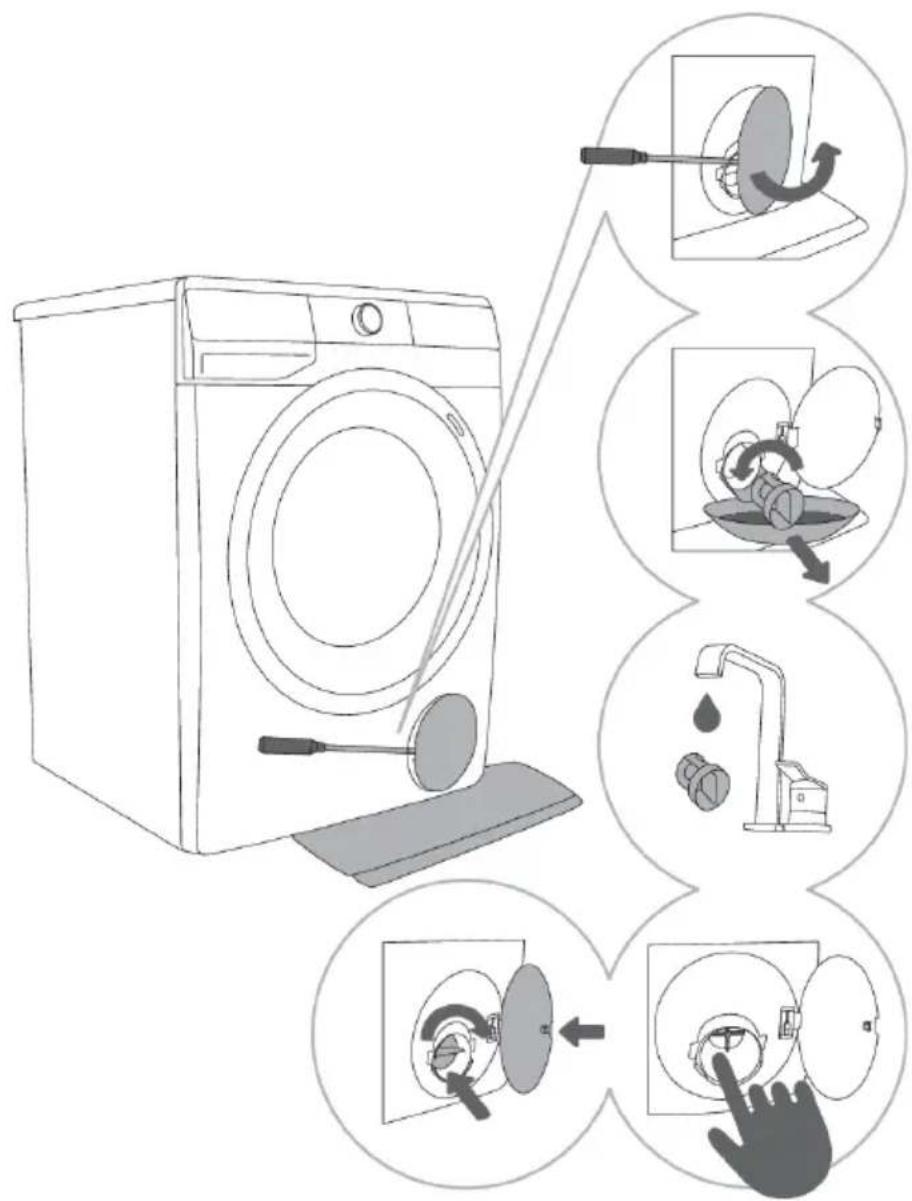
1 Openthepumpfiltercap usingasuitabletool(flat screwdriverorasimilartool).
2 Pulloutthewateroutlet funnelbeforecleaningthe pumpfilter. Rotatethepumpfilterslowly inthecounter-clockwise direction.Pulloutand removethepumpfilterto allowthewatertoslowly drain.
3Cleanthepumpfilter thoroughlyunderrunning water.
4,5 Removealobjects andimpuritiesfromthefilter housingandtheimpeller. Replacethepumpfilteras showninthefigureand fastenitbyrotatinginthe clockwisedirection. Foragoodseal,thefilter gasketsurfaceshouldbe clean.

INFORMATION!
The pump filter must be occasionally cleaned, especially after washing very fleecy, woolly, or very old laundry.
Cleaningthewashingmachineexterior

ELECTRICSHOCK!
Always disconnect the washing machine from the power mains before cleaning.
Cleanthewashingmachineexterioranddisplayunitusingasoftdampcottonclothandwater.

WARNING!
Donotuseanysolventsorcleaningagentsthatcoulddamagethewashingmachine(please observetherecommendationsandwarningsprovidedbythecleaningagentmanufacturers).

INFORMATION!
Donotcleanthewashingmachinewithajetofwater!
natural_image
Line drawing of a washing machine with a drain cover and a bowl of liquid nearby (no text or symbols)TROUBLE-SHOOTING
Whattodo...?
Thewashingmachineshallautomaticallycontroltheoperationofparticularfunctionsduringthe washingcycle.Ifanyirregularityisidentified,thiswillbeindicatedbyreporting(E:XX)onthedisplay. Thewashingmachinewillreporttheerroruntilitisswitchedoff.Disturbancesfromtheenvironment (e.g.thepowergrid)mayresultinvariouserrorreports(seeTROUBLESHOOTINGTABLE).
Insuchcase:
- Switchoffthewashingmachineandwaitforafewseconds.
- Switchonthewashingmachineandrepeatthewashingprogramme.
- Mosterrorsduringoperationcanberesolvedbytheuser(seeTROUBLESHOOTINGTABLE).
- If the error occurs again, call an authorized service unit.
- Repairsmayonlybecarriedoutbyanadequatelytrainedperson.
Troubleshootinganderrortable
Errorsindicatedonthedisplayunitmayincludethefollowing:
| Problem/Error | andproblemdescription | Whattodo?Indicationonthedisplayunit | |
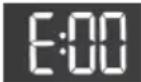 | Incorrectsettings | Restarttheprogram;iftheerrorreoccurs,call aservicetechnician. | |
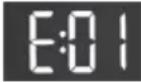 | Temperaturesensorerror | Inletwatertoocold.Repeatthewashing program.Ifthewashingmachinereportsthiserror again,callaservicetechnician. | |
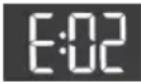 | Doorlockerror | Makesurethewashingmachinedooris closed.Ifyouhearanacousticsignalafterpressing the(9)START/PAUSEbutton,itmeansthat thedoorofthewashingmachineisnotclosed.Closethewashingmachinedoor.Unplugthepowercordfromtheoutlet;then, plugthepowercordbackintotheoutletand switchonthewashingmachine.Iftheerrorreoccurs,callaservicetechnician. | |
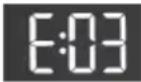 | Checkthefollowing:Waterfillingerror•isthewaterinletvalveopen,•isthefilteronthewaterinlethoseclean,•isthewatersupplyhosedeformed (clipped,cloggedetc.),•isthepressureinthewatermains between0.05and0.8MPa(0.5-8bar)Then,pressthe(9)START/PAUSEbuttonto resumetheprogramme.Iftheerrorreoccurs,callaservicetechnician. | ||
| Problem/Error | andproblemdescription | Whattodo?Indicationonthedisplayunit | |
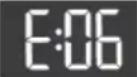 | Waterheatingerror | Restarttheprogram;iftheerrorreoccurs,call aservicetechnician. | |
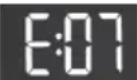 | Checkthefollowing:Waterdrainingerror•isthepumpfilterclean,•isthedrainhoseclogged,•isthedrainclogged,•ifthedischargehoseplacedisplaced belowthemaximumandabovethe minimumheight(seechapter »INSTALLATIONANDCONNECTION/ Connectingandsecuringthewater dischargehose«);pressthe(9)START/PAUSEbuttonagain.Iftheerrorreoccurs,callaservicetechnician. | ||
| Excessiveamountof detergent | Toomuchdetergentmaycauseexcessive foaminginthedrum.SeedescriptionforFd | ||
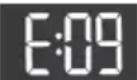 | Waterleakdetectedinthe washingmachinearea | Turnoffthewashingmachineandturnitback on.Inspecttheexterioroftheappliance.Ifyoudo notobserveanyleaks,youcancontinueto usethewashingmachine. | |
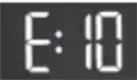 | Waterlevelsensorerror | Unplugthepowercordfromtheoutlet;then, plugthepowercordbackintotheoutlet and switchonthewashingmachine.Venttheappliance.Dothisbydrainingand cleaningthewashingmachinefilterand cleaningthewall-mountedtrap.Iftheerrorreoccurs,callaservicetechnician. | |
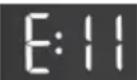 | Wateroverflow | Ifthereiswaterinthedrumthatexceedsa certainlevel,andanerrorisreportedonthe displayunit,thewashingprogramwillbe interruptedandwaterwillbepumpedoutof thewashingmachine.Restarttheprogram;iftheerrorreoccurs,callaservicetechnician.Ifthereiswaterinthedrumthatexceedsa certainlevel,andanerrorisreportedonthe displayunit,whilethewashingmachine continuestoaddwater,closethewatertap andcallaservicetechnician. | |
| Excessiveamountof detergent | Toomuchdetergentmaycauseexcessive foaminginthedrum.Seedescriptionfor.Fd | ||
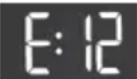 | Motorcontrolerror | Manuallyredistributethelaundry(stuckor tangledlaundry)andrepeatthewashing programme. | |
| Problem/Error | and problem description | What to do?Indication on the display unit | |
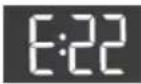 | Doorisclosed,butitcannotbelocked.Error while locking the Switchoffthewashingmachine.Switchit backonandrestartthewashingprogram.Iftheerrorreoccurs,callaservicetechnician. | ||
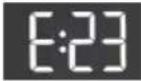 | door Turnoffthewashingmachine,thenturnit | Doorisclosed,butitcannotbeunlocked.Error while unlocki | |
 | backon.Iftheerrorreoccurs,callaservicetechnician.Toopenthedor,seechapter»INTERRUPTIONSANDCHANGINGTHE PROGRAMME/Openingthedoor(Pause/Cancel/ChangeProgramme)«. | ||
 | Electronics communication failure in the washing machine | Unplugthepowercordfromtheoutlet;then, plugthepowercordbackintotheoutletand switchonthewashingmachine.Iftheerrorreoccurs,callaservicetechnician. | |
 | |||
 | Warning from the system for detecting extended washing machine voltage fluctuation-180 V >U >260 V | Aprolongeddropofvoltagedobelow180V, orvoltageinexcessof260Vwasdetected, whichcanaffectthewashingmachine operation.Checkthepowersupplynetworktowhich yourwashingmachineisconnected. | |
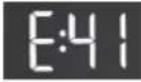 | Warning from the system for detecting incorrect power mains frequency (50/60 Hz) | Whenthewashingmachinewasswitchedon, thesystemdetectedincorrectsupplypower frequency,whichcouldaffectwashing machinefunctionality.Anyproblemsonthepowernetworkshould becheckedandcorrected. | |
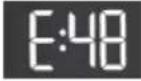 | Appliance cannot be connected to the network. | Theerroronlyaffectstheoptiontoremotely control(Remotecontrol)yourwashing programme.itdoesnotaffectthewashing processonotherprogrammes.Callaservicetechnician. | |
Warnings/informationfortheuser,whichcanbeindicatedonthedisplayunit,mayincludethefollowing:
| Information | Error cause and description, what to do?Indication on the disp | ||
 | ANTI CREASE (CREASE PREVENTION)function that you have selected as a part of the washing programme is activated and in progress | TocancelorstoptheANTI CREASE (CREASE PREVENTION)function,rotatetheprogram selectorknob(1)topositionOFF. ⏻ | |
 | Water drain system alert Displayofwarning. [CLF] | Alertaboutreducedwaterflowinthepumping stage.Checkthefollowing:•isthepumpfilterclean, | |
| Information | Error cause and description, what to do?Indication | ||
| isthedrainhoseclogged,isthedrainclogged,ifthedischargehoseplacedisplaced belowthemaximumandabovethe minimumheight(seechapter»INSTALLATIONAND CONNECTION/Connectingandsecuring thewaterdischargehose«). | |||
 | System warning to run the Drum clean (Self-cleaning programme)Afterthewashingprogramme iscomplete,thesignsanEnEndwillalternateonthedisplay unit. | WerecommendrunningtheDrumclean (Self-cleaningprogramme). | |
 | Warning by the system for detecting excessive foaming during the washing programme | Incaseofexcessivefoaminginthewashing machineorleakoffoamthroughthedetergent dispensertray,thewashedlaundryhastobe rinsedthoroughlywithalargeamountof water.Chooseawashingprogramme,butdo notaddanydetergent.Werecommendchoosingthe Rinse&Softeningprogramme.Decreasetheamountofdetergentadded. | |
 | Power supply failure warning (»PF«/Power Failure) | Thesystemdetectedapowersupplyfailure duringthewashingprogrammeprogress, whichaffectedfunctionalexecutionofthe washingprogramme.Checkthepowersupplynetworktowwhich yourwashingmachineisconnected. | |
 | Power supply failure warning (»PF/End«) | Uponcompletionofthewashingcycle, endandwillalternateonthedisplayunit.This informstheuseraboutapowersupplyfailure andontheeffectontheexecutionofthe washingprogramme.Thewashingprogram continueswhereitwasinterruptedandthen endssuccessfully. | |
 | Warning -U:Lo (voltage below 180 V) | Aprolongeddropofvoltagetobelow180V wasdetected,whichcanaffectthewashing machineoperation.Checkthepowersupplynetworktowwhich yourwashingmachineisconnected. | |
| Information | Errorcauseanddescription,whattodo?Indicationonth | ||
| Unresponsivedisplayunitand allbuttons | Unplugthepowercordfromtheoutlet.Check ifthesupplyvoltageissuitableforthewashing machine(220-240V);then,plugthepower cordbackintotheoutletandswitchonthe washingmachine. | ||
 | Warning-U:Hi (voltageover260V) | Aprolongedvoltagesurgetoover260Vwas detected,whichcanaffectthewashing machineoperation.Checkthepowersupplynetworktowhich yourwashingmachineisconnected. | |
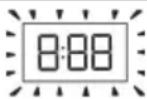 | Washingmachinestanding by,readytoresumethewashingprogrammeThetimeremaininguntil programmecompletionis alternatelylitandoffonthe displayunit. | Toresumethewashingprogramme,pressthe button(9)START/PAUSE. | |
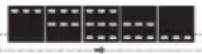 | Preparationforunlockingthe doorSignallightswillflashonthe displayunit.Waterhastobedrained | Waitfortheprocesstofinish.Ifnoerrorsare shownaftertheprocess,anewcyclecanbe run.Waitforthedoortounlock. | |
| Theappliancecannotbe controlledremotely | Applianceremotecontrolisnotactivatedor enabled.CheckiftheWi-Fisymbolontheappliance islit,andsettheprogramselectorknob(1)topositionREMOTECONTROL(ConnectLife)(Remotecontrol). | ||
| connecttotheWi-FinetworkCheckwhether2.4GHznetworkisactivated onyourrouterandwhethertheWi-Fisignal attheapplianceisstrongenough. | TheappliancecannotfindyourWi-Finetwork.Theapplianceis strongenough. | ||

INFORMATION!
Noise and vibration – make sure the appliance is levelled using the adjustable legs and that the jamnutsaresecurelytightened.
Unevenlydistributedlaundryorlumpsoflaundryinthewashingmachinedrumcancauseproblems suchasvibrationandnoisyoperation. ThewashingmachinedetectssuchproblemsandtheUKS* (*stabilitycontrolsystem)willbeactivated.
Smallerloads(e.g.onetowel,onesweater,onebathrobeetc.)orclothesmadeofmaterialswithspecial geometricalpropertiesarevirtuallyimpossibletodistributeevenlyacrossthewashingmachinedrum (slippers,largeitemsetc.).Thisresultsinseveralattemptstoredistributethelaundry,whichinturn leadstolongerprogrammeduration.Inextremecasesofunfavourableconditions,theprogramme canbecompletedwithoutthespinningcycle.
TheUKS ^* (*stabilitycontrolsystem) allows stable operation and longer washing machine useful life.
If the problem spersist despite observing the advice above, call an authorized servicetechnician.
Service
Beforecallingaservicetechnician
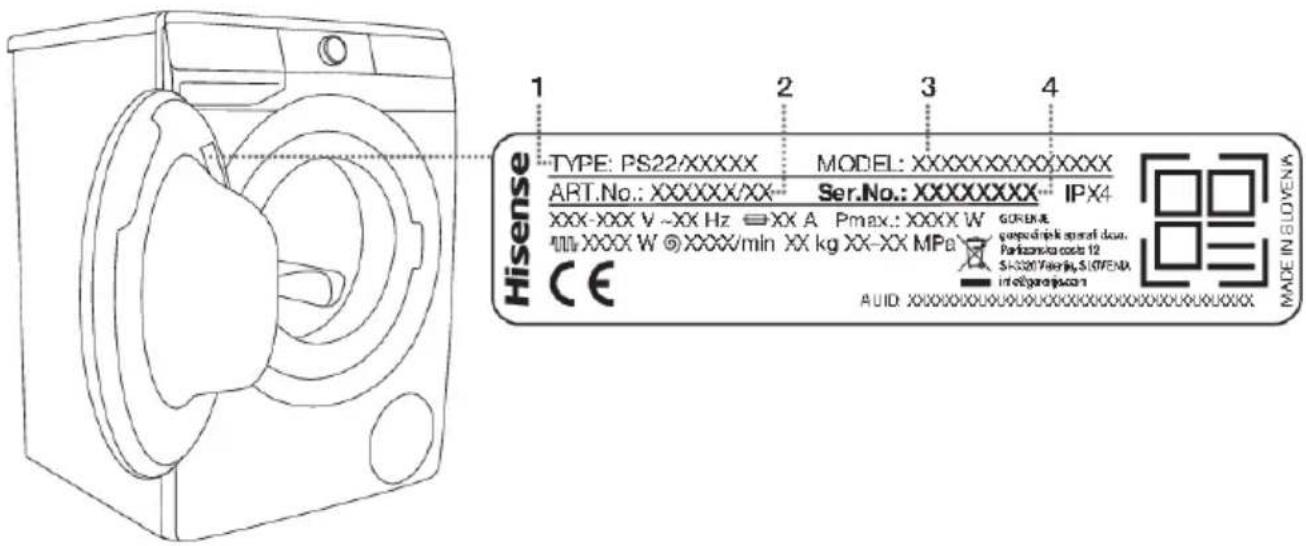
Whenyoucontactaservicecentre, pleasestateyourwashingmachine'stype(1),code/ID(2),model number(3),andserialnumber(4).
Washingmachinetype,code,model,andserialnumbercanbefoundontherating(type)plateonthe innersideofthewashingmachinedoor.

WARNING!
Incaseofafailure,onlyuseapprovedsparepartsbyauthorizedmanufacturers.

WARNING!
Repairoranywarrantyclaimresultingfromincorrectconnectionoruseofthewashingmachine shallnotbecoveredbythewarranty.Insuchcases,thecostsofrepairshallbechargedtothe user.

INFORMATION!
Thewarrantydoesnotcoverconsumables,minordeviationsincolour,increasednoisethat resultsfromapplianceageandwhichdoesnotaffectthefunctionalityoftheappliance,and aestheticdefectsoncomponents,whichdonotaffectthefunctionalityandsafetyoftheappliance.

INFORMATION!
Thewarrantydoesnotcovertheerrorsofailuresresultingfromdisturbancesfromtheenvironment (lightningstrike,powergridfailures,naturaldisastersetc.).
Additionalinformation,equipmentandaccessoriesformaintenancecanbeobtainedthrough Hisensecustomerservicecenters.
RECOMMENDATIONS FOR WASHING AND ECONOMIC USE YOUR WASHING MACHINE
Washnewcolouredgarmentsseparatelythefirsttime.
Washheavilysoiledlaundryinsmalleramounts, withmorepowderdetergentorwithapre-washcycle.
Applyaspecialstainremoveronstubbornstainsbeforethewash.
Withslightlysoiledlaundry, were recommendaprogrammewithoutapre-washcycle, useofshorter programmes(e.g.QUICKER)andalowerwashingtemperature.
If you often wash laundry at low temperatures and with liquiddetergents, bacteriamayspawn which can cause odour in the washing machine. Toprevents such odour, were recommend occasionally running the Drumclean (Self-cleaning programme) (see PROGRAMMETABLE).
Werecommendavoidingwashingverysmallamountsoflaundryasthiswillleadtoexcessiveuseof energyandpoorerwashingmachineperformance.
Loosenanyfoldedlaundrybeforeputtingitintothedrum. Onlyusedetergentsformachinewashing.
Ifwaterhardnessexceeds14°dH,watersoftenershouldbeused.Heaterdamageresultingfrom incorrectuseofwatersoftenersshallnotbecoveredbythewarranty.Checktheinformationonwater hardnesswithyourlocalwatersupplycompanyorauthority.
Useofchlorine-basedbleachesisnotrecommendedastheycandamagetheheater.
Donotaddhardenedlumpsofpowderdetergentintothedetergentdispenserasthismayclogthe pipinginthewashingmachine.
When using thick liquid laundry care products, were recommend diluting them with watertoprevent clogging the dispenser tray drain. Liquiddetergents are intended for washing programmes without aprewash cycle.
Athigherspinningrates, therewillbelessresidualmoistureinthelaundry. Asaresult, dryinga tumbledryerwillbemoreeconomicalandfaster.
| Water hardness | Hardness levels | |||
| p.p.m.°fH (°F)m mol/l° | ||||
| <150<15<1,5<8,41-s | ||||
| 2 – normal | 8,4–14 | 1,5–2,5 | 15–25 | 150–250 |
| >250>25>2,5>143-h | ||||

INFORMATION!
Check the information on water hardness with your local watersupply company or authority.
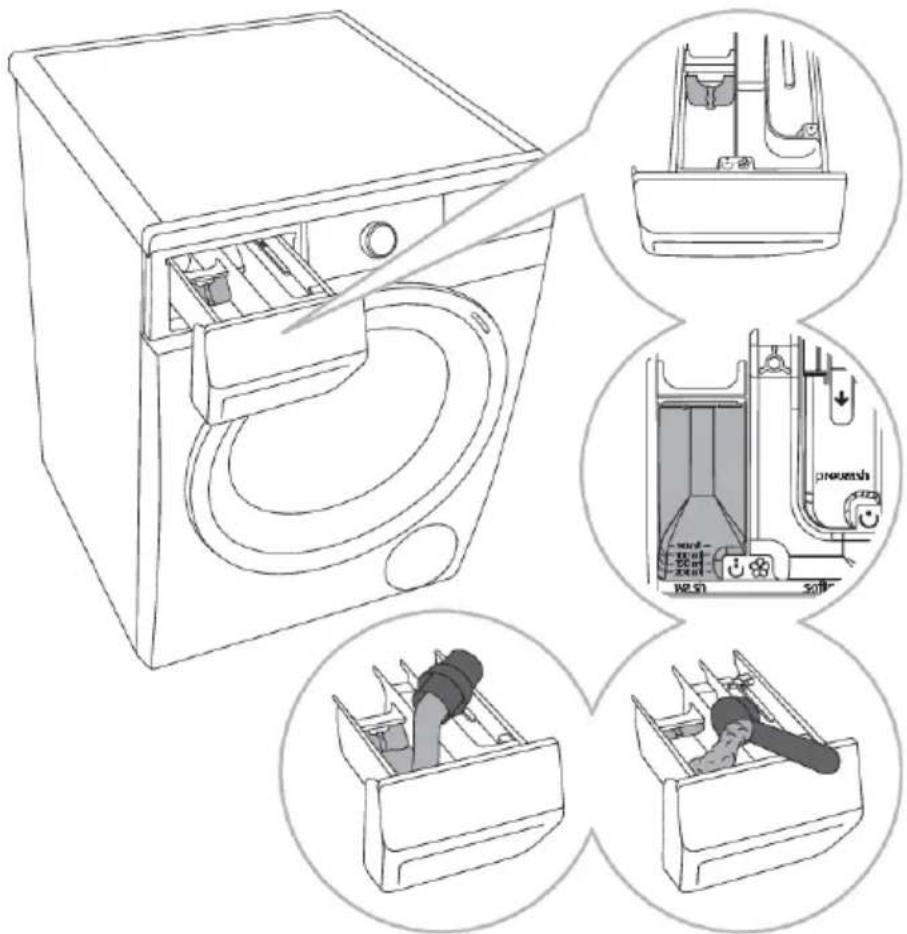
1 Aseparator/dividertab issuppliedwiththewashing machine,whichallows addingliquiddetergentto themainwashcompartment
( leftcompartment).
2Powderandliquid detergentlevelindicator
3 When using powder detergent, the separator/dividertab should be lifted.
4 When using liquid detergent, the separator/dividertab should be lowered.
| Symbolsofdetergentdispensercompartments | |
| prewash | |
| mainwash | |
| softening | |

INFORMATION!
Werecommendaddingpowderdetergentimmediatelybeforethewashingcycle.Ifyouaddit sooner,makesurethedetergentcompartmentinthedispensertrayiscompletelydrybefore addingthepowderdetergent:otherwise,thepowderdetergentmaycakebeforethestartofthe washingprocess.

INFORMATION!
Pourtheconditionerintothedispensertray, into the compartment with the symbol. Observe therecommendation on the conditioner packaging.

INFORMATION!
Donotfilltheconditionercompartmentoverthemax.indication(maximumindicatedlevel). Otherwise, theconditionerwillbeaddedtothelaundrytoosoon, leadingtopoorerwashing effect.
PRODUCT INFORMATION
PRODUCT INFORMATION SHEET According to EU-Regulation No. 2019/2014 (dependingonthemodel)
| Supplier's name or trade mark: | |||||
| Supplier's adress (b): | |||||
| Model identifier: | |||||
| General product parameters: | |||||
| ValueParameter | ValueParameter | ||||
| Ratedcapacity(a)(kg) | x,x | xHeightDimer | |||
| xWidth | |||||
| xDepth | |||||
| W(a) | a)x, x[A/B/C/D/E/F/G](c) | ||||
| Washingefficiencyindex(a) | x,xxx | Rinsingeffectiveness(g/kg)(a) | x,x | ||
| EnergyconsumptioninkWhpercycle,forthe'eco40-60'programme.Actualenergyconsumptionwilldependonhowtheapplianceisused. | x,xxx | Waterconsumptioninlitrepercycle,basedonthe'eco40-60'programme.Actualwaterconsumptionwilldependonhowtheapplianceisusedandonthehardnessofthewater. | x | ||
| Maximumtemperatureinsidethetreatedtextile(a)(oC) | Ratedcapacity | x | Remainingmoisturecontent(a)(%) | x,x | |
| xHalf | |||||
| xQuarter | |||||
| Spinspeed(a)(rpm) | Ratedcapacity | x | Spin-dryingefficiencyclass(a) | [A/B/C/D/E/F/G](c) | |
| xHalf | |||||
| xQuarter | |||||
| Programmeduration(a)(h:min) | Ratedcapacity | x:xx | Type | [built-in/freestanding] | |
| x:xxHalf | |||||
| x:xxQ | |||||
| Airborneacousticalnoiseemissionsinthespinningphase(a)(dB(A)re1pW) | x | Airborneacousticalnoiseemissionsclass(a)(spinningphase) | [A/B/C/D](c) | ||
| x,xxStandbymode(W)> | |||||
| Delaystart(W)(ifapplicable) | x,xx | Networkedstandby(W)(ifapplicable) | x,xx | ||
| Minimum duration of the guarantee offered by the supplier(b): | |||||
| This product has been designed to releasesilver ions during the washing cycle | [YES/NO] | ||||
Additionalinformation:
Weblinktothesupplier'swebsite,wheretheinformationfrompoint9AnexIItoCommitionRegulation (EU)2019/2023( a) (b)isfound:
(a)Forthe»eco40-60«programme.
(b) Changestotheseitemsshallnotbeconsideredrelevantforthepurposesofparagraph4ofArticle 4ofRegulation(EU)2017/1369.
(c) If the product database automatically generate the definitive content of this cell the suppliers shall not enter these data.
Lowstandbymode
If you donotrun any program or choose any settings afterswitching on the washing machine (program selectorknob(1)), the display unit will be switched off after 5 minutes and switched to stand - by mode inordertosave energy.
Thedisplayunitcanbereactivatedbyrotatingtheprogramselectorknob(1).Ifyoudonotdoanything for5minutesaftertheendofaprogramme, thedisplayunitwillbeswitchedofftosavepower.
| <0,5Po=weightedpowerwhenoff[W] | |
| <0,5PI=weightedpowerwheninstand | |
| 5,00TI=standbytime[min] |

INFORMATION!
Appliancewithawirelessconnectionuseslessthan2Wofelectricenergyinstandbymode.
DISPOSAL
Packagingismadeofenvironmentallyfriendlymaterialsthatcanbe recycled, disposedof, or destroyed without any hazard to the environment. To thisend, packaging materials are labelled appropriately.
Thesymbolontheproductoritspackagingindicatesthattheproduct shouldnotbetratedasnormalhouseholdwaste.Taketheproducttoan authorizedcollectioncentreforwasteelectricandelectronicequipment processing.
Whendisposingoftheapplianceattheendofitsusefullife,removeall powercords,anddestroythedoorlatchandswitchtopreventthedoor fromlockingorlatching(childsafety).
Correctdisposaloftheproductwillhelppreventanynegativeeffectson theenvironmentandhealthofpeople,whichcouldoccurincaseof incorrectproductremoval.Fordetailedinformationonremovaland processingoftheproduct,pleasecontacttherelevantmunicipalbodyin chargeofwastemanagement,yourwastedisposalservice,orthestore whereyouboughttheproduct.
Hisense
life reimagined