KCC 620 - Fan Koenic - Free user manual and instructions
Find the device manual for free KCC 620 Koenic in PDF.


| Product type | Mini air cooler with fan and water tank |
| Brand | Koenic |
| Model | KCC 620 |
| Dimensions (approx.) | 15 x 15 x 20 cm |
| Weight | 0.5 kg |
| Power supply | USB 5V, 2A minimum (power adapter not included) |
| Power consumption | 5 W (max) |
| Water tank capacity | 260 ml |
| Operating time (low speed) | Approximately 4 hours |
| Fan speeds | 3 speeds (low, medium, high) |
| LED lighting | 7 colors (red, blue, purple, green, yellow, cyan, white) + off |
| Cooling function | By water evaporation through a filter (non-replaceable) |
| Automatic dust removal function | Yes (activate by pressing speed and light buttons for 3 seconds) |
| Air outlet orientation | Manually adjustable |
| Maintenance and cleaning | Clean with a damp cloth; tank and interior once a week; dry after prolonged use |
| Safety | Do not immerse in water; use with certified USB adapter; do not use with external battery; do not cover while operating |
| Spare parts / repairability | No user-serviceable parts; contact an authorized repairer |
| Warranty | 2 years (according to warranty card) |
| Package contents | Mini cooler, USB cable, manual, warranty card |
Frequently Asked Questions - KCC 620 Koenic
User questions about KCC 620 Koenic
0 question about this device. Answer the ones you know or ask your own.
Ask a new question about this device
Download the instructions for your Fan in PDF format for free! Find your manual KCC 620 - Koenic and take your electronic device back in hand. On this page are published all the documents necessary for the use of your device. KCC 620 by Koenic.
USER MANUAL KCC 620 Koenic
(6)1=11-7
Eng 59-12
10:45 1:17
(2)
B: 0423 27
1507年1月
bapp 37
Nederlands 38-42
B2-1+1=47
Porter 航诺·艾
S-019013 57
(2) E = 11 - h
B. 0768(1) B. 042(1) (1911543, 7:3)
Intron GmbH
In the
E.C. Incented
1.0% 开放日
9.47A 01:18-14
[Non-Text]
MJ1020_101125_05
CE
Sicherheitshinweise
- This product can be used by children aged from 8 years and above and persons with reduced physical, sensory or mental capabilities or lack of experience and knowledge if they are supervised or have received instructions concerning the use of the appliance in a safe way and understand the hazards involved or are under supervision.
• Children shall not play with the product. - Cleaning and user maintenance shall not be carried out by children unless they are supervised.
- Only use the product with an approved and suitable USB adaptor that complies with the requirements of the relevant standards of the IEC/EN 60335 series
- LED's are not replaceable.
- When the light source reaches its end of life the whole product shall be replaced.
- Attention! Please do not look directly into the light emanating from the LED. Do not point the LED light directly into the eyes.
- Follow the instructions in the chapter Cleaning and care.
Safety instructions
- Read this user manual thoroughly before first use and pass it on with the product. Pay attention to the warnings on the product and in this user manual. It contains important information for your safety as well as for the use and maintenance of the equipment.
- Never leave the product unsupervised while it is switched on.
- Do not place any objects on top of the product.
- Never immerse electrical parts of the product in water during cleaning or operation. Never hold the product under running water.
- Do not under any circumstances (e.g. product has been dropped etc.) attempt to repair the product yourself. For servicing and repairs, please consult an authorised service agent.
- Avoid damages to the cord that may be caused by kinks or contact with sharp corners.
- Keep this product including cord away from all heat sources, e.g. ovens, hot plates and other heat-producing products/objects.
- Disconnect the product from the power supply ...
- when the product is not being used,
- in case of malfunctions,
- before attaching / detaching accessories and
- before cleaning the product.
- Use this product in dry indoor areas only and never outdoors.
-
This product is not intended for commercial use. It is designed for household use only.
• Make sure that the motor unit and supply cord do not become wet. -
Use accessories supplied with the device or recommended by the manufacturer only!
- This product is suitable only for private use.
- Do not cover the product while in use. Fire hazard!
English
Congratulations!
Thank you for your purchase of KOENIC product. Please read this manual carefully and keep it for future reference.
Intended use
The fan is intended to be used for air circulation. The LED light of this product is for decoration use only and not suitable for household room lighting. The LED light is not intended for use in other applications. Using it for anything else can damage the device or cause injury.
The Imtron GmbH assumes no liability for damage to the product, for property damage or for personal injury due to careless or improper usage of the product, or usage of the product which does not meet the manufacturer's specified purpose.
Before first time use
Remove the product and its accessories carefully from the original packaging. It is recommended to keep the original packaging for storage. If you wish to dispose of the original packaging, please observe applicable legal provisions. Should you have any questions regarding proper disposal, contact your local waste management center. Inspect the delivery contents for completeness and damages. Should the delivery contents be incomplete or damaged, contact your sales outlet immediately.
After unpacking, please refer to chapter
Cleaning and care.
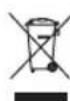
Do not dispose of this product as unsorted municipal waste. Return it to a designated collection point for the recycling of WEEE.
By doing so, you will help to conserve resources and protect the environment. Contact your retailer or local authorities for more information.
Content
1 x Mini air cooler with water tank
1 x USB cable
1 x User manual
1 x Warranty card
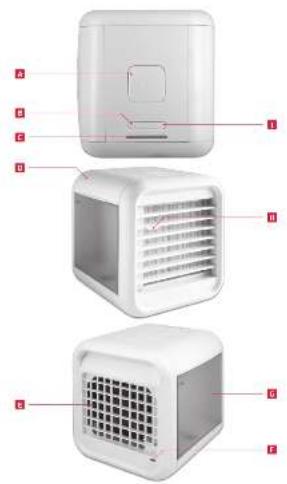
Controls and components
A On/off switch
B Fan level switch
c Fan level indicator
D Water tank lid
Air inlet
F USB socket
G Water tank
H Air outlet, adjustable
Light switch
Technical data
Rated voltage: 5 V
Protection class : III
Water tank capacity : max. 260 ml
Use
Note:
- Place the mini air cooler on an even surface such as a table, desk or counter top.
- Let the filter absorb water for at least 3 minutes after filling the tank and before using it. Doing so, cools down the air the quickest way.
- Try to stay within a few feet of mini air cooler. You'll feel the most benefit when sitting directly in front of it.
- The mini air cooler will run for approximately 4 hours on a single fill on low fan speed. Even if the water tank is empty, the filter is still damp and mini air cooler is still cooling.
- Note that during the very first usage and after longer periods of not using the product, a greater amount of water will instantly flow from the tank into the product and the filter. This is normal and does not influence the total running time.
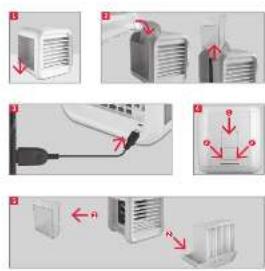
Fig. 1 Place mini air cooler on a flat surface.
Fig. 2 Open the water tank lid and fill it with water. We recommend a pitcher or measuring cup. Or you can take off the water tank to fill it with water from a faucet.

Warning!
If the water tank has been filled, do not move the mini air cooler anymore. If water runs out of the tank and electrical (fan motor) or electronic components get wet, the unit will be permanently damaged.
Fig. 3 Plug an appropriate USB adaptor into a socket outlet. Then, insert the larger USB A plug of the cable into the USB power supply and the other end into the USB socket on the back of the mini air cooler. Note the minimum USB current of 2A. Therefore USB sockets of computers may not work appropriately.

Warning!
Do not turn on and / or use the product while it is connected to a powerbank.
Fig. 4 Press the on/off switch to turn on the mini air cooler.
Set the fan speed by pressing the fan level button. You can choose between low, medium, and high mode. The fan level indicator shows the currently set speed.
Choose the light color by pressing the light button. You can choose between 7 colors in the following order: red, blue, purple, green, yellow, cyan, white. Pushing the light button again when in white light mode will turn off the lights. To turn off the mini air cooler, press the on/off button again.
Note:
- It is recommend to turn on the mini cooler with an empty water tank for at least 0.5 hour for drying. Missing to do so, might result in unpleasant smells etc.
- The machine provides the function of automatically shaking dust. When turned off, but connected with the power supply, press the fan speed and the light buttons for three seconds to enter this mode. The machine will switch back and forth between the high and low speed, and the color of the light will automatically change. Turn off the feature again by pressing the fan speed and light button for 3 seconds, or automatically after the machine runs for 5 minutes. This function can help shake off some dust adsorbed on the curtain fabric.
English
Cleaning and care

Warning!
- When cleaning, never use solvents or abrasive materials, hard brushes, metallic or sharp objects. Solvents are harmful to human health and can attack plastic parts, while abrasive cleaning mechanisms and tools may scratch the surface(s).
- Never immerse any electrical part of the product in water or in other liquids during cleaning. Never place it under running water.
The filter does not need to be replaced.
Clean the device with a damp cloth. Then dry it with a dry cloth. Clean the water tank and clean inside of the unit once weekly.
Fig. 5 Switch off the power. Take off the water tank. Take off the upper parts and clean the filter.
Note:
Before not using the mini air cooler for extended periods of time, empty the water tank, turn the unit on, and set it to the highest fan speed for at least 4 hours. This will dry the filter and the inside of your unit.
Troubleshooting
If there are any problems during operation, please refer to the following table. If problems cannot be solved as indicated under Solution, please contact your retailer.
| Problem Possible causes Solution | ||
| Product does not work | Interrupted power supplyPower supply too weak | Check the power supplyPower supply must deliver at least 2A |

Brand : Koenic
Model : KCC 620
Category : Fan