KHF 22320 - Fan Koenic - Free user manual and instructions
Find the device manual for free KHF 22320 Koenic in PDF.


| Product type | Mini USB handheld fan |
| Intended use | Indoor and outdoor air circulation |
| Power supply | Rechargeable Li-Ion battery 3.7 V, 2200 mAh |
| Input voltage | 5 V ⎓, 1 A |
| Battery life | Up to 10 hours (depending on battery condition) |
| Charging time | Approximately 4 hours |
| Number of speeds | 3 (low, medium, high) |
| Charging LED indicator | Red (charging), green (charged) |
| Base stand | Yes, for tabletop use |
| Package contents | 1 fan, 1 USB cable, 1 base stand, 1 user manual |
| Housing material | Plastic |
| Safety | Do not immerse, do not expose to moisture, do not use unattended |
| Maintenance | Clean with a slightly damp cloth, do not use solvents |
| Repairability | Built-in battery not replaceable; do not attempt to repair yourself |
| Battery type | Lithium-ion (Li-Ion) |
| Overheating protection | Do not cover the device |
| Usage | Household use only |
Frequently Asked Questions - KHF 22320 Koenic
User questions about KHF 22320 Koenic
0 question about this device. Answer the ones you know or ask your own.
Ask a new question about this device
Download the instructions for your Fan in PDF format for free! Find your manual KHF 22320 - Koenic and take your electronic device back in hand. On this page are published all the documents necessary for the use of your device. KHF 22320 by Koenic.
USER MANUAL KHF 22320 Koenic
natural_image
Two black office fans with spiral blades, standing upright (no text or symbols visible)| Densin-3 2 | — |
| Tol-47 10 | — |
| Vag-11 17 | — |
| Lysin-15-18 | — |
| Lysin-29-22 | — |
| Vag-28-20 | — |
| Lysin-27 30 | — |
| Iodine-31 34 | — |
| PheA-35 38 | — |
| Nitrin-33-32 | — |
| Sorine-43 40 | — |
| Tin-47 42 | — |
M_NHP2130_19120_V10_HFmb 1 D12011 1CS8
Felded Elex - At
natural_image
Close-up of a white electronic device with a red arrow pointing to a cable (no visible text or symbols)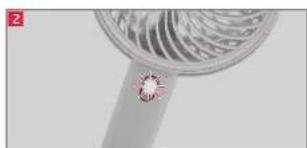
natural_image
Close-up of a metallic fan with a small diamond-shaped contact point on the stem (no text or symbols visible)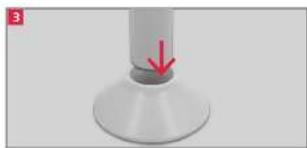
natural_image
Close-up of a white cylindrical object with a red arrow pointing to a small protrusion, no visible text or symbols.M_NHP2130_19120_V10_HFmbl 2 D12011 TCSH
Sicherheitshinweise
- This product can be used by children aged from 8 years and above and persons with reduced physical, sensory or mental capabilities or lack of experience and knowledge if they are being supervised or have been instructed concerning use of the product in a safe way and understand the hazards involved.
- Children shall not play with the product.
- Cleaning and user maintenance shall not be carried out by children unless they are supervised.
- Warning! Keep the product dry.
- Only charge the product with an approved and suitable USB charger that complies with the requirements of the relevant standards of the IEC/EN 60335 series.
English
Safety instructions
Read this user manual thoroughly before first use and pass it on with the product. Pay attention to the warnings on the product and in this user manual. It contains important information for your safety as well as for the use and maintenance of the equipment.
-
Use the product only for its intended purpose and with recommended accessories and components. Improper use or wrong operation may lead to hazards.
-
Never leave the product unsupervised while it is switched on.
-
Never immerse electrical parts of the product in water during cleaning or operation. Never hold the product under running water.
-
Do not under any circumstances attempt (e.g. product has been dropped, etc.) to repair the product yourself. For servicing and repairs, please consult an authorised service agent.
-
Use this product in dry indoor areas only and never outdoors.
-
Never use, expose or put the product near to:
- direct sunlight and dust; - fire (fireplace, grill, candles), water (water splashes, vases, bath tube) or heavy moisture.
-
This product is not intended for commercial use. It is designed for household use only.
-
Follow the instructions in the chapter Cleaning and care.
-
Do not leave the appliance unattended, if it is in use or the power plug is connected to an electrical outlet.
8
-
Do not remove the guard or insert any object during operation.
-
Before cleaning, always let the product come to a complete stop and disconnect it from the mains.
-
In order to avoid overheating, do not cover the product.
-
Small children, children and older people should not be exposed to cold air currents for a long time.
Battery
-
Never expose rechargeable batteries to excessive heat (e.g. bright sun, fire), and never throw them into fire. The rechargeable batteries could explode.
-
The rechargeable battery is permanently built into the product and cannot be replaced.
-
When disposing of the product, please consult an electrician or your retailer to remove and dispose the built in batteries in an environmentally friendly manner.
-
Never short-circuit the contacts of the rechargeable battery. Do not throw the rechargeable battery or the product into fire. There is a danger of fire an explosion!
-
Never charge the rechargeable battery of the product unattended.
English
Congratulations!
Thank you for your purchase of KOENIC product Please read this manual carefully and keep it for future reference.
Intended use
This product is only suitable for circulating air indoors and outdoors.
Any other use may result in damage to product or injuries. This product is not intended for commercial use. It is designed for household use only.
The Imtron GmbH assumes no liability for damage to the product, for property damage or for personal injury due to careless or improper usage of the product, or usage of the product which does not meet the manufacturer's specified purpose.
Before first time use
Remove the product and accessories carefully from the original packaging. Inspect the delivery contents for completeness and damages. Should the delivery contents be incomplete or damaged, contact your sales outlet immediately.
Note
- For first time use, charge the product for at least 4 hours. The general charging time is about 4 hours which also depends on the condition of the battery.
- When the battery is fully charged, the product can be used for 10 hours. The time may vary (depending on the battery condition).
Disposal
Do not dispose of this product as municipal waste. Return it to a designated collection point for the recycling of electrical and electronic equipment. Contact your retailer or local authorities for more information.

Please dispose of batteries in an environmentally friendly manner Do not put batteries into the household waste. Please use the return and collection systems in your community or contact the dealer where you purchased the product.
Content
1 x Mini USB Hand Fan
1 x USB cord
1 x User manual
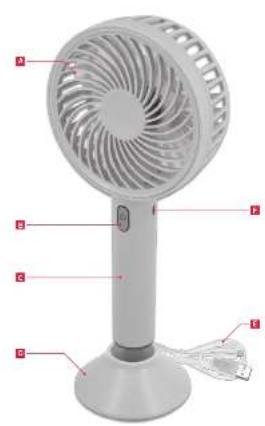
Controls and Components
A Protective cover
B On / off and fan level switch with operation LED
C- handle with battery compartment
DStand
USB charging cable
F Charging socket
Technical Data
Shaver
Battery operated : 3.7 V ===
Rated input voltage/ : 5 V = ,1 A
current
Re-chargeable battery : Li-Ion, 3.7 V
2200 mAh
English
Charging battery

Warning
Do not turn on and / or use the product while it is connected to a powerbank.
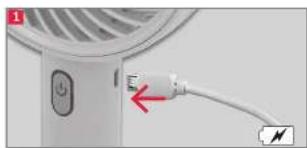
Fig.1 Connect one end of the USB cable to a USB charger or other suitable USB port and the other end to the USB charging socket on the fan. During charging the indicator LED is red and turns green when the battery is fully charged. Charge the battery for at least 4 hours before first use.
Note! Low battery warning:
There is no warning for low battery status. When the battery is empty the fan switches off automatically or cannot be switched on again respectively.
Operation
Fig. 2 Switch on and off, fan speed
- Press the on / off and fan level switch to turn on the fan. The operation LED lights up white.
• Repeatedly press the on / off and fan speed switch to select the desired fan speed (low, medium, high). - Press the on / off and fan level switch again and, if necessary, several times to switch off the fan. The operating LED turns off.
You can also use the fan with the supplied stand. Place the handle in the base.
Cleaning and care

Warning
When cleaning, never use solvents or abrasive materials, hard brushes, metallic or sharp objects. Solvents are harmful to human health and can attack plastic parts, while abrasive cleaning mechanisms and tools may scratch the surface(s).
- Clean the outside of the product with a slightly damp cloth and dry well.
- Keep the product in a dry, cool location which is protected against moisture and direct sunlight. Keep this product out of the reach of children.
Troubleshooting
If there are any problems during operation, please refer to the following table. If problems cannot be solved as indicated under Solution, please contact your manufacturer.
| Problem Possible causes Solution | ||
| Product does not work • Interrupted power supplyBatteries empty | • Check the power supply• Re-charge batteries | |
| LED indicator does not light on during charging batteries | • No power supply• Charging cord is not connected to product | • Check the power supply• Check the charging cord connection |

- Sicherheitshinweise
- English
- Safety instructions
- Battery
- Congratulations!
- Intended use
- Before first time use
- Note
- Disposal
- Content
- Controls and Components
- Technical Data
- Shaver
- Charging battery
- Warning
- Note! Low battery warning:
- Operation
- Fig. 2 Switch on and off, fan speed
- Cleaning and care
- Troubleshooting
Brand : Koenic
Model : KHF 22320
Category : Fan