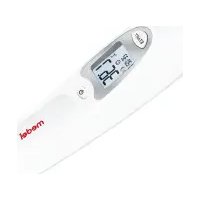
Ear Temp - Thermometer Medel - Free user manual and instructions
Find the device manual for free Ear Temp Medel in PDF.


| Product type | Infrared ear thermometer |
| Brand | Medel |
| Model | Ear Temp |
| Use | Measurement of body temperature in the ear, object temperature, ambient temperature |
| Measurement range (ear) | 28.0 °C to 43.0 °C |
| Measurement range (object) | -20 °C to 100 °C |
| Measurement range (ambient) | 0 °C to 50 °C |
| Accuracy (ear 35.5-42 °C) | ± 0.2 °C |
| Accuracy (ear out of range) | ± 0.3 °C |
| Measurement time | Approx. 1 second |
| Display | Backlit LCD |
| Memory | Last 10 measurements with date and time |
| Fever indicator | Icon and acoustic signal (≥ 38 °C) |
| Power supply | 2 AAA 1.5 V batteries (included) |
| Battery life | Approximately 3000 measurements or 1 year |
| Auto-off | 60 seconds |
| Dimensions (L x W x H) | 155 x 38 x 47 mm |
| Weight (without batteries) | Approximately 63 g |
| Protection rating | IP22 |
| Standards | CE, Directive 93/42/EEC, ISO 80601-2-56 |
| Care and cleaning | Clean the tip with a soft cloth or cotton swab moistened with alcohol or disinfectant. Do not immerse. |
| Spare parts | Replacement protective caps (pack of 2 x 10) |
Frequently Asked Questions - Ear Temp Medel
User questions about Ear Temp Medel
0 question about this device. Answer the ones you know or ask your own.
Ask a new question about this device
Download the instructions for your Thermometer in PDF format for free! Find your manual Ear Temp - Medel and take your electronic device back in hand. On this page are published all the documents necessary for the use of your device. Ear Temp by Medel.
USER MANUAL Ear Temp Medel
natural_image
White medical device with digital display showing temperature reading (no visible text or symbols on device body)EAR TEMP
Termometro per orecchio
Istruzioni per l'uso 2–14
Ohrthermometer
Gebrauchsanweisung....15–26
GB Ear thermometer
Instructions for use....27-38
F Thermomètre auriculaire
Mode d'emploi ....39-50
E Termómetro para el oído
Instrucciones de uso ....51–62
TR Kulak Termometresi
Kullanım Kılavuzu 63–74
PL Termometr douszny
Instrukcja obsługi....75–86
ELECTROMAGNETICCOMPATIBILITY
INFORMATION....87–90
CE 0483

ITALIANO

Read these instructions for use care fully and keep them for later use, be sure to make them accessible to other users and observe the information they contain.
Dear customer.
Thank you for choosing one of our products. Our name stands for high-quality, thoroughly tested products for applications in the areas of heat, gentle therapy, blood pressure/diagnosis, weight, massage and air.
Table of contents
- Signs and symbols 28
- Intended use 20
- Notes 29
- Unit description .... 50
- Initial use .... 31
- Settings 31
a.1 Setting the trilvdsale 31 b.2 Setting the tomorrow Unit BC or 15 26 - Measuring 32
7.1 Measuring body temperature 32
7.2 Measuring object temperature....34
7.5 Displaying room temperature 34 7.4 Displaying range measurements 25 - Replacing the battery 36
- Cleaning and storage 37
- Disposal 37
- What if there are error messages? 37
- Technical data....38
Included in delivery
Check that the delivery has not been tampered with and make sure that all components are present. Before use, ensure that there is no visible damage to the device or accessories and that all packaging material has been removed. If you have any doubts, do not use the device and contact your retailer or the specified Customer Services address.
1 x ear thermometer
2 x 1.5 V AAA batteries
5 x protective caps
1 x set of instructions for use
subsequent purchase articles
Protective cap set replacement available: 2 x 10 protective caps.





- Signs and symbols
The following symbols appear in these instructions for use and on the device:
| WARNINGWarning notice indicating a risk of injury or damage to health. | |
| IMPORTANTSafety note indicating possible damage to the unit/accessory. | |
| i | NoteNote on important information |
| Observe the instructions for use | |
| Application part, type BF | |
| Disposal in accordance with the Waste Electrical and Electronic Equipment EC Directive – WEEE | |
| CE0483 | The CE labelling certifies that the product complies with the essential requirements of Directive 93/42/EEC on medical products. |
| Permissible storage temperature and humidity |
| Permissible operating temperature and humidity | |
| Manufacturer | |
| IP 22 | IP 22, protection against harmful ingress of water and dust |
2. Intended use
The ear thermometer is intended for measuring the body temperature in the ear. Do not use the ear thermometer for measurements in other parts of the body.
You can also use the ear thermometer to measure room and object temperatures.
The ear thermometer has been carefully developed for precise, safe and rapid temperature measurements in the ear. It is a non-invasive ear thermometer with an infra-red detector to determine the body temperature in the auditory canal of adults and children.
Use the device for the intended purpose only and in the manner specified in these instructions for use. Any form of improper use can be dangerous. The manufacturer is not liable for damage resulting from improper or careless use.
The quality of the device has been verified and conforms to the requirements of Council Directive 93/42/EEC (Medical Devices Directive) Annex I, Essential requirements, and the corresponding harmonised standards. ISO 80601-2-56:2009 Clinical ther
mometers – Part 5: Performance of infra-red ear thermometers (with maximum device).
Please note that portable and mobile HF communication systems may interfere with this device. More details can be requested from the stated Customer Services address or found at the end of the instructions for use.
3. Notes
Safety notes
WARNING
• To measure temperature, insert the sensor tip of the ear thermometer carefully into the ear.
- Use of the ear thermometer on different persons can be inappropriate in the event of certain acute infectious diseases because of the possible spread of germs despite cleaning and disinfection. If you have any doubts, please consult your doctor.
- The body temperature measured in the ear may differ from other measurements taken in the mouth, rectum or ampits. Any comparison of these values is therefore futile. Measure temperature regularly to calculate the normal ear temperature and then use these measurements as a basis for comparison when taking measurements in the event of a suspected high temperature.
- This ear thermometer is intended for measuring the temperature in the ear. Do not use this ear thermometer for measurements in other parts of the body.
- Replace the protective cap after each use to ensure an accurate measurement and prevent cross-contamination.
- The ear thermometer may only be used with protective caps from Medel; other protective caps may result in faulty measurements. If you have run out of protective caps, contact the manufacturer or retailer for replacements.
- Consult a doctor if you believe your medical condition to be poor.
Notes on handling batteries
WARNING
- If your skin or eyes come into contact with battery fluid, rinse the affected areas with water and seek medical assistance.
- Choking hazard! Small children may swallow and choke on batteries. Store the batteries out of the reach of small children.
- Observe the plus (+) and minus (-) polarity signs.
- If a battery has leaked, put on protective gloves and clean the battery compartment with a dry cloth.
- Protect batteries from excessive heat.
- Risk of explosion! Never throw batteries into a fire.
- Do not charge or short-circuit batteries.
- If the device is not to be used for a relatively long period, take the batteries out of the battery compartment.
- Use identical or equivalent battery types only
• Always replace all batteries at the same time. - Do not use rechargeable batteries.
- Do not disassemble, split or crush the batteries.





Risks to the device

IMPORTANT
- Do not subject the device to mechanical impacts.
- Do not expose the device to direct sunlight.
- Do not expose the device to liquids. The device is not wa-
terproof. Avoid all direct contact with water or other liquids. - Have the device repaired by authorised service centres only,
otherwise its warranty is invalidated. -
Portable and mobile HF communication systems may interfere with this device. More details can be requested from the stated Customer Services address or found at the end of the instructions for use.
-
Unit description
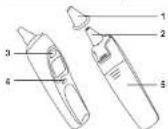
| 1 | Protective cap |
| 2 | Measuring sensor |
| 3 | START button |
| 4 | ON/OFF button ⏻ |
| 5 | Battery compartment |
LCD display
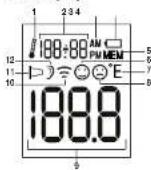
| 1 | Room temperature mode |
| 2 | Displays room temperature/time/date |
| 3 | AM/PM display (time) |
| 4 | Battery symbol |
| 5 | Memory mode |
| 6 | No fever symbol |
| 7 | Temperature unit (°C or °R) |
| 8 | Fever symbol |
| 9 | Temperature display |
| 10 | Object temperature mode |
| 11 | Protective cap symbol |
| 12 | Body temperature mode |
5. Initial use
The batteries are already inserted in new devices. Before first use, remove the protruding plastic insulating strip from the battery compartment. The ear thermometer will then switch on automatically.

6. Settings
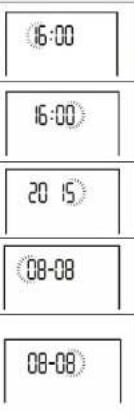
6.1 Setting the time/date
Before beginning to take measurements, we recommend that you set the current time and date. This will allow you to organise the saved measurements more easily later.
| 1. Press and hold the ON/OFF button (on the switched-off device for three seconds. "24 H" appears on the display. |
| 2. Use the START button to select the hour format (12h or 24h) and confirm using the ON/OFF button ⏻ |
| 24 H | |
| 12 H | 24 H |
- The hour setting appears on the display. Use the START button to select the current hour and confirm using the ON/OFF button ⏻
- The minute setting appears on the display. Use the START button to select the current minute and confirm using the ON/OFF button ⏻
- The year setting appears on the display. Use the START button to select the current year and confirm using the ON/OFF button ⏻
- The day flashes on the display. Use the START button to select the current day and confirm using the ON/OFF button (↓)
- The month flashes on the display. Use the START button to select the current month and confirm using the ON/OFF button. The device then switches itself off automatically. The date and time are now saved.
30 31
100008 MEDELEARTEMP USER MANUAL REV.00 22.04.2016 indd 30-31 03/05/2016 15:12:57





6.2 Setting the temperature unit (°C or °F)
You can set the device to display the temperature in degrees Celsius (°C) or degrees Fahrenheit (°F).
| 1. Press and hold the START button on the switched-off device for three seconds. "C" appears on the display. | |
| 2. Use the START button to select the temperature unit (°C or °F) and confirm using the ON/OFF button ⏻ |
- The ear thermometer may be used by children only under adult supervision. Measurement is usually possible over the age of 6 months. In infants under 6 months, the ear canal is still very narrow so the temperature of the eardrum often
- The measurement must not be taken in an ear affected by inflammatory diseases (e.g. discharging pus or secretion), after possible ear injuries (e.g. eardrum damage) or in the healing period after operative procedures. In all of these cases, please consult your doctor.
- Use of the ear thermometer on different persons can be inappropriate in the event of certain acute infectious diseases because of the possible spread of germs despite cleaning and disinfection. If you have any doubts, please consult your doctor.
- This ear thermometer may only be used with the protective cap in place.
- The following circumstances may influence the temperature in the ear: if you have been lying on the ear for an extended period, the ears are covered, the ears are exposed to excessive heat/cold, or after swimming or bathing. In the event of one of these circumstances, wait 20 minutes before performing the measurement.
-
As ear wax can affect the measurement, you should clean the ear before measuring if necessary.
-
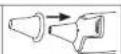
Place a clean protective cap on to the sensor tip of the ear thermometer.
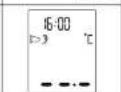
- Press the ON/OFF button to switch on the ear thermometer. Three acoustic signals sound and the display switches on.
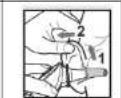
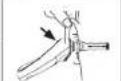
- As the ear canal is slightly curved, you have to pull the ear slightly up and backwards before inserting the sensor tip. This is important so that the tip of the protective cap can be pointed directly at the eardrum.
- Insert the sensor tip with the protective cap carefully into the ear canal and press the START button to begin the measurement.
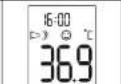
- After approx. one second, a long acoustic signal sounds and the measurement is shown in the display. Press the ON/OFF button to switch off the ear thermometer.

Note
If no button is pressed for one minute after the measurement, the ear thermometer automatically switches itself off again.
Fever indicator
If the measured temperature is < 38 °C (100.4 °F), a laughing smiley appears on the display and a short acoustic signal sounds.
If the measured temperature falls between 37.5 and 37.9 °C, two short acoustic signals will also sound (the indication for "raised temperature").
If the measured temperature is ≥ 38^ (100.4°F), a sad smiley appears on the display and a short, a long and three short acoustic signals sound one after the other.

7. Measuring
i Note
Check before each use that the lens is intact. If it is damaged, contact your retailer or the service address. Bear in mind that the ear thermometer needs to have been in the room in which the measurement is taken for at least 30 minutes before use.
7.1 Measuring body temperature
WARNING
- Some people produce different readings in their left and right ear. In order to record temperature changes, always measure a person's temperature in the same ear.
32 33
100008 MEDELEARTEMP USER MANUAL REV.00 22.04.2016 indd 32-35 03/05/2016 15:12:58


7.2 Measuring object temperature
| 1. Remove the protective cap from the sensor tip of the ear thermometer (if it is on). | |
| 2. Press the ON/OFF button to switch on the ear thermometer. Three acoustic signals sound and the display switches on. |  |
| 3.Ensure that you are in object temperature mode To switch between body temperature and object temperature mode, briefly press and hold the ON/OFF button and the START button at the same time. |  |
| 4.Hold the sensor tip of the ear thermometer 1 to 2 cm from the desired measuring point and press the START button. | |
| 5. After one second, a long acoustic signal sounds and the measurement is shown in the display. Briefly press the ON/OFF button to switch of the ear thermometer. |  |
7.3 Displaying room temperature
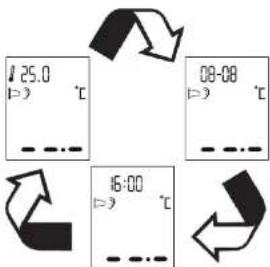
When you switch on the ear thermometer, the room temperature, the date and time appear alternately on the display every 3 seconds.
34 35
100008 MEDELEARTEMP USER MANUAL REV.00 22.04.2016 indd 34-35 03/05/2016 15:12:50


7.4 Displaying stored measurements
The ear thermometer automatically stores the last 10 temperature measurements of body and object temperature respectively (incl. date and time). To recall the stored measurements, proFECd as follows:
| 1. Press the ON/OFF buttondo switch on the ear thermometer. | |
| 2. Press and hold the ON/OFF buttonfor 3 seconds. An M and the last stored measurement ap- pear on the display. | |
| 3. To switch between the individu- al stored measurements, press the ON/OFF buttonWith each subsequent pressing of the ON/OFF buttonthe memory space number is displayed first followed by the measurement. | |
| 4. If you would like to proEECd with a measurement, press the START button. Press and hold the ON/OFF button for 3 sec- onds to switch off the ear thermometer. | |
8. Replacing the battery
Before replacing the battery, ensure that the device is switched off.
- Replace the batteries as soon as the battery symbol (i) appears on the display.

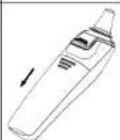
- Slide open the battery compartment and remove the used batteries from the battery compartment.
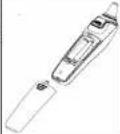
- Insert two new 1.5 V AAA batteries. Make sure that the batteries are inserted the right way round. Close the battery compartment.




9. Cleaning and storage
Protective caps are only intended for single use.
The sensor tip is the most sensitive part of the ear thermometer. Work carefully when cleaning the sensor tip to avoid causing any damage. Use a clean cloth or cotton bud that can be moistened with disinfectant, alcohol or warm water.
To clean the entire device, use a soft cloth slightly moistened with a mild soapy solution.
Do not use any harsh cleaning products.
If prolonged storage is intended, you should remove the batteries. The device must not be stored or used at an excessively high or low temperature or humidity (see technical data), in sunlight, in association with an electrical current or in dusty locations. Otherwise inaccuracies can occur.
10. Disposal
The empty, completely flat batteries should be disposed of through specially designated collection boxes, recycling points or electronics retailers. You are legally required to dispose of the batteries.

Note: The codes below are printed on batteries containing harmful substances; Pb = Battery contains lead, Cd = Battery contains cadmium, Hg = Battery contains mercury.
Dispose of the device in accordance with EC Directive – WEEE (Waste Electrical and Electronic Equipment). If you have any questions, please contact the local authorities responsible for waste disposal.

- What if there are error messages?
| Error message | Cause Solution | |
| ER1 | The ear thermometer is not yet ready for measurement. | Take measurements only once body (for object temperature mode appears on the display. |
| ER2 | The measured ambient temperature is not in the range from 10°C -40°C (50-104°F). | Place the ear thermometer in a room with an ambient temperature between 10°C and 40°C (50°F and 104°F) for at least 30 minutes. |
| ER3 | The ear thermometer is not placed in the ear correctly. | Please observe the notes in the chapter "Measuring". Perform the measurement again. |
| Error message | Cause Solution | |
| ER4 | The ear thermometer registered a large change in the ambient temperature. | Pace the ear thermometer in a room with an ambient temperature between 10°C and 40°C (50°F and 184°F) for at least 30 minutes. |
| ERS | The ear thermometer is not working properly. | Replace the batteries and try again. If the fault occurs again, contact Customer Services. |
| ERS | You are in the "Measuring object temperature" mode and the protective cap is still on. | The protective cap must be removed to measure object temperatures. |
| H1 | In-ear measurement: the measured temperature is over 43 °C (109.4°F). Object measurement: the measured temperature is over 100 °C (212°F). | Ensure that the device and the protective cap are fully functioning. Perform the measurement again. |
| Error message | Cause Solution | |
| In-ear measurement: the measured temper- ature is below 28°C (82.4°F).Object measurement: the measured temperature is below -20°C (-4°F). | Ensure that the device and the protective cap are fully functioning. Perform the measurement again. | |
| The batteries are empty. | Remove the two empty batteries and insert two new 1.5 V AAA batteries in to the ear thermometer. |




- Technical data
| Temperature range | In esr: 28.0 - 43.0 °C (82.4 - 109.4 °F)Object temperature: -20 - 100°C (-4 - 212°F)Room temperature: 0 - 50°C (32 - 122°F) |
| Laboratory measurement accuracy | In esr: ± 0.2 °C (0.4 °F) in measurement range of 35.5 - 42.0 °C (55.9 - 107.6°F); ± 0.3 °C (0.5 °F) in measurement range of ≤35.5 °C (55.5 °F) and ≥42.0 °C (107.6°F)Object temperature: ± 4% or ± 2 °C (4 °F)Room temperature: ±2°C (±4 °F) |
| Clinical reproducibility 0,11 °C (0,2 °F) | |
| Duration of measurement | Approx. one second |
| Operating temperature range | 10 - 40 °C (50 - 104°F), humidity 15 - 85% (non-condensing) |
| Storage temperature range | -25 - 55 °C (-13 - 131°F), humidity 15 - 95% (non-condensing) |
| Memory 10 memory spaces | |
| Display resolution 0.1 °C or 0.1 °F | |
| Battery DC 3 V (2 x 1.5 V) AAA batteries | |
| Dimensions 155 x 38 x 47 mm | |
| Weight Approx. 63 g (without batteries) | |
| Protective caps 10 | |
| Automatic switch-off 60 seconds | |
| Battery operating life | 3,000 measurements in succession or one year with one to two measurements per day, including standby mode. |
| Safety classification | |
| IP protection class IP 22 | protection against harmful ingress of water and dust |
38 39
100008_MEDELEAR TEMP_USER MANUAL_REV.00_22.04.2016.ind 38-39
FRANÇAIS

9. Nettoyage/stockage
flowchart
graph TD
    A["25.0"] --> B["08-08"]
    B --> C["16:00"]
    C --> D["..."]
    D --> A
natural_image
Three technical line drawings of a handheld device, showing front, side, and top views with no visible text or symbols.



ELECTROMAGNETIC COMPATIBILITY INFORMATION
Table 1
Guidance and declaration of manufacturer-electromagnetic emissions
| The Model Ear Temp Ear Thermometer is intended for use in the electromagnetic environment specified below. The customer or the user of the Model Ear Temp Ear Thermometer should assure that it is used in such an environment. | ||
| Emissions test | Compliance | Electromagnetic environment – guidance |
| RF emissions CISPR 11 | Group 1 | The Model Ear Temp Ear Thermometer uses RF energy only for its internal function. Therefore, its emissions are very low and are not likely to cause any interference in nearby electronic equipment. |
| RF emissions CISPR 11 | Class B | The Model Ear Temp Ear Thermometer is suitable for use in all establishments, including domestic establishments and those directly connected to the public low-voltage power supply network that supplies buildings used for domestic purposes. |
| Harmonic emissions IEC 61000-3-2 | Not applicable | |
| Voltage fluctuations/flicker emissions IEC 61000-3-3 | Not applicable | |
86 87
100008_MEDELEAR TEMP_USER MANUAL_REV.00_22.04.2016.ind 86-87

03:05/2016 15:13:08



Table 2
Guidance and declaration of manufacturer-electromagnetic immunity
| The Model Ear Temp Bar Thermometer is intended for use in the electromagnetic environment specified below.The customer or the user of the Model Ear Temp Bar Thermometer should assure that it is used in such an environment. | |||
| IMMUNITY test | IEC 60001 test level | Compliance level | Electromagnetic environment = guidance |
| Electrostatic discharge (ESD)IEC 61000-4-2 | ±6 kV contact+8 kV air | ±5 kV contact=8 kV air | Floors should be wood, concrete or organic tile, if floors are covered with synthetic material, the relative humidity should be at least 30%. |
| Electrostatic transient/burstIEC 61000-4-4 | +2 kW for power supply lines+1 kW for input/output lines | Not applicable | |
| Surge IEC 61000-4-5 | ±1kW differential mode±2kW common mode | Not applicable | |
| Voltage dips, short interruptions and voltage variations on power supply input linesIEC 61000-4-11 | -5% U+7(>95% dip in U-) for 0.5 cycle40% U+7(80% dip in U-) for 5 cycles70% U+7(30% dip in U-) for 25 cycles-5% U+7(>95% dip in U-) for 5 sec | Not applicable | |
| Power frequency (50/60 Hz) magnetic field IEC 61000-4-8 | 3 A/m 3 A/m | Power frequency magnetic fields should be at levels characteristic of a typical location in a typical commercial or hospital environment. | |
| NOTE: U_i is the a.c. mains voltage prior to application of the test level. | |||
08 09
100008 MEDELEAR TEMP USER MANUAL REV.00 22.04.2016 indd 88-89 03/05/2016 15:13:00
Table 3
| Guidance and declaration of manufacturer-electromagnetic immunity | |||
| The Model Ear Temp Ear Thermometer is intended for use in the electromagnetic environment specified below. The customer or the user of the Model Ear Temp Ear Thermometer should assure test it is used in such an environment. | |||
| IMMUNITY test | IEC 60001 test level | Compliance level | Electromagnetic environment - guidance |
| Conducted RF IEC 61000-4-6 | 3Vrms 150 kHz to 80 MHz | Not appli-cable | Portable and mobile RF communications equipment should be used no closer to any part of the Model Ear Temp Ear Thermometer, including cables, than the recommended separation distance calculated from the equation applicable to the frequency of the transmitter. Recommended separation distance: d = 3.5E_f dB MHz to 800 MHz d = 7E_f dB MHz to 2.5 GHz Where P is the maximum output power rating of the transmitter in watts (W) according to the trans-mitter manufacturer and d is the recommended separation distance in meters (m). Field strengths from fixed RF transmitters, as determined by an electromagneto site survey, * should be less than the compliance level in each frequency range. Interference may occur in the vicinity of equipment marked with the following symbol: |
| Radiated RF IEC 61000-4-3 | 3Vrms 80 MHz to 2.5 GHz | 3Vrms | |




Table 4
| Recommended separation distances between portable and mobile RF communications equipment and the Medel Ear Temp Ear Thermometer |
| The Medel Ear Temp Ear Thermometer is intended for use in an electromagnetic environment in which radiated therefore disturbances are controlled. The customer or the user of the Medel Ear Temp Ear Thermometer can help prevent electromagnetic interference by maintaining a minimum distance between portable and mobile RF communications equipment (transmitters) and the Medel Ear Temp Ear Thermometer as recommended below, according to the maximum output power of the communications equipment. |
| Rated maximum output power of transmitter (W) | Separation distance according to frequency of transmitter (m) | |
| 80 MHz to 800 MHz d = [ 3.5E_ r ] | 800 MHz to 2.5 GHz d = [ 7E_ r ] | |
| 0.01 0.12 0.23 | ||
| 0.1 0.38 0.73 | ||
| 1 1.2 2.3 | ||
| 10 3.8 7.3 | ||
| 100 12 23 | ||
For transmitters rated at a maximum output power not listed above, the recommended separation distance d in metres (m) can be estimated using the equation applicable to the frequency of the transmitter, where P is the maximum output power rating of the transmitter in watts (W) according to the transmitter manufacturer.
NOTE 1 At 80 MHz and 800 MHz, the separation distance for the higher frequency range applies.
NOTE 2 These guidelines may not apply in all situations. Electromagnetic propagation is affected by absorption and reflection from structures, objects and people.
90 91
100008 MEDELEARTEMP USER MANUAL REV.00 22.04.2016 ind 90-01


Hans Dinslage GmbH
Riedlinger Str. 28
88524 Uttetweiler, Germany
Distributed by:
Medel International Scl
Via Villapizzane 26 -20156 Milano / Italy

0483
03:05:2016 15:13:09
- EAR TEMP
- ITALIANO
- Table of contents
- Included in delivery
- Intended use
- Notes
- Safety notes
- WARNING
- Notes on handling batteries
- Risks to the device
- IMPORTANT
- Initial use
- Settings
- Setting the time/date
- Setting the temperature unit (°C or °F)
- Note
- Measuring
- i Note
- Measuring body temperature
- Displaying room temperature
- Displaying stored measurements
- Replacing the battery
- Cleaning and storage
- Disposal
- FRANÇAIS
- Nettoyage/stockage
Brand : Medel
Model : Ear Temp
Category : Thermometer