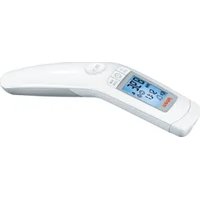
Temp - Thermometer Medel - Free user manual and instructions
Find the device manual for free Temp Medel in PDF.


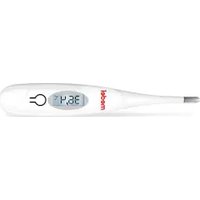
| Product type | Non-contact infrared medical thermometer |
| Brand | Medel |
| Model | Temp (Type SFT 85) |
| Dimensions (L × W × H) | 47.6 mm × 29.0 mm × 188.0 mm |
| Weight (without batteries) | 82 g |
| Power supply | 2 AAA batteries, LR03 (about 3,000 measurements) |
| Main functions | Forehead, object and ambient temperature measurement; memory of last 60 values; LCD display; adjustable audible signal; screen backlight |
| Measurement range (forehead) | 34 °C to 42.2 °C (93.2 °F to 108 °F) |
| Accuracy (forehead) | ± 0.2 °C between 36 °C and 39 °C, ± 0.3 °C elsewhere |
| Measurement range (object) | -22 °C to 80 °C (-7.6 °F to 176 °F) with accuracy ± 4% or ± 2 °C |
| Measurement distance | 2 to 3 cm |
| Display | LCD with backlight |
| Measurement units | °C or °F (adjustable) |
| Memory | 60 automatic measurements with date and time |
| Auto power off | After 1 minute |
| Cleaning | Sensor: soft cloth or cotton swab with disinfectant/70% alcohol. Housing: slightly damp soft cloth. Do not immerse in water. |
| Safety | Do not use if the lens is damaged; avoid shocks and liquids; keep out of reach of children; respect battery polarity |
| Warranty | 5 years (excluding batteries and normal wear) |
| Repairability | Repairs only by a Medel authorized center |
| Operating conditions | 10 °C to 40 °C, humidity ≤ 95% RH |
| Storage conditions | -20 °C to 50 °C, humidity ≤ 85% RH |
| Package contents | Thermometer, 2 AAA batteries, storage box, instruction manual |
Frequently Asked Questions - Temp Medel
User questions about Temp Medel
0 question about this device. Answer the ones you know or ask your own.
Ask a new question about this device
Download the instructions for your Thermometer in PDF format for free! Find your manual Temp - Medel and take your electronic device back in hand. On this page are published all the documents necessary for the use of your device. Temp by Medel.
USER MANUAL Temp Medel
chemical
Diagram showing resonance of 24H in a device with 12H in another, indicating bidirectional resonance structureAbb. 1
Datum
natural_image
Close-up of a baby's face with a dashed-line circular highlight on the forehead (no text or symbols)Abb. 8
natural_image
Diagram of a cylindrical object with an arrow indicating direction, no text or symbols presentnatural_image
Close-up of a smiling baby's face with a dashed-line circular marker on the forehead (no text or symbols)Fig. 8
natural_image
Simple line drawing of a cylindrical object with an arrow indicating direction (no text or symbols)- Signs and symbols ......44
- Use 45
- Warnings and Safety ......46
3.1 Risks to the user 46
3.2 Risks to the device.... 46
3.3 Notes on handling batteries 46 - Information about this thermometer....47
- Unit description ....49
5.1 Display description 50 - Initial use....50
- Switching on and setting the thermometer ....51
7.1 Setting the basic functions ..... 51 - Forehead measurement....53
8.1 Displaying saved measurements .... 54 - Measuring object temperature / room temperature .....55
- Error messages....55
- Batteries ....56
- Cleaning the device....57
- Storing the device ....57
- Disposing of the device....58
- Technical Data....58
- Guidelines ...... 60
- Warranty/service....60

Read these instructions for use carefully and keep them for later use, be sure to make them accessible to other users and observe the information they contain.
Dear customer,
Thank you for choosing one of our products. Our name stands for high-quality, thoroughly tested products for applications in the areas of heat, gentle therapy, blood pressure/diagnosis, weight, massage and air.
Please read these instructions for use carefully and observe the information they contain.
With kind regards,
Your Medel team
Included in delivery
Check that the delivery has not been tampered with and make sure that all components are present. Before use, ensure that there is no visible damage to the device or accessories and that all packaging material has been removed. If you have any doubts, do not use the device and contact your retailer or the specified Customer Services address.
- Thermometer
- 2 x AAA (LR03) batteries
- Storage box
- Instructions for use
1. Signs and symbols
The following symbols appear in these instructions for use and on the device:
 | WARNINGWarning notice indicating a risk of injury or damage to health. |
 | IMPORTANTSafety note indicating possible damage to the unit/accessory. |
 | NoteNote on important information. |
 | Observe the instructions for use |
 | Application part, type BF |
 | Disposal in accordance with the Waste Electrical and Electronic Equipment EC Directive – WEEE |
 83 83 | CE labellingThis product satisfies the requirements of the applicable European and national directives. |
 | Manufacturer |
Storage/Transport | Permissible storage and transport temperature and humidity |
 | Permissible operating temperature and humidity |
| IP22 | Protected against solid foreign objects 12.5 mm in diameter and larger, and against drops of water when the housing is angled up to 15° |
 | Serial number |
 | Important information/tip |
| ▷ | Cross-reference to another section. |
 | Separate the packaging elements and dispose of them in accordance with local regulations. |
 | Separate the product and packaging elements and dispose of them in accordance with local regulations. |
 A A | Marking to identify the packaging material.A = material abbreviation, B = material number:1-6 = plastics, 20-22 = paper and cardboard |
2. Use
This clinical thermometer is intended for non-contact measurement of forehead, object and room temperature. It allows you to quickly and easily measure body temperature Values are saved automatically.
3. Warnings and Safety
3.1 Risks to the user
- Only use the device once you have read and understood these instructions for use.
- Retain these instructions for use. The instructions for use must be accessible to all users. All instructions must be followed.
- The thermometer needs to be in the room in which the measurement is taken for at least 30 minutes before use.
- The Medel Temp thermometer is only designed for the measuring area on the human body stated in the instructions for use.
- The device is only intended for the purpose stated in these instructions for use.
- Children must not be allowed to use the device. Medical devices are not toys.
- Check before each use that the lens is intact. If it is damaged, please contact your retailer or the service address.
- The device has been designed for practical use, but is not a substitute for a visit to the doctor.
- Should you have any questions about using the device, please contact either your retailer or Customer Services.
3.2 Risks to the device
- Do not subject the device to mechanical impacts.
- Do not expose the device to direct sunlight.
- Do not expose the device to liquids. The device is not waterproof. Avoid all direct contact with water or other liquids.
- Have the device repaired by authorised service centres only, otherwise its warranty is invalidated.
- Portable and mobile HF communication systems may interfere with this device.
3.3 Notes on handling batteries
- If your skin or eyes come into contact with battery fluid, flush out the affected areas with water and seek medical assistance.
- Choking hazard! Small children may swallow and choke on batteries. Store the batteries out of the reach of small children.
- Observe the plus (+) and minus (-) polarity signs.
- If a battery has leaked, put on protective gloves and clean the battery compartment with a dry cloth.
- Protect the batteries from excessive heat.
- Risk of explosion! Never throw batteries into a fire.
- Do not charge or short-circuit batteries.
- If the device is not to be used for a long period, take the batteries out of the battery compartment.
- Use identical or equivalent battery types only.
• Always replace all batteries at the same time. - Do not use rechargeable batteries.
- Do not disassemble, split or crush the batteries.
4. Information about this thermometer
The temperature measurement varies depending on the part of the body where the measurement is taken. In a healthy person, the variance can be between 0.2 °C and 1 °C (0.4 °F and 1.8 °F) in different parts of the body.
Normal temperature range with various thermometers
| Measurements Thermometer used | ||
| Forehead temperature | 35.8 °C to 37.6 °C (96.4 °F to 99.7 °F) Forehead thermometer | |
| Ear temperature 36.0 °C | to 37.8 °C (96.8 °F to 100.0 °F) Ear thermometer | |
| Oral temperature 36.0 °C | to 37.4 °C (96.8 °F to 99.3 °F) Conventional thermometer | |
| Rectal temperature 36.3 °C | to 37.8 °C (97.3 °F to 100.0 °F) Conventional thermometer |

Medel tip
• Temperatures measured with different thermometers should never be compared with one another.
- Tell your doctor what type of thermometer you used to take your temperature and on what part of the body. Also bear this in mind if you are diagnosing yourself.

Holding the thermometer for too long in the hand before taking a measurement can cause the device to warm up. This means the measurement could be incorrect.
Influences on body temperature
- A person's individual metabolism
- Age
Body temperature is higher in babies and toddlers than in adults. Greater temperature fluctuations occur faster and more often in children. Normal body temperature decreases with age.
- Clothing
- Outside temperature
• Time of day
Body temperature is lower in the morning and increases throughout the day towards evening.
- Activities
Physical and, to a lesser extent, mental activities increase body temperature.

Medel tip
Taking the body temperature provides a current measurement of a person's temperature. If you are uncertain about interpreting the results or if the values are abnormal (e.g. fever), please consult your doctor. This also applies in the case of slight temperature changes if there are other symptoms of illness such as agitation, severe sweating, flushed skin, fast pulse rate, tendency to collapse, etc.
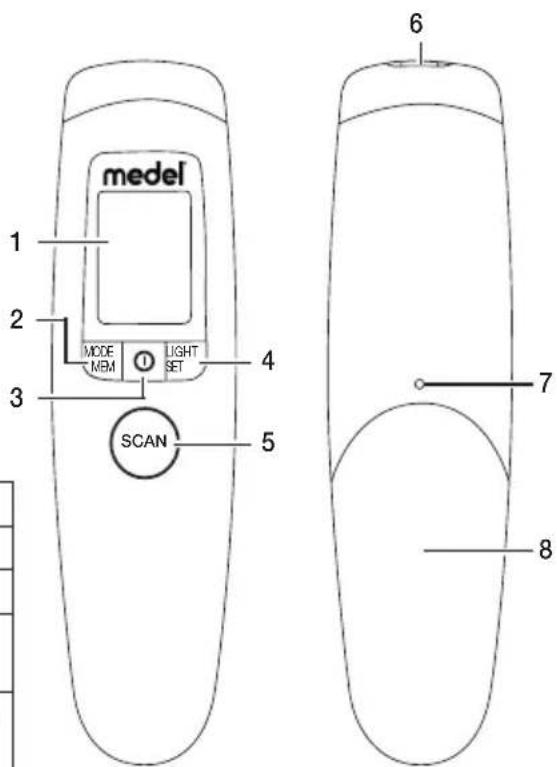
5. Unit description
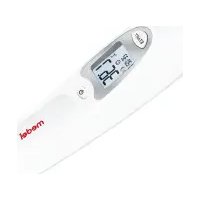
1 Display
2 MODE/MEM button
3 On/Off button ⓘ
4 LIGHT/SET button
5 SCAN button
6 Measuring sensor
7 Battery compartment lock
8 Battery compartment lid
| Buttons Functions | |
| 1 | Turns the device on and off. |
| SCAN Starts the temperature measurement. | |
| MODE/MEM | MODE Sets the measurement mode.MEM Displays stored measurements. |
| LIGHT/SET | LIGHT Manual switch on of the illuminated display.SET Sets the basic functions. |
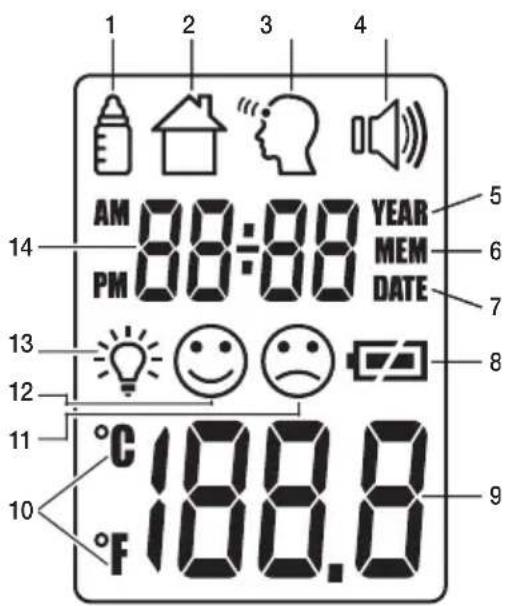
5.1 Display description
1 Object temperature mode
2 Room temperature mode
3 Forehead temperature mode
4 Acoustic signal symbol
5 Year
6 Memory function
7 Date
8 Battery level
13 Illuminated display symbol
14 Year/date/time display
9 Temperature/memory space number display
10 Celsius/Fahrenheit measurement unit
11 Measurement ≥ 38.0°C (≥100.4°F) "fever"
12 Measurement < 38.0°C (<100.4°F) "no fever"
6. Initial use
If provided, pull out the battery insulating strip at the battery compartment or remove the protective film from the battery and insert the battery with the correct polarity.
▷ 11. Batteries
After a brief self-test and two short beeps the thermometer is ready for forehead measurement.
7. Switching on and setting the thermometer
Briefly press the On/Off button ⏻
After a brief self-test and two short beeps the thermometer is ready for forehead measurement.
The device always starts up in forehead temperature mode 🔔.
7.1 Setting the basic functions
This menu allows you to set the following functions individually, one after another.

flowchart
graph LR
    A["Timeformat"] --> B["Date Time"]
    B --> C["Temperature meas. unit"]
    C --> D["Acoustic signal"]
    D --> E["Illuminated display"]
Time format
- With the thermometer switched on, press and hold the LIGHT/SET button for 5 seconds.
The time format option flashes on the display (fig. 1).
- Use the MODE/MEM button to set your preferred time format and confirm with the LIGHT/SET button.
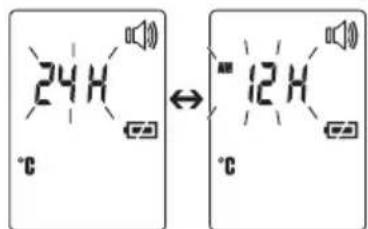
Fig. 1
Date
The year flashes in the display (fig. 2).
- Use the MODE/MEM button to set the year and confirm with the LIGHT/SET button.
Day/month flashes in the display (fig. 3).
- Use the MODE/MEM button to set the day and month, and confirm with the LIGHT/SET button.
In the 24h format, the date is displayed as day/month. In the 12h format, it is displayed as month/day.
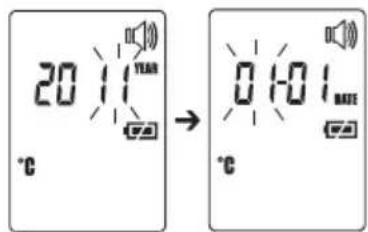
Fig. 2
Fig. 3
| Time | The time flashes in the display (fig. 4).Use the MODE/MEM button to set the time and confirm with the LIGHT/SET button.i In the 12h format, the time is displayed as AM/PM. | [YYYYA]Fig. 4 |
| Temperature meas. unit | The temperature measurement unit flashes in the display (fig. 5).You can set the device to display the temperature in degrees Celsius (°C) or degrees Fahrenheit (°F).To display the temperature in Celsius, select °C using the MODE/MEM button and confirm with the LIGHT/SET button.To display the temperature in Fahrenheit, select °F using the MODE/MEM button and confirm with the LIGHT/SET button. | 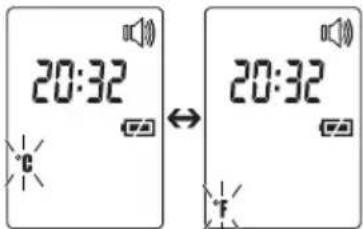 Fig. 5 Fig. 5 |
| Acoustic signal | The acoustic signal symbol flashes in the display (fig. 6).You can activate/deactivate the acoustic signals (device activation, measurement in progress, measurement completion).To activate the acoustic signals, select using the MODE/MEM button and confirm with the LIGHT/SET button.To deactivate the acoustic signals, select using the MODE/MEM button and confirm with the LIGHT/SET button. | 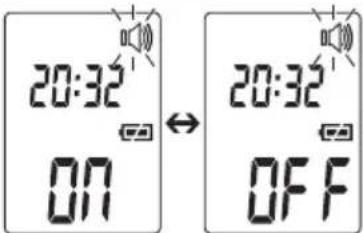 Fig. 6 Fig. 6 |
The light symbol flashes in the display (fig. 7).
You can activate or deactivate the automatic illuminated display (appears following forehead temperature measurement).
- To activate the automatic illuminated display, select OR using the MODE/MEM button and confirm with the LIGHT/SET button.
- To deactivate the automatic illuminated display, select using the MODE/MEM button and confirm with the LIGHT/SET button.
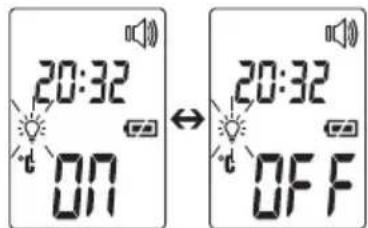
Fig. 7
You can also activate the illuminated display manually by briefly pressing the LIGHT/SET button. The display lights up for 5 seconds.
The automatic and manual illuminated display cannot be used while measurement is in progress.
8. Forehead measurement
Briefly press the On/Off button ⏻
After a brief self-test and two short beeps the device is ready for forehead temperature measurement. The device is in forehead temperature mode. This is indicated by the "symbol."

Medel tip
Remember that
- physical activity, increased perspiration on the forehead, taking vasoconstrictive medication and skin irritations can distort the result,
- the forehead, or the temples, must be free from perspiration and cosmetics.
Hold the thermometer 2 to 3 cm from the measuring point. Press the SCAN button and move the thermometer from side to side over the forehead area (fig. 8).
During measurement you will hear short beeps (only if the acoustic signal is activated), which signal that the thermometer has found a new highest measurement.
End of measurement is signalled by a long beep.
Release the SCAN button.
You can now read the measured value.
In addition to the temperature, the fever or no fever symbols also appear in the display:
The no fever symbol indicates that the body temperature is within normal range; the fever symbol indicates a measurement equal to or higher than 38^ C ( 100.4^ F), which triggers a temperature alarm.
If the acoustic signal is switched on, three beeps will sound once the measurement is complete if the temperature is equal to or higher than 38^ C (100.4 °F).
The measuring time is usually 2 seconds but may take up to 30 seconds.
When two short beeps sound and the forehead symbol "stops flashing, the device is ready to take another measurement.
The measurement is automatically saved with the date/time and the “fever” 😊/“no fever” classification.
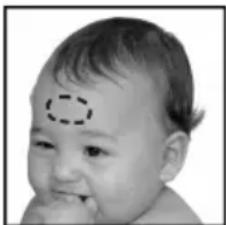
natural_image
Close-up of a baby's face with a dashed-line circular highlight on the forehead (no text or symbols)Fig. 8
8.1 Displaying saved measurements
The device only stores measurements in forehead temperature mode 📄 The device automatically stores the values from the last 60 measurements.
When 60 storage places are exceeded the oldest value is deleted.
The memory can be called up as follows:
- With the thermometer switched on, press and hold the MODE/MEM button for 5 seconds.
The most recent measurement is displayed. - With each subsequent pressing of the MODE/MEM button, first the storage space number is displayed followed by the measurement upon release.
- In the upper line, the time and date are displayed alternately.
9. Measuring object temperature / room temperature
If you want to measure an object temperature with this thermometer, switch to object temperature mode.
- With the thermometer switched on, briefly press the MODE/MEM button.
The device switches to the object temperature mode
- Hold the thermometer 2 to 3 cm from the measuring point. Briefly press the SCAN button and read the temperature in the display (fig. 9).
Measurements taken in object temperature mode are not stored.
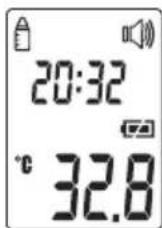
Fig. 9
If you want to use the thermometer to measure the room temperature you need to switch to room temperature mode.
- With the thermometer switched on, briefly press the MODE/MEM button twice.
The device switches to the room temperature mode.
• The room temperature is immediately displayed (fig. 10).
Measurements taken in room temperature mode are not stored.
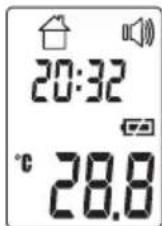
Fig. 10
10. Error messages
| Error message | Problem Solution | |
| Er 1 | Measurement during self-test, device not yet ready for measurement. | Wait until the forehead symbol stops flashing. |
| Er 3 | Room temperature below 10 °C or over40°C(<50°F,>104°F). | Room temperature must be between 10 °C and 40°C (<50°F, >104°F). |
| Hi | (1) Forehead temperature mode: The temperature recorded is higher than 42.2 °C (108°F).(2) Object temperature mode: The temperature recorded is higher than 80°C (176°F). | Operate the thermometer only between the specified temperature ranges. In the event of a repeated error message, contact your retailer or Customer Services. |
| Lo | (1) Forehead temperature mode: The temperature recorded is lower than 34 °C (93.2°F).(2) Object temperature mode: The temperature recorded is lower than -22 °C (-7.6°F). | Operate the thermometer only between the specified temperature ranges. In the event of a repeated error message, contact your retailer or Customer Services. |
| CJ | The batteries are empty. Replace the batteries. |
11. Batteries
The device requires two AAA (LR03) batteries.
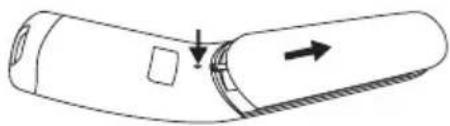
- Open the battery compartment.
Use a pointed object to press down on the battery compartment lock and at the same time slide the battery compartment downwards.
• Take the used batteries out of the battery compartment.
- Insert new batteries.
Make sure that the batteries are inserted the right way round.
- Close the battery compartment.
natural_image
Diagram of a cylindrical object with a square cutout and directional arrows indicating movement or force (no text or symbols)- The empty, completely flat batteries must be disposed of through specially designated collection boxes, recycling points or electronics retailers. You are legally required to dispose of the batteries.
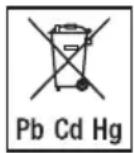
- The codes below are printed on batteries containing harmful substances:
Pb = Battery contains lead,
Cd = Battery contains cadmium,
Hg = Battery contains mercury.
12. Cleaning the device

- The measuring sensor is the most sensitive part of the thermometer. Take great care of the measuring sensor when cleaning the device.
- Do not use any harsh cleaning products.
• Always observe all safety notes for user and device.
▷ 3. Warnings and Safety
Clean the measuring sensor after each use. Use a clean cloth or cotton bud that can be moistened with disinfectant or 70 % alcohol.
To clean the entire device, please use a soft cloth slightly moistened with a mild soapy solution. Under no circumstances may liquid enter the device.
Do not use the device again until it is completely dry.
13. Storing the device

The device must not be stored or used at an excessively high or low temperature or humidity (see technical specifications), in sunlight, in association with an electrical current or in dusty locations. Otherwise inaccuracies can occur.
If prolonged storage is planned, you should remove the batteries.
14. Disposing of the device
- For environmental reasons, do not dispose of the device in the household waste at the end of its useful life. Dispose of the unit at a suitable local collection or recycling point. Dispose of the device in accordance with EC Directive – WEEE (Waste Electrical and Electronic Equipment). If you have any questions, please contact the local authorities responsible for waste disposal.

15. Technical Data
If the device is used other than in accordance with the specifications, perfect functioning cannot be guaranteed! The accuracy of this thermometer has been carefully checked and developed with regard to a long useful life. If using the device for commercial medical purposes, it must be regularly tested for accuracy by appropriate means. Precise instructions for checking accuracy may be requested from the service address.
We reserve the right to make technical changes to improve and develop the product.
The serial number is located on the device or in the battery compartment.
| Type SFT 85 | |
| Measurement method Non-contact | infrared measurement |
| Basic functions Forehead temperature | ture measurementObject temperature measurementRoom temperature measurement |
| Measurement units Celsius (°C) and Fahrenheit (°F) | |
| Operating conditions 10 °C to 40 °C | (50 °F to 104 °F) with a relative humidity of ≤ 95 % |
| Storage conditions -20 °C to 50 °C | (-4 °F to 122 °F) with a relative humidity of ≤ 85 % |
| Measurement distance 2 to 3 cm from the measuring point | |
| Measurement range and accuracy of forehead temperature measurement | Forehead temperature measurement34 °C to 42.2 °C (93.2 °F to 108 °F)Measurement accuracy 36 °C to 39 °C: ± 0.2 °C(96.8 °F to 102 °F: ±0.4 °F)In the remaining measurement range ± 0.3 °C (± 0.5 °F) |
| Clinical repeat precision 0.23 °C (0 | 41 °F) |
| Measurement range and accuracyObject temperature measurement | Object temperature measurement -22 °C to 80 °C (-7.6 °F to 176 °F)Measurement accuracy ± 4% or ± 2 °C (± 4 °F) |
| Memory functionBody temperature measurement | Automatically stores the last 60 measurements. |
| Acoustic signal (can be set) With device activation, during measurement, when measurement is complete. | |
| Display LCD display | |
| Energy saving functions Device automatically switches off after 1 minute. | |
| DimensionsWidth x depth x height | approx. 47.6 mm x 29.0 mm x 188.0 mm |
| Weight 82 g (without batteries) | |
| Batteries 2 x AAA (LR03) batteries | Batteries last for approx. 3000 measurementsActivated functions such as acoustic signal or illuminated display also reduce the battery life. |
16. Guidelines
The device complies with the EU Medical Devices Directive 93/42/EEC, the German Medical Devices Act (Medizinproduktgesetz), the ASTM E 1965 - 98 and the European standard EN 60601-1-2 (in accordance with CISPR11, IEC61000-4-2, IEC61000-4-3, IEC61000-4-8) and is subject to particular precautions with regard to electromagnetic compatibility.

Notes on electromagnetic compatibility
- The device is suitable for use in all environments listed in these instructions for use, including domestic environments.
- The use of the device may be limited in the presence of electromagnetic disturbances. This could result in issues such as error messages or the failure of the display/device.
- Avoid using this device directly next to other devices or stacked on top of other devices, as this could lead to faulty operation. If, however, it is necessary to use the device in the manner stated, this device as well as the other devices must be monitored to ensure they are working properly.
- The use of accessories other than those specified or provided by the manufacturer of this device can lead to an increase in electromagnetic emissions or a decrease in the device's electromagnetic immunity; this can result in faulty operation.
- Failure to comply with the above can impair the performance of the device.
17. Warranty/service
Medel International, via Villapizzone 26 / 20156, Milan (referred to as “Medel”) provides a warranty for this product, subject to the requirements below and to the extent described as follows.
The warranty conditions below shall not affect the seller's statutory warranty obligations which ensue from the sales agreement with the buyer.
The warranty shall apply without prejudice to any mandatory statutory provisions on liability. Medel guarantees the perfect functionality and completeness of this product.
The worldwide warranty period is 5 years, commencing from the purchase of the new, unused product from the seller. The warranty only applies to products purchased by the buyer as a consumer and used exclusively for personal purposes in the context of domestic use.
German law shall apply.
During the warranty period, should this product prove to be incomplete or defective in functionality in accordance with the following provisions, Medel shall carry out a repair or a replacement delivery free of charge, in accordance with these warranty conditions
If the buyer wishes to make a warranty claim, they should approach their local retailer in the first instance: see the attached “International Service” list of service addresses.
The buyer will then receive further information about the processing of the warranty claim, e.g. where they can send the product and what documentation is required. A warranty claim shall only be considered if the buyer can provide Medel, or an authorised Medel partner, with
- a copy of the invoice/purchase receipt, and
- the original product.
The following are explicitly excluded from this warranty:
- deterioration due to normal use or consumption of the product;
- accessories supplied with this product which are worn out or used up through proper use (e.g. batteries, rechargeable batteries, cuffs, seals, electrodes, light sources, attachments and nebuliser accessories);
- products that are used, cleaned, stored or maintained improperly and/or contrary to the provisions of the instructions for use, as well as products that have been opened, repaired or modified by the buyer or by a service centre not authorised by Medel;
- damage that arises during transport between manufacturer and customer, or between service centre and customer;
- products purchased as seconds or as used goods;
- consequential damage arising from a fault in this product (however, in this case, claims may exist arising from product liability or other compulsory statutory liability provisions).
Repairs or an exchange in full do not extend the warranty period under any circumstances.
FRANÇAIS
Contenu
natural_image
Close-up of a smiling baby face with a dashed-line circular highlight on the forehead (no text or symbols)Fig. 8
natural_image
Diagram of a cylindrical device with an arrow indicating direction, no text or symbols presentchemical
Chemical resonance diagram showing 24H and 12H with electron spin statesFig. 1
Fecha
natural_image
Close-up of a baby's face with a dashed-line outline on the forehead (no text or symbols)Fig. 8
natural_image
Diagram of a cylindrical object with an arrow indicating direction, no text or symbols presentContracted Manufacturer: AViTA (WuJiang) Co. LTD
Factory address: No. 858, Jiao Tong Rd.,
Wujiang Economic Development Zone,
Suzhou City, Jiangsu Province, P.R.C.
Phone number: 0512-82078288
Product Name: Touch free infrared thermometer
Model: SFT 85
ISO Standard: ISO 80601-2-56:2017
China medical production License No:
SSYJXSCX20040018
Manufactured in China

Hans Dinslage GmbH
Riedlinger Str. 28
88524 Uttenweiler, Germany

Distributed by:
Beurer GmbH
Söflinger Straße 218
89077 Ulm, Germany
- Datum
- Dear customer,
- Included in delivery
- Signs and symbols
- Use
- Warnings and Safety
- Risks to the user
- Risks to the device
- Notes on handling batteries
- Information about this thermometer
- Medel tip
- Influences on body temperature
- Unit description
- Display description
- Initial use
- Switching on and setting the thermometer
- Setting the basic functions
- Time format
- Date
- Forehead measurement
- Displaying saved measurements
- Measuring object temperature / room temperature
- Error messages
- Batteries
- Cleaning the device
- Storing the device
- Disposing of the device
- Technical Data
- Guidelines
- Notes on electromagnetic compatibility
- Warranty/service
- If the buyer wishes to make a warranty claim, they should approach their local retailer in the first instance: see the attached “International Service” list of service addresses.
- FRANÇAIS
- Contenu
- Fecha
Brand : Medel
Model : Temp
Category : Thermometer