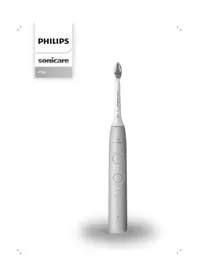
Sonicare 6100 HX7403 - Toothbrush PHILIPS - Free user manual and instructions
Find the device manual for free Sonicare 6100 HX7403 PHILIPS in PDF.

 FR
FR
 AZ
AZ
 BG
BG
 CS
CS
 DA
DA
 DE
DE
 EL
EL
 EN
EN
 ES
ES
 ET
ET
 FI
FI
 HE
HE
 HU
HU
 HY
HY
 IT
IT
 KA
KA
 KK
KK
 KY
KY
 LT
LT
 LV
LV
 MK
MK
 NL
NL
 NO
NO
 PL
PL
 PT
PT
 RO
RO
 RU
RU
 SK
SK
 SL
SL
 SQ
SQ
 SV
SV
 TG
TG
 TK
TK
 UK
UK
 UZ
UZ
| Brand | Philips |
| Model | Sonicare 6100 HX7403 |
| Category | Electric toothbrush |
| Product type | Rechargeable sonic toothbrush |
| Weight | Approximately 200 g (handle) |
| Dimensions (handle) | Approximately 25 cm x 2.5 cm |
| Power source | Rechargeable lithium-ion battery, charging via USB (5 V DC) |
| Battery life | Approximately 42 brushings of 2 minutes (21 days with twice-daily use) |
| Charging time | Up to 24 h (first charge), up to 48 h in travel case |
| Brushing modes | Clean (plaque removal), Sensitive (gentle) |
| Intensities | 3 levels: high, medium, low |
| Technologies | BrushSync, pressure detection, BrushPacer, SmarTimer, EasyStart |
| Timer | BrushPacer (6 segments of 20 s), SmarTimer (2 min) |
| Pressure sensor | Yes, alert by vibration and purple light |
| Brush head replacement reminder | Yes, via BrushSync technology (smart head) |
| Handle material | Plastic with rubberized coating |
| Water resistance | Water resistant, but do not immerse |
| Cleaning and maintenance | Rinse handle and head after use; do not put in dishwasher |
| Safety | Do not use if damaged; keep out of reach of children; consult a doctor if bleeding occurs |
| Spare parts | Smart brush heads (BrushSync) available; USB charger (model HX6110) |
| Warranty | Limited manufacturer warranty (see manual) |
Frequently Asked Questions - Sonicare 6100 HX7403 PHILIPS
User questions about Sonicare 6100 HX7403 PHILIPS
0 question about this device. Answer the ones you know or ask your own.
Ask a new question about this device
Download the instructions for your Toothbrush in PDF format for free! Find your manual Sonicare 6100 HX7403 - PHILIPS and take your electronic device back in hand. On this page are published all the documents necessary for the use of your device. Sonicare 6100 HX7403 by PHILIPS.
USER MANUAL Sonicare 6100 HX7403 PHILIPS
natural_image
Exterior view of a Philips Soundcaper electric toothbrush (no text or symbols visible on the device body)1
-1
1_
-1
1
English 5
Azərbaycanca 24
Čeština 43
Dansk 62
Deutsch 81
Eesti 102
Español 121
Français 141
Hrvatski 161
Italiano 180
Latviešu 200
Lietuviškai 219
Magyar 238
Nederlands 257
Norsk 277
O'zbek 296
Polski 315
Português 335
Română 355
Shqip 374
Slovenščina 393
Slovensky 412
Srpski 431
Suomi 450
Svenska 469
Türkmençe 488
Ελληνικά 507
Български 528
Кыргызча 549
Македонски 570
Русский 590
Точикй 611
Українська 632
Қазақша 652
Ruijtntu 672
Jusimun 665 694
715
Introduction
Welcome to the Philips Sonicare family! This toothbrush enables you to obtain superior plaque removal, whiter teeth and healthier gums. Using Sonicare's combination of gentle sonic technology and clinically developed and proven features, you can be confident that you're getting the very best clean, every time.
Further support and product registration are available to you at:
www.philips.com/support
Important safety information
Only use the product for its intended purpose. Read this information carefully before you use the product and its batteries and accessories, and save it for future reference. Misuse can lead to hazards or serious injuries.
WARNINGS
- Only use original Philips accessories or consumables. If supplied, only use the original USB cable and USB power supply unit.
- This appliance contains no user-serviceable parts. If the appliance is damaged, stop using it and contact the Consumer Care Center in your country. If the USB cable is damaged, stop using it.
- Keep the chargers away from water.
- After cleaning, make sure the chargers and travel charger cases are completely dry before you connect these.
- This appliance can be used by children and persons with reduced physical, sensory or mental capabilities or lack of experience and knowledge if they have been given supervision or instruction concerning use of the appliance in a safe way and understand the hazards involved. Cleaning and user maintenance shall not be made by children without supervision.
- Children should be supervised to ensure that they do not play with the product.
- Do not clean any part of the product in the dishwasher.
- Do not use adapters and chargers outdoors or near heated surfaces.
- This appliance has only been designed for cleaning teeth, gums and tongue.
- Stop using a brush head with crushed or bent bristles. Replace the brush head every 3 months or sooner if signs of wear appear.
- Avoid direct contact with products that contain essential oils or coconut oil. Contact may result in bristles dislodging.
- The maximum altitude of use is 4500 meters.
MEDICAL WARNINGS
- Stop using the appliance and consult your dentist/doctor if excessive bleeding occurs after use, if bleeding continues to occur after 1 week of use or if you experience discomfort or pain.
- If you have had oral or gum surgery in the previous 2 months, consult your dentist before you use this appliance.
- If you have a pacemaker or other implanted device, contact your doctor or the manufacturer of the implanted device prior to use.
- If you have medical concerns, consult your doctor before you use this appliance.
- This appliance is a personal care device and is not intended for use on multiple patients in a dental practice or institution.
BATTERY SAFETY INSTRUCTIONS
- This appliance contains batteries that are only removable by skilled persons.
- Only use the product for its intended purpose. Read this information carefully before you use the product and its batteries and accessories, and save it for future reference. Misuse can lead to hazards or serious injuries. Accessories supplied may vary for different products.
- Only use original Philips accessories and consumables.
- Keep product and batteries away from fire and do not expose them to direct sunlight or high temperatures.
- If the product becomes abnormally hot or smelly, changes color or if charging takes longer than usual, stop using and charging the product and contact Philips.
- Do not place products and their batteries in microwave ovens or on induction cookers.
- Do not open, modify, pierce, damage or dismantle the product or battery to prevent batteries from heating up or releasing toxic or hazardous substances. Do not short-circuit, overcharge or reverse charge batteries.
- This appliance contains batteries that are non-replaceable. When the battery is at end of life, the appliance shall be properly disposed of, see section on Recycling.
- Charge only with Philips HX6110 input ratings: 4.75-5.25VDC, 1.5W.
- Charge and use the product at a temperature between 0 °C and 40 °C (32°F and 104 °F).
- To avoid accidental short-circuiting of batteries after removal, do not let battery terminals come into contact with metal object (e.g. coins, hairpins, rings). Do not wrap batteries in aluminium foil. Tape battery terminals or put batteries in a plastic bag before you discard them.
- This appliance contains a Lithium-ion rechargeable cell. MUST BE RECYCLED OR DISPOSED OF PROPERLY.
Storage and transportation conditions
Temperature -20^ to +60^ (-4 °F to 140 °F).
Electromagnetic fields (EMF)
This Philips appliance complies with all applicable standards and regulations regarding exposure to electromagnetic fields.
Radio Equipment Directive
Hereby, Philips declares that electric toothbrushes with radio equipment type (Bluetooth, NFC) are in compliance with Directive 2014/53/EU.
- The Bluetooth radio frequency interface in applicable products operates at 2.4 GHz.
- The maximum output power by the Bluetooth appliance is 3 dBm.
- The NFC radio frequency interface in applicable products operates at 13.56 MHz.
- The maximum RF power transmitted by the appliance is 30.16 dBm.
The full text of the EU declaration of conformity is available at the following internet address: www.philips.com/support
Note: The Features of different models may vary. Some models may not be equipped with Bluetooth or NFC.
SAVE THESE INSTRUCTIONS
The following symbols may appear on the product:

natural_image
Simple line drawing of an open book with no text or symbols visibleThis symbol means read the instructions for use, before using the appliance.
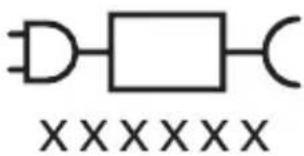
This symbol means to use the indicated power supply.
Intended use
Sonicare power toothbrushes are intended to remove adherent plaque and food debris from the teeth to reduce tooth decay and improve and maintain oral health.
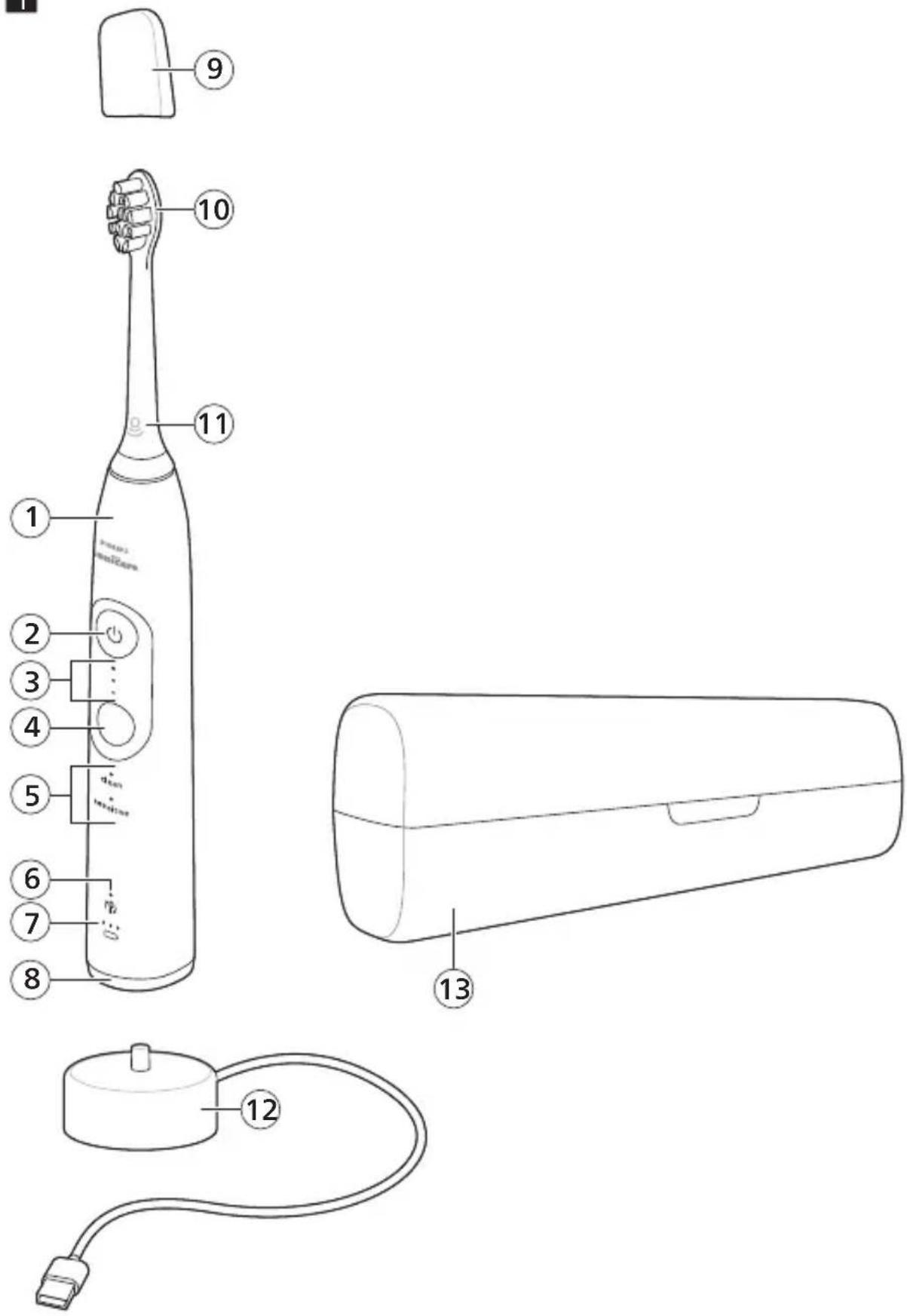
Your Philips Sonicare (Fig 1.)
1 Handle
2 Power on/off button
3 Intensity indicator
4 Mode/intensity button
5 Mode indicator
6 Brush head replacement reminder
7 Battery indicator
8 Light ring
Accessories:
9 Brush head cap
10 Smart brush head(s)
11 BrushSync symbol
12 USB charger (wall adapter not included)
13 Travel case
Note: Accessories included may vary based on the model purchased.
Getting started
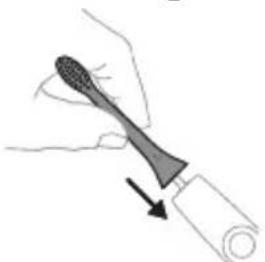
Attaching the brush head
natural_image
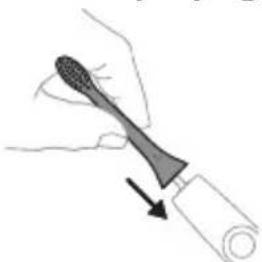
Illustration of a hand holding a toothbrush with an arrow indicating force or direction (no text or symbols)1 Align the brush head so the bristles point in the same direction as the front of the handle.
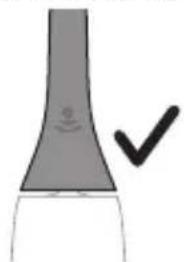
natural_image
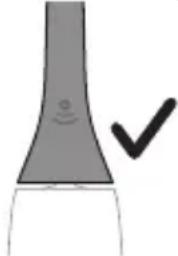
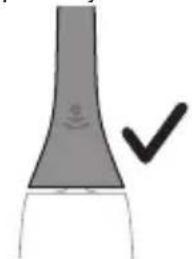
Simple line drawing of a curved object with a checkmark indicating a detail (no text or symbols)2 Firmly press the brush head down onto the metal shaft until it will not go any further.
Note: It is normal to see a slight gap between the brush head and the handle.
Using your Philips Sonicare toothbrush
If you are using your Sonicare toothbrush for the first time, it is normal to feel more vibration than when using a non-electric toothbrush. It is common for first-time users to apply too much pressure. Only apply gentle pressure and let the toothbrush do the brushing for you. Please follow the brushing instructions below for the best experience.
To help you transition to your new Sonicare power toothbrush, use a lower setting for the first 1-2 weeks, then transition to a higher setting.
Brushing instructions
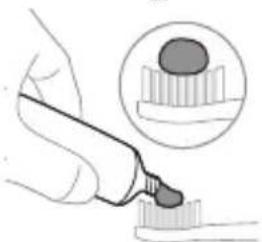
natural_image
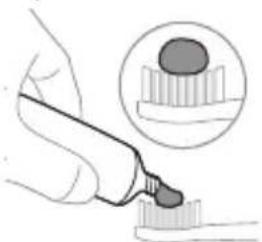
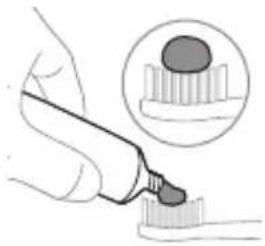
Illustration of a hand using a pipette to apply liquid onto a surface, with an inset showing a droplet on a surface (no text or symbols present)1 Wet the bristles and apply a small amount of toothpaste.

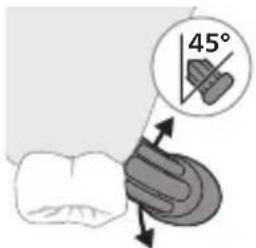
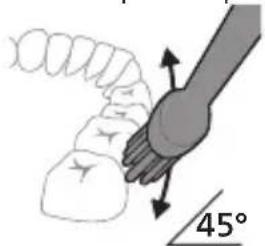
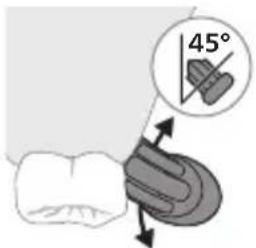
2 Place the toothbrush bristles against the teeth at a slight angle (45 degrees). Pressing firmly to make the bristles reach the gumline or slightly beneath the gumline.
Note: Keep the center of the brush in contact with the teeth at all times.
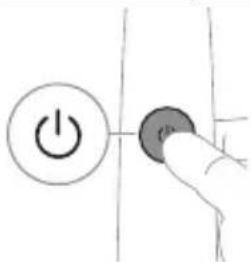
3 Press the power on/off button to switch on the Philips Sonicare.
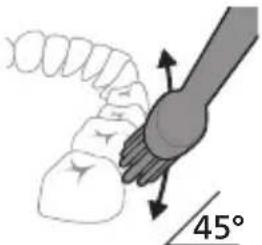
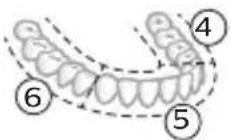
4 Gently keep the bristles placed on the teeth and in the gumline. Brush your teeth with small back and forth motion so the bristles reach between the teeth. Continue this motion throughout your brushing cycle.
Note: The bristles should slightly flare. It is not recommended to scrub as you would with a manual toothbrush.
Note: If you apply too much pressure, you will be alerted by a change in vibration of the handle and a flashing purple brushing feedback light.
natural_image
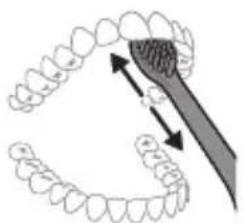
Diagram showing dental tool application on upper teeth with magnified detail (no text or symbols)5 To clean the inside surfaces of the front teeth, tilt the brush handle semi-upright and make several vertical overlapping brushing strokes on each tooth.
6 After you have completed the brushing cycle, you can spend additional time brushing the chewing surfaces of your teeth and areas where staining occurs. You can also brush your tongue, with the toothbrush switched on or off, as you prefer.
Note: Your Philips Sonicare toothbrush is safe to use on braces (brush heads wear out sooner when used on braces) and dental restorations (fillings, crowns, veneers) if they are properly adhered and not compromised.
BrushPacer
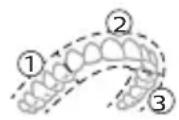
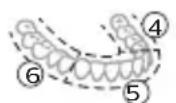
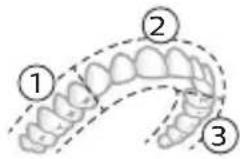
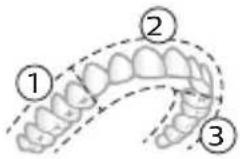
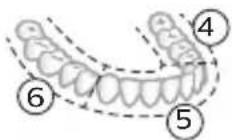
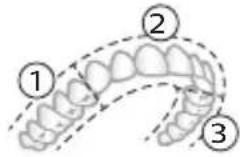
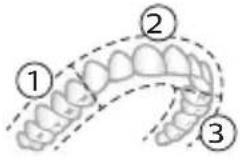
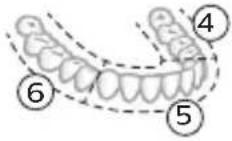
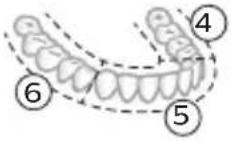
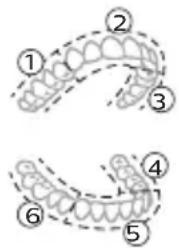
To make sure you brush evenly throughout the mouth, divide your mouth into 6 sections using the BrushPacer feature. The BrushPacer divides the brushing time into 6 equal segments and indicates when you should move to the next area. The segments are indicated with a brief pause in vibration. The toothbrush automatically stops at the end of the brushing session.
Note: Additional time may be added when you use the White or Gum Health modes.
English
Modes
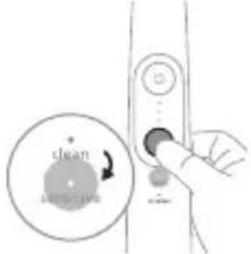
Your power toothbrush is equipped with two modes: Clean and Sensitive. Based on the smart brush head you use, the optimal mode and intensity will be selected automatically by the BrushSync technology.
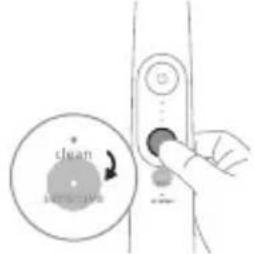
To manually change the mode, press the mode/intensity button when the toothbrush is off. All brush heads work with each mode.
Clean Sensitive
| Benefit Plaque removal Extra gentle mode for | sensitive teeth and gums | |
| Recommended intensity level | High Low* | |
| Total brushing time 2 minutes 2 minutes | ||
| How to brush Brush each segment for 20 seconds | Brush each segment for 20 seconds | |
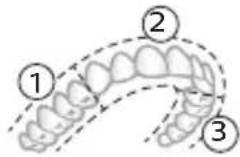 | 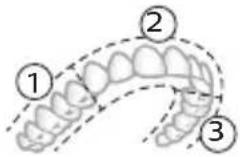 | |
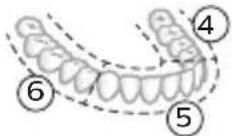 | 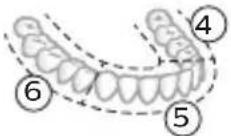 | |
Intensities
Intensity settings
natural_image
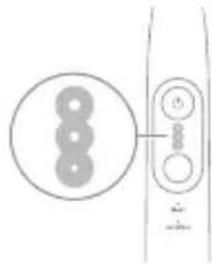
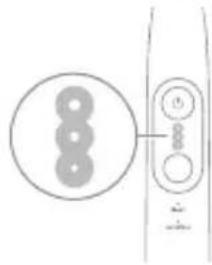
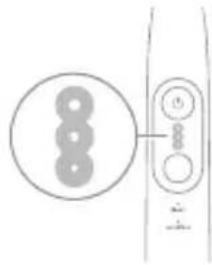
Simple line drawing of a device with three circular components and a vertical connector (no text or symbols)Your power toothbrush comes with 3 different intensity settings:
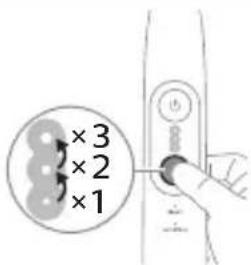
- High intensity (three lights)
- Medium intensity (two lights)
- Low intensity (one light)
Note: We recommend high intensity for best results.
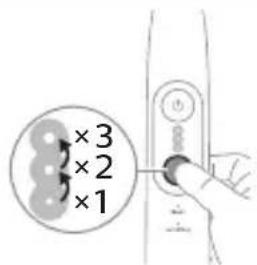
To manually select your desired intensity, press the mode/intensity button when the toothbrush is on, to cycle through the options. The intensity setting can only be changed when the toothbrush is on.
BrushSync technology
natural_image
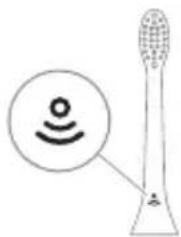
Diagram of a microphone with a circular icon showing wireless signal, no text or symbols presentBrushSync technology enables your brush head to communicate with your handle using a microchip. The symbol at the bottom of the brush head indicates that the brush head is equipped with this technology.
BrushSync technology enables:
- Brush head replacement reminder
- BrushSync mode pairing
Philips Sonicare offers a wide range of smart brush heads, equipped with BrushSync technology. To explore our full range of toothbrush brush heads,
and find the brush head that is best for you, go to www.philips.com/toothbrush-heads for more information.
Features
- Pressure Sensor Feedback
- BrushPacer
- SmarTimer
- EasyStart
- Brush Head Replacement Reminder
- Brush Head Mode Pairing
Pressure Sensor Feedback
Your Sonicare toothbrush measures the pressure you apply while brushing, to protect your gums and teeth from damage.

natural_image
Line drawing of a person holding a pen, no text or symbols presentIf you apply excess pressure, the handle changes its sound and vibration while the brushing feedback light flashes purple at the bottom of the handle until you reduce the pressure.
Note: Your product comes with the Pressure Sensor Feedback activated. To deactivate this feature (see 'Activating or deactivating features').
BrushPacer
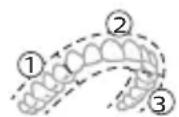
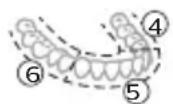
The BrushPacer is an interval timer that helps you to brush evenly through the mouth by dividing your mouth into 6 sections.
SmarTimer
The SmarTimer indicates that your brushing cycle is complete by automatically switching off the toothbrush at the end of the brushing cycle.
Dental professionals recommend brushing no less than 2 minutes twice a day.
Note: If you press the power on/off button after you started the brushing cycle, the toothbrush pauses. If you press the on/off button within 30 seconds, the timer resumes to allow you to finish your brushing cycle. After a pause of 30 seconds, the SmarTimer resets.
EasyStart
This Philips Sonicare model comes with the EasyStart feature deactivated. The EasyStart feature gently increases the power over the first 14 brushings to help you get used to brushing with the Philips Sonicare. The EasyStart feature works with all modes.
*Disclaimer
When the Philips Sonicare toothbrush is used in clinical studies, it must be used at high intensity with the handle fully charged and the EasyStart feature deactivated.
To activate EasyStart (see 'Activating or deactivating features').
Brush Head Replacement Reminder
Your Philips Sonicare is equipped with BrushSync technology that tracks the wear of your brush head.
Note: This feature only works with Philips Sonicare smart brush heads with BrushSync technology.
1 When you attach a new smart brush head for the first time, the handle recognizes that you have a Philips brush head with BrushSync technology and begins tracking brush head wear.
2 Over time, based on the pressure you apply and the total time the brush head has been used, the handle tracks brush head wear in order to determine the optimal time to replace your brush head. This feature guarantees the best cleaning and care of your teeth.
flowchart
graph TD
    A["Start"] --> B["Arrow to next step"]
    B --> C["Next Step"]
3 When the Brush Head Replacement Reminder indicator lights up amber, you should replace your brush head.
Note: All smart brush heads come with the brush head replacement reminder feature activated. To deactivate the brush head replacement reminder see 'Activating or deactivating features'.
Brush head mode pairing
Brush heads with BrushSync technology are equipped with a microchip which communicates with the handle and automatically pairs it with the recommended mode and intensity. Most brush heads with BrushSync technology will auto pair to Clean Mode. Brush heads with specific benefits will pair with the corresponding mode (when available), e.g. S2 Sensitive: Sensitive Mode.
Note: If you choose to change mode/intensity from the recommended setting, the brush head will remember the your chosen setting for future brushing sessions.
Activating or deactivating features
You can activate or deactivate the following features of your toothbrush:
- EasyStart
- Brush Head replacement reminder
- Pressure Sensor Feedback
Note: The brush head replacement reminder is only compatible with Sonicare smart brush heads. The smart brush head must be attached to the toothbrush in order to activate or deactivate the replacement reminder.
From handle:
Step 1: Place the handle on a plugged in charger/charging travel case.
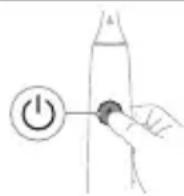
Step 2: Press and hold power on/off button for:
EasyStart Brush Head Replacement Reminder Pressure Sensor Feedback
Up to 3 seconds Up to 5 seconds Up to 7 seconds

Step 3: Let go of the power on/off button when you hear:
| 1 beep 1 beep and then2 beeps | 1 beep, 2 beeps andthen 3 beeps | |
| ↓ ↓ ↓ | ||
| Together with: | ||
 | If you see the left LED for the battery indicator flash green 2 times and hear 3 tones low to high, then the feature has been activated. | |
| OR | ||
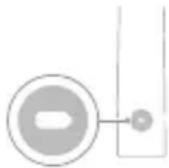 | If you see the left LED for the battery indicator flash amber 1 time and hear 3 tones high to low, then the feature has been deactivated. | |
Charging and battery status
This Philips Sonicare toothbrush is designed to provide on average 42 brushing sessions, each session lasting 2 minutes (21 days if used twice per day) on a fully charged battery. The battery indicator shows the battery status when you complete the 2-minute brushing session, when you pause the toothbrush, or while it is charging.
Note: It can take up to 24 hours to fully charge the battery before first use, but you can use the Philips Sonicare toothbrush before it is fully charged.
Note: Charging your Philips Sonicare toothbrush in the travel case can take up to 48 hours.
Charging
Charging on charger
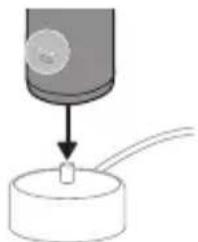
1 Attach the USB charging cord to a wall adapter, plug the wall adapter into an electrical wall outlet.
natural_image
Diagram showing a mechanical component with a downward arrow and a small square base, connected to a circular base (no text or symbols)2 Place the handle on the charger.
3 Connect the attached USB cable to the 5V DC input power supply unit.
- Charge only with Philips compatible chargers or safety approved adapters with input ratings: 100 - 240V\~; 50/60Hz; 3.5W and output ratings 5VDC; 2.5W.
- A UL-listed or certified 1310 Class 2 power supply (NAM only)
4 The battery indicator and light ring illuminate, the handle beeps twice, and all lights on the handle illuminate upward from the bottom of the handle.
5 The flashing light of the battery indicator shows that the toothbrush is charging.
6 When the handle is on the charger and the battery is fully charged, the LED lights of the battery indicator start flashing green. Once the battery is full, the green light remains solid for 30 seconds and then turns off.
Battery status
Battery status (handle on plugged-in charger/charging travel case)
When the handle is placed on the charger or in the charging travel case, the battery indicator shows the battery level.
Battery status
Number of flashing LEDs
LED color
| Low 1 Flashing green | |
| Partially full 2 Flashing green | |
| Full 3 Flashing green until full, | then green for 30 seconds and then switches off |
Battery status (when handle is not on plugged-in charger/charging travel case)
When the toothbrush is awake, the battery indicator at the bottom of the handle shows the battery level.
Battery status Number of LEDs LED color
Full 3 Solid green
| Partially full 2 Solid green | ||
| Medium low 1 Solid green | ||
| Low 1 with 3 beeps after brushing | Flashes amber | |
| Empty 1 with 2 beeps after brushing | Flashes amber | |
Note: To save energy, the battery indicator will switch off when not in use.
Note: When the battery is completely empty, the toothbrush switches off. Place the toothbrush on the charger to charge it.
Note: To keep the battery fully charged at all times, you may keep your toothbrush on the charger when not in use.
Cleaning
Toothbrush handle
natural_image
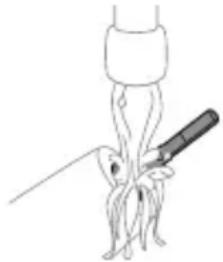
Line drawing of a biological or anatomical structure with a central rod and branching structures (no text or symbols)1 Remove the brush head and rinse the metal shaft area and buttons with warm water. Make sure you remove any residual toothpaste on the handle and around the buttons at least once a week, but preferably after each use.
Caution: Do not push on the rubber seal on the metal shaft or around buttons with sharp objects, as this may cause damage.
2 Wipe the entire surface of the handle with a damp cloth.
Note: Do not tap the handle on the sink to remove excess water.
3 Dry the handle with a soft cloth or towel.
Brush head
natural_image
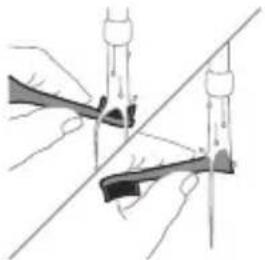
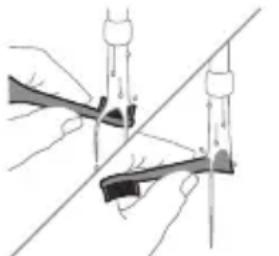
Illustration of two hands using a tool to cut or mark a surface, with no visible text or symbols1 Rinse the brush head and bristles after each use.
2 Remove the brush head from the handle and rinse the brush head connection with warm water at least once a week. Rinse the travel cap as often as needed and air dry. Use only on a dry brush head.
Note: The brush head cap is used for shipping purposes and is not intended for continued use.
Charger
1 Unplug the charger before you clean it.
2 Wipe the surface of the charger with a damp cloth.
3 Dry the charger with a soft cloth or towel.
Travel case
Rinse with warm water and use a damp cloth to clean the travel case and allow to air dry.
Storage
If you are not going to use the product for an extended period of time, unplug it from the electrical outlet, clean it and store it in a cool and dry place away from direct sunlight.
Replacement
Replace Philips Sonicare brush heads every 3 months to achieve optimal results. Use only Philips Sonicare replacement brush heads.
Locating the model number
Look on the bottom of the Philips Sonicare toothbrush handle for the model number (e.g.HX740x).
Troubleshooting (ROW)
This chapter summarizes the most common problems you could encounter with the appliance. If you are unable to solve the problem with the
information below, visit www.philips.com/support and insert your model number for a list of frequently asked questions or contact the Consumer Care Center in your country.
Problem Possible Cause Solution
| I cannot fully attach the brush head. There is a gap between the brush head and handle. | This gap is normal and is needed for the brush head to vibrate appropriately. The brush head must be able to move to create the right amount of vibrations. | |
| My Philips Sonicare toothbrush vibration is less powerful than before. | The brush head is too close to the body of the handle. | Remove the brush head from the handle and re-set it on the metal shaft leaving a small gap.(1-2mm). |
| The toothbrush stops working. | The battery is empty. Charge the toothbrush handle on the charger. | |
| I charged my toothbrush, but it only works for a short time. | The toothbrush handle is not placed vertically on the charger, resulting in no charge. | Place the handle vertically on charger base and make sure the charger is plugged in. |
WARRANTY EXCLUSIONS
What is not covered under warranty:
- In mouth attachments including brush heads and nozzles.
- Damage caused by use of unauthorized replacement parts or unauthorized brush heads.
- Damage caused by misuse, abuse, neglect, alterations or unauthorized repair.
- Normal wear and tear, including chips, scratches, abrasions, discoloration or fading.
IMPLIED WARRANTIES
ANY IMPLIED WARRANTIES, INCLUDING IMPLIED WARRANTIES OF MERCHANTABILITY AND FITNESS FOR A PARTICULAR PURPOSE, SHALL BE LIMITED TO THE DURATION OF THE EXPRESS WARRANTIES SET FORTH ABOVE. IN SOME STATES LIMITATIONS ON DURATION OF IMPLIED WARRANTIES DO NOT APPLY.
LIMITATION OF REMEDIES
IN NO EVENT SHALL PHILIPS OR ANY OF ITS AFFILIATED OR SUBSIDIARY COMPANIES BE LIABLE FOR ANY SPECIAL, INCIDENTAL OR CONSEQUENTIAL DAMAGES BASED UPON BREACH OF WARRANTY, BREACH OF CONTRACT, NEGLIGENCE, TORT, OR ANY OTHER LEGAL THEORY. SUCH DAMAGES INCLUDE, WITHOUT LIMITATION, LOSS OF SAVINGS OR REVENUE; LOSS OF PROFIT; LOSS OF USE; THE CLAIMS OF THIRD PARTIES INCLUDING, WITHOUT LIMITATION, DENTISTS AND DENTAL HYGIENISTS; AND COST OF ANY SUBSTITUTE EQUIPMENT OR SERVICES. SOME STATES DO NOT ALLOW THE EXCLUSION OR LIMITATION OF INCIDENTAL OR CONSEQUENTIAL DAMAGES.
Warranty and support (ROW)
If you need information or support, please visit www.philips.com/support or read the international warranty leaflet.
Warranty exclusions
What is not covered under warranty:
- In mouth attachments including brush heads and nozzles.
- Damage caused by use of unauthorized replacement parts or unauthorized brush heads.
- Damage caused by misuse, abuse, neglect, alterations or unauthorized repair.
- Normal wear and tear, including chips, scratches, abrasions, discoloration or fading.
Recycling
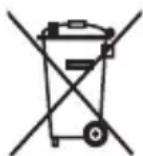
- This symbol means that electrical products and batteries shall not be disposed of with normal household waste.
- Follow your country's rules for the separate collection of electrical products and batteries.
- The built-in rechargeable battery must be removed by a qualified professional when the product is discarded. Instructions for removal of built-in rechargeable batteries can be found on www.philips.com/support. Use the Philips support home search bar to enter the toothbrush model number and find your product. The model number begins with "HX" (e.g. HX123A) and can be found on the bottom of your toothbrush. The battery removal instructions are in the Troubleshooting and Repair section of the product's support page.
- If batteries are damaged or leaking, avoid contact with the skin or eyes. If this occurs, immediately rinse well with water and seek medical care.
- When you handle batteries, make sure that your hands, the product and the batteries are dry.
Giriş
www.philips.com/support
natural_image
Simple line drawing of an open book with no text or symbols visiblenatural_image
Illustration of a hand holding a toothbrush with an arrow indicating force or direction (no text or symbols)natural_image
Simple line drawing of a curved object with a checkmark mark (no text or symbols)natural_image
Illustration of a hand using a pipette to apply liquid onto a surface, with an inset showing a droplet on a surface (no text or symbols present)natural_image
Diagram showing a mechanical joint with a 45-degree angle标注 (no text or symbols beyond the angle indicator)natural_image
Diagram showing dental alignment with a tool interacting with teeth (no text or labels)Azərbaycanca
natural_image
Pure electrical circuit lines without any symbolsnatural_image
Diagram of a toothbrush with a circular icon showing wireless signal, no text or symbols presentnatural_image
Line drawing of a person holding a pen, no text or symbols presentnatural_image
Diagram showing a mechanical component with a downward arrow and a small square base, connected to a circular base (no text or symbols)natural_image
Line drawing of a medical procedure with a needle inserted into tissue (no text or symbols)natural_image
Illustration of two hands using a tool to cut or adjust a mechanical component, with no visible text or symbols.www.philips.com/support
natural_image
Simple line drawing of an open book with no text or symbols visiblenatural_image
Illustration of a hand holding a toothbrush with an arrow indicating force or movement (no text or symbols)natural_image
Simple line drawing of a curved object with a checkmark indicating a detail (no text or symbols)natural_image
Illustration of a hand using a pen to apply a small object, with an inset showing a magnified view of a cylindrical object (no text or symbols present)natural_image
Diagram showing a hand holding a small object with directional arrows indicating movement, labeled '45°' (no text or symbols on the diagram itself)natural_image
Diagram showing dental tool application on upper teeth with magnified detail (no text or symbols)natural_image
Simple line drawing of a device with three circular components and a vertical connector (no text or symbols)natural_image
Diagram of a toothbrush with a circular icon showing wireless signal, no text or symbols presentnatural_image
Line drawing of a person holding a pen, no text or symbols presentnatural_image
Diagram showing a mechanical component with a downward arrow and a small cylindrical object on a base (no text or symbols)natural_image
Simple line drawing of a fork with a pen inserted, no text or symbols presentnatural_image
Illustration of two hands using a tool to cut or adjust a mechanical part, with no visible text or symbols.www.philips.com/support
natural_image
Simple line drawing of an open book with no text or symbols visiblenatural_image
Illustration of a hand holding a toothbrush with an arrow indicating force or direction (no text or symbols)natural_image
Simple line drawing of a curved object with a checkmark indicating a detail (no text or symbols)natural_image
Illustration of a hand using a pipette to apply liquid onto a surface, with an inset showing a droplet on a surface (no text or symbols present)natural_image
Illustration of a hand holding a tool with a 45-degree angle indicator (no text or symbols on the diagram itself)natural_image
Illustration of dental tool application on upper teeth with magnified detail (no text or symbols)Dansk
natural_image
Pure electrical circuit lines without any symbolsnatural_image
Diagram of a toothbrush with a circular icon showing wireless signal, no text or symbols presentnatural_image
Line drawing of a person holding a pen, no text or symbols presentflowchart
graph TD
    A["Process Node"] --> B["π"]
natural_image
Diagram showing a mechanical component with a downward arrow and a small square base, connected to a circular base (no text or symbols)natural_image
Simple line drawing of a medical procedure with a needle inserted into tissue (no text or symbols)natural_image
Illustration of two hands using a tool to cut or mark a surface, with no visible text or symbolsnatural_image
Simple line drawing of an open book with no text or symbols visiblenatural_image
Illustration of a hand holding a toothbrush with an arrow indicating force or direction (no text or symbols)natural_image
Simple line drawing of a curved object with a checkmark indicating a detail (no text or symbols)natural_image
Illustration of a hand using a pen to apply a small object to a surface, with an inset showing a textured surface (no text or symbols present)natural_image
Illustration of a hand holding a small object with directional arrows indicating movement, labeled '45°' (no text or symbols on the diagram itself)natural_image
Diagram showing dental tool application on upper teeth with magnified detail (no text or symbols)natural_image
Simple line drawing of a device with three circular components and a vertical connector (no text or symbols)natural_image
Diagram of a toothbrush with a sensor icon and a circle highlighting the sensor area (no text or symbols present)natural_image
Line drawing of a person holding a pen, no text or symbols presentnatural_image
Diagram showing a mechanical component with a downward arrow and a small square component on a circular base (no text or symbols)natural_image
Simple line drawing of a fork with a knife inserted, no text or symbols presentnatural_image
Illustration of two hands using a tool to cut or adjust a mechanical component, with no visible text or symbols.www.philips.com/support
Tähtis ohutusteave
MEDITSIINILISED HOIATUSED
www.philips.com/support
natural_image
Simple line drawing of an open book with no text or symbols visiblenatural_image
Illustration of a hand holding a tool with an arrow indicating direction (no text or symbols)natural_image
Simple line drawing of a bulb-like shape with a checkmark indicating a detail (no text or symbols)natural_image
Illustration of a hand using a pen to apply a sample onto a surface, with an inset showing a magnified view of the sample (no text or symbols present)natural_image
Diagram showing a hand holding a small object with directional arrows indicating movement, labeled '45°' (no text or symbols on the diagram itself)natural_image
Diagram showing dental tool application on upper teeth with magnified view (no text or labels)Eesti
natural_image
Simple line drawing of a vertical panel with three circular components and a separate circular component (no text or symbols)natural_image
Diagram of a toothbrush with a sensor icon and a magnified view of its tip (no text or symbols)natural_image
Line drawing of a person holding a pen, no text or symbols presentnatural_image
Diagram showing a mechanical component with a downward arrow and a small square base, connected to a circular base (no text or symbols)natural_image
Illustration of a medical procedure involving an incision or needle inserted into a patient's abdomen (no text or symbols present)natural_image
Illustration of two hands using a tool to cut or mark a mechanical component, with no visible text or symbols.natural_image
Simple line drawing of an open book with no text or symbols visiblenatural_image
Illustration of a hand holding a toothbrush with an arrow indicating force or direction (no text or symbols)natural_image
Simple line drawing of a curved object with a checkmark (no text or symbols)natural_image
Illustration of a hand using a pipette to apply liquid onto a surface, with an inset showing a droplet on a surface (no text or symbols present)natural_image
Diagram showing dental tool interacting with teeth (no text or symbols)Clean Sensitive (suave)
natural_image
Pure electrical circuit lines without any symbolsnatural_image
Diagram of a toothbrush with a sensor icon and signal symbol (no text or labels)natural_image
Line drawing of a person holding a pen, no text or symbols presentnatural_image
Diagram showing a mechanical component with a downward arrow and a small square component on a circular base (no text or symbols)natural_image
Simple line drawing of a medical procedure with a tool and tubing (no text or symbols)natural_image
Illustration of two hands holding a rifle with a diagonal line crossing through (no text or symbols)GARANTÍAS IMPLÍCITAS
natural_image
Simple line drawing of an open book with no text or symbols visiblenatural_image
Illustration of a hand holding a toothbrush with an arrow indicating force or direction (no text or symbols)natural_image
Simple line drawing of a curved object with a checkmark indicating a detail (no text or symbols)natural_image
Illustration of a hand using a pipette to apply liquid onto a surface, with an inset showing a microplate (no text or symbols present)natural_image
Diagram showing a hand holding a small object with directional arrows indicating movement, labeled '45°' (no text or symbols on the diagram itself)natural_image
Diagram showing dental tool application on upper teeth with magnified detail (no text or symbols)natural_image
Simple line drawing of a device with three circular components and a vertical connector (no text or symbols)natural_image
Illustration of a toothbrush with a sensor icon and signal symbol (no text or labels)natural_image
Line drawing of a person holding a pen, no text or symbols presentnatural_image
Diagram showing a mechanical component with a downward arrow and a small square component on a circular base (no text or symbols)natural_image
Simple line drawing of a medical procedure with a tool and tubing (no text or symbols)natural_image
Illustration of two hands using a tool to cut or adjust a mechanical component, with no visible text or symbols.EXCLUSIONS DE GARANTIE
www.philips.com/support
www.philips.com/support
Napomena: značajke različitih modela mogu se razlikovati. Neki modeli možda nisu opremljeni sustavom Bluetooth ili NFC.
POHRANITE OVE UPUTE
Na proizvodu se mogu pojaviti sljedeći simboli:

natural_image
Simple line drawing of an open book with no text or symbols visibleOvaj simbol znači da prije upotrebe uređaja morate pročitati upute za upotrebu.
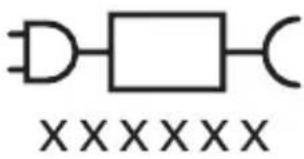
Ovaj simbol znači da morate upotrijebiti naznačeno napajanje.
Namjena
Električne četkice za zube Sonicare namijenjene su za uklanjanje naslaga i ostataka hrane sa zuba kako bi se smanjio karijes te poboljšalo i održavalo oralno zdravlje.
Vaš Philips Sonicare (Slika 1)
1 Drška
2 gumb za uključivanje/isključivanje
3 indikator intenziteta
4 gumb za način rada / intenzitet
5 indikator načina rada
6 podsjetnik o zamjeni glave četkice
7 indikator baterije
8 svjetlosni prsten
Dodaci:
9 poklopac glave četkice
10 pametne glave četkice
11 simbol značajke BrushSync
12 USB punjač (zidni adapter nije uključen)
13 putna torbica
Napomena: priloženi dodaci mogu se razlikovati ovisno o kupljenom modelu.
Početak korištenja
Postavljanje glave četkice
natural_image
Illustration of a hand holding a tool with an arrow indicating force or movement (no text or symbols present)natural_image
Simple line drawing of a bulb-like shape with a checkmark indicating a detail (no text or symbols)2 Glavu četkice čvrsto pritisnite prema dolje na metalnu osovinu drške sve do kraja.
Napomena: Uobičajeno je vidjeti blagi razmak između glave četkice i drške.
Uporaba četkice za zube Philips Sonicare
Ako prvi put upotrebljavate četkicu za zube Sonicare, normalno je da osjećate više vibracija nego pri upotrebi četkice za zube koja nije električna. Korisnici pri prvoj upotrebi često primjenjuju preveliki pritisak. Samo blago pritisnite i četkanje prepustite četkici za zube. Za najbolje iskustvo slijedite upute za četkanje u nastavku.
Da biste se jednostavnije prebacili na svoju novu električnu četkicu za zube Sonicare, upotrebljavajte nižu postavku prvih 1 – 2 tjedna, a zatim prijeđite na višu postavku.
Upute za četkanje
natural_image
Illustration of a hand using a pipette to apply liquid onto a surface, with an inset showing a droplet on a surface (no text or symbols present)1 Smočite vlakna četkice i nanesite malu količinu paste za zube.
natural_image
Diagram showing dental tool interacting with teeth (no text or symbols)Da biste ručno promijenili način rada, pritisnite gumb za način rada / intenzitet dok je četkica za zube isključena. Sve glave četkice rade u svakom načinu rada.
Clean Sensitive
| Prednost uklanjanje naslaga izuzetno osjetljivi način | ||
| rada za osjetljive zube i desni | ||
| Preporučena razina intenziteta | visoka niska* | |
| Ukupno vrijeme četkanja | 2 minute 2 minute | |
| Kako četkati četkajte svaki segment20 sekundi | četkajte svaki segment20 sekundi | |
 |  | |
 |  | |
Jačine
Postavke jačine
natural_image
Pure electrical circuit lines without any symbolsVaša električna četkica za zube ima tri različite postavke intenziteta:
- Visok intenzitet (tri svjetla)
- Srednji intenzitet (dva svjetla)
- Nizak intenzitet (jedno svjetlo)
Napomena: za najbolje rezultate preporučujemo visok intenzitet.
natural_image
Diagram of a toothbrush with a circular icon showing wireless signal, no text or symbols presentTehnologija BrushSync omogućava glavi četkice da komunicira s drškom s pomoću mikročipa. Šimbol na donjem dijelu glave četkice naznačuje da je glava četkice opremljena tom tehnologijom.
Tehnologija BrushSync omogućuje:
natural_image
Line drawing of a person holding a pen, no text or symbols presentnatural_image
Diagram showing a mechanical component with a downward arrow and a small square component on a circular base (no text or symbols)2 Stavite dršku na punjač.
natural_image
Line drawing of a medical procedure with a needle inserted into tissue (no text or symbols)1 Odvojite glavu četkice i isperite prostor oko metalne osovine i tipki toplom vodom. Najmanje jednom tjedno, a po mogućnosti nakon svake upotrebe, obavezno uklonite svu preostalu zubnu pastu s drške i oko tipki.
natural_image
Illustration of two hands using a tool to cut or adjust a mechanical component, with no visible text or symbols.natural_image
Simple line drawing of an open book with no text or symbols visiblenatural_image
Illustration of a hand holding a toothbrush with an arrow indicating force or movement (no text or symbols)natural_image
Simple line drawing of a curved object with a checkmark (no text or symbols)natural_image
Illustration of a hand using a pipette to apply liquid onto a surface, with an inset showing a droplet on a surface (no text or symbols present)natural_image
Diagram showing dental tool application on upper teeth with magnified detail (no text or symbols)natural_image
Simple line drawing of a device with three circular components and a vertical panel (no text or symbols)natural_image
Diagram of a microphone with a sensor icon and signal symbol (no text or labels)natural_image
Line drawing of a person holding a toothbrush (no text or symbols)natural_image
Diagram showing a mechanical component with a downward arrow and a small square component, no text or symbols present.natural_image
Simple line drawing of a medical procedure with a tool and tubing (no text or symbols)natural_image
Illustration of two hands using a tool to cut or adjust a mechanical component, with no visible text or symbols.www.philips.com/support
natural_image
Simple line drawing of an open book with no text or symbols visiblenatural_image
Illustration of a hand holding a toothbrush with an arrow indicating force or direction (no text or symbols)natural_image
Simple line drawing of a curved object with a checkmark mark (no text or symbols)natural_image
Illustration of a hand using a pipette to apply liquid onto a surface, with an inset showing a droplet on a surface (no text or symbols present)1 Samitriniet sarus un uzklājiet mazliet zobu pastas.

natural_image
Diagram showing a hand holding a small object with directional arrows indicating movement, labeled '45°' (no text or symbols on the diagram itself)natural_image
Illustration of dental tool interacting with teeth (no text or symbols)Latviešu
natural_image
Simple line drawing of a device with three circular components and a vertical connector (no text or symbols)natural_image
Diagram of a toothbrush with a sensor icon and a circle highlighting the sensor area (no text or symbols present)natural_image
Line drawing of a person holding a pen, no text or symbols presentflowchart
graph TD
    A["Process Node"] --> B["0"]
natural_image
Diagram showing a mechanical component with a downward arrow and a small square base, connected to a circular base (no text or symbols)natural_image
Line drawing of a medical procedure with a needle inserted into a tube (no text or symbols)natural_image
Illustration of two hands using a tool to cut or adjust a mechanical component, with no visible text or symbols.www.philips.com/support
Svarbi saugos informacija
www.philips.com/support
natural_image
Simple line drawing of an open book with no text or symbols visiblenatural_image
Illustration of a hand holding a tool with a pointed tip, showing a force or movement (no text or symbols)natural_image
Simple line drawing of a vertical pipe or duct with a checkmark indicating a detail (no text or symbols present)natural_image
Illustration of a hand using a pipette to apply liquid onto a surface, with an inset showing a droplet on a surface (no text or symbols present)natural_image
Illustration of a hand holding a small object with directional arrows indicating movement, labeled '45°' (no text or symbols on the diagram itself)natural_image
Diagram showing dental tool application on upper teeth with magnified detail (no text or symbols)natural_image
Simple line drawing of a device with three circular components and a vertical connector (no text or symbols)natural_image
Diagram of a toothbrush with a sensor icon and a circle highlighting the sensor area (no text or symbols present)natural_image
Line drawing of a person holding a toothbrush, no text or symbols presentnatural_image
Simple diagram showing a device with a circular component and a small square object on a base, no text or symbols present.natural_image
Line drawing of a medical procedure involving an incision or needle inserted into a patient's abdomen (no text or labels)Lietuviškai
natural_image
Illustration of two hands using a tool to adjust or install a mechanical component, with no visible text or symbols.natural_image
Simple line drawing of an open book with no text or symbols visiblenatural_image
Illustration of a hand holding a toothbrush with an arrow indicating force or direction (no text or symbols)natural_image
Simple line drawing of a bulb-like shape with a checkmark mark (no text or symbols)natural_image
Illustration of a hand holding a pen, with an inset showing a magnified view of a cylindrical object (no text or symbols present)natural_image
Diagram showing a hand holding a small object with directional arrows indicating movement, labeled '45°' (no text or symbols beyond the angle marker)natural_image
Diagram showing dental tool application on upper teeth with magnified detail (no text or labels)natural_image
Pure electrical circuit lines without any symbolsnatural_image
Diagram of a toothbrush with a sensor icon and signal symbol (no text or labels)natural_image
Line drawing of a person holding a cigarette (no text or symbols)natural_image
Diagram showing a mechanical component with a downward arrow and a small rectangular object on a circular base (no text or symbols)natural_image
Simple line drawing of a medical procedure with a needle inserted into tissue (no text or symbols)natural_image
Illustration of two hands using a tool to cut or mark a surface, with no visible text or symbolswww.philips.com/support
natural_image
Simple line drawing of an open book with no text or symbols visiblenatural_image
Illustration of a hand holding a toothbrush with an arrow indicating force or movement (no text or symbols)natural_image
Simple line drawing of a curved object with a checkmark indicating a detail (no text or symbols)natural_image
Illustration of a hand holding a pen, with an inset showing a magnified view of a cylindrical object (no text or symbols present)natural_image
Diagram showing dental tool application on upper teeth with magnified detail (no text or symbols)natural_image
Simple line drawing of a vertical panel with three circular components and a separate circle connected to the middle panel (no text or symbols)natural_image
Diagram of a toothbrush with a sensor icon and signal symbol (no text or labels)natural_image
Line drawing of a person holding a pen, no text or symbols presentnatural_image
Simple diagram showing a device with a circular component and a small square object on a base, no text or symbols present.natural_image
Line drawing of a medical procedure involving an incision or needle inserted into tissue (no text or symbols)272 Nederlands
natural_image
Illustration of two hands using a tool to adjust or install a mechanical component, with no visible text or symbols.www.philips.com/support
natural_image
Simple line drawing of an open book with no text or symbols visiblenatural_image
Illustration of a hand holding a toothbrush with an arrow indicating force or movement (no text or symbols)natural_image
Simple line drawing of a bulb-like object with a checkmark indicating a detail (no text or symbols)natural_image
Illustration of a hand using a pipette to apply liquid onto a surface, with an inset showing a droplet on a surface (no text or symbols present)natural_image
Diagram showing a hand holding a small object with directional arrows indicating movement, labeled '45°' (no text or symbols beyond the angle marker)natural_image
Diagram showing dental tool application on upper teeth with magnified detail (no text or symbols)natural_image
Pure electrical circuit lines without any symbolsnatural_image
Diagram of a toothbrush with a circular icon showing wireless signal, no text or symbols presentnatural_image
Line drawing of a person holding a pen, no text or symbols presentnatural_image
Diagram showing a mechanical component with a downward arrow and a small square base, connected to a circular base (no text or symbols)natural_image
Simple line drawing of a biological structure with a needle inserted, no text or symbols presentnatural_image
Illustration of two hands using a tool to cut or mark a surface, with no visible text or symbolswww.philips.com/support
Xavfsizlikka oid muhim axborot
Mahsulotdan faqat to'g'ri maqsadda foydalaning. Mahsulotdan hamda uning batareyalari va aksessuarlaridan foydalanishni boshlashdan oldin ushbu axborotni diqqat bilan o'qib chiqing va keyinchalik murojaat qilish uchun uni saqlab qo'ying. Noto'g'ri foydalanish xavflarga yoki jiddiy jarohatlarga olib kelishi mumkin.
OGOHLANTIRISHLAR
- Faqat original Philips aksessuarlaridan va sarf materiallaridan foydalaning. Agar to'plamda mavjud bo'lsa, faqat original USB kabeldan va USB ta'minot blokidan foydalaning.
- Jihoz foydalanuvchi xizmat ko'rsata olmaydigan qismlarga ega. Agar jihoz shikastlangan bo'lsa, undan foydalanishni to'xtating va mamlakatingizdagi Mijozlarga xizmat ko'rsatish markaziga murojaat qiling. Agar USB kabel shikastlangan bo'lsa, undan foydalanishni to'xtating.
- Quvvatlagichlarni suvdan uzoqda tuting.
- Tozalashdan keyin quvvatlagichlar va sayohat quvvatlagich g'iloflarini tarmoqqa ulashdan avval to'liq quriganini tekshiring.
- Ushbu jihoz bolalar hamda jismoniy, hissiy yoki aqliy qobiliyatlari cheklangan yoki tajriba va bilimga ega bo'Imagan shaxslar tomonidan, agar ularga jihozdan xavfsiz foydalanish bo'yicha ko'rsatmalar berilgan bo'lsa yoki ular nazorat ostida bo'lsalar va agar ular undan kelib chiqishi mumkin bo'Igan xavfni tushunsalar, ishlatilishi mumkin. Bolalar jihozni tozalash va unga xizmat ko'rsatish ishlarini nazoratsiz amalga oshirmasliklari lozim.
- Bolalar mahsulot bilan o'ynamasliklari nazorat ostida bo'lishi lozim.
- Mahsulotning hech bir qismini idish yuvish mashinasida tozalamang.
- Adapterlar va quvvatlagichdan tashqarida yoki isitiladigan yuzalar yaqinida foydalanmang.
- Jihoz faqat tishlarni, milklarni va tilni tozalash uchun ishlab chiqilgan.
- Tuklari singan yoki bukilgan cho'tka kallagidan foydalanishni to'xtating. Cho'tka kallagini har 3 oyda yoki agar eskirganlik belgilari namoyon bo'lsa – undan ham tezroq almashtiring.
- Tarkibida efir moylari yoki kokos moyi bo'lgan mahsulotlarning bevosita teginishidan saqlaning. Teginish – cho'tkaning siljib qolishiga olib kelishi mumkin.
- Foydalanishning maksimal balandligi – 4500 metr.
TIBBIY OGOHLANTIRISHLAR
- Agar foydalanishdan keyin ortiqcha qon chiqishi kuzatilsa, qon chiqishi 1 hafta foydalangandan keyin ham davom etsa yoki noqulaylik va og'riq his qilsangiz, jihozdan foydalanishni to'xtating va stomatolog/shifokorga murojaat qiling.
- Agar oxirgi 2 oy ichida og'izda yoki milklarda jarrohlik ishlari olib borilgan bo'lsa, jihozdan foydalanishdan avval shifokor bilan maslahatlashing.
- Agar sizga kardiostimulyator yoki boshqa qurilma implantatsiya qilingan bo'lsa, foydalanishdan oldin shifokor bilan yoki implantatsiya qilingan qurilma ishlab chigaruvchisi bilan maslahatlashing.
- Agar salomatligingizda masalalar bor bo'lsa, ushbu jihozdan foydalanishdan avval shifokor bilan maslahatlashing.
- Ushbu jihoz shaxsiy parvarish qurilmasi bo'lib, stomatologik klinikada yoki muassasada bir necha bemorlar foydalanishi uchun mo'ljallanmagan.
BATAREYA XAVFSIZLIGIGA OID KO'RSATMALAR
- Bu jihozda faqat malakali shaxslar chiqara oladiğan batareyalar mavjud.
- Mahsulotdan faqat to'g'ri maqsadda foydalaning. Mahsulotdan hamda uning batareyalari va aksessuarlaridan foydalanishni boshlashdan oldin ushbu axborotni diqqat bilan o'qib chiqing va keyinchalik murojaat qilish uchun uni saqlab qo'ying. Noto'g'ri foydalanish xavflarga yoki jiddiy jarohatlarga olib kelishi mumkin. Taqdim etilayotgan aksessuarlar turli mahsulotlarda o'zaro farqlanishi mumkin.
- Fagat original Philips aksessuarlari va sarf materiallaridan foydalaning.
- Mahsulotni va batareyalarni olovdan nari tuting va quyosh yoki yuqori harorat ta'sirida goldirmang.
- Agar mahsulot noodatiy qizib ketsa yoki hid chiqarsa yoki rangini o'zgartirsa yoki odatdagidan uzoq vaqt quvvatlansa, undan foydalanishni va quvvatlashni to'xtating va Philips kompaniyasiga murojaat giling.
-
Mahsulotni va uning batareyalarini mikroto'lqinli pechga yoki induksiyali plitaga qo'ymang.
-
Batareyalar qizishi yoki zaharli va xavfli moddalar ajralishining oldini olish uchun jihozni yoki batareyani ochmang, o'zgartirmang, teshmang, shikastlamang yoki qismlarga ajratmang. Qayta quvvatlanadigan batareyalarning qisqa tutashuviga, ortiqcha quvvatlanishiga yoki teskari quvvatlanishiga yo'l qo'ymang.
- Bu jihozda almashtirib bo'Imaydigan batareyalar mavjud. Batareya xizmat muddatining oxiriga yetganida jihoz tegishli tarzda chiqindiga tashlanishi kerak, Qayta ishlash bo'limiga qarang.
- Faqat Philips HX6110 kirish nominallari bilan quvvatlang: 4,75-5,25VDC, 1,5 Vt.
- Mahsulotni 0 °C va 40 °C orasidagi haroratda quvvatlang va ishlating.
- Batareyani ajratib olgach, qisqa tutashuv sodir bo'lmasligi uchun batareya klemmalariga metall buyum (masalan, tanga, soch qadagich, uzuk) tegishining oldini oling. Batareyalarni zarqog'ozga o'ramang. Batareyani chiqindiga tashlashdan avval, uning klemmalarini skotch bilan o'rang yoki batareyani paketga soling.
- Bu jihozda litiy-ionli qayta quvvatlanadigan batareya mavjud. TEGISHLI TARTIBDA QAYTA ISHLANISHI YOKI CHIQITGA CHIQARILISHI KERAK.
Saqlash va tashish sharoitlari
Harorat -20^ to +60^ ( -4^ dan 140^ gacha) gacha.
natural_image
Simple line drawing of an open book with no text or symbols visiblenatural_image
Illustration of a hand holding a toothbrush with an arrow indicating force or movement (no text or symbols)1 Cho'tka tuklari dastaning old qismi bilan bir xil yo'nalishda bo'lishi uchun cho'tka kallagini tekislang.
natural_image
Simple line drawing of a funnel with a checkmark indicating completion (no text or symbols)2 Cho'tka kallagini u boshqa kirmagunigacha metall valga qattiq bosing.
Izoh: Cho'tka kallagi va dasta orasida kichik tirqish ko'rinishi – normal holat.
Philips Sonicare tish pastangizdan foydalanish
Agar Sonicare tish pastasidan birinchi marta foydalanayotgan bo'lsangiz, elektr bo'Imagan tish cho'tkasidan foydalanishga qaraganda ko'proq tebranish sezish normal holat. Odatda birinchi marta foydalanayotgan foydalanuvchilar ortiqcha bosim beradi. Faqat yumshoq bosib bering va tish cho'tkasi siz uchun tozalashiga imkon bering. Eng yaxshi taassurot uchun tish tozalash ko'rsatmalariga amal qiling.
Yangi Sonicare motorli tish cho'tkasiga o'tishingizga yordam berish uchun ilk 1-2 hafta pastroq sozlamada foydalaning, keyin yuqoriroq sozlamaga o'ting.
Tish tozalash ko'rsatmalari
natural_image
Illustration of a hand holding a pipette with a magnified inset showing a droplet on a surface (no text or symbols)1 Cho'tkani namlang va unga kam miqdorda tish pastasi surting.
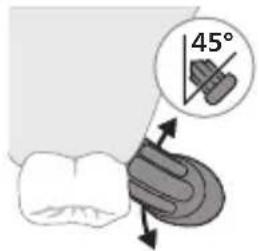
2 Tish cho'tkasini tishlar qarshisida kichik (45 daraja) burchak ostida tuting. Cho'tkalar milk chizig'iga yoki uning tagiga yetishi uchun uni qattiq dosing. Izoh: Cho'tka markazini tishlarga doimi to'liq tekkizib turing.
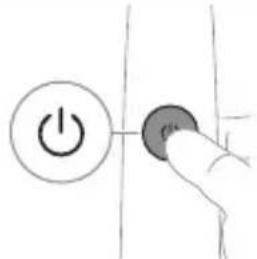
3 Philips Sonicare qurilmasini yoqish uchun yoqish/o'chirish tugmasini bosing.
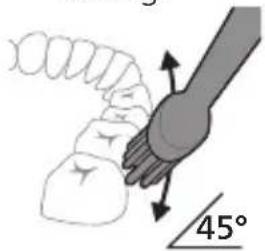
4 Cho'tkani tishlar va milk chizig'iga yengil tutib turing. Cho'tkalar tishlar orasiga kirishi uchun cho'tka kallagini oldinga-orqaqa kichik harakatlar bilan tishlaringizni tozalang. Bu harakatlarni tish tozalash siklingiz yakunlangunga qadar bajaring.
natural_image
Diagram showing dental tool application on upper teeth with magnified view (no text or symbols)Og'izni bir tekisda tozalash maqsadida og'zingizni BrushPacer funksiyasi yordamida 6 qismga bo'ling. BrushPacer tish tozalash vaqtini 6 ta teng segmentga bo'ladi va keyingi hududga o'tishingiz kerak bo'Iganida bildiradi. Segmentlar tebranishdagi qisqa pauza orqali bildiriladi. Tish cho'tkasi tish tozalash seansi yakunida avtomatik ravishda to'xtaydi.
Izoh: White yoki Gum Health salomatligi rejimlaridan foydalanganingizda qo'shimcha vaqt kiritilishi mumkin.
Rejimlar
Motorli tish cho'tkangiz ikkita rejimda ishlaydi: Clean va Sensitive. Siz ishlatayotgan aqli cho'tka kallagidan kelib chiqib, maqbul rejim va jadallik BrushSync texnologiyasi tomonidan avtomatik ravishda tanlanadi.
Bu rejimni oddiy usulda almashtirish uchun tish cho'tkasi o'chiq paytda rejim/jadallik tugmasini bosing. Barcha cho'tka kallaklari alohida rejim bilan ishlaydi.
Clean Sezuvchan
| Foydasi Qasmoqlarni ketkazish Sezuvchan tishlar va | milklar uchun juda yumshoq rejim | |
| Tavsiya etilgan jadallik darajasi | Yuqori Past* | |
| Jami tish tozalah vaqti | 2 daqiga 2 daqiga | |
| Tozalah usuli Har bir segmentni 20 soniyadan tozalang | Har bir segmentni 20 soniyadan tozalang | |
 |  | |
 |  | |
Intensivlik
Jadallik sozlamalari
natural_image
Simple line drawing of a device with three circular components and a vertical bar (no text or symbols)Motorli tish cho'tkangiz 3 turdagi jadallik sozlamalari bilan jihozlangan:
- Yuqori jadallik (uchta chiroq)
- O'rta jadallik (ikkita chiroq)
- Past jadallik (bitta chiroq)
natural_image
Diagram of a microphone with a sensor icon and signal symbol (no text or labels)BrushSync texnologiyasi cho'tka kallagining dasta bilan mikrochip orqali muloqot qilishiga yordam beradi. Cho'tka kallagi ostidagi Belgisi cho'tka kallagi ushbu texnologiya bilan jihozlanganini anglatadi.
BrushSync texnologiyasi quyidagilarni faollashtiradi:
- Cho'tka kallagini almashtirishni eslatish funksiyasi
- BrushSync rejimini jiftlash
Philips Sonicare BrushSync texnologiyasiga ega keng turdagi smart cho'tka kallaklarini taklif qiladi. Tish cho'tkasining cho'tka kallaklari to'liq ko'lami bilan
tanishish va sizga eng mos keladigan cho'tka kallagini topish uchun
www.philips.com/toothbrush-heads veb-saytiga kiring.
Funksiyalar
- Bosim sensori bildirgisi
- BrushPacer
- SmarTimer
- EasyStart
- Cho'tka kallagini almashtirishni eslatish funksiyasi
- Cho'tka kallagini juftlash rejimi
natural_image
Line drawing of a person holding a pen, no text or symbols presentOrtiqcha bosim qo'llasangiz, bosimni kamaytirmaguningizgacha dasta tovushi va tebranishini o'zgartiradi va dasta quyi qismidagi cho'tkalash bildirgi chirog'i miltillaydi (binafsharang).
Izoh: Mahsulotingizda bosim sensori bildirgisi faol holatda taqdim etiladi. Bu funksiyani faolsizlantirish uchun (qarang "Funksiyalarni faollashtirish yoki faolsizlantirish").
BrushPacer
flowchart
graph TD
    A["Process Node"] --> B["Output Box 0"]
3 Cho'tka kallagini almashtirish haqida eslatuvchi indikator sariq rangda yonganida cho'tka kallagingizni almashtirishingiz kerak.
Izoh: Barcha aqlli cho'tka kallaklari cho'tka kallaklarini almashtirishni eslatish funksiyasi yoqilgan holatda yetkaziladi. Cho'tka kallagini almashtirishni eslatish funksiyasini faolsizlantirish uchun qarang: "Funksiyalarni faollashtirish yoki faolsizlantirish".
Cho'tka kallagini juftlash rejimi
BrushSync texnologiyasiga ega cho'tka kallaklari, dasta bilan muloqot qiladigan hamda uni tavsiya qilingan rejim va jadallik bilan dastaga juftlaydigan mikrochip bilan jihozlangan. BrushSync texnologiyasiga ega ko'pchilik cho'tka kallaklari Clean rejimida avtomatik juftlanadi. Ma'lum afzalliklarga ega cho'tka kallaklari tegishli rejim bilan juftlanadi (mavjud bo'lganda), masalan, S2 Sensitive: Sensitive rejimi.
Izoh: Agar tavsiya etilgan sozlamadan rejim/jadallikni o'zgartirishni tanlasangiz, cho'tka kallagi kelgusida tozalash seanslari uchun tanlagan sozlamangizni yodda saqlaydi.
Funksiyalarni faollashtirish yoki faolsizlantirish
natural_image
Diagram showing a mechanical component with a downward arrow and a small square base, no text or symbols present.2 Dastani quvvatlash moslamasiga joylang.
3 Biriktirilgan USB kabelni quyidagi 5V kuchlanishli doim tok ta'minot blokiga ulang.
- Faqat Philips bilan muvofiq quvvatlagichlar yoki nominal kirish quvvatlari bilan xavfsizligi tasdiqlangan adapterlarida quvvatlang: 100 - 240V\~; 50/60Hz; 3,5 Vt va chiqish kuchlanishi 5VDC; 2,5 Vt.
- UL bilan qayd etilgan yoki 1310 Toifa 2 bilan sertifikatlangan quvvat ta'minoti (faqat NAM)
4 Batareya indikatori va chiroq halqasi yonadi, dasta ikki marta signal beradi va dastadagi barcha chiroqlar dastaning yuqori qismidan ostiga qarab yonadi.
5 Batareyaning miltillovchi indikatori tish cho'tkasi quvvatlanayotganini bildiradi.
6 Dasta quvvatlagichda bo'lsa va batareya to'liq quvvatlansa, batareya indikatorining LED chiroqlari yashil rangda miltillashni boshlaydi. Batareya to'liq quvvatlansa, yashil chiroq 30 soniya yonib turadi va keyin o'chadi.
Batareya holati
Batareya holati (dasta quvvatlagich/sayohat g'ilofiga ulangan)
Dasta quvvatlagichga yoki sayohat quvvatlagich g'ilofiga joylanganda batareya indikatori batareya darajasini aks ettiradi.
Batareya holati
Miltillovchi LED chiroqlar soni
LED rang
Past 1 Miltillovchi yashil
Qisman to'Igan 2 Miltillovchi yashil
To'Igan 3 To'Igunicha yashil
rangda miltillaydi, keyin 30 soniya yashil rangda yonib turadi va keyin o'chadi
Batareya holati (dasta quvvatlagich/sayohat g'ilofiga ulanmaganida)
Tish cho'tkasi faolligida dasta ostidagi batareya indikatori batareya darajasini aks ettiradi.
Batareya holati LED chiroqlar soni LED rang
| To’lgan 3 Yaxlit yashil | |
| Qisman to’lgan 2 Yaxlit yashil | |
| O’rtacha past 1 Yaxlit yashil | |
| Past Tozalashdan keyin 3 ta qisqa signal bilan 1 marta | Sariq rangda miltillaydi |
| Bo’sh Tozalashdan keyin 2 ta qisqa signal bilan 1 marta | Sariq rangda miltillaydi |
Izoh: Energiya tejash uchun batareya indikatori ishlatilmayotganida o'chadi.
natural_image
Line drawing of a biological specimen with an arrow pointing to a needle inserted into a tubular structure (no text or labels)1 Cho'tka kallagini chiqarib oling va metall val atrofi va tugmalarini iliq suv bilan yuving. Dasta va tugmalar atrofidagi tish pastasi qoldiqlarini haftada kamida bir marta, lekin yaxshisi har foydalanishdan keyin tozalang.
Ogohlantirish: Metall valdagi yoki tugmalar atrofidagi rezina zichlagichni o'tkir narsalar bilan bosmang, bu shikastlanishga olib kelishi mumkin.
2 Dastaning butun yuzasini nam mato bilan artib oling.
Izoh: Ortiqcha suvni yo'qotish uchun dastani rakovinaga urmang.
3 Dastani yumshoq mato yoki sochiq bilan quriting.
Cho'tka kallagi
natural_image
Illustration of two hands using a tool to cut or mark a surface, with no visible text or symbols1 Cho'tka kallagi va cho'tkani har foydalanishdan keyin yuving.
2 Cho'tka kallagini dastadan chiqarib oling va cho'tka kallagi ulanish qismini kamida haftada bir marta iliq suv bilan yuving. Sayohat qopqog'ini zarur bo'lgancha tez-tez yuving va havoda quriting. Faqat quruq cho'tka kallagida ishlating.
natural_image
Simple line drawing of an open book with no text or symbols visiblenatural_image
Illustration of a hand holding a tool with a downward arrow indicating motion (no text or symbols)natural_image
Simple line drawing of a funnel with a checkmark indicating completion (no text or symbols)natural_image
Illustration of a hand using a pen to apply a small object to a surface, with an inset showing a magnified view of a textured surface (no text or symbols present)natural_image
Diagram showing a hand holding a small object with directional arrows indicating movement, labeled '45°' (no text or symbols on the diagram itself)natural_image
Illustration of dental tool application on upper teeth (no text or symbols)natural_image
Diagram showing a circular arrangement of circles and connected to a vertical line with three circles (no text or symbols)natural_image
Diagram of a toothbrush with a circular icon showing wireless signal (no text or symbols)natural_image
Line drawing of a person holding a toothbrush (no text or symbols)natural_image
Simple diagram showing a device pressing into a cylindrical component with a cable (no text or symbols)natural_image
Simple line drawing of a medical procedure with a needle inserted into tissue (no text or symbols)natural_image
Illustration of two hands using a tool to lift or stand, forming a cross over a line (no text or symbols)www.philips.com/support
natural_image
Simple line drawing of an open book with no text or symbols visiblenatural_image
Illustration of a hand holding a tool with a pointed tip and arrow indicating direction (no text or symbols)natural_image
Simple line drawing of a curved object with a checkmark (no text or symbols)natural_image
Illustration of a hand using a pipette to apply liquid onto a surface, with an inset showing a microplate (no text or symbols present)natural_image
Illustration of dental tool application on upper teeth with magnified detail (no text or symbols)natural_image
Simple line drawing of a vertical panel with three circular components and a separate circular component (no text or symbols)natural_image
Diagram of a toothbrush with a sensor icon and a circle highlighting the sensor area (no text or symbols present)natural_image
Line drawing of a person holding a toothbrush (no text or symbols)natural_image
Diagram showing a mechanical component with a downward arrow and a small rectangular object on a base (no text or symbols)natural_image
Line drawing of a medical procedure with a needle inserted into tissue (no text or symbols)natural_image
Illustration of two hands using a tool to cut or adjust a mechanical component, with no visible text or symbols.GARANTIAS IMPLÍCITAS
natural_image
Simple line drawing of an open book with no text or symbols visiblenatural_image
Illustration of a hand holding a toothbrush with an arrow indicating force or movement (no text or symbols)natural_image
Simple line drawing of a curved object with a checkmark indicating a detail (no text or symbols)natural_image
Illustration of a hand using a pipette to apply liquid onto a surface, with an inset showing a microplate (no text or symbols present)natural_image
Diagram showing dental tool application on upper teeth with magnified view (no text or symbols)natural_image
Simple line drawing of a vertical panel with three circular components and a separate circular component (no text or symbols)natural_image
Diagram of a toothbrush with a sensor icon and a location pin (no text or symbols)natural_image
Line drawing of a person holding a pen, no text or symbols presentnatural_image
Diagram showing a mechanical component with a downward arrow and a small square base, no text or symbols present.natural_image
Simple line drawing of a medical procedure with a tool inserted into tissue (no text or symbols)natural_image
Illustration of two hands using a tool to adjust or install a mechanical component (no text or symbols visible)www.philips.com/support
natural_image
Simple line drawing of an open book with no text or symbols visiblenatural_image
Illustration of a hand holding a tool with a pointed tip, showing a force or grip (no text or symbols present)natural_image
Simple line drawing of a curved object with a checkmark mark (no text or symbols)natural_image
Illustration of a hand using a pipette to apply liquid onto a surface, with an inset showing a droplet on a surface (no text or symbols present)natural_image
Diagram showing a hand holding a small object with directional arrows, labeled '45°' (no text or symbols on the diagram itself)natural_image
Diagram showing dental tool application on upper teeth with magnified detail (no text or symbols)natural_image
Pure electrical circuit lines without any symbolsnatural_image
Diagram of a toothbrush with a sensor icon and a magnified circular detail (no text or symbols)natural_image
Line drawing of a person holding a pen, no text or symbols presentflowchart
graph TD
    A["Process Node"] --> B["P"]
natural_image
Diagram showing a mechanical component with a downward arrow and a small rectangular object on a base (no text or symbols)natural_image
Simple line drawing of a medical procedure with a tool and tubing (no text or symbols)natural_image
Illustration of two hands using a tool to cut or adjust a mechanical component, with no visible text or symbols.www.philips.com/support
natural_image
Simple line drawing of an open book with no text or symbols visibleTa simbol pomeni, da morate pred uporabo aparata prebrati navodila za uporabo.
Ta simbol pomeni, da morate uporabiti navedeni napajalnik.
Predvidena uporaba
natural_image
Illustration of a hand holding a toothbrush with an arrow indicating force or movement (no text or symbols)natural_image
Simple line drawing of a vertical pipe or tube with a checkmark indicating a specific point (no text or symbols present)natural_image
Illustration of a hand using a pipette to apply liquid onto a surface, with an inset showing a droplet on a surface (no text or symbols present)3 Zobno ščetko Philips Sonicare vklopite tako, da pritisnete gumb za vklop/izklop.
natural_image
Diagram showing a hand holding a small object with directional arrows, labeled '45°' (no text or symbols on the object itself)natural_image
Diagram of dental arch with tooth structure and shaded area indicating a specific tooth (no text or labels)natural_image
Simple line drawing of a device with three circular components and a vertical bar (no text or symbols)natural_image
Diagram of a toothbrush with a circular icon showing wireless signal (no text or symbols)natural_image
Line drawing of a person holding a pen, no text or symbols presentflowchart
graph TD
    A["Traffic Light Icon"] --> B["D"]
natural_image
Diagram showing a mechanical component with a downward arrow and a small square base, connected to a circular base (no text or symbols)natural_image
Simple line drawing of a medical procedure with a needle inserted into tissue (no text or symbols)natural_image
Illustration of two hands using a tool to cut or adjust a mechanical component, with no visible text or symbols.www.philips.com/support
www.philips.com/support
natural_image
Simple line drawing of an open book with no text or symbols visibleTento symbol znamená, aby ste si pred použitím zariadenia prečítali návod na použitie.
natural_image
Illustration of a hand holding a toothbrush with an arrow indicating force or movement (no text or symbols)natural_image
Simple line drawing of a curved object with a checkmark indicating a detail (no text or symbols)natural_image
Illustration of a hand using a pipette to apply liquid onto a surface, with an inset showing a microplate (no text or symbols present)natural_image
Diagram showing a hand holding a tool with a 45-degree angle indicator (no text or symbols present)4 Jemne udržujte štetiny v polohe na zuboch a d'asnách. Zuby čistite krátkymi pohybmi dopredu a dozadu tak, aby štetiny dosahovali do priestorov medzi zubami. Tento pohyb opakujte počas celého čistiaceho cyklu.
natural_image
Diagram showing dental tool application on upper teeth with magnified view of tooth structure (no text or labels)natural_image
Pure electrical circuit lines without any symbolsnatural_image
Diagram of a toothbrush with a circular icon showing wireless signal, no text or symbols presentnatural_image
Line drawing of a person holding a toothbrush (no text or symbols)flowchart
graph TD
    A["Traffic Light Icon"] --> B["D Terminal"]
natural_image
Simple diagram showing a device with a circular component and a small square object on a base, no text or symbols present.natural_image
Line drawing of a medical procedure involving an incision or needle inserted into a patient's abdomen (no text or labels)natural_image
Illustration of two hands using a tool to adjust or install a mechanical component, with no visible text or symbols.www.philips.com/support
natural_image
Simple line drawing of an open book with no text or symbols visibleOvaj simbol označava da je potrebno pročitati uputstvo za upotrebu pre korišćenja uređaja.
natural_image
Illustration of a hand holding a toothbrush with an arrow indicating force or movement (no text or symbols)1 Poravnajte glavu četkice tako da su vlakna okrenuta u istom smeru kao i prednja strana drške.
natural_image
Simple line drawing of a curved object with a checkmark indicating a detail (no text or symbols)2 Čvrsto pritisnite glavu četkice na metalnu osovinu do kraja.
natural_image
Illustration of a hand using a pipette to apply liquid onto a surface, with an inset showing a droplet on a surface (no text or symbols present)1 Pokvasite vlakna i nanesite malu količinu paste za zube.
2 Postavite vlakna četkice za zube na zube tako da budu pod blagim uglom (45 stepeni). Čvrsto pritisnite kako bi vlakna stigla do desni ili malo ispod desni.
natural_image
Diagram showing a hand holding a small object with directional arrows, labeled '45°' (no text or symbols on the diagram itself)4 Nežno držite vlakna na zubima i desnima. Perite zube blagim pokretima unapred i unazad tako da vlakna mogu da dosegnu između zuba. Nastavite sa ovakvim pokretima tokom celog ciklusa pranja zuba.
natural_image
Diagram showing dental tool application on upper teeth with magnified view of tooth structure (no text or labels)Da biste ručno promenili režim, pritisnite dugme za režim/intenzitet kad je četkica za zube isključena. Sve glave sa četkicom rade u svakom režimu.
Clean Osetljivi
| Pogodnost Uklanjanje plaka Veoma nežan režim za | osetljive zube i desni | |
| Preporučeni nivo intenziteta | Visok Nizak* | |
| Ukupno vreme pranja zuba | 2 minuta 2 minuta | |
| Kako se pere perite svaki segment 20 sekundi | perite svaki segment 20 sekundi | |
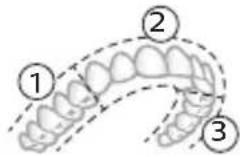 | 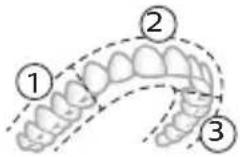 | |
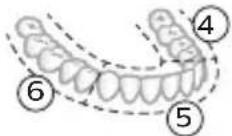 | 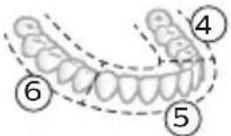 | |
Intenziteti
Postavke intenziteta
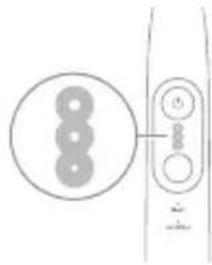
natural_image
Pure electrical circuit lines without any symbolsElektrična četkica za zube ima 3 različitih postavki za intenzitet:
- Veliki intenzitet (tri svetla)
- Srednji intenzitet (dva svetla)
- Mali intenzitet (jedno svetlo)
Napomena: za najbolje rezultate preporučujemo visok intenzitet.
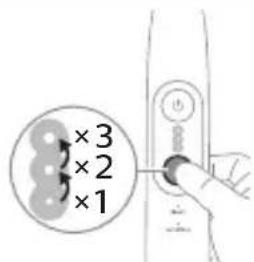
Da biste ručno izabrali željeni intenzitet, pritisnite dugme za režim/intenzitet dok je četkica za zube uključena da biste se kretali kroz opcije. Postavka intenziteta se može prilagoditi samo kada je četkica za zube uključena.
Tehnologija BrushSync
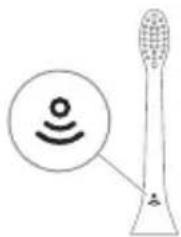
natural_image
Diagram of a toothbrush with a sensor icon and a magnified circular detail (no text or symbols)Tehnologija BrushSync omogućava glavi četkice da komunicira sa drškom pomoću mikročipa. Simbol 🚠a dnu glave četkice pokazuje da glava četkice posjeduje ovu tehnologiju.
Tehnologija BrushSync omogućava:
natural_image
Line drawing of a person holding a pen, no text or symbols presentAko prekomerno pritiskate, drška menja zvuk i vibraciju, a svetlo povratnih informacija o pranju zuba treperi ljubičasto na dnu drške dok ne smanjite pritisak.
Napomena: Proizvod se isporučuje sa aktiviranim povratnim informacijama senzora pritiska. Da biste deaktivirali ovu funkciju (pogledajte 'Aktiviranje ili deaktiviranje funkcija').
BrushPacer
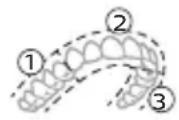
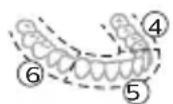
natural_image
Diagram showing a mechanical component with a downward arrow and a small square base, connected to a circular base (no text or symbols)2 Postavite dršku na punjač.
3 Povežite priloženi USB kabl na ulazno napajanje jednosmerne struje od 5 V.
natural_image
Simple line drawing of a fork being inserted into a tube (no text or symbols)1 Skinite glavu četkice i isperite prostor oko metalne osovine i dugmadi toplom vodom. Najmanje jednom nedeljno, a po mogućnosti nakon svake upotrebe, obavezno uklonite svu preostalu zubnu pastu sa drške i oko dugmadi.
Oprez: Nemojte da gurate gumenu zaptivku na metalnoj osovini ili u području oko dugmadi oštrim predmetima pošto to može da dovede do oštećenja.
2 Čitavu površinu drške obrišite vlažnom krpom.
Napomena: Nemojte da udarate ručkom o sudoperu da biste uklonili višak vode.
natural_image
Illustration of two hands using a tool to cut or adjust a mechanical component, with no visible text or symbols.1 Glavu četkice i vlakna isperite nakon svake upotrebe.
2 Bar jednom nedeljno skinite glavu četkice sa drške i toplom vodom isperite njen priključak. Putni poklopac isperite kad god je to potrebno i osušite na vazduhu. Stavljajte ga samo na suvu glavu četkice.
Napomena: Poklopac glave četkice upotrebljava se u transportu i nije namenjen za stalnu upotrebu.
Punjač
1 Isključite punjač iz električne mreže pre čišćenja.
2 Obrišite površinu punjača vlažnom krpom.
3 Osušite punjač mekom krpom ili peškirom.
Putna torbica
Putnu torbicu isperite toplom vodom i očistite vlažnom krpom i ostavite da se osuši na vazduhu.
Skladištenje
Ako proizvod nećete koristiti duže vreme, isključite ga iz zidne utičnice, očistite ga i odložite na hladno i suvo mesto, dalje od direktne sunčeve svetlosti.
Zamena
Zamenite Philips Sonicare glave četkice na svaka 3 meseca kako biste postigli optimalne rezultate. Koristite samo zamjenske glave četkice Philips Sonicare.
www.philips.com/support
natural_image
Simple line drawing of an open book with no text or symbols visiblenatural_image
Illustration of a hand holding a toothbrush with an arrow indicating force (no text or symbols)natural_image
Simple line drawing of a vertical structure with a checkmark indicating a detail (no text or symbols present)natural_image
Illustration of a hand using a pipette to apply liquid onto a surface, with an inset showing a droplet on a surface (no text or symbols present)natural_image
Simple line drawing of a hand pressing a button on a power button (no text or symbols)natural_image
Illustration of a hand holding a small object with directional arrows indicating movement, labeled '45°' (no text or symbols on the diagram itself)natural_image
Illustration of dental arching technique with tooth arrangement and tool (no text or symbols)natural_image
Simple line drawing of a device with three circular components and a vertical connector (no text or symbols)natural_image
Diagram of a toothbrush with a circular icon showing a sensor symbol (no text or labels)natural_image
Line drawing of a person holding a pen, no text or symbols presentnatural_image
Simple diagram showing a device pressing a small component onto a circular base (no text or symbols)natural_image
Simple line drawing of a biological or anatomical structure with a central rod and branching structures (no text or symbols)natural_image
Illustration of two hands using a tool to adjust or install a mechanical component, with no visible text or symbols.www.philips.com/support
natural_image
Simple line drawing of an open book with no text or symbols visiblenatural_image
Illustration of a hand holding a toothbrush with an arrow indicating force or direction (no text or symbols)natural_image
Simple line drawing of a vertical pipe or tube with a checkmark indicating a detail (no text or symbols present)natural_image
Illustration of a hand using a pipette to apply liquid onto a surface, with an inset showing a droplet on a surface (no text or symbols present)474 Svenska
natural_image
Diagram showing a hand holding a small object with directional arrows, labeled '45°' (no text or symbols on the diagram itself)natural_image
Diagram showing dental tool application on upper teeth with magnified detail (no text or symbols)natural_image
Diagram showing a circular arrangement of circles next to a vertical line with three circles and a small circle, no text or symbols present.natural_image
Diagram of a microphone with a sensor icon and signal symbol, no text or labels presentnatural_image
Line drawing of a person holding a pen, no text or symbols presentflowchart
graph TD
    A["P"] --> B["6"]
natural_image
Diagram showing a mechanical component with a downward arrow and a small square base, connected to a circular base (no text or symbols)natural_image
Illustration of a medical procedure involving an incision or needle inserted into a tubular structure (no text or symbols present)natural_image
Illustration of two hands using a tool to cut or mark a surface, with no visible text or symbolswww.philips.com/support
Möhüm howpsuzlyk maglumaty
Bu önümi diñe onuň niyetlenilýän maksady üçin ulanyň. Önümi we onuň batareýalaryny hem-de esbaplaryny ulanmazdan ozal, şu maglumatı üns bilen okaň hem-de geljekde gollanmak üçin ýygnap goýuň. Nädogry ulanmak howplara yá-da agyr şikeslere eltip bilýär.
DUYDURYSLAR
- Diñe hakyky Philips esbaplaryny a-da sarp ediş materiallaryny ulanyň. Eger berlen bolsa, diñe original USB kabelini we USB tok üpjünçilik bloguny ulanyň.
- Bu enjamda ulanyjynyň tehniki hyzmat edip biljek şaýlary ýokdur. Eger enjama zeper ýetse, ony ulanmagy bes ediň we ýurduňyzdaky Müşderi goldawy merkezine ýüz tutuň. USB kabele zeper ýeten bolsa, ony ulanmagy bes ediň.
- Zarýadnikleri suwdan uzakda saklaň.
- Arassalanyňyzdan soň zarýad berijileri we syýahat wagtynda zarýad beriş çehollaryny birikdirmezden ozal olaryň doly gurandygyna göz yetiriň.
- Enjamy çagalar, şeyle hem enjamy howpsuz görnüşde ulanmak boyunça gözükdirijiler berlen ÿa-da howpsuz ulanmak boyunça gözegçilik astyndaky we degişli howplar özlerine mälim edilen ÿagdaÿynda fiziki, duýgurlyk ÿa-da zehin ukyplary pes ÿa-da tejribesi we bilimi bolmadyk şahslar hem ulanyp biler. Çagalar gözegçilik astynda däl wagty enjamda arassaçylyk we ulanyjy tarapyndan geçirilmäge degişli abatlayys işlerini geçirmeli däl.
- Çagalaryň önlem bilen oýnamazlygyny úpjün etmek üçin olary gözegçilikde saklamaly.
- Önümiň hiç bir bölegini gap-gaç yuwujyda arassalamaň.
- Adapterleri we zarýad berijileri açyk howada ýa-da gyzdyrylýan üstleriň ýakynynda ulanmaň.
- Bu enjam diñe dişleri, diş etini we dili arassalamak üçin dizayın edilendir.
-
Gyllary mynjiyan yá-da eplenen çotga nasadkasyny ulanmagy bes ediň. Nasadkany her 3 aydan yá-da könelme alamatlary yüze çyksa, ondan hem ir çalşyryň.
-
Düzüminde efir yaglary ya-da kokos yagy bar bolan önümler bilen gönümel galtaşdyrmaň. Galtaşma gyllaryň gopmagyna eltip biler.
- Ulanmagyň maksimum beýikligi 4500 metrdir.
LUKMANÇYLYK DUÝDURYŞLARY
- Eger ulanyşdan soň çendenaşa ganama yüze çyksa, ganama ulanyşdan 1 hepde geçensoň yüze çykmaga dowam etse ya-da bimazalyk ya-da agyry duýsaňyz, enjamy ulanmagy bes ediň we stomatolog/lukman bilen maslahatlaşyn.
- Eger öňki 2 aýda agyz yá-da diş eti operasiýasyny geçiren bolsaňyz, bu enjamy ulanmazdan öň stomatologyňyz bilen maslahatlaşyn.
- Eger size kardiostimulýator yá-da başga bir implant enjam goýlan bolsa, ulanmazdan öň lukmanyňyza yá-da implant enjamyň öndürijisine yüz tutuň.
- Eger lukmançylyk taýdan şübhelenseňiz, bu enjamy ulanmazdan öz lukmanyňyz bilen maslahatlaşyn.
- Bu önüm şahsy ideg enjamy bolup, stomatologik klinikada yá-da edarada birnäge näsagda ulaşmak üçin niyetlenilmeyär.
BATAREYİN HOWPSUZLYGY BOYUNÇA GÖZÜKDIRIJILER
natural_image
Simple line drawing of an open book with no text or symbols visibleBu nyşan enjamy ulanmazdan ozal ulanyş gözükdirijilerini okaň diýmegi aňladýar.
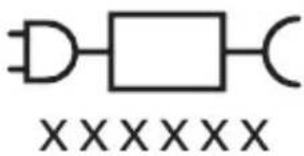
Bu nysan görkezilen elektrik üpjünçiligini ulanmalydygyny aňladýar.
Niyetlenilýän ulanys
Sonicare Prestige elektrikli diş çotgalary dişiň çüyremegini azaltmak we agyz saglygyny saklamak maksady bilen, dişlerdâki daşy hem-de iýmit galyndylaryny aýryrmaklyga niyetlenilýär.
Philips Sonicare enjamyňyz (Şek. 1.)
natural_image
Illustration of a hand holding a tool with a pointed tip and arrow indicating direction (no text or symbols)natural_image
Simple line drawing of a curved object with a checkmark indicating a detail (no text or symbols)2 Nasadkany metal walyň üstüne ol aňryk baryp direyänçă közümli basyň.
natural_image
Illustration of a hand using a pipette to apply liquid onto a surface, with an inset showing a droplet on a surface (no text or symbols present)1 Gyllary öllän we üstüne azajyk diş pastasyny çalyn.
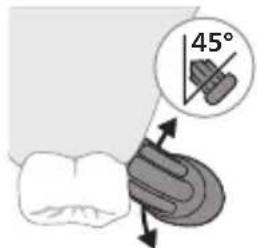
natural_image
Diagram showing a hand holding a small object with directional arrows indicating movement, labeled '45°' (no text or symbols on the diagram itself)natural_image
Diagram showing dental tool application on upper teeth with magnified detail (no text or symbols)natural_image
Simple line drawing of a device with three circular components and a vertical connector (no text or symbols)Elektrikli diş çotgaňyz 3 dürli ýygjamlyk sazlamasy bilen gelýär:
- Yokary yygjamlyk (üç çyra)
- Orta ýygjamlyk (iki çyra)
- Pes yygjamlyk (bir çyra)
Bellik: Iň oňat netijeler üçin ýokary ýygjamlygy maslahat berýāris.
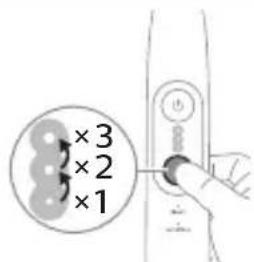
natural_image
Diagram of a toothbrush with a circular icon showing wireless signal, no text or symbols presentnatural_image
Line drawing of a person holding a pen, no text or symbols presentEger artykmaç basyş etseñiz, tutawaç tä basyşy azaldyançaňyz öz sesini hem-de titremesini üýtgedýär we tutawajyň aşagyndaky çotgalama seslenme çyrasy mawy reňkde ýanyp-öçýär.
natural_image
Diagram showing a mechanical component with a downward arrow and a small rectangular object on a base (no text or symbols)2 Tutawajy zarýadnige yerleşdiriň.
3 Dakylgy USB kabelini 5V hemişelik tok çeşmesine birikdiriň,
- Diñe Philips bilen sazlaşykly yá-da giriş derejesi aşakda berlen howpsuzlygy tassyklanan adapterler bilen zarýad berin: 100 - 240V\~; 50/60Hz; 3,5W we çykyş derejeleri 5V hemişelik tok; 2,5W.
- UL talaplaryna laýyk gelýän ya-da 1310 Class 2 standardy boýunça sertifisirlenen tok çeşmesi (diñe NAM)
4 Batareyi görkeziji we çyraly halka ak reňkde ÿanýar, tutawaç iki gezek sesli duýduryş berýär we tutawaçdaky hemme çyralar tutawajyň aşagyndan ýokarlygyna ÿanýar.
natural_image
Simple line drawing of a medical procedure with a needle inserted into tissue (no text or symbols)natural_image
Illustration of two hands using a tool to cut or adjust a mechanical part, with no visible text or symbols.1 Her ulanyşdan soň nasadkany we gyllary yuwup durlaň.
2 Azyndan hepdede bir gezek nasadkany tutawaçdan aýryp, nasadkanyň birikmesini ýyly suw bilen ýuwup durlaň. Syýahat gapagyny näçe ýygylykda zerur bolsa ýuwup durlaň we howa bilen guradyň. Diňe gury nasadkany ulanyň.
Bellik: Nasadkanyň gapagy ony daşamakda ulanylýar we hemişe ulanylmaga niyetlenilmeýär.
Zarýadnik
Kepillik we goldaw (ROW)
Maglumat yá-da goldaw gerek bolsa, www.philips.com/support salgysyna girin yá-da halkara kepillik hatyny okaň.
natural_image
Simple line drawing of an open book with no text or symbols visiblenatural_image
Illustration of a hand holding a toothbrush with an arrow indicating force or direction (no text or symbols)natural_image
Simple line drawing of a bulb-like shape with a checkmark mark (no text or symbols)natural_image
Illustration of a hand using a pipette to apply liquid onto a surface, with an inset showing a droplet on a surface (no text or symbols present)natural_image
Illustration of dental tool application on upper teeth with magnified detail (no text or symbols)natural_image
Diagram showing three circular components connected to a vertical line with circular elements (no text or symbols)natural_image
Diagram of a toothbrush with a circular icon showing wireless signal (no text or symbols)natural_image
Line drawing of a person holding a cigarette (no text or symbols)natural_image
Diagram showing a mechanical component with a downward arrow and a small circular component attached to a base (no text or symbols)natural_image
Illustration of a medical procedure showing an incision being inserted into a patient's abdomen (no text or labels)natural_image
Illustration of two hands using a tool to cut or mark a surface, with no visible text or symbolswww.philips.com/support
natural_image
Simple line drawing of an open book with no text or symbols visiblenatural_image
Illustration of a hand holding a toothbrush with an arrow indicating force or movement (no text or symbols)natural_image
Simple line drawing of a curved object with a checkmark mark (no text or symbols)natural_image
Illustration of a hand using a pipette to apply liquid onto a surface, with an inset showing a droplet on a surface (no text or symbols present)natural_image
Illustration of a tooth being brushed with a tool, showing teeth and jawbone structure (no text or symbols)natural_image
Simple line drawing of a device with three circular components and a vertical connector (no text or symbols)natural_image
Illustration of a microphone with signal icon and speech bubble (no text or symbols)natural_image
Line drawing of a person holding a pen, no text or symbols presentnatural_image
Simple diagram showing a device pressing into a cylindrical component with a cable (no text or symbols)natural_image
Line drawing of a medical procedure with a needle inserted into tissue (no text or symbols)natural_image
Illustration of two hands using a tool to lift or stand (no text or symbols present)www.philips.com/support
natural_image
Simple line drawing of an open book with no text or symbols visiblenatural_image
Illustration of a hand holding a toothbrush with an arrow indicating force or movement (no text or symbols)natural_image
Simple line drawing of a bulb-like shape with a checkmark mark (no text or symbols)natural_image
Illustration of a hand using a pipette to apply liquid onto a surface, with an inset showing a droplet on a surface (no text or symbols present)natural_image
Diagram showing dental tool application on upper teeth with magnified view of tooth structure (no text or labels)natural_image
Simple line drawing of a device with three circular components and a vertical connector (no text or symbols)natural_image
Diagram of a brightness sensor emitting signal waves, showing the bulb and speaker (no text or symbols)natural_image
Line drawing of a person holding a toothbrush (no text or symbols)natural_image
Simple diagram showing a device pressing into a cylindrical component with a cable (no text or symbols)2 Кармагычты кубаттагычтын устүне коюңуз.
3 Камтылган USB кабелин 5V DC кубат булагына туташтырыңыз.
natural_image
Line drawing of a medical procedure involving a tool and tubing (no text or symbols)natural_image
Illustration of two hands using a tool to adjust or install a mechanical component, with no visible text or symbols.natural_image
Simple line drawing of an open book with no text or symbols visiblenatural_image
Illustration of a hand holding a tool with a downward arrow indicating motion (no text or symbols)natural_image
Simple line drawing of a funnel with a checkmark mark (no text or symbols)natural_image
Illustration of a hand using a pipette to apply liquid onto a surface, with an inset showing a droplet on a surface (no text or symbols present)natural_image
Diagram showing a hand holding a small object with directional arrows indicating movement, labeled '45°' (no text or symbols on the diagram itself)natural_image
Diagram of a dental tool interacting with teeth, showing tooth alignment and tooth density (no text or labels)natural_image
Simple line drawing of a device with three circular components and a vertical bar (no text or symbols)natural_image
Diagram of a toothbrush with a circular icon showing wireless signal (no text or symbols)natural_image
Line drawing of a person holding a pen, no text or symbols presentnatural_image
Diagram showing a mechanical component with a downward arrow and a small square component on a base (no text or symbols)natural_image
Simple line drawing of a medical procedure with a tool and tubing (no text or symbols)natural_image
Illustration of two hands using a tool to cut or mark a mechanical component, with no visible text or symbols.natural_image
Simple line drawing of an open book with no text or symbols visiblenatural_image
Illustration of a hand holding a toothbrush with an arrow indicating force or movement (no text or symbols)natural_image
Simple line drawing of a curved object with a checkmark indicating a detail (no text or symbols)natural_image
Illustration of a hand using a pipette to apply liquid onto a surface, with an inset showing a droplet on a surface (no text or symbols present)natural_image
Diagram showing a hand holding a small object with directional arrows, labeled '45°' (no text or symbols on the diagram itself)natural_image
Diagram showing dental tool application on upper teeth with magnified view (no text or labels)natural_image
Simple line drawing of a device with three circular components and a vertical connector (no text or symbols)natural_image
Illustration of a toothbrush with a sensor icon and signal symbol (no text or labels)natural_image
Line drawing of a person holding a pen, no text or symbols presentnatural_image
Simple diagram showing a device pressing into a cylindrical component with a cable (no text or symbols)natural_image
Simple line drawing of a medical procedure with a needle inserted into tissue (no text or symbols)natural_image
Illustration of two hands using a tool to cut or adjust a mechanical component, with no visible text or symbols.natural_image
Simple line drawing of an open book with no text or symbols visiblenatural_image
Illustration of a hand holding a tool with a pointed tip and arrow indicating direction (no text or symbols)natural_image
Simple line drawing of a curved object with a checkmark mark (no text or symbols)natural_image
Illustration of a hand holding a pen with a dropper, showing a magnified inset of a brush (no text or symbols)3 Барои фаьол кардани «Philips Sonicare» тугмаи фаьол/хомўшро пахш кунед.
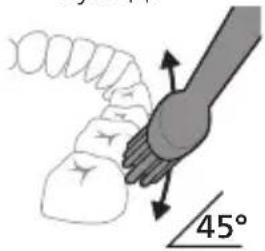
natural_image
Diagram showing dental tool application on upper teeth with tooth width measurement (no text or labels)5 Барои тоза кардани сатххои дарунии дандонхои пеш, дастаки чўткаро нимамудй хам кунед ва дар хар як дандон чанд зарбаи амудии якхеларо анчом дихед.
6 Пас аз анчом додани давраи дандоншуй, шумо метавонед вақти иловагиро барои тоза кардани сатхи хояндаи дандонхо ва чойхое, ки дар он догхо пайдо мешаванд, сарф кунед. Шумо инчунин метавонед забони худро бо чёткаи дандоншуйи фаьол ё гайрифаьолшуда ба таври дилхох тоза кунед.
natural_image
Diagram showing a circular arrangement of circles next to a vertical line with three circles and a plus sign, no text or symbols present.natural_image
Diagram of a toothbrush with a sensor icon and a circular label (no text or symbols)natural_image
Line drawing of a person holding a toothbrush, no text or symbols presentflowchart
graph TD
    A["Traffic Light Icon"] --> B["Terminal Node ?"]
3 Вакте ки нишондихандаи ёдраси ивазкунии саракаи чутка бо ранги зард дурахш мезанад, шумо бояд сараки чуткаро иваз намоед.
natural_image
Simple diagram showing a device pressing into a cylindrical component (no text or symbols)natural_image
Simple line drawing of a medical procedure with a needle inserted into tissue (no text or symbols)natural_image
Illustration of two hands using a tool to adjust or install a mechanical component, with no visible text or symbols.www.philips.com/support
natural_image
Simple line drawing of an open book with no text or symbols visiblenatural_image
Illustration of a hand holding a tool with a black arrow pointing to it (no text or symbols present)natural_image
Simple line drawing of a curved object with a checkmark mark (no text or symbols)natural_image
Illustration of a hand using a pipette to apply liquid onto a surface, with an inset showing a droplet on a surface (no text or symbols present)natural_image
Illustration of a hand holding a small object with directional arrows indicating movement, labeled '45°' (no text or symbols on the diagram itself)natural_image
Diagram showing dental tool application on upper teeth with magnified detail (no text or symbols)natural_image
Diagram showing a circular arrangement of circles next to a vertical panel with three circles and a plus sign, no text or symbols present.natural_image
Diagram of a toothbrush with a sensor icon and a circular label (no text or symbols)natural_image
Line drawing of a person holding a pen, no text or symbols presentnatural_image
Diagram showing a mechanical component with a downward arrow and a small square base, connected to a circular base (no text or symbols)natural_image
Simple line drawing of a medical procedure with a needle inserted into tissue (no text or symbols)natural_image
Illustration of two hands using a tool to cut or mark a surface, with no visible text or symbolswww.philips.com/support
natural_image
Simple line drawing of an open book with no text or symbols visiblenatural_image
Illustration of a hand holding a toothbrush with an arrow indicating force or direction (no text or symbols)natural_image
Simple line drawing of a curved object with a checkmark indicating a detail (no text or symbols)natural_image
Illustration of a hand using a pipette to apply liquid onto a surface, with an inset showing a microplate (no text or symbols present)natural_image
Diagram showing a hand holding a small object with directional arrows indicating movement, labeled '45°' (no text or symbols beyond the angle marker)natural_image
Diagram showing dental tool interacting with teeth (no text or labels)natural_image
Simple line drawing of a device with three circular components and a vertical connector (no text or symbols)natural_image
Diagram of a microphone with a sensor icon and signal symbol (no text or labels)natural_image
Line drawing of a person holding a toothbrush, no text or symbols presentnatural_image
Simple diagram showing a device pressing into a circular component with a cable (no text or symbols)natural_image
Simple line drawing of a medical procedure with a needle inserted into tissue (no text or symbols)natural_image
Illustration of hands using a tool to cut or mark a mechanical component, with no visible text or symbols.natural_image
Simple line drawing of an open book with no text or symbols visibleUju 'u2wùn gnìg t unwìhu, nn wùhnpudt2un t lqwnŋwi oqunwqnndúwù hnwhwùquttn` uwhupwù uwnpù oqunwqnndātn:
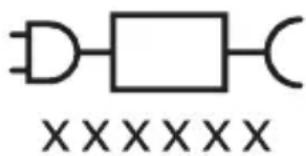
Uju ǔ2wùn gnìg ǐ unwìhu, nn wùhnwdtī2n ǐ oqúnwqqnnδtǐ ǔ2uìwǒ hǐtǐyùnpwúwùnwwlqwnwnniún:
Lwwinnwlywjhù oqinwqnδniú
Sonicare winwuttnp uwpntni htiynnwlywu hunqwuwyttnp uwhwintuqlw6 tiu ynwnwylw6 winwutwwwnn l uuuunwjh uuwgnnnuttnp winwuttnhg htnwgutni hwuiwn, husu oquniu t'auwqtgutl winwuttnh ywnhtun l pwntluwlty lyu wwhwwutl ptnwuh hunnzh winnnqnupjniun:
2tn Philips Sonicare-n (Uy. 1.)
1 Enuwl
2 3nuwùph úhwúguìwù/wùgùnúwù lynǎwù
3 hùntùuhùnìpàwù gnighs
4 Ναδης/ηιούμης ηρωνησίας
5 Ntduhutph gnighs
6 lunqwùwlyh qìhuh yhnhuwnhùu wù hì2tigniú
7 Uwnunlngh gnighs
8 Lniuwjhu onwly
Uputuniwnutn.
9 ἐnqu̥u̥w̥l̥h q̥l̥u̥h̥l̥h y̥w̥i̥h̥wn̥h̥z
10 lunqwluwlyh hutlugh qlhuhy(utn)
11 BrushSync ǔ2wǔ
12 USB lhgpwulnnh (wwwnh hwnuwnwlyghzn utwnwnlwið ʒ)
13 Azwúhnnwnlywù wwnjwù
^1 2niú 3tūn nunwúwnnyunn wputuniwnùtnŋ ywnnn tǔ unwnptnúti' qùuwó uñntiŋgh ywhuylwó:
hùzhg ulutl
Uunwqntp hunqwùwlyh qlhuhyn
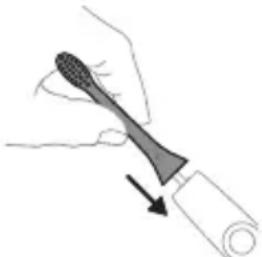
natural_image
Illustration of a hand holding a toothbrush with a black arrow indicating force (no text or symbols)1 lonquuwlyh qihuhyn hwwuwwntgntp wjuwtu, nn uwqhutnu ninnylwsh hutu unju ninnnajwup, hus pnuwlyh nhuwgh lnnun:
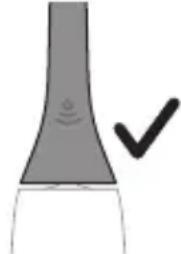
natural_image
Simple line drawing of a funnel with a checkmark indicating completion (no text or symbols)2 Uúnín utnútāp hunqwùwuh qíhuhyn útnplù útunwnŋwlywù jhutzh útg, u̅hùzhu wju l̅wùq wnǔh:
^12 nui' funquwuhgh qihuhh u pnuwuh uhgl uhnpn wugph wnlywnjajniun unnuwl 5:
2tn Philips Sonicare wunwutph hunqwuwgh oqunwqnpnwn
tpt wnwghù wùquú tīp oqunwqnδnú ðtn Sonicare winwúh hunqwùwln, wultih 2wn jænæng qawlɪn ˈunnúwɪl ʒ' hwiútuwinuð nε ʃtlynnwluwù hunqwùwlyh htún: lnnúwɪl ʒ, tnp wnwghù wùquú oqunwqnδnŋútnŋ zwiŋhg 2wn tǔ utŋúniú qnnðwnpníú: Uhwjù yhnwnbip ˈuninp utŋúniú l u jænj unltp, nnwtuqh winwúh hunqwùwlyn ðtn ʊhnhuwntü úwpnh: hùnnniú tǔp htunutl uunnlu ùtnlywjwgulwð hunqwùwlyhg oqunl̩tʃni gnigniū̩utnhù ˈwwlwqnuju wnnjni̩upūtn uunwùwlni hwiúwn: Uugniún ðtn ñnp Sonicare ʃtlynnwlywù winwúh hunqwùwlyh ût2nwgûtʃni hwiúwn winwghù 1-2 zwpwəluw nǚpawgpniú oqunwqnδtpr wultih guðn hyunqwulnniú, wjünihtunl wǔgtp wultih puàn hyunqwulnnúwù:
Uwpnúwù hnwhuìqùtn
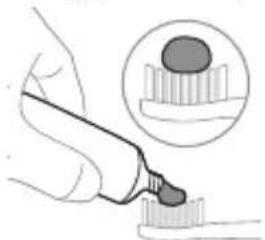
natural_image
Illustration of a hand holding a pen, with an inset showing a magnified view of a cylindrical object (no text or symbols present)Ruijtntu
3 Utnútip hnuwúph úhwugúwù/wùgwùnúwù lynǎwūn` Philips Sonicare-n úhwugútīnì hwuśwn:
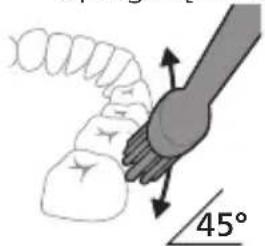
4 Unpntu wuhtp hunquuwlyh uwqtnu wunwutph ynu untwnwnluw du juntinh tanwqdnui: Uwpntp wunwutpn p#p#uwlyh htun ni wizw 2wndniwutnnu, nnwtuqh hunquuwlyh uwqhutpn hwutu winwutphu: Cwnniuwytip wju 2wndniun atn uwpnuwu ynh wupnng np#wgpnui:
L2niú hunquùwuh uwqhúutnp whtnp t úh chnpn lujùwùwù: hunphnngh unnuíniú wunwúutnp uwpntl wjùwtu, hùswtu nnip lúwwpnthp unluŋnwlywù wunwúh hunquìuwlnu:
L2niù 2wihwqwug utò àu2niú qnnδwnntjni ntāwpniú Tnip wjn úwwuhú yhuówuwp prùwlyh panpangh yhnhhnuúwù u úwùni2wlywqnjùnú pawnpnn lniuwjhù gnighzh úhqngnu:
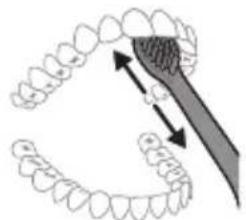
natural_image
Diagram showing dental alignment with a tool interacting with teeth (no text or labels)5 Ungluh wunwutuh utnuh uwltytnunyjutyn iwpntini hwuwipatptp hunqwuwlyh pnuwlyn yhuwninhn nhnpnyu u uh pwuh ninnwhwjwg iwpnnn 2wpndiwutn ywuunwtp jninwpwuyjnin wunwuh ynw:
6 Uwpntini hnniù wuupuntinig htinn lwwnn tpr jnwgnighs dwúwùwly hwnluywgǔti wunwùutnh dwiūn n uwlvtntuuttn uwpntiniù u wjù hwnluywòutnhù, npuntn wnugwùniú 5 pòwùnpniú: Uwpnn tpr ūwlu úwpnti ltaqiú` hunqwùwln ywwhtinú úhwgulwó lwwí wúgwùnwó, hùswtu úwhupùwnpniu tpr:
^12 niú 2tn Philips Sonicare wunwúh hunquúwʊŋ wùuːnwiúq 5 wunwúutnh pntlytunutnh (hunquúwʊŋ qihʊln 2niun 5 uw2ʊniú pntlytunutnh uŋwi) u wunwúutnh ytnwʊwúqūnn hwnúwnwúputnh (ignùniúutn, 2wwyhlúutn, ytǔhnúttn) oqnwɑqnɒsuwi ñtiwpnui, tpti ŋnwup wwnɪn2wá tǔ oqnwɑqnɒluniú l u ʒtiú huuhuːnjuːi:
BrushPacer
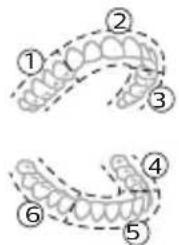
Зwinqutni hwiwn, np hwiwwwnwwh tp úwpnniú wúpnng ptnwùn, ptnwùn 6 úwuh pudwutp` oqnuwqnòtlnu BrushPacer qnnðwnnyjən: BrushPacer unthuünqhwù hunqwüwlyúwù dwúwüwlyn pudwūnui 5 6 hwiwwwn úwuh u waŋwù2wǔnui 5, pà tnp 5 hwnywlhn wùgutl hwgnnn hwnylwòhù: Zwinylwòutnh wqnwu2wùnuiún untnh 5 niútuniú panpangh ywnðwinlu wnwnph úhongnu: Umwùh hunqwüwlyù wujinnúwn lytnwnu wùgwunylnui 5 hunqwüwlytini utuhwjh wylwnuhù:
U2niú White lyuw Gum Health nbdhúutnú oqunwqnɒtju lqunn h wultwgultj inwgnighs dwuwuiwly:
Ntchutn
Etyunnwlywù hunqwùwlyù niùh tŋlni ntdhú' Clean u Sensitive: 2tn oqunwqnndowò hutlwgh hunqwùwlyh qjhuhyh hhúwù ynw' BrushSync nthuünqhwjh úhqngnu wujnnúwun ytnwny lqnüunnultù owunhúwì ntdhún u hàuntüuhylnjəjniùn:
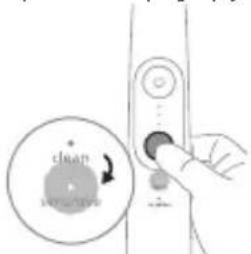
ntdhuŋ ətɪpnu lhnhutni hwiun hunquuulq uigwunlqw dwuwuul utnútp ntdhuh/huunbuihynipajwù ynǎwln: fninn hunquuulqutnh qhuhyutnju wzhwinniu tǔ jinnpwugynin ntdhúnj:
Clean Sensitive
| Unwultinipjniù | Unwùwuhwnhhtnwniú | 2wnhwquig utnúntdhu qawjnùwnuwutph ni juntphhwúwn |
| fùntùuhlnipjwiwwngwnlhynnwunhǎwùn | Fwnàn 8wòn* | |
| funqwùwlytini nùnhwùnin dwnùwùwùn | 2 nnwú 2 nnwú | |
| fùzwbu funqwùwlyt | 3nwnpwùyjnnhwunlwwónfunqwùwlytp 20 lwwjnljwiù | 3nwnpwùyjnnhwunlwwónfunqwùwlytp 20 lwwjnljwiù |
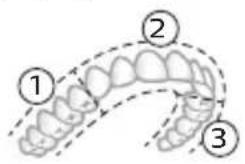 | 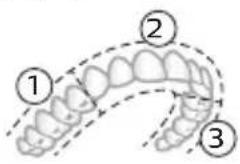 | |
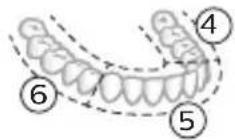 | 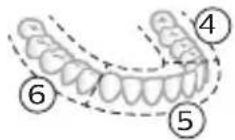 |
hùntùuhǔnīpājwù wùunhǎwùutn hùntùuhǔnīpājwù yuŋqwūlnnniūutn
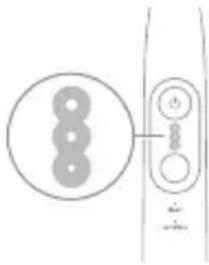
natural_image
Simple line drawing of a device with three circular components and a vertical connector (no text or symbols)Etiqunnwlywù hunqwùwlyu niǔh hùntàuhulniājwù 3 unwnptán lqnqwwünnui.
- Fwnàn hùntùuhúlníjniù (tʌtp lnyu)
- Uhghù hùnbuuhuŋniŋiǔ (tŋlni lnyu)
- 3ωδη ḥιυτιμυμημημ (υθυ μημ)
^12 Niù' Lwúwqniù wnnjniùpùtnh hwiúwn hunphnnŋ bùp unwìhu pwnàn hùntiùuhúnjniù:
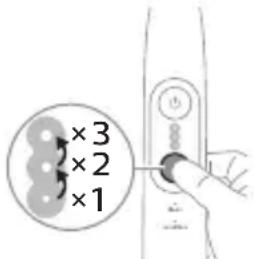
natural_image
Diagram of a toothbrush with a sensor icon and a circle highlighting the sensor area (no text or symbols present)BrushSync unthuünlnqhwiù àtn hunqwùwlyh qihuhlyhù jenijl ٤ unwihu hwnnnnwulgutj pnüwlyh htün uhlynnzhwh oqünujwúp: hunqwùwlyh qihuhlyh uunnnhù hwnluwóniú qunülnn ١٢wùn gnjg ٤ unwihu, nn hunqwùwlyh qihuhlyu wwwwhnluquò ٤ wju unthuünlnqhwiŋnu:
BrushSync unthuunnqhwiwwwhnlnui 5.
- lunqwùwlyh qlhuhlyh yhnhuwnhùu wù hh2tigniù
- BrushSync n'tdʒuːh qniqwʊlnniː
Philips Sonicare-ǔ wīnwqwnlyniú ٤ BrushSync (fūnqwùwlyhUhùpnnùwgniú) unthùnìnqhwnjú hùlqugh fūnqwùwlyh qìhuhyùtph lǚwù unbuwlywùh:
Unqwùwùyǔtnh qìhuìyǔtnh útān wúpnnq unjuwùwùniù dàuùnpàwùwùnì lù dǎq wútiùwhwúwwuwwunwuhuwù qìhuìyún qúnùtīnì lù jnugnighz untnṭlùnyàjniùutnh hwuìwn wjjgtītp www.philips.com/toothbrush-heads:
9nρδωνηγρεύτη
- ดูรุณี ดูรุณี ดูรุณี ดูรุณี
- BrushPacer
- SmarTimer
- EasyStart
- lunqwùwlyh qìhuhlyh yhnhuwnhùuòu hìh2tigniú
- lunqwùwuh qihuhuh ntāchūh qniqwulnniū
natural_image
Line drawing of a person holding a toothbrush, no text or symbols presenttpt wultinn du2ni tp qnndwnpnui, www pnuwlyh duwjun u panpengn ynhuyni tu , huy pnuwlyh uunnphu hwunylwodni qnuyn inuwjh gnighn pwnpaniu uwunl2wlywqnijun uhus ynlyh sulwqtgutp du2niun:
^12 niú Ûwnpnú lquhuwnnnuwó ytnwnl wlnhluwgluwó t zú2úwù utüunnh wnàwqwùpn: Uju qnnòwnnijpàu wwwwwlnhluwgùtni huuíwn (Stu qlnìu «Ulnhluwgùti lyuú wwwwwlnhluwgùti qnnòwnnijpàutīnp»):
BrushPacer
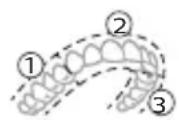

BrushPacer-ŋ hùntŋuŋwɪtʃn h dwiʊwʒwɪh ʒ, nnù oqūniú ʒ àtiq hwiʊwwwnwʒwɪh u̅wpntəl pɛtnwɪŋ` pəwdwɪtʃnʊ wju 6 hwiunʒwɔħ:
SmarTimer
SmarTimer-n gnjg 5 unwju, nn úwpnúwú yhnú wulwnunlwið 5 úwpnúwú yhnúh útnqniú wulnnúwin ytnwnú wúgwintinú wunwúh hunquíwyn: Uunwúwwpnýd-úwuùwqtaunúttn hunphninn tiú unwju úwpnti wunwúuttn onwlywú 2 wùqwúhg nz uwwlyuu:
^12 niù ^b à utnútp hnuwùph úhwúwù/wùgwinúwù lynǎwln úwpnúwù hnliŋ ulyutīng htunn, wunwúh hunqwúwln ywùq lwnùh: ^b àt 30 úwjnljwùh nùwgpniù utnútp hnuwùph úhwúwù/wùgwinúwù lynǎwln, www dwuówzwiwn yultnulyuqh` janyl unwlnú àtq wylwnntl úwpnúwù uhnliŋ: 30 úwjnljwù nwnwnhg htunn SmarTimer-n útnwlqwjlniú t:
EasyStart
Uju Philips Sonicare ünntülu wunwqwnluylnu l: EasyStart qnnðwnnynjau wunwwlyunhulwgulwó uħawlynu: EasyStart qnnðwnnynjæn ywiúwg-lyuúwg wultiugünu l: hqnnnijajniu uwnwghù 14 úwpnniúutnh dwúwúwly` oqūtīnu àtiq unylnnti Philips Sonicare wunwuh hunqwùwlyhg oqunlątniu: EasyStart qnnðwnnynjæn qnnòniu l: pninn azdhúutípnu:
*3pnwdwnwqh tnp Philips Sonicare wunwúh hunqwùwlyu oqunwqnδυniú 5 ylhùhlywlywù htunwqnunnipajniùutpniú, wju wtup 5 oqunwqnδυh pwnàn hùntùuhylnipajwù ynw` pnùwlyn wúpnηqnijawúp lhgrwulnnulwó, huy EasyStart qnnδwnnynjān` wùgwnuŋwó:
EasyStart qnnðwnnyjəu wlyunhulwɡutni hwiúwn (Stu qinju «Ulyunhulwɡutl ywu wwwwwluynhulwɡutl qnnðwnnyjəutqn»):
funqwùwuh qlhuhuh yhnhuwnhùwù hh2tgniú
2tn Philips Sonicare-tu niúh BrushSync (UwppnuwuUhuppnuwgniu) unthuunqhwuu, nnp htunwqdnui t 2tn hunqwuwlyh qlhuhyh uw2quwnpajniùn:
U2niù Uju qnnδwnnyjēu w2huwunniú ʃ u̅hwjù Philips Sonicare hutlugh hunqwùwlyh qihuhyūtn BrushSync (hunqwùwlyhUhūpnnüwgniú) unthuùninqhwjnú:
1 čnč wizwghù wizwú tinn hutligh hunqwùwlyh qihuhly tip wúnwgùniú, pnǔwln āwùwşniú t, nn ηηρ niútp Philips hunqwùwly BrushSync (hunqwùwlyhUhùpnnùwgniu) unthuùnŋqhwnjú l u uluniú t; htünwqðti hunqwùwlyh qihuhý úw2lwiðniŋajniún:
2 dwuwuwlyh npawgpnui, ywhuulwδ δtn lynuhg yhnwnzluwδ δu2niuhg u qihuhyh oqunwqnδsuwi npunhwünin dwuwuwlyhg, pnuwlyn htunwqdnui t hunqwuwlyh qihuhyh uww2lwδnupjniun` nnn2tini hwuwn δtn hunqwuwlyh qihuhyn yhnhutini hwuwn lwuwqnju dwuwuwlyn: Uju qnnδwnnyjan tnww2hwuwnnui t δtn wunwuutph lwuwqnju uwppnniui ni huuwupn:
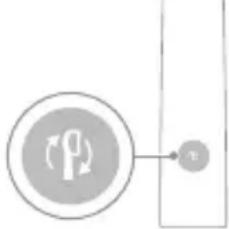
flowchart
graph TD
    A["Process Node"] --> B["Terminal Node v"]
3 tnp hunqwùwlyh qjhuhyh yhnhuwnhùwù wù hħ2tigúwù gnighzn qwnuŋniù t̄ ntnhù qnyùnu, niptúšu ẉtunp t̄ yhnħutip hunqwùwlyh qjhuhyn:
^12 niù húliwgh hunqwùwlyh pninn qihuhyùtinh ynhhuwnhùu wù hh2tgúwù qnnòwnnýrǎu wlnhluwguìwǒ t: hunqwùwuh qihuhyh ynhhuwnhùu wù hh2tgniúu wwwwwlunhluwgǔtǐnì huuwùn untóu "Ulnhluwgǔtǐ lyuú wwwwwlunhluwgǔtǐ qnnòwnnýrǎutīŋn":
unqwùwlyh qlhuhyh ntādhúh qniqwulnniú
BrushSync unthuünqhwjnu lunquuwlyh qjhuhyttnn uhlynzhu niutü, nnp hwnnnnwuglniú t pnuwynph htun u wulnnuiwin ytpwnu qniqwulnniu wju wnwgwnyunn ntadhúh u huntuuuhynijawu htun: BrushSync unthuünqhwjnu lunquuwlyh qjhuhytphg 2wntnu wulnnuiwin ytpwnu qniqwulnniu t Clean ntadhúh htun: Nnn2wlyh wnwultinijajniüuttnu lunquuwlyh qjhuhyttnn yqnqnnnultü hwiwwwwwnwhiwu ntadhúh htun (wnlywjnipawu ntwypniú), on.' S2 Sensitive. Sensitive ntadhú:
^12 nui' tpat nnn2tp ynhuti ntchup/huuntuuhunpajniun hunphnnn unnuun lwnqwulnnniuhg, hunqwuwuh qihuhyn yhh2h 2tn lynnyhg piuunnluw dwnqwulnnniun htinwqw w2huwwnw2ngwutph hwiwn:
Ulnhluwgutl ywi wwwwnlnhluwgutl qnpdwnnyrautp
2tn wunwuh hunqwuwlyh ynw 7nip lywnn tip wlnhulwgutl ywu wwwwluunhulwgutl htunljwl qnnðwnnijrautnn`
- EasyStart
- lunqwùwlyh qlhuhlyh yhnhuwnhùuìwù hh2tigniú
natural_image
Diagram showing a mechanical component with a downward arrow and a small rectangular object on a base (no text or symbols)natural_image
Simple line drawing of a biological or anatomical structure with a tool interacting with a central body (no text or symbols)1 3tizwqntp hunqwùwlyh qihuhyn u lquwgtp útünwnwlywù jhutnh hwnuwrwn u lynǎwyluttn unwp qnnu: 3wúnqultp, nn htizwqntl tpr pniwlyh ynwjh u lynǎwylutnh 2ningn qunùulnn wunwúh úwðnilh úwugnnnúttn wnzuwrqu 2wprwran úty wùquwú, pwjg gwúlywuh f' wútu wùquwú oqnwwqnötinig htunn:
2qn12wgniu' Uh hntp ntnuhut yuhpn unin wnwnlywutpnu lntwh jhutnh utg ywu lynawylutph 2nngn, pwuh nn wju ywnnn ls hwuqtguti yuuwulwoph:
2 Frùwlyh wúpnng úwyltntun úwpntp hùnùwú qnnóu wǒdpnu:
U2niU'Uh hwnylwdtp pnIuwlynyluWgwnwuhu' wyltlnnn.2ninn htnwgutjni hwiúwn:
3 Enuwnynnwngntp ywhlnly yunnnyl yww unphynl:
hunquwuh qihuh
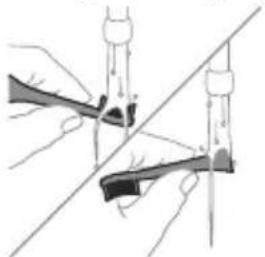
natural_image
Illustration of two hands using a tool to cut or adjust a mechanical component, with no visible text or symbols.1 3nipwpuynin oqunwqnndniuhg htunn yuwgtp hunqwüwwlyh qihuhyn u uwqhylutnp:
2 3tzuwqntip hunquwuwlyh qlnihun pnwuwlyhg u wnzüuqwü 2wpwρen útyi luwgtip hunquwuwlyh qihuhyn unwp znnu: Lluwgtip áwuúhnnnwnywiú ywhwnhşü wjúpwü hwáwhu, nnpwü wühnwdt2un 5, u jænntip, nn znnwüw: Oqnwwqnndtp úhwjü znn hunquwuwlyh qihuhyh ynuu:
^12 niú ^1 nquwùwlyh qihuhyh lwwhwphzú oqinnwqnδύniú ^5 wnwpúwù ^1 wwwwnwlynú l'wwhwunntuqlwó ^3 2wnniùwlywlywú oqinnwqnδύwiú hawúwù:
Lhgpwunnhz
1 Uguwntp jhgpwulnnhyn` uwhupwù wjù uwpntān:
2 Lhgpwulnnhsh uwwytntun uwwpntap huniwwu qnndwlwdpnu:
3 Lhgpwulnnhsn znnwgntp chwuhny lynnnnu lywi unphsnu:
Δωύψηρηλωμώ υωμημώ
Nnnntp qnl gnnu l u oqnwnqnndtp huntuw l yunn` ăwúhnnnwlju w wunjwùn úwpnti ni hwiúwn, l pnntpr, nn znnwùw:
الله
tāt ēp wwnnwwnunjniú tŋlywn dwnwùwly oqnwwqnδti lwwnpn, wǔgwntp wju ħlthynnwutinigúwù lwwnwlyhg, úwpntp wju l u wwhtp qnu l u snn untnniú' wnluh ninh nihnh āwinwwqwjēutphg hīzni:
Φnhuwphùniú
Φnhuunhùtp Philips Sonicare hunquùwlyh qihuhyùtnù wútù 3 wúshùn útly' owunhúwìl wpnŋniùpùtn wwwwhnútlŋní hwuíwn: Oqunwqqnnòtap úhwujù Philips Sonicare-h uhnhuunhǔluŋn qihuhyùtnŋ:
Uzbekistan 2016 3 August 2017
- მენუვიტიო მონყობილობის გამოუცნება და გაცსაუბოტიო სტომატოლოგს/ექიმს, ση გამოუცნების შემდევ ადვილი აქვს მედმეტ სისხოდენას ან ση სისხოდენა 1 კვირის განმავლობაში გამოუცნების მემდევ კვოავ მეინიშნება, ასეკვ, დისკომდორწის ან ტკივილის მეგრძნების შემოხვეკაში.
- ση γδυγμη 2 σηζαν σήσμηγίν σβ σήσμηγόνι σηγήσμης ḥσηφυσμον, σδ ∂mδυμόσμπόνι γσδμγβρόσθργ δυγυγόμον υφμασμημμα.
- ག མ མ མ མ མ མ མ མ མ མ མ མ མ མ མ མ མ མ མ མ མ མ མ མ མ མ མ མ མ མ མ མ མ མ
- συ γ ωσθρωησικόν ζήμστησχόν συζο, σδ δηβγμσησικόν ζαδηγβγσεσχόν συγλυγόσχον συζβι γρισι.
- ụ だımbụmdɒŋmndəs ʒɪnfsɒŋ ʒɪnzʊɡbɒl ɒɡmʌsðyms ɕ Os ʃn ʃmnl ʒʌbʒʊmʒbɒm n หɔːdʒɒgbdʒ ʒɔːʒɒgʃθʒ ʒɔːdmlʌsyʒɡðəməŋ ˌɒfɪməsʃmæmmzɒŋm n だɪmdʌsbyʃmɡðənləs ʃb ʃɒlsəsədnəl ɕsɛbʒlɡðəŋmɡðəsn.
ngbghmnyjbngdoh dsgfsmgnl ylsggmmbmgdsslnt6 qssz3dnmgdoom
phosphorus phosphate
natural_image
Simple line drawing of an open book with no text or symbols visiblegù lùdàmmm bùdǎsǔ, bùnzhmbmm gùdmyjībòn lǚfēngjūn dāmbùmànmànn lùdmyjībòsdāq.
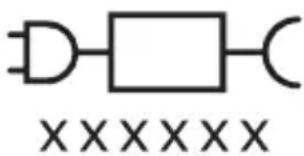
glunodommm bndbsz, gudmnygmon dnnnnngdymn 33gdnl bysfm.
natural_image
Illustration of a hand holding a toothbrush with a black arrow indicating force (no text or symbols)natural_image
Simple line drawing of a funnel with a checkmark indicating completion (no text or symbols)natural_image
Illustration of a hand using a pipette to apply liquid onto a surface, with an inset showing a droplet on a surface (no text or symbols present)3 Philips Sonicare-nu Bubumosuzo, quafngm bumoz/30dmomznu gnmosz.

4 ghmbnngq dmsuzlgn tsgmyngon zdnngduu qo mndmnl bs88j. gunbdnbgom zdnngon dqnng bnb qo yzub dmdmsdom nl, hmd tsgmyngon bzogdom6gb zdnngdu dmhnl. gubsgmdgm slgmn dmdmsmds bdgconu yuzmnl zubdszmmdsdn.
natural_image
Diagram showing dental tool application on upper teeth with magnified view of tooth structure (no text or labels)natural_image
Simple diagram showing a circle with three dots and a vertical bar with three circles connected by lines (no text or symbols)zònmùn l gāngfēnmtsgānnl 3 lbbzqoubbzs n6fghbunzmònl 3smsdghfēn sjd3l:
natural_image
Diagram of a toothbrush with a sensor icon and a circle highlighting the sensor area (no text or symbols present)natural_image
Line drawing of a person holding a toothbrush, no text or symbols presentnatural_image
Simple diagram showing a circular icon with a traffic symbol and a small circle connected to a vertical line (no text or labels)natural_image
Diagram showing a mechanical component with a downward arrow and a small square component, no text or symbols present.odds funds funds funds funds funds funds funds funds funds funds funds funds funds funds funds funds funds funds funds funds funds funds funds funds funds funds funds funds funds funds funds funds funds funds funds funds funds funds funds funds funds funds funds funds funds funds funds funds funds funds funds funds funds funds funds funds funds funds funds funds funds funds funds funds funds funds funds funds funds funds funds funds funds funds funds funds funds funds funds funds funds funds funds funds funds funds funds funds funds funds funds funds funds funds funds funds funds funds funds funds Funds
ඉංකිය අජී
153603 _330m63560
6560mm0mn3 15362 2 330mnn 36366
phosphorus phosphate
natural_image
Line drawing of a medical procedure involving an incision or needle inserted into a patient's leg (no text or labels)natural_image
Illustration of two hands using a tool to adjust or install a mechanical component, with no visible text or symbols.natural_image
Simple line drawing of an open book with no text or symbols visiblenatural_image
Illustration of a hand holding a tool with a downward arrow indicating motion (no text or symbols)natural_image
Simple line drawing of a bulb-like shape with a circular mark and a checkmark (no text or symbols)הכלה 2
natural_image
Illustration of a hand holding a pipette with a dropper, showing a magnified view of a dropper inside a tube (no text or symbols)natural_image
Diagram showing dental tool application on upper teeth with magnified detail (no text or symbols)natural_image
Simple diagram showing a circle with three circles and a vertical line with three circles connected by a line (no text or symbols)natural_image
Illustration of a toothbrush with a sensor icon and signal symbol (no text or labels)natural_image
Line drawing of a person holding a pen, no text or symbols presentEasyStart is. This is EasyStart is. This is Philips Sonicare is. This is. This is EasyStart is. This is Philips Sonicare is.
*הכלה
Philips Sonicare 77.
natural_image
Simple diagram with a circular icon containing a vehicle and a vertical line with a small circle labeled 'n' (no text or symbols beyond the label):הכלה/הכלההוּרָהוּרָהוּרָהוּרָהוּרָהוּרָהוּרָהוּרָהוּרָהוּרָהוּרָהוּרָהוּרָהוּרָהוּרָה:2
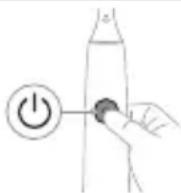
natural_image
Simple diagram showing a mechanical component with a downward arrow and a small circular component at the base (no text or symbols)natural_image
Simple line drawing of a fork with a needle inserted, no text or symbols presentnatural_image
Illustration of two hands using a tool to adjust or install a mechanical component, with no visible text or symbols..הכלההוּרָהוּרָהוּרָהוּרָהוּרָהוּרָהוּרָהוּרָהוּרָהוּרָהוּרָהוּרָהוּרָהוּרָהוּרָה
-ロナ クロナ ヨウ
www.philips.com/Sonicare
©2024 Koninklijke Philips N.V. (KPNV). All rights reserved. Philips and the Philips shield are trademarks of KPNV. Sonicare and the Sonicare logo are trademarks of Philips Oral Healthcare, LLC and/or KPNV.
300012731221 (10/04/2024)