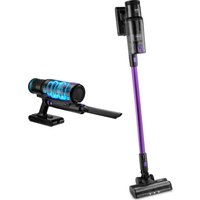
Sahara - Vacuum Cleaner UFESA - Free user manual and instructions
Find the device manual for free Sahara UFESA in PDF.


| Product type | Cordless stick vacuum with hand-held function |
| Brand | Ufesa |
| Model | Sahara |
| Power supply | Rechargeable lithium-ion battery (AC adapter included) |
| Suction power | Adjustable: Eco, Medium, High, Auto |
| Runtime | Approximately 30 to 40 minutes depending on mode |
| Charging time | Approximately 4 to 5 hours |
| Dust bin capacity | 0.6 L (estimated) |
| Filtration | Washable sponge filter and high-efficiency filter |
| Included accessories | Motorized brush, extension tube, mini 2-in-1 brush, long crevice nozzle, cleaning brush, adapter, couple hose, and PetCare brushes (depending on model) |
| Digital display | Shows remaining battery (%), power (LED), dust bin full, brush block, etc. |
| Weight | Approximately 2.5 kg |
| Dimensions (approx.) | 120 cm height (assembled), 25 cm width |
| Maintenance | Empty dust bin, wash filters with cold water (dry completely before reinstalling), clean brush roller |
| Safety | Automatic shutdown in case of overheating; do not vacuum liquids or hot objects; indoor use only |
| Removable battery | Yes, replaceable by an authorized service center |
| Warranty | According to applicable legislation; repair or replacement by authorized service |
| Usage | Household use only |
Frequently Asked Questions - Sahara UFESA
User questions about Sahara UFESA
0 question about this device. Answer the ones you know or ask your own.
Ask a new question about this device
Download the instructions for your Vacuum Cleaner in PDF format for free! Find your manual Sahara - UFESA and take your electronic device back in hand. On this page are published all the documents necessary for the use of your device. Sahara by UFESA.
USER MANUAL Sahara UFESA
FUNCIAMENTO E FUNCAO DO ECRA DIGITAL (FIG. 7)
WE WOULD LIKE TO THANK YOU FOR CHOOSING UFESA. WE WISH THE PRODUCT PERFORMS TO YOUR SATISFACTION AND PLEASURE.
WARNING
PLEASE READ THE INSTRUCTIONS FOR USE CAREFULLY PRIOR TO USING THE PRODUCT. STORE THESE IN A SAFE PLACE FOR FUTURE REFERENCE.
DESCRIPTION
- Dust empty release button
- Dust container release button
- Power On/Off button
- Battery pack release button
- Digital screen
- Motorized power brush
- Extension tube
8.2 in 1 mini corner and furniture brush - Long crevice nozzle
- Clean brush
- Adaptor
- PetCare accessory (*)
12a. Flexible hose
12b. Vacuum brush
12c. Short hair comb
12d. Long hair comb
(^*) available according to model
SAFETY INSTRUCTIONS
This appliance can be used by children aged from 8 years and above and persons with reduced physical, sensory or mental capabilities or lack of experience and knowledge if they have been given supervision or instruction concerning use of the appliance in a safe way and understand the hazards involved.
Children shall not play with the appliance.
Cleaning and user maintenance shall not be made
by children without supervision. The adaptor cable cannot be replaced. If the cable is damaged, the adaptor will be discarded. This device can only be used with the adapter model supplied with the device and powered with the safety voltage indicated in the rating plate of the device. Plug must be removed from socket-outlet before cleaning or maintaining the appliance.
This device can only be used with the adapter model supplied with the device and powered at very safety voltage indicated on the appliance specifications plate. Follow the DEVICE CHARGE instructions in order to charge it. Follow the device BA-TTERY REMOVAL instructions for removal of the batteries from the device.
This appliance is intended for use at a maximum altitude of 2000m above sea level.
This symbol means that the appliance is intended to be supplied from a detachable supply unit. The appliance contains batteries that are only replaceable by skilled persons.
Due to the plastic housing of the vacuum cleaner, keep the appliance away from all the heat sources (radiators, stoves, etc). Do not block the vacuum cleaner inlet and outlet openings! Turn off the vacuum cleaner before replacing equipment.
BATTERY REMOVAL
The appliance must be disconnected from the supply mains when removing the battery.
Make sure the battery broom is fully discharged.
Press the battery removal button and remove the battery from the product.
IMPORTANT WARNINGS
Prior to plugging in the product, check that your mains voltage is the same as the one indicated on the product label. The mains connection cable must not be tangled or wrapped around the product during use. Do not pull on the connection cord in order to unplug it. Do not use, connect or disconnect the device to the mains with your hands or feet wet. Proceed according to the conservation and cleaning section of this manual for cleaning. Unplug the product immediately from the mains in the event of any breakdown or damage and contact an authorized Technical support service. In order to prevent any risk of danger, do not open the device. Only qualified technical personnel from the brand's Official Technical support service may carry out repairs or procedures on the device. Any incorrect use or improper handling of the product shall render the warranty null and void. Only an authorized technical support service center may carry out repairs on this product. This appliance is designed exclusively for domestic use, in no case should be a commercial or industrial use. In case of misuse or tampering with the product, it will be out of warranty. Do not use the appliance to vacuum liquids (water, etc), sharp objects (pins, pins, nails, glass, etc), incandescent objects (matches, cigarettes). Never use the turbobrush to: Polish floors, suck (Liquids, wet or damp dust, hot ash, burning objects, such as cigarettes, matches, sharp and hard items, such us: razors, pins, thumbtacks, pieces of glass, etc), flour, cement, plaster, printer or photocopier toner, etc.
B&B Trends, S.L. disclaims all liability for damages that may occur to people, animals or objects, for the non-observance of these warnings.
ASSEMBLY INSTRUCTIONS
Main unit assembly:
- Install the battery into the main unit by sliding it into the appropriate slot. It will "click" into place.
- Install the dust container by inserting the clip into the main unit from the correct direction, twist it and press it down into place. It will "click" to secure (FIG. 1).
Motorized power brush assembly:
Extension Tube: Use this for extended reach when using as an upright unit or for those hard to reach places.
Motorized power brush: Use this for hard floors and carpets. Easily picking up dirt dust and small debris.
Insert the connector of the motorized floor head into the base of the extension tube by clicking it into place. Attach the extension tube into the motorized power brush, it will "click" into place. Connect the main unit with the extension tube, you will hear the "click" when it is correctly assembled (FIG. 2)
Accessories assembly:
Long crevice nozzle:
Features a narrow nozzle that makes quick work of vacuuming tight spaces such as corners and hard to reach areas.
-
Firstly, with the appliance OFF, insert the long crevice nozzle into the main unit via the connector. It will "click" into place (FIG. 3).
-
Switch on the appliance and vacuum.
2 in 1 mini corner and furniture brush:
Use this for vacuuming fabric furnishings such as sofas armchairs and curtains.
-
Firstly, with the appliance OFF, insert the 2 in 1 mini brush into the main unit via the connector. It will "click" into place.
-
Switch on the appliance and vacuum.
PetCare accessory (^*)
This accessory is specially designed to comb and vacuum your pet's hair.
-
Firstly, with the appliance OFF, insert the flexible hose into the main unit an attach the vacuum brush.
-
Select the desired comb for long or short pet's hair and fix it. It will "click" into place.
-
Switch on the appliance, and gently comb your pet's hair by following the direction of hair growth (never against the grain). Repeat this step several times until the comb will be full of hair.
-
Press the button on vacuum brush. The tab will move onwards, and the hair will be vacuumed. Note: if there is a lot of hair, press the suction button several times.
(*) available according to model
BEFORE FIRST USE
-
Put the unit to the wall mount.
-
Ensure that the air vent and suction pipe are free from blockages and dust. Should they suddenly clogged, switch off the appliance immediately and clear the blockage before attempting to use the vacuum again.
-
Remove any sharp or large objects from the path before using this vacuum as these may damage the appliance irreparably.
Battery charging:
Important: The handheld vacuum cleaner will not work when it's charging.
-
Place the unit near an electrical power outlet and plug in the charger. (FIG. 4)
-
Connect the charger to the charging socket. The battery status indicator lamp will dynamically shine to indicate that the vacuum cleaner is property connected to the charger and that the unit is being charged.
-
When it is fully charged, "100" will be shown on the display screen and the blue light on the battery pack will be permanent on. The screen will shut off 10 minutes after fully charged.
If the charging is made with the battery separated from the main unit, the blue light will blink when it is charging and will be all the time on when the power is full (FIG. 5).
Note: If the vacuum cleaner is charging or with low battery status, the vacuum cleaner will not work.
Disassembly of battery pack:
Press the battery pack release button and pull it according to the direction shown on the picture (FIG. 6).
INSTRUCTIONS OF USE
CAUTION: The vacuum must be fully charged before using for the first time.
- Remove the vacuum cleaner from the wall mount. If using as a handheld unit, disassemble the tube and attach the desired accessory. 2. Use the power ON/OFF button to turn on the appliance.
- Select the proper operation and function through the digital display.
- For a stronger suction, press the power adjustment key to increase the strength, ideal when you are cleaning carpets with a high pile.
- To turn off the vacuum, press the power ON/OFF button again.
OPERATION AND FUNCTION OF THE DIGITAL DISPLAY (FIG. 7)
| 5a Suction power LED Shows suction | power with an intuitive LED strip | |
| 5b | Remaining battery auto-nomy (%) | Shows the digital number when the unit is charging or during use. The battery power is full when the number is showing "100" |
| 5c | Dust container full indicator | Red light is flashing when the dust container is full and needs to be cleaned |
| 5d Power adjustment key | Touch the switch button and select the desired power between ECO / Medium / High / AUTO. The light indicator on the cover will change: ECO (green) / Medium (blue) / High (red) / Auto (green, blue or red) | |
| 5e Motor working Shows that the unit is in use | ||
| 5f Auto mode | Automatically adjusts suction power according to the dirt detected | |
| 5g Battery symbol | It is flashing when the unit needs to be charged: the blue light is flashing during charging and remains blue when it is fully charged | |
| 5h Brush block indicator | The LED brush error lock is flashing when the brush is locked by some foreign matter that needs to be cleaned and the unit is OFF | |
The display will be off about 10 minutes after the unit is fully charged.
MAINTAINING & CLEANING
All the maintenance must be held after the unit is shut off. Clean the dust cup regularly to avoid any problems. It is recommended to dry storage and not to put heavy things on the unit.
Cleaning the dust container: (FIG. 8)
- Press the dust container release button to take the dust container out.
- Press the dust release button to open the bottom cover and expel trash. Wipe to clean the dust container, do not immerse in water.
Cleaning the filter: (FIG. 9)
- Remove the dust container from the main body.
- Hold the filter and pull it out upwards from the dust container.
- Lift to remove the sponge filter and high-efficient filter.
- Rinse the filters thoroughly under the running cold water. Do not use soap or other cleaning solvents.
- COMPLETELY air dry the filters before reassembling. Do not use hair dryer to dry the filter. This may cause the filter to warp.
Filters re-assembly: (FIG. 10)
Important: Make sure the filters assembled rightly, otherwise, the fine dust will come into the motor and destroy it.
Fix the filters into the dust cup and make the right way to fix them as it is shown on the picture (Fig. 10).
Cleaning the roller brush: (FIG. 11)
- Remove the motorized power brush from the main unit before cleaning the roller brush.
- Release the button and pull it out.
- Rotate the cover and pull out the roller brush.
- Carefully clean and remove the hairs and debris from the brush roller. Wipe to clean only, do not use any soap or harsh cleaning solvents.
- If roller brush becomes damp, allow to dry naturally before replacing.
TROUBLESHOOTING
| PROBLEM POSS | BLE CAUSES SOLUTION | |
| Appliance is not power on | This can occur if the appliance has been used or stored for an extended period of time | Connect the vacuum to the charger and allow for a full charging cycle to complete |
| Vacuum is sto-pped suddenly | This will occur if the safety cut-out device has been activated. This device is designed to prevent your appliance from overheating | Ensure the vacuum is turned off, disconnect all accessories and leave to cool down for at least half an hour before attempting to operate again. Try to identify the source of the overheat by checking for blockages in the extension tube motor-drive floor head and accessories. Empty the dust container and clean or replace the filter |
| Suction of the vacuum is reduced | This is probably caused by dust blockages | Turn the vacuum off. Disconnect the floor head, extension tube and any accessories. Check for and remove any blockages from the dustbin filter, air duct, extension tube floor head and accessories |
| Motorized power brush is not rotating | This tends to occur when there are too many fibers wrapped around the brush roll restricting movement | Check the maintenance section of this manual for instructions on how to appropriately clean the brush roll |
| Charging indicator light does not flash up | There may be no power reaching the vacuum from the charger | Ensure that power is being supplied to the mains socket and that the charger is turned on. Ensure the charging cable is securely connected to the vacuum. Ensure the mains socket is switched off before checking the charging cable itself. Do not attempt to use if the cable is split, frayed or otherwise damaged. Instead, seek a replacement charger |
| Application time of the vacuum is less than it used to be | An insufficient charging cycle will result in reduced appli-cation time. | Ensure the battery has completed a full charging cycle. There may be re-dued energy discharge in the battery. This is normal and gradually occurs in all batteries over time |
PRODUCT DISPOSAL
This product complies with European Directive 2012/19/EU on electrical and electronic devices, known as WEEE (Waste Electrical and Electronic Equipment), provides the legal framework applicable in the European Union for the disposal and reuse of waste electronic and electrical devices. Do not dispose of this product in the bin, instead going to the electrical and electronic waste collection centre closest to your home
The product may contain batteries. Remove them before disposing of the product and dispose in special containers approved for this purpose.
FRANÇAIS
NOUS VOUS REMERCIONS D'AVoir CHOISI UFESA. NOUS SOUHAITONS QUE CE PRODUIT VOUS APPORTE SATISFACTION ET QUE VOUS PRENIEZ PLAISIR À L'UTILISER.
AVERTISSEMENT
VEUILLEZ LIRE ATTENTIVEMENT LE MODE D'EMPLOI AVANT D'UTILISER LE PRODUIT. CONSERVEZ-LE DANS UN ENDROIT SÜR POUR POUVOIR LE CONSULTER ULTERIEUREMENT.
DESCRIPTION
INHCTPyKcIM 3A yNOTPEBA
BHIMAHNE:Прешидаинлбатезпьрвпьт,прахocmykaчкataТрбВадa 6bde HanblnoЗарedinga.
- Cbane npaxocmykaqkata ot ctokkata 3a cteha. Ako yn3noI3BaTe kaTo pbuHO yctpoiCTBO, pa3rno6e Te Tpb6ata n npinkpenete JekanHn HaKpaHnK. 2. N3noI3BaIte 6byToHa 3a BKl./N3Kl., 3a da BKnIOuHTe ypeda.
3.Изберетоюхояnte peжим Ha pa6oTaи Функцячрз снфовя дсплел. - 3a no-cinno 3acmykbahe haTusche Te konyeto 3a perynipaHe Ha MooHocTTa, 3a da yBeneuHte cnata.ToBa e ndealHo peSeHne 3a nouchTaBe H KaNIMn C Dblr BnaKha.
- 3a da n3KlouHTe npaxocMykaUkata, HATNCHeTe OTHOBo 6yToHa 3a BKJI.//N3KJI.
PABOTAIΦYHKUHNAIINΦPOBNAIINCPIEJ (ФИГ.7)
10gogjyI 10000000000000000000000000000000000000000000000
jJ11 J 1/1 j pJ 1.0y j
aaii iiaii jao ailbi adbglg aoell jol.
Jgbl Jgll sds lglw cbs wio ooll 0o jdl jn jn n
.8r 1/1j 1 j 1 1 1 1 1 1 1
(V. J. J) Aa Jll Aa L a J I a J I a J I a J I a J I a J I a J I a J I a J I a J I a J I a J I a J I a J I a J I a J I a J I a J I a J I a J I a J I a J I a J I a J I a J I a J I a J I a J I a J I a J Ia
J 1 J 1 J 1 J 1 J 1 J 1 J 1 J 1 J 1 J 1 J 1 J 1 J 1 J 1 J 1 J 1 J 1 J 1 J 1 J 1 J 1 J 1 J 1 J 1 J 1 J 1 J 1 J 1 J 1 J 1 J 1 J 1 J 1 J 1 J
.420g 3 4g.iie
jgljglj
:
.4wSg 1yI dIg 2e b 1a a 0000
.
g 1
log_a > 0.8
J. (wSlebl ojiyly I bI abie y) jai gololj cbi bbl Jdl dlglg jao jao jao
.
bfo 15 j5 i: abo. yw g JwJwJwJwJwJwJwJwJ w
oojj j
jIbI UwO Jgoo (^*)
JgJ1 pJooJ1 J
Sulolololololololololololololololololololololololololololololololololololololololol
J 1
.
. 1001 1 1 1 1 1 1 1 1 1 1 1 1 1 1 1 1 1 1 1 1
:Jb
Lgaiw LlJ 3 Joo y uUy dgoa6b1 aIyraSll Aus6b1:
B&B TRENDS, SL. guarantees compliance of this product, for the use for which it is, during the period established by the legislation in force in the country of sale. In the case of breakdown during the term of this warranty, users are entitled to repair or else the replacement of the product at no charge if the former is unavailable, unless one of these options proves impossible to fulfil or is disproportionate. In this case, you can then opt for a reduction in price or cancellation of the sale, which must be dealt with directly with the sales vendor. This also covers replacement of spare parts provided that the product has been used according to the recommendations specified in this manual for both cases, and has not been tampered with by any third party that is not authorised by B & B TRENDS, SL. The warranty will not cover any parts subject to wear and tear. This warranty does not affect your rights as a consumer in accordance with the provisions in Directive 1999/44/EC for member states of the European Union.
USE OF WARRANTY
Customers must contact a B&B TRENDS, SL., authorised Technical Service for repair of the product. Since any tampering of the same by anyone not authorised by B&B TRENDS, SL., or the careless or improper use of the same shall render this warranty null and void.
You must keep the purchase invoice, receipt or delivery docket in order to exercise your warranty rights.
For technical service and after-sales care outside the Spanish territory, please submit your query to the point of sale where you purchased the item.