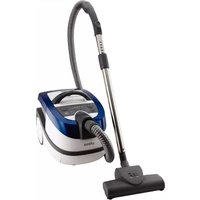
AP9000 - Vacuum Cleaner UFESA - Free user manual and instructions
Find the device manual for free AP9000 UFESA in PDF.


| Product type | Canister vacuum cleaner with bag |
| Brand | Ufesa |
| Model | AP9000 |
| Dimensions (L x W x H) | 40 x 28 x 35 cm |
| Weight | 5.2 kg |
| Power supply | 220-240 V ~ 50 Hz |
| Rated power | 800 W |
| Filter type | Washable HEPA filter |
| Bag capacity | 3 L |
| Operating radius | 8 m |
| Noise level | 76 dB(A) |
| Main functions | Vacuuming floors and carpets, furniture brush, crevice tool |
| Power adjustment | Electronic speed control |
| Maintenance and cleaning | Washable filter, disposable bag |
| Safety | Thermal protection, automatic shutdown in case of overheating |
| Spare parts and repairability | Bag, filter, brush, crevice tool available as spare parts |
| Included accessories | Main brush, crevice tool, furniture brush, replacement bags |
| Warranty | 2 years |
Frequently Asked Questions - AP9000 UFESA
User questions about AP9000 UFESA
0 question about this device. Answer the ones you know or ask your own.
Ask a new question about this device
Download the instructions for your Vacuum Cleaner in PDF format for free! Find your manual AP9000 - UFESA and take your electronic device back in hand. On this page are published all the documents necessary for the use of your device. AP9000 by UFESA.
USER MANUAL AP9000 UFESA
natural_image
Blue and white UFSA vacuum cleaner with camera module, displayed against red background (no text or symbols on device)

natural_image
3D rendering of a gray vacuum cleaner with labeled parts (1 and 2), no text or symbols present.
Congratulations on your choice of our appliance, and welcome among the users of ufesa products. In order to achieve best possible results we recommend using exclusively original ufesa accessories. They have been specially designed for this product. Please read this instruction manual carefully. Pay special attention to important safety instructions. Keep this instruction manual for future reference.
Important safety instructions
DANGER! / WARNING! Health hazard

- Do not operate the appliance if it has a damaged cord or if the housing is visibly damaged.
- If the supply cord is damaged, it must be replaced by the manufacturer, its service agent or similarly qualified persons in order to avoid a hazard.
- The appliance can only be repaired by qualified service personnel. Improper servicing may cause a serious hazard to the user. In case of defects please contact a qualified service center.
- Do not touch the appliance with wet hands when it is connected to the mains supply.
• Always the plug must be removed from the socket-outlet before cleaning, maintaining, assembling or dismantling the appliance.
- Turn off the device and unplug it from an outlet before replacing the equipment or approaching moving parts during use.
- Do not use the vacuum cleaner to clean people or animals, pay special attention to keep the nozzles away from eyes and ears.
- This appliance can be used by children aged from 8 years and above and persons with reduced physical, sensory or mental capabilities or lack of experience and knowledge if they have been given supervision or instruction concerning use of the appliance in a safe way and understand the hazards involved. Children shall not play with the appliance. Cleaning and user maintenance shall not be made by children without supervision.
• Only use the appliance indoors at room temperature and up to 2000 m above sea level.
CAUTION!
Not observance can result in damage to possessions

Connect the vacuum cleaner only to a 230 V mains supply equipped with a 16 A fuse.
Do not unplug by pulling on cord.
Do not allow the plug to have contact with water.
Do not run the vacuum cleaner or the brushes over the cord, it may cause damage to the cord insulation.
Do not pick up: matches, cigarette butts, hot ash.
Avoid picking up sharp objects.
Do not vacuum fine dust such as: flour, cement, gypsum, toners for printers and copy machines etc. Do not pick up corrosive and toxic materials, petrol, kerosene and other flammable or explosive liquids.
The pump may only be switched on when the cleaning liquid container is filled with the solution of cleaning liquid and water. The lack of cleaning liquid is manifested in a loud operation of the pump.
During operation pay attention not to knock the vacuum cleaner over or to spill water on the appliance.
Do not expose the vacuum cleaner to atmospheric conditions (rain, frost).
Do not use the vacuum cleaner without the foam filter installed in the filtration unit.
Do not leave a switched on and operating vacuum cleaner unattended.
The vacuum cleaner may only operate in a natural position i.e. when it is placed with four wheels on the surface.
SUGGESTION Information on the product and suggestions for its use

This appliance is intended for domestic use only. Periodically clean the wheels. The dirt which accumulates on the wheel axis may cause difficulties in the wheel movement.
Move the vacuum cleaner carefully on doorsteps and uneven surfaces, not to cause an excessive rippling of the water inside the tank. This might lead to a slight water overflow.
Technical parameters
The type of the vacuum cleaner and the technical parameters are indicated on the rating label. Mains protection 16 A.
Does not interfere with radio and TV reception. Noise level: 85 dB(A).
Static electricity
In the process of vacuuming of some surfaces in areas of low air humidity the device may become electrically charged. It is a natural phenomenon – it does not damage the device, and it is not considered to be a fault. In order to minimize the phenomenon, we recommend you to:
- discharge the device by touching metal items in the room with the pipe,
• increase air humidity in the room,
• use widely available antistatic agents.
Appliance features

The AP9000 vacuum cleaner is intended to pick up dirt from floors, carpets, ceramic tiles, slots in wood paneling, skirting boards, heaters. The vacuum cleaner is also used to vacuum furniture, curtains, to pick up liquids and to wet clean tiles, floorings, carpets, fitted carpets and upholstery.
Appliance elements

1 Handle
2 Container lid opening button
3 Combination brush fastening
4 Plug and cord
5 Accessory compartment
6 Pump operation indicator
7 Pump switch
8 ON/OFF button
9 Power adjustment button +/-
10 Power level indicator
11 Cord rewind button
12 Clogged air inlet indicator
13 Parquet brush
15 Turbo brush
16 Small brush
17 Small nozzle
18 Crevice nozzle
19 Telescopic suction tube
20 Suction hose
21 SAFBAG dust bag holder
22 Water filter module:
Ⓐ Filtration unit
B Partition
23 Container
24 Cleaning liquid container
26 Large atomizing nozzle
14 Combination brush with small item separator
25 Spray unit - suction hose handle attachment
27 Small atomizing nozzle
28 Water pick up nozzle
29 Rubber slat to the large atomizing nozzle
30 Washing set
31 Foam filter I (installed in the vacuum cleaner)
32 Foam filter II (installed in the vacuum cleaner)
33 Motor filter (installed in the vacuum cleaner)
34 EPA outlet filter (installed in the vacuum cleaner)
Preparing the vacuum cleaner for operation
B
1 Insert the end of the suction hose to the vacuum cleaner opening so that the markings on the hose end and on the vacuum cleaner housing are opposite each other and turn the hose clockwise to the position 🔒
2 Connect the other end of the hose (handle) with the telescopic suction tube.
3 Hold the ring on the pipe and set chosen length putting it in or out.
4 Assemble the appropriate nozzle or brush to the other end of the suction tube.
5 Use the following nozzles and brushes for traditional vacuum cleaning with the SAFBAG dust bag and vacuum cleaning with the use of the water filter module: combination brush with small item separator, small nozzle, small brush, crevice nozzle, parquet brush or turbo brush.
6 You may assemble a basket for picking up small objects in the combination brush with small item separator. In order to do so remove the basket cover and insert the basket.
7 To clean hard surfaces – wooden floors, plastic floors, ceramic tiles etc. pull out the brush by pressing the switch on the nozzle according to the figure .
8 The vacuum cleaner is equipped with an accessory compartment. The compartment opens/closes with the use of a slider. To open/close the compartment side the slider downwards/upwards and take out/put away the desired nozzle.
9 The vacuum cleaner may be stored in a horizontal position; in order to this, place the fastening hook of the combination nozzle/brush into its fastening. The hose may be left attached to the vacuum cleaner, but it is important to pay attention not to leave it heavily bent during storage.
10 Close the lid.
11 Grab the plug (4) and pull the cord out of the vacuum cleaner.
- Plug in the appliance.
Before switching on the vacuum cleaner with the on/off button (8), make sure that the appropriate module is installed in the container (see section C, E, or

12 Switch on the vacuum cleaner by pressing the "on/off" button (8).
In order to prepare the vacuum cleaner for wet operation additionally:
13 Assemble the spray unit – the suction hose handle attachment (25).
-
Attach the hose fastenings to the suction hose and the telescopic suction tube.
14 Attach the end of the hose (sleeve) to the telescopic suction tube and insert the other end of the hose in the small atomizing nozzle or the large atomizing nozzle until you hear a characteristic click.
15 Use the following nozzles for the wet vacuuming and wet cleaning function or to pick up water: large atomizing nozzle, small atomizing nozzle or the water pick up nozzle.
16 Slide the stub pipe valve plug downwards. -
Insert the stub pipe of the hose to the valve in the vacuum cleaner housing.
• Make sure the stub pipe fastenings snap shut.
In case of difficulties in connecting the above mentioned elements moisten the gaskets e.g. with technical vaseline, water, etc.

Vacuum cleaner functions

TRADITIONAL CLEANING WITH SAFBAG DUST BAG

Vacuum cleaner is equipped with SAFBAG bag (1 piece).
1 Press and hold the container lid opening button (2) and lift the container lid.
2 Put the SAFBAG holder (21) into the container. Make sure the holder is inserted correctly in the container guide slots and the safety lock is engaged. Unfold the bag in the container.
Do not put SAFBAG holder into a wet container. Thoroughly dry a wet container. SAFBAG dust bag must not get wet.

3 Cover the container with the filtration unit.
If the SAFBAG holder is not attached properly, the safety lock will prevent covering the container with the filtration unit.

- Prepare the vacuum cleaner for operation according to section B.
4 The vacuum cleaner starts at the same power level it had been working before it was turned off. Set the desired power value by pressing the power adjustment buttons +/- (9).
The vacuum cleaner is equipped with a power level memory function. When you turn off the vacuum cleaner using the ON/OFF button (8), the power level is going to be stored in memory. After the vacuum cleaner is turned on next time, it is going to start working at the same power level it had been working before it was turned off.
The vacuum cleaner is equipped with the adjustment function for LED brightness of the power level indicator (10) and the clogged air inlet indicator (12) situated on the control panel. To set demanded brightness of LEDs you should simultaneously press the power adjustment buttons + and - (9), and then holding them down you should turn on the vacuum cleaner by pressing the "ON/OFF" button (8). The LED for power levels 1, 3, and 5 turn on, and the motor stays turned off. Next by pressing the power adjustment buttons +/- (9) you can respectively increase or decrease the brightness of power level indicator (10), and the clogged air inlet indicator (12). It is not possible to change LED brightness for the pump operation indicator (6). After setting a desired LED brightness, it is necessary to turn off the vacuum cleaner using the ON/OFF button (8). In this way you leave the LED brightness adjustment function mode, and the set LED brightness level is stored.
The vacuum cleaner is equipped with a power limiting function should the inlet opening be clogged or the SAFBAG dust bag full. It is manifested by a pulsing limitation of the motor power and the lighting up of the clogged air inlet indicator (12) while the vacuum cleaner is operating at full power. In such a case
switch off the vacuum cleaner by pressing the on/off button (8), unplug the appliance and clear the tubes or replace the SAFBAG dust bag.
SAFBAG dust bag disassembly/assembly

1 Remove the filtration unit from the container and pull out the SAFBAG holder (21).
2 Lift the SAFBAG tab and slide the dust bag from the holder guide.
3 Slide the new SAFBAG tab all the way into the holder guide as directed by the arrow printed on the bag until tab locks in the guide.
4 Put the SAFBAG holder (21) in the container and cover with the filtration unit in accordance with paragraphs C2 and C3.
If the SAFBAG dust bag is not properly attached to the holder, the safety lock will prevent covering the container with the filtration unit.

VACUUM CLEANING WITH THE USE OF THE WATER FILTER MODULE

1 Press and hold the container lid opening button (2) and lift the container lid.
2 Insert the partition in the container. Make sure the partition is inserted correctly in the container guide slots and the safety lock is engaged.
3 Fill the container with 1,3-1,5 liter of water. The water level should be in the range marked on the wall of the container.
Do not operate the appliance with an empty container while vacuum cleaning with the use of the water filter module.

4 Cover the container with the filtration unit.
If the partition is not inserted properly, the safety lock will prevent covering the container with the filtration unit.

- Prepare the vacuum cleaner for operation according to section B.
- The vacuum cleaner starts at the same power level it had been working before it was turned off. Set the desired power value by pressing the power adjustment buttons +/- (9).
Do not operate the appliance for too long without replacing the water in the container.

WET VACUUMING AND WET CLEANING

Before using the wet cleaning function thoroughly vacuum the surface to be cleaned. Before operating the vacuum cleaner make sure the container is empty and the water filter module and the filters are clean.
1 Press and hold the container lid opening button (2) and lift the container lid.
2 Remove the container together with the water filter module (filtration unit and partition) from the vacuum cleaner.
3 Remove the cleaning liquid container (24) by pulling it by the handle and lifting it upwards.
4 Open the filler cap and fill the cleaning liquid container reservoir (24) with cleaning agent (a mixture of cleaning fluid G 500 O Tens (30) and cold water). Use the amounts stated on the fluid bottle label:
- "G 500 O Tens" manufactured by BUZIL, Germany.
- Close the filler hole of cleaning liquid container with the cap.
Before wet cleaning the carpet, check the colour fasteness of cleaned carpet. Put a small amount of prepared solution on white cloth and clean manually the carpet at least visible place. If the cloth is dyed, it means that the carpet colours are not permanent and the carpet cannot be cleaned using cleaning fluid G 500 O Tens.

5 Insert the cleaning liquid container (24) back to the previous position and press the container to fix it correctly (proceed in the reverse order as in case of removing the container).
6 Insert the container together with the water filter module (filtration unit and partition) to the vacuum cleaner.
For protection against the formation of foam or at its formation, when cleaning fill the rear container with an anti-foaming agent (30) in the amounts specified on the label:
- “G 478 Buz® Defoam” manufactured by company BUZIL, Germany.
- Prepare the vacuum cleaner for operation according to section B.
Use only the large or small atomizing nozzle for wet vacuum cleaning.

- The vacuum cleaner starts at the same power level it had been working before it was turned off. Set the desired power value by pressing the power adjustment buttons +/- (9).
7 Press the pump switch (7).
The pump may only be switched on when the cleaning liquid container is filled with the solution of cleaning liquid and water. The lack of cleaning liquid manifests in a loud operation of the pump.

If the nozzle does not atomize water although the pump is switched on, check if the following items are correctly installed: the cleaning liquid container (press the container), the fastening of the stub pipe in the valve in the base of the vacuum cleaner or the fastening of the hose end in the atomizing nozzle, check if the atomizing nozzle is not clogged.
8 Press the button adjusting the inflow of water to the nozzle on the hose handle.
If you press the button in a pulsating manner, the water shall temporarily flow in a slower manner to the nozzle, if you press and slide the button backwards, the water shall be continuously supplied to the nozzle.
The handle is also equipped with a slider to adjust the suction power. Do not uncover this opening while picking up water or using the wet cleaning function.
Do not spray the cleaning liquid in one place on the carpet for too long in order not to soak the carpet.

- You should to clean the carpet in such a way that during and immediately after cleaning nobody walks on the cleaned surface. After cleaning one part of the carpet stop the spraying process and dry the carpet by sliding the nozzle back and forth. Repeat until the whole surface of the carpet is dried.
- After ending the spraying process switch off the pump and press the button adjusting the water inflow to the nozzle for a moment to "release the pressure".
The vacuum cleaner is equipped with a float which will automatically block the suction if the foam filter II (32) is heavily

dirty or the liquid exceeds the maximum level. It is manifested by a pulsing limitation of the motor power and the lighting up of the clogged
air inlet indicator (12). In such a case switch off the vacuum cleaner by pressing the on/off button (8), unplug the appliance, clean the filter and empty the container.
Make sure the carpet is not soaked. It may lead to a permanent deformation of the carpet (folding).

PICKING UP WATER
If you want to use the vacuum cleaner to vacuum liquid in the container, the vacuum cleaner should be prepared as in the case of vacuum cleaning with the use of the water filter module except that:
- The container should be empty (without water).
- You are to use atomizing nozzles (large or small), large atomizing nozzle with the gathering attachment or the nozzle for picking up water.
Do not operate the vacuum cleaner with a full container! Do not vacuum large amounts of liquid at a time (e.g. with the hose immersed into water).

If the water exceeds the maximum level during vacuuming, the float will automatically block the suction. The maximum capacity of the container is about 5 l. In such a case proceed in the manner described above in the part concerning the blocking of suction caused by a dirty foam filter (pulsating motor speed).
END OF OPERATION CLEANING AND MAINTENANCE
- Switch off the vacuum cleaner by pressing the on/off button (8) and unplug the appliance.
- Wind the cord by pressing the cord rewind button (9). While doing this hold the cord to make sure it is not tangled and the plug does not hit the vacuum cleaner housing.
- Turn the end of the hose until the tops of the marks
on the end of the hose end and on the vacuum cleaner housing are in the same position and pull the hose out of the opening.
- Remove the stub pipe of the hose by pressing the red button on the valve and pull the stub pipe.
- Disconnect the telescopic tube from the hose and the nozzle or brush.
- Pour the dirty water out of the container.
- It is recommended to wash the container, filters (disassembly below) and partition thoroughly after each use – changing water several times.
- After using the wet cleaning function thoroughly wash all attachments used in this process (hose, tubes, accessories).
If you do not clean the above-mentioned parts or clean them insufficiently it may lead to the loss of the filtration capabilities of the inserts and foam and cause the formation of bacteria and mites. Dry all the cleaned parts thoroughly before reassembly.

FILTER DISASSEMBLY
FOAM FILTER I

1 Open the lid of the filtration unit by pulling the handle upwards.
2 Take out the filtration, wash it under running water, dry and reinsert.
- Close the filtration unit lid by pressing it until you hear a characteristic click.
FOAM FILTER II

It is recommended to wear rubber protective gloves while dismantling the filter.
1 Grab the foam filter with your fingers and remove it from the filtration unit body.
2 Wash under running water, dry and reinsert.
Do not hand wash the filter foam, do not wring it, do not wash it in washing machines. Avoid crumpling, stretching and deforming. After cleaning dry the floor room temperature. Never dry the foam or heaters, stoves, etc.

EPA OUTLET FILTER AND COOLING AIR FILTER

The EPA outlet filter should be replaced after about 30 hours of operation (6 months) or earlier in case of heavy dirt.
1 Slide the slider of the filter cover interlock downwards and open the filter cover.
2 Remove and replace the EPA filter with a new one when the filter becomes dirty.
3 Remove and replace the motor filter with a new one when the filter becomes dirty.
4 It is possible to rinse the EPA filter and the cooling air filter under running water. Remember to dry the above mentioned filters before reassembly.
- Close the filter cover and slide the interlock slider upwards.
TURBO BRUSH

J

natural_image
Close-up of a circular mechanical knob with a white arrow labeled 'A' pointing left (no text or symbols on the knob itself)

natural_image
Close-up of a vacuum cleaner next to a textured surface, with no visible text or symbols
natural_image
Close-up of a mechanical device with a tool inserted, showing internal components and a numbered label (2) and an arrow pointing to a feature.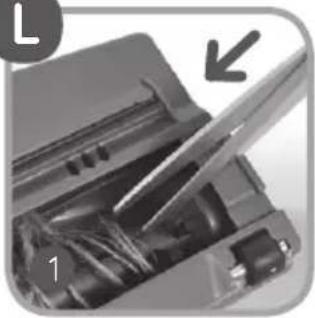
natural_image
Close-up of a mechanical device with a tool inserted, showing internal components and a directional arrow (no text or symbols)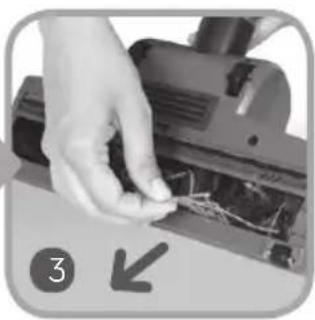
natural_image
Close-up of a hand using a power tool to adjust or repair electrical components (no visible text or symbols)M

natural_image
Close-up of hands operating a mechanical device with a tool, no visible text or symbols
natural_image
Close-up of a hand using a handheld tool to press or install electronic components (no visible text or symbols)
natural_image
Close-up of a hand using a tool to adjust or install electronic components on a circuit board (no visible text or symbols)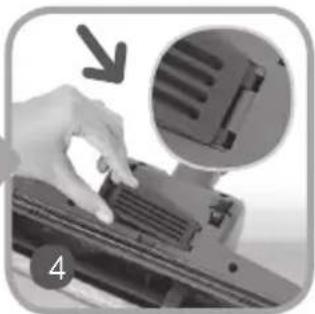
natural_image
Close-up of a hand pressing down on a mechanical component with an inset showing a close-up of internal components (no text or symbols visible)Turo brush description
Turo brush is a suction nozzle with rotating, turbine driven brush. It is intended only for vacuum cleaners to clean carpets and fitted carpets. Plastic casing ensures esthetic appearance. Rotating brush enables removing difficult rubbish, such as threads, rags, paper, etc. It is especially useful in houses with animals (cats, dogs), where removing fur from carpets is very burdensome. Brush roller is driven by turbine placed in the joint, by means of belt transmission. Proper position of the regulator ensures correct work of the turo brush, depending on height of carpet hair and facilitates its movement along the carpet.
Safety instructions
When using the turbo brush observe the following safety precautions:
DANGER! / WARNING!
Health hazard

Do not touch the rotating brush.
- Do not touch power cords of electrical devices with the turbo brush. This may damage insulation of these cords.
- Do not allow children near the working turbo brush.
- Touching the rotating brush may cause injury.
- This appliance can be used by children aged from 8 years and above and persons with reduced physical, sensory or mental capabilities or lack of experience and knowledge if they have been given supervision or instruction concerning use of the appliance in a safe way and understand the hazards involved. Children shall not play with the appliance. Cleaning and user maintenance shall not be made by children without supervision.
Never use the turbo brush to:
Polish floors.
Suck:
liquids,
wet or damp dust,
- hot ash, - burning objects, such as cigarettes, matches, - sharp and hard items, such as: razors, pins, thumbtacks, pieces of glass, etc., - flour, cement, plaster, printer or photocopier toner, etc.
CAUTION!
Not observance can result in damage to possessions

During work the roller of the rotating brush or suction inlet may get obstructed with rags, papers, etc.
SUGGESTION
Information on the product and suggestions for its use

Turbo brush is equipped with wheels that prevent damage in case of unintentional use on hard floor.
Product description

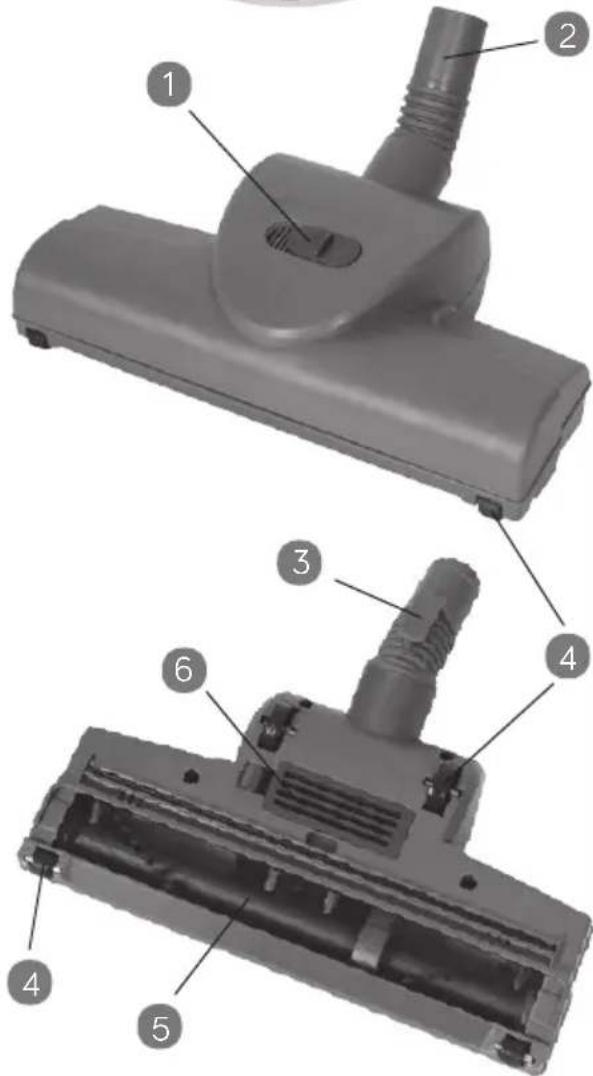
1 Regulator
2 Connector
3 Fastening hook
4 Wheels
5 Rotating brush
6 Turbine cover
Using the turbo brush

To avoid obstruction of rotating element remove big rubbish from the cleaned surface before cleaning.

- Switch the vacuum cleaner on.
- Set the regulator on the turbo brush body depending on the height of carpet hair.
- Short hair carpet – move the regulator towards the sign
- Long hair carpet – move the regulator towards the sign.
In order to use the vacuum cleaner with the turbo brush safely, especially while cleaning long hair carpets and animal
skins, it is recommended to test the suction power of the turbo brush on a small area of the cleaned surface.

- Slowly push the turbo brush back and forth.
Do not hold the working turbo brush for a longer time in one place, but constantly move it, so as not to damage the carpet (fitted carpet).

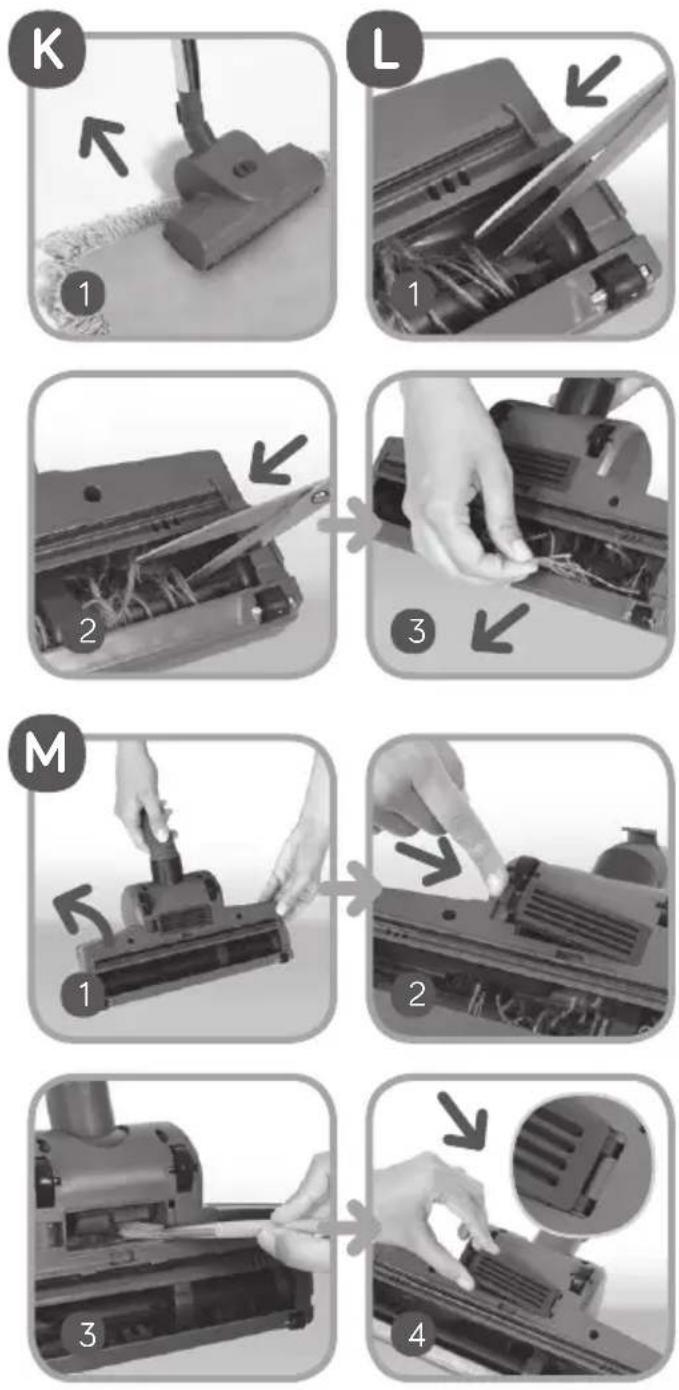
While cleaning carpet fringes always move the turbo brush in the direction indicated by the arrow (Fig. K). It prevents getting the fringes into the rotating brush.

The speed of the brush roller rotation depends on the amount of dust in the dust bag and cleanliness of filters. The
roller may stop rotating on the carpet. Then the dust bag and filters should be replaced.

Maintenance and cleaning of the turbo brush

Before cleaning and maintenance of the turbo brush it must be disassembled from the vacuum cleaner.

CLEANING OF THE ROTATING BRUSH

During operation the brush collects pieces of: threads, strings, hair, rags, etc. They reduce cleaning efficiency.

To remove dirt from the rotating brush follow the steps below:
1 Place tips of scissors into the slot of the rotating brush.
2 Move the scissors so as to catch the threads and hair tangled on the brush.
3 Cut them and take out manually or using small tongs. Be careful not to damage the bristle of the rotating brush.
Dirt such as matches, pieces of paper or clothing may obstruct the suction duct of the turbo brush, leading to significant

reduction of the suction power and reduced speed or brush roller rotation (until it completely stops).
CLEANING OF THE SUCTION DUCT OF THE TURBO BRUSH

To remove dirt from the suction duct of the turbo brush follow the steps below:
1 Turn the turbo brush with wheels upward.
2 Press the fastening in the turbine cover and take the cover out from the turbo brush.
3 Remove dirt from the suction duct, turbine blades and turbine chamber.
4 Place the turbine cover so that its two ledges match the holes in the turbo brush body, press the cover until the it latches on the body. Characteristic clicking sound indicates the correct assembly of the turbine cover.
Cleaning the turbo brush
Never clean the turbo brush with gasoline, solvents, oils and other chemicals that may cause discoloring of the housing.

Do not use granular cleaning agents that may scratch the housing.

- The turbo brush may be cleaned with damp cloth (possibly moisten with a washing-up liquid).
Store the turbo brush away from hot ovens, radiators, heaters, etc. High temperature may lead to permanent deformation of the turbo brush housing.

Disposal

Dispose of packaging in an environmentally-friendly manner. Our goods come in optimised packaging.
This basically consists in using non-contaminating materials which should be handed over to the local waste disposal service as secondary raw materials.

This appliance is labelled in accordance with European Directive 2012/19/EU concerning used electrical and electronic appliances (waste electrical and electronic equipment
- WEEE). The guideline determines the framework for the return and recycling of used appliances as applicable throughout the EU. Please ask your specialist retailer about current disposal facilities.
The manufacturer does not accept any liability for any damages resulting from unintended use or inappropriate handling.
The manufacturer reserves his rights for modifying the product any time in order to adjust it to law regulations, norms, directives, or due to construction, trade aesthetic or other reasons, without notifying it in advance.
FR
Chers Clients!


natural_image
Close-up of a vacuum cleaner cleaning a textured surface (no text or symbols visible)
natural_image
Close-up of a mechanical device with a tool inserted, showing internal components and a numbered label (2) and an arrow pointing to a feature.
natural_image
Close-up of a mechanical device with a tool and component, no visible text or symbols
natural_image
Close-up of a hand using a power tool to cut or wire on a workbench, with no visible text or symbols.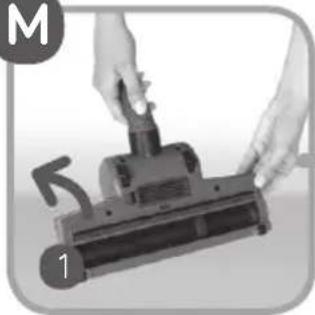
natural_image
Close-up of hands operating a mechanical device with a tool, no visible text or symbols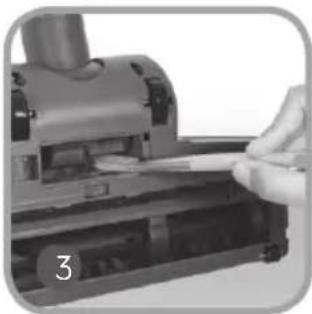
natural_image
Close-up of a hand holding a small object over a mechanical device (no visible text or symbols)
natural_image
Close-up of a hand using a tool to press or install electronic components (no visible text or symbols)
natural_image
Close-up of a hand pressing down on a mechanical component with an inset showing a close-up of a slot (no text or symbols visible)

K

natural_image
Close-up of a vacuum cleaner cleaning a tiled floor with a magnified view (no text or symbols visible)L

natural_image
Close-up of a mechanical device with a tool inserted, showing internal components and a downward arrow (no text or symbols)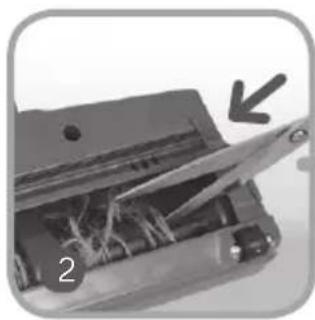
natural_image
Close-up of a mechanical device with visible internal components and a downward arrow indicating a specific part (no text or symbols)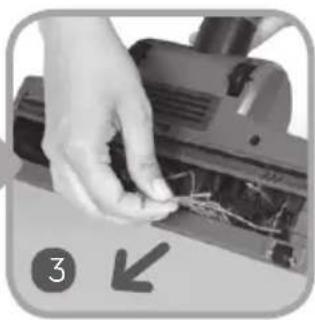
natural_image
Close-up of a hand using a power tool to cut electrical wires (no text or symbols visible)M

natural_image
Close-up of hands operating a portable vacuum cleaner with a tool, no visible text or symbols
natural_image
Close-up of a hand using a tool to press or install electronic components on a device (no visible text or symbols)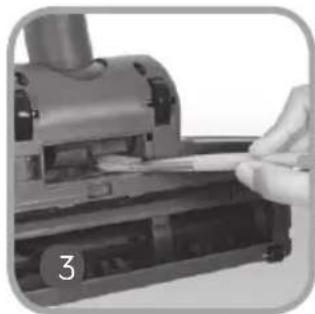
natural_image
Close-up of a hand using a handheld device to press or write on paper (no visible text or symbols)
natural_image
Close-up of a hand pressing down on a mechanical component with an inset showing a close-up of a textured component (no text or symbols visible)Característica da escova turbo


.(waste electrical and electronic equipment - WEEE)
natural_image
Close-up of a printer's internal components with a magnified view showing a tool and paper (no text or symbols visible)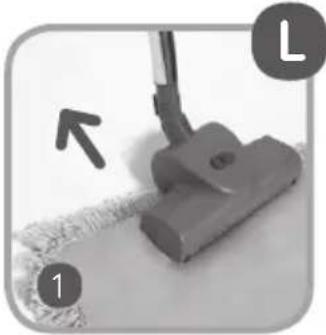
natural_image
Close-up of a vacuum cleaner's head and neck, showing texture and cleaning effect (no text or symbols)
• ضرطوم و
m = 311
يمك
بداخ
محل
ذلك
D
SAFBAG / تركيب كيس


- Important safety instructions
- DANGER! / WARNING! Health hazard
- CAUTION!
- Not observance can result in damage to possessions
- SUGGESTION Information on the product and suggestions for its use
- Technical parameters
- Static electricity
- Appliance features
- Appliance elements
- Preparing the vacuum cleaner for operation
- B
- Vacuum cleaner functions
- TRADITIONAL CLEANING WITH SAFBAG DUST BAG
- SAFBAG dust bag disassembly/assembly
- VACUUM CLEANING WITH THE USE OF THE WATER FILTER MODULE
- WET VACUUMING AND WET CLEANING
- PICKING UP WATER
- END OF OPERATION CLEANING AND MAINTENANCE
- FILTER DISASSEMBLY
- FOAM FILTER I
- FOAM FILTER II
- EPA OUTLET FILTER AND COOLING AIR FILTER
- TURBO BRUSH
- Turo brush description
- Safety instructions
- DANGER! / WARNING!
- Health hazard
- SUGGESTION
- Information on the product and suggestions for its use
- Product description
- Using the turbo brush
- Maintenance and cleaning of the turbo brush
- CLEANING OF THE ROTATING BRUSH
- CLEANING OF THE SUCTION DUCT OF THE TURBO BRUSH
- Cleaning the turbo brush
- Disposal
- FR
- Característica da escova turbo
- m = 311
- D
Brand : UFESA
Model : AP9000
Category : Vacuum Cleaner