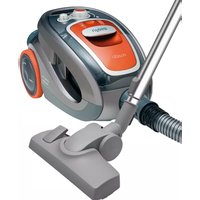
AS5200 - Vacuum Cleaner UFESA - Free user manual and instructions
Find the device manual for free AS5200 UFESA in PDF.


| Product type | Bagless canister vacuum |
| Brand | Ufesa |
| Model | AS5200 |
| Dimensions (L x W x H) | 40 x 25 x 30 cm |
| Weight | 5 kg |
| Power supply | 220-240 V ~ 50/60 Hz |
| Max power | 2000 W |
| Tank capacity | 2 L |
| Filter type | Washable HEPA H13 |
| Noise level | 78 dB(A) |
| Cord length | 6 m |
| Cleaning radius | 9 m |
| Included accessories | Crevice nozzle, brush nozzle, furniture nozzle |
| Main functions | Vacuuming hard floors and carpets, electronic power adjustment |
| Maintenance and cleaning | Empty the tank after each use; wash the HEPA filter monthly with lukewarm water |
| Safety | Automatic shutdown in case of overheating |
| Spare parts | HEPA filter, tank, nozzles (ref. UF-AS5200-ACC) |
| General information | 2-year warranty, European manufacturing |
Frequently Asked Questions - AS5200 UFESA
User questions about AS5200 UFESA
0 question about this device. Answer the ones you know or ask your own.
Ask a new question about this device
Download the instructions for your Vacuum Cleaner in PDF format for free! Find your manual AS5200 - UFESA and take your electronic device back in hand. On this page are published all the documents necessary for the use of your device. AS5200 by UFESA.
USER MANUAL AS5200 UFESA
05 1 Chemicals and Coatings
电话:010-6875977
[Unreadable]
[Unreadable due to extreme blurriness]
[Unreadable]

The following table is presented in the image.
[Unreadable]
ES
EN
FF
[Unreadable]
H
15
AR
ufesa
aspirador: bolsa
AS5200
aspirador sin bolsa
AS5200
bacless vacuum cleaner
espirador sem saco
aspirateur sans sac
www.ufesa.es
A




f rimado cler W
1


Congratulations on your choice of our appliance, and welcome among the users of ufesa products. In order to achieve best possible results we recommend using exclusively original ufesa accessories. They have been specially designed for this product. Please read this instruction manual carefully. Pay special attention to important safety instructions. Keep this User's Guide for future reference.
Important safety instructions

DANGER! / WARNING! Health hazard

- Do not operate the appliance if the cord, the housing or the handle is visibly damaged. In such a case, return the appliance to a service center.
If the supply cord is damaged, it must be replaced by the manufacturer, its service agent or similarly qualified persons in order to avoid a hazard.
The appliance can only be repaired by qualified service personnel. Improper servicing may cause a serious hazard to the user. In case of defects please contact a qualified service center.
• Always unplug the appliance before cleaning, assembling or dismantling.
Turn off the device and unplug it from an outlet before replacing the equipment or approaching moving parts during use.
- Do not use the vacuum cleaner to clean people or animals, pay special attention to keep the nozzles away from eyes and ears.
Do not use the vacuum cleaner to clean liquids or other damp dirt.
This appliance can be used by children aged from 8 years and above and persons with reduced physical, sensory or mental capabilities or lack of experience and knowledge if they have been given supervision or instruction concerning use of the appliance in a safe way and understand the hazards involved. Children shall not play with the appliance. Cleaning and user maintenance shall not be made by children without supervision.
CAUTION! Not observance can result in damage to possessions

Connect the vacuum cleaner only to a 230 V mains supply equipped with a 16 A fuse.
Do not unplug by pulling on cord.
Do not run the vacuum cleaner or the brushes over the cord, it may cause damage to the cord insulation.
Do not use the vacuum cleaner without the filters installed in the vacuum cleaner or if the filters are damaged.
Do not pick up: matches, cigarette butts, hot ash. Avoid picking up sharp objects.
Check the suction hose, the tubes and the nozzles - remove the dirt from the inside.
Do not vacuum fine dust such as: flour, cement, gypsum, toners for printers and copy machines etc. It is forbidden to cover up the air holes of the vacuum cleaner while it is working. Otherwise, the hot air has no way of exiting the vacuum cleaner, and this may lead to motor overheating causing a failure or a deformation of the plastic parts.
SUGGESTION
Information on the product and suggestions for its use

The vacuum cleaner is for household use only. Operate the appliance only in indoor spaces and vacuum only dry surfaces. Before vacuuming dry the carpets that were wet cleaned. Vacuum cleaner is a universal device with a switchable sucking brush nozzle, which is used for vacuuming hard floors and carpets.
Technical parameters
The type of the vacuum cleaner and the technical parameters are indicated on the rating label. Mains protection 16 A.
Does not cause interferences with audio/video devices.
Does not require grounding ☐
Vacuum cleaners meet the requirements of the applicable norms.
The appliance is in conformity with the requirements of the directives:
–Electrical equipment designed for use within specific voltage limits (LVD) - 2006/95/EC.
–Electromagnetic compatibility (EMC) - 2004/108/EC. The device meets the requirements of Commission Regulation (EU) No. 666/2013 on implementing the Directive of the European Parliament and of the Council 2009/125/EC with regard to eco-design requirements for vacuum cleaners.
The device complies with the requirements of the Commission Delegated Regulation (EU) No. 665/2013 supplementing Directive of the European Parliament and of the Council 2010/30/EU with regard to energy labelling of vacuum cleaners. Noise level: 77 dB(A).
This vacuum cleaner has a dust bin “CYCLONE” with cyclone filtration, which allows vacuuming without the use of a traditional bag. A characteristic feature of the cyclone filter is the use the phenomenon of turbulence of air stream for separating fixed impurities. Separation of impurities occurs in the container part of circular cross section, in which the rotating air moves the pollutions on the wall of the container. The initially purified air is targeted to the foam inlet filter and washable HEPA inlet filter. For washable inlet filter HEPA was used a special filtering material, which allows to rinse the filter with running water after its dirty, and reuse of the filter.
Static electricity
In the process of vacuuming of some surfaces in areas of low air humidity the device may become electrically charged. It is a natural phenomenon – it does not damage the device, and it is not considered to be a fault. In order to minimize the phenomenon, we recommend you to:
- discharge the device by touching metal items in the room with the pipe,
- increase air humidity in the room,
• use widely available antistatic agents.
Structure of device

1 Outlet filter cover
2 A hook for mounting sucker-brush sweeper or telescopic tube
3 A plug with power connecting cable
4 On/Off button and simultaneously a knob for suction power control
5 Dust bin full indicator "CYCLONE"
6 Cable retractor button
7 An attach to unlock the dust bin "CYCLONE"
8 A handle for carrying vacuum cleaner
9 A bolt - mechanical suction power regulator
10 Suction hose
11 Telescopic suction tube with a fastening hook
12 Outlet filter "Microfilter" (mounted in a vacuum cleaner)
13 Foam exhaust filter (mounted in vacuum cleaner, in exhaust filter cover)
14 Inlet filter HEPA H13 (mounted in dust container "CYCLONE")
15 Foam inlet filter (mounted in dust container) "CYCLONE", in the inlet filter HEPA frame
16 Dust container "CYCLONE" (which is a removable segment of the vacuum cleaner)
17 Dust container cone "CYCLONE" (mounted in dust container "CYCLONE")
18 Switchable sucker-brush sweeper
19 Gap sucker
20 Small brush sweeper
21 Small sucker
22 "BNB" Parquet brush sweeper (Brush Natural Bristle)
23 Turbobrush
Prepare the vacuum cleaner to use
B
1 Insert the tip of the suction hose to the vacuum cleaner inlet. The characteristic "click" indicates a properly fitted hose.
2 The second end of the hose (a handle) connect to telescopic suction tube.
3 Set the telescopic suction tube to the desired length by sliding the slider according with arrow and put out / slide out the tube.
4 On the other end of the suction tube install the appropriate sucker or brush.
5 Use combination carpet & floor brush for vacuuming both hard surfaces and carpets. To clean hard surfaces – wooden floors, plastic floors, ceramic tiles etc. pull out the brush by pressing the switch on the combination brush according to the figure . . . . . . . . . . . . . . . . . . . . . . . . . . . . . . . . . . . . . . . . . . . . . . . . . . . . . . . . . . . . . . . . . . . . . . . . . .
6 Catch the connection cable plug (3) and draw it out from the vacuum cleaner.
When drawing out the power cable you have to pay attention to yellow band indicating the end of the cable drawn on

Further attempts (jerks) may lead to damage of the cable.
7 Plug the cord into an AC outlet.
Before you start vacuum cleaner make sure whether the dust container "CYCLONE" is mounted in chamber of the vacuum cleaner, and whether the inlet and outlet filters are mounted in the vacuum cleaner.
8 Start the vacuum cleaner by pressing On/Off button (4).
9 Vacuum cleaner is equipped with electronic power regulator, which - during the vacuuming - can smooth control the suction power of vacuum cleaner. By turning the knob (4) right or left - you can increase or decrease the suction power.
10 Vacuum cleaner is also equipped in mechanical control of suction power (9), which is located on the handle of the hose. It can temporarily slightly adjust the suction power, without adjustment done with knob (4).
Disassembly/assembly of "CYCLONE" dust container
C
Vacuum cleaner is equipped in removable dust container “CYCLONE” (which is a removable segment of vacuum cleaner), which accumulates contaminants. As soon as the “CYCLONE” dust container is full, it should be emptied.
Vacuum cleaner is equipped with a safety valve which is located in the chamber of the "CYCLONE" dust container. The valve is activated (open) automatically when a total jam (occlusion) occurs on the sucking hose or this happens to equipment connected to it, as well as in the case of excessive overfill of "CYCLONE" dust container. When the valve is open you can hear a characteristic sound ("a sound of flutter") in the vacuum cleaner.
1 Vacuum cleaner is equipped with a dust container "CYCLONE" full indicator (5). When the gap of dust container "CYCLONE" full indicator is totally filled with red mark during operation (vacuum cleaner operates at full power and sucker nozzle or brush is upraised over cleaned surface) so this informs that there is a need to empty the dust bin "CYCLONE". The dust container "CYCLONE" full indicator (5) may work also in the case of clogging of the suction hose or clogging of equipment connected to the hose.
2 Switch off the vacuum cleaner by pressing On/Off button (4).
3 Take off the cable connection plug from the wall outlet.
4 Press the two side buttons on the hose end, then remove the hose end from vacuum cleaner inlet hole.
5 Raise the hook to unlock the dust container "CYCLONE" (7) and remove dust container "CYCLONE" (16) from the vacuum cleaner.
6 Move the dust container "CYCLONE" on garbage trash. Press the button located on dust container "CYCLONE", the bottom of the container will open and the contents will fall out to the trash.
7 After emptying the container, snap the bottom. Pay attention to the fact that a seal located on the bottom of container must be correctly positioned.
Container must be precisely closed. Otherwise the dust will penetrate the vacuum cleaner chamber and the suction power will decrease.

8 Insert the empty dust container "CYCLONE" to vacuum cleaner. The characteristic "click" indicates that container has been mounted correctly.
Emptying the dust container "CYCLONE" is necessary when you notice that:
a) "CYCLONE" dust container full indicator indices turned on,
b) sucking power of vacuum cleaner decreased,
c) dust container "CYCLONE" is full.
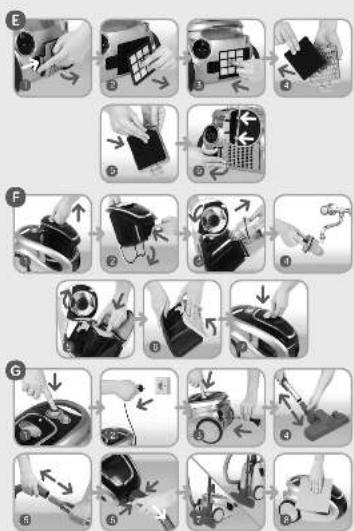
Disassembly of filters

In case of dirty filters: inlet filter, foam filter (15), HEPA inlet filter (14), outlet

foam filter (13), "Microfilter" (12) you can replace them with new filters, clean them or rinse with running water.
Do not wash the filter in the washing machine or dishwasher.
Filters can be dried in natural way only.
Do not dry the filters using hairdryers, on heaters and radiators.
Before replacement of filters make sure that vacuum cleaner is switched off and connection cable plug is pulled out from the wall outlet.

INLET FILTER HEPA AND FOAM INLET FILTER

Vacuum cleaners are equipped with inlet filter HEPA type H13.
It is necessary to clean periodically the inlet filter HEPA (14) in order to remove minor fractions of the dust, and foam inlet filter (15) must be also cleaned.
Disassembly the "CYCLONE" dust container and empty it in accordance with paragraph ©.
1 Remove the HEPA foam inlet filter (14) from "CYCLONE" dust container.
2 Remove foam inlet filter (15). If the foam inlet filter (15) is dirty, you can replace it with a new filter, you can clean it or rinse with running water. Do not forget to dry above mentioned filter before re-installation.
The main function of the foam inlet filter (15) is to protect HEPA inlet filter (14) against excessive dirt.
For safety reasons it is unacceptable to install the moist or damaged foam inlet filter (15).

- Clean the pleats of HEPA inlet filter (14), in case of filter damage it should be absolutely replaced with a new filter. If HEPA inlet filter (14) is dirty, you can replaced it with a new filter, you can clean it or rinse with running water. Do not forget to dry above mentioned filter before re-installation.
For safety reasons it is unacceptable to install the moist or damaged inlet filter HEPA (14).

- Insert a new/rinsed inlet foam filter (15) into previously occupied space.
3 Insert a new/rinsed HEPA inlet filter (14) to the dust container into previously occupied space.
4 Insert "CYCLONE" dust container with mounted HEPA inlet filter (14) to vacuum cleaner chamber. The characteristic "click" indicates that container has been correctly mounted.
It is recommended to replace HEPA inlet filter (14) with a new one every 6 months of use.

Do not vacuum without HEPA inlet filter (14) installed in "CYCLONE" dust container. Lack of HEPA inlet filter (14) shall prevent insertion of "CYCLONE" dust container to the vacuum cleaner.

"MICROFILTER" OUTLET FILTER AND OUTLET FOAM FILTER

1 In order to replace "Microfilter" outlet filter (12) press the hook located in the filter cover and pull out the filter cover from vacuum cleaner.
2 Pull out the "Microfilter" outlet filter (12).
If the "Microfilter" outlet filter (12) is dirty, you can replace it with a new filter, you can clean it or rinse with running water. Do not forget to dry above mentioned filter before re-installation.
For safety reasons it is unacceptable to install the moist or defective "Microfilter" outlet filter (12).

3 Carefully insert a new / rinsed filter to previously occupied space.
4 Pull out the foam outlet filter from filter cover (1). If the outlet foam filter (13) is dirty, you can replace it with a new filter, you can clean it or rinse with running water. Do not forget to dry above mentioned filter before re-installation.
For safety reasons it is unacceptable to install the moist or damaged outlet foam filter (13).

5 Carefully insert a new / rinsed filter to previously occupied space.
6 Put the filter cover so that two tips located at the right side of the cover should hit the holes in the body of the vacuum cleaner, press the filter cover so the hook snapped in the body. Characteristic “click” sound informs, that the filter cover has been properly installed.
Do not use the vacuum cleaner with no inlet and outlet filters mounted in the device.

Damaged inlet and outlet filters must be always replaced with new, factory original filters.

THE CONE OF "CYCLONE" DUST CONTAIN

It is necessary to clean periodically the "CYCLONE" dust container cone.
1 Disassembly "CYCLONE" dust container according to point C.
2 Press the button located on "CYCLONE" dust container and open the bottom of the container. If "CYCLONE dust container is full, empty it according to the point C.
3 Turn the cone left, so the two tips located on the flange of the cone were put out from the slots of the container. Put out the cone.
4 If the "CYCLONE" dust container cone (17) is dirty, you can rinse it with running water. Do not forget to dry above mentioned cone before re-installation.
5 Insert the rinsed cone of "CYCLONE" dust container into the container slot so the tip located on the flange of the cone was in the slot of container's body. Turn right the cone so that the two tips located on the flange of the cone were blocked in the slots of the container.
6 Snap the bottom of "CYCLONE" dust container. Please pay attention to the proper positioning of seal found on the bottom of the container.
7 Insert "CYCLONE" dust container to vacuum cleaner chamber. The characteristic "click" indicates that the container has been correctly mounted.
End of operation, cleaning and maintenance

1 Switch off vacuum cleaner pressing On/Off switch (4).
2 Put the connection cable plug out the wall outlet.
3 Wind the cable by pressing retractor button (6). Performing this action, hold the power cable to avoid any tangles and shocking the vacuum cleaner body with the plug.
4 Disconnect telescopic suction tube and a sucker or a brush sweeper.
5 Disconnect telescopic suction tube and a hose.
6 Press the two side buttons located at the hose end, then remove the hose end from vacuum cleaner inlet hole.
7 Vacuum cleaner can be stored either in vertical or horizontal position. The hose may remain attached to the vacuum cleaner, but please note that the hose should not be strongly bent during storage.
Storing in horizontal position:
-Insert a fixing hook of sucker-brush sweeper to a hook for fixing the sucker-brush sweeper located on the back of the vacuum cleaner over the outlet filter cover.
Vertical storage:
- place the nozzle brush on the telescopic pipe, - then insert the hook of the telescopic pipe into the fastening situated on the bottom of the vacuum cleaner, near the front wheel.
8 If necessary, clean the casing and the chamber of the vacuum cleaner with a damp cloth (it may be damped in dishwashing liquid), dry it off, and wipe it dry.
Do not use any scrubbing agents or solvents.

Examples of problems you may encounter when using the vacuum cleaner
PROBLEM SOLUTION
A characteristic fl uttering in the vacuum cleaner is heard.
- Check the CYKLON dust container and other accessories. Remove the reason for the clog-up or empty and clean the CYKLON dust container.
- Replace or clean the filters.
The vacuum cleaner works less effi ciently.
Empty and clean the CYKLON dust container, replace or clean the fl iters, check the suction pipe, the hose, and the nozzle - remove the reason for the clog-up.
The cut-out of the wiring system has been triggered.
Check if there are any other devices, besides the vacuum cleaner, plugged into the same electrical circuit. If the cut-out is triggered again, have the vacuum cleaner repaired in a servicing center.
The vacuum cleaner does not work; the body or the power cord is damaged.
Have the vacuum cleaner repaired in a servicing center.
TURBOBRUSH
H

1



Turbobrush description
Turbobrush is a suction nozzle with rotating, turbine driven brush. It is intended for vacuum cleaners only. It is used for cleaning carpets and fitted carpets. Plastic casing ensures aesthetic appearance. Rotating brush enables removing difficult dirt, such as threads, rags, paper, etc. It is especially useful in households with pets (cats, dogs), when removing the animal hair from carpets is very onerous. Brush roller is driven by turbine installed in the turbobrush casing, by means of belt transmission.
Safety instructions

When using the turbobrush observe the following safety precautions:
DANGER! / WARNING!
Health hazard

Do not touch the rotating brush.
- Do not touch power cords of electrical devices with the turbobrush. This may damage insulation of these cords.
Do not allow children near the working turbobrush.
- Touching the rotating brush may cause injury.
This appliance can be used by children aged from 8 years and above and persons with reduced physical, sensory or mental capabilities or lack of experience and knowledge if they have been given supervision or instruction concerning use of the appliance in a safe way and understand the hazards involved. Children shall not play with the appliance. Cleaning and user maintenance shall not be made by children without supervision.
Never use the turbobrush to:
Polish floors.
Suck:
liquids,
wet or damp dust,
hot ash,
burning objects, such as
cigarettes, matches,
sharp and hard items, such as:
razors, pins, thumbtacks, pieces of glass, etc.,
- flour, cement, plaster, printer or photocopier toner, etc.
Using the turbobrush
To avoid obstruction of rotating element remove big rubbish from the cleaned surface before cleaning.

- Switch the vacuum cleaner on.
In order to use the vacuum cleaner with the turbobrush safely, especially while cleaning long hair carpets and animal skins, it is recommended to test the suction power of the turbobrush on a small area of the cleaned surface.

CAUTION!
Not observance can result in
damage to possessions

During work the roller of the rotating brush or suction inlet may get obstructed with rags, papers, etc.
- Slowly push the turbobrush back and forth.
Do not hold the working turbobrush for a longer time in one place, but constantly move it, so as not to damage the carpet (fitted carpet).

SUGGESTION
Information on the product and suggestions for its use

During operation the brush collects pieces of: threads, strings, hair, rags, etc. They reduce cleaning efficiency.
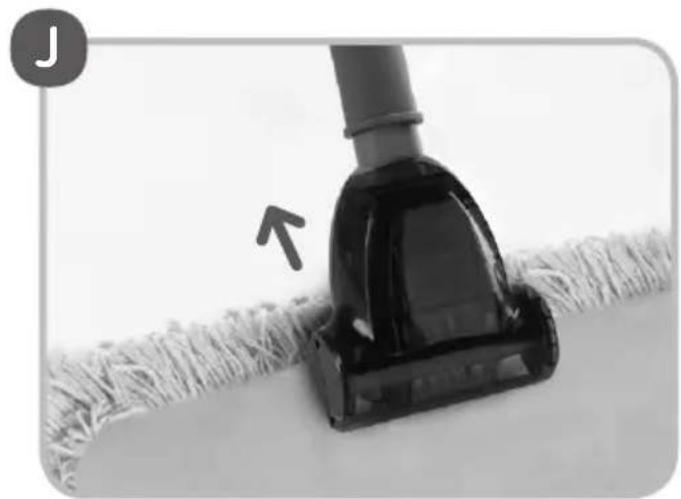
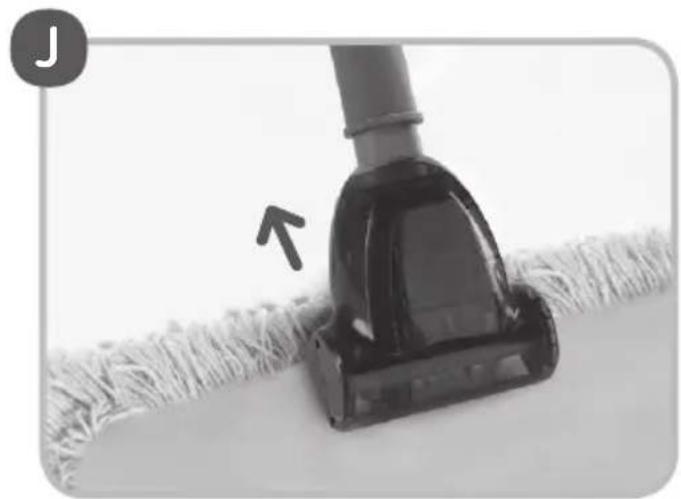
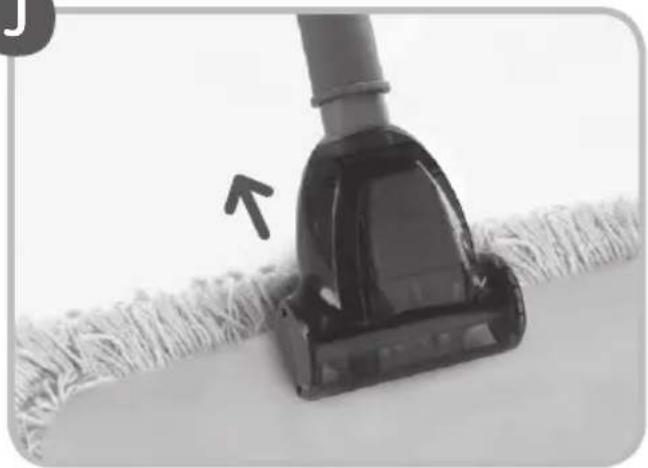
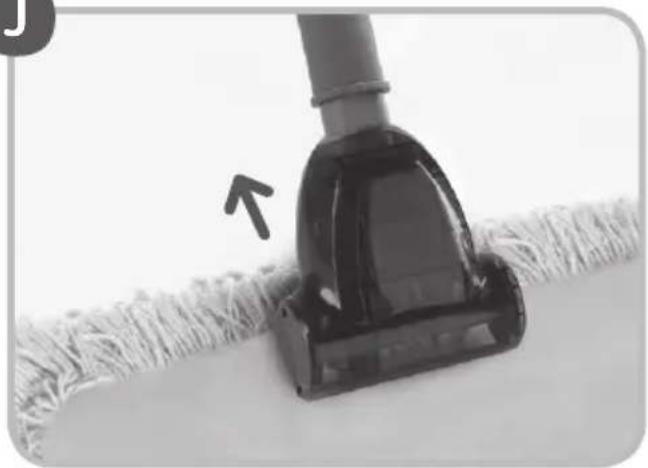
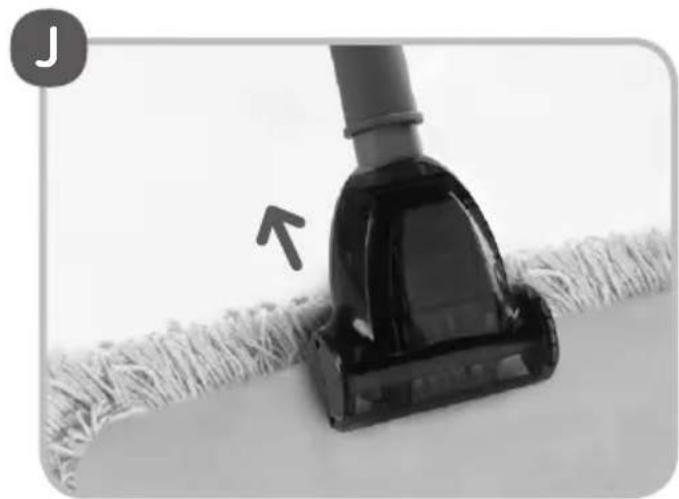
While cleaning carpet fringes always move the turbobrush in the direction indicated by the arrow (Fig. J).

It prevents getting the fringes into the rotating brush.
The speed of the brush roller rotation depends on the amount of dust in the dust bag and cleanliness of filters. The roller may stop rotating on the carpet. Then the dust bag and filters should be replaced.

Product description

1 Connector
2 Rotating brush
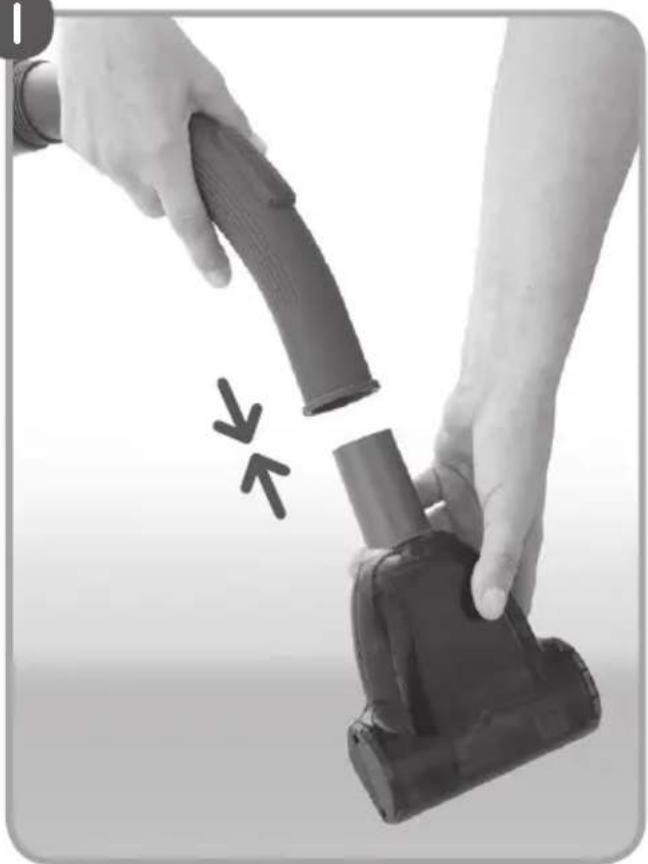
Assembling the turbobrush and the vacuum cleaner

- Insert the turbobrush connector into the vacuum cleaner hose handle.
Maintenance and cleaning of the turbobrush

Before cleaning and maintenance of the turbobrush it must be disassembled from the vacuum cleaner.

Cleaning of the rotating brush

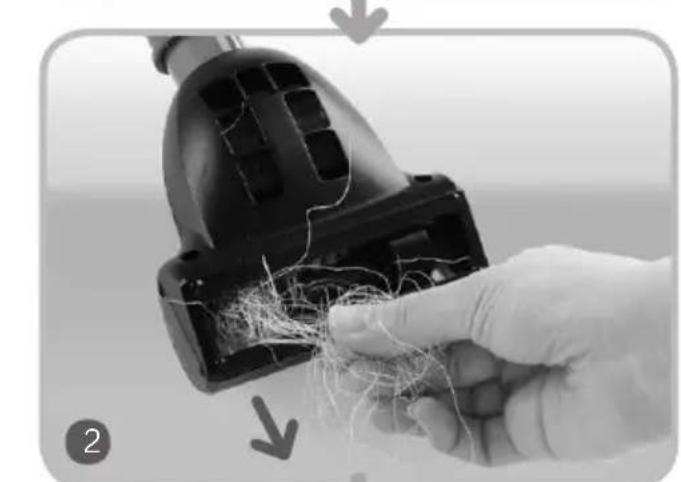
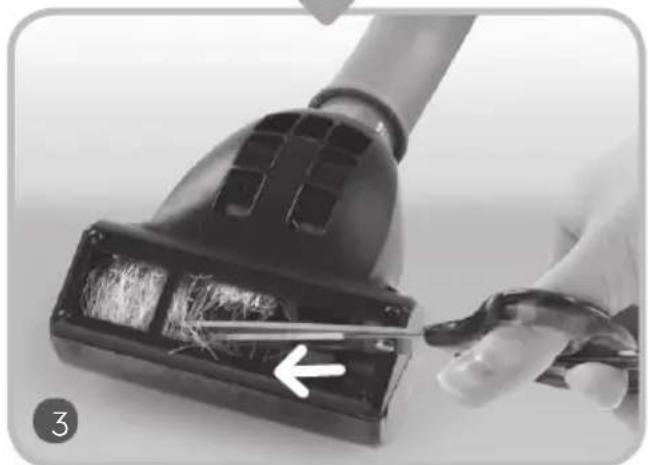
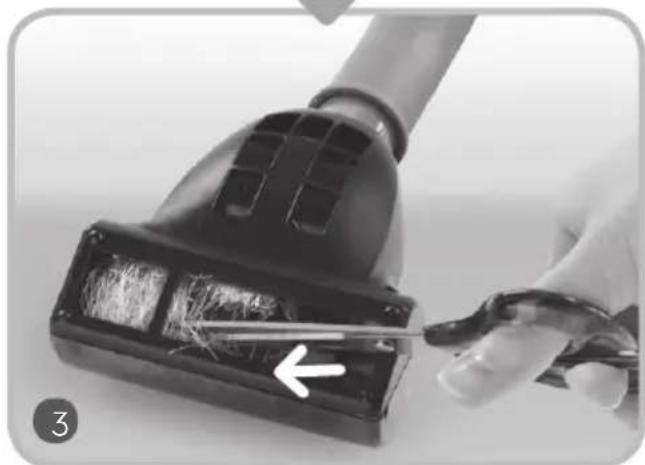
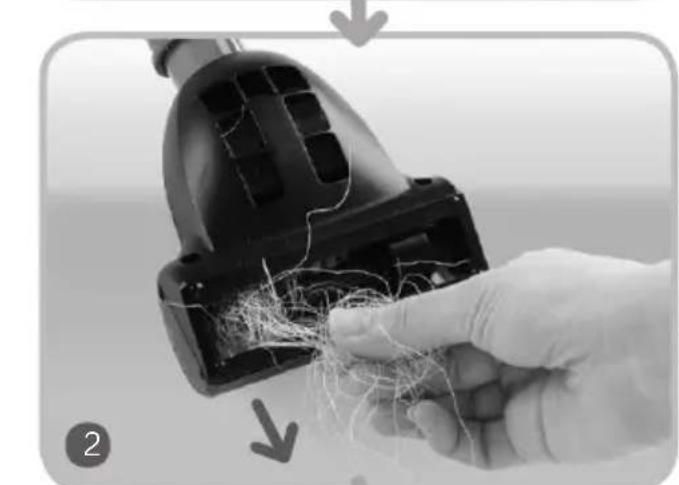
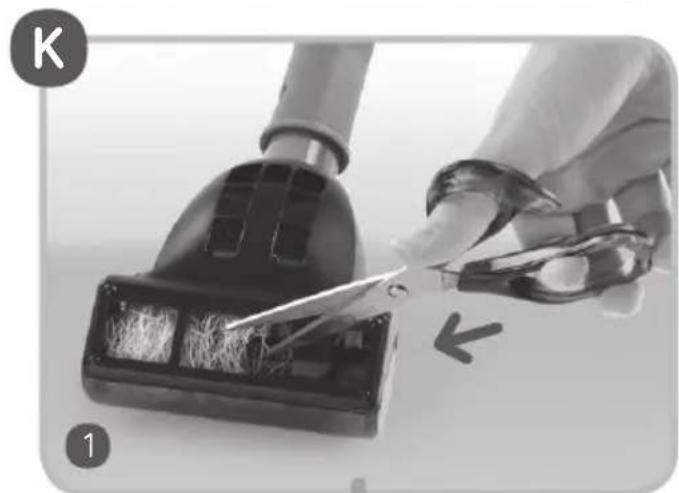
To remove dirt from the rotating brush follow the steps below:
1 Place tips of scissors into the slot of the rotating brush.
2 Move the scissors so as to catch the threads and hair tangled on the brush.
3 Cut them and take out manually or using small tongs. Be careful not to damage the bristle of the rotating brush.
Dirt such as matches, pieces of paper or clothing may obstruct the suction duct of the turbobrush, leading to significant

reduction of the suction power and reduced speed or brush roller rotation (until it completely stops).
Cleaning the turbobrush
Never clean the turbobrush with gasoline, solvents, oils and other chemicals that may cause discoloring of the housing.

Do not use granular cleaning agents that may scratch the housing.

- The turbobrush may be cleaned with damp cloth (possibly moisten with a washing-up liquid).
Store the turbobrush away from hot ovens, radiators, heaters, etc. High temperature may lead to permanent deformation of the turbobrush housing.

Advice on disposal
Our goods come in optimised packaging. This basically consists in using non-contaminating materials which should be handed over to the local waste disposal service as secondary raw materials.

This product complies with EU Directive 2002/96/EC. The crossed wheelie bin symbol shown on the appliance indicates that when it comes to dispose of the product it
must not be included in with household refuse. It must
be taken to a special refuse collection point for electric and electronic appliances or returned to the distributor when purchasing a similar appliance. Under current refuse disposal regulations, users who fail to take discarded appliances to special refuse collection points may be penalised. Correct disposal of discarded appliances means that they can be recycled and processed ecologically, helping the environment and allowing materials used in the product to be reused. For more information on available waste disposal schemes contact your local refuse service or the shop where the product was purchased. Manufacturers and importers are responsible for ecological recycling, processing and disposal of products, whether directly or via a public system.
Your local town council can provide you with information about how to dispose of obsolete appliances.
The manufacturer/importer does not accept any liability for any damages resulting from unintended use or improper handling. The manufacturer/importer reserves his rights to modify the product any time in order to adjust it to law regulations, norms, directives, or due to construction, trade, aesthetic or other reasons, without notifying in advance.

Chers Clients!
J
K


J
K


Característica da escova turbo



الفرشاة التوريو


التصرف


- UFESA
- 1
- IMPORTANT SAFETY INSTRUCTIONS
- DANGER! / WARNING! HEALTH HAZARD
- CAUTION! NOT OBSERVANCE CAN RESULT IN DAMAGE TO POSSESSIONS
- SUGGESTION
- INFORMATION ON THE PRODUCT AND SUGGESTIONS FOR ITS USE
- TECHNICAL PARAMETERS
- STATIC ELECTRICITY
- STRUCTURE OF DEVICE
- PREPARE THE VACUUM CLEANER TO USE
- B
- DISASSEMBLY/ASSEMBLY OF "CYCLONE" DUST CONTAINER
- C
- DISASSEMBLY OF FILTERS
- INLET FILTER HEPA AND FOAM INLET FILTER
- MICROFILTER" OUTLET FILTER AND OUTLET FOAM FILTER
- FOR SAFETY REASONS IT IS UNACCEPTABLE TO INSTALL THE MOIST OR DAMAGED OUTLET FOAM FILTER (13)
- DO NOT USE THE VACUUM CLEANER WITH NO INLET AND OUTLET FILTERS MOUNTED IN THE DEVICE
- DAMAGED INLET AND OUTLET FILTERS MUST BE ALWAYS REPLACED WITH NEW, FACTORY ORIGINAL FILTERS
- THE CONE OF "CYCLONE" DUST CONTAIN
- END OF OPERATION, CLEANING AND MAINTENANCE
- DO NOT USE ANY SCRUBBING AGENTS OR SOLVENTS
- EXAMPLES OF PROBLEMS YOU MAY ENCOUNTER WHEN USING THE VACUUM CLEANER
- PROBLEM SOLUTION
- TURBOBRUSH
- H
- TURBOBRUSH DESCRIPTION
- SAFETY INSTRUCTIONS
- DANGER! / WARNING
- HEALTH HAZARD
- USING THE TURBOBRUSH
- CAUTION
- NOT OBSERVANCE CAN RESULT IN
- DAMAGE TO POSSESSIONS
- PRODUCT DESCRIPTION
- ASSEMBLING THE TURBOBRUSH AND THE VACUUM CLEANER
- MAINTENANCE AND CLEANING OF THE TURBOBRUSH
- CLEANING OF THE ROTATING BRUSH
- CLEANING THE TURBOBRUSH
- ADVICE ON DISPOSAL
- CARACTERÍSTICA DA ESCOVA TURBO
- التصرف
Brand : UFESA
Model : AS5200
Category : Vacuum Cleaner