USER MANUAL Moto Majority
What's In the Box? 3
Controls And Functions.... 4
Instructions Guide.... 8
Basic Operation.... 8
Phono Mode - Play Vinyl Record....9
Bluetooth – Out Mode.... 10
USB Recording.... 11
AUX – In Mode.... 12
Bluetooth – In Mode.... 13
USB Playback Mode.... 14
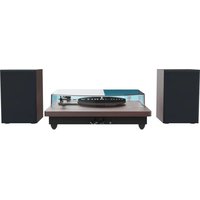
Connecting Speakers via RCA Connection.... 15
Tips for Better Turntable Performance.... 16
Troubleshooting.... 17
Specification and Warranty.... 18
Safety Information.... 19
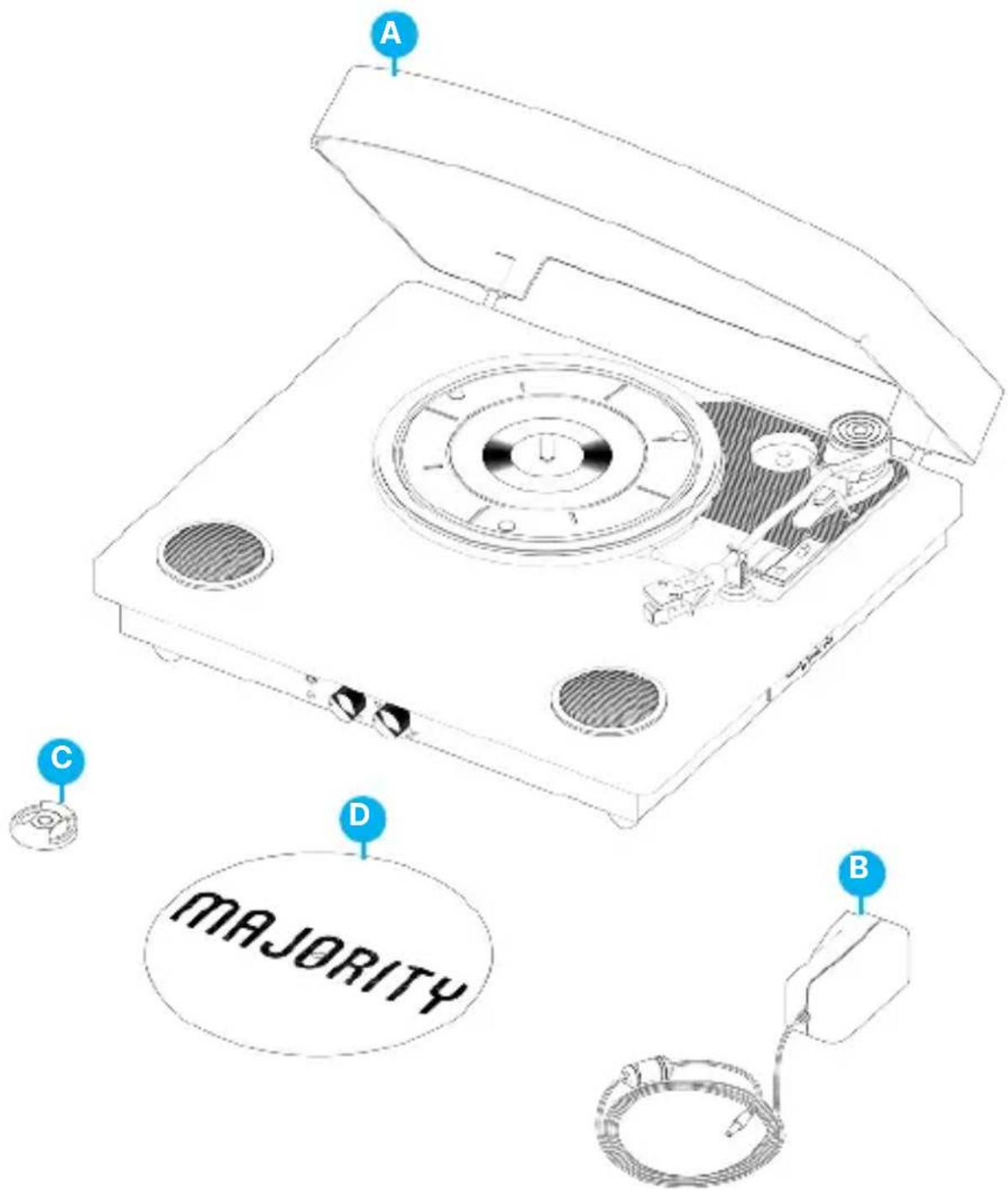
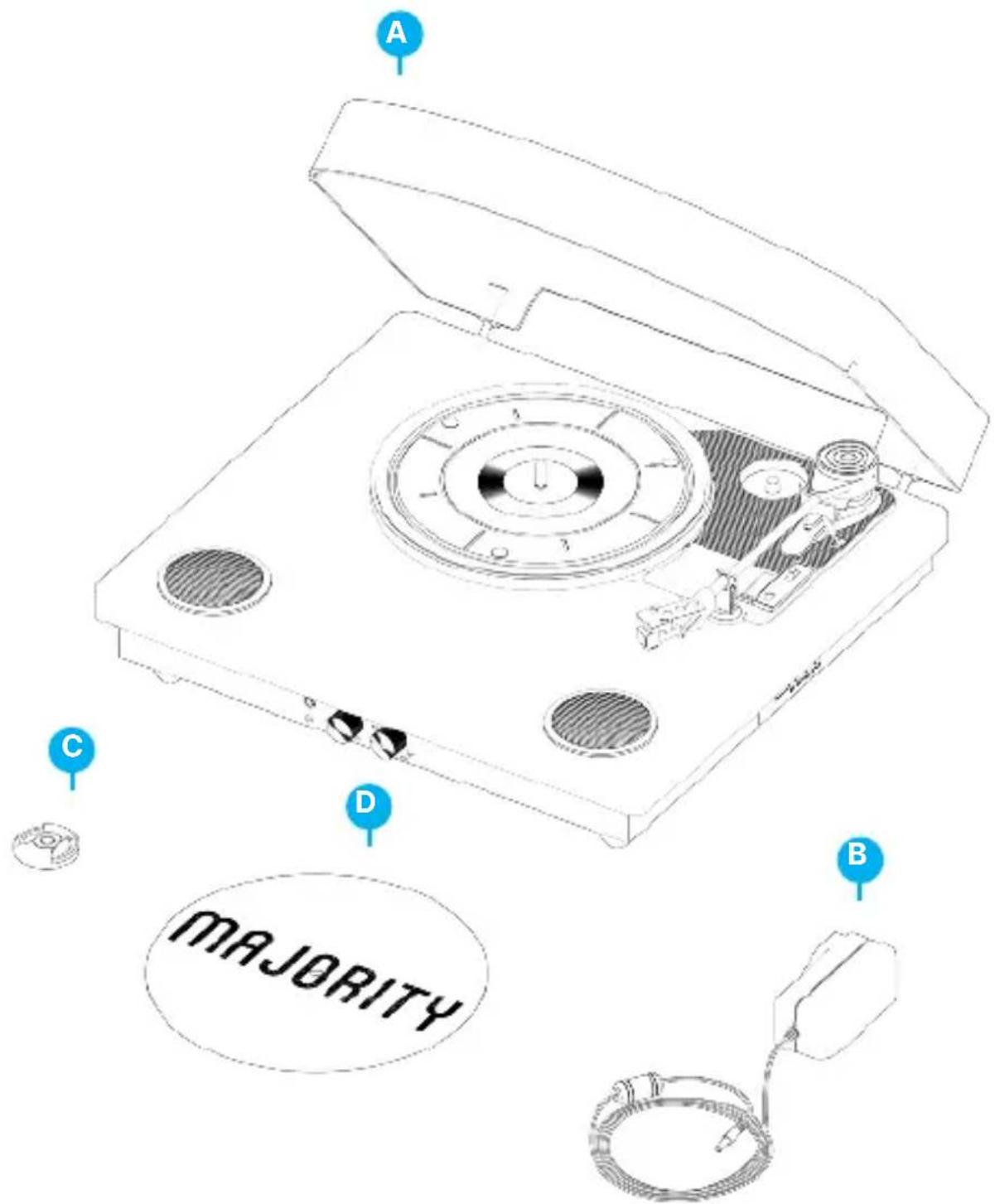
What's in the Box?
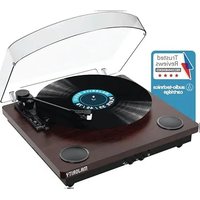
A. Majority Moto Turntable
B. Power Adaptor
C. 45 RPM Adaptor
D. Felt Mat
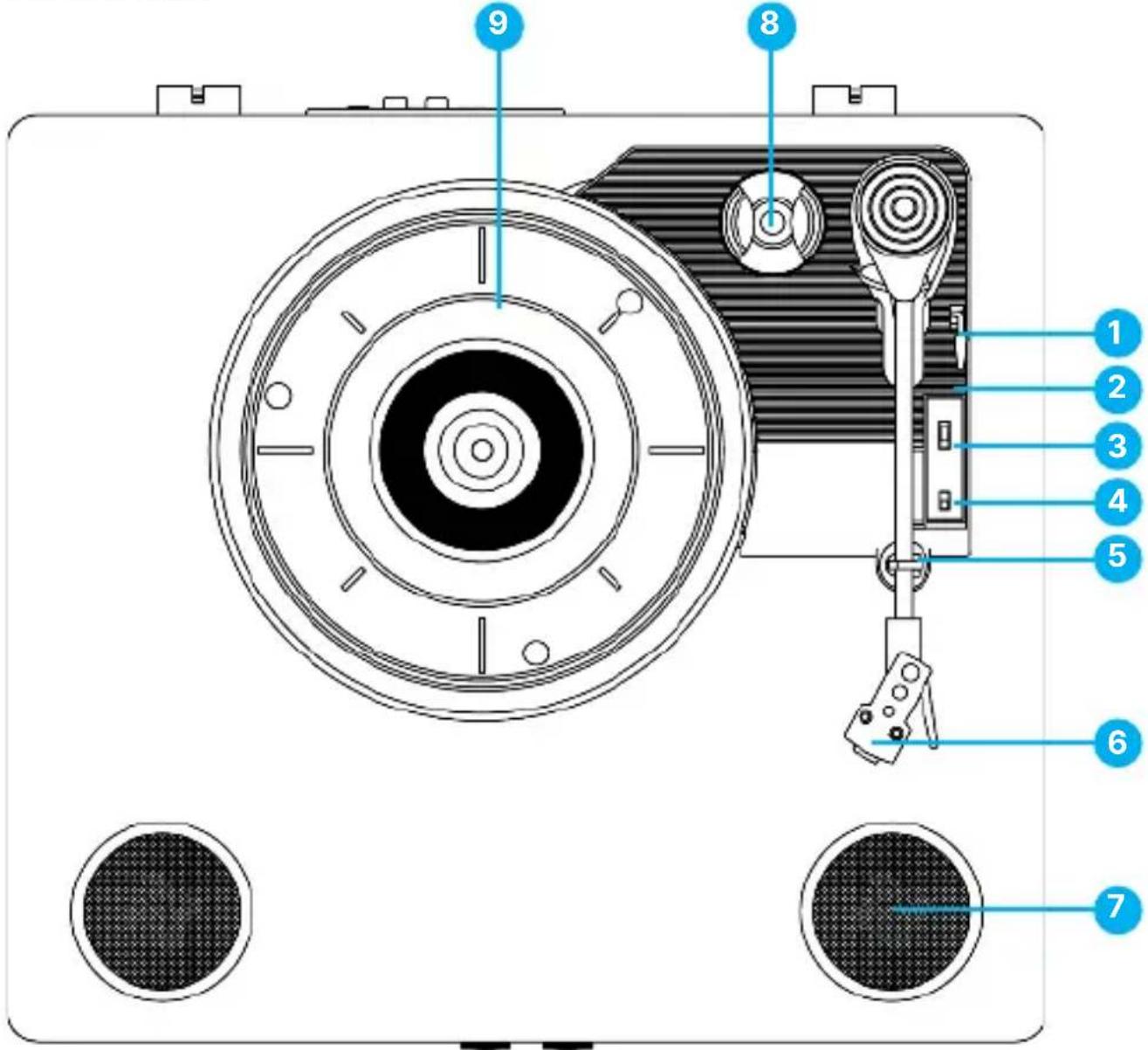
Top View
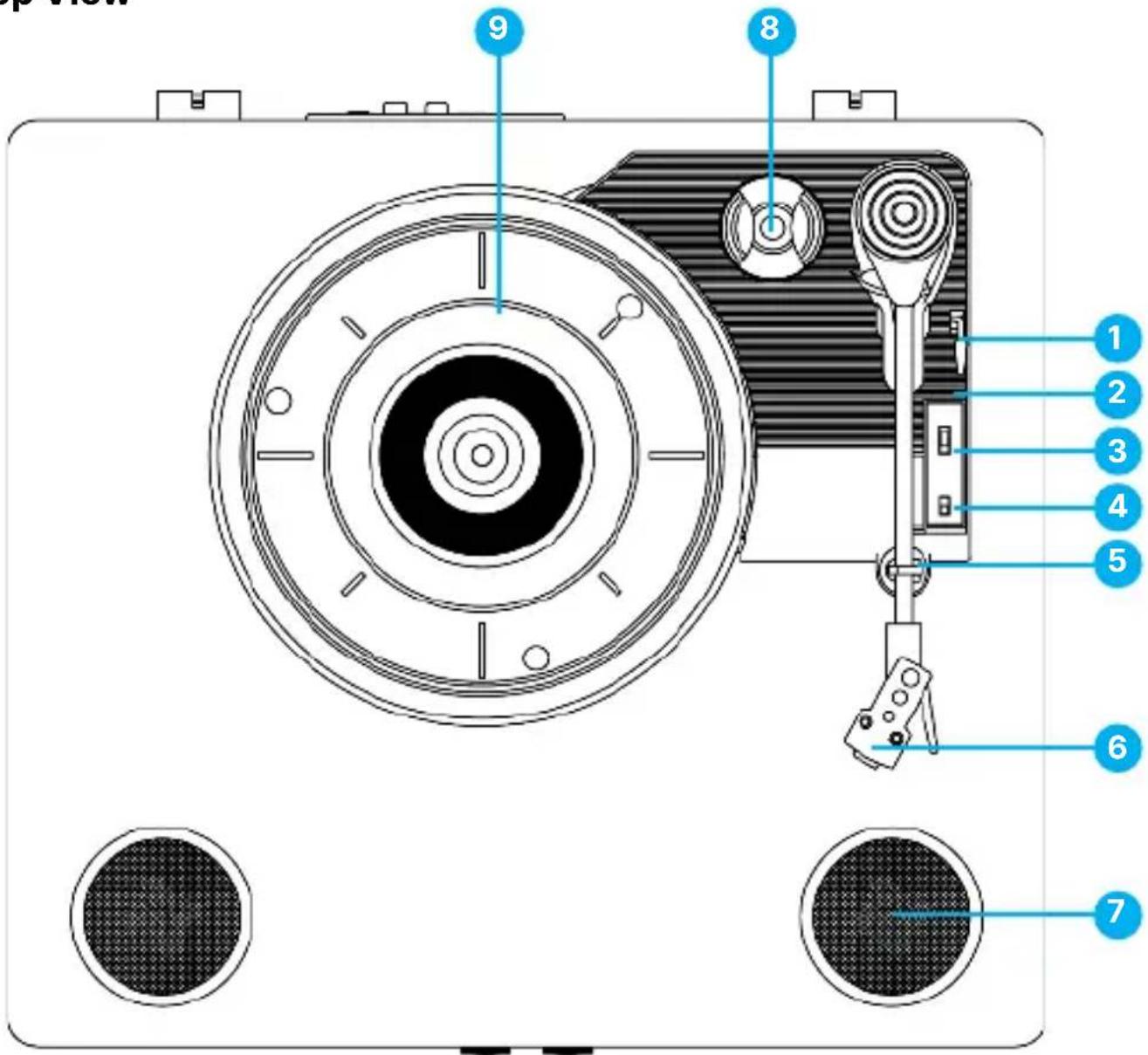
- Lift lever
- Tone arm - The turntable comes with a ready-to-use pre-balanced tone arm and cartridge.
-
33/45/78 RPM switch - This switch controls the speed of the turntable platter.
-
AUTO STOP ON/OFF switch
- Tone arm clip
- Audio-Technica cartridge
- Speaker
- 45 RPM adaptor – This is used for 45RPM vinyl records.
- Platter- Place your record here.
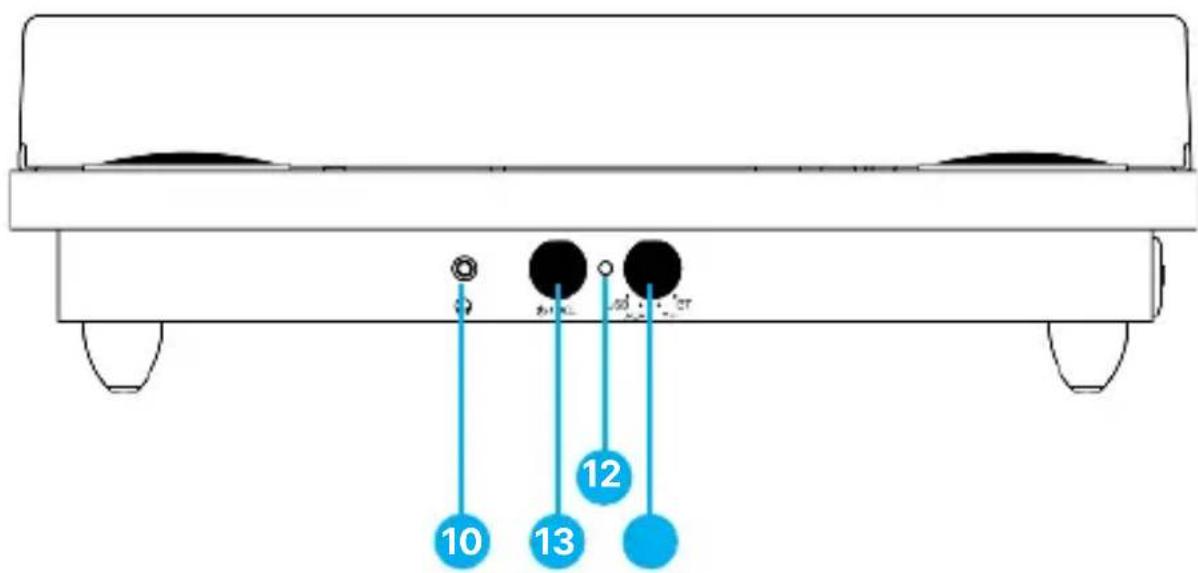
Front View
-
Headphones Jack - To be used to connect headphones or earphones.
-
Power ON/OFF and Volume Control knob
-
LED light Indicator
- Mode selection knob (USB /AUX IN /PH /BT IN)
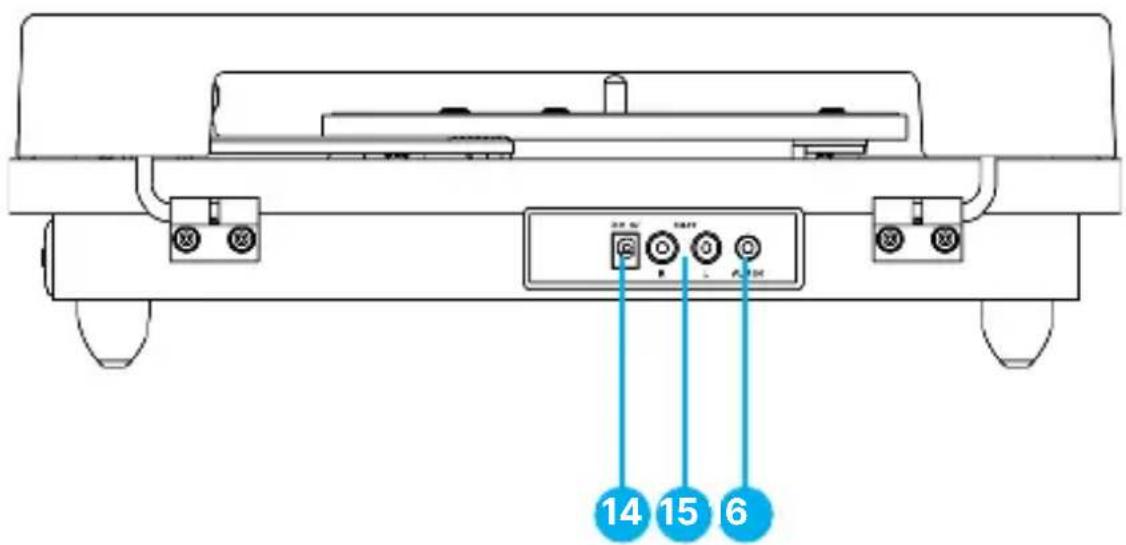
Rear View
-
DC IN port - Used to connect power adaptor.
-
RCA output - This is used to connect to an external speaker, not included.
-
AUX IN jack
Side View
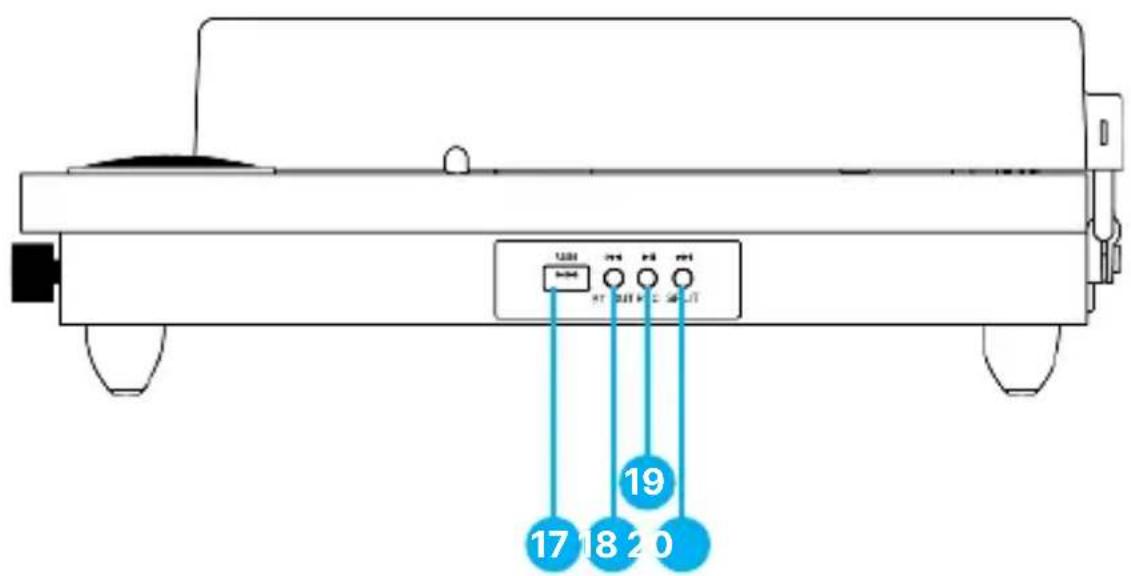
- USB port
- PREV and BT OUT button
- PLAY/PAUSE/ REC button
- NEXT and SPLIT button
Basic Operation
Please note all (Ref.) refer to Page 4-7 Controls and Functions mapping guide.
Before using the Majority Moto Record Player, choose a safe location to keep the unit away from direct sunlight or near any heat source.
Position the Majority Moto with some space left at the rear of the cabinet, to allow room for a full-sized vinyl disc to be placed on the platter - Avoid a surface subject to vibrations, excessive dust, cold or moisture.
When cleaning the unit, use a dry cloth only.
Do not open the internal parts of the cabinet as this may result in electrical shock. When removing the power plug from the wall outlet, pull directly on the plug, NOT the cord.
Keep this manual for future reference.
Starting the Turntable
Place the transparent dust cover onto the turntable.
Firmly and securely insert the DC plug of the adaptor to the DC IN Jack on the back of the unit. Plug the adaptor's AC plugs into a power outlet.
Phono Mode - Play Vinyl Record
- Turn the mode selection knob to PH (Ref.13).
- Turn the power & volume control knob clockwise to switch this on and set the volume. The LED light indicator will flash red.
- Place a record on the turntable platter and select the desired speed (33/45/78) according to the record.
Note: When playing a 45RPM record, please use the included 45RPM adaptor located in the holder next to the platter (Ref.8).
-
Remove the stylus protector and elastic band (Keep this to protect the stylus when not in use).
-
Open the tone arm clip to release the tone arm (Ref.2). Lift the lift-lever to raise the tone arm and gently move this to the desired position, over the record.
-
The turntable will begin to spin when the tone arm is moved toward the record (when the AUTO STOP switch is ON). Move the lift-lever back to the
-
down-position to lower the tone arm slowly onto the desired position of the record to start playback.
-
If the Auto Stop Control Switch is turned on, the record will stop automatically when finished. If the Auto Stop Control Switch is turned off, the record will NOT stop automatically when finished.
Note: The AUTO STOP function applies to most 33RPM vinyl records. However, for very few vinyl records with an unusual groove pattern, it will stop before it comes to an end. If this is the case, turn the AUTO STOP switch to the 'OFF' position and then it will continue playing.
Bluetooth - Out Mode
Bluetooth-Out mode allows you to pair the turntable with a Bluetooth speaker or headphones.
- Set the main mode function to PH (phono), for vinyl playback.
- Press the BT OUT button. The LED light indicator will then start flashing red.
- Turn on the BT function of the speaker or headphones and start pairing with Majority Moto. When the connection is successful, the LED light indicator will stop flashing.
Once paired, the vinyl playback will be transmitted to the speaker or headphones wirelessly.
Note: In this mode, the volume level can only be controlled from the speakers or headphones that you are pairing with the turntable.
USB Recording
Recording to USB stick is only available with Phono mode and AUX mode playback.
- Plug your USB stick into the USB port. Start playing a vinyl record under Phono Mode playback or play via AUX playback from another device connected to the turntable.
- Press the REC button to start a recording. The LED light indicator will flash red and blue to confirm the recording has begun.
- To save different files on the recording, press the SPLIT button when recording. Press the SPLIT button again and it will generate another file.
- Press the REC button to stop the recording. The LED light indicator will flash red to confirm recording has been ended, and it resumes to Phono mode playback or AUX mode playback.
Files recorded onto the USB are saved in MP3 file format, under folders titled 'ALBUM_01' and the files titled 'REC_0000, 0001, 0002' etc.
Note: The recording is made in a fixed-volume format. The volume level of the recorded file cannot be changed by any adjustments of the volume control on the turntable.
Note: Max size of USB stick supported is 128GB and needs to be set to FAT format.
AUX In Mode
Connect your iPod, MP3 player, mobile phones etc. to the AUX IN port using a 3.5mm-3.5mm audio cable (not included).
- Turn the MODE knob to AUX. The LED indicator will flash purple. You can now play music from an auxiliary device through the unit.
- Turn the VOLUME CONTROL knob on the Majority Moto Turntable to adjust the volume. (The iPod, MP3 player and/or mobile phones' volume control may also impact the volume level, therefore, ensure this is also turned up).
Bluetooth - In Mode
- Turn the MODE knob to BT. The LED light indicator will flash blue.
- Switch on Bluetooth connectivity on your device and search for Majority Moto. Once successfully paired, the LED light indicator will stop flashing.
- Use the VOLUME CONTROL knob to adjust the volume as per your preferences.
Note: The volume on your device paired with the turntable via Bluetooth can also impact the playback volume, therefore make sure the volume level is also turned up on your device while playing.
USB Playback Mode
- Turn the MODE knob to USB. The LED light indicator will flash red.
- Plug in the USB drive and play your chosen audio. The LED light will now flash red.
- Press PLAY/PAUSE/REC to play or pause. Press PREV button to play the previous track. Press NEXT button to play the next track.
Note: Max size of USB stick supported is 128GB, and it needs to be set to FAT format. USB playback supports MP3, M4A, SBC, & PCM files.
Connecting Speakers via RCS Connection
In PH (phono) Vinyl Playback mode, you can connect to your own speaker system using the RCA port on the turntable.
Note: This works using RCA to 3.5mm audio cable only (not included).
When using this type of connection with any speaker via RCA, it will supersede the in-built turntable speakers, therefore, you will only hear audio through your connected speakers. Use the volume control on your connected speakers to adjust the audio level as per your preferences.
- When opening or closing the turntable cover, handle it gently, gripping it either at the centre or at each side.
- Do not touch the needle tip with your fingers; avoid bumping the needle against the turntable platter or record edge.
- Frequently clean the needle tip with a soft brush in a back-to-front motion only.
- If you must use needle cleaning fluid, use it very sparingly.
- Gently wipe the dust cover and turntable housing with a soft cloth. Use only a small amount of mild detergent to clean the turntable and dust cover.
| Observation Potential Cause/Solution |
| No power/function | Check whether the power is switched on or off at the wall.Check that the power adaptor is properly connected to the power outlet. |
| No sound | Check whether unit is set to MUTE.Check whether MODE is correctly selected.Turn up the volume on the speakers or on your external device.Check that cables are properly installed. |
| Function disturbance | Switch off and unplug the unit. Leave it for 2 minutes and switch it on again. |
| Bluetooth not connecting | Ensure that you are on Bluetooth mode on the speaker and the Bluetooth on your device is switched on. Select the Bluetooth device ‘Majority Moto’ and you should now be able to play audio. |
Support
If you require further assistance with your Majority product, please contact our support team on the Majority website: www.majority.co.uk/support
Specification
| Power Supply DC 5V 1A | |
| Frequency Response 30Hz-20KHz | |
| SNR 70dB | |
| Separation 45dB | |
| Bluetooth V5.3 | |
| Dimension (WxHxD) 38 x 12 x 34.6 cm | |
Warranty
All products come with a standard 12 month warranty. All items must be registered on www.majority.co.uk for the warranty to be valid. Once on the web page, use the menu to find 'Register Your Product'. You will also be given the chance to extend your warranty for an additional 24 months, free of charge.
- Read these instructions.
- Keep these instructions. Instructions are also available for download at www.majority.co.uk.
- Heed all warnings.
- Follow all instructions.
- Do no clean the apparatus near or with water.
- Do not block any ventilation openings. Install in accordance with the manufacturer's instructions.
- Do not block any ventilation openings. Install in accordance with the manufacturer's instructions.
- Do not install near any heat sources such as radiators, heat registers, stoves, or other apparatus that produce heat.
- Protect the power from being walked on or pinched particularly at plugs, convenience receptacles, and the point where they exit from the apparatus.
- Only use accessories specified by the manufacturer.
- Unplug this apparatus during light storms or when unused for long periods of time.
- Refer all servicing to qualified service personnel.
- No naked flame sources, such as a lit candle should be placed on the apparatus.
- Dispose of used electrical products and batteries safely according to your local authority and regulations.
ADDITIONAL WARNINGS
The apparatus shall not be exposed to dripping, splashing or objects filled with water.
The main plug is used to disconnect the device. In order to disconnect the apparatus from the main mains completely, the mains plug should be disconnected from the main socket outlet completely.
Battery shall not be exposed to excessive heat.
RECYCLING ELECTRICAL PRODUCTS
You should now recycle your waste electrical goods and in doing so help the environment.
electrical product should not be disposed of with normal household waste. Please ensure it is taken to a suitable facility for disposal when finished.
IMPORTANT: Please read all instructions carefully before use and keep for future reference.
Risk of electric shock. Do not open.
Read all instructions carefully
before use and keep for future
reference.
When servicing, use only identical replacement parts.
ATTENTION
RISK OF ELECTRIC SHOCK DO NOT OPEN

CAUTION
RISQUE D'ELECTROCUTION NE
PAS OUVRIR


IMPORTANT: Please read all instructions carefully before use and keep for future reference

natural_image
Solid dark blue background with no visible text, symbols, or objects.
Moto Plattenteller
Benutzerhandbuch
MAJORITY
www.majority.co.uk/support
Spezifikation
| Stromversorgung DC 5V 1A | |
| Frequenzgang 30Hz-20KHz | |
| SNR 70dB | |
| Trennung 45dB | |
| Bluetooth V5.3 | |
| Dimension (WxHxD) 38 x 12 x 34.6 cm | |
Garantie
RECYCLING VON ELEKTROPRODUKTEN
RISK D'ELECTROCUTIO N NE PAS
OUVRIR


RISQUE D'ELECTROCUTION NE
PAS OUVRIR


D. Tappetino in feltro
Vista dall'alto
RISQUE D'ELECTROCUTION NE
PAS OUVRIR


RISQUE D'ELECTROCUTION NE
PAS OUVRIR


RISQUE D'ELECTROCUTION
NE PAS OUVRIR

MAJORITY
I hereby declare that the product:
Product Name: Majority Moto Turntable
Model: 1000002931 and 1000002932
Brand Name: Majority
Satisfies all the technical regulations applicable to the product within the scope of Council Directives 2014/35/EU and 2014/30/EU, 2009/125/EC, 2012/19/EU, 2014/53/EU, 2011/65/EU, 1907/2006.
2014/35/EU (LVD Directive)
EN62368-1:2014+A11:2017
2014/30/EU (EMC Directive)
EN55032:2015+A11:2020, Class B, EN IEC 61000-3-2:2019, EN61000-3-3:2013+A1:2019, EN55035:2017, EN 301489-1 V2.2.3 (2019-11), EN 301489-17 V3.2.2 (2019-12)
2009/125/EC (ERP Directive)
1907/2006 (REACH Directive)
All essential test suites have been carried out.
This declaration is issued under the sole responsibility of iZilla Ltd.
Point of Contact: Eddie Latham | Founder
Signed:

Date: July 2023
UK: iZilla Ltd, Newton House, 2 Pioneer Court, Histon, Cambridge, CB24 9PT
EU RP: AR Experts, P.O. Box 5047, 3620 AA Breukelen, The Netherlands
US: Izilla Ltd, C/O A.N. Deringer, Inc., 19520 Wilmington Ave, Rancho Dominguez, CA, 90220
Majority is owned and operated by iZilla Ltd. Registered in England with Company No: 08520738
MAJORITY
IMPORTANT: Please read all instructions carefully before use
View instruction manual online first at
www.majority.co.uk/product
Heed all Warnings
Follow all instructions
Do not clean the apparatus near or with water
Do not block any ventilation openings. Install in accordance with the manufacturer's instructions
Do not install near any heat sources such as radiators, heat registers, stoves, or other apparatus (including amplifiers) that produce heat.
Protect the power from being walked on or pinched particularly at plugs, convenience receptacles, and the point where they exit from the apparatus. Only use attachments/accessories specified by the manufacturer.
Unplug this apparatus during light storms or when unused for long periods of time.
Refer all servicing to qualified service personnel. Servicing is required when the apparatus has been damaged in a way, such as power-supply cord or plug is damaged, liquid has been spilled or objects have fallen into the apparatus, the apparatus has been exposed to the rain or moisture, does not operate normally or has been dropped.
No naked flame sources, such as lit candles, should be placed on the apparatus.
Dispose of used electrical products and batteries safely according to your local authority and regulations.
Additional Warnings
The apparatus shall not be exposed to dripping or splashing and no objects filled with liquid, such as vases, shall be places on the apparatus. Main plug is used to disconnect device and it should remain readily operable during intended use. In order to disconnect the apparatus from the main mains completely, the mains plug should be disconnected from the main socket outlet completely. Battery shall not be exposed to excessive heat such as sunshine, fire or the like.
Recycling Electrical Products

You should always recycle your waste electrical goods and in doing so help the environment. This symbol means an electrical product should not be disposed of with normal household waste. Please ensure it is taken to a suitable facility for disposal when finished with.

Risk of electric shock. Do not open.

Read all instructions carefully before use.

When servicing, use only identical replacement parts.


natural_image
Solid dark blue background with no visible text, symbols, or objects.
MAJORITY
www.majority.co.uk