RS Pro - Microphone Majority - Free user manual and instructions
Find the device manual for free RS Pro Majority in PDF.


Pick your language and provide your email: we'll send you a specifically translated version.
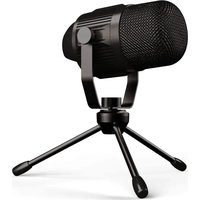
| Product Type | Dynamic Microphone |
| Dimensions (approx.) | 180 x 50 x 50 mm (L x W x D) |
| Weight (approx.) | 300 g |
| Power Source | Passive (no battery required) |
| Polar Pattern | Cardioid |
| Frequency Response | 50 Hz – 15 kHz |
| Impedance | 600 Ω |
| Connector | XLR (3-pin) |
| Main Functions | Live vocals, public speaking, podcasting |
| Maintenance | Wipe with dry cloth; avoid liquids |
| Safety Precautions | Keep away from moisture and extreme temperatures |
| Spare Parts & Repairability | No user-serviceable parts; contact support |
| General Info | Brand: Majority, Model: RS Pro, Category: Microphone |
Frequently Asked Questions - RS Pro Majority
How do I connect the RS Pro microphone to a mixer or audio interface?
Use a standard XLR male-to-XLR female cable. Connect the microphone's XLR output to the mic input of your mixer or interface. No phantom power is required as it's a dynamic microphone.
Is the RS Pro microphone suitable for recording instruments?
Yes, it can be used for recording amplified instruments like guitar amps or drums, but its cardioid pattern is optimized for vocals. For best results, position it close to the sound source.
Does the RS Pro microphone require batteries or phantom power?
No, it is a dynamic microphone that operates passively. It does not need batteries or phantom power.
How do I clean the RS Pro microphone?
Wipe the exterior gently with a dry, lint-free cloth. Do not use any liquids or cleaning agents. The grille can be unscrewed for deeper cleaning if needed.
What is the pickup pattern of the Majority RS Pro?
It features a cardioid polar pattern, which picks up sound primarily from the front and rejects noise from the sides and rear. This reduces feedback and background noise.
Can I use the RS Pro with a smartphone or computer?
It is designed for professional XLR inputs. To use with a smartphone or computer, you will need an XLR-to-USB audio interface or a compatible adapter.
What is the frequency response of the RS Pro microphone?
The frequency response is 50 Hz to 15 kHz, providing a clear and natural sound suitable for speech and vocal performances.
Is the RS Pro microphone durable?
Yes, it features a rugged metal construction designed to withstand the demands of live use. However, avoid dropping it or exposing it to moisture.
What accessories are included with the Majority RS Pro?
Typically, the package includes the microphone, a microphone clip, and a carrying pouch. Check the product listing for exact contents.
How can I troubleshoot low output volume from the RS Pro?
Ensure your XLR cable is fully connected and not damaged. Check that the mixer or interface input gain is turned up. The dynamic microphone has a lower output than condenser mics, so you may need more gain.
User questions about RS Pro Majority
0 question about this device. Answer the ones you know or ask your own.
Ask a new question about this device
No questions yet. Be the first to ask one.
Download the instructions for your Microphone in PDF format for free! Find your manual RS Pro - Majority and take your electronic device back in hand. On this page are published all the documents necessary for the use of your device. RS Pro by Majority.
USER MANUAL RS Pro Majority
Manual assistant
Powered by Anthropic
Waiting for your message
Product information
Brand : Majority
Model : RS Pro
Category : Microphone