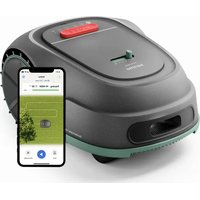
RSL3000 - Lawn mower PHILIPS - Free user manual and instructions
Find the device manual for free RSL3000 PHILIPS in PDF.


| Product type | Robot lawn mower |
| Brand | Philips |
| Model | RSL3000 |
| Use | Outdoor domestic use |
| Mower weight | 10 kg |
| Base weight | 2.46 kg |
| Battery type | Rechargeable Li-ion 18 V, 4700 mAh |
| Battery life | Not specified, but full charge recommended before storage |
| Charging time | Not specified |
| Cutting modes | Orderly cutting and random cutting |
| Rain detection | Yes |
| Obstacle detection | Yes, with stop, reverse, and turn |
| Guidance | Boundary wire and GPS |
| Height sensors | Three sensors to avoid height differences |
| Control | Mobile app |
| Safety | STOP button, PIN code, automatic stop when lifted |
| Sound level | 60.81 dB (A) with uncertainty K = 3.45 dB(A) |
| Blades | Replacement recommended every 1 to 3 months, use original blades and screws |
| Cleaning | Cutting head and casing washable with water; do not use high-pressure cleaner |
| Charging temperature | 6 °C to 40 °C |
| Storage temperature | 0 °C to 45 °C |
| Warranty | 2 years by Versuni |
| Support | www.philips.com/support |
Frequently Asked Questions - RSL3000 PHILIPS
User questions about RSL3000 PHILIPS
0 question about this device. Answer the ones you know or ask your own.
Ask a new question about this device
Download the instructions for your Lawn mower in PDF format for free! Find your manual RSL3000 - PHILIPS and take your electronic device back in hand. On this page are published all the documents necessary for the use of your device. RSL3000 by PHILIPS.
USER MANUAL RSL3000 PHILIPS
natural_image
Black circular warning symbol with a white exclamation mark (no text or numbers)
natural_image
Icon of a person reading a book inside a black circle (no text or symbols)1
2
3
4
5
6
7
natural_image
Hand holding a mechanical component, possibly a tool or device, with no visible text or symbols.8
natural_image
Architectural sketch of a building facade with an arrow indicating a structural detail (no text or symbols present)9
English 6
Dansk 11
Deutsch 16
Español 21
Français 26
Italiano 31
Nederlands 36
Norsk 41
Polski 46
Svenska 51
Български 56
Introduction
Congratulations on your purchase and welcome to Philips! To fully benefit from the support that Philips offers, register your product at www.philips.com/welcome.
Important
Read the separate important information leaflet and the user manual carefully before you use the appliance. Save both documents for future reference.
Philips Garden Care Robot Lawn Mower 3000 Series is a robotic lawn mower. It knows when it needs to go to its base station, can sense when it is raining, can stop itself when it senses a problem and knows to stop, draw back, and turn around when it bumps into something blocking its path. The boundary wire and GPS control the movement of the mower within the working area. The front of the mower always passes the boundary wire by a specific distance before it turns around when the mower approaches the boundary wire. It has two movement modes: orderly cutting and random cutting, users can choose from on the app.
This appliance is intended for domestic lawn mowing. Do not operate the mower indoors. Do not use the mower for any other purpose because of the increased risk of accidents and damage to the mower. Never attempt to modify the mower in any way since this may result in accidents or damage to the mower.
This appliance has been designed for domestic use only. Any commercial use, inappropriate use or failure to comply with the instructions, the manufacturer accepts no responsibility and the guarantee will not apply.
Danger
- Do NOT immerse the robot or the station in water or any other liquid.
- Do NOT use the robot in places where there is a risk of immersion in water or other liquids.
- DO NOT operate the mower in bad weather, such as thunderstorms, or snow.
- Do NOT charge the mower with third-party charger.
- Do NOT flip over the mower when it's running.
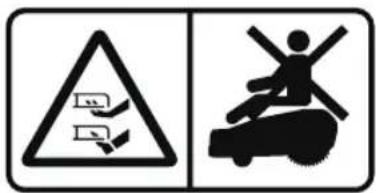
- Do NOT put your feet / hands under the mower when it's running.
- Do NOT push/pull the mower when it's running.
- Do NOT disassemble any parts when it's powered.
- Do NOT touch moving hazardous parts before these have come to a complete stop.
- Do NOT use hands to touch the charging ports.
- Do NOT run the mower through flooded areas on the lawn.
- Do NOT run mower on ground or lawn with stones or stick like debris.
- DO NOT allow children to get close to or play with the mower when it is in use.
- DO NOT allow children, persons with reduced physical, sensory or mental capabilities or lack of experience and knowledge or people unfamiliar with these instructions to use the machine.
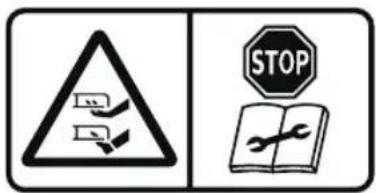
- Unplug the power supply and turn off the mower before you clear a blockage, do maintenance or examine the product, and if it starts to vibrate abnormally. Examine the product for damage before you start the product again. Do not use the product if it is damaged.
- Do not use the product if the STOP button does not work.
- Do not lift the product when it is parked in the station. It can damage the station and/or the product. Turn off the mower and pull the mower out of the station before lifting it (Mower 10kg/Station 2.46kg).
- Do not touch the blades during charging or running. Keep your hands and feet away from the rotating blades.
Warning
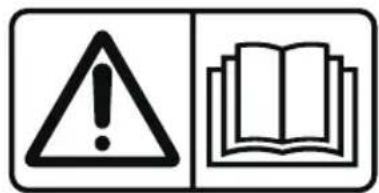
- WARNING: Read user instructions before operating the machine (Fig. 1).
English 7
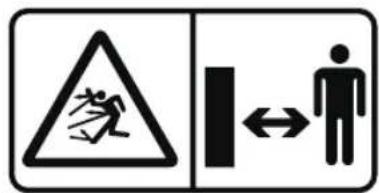
- WARNING: Keep a safe distance from the machine when operating (Fig. 2).
- WARNING: Operate the disabling device before working on or lifting the machine (The disabling device hereby refers to the PIN code. Make sure the mower is locked by the PIN code before lifting or operating) (Fig. 3).
- WARNING: Do not ride on the machine (Fig. 4).
- Unplug the power supply and turn off the mower before checking, cleaning or working on the robot or base station.
- The robot must be turned off before lifting it.
- Do not use electric screwdrivers.
- Do not use a high-pressure washer to clean the product.
- Please hold the blade disc and wear gloves when changing blades.
- Always wear substantial footwear and long trousers while operating the product.
- After the mower has struck a foreign object, if you need to check the mower for damage, make sure that the mower is turned off and that the power cord is not connected.
- Please use the machine within the recommended working area, and please read the instructions carefully during installation.
- Before powering on the working base station, check whether the voltage indicated on the adapter corresponds to the local power supply voltage.
- Do not overreach and to keep the balance at all times, to always be sure of the footing on slopes and to walk, never run while operating the machine or its peripherals.
- Connect the machine and/or its peripherals only to a supply circuit protected by a residual current device (RCD) with a tripping current of not more than 30 mA.
- Please keep extension cords away from moving hazardous parts to avoid damage to the cords which can lead to contact with live parts.
- Do not put power supply and extension cord in the work area. This can cause damage to the cables.
- Do not place the base station too close to a slope, such as at the top of a hill or the bottom of a furrow.
- If the power cord is damaged, you must have it replaced by Philips, a Philips authorized service center or a similarly qualified person to avoid danger.
- Before cleaning or servicing the equipment, the power supply must be disconnected from the base station and turn off the mower.
- Do not use the robot if the base station or the robot itself is damaged or incomplete.
- Make sure the base station is clean, dry, and away from heat (such as radiators).
- Please clear the lawn of any debris, toys and animal litter before operation on.
- Keep the device and its cord out of the reach of children under 8 years old.
- Do not allow the robot to work on other electrical appliances or cables as this may cause danger.
- Stop the robot if a dangerous situation occurs or if the robot behaves abnormally or gives off an abnormal smell.
- If an accident or breakdown occurs when the mower is running, please press the STOP button immediately.
- To prevent damage, do not use the robot if there are no blades in the cutterhead or they are not installed correctly in the cutterhead.
- Keep a safe distance and be careful of splashing objects.
- Do not cover the robot or block the ventilation openings while the robot is being cleaned or charged. This may cause the robot to overheat.
- Do not store the robot at temperatures of +45 °C or below 0 °C.
- Do not incinerate batteries. Rechargeable batteries may explode if overheated.
- Always return the appliance to an authorized Philips service center for examination or repair. Repair by unqualified persons could cause an extremely hazardous situation for the user.
8 English
Caution
- The robot has several sensors in its bottom. It uses these sensors to detect and avoid height differences.
- Do not use robots to clean hard or sharp objects (such as decorative waste, glass and nails).
- Be aware that the robot moves on its own. Take care when walking in the area that the robot is operating in to avoid stepping on it.
- Measured sound power noise level, 60.81 dB (A). Noise emissions uncertainties, K=3.45 dB (A).
- The weight of the mower is 10 kg and the base station is 2.46 kg.
- Do not put any tape or stickers over the sensors and make sure you clean the sensors regularly.
- Make sure the robot is turned off when being transported and kept in its original packaging, if possible.
- Never use scouring pads, abrasive cleaning agents or aggressive liquids such as petrol or acetone to clean the appliance.
- Do not touch the mains plug with wet hands.
- Only use the station supplied to charge the appliance.
- Unplug the station if you are not going to use the robot for some time.
- Please unplug the power to disconnect the machine or its peripherals from the mains, if the cord becomes damaged or entangled during use.
- If placing the robot into storage, charge it fully and turn it off before placing it in a cool dry place. Recharge it at least every three months to prevent the battery from discharging.
- The cutterhead and robot shell can be cleaned with water.
- We recommend that you replace the blades 1-3 months depending on their condition. Replace all blades and screws at the same time. Only use the right type of screws and original blades as approved by Philips. When replacing the blade, make sure that the mower completely stopped and remove the battery temporarily. We recommend that you wear heavy work gloves in case of sharp blades.
- Warning signs must be placed around the work area of the product if it operates in public areas. The signs must have the text that follows: Warning! Automatic lawn mower! Keep away from the machine! Supervise children!
Battery safety instruction
- Only use this product for its intended purpose and follow the general and battery safety instructions as described in this user manual. Any misuse can cause electric shock, burns, fire and other hazards or injuries.
- Only charge the robot with the station supplied. The corresponding appliance number can be found at the station.
- Only charge the mower with the power supply supplied.
- Only use the rechargeable battery installed in the robot. Only use the 18V Li-ion rechargeable battery INR18650-25T, with the maximum rechargeable battery capacity is 4700mAh. The corresponding battery number can be found on the battery.
- WARNING: For the purposes of recharging the battery, only use the detachable supply unit provided with this appliance.
- Charge the robot at a temperature between 6 °C and 40 °C.
- Do not expose the device to high temperatures (near hot stoves, in microwave ovens or on induction cookers). Batteries may explode if overheated.
- If the product becomes abnormally hot or smelly, changes color or if charging takes longer than usual, stop using and charging the product and contact Philips.
- Do not place products and their batteries in microwave ovens or on induction cookers.
- When you handle batteries, make sure that your hands, the product and the batteries are dry.
-
Do not wipe the charging contacts with wet cloth or wet hands.
-
To prevent batteries from heating up or releasing toxic or hazardous substances, do not modify, pierce or damage products and batteries and do not disassemble, short-circuit, overcharge or reverse charge batteries.
- To avoid accidental short-circuiting of batteries after removal, do not let battery terminals come into contact with metal objects (e.g. coins, hairpins, rings). Do not wrap batteries in aluminum foil. Tape battery terminals or put batteries in a plastic bag before you discard them.
- This product contains a rechargeable battery. This appliance contains batteries that are only replaceable by skilled persons.
- Do not recharge non-rechargeable batteries.
- If batteries are damaged or leaking, avoid contact with the skin or eyes. If this occurs, immediately rinse well with water and seek medical care.
Recycling
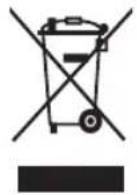
- This symbol means that this product shall not be disposed of with normal household waste (2012/19/EU) (Fig. 5).
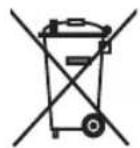
- This symbol means that this product contains a built-in rechargeable battery which shall not be disposed of with normal household waste (2006/66/EC) (Fig. 6).
- Follow the instructions in section 'Removing the rechargeable battery' to remove the battery.
- Follow your country's rules for the separate collection of electrical and electronic products and rechargeable batteries. Correct disposal helps prevent negative consequences for the environment and human health.
Electromagnetic fields (EMF)
This appliance complies with the applicable standards and regulations regarding exposure to electromagnetic fields.
Removing the rechargeable battery
To remove the rechargeable battery, follow the instructions below. You can also take the robot to a Philips service center to have the rechargeable battery removed. Contact the Philips Consumer Care Center in your country for the address of a service center near you.
Take any necessary safety precautions when you handle tools to open the product and when you dispose of the rechargeable battery.
Warning: Before you remove the battery, make sure that the mower is disconnected from the station, the base station is disconnected from the power supply and that the battery is completely empty. Wear protective gloves.
1 Start the mower from a place somewhere in the garden and not from the base station
2 Let the mower run until the rechargeable battery is empty to make sure that the rechargeable battery is completely discharged before you remove it and dispose of it.
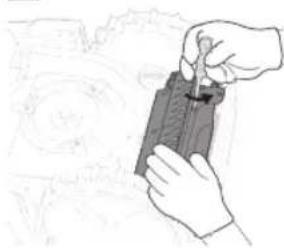
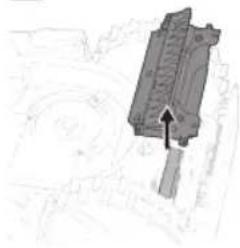
3 Undo the screws of the battery compartment lid (Fig. 7) and remove the lid (Fig. 8).
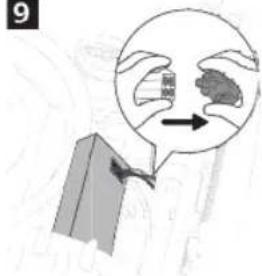
4 Lift out the rechargeable battery and disconnect it by pressing the little clip on the battery connector to release the battery connector (Fig. 9).
5 Take the rechargeable battery to a collection point for electrical and electronic waste.
Ordering accessories
To buy accessories or spare parts, visit www.philips.com or go to your Philips dealer. You can also contact the Philips Consumer Care Center in your country (see the international warranty leaflet for contact details).
Warranty and support
Versuni offers a two-year warranty after purchase on this product. This warranty is not valid if a defect is due to incorrect use or poor maintenance. Our warranty does not affect your rights under law as a consumer. For more information or for invoking the warranty, please visit our website www.philips.com/support.
Your robot mower has been designed and developed with the greatest possible care. In the unfortunate case that your robot needs repair, the Consumer Care Centre in your country will help you by arranging any necessary repairs in the shortest possible time and with maximum convenience. If there is no Consumer Care Centre in your country, go to your local Philips dealer.
Indledning
- This symbol means that this product shall not be disposed of with normal household waste (2012/19/EU) (Fig. 5).
- This symbol means that this product contains a built-in rechargeable battery which shall not be disposed of with normal household waste (2006/66/EC) (Fig. 6).
- Follow the instructions in section 'Removing the rechargeable battery' to remove the battery.
- Follow your country's rules for the separate collection of electrical and electronic products and rechargeable batteries. Correct disposal helps prevent negative consequences for the environment and human health.
Elektromagnetiske felter (EMF)
- This symbol means that this product shall not be disposed of with normal household waste (2012/19/EU) (Fig. 5).
- This symbol means that this product contains a built-in rechargeable battery which shall not be disposed of with normal household waste (2006/66/EC) (Fig. 6).
- Follow the instructions in section 'Removing the rechargeable battery' to remove the battery.
- Follow your country's rules for the separate collection of electrical and electronic products and rechargeable batteries. Correct disposal helps prevent negative consequences for the environment and human health.
- This symbol means that this product shall not be disposed of with normal household waste (2012/19/EU) (Fig. 5).
- This symbol means that this product contains a built-in rechargeable battery which shall not be disposed of with normal household waste (2006/66/EC) (Fig. 6).
- Follow the instructions in section 'Removing the rechargeable battery' to remove the battery.
- Follow your country's rules for the separate collection of electrical and electronic products and rechargeable batteries. Correct disposal helps prevent negative consequences for the environment and human health.
Campos electromagnéticos (CEM)
- This symbol means that this product shall not be disposed of with normal household waste (2012/19/EU) (Fig. 5).
- This symbol means that this product contains a built-in rechargeable battery which shall not be disposed of with normal household waste (2006/66/EC) (Fig. 6).
- Follow the instructions in section 'Removing the rechargeable battery' to remove the battery.
- Follow your country's rules for the separate collection of electrical and electronic products and rechargeable batteries. Correct disposal helps prevent negative consequences for the environment and human health.
- This symbol means that this product shall not be disposed of with normal household waste (2012/19/EU) (Fig. 5).
- This symbol means that this product contains a built-in rechargeable battery which shall not be disposed of with normal household waste (2006/66/EC) (Fig. 6).
- Follow the instructions in section 'Removing the rechargeable battery' to remove the battery.
- Follow your country's rules for the separate collection of electrical and electronic products and rechargeable batteries. Correct disposal helps prevent negative consequences for the environment and human health.
- This symbol means that this product shall not be disposed of with normal household waste (2012/19/EU) (Fig. 5).
- This symbol means that this product contains a built-in rechargeable battery which shall not be disposed of with normal household waste (2006/66/EC) (Fig. 6).
- Follow the instructions in section 'Removing the rechargeable battery' to remove the battery.
- Follow your country's rules for the separate collection of electrical and electronic products and rechargeable batteries. Correct disposal helps prevent negative consequences for the environment and human health.
- This symbol means that this product shall not be disposed of with normal household waste (2012/19/EU) (Fig. 5).
- This symbol means that this product contains a built-in rechargeable battery which shall not be disposed of with normal household waste (2006/66/EC) (Fig. 6).
- Follow the instructions in section 'Removing the rechargeable battery' to remove the battery.
- Follow your country's rules for the separate collection of electrical and electronic products and rechargeable batteries. Correct disposal helps prevent negative consequences for the environment and human health.
- This symbol means that this product shall not be disposed of with normal household waste (2012/19/EU) (Fig. 5).
- This symbol means that this product contains a built-in rechargeable battery which shall not be disposed of with normal household waste (2006/66/EC) (Fig. 6).
- Follow the instructions in section 'Removing the rechargeable battery' to remove the battery.
- Follow your country's rules for the separate collection of electrical and electronic products and rechargeable batteries. Correct disposal helps prevent negative consequences for the environment and human health.
- This symbol means that this product shall not be disposed of with normal household waste (2012/19/EU) (Fig. 5).
- This symbol means that this product contains a built-in rechargeable battery which shall not be disposed of with normal household waste (2006/66/EC) (Fig. 6).
- Follow the instructions in section 'Removing the rechargeable battery' to remove the battery.
- Follow your country's rules for the separate collection of electrical and electronic products and rechargeable batteries. Correct disposal helps prevent negative consequences for the environment and human health.
- This symbol means that this product shall not be disposed of with normal household waste (2012/19/EU) (Fig. 5).
- This symbol means that this product contains a built-in rechargeable battery which shall not be disposed of with normal household waste (2006/66/EC) (Fig. 6).
- Follow the instructions in section 'Removing the rechargeable battery' to remove the battery.
- Follow your country's rules for the separate collection of electrical and electronic products and rechargeable batteries. Correct disposal helps prevent negative consequences for the environment and human health.
PHILIPS and the Philips Shield Emblem are registered trademarks of Koninklijke Philips N.V. and are used under license.
This product has been manufactured by and is sold under the responsibility of Versuni Holding B.V., and Versuni Holding B.V. is the warrantor in relation to this product.
2024 © Versuni Holding B.V.
642001011507 (04/2024)