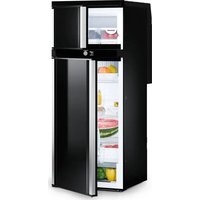
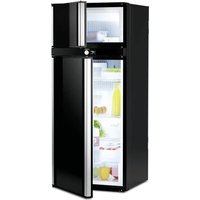
USER MANUAL RCD 10.5XET DOMETIC
RCD10.5ES, RCD10.5XES, RCD10.5ET, RCD10.5XET
EN Compressor refrigerator
Operating manual....10
© 2023 Dometic Group. The visual appearance of the contents of this manual is protected by copyright and design law. The underlying technical design and the products contained herein may be protected by design, patent or be patent pending. The trademarks mentioned in this manual belong to Dometic Sweden AB. All rights are reserved.
NOTICE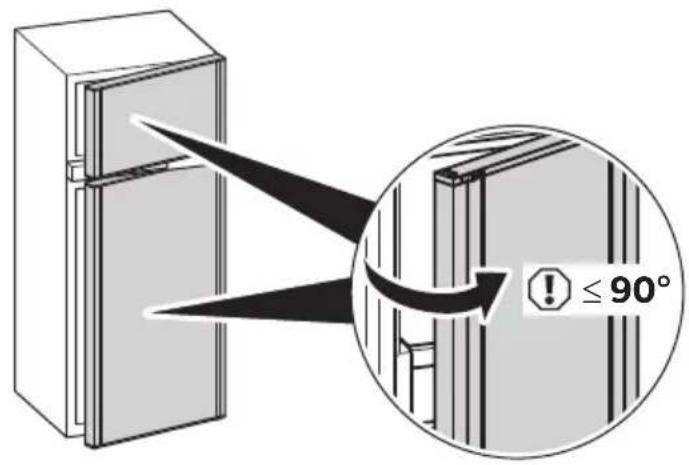
![graph TD A["User mode"] --> B["Settings"] B --> C["Performance"] C --> D["Quiet"] D --> E["Boost"] E --> F["User mode"] F --> G["Settings"] G --> H["Performance"] H --> I["Quiet"] I --> J["Boost"] J --> K["User mode"] K --> L["Settings"] L --> M["Performance"] M --> N["Quiet"] N --> O["Boost"] O -->…](/content/2026/04/704625/images/2c44c5c8424bb4814b0b820704fc1d66ccd98903e646a7944e82af5fe671ea2f.jpg)
7
10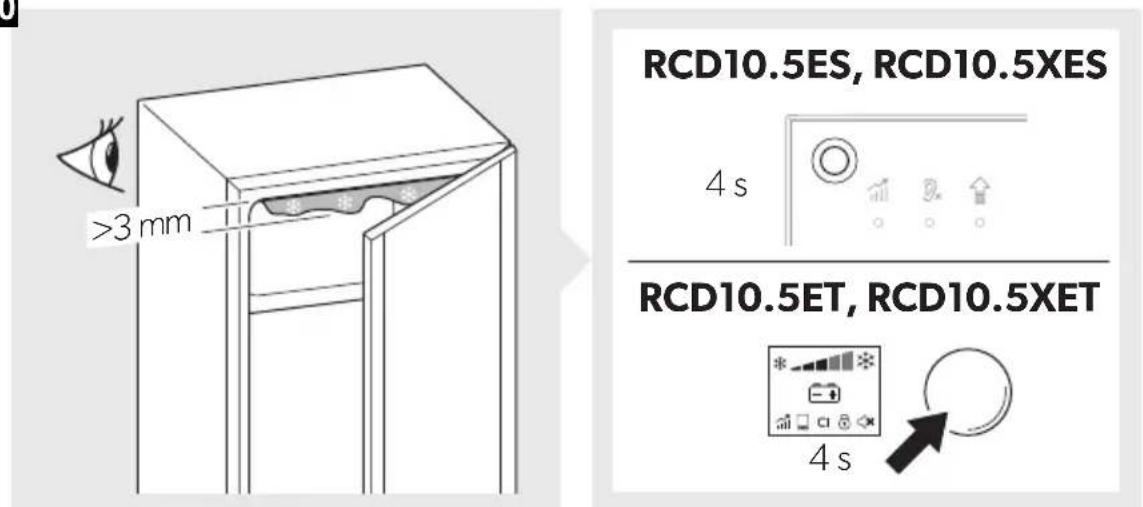
Please read these instructions carefully and follow all instructions, guidelines, and warnings included in this product manual in order to ensure that you install, use, and maintain the product properly at all times. These instructions MUST stay with this product.
By using the product, you hereby confirm that you have read all instructions, guidelines, and warnings carefully and that you understand and agree to abide by the terms and conditions as set forth herein. You agree to use this product only for the intended purpose and application and in accordance with the instructions, guidelines, and warnings as set forth in this product manual as well as in accordance with all applicable laws and regulations. A failure to read and follow the instructions and warnings set forth herein may result in an injury to yourself and others, damage to your product or damage to other property in the vicinity. This product manual, including the instructions, guidelines, and warnings, and related documentation, may be subject to changes and updates. For up-to-date product information, please visit dometic.com.
Contents
1 Explanation of symbols....10 2 Safety instructions....11 3 Intended use....15 4 Technical description ....16 5 Using the refrigerator....19 6 Storing the refrigerator 23 7 Troubleshooting 23 8 Cleaning and maintenance.... 26 9 Warranty 28 10 Disposal.... 28 11 Technical data 29
1 Explanation of symbols

WARNING!
Safety instruction: Indicates a hazardous situation that, if not avoided, could result in death or serious injury.

CAUTION!
Safety instruction: Indicates a hazardous situation that, if not avoided, could result in minor or moderate injury.

Indicates a situation that, if not avoided, can result in property damage.

NOTE
Supplementary information for operating the product.
2 Safety instructions
2.1 General safety

WARNING! Failure to obey these warnings could result in death or serious injury.
Electrocution hazard
- Installation and removal of the refrigerator may only be carried out by qualified personnel.
- Do not operate the refrigerator if it is visibly damaged.
- This refrigerator may only be repaired by qualified personnel. Improper repairs can result in considerable danger or damage to the refrigerator.
- If the power cable for this refrigerator is damaged, it must be replaced by the manufacturer, customer service or a similarly qualified person in order to prevent safety hazards.
- When positioning the refrigerator, ensure the supply cord is not trapped or damaged.
- Do not locate multiple portable socket-outlets or portable power supplies at the rear of the refrigerator.
- Plug the device to sockets that ensure proper connection especially when the device needs to be earthed.
Fire hazard
The refrigerant in the refrigerant circuit is highly flammable. In the event of a leak, combustible gases could build up if the appliance is in a small room.
In the event of any damage to the refrigerant circuit:
- Keep naked flames and potential ignition sources away from the refrigerator.
- Ventilate the room well.
- Switch off the refrigerator.
For refrigerators with R600a refrigerant:
- The refrigeration circuit contains a small quantity of an environmentally friendly but flammable refrigerant. It does not damage the ozone layer and does not increase the greenhouse effect. Any leaking refrigerant may ignite.
- Do not use or store the refrigerator in confined spaces with none or minimal air flow.
- Keep the installation recess for the refrigerator free of any electrical components and luminaires which during normal or abnormal operation produce sparks or arcs (i.e. relays or fuse boxes).
Explosion hazard
- Do not spray aerosols in the vicinity of this refrigerator while it is in operation.
- Do not store any explosive substances, such as aerosol cans with propellants, in the refrigerator.
Health hazard
- This refrigerator can be used by children aged from 8 years and above and persons with reduced physical, sensory or mental capabilities or lack of experience and knowledge if they have been given supervision or instruction concerning use of the refrigerator in a safe way and understand the hazards involved.
- Children aged from 3 to 8 years are allowed to load and unload the refrigerator.
- Cleaning and user maintenance may not be carried out by unsupervised children.
- Children must be supervised to ensure that they do not play with the refrigerator.
Risk of child entrapment
- Ensure that the shelves are mounted and secured so that children cannot lock themselves in the refrigerator.
- Before disposing of your old refrigerator:
- Dismantle the drawers.
- Leave the shelves in the refrigerator so that children cannot climb inside.
- Take off the doors.

CAUTION! Failure to obey these cautions could result in minor or moderate injury.
Health hazard
- To avoid a hazard due to instability of the refrigerator, it must be fixed in accordance with the installation instructions.
- Keep ventilation openings, on the refrigerator and in its enclosure or in the built-in structure, clear of obstruction.
- Do not use mechanical devices or other means to accelerate the defrosting process, other than those recommended by the manufacturer.
- Do not open or damage the refrigerant circuit under any circumstances.
- Do not use electrical devices inside the refrigerator unless they are recommended by the manufacturer for that purpose.
Risk of injury
- Do not use or store flammable materials in or near this refrigerator.
- Do not place articles on or against this refrigerator.
- Do not modify this refrigerator.

NOTICE! Damage hazard
- Check that the voltage specification on the data plate is the same as that of the power supply.
- Do not place the refrigerator near heat sources (heaters, direct sunlight, gas ovens, etc.).
- Keep the condensate drain clean at all times.
- Do not use a high-pressure cleaner near the ventilation grille when cleaning the vehicle.
- The refrigerator may not be exposed to rain.
2.2 Safety when operating

CAUTION! Failure to obey these cautions could result in minor or moderate injury.
Health hazard
- Ensure to put only items in the refrigerator which may be chilled at the selected temperature.
- Food may only be stored in its original packaging or in suitable containers.
- Opening the door for long periods can cause a significant increase in the temperature of the refrigerator compartments.
- Clean regularly surfaces that can come into contact with food and accessible drainage systems.
- Store raw meat and fish in suitable containers in the refrigerator, so that they do not come into contact with or drip onto other food.
- If the refrigerator is left empty for long periods:
- Switch off the refrigerator.
- Defrost the refrigerator. – Clean and dry the refrigerator.
- Leave the door open to prevent mold from developing inside the refrigerator.
Risk of injury
- Do not put your fingers into the hinge.
- Close and latch the refrigerator door before beginning a journey.
- The cooling system at the back of the refrigerator becomes very hot during operation. Protect yourself from coming into contact with hot parts when removing ventilation grilles.

NOTICE! Damage hazard
- Do not lean on the open refrigerator door.
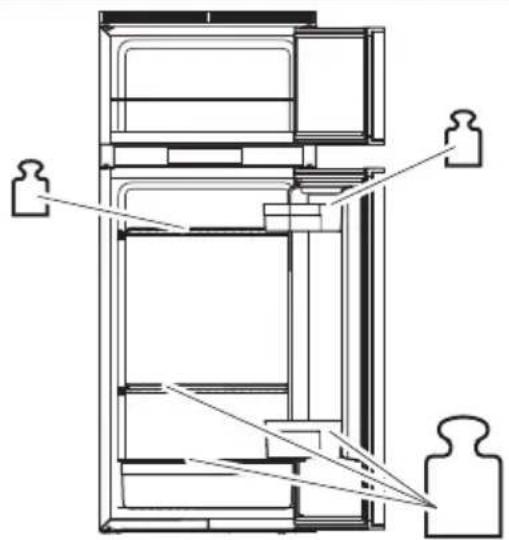
- Store heavy objects such as bottles or cans only in the refrigerator door, in the vegetable compartment, or on the bottom shelf.
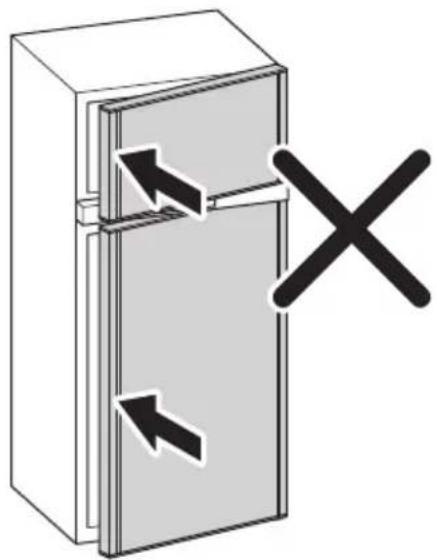
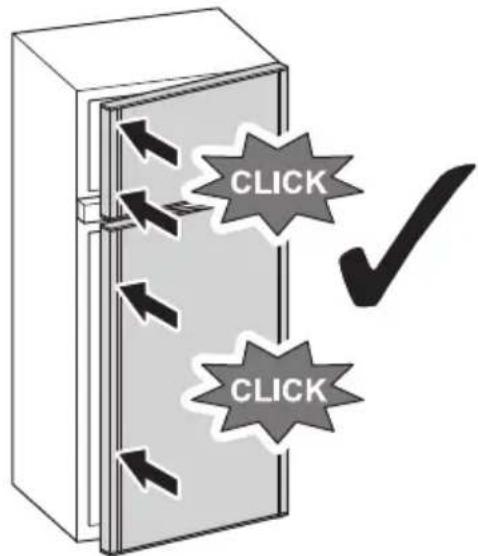
- If the refrigerator has a double-sided door and the door is not locked correctly on the opposite side, push on that side at the top and the bottom until it locks in place.
- Ensure that the ventilation openings are not covered.
• Danger of overheating!
Always ensure sufficient ventilation so that the heat generated during operation can dissipate. Ensure that the refrigerator is sufficiently far away from walls and other objects so that the air can circulate.
- Do not fill the interior with ice or fluid.
- Protect the refrigerator and the cable against heat and moisture.

NOTE
- If the battery management of your vehicle shuts down the refrigerator to protect the battery, contact your vehicle manufacturer.
- Put the refrigerator door and the freezer door into the winter position if the refrigerator will not be used for a longer period of time. This prevents mold from forming.
- For ambient temperatures of +15 °C to +25 °C select the average temperature setting.
- To avoid food waste, note the following:
- Keep temperature fluctuation as low as possible. Only open the freezer as often and for as long as necessary. Store the foodstuff in such a way that the air can still circulate well.
- If the temperature can be adjusted: Adjust the temperature to the quantity and type of the foodstuff.
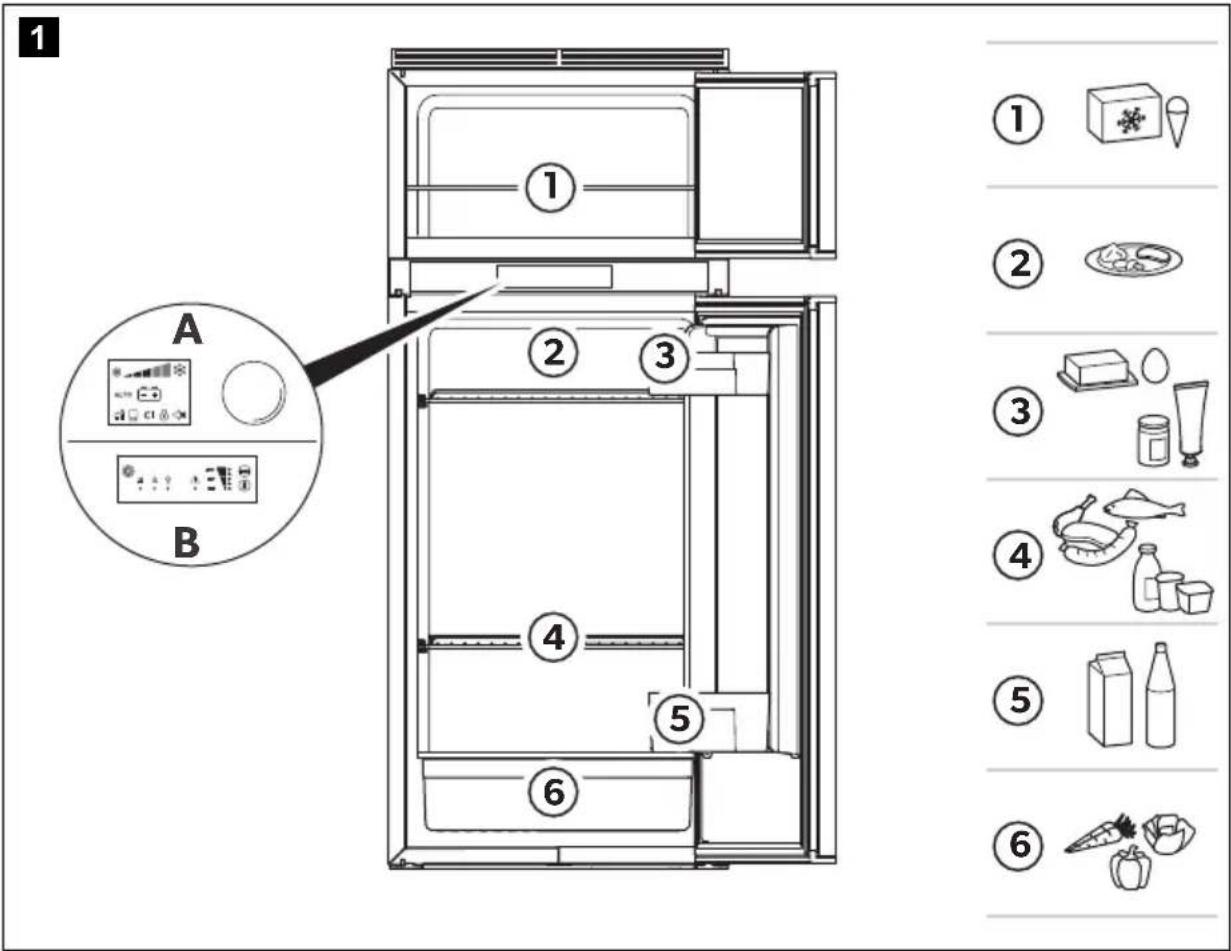
- Store the different foodstuff types as shown in the figures.
- Foodstuff can easily absorb or release odor or taste. Always store foodstuff covered or in closed containers/bottles.
2.3 Safety when operating with DC power

NOTICE! Damage hazard
- Only select operation with DC power supply if the vehicle engine is running and providing sufficient voltage to the light system, or if you are using a battery monitor.
3 Intended use
The refrigerator is suitable for:
• Installation in caravans and motor homes • Cooling, deep-freezing and storing food
The refrigerator is not suitable for:
- Storing medications
- Storing corrosive substances or substances that contain solvents
- Quick-freezing food
The refrigerator is intended for installation in a piece of cabinetry or an installation niche.
This refrigerator is not intended to be used in household applications.
The frozen compartment is suitable for storing pre-frozen food, storing or making ice cream and making ice cubes. It is not suitable for freezing previously unfrozen food.
This product is only suitable for the intended purpose and application in accordance with these instructions.
This manual provides information that is necessary for proper installation and/or operation of the product. Poor installation and/or improper operating or maintenance will result in unsatisfactory performance and a possible failure.
The manufacturer accepts no liability for any injury or damage to the product resulting from:
- Incorrect assembly or connection, including excess voltage
- Incorrect maintenance or use of spare parts other than original spare parts provided by the manufacturer • Alterations to the product without express permission from the manufacturer
- Use for purposes other than those described in this manual
Dometic reserves the right to change product appearance and product specifications.
4 Technical description
The refrigerator is a compressor refrigerator and is designed for operation on a 12 V---power supply.

NOTE
To safely operate 12 V consumer units in the caravan while driving, it must be ensured that the towing vehicle provides sufficient voltage. On some vehicles, the battery management system may automatically switch off the consumer units to protect the battery. Ask your vehicle manufacturer for more information.
4.1 Operating and display elements
RCD10.5ET, RCD10.5XET
The TFT display features the following operating and display elements (fig. 1 A, page 4):
| Symbol Description |
| * - + * | Temperature setting indicator |
| Blue snowflake: compressor is running |
| White snowflake: compressor is not running |
| Operation with DC power |
| Warning indication with error code |
| User mode | User mode: |
| PERFORMANCE modeAll thermostat settings selectableCompressor operates in high rpm mode defined by level settings in which the compressors runs in different speedsExternal ventilation fan operates in high rpm mode |
| QUIET modeThermostat settings 1, 2 and 3 are selectableCompressor operates in low rpm modeExternal ventilation fan operates in low rpm mode |
| BOOST modeThermostat settings fixed on maximumCompressor operates in high rpm modeExternal ventilation fan operates in the highest rpm mode |
| Settings | SettingsFrame heaterSymbol lights up when the frame heater is operating.The frame heater of the frozen compartment reduces condensation. |
| Symbol lights up when the refrigerator is connected to the CI bus. |
| Symbol lights up when child lock is enabled:Push the rotary button 3 times within 1,5 seconds to unlock the controls.After 10 seconds of inactivity the controls will lock again automatically. |
| Beep off:Error messages, warning messages and door left open for an extended period are not signalled acoustically. |
| Confirm selection and return to the main menu |
RCD10.5ES, RCD10.5XES
The LED display features the following operating and display elements (fig. 1 B, page 4):
| Symbol Description |
| 1 | ON/OFF button |
| PERFORMANCE modeAll thermostat settings selectableCompressor operates in high rpm mode defined by level settings in which the compressors runs in different speedsExternal ventilation fan operates in high rpm mode |
| QUIET modeThermostat settings 1, 2 and 3 are selectableCompressor operates in low rpm modeExternal ventilation fan operates in low rpm mode |
| BOOST modeThermostat settings fixed on maximumCompressor operates in high rpm modeExternal ventilation fan operates in the highest rpm mode |
| Error warning |
| Temperature indicator |
| Mode selection button |
| Temperature selection button |
5 Using the refrigerator
5.1 Before first use
- Before starting your new refrigerator for the first time, clean it inside and outside with a damp cloth for hygienic reasons.
- When using the refrigerator for the first time, there may be a mild odour which will disappear after a few hours. Air out the living space well.
▶ Do not store goods in the refrigerator for the first 4 hours after start-up.
▶ Protect the interior of the vehicle from warming up excessively (e.g. sunshades in the windows, air conditioner).
▶ Protect the refrigerator from direct sunlight (e.g. sunshades in the windows).
5.2 Notes on storing food

CAUTION! Health hazard
If the refrigerator is exposed to a room temperature of below +10 °C for an extended period of time, a uniform temperature cannot be guaranteed in the frozen compartment. This can lead to an increase of the frozen compartment temperature and the goods stored in it may defrost.

NOTICE! Damage hazard
- The maximum weight per door shelf is 3 kg. The maximum weight for the entire door is 7.5 kg.
- Do not keep carbonated drinks in the frozen compartment.
The cooling capacity can be affected by:
– the ambient temperature (e.g., when the vehicle is exposed to direct sunlight) – the amount of food to be refrigerated – how often you open the door
Park the vehicle so that it is level, especially when starting up and filling the refrigerator before setting off on a journey.
Store food as shown (fig. 1, page 4).
5.3 Saving energy
- Only open the refrigerator as often and for as long as necessary.
- Allow warm food to cool down first before placing it in the device to keep cool.
- Defrost your refrigerator as soon as a layer of ice forms.
- Avoid unnecessarily low temperature settings.
- For optimal energy consumption, position the shelves and drawers according to their position on delivery.
- On a regularly basis, make sure the door seal still fits properly.
- Clean dust and dirt from the condenser at regular intervals.
5.4 Operating the refrigerator

NOTE
- When setting the QUIET mode or BOOST mode, the refrigerator returns after 8 hours automatically to PERFORMANCE mode, using the same configuration as set before changing to QUIET or BOOST mode.
- For ambient temperatures of +15 °C to +25 °C, select the average temperature setting.
Operating modes
| Symbol Explanation |
| PERFORMANCE mode:Standard modeSelection of all temperature levels (1 to 5) |
| QUIET mode:Decreased fan and compressor speed with reduced noise, e.g. if the user wants to relax or sleepSelection of three temperature levels (1 to 3) |
| BOOST mode:Maximum performance, e.g. for an immediate cool down or after a larger amount of uncooled foodstuff has been put in the refrigeratorNo selection of temperature levels |
RCD10.5ET, RCD10.5XET
To switch on the refrigerator:
Press the control knob for 2 seconds. The refrigerator starts with the most recent settings.
- Press the control knob to activate the navigation menu (fig. 2, page 5).
Turn the control knob to select the desired detail menu. Press the control knob to open the selected detail menu. Turn the control knob to navigate through the detail menu.
Selected settings are displayed in blue.
- Press the control knob to choose the selected setting.
- Confirm the selection using .
To switch off the refrigerator:
Press the control knob for 4 seconds. A beep sounds and the refrigerator switches off.
RCD10.5ES, RCD10.5XES
To switch on the refrigerator:
To switch on the refrigerator press the Ⓐ button for 2 seconds. The refrigerator starts with the most recent settings.
To adjust settings:
- Repeatedly press the mode button, until the LED indicates the desired operating mode.
- Repeatedly press the 8 button, until the desired temperature level is set.

To switch off the refrigerator:
To switch off the refrigerator press the Ⓐ button for 4 seconds.
5.5 Using the refrigerator door
To release the refrigerator door:
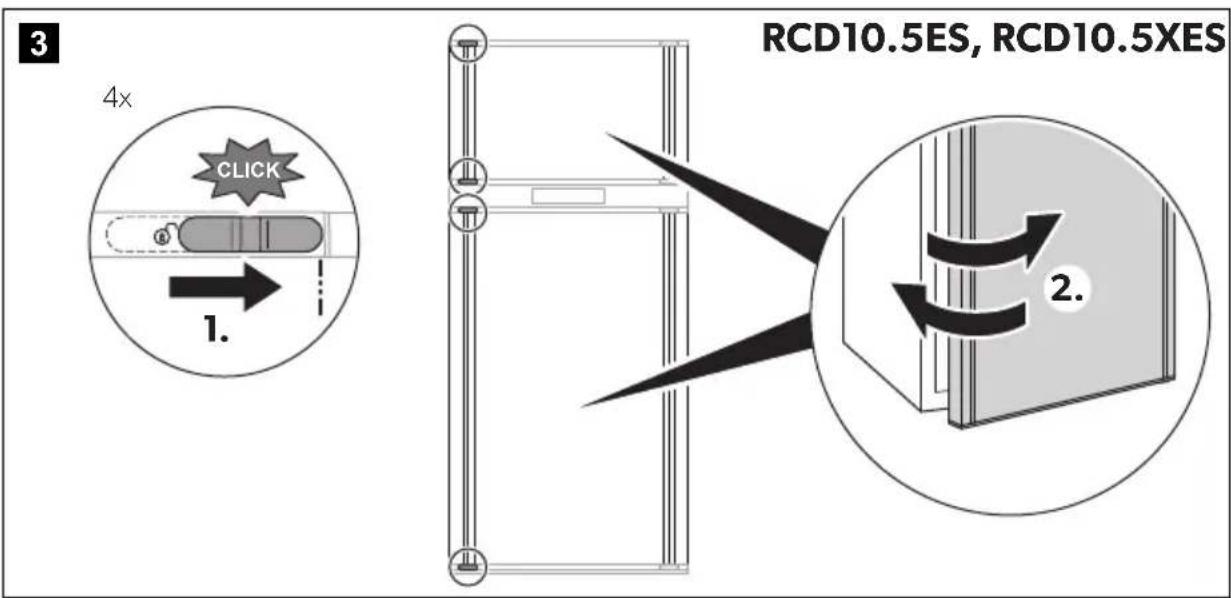
Release the refrigerator door as shown (fig. 3, page 5). The refrigerator door is easy to open and close but will not be secured when closed.
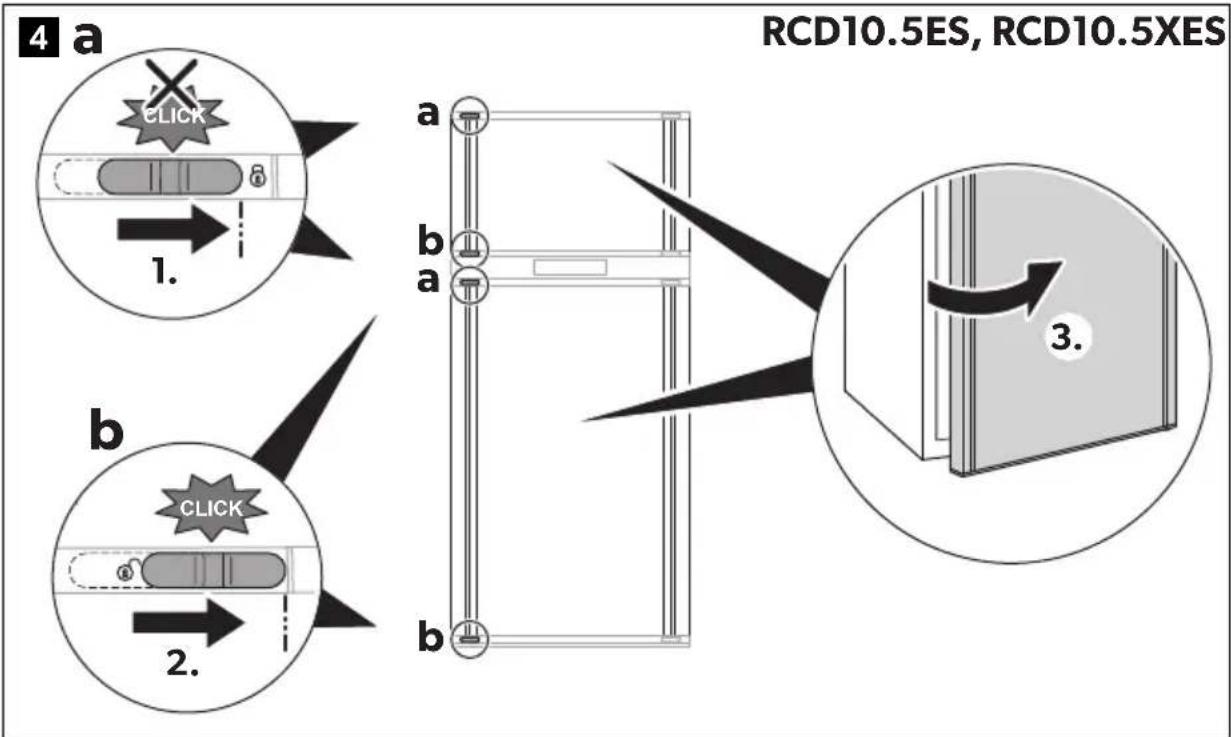
To secure the refrigerator door at the top automatically:
Release and open the refrigerator door as shown (fig. 4, page 6).
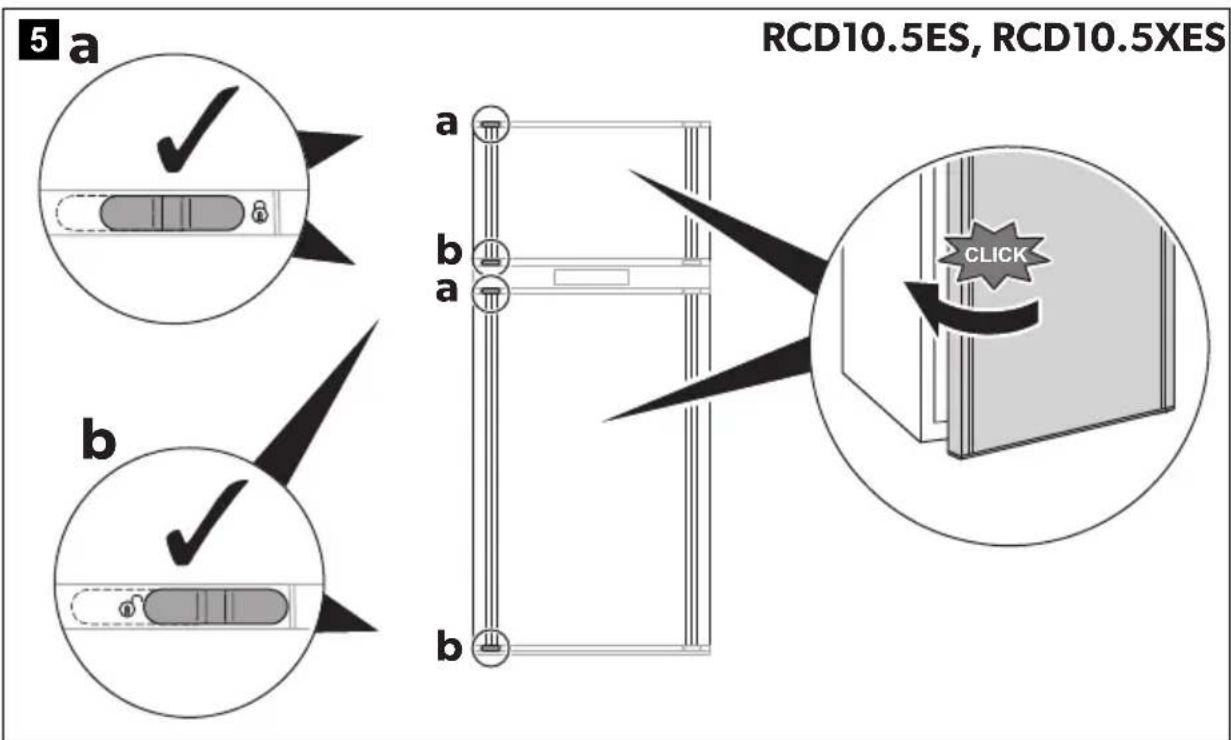
The refrigerator door is automatically secured at the top after closing (fig. 5, page 6).
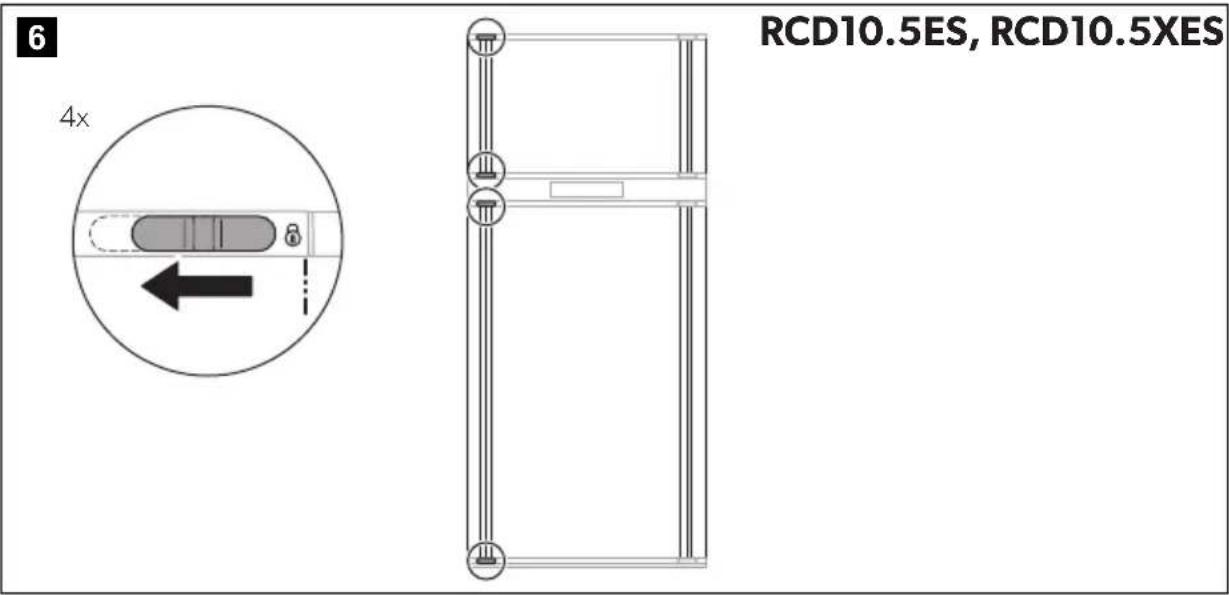
To secure the refrigerator door before starting to drive:
▶ Secure the refrigerator door as shown (fig. 6, page 7).
5.6 Using the VG fresh base
RCD10.5ET, RCD10.5XET

NOTICE! Damage hazard
The maximum load capacity of the VG fresh base is 4.5 kg.
The slider in the VG fresh base can be used to regulate the humidity in the vegetable compartment below it:
Goods to be cooled Optimal humidity Slider position
| Vegetables | | High ▶ Close the slider. |
| Fruit | | Low ▶ Open the slider. |
To remove and insert the VG fresh base:
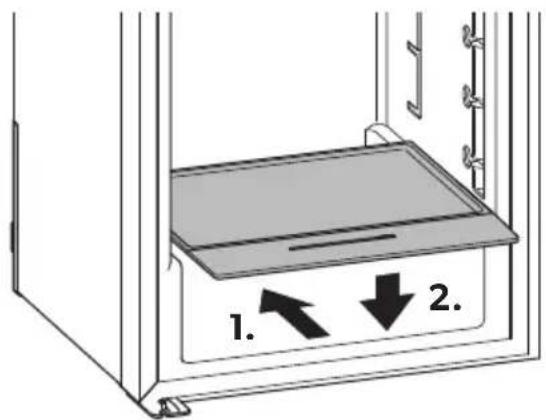
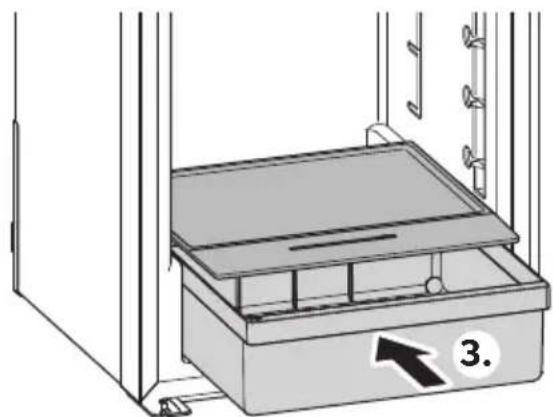
▶ Proceed as shown (fig. 7, page 7).
5.7 Positioning the shelves

WARNING! Risk of child entrapment
All shelves are fixed in place to prevent children from climbing into the refrigerator.
- Only remove the shelves for cleaning purposes. • Refit the shelves and secure them in place.
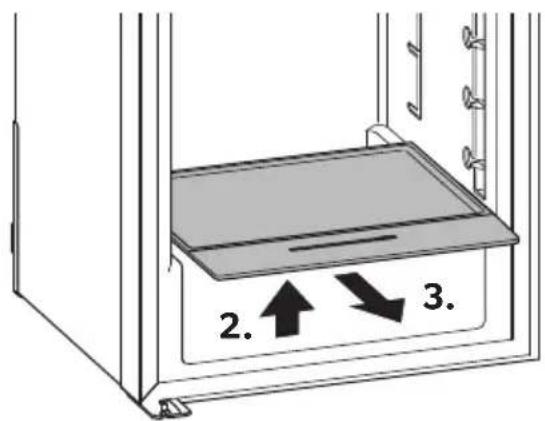
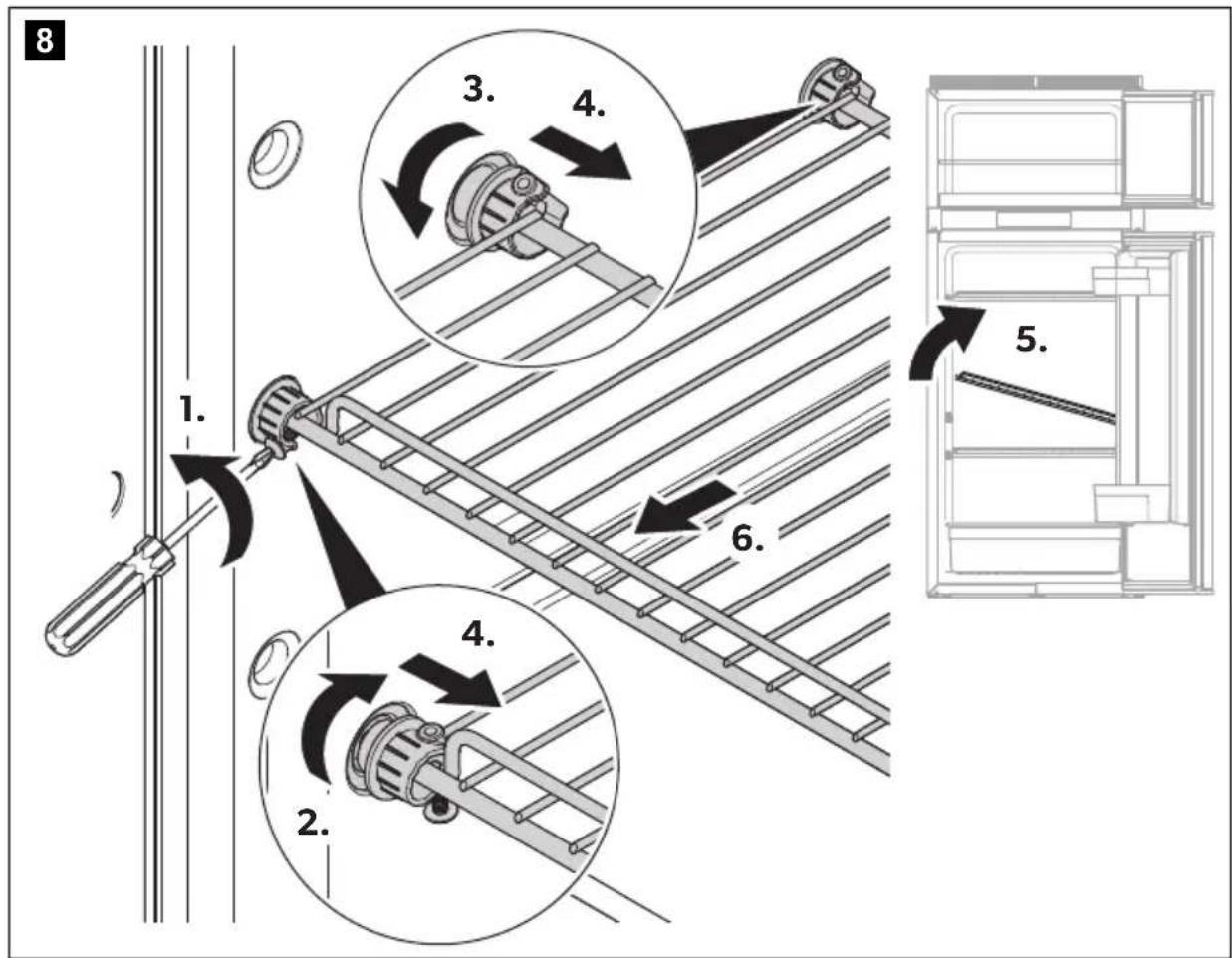
- Remove the shelf as shown (fig. 8, page 8).
- Refit the shelf in the reverse order.
6 Storing the refrigerator

NOTICE! Damage hazard
The storing position may not be used while driving.
Place the refrigerator door and the frozen compartment door into the storing position if you are not going to use the refrigerator for an extended period of time. This prevents mould from forming.
- Defrost the refrigerator (chapter "Defrosting the refrigerator" on page 27).
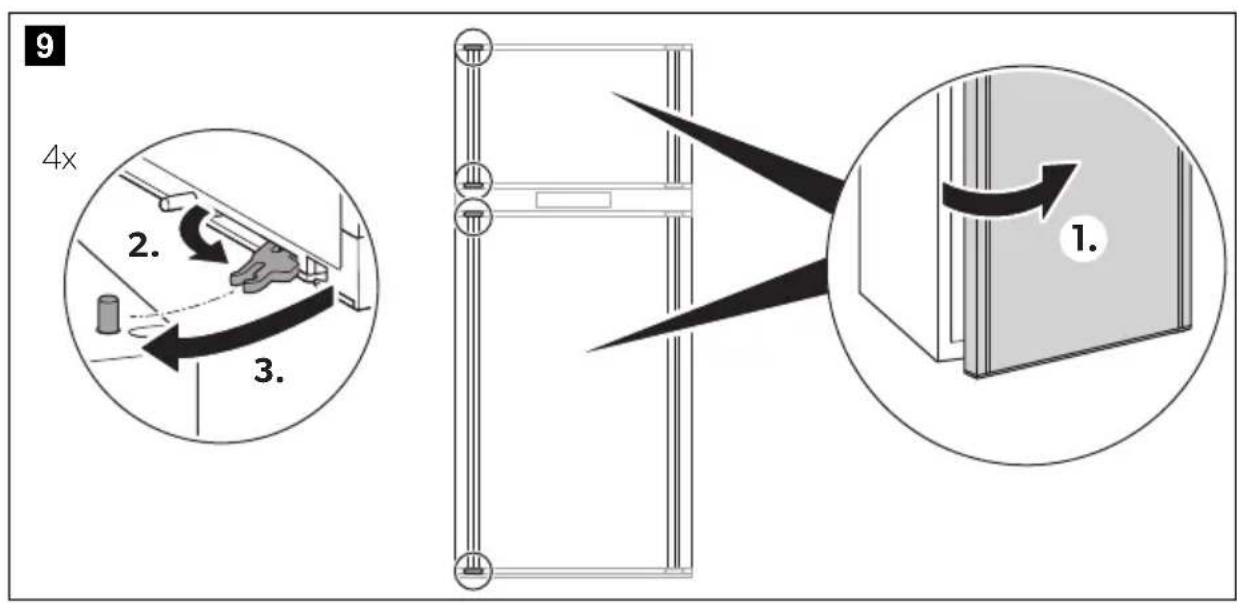
- Turn the hook near the securing mechanism all the way at the top and bottom of one side of the door (fig. 9, page 8).
- Press against the refrigerator door.
√ The protruding pin snaps into the hook.
Open the door in storing position as follows:
- Pull the door toward you.
- Push the protruding hooks at the top and bottom of the door back in.
7 Troubleshooting
Fault Possible cause Suggested remedy
| The refrigerator does not work. | The fuse in the DC cable is defective. | ► The fuse on the main board must be replaced. ► Contact an authorized service agent. |
| The vehicle fuse has blown. | ► Replace the vehicle fuse. (Please refer to the operating manual of your vehicle.) |
| The vehicle battery is discharged. | ► Test the battery and charge it. |
| The temperature at the compressor is too low (<0 °C). | ► Close/cover all external ventilation grilles completely with insulation material. |
| The refrigerator switches off automatically if the voltage is insufficient (Cut-off voltage: 10.4 V). | ► Load the battery. The refrigerator will start again automatically (Cut-in voltage: 11.7 V). |
Fault Possible cause Suggested remedy
| The refrigerator is not cooling adequately. | The ventilation around the cooling unit is not sufficient. | ▶ Check that the ventilation grille is not obstructed. |
| The evaporator is iced up. | ▶ Check whether the refrigerator door closes properly. Make sure that the refrigerator seal fits correctly and is not damaged. Defrost the refrigerator. |
| The temperature is set too high. | ▶ Set a lower temperature. |
| The ambient temperature is too high. | ▶ Remove the ventilation grille for a while so that warm air can escape quicker. |
| Too much food was placed in the refrigerator at the same time. | ▶ Remove some of the food. |
| Too much warm food was placed in the refrigerator at the same time. | ▶ Remove the warm food and leave it to cool down before putting it in again. |
| The refrigerator has not been operating for very long. | ▶ Check the temperature again after four or five hours. |
7.1 Error and warning indication
All faults are indicated by a warning symbol, a fault ID and a beep. The beeping lasts for 2 minutes and is repeated every 30 minutes until the error has been rectified.
RCD10.5ET, RCD10.5XET
Faults are indicated by a fault code with a warning symbol ( ) in the middle of the TFT display.
If multiple faults occur, the fault codes scroll over in the middle of the display.
All faults of the WARNING (W) type are reset automatically once the fault has been rectified.
All faults of the ERROR (E) type must be reset manually:
▶ Press the control knob for at least 2 seconds. √ A beep sounds. √ The error has been reset.
| Code | Audio alarm Fault Solution |
| W02 No | Defective temperature sensor in the refrigerator compartment | → | Contact an authorized customer service point. |
| E03 | Yes | Communication error | → Press the on/off button for at least 2 seconds. |
| W04 No | CI bus fault | Resets automatically |
| W10 Yes Door open for more than 2 minutes | → Close the door. |
| W11 | Yes | DC voltage <7.5 V | Resets automatically |
| W19 Yes DC voltage <10.9 V | Resets automatically |
| E32 | Yes | Outer fan overcurrent | → Press the on/off button for at least 2 seconds. |
| E33 | Yes | Compressor does not start | → Press the on/off button for at least 2 seconds. |
| E34 | Yes | Compressor overload | → Press the on/off button for at least 2 seconds. |
| E35 Yes Thermal cut out compressor controller unit | → Press the on/off button for at least 2 seconds. |
RCD10.5ES, RCD10.5XES
In the event of a fault, the warning LED (⚠️) in the display flashes.
All faults of the WARNING (W) type are reset automatically once the fault has been rectified.
All faults of the ERROR (E) type must be reset manually:
▶ Press for 2 seconds. √ A beep sounds. √ The error has been reset.
| Number of flashes | Audio alarm | Fault type | Fault | Solution |
| Continuous | No | W | Defective temperature sensor in the refrigerator compartment | ▶ Contact an authorized customer service point. |
| 1 | Yes | W | DC voltage <10.9 V | Resets automatically |
| 2 Yes E Outer fan overcurrent ▶ Press the on/off | button for at least 2 seconds. |
| 3 Yes E Compressor does not start ▶ Press the on/off | button for at least 2 seconds. |
| 4 Yes E Compressor overload ▶ Press the on/off | button for at least 2 seconds. |
| 5 Yes E Thermal cut out compressor controller unit | Press the on/off button for at least 2 seconds. |
| 6 No W CI bus fault | Resets automatically | |
| -Yes | W Door open for more than 2 minutes | Close the door. |
8 Cleaning and maintenance

WARNING! Electrocution hazard
Always disconnect the refrigerator from the mains before you clean and service it.

NOTICE! Damage hazard
- Do not use abrasive cleaning agents or hard objects during cleaning as these can damage the refrigerator.
- Never use hard or sharp tools to remove ice or to free objects frozen onto the device.
- Do not use any mechanical tools or any other tools to speed up the defrosting process.
Clean the refrigerator regularly and as soon as it becomes dirty with a damp cloth. Make sure that no water drips into the seals. This can damage the electronics. Wipe the refrigerator dry with a cloth after cleaning. Check the condensate drain regularly.
Clean the condensate drain when necessary. If it is blocked, the condensate collects on the bottom of the refrigerator.

WARNING! Fire hazard
- Only a qualified person must do the repair, maintenance or recharging of the appliance.
- This appliance refrigerant circuit contains flammable refrigerant.
- Improper repairs or maintenance can lead to considerable hazards.
- Note that self-repair or nonprofessional repair can have safety consequences and might void the guarantee.
8.1 Defrosting the refrigerator

NOTICE! Damage hazard
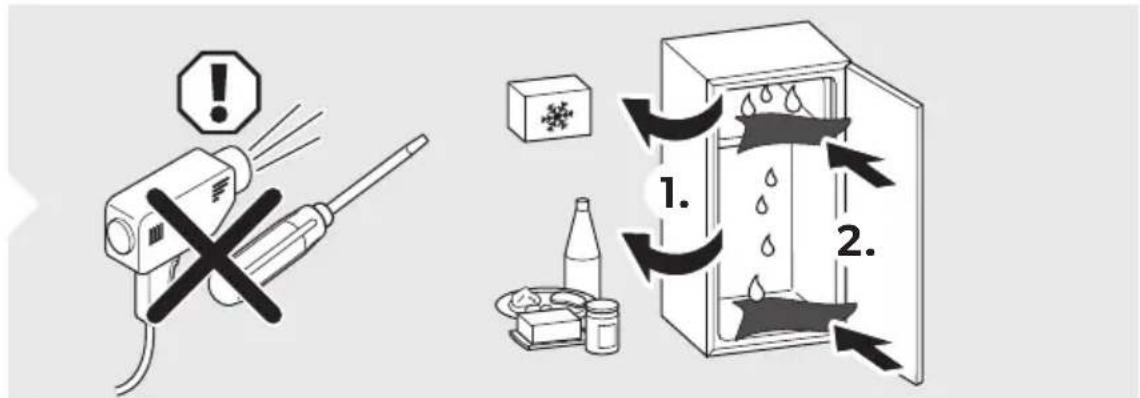
Do not use mechanical tools or a hair dryer to remove ice or to loosen frozen items.
Over time, frost builds up on the cooling fins inside the refrigerator. If this layer of frost is about 3 mm thick, you should defrost the refrigerator.
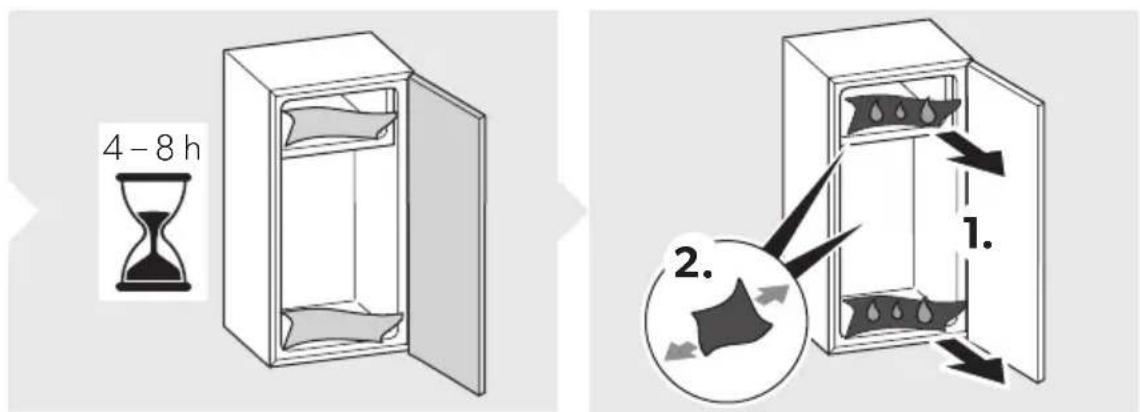
▶ Proceed as shown (fig. 10, page 9).
8.2 Changing the LED light

NOTICE! Damage hazard
The light source can only be replaced by the manufacturer, a service agent or similarly qualified person to avoid hazard.
![graph LR A["Worker Icon"] --> B["LED"] B --> C["LED"]](/content/2026/04/704625/images/1d81e082b7738931f3eb29cb51c55f2245c65c8ee8d89916947c1e0c78153fcd.jpg)
9 Warranty
The statutory warranty period applies. If the product is defective, please contact your retailer or the manufacturer's branch in your country (see dometic.com/dealer).
For repair and warranty processing, please include the following documents when you send in the product:
• A copy of the receipt with purchasing date - A reason for the claim or description of the fault
Note that self-repair or non-professional repair can have safety consequences and might void the warranty.
10 Disposal

NOTICE!
The insulation of the cooling device contains flammable cyclopentane and requires special disposal procedures. Deliver the cooling device at the end of its life-cycle to an appropriate recycling center.

Place the packaging material in the appropriate recycling waste bins wherever possible. Consult a local recycling center or specialist dealer for details about how to dispose of the product in accordance with the applicable disposal regulations.
Recycling products with batteries, rechargeable batteries and light sources
Remove any batteries, rechargeable batteries, and light sources before recycling the product. ▶ Return defective or used batteries to your retailer or dispose of them at collection points. Do not dispose of any batteries, rechargeable batteries, and light sources with general household waste. If you wish to finally dispose of the product, ask your local recycling center or specialist dealer for details about how to do this in accordance with the applicable disposal regulations. The product can be disposed free of charge.
11 Technical data
For the current EU declaration of conformity for your device please refer to the respective product page on dometic.com or contact the manufacturer directly (see dometic.com/dealer).
This device complies with regulation UN ECE R10.
| RCD10.5ES, RCD10.5ET RCD10.5XES, RCD10.5XET |
| Capacity | | |
| Total capacity | 176 l | 200 l |
| Refrigerator compartment | 140 l | 159 l |
| Frozen compartment | 35.7 l | 40.6 l |
| Connection voltage | 12 V--- | 12 V--- |
| Average power input 75 W 75 W | | |
| Energy consumption | 0.65 kWh/24 h | 0.83 kWh/24 h |
| PERFORMANCE mode | 42.4 Ah/24 h | 52.9 Ah/24 h |
| Climate class N, ST N, ST | | |
| Refrigerant R600a R600a | | |
| Refrigerant quantity 34 g | 34 g | |
| CO2 equivalent | 0.000102 t | 0.000102 t |
| Global warming potential (GWP) | 3 3 | |
| Noise emission | 39 dB(A) | 39 dB(A) |
| Dimensions H x W x D (in mm) | 1283 x 523 x 550 | 1283 x 523 x 605 |
| Weight | 38 kg | 39.5 kg |
| Inspection/certification | CE UK CA |
9 Warranty
4 Technical description
5.7 Positioning the shelves
![graph LR A["Worker Icon"] --> B["LED"] B --> C["Arrow"] C --> D["LED"]](/content/2026/04/704625/images/411bbb4aca4822025af53b2031bf43a4c4547fbc32c9e5435fa2bd6ca153f434.jpg)
9 Warranty
9 Warranty
√ The error has been reset.
WARNING! Fire hazard
9 Warranty
9 Warranty
- Warning against overheating!
9 Warranty
9 Warranty
9 Warranty
9 Warranty
9 Warranty
9 Warranty
dometic.com/sales-offices