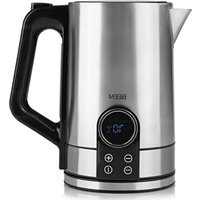
Tea Switch - Kettle BEEM - Free user manual and instructions
Find the device manual for free Tea Switch BEEM in PDF.


| Product type | Electric kettle |
| Brand | BEEM |
| Model | Tea Switch |
| Reference | 08851 |
| Module number | MD-357T |
| Supply voltage | 220-240 V ~ 50/60 Hz |
| Power | max. 2200 W |
| Protection class | I |
| Capacity | 1.7 liters (max) |
| Temperature range | 40 °C to 100 °C |
| Main functions | Boiling, keep warm, temperature setting |
| Display | LCD with display of current temperature and symbols |
| Base | Rotating with integrated cord winder |
| Anti-scale filter | Removable, located in the kettle |
| Safety | Automatic shutdown, dry-boil protection, lid lock |
| Intended use | Heating water only, not milk or other liquids |
| Keep warm | Automatic, lasts up to 120 minutes, adjustable |
| Recommended descaling | Every 2 to 6 weeks depending on water hardness |
| Included accessories | Kettle, base, anti-scale filter, user manual |
| Warranty | According to conditions, excludes scaling and normal wear |
Frequently Asked Questions - Tea Switch BEEM
User questions about Tea Switch BEEM
0 question about this device. Answer the ones you know or ask your own.
Ask a new question about this device
Download the instructions for your Kettle in PDF format for free! Find your manual Tea Switch - BEEM and take your electronic device back in hand. On this page are published all the documents necessary for the use of your device. Tea Switch by BEEM.
USER MANUAL Tea Switch BEEM
Operating instructions
Mode d'emploi
On the fold-out page you will find all the illustrations that are referred to in these operating instructions. Open up the page before reading the operating instructions.
FR
15 Items Supplied
15 Device Overview
16 Information About Your Operating Instructions
16 Explanation of the Symbols
16 Explanation of the Signal Words
16 Intended Use
17 Safety Notices
19 Before Initial Use
20 Setting Up and Connecting the Device
20 Pouring In Water
20 Displays
21 Use
21 Boiling Water
21 Keeping Water Warm
21 The Temperature Levels
22 Cleaning and Care
22 Descaling
23 Storage
23 Troubleshooting
24 Warranty and Limitations of Liability
24 Technical Data
25 Disposal
Items Supplied
- Kettle
- Base station with connecting cable
Limescale filter - Operating instructions.
Check the items supplied for completeness and the components for transport damage. If you find any damage, do not use the device but contact our customer service department.
Remove all packaging materials and any possible protective films used for protection during transportation. Never remove the rating plate and any possible warnings.
Device Overview
(See fold-out page for illustrations)
Device
Lid
2 Button for opening the lid
3 Handle
4 Fill-level indicator with MIN and MAX marking
5 Base station with integrated connecting cable and cable winder
6 Control panel
7 Display
8 Kettle
9 Pouring spout
10 Limescale filter (in the kettle)
Display and control panel
II Boiling and heating process symbol
12 Keep-warm symbol
13 Beapot symbol (water temperature over 95^
14 Coffee cup symbol (water temperature 85 - 90^
15 Temperature display
16 Field +
17 Field | (100^ / boil water)
18 Field PROG (set temperature level)
19 Field -
Key numbers are shown as follows: (I)
Control panels are shown as follows: PROG
Congratulations!
Dear Customer,
We are delighted that you have chosen this kettle.
If you have any questions about the device and about spare parts/accessories, contact the customer service department via our website: www.beem.de
Information About Your Operating Instructions
Before using the device for the first time, please read through the operating instructions carefully and keep them for future reference. If the device is given to someone else, it should always be accompanied by these operating instructions. The manufacturer and importer do not accept any liability if the information in these operating instructions is not complied with.
Explanation of the Symbols


Danger symbols: These symbols indicate risks of injury (e.g. from electricity or fire). Read through the associated safety notices carefully and follow them.
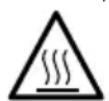
Beware of hot surfaces!

Supplementary information

Suitable for use with food.

Read operating instructions before use!
Explanation of the Signal Words
Signal words indicate hazards if the associated notices are not followed.
DANGER - high risk, results in serious injury or death
WARNING - medium risk, may result in serious injury or death
CAUTION - low risk, may result in minor or moderate injury
NOTICE - may result in risk of damage to material
Intended Use
- The device may only be used to heat up water, not to heat up milk or other liquids. Do not use the device to make tea or coffee in it.
- The device is for personal use only and is not intended for commercial or domestic-like applications, e.g. in hotels, bed and breakfasts, offices, staff kitchens or similar places.
- The device should only be used as described in the operating instructions. Any other use is deemed to be improper.
Safety Notices

WARNING: Note all safety notices, instructions, illustrations and technical data provided with this device. Failure to follow the safety notices and instructions may result in electric shock, fire and / or injuries.
- This device may be used by children aged 8 and over and by people with reduced physical, sensory or mental abilities or a lack of experience and/or knowledge if they are supervised or have received instruction on how to use the device safely and have understood the dangers resulting from failure to comply with the relevant safety precautions.
Children must not play with the device. - Cleaning and user maintenance must not be carried out by children, unless they are older than 8 years of age and are supervised.
- Children younger than 8 years of age and animals must be kept away from the device and the connecting cable.
CAUTION: hot surfaces!
The device and the accessories are very hot during and shortly after use. While the device is in operation, only ever touch the handle and the control panel. Allow the device to cool down completely before it is cleaned.
- Never exceed the maximum fill level (MAX marking). If the kettle is overfilled, hot water could splash out or overflow during boiling.
- Never immerse the kettle, the base station and the connecting cable in water or other liquids and ensure that these components cannot fall into water or become wet.
- Use the kettle only with the base station provided. Do not use the base station with other devices.
-
The device is not designed to be operated with an external timer or a separate remote control system.
-
The base station must always be disconnected from the mains power when it is left unattended and before cleaning it.
- Do not make any modifications to the device. Do not replace the connecting cable yourself. If the device, the base station or the connecting cable are damaged, they must be replaced by the manufacturer, customer service department or authorised distributors in order to avoid any hazards.
- It is essential to follow the instructions in the "Cleaning and Care" chapter.

DANGER - Danger of Electric Shock
- Use the device only in closed rooms.
- Do not use the device in rooms with high humidity.
- If the base station falls into water while it is connected to the mains power, pull the mains plug out of the plug socket immediately. Only after this should you pull the base station out of the water. Before using it again, have it inspected by the manufacturer, customer service department or authorised distributors in order to avoid any hazards.
- Never touch the base station and the connecting cable with wet hands when the base station is connected to the mains power.
- Take the kettle off the base station to fill it, pour water or clean it. Make sure that no water gets into the contacts on the bottom of the kettle.
- Make sure that the steam which emerges does not come into contact with electrical devices and equipment containing electrical components.

WARNING - Danger of Injury
- Keep children and animals away from the packaging material. There is a danger of suffocation!
Danger of scalding from heat, hot steam or condensation!
- Avoid coming into contact with the rising steam. Do not open the lid of the device during the boiling and heating process.
- Do not move the device during the boiling and heating process.
-
Pour out boiling water slowly and carefully without tipping the device too quickly.
-
Make sure that the connecting cable does not present a trip hazard. The connecting cable should not hang down from the surface on which the device is placed in order to prevent the device from being pulled down.
-
Make sure that the connecting cable is kept out of the reach of small children and animals. There is a danger of strangulation!

WARNING - Danger of Fire
- Do not connect the device along with other consumers (with a high wattage) to a multiple socket in order to prevent overloading and a possible short circuit (fire).
- Do not use the device in conjunction with extension cables.
- Do not operate the device in the vicinity of combustible materials. Do not place any combustible materials (e.g. cardboard, paper, wood or plastic) in or on the device.
- Do not cover the device during operation.
NOTICE - Risk of Damage to Material and Property
- Switch off the device and pull the mains plug out of the plug socket if an error occurs during operation, when there is a power cut or before a thunderstorm. When you pull it out of the plug socket, always pull on the mains plug and never the mains cable!
- Never pull or carry the base station by the connecting cable.
- Protect the device from other heat sources, naked flames, sub-zero temperatures, persistent moisture, wet conditions and impacts.
- Never place any heavy objects on the base station or the connecting cable.
- Use only original accessories from the manufacturer in order to guarantee that there is no interference that may prevent the device from working and to avoid possible damage.
Before Initial Use
I. Wipe the device with a clean, damp cloth. Rinse the kettle (8) with a little mild detergent and clear water.
2. Set up the device and connect it (see the "Setting Up and Connecting the Device" chapter).
3. Before you first use hot water, we recommend that you carry out a trial run to remove any possible production residues. To do this, follow the instructions in the "Pouring In Water" and "Use" chapters.

When the device is first used, production-related additives may cause a small amount of smoke and / or an odour to be produced. This is normal and not a device defect.
- Repeat this process twice. Do not drink this water!
- Clean the device and accessories (see the "Cleaning and Care" chapter).
Setting Up and Connecting the Device
PLEASE NOTE!
- Only connect the base station to a plug socket that is properly installed. The mains voltage must be the same as the technical data of the base station.
- Do not place the device below kitchen wall units or similar cupboards. The rising steam could cause damage to them!
-
Lay the connecting cable in such a way that it does not become squashed or bent and does not come into contact with hot surfaces (also applies to the hot surfaces of the device!).
-
Unwind the connecting cable on the bottom of the base station (5) to the length you want and place it in the recess which is provided for it on the edge.
- Place the base station on the kitchen unit or another dry, solid, flat, heat-resistant and splash-proof work surface. Ensure there is sufficient clear space on all sides (at least 20 cm to the sides and 30 cm above).
- Insert the mains plug into a properly installed plug socket. The plug socket must be readily accessible so that the connection to the mains can quickly be isolated.
- Place the kettle (8) on the base station. The display (7) switches on and shows the temperature currently prevailing in the kettle.
Pouring In Water

Only ever fill the kettle (8) with fresh, clear tap water. Do not pour in any other liquids.
- Press the button for opening the lid (2). The lid (1) flips up.
- Pour the quantity of water you want (maximum 1.7 litres) into the kettle. Note the MIN and MAX marking on the fill-level indicator (4). Insufficient water will cause the device to switch off prematurely. If the MAX marking is exceeded, water could splash out during the boiling process.
- Press on the lid until you hear it engage.
Displays
In addition to the temperature, four other functions are shown on the display:
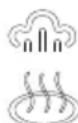
Heating process (II) - The device is heating.
Keep warm (12) - The keep-warm function is switched on.
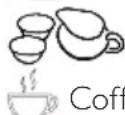
Teapot (13) – The water has a temperature of over 95^ and is thus suitable for black tea.
Coffee cup (14) – The water has a temperature of between 85 – 90°C and has thus reached the ideal temperature for coffee.

Use
NOTICE
- Only use the device if the lid has been closed correctly and the kettle is placed on the base station correctly!
- Do not operate the device without water.

If water needs to be added, switch off the device, pull the mains plug out of the socket and allow the device to cool down for a few minutes.
Boiling Water
I. Pour water into the kettle (8) (see the "Pouring In Water" chapter) and place it on the base station (5). The display (7) lights up and shows the current water temperature (15).
2. Press the button | (17). (II) lights up on the display and the device starts the heating process. In addition, the temperature prevailing in the kettle is shown on the display.
3. As soon as the water has boiled (100^) , you will hear 3 beeps and (13) will light up on the display. The device switches off.
Keeping Water Warm
I. Pour water into the kettle (8) (see the "Pouring In Water" chapter) and place it on the base station (5). The display (7) lights up and shows the current water temperature (15).

The display switches off after a few minutes if no button is pressed.
- Use the buttons + (16) and - (19) to set the desired water temperature at which the water should be kept warm.
- Press the PROG button (18). The device switches on automatically. (12) appears on the display.
-As soon as the water has boiled (100^) , you will hear 3 beeps.
- As soon as the temperature drops 5^ below the selected temperature, the kettle heats up to this temperature again.

The keep-warm function switches off automatically after 120 minutes. It can be switched off at any time using the button | (17).
The Temperature Levels
You can select temperatures of between 40 and 100^ with the kettle.
40^ ideal for baby food, for mixing facial masks, oats/porridge
50^ C ideal for milk powder
60^ C ideal for very delicate green tea
70^ ideal for white tea
80^ ideal for oolong tea, green tea, inhalation solutions
90^ ideal for fruit tea, pour-over coffee, French press, hot-water bottle
100°C ideal for black tea, herbal tea / boiling water
These specifications are merely guides - ALWAYS follow the manufacturer's specifications and for example with baby food or milk powder carefully check beforehand whether the temperature is really suitable.
Cleaning and Care
NOTICES
-
Do not use any toxic, corrosive or abrasive cleaning agents or scouring sponges to clean the device. These may damage the surface.
-
Empty the device completely.
- Wipe down the kettle (8) and the base station (5) with a damp cloth. If necessary, use a little mild detergent to remove more intense soiling.
- Take out the limescale filter (9) inside the kettle by pressing down the locking lug and clean it.
- Keep the kettle and the base station ready to operate.
Dscaling
Limescale deposits have an adverse effect not only on the quality of the water, but they also cause power losses and shorten the lifespan of the device. The thicker a limescale layer is, the more difficult it is to remove.
We therefore recommend regularly removing limescale deposits with a descending agent in accordance with the water quality and how often the device is used (approx. every 2 - 6 weeks).
The first indications that descending is required are a large amount of steam being produced and slower boiling of the water. Limescale deposits on the bottom of the kettle can cause the device to switch off prematurely.
For descending we recommend the BEEM Premium Descaler Concentrate. The efficient, food-safe and environmentally friendly BEEM Premium Descaler Concentrate is available from selected specialist stockists, via our website www.beem.de or from our customer service department on request.
Dscaling with the BEEM Premium Descaler Concentrate
I. Fill the kettle (8) with a concentrate/water solution of no more than 1:20 (one part concentrate to 20 parts water).
Do not fill the kettle all the way up to the MAX marking to prevent any splashing or flow if the descending agent causes foaming of the water.
- Press the button | (17). (II) lights up on the display (7) and the device starts the heating process. The solution starts boiling.
- As soon as the solution has boiled (100^) , you will hear 3 beeps. The device switches off.
- Allow the solution to act for a few minutes and then pour it away.
- To rinse the kettle, boil up clear water twice and pour this water away. The device is now descaled and ready to be used again.
Storage
Disconnect the device from the mains power when it is not going to be used for a prolonged period. Clean the device again if necessary (see the "Cleaning and Care" chapter) and let it dry completely.
Store the device and all accessories in a dry, clean, frost-free place that is protected from direct sunlight and cannot be accessed by children or animals.
Troubleshooting
If the device does not work properly, check whether you are able to rectify the problem yourself. If the problem cannot be solved with the steps that are listed, contact our customer service department.

Do not attempt to repair an electrical device yourself!
| Problem | Possible cause | Fix |
| The display (7) does not light up. The device cannot be switched on. | The mains plug is not inserted correctly in the plug socket. | Correct the fit of the mains plug. |
| The plug socket is defective. Try another plug socket. | ||
| There is no mains voltage. | Check the fuse of the mains connection. | |
| The device switches off after a few seconds. | The device has been switched on without any water in it. The dry-running protection has activated. | In this case, allow the device to cool down for around 5 - 10 minutes before water is poured in and the device is used again. |
| The fuse in the fuse box is triggered. | Too many devices connected to the same circuit. | Reduce the number of devices in the circuit. |
| A large amount of steam is produced in the brewing process. | The device is furred up. Descale the device. | |
| During use, an unpleasant smell is detected. | The device is being used for the first time. | A smell often develops when new devices are first used. The smell should disappear once the device has been used several times. |
| The device has previously been descaled. | Rinse out the device with fresh water. |
Warranty and Limitations of Liability
The warranty does not cover faults caused by incorrect handling, calcification, damage or attempted repairs. The same applies to normal wear and tear.
We do not accept any liability for damage or consequential damage resulting from:
- failure to follow the operating instructions
- non-designated use
- improper or unsuitable handling
- repairs which are not carried out properly
- unauthorised modifications
- use of outside parts or spare parts
- use of unsuitable additional parts or accessories

Keep the original packaging during the warranty period of the device so that the device can be properly packaged up if it needs to be returned. The warranty claim will lapse if any damage is caused during transport.
Technical Data
Article number: 08851
Model number: MD-357T
Voltage supply: 220 - 240V 50 / 60Hz
Power: max. 2200 W
Protection class:
Capacity: max. 1.7 litres
ID of operating instructions: Z 0885 I M BE V4 0523 mh

Disposal
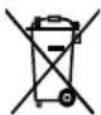
Dispose of the packaging material in an environmentally friendly manner so that it can be recycled.
The adjacent symbol (crossed-out bin underlined) means that used devices should not be disposed of in the domestic waste, but should instead be taken to special collection and return systems.
Owners of used devices from private households can take them free of charge to the collection points of the public waste disposal authorities or the disposal points which are set up by manufacturers and distributors under the Electrical Equipment Act so that they can be disposed of in an environmentally friendly way and valuable raw materials can be recovered. If they are not disposed of properly, toxic ingredients may escape into the environment and cause harm to the health of humans, animals and plants. Businesses which market electrical and electronic devices are also obliged to take back used devices.
Waste prevention makes an even more valuable contribution to protecting the environment. This means if possible, as well as continuing to use or repair a device yourself, passing it on to another user also represents an ecologically beneficial alternative to disposal.
All rights reserved.
Composition
Chere cliente, cher client,
Attention aux surfaces chaudes!

Calls to German landlines are subject to your provider's charges.
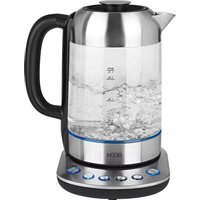
- FR
- Items Supplied
- Device Overview
- Device
- Display and control panel
- Congratulations!
- Information About Your Operating Instructions
- Explanation of the Symbols
- Explanation of the Signal Words
- Intended Use
- Safety Notices
- CAUTION: hot surfaces!
- DANGER - Danger of Electric Shock
- WARNING - Danger of Injury
- Danger of scalding from heat, hot steam or condensation!
- WARNING - Danger of Fire
- NOTICE - Risk of Damage to Material and Property
- Before Initial Use
- Setting Up and Connecting the Device
- PLEASE NOTE!
- Pouring In Water
- Displays
- Use
- NOTICE
- Boiling Water
- Keeping Water Warm
- The Temperature Levels
- Cleaning and Care
- NOTICES
- Dscaling
- Dscaling with the BEEM Premium Descaler Concentrate
- Storage
- Troubleshooting
- Warranty and Limitations of Liability
- Technical Data
- Disposal
- Composition
Brand : BEEM
Model : Tea Switch
Category : Kettle