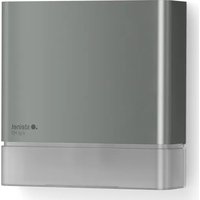
MD IR D180 COM1 - Motion detector STEINEL - Free user manual and instructions
Find the device manual for free MD IR D180 COM1 STEINEL in PDF.


User questions about MD IR D180 COM1 STEINEL
0 question about this device. Answer the ones you know or ask your own.
Ask a new question about this device
Download the instructions for your Motion detector in PDF format for free! Find your manual MD IR D180 COM1 - STEINEL and take your electronic device back in hand. On this page are published all the documents necessary for the use of your device. MD IR D180 COM1 by STEINEL.
USER MANUAL MD IR D180 COM1 STEINEL

GB ..... 10 Follow written instructions!
natural_image
Technical line drawing of a mechanical component with no visible text or symbols3.2
3.3
4.1
pie
| Category | Value | |---|---| | 1 | 6 | | 2 | 7 | | 3 | 8 | | 4 | 5 | | 5 | 9 | | 6 | 1 | 6.1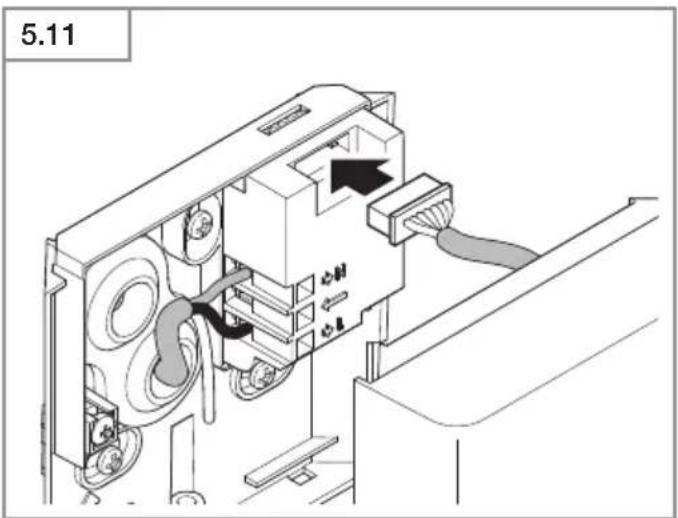
DE

Please read carefully and keep in a safe place.
—Under copyright. Reproduction either in whole or in part only with our consent.
-Subject to change in the interest of technical progress.
2. General safety precautions

Failure to observe these operating instructions presents hazards!
These instructions contain important information on the safe use of this product. Particular attention is drawn to potential hazards. Failure to observe this information may lead to death or serious injuries.
- Read instructions carefully.
- Follow safety advice.
- Keep instructions within easy reach.
- Working with electrical current may produce hazardous situations. Touching live parts can result in electrical shock, burns or death.
-Work on mains voltage must only be performed by qualified, skilled personnel.
-National wiring regulations and electrical operating conditions must be observed (e.g. DE: VDE 0100, AT: ÖVE-ÖNORM E8001-1, CH: SEV 1000).
-Only use genuine replacement parts.
- Repairs must be made by specialist workshops.
3. MD IR D180
Proper use
-Sensor suitable for wall mounting indoors and outdoors.
-Sensor can be used on its own or interconnected using Connect Bluetooth Mesh.
Features
-Operation via Steinel Connect App.
Operating principle
-The integrated infrared sensor detects the heat radiated from moving objects (e.g. people, animals).
- The heat detected in this way is converted electronically into a signal that automatically switches ON a connected load (e.g. a light).
-The most reliable way of detecting motion is to install the unit with the sensor aimed across the direction in which a person would walk.
-Reach is slightly restricted when the unit is approached head on.
-Obstacles (e.g. trees, walls etc.) interrupt the line of sensor vision.
- Heat radiation is not detected through obstacles (e.g. walls or panes of glass), the sensor is not triggered.
–Sudden fluctuations in the temperature from changes in weather are not distinguished sources of heat.
Package contents (Fig. 3.1)
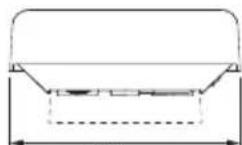
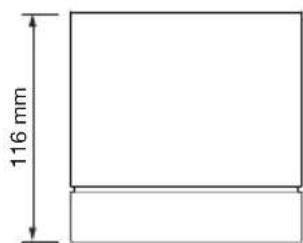
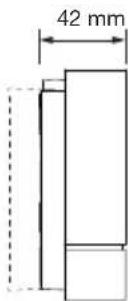
Product dimensions (Fig. 3.2)
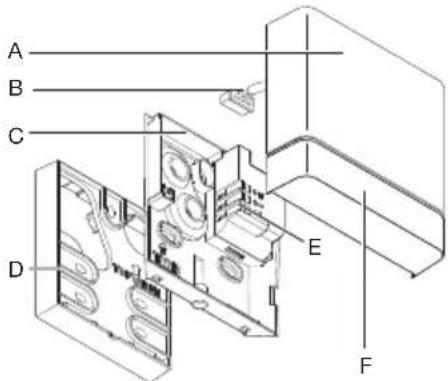
Product components (Fig. 3.3)
A Sensor unit
B Sensor connection plug
C Wall mount
D Surface-mounted wall base
E Connecting terminal
F LED
Technical specifications
-Dimensions (H × W × D): 116 × 116 × 42 mm
- Power supply: 220–240 V, 50/60 Hz
-Stand-by power consumption: < 0.6 W
- Time setting: 5 s - 60 min
- Twilight setting: 2-1,000 lux, daytime mode
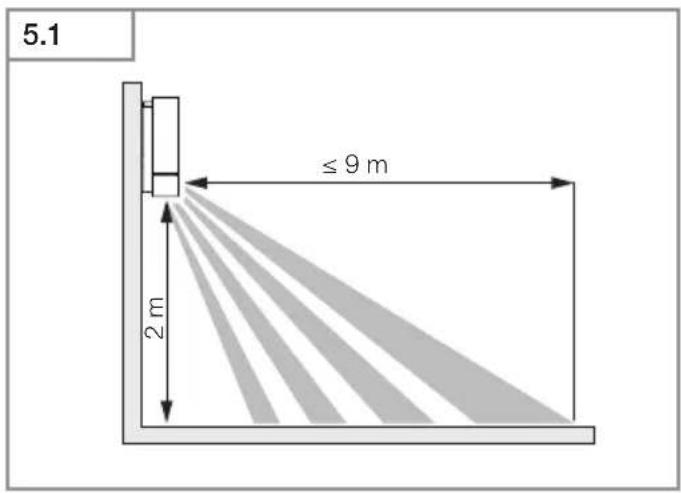
-Reach: 9 m tangentially, 6 m radially, mounted at a height of 2.0 m
- Mounting height: 1.8–2.5 m
- Sensor system: passive infrared
- Angle of coverage: 180°
- Temperature range: -20°C to +40°C
- Bluetooth frequency: 2.4 to 2.48 GHz
- Bluetooth transmission power 5 dBm / 3 mW
- IP rating IP 54
Switching capacity:
- Incandescent / halogen lamp load: 2,000 W
- LED / ECG load: 500 W (50 pcs. c < 176 μF)
4. Electrical installation
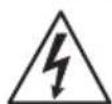
Hazard from electrical power.
Touching live parts can result in electrical shock, burns or death.
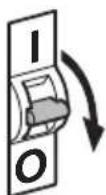
- Switch OFF power and interrupt power supply.
- Using a voltage tester, check to make sure the the power supply is disconnected.
- Make sure power supply remains interrupted.
Risk of damage to property!
Mixing up connection leads may produce a short circuit.
- Identify connection leads.
• Re-connect connection leads.
Connecting the mains power supply lead
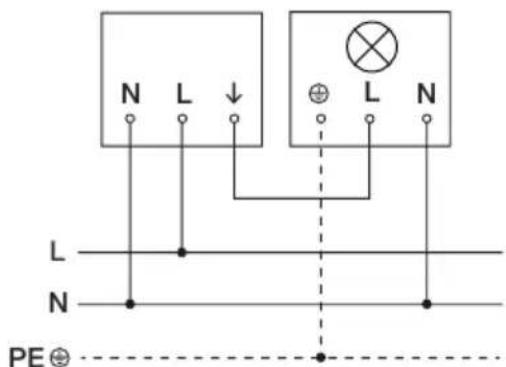
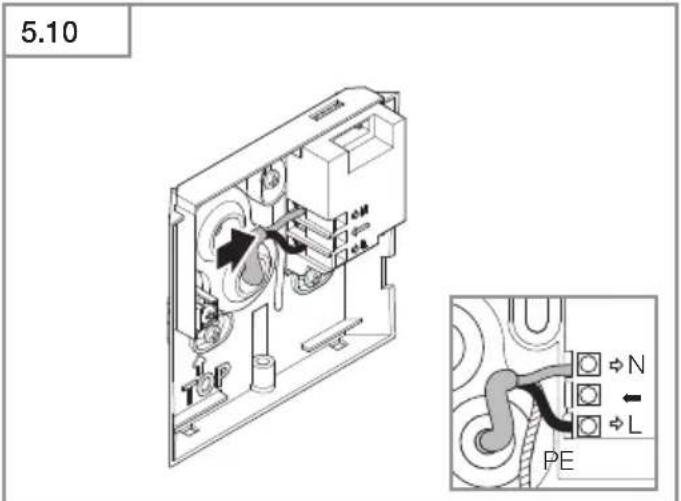
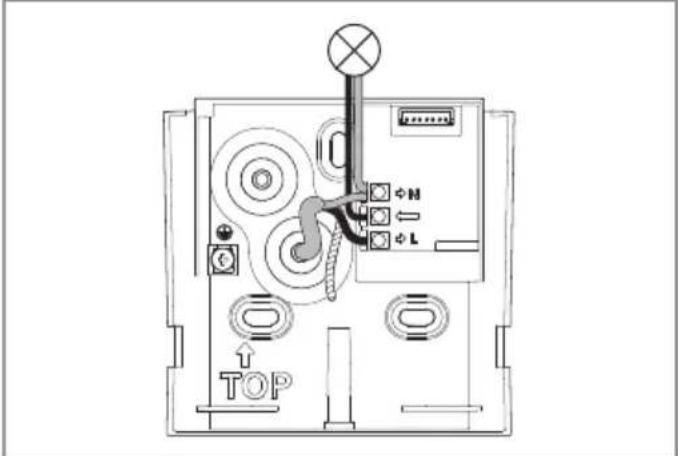
The supply lead is a 4-core cable:
L = phase conductor (usually black, brown or grey)
= Switched phase conductor (usually black, brown or grey)
N = neutral conductor (usually blue)
PE = protective-earth conductor (green / yellow)
Note:
The sealing plugs provided are intended for a mains supply lead with an outer diameter of 5–10 mm.
Note:
The protective-earth conductor need not be connected for this product.
Wiring diagram (Fig. 4.1)
5. Installation
Preparing for installation
- Check all components for damage. Do not use the product if it is damaged.
- Select an appropriate site to install the product.
-Take reach into consideration. (Fig. 5.1)
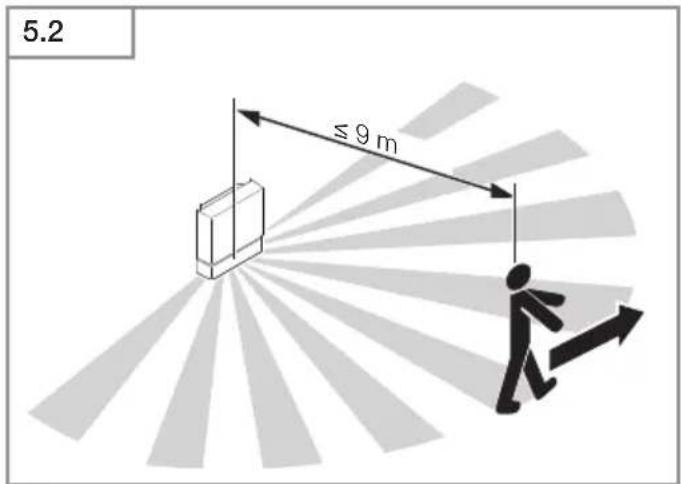
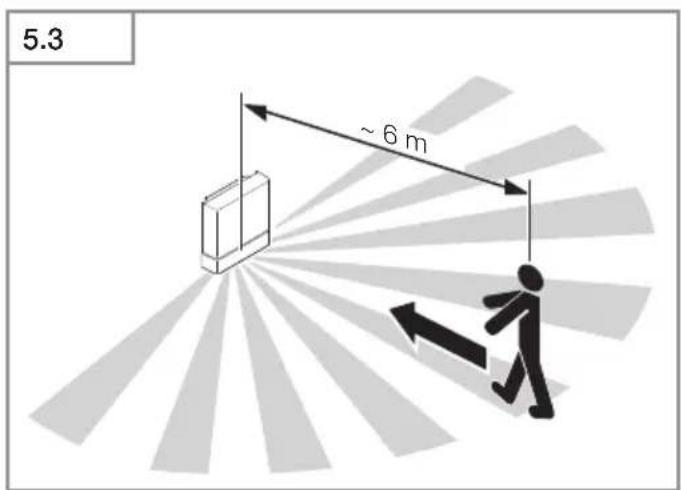
-Take reach and motion detection into consideration. (Fig. 5.2, 5.3)
-Vibration-free. - No obstacles in detection zone.
-Not in explosive atmospheres.
-Not on normally flammable surfaces.
Mounting procedure
- Check to make sure the power supply is switched OFF. (Fig. 4.1)
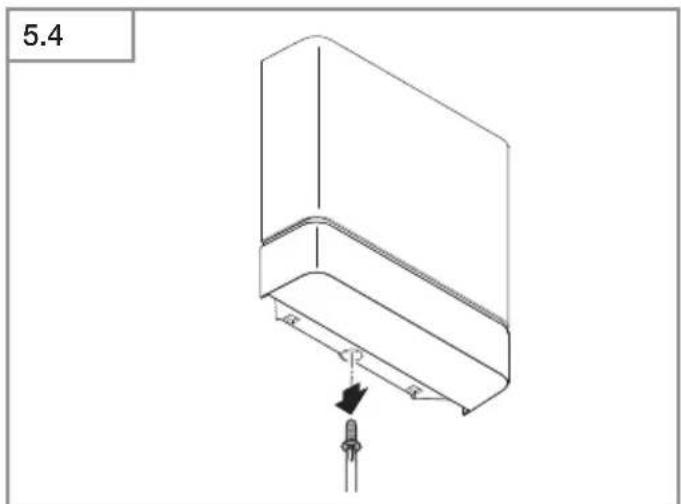
- Unscrew retaining screw. (Fig. 5.4)
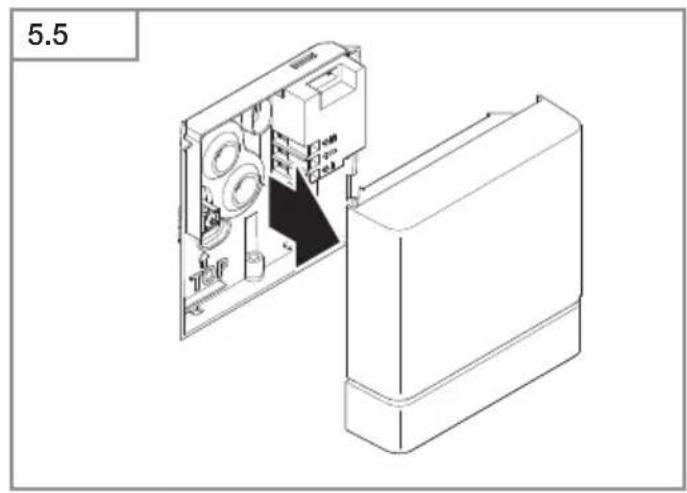
- Detach sensor switch from wall mount. (Fig. 5.5)
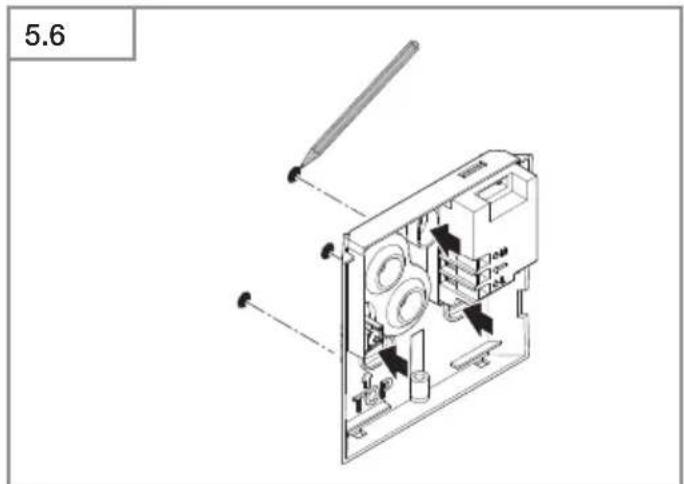
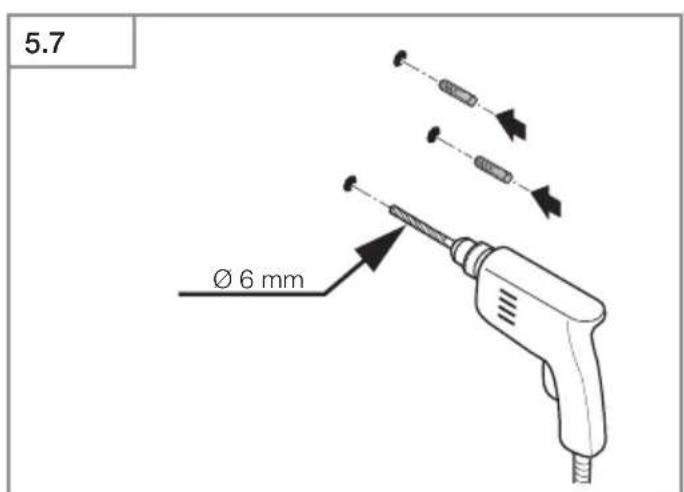
• Mark drill holes. (Fig. 5.6) - Drill holes (∅ 6 mm) and fit wall plugs. (Fig. 5.7)
- Firmly screw wall mount into place.
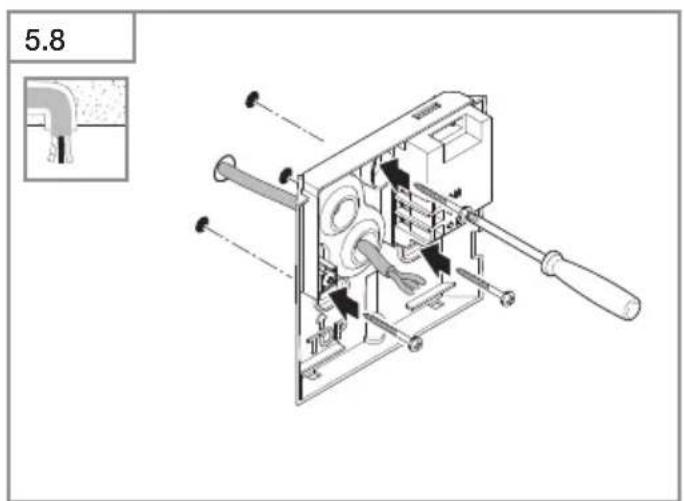
-Concealed version (Fig. 5.8)
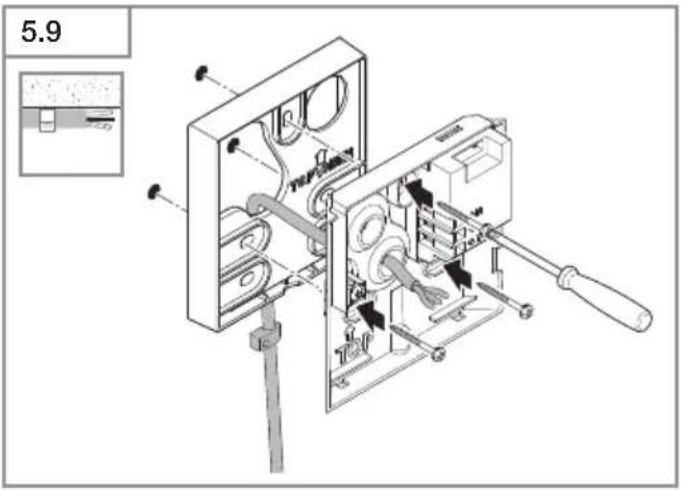
-Surface-mounted version with surface-mounted wall base (Fig. 5.9) - Connect mains power supply lead according to terminal labelling. An additional external load can be connected to N and =. (Fig. 5.10)
- Plug in sensor connection plug. (Fig. 5.11)
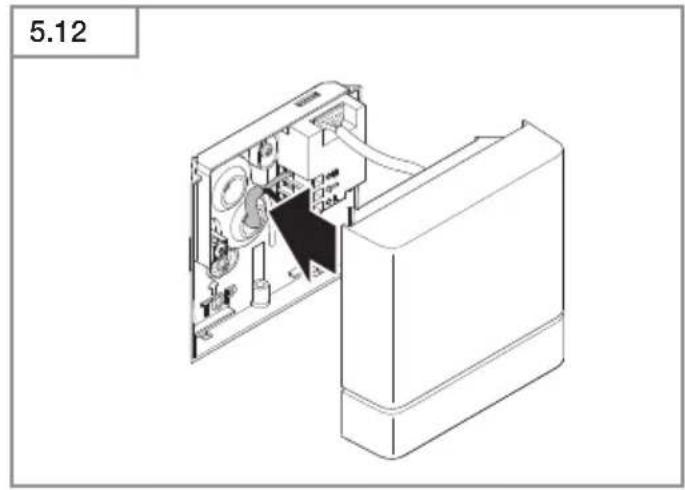
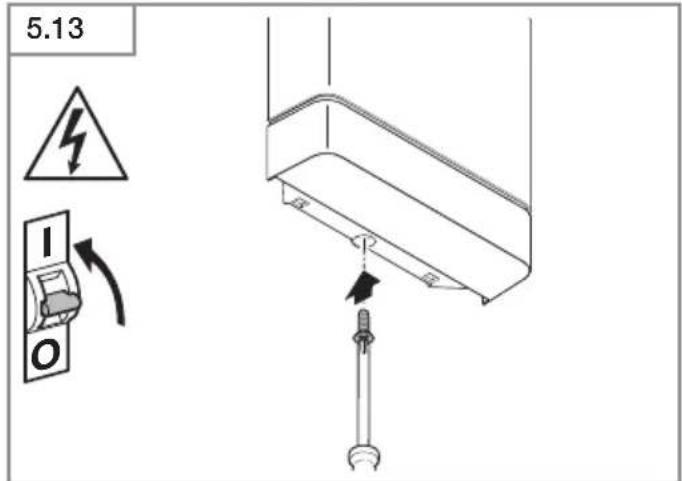
• Fit sensor switch on wall mount. (Fig. 5.12) - Tighten retaining screw. (Fig. 5.13)
- Switch ON power supply. (Fig. 5.13)
• Make settings → "6. Function"
6. Function
Factory settings
Time setting: 5 seconds
Twilight setting: (daytime mode)
Reach: 100 %
Steinel Connect app
To configure the sensor via smartphone or tablet, you must download the STEINEL Connect app from your app store. You will need a Bluetooth-capable smartphone or tablet.
Android iOS


Following functions can be set via the Steinel Connect app:
-Time setting 5 s-60 min
- Twilight setting 2–2,000 lux, daytime mode, lux teach, time teach
-Reach adjustment
-Bluetooth interconnection
LED function
-Initialisation: LED flashes green.
-Bluetooth identification: LED slowly flashes blue.
-Normal mode: LED is OFF.
Time setting
The time you want the sensor switch controlled light to stay ON for can be set to any period from approx. 5 seconds to a maximum of 60 minutes. Any movement detected before this time elapses will restart the timer.
Note:
After the load switches OFF, it takes approx. 1 second before movement can be detected again. The load will only switch light ON again in response to movement once this period has elapsed.
Twilight setting
The chosen sensor response threshold is infinitely adjustable from approx. 2 to 2,000 lux.
Setting detection zone
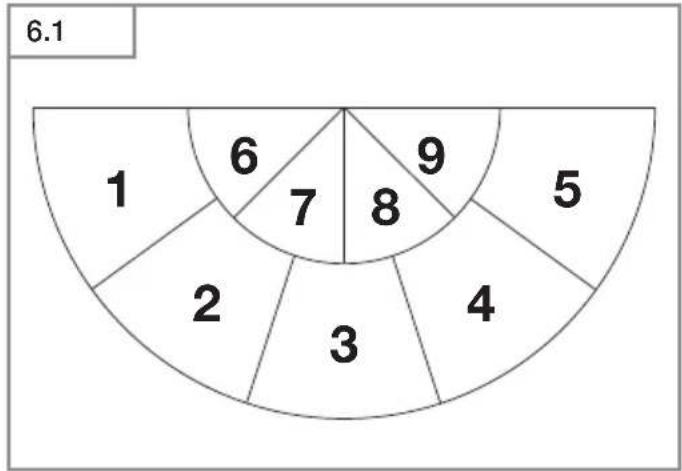
The area covered by the sensor can be divided into nine zones (Fig. 6.1):
-Four zones for close-up detection (6-9).
-Five zones for long-distance detection (1 - 5).
Each zone can be activated or deactivated separately.
The boundary between close-up and long-distance detection is at a distance of approx. 4.5 m, when mounted at a height of 2.0 m.
The zones for close-up detection (6 - 9) can only be deactivated if the neighbouring zone for long-distance detection (1 - 5) is deactivated at the same time.
The sensitivity of the 5 pyros can also be adjusted individually. The pyros are assigned in line with the various zones. It is only recommended to adjust sensitivity if the chosen detection zone cannot be suitably covered by activating/deactivating individual zones.
Note:
If one or more of the outer zones (1 to 5) are deactivated and several persons are present in these zones at the same time, the sensor may still switch ON.
Note:
When setting the time, it is recommended to select the shortest period.
Note:
The twilight setting control must be set to daylight mode when adjusting the detection zone and performing the functional test in daylight.
Bluetooth interconnection (Connect Bluetooth Mesh)
The sensor is configured via the Steinel Connect app. Appropriate network keys are saved on a smartphone or tablet the first time a connection is made between the sensor and Steinel Connect app. The key rules out any unauthorised access to the sensor.
The network key must be shared for access via another smartphone or tablet.
7. Cleaning and Maintenance

Hazard from electrical power.
Contact between water and live parts can result in electrical shock, burns or death.
- Only clean tool in a dry state.
Risk of damage to property!
Using the wrong detergent can damage the light.
- Clean sensor switch with a moist cloth without detergent.
8. Troubleshooting
Unit without power.
-Fuse not switched ON or faulty.
- Switch ON fuse.
- Change faulty fuse.
-Break in wiring.
- Switch ON mains switch.
- Check wiring with voltage tester.
-Short circuit in mains power supply lead.
- Check connections.
Unit does not switch ON.
- Wrong twilight setting selected.
- Reset brightness response threshold
-Mains switch OFF.
- Switch ON mains switch.
-Fuse not switched ON or faulty.
- Switch ON fuse.
- Change faulty fuse.
–Detection zone too small or incorrect.
- Check and adjust detection zone.
Unit does not switch OFF.
-Continued movement within the detection zone.
- Check detection zone.
- If necessary, limit or change detection zone.
Unit switches ON when it should not
–Movement within the detection zone, e.g. from animals, trees or cars.
- Check detection zone.
- If necessary, limit or change detection zone.
-Unit is moving as a result of gusts of wind or precipitation.
- Mount floodlight on a firm surface.
No connection being set up to sensor switch from smartphone or tablet.
–Smartphone too close to sensor switch.
• Distance from sensor at least 1.5 m.
–The app is not compatible with the smartphone or tablet.
- Use different smartphone or tablet.
-App version not up to date.
- Update Steinel Connect app in the app store.
No connection with the app.
- No network key on the smartphone or tablet that is being used.
- Share network key via app.
9. Disposal
Electrical and electronic equipment, accessories and packaging must be recycled in an environmentally compatible manner.
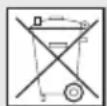
Do not dispose of electrical and electronic equipment as domestic waste.
EU countries only:
Under the current European Directive on Waste Electrical and Electronic Equipment and its implementation in national law, electrical and electronic equipment no longer suitable for use must be collected separately and recycled in an environmentally compatible manner.
10. Declaration of Conformity
STEINEL GmbH hereby declares that the MD IR D180 COM1 sensor conforms to Directive 2014/53/EU. The full wording of the EU Declaration of Conformity is available for downloading from the following Internet address: www.steinel.de
11. Manufacturer's warranty
Manufacturer's warranty of STEINEL GmbH, Diesel strasse 80-84, DE-33442 Herzebrock-Clarholz, Germany
All STEINEL products meet the highest quality standards. For this reason, we, the manufacturer, are pleased to provide you, the customer, with a warranty under the following terms and conditions: The warranty covers the absence of deficiencies which are proven to be the result of a material defect or fault in manufacturing and which are reported to us immediately after detection and within the warranty period. The warranty shall cover all STEINEL Professional products sold and used in Germany.
Our warranty cover for consumers
The provisions below apply to consumers. A consumer is any natural person who, on entering into the purchase transaction, neither acts in exercising their commercial nor their self-employed activity.
You can opt for warranty cover in the form of repair or replacement which will be provided free of charge (if applicable, in the form of a successor model of the same or higher quality) or in the form of a credit note.
In the case of sensors, floodlights, outdoor and indoor lights, the warranty period for the STEINEL
Professional product you have purchased is 5 years in each case from the date on which the product was purchased.
We shall bear the shipping costs but not the transport risks involved in return shipment.
Our warranty cover for entrepreneurs
The provisions below apply to entrepreneurs. Entrepreneur is a natural or legal person or partnership with legal personality who or which, on entering into the purchase transaction, acts in exercising their or its commercial or self-employed activity. We have the option of providing warranty cover by rectifying deficiencies free of charge, replacing a product free of charge (if applicable, in the form of a successor model of the same or higher quality) or by issuing a credit note.
In the case of sensors, floodlights, outdoor and indoor lights, the warranty period for the STEINEL
Professional product you have purchased is 5 years in each case from the date on which the product was purchased.
Within the scope of warranty cover, we shall not bear your expenses accruing from subsequent fulfillment nor shall we bear your expenses for removing the defective product and installing a replacement product.
Statutory rights accruing from defects, gratuitousness
The warranty cover described here shall be applicable in addition to the statutory rights of warranty – including special consumer protection provisions – and shall not restrict or replace them. Exercising your statutory rights in the event of defects is gratuitous.
Exemptions from the warranty
All replaceable lamps are expressly excluded from this warranty.
In addition to this, the warranty shall not cover:
–any wear resulting from use or any other natural wear of product parts or any deficiencies in the STEINEL Professional product that are attributable to wear caused by use or other natural wear,
-any improper or non-intended use of the product or any failure to observe the operating instructions,
–any unauthorised additions, alterations or other modifications to the product or any deficiencies attributable to the use of accessory,
-supplementary or replacement parts which are not genuine STEINEL parts,
–any maintenance or care of products that is not carried out in accordance with the operating instructions,
-any attachment or installation that is not in accordance with STEINEL's installation instructions,
-any damage or loss occurring in transit.
Application of German law
The warranty shall be governed by German law excluding the United Nations Convention concerning the International Sale of Goods (CISG).
Making claims
If you wish to make a warranty claim, please send your product complete and carriage paid with the original receipt of purchase, which must show the date of purchase and product designation, either to your retailer or directly to us at STEINEL (UK) Ltd. – 25 Manasty Road, Axis Park, Orton Southgate, GB- Peterborough Cambs PE2 6UP United Kingdom. For this reason, we recommend that you keep your receipt of purchase in a safe place until the warranty period expires.
5 YEAR MANUFACTURER'S WARRANTY
FR
500 W (50 pcs c < 176 μF



Collegamento in rete Bluetooth (Connect Bluetooth Mesh)




STEINEL Connect App -sovellus on ladattava

-Skjult variant (ill. 5.8)

Bluetooth-tilkobling (Connect Bluetooth Mesh)
Sensoren konfigureres via Steinel Connect-appen. Ved første gangs forbindelse mellom sensoren og Steinel Connect-appen blir det lagret en tilhørende nettverksnøkkel på smarttelefonen eller nettbrettet. Med denne nøkkelen er uvedkommende tilgang til sensoren utelukket. Nettverksnøkkelen må deles for tilgang via en ytterligere smarttelefon eller et videre nettbrett.







http://steinelshop.ro/termeni-si-conditii#answer10

Funkcije, nastavljive v aplikaciji Steinel Connect:

Funkcije koje se mogu podesiti pomoću aplikacije Steinel Connect:






natural_image
World map silhouette in grayscale, showing continents and oceans without any text or labelsContact
www.steinel.de/contact