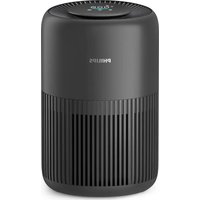
AC0951 - Air purifier PHILIPS - Free user manual and instructions
Find the device manual for free AC0951 PHILIPS in PDF.


| Product type | Air purifier |
| Brand | Philips |
| Model | AC0951 |
| Compatible filter | FY0910 |
| Power adapter | KA2401A-2401000EU |
| Detection technology | AeraSense (PM2.5 particle sensor) |
| Air quality indicator | Color indicator: blue (good), blue-purple (fair), purple-red (poor), red (very poor) |
| Operating modes | Auto, Medium, Turbo, Sleep |
| Connectivity | Wi-Fi 2.4 GHz (802.11b/g/n/ax) and Bluetooth® 5.2 (LE) |
| Mobile app | Philips Air+ (iOS/Android) |
| Filter cleaning alert | Yes (display) |
| Filter replacement alert | Yes (display, automatic lock if not replaced) |
| Child lock | Yes (activate/deactivate by pressing button for 3 seconds) |
| Particle sensor cleaning | Every 2 months with a dry cotton swab |
| Housing cleaning | Soft dry cloth |
| Filter surface cleaning | Vacuum when alert appears |
| Filter replacement | By user (simple, no tool required) |
| Spare parts | FY0910 filter available |
| Known error code | E1 (motor) - contact service |
| Warranty | 2 years (Versuni) |
| Usage | Indoor, domestic |
| Safety | Auto shut-off if base not properly installed; do not use water or flammable detergent |
Frequently Asked Questions - AC0951 PHILIPS
User questions about AC0951 PHILIPS
0 question about this device. Answer the ones you know or ask your own.
Ask a new question about this device
Download the instructions for your Air purifier in PDF format for free! Find your manual AC0951 - PHILIPS and take your electronic device back in hand. On this page are published all the documents necessary for the use of your device. AC0951 by PHILIPS.
USER MANUAL AC0951 PHILIPS
Read this user manual carefully before you use the appliance, and save it for future reference.
To ensure the best performance, kindly suggest the firmware of your purifier is upgraded to the latest version. You can do this upgrade via the Air+ app.
Danger
- Do not clean the appliance with water, any other liquid, or a (flammable) detergent, nor let them enter the appliance, to avoid electric shock and/or a fire hazard.
- Do not spray any flammable materials such as insecticides or fragrance around the appliance.
Warning
- Check if the voltage indicated on the appliance corresponds to the local power voltage before you connect the appliance.
- If the power cord is damaged, you must have it replaced by Philips, a service center authorized by Philips, or similarly qualified persons in order to avoid a hazard.
- Do not use the appliance if the adaptor, the power cord, or the appliance itself is damaged.
- Only to be used together with the adaptor provided with the appliance.
- This appliance can be used by children aged from 8 years and above and persons with reduced physical, sensory or mental capabilities or lack of experience and knowledge if they have been given supervision or instruction concerning use of the appliance in a safe way and understand the hazards involved.
- Children shall not play with the appliance.
- Cleaning and maintenance shall not be made by children without supervision.
- Do not block the air inlet and outlet, e.g. by placing items on the air outlet or in front of the air inlet.
- Make sure that foreign objects do not fall into the appliance through the air outlet.
- Standard WiFi interface based on 802.11b/g/n/ax at 2.4GHz with a maximum output power of 64mW EIRP.
Bluetooth version 5.2 (LE) at frequency 2.4GHz with RF output less than 10mW EIRP. - We recommend people who are allergic to dust, pollen, pets or mold, not to replace filters by themselves or to take protective measures, such as mask and gloves.
Caution
-
We recommend people who are allergic to dust, pollen, pets or mold, not to replace filters by themselves or to take protective measures, such as mask and gloves. This appliance is not a substitute for proper ventilation, regular vacuum cleaning, or use of an extractor hood or fan while cooking.
-
Always place and use the appliance on a dry, stable, level, and horizontal surface.
- Leave at least 20cm free space around the appliance and leave at least 30cm free space above the appliance.
- Do not sit or stand on the appliance. Do not place anything on top of the appliance.
- Do not place the appliance directly below an air conditioner to prevent condensation from dripping onto the appliance.
Only use the original Philips filters specially intended for this appliance. Do not use any other filters.
Combustion of the filter may cause irreversible human hazard and/or jeopardize other lives. Do not use the filter as fuel or for similar purpose. - Avoid knocking against the appliance (the air inlet and outlet in particular) with hard objects.
- Do not insert your fingers or objects into the air outlet or the air inlet to prevent physical injury or malfunctioning of the appliance.
- Do not use this appliance when you have used indoor smoke-type insect repellents or in places with oily residues, burning incense, or chemical fumes.
- Do not use the appliance near gas appliances, heating devices or fireplaces.
Always unplug the appliance when you want to move, clean appliance, replace the filter or carry out other maintenance. - The appliance is only intended for household use under normal operating conditions.
- Do not use the appliance in wet surroundings or in surroundings with high ambient temperatures, such as the bathroom, or in a room with major temperature changes.
- The appliance does not remove carbon monoxide (CO) or radon (Rn). It cannot be used as a safety device in case of accidents with combustion processes and hazardous chemicals.
Electromagnetic fields (EMF)
This appliance complies with the applicable standards and regulations regarding exposure to electromagnetic fields.
Recycling
This symbol means that this product shall not be disposed of with normal household waste (2012/19/EU).
Follow your country's rules for the separate collection of electrical and electronic products. Correct disposal helps prevent negative consequences for the environment and human health.
The filter units are non-washable and non-recyclable, dispose of used filter units in accordance with local regulations.
6 English
Simplified EU declaration of conformity
Hereby, DAP B.V. declares that the radio equipment type AC0950/AC0951 is in compliance with Directive 2014/53/EU. The full text of the EU declaration of conformity is available at the following internet address: www.philips.com.
Your air purifier
Congratulations on your purchase, and welcome to Philips!
To fully benefit from the support that Philips offers, register your product at www.philips.com/support.
Product overview

A Control panel D Filter (FY0910)
B Air outlet E Base
C Air quality sensor F Adapter (KA2401A-2401000EU)
Controls overview
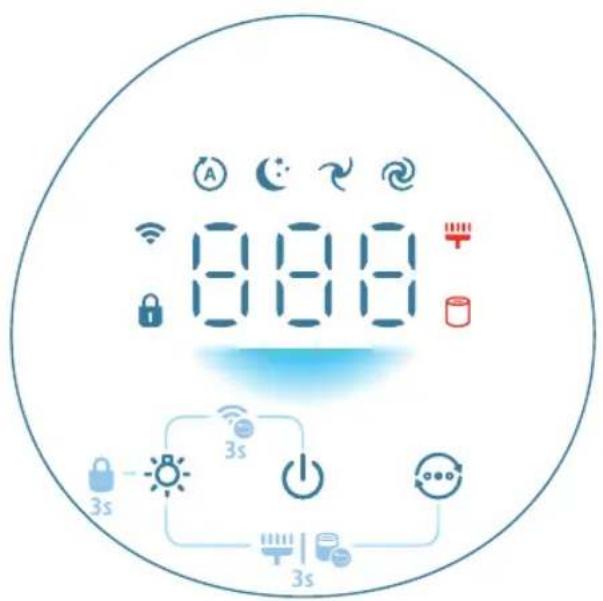
Control buttons:
Power on/off button Light on/off button

Mode switch button
Long press the button(s) for 3 seconds:
Child lock Wi-Fi reset

- Filter reset
Display panel:
A Auto mode Medium mode

Sleep mode Turbo mode

WiFi indicator Child lock indicator

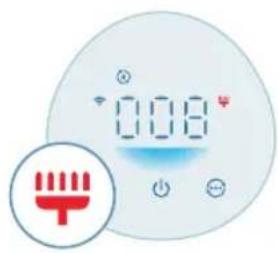
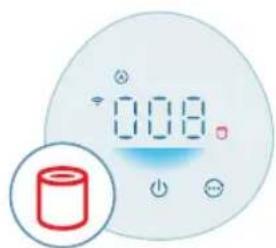
Filter cleaning alert Filter replacement alert

8 English
Getting started
Installing the filter
Remove all packaging of the filter before use.
Note: Make sure the air purifier is unplugged from the electrical outlet before installing the filter.
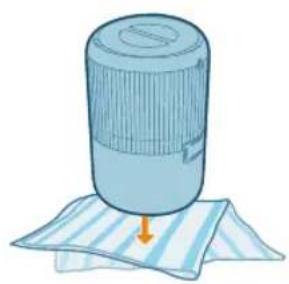
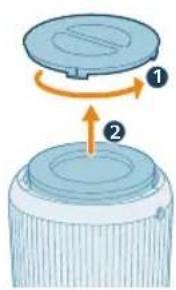
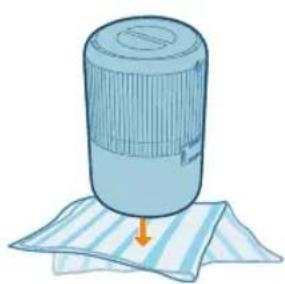
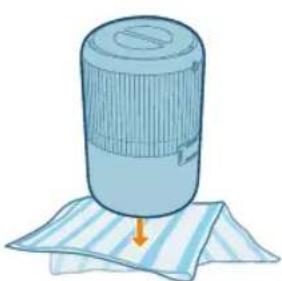
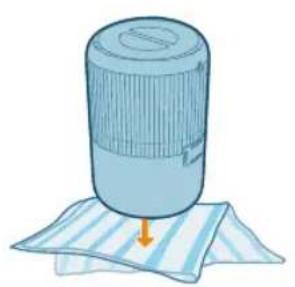
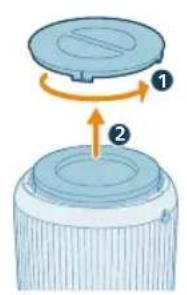
1 Turn the appliance upside down and place it on a soft cloth.
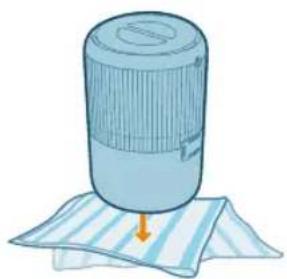
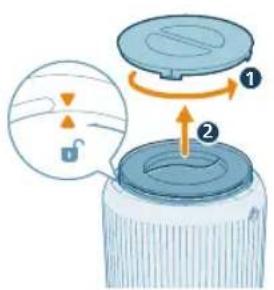
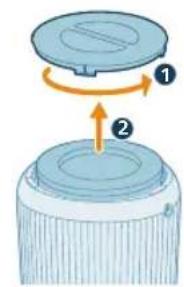
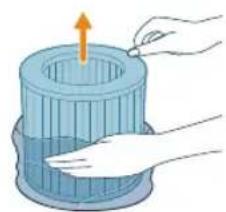
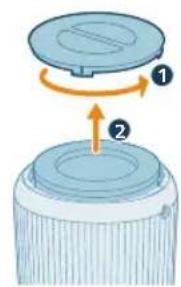
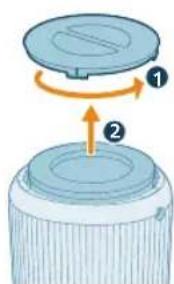
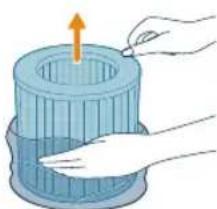
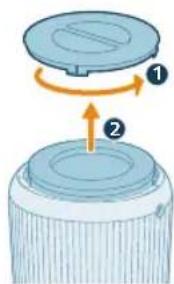
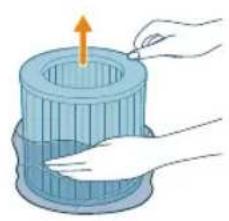
2 Rotate the base anti-clockwise to remove it from the appliance. Pull the filter out from the appliance.
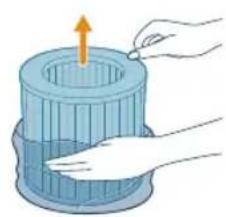
3 Remove all packaging materials of the air purification filter.
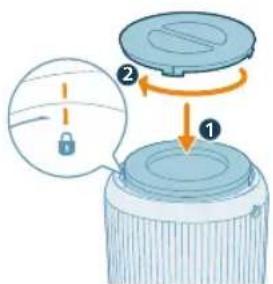
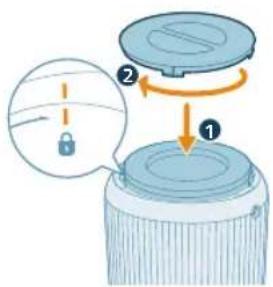
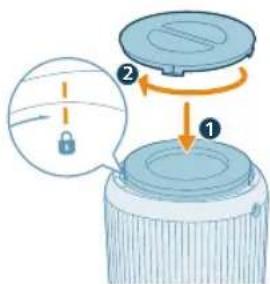
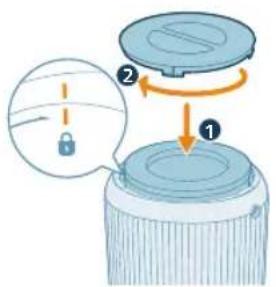
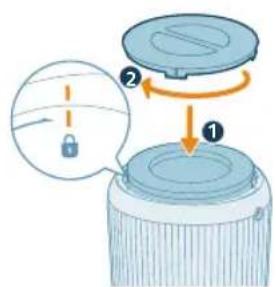
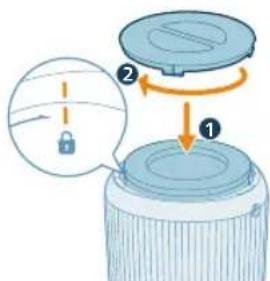
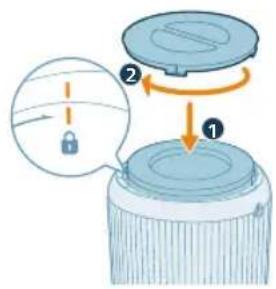
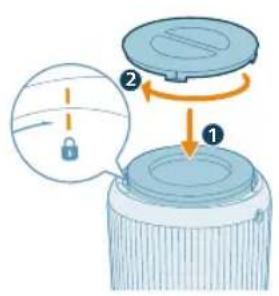
4 Put the filter back into the appliance. Reattach the base and rotate it clockwise to fasten the base.
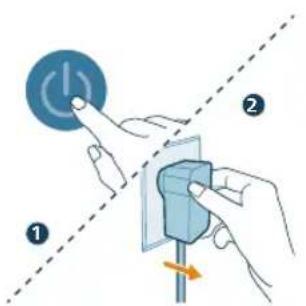
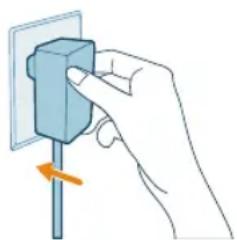
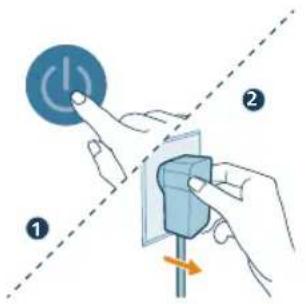
Connecting power
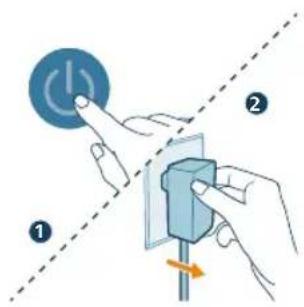
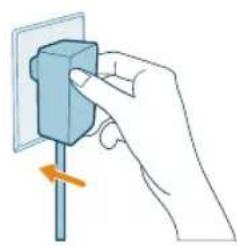
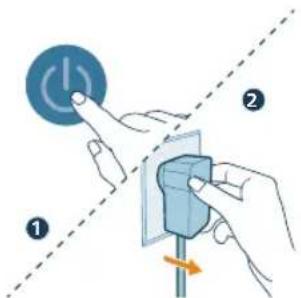
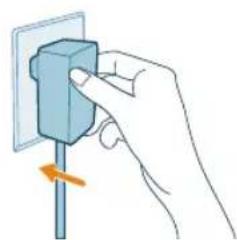
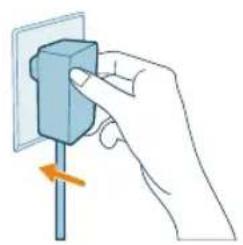
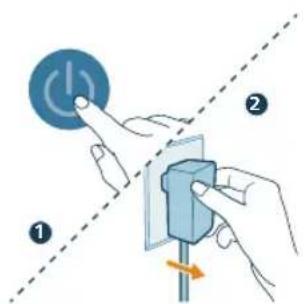
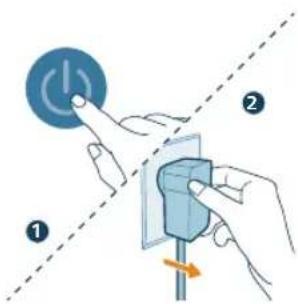
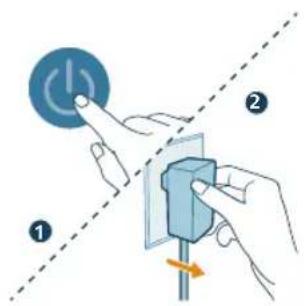
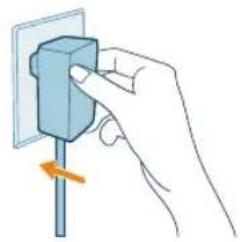
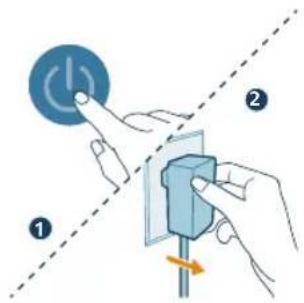
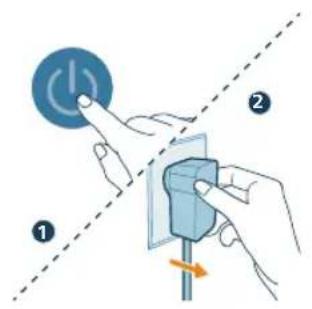
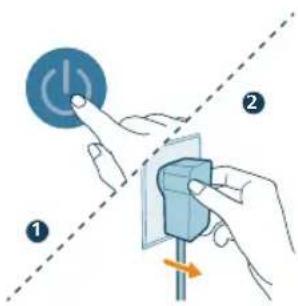
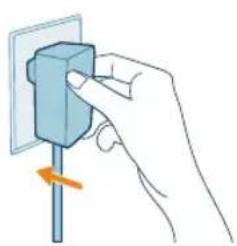
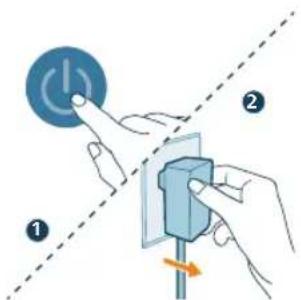
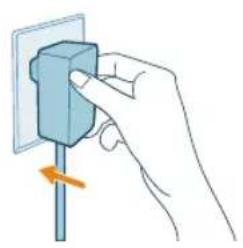
CAUTION: Risk of electric shock! When you unplug the adaptrt, always pull the plug from the socket. Never pull the cord.
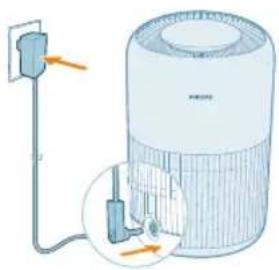
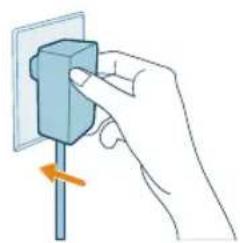
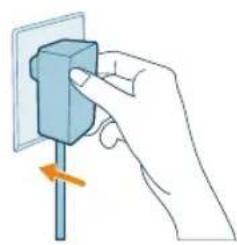
Connect the power adapter to:
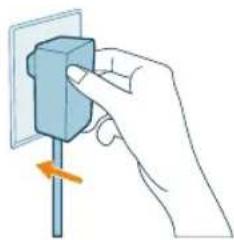
- First, the power adapter on the appliance.
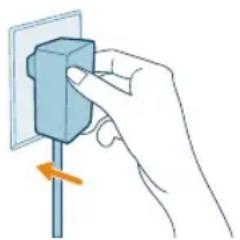
- Then, the wall outlet.
Understanding Wi-Fi indicator
Wi-Fi icon status Wi-Fi connection status
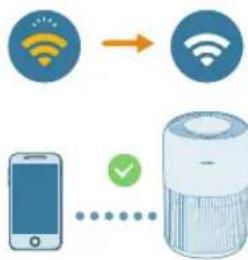
Blink in orange Connecting to the smart phone
Stable in orange Connected to the smart phone
Blink in white Connecting to the server
Stable in white Connected to the server
Off Wi-Fi function disabled or device lights are off
Wi-Fi connection

Setting up the Wi-Fi connection for the first time
1 Download and install the Philips "Air+ app from the App Store or Google Play.
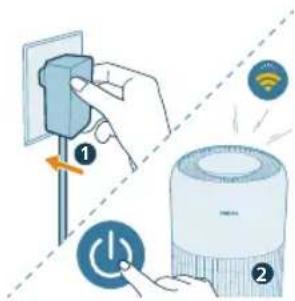
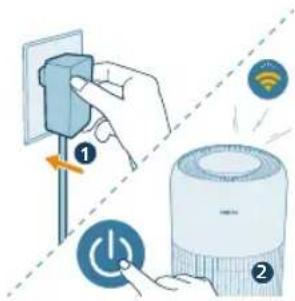
2 Put the plug of the air purifier in the power socket and press the power button to turn on the air purifier.
- The Wi-Fi indicator links orange for the first time.
English
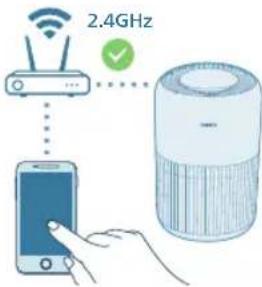

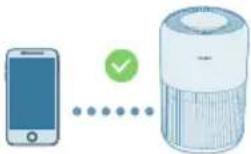
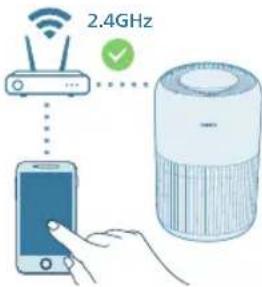
3 Make sure that your smart phone or tablet is successfully connected to your Wi-Fi network.
Note:
Enable Bluetooth feature on your smart phone to ensure the smooth pairing.
Please ensure your smartphone is connected to a 2.4GHz (home) Wi-Fi network instead of a 5GHz Wi-Fi network or public Wi-Fi. For a successful pairing, we suggest turning off your mobile data before initiating the pairing process.
4 Launch the Philips "Air+ app and click on "Add a device" or press the "+" button on the screen. Follow the on-screen instructions to connect the air purifier to your network.
After a successful connection, the Wi-Fi indicator remains steady in white.
Note:
This instruction is only valid when the air purifier is being set up for the first time. If the network has changed or the setup needs to be performed again.
If you want to connect more than one air purifier to your smart phone or tablet, you can add the purifier in the app on additional smart phones without doing the Wi-Fi connection reset on the device.
Make sure that the distance between your smart phone or tablet and the air purifier is less than 10m without any obstructions.
Reset the Wi-Fi connection
1 Put the plug of the air purifier in the power socket and press turn on the air purifier.
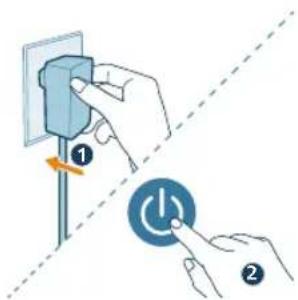
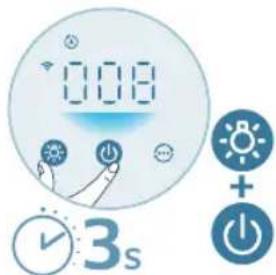
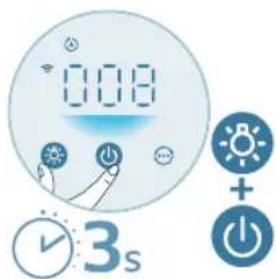
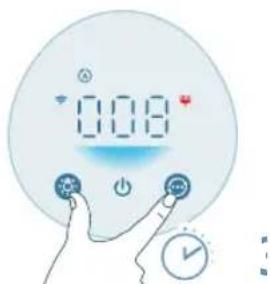
2 Long press and button at the same time for 3 seconds until you hear a beep.
The air purifier goes to pairing mode.
- The Wi-Fi indicator blinks orange.
3 Follow the steps 3-4 in "Setting up the Wi-Fi connection for the first time" section.
Using the air purifier
Understanding the air quality light
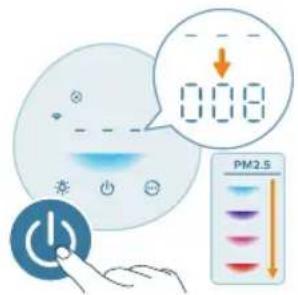
The air quality light automatically goes on when the air purifier is switched on, and lights up all colors in sequence. After approximately 30 seconds, the particle sensor selects the color that corresponds to the surrounding air quality of airborne particles.
The color of the air quality light is determined by the PM2.5 reading.
PM2.5
AeraSense sensing technology accurately detects and quickly responds to even the slightest particle change in the air. It provides you with reassurance with real-time PM2.5 feedback.
Most of the indoor air pollutants fall under PM2.5 – which refers to airborne particle pollutants smaller than 2.5 micrometers. Common indoor sources of fine particles are tobacco smoke, cooking, burning candles. Some airborne bacteria and the smallest mold spores, pet allergen and dust mite allergen particles also fall under PM2.5.
PM2.5 level Air quality color Air quality level
| ≤12 Blue Good |
| 13-35 Blue-purple Fair |
| 36-55 Purple-red Poor |
| >55 Red Very poor |
Turning on and off
Note:
For optimum purification performance, close doors and windows.
Keep curtains away from the air inlet or air outlet.
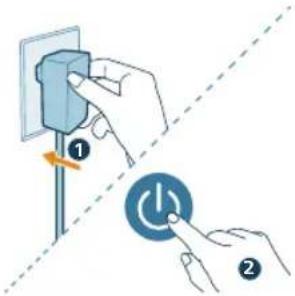
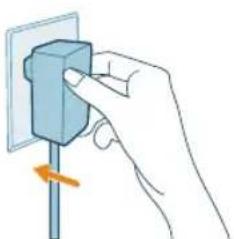
1 Put the adapter of the air purifier into the power socket.

12 English
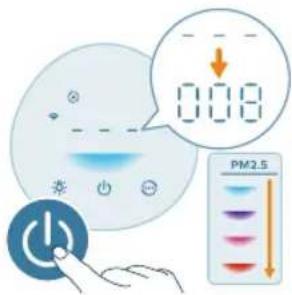
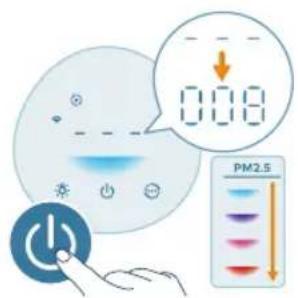
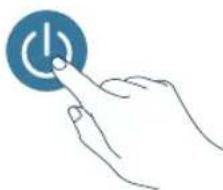
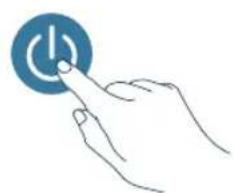
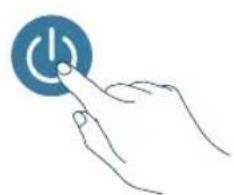
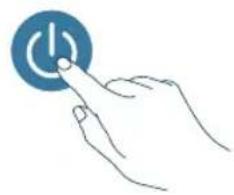
2 Press the power button to switch on the air purifier.
The air purifier beeps.
The displays on the screen during warming up. Then the air purifier shows the PM2.5 level after measuring the air quality.
The air purifier operates in the Auto mode with PM2.5 displayed on the screen.
3 Press the power button again to switch off the air purifier.
Note: If the air purifier stays connected to the electrical outlet after turning OFF, the air purifier will operate under the previous settings when turned ON again.
Changing the mode setting
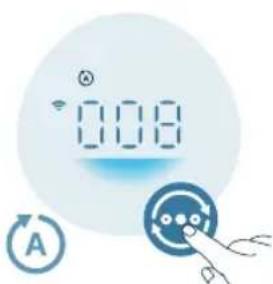
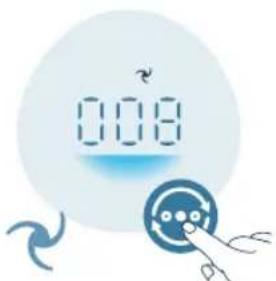
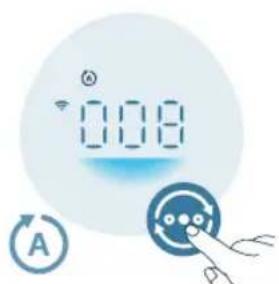
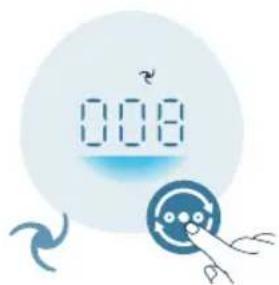
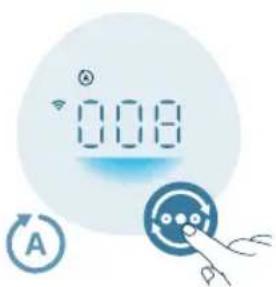
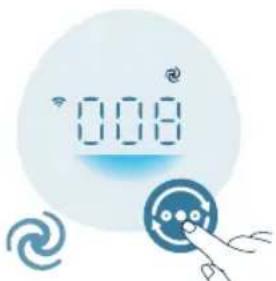
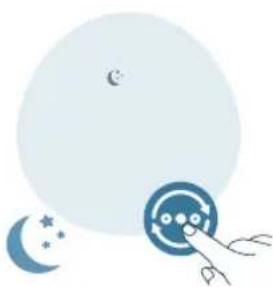
You can choose the Auto mode, the Medium mode, the Turbo mode, or the Sleep mode by pressing the mode switch button.
Auto mode ( The air purifier automatically adjusts the fan speed in accordance with the ambient air quality.
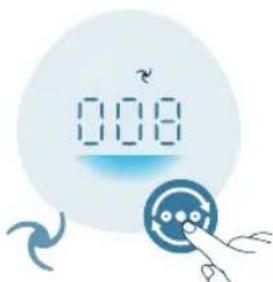
Medium mode (In the Medium mode, the air purifier operates on a medium speed.
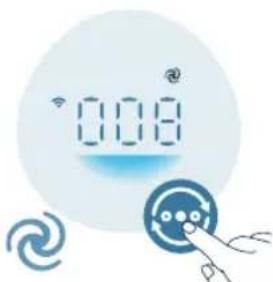
Turbo mode ( The air purifier operates on the highest speed.
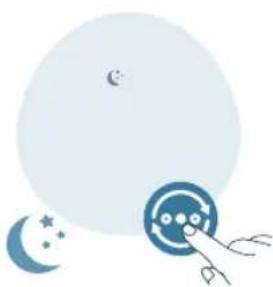
Sleep mode (V): The air purifier operates quietly at a low speed. After 3 seconds, the screen lights turn off.
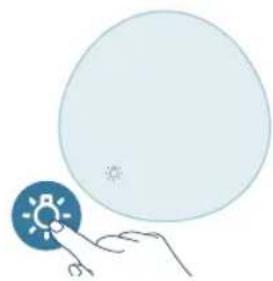
Using the light on/off function
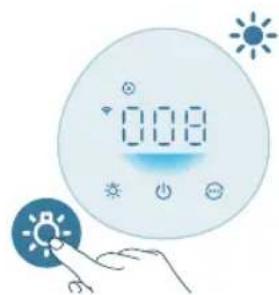
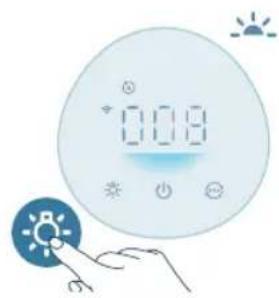
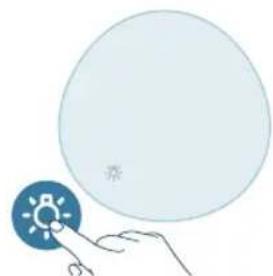
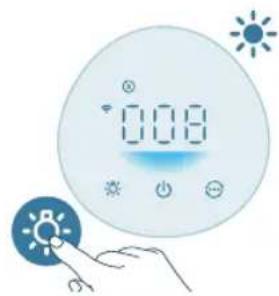
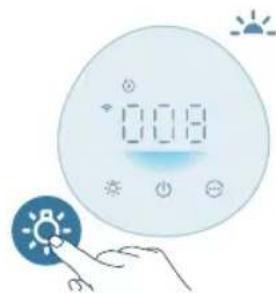
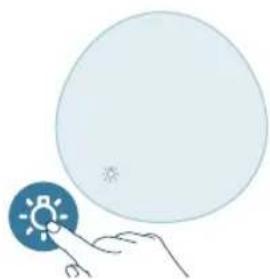
You can press the button to turn on, dim or turn off all lights and the control panel.
The control panel is turned on.
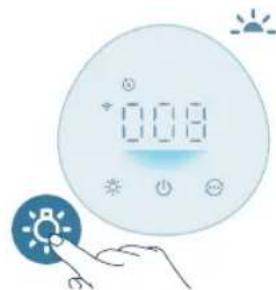
The control panel is dimmed.
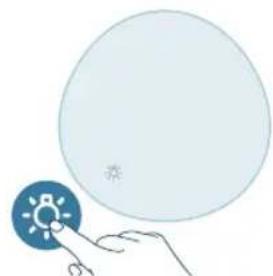
The control panel is turned off.
14 English
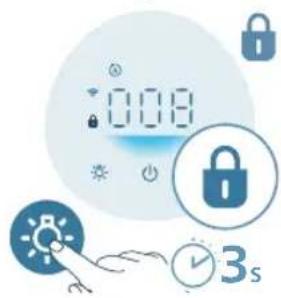
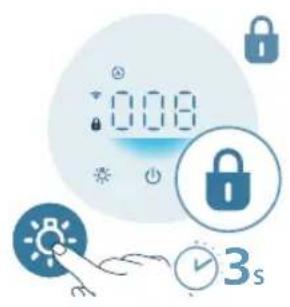
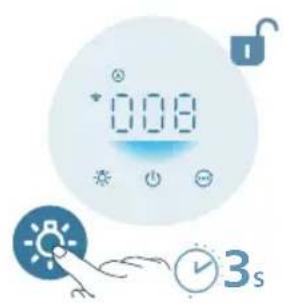
Setting the child lock
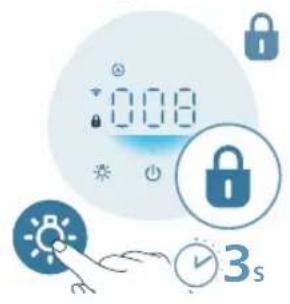
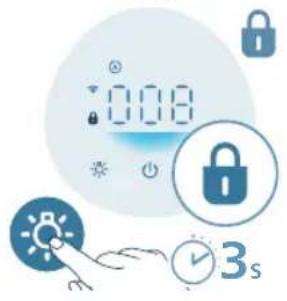
1 Press the button for 3 seconds to activate the child lock. The displays on the screen.
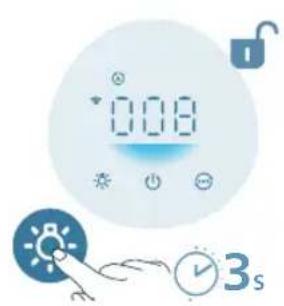
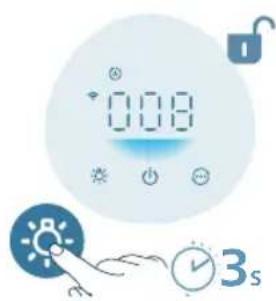
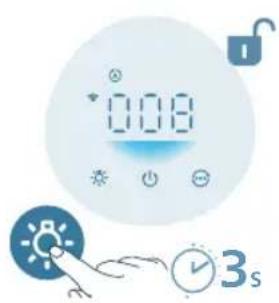
2 Press the button for 3 seconds again to deactivate the child lock. The disappears from the screen.
Cleaning and maintenance
Note:
Always unplug the appliance before you clean it.
Never immerse the appliance in water or any other liquid.
Never use abrasive, aggressive, or flammable cleaning agents such as bleach or alcohol to clean any part of the appliance.
Never use any liquids (including water) to clean the filter.
Do not attempt to clean the air quality sensor with a vacuum cleaner.
Cleaning schedule
Frequency Cleaning method
When necessary Wipe the plastic part of the appliance with a soft, dry cloth
Clean the air outlet cover
Every two months Clean the particle sensor with a dry cotton swab

displays on the screen Clean the surface of the filter
Cleaning the body of the air purifier
Regularly clean the inside and outside of the air purifier to prevent dust from collecting.
1 Use a soft, dry cloth to clean both the interior and exterior of the air purifier.
2 The air outlet can also be cleaned with a dry, soft cloth.
Cleaning the particle sensor
Clean the air quality sensor every 2 months for optimal functioning of the appliance.
If the air purifier is used in a dusty environment, it may need to be cleaned more often.
If the humidity level in the room is very high, condensation may develop on the particle sensor and the air quality light may indicate a more poor air quality even though the air quality is actually good. If this occurs, clean the air quality sensor.
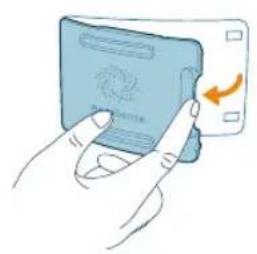
1 Switch off the air purifier and unplug from the power socket.
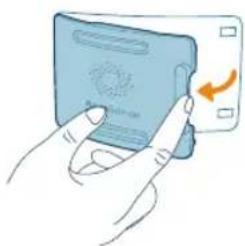
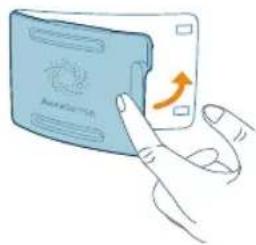
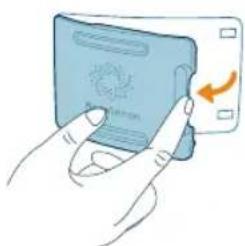
2 Open the air quality sensor cover.
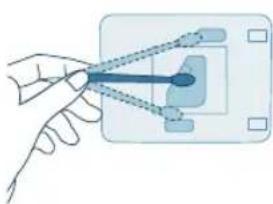
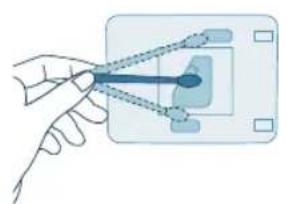
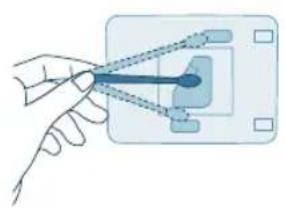
3 Clean the particle sensor with a damp cotton swab.
4 Dry all parts thoroughly with a dry cotton swab.
English
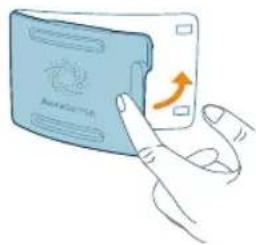
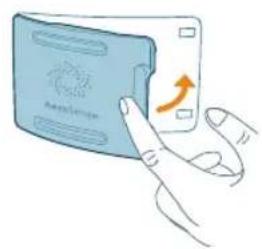
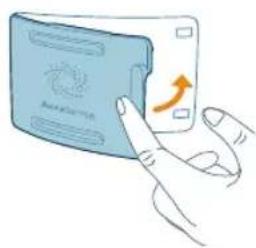
5 Close the air quality sensor.
Cleaning the surface of the filter
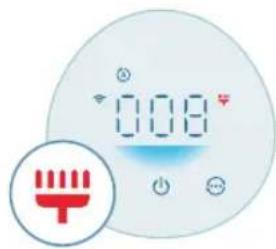
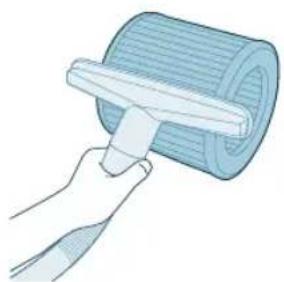
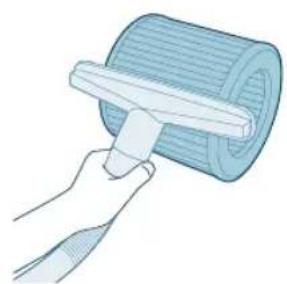
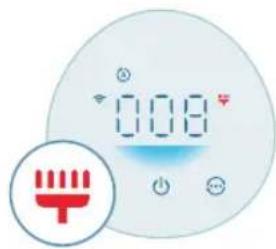
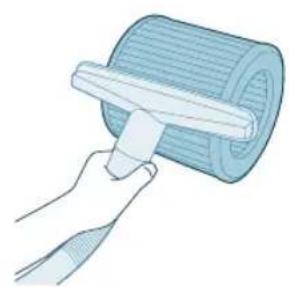
When the filter cleaning alert displays on the screen, clean the surface of the filters with a vacuum cleaner.
Note: We recommend people who are allergic to dust, pollen, pets or mold, not to replace filters by themselves or to take protective measures, such as wearing a mask and gloves.
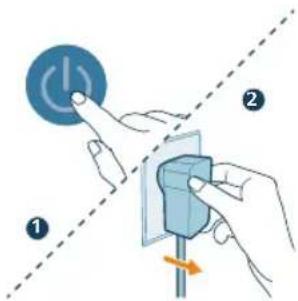
1 Switch off the air purifier and unplug from the power socket.
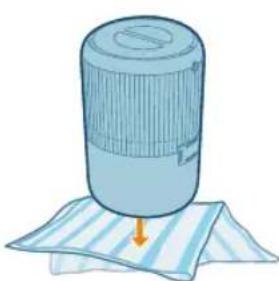
2 Turn the appliance upside down and place it on a soft cloth.
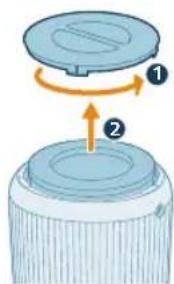
3 Rotate the base anti-clockwise to remove it from the appliance. Pull the filter out from the appliance.
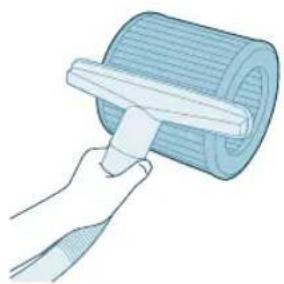
4 Clean the surface of the filters with a vacuum cleaner.
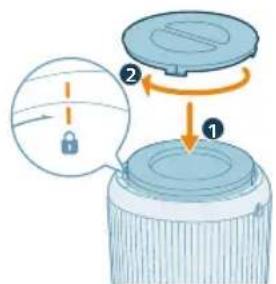
5 Put the filter back into the appliance. Reattach the base and rotate it clockwise to fasten the base.
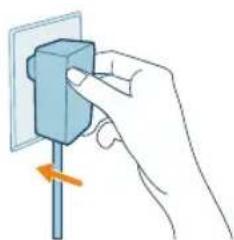
6 Put the adapter of the air purifier in the power socket.
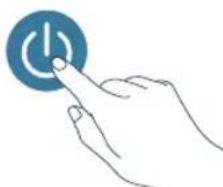
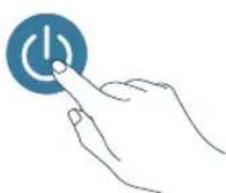
7 Press the button to switch on the appliance.
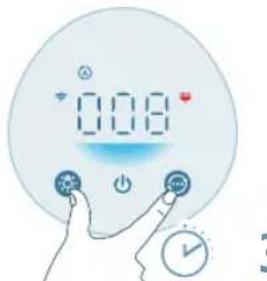
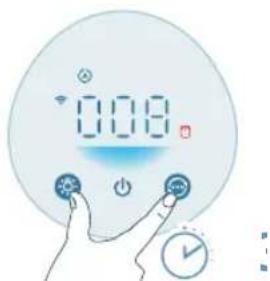
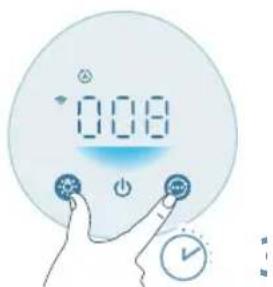
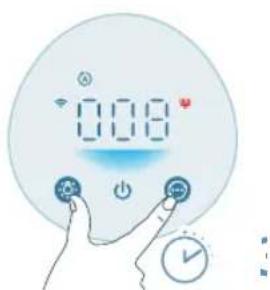
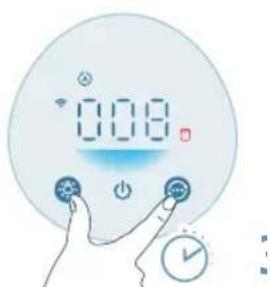
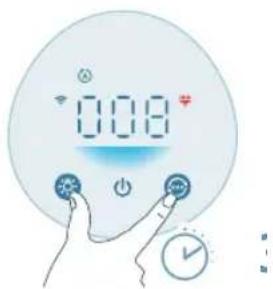
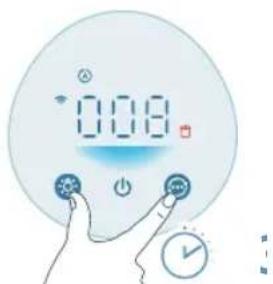
8 Press and hold the and button for 3 seconds to reset the filter cleaning time.
- You can also reset the filter cleaning time via the Air+ app.
After the reset is successful, the filter cleaning alert disappears from the screen.
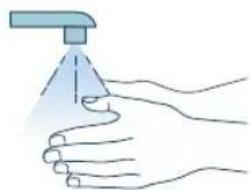
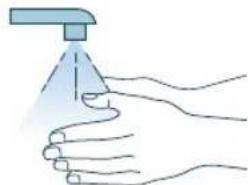
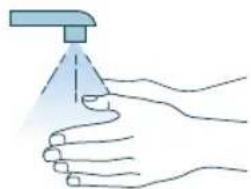
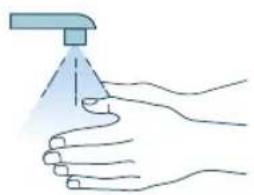
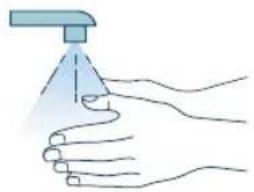
9 Wash your hands thoroughly after cleaning the filters.
Replacing the filter
Understanding the healthy air protect lock
This air purifier is equipped with a filter replacement indicator to make sure that the air purification filter is in optimal condition when the air purifier is operating. When the filter needs to be replaced, the filter replacement alert lights up red. If the filter is not replaced in time, the air purifier will stop operating and automatically lock to protect the air quality in the room. Replace the filter as soon as possible.
Replacing the filter
Note:
The filter is not washable or reusable.
Always turn off the air purifier and unplug from the electrical outlet before replacing the filter.
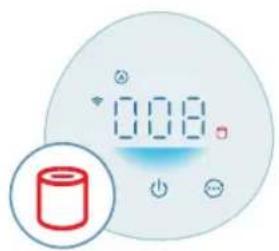
When the filter replacement alert displays on the screen, replace the filter (FY0910).
Note: We recommend people who are allergic to dust, pollen, pets or mold, not to replace filters by themselves or to take protective measures, such as wearing a mask and gloves.
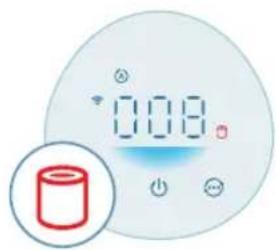
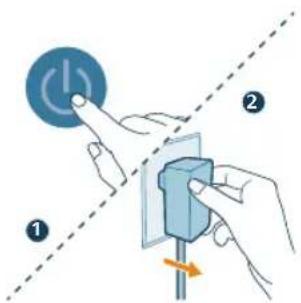
1 Switch off the air purifier and unplug from the power socket.
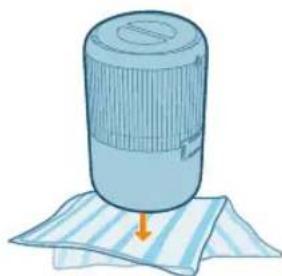
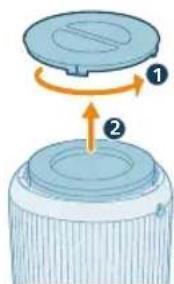
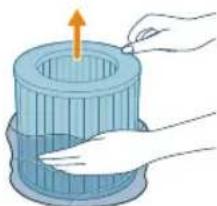
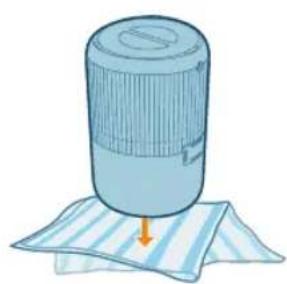
2 Turn the appliance upside down and place it on a soft cloth.
3 Rotate the base anti-clockwise to remove it from the appliance. Pull the filter out from the appliance. Discard the used filter.
4 Remove all packaging materials of the new filter.
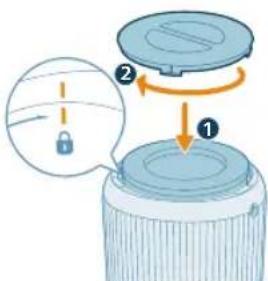
5 Put the new filter into the appliance. Reattach the base and rotate it clockwise to fasten the base.
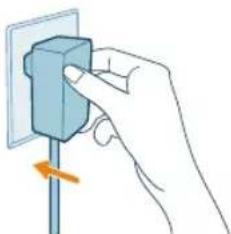
6 Put the adapter of the air purifier in the power socket.
20 English
7 Press the button to switch on the appliance.
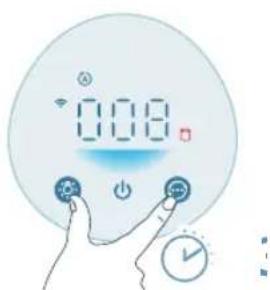
8 Press and hold the and button for 3 seconds to reset the filter lifetime counter.
- You can also reset the filter cleaning time via the Air+ app.
After the reset is successful, the filter replacement alert disappears from the screen.
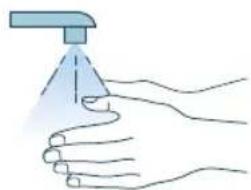
9 Wash your hands thoroughly after replacing the filter.
Note: Do not smell the filter as it has collected pollutants from the air.
Filter reset
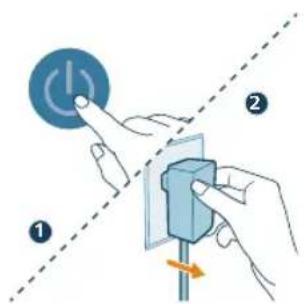
You can replace the filters even before filter replacement alert ( displays on the screen. After replacing filters, you need to reset the filter lifetime counter manually.
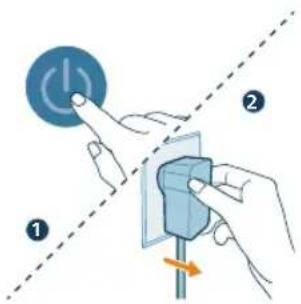
1 Press the button to turn off the appliance. Unplug the appliance.
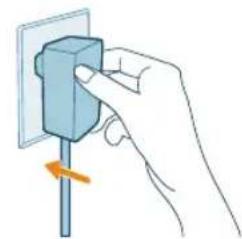
2 Make sure the appliance is completely unplugged, and then put the power adapter in the power socket.
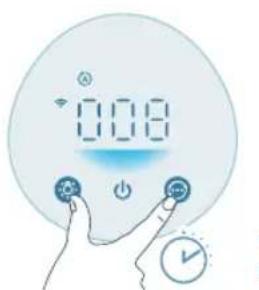
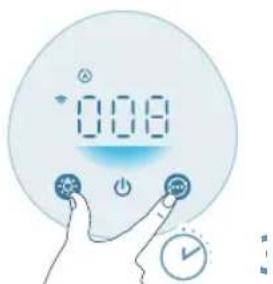
3 Within 15 seconds after power on, press and hold the and button for 3seconds to reset the filter lifetime counter.
Storage
1 Turn off the air purifier and unplug from the power socket.
2 Clean the air purifier and the surface of the filter (see Chapter "Cleaning and Maintenance").
3 Let all parts air dry thoroughly before storing.
4 Wrap the filter in air tight plastic bags.
5 Store the air purifier, filter in a cool, dry location.
6 Always thoroughly wash hands after handling filter.
Troubleshooting
This chapter summarizes the most common problems you could encounter with the appliance. If you are unable to solve the problem with the information below, contact the Consumer Care Center in your country.
Problem Possible solution
| The appliance does not work properly. Check if the base is properly installed. If not, for safety reason, the appliance will stop operating. | |
| The filter replacement alert is on but you have not replaced the corresponding filter. As a result, the appliance is now locked. In this case, replace the filter and reset the filter lifetime counter. | |
| The airflow that comes out of the air outlet is significantly weaker than before. | The surface of the filter is dirty. Clean the surface of the filter (see Chapter 'Cleaning and maintenance'). |
| The air quality does not improve, even though the appliance has been operating for a long time. | Check if the packing material is removed from the filter. |
22 English
| Make sure that the filter (FY0910) is properly installed. | |
| Room size is large or the outdoor air quality is poor. | |
| For optimum purification performance, please close the doors and windows when operating the air purifier. | |
| There are indoor pollution resources. For instances, smoking, cooking, incense. | |
| Filters reach the end of life. Replace the filter with a new one. | |
| The appliance produces a strange smell. The first few times you use the appliance, it may produce a plastic smell. This is normal. However, if the appliance produces a burnt smell even if removing the filter, contact your Philips dealer or an authorized Philips service center. The filter may produce smell after being used for a while because of the absorption of indoor gases. It's recommended that you reactivate the filter by putting it in direct sunlight for repeated use. If odor still exists, replace the filters. | |
| The appliance is extra loud. It's normal if the appliance runs at the Turbo mode. | |
| The appliance will run in high speed when the air quality is poor, which will cause higher noise. When using the appliance in a bedroom at night, choose the Sleep speed. | |
| If there is abnormal sound, contact the Consumer Care Center in your country. | |
| The appliance still indicates that I need to replace filter, but I already did. | Perhaps you did not reset the filter lifetime counter. Switch on the appliance. Then touch and hold the and simultaneously for 3 seconds. |
| Error code "E1" displays on the screen. The motor has malfunctions. Contact the Consumer Care Center in your country. | |
| The Wi-Fi setup is not successful. Please ensure your smart phone is connected to a 2.4GHz (home) Wi-Fi network instead of a 5GHz Wi-Fi network or public Wi-Fi. For a successful pairing, we suggest turning off your mobile data before initiating the pairing process. | |
| Ensure to enable the following permissions: "Location", "Storage", "Bluetooth", and "Local Network" on your smart phone. After a successful Wi-Fi setup, you can change permission settings as desired. | |
| Please verify that you have entered the correct Wi-Fi password. The password is case-sensitive, has a limit of 63 characters. Special symbols are not accepted. | |
| Ensure the network name of your home Wi-Fi is correct. The network name is case-sensitive. | |
| If you are using a VPN on your smart phone, please turn it off before starting the pairing process. | |
| If your router has a whitelist set up to block pairing, please disable the whitelist to ensure successful connection. | |
Please ensure that both your device and smart phone are within 10 meters of the router.
| Ensure the app has been updated to the latest version. | |
| To ensure a strong Wi-Fi connection, avoid placing your device near other electronic devices, bright light sources, or signal stations that may cause interference. If you experience connectivity issues, move the device away from these sources and attempt to reconnect it to the Wi-Fi network. | |
| Consult the help section in the app for extensive and up-to-date troubleshooting tips. |
Warranty and support
Versuni offers a two-year warranty after purchase on this product. This warranty is not valid if a defect is due to incorrect use or poor maintenance. Our warranty does not affect your rights under law as a consumer. For more information or for invoking the warranty, please visit our website www.philips.com/support.
Order parts or accessories
If you have to replace a part or want to purchase an additional part, go to your Philips dealer or visit www.philips.com/support.
If you have problems obtaining the parts, please contact the Philips Consumer Care Center in your country.
Penting
5 Zavretekrysnimacecastic.
Urine and urine analysis: Urine and urine analysis were performed using the following methods: Urine analysis, urine analysis, urine analysis, urine analysis, urine analysis, urine analysis, urine analysis, urine analysis, urine analysis, urine analysis, urine analysis, urine analysis, urine analysis, urine analysis, urine analysis, urine analysis, urine analysis, urine analysis, urine analysis, urine analysis, urine analysis, urine analysis, urine analysis, urine analysis, urine analysis, urine analysis, urine analysis, urine analysis, urine analysis, urine analysis, urine analysis, urine analysis, urine analysis, urine analysis, urine
Ovladacipaneljezapnuty.

Stlm sa podsvietenie ovladacieho panela.
- Ovladaci panel je vypnuty.
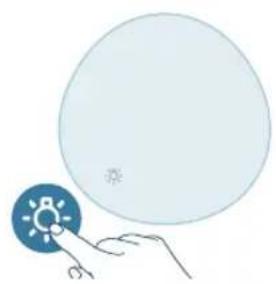
Pa/av-knapp Pa/av-knapp for lampa


Lägesväxlarknapp
Larm for filterrengöring Larm for filterbyte

Komma igang
Installera filtret
Ta bort allt forpackningsmaterial runt filtrt fore anvandning.
HnBO Ha PM2.5 UBeTHa HnDnKaun 3a KaueCTBOTO Ha Bb3dYxa
HnBO Ha KaueCTBO Ha Bb3dUyXa
BkJIIOUBaHe N n3KJIIOUBaHe
3a6eJekka:
3a onTumaln XapaKTePcNTuKn Ha npeuNCTBaHeTO 3aTBOpTe BpaTtTe N npO3OpUte.
He onyckaTe da nma 3aBeecn 6JI3O Do OTBopa 3a npITOK Ha Bb3dyx nn OTBopa 3a n3XoJraU, Bb3dyx.
1 BkIouhe aIaItepa Ha npeuCTBaTeIa Ha Bb3dyx B KOHTaKaTa.
2HaTnCHHe6yToHa 3a 3axpaHbAHe, 3a Da BKIOUHTe npueNCTBaTeI Ha Bb3dyx.
IpeunCTBaTeJIaHb3dUxN3daBa3ByKOB CnHaJI.
- - - - ce noka3Ba Ha ekpaHa no BpeMe Ha 3aRpaBaHe. Cnei ToBa
прунICTBaTeЯнТ Ha Bb3dYx noka3Ba HnBOTO Ha PM2.5 cnei n3MepBaHe Ha KaueCTBOTO Ha Bb3dYxa.
-П配电CTBaTeJIaT Ha Bb3dIyxa pa6OTn B aBTOMaTHueH peKIM c PM2.5, nOKa3aHO Ha ekpaHa.
3 HaTnCHeTe OTHOBO 6yToHa 3a 3axpaHbAHe, 3a Ja n3KJIouHTe IpeuNCTBaTeJr Ha Bb3dYx.
3a6eIeKka:Ako npueuCTBaTeJrT Ha Bb3dYx OCTaBa Cbbp3aH KbMeIeKtpnueckn KOHTaKT CJIeI N3KJIIOUHaHe, npueuCTBaTeJrT Ha Bb3dYx Iepa60TN cBflacHO npEduHnTE HaCTpOKn, KOrato Ce BKIOHy OTHOBO.
YecToTa MeToI Na noUncTbaHe
Koratoe Heo6xOIMOn H36bPse Te NactMacOBaTa Ha ypea C Meka H
Cyxa Kbpna
PepOBHO NOUCTBaIte BbTpEWHaTnBbHHaTa Yact Ha npueNCTBaTeJnHa Bb3nyx, 3a da npedOTbpaTnTe HATpyNBAHeTo Ha npax.
1 N3nON3BaIte MeKa n cyxa Kbpna 3a nouNCTBaHe OTbH N OTbTpe Ha npueNCTBaTeJHa Bb3dyX.
2 OToBopbT 3a n3xOJaBb3DyX MoKe CbIo Da ce noUcTn Cbc Cyxa N MeKa Kbpna.
4 CbaIeTe BCnUKN ONaKOBbUHN MaTePnAIN OT HOBnA qHJTbp.
5 CLOXKeTe HOBnA qHJTbp Bypea.MoHTnpaIe OTHOBO OCHOBaTn a 3aBbPteTe No nocoka Ha yacOBHnKOBaTa CTpeJIka, 3a da n 3akpenite.
6 BkIIOUeTe aAnTepa Ha npeuNCBaTeJHa Bb3dYx B KOHTaKaTa.
7 HaTnchTe 6byToHa3a Da BkNIOuHTe ypea.
8 HatncheTe n 3aepbXte 6yToHnTe 3cekyn, 3a da HynpaTe 6poya 3a ekcnloatauHOHe cpoK Ha hnTpnte.
- Mojke Te cIto Taka Da HylnPate BpeMeTo 3a NoCtBaHe Ha fHITpnte Upe3 npJIOKeHnETo Air+.
CneI KaTo HynipaHTo e ycneuHO, npedynpexJeHHeTO 3a cmHa Ha ntpte n3ye3Ba oT ekpaHa.
9 13MnBaIe pBcTe Cn CTapaTeHcNei CmHa Ha qnTbpa.
3a6eJexKa: He MnpuWeTe fntbpa, Tb KaTo e c6paJ 3aMbpCnTeJN OT Bb3dyxa.
HyalpaeHaΦnItbp
Moxete da cmeHnte fuiItpnte dopn npdei noBaTa ha npedynpeXdHe 3a cmHa Ha fuiItpnte (Ha ekpaHa. Cnei cMaHa Ha fuiItpnte Tpr6Ba Da hyInpate pbuHO 6poya 3a ekcnloatauHOHe cPok Ha fuiItpnte.
1 HaTnCHHe 6yToHa, Da n3KJIIOHTe ypeJa. N3KJIIOHTe ypeJa ot KOHTaTa.
2 YBepete ce,Ye ypeIbTe HnblHo nKJIOueH OT eJeKTpueeckata MpeXa, IN CneI TOBa NoCTaBeTe 3axpaHbAunia aanTep B KOHTaTa.
3BpaMKnteHa15cekyHnCneiBkIIOUBaHeHa3axpaHbAHeToHaTNCheTe 3aIpbXTe6yTOHnTe 3a3cekyHn,3aJaHynpate6pOra3a ekcnloatauHOHe CpOK HaΦnTpTe.
CbxpaHne
1 N3KJIIOUeTe npeuHCTBaTeIHa Bb3dyX IN N3KJIIOUeTe IeNceIa OT KOHTaKaTa.
2 NocTeIpeuCTBaTeJI Ha Bb3dyx INOBpbXHOCTTa Ha fHNTpa(BNXTe IanaBa "NocCTBaHe n NOdApBkKa").
3 OctaBeTe BCnUckn YacTn Da nI3cbXHaT PpeiN CbXpaHraBaHe.
4YBnIteΦnJIbpaBBBb3dYxHOHePnoHuaemnPiactMaCOBnPiNKOBe.
5 CbxaHraBaTe ΦnIbpa Ha npeuNCBaTeJHa Bb3dYx Ha XnaHO u cyxo MRCTO.
6 BuHaHn 3MmBaIte CTapaTeNo pBcTe cN cJePa6Ota C fHntbpa.
A B T O M A T C K N P E X M (A) I npeuNCTyBaUOT Ha BO3dYx A B T O M A T C K N J a I npCnOco6yBa 6p3nHaTHa BeHTnlaTOpOT Bo 3aBnCHOCT OJ KBaJInteTOT Ha aM6NeHTaJIHnOT BO3dYx.
Cpehen peknM BO CpeHnOT peKIM, npeuNCTyBaOT Ha Bo3dyx pa6oTn co cpeHa 6p3nHa.
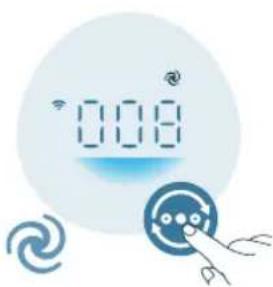
Typ6o pekum (9. npeuNcTByBaOT Ha BO3dyx pa60Tu co HajroJema 6p3nHa.
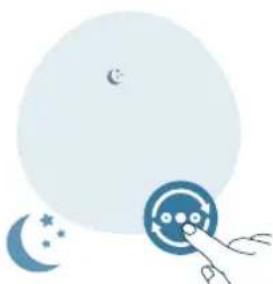
PeknHa MnyBaHe (NpeuHCTyBaOT Ha BO3dyx pa6Otn TNBKO Co MaNa 6p3nHa. CBeTnata Ha ekpaHOT ce ncknyBaat no 3 ckyHn.
KopncTeHbe Ha ФункциJaTa 3a BKnyuBaHbe/ИСКnyuYBaHbe CBETJIO
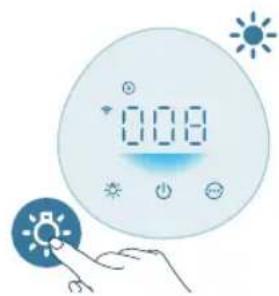
MoxTe Da ro npTnCHete KOnyeto 3a Da rN BkIyHnte, 3aTeMHnTe UINCKIyHnte CNTe CBETna N KOHTpOHaTa Ta6Na.
KoHTpoJHaTa Ta6Ja e BkJyHeHa.
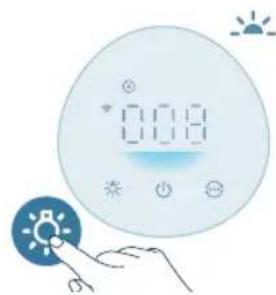
KoHTpOHaTa Ta6Ja e 3aTeMHeTa.
KoHTpOHaTa Ta6na e NcKnyueHa.
IocTaByBaHbe 3aKnyuBaHbe 3a Deca
1PnTnCHTe ro konyeto Tpaehe o3 cekyHn 3a da ro aKtubnPate 3aknyBaHbeto 3a deua.
HaekpaHOTce npkaxyBa
2 NOBTOPOHnPNTINCHeTe ro KOnHeTo B8 TpaEHe o3 cekyni 3a da ro DeakTNBnPaTe 3aKnyyBaHbTeO 3a deca.
Ke nCue3He OeKpaHOT.
YncteHbE n OdpjxuBaHbe
3a6eileuka:
Cekoraw ncknyuybajTe ro anapatot od wTekep nped da ro yuctte.
Hnkoraaw He notonybajTe ro anapatot BO BODa Nn Hekoja pyra Teuhoct.
3a uncTeHe Ha deNoBte Ha anapaTOT HNKoraH HeMoJTe da KopnCTnte a6pa3uBn, arpeCnBn nn 3anaBn CpeDCTBa 3a uncTeHe KaKO ITO ce 6eIIno nn aIKoxOJ.
HnkoraH HeMoTe Da Ro YnCTnTe 0uNTepoT Co TeuHocTn (BknyBajKn BOda).
He obinyBaJte ce da ro ynCTnte ceH3OpOT 3a KBaJInteT Ha BO3dyx Co npabocmykaJa.
PacnopeHa uHcTeHe
3aueTeHcT MeToHa YnCTeHe
Kora e Heonxodno IV36pniweTe ro nlaCTnHnot JeI Ha anapatot co Meka u CyBa Kpna
IcncTeTe ro KaNAKOT Ha n3Je3OT 3a BO3dYx
Cekon Dba Meceu NcHCTeTe ro ceH3OpOT 3a YecTnKu CO cyBO CTanHe CO namyueh BpB
ke ce npkaKe Ha ekpaHOT NcUcTeTe ja noBpuHaTa Ha qntepot
YncteHe Ha KyKnIstTeTo Ha IpeuNCTyBaayoT Ha Bo3dUx
PeIOBHO uCTeTe n BHaTpeuHnOT n HaBOpEuHnOT dEn Ha npueNCTyBaYOT Ha BO3dyx 3a da He ce HacO6epe npab.
1 KopnctTe MeKa n CyBa Kpna 3a Da rN NcHCTnTE BHaTpeWHaTa n HaDbOpewHaTa NOBpuHHa Ha npueNCTyBaOT Ha BO3dyx.
2 Co cyBa n MeKa KpNa MoKe Da ce YnCTN N OTBOPOT 3a N3Ne3 Ha BO3DyX.
YncteHe Ha ceH3OpOT 3a YecTnUKN
YnCTeTe ro ceH3OpOT 3a KBaJIntET Ha BO3IyX cekOn 2 Meceu 3a ONTImaJIHO pa6oTeHe Ha anapaToT.
Ako npueuNTyBaOT Ha BO3dyx ce KopnCTN BO npaBnBO onkpyKyaHe, Moke6Ke Tpe6a NoecTo Da ce nctn.
Ako HnBToHa BnaXHocT Bo npocTopuJaTa e MHOr y BnCOKo, Ha ceH3OpOT 3a yeCTnKMOx Ja Ce nojabN KOHeH3aunja N CBeTnOTo 3a KBaJIITeT Ha BO3dyx MoKe Da nokae nocJa6 KBaIITeT Ha BO3dYxOT nako KBaIITeTOT Ha BO3dyxOT e BCyshOcT Do6ap. Ako ce cnuyn Toa, nCnCTeTe rO ceH3OpOT 3a KBaJIITeT Ha BO3dyx.
1 Ncknyte ro npceuNCTyBaHT Ha Bo3dyx n 3BaTe ro npNKlyyOKOT od npNKlyuHncaTa.
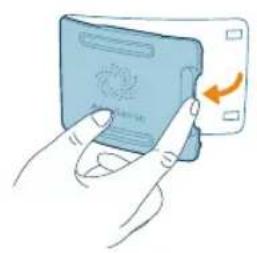
2 OTbopeTe ro kanaKoT Ha ceH3OpOT 3a KBaJInteT Ha BO3dYx.
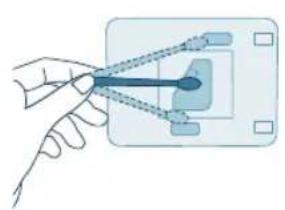
3 IcHCTeTe ro ceH3OpOT 3a YeCTnKu CO BnaXHo CTanHe Co naMyueH BpB.
4 Temelno ncyuweTe rncnteJeIOBn co cyBO cTanue Co naMyuyeh BpB.
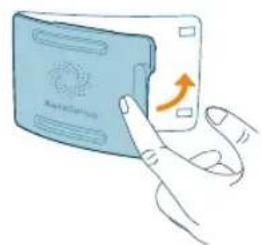
5 3aTbOpTe ro ceH3OpOT 3a KBaJIInTe Ha BO3dYx.
YncteHe Ha NOBpHnHaTa Ha qnlTepot
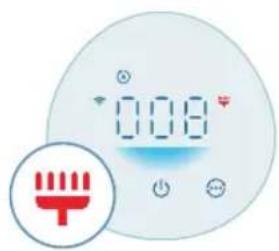
Kora npdunpeyBaHbTo 3a uNCTeHa hΦnTepoTe npKaxyBaHa ekpaHot, nCnCTeTe ja noBpUnHaTa HaΦnTepoCo npabocMykajka.
3a6eneuka:HaIyreToKoNcealeprnHnHa npab,NoJeH,domaunmMnJIeHnUnn MyBna mnpenopayBaMe da He rMaHyBaat qntpnte camn nn da ce 3aHTtATc MoMaCKa n paKaBnCn.
1 NcknyeTe ro npeeNCTyBaOT Ha BO3dyx IN 3BaTe ro npNKnyOkOT O, npNKJyHncaTa.
2 PpeBpTeTe ro anapaToT Haonaky n CTaBeTe ro Ha Meka Kpna.
3 3aBpTeJe ja OCHOBaTa BO CnpoTnBHa HAcOka OJ CTpeJIKNTe Ha YacOBHKnOT 3a da ja OTCTpaHInTe OJ anapatOT. IVBaJeTe Ro ΦHIpTePOT oJ anapatOT.
4 NcHCTeTe ja NOBpuHHaTa Ha φnIITpNTe co npaBOCMyKaJIka.
5 BpaTeTe ro fntepoT Bo anapatot. Nobtopno nocTaBeTe ja ochobata u 3aBpTeTe ja BO HacOKa Ha CTpeJKNte Ha YacOBHnKOT 3a da ja npuCBpCTnte.
6 BMeHTe Ro aanTepoT Ha npeuNCTyBaHOT Ha BO3dyx Bo npNKJyUHnuaTa.
7 PnTtncHeTe ro konueTo 2a da ro BkIyUHTe anapatoT.
8 PnTnCHHe Tn KOnuHbata N 3aApXeTe Tn 3 cekyn3a da ro peceTpate BpeMeTo 3a YnCTeHe Ha nItePOT.
- Moxete da ro peceTnpaTe BpeMeTo 3a YnCTeHb e Ha qntepoT n BO anlkaunjata Air+.
- No ycneHHTO pceTnpaHe, npdynpeDyBaHeTo 3a YnCTeHbHa cnItePOT nCye3HyBa OJ ekpaHOT.
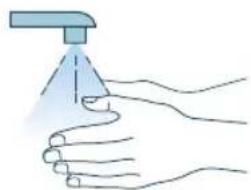
9 Temenho n3Mnje rpaueTe oTKaKO Ke rN uCnCTnTe fHJTpnte.
3ameHa HaФntepoT
ObachyBaHbe 3a cyHKunjaTa 3a 6IoknpaHe Ha anapaTOT nopaN 3aHTNaOd HeuNCT Bo3dyx
Oboj npuechcyBaH a Bo3dyx e onpeMeH co HnDnKaTOp 3a 3ameHa ha fNlTepot, ITO Ke OBO3MOXn fNlTepot 3a npuechcyBaHb e Ha Bo3dyx Da e BO ONTImaHa cOctoj6a Kora pa60t npuechcyBaHT Ha Bo3dyx. Kora fNlTepot Tpe6a da ce 3aMeHN, npEynpeDyBaHbeto 3a 3ameHa ha fNlTepot BETn CpBeHo.
Ako fntepot He ce 3aMeHn HABpeMe, npeuNCTyBaOT Ha BO3dyx Ke npectaHe Da pa60Tu n ABToMaTcKn Ke ce 6NoKnpa 3a Da ro 3aHTn KBAJNTeTOT Ha BO3dyXOT BO npocToPjata. 3ameHete ro fntepot Haj6p3o wTO MOKeTe.
3aMeHa HaΦnITepeoT
3a6eileuka:
Φιπεροῦ He ce nepe n He e 3a NOBΕΚeΚpαthA yηοTpε6a.
IpeiJa n3BpUHTe 3aMeHa Ha fHNTepOT, cekora uNCKnyyBaJte ro IpeuHCTyBaUOT Ha BO3dyx H N3BLeKyBaJte Ro aAnTepOT od sHnOt wTeKepe.
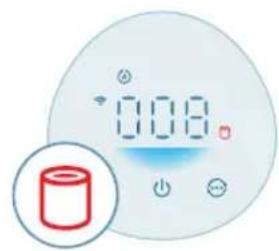
Kora npdynpdyBaHbeto 3a 3ameHa Ha qntepot Ce npkaKyBa Ha ekpaHot, 3ameHete ro qntepot (FY0910).
3a6eneuka:Ha lyreTo KOe ce aIepnHn Ha npab, noJeH, domaunm MInJeHcN nn MyBna nnpenopayBaMe da He rM MeHyBaat qntpnte camn nn da ce 3aHTiTAT Co MaCKa n paKaBnC.
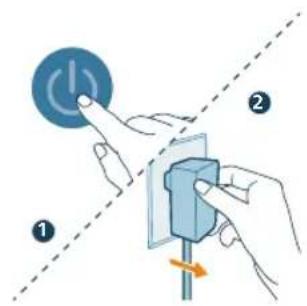
1 Ncknyte ro npneictyBaOT Ha BO3dyx n 3BaTe ro npNKnyokOT od npNKlyuHncaTa.
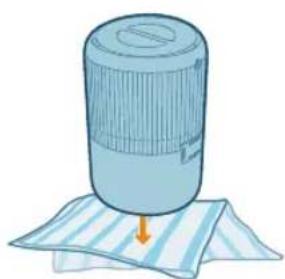
2 PpeBpTeTe ro anapaTOn Haonaky nCTaBeTe ro Ha MeKa KpNa.
3 3aBpTe ja OCHOBaTa BO CnpOTnBHa HAcOka OD CTpeJIKNTe Ha YacOBHnKOT 3a da ja OTcpaHnTe OD anapatOT. N3BaJeTe ro fNlTePOT od anapaTOT. PpIeTe rNCKOpNCtEHnOT fNlTeP.
4 OToTaPaHeTe ja eIaT a am6aIaxa oN HOBnO T HJITep.
5 Ctabete ro HOBnot fHNTep BO anapatot. NobTOpHO NOCTabeTe ro NoHoxjeto 3aBpTeTe ro BO HAcOKa Ha CTpeJIKNTe Ha YacOBHKOT 3a da Ro npuBpCTnte.
6 BmteTe ro aanTepoHa npueCyBaHOT Ha BO3dyx BO npNKnyHuaTa.
7 PnTncHeTe ro konyeTo 3a da ro BkIyUte anapatot.
8 IpnTnncHeTe rKoNunHbataa 3aapKeTe rN 3 cekyHn 3a da ro peceTpate 6pojaot 3a pa6oTeH BEk Ha qntepOT.
- Moxete da ro pecetnpate BpeMeTo 3a qucteHe Ha qinTepot n BO annkaunjata Air+.
- No ycneuHOTo peceTnpaHe, npedynpeyBaHbeto 3a 3aMeHa Ha qntepot Ke nue3He oJ ekpaHot.
9 Temenho n3mjuTe rna paueTe oTKaKO Ke ro 3amEnHe Tne pntepoT.
3a6eileka: HemojTe da ro MnpcaTe fntepot 6nndejk co6upa 3araayBauchu yeCTnKoD BO3dyXOT.
PecetnpaHe Ha qntepot
Cbitntb6iJIM CBITIOM NiKIOUyeHO Do cepBepa
He cBiITbCf ΦyHKciH Wo-Fi BmKHeNo a6o iHnKaTOpn
PnucTpoIO He CbITaTbcra
3'εДнаннЯ Wi-Fi

HanaWtYBaHHa 3'eHaHHaWi-Fi Bnepwe
1 3aBaHTaXTe i BCTaHOBITb DoJaTOK Philips Air+ i3 MaRa3Hv DoJaTkIB App Store a6o Google Play.
2 BCTaBTe 1eKep OunuBaHa nobITpy B po3ETky i HATNCHTb KHONKy KINBHeHH, Uo6 yBIMKHyTN OUnuBaH noBITpy.
IHnkaTopWi-Fi 6IImaOpaHKeBIMCBITLOm nepuippa3.
3 Cmapfoh a6o nlaanwet Mae 6yTu nnKluueHo do Mepekxi Wi-Fi.
PnmuMITka.
YbIMKHTb yHKtio Bluetooth Ha cMapTfoH iIra INaBHorO cnapeHHa.
IpekehauTecra, 0c maptfoH nikKIOueHO do (DOMaunho) Mepeksi Wi-Fi 2.4 Tt, a He do mepexi Wi-Fi 5 TT a6o 3aRaIbHoIOCTyNHOi Mepeksi Wi-Fi. IycniHoro 3'EDHaHHB npapyeKomeHdyEMOBIMKHyTu MoibHi dahi nepeonouatkOM npocecy cnapeHHa.
4 3anyctitbdoataok Philips Air+ i haTnCHiB DoaTu npncpti a6o HaTnCHiTb KhoNky "+"Ha ekpahi. BkoHaiTe Bka3iBkn Ha ekpahi, o6 nIeHaTu OunuBaayobitprdo Baawoi MEPexi.
- Picna ycniun Horo 3'eHaHHB napy iHnkaTop Wi-Fi cbitntumetbcra 6JIMCbitlom 6e3 6JImaHH.
PnmuTka.
Taka Bka3iBk DaIcH aIne B pa3i HanaTuBaHH OOnuByaNoBITpBnepwe. KaO MepeKy 3mHeHO, Notpi6Ho 3HOBy BkoHaTu HanaTuBaHH.
KuO Bu XoTe n'EdHn 6IbWe OndHOrO OunSyBaa NoBITpRdo CBOO cMapToHa a6o PnAhnWeta, BMOKeTe IOnaTn OUnSyBaU y DoaTkU Ha iHux cMapToHax, He BVKOHyOuCKnDaHHN3'EDHaHHN Wi-Fi Ha npicTpoi.
BicTaHb MIX BaHm CMaprfoHom a6o IJaHwTeOM Ta OUnyBaUem NOBITpMa cTahOBHTn He 6JIbwe 10 M 6e3 6yIb-kaNX nepeWKoJ.
CkndaHH3'eHaHHWi-Fi
1 BCTABTe ⅢTEKeP OUnuBau NaOBITpy Bpo3eTKy HATNCHTb,06 yBIMKHyTN OUnuBau NOBITpr.
2HaTNCiB OJHOaCHO yTPMMyTe KHONKn TpTAROM 3ceKyHN, DOKN He NOuyETe 3BYKOBN CnRHaI.
OuIyBaH noBITpy nepexoDHTb y pexkIM 3'eHaHHB napy.
IHNkaTop Wi-Fi nmae opaHkeBn mCBITJLOM.
3 BnKoHaTe KpOKn 3-4 y po3diJI "HaJauTyBaHHra'3'eHaHHaWi-Fi Bneppe".
BnKopncTaHnOuNcUyBaUa nobITpy
3haeHnKaIohbOpB iHdkaTopa kOcTi nobitpr
Iicra yBimkHenHcOBiKyBaHa nobITpy iNikatop kOcTi nobITpa ABTomTuHO BMkaetbcra i NouHae nocjIOBHO 3MiHObATn KOIp. Ppi6Jn3Ho uepe3
30 cekynd daTnK qactnHOK Bn6pe KOIp, kNBIIOBIAe kOcTi qactoHOK NOBITpy npimiuenceHHI.
Kolip iHnkaTopa kOcTi NOBITpBn3HaayeTbCp Noka3HnKoPM2.5.
PM2.5
TexHOroripo3ni3habaHnAeraSenseToUHO BnBnE Ta WbNko pearye HabItb Ha hainMeHsi 3miH o6craIy aactInOH k y nobitpi. NobiOMJeHH npo pibHb qactOouK PM2.5 y pealbHomy yaci Hadae Bam BneBHeHoCTi.
BilbictbKimHaTHnx3a6pydHOBayIB NOBITPnIiJaAOTb NID Bn3HaueHH
PM2.5, 10 no3Haac3a6pyndHIOUci peOBUHNy nobITpi po3mipom MeHwe
2,5 mikpometpa. TnOBIMKIMHaTHIMN DkepeJamn pio6Hnx qacToK y nobitpi e
TIOHOBNI DIM,ROTYBaHHIIXI,ROPIHHCBiOHK.Jaek6aKTePi TaHaMeHsICnOpNcBiINi,anepreHN domaunix TBapNH Ta aJepeHHI qactouKN nnOBHX
KniuiB TaKoN iIiNaHaOTb NiB Bu3HaueHHa PM2.5.
Pibehb PM2.5 Kolip kocti nobitpr Pibehkocti nobitpr
≤12 Blaakntn Xopoosn
13-35 BlaakTNn-nypnpoBn 3aOobInbHn
36-55 NypnypoBni-uepBOHn IorAHn
55 YepBoHn IyXe noraHn
YbIMKHeHH Ta BmKHeHHa
PpIMITka.
Iy ONTMaJIbHOoi eOeKTHBHOCTi OUYIeHHa 3aKnTe IBepi BkHa.
TpmaIte 7tOpn noaIi BiD BxIHnx YN BxIHnx OTBopIB nOBitpr.
1 BcTaBte aanTep ouuSyBaHa noBITpy Bpo3eKy.

2 Lio6 yBIMKHyTN OuNcUyBauch NOBITpy, HATNCHITb KONKy JKBHeHH.
OuIyBaH nobITpnoJaCnHaJI.
PiucyibimKHeHHHaekpahi BIO6paKaeTbc iHnkaCiai "TnBmipOBAHRAKOCTI NOBITPOUuSyBaN OOBITPOKA3yepibehPM2.5.
OuunyBaH nobitpr npaioB aBTOMTuHOMy pexmi, a Ha ekpaHi BIO6paxaetbc piBeHb PM2.5.
3 Lio6 BmKHyTu OuIyBaU NOBITpy, 3HOBy HaTCHITb KONKy JxNBJeHHA.
Pnmtka. kio nicBmKHeHH ouuYBaH nobitpy He BiD'EnHyBaTn BiEneKtpomepexi, To nCra yBIMKHeHH BIn npOobXntb po60Ty 3 nonepedHIMNaHaHTyBaHHaMn.
3miHeHHHaIaStyBaHHpeXIMy
MoxHa Bn6paTu ABTomatuHn peXm, PomipHn peXm, Typ6opeXm a6o PeXm cHy, HATnCKaOuN KONky nepemkaHHa peXmIB.
ABTomatnHn peKm OuyuBaH NOBITpA BtOMaTnHO HaNaTOByE WbNkICTb BEHTnJrTopa BiINOBiDHO Do kOCTI NobITpHaBKONO.
Pomipn pexm Y nomipHomy pexmi ouuBau nobitpr npaioe i3 cepeHbOIO WBNkictIO.
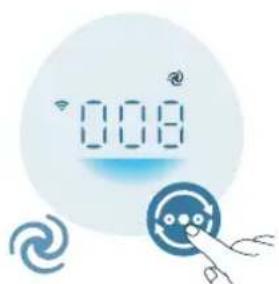
Typ6opexm OunuBaay noBITpr npaIOe 3 HaBnIOU WBNkICTIO.
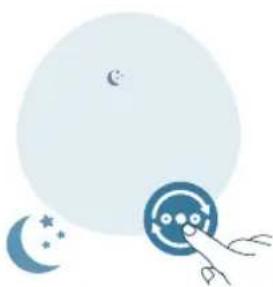
Pekn m cy (OunuBaN noBITpnaIOE TNXO 3 Hn3bKOIO WnDkicto. Hepe3 3 cekyHn ekpaHHi INdkaTopn 3raChTyb.
BnKopncTaHna yHKcii yBIMKHeHHa/BmKHeHHa iDCbITKn
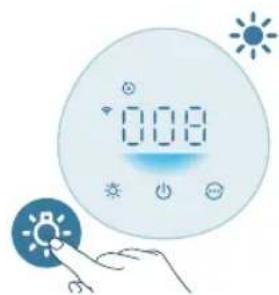
Moxha haTnchTy KONky yob yBIMKHyTu, npurnyuHTn a6o BUMKHyTu Bci iHdkaTopu Ta naHeIb KepyBaHH.
- NaHeIb KepyBaHHB BMNkaeEtbcra.
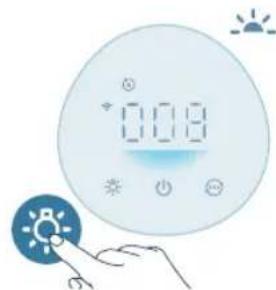
- PiccbitKa nahel KepyBaHHa 3MeHsUc.
- NaHEnb KepyBaHHB BUMKaTbcra.
HaataybaHHaYHKci6lokyBaHHaBd iTei
1Lio6akTnBvBaTH 6IokyBaHH BID, iTei, HATNCHTb Ta yTpmyte KhoNky npotraom 3 cekyHd.
Haekpani Biio6paKaetbcra
2 Lio6 BmKHyTn 6JokyBaHHa BiD iTeu, HATNCHiTb Ta yTpmyTe KhoNky npotrrom 3 cekyHd.
- Hnkaicj HnKHe 3 ekpaHa.
YnueHnTa DOrJa
PpIMtKa.
IpeepuHnueHHm 3aBKnBnMaTe wTeKe pncToHO i po3eKn.
Y kOJHOMy pa3i He 3aHypoIte npicptiy B Ovdu yin Hsny piDHy.
He yntbte XoDHy qactnHy npctpo1o a6pa3nBHMn, idkMn 3aMnCTMN 3aco6amN dny nueeHH, HanpukJaad Bi6iIOBaayem cnCnpTOM.
Y kOAnHomy pa3i He nCtBte pInbTp iDnHaMn (3OKpema, BDOIO).
He nctbTe DaTnK cactnHOK 3a DonomorOIO nnococa.
TpaΦik YnueHn
Uactota Cnoci6 uuueHHa
3a Heo6xidnocti BntnpaTe nlaactNKOBIO nobepxHIM'koIO cyxoIO
raHuyipKOIO
HnueHHKpnuKNBHXOy nobitpr
KoXHi DbMa MicuI IpOtnpaIte DaTnK YaCTnHOK CyXM BaTHM
TamnoHOM

BIO6paKaεTbCnHaekpHi.ΠOuNCTbTe NOBepxHIOΦIbTpα
YnueHHa Kopnyca OunuBaay noBITp
PeryIaRHO uCTbTe ouuSyBauchOBITpa 3OBHi Ta BCEpeiHi Ira 3anO6irAHnHaKoHueHHIO NJIy.
1ДииHnBHyTpiHbOi 3OBHIHbOJ yactNH Kopnyca OuyBaaynoBITpy BnKOpNCTOByIe M'ky Cyxy raHipKy.
2 OTBipIINBHXOyIOBITpRAKOXMOXHa npOTnPaTm'koHO cyxHO raHuyipKoIO.
YnueHHaTUnKa YactHOK
IyOnTumalbHoi po60Tu OunuYBaayu nCTbTe DaTnK uactnHOK Koxh2 Mcaui.
KUO OUYBaN NOBITP BIKOPNCOBYETbC y 3aHJIeHOMy CEpeoBUNI, Ioro. Notpi6Ho 6yde qactiue hCTUTn.
KU pIBeH BONOROCTI B KIMHaTI DyJke BUCOKN, Ha DaTnIKy YAcTHNOK MOKe yTBOpHTNC KOHDeHCAT, TOMy MOKe BiO6paXaTNC HxKuN pIBeH JKOcTi NOBITpR, HIX CE HacnpabDi. Y TakOMy pa3i Nouchte DaTnIK YAcTHNOK.
1 Bumknitb ouuhyBaay nobitrpa i Bi'd'ednaHte noro Bi d eJeKtpomepexi.
2 BiKpnIe KpnIky DaTynKa qactnHOK.
3 NocTbTe DaTnK qactnHOK BOIOnm BaTHm TaMnOHOM.
4 PeTeJIbHO BnTpIb yci YaCTHn CyXm BaTHM TaMNoHOM.
5 3akpiTe KpNkUy DaTUnKa YaCTnHOK.
YnueHnnoBepxhi pfIbTpap
KoHa ekpaHi BiO6paxaEcTbCnObiueHn npO uuieHHn pInbtpa nOHTe NOBepxHIO iInbTpIB 3a DOnOMOrIO nnococa.
PpimItka.PekomeHdyEmo oco6am, kai Maotb alepriHO ha nn, nJOK, domaunix TBapnH abo nniceH, he 3amHOBaTu φ JbTpnc camoctiuHO a6o BXNBaTu 3axNCI 3axOIn, HapnKlnd OjraTu Macky npKaBnuKn.
1 Bumknitb ouuhybaay nobitrpa i BiD'edhaite noro BiEneKtpomepexi.
2 IpepeBepHitb npicptiDoropn DHom i noKJaIDtB Noro Ha M'ky raHupyk.
3 NobepHtB nlaTfOpmy npOTn rOuHHNKOBoi CTpiKN, 06 3HrTn ii 3 npictpo. BnmiB pfIbTp i3 npictpo.
4 NocTe NOBepxHIO fIbTpIB 3a DOnOMoroI nnococa.
5 NocTaBTe pIbTp Ha3a y npucpti. NobTOpHO BCTaHOBITb natafOpMy I NOBepHt b 3a roHHNKOBIO CTPIKOIO, 0o6 3aΦikCyBatn.
6 BCTaBTe aanTep ouuSyBaHa nobITpy Bpo3eKy.
7 LIO6 yBIMKHyTN npncTpi,HaTnCHiTb KONky
8 HaTnCHiB Ta yTPmMyTe KONKra pOToROM 3 ceKyH, Uo6 cKNHyTn daHI liuNbHuKa TepmiHy ouuueHHaIbTa.
- MoXHa TaKoX CKnHyTu nac OuyuHnHnΦiNbTpBa DOnaTky Air+.
- Picna ycniun Horo cKaaHnHaJIuNbHnKa nonepeJxehn npO uHnHn HnE 3nKHe 3ekpaHa.
9 PicIa 3amHn fIbTpB Do6pe nomuTe pykn.
3aminaΦilbtpa
IopchennoofoyHKui6lokyBaHHn3doPoboro nobitpr
Cen ouynybau noBipra 6nlaHaHO iHnKATOPOM 3aMHN fNbtpa dna rapaHTI toro, uO fInbTp ouuueHH NOBIPRA nepe6yBaEC ONTmAbHomy cTaHI, KOU OuyBauchOBITPnpaQIO. KOINOTpi6HO 3aMHNTu fNbTp, INnKaTOP nonepedxekHH npo 3aMHy fInbtpa BacbiyeTbcra cepBOHm CBITLOM.
JkUO pIbTp BuaCHO He 3MiHHTN, OunuBaH NOBITpnepeTaHe npaIOBaTu n ABTOMaTHNo 3a6IoKyETbcra Inna 3axncty kocti nobITpy y KimHaTI. 3amHItb fIbTp JkOMoRa WbnDwe.
3aMiHaΦijbTpα
PpIMITka.
ΦiNbTp He MoXHa MNTu BDOIO a6o NOBtOPOBnTOBByBaTn.
3aBxDn BmkaTe OunuBaay nobITpy i Bi'EnhaIte NOro BiEneKtpomepexi, nepHix 3amHrTn fInbTp.
KoIHa ekpaHb BINO6paKaCTbcra CNOBIueHHnpo 3aMHy fInbTpapnoTpi6Ho 3amHnTn fInbTp (FY0910).
Ppimtka.PekomeHnyeMo oO6am, kI MaOTb aIepriHO Ha NN, NIOK, Domaunix TBapnH a6o PniceH, He 3amIHOBaTu fiNbTpnu camocTiuHO a6o BxNBaTu 3axNCHI 3axOuN, HApNKlaD OJraTu Macky npKaBNUKN.
1 BmKHiB oOnuBaay nobITpy i Bi'd'EnHaIte Ioro Bi d eJeKTpomepexi.
2IpepeBepHitb npncpii DOrOpn iNokJaDiTb NOro Ha M'ky raHcy.
3 NObepHtB natafopmy npotn roHHNKOBoi ctpiKn, 106 3HrTNI 3 npictpoIO. Bnmitb fIbTp i3 npictpoIO. Ytni3yte BkOpncTaHn fIbTp.
4 3HimiTb i3 HOBOrO fJIbTpBa Becb naKyBaIbHn MaTepiAJI.
5 BctaHObitb HOBn fIbTp y npunctpi. BcTaHObitb nlaTΦopMy Ha Mice Ta 3aΦikcyuTe ii, NOBepTaIOH 3a RoDHHNKOBIO CTPIKIO.
6 BctaBte aanTep ouuSyBaHa nobITprB po3eKy.
7 Lio6 yBimKHyTN npncTpi, HaTnCiHb KhoNky
8 HaTnCHiItb Ta yTpmyte KhoNkna T a npOTaROM 3 cekyH, uo6 cKHyTu daHi liuNbHka TepmiHy ekCnnyatauii fiNbtpa.
- MoXHa TaKoX cKnHyTu n ac OunuHnHn foIbTaPb BdoTaKy Air+.
- Picra ycnihoro ckiDHaHHcnoBieHHnpo 3amHy pfIbTp a3HkHe 3 ekpaHa.
9 Picna 3amHn fIbTpa Do6pe nomnTe pykn.
Pnmuitka.He Hoxaute fInbTp, OckinbKn B Hbomy 3i6paIncra 3a6pydHIOUOi peoOBHH 3 NOBITp.
CknndaHnnaHnx npo pfjltp
ΦiNbTpMoXHa 3aMihrTaHabITb Do nOBn CnoBieHHra npo 3aMHy fIbTpa (Ha ekpaHi. Picra 3aMHNfIbTpIB Notpi6HO BpyHy cKHyTu daHi liuNbHKa TepMHy eKcnnyatauii fIbTpa.
1 HaTnCHiTB KONky, 06 BmKHyTu npucpii. Bi'edHaIe npucptpii BiD mepeki.
2 IpepeBipTe, Hn npicptpi NobHicTIO Bi'EDHaHO BiMepexi, a ToDi BCTaBTe aanTep KINBHeHHB pO3eTKy.
3 Ppotarom 15 ckynd nicna BBimkHeHHaTnCHiTb Ta yTpmyTe KhoNk Ta potarom 3 ckynd dnyckuaHHraIiyhka TepmiHy ekcnnyatauii fInbtpa.
36epirahnna
1 BumknHtB ouuhyBaay nobitpr i BiD'edHaite noro biEneKtpomepeksi.
2 Noctbte OunuBau nobitpa i nobepxHIO fIbtpa (nVB. po3di "NueHHra Ta nOgna")
3 PeTeIbHO BucuItb yci acTnH, nepw HIX BiKNaCTn ix Ha 36epiraHHa.
43aropHtB dIbTp v repMeTuHi nlaCTNKOBi naKeTH.
5 36epiraute ouuubau nobirtpa fIbtpy cyxomy npoxoHOMy micui.
6 3aBXn peTeIbHO MmIte pyKu nIcJr po60Tu 3 fJIbTpOM.
UcyHeHHa HeCnpaBHOCTe
Y zuBMy po3diI niOdaHO OCHOBHI npo6lemn, kI MOxTyb BUNHKHyTN iD yac BnKOpNCTaHH npicTpoIO. KkIo npo6lemy He Bdaetbc BnpiuNTn 3a DonomoroIO IHΦopMaui, noaHOi Huxue, 3BepHITbcrdo LcHTpy 06cIyROByBaHH KJIeHTbY cBoi KpaIIHi.
PpO6JIeMa MoXJIuBepiWeHHN
Ipnctpi He npaue HaJeKHM uHOM. IpeBipTe, yu nlaTFOpmy BCTaHOBJeHO HaJeXHM uHOM. Kaio Hi, 3 MIPkyBaHb 6e3neKn pnucptpi npnHHt bpo60Ty.
∴ S = S
aJell jaiitll 0x ga bajgjial plixuill 1o jzllia
gplasll Jto aalc abaxall aylal lgsol gglb jglss
aJd aJ 0aJ5 cJla J 0aJc
Jb gol jlaS dolssu (Rn) gulljglg(CO) gullg jge
aJbssll aIgolg 1x Ilaoc g>
(EMF) auiubioogyI I xI
aaii 1
ygllae!

(2012/19/EU) aJellal aJlial llaill go jlll iio no o alll pue yj jol liae y
a aag aall jae aall wgel gio aaa aayb ayalill
jsslll cllg no yalsll pug gddll aieI g Jauill aiae jslalll lll 1
aalall glll gaoiaiall
bI 1
gACog50/ACog51 gill 0Lwll jai aag DAP B.V .d Jyj yj yj yj yj yj yj yj yj yj yj yj yj yj yj yj yj yj yj yj yj yj yj yj yj yj yj yj yj yj yj yj yj yj yj yj yj yj yj yj yj yj yj yj
jiall jlluui jilll uui
puiiui 1
Jll
aolusuljzjzlalccsla
∴ ab > sl
y 1
aai jie aol o l iouy> gll jgll g! sill dall alge aai jie no rj f uogj y cui li jglll JcWi-Fi Jlai nuea aie! ono aalol! aai gao jiaubill agell
o aJg jol 10 o Jal eJgall aai jge g Jgll jge Jgll Jgll Jgll Jgll Jgll Jgll
Wi-Fi Jlae
1.daiui
- Δ µ ≥ 0
1jzIg0g aagai j
Wifi-Fi joo
3."JgXa aal W
glpl aai jge plssil
gell aJg> g0
a 30 1 Jauuill yolglal 5 cag g aai jg Jaaui iic lslal agll aeg Joa
algaiall clayssyolll baxll agll agg eo gai gill glll caiusll jniu u
PM2.5 0e jol ool gll oogg
PM2.5
aia 1 aai i 1i
PM2.5 Jg aale cllslo ayaiy aiejabll
glall algall glall gagPM2.5 csi jlll gall glall gall aee gall gall gall gall gall gall gall gall gall gall gall gall gall gall gall gall gall gall gall gall gall gall gall gall gall gall gall gall gall gall gall gall gall gall gall gall gall gall gall gall gall gall gall gall gall gall gall gall gall gall galling
elglllg> gsiuooellg 1gjPM2.5 gsiu
∴ | a - b | = 1 2 ≥ J _ ija ω_ ji g _ jk - 1/3 g _ ji ^ 2 1 3 - 3 5 c (5) y 2 a + 1 - | gy | 3 6 - 5 5 5 5 lt
Jzillg Jzill
∴ ab > 10
gill ggl 1 aaii i jn o Jaiw
eagglg 1
1.aalblljlo
2.5gell aaij j1q
.3j60cog0golqglaaijjj
gaioll agell aai jias oj yo pclxyl jao jolll ofo laolll
1g9f 2g> g3g2g2PM2.5
aalall jc PM2.5 gio ge jilalll egglgll aaij jao
一
3
gall aai jia Jaoaui alai jay jilpil islolly slao elgal aai jgs Jb li abso
goll 1e!
bals 00 gssall gog ggsall aegllgogg bwsoll gagll giall
.
gall gge 0 wuLiuy Lg lalab a>glall aew baw, gell qai jgs pgi: (jaliell goll
abwio aew jclgall aaijla Jaa, bawial gogll 1 wgiall gagll

.
a2yall 595
3 1900 aaiuui iiai.aaiaiaaieae
gall Jz/1z z a pss
15ab1g 10aog 15 aagclg 15 Jbcai all diy
-05 all a>gl Jaiw pi
-00000000
ρ - S = all agl Jauw glaJg pJ
596 a
Jabla Jaa Juc
aulll 0e p
-
jiā bǎi 1 jiān b2
-
JIaBJI JIoA I
aulllJe no
aillg biiil
∴ ab > 10
aaii iiaai bll jao ic laljlaol
.
1 1
∴ j4 = 2700
a bcl 1c (dall lal lo) jgss
aaiy5 aaiiSo aaiiogclggl gglgaiuio aaiii Jgix
aaiiiaaybajgll
a bciill JgJ
aalg acll wla aebj jglll guiwll cjjll goiol ojwrll iie
glall 2xio ellie (i-b)
aall 0 jg aagbawlgclaaaswlljaiu u
jlll 1
…
glll aai jj 50
jell jgi pblu jsll jgl aai jaaa
jll lIy elly eiaowll jS clawll jeeioo
a aaii i 1
gag gag aagaaagaaagagagagagagagagagagagagagagagagagagagagagagagagagagagagagagagagagagagagagagagagagagagagagagagagagagagagagagagagagagagagagagagagagagag
- a ball is lo
2.c|g|ll a|g>la
- , d 、
-
1/2 的一个零点
-
1 & 若 g ≥ 0 \ & 2 . 或 2 = 103
jilil jhoo
aaiisaiiiaaiii
aai jai aai iaii gai bll jie g jiee no aywauu yaaal oaiy iyoj: abdo .gag elg lto agag cglj 1slyg p waij jdall Jia
- a ball is to be
2.acljlaa
- 1 & 0 \ 2 & 0 .
aall 599
- a1sylp5 auius
jglgll qai jiall aill all lal alal jilal wagloiae gell qai jge 1
jglll jllw cio yjiall jaiwll iajll iie. jaii
laq piwglall e gell qai jay jaiy w wai wai wai wai wai wai wai wai wai wai wai wai wai wai wai wai wai wai wai wai wai wai wai wai wai wai wai wai wai wai wai wai wai wai wai wai wai wai wai wai wai wai
jall
∴ ab > 10
aolusstwl ola! g jilall Juae 5ao
jlll l l l l l l l l l l l l l l l
(FYog910) jlll Juiu, auiu ll Jilaii uuiu gab sic
y 10000000000000000000000000000000000000000000000000000000
1.aaa 150
a22,211 601
2.aoljulaa
3jolloo
Air+ gaijie jiall albi iog yai d
ailll no jlll llll aaii iie 1e eeeil oie! plai!
- jiall luiw
PHILIPS and the Philips Shield Emblem are registered trademarks of Koninklijke Philips N.V. and are used under license.
This product has been manufactured by and is sold under the responsibility of Versuni Holding B.V., and Versuni Holding B.V. is the warrantor in relation to this product.
2024 © Versuni Holding B.V.
- DANGER
- WARNING
- CAUTION
- ELECTROMAGNETIC FIELDS (EMF)
- RECYCLING
- 6 ENGLISH
- SIMPLIFIED EU DECLARATION OF CONFORMITY
- YOUR AIR PURIFIER
- PRODUCT OVERVIEW
- CONTROLS OVERVIEW
- CONTROL BUTTONS
- 8 ENGLISH
- GETTING STARTED
- INSTALLING THE FILTER
- CONNECTING POWER
- UNDERSTANDING WI-FI INDICATOR
- WI-FI CONNECTION
- SETTING UP THE WI-FI CONNECTION FOR THE FIRST TIME
- ENGLISH
- RESET THE WI-FI CONNECTION
- USING THE AIR PURIFIER
- UNDERSTANDING THE AIR QUALITY LIGHT
- PM2.5
- TURNING ON AND OFF
- 12 ENGLISH
- CHANGING THE MODE SETTING
- USING THE LIGHT ON/OFF FUNCTION
- 14 ENGLISH
- SETTING THE CHILD LOCK
- CLEANING AND MAINTENANCE
- CLEANING SCHEDULE
- FREQUENCY CLEANING METHOD
- CLEANING THE BODY OF THE AIR PURIFIER
- CLEANING THE PARTICLE SENSOR
- CLEANING THE SURFACE OF THE FILTER
- REPLACING THE FILTER
- UNDERSTANDING THE HEALTHY AIR PROTECT LOCK
- 20 ENGLISH
- FILTER RESET
- STORAGE
- TROUBLESHOOTING
- 22 ENGLISH
- WARRANTY AND SUPPORT
- ORDER PARTS OR ACCESSORIES
- PENTING
- KOMMA IGANG
- INSTALLERA FILTRET
- BKJIIOUBAHE N N3KJIIOUBAHE
- HYALPAEHAΦNITBP
- CBXPAHNE
- KOPNCTEHBE HA ФУНКЦИJATA 3A BKNYUBAHBE/ИСКNYUYBAHBE CBETJIO
- IOCTABYBAHBE 3AKNYUBAHBE 3A DECA
- YNCTEHBE N ODPJXUBAHBE
- PACNOPEHA UHCTEHE
- 3AUETEHCT METOHA YNCTEHE
- YNCTEHE HA KYKNISTTETO HA IPEUNCTYBAAYOT HA BO3DUX
- YNCTEHE HA CEH3OPOT 3A YECTNUKN
- YNCTEHE HA NOBPHNHATA HA QNLTEPOT
- 3AMEHA HAФNTEPOT
- OBACHYBAHBE 3A CYHKUNJATA 3A 6IOKNPAHE HA ANAPATOT NOPAN 3AHTNAOD HEUNCT BO3DYX
- 3AMEHA HAΦNITEPEOT
- PECETNPAHE HA QNTEPOT
- 3'ΕДНАННЯ WI-FI
- HANAWTYBAHHA 3'EHAHHAWI-FI BNEPWE
- CKNDAHH3'EHAHHWI-FI
- BNKOPNCTAHNOUNCUYBAUA NOBITPY
- 3HAEHNKAIOHBOPB IHDKATOPA KOCTI NOBITPR
- PIBEHB PM2.5 KOLIP KOCTI NOBITPR PIBEHKOCTI NOBITPR
- YBIMKHEHH TA BMKHEHHA
- 3MIHEHHHAIASTYBAHHPEXIMY
- BNKOPNCTAHNA YHKCII YBIMKHEHHA/BMKHEHHA IDCBITKN
- HAATAYBAHHAYHKCI6LOKYBAHHABD ITEI
- YNUEHNTA DORJA
- TPAΦIK YNUEHN
- UACTOTA CNOCI6 UUUEHHA
- YNUEHHA KOPNYCA OUNUBAAY NOBITP
- YNUEHHATUNKA YACTHOK
- YNUEHNNOBEPXHI PFIBTPAP
- 3AMINAΦILBTPA
- IOPCHENNOOFOYHKUI6LOKYBAHHN3DOPOBORO NOBITPR
- 3AMIHAΦIJBTPΑ
- CKNNDAHNNAHNX NPO PFJLTP
- 36EPIRAHNNA
- UCYHEHHA HECNPABHOCTE
- PPO6JIEMA MOXJIUBEPIWEHHN
- GLPL AAI JGE PLSSIL
- GELL AJG> G0
- JZILLG JZILL
- GALL JZ/1Z Z A PSS
- GLLL AAI JJ 50
- JILIL JHOO
Brand : PHILIPS
Model : AC0951
Category : Air purifier