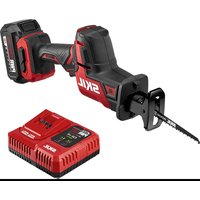
PWR CORE 20 - Saw SKIL - Free user manual and instructions
Find the device manual for free PWR CORE 20 SKIL in PDF.


User questions about PWR CORE 20 SKIL
0 question about this device. Answer the ones you know or ask your own.
Ask a new question about this device
Download the instructions for your Saw in PDF format for free! Find your manual PWR CORE 20 - SKIL and take your electronic device back in hand. On this page are published all the documents necessary for the use of your device. PWR CORE 20 by SKIL.
USER MANUAL PWR CORE 20 SKIL
natural_image
Line drawing of a SKIL-branded electrical shaver with no visible text or symbolsModel/ Modelo/ Modèle: RS5825B-00
PWRCORE 20 ^TM
20V Brushless One Hand Recip Saw
General Power Tool Safety Warnings 3-5
Safety Warnings for Reciprocating Saw ....5
Symbols 6-9
Get to Know Your Reciprocating Saw....10
Specifications ....10
Operating Instructions 11-16
Maintenance ....17
Troubleshooting....18
Limited Warranty of SKIL Consumer Tools....19
WARNING
- Some dust created by power sanding, sawing, grinding, drilling and other construction activities contains chemicals known to the State of California to cause cancer, birth defects or other reproductive harm. Some examples of these chemicals are:
- Lead from lead-based paints.
- Crystalline silica from bricks, cement, and other masonry products.
- Arsenic and chromium from chemically-treated lumber.
- Your risk from these exposures varies, depending upon how often you do this type of work. To reduce your exposure to these chemicals:
- Work in a well-ventilated area.
- Work with approved safety equipment, such as dust masks that are specially designed to filter out microscopic particles.
- Avoid prolonged contact with dust from power sanding, sawing, grinding, drilling, and other construction activities. Wear protective clothing and wash exposed areas with soap and water. Allowing dust to get into your mouth or eyes or to lie on the skin may promote absorption of harmful chemicals.
GENERAL POWER TOOL SAFETY WARNINGS

Read all safety warnings, instructions, illustrations and specifications provided with this power tool. Failure to follow all instructions listed
below may result in electric shock, fire and/or serious injury.
SAVE ALL WARNINGS AND INSTRUCTIONS FOR FUTURE REFERENCE.
The term “power tool” in the warnings refers to your mains-operated (corded) power tool or battery-operated (cordless) power tool.
Work area safety
Keep work area clean and well lit. Cluttered or dark areas invite accidents.
Do not operate power tools in explosive atmospheres, such as in the presence of flammable liquids, gases or dust. Power tools create sparks which may ignite the dust or fumes.
Keep children and bystanders away while operating a power tool. Distractions can cause you to lose control.
Electrical safety
Power tool plugs must match the outlet. Never modify the plug in any way. Do not use any adapter plugs with earthed (grounded) power tools. Unmodified plugs and matching outlets will reduce risk of electric shock.
Avoid body contact with earthed or grounded surfaces, such as pipes, radiators, ranges and refrigerators. There is an increased risk of electric shock if your body is earthed or grounded.
Do not expose power tools to rain or wet conditions. Water entering a power tool will increase the risk of electric shock.
Do not abuse the cord. Never use the cord for carrying, pulling or unplugging the power tool. Keep cord away from heat, oil, sharp edges or moving parts. Damaged or entangled cords increase the risk of electric shock.
When operating a power tool outdoors, use an extension cord suitable for outdoor use. Use of a cord suitable for outdoor use reduces the risk of electric shock.
If operating a power tool in a damp location is unavoidable, use a ground fault circuit interrupter (GFCI) protected supply. Use of a GFCI reduces the risk of electric shock.
Personal safety
Stay alert, watch what you are doing and use common sense when operating a power tool. Do not use a power tool while you are tired or under the influence of drugs, alcohol or medication. A moment of inattention while operating power tools may result in serious personal injury.
Use personal protective equipment. Always wear eye protection. Protective equipment such as a dust mask, non-skid safety shoes, hard hat or hearing protection used for appropriate conditions will reduce personal injuries.
Prevent unintentional starting. Ensure the switch is in the off-position before connecting to power source and/or battery pack, picking up or carrying the tool. Carrying power tools with your finger on the switch or energizing power tools that have the switch on invites accidents.
Remove any adjusting key or wrench before turning the power tool on. A wrench or a key left attached to a rotating part of the power tool may result in personal injury.
Do not overreach. Keep proper footing and balance at all times. This enables better control of the power tool in unexpected situations.
Dress properly. Do not wear loose clothing or jewelry. Keep your hair, and clothing away from moving parts. Loose clothes, jewelry or long hair can be caught in moving parts.
If devices are provided for the connection of dust extraction and collection facilities, ensure these are connected and properly used. Use of dust collection can reduce dust-related hazards.
Do not let familiarity gained from frequent use of tools allow you to become complacent and ignore tool safety principles. A careless action can cause severe injury within a fraction of a second.
Power tool use and care
Do not force the power tool. Use the correct power tool for your application. The correct power tool will do the job better and safer at the rate for which it was designed.
Do not use the power tool if the switch does not turn it on and off. Any power tool that cannot be controlled with the switch is dangerous and must be repaired.
Disconnect the plug from the power source and/or remove the battery pack, if detachable, from the power tool before making any adjustments, changing accessories, or storing power tools. Such preventive safety measures reduce the risk of starting the power tool accidentally.
Store idle power tools out of the reach of children and do not allow persons unfamiliar with the power tool or these instructions to operate the power tool. Power tools are dangerous in the hands of untrained users.
Maintain power tools and accessories. Check for misalignment or binding of moving parts, breakage of parts and any other condition that may affect the power tool's operation. If damaged, have the power tool repaired before use. Many accidents are caused by poorly maintained power tools.
Keep cutting tools sharp and clean. Properly maintained cutting tools with sharp cutting edges are less likely to bind and are easier to control.
Use the power tool, accessories and tool bits etc. in accordance with these instructions, taking into account the working conditions and the work to be performed. Use of the power tool for operations different from those intended could result in a hazardous situation.
Keep handles and grasping surfaces dry, clean and free from oil and grease. Slippery handles and grasping surfaces do not allow for safe handling and control of the tool in unexpected situations.
Battery tool use and care
Recharge only with the charger specified by the manufacturer. A charger that is suitable for one type of battery pack may create a risk of fire when used with another battery pack.
Use power tools only with specifically designated battery packs. Use of any other battery packs may create a risk of injury and fire.
When battery pack is not in use, keep it away from other metal objects, like paper clips, coins, keys, nails, screws or other small metal objects, that can make a connection from one terminal to another. Shorting the battery terminals together may cause burns or a fire.
Under abusive conditions, liquid may be ejected from the battery; avoid contact. If contact accidentally occurs, flush with water. If liquid contacts eyes, additionally seek medical help. Liquid ejected from the battery may cause irritation or burns.
Do not use a battery pack or tool that is damaged or modified. Damaged or modified batteries may exhibit unpredictable behavior resulting in fire, explosion or risk of injury.
Do not expose a battery pack or tool to fire or excessive temperature. Exposure to fire or temperature above 265 °F may cause explosion.
Follow all charging instructions and do not charge the battery pack or tool outside the
temperature range specified in the instructions. Charging improperly or at temperatures outside the specified range may damage the battery and increase the risk of fire.
Service
Have your power tool serviced by a qualified repair person using only identical replacement parts. This will ensure that the safety of the power tool is maintained.
Never service damaged battery packs. Service of battery packs should only be performed by the manufacturer or authorized service providers.
SAFETY WARNINGS FOR RECIPROCATING SAW
Hold the power tool by insulated gripping surfaces, when performing an operation where the cutting accessory may contact hidden wiring. Cutting accessory contacting a “live” wire may make exposed metal parts of the power tool “live” and could give the operator an electric shock.
Use clamps or another practical way to secure and support the workpiece to a stable platform. Holding the workpiece by hand or against your body leaves it unstable and may lead to loss of control.
SYMBOLS
Safety Symbols
The purpose of safety symbols is to attract your attention to possible dangers. The safety symbols and the explanations with them deserve your careful attention and understanding. The symbol warnings do not, by themselves, eliminate any danger. The instructions and warnings they give are no substitutes for proper accident prevention measures.

Be sure to read and understand all safety instructions in this Owner's Manual, including all safety alert symbols such as "DANGER,"
"WARNING," and "CAUTION" before using this tool. Failure to following all instructions listed below may result in electric shock, fire, and/or serious personal injury.
| The definitions below describe the level of severity for each signal word. Please read the manual and pay attention to these symbols. | |
 | This is the safety alert symbol. It is used to alert you to potential personal injury hazards. Obey all safety messages that follow this symbol to avoid possible injury or death. |
 | DANGER indicates a hazardous situation which, if not avoided, will result in death or serious injury. |
 | WARNING indicates a hazardous situation which, if not avoided, could result in death or serious injury. |
 | CAUTION, used with the safety alert symbol, indicates a hazardous situation which, if not avoided, will result in minor or moderate injury. |
Damage Prevention and Information Messages
These inform the user of important information and/or instructions that could lead to equipment or other property damage if they are not followed. Each message is preceded by the word "NOTICE", as in the example below:
NOTICE: Equipment and/or property damage may result if these instructions are not followed.

natural_image
Icon of a person wearing glasses inside a circle (no text or symbols)
The operation of any power tools can result in foreign objects being thrown into your eyes, which can result
in severe eye damage. Before beginning power tool operation, always wear safety goggles or safety glasses with side shields and a full face shield when needed. We recommend a Wide Vision Safety Mask for use over eyeglasses or standard safety glasses with side shields. Always use eye protection which is marked to comply with ANSI Z87.1.
SYMBOLS (CONTINUED)
IMPORTANT: Some of the following symbols may be used on your tool. Please study them and learn their meaning. Proper interpretation of these symbols will allow you to operate the tool better and more safely.
| Symbol Name Designation/Explanation | ||
| V Volts Voltage (potential) | ||
| AAmperes Current | ||
| Hz Hertz Frequency (cycles per second) | ||
| WWatt Power | ||
| kg Kilograms Weight | ||
| min | Minutes | Time |
| s | Seconds | Time |
| Wh | Watt-hours | Battery capacity |
| Ah Ampere-Hours Battery capacity | ||
| ∅ | Diameter Size of drill bits, grinding wheels, etc. | |
| n_0 | No load speed | Rotational speed, at no load |
| n | Rated speed | Maximum attainable speed |
| .../min | Revolutions or reciprocation per minute | Revolutions, strokes, surface speed, orbits, etc. per minute |
| 0 | Off position | Zero speed, zero torque... |
| 1,2,3,...I,II,III, | Selector settings | Speed, torque or position settings. Higher number means greater speed |
| 0 | Infinitely variable selector with off | Speed is increasing from 0 setting |
| → | Arrow | Action in the direction of arrow |
| ~ | Alternating current | Type or a characteristic of current |
| --- | Direct current | Type or a characteristic of current |
| ~ | Alternating or direct current | Type or a characteristic of current |
| □ | Class II tool | Designates Double Insulated Construction tools. |
| ⊕ | Earthing terminal | Grounding terminal |
 | Li-ion RBRC seal | Designates Li-ion battery recycling program |
 | Ni-Cad RBRC seal | Designates Ni-Cad battery recycling program |
| Symbol | Name Designation/Explanation | |
 | Read manual symbol Alerts user to read manual | |
 | Wear eye protection symbol Alerts user to wear eye protection | |
SYMBOLS (CERTIFICATION INFORMATION)
IMPORTANT: Some of the following symbols for certification information may be used on your tool. Please study them and learn their meaning. Proper interpretation of these symbols will allow you to operate the tool better and more safely.
| Symbol Designation/Explanation | |
 | This symbol designates that this tool is listed by Underwriters Laboratories. |
 | This symbol designates that this tool is recognized by Underwriters Laboratories. |
 | This symbol designates that this tool is listed by Underwriters Laboratories, to United States and Canadian Standards. |
 | This symbol designates that this tool is listed by the Canadian Standards Association. |
 | This symbol designates that this tool is listed by the Canadian Standards Association, to United States and Canadian Standards. |
 | This symbol designates that this tool is listed by the Intertek Testing Services, to United States and Canadian Standards. |
 | This symbol designates that this tool complies to NOM Mexican Standards. |
GET TO KNOW YOUR RECIPROCATING SAW
20V Brushless One Hand Recip Saw
Fig. 1
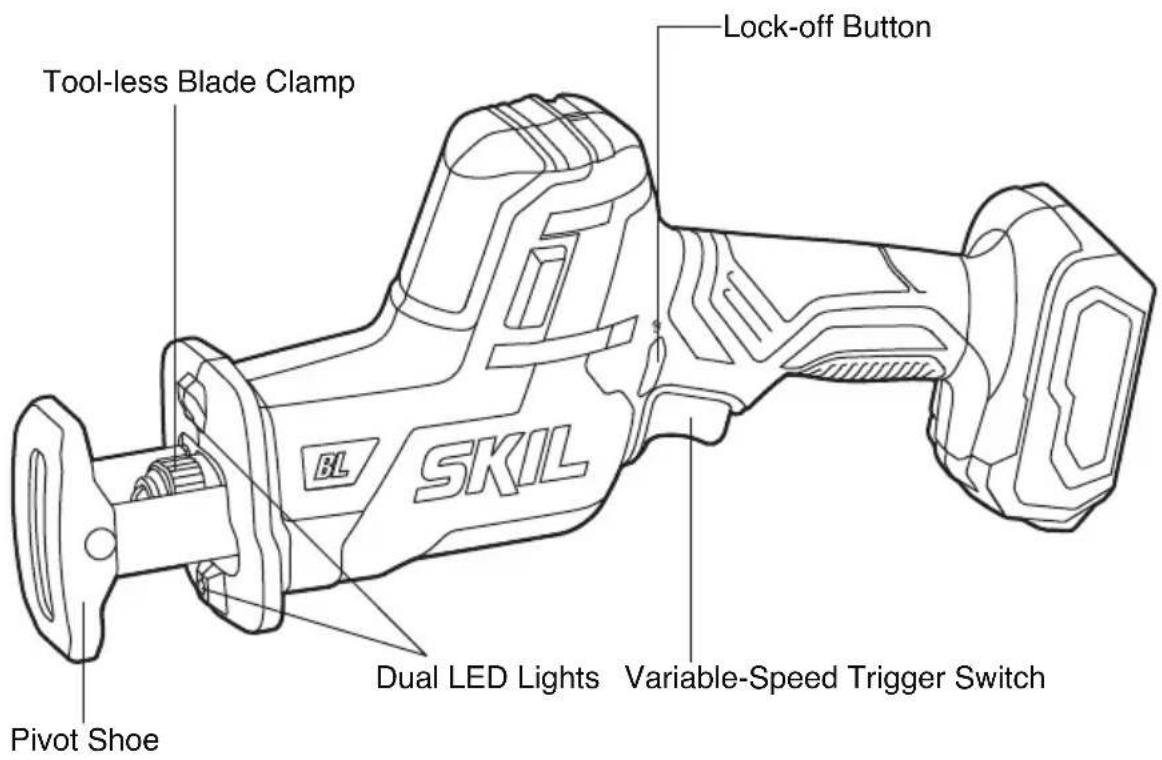
text_image
Tool-less Blade Clamp Lock-off Button Pivot Shoe SKIL Dual LED Lights Variable-Speed Trigger SwitchSPECIFICATIONS
| Rated voltage 20 V d.c | |
| No-load speed 0-3000 SPM (Strokes per Minute) | |
| Stroke 1" (25.4mm) | |
| Sawing capacity in wood 7-3/32" (180mm) | |
| Sawing capacity in aluminum 1-3/16" (30mm) | |
| Sawing capacity in metal 19/32" (15mm) | |
| Recommended working temperature 14~104°F (-10~40 °C) | |
| Recommended storage temperature 32~104°F (0~40 °C) | |
OPERATING INSTRUCTIONS
To reduce the risk of fire, personal injury, and product damage due to a short circuit, never immerse your tool, battery pack or charger in
fluid or allow a fluid to flow inside them. Corrosive or conductive fluids, such as seawater, certain industrial chemicals, and bleach or bleach-containing products, etc. can cause a short circuit.

If any parts are damaged or missing, do not operate this product until the parts are replaced. Use of this product with damaged or missing parts
could result in serious personal injury.
Do not attempt to modify this tool or create accessories not recommended for use with this tool. Any such alteration or modification
is misuse and could result in a hazardous condition leading to possible serious injury.
To prevent accidental starting that could cause serious personal injury, always remove the battery pack from the tool when assembling
parts.
This cordless reciprocating saw must be used only with the battery packs and chargers listed below:
| Battery Pack | Charger | |||||
| 2Ah 2Ah | 2.5Ah 4Ah 5Ah | |||||
| SKILBY519701 | SKILBY519702 | SKILBY519703 | SKILBY519601 | SKILBY519603 | SKILSC535801 | SKILQC536001 |
NOTICE: Please refer to the battery pack and charger manuals for detailed operating information.
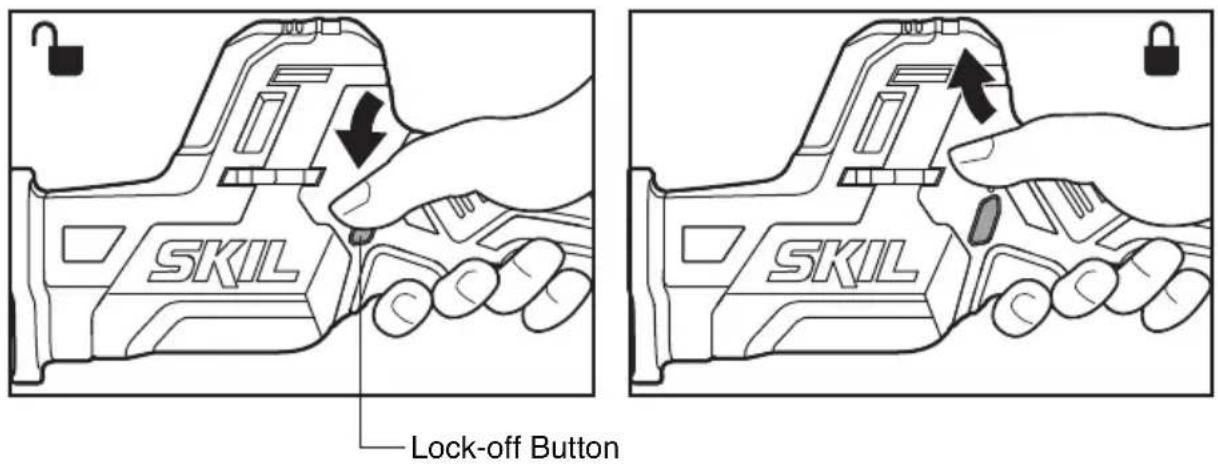
Lock-Off Button (Fig .2)
Your tool is equipped with a lock-off button, located above the variable-speed trigger switch, to prevent the saw from being activated unintentionally.
To lock the switch in the OFF position, depress the lock-off button to the locked (locked) position.
To unlock the switch, depress the lock-off button to the 🔔 (unlocked) position.
Fig. 2
text_image
SKIL Lock-off Button SKILTo attach/detach battery pack
Lock the variable-speed trigger switch "OFF" on the tool by depressing the lock-off button to the locked position 🔒.
To attach the battery pack:
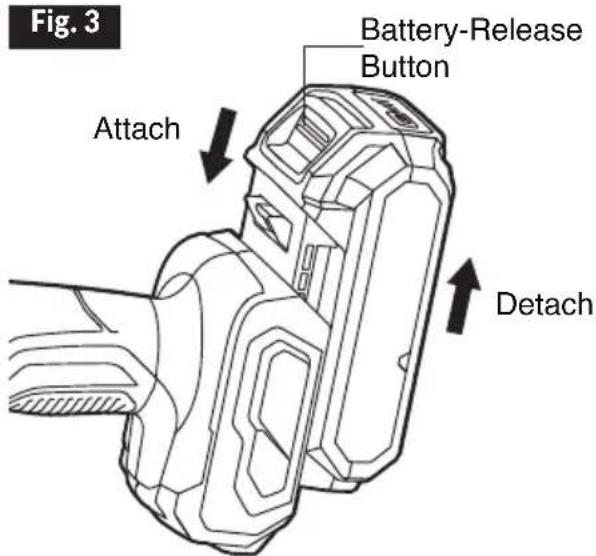
Align the raised rib on the battery pack with the grooves on the tool, and then slide the battery pack onto the tool (Fig.3).
To detach the battery pack:
Depress the battery-release button, located on the front of the battery pack, to release the battery pack. Pull the battery pack out and remove it from the tool (Fig.3).
NOTICE: When placing the battery pack on the tool, be sure that the raised rib on the battery pack aligns with the groove inside the tool and that the latches snap into place properly. Improper attachment of the battery pack can cause damage to internal components
WARNING
Battery tools are always in operating condition. Therefore, the lock-off button should always be depressed in the locked position when the tool is
not in use or when carrying it at your side.
Variable-Speed Trigger Switch
Your tool is equipped with a variable-speed trigger switch. The tool can be turned "ON" or "OFF" by depressing or releasing the trigger.
The variable-speed trigger switch delivers higher speed with increased trigger pressure and lower speed with decreased trigger pressure (Fig.4)
text_image
Fig. 3 Battery-Release Button Attach Detach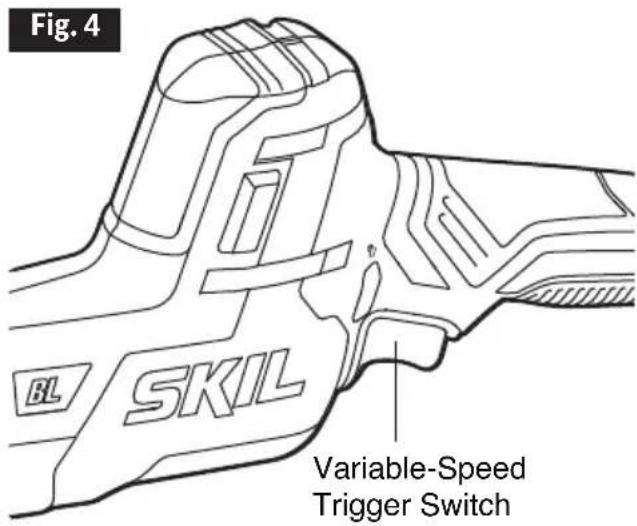
text_image
Fig. 4 BL SKIL Variable-Speed Trigger SwitchDual LED Lights (Fig .5)
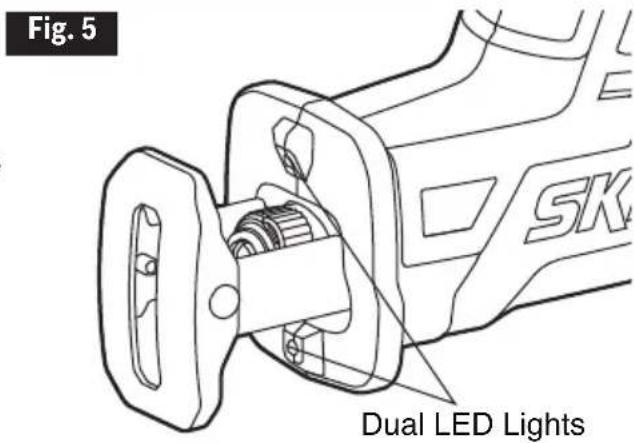
Your tool is equipped with Dual LED lights, located below and above the blade clamp of the tool. This provides additional light on the surface of the workpiece for operation in lower-light areas.
The LED light will automatically turn on with a slight squeeze on the variable-speed trigger switch before the tool starts running and will turn off approximately 10 seconds after the variable-speed trigger switch is released.
text_image
Fig. 5 SK Dual LED LightsThe LED light will rapidly flash when the tool and/or battery pack becomes overloaded or too hot, and the internal sensors will turn the tool off if the tool and/or battery pack are
overloaded. Rest the tool for a while or place the tool and battery pack separately under air flow to cool them.
The LED light will flash more slowly to indicate that the battery is at low-battery capacity.
Recharge the battery pack.
Blade Selection
To obtain the best performance from the saw, it is important to select the correct blade for the application and type of material to be cut.
Blades with fewer teeth, e.g., 7 teeth per inch (TPI), are typically used for cutting wood; blades with more teeth per inch are better for cutting metal or plastic.
We recommend 14 TPI blades for plastics and soft metals and 18 TPI blades for hard metals.
Installing and Removing the Saw Blade (Fig .6)
WARNING
Always lock the tool off and remove the battery pack before making any adjustments or assembling parts.
Depress the lock-off button to the locked position and then remove the battery pack from the tool.
To install the saw blade:
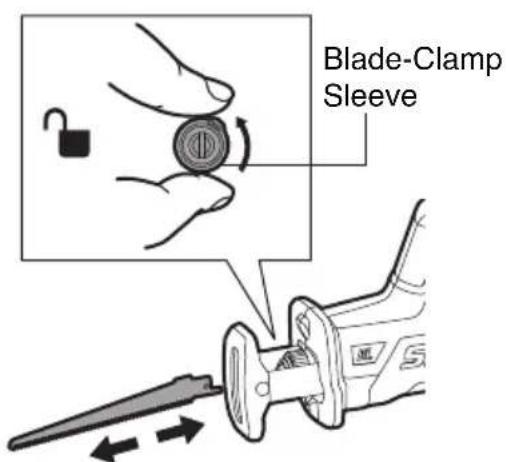
a. Use one hand to rotate the blade-clamp sleeve in the direction of the arrow marked on the blade clamp, and then hold it in place.
b. Use the other hand to insert the saw blade into the blade clamp as far as possible.
c. Release the blade-clamp sleeve; the blade should be locked in place automatically.
d. Try to push in and pull out the blade to check whether it is locked correctly.
NOTICE: The blade may be installed with the teeth pointing up or down, according to the needs of the cutting operation.
To remove the saw blade:
a. Use one hand to rotate the blade-clamp sleeve in the direction of the arrow marked on the blade clamp and then hold it in place.
b. Remove the saw blade from the blade clamp with your other hand.
c. Release the blade-clamp sleeve.
Fig. 6
text_image
Blade-Clamp Sleeve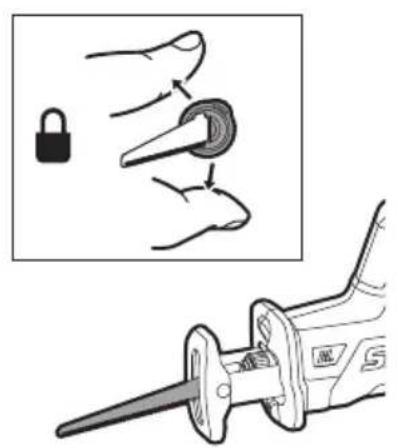
text_image
Diagram showing a hand holding a lock and a tool with a handle, alongside an instructional illustration.WARNING prolonged use.
Use protective gloves when removing the saw blade from the tool, or first allow the saw blade to cool down. The saw blade may be hot after
Pivoting the Shoe (Fig .7)
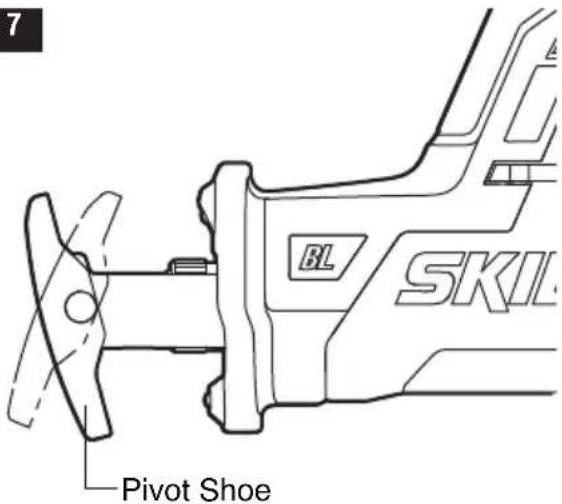
The shoe pivots to provide maximum control when it is flat against the surface being cut.
a. Depress the lock-off button to the locked position and then remove the battery pack from the tool.
b. Firmly hold the saw and then pivot the shoe to the desired angle, while taking care to avoid contact with the blade.
c. Reinstall the battery and prepare to cut.
Fig. 7
text_image
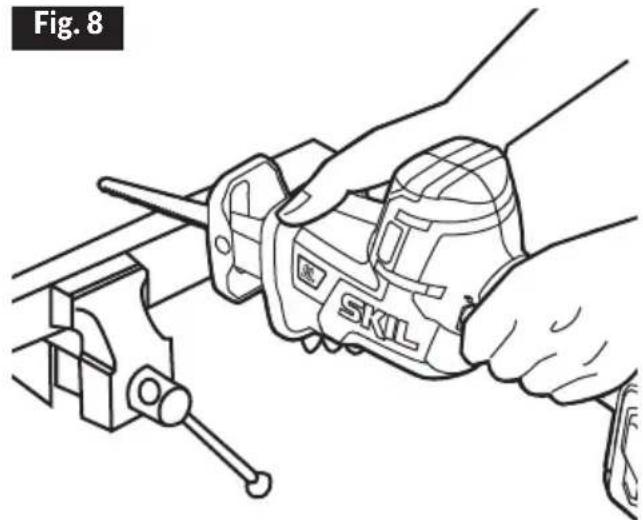
7 Pivot Shoe BL SKILGeneral Cutting (Fig .8)
WARNING
Never use the wood-cutting blade for cutting
metals. Failure to do so could result in serious personal injury.
WARNING
Before attaching the battery pack onto the
tool, always check to determine that the switch performs properly and returns to the "OFF" position when released.
WARNING
Hold the tool only by the plastic handle and the
insulated grip area to help prevent electrical shock. When sawing into walls or floors you may encounter electrical wiring. Sawing into a
natural_image
Line drawing of hands using a sawl caliper to adjust a workpiece (no text or symbols present)"live" wire will conduct electricity into the tool and possibly cause serious injury.
a. Depress the lock-off button to the locked position and then remove the battery pack from the tool.
b. Make sure that the workpiece is firmly clamped in place to keep it from slipping or moving while cutting.
c. Install the appropriate type and size of blade for the workpiece material and size.
d. Check the pivot shoe to make sure that the blade will extend beyond the shoe and through the workpiece at all times.
e. Check for clearance behind the workpiece so that the blade will not contact another surface.
f. Mark the line of cut clearly. If cutting metal, apply cutting oil to the line.
g. Attach the battery pack to the reciprocating saw.
h. Hold the saw firmly with both hands. Make sure to keep your hands on the insulated gripping areas only.
i. Depress the lock-off button to the unlock position and squeeze the variable-speed trigger switch to start the saw and bring it to the maximum desired cutting speed before applying the blade to the workpiece.
j. Place the shoe firmly on the workpiece while cutting. Use only enough steady pressure on the blade to keep the saw cutting. Do not force the tool.
k. Reduce pressure as the blade comes to the end of the cut.
I. Allow the saw to come to a complete stop before removing the blade from the workpiece. NOTICE: When sawing fiberglass, plaster, wallboard, or spackling compound, clean the motor vents frequently with a vacuum or with compressed air. These materials are highly abrasive and may accelerate the wear on motor bearings and brushes.
WARNING
Always wear safety goggles when cleaning tools with compressed air.
NOTICE: Cutting speeds should vary with the workpiece. Hard materials, such as metals, require lower speeds; use the higher speeds for softer materials.
WARNING wear a dust mass
Always wear safety goggles or safety glasses with side shields during power tool operation or when blowing dust. If operation is dusty, also
WARNING
Do not allow familiarity with the saw to make you careless. One careless fraction of a second is enough to inflict serious injury.
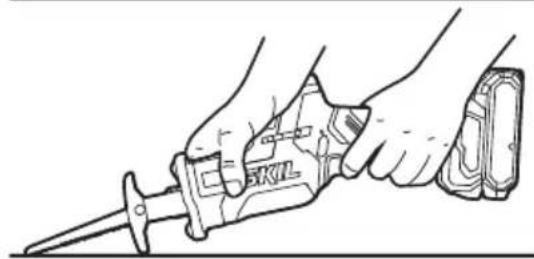
Plunge Cutting (Fig .9)
Your reciprocating saw is ideal for plunge cutting directly into non-metal surfaces that cannot be cut from an edge, such as walls or floors.
WARNING
Do not plunge cut into metal surfaces.
a. Depress the lock-off button to the locked position and then remove the battery pack from the tool.
b. Make sure that the workpiece is firmly clamped in place to keep it from slipping or moving while cutting.
c. Select the appropriate type and size of blade for the workpiece material and size. Install the blade onto the tool.
d. Check the pivot shoe to make sure that the blade will extend beyond the shoe and through the workpiece at all times.
e. Check for clearance behind the workpiece so that the blade will not contact another surface.
f. Mark the line of cut clearly.
g. Attach the battery pack to the reciprocating saw.
h. Hold the tool as shown in the Fig. 9, resting the edge of the shoe on the workpiece.
i. With the blade just above the workpiece, depress the lock-off button to the unlock position and trigger the switch to start the tool; allow it to come to the desired speed. Then, using the edge of the shoe as a pivot, lower the blade into the workpiece.
j. As the blade starts cutting, raise the handle of the tool slowly, until the shoe rests firmly on the workpiece
k. After the blade has penetrated through the
Fig. 9
natural_image
Line drawing of a hand using a saw tool to cut a component (no text or symbols present)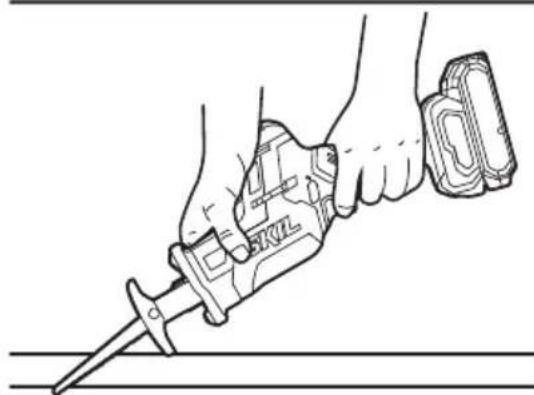
natural_image
Line drawing of a hand using a sawtooth tool to cut a surface (no text or symbols present)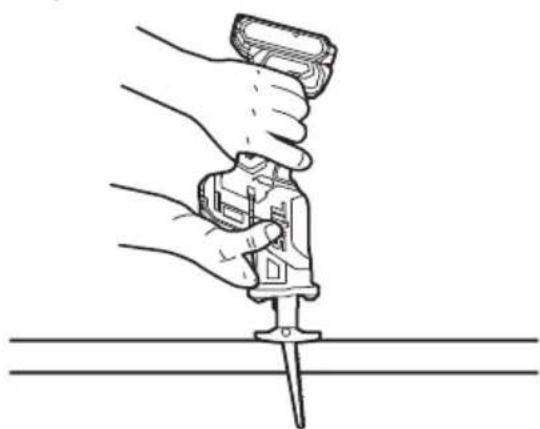
natural_image
Illustration of a hand using a tool to apply or install a screwdriver into a flat surface (no text or symbols present)workpiece, continue sawing along the marked cutting line.
I. Allow the saw to come to a complete stop before removing the blade from the workpiece.
To reduce the risk of explosion, electric shock and property damage, always check the work area for hidden gas pipes, electrical wires or making blind or plunge cuts.

To avoid loss of control and serious injury, make sure that the blade reaches the full desired speed before touching it to the workpiece.

Do not make plunge cuts in metal materials.
Metal Cutting
Never use a wood-cutting blade for cutting metals. Failure to do so could result in serious personal injury
The saw can be used to cut metals, such as sheet steel, pipe, steel rods, aluminum, brass, and copper. Be careful not to twist or bend the saw blade. Do not force the tool.
The use of cutting oil is recommended when cutting soft metals and steel. Cutting oil will keep the blade cool, increase the cutting action, and prolong blade life.

To avoid possibly serious injury:
- Never use gasoline as cutting lubricant, because normal sparking could ignite the fumes.
- Securely clamp the workpiece in position and make the cut close to the clamping point to minimize vibration.
- When cutting conduit pipe or angle iron, clamp the work in a vise, if possible, and cut close to the vise.
- To cut thin sheet material, “sandwich” the material between pieces of hardboard or plywood, and clamp the layers together to reduce vibration and tearing of the material
MAINTENANCE

To avoid serious personal injury, always remove the battery pack from the tool when cleaning or performing any maintenance.
Service

Preventive maintenance performed by unauthorized personnel may result in misplacing of internal wires and components which could
cause a serious hazard. We recommend that all tool service be performed by a SKIL Factory Service Center or Authorized SKIL Service Station.
General Maintenance

When servicing, use only identical replacement parts. Use of any other parts could create a hazard or cause product damage.
Periodically inspect the entire product for damaged, missing, or loose parts such as screws, nuts, bolts, caps, etc. Tighten securely all fasteners and caps and do not operate this product until all missing or damaged parts are replaced. Please contact customer service or an authorized service center for assistance.
Cleaning

The tool may be cleaned most effectively with compressed dry air. Always wear safety goggles when cleaning tools with compressed air.
Ventilation openings and switch levers must be kept clean and free of foreign matter. Do not attempt to clean by inserting pointed objects through openings.

Certain cleaning agents and solvents damage plastic parts. Some of these are: gasoline, carbon tetrachloride, chlorinated cleaning solvents, behold detergents that contain ammonia.
Storage
Store the tool indoors in a place that is inaccessible to children. Keep away from corrosive agents.
TROUBLE SHOOTING
| Problem Cause | Remedy | |
| Tool will not start | 1. The battery pack charge is depleted.2. Tool is over-loaded. 2. Release the on/off switch and try again.3. The battery pack is over temperature.4. The battery pack is not installed properly.5. The switch is burned out. 5. Have the switch replaced by an Authorized SKIL Service Center or Service Station. | 1. Charge the battery.the on/off switch and try again.3. Turn off the tool and cool the battery pack under air flow.4. Confirm that the battery is locked and secured to the tool. |
| The blade binds, jams, or bums the wood. | 1. The blade is dull. 1. Replace the blade.2. An improper blade is being used.3. The blade is warped. 3. Replace the blade. | blade.2. Choose the correct blade for your operation. |
| The saw vibrates or shakes | 1. The blade is damaged. 1. Replace the blade.2. The blade is loose. 2. Remove the blade and reinstall it. | the blade. |
LIMITED WARRANTY OF SKIL CONSUMER TOOLS
5 YEAR LIMITED WARRANTY - LEGAL
Chervon North America, Inc. ("Seller") warrants to the original purchaser only, that all SKIL consumer TOOLS will be free from defects in material or workmanship for a period of five years from date of purchase, if original purchaser registers the product within 30 days from purchase. BATTERIES AND CHARGERS are warranted for 2 years. Product registration can be completed online at www.Registermyskil.com. Original purchasers should also retain their receipt as proof of purchase. THE FIVE-YEAR WARRANTY PERIOD FOR TOOLS IS CONDITIONED ON REGISTRATION OF THE PRODUCT WITHIN 30 DAYS OF PURCHASE. If original purchasers do not register their product timely, the foregoing limited warranty will apply for a duration of three years for tools. All batteries and chargers will remain under the two-year limited warranty.
Notwithstanding the foregoing, if a SKIL consumer tool is used for industrial, professional or commercial purposes, the foregoing warranty will apply for a duration of ninety days, regardless of registration.
SELLER'S SOLE OBLIGATION AND YOUR EXCLUSIVE REMEDY under this Limited Warranty and, to the extent permitted by law, any warranty or condition implied by law, shall be the repair or replacement of parts, without charge, which are defective in material or workmanship and which have not been misused, carelessly handled, or repaired by persons other than Seller or Authorized Service Station. To make a claim under this Limited Warranty, you must return the complete product, transportation prepaid, to any SKIL Factory Service Center or Authorized Service Station. For Authorized SKIL Power Tool Service Stations, please visit www.Registermyskil.com or call 1-877-SKIL-999 (1-877-754-5999).
THIS LIMITED WARRANTY DOES NOT APPLY TO ACCESSORY ITEMS SUCH AS CIRCULAR SAW BLADES, DRILL BITS, ROUTER BITS, JIGSAW BLADES, SANDING BELTS, GRINDING WHEELS AND OTHER RELATED ITEMS.
ANY IMPLIED WARRANTIES APPLICABLE TO A PRODUCT SHALL BE LIMITED IN DURATION EQUAL TO THE DURATION OF THE EXPRESS WARRANTIES APPLICABLE TO SUCH PRODUCT, AS SET FORTH IN THE FIRST PARAGRAPH ABOVE. SOME STATES IN THE U.S., SOME CANADIAN PROVINCES DO NOT ALLOW LIMITATIONS ON HOW LONG AN IMPLIED WARRANTY LASTS, SO THE ABOVE LIMITATION MAY NOT APPLY TO YOU.
IN NO EVENT SHALL SELLER BE LIABLE FOR ANY INCIDENTAL OR CONSEQUENTIAL DAMAGES (INCLUDING BUT NOT LIMITED TO LIABILITY FOR LOSS OF PROFITS) ARISING FROM THE SALE OR USE OF THIS PRODUCT. SOME STATES IN THE U.S. AND SOME CANADIAN PROVINCES DO NOT ALLOW THE EXCLUSION OR LIMITATION OF INCIDENTAL OR CONSEQUENTIAL DAMAGES, SO THE ABOVE LIMITATION OR EXCLUSION MAY NOT APPLY TO YOU.
THIS LIMITED WARRANTY GIVES YOU SPECIFIC LEGAL RIGHTS, AND YOU MAY ALSO HAVE OTHER RIGHTS WHICH VARY FROM STATE TO STATE IN THE U.S., PROVINCE TO PROVINCE IN CANADA AND FROM COUNTRY TO COUNTRY.
THIS LIMITED WARRANTY APPLIES ONLY TO PRODUCTS SOLD WITHIN THE UNITED STATES OF AMERICA, CANADA AND THE COMMONWEALTH OF PUERTO RICO. FOR WARRANTY COVERAGE WITHIN OTHER COUNTRIES, CONTACT YOUR LOCAL SKIL DEALER OR IMPORTER.
© Chervon North America, 1203 E. Warrenville Rd, Naperville, IL 60563.
06/20
TABLE DES MATIÈRES
natural_image
Icon of a person wearing glasses inside a circle (no text or symbols)
natural_image
Line drawing of hands using a sawl caliper to adjust a workpiece (no text or symbols present)natural_image
Line drawing of hands using a sawl tool (no text or symbols present)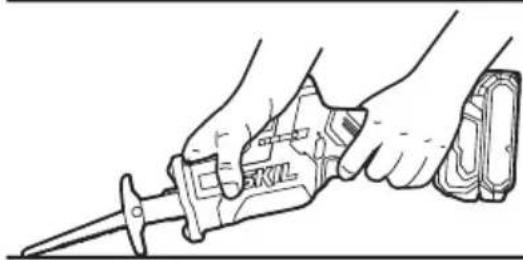
natural_image
Line drawing of a hand holding a saw tool, no text or symbols present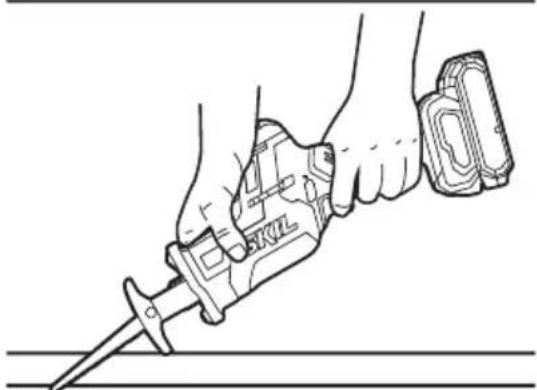
natural_image
Line drawing of a hand holding a tool with a screwdriver, no text or symbols present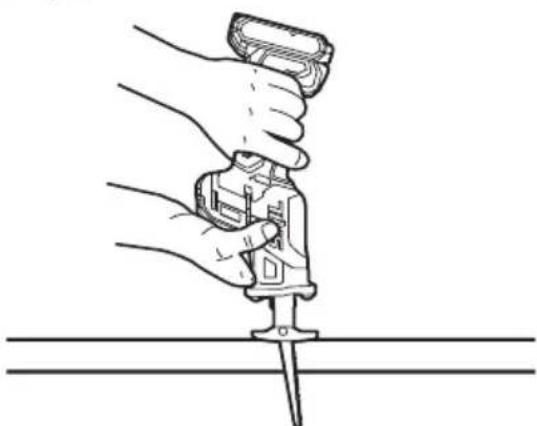
natural_image
Line drawing of a hand using a tool to cut a screwdriver into a flat surface (no text or symbols)© Chervon North America, 1203 E. Warrenville Rd, Naperville, IL 60563.
06/20
ÍNDICE
natural_image
Icon of a person wearing glasses inside a circle (no text or symbols)
natural_image
Line drawing of hands using a SKIL tool to lift a vise (no text or symbols present)ADVERTENCIA
natural_image
Line drawing of hands using a saw tool to cut a component (no text or symbols)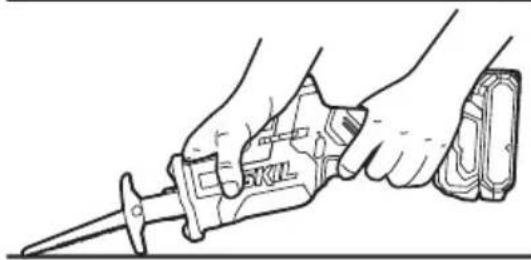
natural_image
Line drawing of a hand holding a saw tool, no text or symbols present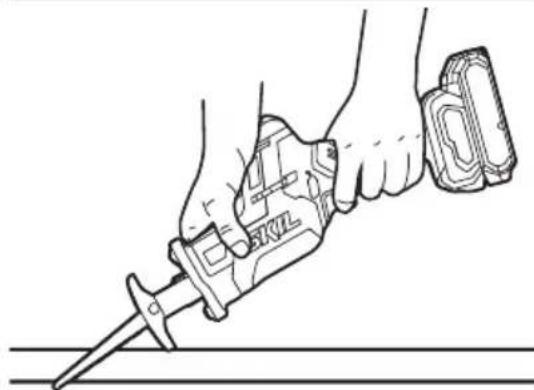
natural_image
Line drawing of a hand using a sawdriver to cut a tool, no text or symbols present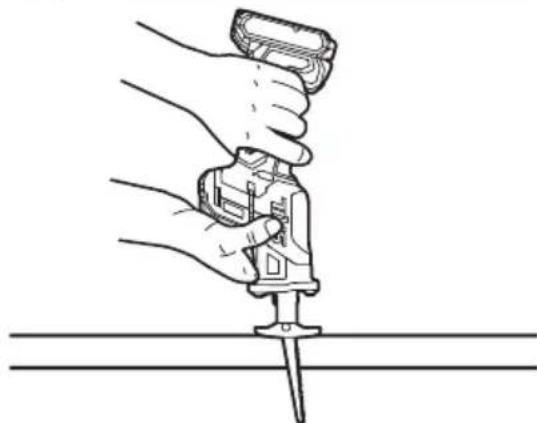
natural_image
Line drawing of a hand using a tool to lift a screwdriver into a flat surface (no text or symbols)ADVERTENCIA
© Chervon North America, 1203 E. Warrenville Rd, Naperville, IL 60563.
06/20
text_image
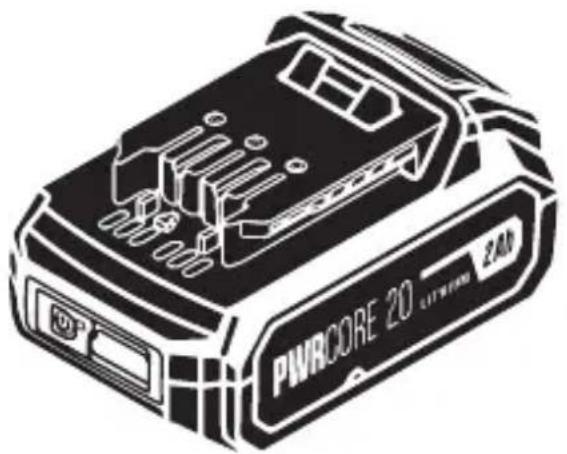
PWRCORE 20 LITWORM ZAMLithium 20V Battery with
PWRAssist™ Mobile Charging
Safety Instructions 3-6
Symbols 7-12
Get to Know Your Battery....13
Specifications 13
Operating Instructions .... 14-16
Maintenance....17-18
Battery Care....18
Battery Disposal 19
Limited Warranty of SKIL Battery Pack. 20-21
SAFETY INSTRUCTIONS

Read all safety warnings, instructions, illustrations and specifications. Failure to follow all instructions listed below may result in electric shock, fire and/or serious injury.
SAVE ALL WARNINGS AND INSTRUCTIONS FOR FUTURE REFERENCE.
The term “power tool” in the warnings refers to your mains-operated (corded) power tool or battery-operated (cordless) power tool.
Work area safety
Keep work area clean and well lit. Cluttered or dark areas invite accidents.
Do not operate power tools in explosive atmospheres, such as in the presence of flammable liquids, gases or dust. Power tools create sparks which may ignite the dust or fumes.
Electrical safety
Do not expose power tools to rain or wet conditions. Water entering a power tool will increase the risk of electric shock.
Battery tool use and care
Recharge only with the charger specified by the manufacturer.
A charger that is suitable for one type of battery pack may create a risk of fire when used with another battery pack.
Use power tools only with specifically designated battery packs. Use of any other battery packs may create a risk of injury and fire.
When battery pack is not in use, keep it away from other metal objects, like paper clips, coins, keys, nails, screws or other small metal objects, that can make a connection from one terminal to another. Shorting the battery terminals together may cause burns or a fire.
Under abusive conditions, liquid may be ejected from the battery; avoid contact. If contact accidentally occurs, flush with water. If liquid contacts eyes, additionally seek medical help.
Liquid ejected from the battery may cause irritation or burns.
Do not use a battery pack or tool that is damaged or modified. Damaged or modified batteries may exhibit unpredictable behaviour resulting in fire, explosion or risk of injury.
Do not expose a battery pack or tool to fire or excessive temperature. Exposure to fire or temperature above 265 °F may cause explosion.
Follow all charging instructions and do not charge the battery pack or tool outside the temperature range specified in the instructions. Charging improperly or at temperatures outside the specified range may damage the battery and increase the risk of fire.
Service
Have your power tool serviced by a qualified repair person using only identical replacement parts. This will ensure that the safety of the power tool is maintained.
Never service damaged battery packs. Service of battery packs should only be performed by the manufacturer or authorized service providers.
Specific Safety Rules
Before using battery, read all instructions and cautionary markings on (1) battery charger, (2) battery pack, and (3) product using battery.
Risk of fire and burns. Do not recharge, disassemble, heat above 100 °C (212 °F), or incinerate. Keep battery out of reach of children and in original package until ready to use.
Battery tools do not have to be plugged into an electrical outlet; therefore, they are always in operating condition. Be aware of possible hazards when not using your battery tool or when changing accessories.
Do not place battery tools or their batteries near fire or heat.
Charge battery pack within the required temperature range. Store charger and battery pack in locations where temperature is within the recommended storage temperature range. This is important to prevent serious damage to the battery cells.
Do not crush, drop or damage the battery pack. Do not use a battery pack or charger that has been dropped or received a sharp blow. A damaged battery is subject to explosion. Properly dispose of a dropped or damaged battery immediately.
Do not insert battery pack in charger if battery pack case is cracked. Using damaged battery pack may result in electric shock or fire.
Batteries vent hydrogen gas and can explode in the presence of a source of ignition such as a pilot light. To reduce the risk of serious personal injury, never use any cordless product in the presence of open flame. An exploded battery can propel debris and chemicals. If exposed, flush with water immediately.
Do not recharge battery in damp or wet environment. Do not expose charger to rain or snow. Water entering battery charger may result in electric shock or fire.
Do not store outside or in vehicles.
Do not store battery pack in charger. Battery pack stored in charger over a long period of time could lead to battery pack damage and fire.
Battery leakage may occur under extreme usage or temperature conditions. Avoid contact with skin and eyes. The battery liquid is caustic and could cause chemical burns to tissues. If liquid comes in contact with skin, wash quickly with soap and water. If the liquid contacts your eyes, flush them with water for a minimum of 10 minutes and seek medical attention.
Do not let gasoline, oils, petroleum-based products, etc. come in contact with plastic parts. They contain chemicals that can damage, weaken or destroy plastic.
Do not touch the uninsulated portion of output connector or uninsulated battery terminal. There is a risk of electric shock.
Replace battery pack if a substantial drop in operating time per charge is observed. Battery pack may be nearing the end of its life.
SYMBOLS
Safety Symbols
The purpose of safety symbols is to attract your attention to possible dangers. The safety symbols and the explanations with them deserve your careful attention and understanding. The symbol warnings do not, by themselves, eliminate any danger. The instructions and warnings they give are no substitutes for proper accident prevention measures.

WARNING
Be sure to read and understand all safety instructions in this Owner's Manual, including
all safety alert symbols such as “DANGER,” “WARNING,” and “CAUTION” before using this tool. Failure to following all instructions listed below may result in electric shock, fire, and/or serious personal injury.
| The definitions below describe the level of severity for each signal word. Please read the manual and pay attention to these symbols. | |
 | This is the safety alert symbol. It is used to alert you to potential personal injury hazards. Obey all safety messages that follow this symbol to avoid possible injury or death. |
 DANGER DANGER | DANGER indicates a hazardous situation which, if not avoided, will result in death or serious injury. |
 WARNING WARNING | WARNING indicates a hazardous situation which, if not avoided, could result in death or serious injury. |
CAUTION
CAUTION, used with the safety alert symbol, indicates a hazardous situation which, if not avoided, will result in minor or moderate injury.
Damage Prevention and Information Messages
These inform the user of important information and/or instructions that could lead to equipment or other property damage if they are not followed. Each message is preceded by the word “NOTICE”, as in the example below:
NOTICE: Equipment and/or property damage may result if these instructions are not followed.

natural_image
Icon of a person wearing glasses inside a circle (no text or symbols)WARNING
The operation of any power tools can result in foreign
objects being thrown into your eyes, which can result in severe eye damage. Before beginning power tool operation, always wear safety goggles or safety glasses with side shields and a full face shield when needed. We recommend a Wide Vision Safety Mask for use over eyeglasses or standard safety glasses with side shields. Always use eye protection which is marked to comply with ANSI Z87.1.
SYMBOLS (CONTINUED)
IMPORTANT: Some of the following symbols may be used on your tool. Please study them and learn their meaning. Proper interpretation of these symbols will allow you to operate the tool better and more safely.
| Symbol Name Designation/Explanation | ||
| V Volts | Voltage (potential) | |
| A Amperes Current | ||
| Hz Hertz | Frequency (cycles per second) | |
| W Watt | Power | |
| kg Kilograms Weight | ||
| min Minutes Time | ||
| s Seconds Time | ||
| Wh Watt-hours Battery capacity | ||
| Ah Ampere-Hours | Battery capacity | |
| ∅ | Diameter | Size of drill bits, grinding wheels, etc. |
| n_0 | No load speed | Rotational speed, at no load |
| n Rated | speed | Maximum attainable speed |
| .../min | Revolutions orreciprocation perminute | Revolutions, strokes,surface speed, orbits, etc.per minute |
| 0 Off position | Zero speed, zero torque... | |
| 1,2,3,...I,II,III, | Selector settings | Speed, torque or position settings. Higher number means greater speed |
 | Infinitely variable selector with off | Speed is increasing from 0 setting |
 | Arrow | Action in the direction of arrow |
 | Alternating current | Type or a characteristic of current |
 | Direct current | Type or a characteristic of current |
 | Alternating or direct current | Type or a characteristic of current |
 | Class II tool | Designates Double Insulated Construction tools. |
 | Earthing terminal Grounding terminal | |
 | Li-ion RBRC seal | Designates Li-ion battery recycling program |
 | Ni-Cad RBRC seal | Designates Ni-Cad battery recycling program |
 | Read manual symbol Alerts user to read manual | |
 | Wear eye protection symbol | Always wear safety goggles or safety glasses with side shields and a full face shield when operating this product. |
SYMBOLS (CERTIFICATION INFORMATION)
IMPORTANT: Some of the following symbols for certification information may be used on your tool. Please study them and learn their meaning. Proper interpretation of these symbols will allow you to operate the tool better and more safely.
| Symbol Designation/Explanation | |
 | This symbol designates that this tool is listed by Underwriters Laboratories. |
 | This symbol designates that this tool is recognized by Underwriters Laboratories. |
 | This symbol designates that this tool is listed by Underwriters Laboratories, to United States and Canadian Standards. |
 | This symbol designates that this tool is listed by the Canadian Standards Association. |
 | This symbol designates that this tool is listed by the Canadian Standards Association, to United States and Canadian Standards. |
 | This symbol designates that this tool is listed by the Intertek Testing Services, to United States and Canadian Standards. |
 | This symbol designates that this tool complies to NOM Mexican Standards. |
 | This symbol designates that this tool is listed by the California Energy Commission. |
GET TO KNOW YOUR BATTERY
PWRCORE 20™ Lithium Battery Pack
Fig. 1
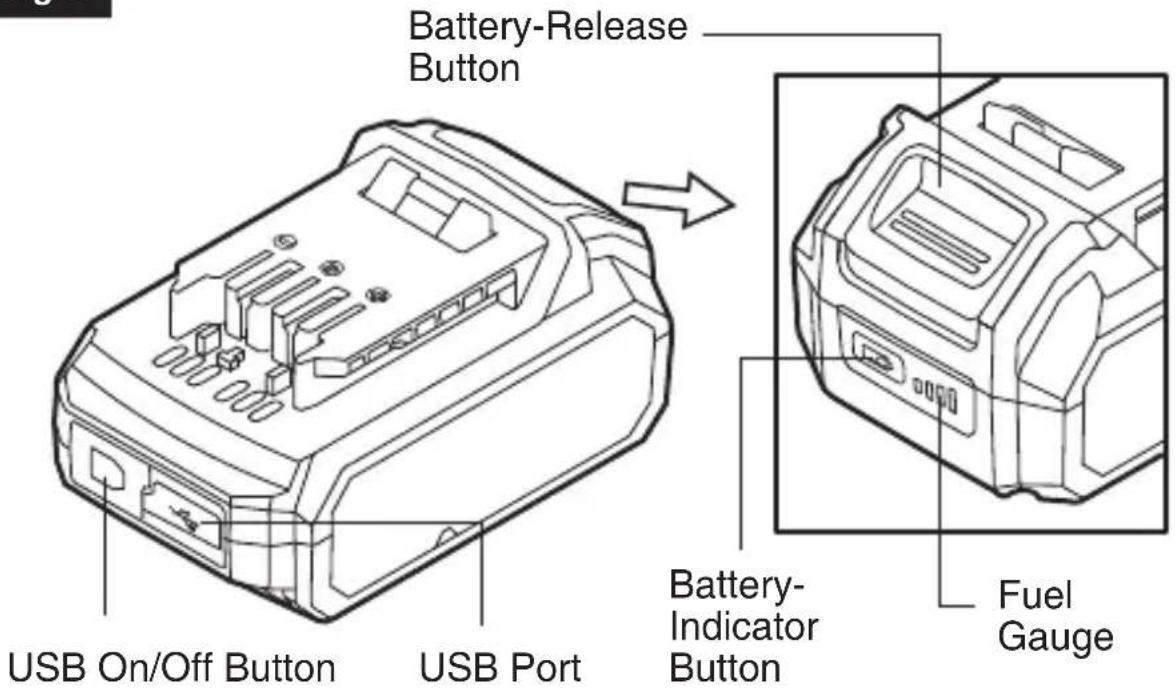
text_image
Battery-Release Button USB On/Off Button USB Port Battery-Indicator Button Fuel GaugeSPECIFICATIONS
| Model No. SKIL BY519702 | |
| Battery Capacity 2Ah | |
| Charger input 120V, 60Hz AC only | |
| Battery Voltage 20 V | |
| USB output 5V 1A | |
| Recommended Charging Temperature | Normal Charging:41°F (5°C) ~ 104°F (40°C) |
| Recommended Storage Temperature | 32°F (0°C) ~104°F (40°C) |

WARNING
The batteries listed above can be charged with SKIL SC535801, QC536001 chargers.
NOTICE: Use of chargers or battery packs not sold by SKIL will void the warranty.
OPERATING INSTRUCTIONS
WARNING
To reduce the risk of fire, personal injury, and product damage due to a short circuit, never immerse your charger or battery pack in fluid or allow a fluid to flow inside them. Corrosive or conductive fluids, such as seawater, certain industrial chemicals, and bleach or bleach-containing products, etc, can cause a short circuit.
When to Charge the Battery Pack
It is not necessary to run down the battery pack charge before recharging. The Lithium-Ion battery can be charged at any time and will not develop a “memory” when charged after only a partial discharge.
Remove the battery pack from the tool when it is convenient for you and your job.
"Top off" the battery pack charge by charging it for a time before starting a big job or use for a long period.
How to Charge the Battery Pack
NOTICE: The Lithium battery pack is shipped partially charged.
Before using it the first time, fully charge the battery pack.
a. Charge the battery pack with the correct charger.
b. Connect the charger to a power supply. The red Defect Indicator and the green Normal Charging Indicator will both shine for one
second and then go out, indicating that the charger self-inspection is completed.
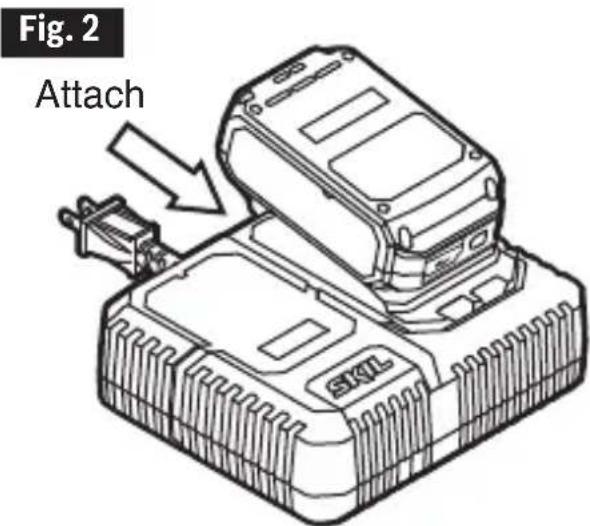
text_image
Fig. 2 Attachc. Align the raised ribs of the battery pack with the slot in the charger.
d. Insert the battery pack into the charger (Fig. 2).
e. The charger will communicate with the battery pack to evaluate the condition of the battery pack.
f. The charger will charge the battery automatically.
Please refer to the charger manual for detailed charging operation.
NOTICE: If the battery pack cannot accept a charge, the contacts of the charger or battery pack may be contaminated. Clean the contacts of the charger or battery pack (e.g. by inserting and removing the battery several times or scrubbing with a cotton swab and alcohol), replace a new charger or replace the battery pack, as required.
Defective Battery Pack
If the charger detects a problem, the red Defect Indicator will begin flashing. Remove and re-insert the battery pack in the charger. If the Defect Indicator flashes a second time, try charging a different battery pack.
a. If a different battery pack charges normally, have the first defective battery pack serviced by an Authorized SKIL Service Station.
b. If a different battery pack also indicates “defective,” the charger may be defective. Have the charger serviced by an Authorized SKIL Service Station.
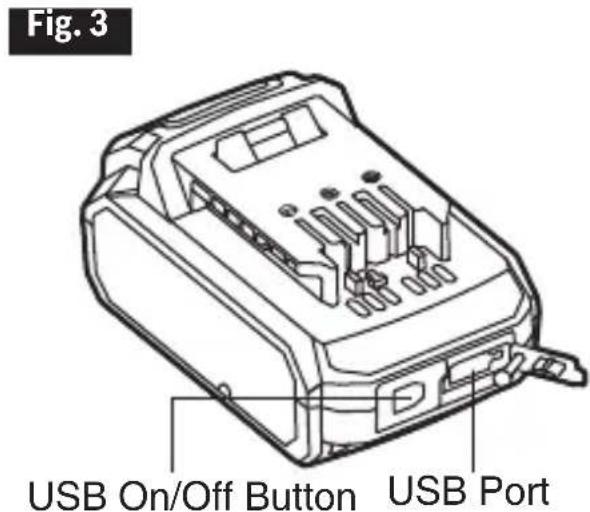
USB Port (Fig. 3)
The battery pack has a USB port, which can provide 5V 1A output when the battery is not depleted.
a. Connect an appropriate device to the battery (cell phone, etc.) with a standard USB cable.
b. Depress the USB on/off button to activate the discharging function at the USB port. During
the discharging, the fuel gauge will flash green.
text_image
Fig. 3 USB On/Off Button USB PortWARNING
Do not use the battery pack to charge or power another device when the battery pack is charging. Discharging and charging in the same time may cause damage to the battery pack and possible personal injury.
Fuel Gauge
The four LEDs on the battery comprise the Fuel Gauge, indicating the current battery capacity when the battery-indicator button is depressed.
The first LED of the fuel gauge will flash green when the charge level of the battery is low. Recharge the battery pack as needed.
To Attach/Detach Battery Pack
Follow the instructions in the Owner's Manual for the individual SKIL tool.
MAINTENANCE
Service
Maintenance performed by unauthorized personnel may result in misplacing of internal wires and components which could cause serious hazard. We recommend that all tool service be performed by a SKIL Factory Service Center or Authorized SKIL Service Station.
General Maintenance
When servicing, use only identical replacement parts. Use of any other parts could create a hazard or cause product damage.
Periodically inspect the entire product for damaged, missing, or loose parts such as screws, nuts, bolts, caps, etc. Tighten securely all fasteners and caps and do not operate this product until all missing or damaged parts are replaced. Please contact customer service or an authorized service center for assistance.
To avoid serious personal injury, always remove the battery pack from the charger/ tool when cleaning or performing any maintenance.
Cleaning
The tool may be cleaned most effectively with compressed dry air. Always wear safety goggles when cleaning tools with compressed air. Do not attempt to clean by inserting pointed objects through openings.
Certain cleaning agents and solvents damage plastic parts. Some of these are: gasoline, carbon tetrachloride, chlorinated cleaning solvents, ammonia and household detergents that contain ammonia.
Storage
Store the tool indoors in a place that is inaccessible to children. Keep away from corrosive agents.
BATTERY CARE
When batteries are not in the tool or charger, keep them away from metal
objects. For example, to protect terminals from shorting DO NOT place batteries in a tool box or pocket with nails, screws, keys, etc. Fire or injury may result.
DO NOT PUT BATTERIES INTO FIRE OR EXPOSE TO HIGH HEAT. They may explode.
BATTERY DISPOSAL
WARNING
Do not attempt to disassemble the battery or remove any component projecting from
the battery terminals. Fire or injury may result. Prior to disposal, protect exposed terminals with heavy insulating tape to prevent shorting.
Lithium-Ion Batteries: If equipped with a lithium-ion battery, the battery must be collected, recycled or disposed of in an environmentally sound manner.

text_image
RECYCLE RBRC TM Li-ion 1:800.822.8837The EPA certified RBRC Battery Recycling Seal on the lithium-ion (Li-ion) battery indicates Chervon North America is voluntarily participating in an industry program to collect and recycle these batteries at the end of their useful life, when taken out of service in the United States or Canada. The RBRC program provides a convenient alternative to placing used Li-ion batteries into the trash or the municipal waste stream, which may be illegal in your area.
Please call 1-800-8-BATTERY for information on Li-ion battery recycling and disposal bans/restrictions in your area, or return your batteries to a SKIL Service Center for recycling. Chervon North America's involvement in this program is part of our commitment to preserving our environment and conserving our natural resources.
LIMITED WARRANTY OF SKIL CONSUMER TOOLS
2 YEAR LIMITED WARRANTY- LEGAL
Chervon North America, Inc. ("Seller") warrants to the original purchaser only, that all SKIL consumer BATTERIES AND CHARGERS will be free from defects in material or workmanship for a period of two years from date of purchase.
Product registration can be completed online at www.Registermyskil.com. Original purchasers should also retain their receipt as proof of purchase.
Notwithstanding the foregoing, if a SKIL consumer portable power tool is used for industrial, professional or commercial purposes, the foregoing warranty will apply for a duration of ninety days, regardless of registration.
SELLER'S SOLE OBLIGATION AND YOUR EXCLUSIVE REMEDY under this Limited Warranty and, to the extent permitted by law, any warranty or condition implied by law, shall be the repair or replacement of parts, without charge, which are defective in material or workmanship and which have not been misused, carelessly handled, or repaired by persons other than Seller or Authorized Service Station. To make a claim under this Limited Warranty, you must return the complete product, transportation prepaid, to any SKIL Factory Service Center or Authorized Service Station. For Authorized SKIL Power Tool Service Stations, please visit www.Registermyskil.com or call 1-877-SKIL-999 (1-877-754-5999).
THIS LIMITED WARRANTY DOES NOT APPLY TO ACCESSORY ITEMS SUCH AS CIRCULAR SAW BLADES, DRILL BITS.
ANY IMPLIED WARRANTIES APPLICABLE TO A PRODUCT SHALL BE LIMITED IN DURATION EQUAL TO THE DURATION OF THE EXPRESS WARRANTIES APPLICABLE TO SUCH PRODUCT, AS SET FORTH IN THE FIRST PARAGRAPH ABOVE. SOME STATES IN THE U.S., SOME CANADIAN PROVINCES DO NOT ALLOW LIMITATIONS ON HOW LONG AN IMPLIED WARRANTY LASTS, SO THE ABOVE LIMITATION MAY NOT APPLY TO YOU.
IN NO EVENT SHALL SELLER BE LIABLE FOR ANY INCIDENTAL OR CONSEQUENTIAL DAMAGES (INCLUDING BUT NOT LIMITED TO LIABILITY FOR LOSS OF PROFITS) ARISING FROM THE SALE OR USE OF THIS PRODUCT. SOME STATES IN THE U.S. AND SOME CANADIAN PROVINCES DO NOT ALLOW THE EXCLUSION OR LIMITATION OF INCIDENTAL OR CONSEQUENTIAL DAMAGES, SO THE ABOVE LIMITATION OR EXCLUSION MAY NOT APPLY TO YOU.
THIS LIMITED WARRANTY GIVES YOU SPECIFIC LEGAL RIGHTS, AND YOU MAY ALSO HAVE OTHER RIGHTS WHICH VARY FROM STATE TO STATE IN THE U.S., PROVINCE TO PROVINCE IN CANADA AND FROM COUNTRY TO COUNTRY.
THIS LIMITED WARRANTY APPLIES ONLY TO PRODUCTS SOLD WITHIN THE UNITED STATES OF AMERICA, CANADA AND THE COMMONWEALTH OF PUERTO RICO. FOR WARRANTY COVERAGE WITHIN OTHER COUNTRIES, CONTACT YOUR LOCAL SKIL DEALER OR IMPORTER.
© Chervon North America, 1203 E. Warrenville Rd, Naperville, IL 60563. 01/19
TABLE DES MATIÈRES
natural_image
Icon of a person wearing glasses inside a circle (no text or symbols)AVERTISSEMENT
text_image
RECYCLE RBRC TM Li-ion 1.800.822.8837© Chervon North America, 1203 E. Warrenville Rd, Naperville, IL 60563.
01/19
ÍNDICE
natural_image
Icon of a person wearing glasses inside a circle (no text or symbols)ADVERTENCIA
text_image
RECYCLE RBRC TM Li-ion 1.800.822.8837© Chervon North America, 1203 E. Warrenville Rd, Naperville, IL 60563.
01/19
text_image
PVBJUMP JUMPEO SKILCharger Safety Instructions 3-4
Extension Cords 4
FCC Caution....5
Symbols 6-9
Get to Know Your Charger ....10
Specifications 10
Important Charging Notes 11
Operating Instructions 12-14
Maintenance....15
Troubleshooting 15
Limited Warranty of SKIL Charger....16
IMPORTANT SAFETY INSTRUCTIONS - SAVE THESE INSTRUCTIONS
TO REDUCE THE RISK OF FIRE OR ELECTRIC SHOCK, CAREFULLY FOLLOW THESE INSTRUCTIONS.
CHARGER SAFETY INSTRUCTIONS
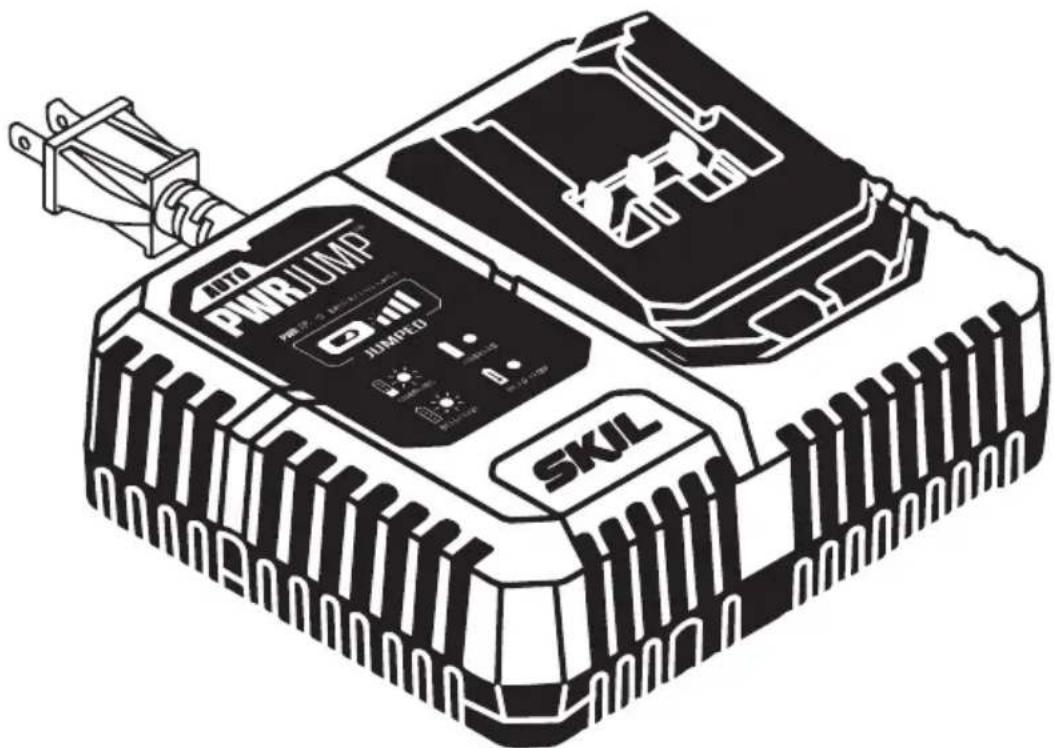
Save these instructions. This manual contains important safety and operating instructions for battery charger model QC536001.
Before using battery charger, read all instructions and cautionary markings on battery charger, battery and product using battery.
To reduce risk of injury, charge only SKIL rechargeable batteries listed in the manual. Other types of batteries may burst causing personal
injury and damage.
Charge battery pack within the required temperature range. Store charger and battery pack in locations where temperature is within the recommended storage temperature range. This is important to prevent serious damage to the battery cells.
Do not recharge battery in damp or wet environment. Do not expose charger to rain or snow. Water entering battery charger may result in electric shock or fire.
Battery leakage may occur under extreme usage or temperature conditions. Avoid contact with skin and eyes. The battery liquid is caustic and could cause chemical burns to tissues. If liquid comes in contact with skin, wash quickly with soap and water. If the liquid contacts your eyes, flush them with water for a minimum of 10 minutes and seek medical attention.
Place charger on flat nonflammable surfaces and away from flammable materials when recharging battery pack. Carpeting and other heat insulating surfaces block proper air circulation which may cause overheating of the charger and battery pack. If smoke or melting of the charger or battery pack is observed, unplug the charger immediately and do not use the battery pack or charger. Contact customer service immediately.
Keep the cord and charger from heat to prevent damage to housing or internal parts.
Do not allow gasoline, oils, petroleum-based products, etc. to come in contact with plastic parts. These materials contain chemicals that can damage, weaken, or destroy plastic.
Make sure cord is located so that it will not be stepped on, tripped over, or otherwise subjected to damage or stress. Damaged plug and cord may result in electric shock or fire.
Disconnect the charger by pulling the plug rather than the cord. Do not operate charger with damaged cord or plug; have them replaced immediately. Damaged plug or cord may result in electric shock or fire.
Do not insert battery pack in charger if battery pack case is cracked. Using damaged battery pack may result in electric shock or fire.
Do not disassemble charger or operate the charger if it has received a sharp blow, been dropped or otherwise damaged in anyway. Incorrect reassembly or damage may result in electric shock or fire.
Before each use, check the battery charger, cable and plug. If damage is detected, do not use the battery charger. Never open the battery charger yourself, take it to a SKIL Factory Service Center, or qualified serviceman only using original spare parts. Incorrect reassembly may result in electric shock or fire.
Do not touch the uninsulated portion of output connector or uninsulated battery terminal. There is a risk of electric shock.
Do not use attachment not recommended or sold by SKIL. Using attachments not recommended may result in electric shock or fire.
Do not store battery pack in charger. Battery pack stored in charger over a long period of time could lead to battery pack damage and fire.
Unplug charger from outlet before storage, attempting any maintenance or cleaning.
Such preventive safety measures reduce the risk of electric shock or fire.
Keep the battery charger clean by blowing compressed air on charger vents and wiping the charger housing with a damp cloth. Contamination may result in electric shock or fire.
Replace battery pack if a substantial drop in operating time per charge is observed.
Battery pack may be nearing the end of its life.
To reduce the risk of injury, close supervision is necessary when an appliance is used near children.
Do not use outdoors.
EXTENSION CORDS
WARNING
AN EXTENSION CORD SHOULD NOT BE USED UNLESS ABSOLUTELY NECESSARY. Use of improper extension cord could result in risk of fire
and electrical shock. If an extension cord is used, make sure:
a. The pins on plug of extension cord are the same number, size, and shape as those of plug on charger.
b. The extension cord is properly wired and in good electrical condition.
c. The wire size is large enough for AC ampere rating of charger as specified below:
| Length of Cord (Feet) 25' 50' 100' 150' | ||||
| Size of Cord (AWG) 18 16 16 14 |
| Extension Cord Chart for 220/240 Volt Tools: | |
| 0.75mm2 CORD 50 Meters | |
| 1.0mm2 CORD 75 Meters | |
d. An extension cord is a temporary solution. Move the charger to a standard receptacle as soon as the job has been completed.
FCC CAUTION
- This device complies with Part 15 of the FCC Rules. Operation is subject to the following two conditions:
(1) This device may not cause harmful interference. (2) This device must accept any interference received, including interference that may cause undesired operation. - Changes or modifications not expressly approved by the party responsible for compliance could void the user's authority to operate the equipment.
NOTE: This equipment has been tested and found to comply with the limits for a Class B digital device, pursuant to Part 15 of the FCC Rules. These limits are designed to provide reasonable protection against harmful interference in a residential installation. This equipment generates, uses, and can radiate radio frequency energy and, if not installed and used in accordance with the instructions, may cause harmful interference to radio communications. However, there is no guarantee that interference will not occur in a particular installation. If this equipment does cause harmful interference to radio or television reception, which can be determined by turning the equipment off and on, the user is encouraged to try to correct the interference by one or more of the following measures:
- Reorient or relocate the receiving antenna.
- Increase the separation between the equipment and receiver.
- Consult the dealer or an experienced radio/TV technician for help.
- Connect the equipment into an outlet on a circuit different from that to which the receiver is connected.
DANGER People with electronic devices, such as pacemakers, should consult their physician(s) before using this product. Operation of electrical equipment in close proximity to a heart pacemaker could cause interference or failure of the pacemaker.
SYMBOLS
Safety Symbols
The purpose of safety symbols is to attract your attention to possible dangers. The safety symbols and the explanations with them deserve your careful attention and understanding. The symbol warnings do not, by themselves, eliminate any danger. The instructions and warnings they give are no substitutes for proper accident prevention measures.
WARNING
Be sure to read and understand all safety instructions in this Owner's Manual, including all safety alert symbols such as "DANGER,"
"WARNING," and "CAUTION" before using this tool. Failure to following all instructions listed below may result in electric shock, fire, and/or serious personal injury.
| The definitions below describe the level of severity for each signal word. Please read the manual and pay attention to these symbols. | |
 | This is the safety alert symbol. It is used to alert you to potential personal injury hazards. Obey all safety messages that follow this symbol to avoid possible injury or death. |
 | DANGER indicates a hazardous situation which, if not avoided, will result in death or serious injury. |
 | WARNING indicates a hazardous situation which, if not avoided, could result in death or serious injury. |
 | CAUTION, used with the safety alert symbol, indicates a hazardous situation which, if not avoided, will result in minor or moderate injury. |
Damage Prevention and Information Messages
These inform the user of important information and/or instructions that could lead to equipment or other property damage if they are not followed. Each message is preceded by the word "NOTICE", as in the example below:
NOTICE: Equipment and/or property damage may result if these instructions are not followed.

natural_image
Icon of a person wearing glasses inside a circle (no text or symbols)WARNING
The operation of any power tools can result in foreign objects being thrown into your eyes, which can result in severe eye damage. Before beginning power tool operation, always wear safety goggles or safety glasses with side shields and a full face shield when needed. We recommend a Wide Vision Safety Mask for use over eyeglasses or standard safety glasses with side shields. Always use eye protection which is marked to comply with ANSI Z87.1.
SYMBOLS (CONTINUED)
IMPORTANT: Some of the following symbols may be used on your tool. Please study them and learn their meaning. Proper interpretation of these symbols will allow you to operate the tool better and more safely.
| Symbol Name | Designation/Explanation | |
| V Volts Voltage (potential) | ||
| A Amperes Current | ||
| Hz Hertz Frequency (cycles per second) | ||
| W Watt Power | ||
| kg Kilograms Weight | ||
| min | Minutes | Time |
| s | Seconds | Time |
| Wh | Watt-hours | Battery capacity |
| Ah Ampere-Hours Battery capacity | ||
| ∅ | Diameter Size of drill bits, grinding wheels, etc. | |
| n_0 | No load speed | Rotational speed, at no load |
| n | Rated speed | Maximum attainable speed |
| .../min | Revolutions or reciprocation per minute | Revolutions, strokes, surface speed, orbits, etc. per minute |
| 0 | Off position | Zero speed, zero torque... |
| 1,2,3,...I,II,III, | Selector settings | Speed, torque or position settings. Higher number means greater speed |
| 0 | Infinitely variable selector with off | Speed is increasing from 0 setting |
| → | Arrow | Action in the direction of arrow |
| ~ | Alternating current | Type or a characteristic of current |
| --- | Direct current | Type or a characteristic of current |
| ~ | Alternating or direct current | Type or a characteristic of current |
| ☐ | Class II tool | Designates Double Insulated Construction tools. |
| ⊕ | Earthing terminal | Grounding terminal |
 | Li-ion RBRC seal | Designates Li-ion battery recycling program |
 | Ni-Cad RBRC seal | Designates Ni-Cad battery recycling program |
 | Read manual symbol Alerts user to read manual | |
 | Wear eye protection symbol | Always wear safety goggles or safety glasses with side shields and a full face shield when operating this product. |
SYMBOLS (CERTIFICATION INFORMATION)
IMPORTANT: Some of the following symbols for certification information may be used on your tool. Please study them and learn their meaning. Proper interpretation of these symbols will allow you to operate the tool better and more safely.
| Symbol Designation/Explanation | |
 | This symbol designates that this tool is listed by Underwriters Laboratories. |
 | This symbol designates that this tool is recognized by Underwriters Laboratories. |
 | This symbol designates that this tool is listed by Underwriters Laboratories, to United States and Canadian Standards. |
 | This symbol designates that this tool is listed by the Canadian Standards Association. |
 | This symbol designates that this tool is listed by the Canadian Standards Association, to United States and Canadian Standards. |
 | This symbol designates that this tool is listed by the Intertek Testing Services, to United States and Canadian Standards. |
 | This symbol designates that this tool complies to NOM Mexican Standards. |
 | This symbol designates that this tool is listed by the California Energy Commission. |
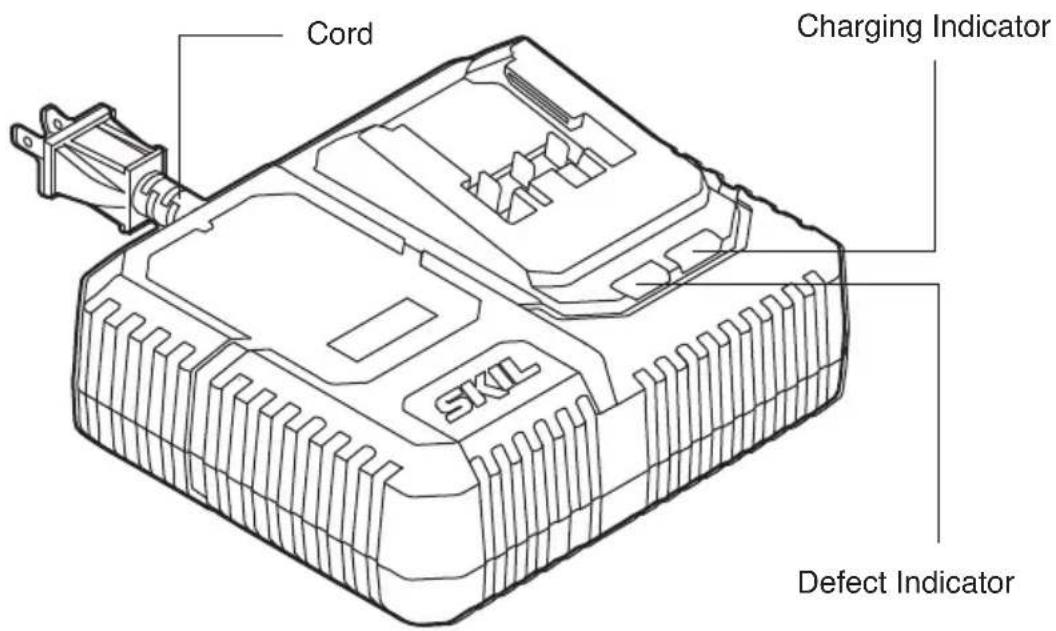
GET TO KNOW YOUR CHARGER
PWRCore 20 ^TM Charger
Fig. 1
text_image
Cord Charging Indicator SKIL Defect IndicatorSPECIFICATIONS
| Rated input 120V a.c. 60Hz 150W | ||||
| Rated output 20V | ||||
| Battery Compatibility | 2Ah:SKIL BY519701SKIL BY519702 | 2.5Ah:SKIL BY519703 | 4Ah:SKIL BY519601 | 5Ah:SKIL BY519603 |
| Recommended Charging Temperature | 41°F(5°C) ~ 95°F(35°C) | |||
| Recommended Storage Temperature | 32°F (0°C)~104°F (40°C) | |||
IMPORTANT CHARGING NOTES
- The charger was designed to rapidly charge the battery only when the battery temperature is between 41^ F ( 5^ C) and 95^ F ( 35^ C). If the battery pack is too hot or too cold, the charger will not begin charging the battery. (This may happen if the battery pack is hot from heavy use). Once the battery temperature returns to its safe charging temperature, the charger will automatically begin charging.
- A substantial drop in operating time per charge may mean that the battery pack is nearing the end of its life and should be replaced.
- Remember to unplug the charger during storage.
- If battery does not charge properly:
a. Check for power at the outlet by plugging another electrical device into the outlet.
b. Check to see if outlet is connected to a light switch that turns power "off" when the lights are turned off.
c. Check the battery pack terminals for dirt. Clean with a cotton swab and alcohol, if necessary.
d. If proper charging still does not occur, take or send the tool, battery pack and charger to your local SKIL Service Center. Please refer to the Customer Service information on the cover of this manual.
Note: Use of chargers or battery packs not sold by SKIL will void the tool warranty.
OPERATING INSTRUCTIONS
WARNING
To reduce the risk of fire, personal injury, and product damage due to a short circuit, never immerse your charger or battery pack in fluid or
allow a fluid to flow inside them. Corrosive or conductive fluids, such as seawater, certain industrial chemicals, and bleach or bleach-containing products, etc, can cause a short circuit.
How to Charge the Battery Pack
NOTICE: The battery pack is shipped partially charged. Before using it the first time, fully charge the battery pack. The charger charges a fully-depleted 2.0Ah battery pack to approximately 25% capacity in 5 minutes.
a. Charge the battery pack with the correct charger.
b. Connect the charger to a power supply. The red Defect Indicator and green Charging Indicator will shine for one second and then go out, indicating that the charger self-inspection is completed.
c. Align the raised ribs of the battery pack with the slot in the charger.
d. Insert the battery pack into the charger (Fig. 2).
e. The charger will communicate with the battery pack to evaluate the condition of the battery pack.
f. If the battery pack temperature is within the charging temperature range, the charger will automatically start charging the battery pack. The green charging indicator will ash during charging. After the charging is complete, the green charging indicator will remain green, without ashing.
g. A ashing red defect indicator indicates a defective battery, a defective charger, or a bad connection between the battery and the charger.
h. A solid red defect indicator indicates that the battery is warmer or colder than the optimal temperature. Remove the battery pack from the charger. If the battery is too hot, cool the battery under air ow. If the battery is too cold, place it indoors until it reaches room temperature.
i. It is not recommended that the battery pack remain on the charger for more than 24 hours.
NOTICE: If the battery pack cannot accept a charge, the contacts of the charger or battery pack may be contaminated. Clean the contacts of the charger or battery pack (e.g., by inserting and removing the battery several times or cleaning with a cotton swab and alcohol), or replace the charger or replace the battery pack, as required.
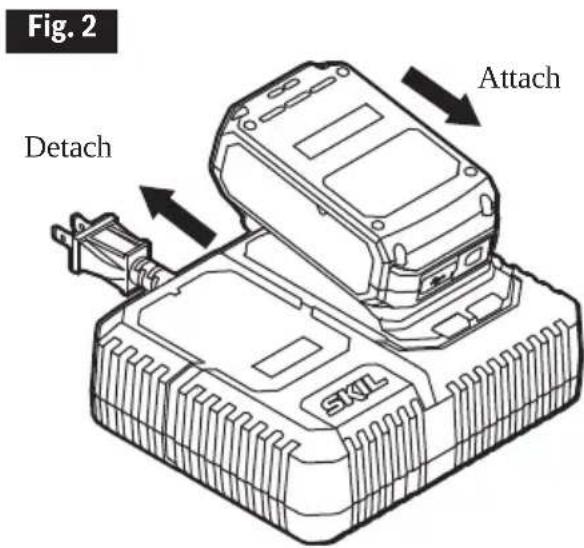
text_image
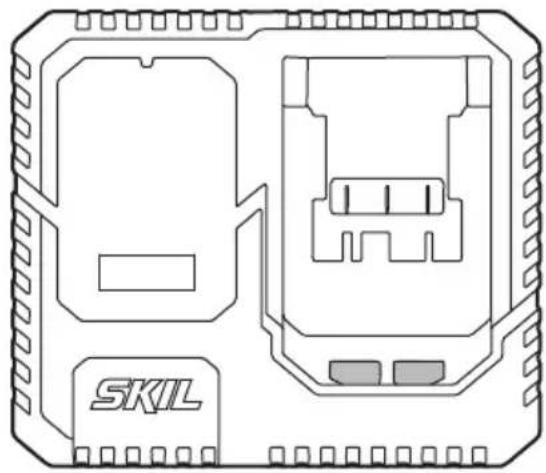
Fig. 2 Attach DetachCharger Display (Fig. 3)
Fig. 3
natural_image
Technical line drawing of a device casing with internal components and labeled 'SKIL' (no text or symbols beyond label)| Mode | Charging Indicator (green) | Defect Indicator (red) | Note |
| Self-inspection completed | 1 second 1 second | nd Shines for 1 second. | |
| Self-inspection failed Either or both are off | Either or both will normally have no reaction when the charger is plugged in. | ||
| Normal charging Flashing Off | The charger will automatically start charging the battery pack, if the battery pack temperature is within the charging temperature range. | ||
| Fully Charged Steady green Off | |||
| Hot/Cold Battery Off Steady red | Remove the battery from the charger. | ||
| Defective Off Flashing or Off Charging defect. | |||
NOTICE: Charger may become warm with several continuous charge cycles. This is part of the normal operation of the charge. Charge in a well ventilated area.
Defective Charger
If the charger self-inspection fails to react when the charger is plugged in, the causes include no power to the charger, bad contacts, or a defective charger. Check to see if the charger self-inspection can be activated when the charger is plugged in again or plugged into a different outlet. If it still fails, have the charger serviced by an Authorized SKIL Service Station.
Defective Battery Pack
If the charger detects a problem, the red Defect Indicator will begin flashing. Remove and re-insert the battery pack in the charger. If the Defect Indicator flashes a second time, try charging a different battery pack.
a) If a different battery pack charges normally, have the first defective battery pack serviced by an Authorized SKIL Service Station.
b) If a different battery pack also indicates "defective," the charger may be defective. Have the charger serviced by an Authorized SKIL Service Station.
MAINTENANCE
Service
Preventive maintenance performed by unauthorized personnel may result in misplacing of internal wires and components which could
cause serious hazard. We recommend that all tool service be performed by a SKIL Factory Service Center or Authorized SKIL Service Station.
General Maintenance

When servicing, use only identical replacement parts. Use of any other parts could create a hazard or cause product damage.
Periodically inspect the entire product for damaged, missing, or loose parts such as screws, nuts, bolts, caps, etc. Securely tighten all fasteners and caps and do not operate this product until all missing or damaged parts are replaced. Please contact customer service or an authorized service center for assistance.
To avoid serious personal injury, always remove the battery pack from the charger/tool when cleaning or performing any maintenance.
Cleaning

The tool may be cleaned most effectively with compressed dry air. Always wear safety goggles when cleaning tools with compressed air.
Ventilation openings and switch selectors must be kept clean and free of foreign matter. Do not attempt to clean by inserting pointed objects through openings.

Certain cleaning agents and solvents damage plastic parts. Some of these are: gasoline, carbon tetrachloride, chlorinated cleaning solvents,
ammonia and household detergents that contain ammonia.
Storage
Store the tool indoors in a place that is inaccessible to children. Keep away from corrosive agents.
TROUBLESHOOTING
| Problem Cause | Remedy | |
| Battery pack will not charge. | 1. Charger is not plugged into a functioning outlet.2. Battery pack is not properly inserted into the charger.3. Bad contacts.4. Battery is over- or under-temperature.5. Battery pack is damaged.6. Charger is damaged. | 1. Confirm that the charger is plugged into a functioning outlet.2. Confirm that the battery pack is inserted into the charger completely.3. Clean the contacts of the charger or battery packs.4. Cool the battery if too hot. Place the battery indoors if too cold.5. Have the battery pack serviced by an Authorized SKIL Service Station.6. Have the charger serviced by an Authorized SKIL Service Station. |
LIMITED WARRANTY OF SKIL CONSUMER TOOLS
2 YEAR LIMITED WARRANTY- LEGAL
Chervon North America, Inc. ("Seller") warrants to the original purchaser only, that all SKIL consumer BATTERIES AND CHARGERS will be free from defects in material or workmanship for a period of two years from date of purchase.
Product registration can be completed online at www.Registermyskil.com. Original purchasers should also retain their receipt as proof of purchase.
Notwithstanding the foregoing, if a SKIL consumer portable power tool is used for industrial, professional or commercial purposes, the foregoing warranty will apply for a duration of ninety days, regardless of registration.
SELLER'S SOLE OBLIGATION AND YOUR EXCLUSIVE REMEDY under this Limited Warranty and, to the extent permitted by law, any warranty or condition implied by law, shall be the repair or replacement of parts, without charge, which are defective in material or workmanship and which have not been misused, carelessly handled, or repaired by persons other than Seller or Authorized Service Station. To make a claim under this Limited Warranty, you must return the complete product, transportation prepaid, to any SKIL Factory Service Center or Authorized Service Station. For Authorized SKIL Power Tool Service Stations, please visit www.Registermyskil.com or call 1-877-SKIL-999 (1-877-754-5999).
THIS LIMITED WARRANTY DOES NOT APPLY TO ACCESSORY ITEMS SUCH AS CIRCULAR SAW BLADES, DRILL BITS.
ANY IMPLIED WARRANTIES APPLICABLE TO A PRODUCT SHALL BE LIMITED IN DURATION EQUAL TO THE DURATION OF THE EXPRESS WARRANTIES APPLICABLE TO SUCH PRODUCT, AS SET FORTH IN THE FIRST PARAGRAPH ABOVE. SOME STATES IN THE U.S., SOME CANADIAN PROVINCES DO NOT ALLOW LIMITATIONS ON HOW LONG AN IMPLIED WARRANTY LASTS, SO THE ABOVE LIMITATION MAY NOT APPLY TO YOU.
IN NO EVENT SHALL SELLER BE LIABLE FOR ANY INCIDENTAL OR CONSEQUENTIAL DAMAGES (INCLUDING BUT NOT LIMITED TO LIABILITY FOR LOSS OF PROFITS) ARISING FROM THE SALE OR USE OF THIS PRODUCT. SOME STATES IN THE U.S. AND SOME CANADIAN PROVINCES DO NOT ALLOW THE EXCLUSION OR LIMITATION OF INCIDENTAL OR CONSEQUENTIAL DAMAGES, SO THE ABOVE LIMITATION OR EXCLUSION MAY NOT APPLY TO YOU.
THIS LIMITED WARRANTY GIVES YOU SPECIFIC LEGAL RIGHTS, AND YOU MAY ALSO HAVE OTHER RIGHTS WHICH VARY FROM STATE TO STATE IN THE U.S., PROVINCE TO PROVINCE IN CANADA AND FROM COUNTRY TO COUNTRY.
THIS LIMITED WARRANTY APPLIES ONLY TO PRODUCTS SOLD WITHIN THE UNITED STATES OF AMERICA, CANADA AND THE COMMONWEALTH OF PUERTO RICO. FOR WARRANTY COVERAGE WITHIN OTHER COUNTRIES, CONTACT YOUR LOCAL SKIL DEALER OR IMPORTER.
© Chervon North America, 1203 E. Warrenville Rd, Naperville, IL 60563.
02/19
TABLE DES MATIÈRES
natural_image
Icon of a person wearing glasses inside a circle (no text or symbols)AVERTISSEMENT
text_image
Retirer Fixez SKLnatural_image
Technical line drawing of a device casing with internal components and labeled 'SKIL' (no text or symbols beyond label)If the charger detects a problem, the red Defect Indicator will begin flashing. Remove and re-insert the battery pack in the charger. If the Defect Indicator flashes a second time, try charging a different battery pack.
© Chervon North America, 1203 E. Warrenville Rd, Naperville, IL 60563.
02/19