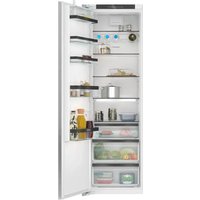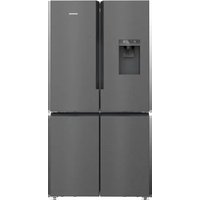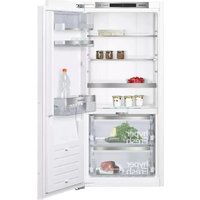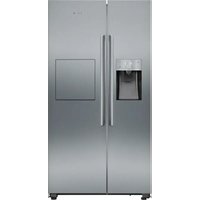
KA93GAIDP - Fridge SIEMENS - Free user manual and instructions
Find the device manual for free KA93GAIDP SIEMENS in PDF.


User questions about KA93GAIDP SIEMENS
0 question about this device. Answer the ones you know or ask your own.
Ask a new question about this device
Download the instructions for your Fridge in PDF format for free! Find your manual KA93GAIDP - SIEMENS and take your electronic device back in hand. On this page are published all the documents necessary for the use of your device. KA93GAIDP by SIEMENS.
USER MANUAL KA93GAIDP SIEMENS
Register your product on My Siemens and discover exclusive services and offers.
siemens-home.bsh-group.com/welcome
The future moving in.
de
Inhaltsverzeichnis
natural_image
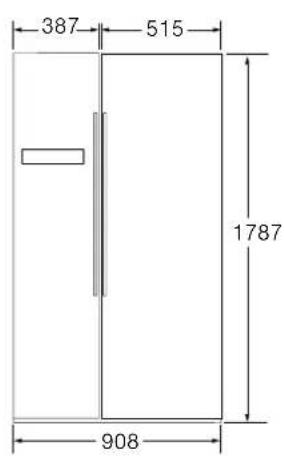
Laptop rear panel showing internal ventilation ducts and mounting points (no text or symbols visible)Aufstellmaße
text_image
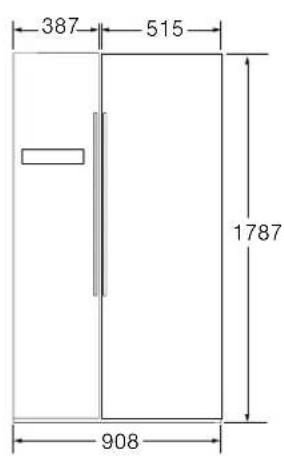
387 515 1787 908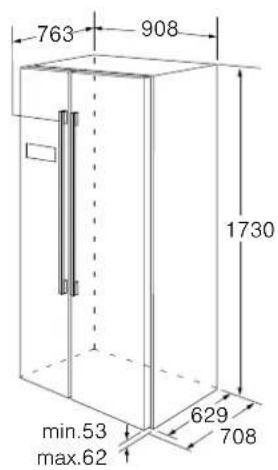
text_image
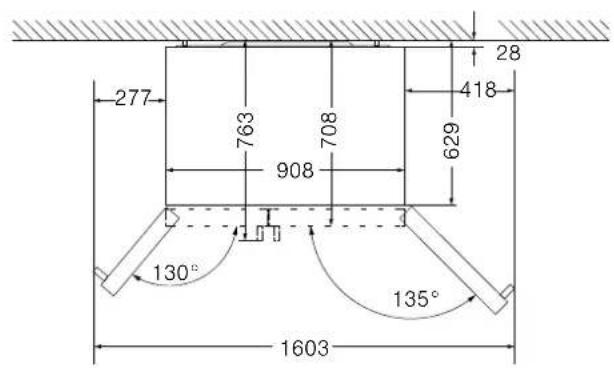
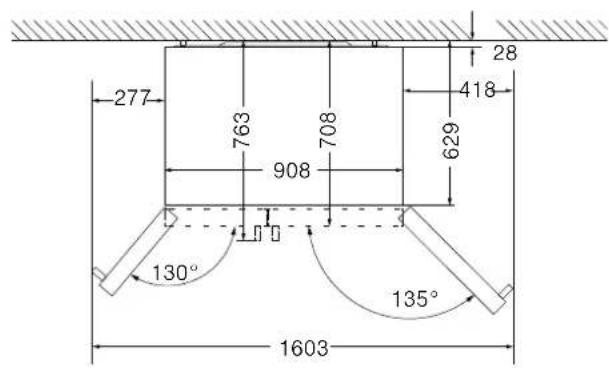
763 908 1730 min.53 max.62 629 708Türöffnungswinkel
text_image
277 763 708 908 629 418 28 130° 135° 1603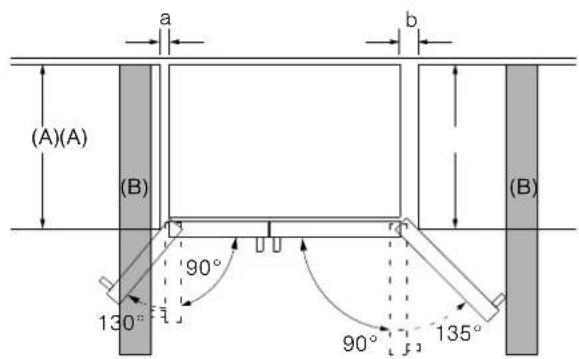
text_image
(A)(A) (B) 130° 90° 90° 135° a b (B)| A | a | b |
| 600 | 50 | 50 |
| 650 | 50 | 50 |
| 700 | 53 | 96 |
| B | 75 | 418 |
natural_image
Simple line drawing of a mechanical lever or bracket with a fulcrum, no text or symbols presentGerätausrichten
text_image
Diagram showing refrigerator door and kitchen sink with labeled parts and a close-up of the wrench tool interacting with the sink.text_image
Diagram showing hand cleaning a refrigerator with magnified detail and directional arrow indicating cleaning processnatural_image
Hand holding a small object inserted into a black appliance component (no text or symbols visible)natural_image
Technical line drawing of a mechanical assembly with an inset showing a cylindrical component being inserted (no text or symbols present)text_image
Diagram showing hand cleaning a refrigerator with magnified detail and directional arrow indicating cleaning processnatural_image
Technical illustration of two mechanical fasteners with bolt holes and a nut assembly (no text or symbols)text_image
7 6 5 4 3 2 1 8 9 10 alarm lock 3s -88 °C 88 °C vacation 11 12 13 14 15 16 17 ice off freeze super 3s cool super 3s eco filter reset 3s cubed ice crushed ice water 20 19 181 T a s t e „ f r e e z ZurEinstellungderGefrierraum-Temperatur.
text_image
*** **** noFrost 2-6 months 4-8 months 6-12 monthsnatural_image
Illustration of a hand holding a cup over a digital water level monitor (no text or symbols)natural_image
Illustration of a hand holding a cup on a digital kitchen scale (no text or symbols visible)natural_image
Illustration of two hands hanging from parallel plates with a downward arrow indicating motion (no text or symbols)natural_image
Pure technical line drawing of a mechanical or electrical component with no text, numbers, or symbolsnatural_image
Diagram showing a device with internal components and an arrow indicating process (no text or symbols)natural_image
Mechanical component with a white arrow indicating direction, no visible text or symbolstext_image
Diagram showing a hand pressing down an air conditioner into a rack, with labeled parts and directional arrows indicating motion.natural_image
Line drawing of a refrigerator with air conditioner unit and adjacent to a box labeled ① (no text or symbols on the device itself)natural_image
Technical line drawing of an air conditioner unit showing internal components and a close-up view of the device's internal structure (no text or symbols)text_image
Diagram showing a hand cleaning a refrigerator with a magnified view of the interior and hand holding a cloth.text_image
Technical diagram showing a mechanical component with an inset close-up of its top view and a magnified detail highlighting the rotation direction.natural_image
Diagram showing a mechanical component with an inset close-up of a cylindrical component and a curved arrow indicating rotation (no text or symbols present)text_image
Diagram showing hand cleaning a refrigerator with magnified detail and directional arrow indicating cleaning processAvoidingplacingchildrenandvulnerablepeople at risk 28
Generalrequirements 28.
Damage 28
Weight 28
Information concerning disposal 28
Disposal of packaging 28
Disposal of your old appliance 28
Scope of delivery 29
Installing the appliance 29
Transporting 29
Removing the appliance doors 29
Installationlocation29.
Subsurface 29
Observe ambient temperature and ventilation .... 30
Installing the spacers 30
Installation dimensions 30
Dooropeningangle 30.
Fixing the door handle 31
Aligningtheappliance 31.
Aligningthedoors31....
Connecting the appliance 32
Waterconnection 32.
Electrical connection 33
Getting to know your appliance 34
Control and display panel 35
Switching on the appliance 36
Child lock 36
Unlockingthebuttons 36.
Lockingthebuttons 36.
Setting the temperature 36
Freezercompartment 36.
Refrigerator compartment 36
Usable capacity 36
Freezer compartment 37
Purchasing frozen food 37
Drawers 37
Fully utilising the freezer volume 37
Freezingcapacity 37.
Freezing fresh food 37
Packingfrozenfood 37.
Shelf life of frozen food 38
Freezercalendar 38.
Super freezing 38
Switching on super freezing 38
Switching off super freezing 38
Thawing frozen food 38
Refrigerator compartment 39
Storing food 39
Notethechillzonesintherefrigerator compartment 39
Fruit and vegetables crisper 39
Barcompartment 39.
Super cooling 40
Switching on super cooling 40
Switching off super cooling 40
Ice and water dispenser 40
Dispensingwater40.
Ice maker 41
Dispensing ice 41
Variableinteriordesign 41..
Alarm 42
Door alarm 42
Holiday mode 42
Switching on holiday mode 42
Switching off holiday mode 42
Energysavemode 42. .
Switching on energy save mode 42
Switching off energy save mode 42
Switching off and disconnecting the appliance .. 43
Switching off the appliance 43
Disconnecting the appliance 43
Defrosting 43
Freezercompartment 43.
Refrigerator compartment 43
Cleaning the appliance 43
Procedure 43
Dispenser 43
Interior fittings 44
Handling the .ice. bucket 44
Defrosting 45
Replacing the water filter 46
Purchasing a new water filter 46
Removing the old water filter 46
Installing the new water filter 46
Light (LED) 47
Tips for saving energy : 47
Operatingnoises 47.
Quite normal noises 47
Preventingnoises 47.
Eliminating minor faults yourself 48
Customer service 49
Repair order and advice on faults 49

Safetyinstructions
This appliance complies with therelevant safety regulations for electrical appliances and disfitted with noises suppression.
Therefrigerationcircuithasbeenchecked forleaks.
Abouttheseinstructions
- Readandfollowthelnstallationinstructions andinstructionsforuse. Theycontainimportantinformationonhowtoinstall, use andmaintaintheappliance.
■ ThemanufacturerisnotliableifyoudisregardtheinstructionsandwarningsintheInstallationinstructionsandinstructionsforuse.
■ Retainalldocumentsforsubsequentuse orforthenextowner.
Riskofexplosion
■ Neveruseelectricappliancesinsidethe appliance(e.g.heatersorelectricice makers).
■ Donotstoreproductswhichcontain flammablepropellant(e.g.spraycans)or explosivesubstancesintheappliance.
■ Storehigh-percentagealcoholtightly sealedandinuprightposition.
■ Donotuseadditionalmeanstoaccelerate thedefrostingprocessotherthanthose recommendedbythemanufacturer.
Riskofelectricshock
Improperinstallationsandrepairsmayput theuseratconsiderablerisk.
■ Wheninstallingtheappliance,ensure thatthemainscableisnottrappedor damaged.
■ Ifthemainscableisdamaged: immediately disconnecttheappliance from the electricity supply.
■ Do not use multiple sockets, extension leadsoradapters.
■ Havetheappliancerepairedbythe manufacturer,Customerserviceora similarlyqualifiedpersononly.
■ Useoriginalpartssuppliedbythemanu-
factureronly.
Themanufacturerguaranteesthatthese
partssatisfythesafetyrequirements.
Riskofcoldburns
■ Neverputfrozenfoodstraightfromthe freezercompartmentintoyourmouth.
■ Avoidprolongedcontactofskinwith frozenfood,iceandthetubesinthe freezercompartment.
Riskofinjury
Containerswhichcontaincarbonateddrinks mayburst.Donotstorecontainerswhich containcarbonateddrinksinthefreezer compartment.

Firehazard/Dangerduetorefrigerants
The tubes of therefrigeration circuit conveyasmallquantityofanenvironmentally friendly but flammablerefrigerant(R600a). It does not damage the ozonelayer and does not contribute to the greenhouse effect. If refrigerantescapes, it may injure you reyes orignite.
■ Donotdamagethetubes.
Ifthetubesaredamaged:
- Keepnakedflamesandignitionsources awayfromtheappliance.
■ Ventilatetheroom.
■ Switchofftheapplianceandpulloutthe mainsplug.
■ PleasecontactCustomerservice.

Firehazard
Portable multiple outlets or power supplies may overheat, causing a fire.
Neverleaveportablemultipleoutletsor portablepowersuppliesbehindtheappliance.
en
Avoidingplacingchildrenandvulnerable peopleatrisk
Atriskare:
■ Children,
■ Peoplewhohavelimitedphysical,mental orsensoryabilities,
■ Peoplewhohaveinadequateknowledge concerningsafeoperationoftheappliance.
Measures:
■ Ensurethatchildrenandvulnerablepeople haveunderstoodthehazards.
■ Childrenorvulnerablepeoplemustbe supervisedbyaresponsiblepersonwhen usingtheappliance.
■ Onlychildrenfrom8yearsandabovemay usetheappliance.
■ Supervisechildrenwhiletheapplianceis beingcleanedormaintained.
■ Neverallowchildrentoplaywiththe appliance.
Riskofsuffocation
- Keepchildrenawayfromthepackaging anditsparts.
Generalrequirements
■ This appliance is intended for use in the home and the home environment.
This appliance is intended for use up to a maximum height of 2000 metres above sealevel.
Damage
Topreventdamage:
■ Donotstandorsupportyourselfonthe base,runnersordoors.
- Keepplasticpartsanddoorsealsfreeof oilandgrease.
■ Pullthemainsplug—notthepowercord.
Weight
The appliance is very heavy. The appliance should always be transported and setup by at least 2 persons.
Informationconcerning disposal
Disposalofpackaging
The packaging protects your appliance from damage during transit. All utilised materials are environmentally safe and recyclable. Please help us by disposing of the packaging in an environmentally friendly manner.
Please ask your dealer or inquire at your url about current means of disposal.
Disposalofyouoldappliance
Oldappliancesarenotworthlessrubbish!Valuableraw materialscanbereclaimedbyrecyclingoldappliances.

This appliance is labelled in accordance with European Directive 2012/19/EU concerning use of electrical and electronic appliances (waste electrical and electronic equipment – WEEE). The guideline determines the framework for the return and recycling of used appliances as applicable throughout the EU.
Warning
Redundantappliances
- Pulloutthemainsplug.
- Cutoff the power cord and discard with themains plug.
- Donottakeoutthetraysandreceptacles: children are therefore prevented from climbingin!
- Donotallowchildrentoplaywiththeappliance onceithasspentitsusefullife.Dangerofsuffocation!
Refrigeratorscontainrefrigerantandgasesintheinsulation. Refrigerantandgasesmustbedisposedof professionally.Ensurethattubingoftherefrigerant circuitisnotdamagedpriortoproperdisposal.
Scopeofdelivery
Afterunpackingallparts,checkforanydamagein transit.Ifyouhaveanycomplaints,pleasecontactthe dealerfromwhomyoupurchasedtheapplianceorour Customerservice.
Thedeliveryconsistsofthefollowingparts:
■ Free-standing appliance
■ Bagcontaininginstallationmaterials
■ Waterfilterpackage
■ Interiorfittings(dependingonmodel)
■ Operatinginstructions
■ Customerservicebooklet
■ Warrantyenclosure
■ Informationontheenergyconsumptionandnoises
Installingtheappliance
Transporting
The appliance is heavy. Secure in position during transportation and installation.
Duetotheweight/dimensionsoftheapplianceand tominimisetheriskofinjuryanddamagetotheapplianceatleasttwopersonsarenecessarytoset-upthe appliancesafely.
Removingtheappliancedoors
If the appliance will not fit through the housed door, the appliance or scan be unscrewed.
Caution!
Only Customerservicemayunscrewtheappliance doors.
Installationlocation
Installtheapplianceinadry,wellventilatedroom.The installationlocationsshouldneitherbeexposedtodirect sunlightnoreaheatsource,e.g.acooker,radiator, etc.lfinstallationnexttoaheatsourcesunavoidable, useasuitableinsulatingplateorobservet minimumdistanceoahatsource:
■ 3cmtoelectricorgascookers.
■ 30cmtoanoilorcoal-firedcooker.
Ifinstallingtheappliancenexttoanotherrefrigeratoror freezer,ensureaminimulateraldistanceof25mm topreventtheformationofcondensation.
Ifapanelorcupboardisinstalledabovetheappli- ance,ensure that atagapof30mmisleftsoth appliancecanbepulledoutoftherecessifrequired.
The air heated on there are side of the appliance must be allowed to escape unhindered.
Subsurface
Caution!
The appliance is very heavy.
Theflooroftheinstallationlocationmustnotgiveway; ifrequired,reinforcefloor.
Toensure that the doors can open all the way, observe lateral minimum distances when installing the appliance in acorneror recess
(→ chapter"Installationdimensions").
If the depth of the adjacent kitchen equipment is more than 60 cm, observelateral minimum distances in ordertoutilisethe full door opening angle
(→ chapter“Dooropeningangle”).
en
Observeambienttemperature and ventilation
Ambienttemperature
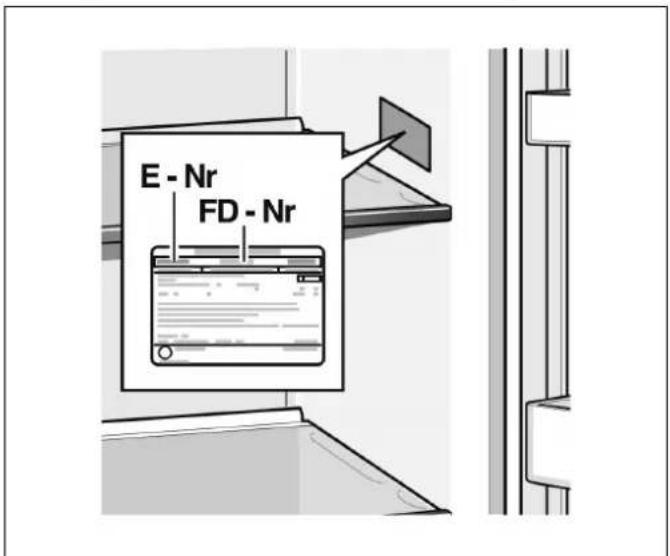
Theclimateclasscanbefoundontheratingplate.The climateclassindicateswithinwhichambienttemperaturestheappliancecanbeoperated.Theratingplate islocatedintherefrigeratorcompartmentattheright side.
ClimateclassPermittedambienttemperature
SN+10°C to 32°C
N+16°C to 32°C
ST+16°C to 38°C
T+16°C to 43°C
Note:
The appliance is fully functional within the room temperature limit so the indicated climatic class. If an appliance of climatic class Sunis operated at colder room temperatures, the appliance will not be damaged up to a temperature of +5°C.
Ventilation
Nevercovertheventilationopeningsontherearofthe appliance.Conductionoftheheatedairmustnotbe obstructed. Otherwise,therefrigerationunitwillhaveto workharder.Thisincreasespowerconsumption.
Installingthespacers
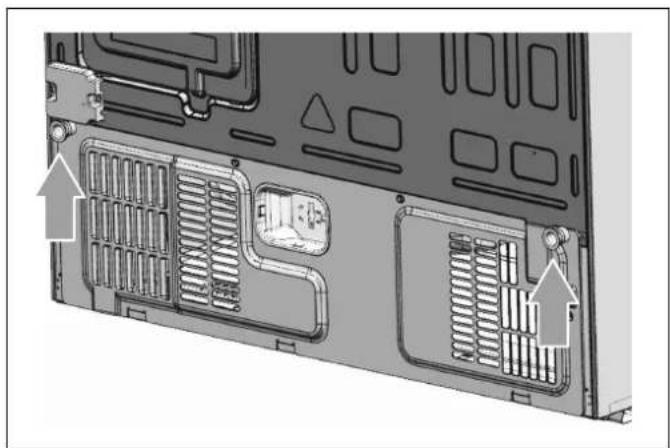
Removethetwoscrewsusingascrewdriver.Takethe spacersoutofthebag.Securethespacerstotherear oftheapplianceusingthescrews.Thisensuresthat thereisaminimumdistancebetweenthea andthewall.
natural_image
Laptop rear panel showing internal ventilation grilles and mounting hardware (no text or symbols visible)Installationdimensions
text_image
387 515 1787 908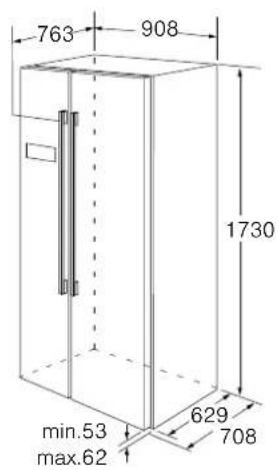
text_image
763 908 1730 min.53 max.62 629 708Dooropeningangle
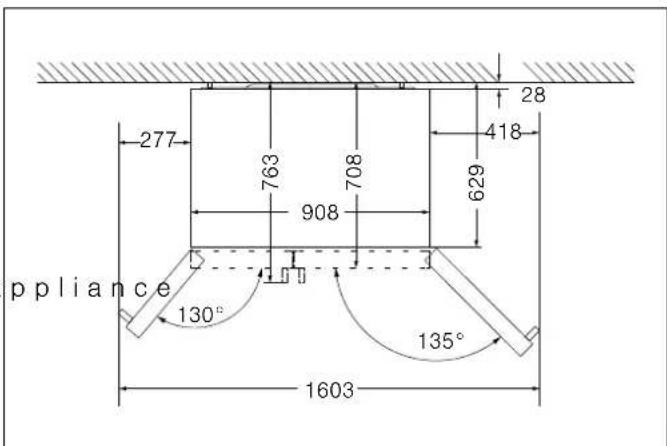
text_image
277 763 708 908 629 418 28 ppliance 130° 135° 1603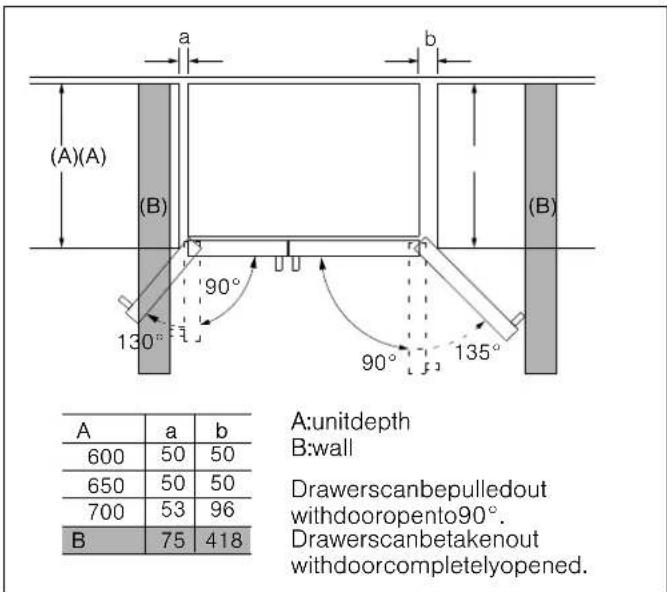
text_image
(A)(A) (B) 130° 90° 90° 135° A:unitdepth B:wall 600 50 50 650 50 50 700 53 96 B 75 418 Drawerscanbepulledout withdooropento90°. Drawerscanbetakenout withdoorcompletelyopened.Fixingthedoorhandle
Beforeyousetheproduct,pleasecheckthehandles oftheappliance.Ifahandleisloose,youshouldfixit withthehexangularscrewdriverintheclockwise direction,thenitcanbeusednormally.

natural_image
Simple line drawing of a mechanical bracket with a curved angle and a small circular mark (no text or symbols)Aligningtheappliance
Toensure that the appliance functions correctly, it must be set level with a spirit level.
■ Forsufficientlevelingandaircirculatinginthelower
rearsectionoftheappliance,thebottomfeetmay
needtobeadjusted.
■ To allow the doors to self-close, tilt back the top backwardsatabout15mmor0.5°byturningthe adjustablefeet.
■ Whenever you want to move the appliance, remembert to turn the feet backup, so that the appliance can roll freely.
■ Therollers, which are not castors, should be only used for forward or backward movement. Moving therefrigerators sideways may damage your floor and therollers.
■ Reinstalltheappliancewhenrelocating.
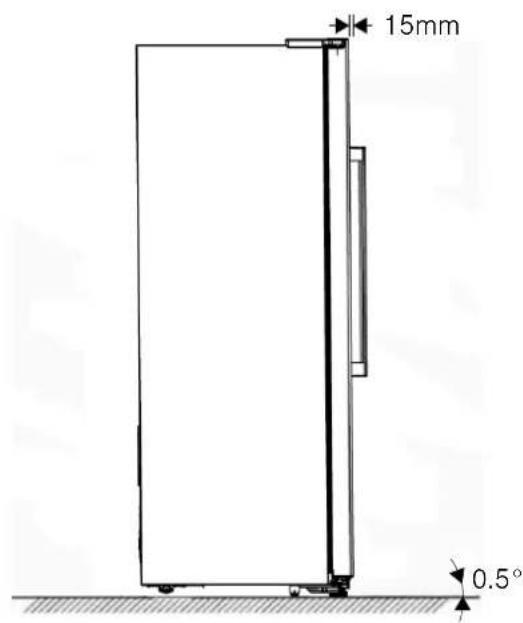
text_image
15mm 0.5°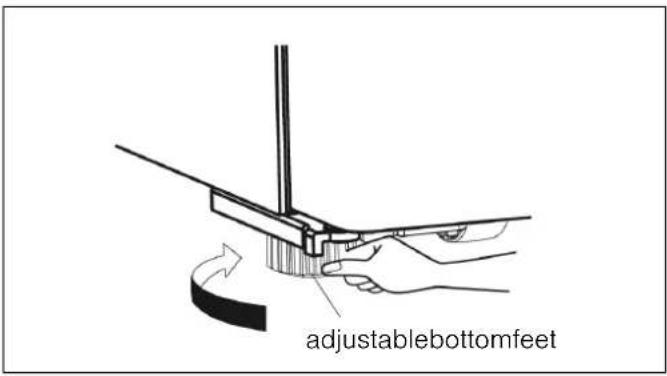
text_image
adjustablebottomfeetAligningthedoors
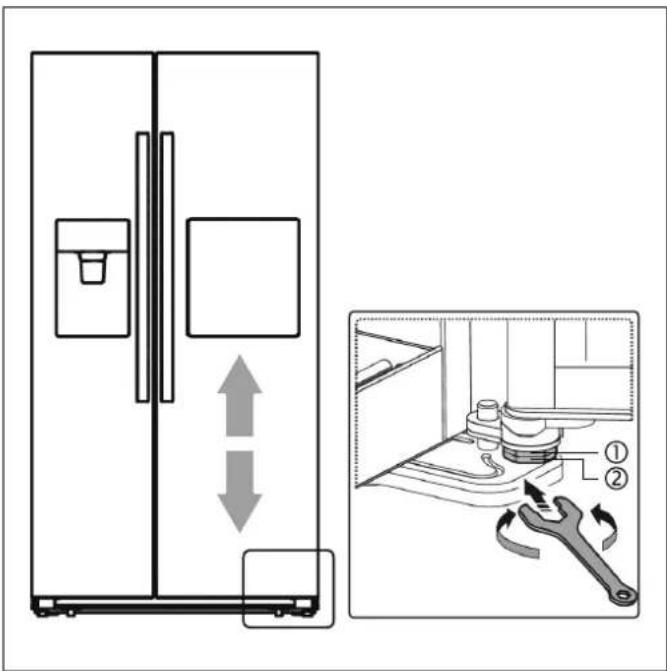
When you found the doors are not at the same level, you can use aspannertoadjust the fridgedoor.
Onlythefridgedoorcanbeadjusted.
text_image
Diagram showing refrigerator door and kitchen sink with labeled parts and a close-up of the wrench tool in action.Toraisethefridgedoor,turnthebolt(1)anticlockwise.
Tolowerthefridgedoor,turnthebolt(1)clockwise.
Onceinposition,lockthenut(2).
Connectingtheappliance
Haveatechnicianinstallandconnecttheappliance accordingtotheenclosedinstallationinstructions.
Donotremovethetransportationprotectiondevices fromtheshelvesandstoragecompartmentsuntilthe appliancehasbeeninstalled.
Alwaysconnectthewaterbeforethepower.
Apartfromstatutorynationalregulations,youshould sticktotheconnectiontermsrelatingtothelocal electricitycompany.
Afterinstallingtheappliance,waitatleast1houruntil theappliancestartsup.Duringtransportationtheoilin thecompressormayhaveflowedintotherefrigeration system.
Beforeswitchingontheapplianceforthefirsttime, cleantheinterioroftheappliance
(→ chapter"Cleaningtheappliance").
Waterconnection
Connecttheappliancetoadomesticwatersupply.The appliancemayonlybeconnectedtoacold-waterline.
-Minimumpressure:2bar
-Maximumpressure:8bar
Contactaplumbingcompanyifyouareunsurehowto checktheexistingwaterpressure.
Installingthewaterfilter
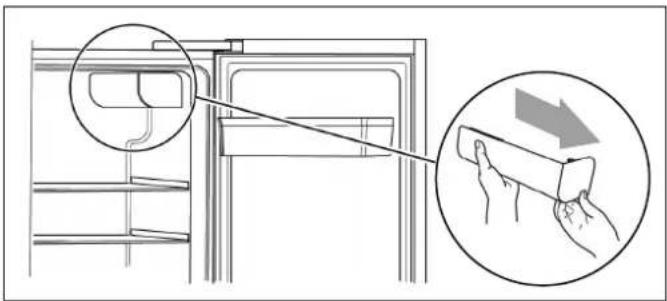
When appliance is delivered, the water filter package is located in a doorrack of therefrigerator compartment.
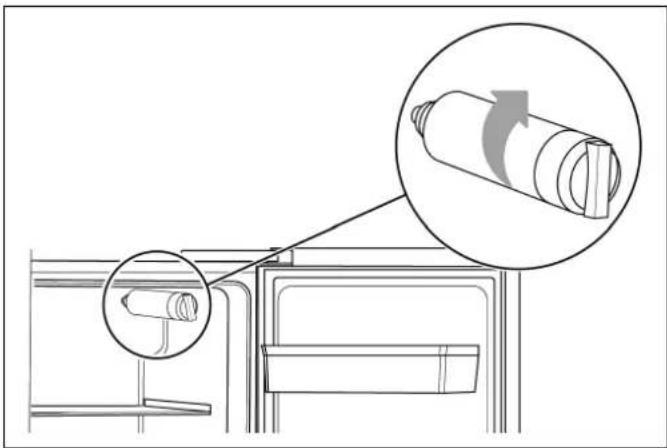
- Takethewaterfilteroutofthepackaging. The instructionsinthepackagingincludeinformationfor thewaterfilter.Pleasekeepthemforfutureuse.
text_image
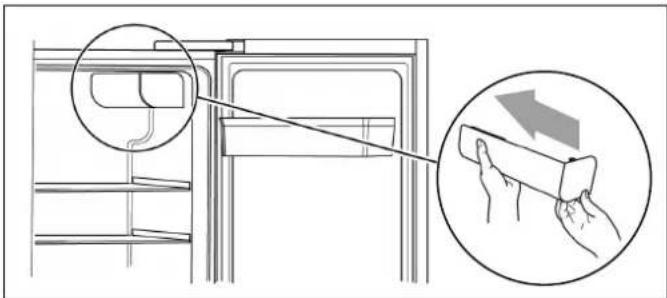
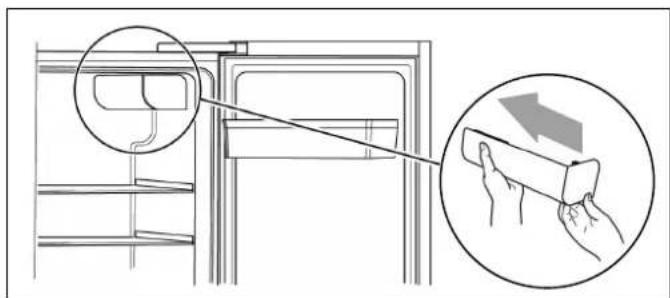
Diagram showing hand cleaning a refrigerator with magnified detail and directional arrow indicating cleaning process- Opentherefrigeratordoortoitsmaximumangle andremovethewaterfiltercapbypullingitout slowly.
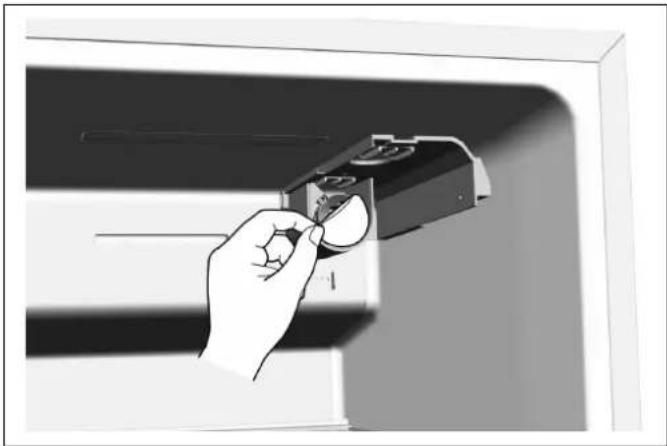
natural_image
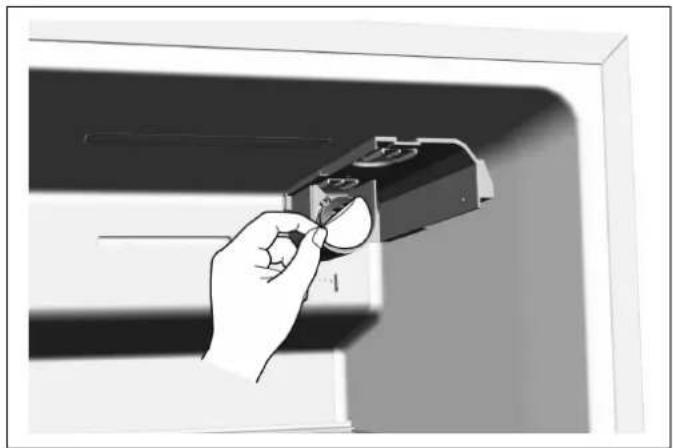
Hand holding a small object inside a cabinet or enclosure, no visible text or symbols- Removetheprotectorofthewaterfilterbase.
natural_image
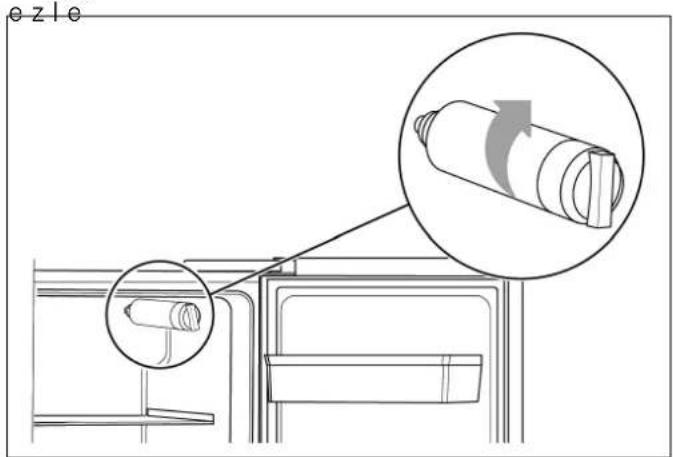
Diagram showing a mechanical assembly with an inset close-up of a cylindrical component and a magnified view of the shaft (no text or symbols)- Screwinthewaterfilterinclockwisedirectionand makesureitisfirmlyfittedtothewaterfilterbase.
Warning
If not installed correctly, this can result in the appliance is not working properly, or result in water leakages.
text_image
Diagram showing hand cleaning a refrigerator with magnified detail and directional arrow indicating cleaning process5.Reattachthefiltercoverbygentlyslidingiton.
Installingthewaterhose
Use the supplied connection hose for installation.
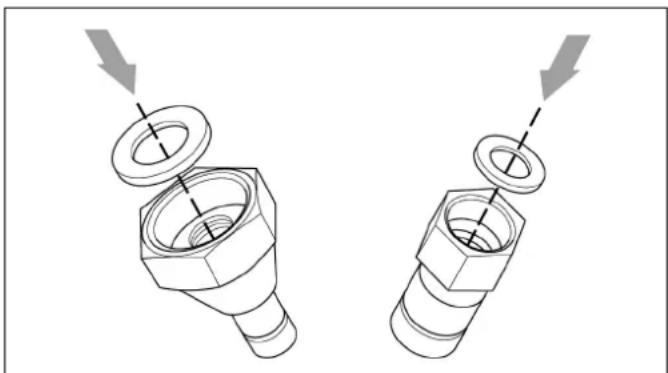
- Unpack the bag containing installation materials and takeout the twopads.
natural_image
Technical illustration of two mechanical fasteners with bolt holes and a nut assembly (no text or symbols)- Installthetwopadstothehosenuts.
flowchart
graph TD
    A[" faucet"] --> B[" valve "]
    B --> C[" pump "]
    C --> D[" control unit "]
    style A fill:#f9f,stroke:#333
    style B fill:#ccf,stroke:#333
    style C fill:#cfc,stroke:#333
    style D fill:#fcc,stroke:#333
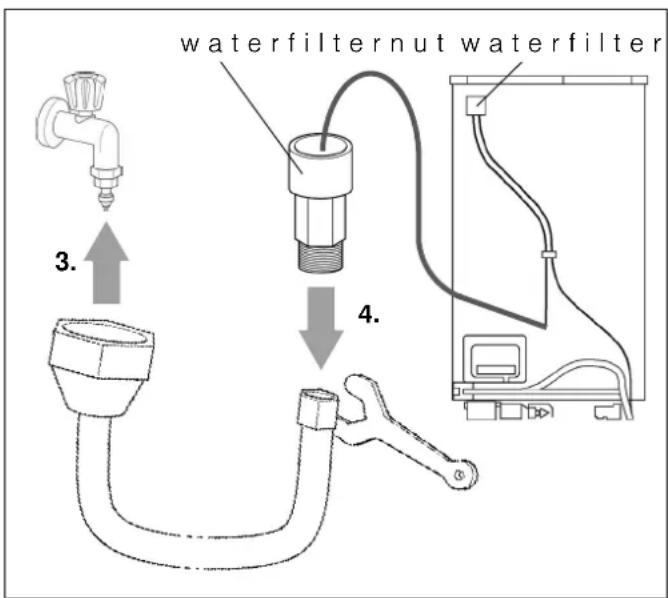
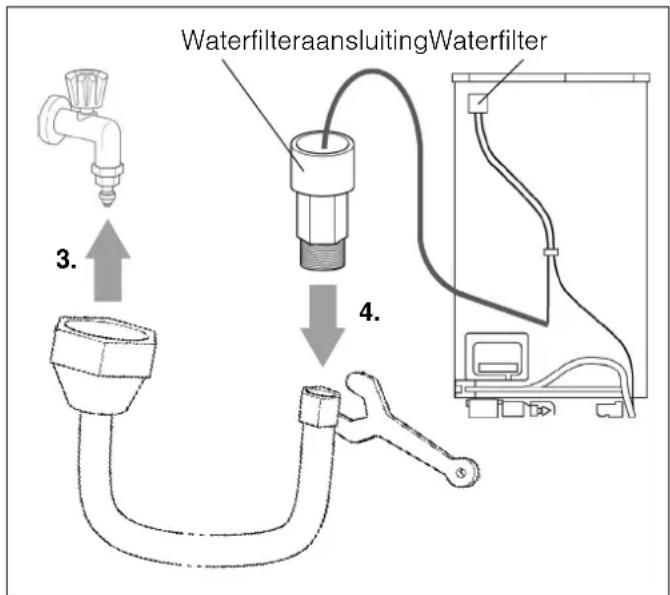
- Manually connect the hosenuttothetap.
- Use the spannerto connect the other hosenutto the water filter nut.
Checkingthewaterconnectionforleaks
Warning-Riskofleaksandwaterdamage!
■ Afterturningonthewatervalve,makesurethat thereisnoleakageatallconnectionpointsofthe waterlines.Ifthereisaleakage,turnoffthevalve immediatelyandtightenthewaterconnector.
■ Thewaterliness should not bepressed by heavy things and should not bend too much.
■ Placethewaterhoseinloopsorcoilssothatthe appliancecanbemovedawayfromthewall.
Note: Afterconnection, please flush the lines with several cup of water before use. Dispense water according to the instructions for use. This will last severalseconds as there is still air in the lines and the watertank.
Electricalconnection
Warning-Riskofelectricshock!
Ifthelengthofthemainscableisinadequate,never use multiples o c k e t s o r e x tensionleads.Instead, pleasecontactCustomerserviceforalternatives.
The appliance must be connected to a permanently installed socket.
Thesocketmustbeneartheapplianceandalsofreely accessiblefollowinginstallationoftheappliance.
The appliance complies with protection classl. Connect the appliance to 220-240V/50Hz alternating current via accurately installed socket with protective conductor. Thesocket must be protected by a 10Ato 16Afuse or higher.
Forappliancesoperatedinnon-Europeancountries, checkwhethertheindicatedvoltageandcurrenttype matchthevaluesofyourelectricitysupply.Therating plateissituatedinthebottomright-handsideofthe appliance.Themainscablemaybereplacedbya technicianonly.
Warning
Neverconnecttheappliancetoelectronicenergysaver plugs.
Our appliances can be used with mains and sine-controlled inverters. Mains-controlled inverters are used for photovoltaics systems which are connected directly to the national grid. Sine-controlled inverters must be used for isolated applications (e.g. onships or in mountain lodges) which are not connected directly to the national grid.
Gettingtoknowyour appliance
Note:
Duetounceasingmodificationofourproductsyour appliancemaybeslightlydifferentfromthisInstruction manualbutitsfunctionsandusingmethodsremainthe same.
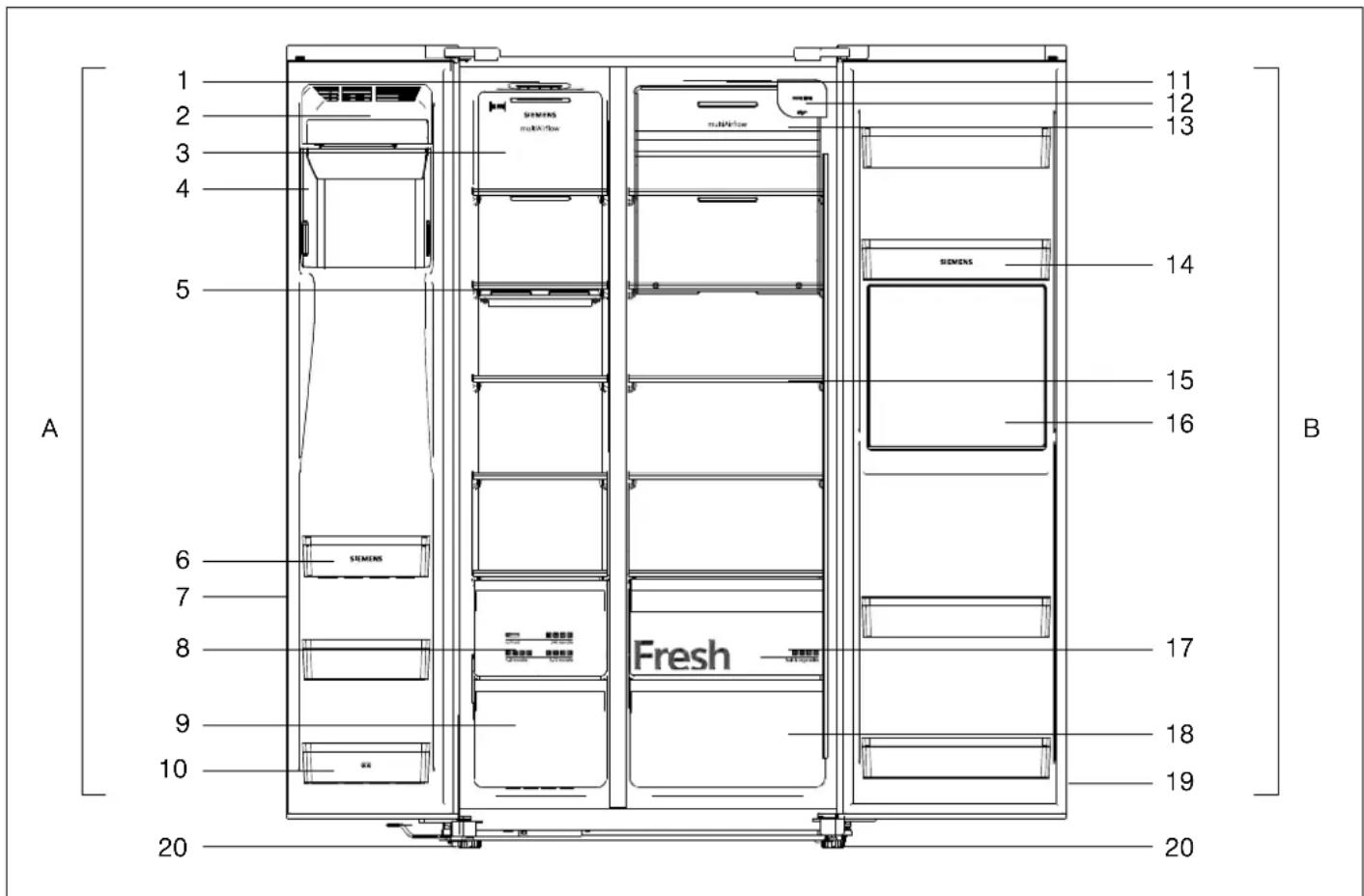
text_image
A 1 2 3 4 5 6 7 8 9 10 20 11 12 13 14 15 16 B Fresh SIEMENS SUNHFlow SIEMENS 17 18 19 20AFreezercompartment
1 FreezerLEDLight
2 | c e -makerfrontcoverassembly
3Windchannelcoverinfreezer
4Icebucketassembly
5Freezershelf
6Freezerdoorrack
7Freezerdoorgasket
8Freezerupperdrawer
9Freezerlowerdrawer
10 Freezerdoorrack(two-starzone)
BRefrigeratorcompartment
11FridgeLEDlight
12Waterfilter(behindcap)
13Windchannelcoverinfridge
14Fridgedoorrack
15Fridgeshelf
16Barcompartment
17Fruitandvegetablescrisper
18Fridgelowerdrawer
19Fridgedoorgasket
20Adjustablefeet
Controlanddisplaypanel
The control and display panel on the door consists of 2 display area showing temperatures, displays for different modes and 9 control buttons.
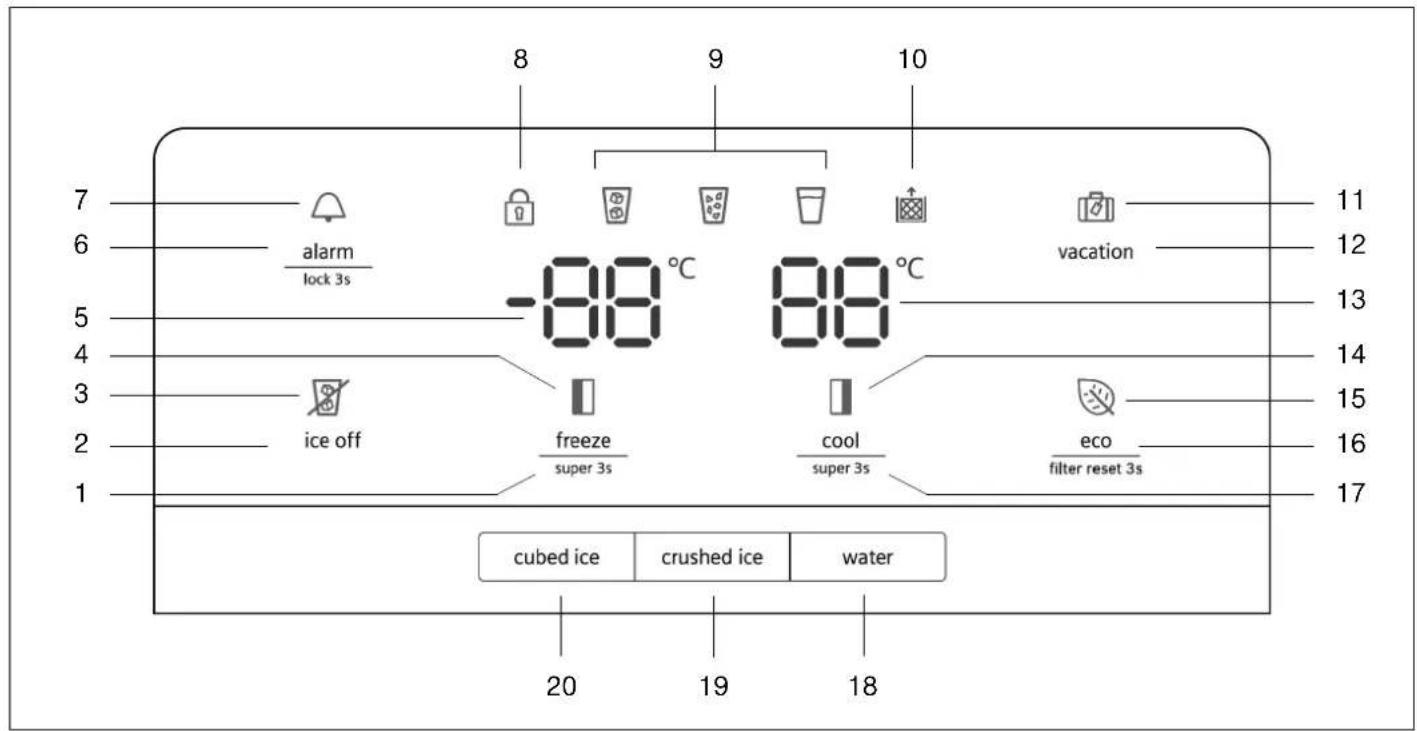
text_image
7 6 5 4 3 2 1 8 9 10 alarm lock 3s -88 °C 88 °C vacation 11 12 13 14 15 16 17 ice off freeze super 3s cool super 3s eco filter reset 3s cubed ice crushed ice water 20 19 181Button"freeze/super3s"
Tochangetemperatureoffreezer.
2Button"iceoff"
Toturnicemakeronoroff.
Illuminated, whenicemakeristurnedoff.
4 D i (supəfreeze) a y
Illuminated, when "superfreezing" function isactive.
5Freezercompartmenttemperaturedisplay
6Button"alarm/lock3s"
Toclearapresentdooralarm.
Tolockorunlockthecontrolpanelandthe dispenserfunction(childlock).
7 D i s p l a y ⚠ (alarm)
Illuminatedincaseofdooralarm.
8 D i 🔒 (childbook)l a y
Illuminated, whenchildlockisactive.
9Displayofdispensermode:
"cubedice"modeactive.
“crushedice”modeactive.
☐ "water"modeactive.
10Display (waterfilter)
Whendisplayisblinking,youneedtoreplace thewaterfilter
(→ chapter "Replacing the water filter").
11Display (vacation) Illuminated,when"holiday"modeisactive.
12Button"vacation" Toactivateordeactivate"holiday"mode.
13Fridgecompartmenttemperaturedisplay
14Display □ (supercool) Illuminated, when "supercooling" function is active.
15Display (eco) Illuminated,when"energysave"modeisactive.
16Button"eco/filterreset3s" Toturnenergysavemodeonoroff. Toresetthewaterfilterdisplay,afterhaving replacedthewaterfilter.
17Button"cool/super3s" Tochangetemperatureofrefrigerator.
18Button"water" Toactivatedispensermode"water".
19Button"crushedice" Toactivatedispensermode"crushedice".
20Button"cubedice" Toactivatedispensermode"cubedice".
Switchingontheappliance
Whentheapplianceispoweredon,thebacklighting ofthedisplaysonthecontrolpanelstartworking. Alldisplayswillightupfor3secondsandabuzzer sounds.Ifnobuttonshavebeenpressedandthe doorsareclosed,thebacklightingwillturnoffafter 60seconds.
The preset temperatures are reached after several hours. Donotputany food in the appliance beforehand.
Thefactoryhasrecommendedthefollowingtemperatures:
■ Freezercompartment:-18°C
■ Refrigeratorcompartment:+4°C
Note:
Childlockisoffwhenapplianceispoweredon.
Childlock
If the display is illuminated, all the buttons are locked and the dispenser function is deactivated.
Unlockingthebuttons
Pressthe"alarm/lock3s"buttonfor3secondsto unlockthebuttonsandtoactivatethedispenser function.Display 🔒 goesout.
Lockingthebuttons
Pressthe"alarm/lock3s"buttonfor3secondsto lockallthebuttonsanddeactivatethedispenser function.Display 🔒 willbeilluminated.
Settingthetemperature
Freezercompartment
Thefreezercompartmentcanbesetfrom-14°C to -24°C. Werecommendasettingof-18°C.
After unlocked, the freezertemperature setting is activated. Press "freeze/super3s" button to set freezertemperature between -14°C and -24°C as needed.
The control panel will display the corresponding value according to the following sequence.

text_image
-14°C -15°C-16°C-17°C-18°C -19°C -24°C -23°C-22°C-21°C-20°CRefrigeratorcompartment
Therefrigeratorcompartmentcanbesetfrom+2°C to+8°C.Werecommendasettingof+4°C.
Perishable food should not be stored above +4°C.
After unlocked, the fridgetemperature setting is activated. Press "cool/super3s" button to set fridge temperature between 8°C and 2°C as needed. The control panel will display the corresponding value according to the following sequence.
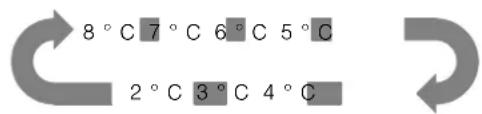
text_image
8°C 7°C 6°C 5°C 2°C 3°C 4°CUsablecapacity
Informationontheusablecapacitycanbefoundinside yourapplianceontheratingplate ( chapter“Customerservice”).
Freezercompartment
Usethefreezercompartment
■ tostoredeep-frozenfood,
■ tomakeicecubes,
■ tofreezefood.
Caution!
Ensure that bottles are not left in the freezer for longer than needed as freezing may cause the bottlet to break.
Note:
Ensure that the freezer compartment door has been closed properly. If the door is open, the frozen food will thaw. The freezer compartment will become recovered in thick ice. Also: waste of energy duetohigh power consumption!
Whenthefreezercompartmentdoorisclosed, alow pressure occurs, causing a sucking noise. Waittwoto threeminutes until the low pressure has adjusted itself.
Purchasingfrozenfood
■ Packagingmustnotbedamaged.
■ Usebythe"useby"date.
■ Temperatureinthesupermarketfreezermustbe -18°Corlower.
■ If possible, transport deep-frozen foodinan insulated bag and place quickly in thef compartment.
Drawers
Thedrawers, mountedontelescopicextensionslides, canbeusedtostorelargequantitiesoffrozenfood.
Whenyouremovethedrawerpullitforwardsandliftoff thesliders.Remembertoremoveallfoodfirst.
Once you have removed the drawer, ensu are pushed backfully.
Fullyutilisingthefreezervolume
If you don't needice, you can switch off the i cemaker and replace the ice bucket by the doorrack (→ chapter "Cleaning the appliance").
Freezingcapacity
Informationaboutthefreezingcapacitycanbefound ontheratingplate.
Freezingfreshfood
Freezefreshandund a m aged food only.
Toretainthebestpossiblenutritionalvalue,flavourand colour,vegetablesshouldbeblanchedbeforefreezing. Aubergines,peppers,zucchiniandasparagusdonot requireblanching.
Literatureonfreezingandblanchingcanbefoundin bookshops.
Note:
Keepfoodwhichistobefrozenawayfromfoodwhichisalreadyfrozen.
■ The following foods are suitable for freezing: Cakes and pastries, fish and seafood, meat, game, poultry, vegetables, fruit, herbs, egg with out shells, dairy product such as cheese, butter and quark, ready meals and leftovers such as soups, stews, cooked meat and fish, pot atodishes, souffles and desserts.
■ The following foods are not suitable for freezing: Types of vegetables, which are usually consumed raw, such as lettuce or radishes, eggs in shells, grapes, whole apples, pears and peaches, hard-boiledeggs, yoghurt, souredmilk, sour cream, crème fraîche and mayonnaise.
Packingfrozenfood
Toppreventfoodfromlosingitsflavourordryingout, placeinairtightcontainers.
- Placefoodinpackaging.
- Removeair.
3.Sealthewrapping.
4.Labelpackagingwithcontentsanddateoffreezing.
Suitablepackaging:
Clingwrap, tubularfilmmade of polyethylene, aluminium foil, freezer containers.
Theseproductsareavailablefromspecialistoutlets.
Unsuitablepackaging:
Wrappingpaper, greaseproofpaper, cellophane, binlinersandusedshoppingbags.
Itemssuitableforsealingpackagedfood:
Rubberbands, plasticclips, string, cold-resistant adhesivetape, etc.
Bagsandtubularfilmmadeofpolyethylene(PE)can besealedwithafilmheatsealer.
en
Shelflifeoffrozenfood
Storagedurationdependsonthetypeoffood.
Atatemperatureof-18°C:
■ Fish, sausage, readymeals and cakes and pastries: upto 6 months
■ Cheese, poultry and meat: upto 8 months
■ Vegetablesandfruit: upto 12 months
Freezercalendar
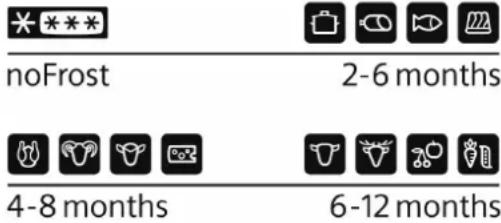
text_image
*** noFrost 2-6 months 4-8 months 6-12 monthsTopreventthequalityofthefrozenfoodfromdeteriorating,donotexceedthestorageduration.Thestorage perioddependsonthetypeofproduce.Thefigures nexttothesymbolsindicatethepermittedstorage periodoftheproduceinmonths.
In case of commercialy available frozen food observe the date of manufacture or use by date.
Superfreezing
Foodshouldbefrozensolidasquicklyaspossiblein ordertoretainvitamins,nutritionalvalue,appearance andflavour.
Theappliancerunsconstantlywhensuperfreezinghas beenswitchedon.Thefreezercompartmenttemperaturesaremuchlowerthaninnormaloperation.
Several hours before replacing fresh food in the freezer compartment, switch on superfreezing to prevent an unwanted temperaturerise.
If the freezing capacity according to the rating plate is to be used, switch on superfreezing 24 hours before the fresh products are placed in the freezer compartment.
Smallerquantitiesoffood(upto2kg)canbefrozen withoutsuperfreezing.
Switching on superfreezing
Pressthe"freeze/super3s"buttonfor3seconds toswitchon"superfreezing".
Display ■ (superfreeze)goesonandthefreezer compartmenttemperaturedisplayshows"-24°C".
Switchingoffsuperfreezing
Toswitchoff"superfreezing",pressthe"freeze/super3s"button.
Ifsuperfreezingisswitchedoff,display ■ (super freeze)goesout.Theapplianceautomaticallyswitches tothetemperaturesetpriortosuperfreezingmode.
Notes
■ Superfreezingautomaticallyswitchesoffafter 52hours.
■ Activation of "energysave" or "holiday" modewill switchoffsuperfreezing.
Thawingfroozenfood
Dependingonthetypeandapplication,selectoneof thefollowingoptions:
■ atroomtemperature
■ intherefrigerator
■ inanelectricoven, with/without fan assisted hot-air
■ inthemicrowave
Caution!
Donotrefreezethawingorthawedfood.Onlyready meals(boiledorfried)mayberefrozen.
Nolongerstorethefrozenproduceforthemax. storageperiod.
Refrigeratorcompartment
Therefrigeratorcompartmentistheidealstorage locationformeat, sausage, fish, dairyproducts, eggs, readymealsandpastries.
Storingfood
■ Storefresh, undamaged food. The quality and freshness will then be retained for longer.
■ In the case of ready-made products and goods, observethebest-before date or use-by date specified by the manufacturer.
■ Toretainaroma, colourandfreshness, packor coverfoodwellbeforeplacingintheappliance. Thiswillpreventthetransferofflavoursandthe discolourationofplasticpartsintherefrigerator compartment.
- Allowwarmfoodanddrinkstocooldownbefore placingintheappliance.
Note:
Avoidcontactbetweenfoodandrearpanel. Otherwise theaircirculationwillbeimpaired.
Foodorpackagingcouldfreezetotherearpanel.
Notethechillzonesintherefrigerator compartment
Theaircirculationintherefrigeratorcompartment createsdifferentchillzones:
- Coldestzoneisbetweenthevegetablecontainer andtheglassshelfsituatedabove.
Note:
Storeperishablefood(e.g.fish,sausage,meat)in the coldestzoneabovethevegetablecontainer.
■ Warmestzoneisattheverytopofthedoor.
Note:
Storee.g.hardcheeseandbutterinthewaermost zone.Cheesecanthencontinuetoreleaseits flavourandthebutterwillstillbeeasytospread.
Fruitandvegetablescrisper
Thecrisper, mountedontelescopicextensionslides, isforstoringvegetablesandfruit.
Whenyouremovethecrisperpullitforwardsandliftoff thesliders.Remembertoremoveallfoodfirst.
Onceyouhaveremovedthecrisper,ensuretheslides arepushedbackfully.
Notes
■ Fruitsensitivetocold(e.g.pineapple,banana, papayaandcitrusfruit)andvegetablessensitive tocold(e.g.aubergines,cucumbers,zucchini, peppers,tomatoesandpotatoes)shouldbestored outsidetherefrigeratorattemperaturesofapprox. +8°Cto+12°Cforoptimumpreservationofquality andflavour.
■ Condensationmayforminthevegetablecontainer dependingonthetypeandquantityofproducts stored.Removecondensationwithadrycloth.
Barcompartment
Toremovedrinksetc.fromtherefrigerator compartment,itisnotnecessarytoopenthedoor.
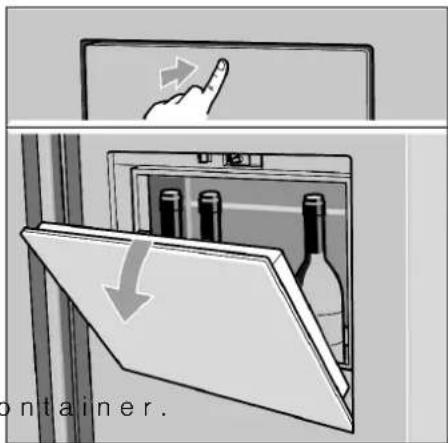
text_image
container.Caution!
Observthemax.loadof5kg.
Supercooling
Supercoolingsetstherefrigeratortemperatureto thecoldesttemperaturesetting.
Switchonsupercoolingmode, e.g.
■ beforeplacinglargequantitiesoffoodinthe refrigeratorcompartment.
■ forthefastcoolingofdrinks.
Switchingonsupercooling
Pressthe"cool/super3s"buttonfor3seconds toswitchon"supercooling".
Display ■ (supercool)goesonandtherefrigerator compartmenttemperaturedisplayshows"2°C".
Switchingoffsupercooling
Toswitchoff"supercooling",pressthe"cool/ super3s"button.
If supercooling is switched off, display □ (supercool) goes out. The appliance automatically switch the temperatures set prior to supercooling mode.
Notes
■ Supercoolingautomaticallyswitchesoffafter 3 hours.
■ Activationof"energysave"or"holiday"modewill switchoffsupercooling.
Iceandwaterdispenser
The following can be dispensed as required:
cooledwater
- cubedice
- crushedice
Youcanchoosethetypeoficeorwaterbytouching the "cubedice", "crushedice" or "water" button.
Warning
■ Donotusefragilereceptaclesford dispensingwater orice-riskofinjuryfrombrokenglass!
- Keepfingersclearofthedischargeopening.Riskof injuryfromcrusherblades!
Note:
Theiceandwaterdispenserwillnotfunctionwhenthe freezerdoorisopenorchildlockisactivi
Dispensingwater
Thewaterfromthedispenseriscooledtoapalatable temperature.Ifyouwouldlikethewatercolder,place icecubesintheglassbeforedispensingthewater.
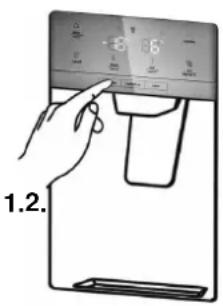
text_image
1.2.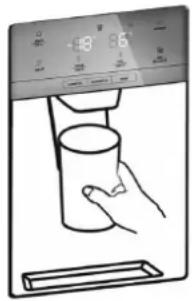
natural_image
Illustration of a hand holding a cup inside a digital water dispenser (no text or symbols visible)- Pressbutton "water" to activated dispenser mode "water".
Display □ willilluminate, when "water" mode is active.
2.Presstheglassagainstthedispenserlever.
Thewaterstopsrunningwhentheglassisremoved fromthelever.
Donotimmediately remove your glass from under the dispenserafter dispensing water. Wait for 2 or 3 second stop prevent spills.
Note:
Ifnowaterisdispensedoritisdispensedslowly, thewaterfiltermaybecloggedandmayneedtobe replaced
(→ chapter "Replacing the water filter").
Icemaker
Whenthefreezercompartmenthasreacheditsfreezing temperature,waterflowsintotheicemakerandfreezes intoicecubes.Whentheicecubesareready,theyare automaticallydischargedintotheicebucket.
Turningofftheicemaker
Theicemakercanbeturnedofftosavewaterand energy,ifnoiceisneeded.
Pressthe"iceoff"buttontoturnonorofftheicemaker.Display 📋 (iceoff)isilluminated,whenthe icemakeristurnedoff.
Note: "iceoff" onlyconcernstheicemaker, notthe dispenser.
Emptyingtheicebucket
If you donot dispense ice foralong period, icemay clumpin the ice bucket. If this occurs, pleaseremove and empty the bucket
(→ chapter"Cleaningtheappliance").
Dispensingice
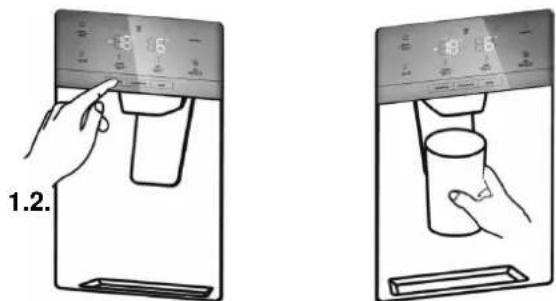
text_image
1.2.-
Pressbutton "cubedice" or "crushedice" to activated dispenser mode "cubedice" or "crushed ice". Corresponding display 📄 or 📅illuminate, when selected mode is active.
-
Pressasuitablereceptacleagainstthedispenser lever. Removethereceptaclefromthedispenserlever whenitisapprox.halffull.Iceinthedischarge maycausethereceptacletooverfloworblockthe discharge. Donotimmediatelyremoveyourglassfromunder thedispenserafterdispensingice.Waitfor2or 3secondstopreventspills.
Notes
■ Afterswitchingoverfromdispensingcubediceto crushedice, the dispensermaystillcontainwhole icecubesorpiecesoficecube. These will be dispensed with the first portion of crushedice.
■ Afterswitchingoverfromdispensingcrushedice to cubedice,asmallamountofcrushedicemay bedispensedwiththefirstportionsofcubedice.
■ Donotdispenseicecontinualymorethanone minuteduringnormalusetoavoidexcessive temperature on the ice crusher motor.
Variableinteriordesign
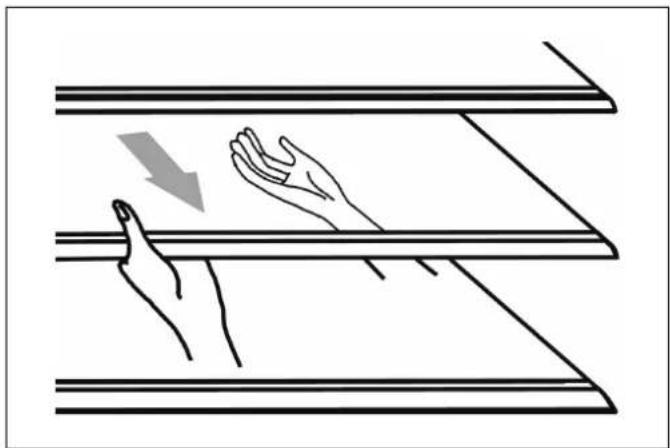
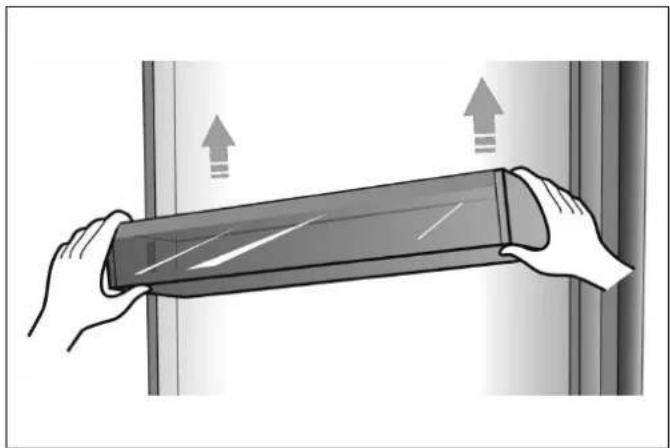
Therefrigeratorcompartmentisprovidedwith5glass shelvesandseveraldifferentdoorracks,whichare suitableforthestorageofeggs,cannedliquid,bottled drinks and packed food. They can be placed differentheightsaccordingtoyourneeds. Beforeeremovingthedoorrackspleaseremoveallfood itemstoavoidspillage.
natural_image
Illustration of two hands holding a horizontal panel with a downward arrow indicating compression or force (no text or symbols)■ Whenyouremovetheshelves, gently pull them forward until the shelf comes clear of the shelf guides.
■ Whenyoureturntheshelves, makesurethereisno obstaclebehindandgentlypushtheshelfbackinto theposition.
natural_image
Illustration of hands holding a flexible electronic device with directional arrows indicating movement (no text or symbols)■ Liftthedoorracksandremove.
en
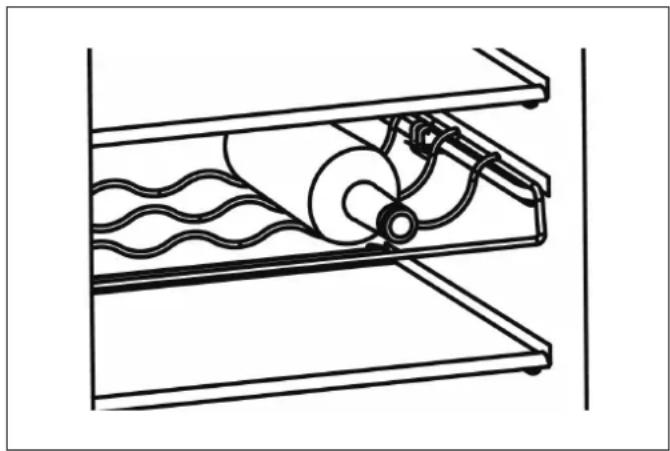
Thebottlerack(option)isforstoringbottledwineand drinks.
Note: Please use gently when you remove the bottles.
natural_image
Technical line drawing of a mechanical component with wavy internal structure and coiled components (no text or symbols)■ Theshelfcanbetakenouttobecleaned theshelfspace.
Alarm
Incaseofalarm, display⚠️ willbeonandtherewillbe abuzzingsound.
Note: When buzzersoundsthreetimesandwaterfilter displayisblinking,thewaterfilterneedstobereplaced ( chapter "Replacing the water filter").
Dooralarm
If the door of the fridge or freezer is open for longer than 2 minutes, the door alarm switches on.
Incaseofdooralarm,thebuzzerwillsound3times every1 minuteandwillautomaticallystopalarming 10minuteslater.
Tosaveenergy, please avoid keeping the door open for alongtim when using the appliance.
Thedooralarmcanbeclearedbyclosingthedoor.
Withopendoor, the alarm can be cleared by pressing the "alarm/lock3s" button when childlock is not active.
Holidaymode
If you are going away for a long period of time, "holiday" mod will be your best choice. It switches the temperature of there refrigerator compartment to 15^ and the temperature of the freezer compartment to -18^ to minimize the energy consumption.
Important: Donotstoreanyfoodinthefridgeduring thistime.
Note: It is also recommended to close the watersupply during the absence.
Switchingonholidaymode
Pressthe"vacation"buttontoswitchonholidaymode.
Display (vacation) goes on and there refrigerator compartment temperature display shows "15°C".
Note: Whentheholidaymodeison, theicemaker will automatically turnoff.
Switchingoffholidaymode
Toswitchoff"holidaymode", pressthe "vacation" button.
Ifholidaymodeisswitchedoff, display (vacation) goesout. Thetemperaturesettingwillrevertbackto it'sprevioussetting.
Energysavemode
Energysavemodemayhelpyoutoreducetheenergy consumption.Itsetsthetemperatureoftherefrigerator compartmentto6°Candthetemperatureofthe freezercompartmentto-17°C.
Switchingonenergysavemode
Pressthe"eco/filterreset3s"buttontoswitchonthe energysavemode.
Display 📋 (eco)goeson,whenenergysavemodeis active.
Switchingoffenergysavemode
Toswitchoffenergysavemode, pressthe "eco/filter reset3s" button.
lfenergysavemodeisswitchedoff,display (eco) goesout. Thetemperaturesettingwillrevertbackto it'sprevioussetting.
Switchingoffand disconnectingtheappliance
Switchingofftheappliance
Pulloutmainsplugorswitchoffuse.
Refrigerating units switches off.
Caution!
If the appliance is powered off too long, the ice in the bucket will melt and the water will flow out of the appliance to the floor. To avoid this, you should empty the ice bucket
(→ chapter"Cleaningtheappliance").
Note: Childlock, superfreeze and supercool will not be retained, when appliance is switched off.
Disconnectingtheappliance
If you donot us the appliance for a prolonged period:
- Take all food out of the appliance.
- Cutoffthewatersupply.
- Runofftheremainingdrinkingwater.
- Pulloutthemainsplug.
- Removethewaterfilter.
Note:
Before recommissioning the appliance, install a new water filter.
-
Cleantheapplianceinteriorandemptytheice bucket
(→ chapter"Cleaningtheappliance"). -
Leavetheappliancedoorsopentopreventodours fromforming.
Defrosting
Freezercompartment
ThefullyautomaticNoFrostsystemensuresthatthe freezercompartmentremainsfreeoffice.Defrostingis nolongerrequired.
Refrigeratorcompartment
Defrostingisactuatedautomatically.
The condensation run through the drainage of the water collecting tray and the trainer, anevaporation panon there are of the appliance.
Cleaningtheappliance

Warning
Nevercleantheappliancewithasteamcleaner!
Caution!
■ Donotuseabrasive, chloride or acidic cleaning agents or solvents.
■ Donotusescouringorabrasivesponges. The metallic surfaces could corrode.
■ Don't uses sharp object store move frost from the refrigerator.
■ Never clean shelves and containers in the dishwasher. The parts may become deformed!
Procedure
- Pulloutthemainsplugorswitchoffthefuse.
- Takeout the frozen food and store in a cool location.
- Wait until the layer off frost that has thawed.
- Clean the appliance with as soft cloth, lukewarm water and a little pH-neutral washing-up liquid. Therinsing water must not run into the light.
- Wipethedoorseal with clear water only and then wiped dry thoroughly.
- Aftercleaningreconnecttheappliance. Interiorshouldbecompletelydrybeforeconnecting themainsplugandswitchingon.
- Putthefrozenfoodbackintotheappliance.
Dispenser
■ Donotpullthedispenserleveroutasthiscould damageorbreakthelever'sspring.
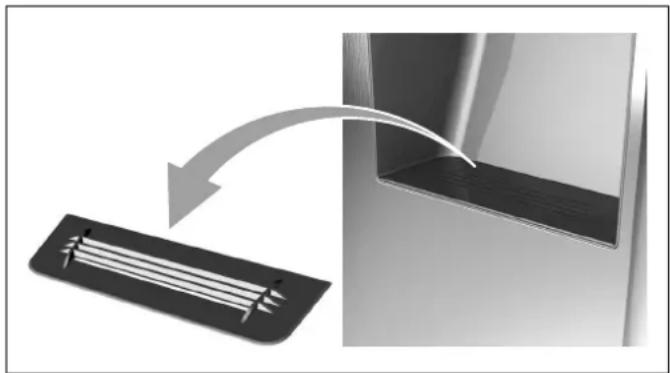
Cleaningwatercollectingtrayandstrainer
Spilledwatercollectsinthewatercollectingtray.
natural_image
Diagram showing a mechanical component with a curved arrow indicating motion, no text or symbols presentTocleanthewatercollectingtrayandthestrainer, thestrainercanbetakenout.
en
Interiorfittings
Tocleantheequipment, all variable part of the appliance can be taken out ( chapter "Variable interior design").
Note:
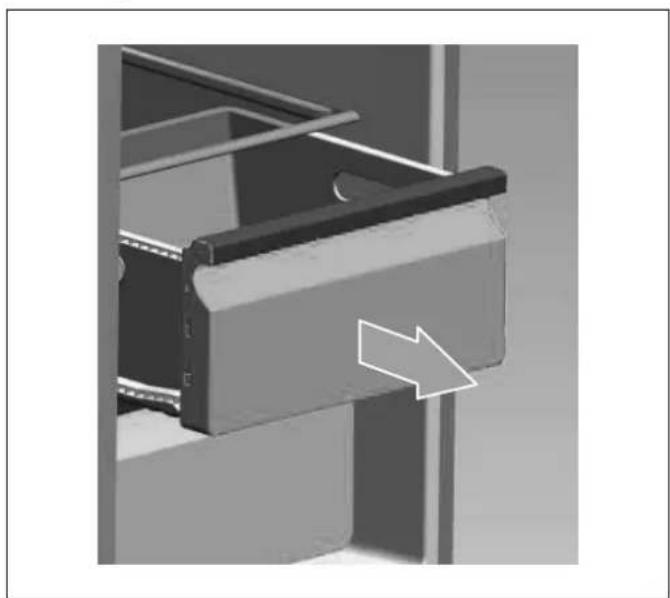
Totakeoutandcleanthecontainers,openthedoors fullybeyond90°.
Removingcontainer
natural_image
Mechanical assembly diagram showing a bracket with an arrow indicating direction (no text or symbols present)■ Pulloutcontaineralltheway, lifttodetachitfrom theholderandtakeout.
Toinsertthedrawer, placeonthetelescopicrailsand pushintotheappliance. Attachthedrawerbypassing itdown.
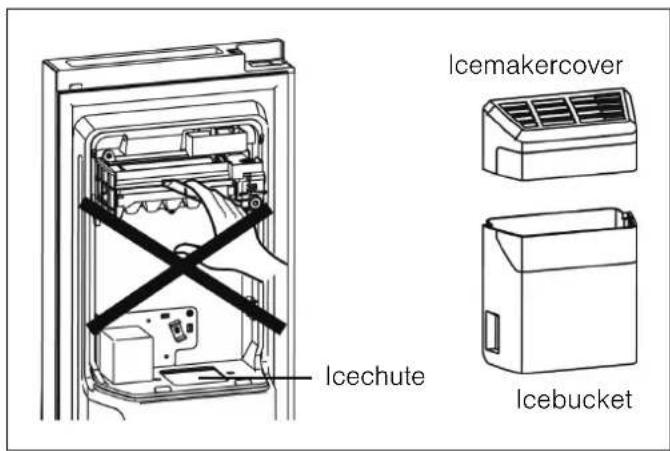
Handlingtheicebucket
Removingtheicebucket
For cleaning purposes orify you don't nee bucket can be removed.

text_image
Diagram showing a hand pressing down an air conditioner panel with labeled parts and directional arrows indicating motion.- Hold at the handle and lift up the ice buck
- Pull out the ice buckets slowly to prevent damage.
text_image
Icechute Icebreakercover IcebucketWarning
Donotputyourfingers,handsoranyunsuitable objectsintheicechuteoricemaker.Thiscancause personalinjuryormaterialdamage.
Note: Thereisawaterlineconnectiontotheicemaker. Donotdisassemblethewholewatersupplysystemby yourself.Itisrecommendedtobedonebyqualified personsonly.
Emptyingandcleaningtheicebucket
Theicebucketmayneedtobeemptied,iftheice cubessticktogetherorificecubeshavenotbeendispensedforaprolongedperiodorwhentheappliance ispoweredoff.
Tocleantheicebucket, washwithamilddetergent, rinsewellanddrythoroughly. Donotuseharshor abrasivecleanersorsolvents.
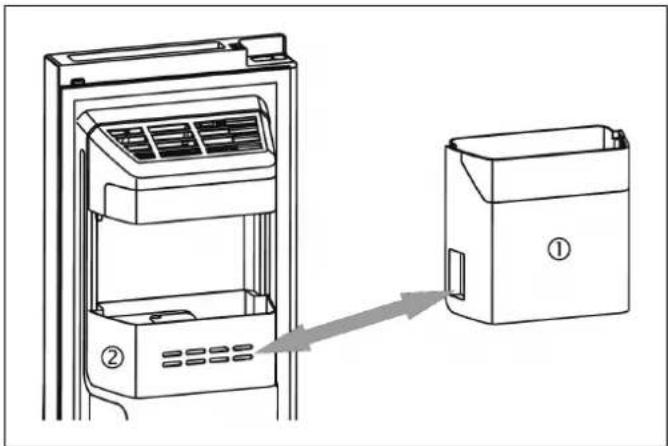
Replacingtheicebucket
natural_image
Line drawing of an air conditioner unit with a door panel and a separate cabinet labeled ①, showing airflow direction (no text or symbols beyond labels)If you don't need dice, you can switch to the icemaker and replace the ice bucket (1) by the doorrack (2) to increase your freezervolume.
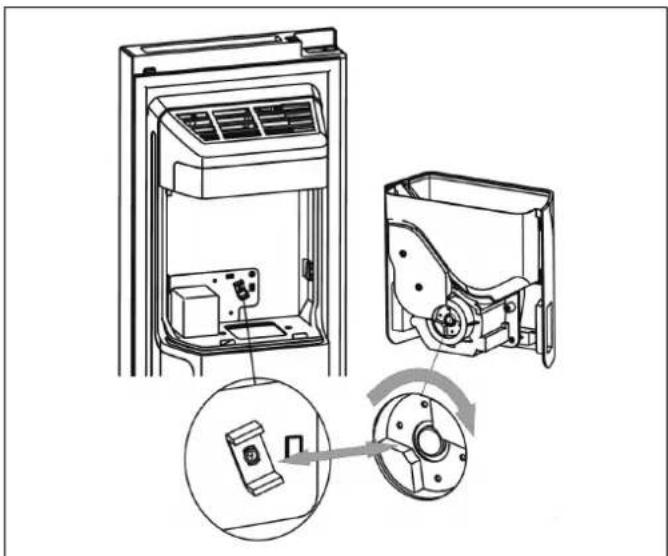
Refittingtheicebucket
natural_image
Technical line drawing of an air conditioner unit showing internal components and a close-up of the housing (no text or symbols)- Check that the two couplers are at a suitable angle to connect correctly. If necessary, turn the coupler of the ice bucket to match them motor coupler.
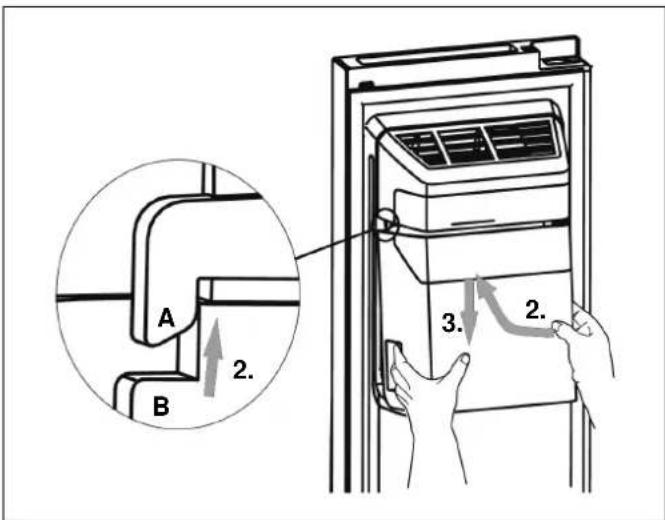
text_image
A B 2. 3. 2.-
Hold at the handle and push up the ice buck Ensure that on both sides the ice bucket (B) is wedged into the buckles (A) of the icemaker.
-
Pulldowntheicebucketandensureitisheldfirmly.
Defrosting
Although this appliance automatically defrosts, alayer offrost may occur on the freezer compartment's interior walls if the door is opened frequently or kept open too long.
If the frostistoothick wait until food stocks are low and proceedings follows:
-
Remove existing food and accessories baskets, unplug the appliance from themains power and leavethedores open. Ventilatetheroom thoroughly to accelerate the methawing process.
-
Whendefrostingiscompleted, cleanyourfreezer asdescribedabove.
Replacingthewaterfilter
Ingeneral, you should replace the water filter every 6 month to ensure the highest possible water quality.
Aftertheappliancehasdispensedabout4000litersof water(usualconsumptionwithin6months),thewater filterdisplay blinks,andthebuzzersounds3times, toremindyouthatyouuneedtoreplacethewaterfilter.
Note:
■ Ifnowaterisdispensedoritisdispensedslowly, thewaterfiltermaybecloggedandmayneedtobe replaced. Some areashavelargeamountsoflimein their water, which cause st hewaterfiltertoclog more quickly.
Purchasinganewwaterfilter
Firstofall,youneedtopurchaseanewwaterfilter. Youcanpurchasethenewfilterfromtheretailerwhere youpurchasedyourapplianceorfromtheCustomer service.Pleasecheckthatthenewfilterisofthesame typeasbefore,sothatitcanbeusedcorrectlyinyour appliance.
Removingtheoldwaterfilter
Notes
■ Closethewatervalvebeforeremovingthefilter.
■ Whenyoureplacethefilter,somewatermayleak fromthefilterandlines.Letthewaterflowintoa pan,andwipeupanyleakagethatmayhave occurred.
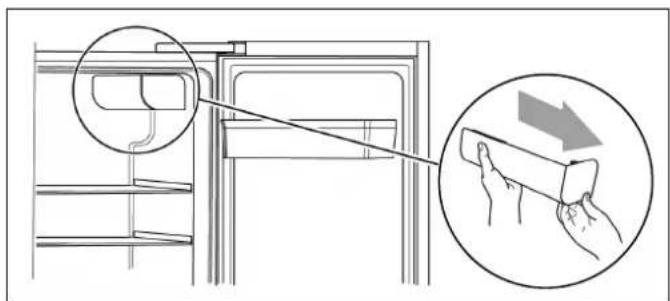
text_image
Diagram showing a refrigerator interior with a hand cleaning the door, accompanied by a magnified view of the hand using a tool.- Opentherefrigeratordoortoitsmaximumangle andremovethewaterfiltercapbypullingitout slowly.
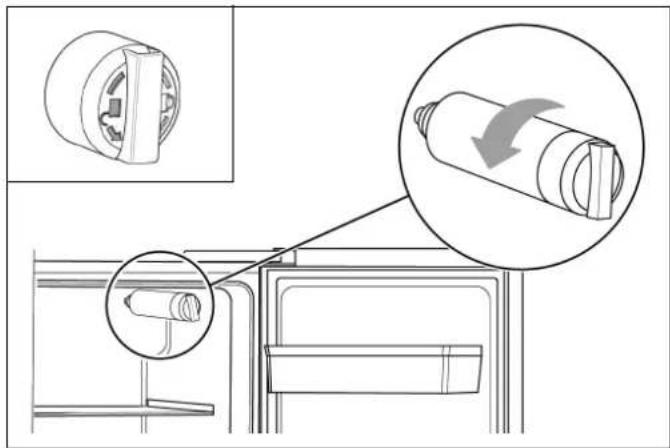
text_image
Technical diagram showing mechanical assembly with magnified views and directional arrow indicating rotation or movement- Screwout the old water filter in anticlockwise direction (seesignonthefilter) and remove it.
Warning
Donotpulloutthewaterfilterwithforce,asthiscan causematerialdamage.
Installingthenewwaterfilter
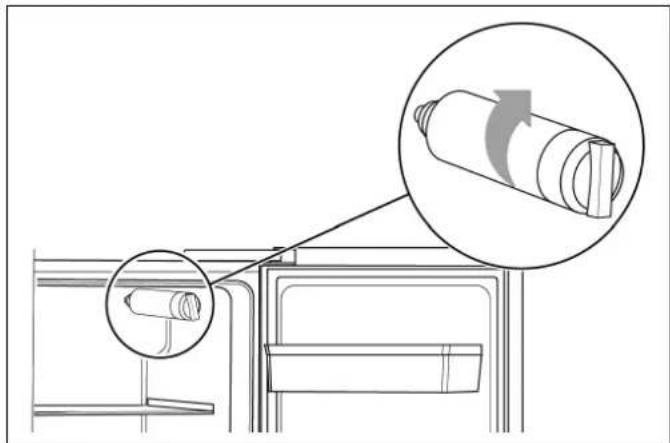
natural_image
Diagram of a refrigerator interior with a magnified view showing the exterior wall and internal components (no text or symbols)- Screwinthenewaterfilterinclockwisedirection andmakesureitisfirmlyfittedtothewaterfilter base.
Warning
If not installed correctly, this can result in the appliance is not working properly, or result in water leakages.
text_image
Diagram showing hand cleaning a refrigerator with magnified detail and directional arrow indicating cleaning process- Reattachthefiltercoverbygentlyslidingiton.
- After you have installed an new water filter, touch and hold the "eco/filterreset3s" button for 3 seconds to reset the water filter display.
Light(LED)
Your appliance features a maintenance-free LED light.
TheselightsmaybepairedbyCustomerserviceor authorisedtechniciansonly.
Tipsforsavingenergy
- Installtheapplianceinadry,wellventilatedroom!
Theapplianceshouldnotbeinstalledindirectsun-
lightornearaheatsource(e.g.radiator,
Ifrequired,useaninsulatingplate.
■ Donotblocktheventilationopeningsinthe appliance.
■ Allowwarmfoodanddrinkstocooldownbefore placingintheappliance.
■ Thawfrozenfoodintherefrigeratorcompartment andusethelowtemperatureofthefrozenfoodto coolrefrigeratedfood.
■ Opentheapplianceasbrieflyaspossible.
■ Ensure that the freezer compartment door is always closed properly.
■ The arrangement of the fittings does not affect the energy rating of the appliance.
■ Theicemakercanbeturnedofftosavewaterand energy,ifnoiceisneeded.
Operatingnoises
Quitenormalnoises
■ Compressorrunningnoises.
■ Airmovementnoisefromthesmallfanmotorin thefridgecompartmentorothercompartments.
■ Gurglingsoundsimilartowaterboiling.
■ Poppingnoiseduringautomaticdefrosting.
- Clickingnoisebeforethecompressorstarts.
■ Noises, when the icemaker dumpsice into the icebucket.
■ Whentouchingthe"water"button,thewaterpump willstartandthereislittlenoisewhenthepumpis working.
Preventingnoises
Theapplianceisnotlevel
Please align the appliance with aspiritlevel. Use the height-adjustable feet or place packing underneath them.
The appliance is not free-standing
Pleasemovetheapplianceawayfromadjacentunitsor appliances.
Containersorstorageareaswobbleorstick
Pleasechecktheremovablepartsandre-insertthem correctlyifrequired.
Bottlesorreceptaclesaretouchingeachother
Movethebottlesorreceptaclesslightlyawayfromeach other.
Eliminatingminorfaults yourself
BeforeyoucallCustomerservice:
Please check whether you can eliminate the faulty yourself based on the following information.
Customerservicewillchargeyouforadviceevenifthe applianceisstillunderguarantee!
| FaultPossiblecauseRemedialaction | ||
| Appliance is not working | Mains plug has not been inserted properly. | Check whether the power cord is plugged into thepoweroutletproperly. |
| Thefusehasbeenswitchedofforisdefective.Checkthefuse;replaceifnecessary. | ||
| Powerfailure.Checkthecircuitofyourpowersupply. | ||
| Theambienttemperatureistoolow.Trysettingthechambertemperaturetoacolder leveltosolvethisproblem. | ||
| Itisnormalthattherefrigeratorisnotoperating duringtheautomaticdefrostcycle,orforashort timeaftertheapplianceisswitchedontoprotect thecompressor. | ||
| Odours from the compartments | The interior is dirty. | Clean the interior. |
| Somefood,containersorwrappingcauseodours. | ||
| The motor runs continuously | It is normal to frequently hear the sound of the motor, it will need to run more when in following circumstances:■ Temperaturesettingissetcolderthan necessary.■ Alargequantityofwarmfoodhasrecently beenstoredwithintheappliance.■ The temperature outside the appliance is toohigh.■ Doorsarekeptopentoolongortoooften.■ Afteryourinstallingtheapplianceorthas beenswitchedoffforalongtime. | |
| Alayeroffrostoccursinthe compartment | Airoutletsareblocked;insufficientventilation; doornotfullyclosed. | Checkthattheairoutletsarenotblockedby food and ensure food is placed within the appli-ancetoallowsufficientventilation.Ensurethat doorisfullyclosed.Toremovethefrost:→ chapter“Cleaningtheappliance”. |
| Temperature inside is too warm | You may have left the doors open too long or toofrequently;orthedoorsarekeptopenby someobstacle;ortheapplianceislocatedwith insufficientclearanceatthesides,backortop. | Donotopenthedoorsunnecessarilyorlonger thannecessary;checkclearanceofappliance. |
| Doors can't be closed easily | Appliance is not tilted to the back about 15 mm. Somethinginsideispreventingthedoorsfrom closing. | Checktiltingandcorrectbyturningtheadjust - ablefeet,ifnecessary.Checkinteriorand removeobstacle. |
| The light is not working | LED light is automatically switched off due to the doorbeeingkeptopenfortoolong.LEDlightisdamaged. | Close and reopen the door to reactivate the light. HavetheLEDlightbereplaced → chapter“Light(LED)”. |
| FaultPossiblecauseRemedialaction | |
| WaterdripsonthefloorWaterpanattherearbottomoftheappliancenotproperlylevelledordrainingspoutnotproperlypositionedtothepanorspoutblocked.Waterconnectionisnottight.Iceintheicebucketismeltowater,causedbypowerfailure. | Checkwaterpananddrainingspoutattherear.Checkwaterconnectionandtightenthenuts.Checkicebucketandemptyit,ifnecessary. |
| DispenseristnotworkingWaterlinenotconnectedorwatervalveclosed.Waterlinecrushedorkinked.WaterfilternotinstalledcorrectlyorWatertankfrozenduetotoolowtemperatureofrefrigeratorcompartment.Childlockactiveorfreezerdooropen. | Checkthewaterlineandthewatervalve.Checkwaterfilter.Selectegetwarmersettingoftherefrigeratorcompartment.Deactivatechildlock.Closefreezerdoor. |
| IceisnotdispensedAfterinstallation,itwilltakeseveralhoursuntilthefreezerhasreachedit'stemperatureandicecubescanbeproduced.Waterlinenotconnectedorwatervalveclosed.WaterfilternotinstalledcorrectlyorIcecubessticktogetherintheicebucketoricestuckinthechute.Icemakeristurnedoff. | Checkifthewaterlineisconnectedandthewatervalveisopen.Checkwaterfilter.Checkicecute.Checkicebucketandemptyit,ifnecessary.Tugnetdeicemaker. |
Customerservice
YourlocalCustomerservicecanbefoundinthe telephonedirectoryorintheCustomerserviceindex. PleaseprovideCustomerservicewiththeappliance productnumber(E-Nr.)andproductionnumber (FD-Nr.).
Thesespecificationscanbefoundontheratingplate.
text_image
E - Nr FD - NrTopreventunnecessarycall-outs,pleaseassist Customerservicebyquotingtheproductandproductionnumbers.Thiswillsaveyouadditionalcosts.
Repairorderandadviceonfaults
Contactinformationforallcountriescanbefoundon theenclosedCustomerservicelist.
GB03448928999Callschargedatlocalormobile rate.
IE 014502655 0.03€perminuteatpeak. Offpeak0.0088€perminute.
US 8664474363 toll-free
fr
Tabledesmatières
Consignesdesécurité51....
natural_image
Laptop rear panel showing internal ventilation ducts and mounting hardware (no text or symbols visible)natural_image
Simple line drawing of a mechanical lever or bracket with a fulcrum, no text or symbols presentAjustementdel'appareil
-Pressionminimum:2bars
-Pressionmaximum:8bars
text_image
Diagram showing hand cleaning a refrigerator with magnified detail and directional arrow indicating cleaning process- Ouvrezlaportedelachambrefroideaussigrand quepossibleetretirezlecouvercledufiltreenletirantlentement.
natural_image
Hand inserting a small object into a device (no text or symbols visible)3.Enlevezlefilmdeprotectionsurlesoclieau.
text_image
e z t e- Vissezlefiltreàeaudanslesensdesaig d'unemontreetassurez-vousquelefil vissédanslesocle.
Miseengarde
text_image
Diagram showing hand cleaning a refrigerator with magnified detail and directional arrow indicating cleaning process- Replacezlecouvercledufiltreenlepou prudemmentpardessus.
Installationdutuyaud'eau
Utilisezletuyauderaccordementfourni.
natural_image
Technical illustration of two mechanical fasteners with bolt holes and a nut assembly (no text or symbols)- Insérezlesbaguesd'étanchéitésdanslesraccord dutuyau.
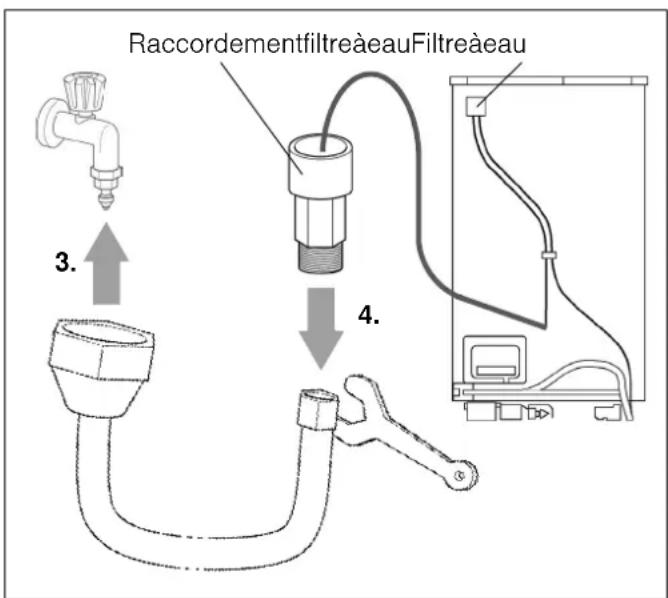
text_image
RaccordementfiltreàeauFiltreàeau 3. 4.text_image
7 6 5 4 3 2 1 8 9 10 alarm lock 3s -88 °C 88 °C vacation 11 12 13 14 15 16 17 ice off freeze super 3s cool super 3s eco filter reset 3s cubed ice crushed ice water 20 19 181Touche«freeze/super3s»
text_image
noFrost 2-6 months 4-8 months 6-12 monthsnatural_image
Illustration of a hand pointing at a device with bottles inside, showing a drop in the window (no text or symbols)Attention!
Chargeravec5kgmaximum.
Super-réfrigération
natural_image
Illustration of a hand holding a glass cup inside a digital kitchen appliance (no text or symbols visible)natural_image
Illustration of a hand holding a glass cup over a digital kitchen counter (no text or symbols visible)natural_image
Illustration of two hands holding a horizontal bar with a downward arrow indicating compression or force (no text or symbols)natural_image
Illustration of hands holding a flexible electronic device with directional arrows indicating movement (no text or symbols)natural_image
Technical line drawing of a mechanical component with wavy internal structure and coiled components (no text or symbols)natural_image
Diagram showing a mechanical component with internal parallel grooves and an arrow indicating motion (no text or symbols)natural_image
Mechanical component with a white arrow indicating direction, no visible text or symbolstext_image
Diagram showing airflow or ventilation process between a refrigerator with labeled components and directional arrowsnatural_image
Line drawing of a refrigerator with air conditioner unit and adjacent to a paper holder (no text or symbols)natural_image
Technical line drawing of an air conditioner unit showing internal components and a close-up of the device's internal structure (no text or symbols)text_image
Diagram showing hand cleaning a refrigerator with magnified detail and directional arrow indicating cleaning process- Ouvrezlaportedelachambrefroideaussigrand quepossibleetretirezlecouvercledufiltreenle tirantlentement.
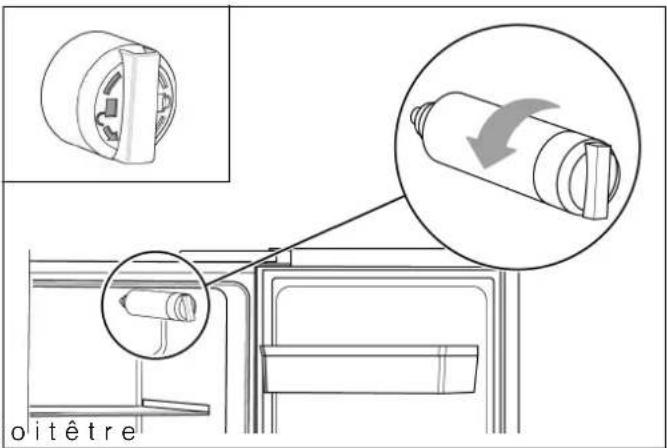
text_image
oitêtrenatural_image
Diagram showing a mechanical component with an inset close-up of a cylindrical component and a magnified view of its rotation (no text or symbols present)text_image
Diagram showing hand cleaning a refrigerator with magnified detail and directional arrow indicating cleaning processnatural_image
Back panel of a computer drive showing internal ventilation ducts and mounting points (no text or symbols visible)natural_image
Simple line drawing of a mechanical lever or bracket with a fulcrum, no text or symbols presenttext_image
Diagram showing refrigerator door and kitchen sink with labeled parts and a close-up of the wrench indicating mechanical adjustment.Persollevarelaportadelvanofrigorifero, ruotareil dado(1)insensoantiorario.
Perabbassarelaportadelvanofrigorifero, ruotare ildado(1)insensoorario.
Selaportaèlivellatacorrettamente, fissarlaconil dado(2).
it
text_image
Diagram showing a refrigerator interior with a close-up of the door and hand cleaning a surface, with an arrow indicating the process.natural_image
Hand inserting a small circular component into a wall-mounted device (no text or symbols visible)natural_image
Technical line drawing of a mechanical assembly with an inset showing a cylindrical component being inserted (no text or symbols present)text_image
Diagram showing hand cleaning a refrigerator with magnified detail and directional arrow indicating cleaning process- Ricollocarelacoperturadelfiltro, spingendolacon cautela.
natural_image
Technical illustration of two mechanical components with cross-sectional views and downward arrows indicating assembly (no text or symbols)text_image
7 6 5 4 3 2 1 8 9 10 alarm lock 3s -88°C 88°C vacation 11 12 13 14 15 16 17 ice off freeze super 3s cool super 3s eco filter reset 3s cubed ice crushed ice water 20 19 181Tasto"freeze/super3s"
Perimpostarelatemperaturadelvano congelatore.
text_image
*** noFrost 2-6 months 4-8 months 6-12 monthsnatural_image
Illustration of a refrigerator with bottles inside and a hand pointing at it, showing a downward arrow (no text or symbols)Attenzione!
Caricomassimodi5kg.
Raffreddamentosuper
natural_image
Illustration of a hand holding a cup over a digital water dispenser (no text or symbols visible)natural_image
Illustration of two hands holding a horizontal bar with a downward arrow indicating compression or force (no text or symbols)natural_image
Illustration of hands holding a flexible electronic device with upward arrows indicating motion or force (no text or symbols)■ Sollevareibalconcinidellaporta,quindirimuoverli.
it
natural_image
Pure technical line drawing of a mechanical or electrical component with no text, numbers, or symbolsnatural_image
Diagram showing airflow or heat transfer from a black rectangular component to a metallic panel (no text or symbols)natural_image
Mechanical component with a white arrow indicating direction, no visible text or symbolstext_image
Diagram showing airflow or ventilation process of an air conditioner unit with labeled components and directional arrowsnatural_image
Line drawing of an air conditioner unit with a separate box labeled ①, showing airflow direction (no text or symbols beyond labels)natural_image
Technical line drawing of an air conditioner unit showing internal components and a close-up view of the device's internal structure (no text or symbols)text_image
Diagram showing hand cleaning a refrigerator with magnified detail and directional arrow indicating cleaning processtext_image
Technical diagram showing mechanical assembly with magnified views and directional arrow indicating rotation or adjustment.- Svitareilfiltrousatoinsensoantiorario (vedere marcaturasulfiltro) erimuoverlo.
text_image
Diagram illustrating hand cleaning a refrigerator with magnified detail showing hand holding a cloth and arrow indicating direction.- Ricollocarelacoperturadelfiltro, spingendolacon cautela.
- Alterminedellacorrettasostituzionedelfiltro ripristinareilrelativoindicatore, premendoiltasto "eco/filterreset3s" pertresecondi.
Illuminazione(LED)
natural_image
Laptop rear panel showing ventilation grilles and mounting points (no text or symbols visible)Opstellingsmaten
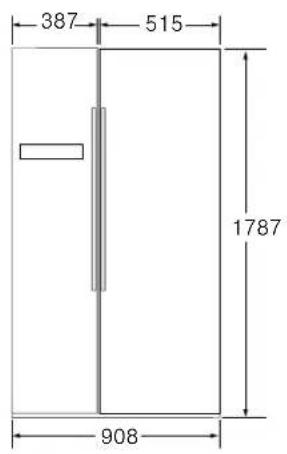
text_image
387 515 1787 908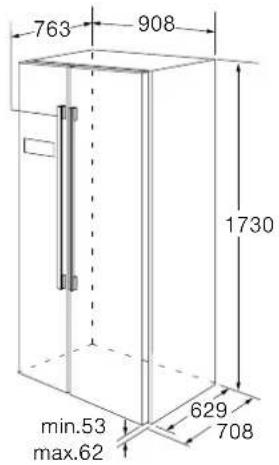
text_image
763 908 1730 min.53 max.62 629 708Deuropeningshoek
text_image
277 763 708 908 629 418 28 130° 135° 1603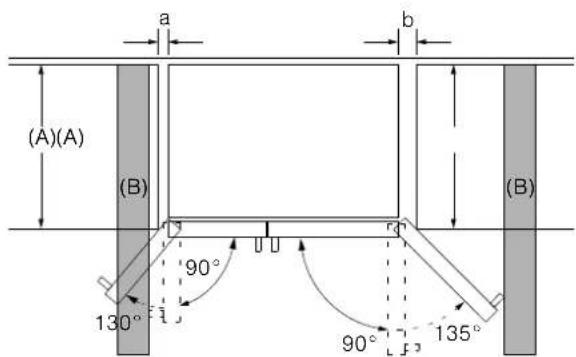
text_image
(A)(A) (B) 90° 130° 90° 135° (B)| A | a | b |
| 600 | 50 | 50 |
| 650 | 50 | 50 |
| 700 | 53 | 96 |
| B | 75 | 418 |
A: Apparaatdiepte B: Wand
Wanneerdedeur90°isgeopend, dankuntudeladeneruittrekken. Wanneerdedeurvolledigisgeopend, dankuntudeladeneruithalen.
nl
Handgreepbevestigen
natural_image
Simple line drawing of a mechanical lever or bracket with a fulcrum, no text or symbols presentApparaatuitlijnen
natural_image
Diagram of a hand holding a tool interacting with a vertical structure, showing motion and rotation (no text or symbols)Schroefvoeten
Deurenuitlijnen
text_image
Diagram showing a wrench and switch mechanism in a kitchen or bathroom setting, with numbered annotations indicating components.text_image
Diagram showing a refrigerator interior with a hand holding a rectangular object, annotated with an arrow indicating direction or force.natural_image
Hand inserting a small circular component into a device (no text or symbols visible)natural_image
Diagram showing a mechanical component with an inset close-up of a cylindrical component being inserted, no text or symbols present.text_image
Diagram showing hand cleaning a refrigerator with magnified detail and directional arrow indicating cleaning processnatural_image
Technical illustration of two mechanical fasteners with bolt holes and a nut assembly (no text or symbols)- Doedeafdichtringenindeaansluitingenvande slang.
flowchart
graph TD
    A["Tap"] --> B["Valve"]
    B --> C["Pump"]
    C --> D["Waterfilter"]
    D --> E["Waterfilter aansluiting Waterfilter"]
    style A fill:#f9f,stroke:#333
    style B fill:#ccf,stroke:#333
    style C fill:#cfc,stroke:#333
    style D fill:#fcc,stroke:#333
    style E fill:#cff,stroke:#333
3.Sluitdeslangmetdehandopdewaterkraanaan.
text_image
7 6 5 4 3 2 1 8 9 10 alarm lock 3s -88 °C 88 °C vacation 11 12 13 14 15 16 17 ice off freeze super 3s cool super 3s eco filter reset 3s cubed ice crushed ice water 20 19 181Toets"freeze/super3s"
Brandtbijeendeuralarm.
natural_image
Illustration of a refrigerator with bottles inside and a hand pointing at the top panel (no text or symbols)Attentie!
Maximaalmet5kgbeladen.
Super-koelen
natural_image
Illustration of a hand holding a cup over a digital kitchen counter (no text or symbols visible)natural_image
Illustration of a hand pouring liquid into a cup using a digital water dispenser (no text or symbols visible)natural_image
Diagram showing two hands holding parallel plates with a downward arrow indicating motion (no text or symbols)natural_image
Illustration of hands holding a flexible electronic device with directional arrows indicating motion (no text or symbols)natural_image
Pure technical line drawing of a mechanical or electrical component with no text, numbers, or symbolsnatural_image
Diagram showing a mechanical component with internal parallel grooves and an arrow indicating motion (no text or symbols)natural_image
Mechanical component with a white arrow indicating direction, no visible text or symbolstext_image
Diagram showing airflow or ventilation process between a refrigerator with labeled components and directional arrowsnatural_image
Line drawing of a refrigerator with air conditioner unit and adjacent to a paper holder (no text or symbols)natural_image
Technical line drawing of an air conditioner unit showing internal components and a close-up of the device's internal structure (no text or symbols)text_image
Diagram showing hand cleaning a refrigerator with magnified detail and directional arrow indicating cleaning processnatural_image
Technical line drawing of a mechanical assembly with an inset showing a cylindrical component being rotated (no text or symbols present)text_image
Diagram showing hand cleaning a refrigerator with a magnified inset highlighting the process.siemens-home.bsh-group.com

9001567805(0206)de,en,fr,it,nl