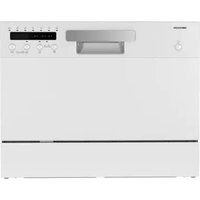
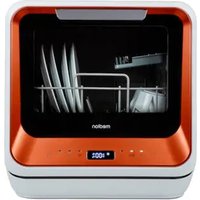
MD 37496 - Dishwasher MEDION - Free user manual and instructions
Find the device manual for free MD 37496 MEDION in PDF.


| Product type | Tabletop dishwasher |
| Brand | Medion |
| Model | MD 37496 |
| Dimensions (H x W x D) | 438 x 550 x 500 mm (door closed), 812 mm (door open) |
| Net weight | 21.4 kg |
| Power supply | 220-240 V, 50 Hz, 1170-1380 W |
| Capacity | Up to 6 standard place settings (ø 24 cm) |
| Water inlet pressure | 0.04 – 1.0 MPa (0.4 – 10 bars) |
| Max. hot water connection | 60 °C |
| Protection class | I |
| Wash programs | Intensive, Universal, Eco, Glass, 90 min, Rapid, Self-cleaning |
| Special functions | Delay start (1-24 h), Auto door opening, Button lock, Extra dry |
| Water consumption (Eco) | 6.5 L |
| Energy consumption (Eco) | 0.494 kWh |
| Program duration (Eco) | 215 min |
| Noise level | Not specified |
| Filtration system | Coarse filter and main filter |
| Water softener | Integrated, adjustable (H1 to H6) |
| Safety | Aquastop, child lock, leak protection |
| Spare parts availability | Minimum 7 years for electronic parts, 10 years for plastic parts and accessories |
| Package contents | Dishwasher, dish basket, cutlery basket, water inlet hose (Aquastop), drain hose, funnel, quick start guide |
Frequently Asked Questions - MD 37496 MEDION
User questions about MD 37496 MEDION
0 question about this device. Answer the ones you know or ask your own.
Ask a new question about this device
Download the instructions for your Dishwasher in PDF format for free! Find your manual MD 37496 - MEDION and take your electronic device back in hand. On this page are published all the documents necessary for the use of your device. MD 37496 by MEDION.
USER MANUAL MD 37496 MEDION
natural_image
Three modern kitchen appliances in different sizes and colors, displayed against a plain background (no visible text or labels)Tischgeschirrspüler Lave-vaisselle Tafelvaatwasser Lavavajillas de sobremesa Lavastoviglie da tavolo Table top dishwasher
MEDION MD 37496
Inhaltsverzeichnis
DE
Abb. 1
natural_image
Technical line drawing of a structural frame with grid and support elements, no text or symbols presentAbb. 2
natural_image
Line drawing of a faucet with a valve and handle (no text or symbols)Abb. 5
natural_image
Diagram of a mechanical setup with a tool inserted into a pipe, showing a magnified view of the pipe connection (no text or symbols present)Abb. 7
flowchart
graph LR
    A["Hand holding a container"] --> B["Add liquid into a jar"]
    B --> C["Transfer to a container with salt"]
    C --> D["Add salt into a container"]
    D --> E["Final step with salt"]
Abb.8
natural_image
Illustration of a hand inserting a device into a device panel (no text or symbols visible)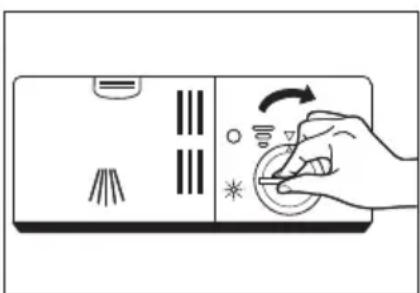
natural_image
Hand pressing down on a device panel with icons and arrows (no text or symbols)Abb. 12
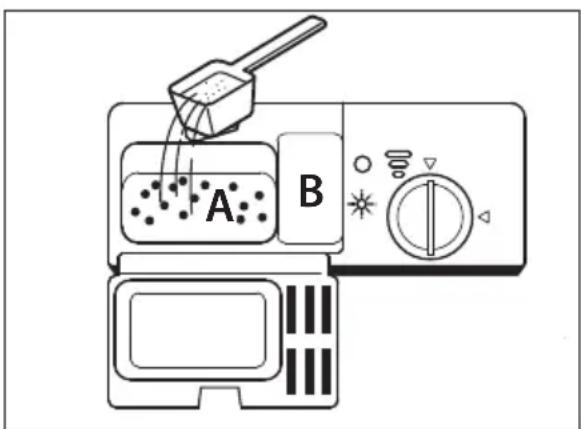
Abb. 13
natural_image
Diagram showing a mechanical or fluid system with an arrow, circular component, and droplet on a surface (no text or symbols)Abb. 14
natural_image
Illustration of a hand holding a small mechanical component with directional arrows indicating rotation (no text or symbols)Abb. 19
natural_image
Line drawing of a hand washing a sink with a faucet, no text or symbols presentAbb. 20
natural_image
Diagram showing a hand adjusting a mechanical component with an inset close-up of the component (no text or symbols present)Abb. 21
natural_image
Illustration of a hand using a tool to press or install a mechanical component on a flat surface (no text or symbols)Abb. 22
natural_image
Illustration of hands cleaning a kitchen sink with a faucet and cleaning tool (no text or symbols)Abb. 23
Fig. 1
natural_image
Technical line drawing of a structural frame with grid and circular elements, no text or symbols presentFig. 2
natural_image
Line drawing of a faucet with a valve and handle (no text or symbols)Fig. 5
natural_image
Diagram of a mechanical setup with a tool inserted into a pipe, showing a magnified view of the pipe connection (no text or symbols present)Fig. 7
flowchart
graph LR
    A["Hand holding a container"] --> B["Transfer to a jar with liquid"]
    B --> C["Add salt into a container"]
    C --> D["Add salt into a salt container"]
    D --> E["Transfer to a container with salt and salt"]
Fig. 8
natural_image
Hand pressing down on a control panel with icons and arrows (no text or symbols)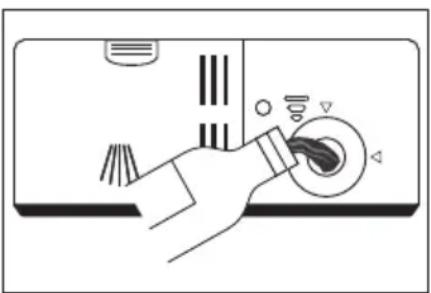
natural_image
Illustration of a hand using a circular tool to interact with a device (no text or symbols visible)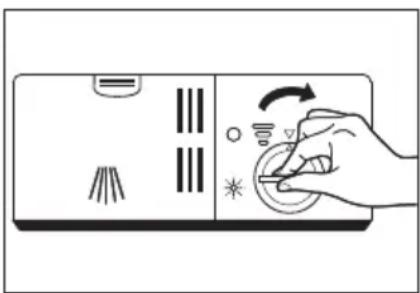
natural_image
Illustration of a hand pressing down on a device panel with icons and arrows (no text or symbols)Fig. 9 Fig. 10 Fig. 11
Fig. 12
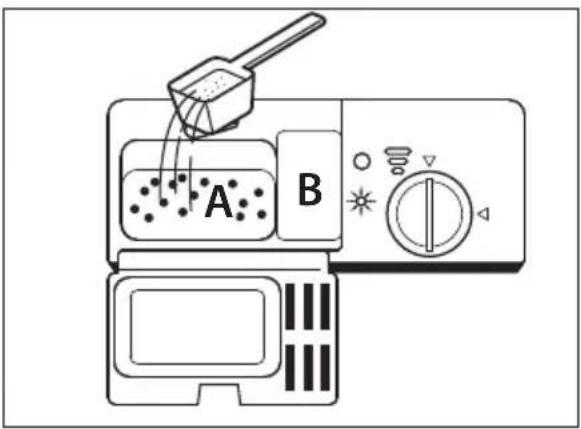
Fig. 13
natural_image
Diagram showing a mechanical or fluid system with an arrow, circular component, and droplet on a base (no text or symbols)Fig. 14
natural_image
Illustration of a hand holding a small object on a flat surface with directional arrows indicating rotation (no text or symbols)Fig. 19
natural_image
Line drawing of hands using a tool to clean or wash a cup on a sink (no text or symbols)Fig. 20
natural_image
Diagram showing a hand operating a mechanical component with an inset close-up of the mechanism (no text or symbols)Fig. 21
natural_image
Illustration of a hand using a tool to adjust or install a mechanical component on a flat surface (no text or symbols)Fig. 22
natural_image
Line drawing of a kitchen sink with a hand cleaning the surface and a faucet pouring liquid (no text or symbols)Fig. 23
Afb.1
natural_image
Technical line drawing of a structural frame with grid and circular elements, no text or symbols presentAfb.2
natural_image
Line drawing of a faucet with a valve and handle (no text or symbols)Afb. 5
natural_image
Diagram of a screwdriver inserted into a pipe with a magnified inset showing the cable being inserted (no text or labels)Afb.7
flowchart
graph LR
    A["Hand holding lid"] --> B["Add liquid into container"]
    B --> C["Transfer to container with salt"]
    C --> D["Ordering to container with salt"]
    D --> E["Ordering to container with salt"]
Afb.8
natural_image
Illustration of a hand pressing a button on a device panel with icons (no text or symbols)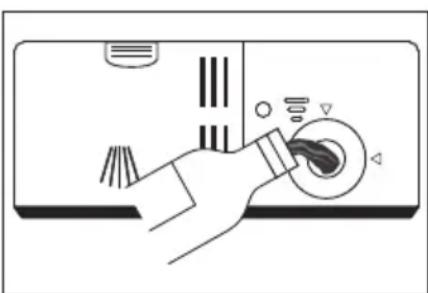
natural_image
Illustration of a hand inserting a device into a device panel (no text or symbols visible)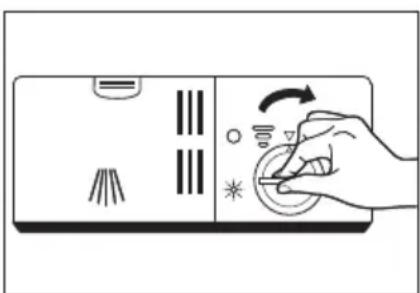
natural_image
Illustration of a hand pressing down on a device with icons and arrows indicating action (no text or symbols)Afb. 12
Afb. 13
natural_image
Diagram showing a mechanical or fluid system with an arrow, a circular component, and a downward arrow emerging from a rectangular base (no text or symbols)Afb.14
Afb. 18
natural_image
Illustration of a hand holding a small mechanical component with directional arrows indicating rotation (no text or symbols)Afb. 19
natural_image
Line drawing of a kitchen sink with a faucet and cleaning tool (no text or symbols)Afb. 20
natural_image
Diagram showing a hand adjusting a mechanical component with an inset close-up of the mechanism (no text or symbols)Afb. 21
natural_image
Illustration of a hand using a tool to press or install a small object on a flat surface, with no visible text or symbols.Afb. 22
natural_image
Line drawing of hands cleaning a kitchen sink with a faucet and cleaning tool (no text or symbols)Afb. 23
Fig. 1
natural_image
Technical line drawing of a structural frame with grid and circular elements, no text or symbols presentFig. 2
natural_image
Line drawing of a faucet with a valve and handle (no text or symbols)Fig. 5
natural_image
Diagram showing a screwdriver inserted into a pipe with a magnified inset illustrating the process (no text or symbols present)Fig. 7
flowchart
graph LR
    A["Hand holding lid"] --> B["Transfer to container"]
    B --> C["Add liquid into jar"]
    C --> D["Transfer to container with salt"]
    D --> E["Transfer to final container with salt"]
Fig. 8
natural_image
Hand interacting with a control panel showing icons and a curved arrow (no text or symbols)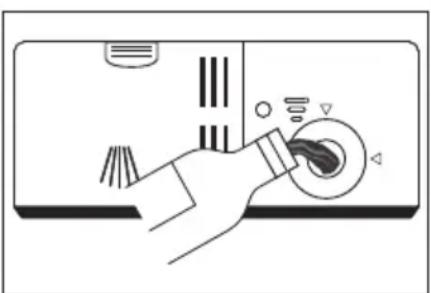
natural_image
Illustration of a hand inserting a device into a device panel (no text or symbols visible)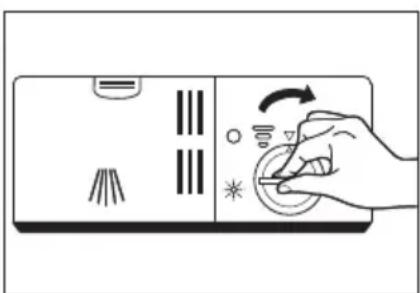
natural_image
Hand operating a device with icons and a scroll wheel (no text or symbols)Fig. 9 Fig. 10 Fig. 11
▶ Abra la puerta del aparato.
Fig. 12
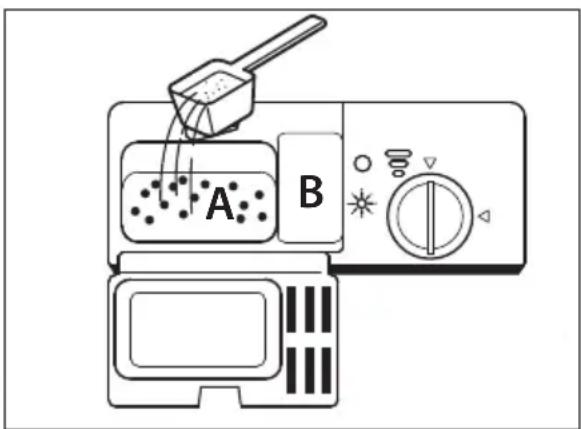
Fig. 13
natural_image
Diagram showing a mechanical or fluid system with arrows indicating motion, no text or symbols presentFig. 14
Fig. 18
natural_image
Illustration of a hand holding a small mechanical component with directional arrows indicating rotation (no text or symbols)Fig. 19
▶ Saque el filtro principal (b).
natural_image
Line drawing of a hand washing a sink with a faucet, no text or symbols presentFig. 20
natural_image
Diagram showing a hand adjusting a mechanical component with an inset close-up of the mechanism (no text or symbols)Fig. 21
natural_image
Illustration of a hand using a tool to press or install a small object on a flat surface, with no visible text or symbols.Fig. 22
natural_image
Line drawing of hands cleaning a kitchen sink with a faucet and cleaning tool (no text or symbols)Fig. 23
Fig. 1
natural_image
Technical line drawing of a structural frame with grid and circular elements, no text or symbols presentFig. 2
natural_image
Line drawing of a faucet with a valve and handle (no text or symbols)Fig. 5
natural_image
Diagram of a mechanical setup with a tool inserted into a spring, connected to a cabinet and tubing (no text or symbols present)Fig. 7
flowchart
graph LR
    A["Hand holding a cup with a lid"] --> B["Add liquid to a container"]
    B --> C["Add liquid into a jar with a spoon"]
    C --> D["Add liquid into a container with a salt lamp"]
    D --> E["Add liquid into a side bowl with a salt lamp"]
Fig. 8
natural_image
Hand pressing down on a control panel with icons and arrows (no text or symbols)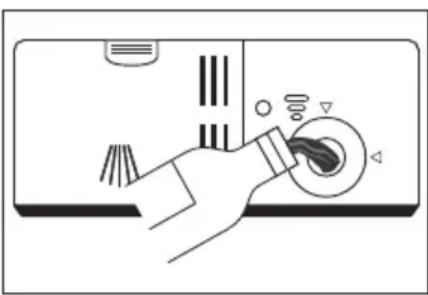
natural_image
Illustration of a hand using a circular tool to interact with a device (no text or symbols visible)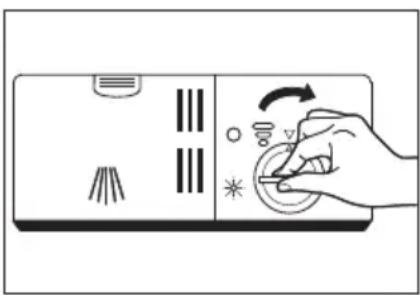
natural_image
Hand operating a remote control panel with icons and a scroll wheel (no text or symbols)Fig. 9 Fig. 10 Fig. 11
Fig. 12
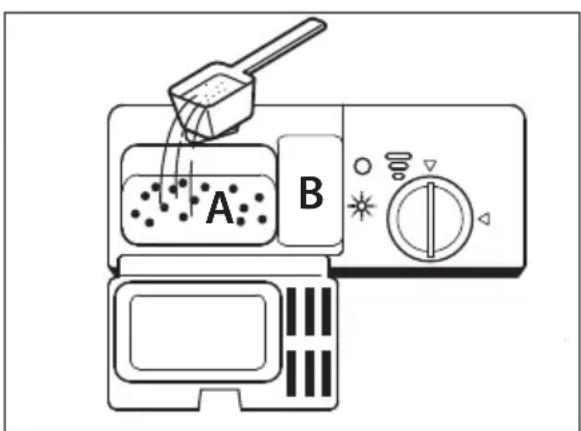
Fig. 13
natural_image
Diagram showing a mechanical or fluid system with an arrow, circular component, and droplet on a surface (no text or symbols)Fig. 14
Fig. 18
natural_image
Illustration of a hand holding a small mechanical component with directional arrows indicating rotation (no text or symbols)Fig. 19
natural_image
Line drawing of hands using a tool to clean or wash a surface, no text or symbols presentFig. 20
natural_image
Diagram showing a hand adjusting a mechanical component with an inset close-up of the mechanism (no text or symbols)Fig. 21
natural_image
Illustration of a hand using a tool to press or install a mechanical component on a flat surface (no text or symbols)Fig. 22
natural_image
Line drawing of hands cleaning a kitchen sink with a faucet and cleaning tool (no text or symbols)Fig. 23
1. Information about this user manual ....239
1.1. Explanation of symbols ......239
FR
- Proper use 24
NL
-
Safety instructions NL
-
Package contents 24
-
Appliance overview ......24
5.1. Front....246
IT
5.2. Rear 247
5.3. Control panel 248
EN
- Installation 219
6.1. Set-up and levelling ......249
6.2. Water connection 25
6.3. Connecting the water outlet....250
6.4. Connecting to power supply 252
7. Preparations for use 253
7.1. Opening the door 253
7.3. Adding salt to the appliance....253
7.4. Setting salt consumption....254
7.5. Adding rinse aid....255
7.6. About dishwasher detergents....256
7.7. Adding detergent
7.8. Arranging the dishes and cutlery....258
8. Starting the wash program 261
8.1. Selecting the program 261
8.2. Switching on the appliance....264
8.3. Changing the program 264
8.4. Opening during operation 265
8.5. Using the timer 265
8.6. Button lock 265
8.7. Automatic door opening....266
8.8. End of the wash program....266
9. Cleaning and maintenance 267
9.1. Filter system 267
9.2. Cleaning the appliance 269
-
Antifreeze protection 271
-
Longer periods without use....271
-
Moving the appliance....272
-
Troubleshooting 272
-
Error messages 276
- Disposal 277
- Technical specifications 278
16.1. Product data sheet .....278 - EU declaration of conformity 278
- Spare parts 279
- Service information 279
- Legal Notice.... 280
1. Information about this user manual

Thank you for choosing our product. We hope you enjoy using this appliance.
Please read the safety instructions and the user manual carefully before using the appliance for the first time. Note the warnings on the appliance and in the user manual.
Always keep the user manual close to hand. If you sell the appliance or give it away, please ensure that you also pass on this user manual. It is an essential component of the product.
1.1. Explanation of symbols
If a block of text is marked with one of the warning symbols listed below, the hazard described in that text must be avoided to prevent the potential consequences described there from occurring.

DANGER!
Warning: risk of fatal injury!

Warning: risk of electric shock!

WARNING!
Warning: risk of possible fatal injury and/or serious irreversible injuries!

Warning: risk of explosive materials!

CAUTION!
Warning: risk of minor and/or moderate injuries!

CE labelling
Products that feature this symbol meet the requirements of the EU directives.

NOTICE!
Follow these instruc- tions to prevent damage to the appliance!

Symbol for alternating current (AC)

More detailed information about using the appliance!

Indoor use
Appliances with this symbol are intended exclusively for use indoors.

Follow the instructions in the user manual!
2. Proper use
This appliance may only be used for washing dishes and cutlery. This appliance is designed for use in private households and similar household applications, such as
- in kitchens for staff in retail outlets, offices and other commercial areas
• on agricultural estates - by customers in hotels, motels and other accommodation facilities
- in bed & breakfast accommodation.
The appliance is not intended for commercial or industrial use.
Please note that we shall not be liable in cases of improper use:
■ Do not modify the appliance without our consent and do not use any auxiliary equipment that we have not approved or supplied.
■ Only use replacement parts or accessories that we have supplied or approved.
■ Comply with all the information in this user manual, especially the safety instructions. Any other use is considered improper and can cause personal injury or property damage.
3. Safety instructions
IMPORTANT SAFETY INSTRUCTIONS – READ CAREFULLY AND KEEP FOR FUTURE REFERENCE!

WARNING!
Risk of injury!
Risk of injury due to improper use.
- Keep the appliance and its accessories out of the reach of children.
This appliance can be used by children of 8 years and older, and by people with reduced physical, sensory or mental capacity, or with a lack of experience and/or knowledge, but only with proper supervision, or if they have been told how to use the appliance safely, and have understood the risks involved if they use it improperly.
■ Children must not be allowed to play with the appliance.
■ Cleaning and user maintenance may not be carried out by children unless they are supervised.
■ Supervise children in the vicinity of the dishwasher at all times. There is a risk of children becoming trapped in the dishwasher.

WARNING!
Risk of injury!
There is a risk of injury. Dishwasher detergents are highly alkaline, therefore dangerous if swallowed and may cause burns.
■ Avoid contact with the eyes and skin.
■ Always keep detergents out of reach of children.
- Keep children away from the appliance door when open, there could be detergent in the appliance.

WARNING!
Risk of injury!
There is a risk of injury due to sharp objects.
■ Knives and other utensils with sharp tips must be placed in the basket or rack with the tip downwards or in a horizontal position.

WARNING!
Risk of electric shock!
There is a risk of electric shock due to live parts.
■ Only connect the appliance to a properly installed and freely accessible socket. The local mains voltage must correspond to the technical specifications for the appliance. The socket must have a fuse rated at min. 10 ampere.
■ Do not use an extension cable.
■ The appliance is switched on or off using the switch. It only ceases to be live when you pull the plug out of the socket. The socket must be easily accessible at all times.
■ Make sure that the power cable is undamaged and does not run underneath the appliance or over any sharp edges.
If the mains cable of this appliance is damaged, it must be replaced by the manufacturer (or relevant customer service) or other suitably qualified person. This is to avoid hazards.
■ Only install the appliance in a protected dry room.

WARNING
Risk of explosion!
Under certain conditions, hydrogen gas may be produced in a hot water system that has not been used for two weeks or more. HYDROGEN GAS IS HIGHLY EXPLOSIVE!
If you have not used the dishwasher for an extended period of time, open all hot water taps and allow the water to flow for several minutes before using the dishwasher. This releases pent up hydrogen gas from the system.
■ As hydrogen gas can ignite, avoid naked flames during this time and do not smoke.
DE

CAUTION!
Risk of scalding!
FR
NL
ES
IT
There is a risk of scalding if hot surfaces are touched. Hot water/hot steam can escape and cause burns if the door is opened while a program is running.
■ The appliance works with high water temperatures. Children may only use the appliance when supervised by adults owing to the high temperatures and resultant water vapour.
- Allow the appliance to cool down before emptying. Do not touch the heating element in the dishwasher during or immediately after use.
■ Only operate the dishwasher once the door has been closed firmly.
- Do not open the dishwasher door fully straight away – instead wait for about 3 seconds until the spray arm stops rotating and then open the door completely.

CAUTION!
Risk of injury!
There is a risk of injury due to improper use of the appliance.
■ Close the appliance door again after a wash cycle has finished, as an open door could pose a trip hazard.
■ Do not place any heavy objects on the door if it is open. The appliance could tip forwards.

NOTICE!
Possible material damage!
Incorrect loading can damage the dishes.
■ Only use dishwasher-safe dishes. Look for markings such as "Dishwasher safe" or "Suitable for dishwashers" when purchasing dishes.
EN
■ Ensure that plastic dishes do not come into contact with the heating element when the appliance is in use.

NOTICE!
Possible material damage!
There is a risk of material or water damage if the appliance is installed or used incorrectly.
■ Do not install the appliance in rooms prone to frost, as considerable damage can result if the pipes burst.
■ The appliance must be installed on a level, stable surface, which can bear the weight of the appliance plus that of the dishes contained in it.
If the appliance is to replace an old appliance, never use old hose sets for the connection. Connect the appliance with the new hose sets provided.
■ Connect the appliance to a drinking water pipe up to 60°C.
■ Only use the accessories supplied or accessories which are described as suitable in this user manual.
■ Only use dishwasher-safe detergent and rinse aid. Do not use soap, laundry detergent or hand wash.
■ The appliance is designed as a free-standing appliance. It must not be built into kitchen units.
■ Use the appliance indoors only.
■ Do not expose the appliance to extreme conditions. Avoid:
– high humidity or wet conditions
– extremely high or low temperatures
- direct sunlight
- naked flames.
■ Do not place the appliance near heat sources.
■ The appliance is designed for up to 6 place settings (dia. 24 cm). Do not overload the appliance.
Chemical additives in furniture coatings may corrode the material of the appliance feet and cause residue on the furniture surface.
If necessary, place the appliance on an underlay that is insensitive to heat and moisture.
4. Package contents

DANGER!
Risk of choking and suffocation!
There is a risk of choking and suffocation due to swallowing or inhaling small parts or plastic wrap.
- Keep the plastic packaging out of the reach of children.
■ Do not let children play with the packaging material.
Remove the product from the packaging and remove all packaging material.
▶ Check the package contents to ensure that all items are included and in perfect condition. If anything is missing or damaged, please contact us within 14 days of purchase.
- Tabletop dishwasher
- Dish rack
- Cutlery basket
– Water supply hose with hose connection (with water stop) - Drain hose
- Funnel to aid when filling up the salt
- Short manual

A test cycle with water was run after production of the appliance. It is normal if there is still some water in the appliance.
5. Appliance overview
5.1. Front
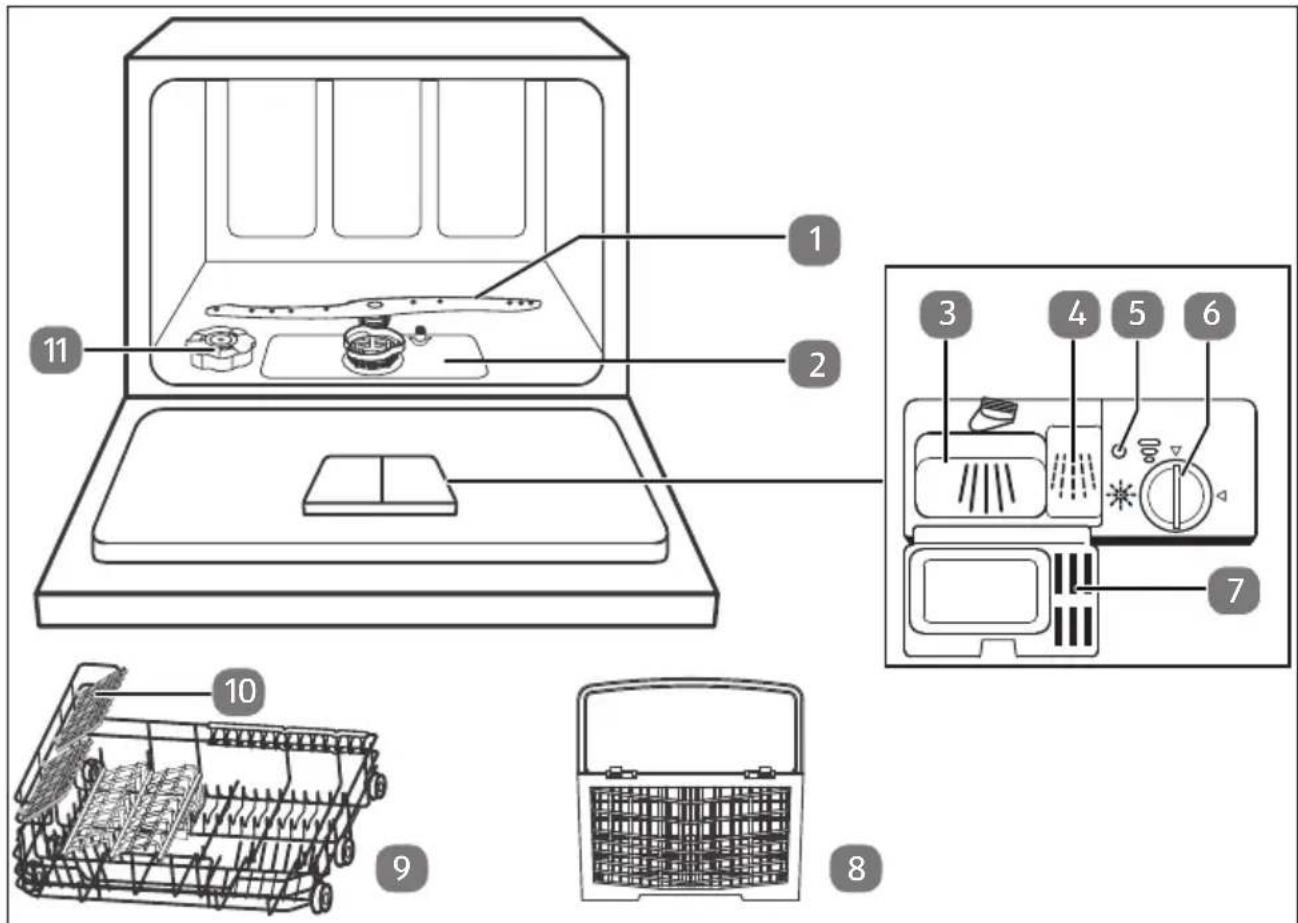
Fig. 1
- Spray arm
- Filter apparatus
- Compartment for detergent, main wash cycle
- Compartment for detergent, pre wash cycle
- Rinse aid indicator
- Set water hardness/rinse aid compartment latch
- Cover flap
- Cutlery basket
- Dish rack
- Attachment for cups
- Salt container
5.2. Rear
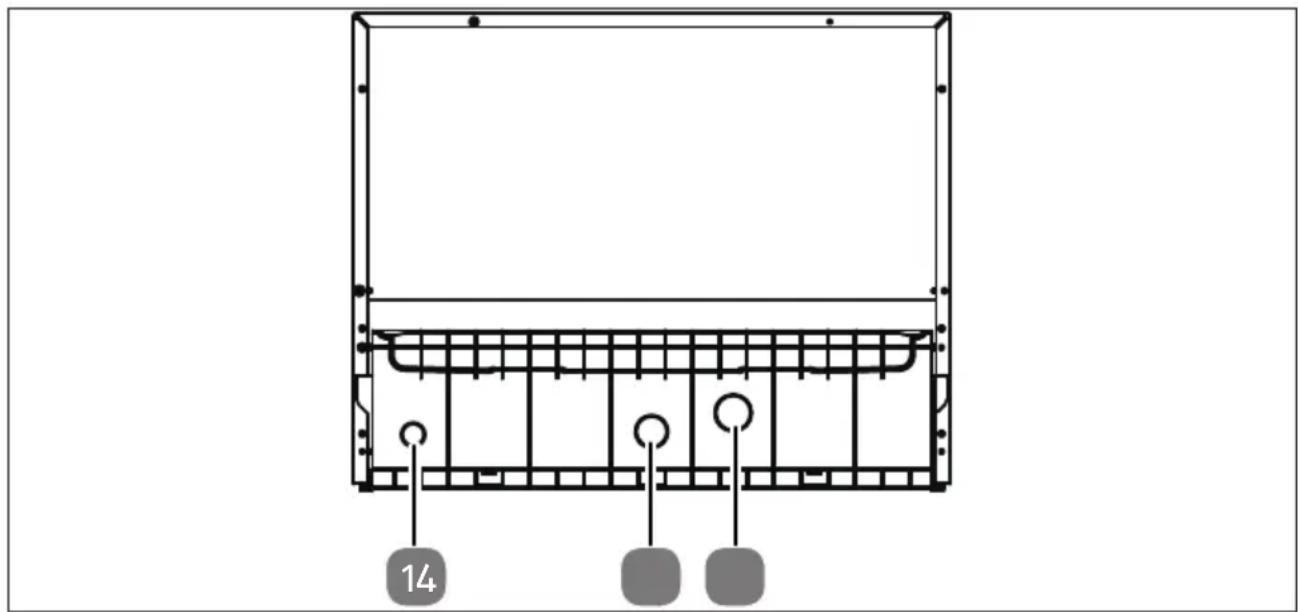
natural_image
Technical line drawing of a structural frame with grid and circular elements, no text or symbols presentFig. 2
- Connection for water outlet
- Connection for water supply
- Mains cable (not shown)
5.3. Control panel
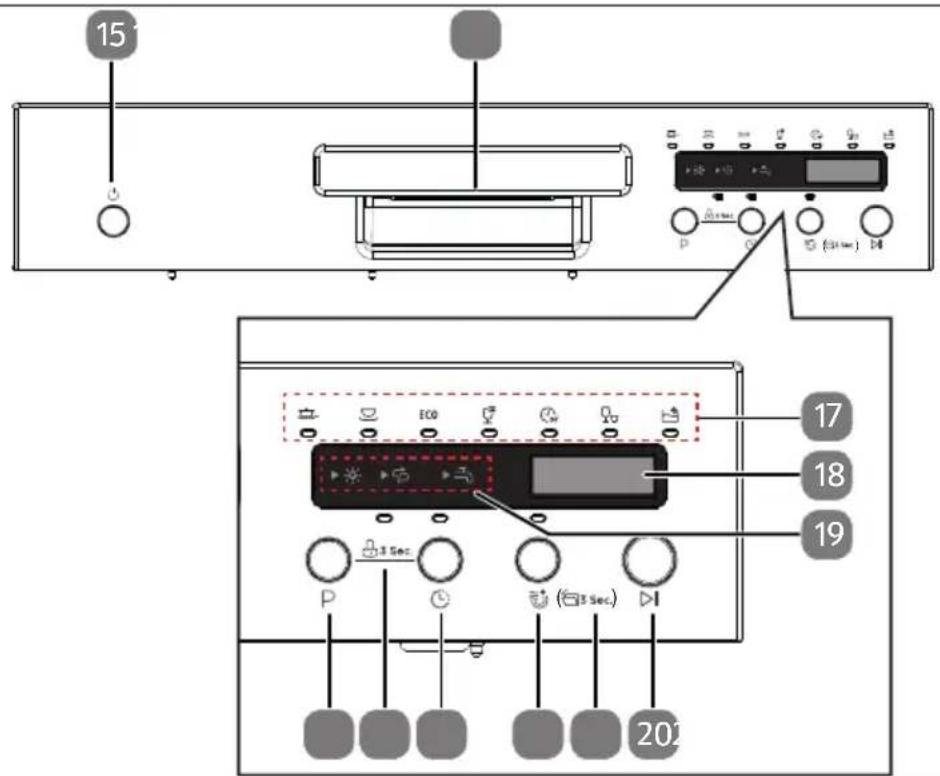
Fig. 3
- ⏻ Switch the appliance on/off
- Recessed grip
-
Program indicator lights:
-
Indicator light for intensive program
- Universal program indicator light
- ECO Indicator light for ECO program
- Indicator light for glass program
- Indicator light for 90 min. program
- 🍴 Indicator light for short program
-
Self-cleaning indicator light
-
Display
-
Warning lights:
-
✦ Rinse aid: Lights up when the rinse aid needs refilling
- Salt: Lights up when the salt container needs refilling
-
Water supply: Lights up when water is not being supplied.
-
▷|Starts or interrupts the wash program
-
Press and hold the button ≈ for approx. 3 seconds: Automatic door opening
- ✉ Extra drying (only for the Intensive, Universal, Eco, Glass and 90 min. programs)
- Ⓛ: Timer button: Time selection
- Press the L/P buttons simultaneously for 2 seconds: Button lock
- P Program selection button
6. Installation

WARNING!
Risk of electric shock and material damage!
There is a risk of electric shock as well as material damage if the appliance is connected improperly.
■ The electricity and water supply should only be connected by a qualified expert.
6.1. Set-up and levelling
▶ Install the appliance on a stable, flat surface close to a drain and water connection:
- on a table/work surface
– in a ventilated cupboard.
▶ Only connect the appliance to a properly installed and freely accessible socket if the water supply and outlet have been connected correctly (see next section).
Note the dimensions of the appliance when installing it (see Fig. 4).
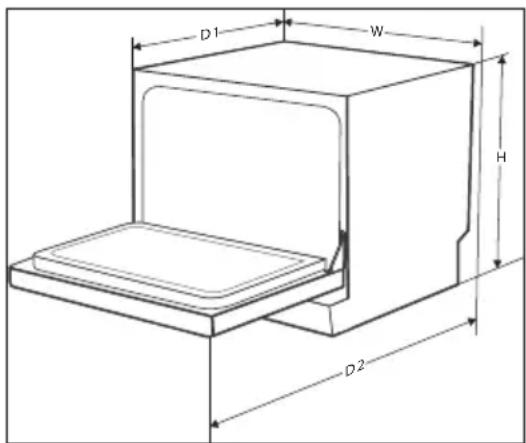
Fig. 4
Height (H) 438 mm
Width (W) 550 mm
Depth (D) (closed) 500 mm
Depth (door open) 812 mm
6.2. Water connection

NOTICE!
Damage to the appliance!
If the appliance is connected improperly, there is a risk of damage to the appliance.
■ The hose must be free of kinks and connected carefully.
If the water pipes are new or have not been used for a long time, run the water to ensure that the water is clear and free of impurities. If this precaution is not taken, there is a risk of the water inlet becoming blocked and the appliance being damaged.

When connecting to the drinking water, ensure that the appliance is connected to a safety device to stop the drinking water becoming contaminated by backflow (in accordance with DIN EN 1717). We recommend hiring a qualified specialist to perform the installation work, including the water and electrical connections, and any repair work.
If the hose supplied does not fit your tap, you can buy adapters from your plumbing supply store.

Connect the water supply hose to the connection for the water supply (13). Screw the hose connection hand tight.
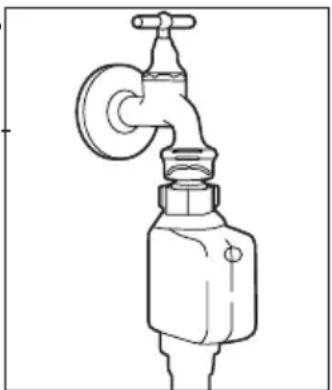
Connect the end of the hose with AquaStop to a cold water tap with a 3/4" thread (see Fig. 5). You can also connect the supply hose to a hot water tap if the water temperature does not exceed 60°C.
This reduces wash time by about 15 minutes.
▶ Screw the hose connection hand tight.
The water hose is designed for a water pressure of approx. 10 bar. We recommend turning off the water supply after use, especially if your house connection does not have a pressure reducer.
natural_image
Line drawing of a faucet with a valve and handle (no text or symbols)Fig. 5
6.3. Connecting the water outlet
You can connect the outlet hose in different ways:
- connect the hose to a special connection on the drain pipe
– feed the hose into a drain pipe
6.3.1. Connecting the hose with the siphon on the sink
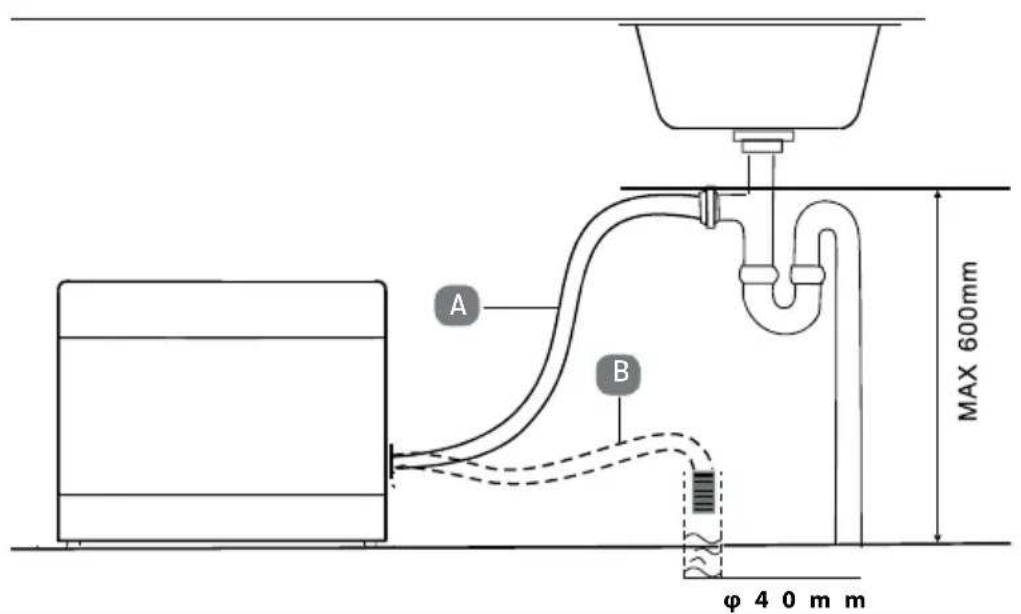
Fig. 6
Connect the outlet hose with the drain pipe siphon (for washing machines) underneath the sink. Ensure that the waste water hose is inclined sufficiently. The appliance should be positioned at least 4 cm above the drain (see Fig. 6, A).

If connecting to a siphon, depending on the siphon design an adapter may be required for the connection to the outlet hose. This is available from specialist retailers.
natural_image
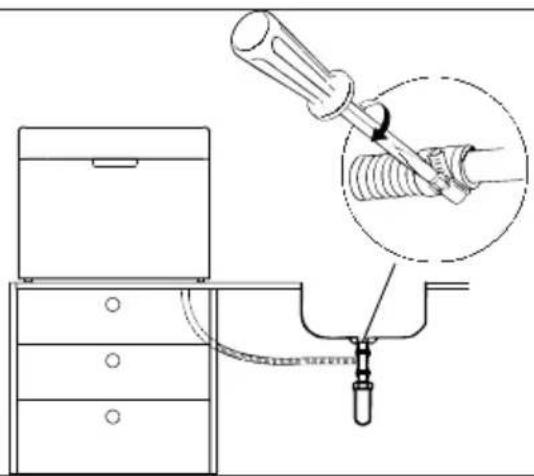
Diagram of a mechanical setup with a bed, drawer, and tool inserted into a pipe (no text or symbols)Fig. 7
▶ Secure the hose end so that the hose cannot slip (see Fig. 7).
6.3.2. Feeding the hose into an drain pipe

NOTICE!
Possible material damage!
Material damage is possible in the event of water leakage.
■ Make sure that the outlet hose is always introduced into an outlet at a height of 60 cm, as otherwise the pump performance would be impaired.
■ Under no circumstances should the hose end be submerged.
■ Ensure that the inlet and outlet hoses are not kinked or crushed.
You can also feed the outlet hose into a drain pipe. Hook the hose into the drain pipe in such a way that it cannot come loose and the water drains directly downwards unhindered (see Fig. 6, B).
The outlet hose can be extended by max. 100 cm. Use an extension with an internal diameter that is at least the diameter of the original hose or a suitable connecting piece.
The hose extension should run along the floor – only the section of hose near the draining point should run upwards.
6.4. Connecting to power supply
▶ Once you have connected the washing machine to the water supply and drain, connect the power plug to a socket.
The socket must be easily accessible so that you can unplug the appliance from the mains quickly if necessary.
7. Preparations for use
7.1. Opening the door
▶ Hold the recessed grip and open the door by pulling it towards you. Open the door out fully.
If the door is opened during operation the wash cycle will automatically be interrupted.
7.2. Closing the door
▶ Push the dish rack fully into the appliance.
▶ Press on the door until you hear it lock into place.
7.3. Adding salt to the appliance
Dishwasher salt (regeneration salt) is used to harden water from a water hardness of 1-2 "medium".
It is advisable to add dishwasher salt.

NOTICE!
Possible material damage!
Using an incorrect salt additive may damage the appliance.
■ Always use dishwasher salt/regeneration salt that is suitable for the dishwasher.
■ Normal household salt is not suitable and can damage the appliance.
flowchart
graph LR
    A["Hand holding a container"] --> B["Add liquid into a container"]
    B --> C["Transfer to a jar with liquid using salt"]
    C --> D["Add salt into a container"]
    D --> E["Final product with salt being added"]
Fig. 8
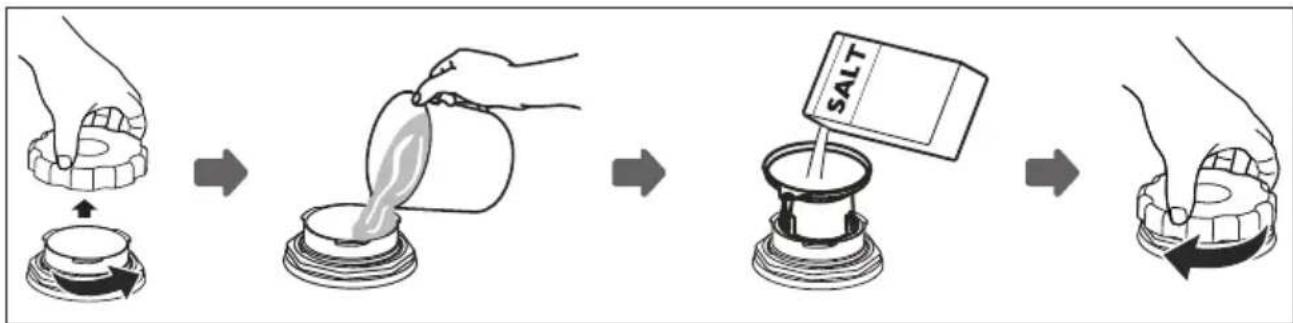
Remove the dish rack and twist the lid off the salt container (11).
▶ Fill the salt container (11) with approx. 700 ml water before the first use.
Insert the funnel into the opening on the salt container and fill it with 1 kg of dishwasher salt. It is normal for water to come out of the salt container (11).
▶ Once the container has been filled, twist the lid clockwise to tighten.
To prevent damage to the appliance, a quick program without dishes or dishwasher detergent should be started immediately after filling with salt (see section "8. Starting the wash program" on page 261).

The salt container (11) needs filling when the salt warning light (19) switches on.
Once the salt consumption has been set according to "7.4. Setting salt consumption" on page 254 and the salt container (11) has been filled, the salt warning light will go out.
7.4. Setting salt consumption
For good dishwashing results, the dishwasher needs low-lime water. Adding regeneration salt helps to achieve the required water hardness with the aid of the softening system. To maintain the function of the softening system, regeneration is performed regularly, resulting in higher water and energy consumption during the process (see table below).
▶ Set the required salt consumption, depending on the local water hardness.
The table below shows what setting is necessary for your local water hardness.
| Water hardness | Salt consumptionPress P | Display | Regeneration at every X program sequence* | |
| dH(degree of German hardness) | mmol/l(millimole per litre) | |||
| 0–5 0–0.9 | Press 1 x H1 | - | ||
| 6–11 1.0–2.0 | Press 2 x H2 | 10 | ||
| 12–17 2.1–3.0 | Press 3 x H3 | 5 | ||
| 18–22 | 3.1–4.0 | Press 4 x (factory setting) | H4 | 3 |
| 23–34 | 4.1–6.1 | Press 5 x H5 | 2 | |
| 35–45 | 6.2–8.0 | Press 6 x | H6 | 1 |
| * When regeneration is carried out during a program, an additional 2 l of water is required, the energy consumption increases by 0.02 kWh and the program is extended by 4 minutes. | ||||
▶ Close the appliance door.
▶ Press the ⏻ button (15) to switch on the appliance and make settings. Wait approx. 60 seconds.
Then press and hold the P button (25) for approx. 5 seconds to set the salt consumption according to the table above.
▶ Press the P button several times until the required water hardness level (H1, H2, H3, H4, H5 or H6) is set. The setting is saved after 5 seconds if no further buttons are pressed.
7.5. Adding rinse aid
Rinse aid prevents water droplets and deposits from forming on the dishes in the last part of the wash program. Rinse aid also ensures that the dishes dry better and faster.
The appliance can operate with liquid rinse aid. The container is located next to the detergent container (3/4) on the inside of the door.

NOTICE!
Risk of damage to the appliance
Using incorrect rinse aid may damage the appliance.
■ Only fill with pure rinse aid for dishwashers. Rinse aids with washing or other additives are not suitable.
natural_image
Hand pressing a button on a device panel with icons and arrows (no text or symbols)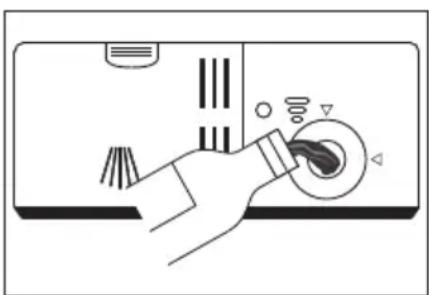
natural_image
Illustration of a hand pressing down on a device with buttons and a knob (no text or symbols)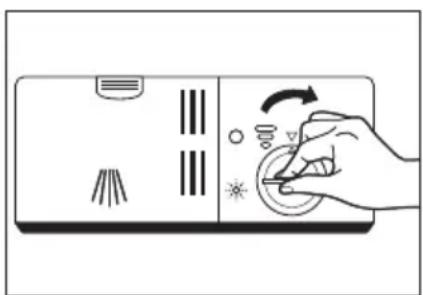
natural_image
Hand pressing down on a device with icons for lighting and adjustment (no text or symbols)Fig. 9 Fig. 10 Fig. 11
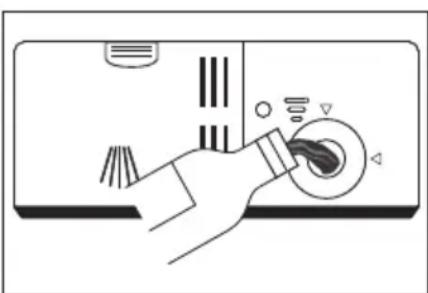
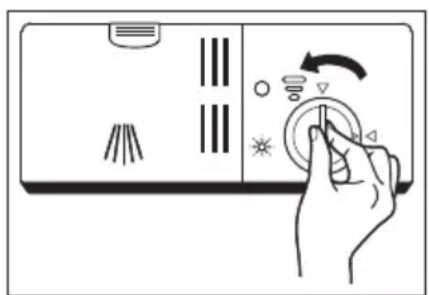
▶ Open the appliance door.
Twist the lid of the rinse aid container (6) anticlockwise to the left arrow and remove the lid (see Fig. 9).
▶ Fill the rinse aid up to the "MAX" mark (see Fig. 10). Make sure the container does not overflow.
▶ Replace the lid with the arrow tip onto the left arrow again and twist it clockwise onto the right arrow (see Fig. 11).
Rinse aid must be replenished if the rinse aid warning light (19) lights up.
To check the level of the rinse aid from time to time, the rinse aid display is located to the left of the rinse aid container opening (5). The display changes, depending on the level of the container:

Full

3/4 full

1/2 full

1/4 full – the container should be refilled.

Empty

Remove surplus rinse aid with a damp cloth after filling and close the lid.
7.5.1. Setting the rinse aid dosing
The dosage control (6) is located inside the rinse aid container.
Remove the lid.
The control has 6 dosing levels.
▶ Begin with level 4 and check whether there are water spots on the washed dishes or are poorly dried. If this is the case, increase the dosing amount by setting the control to a higher level, e.g. with a coin.
If the dishes appear matt or glasses look "dull", reduce the amount of rinse aid. Turn the control to a lower level.
7.6. About dishwasher detergents
7.6.1. Types of detergent
Dishwasher detergent ensures that dirt is loosened and removed from dishes and cutlery. Always use detergents suitable for dishwashers. There are three types of dishwasher detergent:
• Detergents with phosphate and chlorine
• Detergents with phosphate and without chlorine
- Detergents without phosphate and without chlorine.
Dishwasher detergent in powdered form does not normally contain phosphate. As phosphate softens water, this function is not performed without phosphate.
If phosphate-free detergent is used, add extra dishwasher salt (see section "7.3. Adding salt to the appliance" on page 253).
▶ If using phosphate-free detergent, increase the dose of detergent to avoid water spots on the dishes and glasses.
Detergents with chlorine will bleach the dishes slightly. Stains and crusts are removed less easily without chlorine.
In this case, select a wash program with a higher temperature.
7.6.2. Detergent concentrates
Concentrates come in two types, depending on their chemical composition:
- Conventional, alkaline detergents with caustic components
- Detergents with low alkali content and natural enzymes.
A “normal” wash program in conjunction with a detergent concentrate reduces water pollution and is better for the dishes. These wash programs are designed to loosen the dirt optimally and can achieve the same effect with cleaner concentrate as an “intensive” program.
7.6.3. Detergent tabs
The various components of cleaner tabs (e.g. 3-in-1 tabs, rinse aid, salt) dissolve gradually in sequence. The combination of several components does away with the need for a separate rinse aid and/or salt.
Larger cleaner tabs may not dissolve fully in certain circumstances. Make sure that the tabs are suitable for the selected wash program and follow the manufacturer's instructions.
7.7. Adding detergent

DANGER!
Risk of chemical burns!
Detergents are chemicals containing caustic and abrasive ingredients.
- Keep detergent out of reach of children!
■ Do not fill the detergent compartment (3) with detergent until just before running the wash cycle.
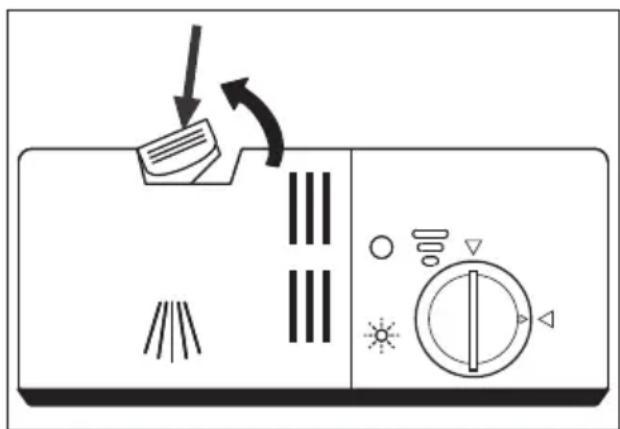
Fig. 12
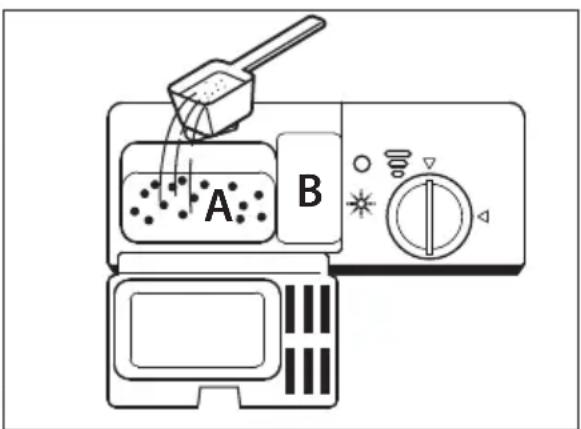
Fig. 13
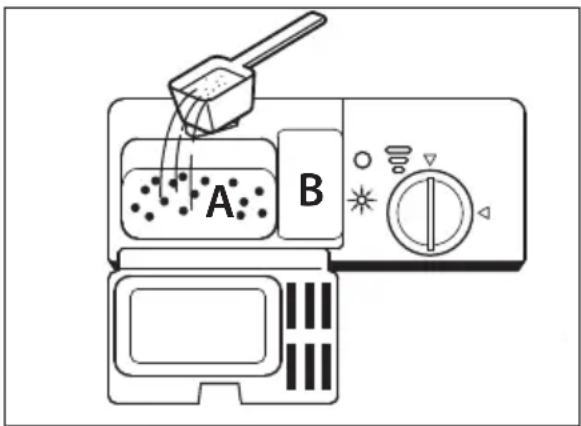
Dishwasher detergent must be added before each wash cycle. Only add as much detergent as indicated in the table in section "8. Starting the wash program" on page 261.
The appliance normally needs less detergent than a conventional dishwasher. One tablespoon of detergent is usually enough to wash a complete load of dishes. Depending on the degree of dirt, more can also be required.
Always add the detergent immediately before the wash cycle so that dishwasher powder does not become moist and dissolves properly later.
▶ Open the appliance door.
If the lid of the detergent container (3/4) is closed, push the unlocking lever to the rear (Fig. 12). The lid (7) will open.
▶ Fill the left dispenser (3) with dishwasher powder or a detergent tab (see Fig. 13). During the pre wash cycle: If using dishwasher powder, you can also fill the right dispenser (4) with a little powder.
▶ Close the lid of the detergent compartment. The lid must lock into place and must not spring open again.
7.8. Arranging the dishes and cutlery

WARNING!
Risk of injury!
There is a risk of injury due to sharp objects.
■ Knives and other utensils with sharp tips must be placed in the rack or basket with the tip in a horizontal position.
7.8.1. General information and tips on energy saving
Only use dishwasher-safe dishes and cutlery. Look for markings such as "Dish-washer safe" or "Suitable for dishwashers" when purchasing dishes.
▶ Use mild detergent that is also suitable for sensitive dishes.
Remove larger food residues from the crockery and soak dried food residues (such as dried egg or spinach). However, it is not necessary to rinse the dishes under running water before the wash cycle. Pre-rinsing dishes increases water and energy consumption and is not recommended.
To prevent damage to glass or cutlery, do not remove these from the dishwasher directly after the wash program has finished. Allow the dishes to cool down slightly first.
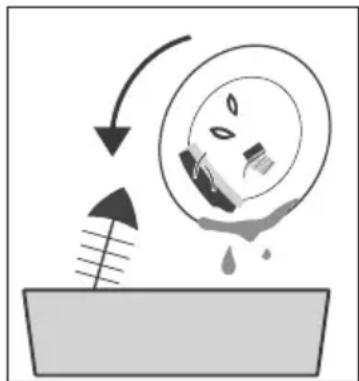
natural_image
Diagram showing a mechanical or fluid system with an arrow, a circular component, and a droplet on a surface (no text or symbols)Fig. 14
▶ Arrange hollow objects such as cups, glasses, pans etc. with the opening downwards, so that water cannot collect inside.
Dishes must not be put inside each other or cover another dish.
Place large dishes on the dish rack (6).
▶ To save energy and water it is best to run a cycle when your dishwasher is full.
To achieve good washing results, avoid overfilling the dishwasher.
▶ Washing dishes in a dishwasher usually uses less energy and water than washing them by hand, provided the dishwasher is used according to the user manual.
▶ Select a program that is suitable for the type of dishes and the degree of soiling.
▶ Reduce the amount of detergent if the dish racks are only half full.
7.8.2. Unsuitable or partially suitable dishes
Unsuitable dishes
• Dishes with elements made from wood, horn, mother-of-pearl
- Plastic items not resistant to heat
- Bonded dishes
- Pewter
- Crystal glass
• Non-stainless steel items
Partially suitable dishes
• Some types of glass can become dull after many wash cycles
• Silver and aluminium parts can lose colour
- Glazed designs can become pale after many wash cycles
7.8.3. Dish loading example
▶ Load the dish rack (9) as shown in the example (Fig. 15/16). The arrow shows the slide-in direction. Dishes should be placed in the positions provided to obtain the best washing result.
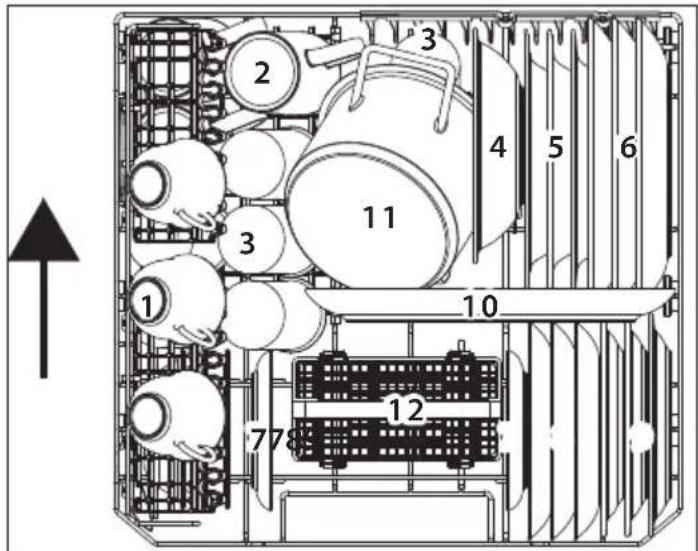
Fig. 15: with cup support folded out
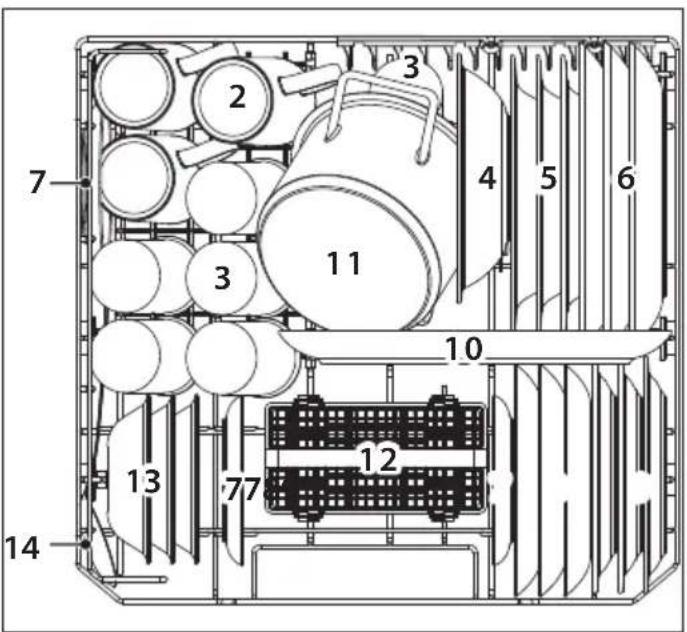
Fig. 16: without cup tray
1) cups 10) oval plate
2) mugs 11) small pan
3) glasses 12) cutlery basket
4) melamine bowl
5) soup bowls
6) dinner plates
7) saucers
8) dessert plate
9) Melamine dessert plates
13) dessert bowls
14) serving spoon
7.8.4. Cutlery loading exam ple
Place cutlery in the cutlery basket (8).
Place long and sharp knives horizontally in the upper cup holder (10) to avoid injury.
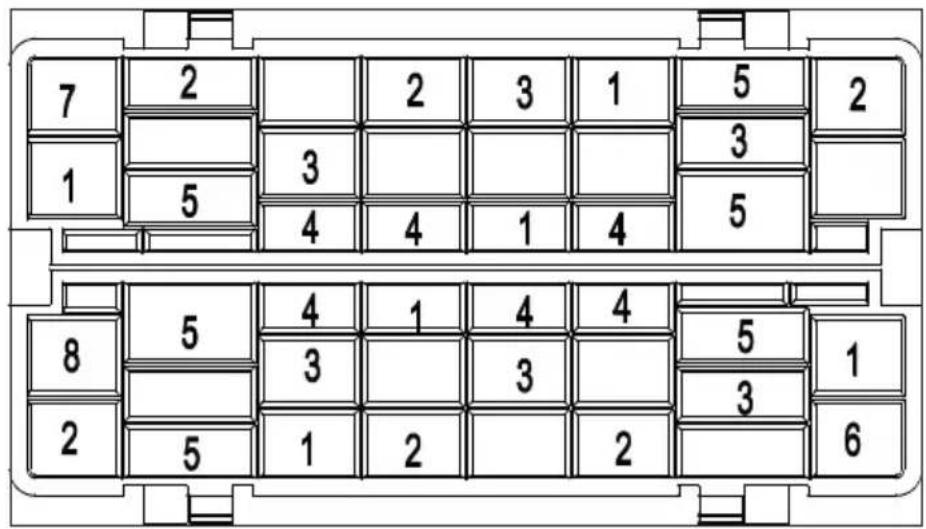
Fig. 17
- Forks
- Soup spoons
- Dessert spoons
- Teaspoons
- Knives
- Serving spoons
- Ladles
- Serving forks
8. Starting the wash program
8.1.Selectingtheprogram
The following table shows the various wash programs and their applications.
▶ Set an energy saving or quick program if possible, e.g. the "ECO" or "Quick" program. These programs are marked with *.
| Program | Suitable for Sequence | Detergent (left/right dies-penser) | Runtime** | Energy consumption [kWh] | Water consumed [litres] | Rinse aid |
| Intensive | ||||||
| Universal | heavy ittems such as pots, pans, caserole dishes and dishes with dried-on dirt | Pre-wash (50°C)Wash (70°C)RinseRinse (60°C) Dry | 10/4 g1 tab | 135 0.790 9.6 Yes | ||
| normal ittems such as small pots, plates, glasses andlighty solled pans | Pre-washWash (60°C)RinseRinse (60°C) Dry | 10/4 g1 tab | 110 0.580 7.7 Yes | |||
| lighty solled items such asplates, glasses, bowls andlighty solled pans | Pre-washWash (45°C)Rinse (55°C) Dry | 10/4 g1 tab | 215 0.494 6.5 Yes | |||
| lighty solled items such as glasses, porcelain | Wash (45°C)RinseRinse (50°C) Dry | -1/4 g1 tab | 70 0.400 5.8 Yes |
| Program | Suitable for Sequence | Detergent (Left/right dispenser) | Runtime** | Energy consumption [kWh] | Water consumption [litres] | Rinse aid | |
| 90 minutes[IMAGE] | lightly soiled dishes and glasses | Wash (65 °C)RinseRinseRinse (60 °CDry | -/14 g1 tab | ap-prox. 90 | 0.590 6.6 | Yes | |
| Quick*[IMAGE] | lightly soiled items that do not have to be dried | Wash(40 °C)RinseRinse | -/12 g1 tab | 30 0.244 | 5.8 No | ||
| Self-cleaning[IMAGE] | Cleans the interior without a load | Cleaning (70 °C)RinseRinse (55 °CDry | -/14 g1 tab | 70 0.520 | 5.6 Yes |
* The ECO program is suitable for cleaning normally soiled dishes. For this application, it is the most efficient program in terms of its energy and water consumption, and therefore complies with the EU Ecodesign Directive.
Consumption figures and program duration are only approximate values, except for the ECO program.
** Runtime calculated at a water temperature of 15 °C from the water inlet
8.2. Switching on the appliance
To start the appliance, proceed as follows:
▶ Add the detergent, rinse aid and possibly salt, depending on the desired program.
Insert the dish rack and cutlery basket (8/9) (see section "7.8. Arranging the dishes and cutlery" on page 258) and push the dish rack into the dishwasher.
Plug the mains plug (14) into the socket. Turn on the water supply fully.
▶ Press the button (15) to switch on the appliance.
An acoustic signal will sound.
▶ Press the program selection button P (25) several times to select the desired program.
The control light for the selected program lights up.
▶ Press the || button (20) to start the program.
An acoustic signal will sound.

If you press the button (20) while the program is running, the program is interrupted. The appliance sounds an acoustic signal every minute.
▶ Press the || button (20) again to continue the program. The program continues after approx. 5-10 seconds.
8.3. Changing the program
You can change the program if the appliance has been operating for a short time. If the machine has already been running for a longer time, detergent and possibly rinse aid will have to be replenished.
▶ Press the || button (20) to interrupt the program.
▶ Press the P (25) button for approx. 3 seconds until the program changes.
▶ Use the program selection button P to select another program.
▶ Press the || button again to start the program.
8.4. Opening during operation
DE

CAUTION!
Risk of burning!
FR
NL
ES
Hot water/hot steam can escape and cause burns if the door is opened while a program is running.
- Do not open the dishwasher door fully straight away – instead wait for about 3 seconds until the spray arm (1) stops rotating and then open the door completely.
The door can be opened while a program is running, allowing more dishes to be loaded or others to be removed. This is only efficient if the program has only been running for a short time, as otherwise the newly loaded dishes might no longer be fully cleaned.
▶ While the program is running, press the || button (20). Wait about 3 seconds until the spray arm (1) stops rotating and then open the door.
▶ Load the additional dishes and/or remove items.
- Close the door again fully. Press the || button (20) again to continue the program. The appliance continues after approx. 5–10 seconds.
8.5. Using the timer
You can start the wash program at a later time. Select between 1 and 24 hours for the start delay.
▶ Switch on the appliance by pressing (15).
▶ Select a wash program as described above.
▶ Use the button (23) to select the desired delay, after which the appliance is to start the wash program. The display indicates the selected delay.
▶ Press the || button (20) to confirm the setting.
The appliance starts automatically after the set delay time.
8.6. Button lock
▶ Press the ⏻ and P buttons simultaneously for 3 seconds to activate the button lock.
The button ⏻ (15) can still be operated.
▶ Press the: and P buttons again simultaneously for 2 seconds to switch off the button lock.
8.7. Automatic door opening
▶ Press the 🕒 Extra drying button for approx. 3 seconds so that the door opens when the dishwashing process is complete to speed up dish drying.
This function is not available for the quick program.
8.8. End of the wash program

WARNING!
Risk of scalding!
Hot water/hot steam can escape and cause burns if the door is opened while a program is running.
- Do not fully open the door immediately – wait instead until the appliance has cooled down.

CAUTION!
Risk of tripping!
The opened door constitutes a trip hazard.
■ Close the appliance door again after a wash cycle has finished.
Once the program has ended, acoustic signals sound and End appears on the display.
▶ Switch off the appliance using the button (15).
The appliance will switch off automatically some time after the end of the wash cycle.
▶ Open the door slightly or use the Automatic door opening function to allow the steam to escape.
▶ Wait a short time before removing the cutlery/dishes so that the dishes dry more quickly and the heat can escape.
Remove the dishes and cutlery. It is normal for the appliance to be damp inside.
9. Cleaning and maintenance

WARNING!
Risk of electric shock from live parts
■ Always pull out the mains plug each time before cleaning or maintenance.
9.1. Filter system
The filter system (2) prevents larger food residues and small items from blocking the water outlet and damaging the appliance.
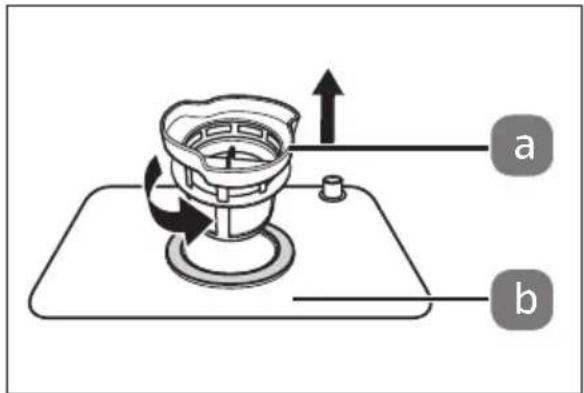
Fig. 18
The filter consists of 2 parts (see Fig. 18):
(a) coarse filter, which retains large parts such as glass
(b) main filter.

NOTICE!
Risk of damage to the appliance
Operation without the filter will damage the appliance.
■ Never start the appliance without the filter system installed.
■ An incorrectly inserted filter can damage the appliance or dishes.
9.1.1. Cleaning the fi Iter
To ensure that the appliance continues to wash effectively, the filter must be cleaned at regular intervals.
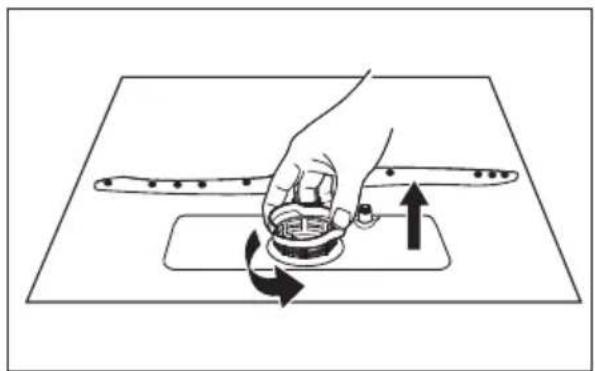
natural_image
Illustration of a hand pressing down on a mechanical component with directional arrows indicating motion (no text or symbols)Fig. 19
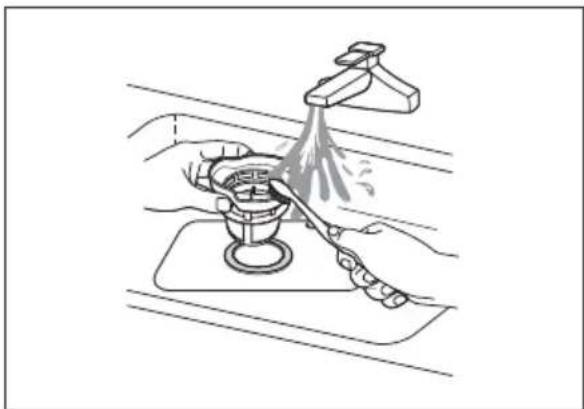
▶ Turn the coarse filter (a) anti-clockwise and pull it out of the main filter (see Fig. 19).
▶ Remove the main filter (b).
natural_image
Illustration of hands using a tool to clean or wash a water bottle on a kitchen sink (no text or symbols)Fig. 20
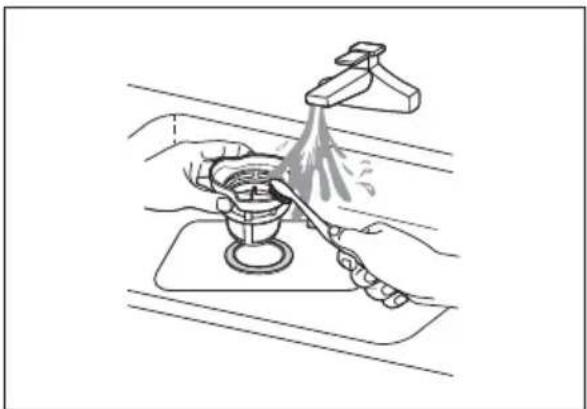
- Rinse the filters under running water and clean them thoroughly with a brush (see Fig. 20). After each wash cycle, check whether larger objects are blocking the filter and remove them immediately.
natural_image
Diagram showing a hand operating a mechanical component with an inset close-up of the mechanism (no text or symbols)Fig. 21
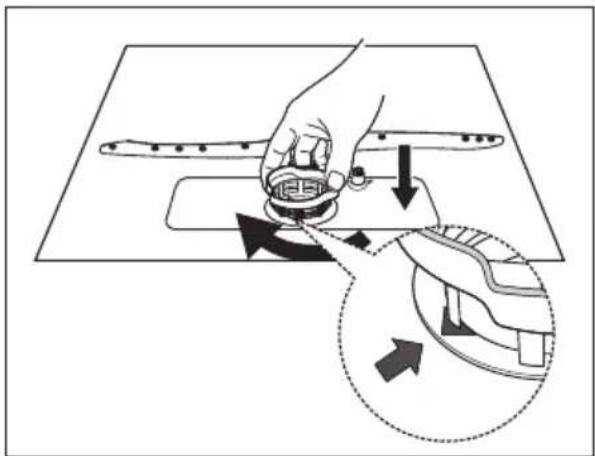
▶ Proceed in the reverse order to refit the filter system. (see Fig. 21)
Insert the coarse filter (a) with the arrow pointing out of the appliance and turn it clockwise. Ensure that the arrow markings are facing each other after the coarse filter is fitted.
9.2. Cleaning the appliance

E!
Possibility of damage to the appliance!
Damage to the appliance is possible if incorrect detergent is used.
DE
FR
NL
ES
IT
EN
■ Do not use harsh detergents or scouring agents or sharp objects to clean the appliance. Abrasive materials such as steel wool and sponges with a scrubbing side are not suitable either.
■ Clean the outside of the appliance with mild detergent using a damp cloth.

NOTICE!
Possibility of damage to the appliance!
Risk of damage to the appliance due to moisture in the appliance.
■ Clean the appliance door with a slightly damp cloth.
■ Make sure that no moisture penetrates into the electronics of the door lock so as not to damage the appliance.
■ To protect the control panel, make sure that no moisture comes into contact with the electronics.
■ Do not use spray cleaner.

NOTICE!
Possible material damage
Material damage is possible in the event of water leakage.
■ Turn the water supply off before cleaning.
natural_image
Illustration of a hand using a tool to adjust or install a mechanical component on a flat surface (no text or symbols)Fig. 22
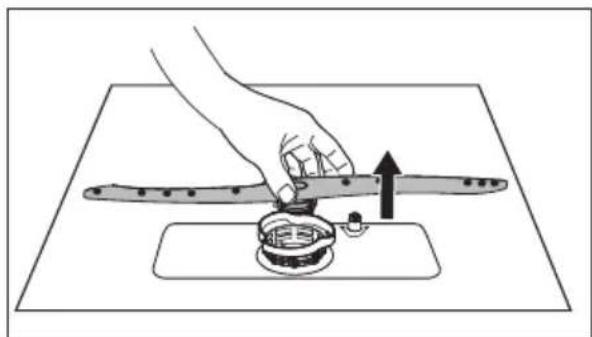
Remove the spray arm (1) inside the appliance to clean it. To do this, lift it slightly and remove it (see Fig. 22).
natural_image
Line drawing of a kitchen sink with a hand cleaning the surface and a faucet pouring liquid (no text or symbols)Fig. 23
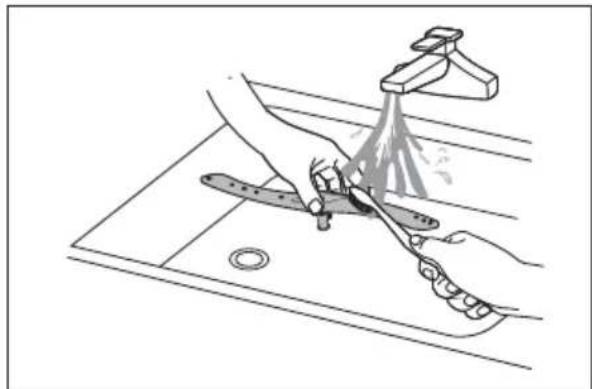
Clean the spray arm (1) under running water and check that the openings are not blocked (see Fig. 23). Reinstall it again afterwards.
If there are grease deposits, run the intensive program without a load to clean the interior.
▶ To remove stains or soiling from the interior surfaces, use water and a cloth dampened with a little vinegar or detergent suitable for a dishwasher.
9.2.1. Cleaning the water inlet fi Iter
A filter is located inside the water supply connection (13).
▶ Unscrew the hose nut with sealing ring.
Remove the filter using pliers and clean it. Reinstall the filter after cleaning.
▶ Fasten the hose on the water supply connection (13) using the hose nut. Tighten the hose nut. Make sure that the sealing rings fit correctly and that the screw connection is not tilted.
The AquaStop connection also contains a filter.
Remove the hose connection from the cold water tap.
Remove the sealing ring with strainer e.g. using a small Philips screwdriver.
▶ Clean the strainer under running water. Use a little limescale remover in case of heavy calcification.
Insert the sealing ring and strainer with curvature upwards into the hose connection.
▶ Screw the hose connection hand tight on the cold water tap.
10. Antifreeze protection
When operating in cold environments, e.g. during the winter months, follow these instructions after each wash cycle to prevent freezing:
▶ Pull the mains plug out of the socket.
▶ Turn the water supply off and disconnect the water hose from the water inlet valve.
▶ Allow the water to drain out of the hose and valve (e.g. into a bucket).
▶ Reconnect the hose to the water inlet valve.
Remove the filter system on the base of the appliance and collect the remaining water from the appliance base using a rag or sponge.

Contact customer services or a similarly qualified person if the appliance does not function due to freezing.
11. Longer periods without use

WARNING
Risk of explosion!
Under certain conditions, hydrogen gas may be produced in a hot water system that has not been used for two weeks or more. HYDROGEN GAS IS HIGHLY EXPLOSIVE!
If you have not used the dishwasher for an extended period of time, open all hot water taps and allow the water to flow for several minutes before using the dishwasher. This releases pent up hydrogen gas from the system.
As hydrogen gas can ignite, avoid naked flames during this time and do not smoke.
▶ Perform a wash cycle without load.
▶ Pull the mains plug out of the socket.
▶ Turn off the water supply.
Leave the appliance door open slightly to prevent potential odours from forming and preserve the seal.
12. Moving the appliance
Always transport the appliance vertically, wherever possible. If necessary, it is also possible to transport the appliance on its back.
13. Troubleshooting
| Technical faults | ||
| Fault Possible cause Solution | ||
| The appliance does not start. | Fuse defective or circuit breaker tripped | ▸ Change the fuse or switch on the circuit breaker again. Make sure that the electric circuit is protected with at least 10 am-pere. |
| ▸ Switch the appliance on. | ||
| Appliance door is not fully closed | ▸ Close the door correctly. | |
| Water was not pumped out of the dish-washer. | Drain hose is kinked ▶ Route the hose so that it is not kinked. | |
| Filter blocked ▶ Clean the filter regularly. | ||
| Siphon is blocked ▶ Check the siphon. Make sure the outlet hose is properly in-stalled. | ||
| General faults | ||
| Fault Possible cause Solution | ||
| Foam in the appliance | Incorrect detergent | ► Only use detergent that is suitable for household dishwashers.► If foam has formed, open the appliance and wait a while until the foam has disappeared. Start the “Quick” wash cycle without detergent to remove detergent residues. |
| Spilt rinse aid ► Remove | the rinse aid immediately. | |
| Blotchy appli-ance accesso-ries | Detergent with colour additives was used. | ► Only use detergent without col our additives. |
| White deposits inside the ap- pliance | Mains water hard/high in calcium carbonate | ► Clean the appliance with a little cleaner for dishwashers using a damp sponge. Wear rubber gloves during cleaning. Always use only cleaners for household dishwashers. |
| Rust marks on the cutlery | The cutlery in question is not stainless. | ► Use only dishwasher-safe cut- lery. |
| No program was started after adding salt. | ► Always start the Quick program without dishes after adding salt. | |
| Noise | ||
| Fault Possible cause Solution | ||
| Knocking/rat-tling noise in the appliance | The spray arm (1) is knocking against the dishes and/or against an item in the dish rack or one of the dishes is loose in the rack. | ▸ Stop the program and rear-range the dishes. |
| Unsatisfactory wash result | ||
| Fault Possible cause Solution | ||
| The dishes are not clean. | The dishes were not ar- ranged correctly. | ▸ Arrange the dishes correctly (see section “7.8. Arranging the dishes and cutlery” on page 258). |
| The selected program was not suitable. | ▸ Select a more intensive pro- gram (see section “8.1. Selecting the program” on page 261). | |
| Not enough detergent was used. | ▸ Use more or another detergent. | |
| The dishes are not clean. | Individual dishes are blocking the path of the spray arm. | ▸ Rearrange the dishes so that the spray arm (1) can move freely. |
| The filter is not inserted or is fitted incorrectly. | ▸ Clean and/or insert the fil- ter correctly. Also clean the spray arm (1) (see section “9.2. Cleaning the appliance” on page 269). | |
| Glasses are spotty. | Combination of soft water and too much de- tergent. | ▸ Use less detergent if you have soft water and use the shortest program to wash glasses cor- rectly. |
| Black or grey spots on the dishes. | Aluminium cutlery/ac- cessories have come into contact with the plates. | ▸ Use a mild detergent to remove the spots. |
| The detergent compartment (3) still con- tains deter- gent after the wash cycle. | The lid of the deter- gent compartment was blocked by dishes. | ▸ Rearrange the dishes. |
| Unsatisfactory drying results | ||
| Fault Possible cause Solution | ||
| The dishes are not dried. | The dishes were not ar- ranged correctly. | ▶ Arrange the dishes cor- rectly (see section “7.8. Arranging the dishes and cutlery” on page 258). |
| Not enough rinse aid. ▶ | Use more rinse aid/ replenish the rinse aid compartment. | |
| The dishes are not dried. | The dishes were re- moved too soon. | ▶ Do not remove the dish es immediately after the program is finished. Open the door slightly so that the steam can escape. Remove the dishes while they are still slightly warm. |
| Incorrect program se-lected. | ▶ The temperature is low er in programs with a short runtime. Select a program with a longer runtime and higher temperature. | |
14. Error messages
If there is a fault, the dishwasher displays an error code. The following table shows possible error codes and their causes.
| Error message | Possible cause Solution | |
| E1 Water | cannot be pumped in. | ▸ Open the water inlet or increase the water pressure if the water inlet is not fully open. |
| E3 The | required water temperature is not reached. | ▸ Heating element malfunction. Contact our Service Centre. |
| E4 The | appliance over-flows/leaks. | ▸ Make sure that the door is closed correctly and that the water inlet and outlet are connected correctly.▸ Turn off the water supply.▸ If water is on the appliance base due to overfilling, remove the water before restarting the dishwasher. |
| Ed Communication fault between main board and display board. | ▸ Interrupted circuit or interrupted wiring for communication. Contact our Service Centre. | |
 | Rinse aid is empty ▶ Replenish the rinse aid | |
 | Salt container (11) is empty | ▸ Replenish the salt container (11) |
 | Water supply not ensured | ▸ Check water supply, see above. |
15. Disposal


PACKAGING
Your appliance has been packaged to protect it from damage in transit. The packaging is made of materials that can be recycled in an environmentally friendly manner.

Packaging material label regarding waste separation includes abbreviations (a) and code number (b) with the following meaning:
a: additional material details
b: 1–7: plastics/20–22: paper and cardboard/80–98: composite materials (France only)

The “Triman” symbol tells the consumer that the product can be recycled, is covered by an extended system of manufacturer’s responsibility and must be sorted by material type in France.
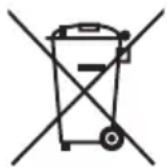
APPLIANCE
All old appliances marked with the symbol shown must not be disposed of in normal household waste.
In accordance with Directive 2012/19/EU, the appliance must be properly disposed of at the end of its service life.
This involves separating the materials in the appliances for the purpose of recycling and minimising the environmental impact.
Take old appliances to an electrical scrap collection point or a recycling centre.
Contact your local waste disposal company or your local authority for more information on this subject.
16. Technical specifications
Power supply 220-240 V, 50 Hz
Power consumption 1170–1380 W
Capacity up to 6 place settings (dia. 24 cm)
Inlet water pressure 0.04–1.0 MPa (0.4–10 bar)
Hot water supply max. 60°C
Protection class I
Net weight 21.4 kg


www.tuv.com ID 1111235845
16.1. Product data sheet

Scan the QR Code shown to download the product data sheet or contact the service department at www.medion.com/contact to obtain a printed copy of the product data sheet. You will also find the QR code on the energy label.
17. EU declaration of conformity

MEDION AG hereby declares that the product conforms to the following European requirements:
• EMC Directive 2014/30/EU
• Low Voltage Directive 2014/35/EU
• Ecodesign Directive 2009/125/EC
• RoHS Directive 2011/65/EU
• Regulation (EU) 2019/2022
• Regulation (EU) 2019/2017
18. Spare parts
Please visit our MEDION Service Shop at https://www.medion.com/medionservice-shop to order any spare parts you need.
You will be able to find out all the details about your specific product while you're there.
The minimum period for the supply of electronic components for your dishwasher is 7 years. For the supply of spare parts such as seals, spray arms, drain filters, internal shelves and plastic peripherals such as baskets and lids, the minimum period for your dishwasher is 10 years.
19. Service information
Please contact our Customer Service team if your device ever stops working the way you want or expect it to. There are several ways for you to contact us:
- In our Service-Community, you can meet other users, as well as our staff, and you can exchange your experiences and pass on your knowledge there. You will find our Service-Community at community.medion.com.
• Alternatively, use our contact form at www.medion.com/contact. - You can also contact our Service team via our hotline or by post.
| Opening times Hotline number UK | |
| Mon – Fri: 08.00 – 20.00Sat – Sun: 10.00 – 16.00 | 3 0333 3213106 |
| Service address | |
| MEDION Electronics Ltd.120 Faraday Park, Faraday Road, DorcanSwindon SN3 5JF, WiltshireUnited Kingdom | |

You can download this and many other sets of operating instructions from our service portal at www.medionservice.com.
We have stopped providing printed copies of our warranty terms and conditions as part of our commitment to sustainability, but you can access the warranty terms and conditions on our service portal.
You can also scan the QR code on the side of the screen, to download the operating instructions onto your mobile device from the service portal.
20. Legal Notice
Copyright © 2024
Date: 2. April 2024
All rights reserved.
These operating instructions are protected by copyright.
Mechanical, electronic and any other forms of reproduction are prohibited without the written permission of the manufacturer.
Copyright is owned by the company:
MEDION AG
Am Zehnthof 77
45307 Essen
Germany
Please note that you cannot use the address above for returns. Please always contact our Customer Service team first.
- Inhaltsverzeichnis
- Information about this user manual ....239
- Preparations for use 253
- Starting the wash program 261
- Cleaning and maintenance 267
- Information about this user manual
- Explanation of symbols
- DANGER!
- WARNING!
- CAUTION!
- CE labelling
- NOTICE!
- Indoor use
- Proper use
- Safety instructions
- Risk of injury!
- Risk of electric shock!
- WARNING
- Risk of explosion!
- Risk of scalding!
- Possible material damage!
- Package contents
- Risk of choking and suffocation!
- Appliance overview
- Front
- Rear
- Control panel
- Installation
- Risk of electric shock and material damage!
- Set-up and levelling
- Water connection
- Damage to the appliance!
- Connecting the water outlet
- Connecting the hose with the siphon on the sink
- Feeding the hose into an drain pipe
- Connecting to power supply
- Preparations for use
- Opening the door
- Closing the door
- Adding salt to the appliance
- Setting salt consumption
- Adding rinse aid
- Risk of damage to the appliance
- Setting the rinse aid dosing
- About dishwasher detergents
- Types of detergent
- Detergent concentrates
- Detergent tabs
- Adding detergent
- Risk of chemical burns!
- Arranging the dishes and cutlery
- General information and tips on energy saving
- Unsuitable or partially suitable dishes
- Unsuitable dishes
- Partially suitable dishes
- Dish loading example
- Cutlery loading exam ple
- Starting the wash program
- 8.1.Selectingtheprogram
- Switching on the appliance
- Changing the program
- Opening during operation
- Risk of burning!
- Using the timer
- Button lock
- Automatic door opening
- End of the wash program
- Risk of tripping!
- Cleaning and maintenance
- Risk of electric shock from live parts
- Filter system
- Cleaning the fi Iter
- Cleaning the appliance
- E!
- Possibility of damage to the appliance!
- Possible material damage
- Cleaning the water inlet fi Iter
- Antifreeze protection
- Longer periods without use
- Moving the appliance
- Troubleshooting
- Error messages
- Disposal
- PACKAGING
- APPLIANCE
- Technical specifications
- Product data sheet
- EU declaration of conformity
- Spare parts
- Service information
- Legal Notice
- MEDION AG
Brand : MEDION
Model : MD 37496
Category : Dishwasher