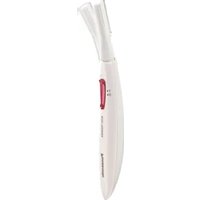
ES-WR50 - Shaver PANASONIC - Free user manual and instructions
Find the device manual for free ES-WR50 PANASONIC in PDF.


| Product type | Shaver (compact body trimmer) |
| Brand | Panasonic |
| Model | ES-WR50 |
| Power source | 1 LR03 (AAA) alkaline battery, sold separately |
| Estimated battery life | About 1 month (use 2 times/week, 5 min) |
| Usage | Dry use only (do not immerse in water) |
| Use areas | Underarms, legs, arms, neck/back, hands/fingers, bikini area (except face) |
| Blade | Removable, replaceable (does not disassemble) |
| Protective cap | Included, attach after use and during transport |
| Cleaning | With the included brush (do not wash with water) |
| Maintenance | Clean hair clippings regularly |
| Safety | Do not use on irritated skin or with pimples; do not share; keep out of reach of children |
| Weight | Not specified |
| Dimensions | Not specified |
| Usage | Household use only |
Frequently Asked Questions - ES-WR50 PANASONIC
User questions about ES-WR50 PANASONIC
0 question about this device. Answer the ones you know or ask your own.
Ask a new question about this device
Download the instructions for your Shaver in PDF format for free! Find your manual ES-WR50 - PANASONIC and take your electronic device back in hand. On this page are published all the documents necessary for the use of your device. ES-WR50 by PANASONIC.
USER MANUAL ES-WR50 PANASONIC
Operating Instructions
(Household) Compact body trimmer
Model No. ES-WR50
English 3
Français ....13
Español....23
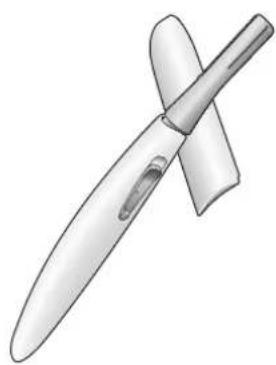
natural_image
Illustration of a knife with a curved blade and handle (no text or symbols)Panasonic®
Operating Instructions
(Household) Compact body trimmer
Model No. ES-WR50
Contents
Safety precautions......4
Important information ......6
Parts identification ....7
Installing the battery ....7
Using 8
Installing or removing the blade .....9
Cleaning 9
Troubleshooting ....10
Specifications ....10
Thank you for purchasing this Panasonic product.
Before operating this unit, please read these instructions completely and save them for future use.
Safety precautions
To reduce the risk of injury, loss of life, electric shock, fire, and damage to property, always observe the following safety precautions.
Explanation of symbols
The following symbols are used to classify and describe the level of hazard, injury, and property damage caused when the denotation is disregarded and improper use is performed.

WARNING
Denotes a potential hazard that could result in serious injury or death.

CAUTION
Denotes a hazard that could result in minor injury or property damage.
The following symbols are used to classify and describe the type of instructions to be observed.

This symbol is used to alert users to a specific operating procedure that must not be performed.

This symbol is used to alert users to a specific operating procedure that must be followed in order to operate the unit safely.

WARNING
▶ This product
Do not place within reach of children or infants. Do not let them use it.

- Doing so may cause injury or accidental ingestion of the accessories or removable of small parts.

Immediately stop using if there is an abnormality or malfunction.
- Failure to do so may cause fire or injury.
▶ Preventing accidents
This appliance is not intended for use by persons (including children) with reduced physical, sensory or mental capabilities, or lack of experience and knowledge, unless

they have been given supervision or instruction concerning use of the appliance by a person responsible for their safety. Children should be supervised to ensure that they do not play with the appliance.
- Failure to do so may cause an accident or injury.

CAUTION
▶ To protect your skin
The following persons should not use this appliance:

- Persons with sensitive or delicate skin, persons with allergies.

Do not use on areas with pimples, etc. - Doing so may result in injury to your skin.

If the battery cover is tight, do not remove it with excessive force.
- The protective cap may detach first and the blade may cause injury to your hands.

Do not apply strong pressure to the skin, move repeatedly over the same area or keep applying your skin. Also, do not use with a jabbing motion.
- Doing so may cause injury or inflammation of the skin, or increased pain.

Do not forcefully press the blade. Also, do not touch the blade with fingers or nails when in use.
- Doing so may cause injury to the skin or reduce the life of the blade.

Before using, check that the blade is free from deformities, cracks, and damage.
- Failure to do so may cause injury to the skin.
To remove the protective cap, hold it in the center and pull.
- Failure to do so may cause injury to your hands by the blade.
Use the appliance only for its intended use. - Failure to do so may cause injury.
If skin problems appear after use, stop using the appliance and contact a dermatologist.
- Failure to do so may cause symptoms to worsen.
When storing or carrying, always attach the protective cap.
- Failure to do so may cause injury to the skin or reduce the life of the blade.
▶ This product
Do not share with your family or others.
- Doing so may cause infection or inflammation.
Do not drop or subject to shock.
- Doing so may cause injury.
Do not modify, disassemble of repair.
- Doing so may cause an accident or injury. Contact an authorized service center for repair.
The battery
Do not throw into fire or disassembly.
The supply terminals are not to be short-circuited.
- Doing so may cause a burn or injury.

CAUTION
Always follow the cautions printed on the battery.
Check the polarity of the battery (⊕ and ⊖) and install it correctly. Remove the battery immediately and dispose of it safely when it is discharged.

Remove the battery when not using the appliance for an extended period of time. Use the battery by the recommended use-by date.
Non-rechargeable battery is not to be recharged.
- Failure to do so may cause injury or surrounding contamination due to heat generation, bursting, or leakage of the battery.

The symbol on the left means "Do not wash the product with water".
Important information
- Dry shave only.
- Do not immerse the main body in water or pour water over it.
Doing so may damage it.
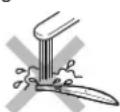
- Do not wipe the main body with alcohol, polish remover, detergent (hand cleansers) etc. Doing so may cause malfunction, cracking or discoloration of the parts. Clean with a well-wrung cloth immersed in diluted soapy water.

- Do not operate the appliance to sunscreen or perfume, etc. sticking to your hands. If sunscreen or perfume, etc. adheres to the main body, please remove it. Otherwise such substances may cause deterioration of the plastic or malfunction due to cracks.
Parts identification
A
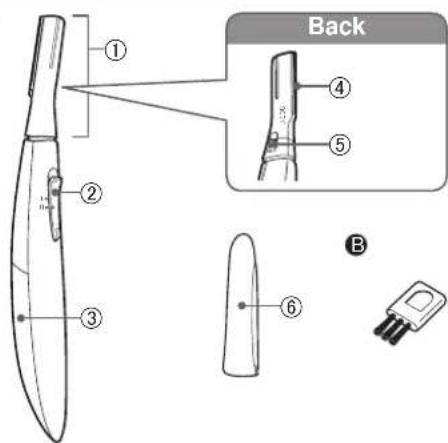
A Main body
① Head
② Power switch [0/1]
③ Battery cover
④ Blade
⑤ Blade release button
⑥ Protective cap
Accessory
B Cleaning brush
The battery is not provided.
Please purchase it at a dealer.
Installing the battery
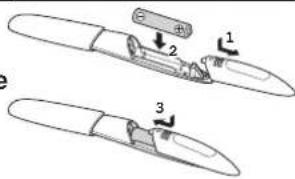
• Always attach the protective cap when installing or replacing the battery.
- Make sure the power switch is in the "0" position.
- Pull the battery cover to remove it.
- Check⊕ and insert the battery.
- Attach the battery cover.
Press firmly until it clicks.
Notes
- You can use the appliance for approximately 1 month with the Panasonic LR03 (AAA alkaline battery). (When used in an environment at a 20 °C (68 °F) room temperature, twice a week, and five minutes at a time.)
- Use only LR03 (AAA alkaline battery).
- Do not use rechargeable type battery.
- If using a battery other than the specified type, the power or number of use may vary.
Using
Notes
- When you use the appliance for the first time, apply the appliance to your skin softly and shave off the hair gradually.
- Do not use the appliance on your face.
Preparations
- Wipe off moisture or sweat on your skin. Do not apply skin lotion, milky lotion, powder, or antiperspirant etc. Keep your skin clean and dry.
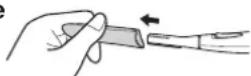
- Hold the center of protective cap and remove it.
-
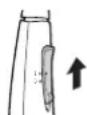
Slide the power switch to "1" and shave.
-
Set down the blade and apply it along your skin.
- Move the appliance toward the direction indicated by an arrow slowly against the hair flow.
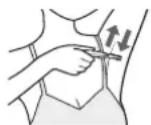
Example of use
Underarms
Move in several directions
Arms
Inwards from the outside of the arm

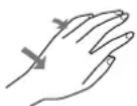
Hands / fingers
Inwards from the outside
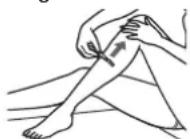
Legs
Upwards from the bottom of the leg
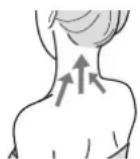
Nape of the neck/back
Upwards from the bottom
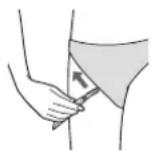
Bikini area
Upwards from the bottom
- Put on your swimsuit or shorts, and make sure the line which you would like to shave in advance.
-
Set the power switch to "0".
-
Attach the protective cap.
• To prevent deformation or damage of blade, or attachment of foreign object, be sure to attach the protective cap after using the appliance.
Installing or removing the blade
- Be sure to set the power switch to "0" when you installing or removing the blade.
How to remove the blade How to attach the blade
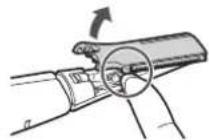
- Support the head of the shaver with your fingers so that it does not swing excessively.
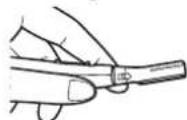
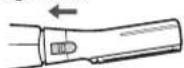
- Slide the blade release button in the direction of the arrows.
- It is easier to slide the blade release button with using your fingernail.
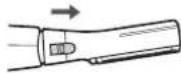
- Support the head of the shaver with your fingers so that it does not swing excessively.
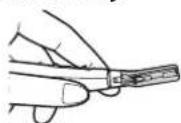
- Insert the hook at the end of the head into the hole on the blade to attach it.
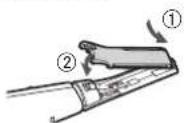
- Remove it toward the direction indicated by an arrow.
- You can remove it if you float the resin section by nails.
- Slide the blade release button in the direction of the arrow.
- It is easier to slide the blade release button with using your fingernail.
Cleaning
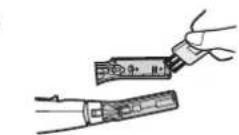
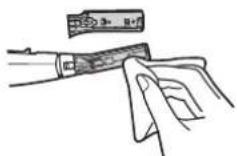
- This appliance cannot be washed with water. Clean it up with the brush or dry cloth.
-
Be sure to set the power switch to "0" before cleaning.
-
Remove the blade and clean it with the brush.
• It is not possible to disassemble the blade. - Remove anything which adheres to the blade with a dry cloth.
- Attach the blade. (See this page)
Troubleshooting
| Problem | Possible causes | Action |
| The appliance is not cutting as well as before. | Lifetime of blade. | Replace the blade.(See page 9) |
| Blade is deformed. | ||
| The battery has reached the end of its life. | Replace with a new battery.(See page 7) | |
| The appliance is not working. | Hair dust is accumulated. | Clean the hair dust.(See page 9) |
| The battery is inserted reversely. | Make sure the battery is installed correctly.(See page 7) |
If the problems still cannot be solved, contact the store where you purchased the appliance or a service center authorized by Panasonic for repair.
Specifications
| Power supply Dry-cell battery | |
| Battery type | One LR03 (AAA alkaline battery).(Sold separately) |
This product is intended for household use only.
Personal Care & Beauty Care Products
FOR USA ONLY
30-Day Quality Satisfaction Guarantee
If you are dissatisfied with any Panasonic Personal Care & Beauty Care Products for any reason, simply return it to the place of purchase with a dated proof of purchase, in the original packaging, with all accessories, parts and instructions, within 30 days of the date of purchase, for a full refund, or call Panasonic at 1-800-338-0552. Abuse or misapplication of this product voids the guarantee.
FOR YOUR CONVENIENCE, WE HAVE ESTABLISHED A TOLL-FREE (IN USA ONLY) NATIONAL ACCESSORY PURCHASE HOT LINE AT 1-800-332-5368.
Panasonic®
▶ Prévention des accidents
Uso
Notas
natural_image
Illustration of two hands holding a tool, one with a pen inserted and the other with a tool inserted into a device (no text or symbols present)Panasonic Corporation of North America Two Riverfront Plaza, Newark, NJ 07102-5490
IN CANADA CONTACT:
AU CANADA, COMMUNIQUEZ AVEC :
Panasonic Canada Inc.
5770 Ambler Drive, Mississauga, Ontario L4W 2T3
www.panasonic.com
Service • Assistance • Accessories
www.panasonic.ca/english/support (In Canada)
www.panasonic.ca/french/support (Au Canada)
http://www.panasonic.com
© Panasonic Corporation 2019
⑤ EN, CA, ES
Printed in China
Imprimé en Chine
Impreso en China
ES9700WR501551 S0619-0

- Panasonic®
- Contents
- Safety precautions
- Explanation of symbols
- WARNING
- CAUTION
- ▶ This product
- ▶ Preventing accidents
- Important information
- Parts identification
- A Main body
- B Cleaning brush
- Installing the battery
- Notes
- Using
- Preparations
- Example of use
- Underarms
- Arms
- Hands / fingers
- Legs
- Nape of the neck/back
- Bikini area
- Installing or removing the blade
- How to remove the blade How to attach the blade
- Cleaning
- ▶ Prévention des accidents
- Uso
- Notas
- IN CANADA CONTACT:
Brand : PANASONIC
Model : ES-WR50
Category : Shaver