303077 - Built-in kit Aplic - Free user manual and instructions
Find the device manual for free 303077 Aplic in PDF.


User questions about 303077 Aplic
0 question about this device. Answer the ones you know or ask your own.
Ask a new question about this device
Download the instructions for your Built-in kit in PDF format for free! Find your manual 303077 - Aplic and take your electronic device back in hand. On this page are published all the documents necessary for the use of your device. 303077 by Aplic.
USER MANUAL 303077 Aplic
natural_image
Blue abstract logo shape resembling a stylized letter 'Q' or partial circle (no text or symbols)aplic
CAR SPEAKERPHONE
Thank you for choosing an aplic product. Please read the following user manual carefully so that you can get the most from the product you have purchased.
1 Scope of supply
- Bluetooth Hands-free device
- microUSB charging cable
- User manual
2. Technical data
| Bluetooth version V4. 1 (supports hands-free 1.6, 1.5 AVRCP, A2DP 1.2) | |
| transmission power 3.82 dBm | |
| frequency range 2.402-2.480GHz | |
| Standby time | up to 35 days |
| Talk time up to 17 hours | |
| Range up to 10m | |
| Battery type 3.7 v / 1000mAh | |
| Features • Integrated speaker• Holder magnet• Two connections can be saved | |
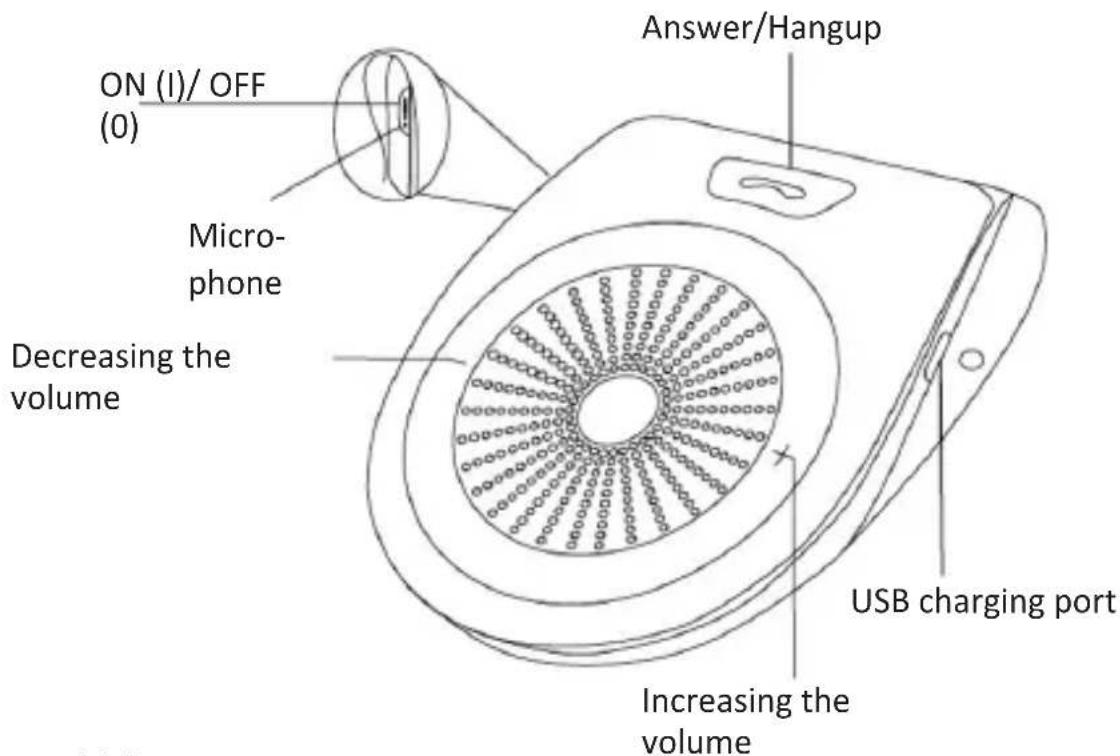
3. Product details
text_image
ON (I)/ OFF (0) Micro- phone Decreasing the volume Answer/Hangup USB charging port Increasing the volume4. Initial use
Take the product out of the package and remove all the packaging material. Charge the hands-free device fully before using it for the first time. The microUSB charging port is located on the side of the device. You can mount the hands-free device to a sun visor by attaching the clip. Set the "ON/OFF" switch to position ON (I) to switch on the device. The hands-free device will be automatically connected with the last-connected Smartphone. The next chapter shows how to connect a Bluetooth-enabled device for the first time.
5. Establishing a connection via Bluetooth
Ensure that the hands-free device is switched off initially. Switch on the hands-free device. The pairing mode is activated automatically. Enable the Bluetooth on the device that you want to connect with the hands-free device. Carry out a search now and connect to "aplic-303077". Enter "0000" at this point if you are prompted for a security code.
Note: The Bluetooth pairing mode is disabled for security reasons if connection could not be established even after several minutes. Please carry out the steps mentioned above once again if the pairing was not successful.
Please proceed as follows to register your hands-free unit in two devices: Disconnect the Bluetooth connection from your first connected Smartphone. Now put the hands-free device in pairing mode once again. To do this, turn off the device by setting the "On/Off" switch to OFF (0) position. Set the "On/Off" switch to ON(I) position again. Activate the Bluetooth connection on your second device and connect to the hands-free device as described previously. Once the pairing process is completed, you can connect with your first paired device as usual. It is saved as the primary device. It always has priority. You can use the hands-free device with the second device only if the primary device is inactive.
5.1 Languages
The hands-free device supports four different languages, which you can change by simultaneously pressing the "+" and "-" buttons. You can choose between: English, Chinese, French and Spanish.
6. Voice assistant
The hands-free device provides the option to open the voice assistants of the operating system of your Smartphone, if your device supports this. Press and hold the "button" until you get a voice feedback from the hands-free device.
7. Button functions
| Action Function / button | |
| Answer call /Reject call | To answer a call, press the "Answer/Hang up" button to answer the call.To reject a call, press the "Answer/Hang-up" button twice consecutively. |
| Hang up | Press the "Answer/Hang up" button to end a call |
| Call the most recently dialled number | To call the last dialled number, press the "Answer/Hang-up" button twice in rapid succession. |
| Volume • Press the "+" or "-" | button to adjust the volume of the device. |
8. Low battery status
You hear a beep when the battery of the device is low. As soon as you hear this, you should recharge the device directly to ensure proper function.

Please note!

9. Safety instructions and liability disclaimer
Never try to open the device to carry out repairs or conversions. Avoid contact with mains voltages. Do not short-circuit the product. The device is not certified for use in the open air; only use it in dry conditions. Protect it from high humidity, water and snow. Keep it away from high temperatures. Do not subject the device to sudden changes in temperature or heavy vibration as this might damage
12 English
electronic components. Examine the device for damage before using it. The unit should not be used if it has received an impact or has been damaged in any other way. Please observe national regulations and restrictions. Do not use the device for purposes other than those described in the instructions. This product is not a toy. Keep it out of the reach of children or mentally impaired persons. Any repair or alteration to the device not carried out by the original supplier, will invalidate the warranty or guarantee. The product may only be used by persons who have read and understood these instructions. The device specifications may change without any separate prior notice to this effect.

10. Disposal instructions
Electrical and electronic devices may only be disposed of in accordance with the European WEEE Directive and not with household rubbish. Components must be disposed of or recycled separately as dangerous, toxic elements can inflict sustained damage on the environment if they are disposed of incorrectly. As a consumer, you are bound by the Electrical and Electronic Devices Act (ElektroG) to return electrical and electronic goods free of charge at the end of their useful life to the manufacturer, the place of purchase or to specially set up, public collection points. The details in each case are governed by national law. The symbol on the product, the operating instructions and/or the packaging refers to these regulations. By separating materials in this way, recycling and disposing of old devices, you are making an important contribution towards protecting our environment.

11. Instructions on the disposal of batteries
With regard to the sale of batteries or the supply of devices containing batteries, the supplier is obliged to draw the customer's attention to the following:
As the end user, the customer has a statutory obligation to return used batteries. He can return old batteries stocked or previously stocked by the supplier in the form of new batteries to the supplier's despatch warehouse (despatch address) free of charge. The symbols shown on the batteries have the following meanings: Pb = battery contains more than 0.004 percent by mass of lead, Cd = battery contains more than 0.002 percent by mass of cadmium, Hg = battery contains more than 0.0005 percent by mass of quicksilver.

The symbol of the rubbish bin with a cross through it indicates that the battery may not be put in household waste.

WEEE guideline: 2012/19/EU WEEE register number: DE 67896761
WD Plus GmbH, herewith declares that this product 303077/20180515SZ128 conforms to the principle requirements and other relevant stipulations of Directive 2014/53/EU. The complete Declaration of Conformity can be obtained from: WD Plus GmbH, Wohlenbergstraße 16, 30179 Hanover, https://www.ganzeinfach.de/