43372 - Other computer accessories Lindy - Free user manual and instructions
Find the device manual for free 43372 Lindy in PDF.


User questions about 43372 Lindy
0 question about this device. Answer the ones you know or ask your own.
Ask a new question about this device
Download the instructions for your Other computer accessories in PDF format for free! Find your manual 43372 - Lindy and take your electronic device back in hand. On this page are published all the documents necessary for the use of your device. 43372 by Lindy.
USER MANUAL 43372 Lindy
DST-Pro USB4, USB-C Laptop Docking Station
User Manual English
natural_image
Exterior view of a black BIRCY device with 10Gbps and SD/MICRO SD labels (no additional text or symbols)No. 43372
lindy.com
Introduction
Thank you for purchasing the Lindy USB-C Laptop Docking Station. This product has been designed to provide trouble free, reliable operation. It benefits from both a LINDY 2 year warranty and free lifetime technical support. To ensure correct use, please read this manual carefully and retain it for future reference.
This Laptop Docking Station of the latest USB4 generation is a high performance, multifunctional solution for connecting laptops, tablets or mobile phones to a range of interfaces including an 8K 30Hz DisplayPort or HDMI® display or two displays simultaneously at 4K 60Hz*. Through a single USB-C cable, connect to multiple SuperSpeed 10Gbps USB Type A or Type C ports, a 3.5mm combined headphone jack, Gigabit Ethernet, (Micro-) SD card slots, DisplayPort and HDMI®.
The USB4 Docking Station also supports Power Delivery 3.0 up to 100W for charging the connected laptop or peripheral devices (power supply not included). The dock can be used with the power supply supplied with the laptop or a power supply can be purchased separately.
Package Contents
• USB-C Laptop Docking Station
• USB4 Type C cable (appr. 0.8m)
- This Manual
Specification
- Host Interface: USB4 (40Gbps)
- Connects an HDMI® and/or DP display to your laptop
• Max. resolutions (single display): 7680x4320 30Hz, 3840x2160 120Hz - Max. resolution for dual displays* (MST - macOS does not support MST): 3480x2160 60Hz
• 4 Port USB 3.2 / 3.1 Gen 2 10Gbps Hub: 3x USB Type A and 1x USB Type C
• 3 Port USB 2.0 480Mbps Hub (for mouse, keyboard etc.) : 3x USB Type A
• 1x USB Type C Power Delivery port (PD 3.0 up to 20V / 5A)
• Supports Gigabit Ethernet 10/100/1000Mbps - 1x SD and 1x Micro SD slot (SD 3.0 up to 1Gbps), compatible with SDXC, SDHC, SD, MMC, RS-MMC, Micro SDXC, microSD, micro SDHC, UHS-I
- 1x 4 segments combo Audio port (1x in, 1x out)
- Compatible with computers with USB4 / 3.2 / Thunderbolt 3/4 Type C interface and DisplayPort Alternate mode
- Special Features: 3x USB Gen 2 Type A Battery Charging 1.2 ports (total current limit is 2.3A), Supports MST for Windows, supports simultaneous card reading (microSD), PXE (Preboot Execution Environment) and Wake on LAN (WOL) support
Physical Properties
• Dimensions WxDxH: 129x69.5x48mm (5.08x2.74x1.89in)
• Housing Material: Aluminium Alloy
• Net Weight: 0.3kg (0.66lb)
• Operating Temperature: 0°C - 40°C (32°F -104°F)
• Storage Temperature: -10°C - 70°C (14°F - 158°F)
• Humidity: 10 - 90% RH (non-condensing)
• Power Requirements: 20W
• Colour: Anthracite
Installation & Operation
Connect the Docking Station to your laptop or tablet using the supplied USB4 Type C cable. Any required drivers will be automatically downloaded from the internet.
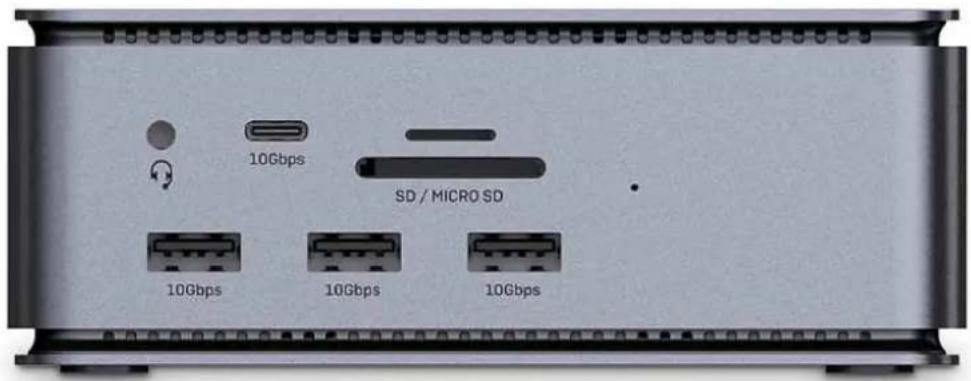
Front (from left to right, from top to bottom):
text_image
10Gbps SD / MICRO SD 10Gbps 10Gbps 10Gbps
• : 3.5mm Stereo Audio input/output to connect headphones, speakers or microphone.
• 10Gbps: Connect USB Type C devices (support up to 10Gbps)
• SD/MicroSD: Card reader for SD and microSD cards
- 10Gbps: Connect USB Type A devices (support up to 10Gbps) as well as Battery Charging 1.2 for fast charging
Rear (from left to right, from top to bottom):
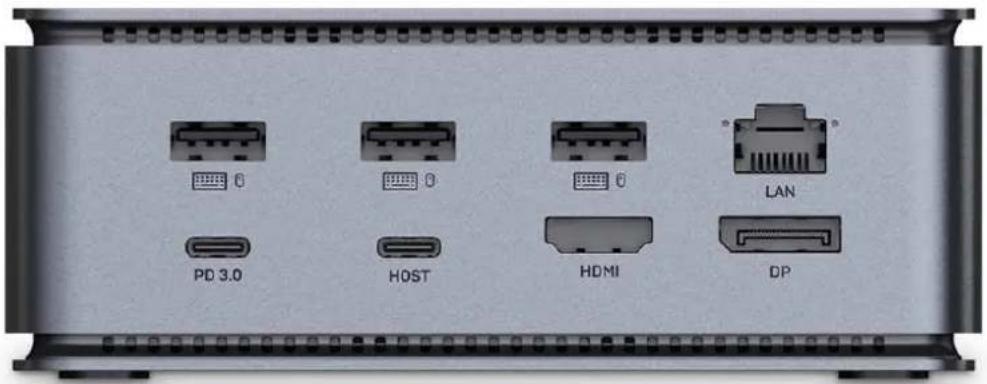
text_image
PD 3.0 HOST HDMI LAN DP• : Connect USB Type A devices (support up to 480Mbps)
• LAN: Connect to a network LAN using a Cat.5e or above cable
- PD 3.0: Connect a Type C PD power supply (i.e. of your laptop or tablet) to provide power to the host computer.
- Host: Connect a Type C source (i.e. laptop or tablet) using the included USB4 Type C Male to Male cable.
Please Note: Type C source connected must support DisplayPort Alternate mode; it can also be powered from the PD 3.0 port connecting a Type C PD power supply (not included).
- HDMI®: Connect a HDMI® monitor using a HDMI® Male to Male cable
- DP: Connect a DisplayPort monitor using a DisplayPort Male to Male cable
Please Note:
- The USB Type C source connected must support Power Delivery, the charging power depends on the PD power supply connected (up to 100W). Each laptop docking station needs a certain wattage for its own operation. Therefore, the current delivered to the laptop may be lower than the current indicated on the USB-C charger. I.e. if the internal power consumption of a laptop docking station is 20W and a 100W power supply is connected, the docking station delivers 80W to the laptop.
- For multi-monitor installations we recommend using identical monitors to ensure the best compatibility and performance.
The terms HDMI, HDMI High-Definition Multimedia Interface, HDMI Trade dress and the HDMI Logos are trademarks or registered trademarks of HDMI Licensing Administrator, Inc.
Lindy regularly checks and tests our product range to ensure maximum compatibility and performance. For the most up to date version of this manual, please refer to your local Lindy website, search for the relevant part number and find the manual under Downloads.
Einführung
WEEE (Waste of Electrical and Electronic Equipment), Recycling of Electronic Products
Europe, United Kingdom
In 2006 the European Union introduced regulations (WEEE) for the collection and recycling of all waste electrical and electronic equipment. It is no longer allowable to simply throw away electrical and electronic equipment. Instead, these products must enter the recycling process. Each individual EU member state, as well as the UK, has implemented the WEEE regulations into national law in slightly different ways. Please follow your national law when you want to dispose of any electrical or electronic products. More details can be obtained from your national WEEE recycling agency.
LINDY declares that this equipment complies with relevant European CE requirements.
LINDY declares that this equipment complies with relevant UKCA requirements.
FCC Certification
This equipment has been tested and found to comply with the limits for a Class B digital device, pursuant to part 15 of the FCC Rules. These limits are designed to provide reasonable protection against harmful interference in a residential installation.
You are cautioned that changes or modification not expressly approved by the party responsible for compliance could void your authority to operate the equipment.
This device complies with part 15 of the FCC Rules.
Operation is subject to the following two conditions:
-
This device may not cause harmful interference, and
-
This device must accept any interference received, including interference that may cause undesired operation.
Tested to comply with
FCC standards.
For home and office use.
No. 43372
^rd Edition, June 2024
lindy.com