
Cleanexxo - Vacuum Cleaner EINHELL - Free user manual and instructions
Find the device manual for free Cleanexxo EINHELL in PDF.
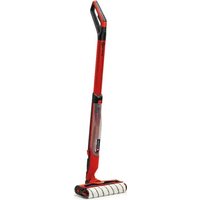


| Product type | Cordless hard floor vacuum cleaner |
| Brand | Einhell |
| Model | Cleanexxo |
| Power supply | Li-Ion 18 V battery (Power X-Change) |
| Clean water tank capacity | 400 ml |
| Dirty water tank capacity | 300 ml |
| Weight | 2.5 kg |
| Battery type | Li-Ion Power X-Change (sold separately) |
| Roller rotation speed | Variable with Boost mode |
| Self-cleaning function | Yes (30-second cleaning mode) |
| Sound pressure level | 62.6 dB(A) |
| Sound power level | 74.1 dB(A) |
| Operating temperature | +5°C to +40°C |
| Maximum water temperature | 40°C |
| Floor type | Hard floors only |
| Cleaning roller material | Machine washable at 60°C |
| Cleaning and storage station | Included |
| Warranty | 2 years (terms apply) |
| Wear parts | Cleaning roller |
Frequently Asked Questions - Cleanexxo EINHELL
User questions about Cleanexxo EINHELL
0 question about this device. Answer the ones you know or ask your own.
Ask a new question about this device
Download the instructions for your Vacuum Cleaner in PDF format for free! Find your manual Cleanexxo - EINHELL and take your electronic device back in hand. On this page are published all the documents necessary for the use of your device. Cleanexxo by EINHELL.
USER MANUAL Cleanexxo EINHELL
GB Original operating instructions Cordless Hard Floor Cleaner
D
Danger!
When using the equipment, a few safety precautions must be observed to avoid injuries and damage. Please read the complete operating instructions and safety regulations with due care. Keep this manual in a safe place, so that the information is available at all times. If you give the equipment to any other person, hand over these operating instructions and safety regulations as well. We cannot accept any liability for damage or accidents which arise due to a failure to follow these instructions and the safety instructions.
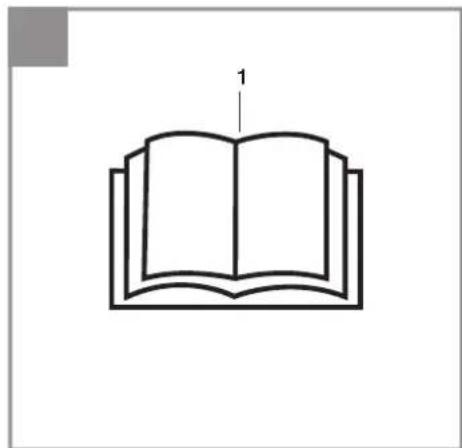
Explanation of the symbols used (see Fig. 13)
- Danger! - Read the operating instructions to reduce the risk of injury.
1. Safety regulations
The corresponding safety information can be found in the enclosed booklet.
Danger!
Read all safety regulations and instructions. Any errors made in following the safety regulations and instructions may result in an electric shock, fire and/or serious injury.
Keep all safety regulations and instructions in a safe place for future use.
2. Layout and items supplied
2.1 Layout (Fig. 1-11)
- Fresh water tank
- Dirty water tank
- Dirty water tank cover
- Cleaning roller
- Cleaning tool
- Cleaning roller cover
- Cleaning and parking station with transport handle
- Water supply button
- On/Off button
- BOOST button
- Status LED
- Locking button for dirty water tank cover
- Locking button for cleaning roller cover
- Locking button for battery holder
- Battery holder
- Locking button for water tank
- Locking clip
- Water filling opening
- Inlet nozzles
2.2 Items supplied
Please check that the article is complete as specified in the scope of delivery. If parts are missing, please contact our service center or the nearest branch of the DIY store where you made your purchase at the latest within 5 work days after purchasing the article and upon presentation of a valid bill of purchase. Also, refer to the warranty table in the warranty provisions at the end of the operating instructions.
- Open the packaging and take out the equipment with care.
- Remove the packaging material and any packaging and/or transportation braces (if available).
- Check to see if all items are supplied.
- Inspect the equipment and accessories for transport damage.
- If possible, please keep the packaging until the end of the guarantee period.
Danger!
The equipment and packaging material are not toys. Do not let children play with plastic bags, foils or small parts. There is a danger of swallowing or suffocating!
• Cleaning roller cover - Cleaning tool • Cleaning and parking station with transport handle • Original Operating Instructions • Safety Information
3. Proper use
This tool is designed for domestic cleaning of hard floors.
The equipment is to be used only for its prescribed purpose. Any other use is deemed to be a case of misuse. The user / operator and not the manufacturer will be liable for any damage or injuries of any kind caused as a result of this.
Please note that our equipment has not been designed for use in commercial, trade or industrial applications. Our warranty will be voided if the machine is used in commercial, trade or industrial businesses or for equivalent purposes.
This machine is not intended for use by persons (including children) with reduced physical,
sensory or mental capabilities, or lack of experience and knowledge.
4. Technical data
Motor power supply: 18V
Capacity of the fresh water tank: ....400 ml
Capacity of the dirty water tank: ....300 ml
Weight: 2.5 kg
Important!
The equipment is supplied without batteries and without a charger and is allowed to be used only with the lithium-ion batteries of the Power X-Change series!
The lithium-ion batteries of the Power X-Change series are allowed to be charged only with Power X-Chargers.
Suitable batteries and chargers from the Power X-Change series are for example.
• Battery: Power X-Change 1.5 • Battery: Power X-Change 5.2 • Charger: Power X-Charger 3A • Charger: Power X-Charger
Danger!
Sound and vibration
The sound and vibration values were measured in accordance with EN 60335-2-10.
Sound pressure level LpA 62.6 dB(A)
Uncertainty KpA 3 dB
Sound power level LWA .....74.1dB(A)
Uncertainty KWA 3 dB
5. Before putting into operation
Caution!
Protect your battery pack against moisture, rain and high humidity. Make sure that no water runs over the battery pack or its contacts during operation.
Warning!
Always pull out the battery before making any settings on the equipment.
5.1 Using the equipment correctly
- The tool must be stood on a level, stable surface.
- So that the pump does not suffer any damage when it is not in use, a small amount of leakage from the pump is normal.
- Never use the machine in potentially explosive areas under any circumstances!
- The operating temperature must be between +5 and +40°C.
- The tool is designed to be used with cold or lukewarm water (max. 40°C); higher temperatures will result in damage to the pump.
- Do not use water that is dirty, gritty or contains any chemical products, as these could impair operation and shorten the life of the equipment.
- The tool is approved for use only with pure tap water and standard, commercially available floor cleaning agent.
- When using cleaning agents, refer to the instructions for use, safety information etc. provided by the manufacturer.
Warning – Risk of explosion
Do not spray flammable liquids.
Warning
If cleaning agent gets into contact with your skin or into your eye, rinse immediately with lots of clean water. Then consult a doctor or follow the steps described on the safety data sheet or provided by the manufacturer of the cleaning agent.
5.2 Assembly
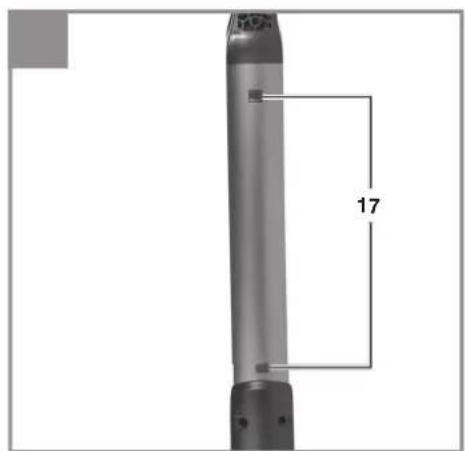
5.2.1 Assembling the tool (Fig. 11)
Push the parts of the tool together and make sure that the two locking clips (17) engage securely in the housing.
Note: Check that the attachment is securely seated before you start cleaning.
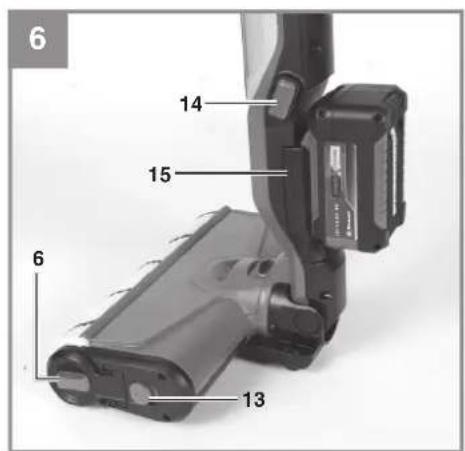
5.2.2 Inserting the battery (Fig. 6)
To insert the battery in the battery holder (15), press the locking button for the battery holder (14) so that the battery holder (15) folds open. Then insert your battery in the device and fold the battery holder back into the device.
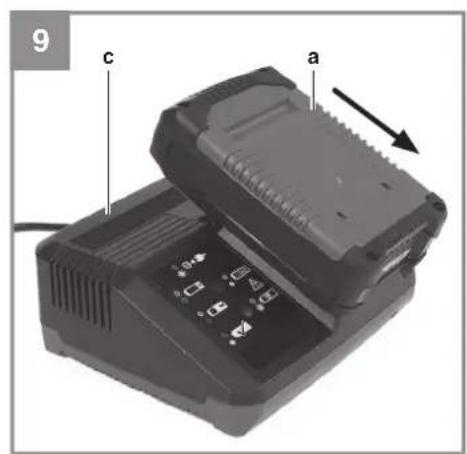
5.3 Charging the Li battery pack (Fig. 9-10)
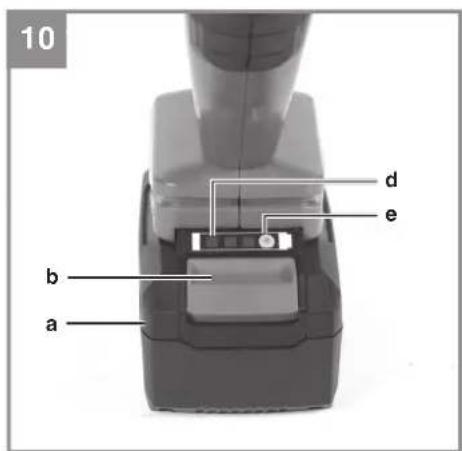
- Remove the battery pack (a) from the handle, pressing the pushlock button (b) downwards as you do so.
- Check that your mains voltage is the same as that marked on the rating plate of the battery charger. Insert the power plug of the charger (c) into the socket outlet. The green LED will then begin to blink.
- Push the battery (a) onto the charger (c).
- In the section entitled "Charger indicator" you will find a table with explanations of the LED display on the charger.
Caution!
To prevent the battery from overheating, only ever charge it without the PXC battery cover fitted.
The battery can become a little warm during charging. This is normal.
If the battery pack fails to charge, check:
• whether there is voltage at the socket outlet - whether there is good contact at the charging contacts
If the battery pack still fails to charge, send
• the charging unit • and the battery pack
to our customer service center.
To ensure that items are properly packaged and delivered when you send them to us, please contact our customer service or the point of sale at which the equipment was purchased.
When shipping or disposing of batteries and cordless tools, always ensure that they are packed individually in plastic bags to prevent short circuits and fires.
To ensure that the battery pack provides long service, you should take care to recharge it promptly. You must recharge the battery pack when you notice that the performance of the device drops. Never allow the battery pack to become fully discharged. This will cause it to develop a defect.
5.4 Battery capacity indicator (Fig. 10/d) Press the button for the battery capacity indicator (e). The battery capacity indicator (d) shows the charge status of the battery using 3 LEDs.
All 3 LEDs are lit:
The battery is fully charged.
2 or 1 LED(s) are lit:
The battery has an adequate remaining charge.
1 LED flashes:
The battery is empty, recharge the battery.
All LEDs blink:
The battery temperature is too low. Remove the battery from the equipment, keep it at room temperature for one day. If the fault reoccurs, this means that the rechargeable battery has undergone exhaustive discharge and is defective. Remove the battery from the equipment. Never use or charge a defective battery.
6. Operation
6.1 Using for the first time
6.1.1 Filling up the fresh water tank
Press the locking button for the water tank (16) to remove the water tank (1). Then fill it up with tap water through the water filling opening (18) up to the MAX line (do not overfill). Optionally add the correct quantity of floor cleaning agent as specified by the manufacturer.
6.1.2 Switching on the tool (Fig. 3)
Then you can start the device by pressing the On/Off button (9). Pressing and holding the water supply button (8) adds water via the inlet nozzles (19) to moisten the cleaning roller (4). It can take a few seconds until the roller is completely moistened. The water supply will stop again once you let go of the water supply button (8). Use only as much water as you actually need. By pressing the BOOST button (10) you can increase the rotating speed of the roller. The current status of the device is indicated via the status LED (11). To switch the device off, press the On/Off button again.
6.1.3 Emptying and filling the tool
If the water supply in the fresh water tank (1) is depleted, simply top it up again. Every time the fresh water tank becomes empty the dirty water tank (2) must also be emptied. To empty it, remove the dirty water tank cover (3) by pressing the locking button for the dirty water tank cover (12)
and lifting up the cover. (Fig. 4)
Then take out and empty the dirty water tank (2) and follow the steps in reverse order to set up your device ready for use again.
Once you have finished cleaning, please empty all tanks and dry the cleaning roller.
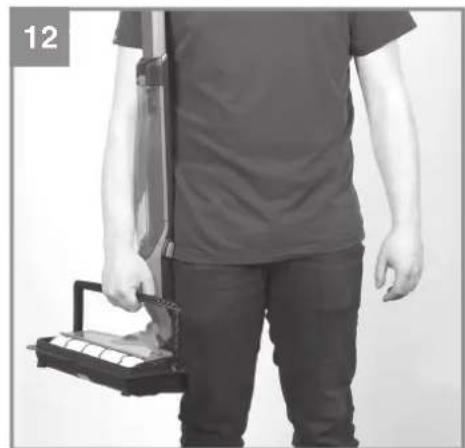
6.1.4 Transport (Fig. 12)
The tool can be transported with the cleaning and parking station (7).
7. Cleaning the equipment, maintenance and ordering spare parts
Danger!
Pull out the battery before starting any cleaning work on the equipment.
7.1 Cleaning the equipment
- Keep all safety devices, air vents and the motor housing free of dirt and dust as far as possible. Wipe the equipment with a clean cloth or blow over it with compressed air at low pressure. • We recommend cleaning the equipment immediately each time after use.
- Clean the equipment regularly with a damp cloth and some soft soap. Do not use cleaning agents or solvents; these might be aggressive to the plastic parts in the equipment. Ensure that no water can get into the interior of the equipment. The ingress of water into an electric power tool increases the risk of an electric shock.
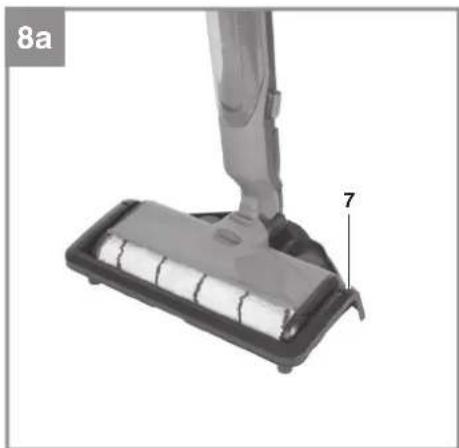
7.1.1 Cleaning mode (Fig. 8a)
During/after cleaning your hard floor, you can place the device in the cleaning and parking station (7) in order to clean the cleaning roller (4). Make sure that the fresh water tank (1) is still filled at least to the MIN line.
Once you have placed the device in the cleaning and parking station (7) and you have checked the water level, you can start the cleaning function. To do this, press and hold the BOOST button (10) for at least 3 seconds.
Once the cleaning mode has been successfully started, both status LEDs will flash (11).
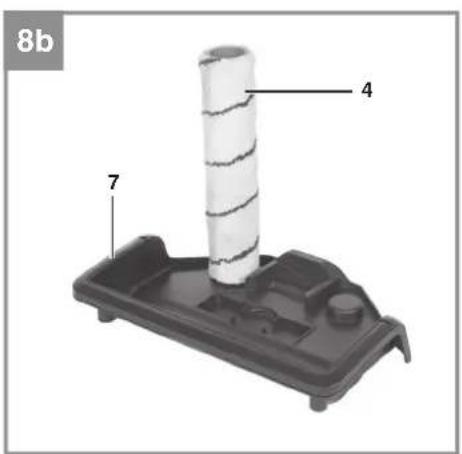
The cleaning mode lasts around 30 seconds. After it is finished, you can go back to using the device to clean your hard floor again, or you can take off the cleaning roller (4) and place it in the
cleaning and parking station (7) to dry. (Fig. 8b)
7.1.2 Cleaning the roller (Fig. 6)
To remove the cleaning roller (4), press the locking button for the cleaning roller cover (13) to the rear and pull out the cleaning roller cover (6). You can then pull out the cleaning roller (4). You can wash the cleaning roller (4) in a washing machine at a maximum temperature of 60 degrees with a gentle/minimal spin cycle.
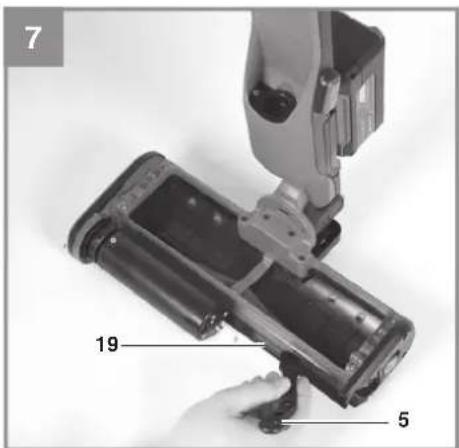
7.1.3 Cleaning the inlet nozzles (Fig. 7)
Take out the cleaning tool (5) from the cleaning and parking station (7) and use it to clean dirt off the inlet nozzles (19) that are behind the cleaning roller (4).
7.2 Maintenance
7.2.1 Long service life of the electric pump
The machine should be fully emptied of water each time after use. To do this, switch on the device without any tanks (1, 2) and without the cleaning roller (4), then press the water supply button (8) and hold it until no more water comes out of the inlet nozzles (19).
7.3 Ordering replacement parts:
Please quote the following data when ordering replacement parts:
Type of machine
• Article number of the machine • Identification number of the machine - Replacement part number of the part required For our latest prices and information please go to www.Einhell-Service.com
8. Disposal and recycling
The unit is supplied in packaging to prevent its being damaged in transit. This packaging is raw material and can therefore be reused or can be returned to the raw material system.
The unit and its accessories are made of various types of material, such as metal and plastic. Defective components must be disposed of as special waste. Ask your dealer or your local council.
GB
9. Storage
Store the equipment and accessories out of children's reach in a dark and dry place at above freezing temperature. The ideal storage temperature is between 5 and 30°C. Store the electric tool in its original packaging.
10. Possible causes of failure
| Fault Cause | Remedy | |
| Device not working. - | No voltage present at the tool.- Tool overheated (status LED (11) flashes on and off for 10 seconds). | - Battery not charged.- Battery not connected properly.- Allow the device to cool down. |
| Motor running but no water being delivered. | - Inlet nozzles blocked.- Water tank empty. | - Clean the inlet nozzles. (See 7.1.3)- Fill up the water tank. |
11. Charger indicator
| Indicator status Explanations and actions | ||
| Red LED Green LED | ||
| Off | Flashing | Ready for useThe charger is connected to the mains and is ready for use; there is no battery pack in the charger |
| On Off Charging | The charger is charging the battery pack in quick charge mode. The charging times are shown directly on the charger.Important! The actual charging times may vary slightly from the stated charging times depending on the existing battery charge. | |
| Off | On | The battery is charged and ready for use.The unit then changes over to gentle charging mode until the battery is fully charged.To do this, leave the rechargeable battery on the charger for approx. 15 minutes longer.Action:Take the battery pack out of the charger. Disconnect the charger from the mains supply. |
| Flashing Off | Adapted charging | The charger is in gentle charging mode.For safety reasons the charging is performed less quickly and takes more time. The reasons can be:- The rechargeable battery has not been used for a very long time.- The battery temperature is outside the ideal range.Action:Wait for the charging to be completed; you can still continue to charge the battery pack. |
| Flashing Flashing Fault | Charging is no longer possible. The battery pack is defective.Action:Never charge a defective battery pack.Take the battery pack out of the charger. | |
| On On Temperature fault | The battery pack is too hot (e.g. due to direct sunshine) or too cold (below 0°C ).Action:Remove the battery pack and keep it at room temperature (approx. 20°C ) for one day . | |
GB

For EU countries only
Never place any electric power tools in your household refuse.
To comply with European Directive 2012/19/EC concerning old electric and electronic equipment and its implementation in national laws, old electric power tools have to be separated from other waste and disposed of in an environment-friendly fashion, e.g. by taking to a recycling depot.
Recycling alternative to the return request:
As an alternative to returning the equipment to the manufacturer, the owner of the electrical equipment must ensure that the equipment is properly disposed of if they no longer wish to keep it. The old equipment can be returned to a suitable collection point that will dispose of it in accordance with national recycling and waste disposal regulations. This does not apply to any accessories or aids without electrical components supplied with the old equipment.
Please note that batteries and lamps (e.g., light bulbs) must be removed from the tool before it is disposed of.
The reprinting or reproduction by any other means, in whole or in part, of documentation and papers accompanying products is permitted only with the express consent of Einhell Germany AG.
Subject to technical changes.
GB
Service information
We have competent service partners in all countries named on the guarantee certificate, whose contact details can also be found on the guarantee certificate. These partners will assist you with all service requests, such as repairs, spare and wear part orders, or the purchase of consumables.
Please note that the following parts of this product are subject to normal or natural wear and are therefore also required for use as consumables.
| Category Example | |
| Wear parts* Cleaning roller | |
| Consumables* | |
| Missing parts |
* Not necessarily included in the scope of delivery!
In the event of defects or faults, please register the problem on the internet at www.Einhell-Service.com. Please ensure that you provide a precise description of the problem and answer the following questions in all cases:
• Did the equipment work at all or was it defective from the beginning? • Did you notice anything (symptom or defect) prior to the failure? • What malfunction does the equipment have in your opinion (main symptom)? Describe this malfunction.
GB
Warranty certificate
Dear Customer,
All of our products undergo strict quality checks to ensure that they reach you in perfect condition. In the unlikely event that this equipment develops a fault, please contact our service department at the address shown on this guarantee card. You can also contact us by telephone using the service number shown. Please note the following terms under which guarantee claims can be made:
- These guarantee terms apply solely to consumers, i.e. natural persons, who do not want to use this product in connection with either their commercial or other self-employed activities. These guarantee terms regulate additional guarantee services which the undermentioned manufacturer promises to buyers of its new products in addition to their statutory rights of guarantee. Your statutory rights of guarantee are not affected by this guarantee. Our guarantee is free of charge to you.
- The guarantee services cover only defects due to material or manufacturing faults on the new product which you have bought in the European Union from the undermentioned manufacturer and are limited to either the rectification of said defects or the replacement of the product, whichever we prefer. Please note that only equipment under the brand name "Professional" has been designed for use in commercial, trade or professional applications. For all other products the guarantee is invalidated if the equipment is used within the guarantee period in commercial, trade or industrial applications or for other equivalent activities.
- Our guarantee does not cover:
- Damage to the equipment caused by failure to comply with the installation/assembly instructions or by unprofessional installation; damage caused by failure to comply with the operating instructions (e.g. connection to the wrong mains voltage or current type); damage caused by failure to comply with the maintenance and safety regulations; damage caused by exposing the equipment to abnormal environmental conditions; damage resulting from poor care and maintenance.
- Damage to the equipment caused by misuse or incorrect applications (e.g. overloading the equipment or using non-approved attachments or accessories); damage caused by foreign bodies (e.g. sand, stones, dust, ....) getting inside the equipment. Damage in transit; damage caused by force or external influences (e.g. by dropping the equipment).
- Damage to the equipment or parts of the equipment which is owed to use-related, normal or otherwise natural wear. For example, batteries and battery packs are manufactured with a cycle limit for design-related reasons. Wear is negatively influenced in particular by load demands and charging speeds as well as exposure to heat, cold, vibration and impact.
- The guarantee is valid for a period of 2 years starting from the purchase date of the equipment. Guarantee claims must be submitted before the end of the guarantee period and within two weeks of the defect being noticed. No guarantee claims will be accepted after the end of the guarantee period. The original guarantee period remains applicable to the equipment even if repairs are carried out or parts are replaced. In such cases, the work performed or parts fitted will not result in an extension of the guarantee period, and no new guarantee will become active for the work performed or for any replacement parts fitted. This also applies if on-site service is used.
- To assert your guarantee claim, register the defective equipment at: www.Einhell-Service.com. You will need to provide proof of purchase of the new item of equipment. Equipment returned without such proof or without a rating plate are excluded from the guarantee services because of the lack of traceability. If the defect is covered by our guarantee, then either the item in question will be repaired immediately and returned to you or we will send you a new replacement.
- If you have taken the equipment with you to a different EU country than where you bought it, we will arrange for a local service partner to provide the guarantee services. If you take the equipment outside the EU, the guarantee will not apply.
Of course, we are also happy to offer a chargeable repair service for any defects which are not covered or no longer covered by the scope of this guarantee. To take advantage of this service, please send the equipment to our service address. We draw attention to the restrictions of this guarantee concerning wear parts, consumables and missing parts as presented in the service information included in this operating manual.
Warrantor/ Service:
Einhell UK Ltd, Unit 10, 1st Floor, Champion's Business Park, Arrowe Brook Road, Upton, Wirral, CH49 0UQ
Danger!
6.1.4 Transport (fig. 12)
Uncertainty KWA 3 dB
5. Before use
Caution!
Subject to change without notice
Archive-File/Record: NAPR024223
Documents registrar: Luca Peer
Wiesenweg 22, D-94405 Landau/Isar
1) GR Cordless Hard Floor Cleaner - F Nettoyeur de sol dure sans fil - E Scope lavauperviment à bacteria - DK/AKU-Akku-ingeringesystem II hande guirve - S Batterleihen goitivaité for handa gourv - CZ Akumulatorovéz échéant rondy podiatr - SK Akumulatorovéz échéant hana rodde poulty. NL Accumulatorovéz pour hande vorder. - E Fragatione de suutos inalaménica - KIN Kowan latilien akkupdatin. SLO AKumulatoratokisteln lat i, H Akkus-kennymapadit tisitrite. RO Curápteur de pedole dure ou Azerbaijan - GR Kuozekul kalaparou-ú akkupat ó amázou, με μοραία - P Limpador de chao duro sem fio. HR/HGI Batenj-e čistate tarih podiatr - RS Akumulatorovéz échéant vordde. PL Mop akumulatorovéz - TR Akul sert zemin lemuleme makinesi - SG Akumularia ren- yred, za nepiniuance na terapär podade

Declaration of conformity
We, Einhell UK Ltd
Champions Business Park, First Floor Unit 10, Arrowe Brook Rd, Upton, Wirral CH49 0AB, United Kingdom
declare the conformity to UK standards and legislation was assessed for:
Cordless Hard Floor Cleaner CLEANEXXO (Einhell)
UK legislation
□ Simple Pressure Vessels (Safety) Regulation □ Electrical Equipment (Safety) Regulation □ Radio Equipment Regulation □ Personal Protective Equipment Regulation ☐ The Ecodesign for Energy-Related Products and Energy Information Regulation X The Restriction of the Use of Certain Hazardous Substances in Electrical and Electronic Equipment Regulation □ Noise Emission in the Environment by Equipment for use Outdoors Regulation X Electromagnetic Compatibility Regulation □ Measuring Instruments Regulation ☐ Pressure Equipment (Safety) Regulation
Annex V
Annex VI
Noise: measured L ww = dB (A); guaranteed L ww = dB (A) P = kW; L/∅ = cm UK Approved Body:
X Supply of Machinery (Safety) Regulation
Annex IV
UK Approved Body:
UKTE Certificate No.:
Standards: BS EN 60335-1; BS EN 60335-2-10; BS EN IEC 55014-1; BS EN IEC 55014-2
Wirral, 2023.05.26

Archive-File/Record: NAPR024223
Article Number: 34.371.10 I.-No.: 21012
Subject to change without notice Wiesenweg 22, 94405 Landau/Isar, Germany
Documents registrar: Luca Peer
EH 06/2023 (01)


- D
- DANGER
- EXPLANATION OF THE SYMBOLS USED (SEE FIG. 13)
- SAFETY REGULATIONS
- LAYOUT AND ITEMS SUPPLIED
- LAYOUT (FIG. 1-11)
- ITEMS SUPPLIED
- PROPER USE
- TECHNICAL DATA
- IMPORTANT
- SOUND AND VIBRATION
- BEFORE PUTTING INTO OPERATION
- CAUTION
- WARNING
- USING THE EQUIPMENT CORRECTLY
- WARNING – RISK OF EXPLOSION
- ASSEMBLY
- ASSEMBLING THE TOOL (FIG. 11)
- INSERTING THE BATTERY (FIG. 6)
- CHARGING THE LI BATTERY PACK (FIG. 9-10)
- TO ENSURE THAT ITEMS ARE PROPERLY PACKAGED AND DELIVERED WHEN YOU SEND THEM TO US, PLEASE CONTACT OUR CUSTOMER SERVICE OR THE POINT OF SALE AT WHICH THE EQUIPMENT WAS PURCHASED
- ALL 3 LEDS ARE LIT
- OR 1 LED(S) ARE LIT
- LED FLASHES
- ALL LEDS BLINK
- OPERATION
- USING FOR THE FIRST TIME
- FILLING UP THE FRESH WATER TANK
- SWITCHING ON THE TOOL (FIG. 3)
- EMPTYING AND FILLING THE TOOL
- TRANSPORT (FIG. 12)
- CLEANING THE EQUIPMENT, MAINTENANCE AND ORDERING SPARE PARTS
- CLEANING THE EQUIPMENT
- CLEANING MODE (FIG. 8A)
- CLEANING THE ROLLER (FIG. 6)
- CLEANING THE INLET NOZZLES (FIG. 7)
- MAINTENANCE
- LONG SERVICE LIFE OF THE ELECTRIC PUMP
- ORDERING REPLACEMENT PARTS
- DISPOSAL AND RECYCLING
- GB
- STORAGE
- POSSIBLE CAUSES OF FAILURE
- CHARGER INDICATOR
- SERVICE INFORMATION
- WARRANTY CERTIFICATE
- BEFORE USE
- DECLARATION OF CONFORMITY
- CORDLESS HARD FLOOR CLEANER CLEANEXXO (EINHELL)
- UK LEGISLATION
Brand : EINHELL
Model : Cleanexxo
Category : Vacuum Cleaner