ATXC60BV1B - Air Conditioning DAIKIN - Free user manual and instructions
Find the device manual for free ATXC60BV1B DAIKIN in PDF.


User questions about ATXC60BV1B DAIKIN
0 question about this device. Answer the ones you know or ask your own.
Ask a new question about this device
Download the instructions for your Air Conditioning in PDF format for free! Find your manual ATXC60BV1B - DAIKIN and take your electronic device back in hand. On this page are published all the documents necessary for the use of your device. ATXC60BV1B by DAIKIN.
USER MANUAL ATXC60BV1B DAIKIN
DAIKIN ROOM AIR CONDITIONER
OPERATING MANUAL
MODELS
ATXC20BV1B
ATXC25BV1B
ATXC35BV1B
ATXC50BV1B
ATXC60BV1B
ATXC71BV1B
Operating Manual Handset Wireless
English
Safety Precautions 2
Remote controller overview 6
Preparation Before Operation 7
OPERATION
Adjusting the Airflow Direction 13
ECO+ Operation 14
SLEEP Operation 15
POWERFUL Operation 16
QUIET Operation 17
LED Operation 18
TIMER Operation 19
Fault Diagnosis 21
CARE AND CLEANING 24
TROUBLESHOOTING 28
Note :
Illustrations in this manual are for explanation to user only. And may differ from the actual machine. Are subject to change without prior notice. For the development of future products.
Safety Precautions

Read the precautions in this manual carefully before operating the unit.
This appliance is filled with R32.
• After reading, keep this manual in a convenient place so that you can refer to it whenever necessary. If the equipment is transferred to a new user, be sure also to hand over the manual.
- Keep this manual where the operator can easily find them.
- Read all safety precautions in this manual carefully before operating the unit.
- For safety reason the operator must read the following cautions carefully.
- The precautions described herein are classified as WARNING and CAUTION. They both contain important information regarding safety. Be sure to observe all precautions without fail.

WARNING
Failure to follow these instructions properly may result in personal injury or loss of life.

CAUTION
Failure to observe these instructions properly may result in property damage or personal injury, which may be serious depending on the circumstances.

Never attempt. Be sure to follow the instructions.

Be sure to establish an earth connection.

Never wet the air conditioner nor the remote controller with water.

Never touch the air conditioner nor the remote controller with wet hands.

WARNING
- The appliance must be stored in a room without continuously operating ignition sources (for example: open flames, an operating gas appliance or an operating electric heater).
- Do not pierce or burn.
- Be aware that refrigerants may not contain an odour.
- In order to avoid fire, explosion or injury, do not operate the unit when harmful, among which flammable or corrosive gases, are detected near the unit.
- It is not good for health to expose your body to the air flow for a long time.
- Do not place objects, including rods, your fingers, etc., in the air inlet or outlet. Product malfunctioning, product or injury damage may result due to contact with the air conditioner's high-speed fan blades.
- Do not attempt to repair, dismantle reinstall or modify the air conditioner yourself as this may result in water leakage, electric shocks or fire hazards.
- Do not attempt to install or repair the air conditioner yourself. Improper workmanship may result in water leakage, electric shocks or fire hazards. Please contact your local dealer or qualified personnel for installation and maintenance work.
- Do not use flammable spray near the air conditioner, or otherwise fire may result.
- Do not place flammable items, such as spray cans, within 1 meter of the air outlet.
- The spray cans may explode as a result of hot air from the indoor or outdoor units.
- When the air conditioner is malfunctioning (giving off a burning odour, etc.) turn off power of the unit and contact your local dealer. Continued operation under such circumstances may result in a failure, electric shocks or fire hazards.
- Do not use a refrigerant other than the one indicated on the outdoor unit (R32) when installing, moving or repairing. Using other refrigerant may cause trouble or damage to the unit, and personal injury.

- The refrigerant used in the air conditioner is safe. Although leaks should not occur, if for some reason any refrigerant happens to leak into the room, make sure it does not come in contact with any flame as of gas heaters, kerosene heaters or gas range.

- If the air conditioner is not cooling properly, the refrigerant may be leaking, so call your dealer. When carrying out repairs accompanying adding refrigerant, check the content of the repairs with our service staff.
- Do not wash the air conditioner with water, as this may result in electric shocks or fire.
- Be sure to install an earth leakage breaker. Failure to install an earth leakage breaker may result in electric shocks or fire.
- Only connect the air conditioner to the specified power supply circuit. Power suppliers other than the one specified may result in electric shocks, overheating and fires.
- Be sure to earth the unit. Do not earth the unit to a utility pipe, lightning conductor or telephone earth lead. Imperfect earthing may result in electric shocks.


CAUTION
- Be aware that prolonged, direct exposure to cool or warm air from the air conditioner, or to air that is too cool or too warm can be harmful to your physical condition and health.
- Do not use the air conditioner for purposes other than those for which it is intended. Do not use the air conditioner for cooling precision instruments, food, plants, animals or works of art as this may adversely affect the performance, quality and/or longevity of the object concerned.

- Do not expose plants or animals directly to airflow from the unit as this may cause adverse effects.
- Do not place appliances that produce naked flames in places exposed to the air flow from the unit as this may impair combustion of the burner.
- Do not block air inlets nor outlets. Impaired air flow may result in insufficient performance or trouble.
- Beware of fire in case of refrigerant leakage. If the air conditioner is not operating correctly, i.e. not generating cool or warm air refrigerant leakage could be the cause. Consult your dealer for assistance. The refrigerant within the air conditioner is safe and normally does not leak. However, in the event of a leakage, contact with a naked burner, heater or cooker may result in generation of noxious gas. Do not longer use air conditioner until a qualified service person confirms that the leakage has been repaired.
- Do not sit or place objects on the outdoor unit. Falling yourself or falling objects could cause injury.
- Do not place objects that are susceptible to moisture directly beneath the indoor or outdoor units. Under certain conditions, condensation on the main unit or refrigerant pipes, air filter dirt or drain blockage may cause dripping, resulting in fouling or failure of the object concerned.
- After prolonged use, check the unit stand and its mounts for damage. If left in a damaged condition, the unit may fall and cause injury.
- To avoid injury, do not touch the air inlet or aluminium fins of the indoor or outdoor units.
- The appliance is not intended for use by unattended young children or infirm persons. Impairment of bodily functions and harm to health may result.
- Children should be supervised to ensure that they do not play with the unit or its remote controller. Accidental operation by a child may result in impairment of bodily functions and harm health.
- Do not sit on the outdoor unit. Put things on the unit, or pull the unit. Doing so may cause accidents, such as falling or toppling down, thus resulting in injury, product malfunctioning, or product damage.
- Do not give impact to the indoor and outdoor units, or otherwise product damage may result.
- Do not place objects around the indoor unit. Doing so may have an adverse influence on the performance, product quality, and life of the air conditioner.
- Be careful not to let pets urinate on the air conditioner. Urination on the air conditioner may result in electric shocks or fire.
- Do not sit or hang on the up and down panel. The up and down panel may fall, and injury or product malfunctioning may result.
- Do not sway the up and down panel. The up and down panel may hit people or objects, and injury or property damage may result.
- Do not let children play around the up and down panel. Injury or property damage may result.
- Do not pull the wires. The wires may be broken and the up and down panel may fall, and injury or property damage may result.
- Do not locate obstacles in the up and down route. The up and down panel may fall, and injury or property damage may result.
- Do not bend or damage the wires. The wires may be broken and the up and down panel may fall, and injury or property damage may result.
- Do not put objects on the up and down panel, or otherwise production malfunctioning may result.
- Do not use an unstable stand at the time of operating or maintaining the air conditioner, or otherwise you may topple over or injury yourself.
- Locate the remote controller in places out of reach of children. The wrong operation of the remote controller may result in injury.
- To avoid oxygen depletion, ensure that the room is adequately ventilated if equipment such as a burner is used together with the air conditioner.
- Before cleaning, be sure to stop unit operation, turn the breaker off or remove the power cord.
- Otherwise, an electric shock and injury may result.
- Do not connect the air conditioner to a power supply different from the one as specified. It may cause trouble or fire.
- Depending on the environment, an earth leakage breaker must be installed. Lack of an earth leakage breaker may result in electric shocks.
- Arrange the drain hose to ensure smooth drainage. Incomplete draining may cause wetting of the building, furniture etc.
- Do not place objects in direct proximity of the outdoor unit and do not let leaves and other debris accumulate around the unit.
Leaves are a hotbed for small animals which can enter the unit.
Once in the unit, such animals can cause malfunctions, smoke or fire when making contact with electrical parts.
- To avoid electric shocks, do not operate with wet hands.


- Do not wash the indoor unit with excessive water, only use a slightly wet cloth.
- Do not place things such as vessels containing water or anything else on top of the unit. Water may penetrate into the unit and degrade electrical insulations, resulting in an electric shock.

Installation site.
■ To install the air conditioner in the following types of environments, consult the dealer.
- Places with an oily ambient or where steam or soot occurs.
- Salty environment such as coastal areas.
- Places where sulfide gas occurs such as hot springs.
- Places where snow may block the outdoor unit.
- The indoor unit is at least 1m away from any television or radio set (unit may cause interference with the picture or sound).
- The drain from the outdoor unit must be discharged to a place of good drainage.
Consider nuisance to your neighbours from noises.
■ Also pay attention to operating noise.
- Select the following kinds of location:
A. A place that can sufficiently withstand the weight of the air conditioner with less running noises and vibrations.
B. A place where warm airflow from the air outlet of the outdoor unit and operating noise do not cause a nuisance to neighbours.
- Be sure there are no obstructions near the air outlet of the outdoor unit.
- Obstructions may result in poor performance and increased operating noise. If abnormal noise occur, ask your dealer for advise.
Electrical work.
- For power supply, be sure to use a separate power circuit dedicated to the air conditioner.
System relocation.
- Consult your Daikin dealer about remodelling and relocation.
Note is valid for Turkey only: The lifetime of our products is ten (10) years
text_image
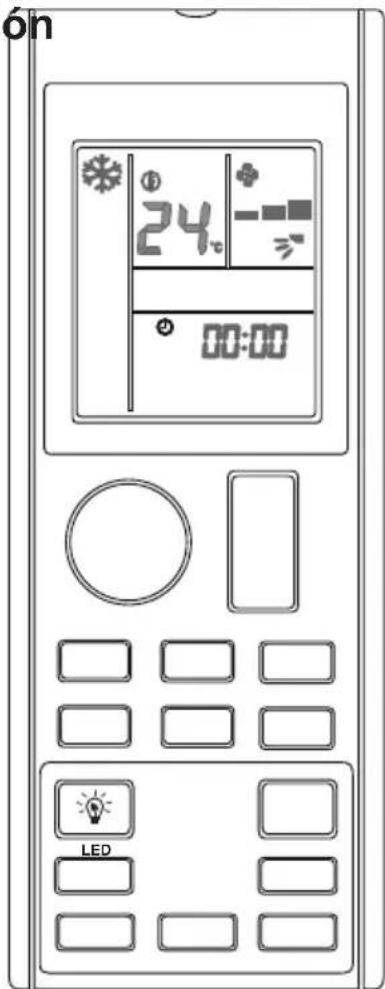
Display (LCD) • Display the current settings. (This illustration shows the full display of the LCD panel, including functions for applicable remote controller models only). ON/OFF Button • Start/Stop the operation. FAN Button • Changes the operating fan speed. QUIET Button • Enable / Disable QUIET function. Mode Button • Change between the available operating modes. LED Button • Change the indication display. ON Timer Button • Enable / Disable and change ON Timer setting. IR Signal Transmitter • To enable signal transmission, direct the transmitter to the indoor unit. Note that in condition where there is an obstacle that blocks between the transmitter and the indoor unit, signal transmission might not be successful. Temperature Setting Button • Increase / Decrease the temperature setting. POWERFUL Button • Enable / Disable POWERFUL function. UP-DOWN SWING Button • Direct the air flow in up- down direction. SLEEP Button • Enable / Disable SLEEP function. ECO+ Button • Enable / Disable ECO + function. OFF Timer Button • Enable / Disable and change OFF Timer setting. CLOCK Button • Changes RTC setting.Preparation Before Operation
■ Accessories
The following accessories are included.
| Drywall screw Battery | Remote Controller Holder | |
 | 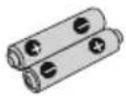 | 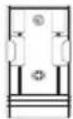 |
| 2 | 2 | 1 |
■ To set the batteries
- Release the battery cover at the back of the remote controller.
- Insert two dry batteries (LR03:AAA).
- Set the battery cover as before.
Disposal Requirements

The batteries supplied with the controller are marked with this symbol.
This means that the batteries shall not be mixed with unsorted household waste.
If a chemical symbol is printed beneath the symbol, this chemical symbol means that the battery contains a heavy metal above a certain concentration.
Possible chemical symbols are:
■ Pb: lead (>0,004%)
Waste batteries must be treated at a specialized treatment facility for re-use. By ensuring correct disposal, you will help to prevent potential negative consequences for the environment and human health. Please contact your local authority for more information.
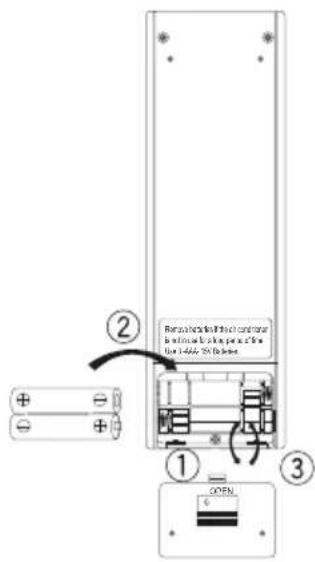
text_image
Retrosing to the next controller is optional for opening the the 1400x 2000000000 ② ① ③ OPEN■ About batteries
- Remove the batteries from the remote controller if the air conditioner will not be used for an extended period of time.
- When replacing the batteries, it is advised to replace the both batteries together with batteries of the same type.
- Batteries should be replaced once a year, However, if the display of remote controller started to fade or there is a noticeable degradation in performance, replace both batteries with new AAA:LR03 batteries.
- The attached batteries are provided for initial use of the air conditioner. The usage period of these batteries depends on the manufactured date of the air conditioner.
Preparation Before Operation
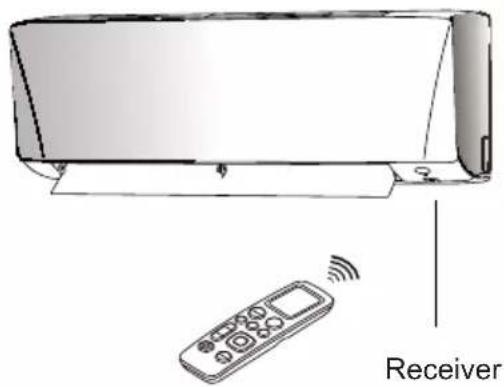
■ To operate the remote controller
- Aim the transmitter of the remote controller at the receiver of the indoor unit.
- Ensure there is no blockage such as curtain between the indoor unit and the remote controller, signal transmission will be unsuccessful.
- The maximum distance for successful communication is about 7m.
text_image
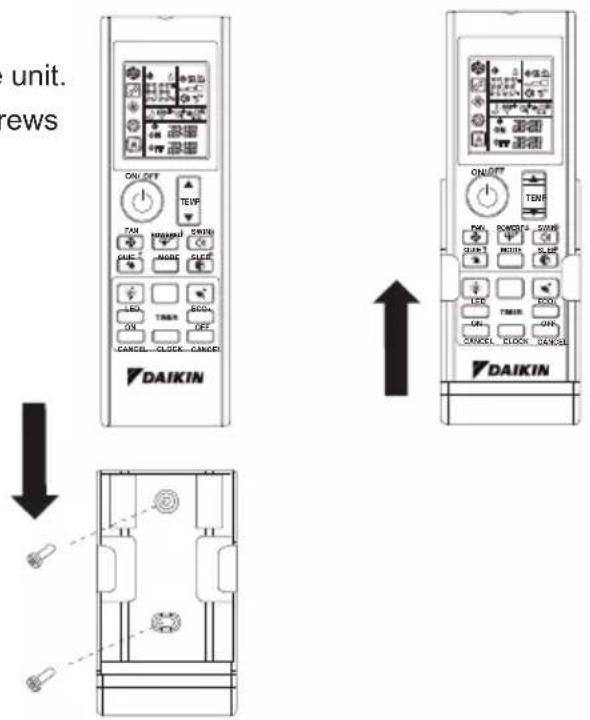
Receiver■ To fix the remote controller holder on the wall
-
Choose a location where signal is able to reach the unit.
-
Fix the holder onto a wall, a pillar or etc with the screws supplied with the holder.
-
Place the remote controller on the holder.
text_image
unit. views ON/OFF TEVP TAN NAMORI SWING GUE MAGE SLICE LED TRIM SCO ON OFF CANCEL CLOCK CANDER DAIKIN ON/OFF TEVP FNV POMS SWM RUN 3 MOSL SLICE LED TRIM ECOL ON CANCEL CLOCK CANDER DAIKIN■ About remote controller
- Do not drop nor wet the remote controller.
- Never expose the remote controller under direct sunlight.
- Dust on the transmitter lens cover will reduce the sensitivity.
- Signal communication may be affected if the air conditioner is being installed near an electronic-starter-type fluorescent lamp (such as inverter-type lamp) in the room.
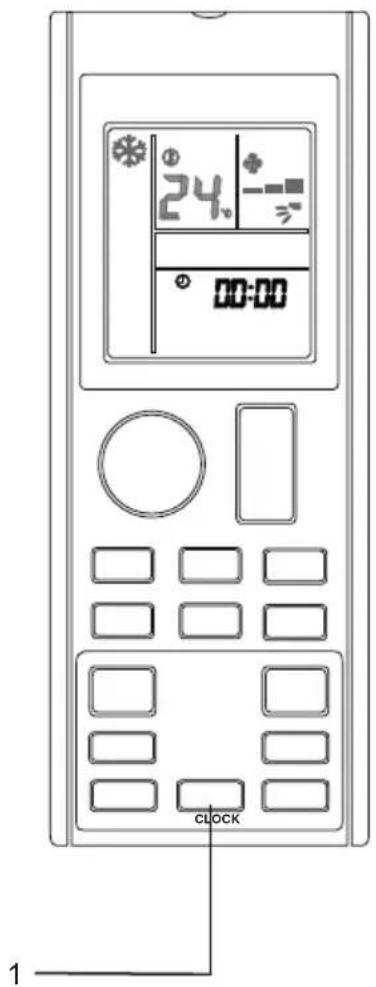
■ To set the clock
- Press and hold CLOCK button to set the clock time.
• ^④ blinks:00
- For example, present time is 8 o'clock in the morning,
^④ 08:00 will be displayed.
text_image
24 00:00 CLOCK 1Note
- Remote controller is automatically in clock setting mode upon battery insertion. Users are advised to complete the clock setting before operation.
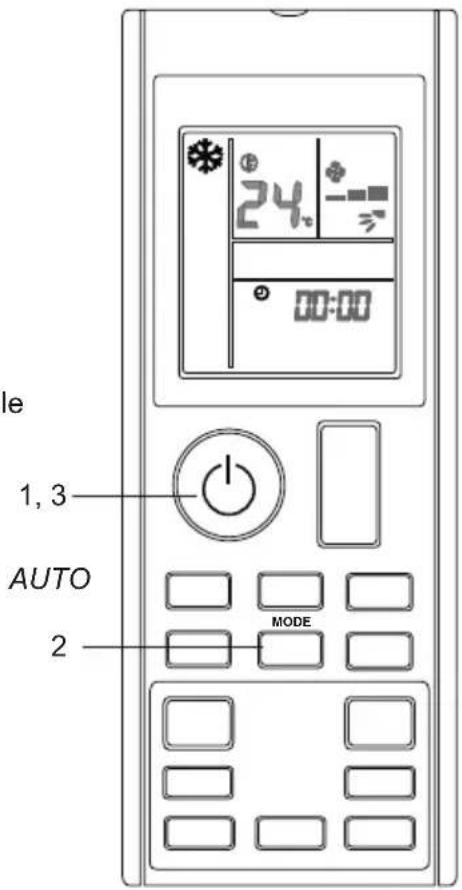
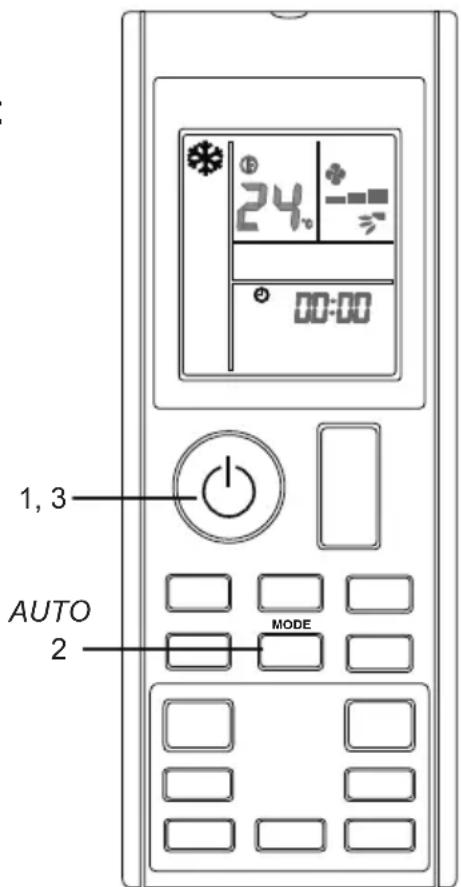
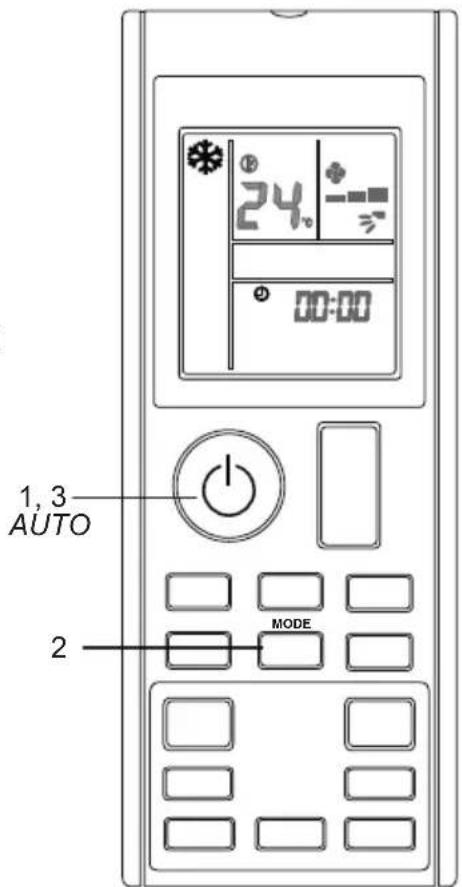
AUTO • COOL • DRY • FAN • HEAT Operation
■ To start operation
-
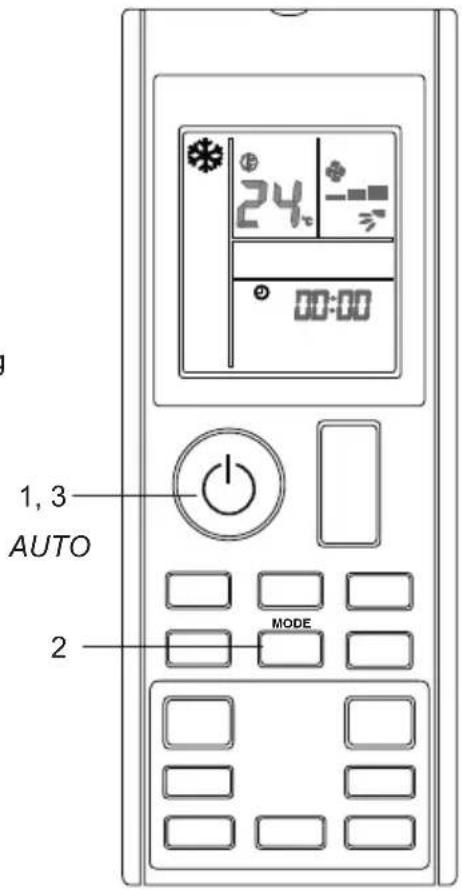
Press button to start the unit operation.
-
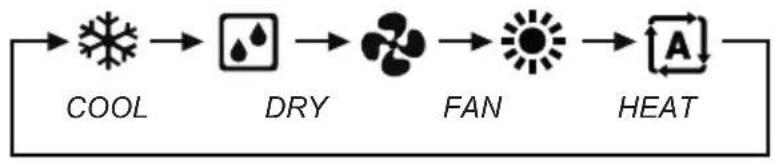
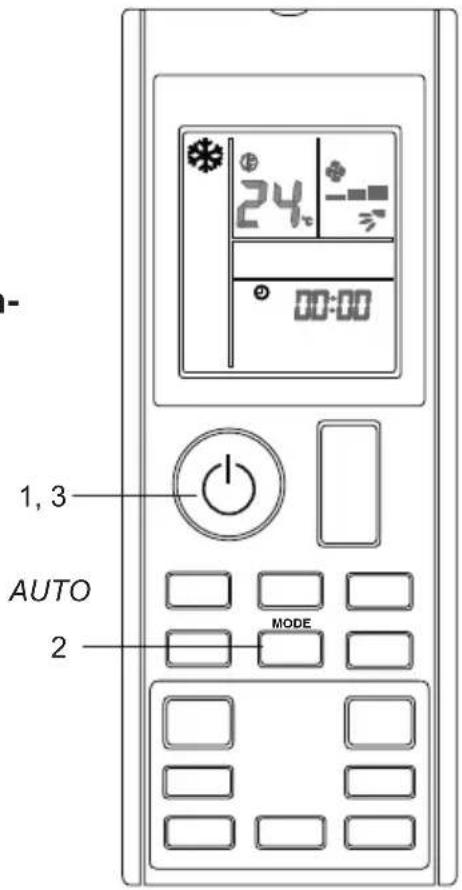
Press MODE button to choose the desired operation mode.
• Each pressing on the button advances the available operating mode in sequence below:
flowchart
graph LR
    A["COOL"] --> B["DRY"]
    B --> C["FAN"]
    C --> D["HEAT"]
text_image
1, 3 AUTO 2 MODE■ To stop operation
-
Press button again to stop the unit operation.
-
Note
| Operating Mode Description | |
| COOL The air conditioner cools down the room by releasing the heat to outdoor unit. | |
| DRY The air conditioner operates to control the room humidity by regulating the indoor unit fan speed. Therefore, manual adjustment of the fan speed in DRY mode is not available. | |
| FAN The air conditioner indoor unit will run in fan only. | |
| HEAT The air conditioner heats up a room to be temperature setpoint. | |
| AUTO The air conditioner cools down or heats up a room to the temperature setpoint. It automatically switches between cooling and heating if necessary. |
■ Notes on the operating conditions
- The air conditioner will always consume a small amount of electricity even in standby mode.
- Ensure that the power supply / breaker is switch off if the air conditioner is not going to be used for an extended period of time.
■ To change temperature setting
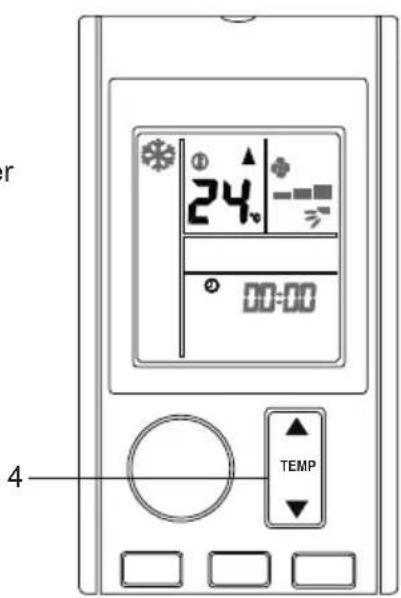
4. Press ▲ TENP button.
- The temperature segments on LCD display shall change whenever ▲ or ▼ button is pressed.
| Operating Mode | COOL HEAT | AUTO DRY | & FAN | |
| Set Temperature Range | 18°C - 32°C | 10°C - 30°C | 18°C - 30°C | Not applicable |
text_image
r 24 00:00 TEMP 4- Press simultaneously on ▲ and ▼ to change the temperature display unit in Celcius (°C) or Fahrenheit (°F).
• For example, ^①24_c ^②76_*
■ Tips for energy saving
- Keeps the temperature setting at a moderate level (do not over-cool the room).
- Clean the air filters to prevent clogging that could contribute to inefficient operation and energy wastage.
** Recommended to clean the filter once every 2 weeks for regular user.
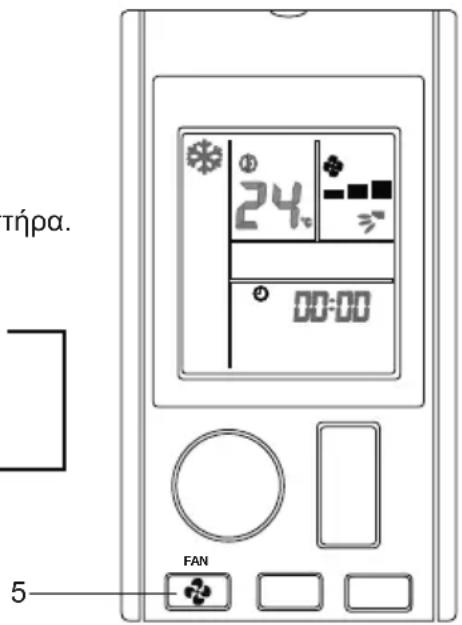
■ To change fan speed setting
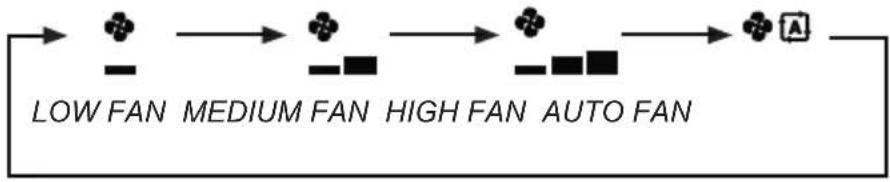
5. Press button.
• Each pressing on the button advances the fan speed mode in sequence.
• In COOL & HEAT mode:
flowchart
graph LR
    A["Low Fan"] --> B["MEDIUM Fan"]
    B --> C["HIGH Fan"]
    C --> D["AUTO Fan"]
- In FAN mode:
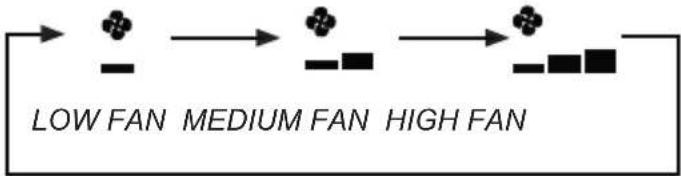
flowchart
graph LR
    A["Low FAN"] --> B["MEDIUM FAN"]
    B --> C["HIGH FAN"]
• Fan speed setting not available in DRY mode.
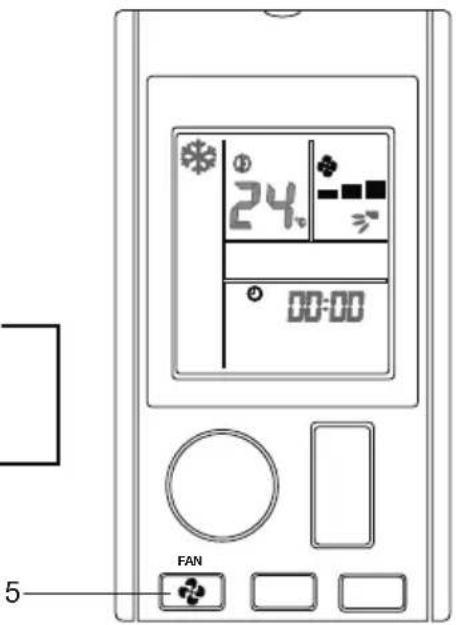
text_image
24 00:00 FAN 5■ Notes on fan speed setting
- When fan speed is set to AUTO fan speed, the air flow rate will adjust automatically based on the room temperature and temperature setting selected by user.
• Cooling and heating effect will be affected at lower air flow rate.
Adjusting the Airflow Direction
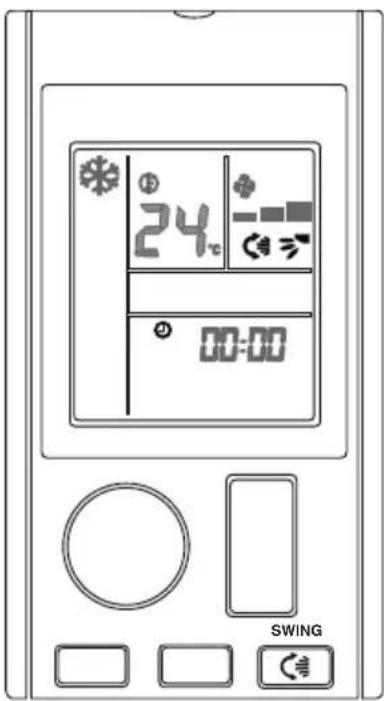
■ To change the air flow in up-down direction (UP-DOWN swing)
1. Press button.
- To distribute the air to a specific direction, press the button and wait until the louver move to the desired direction and press the button once again.
text_image
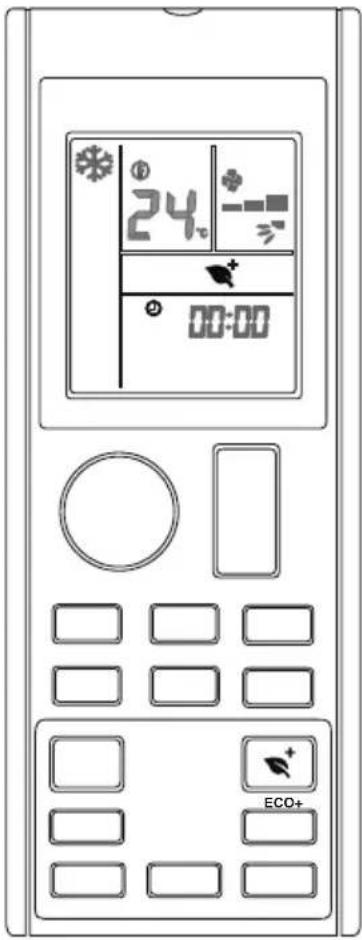
24°C 00:00 SWING■ To start ECO+ operation
1. Press button.
• will be displayed on the LCD.
■ To cancel ECO+ operation
2. Press button.
• ^+ disappear from the LCD. The previous setting used before ECO+ operation will be resumed.
text_image
24 00:00 ECO+■ Notes on ECO+ operation
- This operation adjust the operating condition to energy saving level by limiting the maximum power consumption of the air conditioner unit.
- ECO+ operation will be stopped if SLEEP operation is activated.
- ECO+ only available in COOL and HEAT mode.
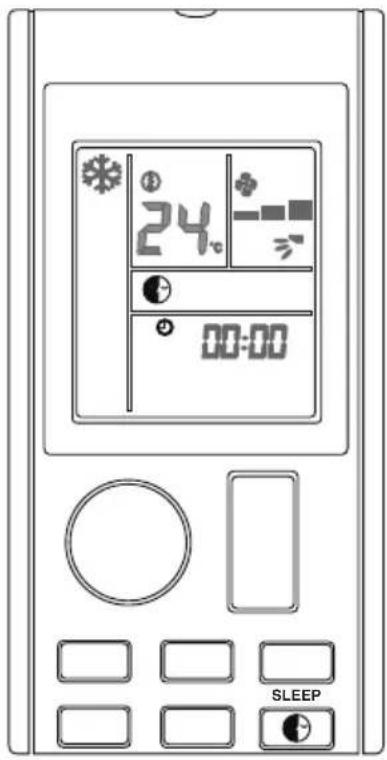
■ To start SLEEP operation
1. Press Button.
- with be displayed on the LCD.
- LED Indication lights of unit will be dimmed down.
■ To cancel SLEEP operation
2. Press Button.
- will disappear from the LCD. The previous setting used before SLEEP operation will be resumed.
text_image
24 00:00 SLEEP■ Notes on SLEEP operation
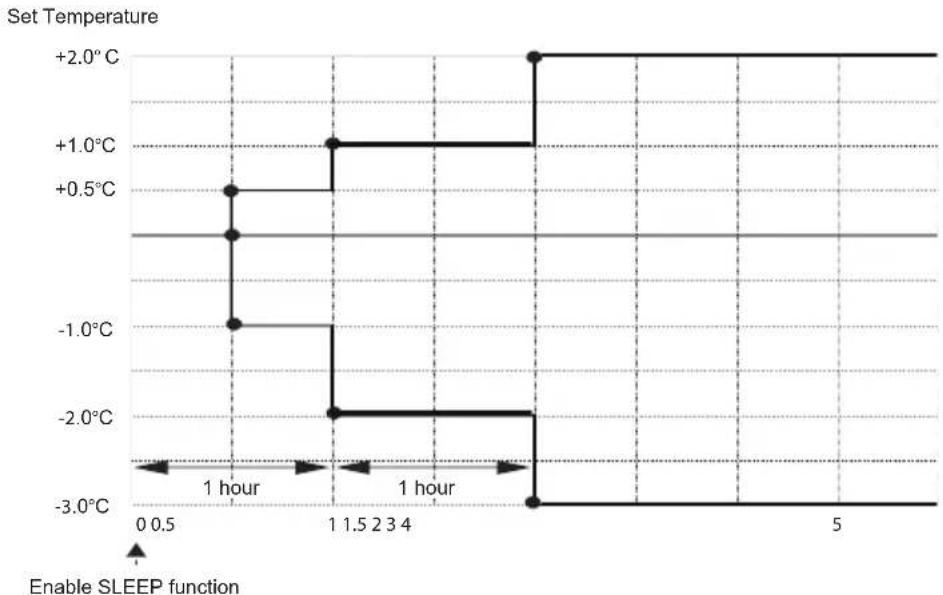
- This operation automatically adjust the set temperature of the air conditioner to provide a comfort sleeping environment.
line
| Time (hours) | Temperature (°C) | |--------------|-----------------| | 0 | -3.0 | | 1 | -2.0 | | 2 | -1.0 | | 3 | -0.5 | | 4 | +0.5 | | 5 | +1.0 | | 6 | +2.0 |- SLEEP only available in COOL, HEAT and AUTO mode.
- SLEEP operation will be stopped if ECO+ operation is activated
POWERFUL Operation
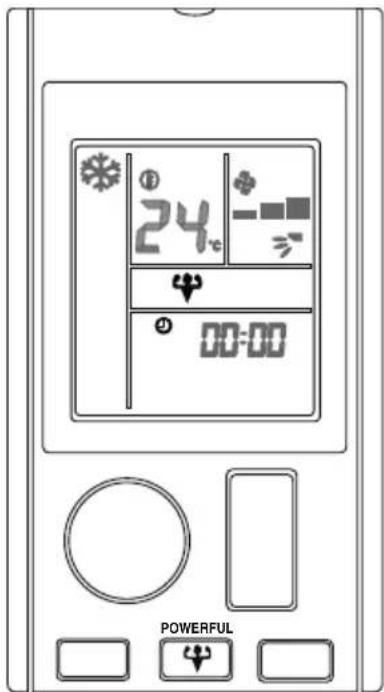
■ To start POWERFUL operation
1. Press button.
- will be displayed on the LCD.
- POWERFUL operation ends in 20 minutes. The previous setting used before POWERFUL operation will be resumed.
■ To cancel POWERFUL operation
2. Press button.
• CD will disappear from the LCD. The previous setting used before POWERFUL operation will be resumed.
text_image
24 00:00 POWERFUL■ Notes on POWERFUL operation
• This operation cannot operate with QUIET.
- In condition where POWERFUL is started, it will temporarily override the operation of other functions for 20 minutes.
- POWERFUL operation will be stopped if fan speed is adjusted. Priority will be given to the last button pressed.
- Indoor unit operating sound will appear to be louder during POWERFUL operation.
- POWERFUL operation will not increase the capacity of air conditioner if the air conditioner is already operating in its maximum capacity.
- POWERFUL only available in COOL and HEAT mode.
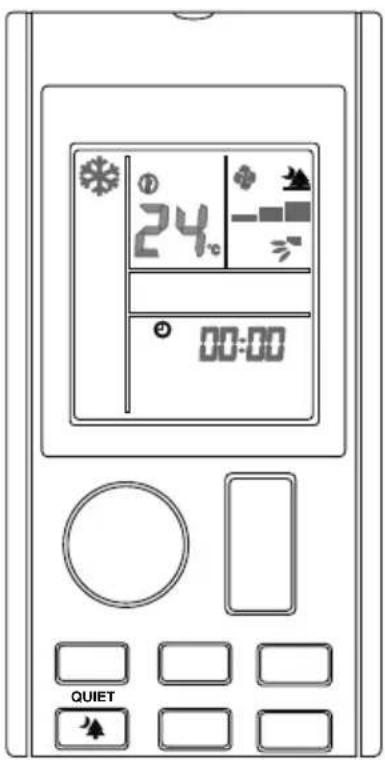
■ To start QUIET operation
- Press button.
- 2.5 will be displayed on the LCD.
■ To cancel QUIET operation
- Press button.
- Will disappear from the LCD. The previous setting used before QUIET operation will be resumed.
text_image
24 00:00 QUIET■ Notes on QUIET operation
- Indoor unit operating sound will appear to be lower during QUIET operation.
• The cooling and heating effect will be lower in QUIET operation. - QUIET operation will be stopped if fan speed is adjusted or POWERFUL operation is activated.
- Priority will be given to the last button pressed.
- QUIET only available in COOL and HEAT mode.
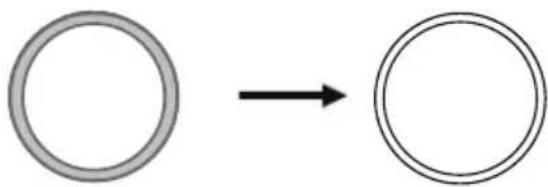
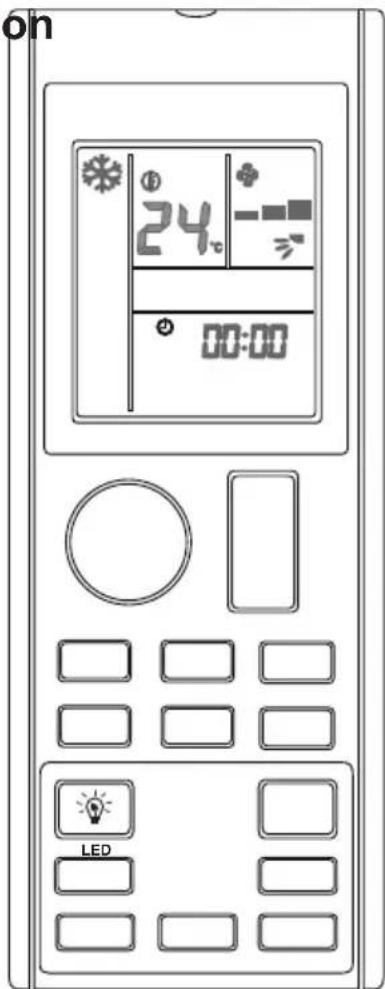
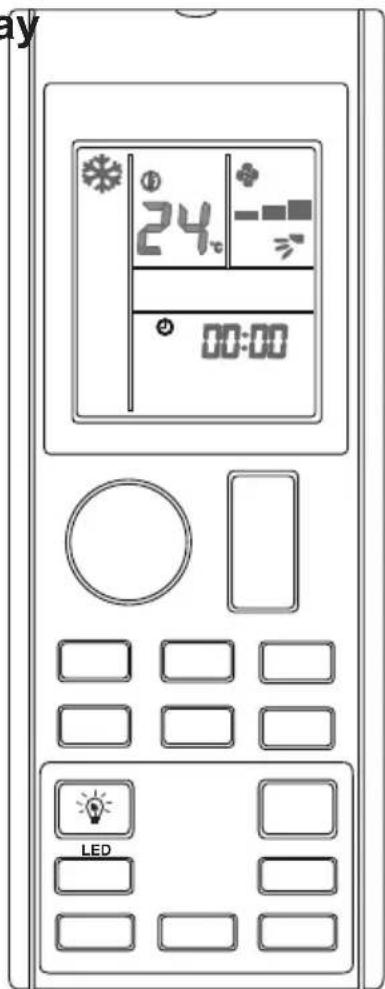
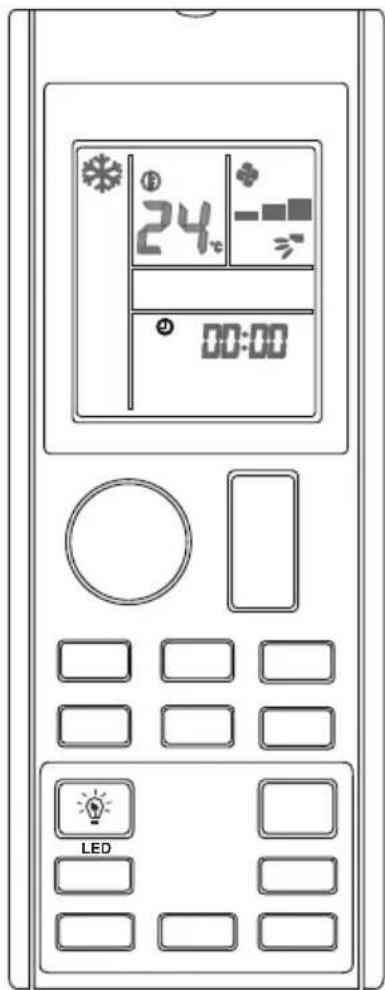
■ To change or switch off the indication display on the indoor unit
1. Press button.
- Press and hold the button changes the indication display on the indoor unit.
- For example,
natural_image
Simple diagram showing a circle transforming into a ring (no text or symbols)Indication light ON Indication lights OFF
text_image
on 24 00:00 LED
text_image
LED INDICATION LIGHTS■ Notes on indoor unit indication display
For operating mode status indication display:
• COOL mode: Light blue
- HEAT mode: Red
• FAN mode: Yellow
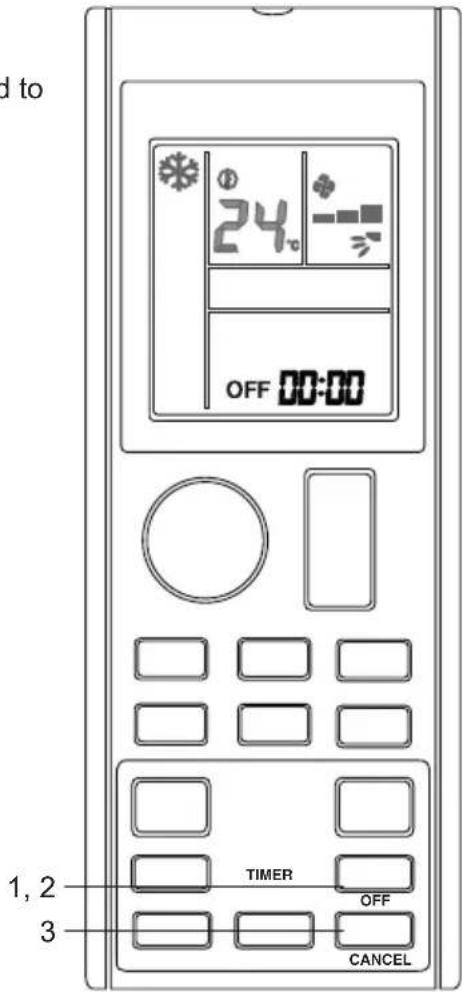
■ To use OFF TIMER operation
- Ensure the clock setting is set to present time (refer to method to set the clock under preparation before operation).
- Press □ OFF button.
• OFF be displayed on the LCD.
- Press ☐ to set the off timer setting.
- Set the desired off time by pressing the OFF TIMER button continuously.
■ To cancel OFF TIMER operation
- Press □ button to cancel the OFF TIMER. CANCEL
text_image
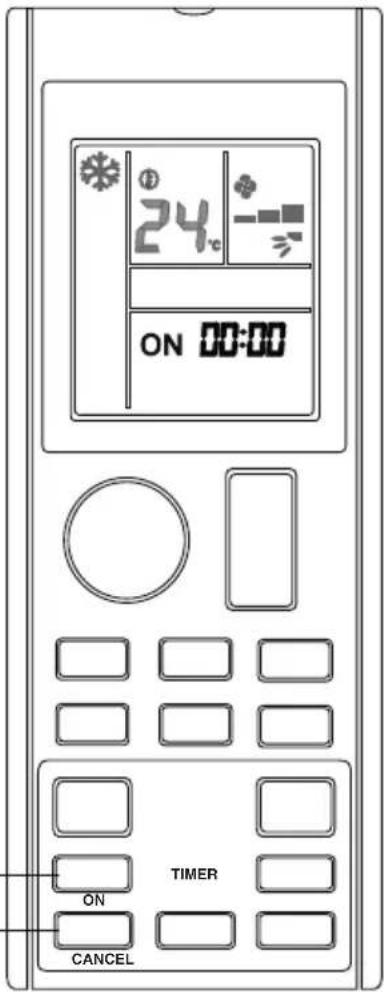
d to 24 OFF 00:00 TIMER OFF CANCEL 1, 2 3■ To use ON TIMER operation
- Ensure the clock setting is set to present time (refer to method to set the clock under preparation before operation).
- Press ON button.
- ONII be displayed on the LCD.
- Press ON to set the on timer setting.
- Set the desired off time by pressing the ON TIMER button continuously. If timer is set to 7.30am, the air conditioner will turn on at 7.30am sharp.
■ To cancel ON TIMER operation
- Press CANCEL button to cancel the ON TIMER.
1,2
text_image
24°C ON 00:00 TIMER ON CANCEL■ Notes on TIMER setting
- ON TIMER setting is sharing the same segment with CLOCK setting on the LCD display.
- LCD will display only the TIMER setting once ON TIMER and/or OFF TIMER is set.
- TIMER setting will auto exit if no button press after blink for 3s.
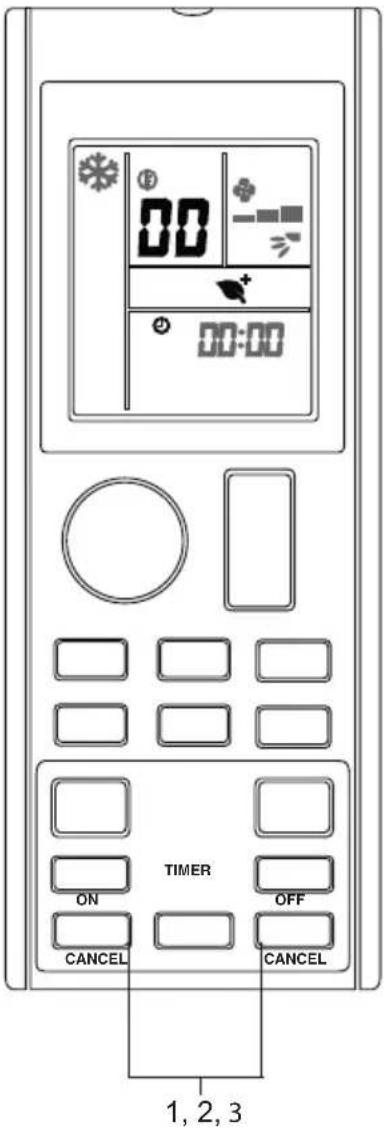
■ To perform error code diagnosis
- Press and hold ON or OFF button for 5 seconds. CANCEL CANCEL
• binks.
- Press ON or OFF to check on the error code. CANCEL CANCEL
- Press on the button repeatedly until a long "beep" acknowledgement heard from the indoor unit.
■ To exit from error code diagnosis
- Press and hold ON or OFF button for 5 seconds. CANCEL CANCEL
- The code display will cancel itself if the button is not pressed for 1 minute.
text_image
00:00 ON TIMER OFF CANCEL CANCEL 1, 2, 3Note
- A short "beep" and two consecutive "beep" acknowledgement from the indoor unit indicates a non-correspondence error code.
- User shall not attempt to repair or modify the air conditioner as any incorrect work may result in electric shock or fire.
- Consult the service personnel in case the air conditioner is found to be faulty.
■ Error code definition
| Error Code Meaning | |
| 00 Normal | |
| A1 Indoor PCB error | |
| A3 Drain pump abnormal | |
| A5 Antifreeze | |
| A6 Indoor fan motor abnormal | |
| AH Electrical air cleaner abnormal | |
| C4 Indoor heat exchanger (1) thermistor short / open | |
| C5 Indoor heat exchanger (2) thermistor short / open | |
| C7 Louver limit switch error | |
| C9 Indoor room thermistor short / open | |
| E1 Outdoor PCB error | |
| E3 High pressure protection | |
| E4 Low pressure protection | |
| E5 Compressor motor lock / compressor overload | |
| E6 Compressor start-up error | |
| E7 | Outdoor DC fan motor lock |
| E8 | AC input overcurrent |
| E9 | EXV error |
| EA | 4 way valve error |
| F3 | Discharge pipe overheat |
| F6 | Heat exchanger overheat |
| H0 | Compressor sensor system error |
| H3 High pressure switch error | |
| H6 | Compressor feedback detection error |
| H7 | Fan motor overload / overcurrent / sensor abnormal |
| H8 | AC current sensor error |
| H9 Outdoor air thermistor short/open | |
| J1 Pressure sensor error | |
| J3 Compressor discharge pipe thermistor short / open / misplaced | |
| J5 Suction pipe thermistor short / open | |
| J6 Outdoor heat exchanger thermistor short / open | |
| J7 Subcooling heat exchanger thermistor short / open | |
| J8 Liquid pipe thermistor short / open | |
| J9 Gas pipe thermistor short / open | |
| L1 Inverter outdoor PCB error | |
| L3 Outdoor control box overheat | |
| L4 Heat sink overheat | |
| L5 IPM error / IGBT error | |
| L8 Inverter compressor overcurrent | |
| L9 Compressor overcurrent prevention | |
| LC Communication error (outdoor control PCB and inverter PCB) | |
| P1 Open phase or voltage unbalance | |
| P4 Heat sink thermistor short / open | |
| PJ Capacity setting error | |
| U0 Insufficient gas | |
| U2 | DC voltage out of range |
| U4 | Communication error |
| U7 | Communication error (outdoor control PCB and IPM PCB) |
| UA | Installation error |
| UF | Piping & wiring installation mismatch / wrong wiring / insufficient gas |
| UH | Antifreeze (other rooms) |
Note
After connecting to wireless LAN adapter, remote controller settings prevail over WLAN apps setting.
Care and Cleaning

CAUTION
- Before cleaning, be sure to stop the operation and turn off the circuit breaker.
- Do not touch the aluminium fins of the indoor unit. If you touch those parts, this may cause an injury.
- Avoid direct contact of any coil treatment cleaners on plastic part. This may cause plastic part to deform as a result of chemical reaction.
■ Quick reference
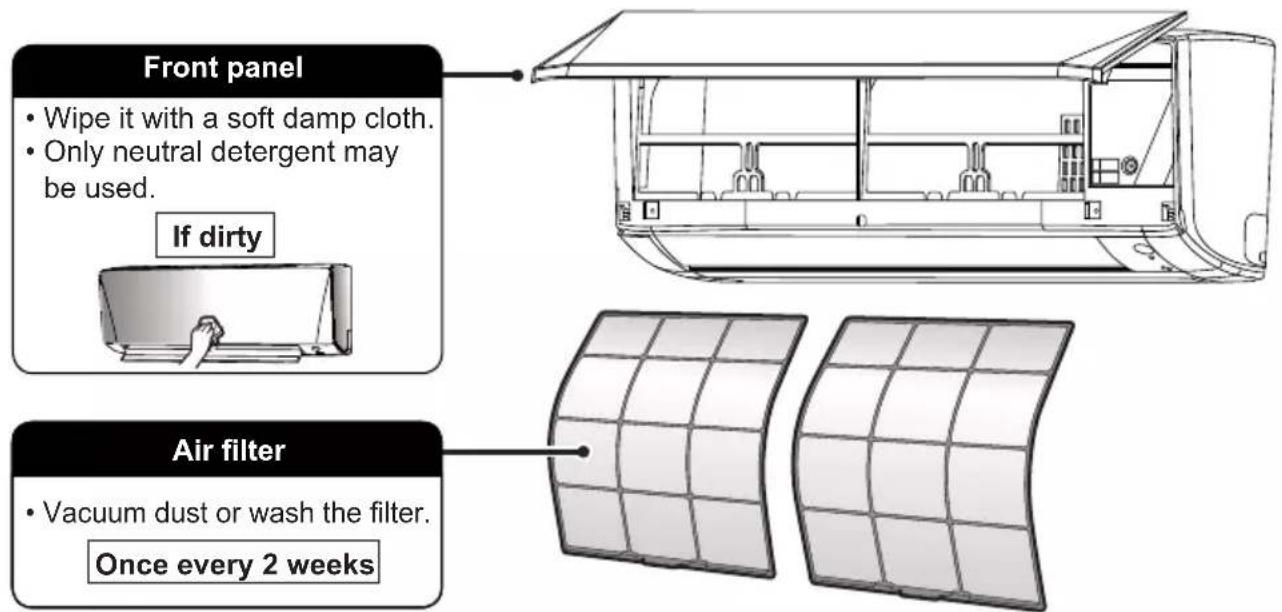
Cleaning parts
text_image
Front panel • Wipe it with a soft damp cloth. • Only neutral detergent may be used. If dirty Air filter • Vacuum dust or wash the filter. Once every 2 weeksIndoor unit, outdoor unit and remote controller
- Wipe them with a soft cloth.
If dirty
Note
For cleaning, do not use any of the following :
• Water hotter than 40^ C/104°F
• Volatile liquid such as benzene, gasoline and thinner
- Polishing compounds
- Rough materials such as a scrubbing brush
Air filter
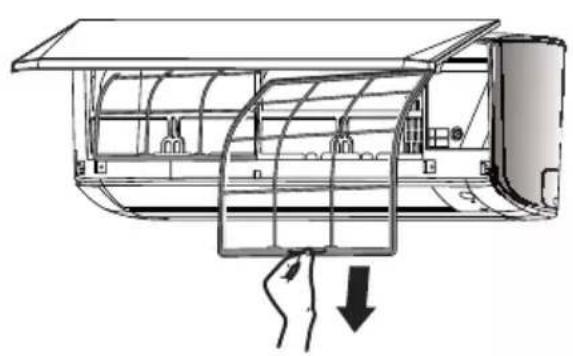
1. Pull out the air filters.
- Open the front panel
- Push the filter tab at the centre of each air filter a little upwards, then pull it down.
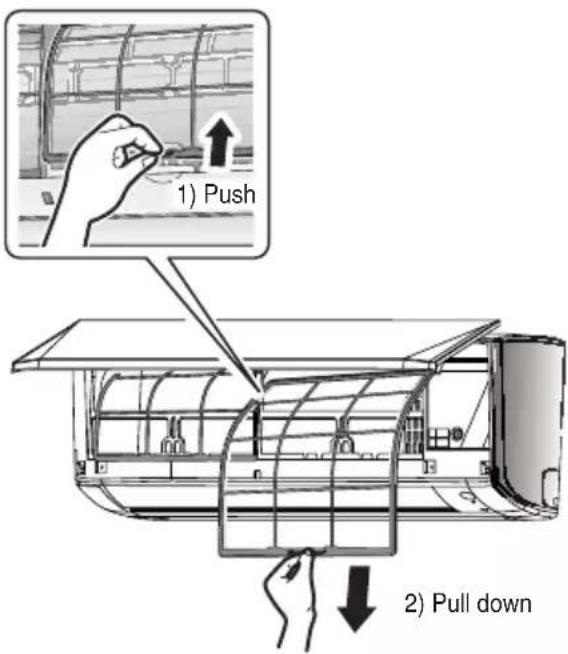
text_image
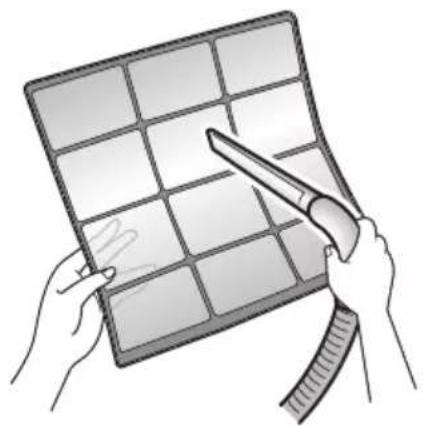
1) Push 2) Pull down2. Wash the air filters with water or clean them with vacuum cleaner.
- It is recommended to clean the air filters every 2 weeks.
natural_image
Illustration of hands holding a grid-based tablet with a pen, no text or symbols present
CAUTION
- Do not touch the aluminum fins by bare hand at the time of dismounting or mounting the filter.
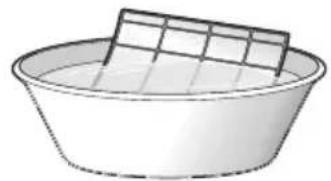
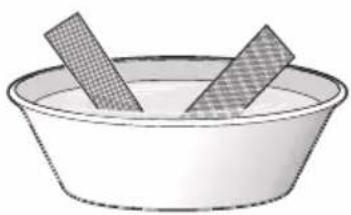
If the dust does not come off easily
- Wash the air filters with neutral detergent thinned with lukewarm water, then dry them up in the shade.
- Be sure to remove the titanium apatite deodorizing filter. Refer to "Titanium apatite deodorizing filter" on the next page.
natural_image
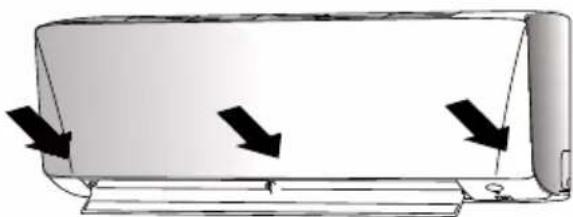
Simple line drawing of a basin with a rectangular plate on top (no text or symbols)3. Set the filters as they were and close the front panel slowly.
- Press the front panel at both side and the center.
natural_image
Diagram of a car air conditioner unit with three black arrows indicating airflow direction (no text or symbols)* Appearance of the indoor unit may differ from some models.
Titanium apatite deodorizing filter
The titanium apatite deodorizing filter can be renewed by washing it with water once every 6 months. We recommend replacing it once every 3 years.
1. Take off the titanium apatite deodorizing filter
- Open the front panel and pull out the air filter.
- Remove titanium apatite deodorizing filter from the back of air filter.
natural_image
Technical line drawing of a car air conditioner unit with airflow direction indicator (no text or symbols)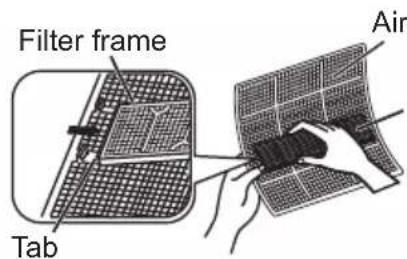
text_image
Filter frame Tab AirTitanium apatite deodorizing filter
2. Clean or replace the titanium apatite deodorizing filter.
[Maintenance]
2-1 Vacuum dusts, and soak in lukewarm water or water for about 10 to 15 minutes if dirt is heavy.
2-2 After washing, shake off remaining water and dry in the shade.
[Replacement]
Remove filter from the back of air filter.
- Dispose of the old filter as non-flammable waste.
3. Set the filters as they were and close the front panel.
- Press the front panel at both sides and the center.
natural_image
Simple line drawing of a bowl containing two textured food items (no text or symbols)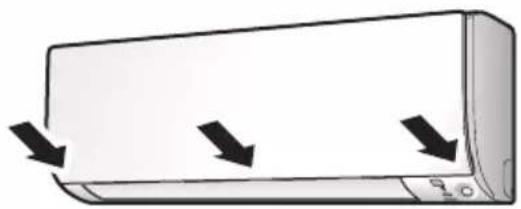
natural_image
Illustration of a car air conditioner unit with three arrows indicating airflow or movement (no text or symbols)*Appearance of the indoor unit may differ from some models.
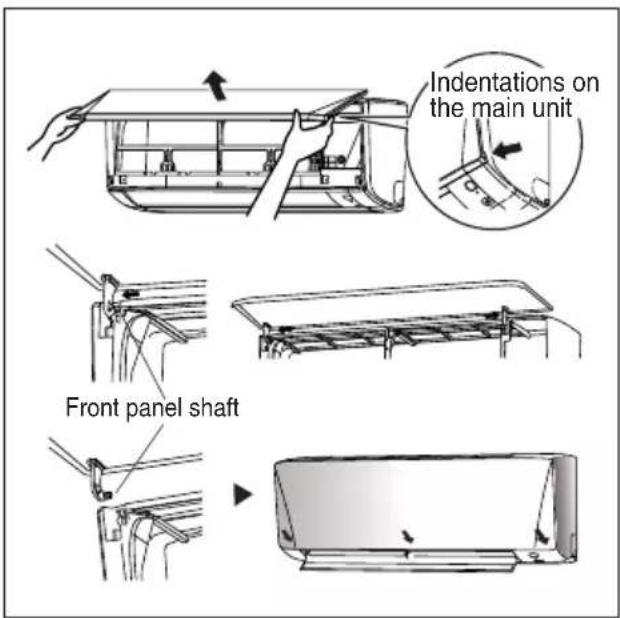
How to open Front Panel
1. Open the front panel.
- Hold the panel at the recesses on the main unit (2 recesses on right and left sides) and lift it until it stops.
2. Remove the front panel.
- While lifting the front panel further, slide it to the right and pull it to the front side. The left rotating shaft is detached. Slide the right rotating shaft to the left and pull it to the front side to remove it.
3. Attach the front panel.
- Align the right and left rotating shafts of the front panel with the grooves and push them all the way in.
• Gently close the front panel. (Push both ends and the center on the front panel.)
text_image
Indentations on the main unit Front panel shaft
CAUTION
- Don't touch the metal parts of the indoor unit. It may cause an injury.
- When removing or attaching the front panel, support the panel securely with hand to prevent it from falling.
- For cleansing, do not use hot water above 40^ , benzene, gasoline, thinner, nor other volatile oils, polishing compound, scrubbing brushes, nor other hand stuff.
• After cleaning, make sure that the front panel is securely fixed.
When The Unit Is Not To Be Used For An Extended Long Period Of Time
Operate the unit for 2 hours with the following setting.
Operating mode : cool Temperature : 30°C/86°F
natural_image
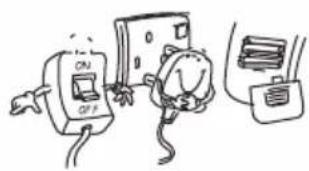
Cartoon illustration of a person holding a book with motion lines (no text or symbols)Remove the power plug.
If you are using an independent electric circuit for your unit, cut off the circuit.
Remove the batteries in the remote control.
natural_image
Simple line drawing of a cat and a computer with books, no text or symbols presentTROUBLESHOOTING
For any enquiries on spare part please contact your authorized dealer. If any malfunction of the air conditioner unit is noted, immediately switch off the power supply to the unit. Check the following fault conditions and causes for some simple troubleshooting tips.
| Fault Causes / Action | |
| 1. The compressor does not operate 3 minutes after the air conditioner unit is started. | - Protection against frequent starting. Wait for 3 to 4 minutes for the compressor to start operating. |
| 2. The air conditioner unit does not operate. - | Power failure, or the fuse need to be replaced.- The power plug is disconnected.- It is possible that your delay timer has been set incorrectly.- If the fault persist after all these verifications, please contact the air conditioner unit installer. |
| 3. The air flow is too low. | - The air filter is dirty.- The doors or windows are open.- The air suction and discharge are clogged.- The regulated temperature is not high enough. |
| 4. Discharge air flow has bad odour. | - Odours may be caused by cigarettes, smoke particles, perfume etc. which might have adhered onto the coil. |
| 5. Condensation on the front air grille of the indoor unit. | - This is caused by air humidity after an extended long period of operation.- The set temperature is too low, increase the temperature setting and operate the unit at high fan speed. |
| 6. Water flowing out from the air conditioner unit. | - Switch off unit and call dealer. |
If the fault persists, please call your local dealer / serviceman.
INDICE
LEGGERE PRIMA DELL'USO
flowchart
graph LR
    A["COOL"] --> B["DRY"]
    B --> C["FAN"]
    C --> D["HEAT"]
text_image
24 00:00 1, 3 AUTO MODE 2flowchart
graph LR
    A["Low FAN"] --> B["MEDIUM FAN"]
    B --> C["High FAN"]
text_image
24 00:00 SWINGFunzionamento ECO+
natural_image
Simple diagram showing a circle transforming into a ring (no text or symbols)Spia ON Spia OFF
text_image
24 00:00 LED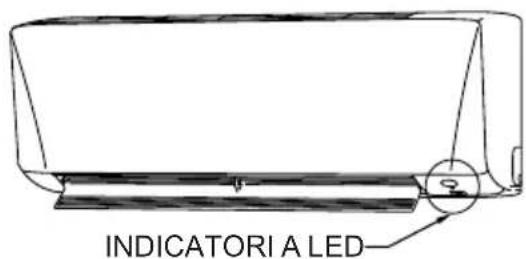
text_image
INDICATORI A LEDnatural_image
Technical line drawing of a vehicle interior showing structural components (no text or labels)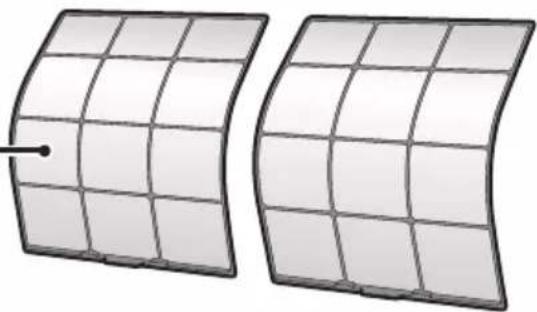
natural_image
Two curved solar panels with grid lines, one with a small dot and the other with a dot (no text or symbols)Filtro dell'aria
natural_image
Illustration of hands holding a grid-based panel with a tool, no text or symbols presentnatural_image
Simple line drawing of a bowl with a grid-patterned top and a rectangular object on top (no text or symbols)natural_image
Diagram of a car air conditioner unit with airflow arrows indicating airflow direction (no text or symbols)natural_image
Technical line drawing of a car air conditioner unit with airflow direction indicator (no text or symbols)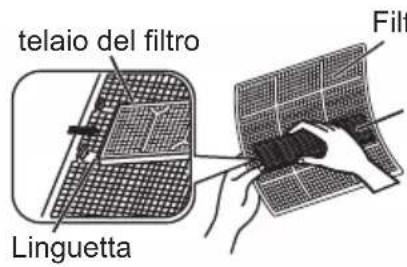
natural_image
Simple line drawing of a bowl containing two striped food items (no text or symbols)natural_image
Illustration of a wall-mounted air conditioner unit with three black arrows indicating airflow direction (no text or symbols)natural_image
Cartoon illustration of a smiling face on a phone receiver (no text or symbols)text_image
dienung. ② File Name: Supercalator is a 200mm x 100mm x 150mm x 200mm x 250mm x 300mm ① ③ OPEN■ Über Batterien
flowchart
graph LR
    A["COOL"] --> B["DRY"]
    B --> C["FAN"]
    C --> D["HEAT"]
text_image
1, 3 AUTO 2 MODEflowchart
graph LR
    A["Low FAN"] --> B["MEDIUM FAN"]
    B --> C["High FAN"]
text_image
19 24 00:00 SWINGnatural_image
Simple diagram showing a circle transforming into a ring (no text or symbols)natural_image
Technical line drawing of a car interior showing internal compartments and structural elements (no text or labels)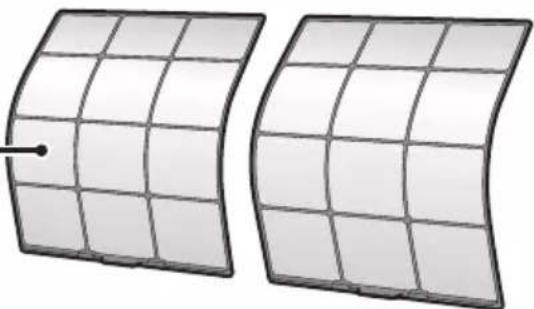
natural_image
Two curved solar panels with grid lines and a small dot on one panel (no text or symbols)Luftfilter
natural_image
Illustration of hands holding a grid-based panel with a tool, no text or symbols presentnatural_image
Simple line drawing of a bowl with a grid on top (no text or symbols)natural_image
Diagram of a car air conditioner unit with airflow arrows indicating cooling or ventilation (no text or symbols)natural_image
Technical line drawing of a car air duct system with airflow direction indicator (no text or symbols)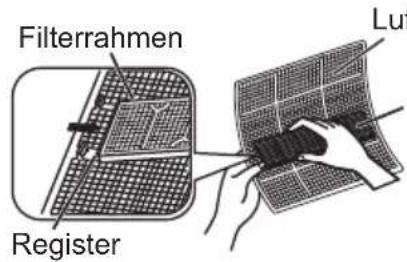
text_image
Filterrahmen Register Lufnatural_image
Simple line drawing of a bowl containing two chopsticks (no text or symbols)natural_image
Illustration of a wall-mounted air conditioner unit with three black arrows indicating airflow or cooling direction (no text or symbols)text_image
Indentations on the main unit Front panel shaft
VORSICHTSHINWEIS
natural_image
Cartoon illustration of a smiling face inside a book with motion lines indicating speed (no text or symbols)text_image
Hand-drawn cartoon showing a switch labeled 'ON' and 'OFF' connected to a battery and circuit board, with two characters interacting.FEHLERSUCHE
flowchart
graph LR
    A["COOL"] --> B["DRY"]
    B --> C["FAN"]
    C --> D["HEAT"]
flowchart
graph LR
    A["Low FAN"] --> B["MEDIUM FAN"]
    B --> C["High FAN"]
text_image
24°C 00:00 SWINGFuncionamiento ECO+
natural_image
Simple diagram showing a circle transforming into a ring (no text or symbols)Luz indicadora ON Luz indicadora OFF
text_image
on 24 00:00 LED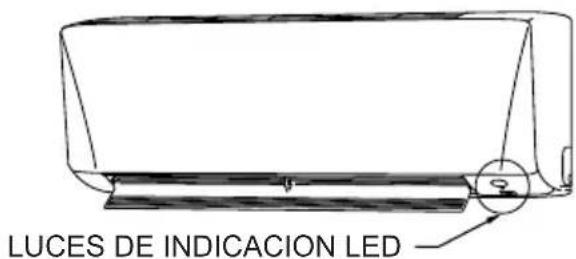
text_image
LUCES DE INDICACION LEDnatural_image
Technical line drawing of a vehicle interior showing structural components (no text or labels)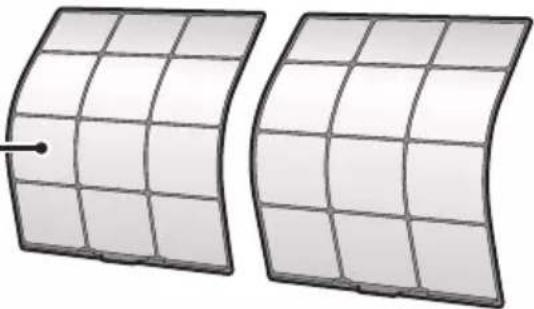
natural_image
Two curved, grid-patterned panels with a dot on one side (no text or symbols)Filtro de aire
natural_image
Illustration of hands holding a grid-based tablet with a tool, no text or symbols presentnatural_image
Simple line drawing of a bowl with a grid-patterned top (no text or symbols)natural_image
Diagram of a car air conditioner unit with three black arrows indicating airflow direction (no text or symbols)natural_image
Technical line drawing of a car air duct system with airflow direction indicated by arrows (no text or symbols)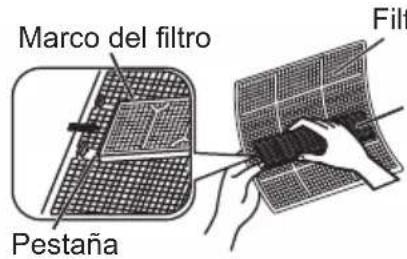
text_image
Marco del filtro Pestaña Filtnatural_image
Simple line drawing of a bowl containing two rectangular objects, one with a grid pattern and the other empty (no text or symbols)natural_image
Illustration of a wall-mounted air conditioner unit with three black arrows indicating airflow direction (no text or symbols)natural_image
Cartoon illustration of a person holding a tablet with motion lines indicating speed (no text or symbols)text_image
Hand-drawn cartoon showing a person using a timer with 'ON' and 'OFF' buttons, next to a device labeled '电脑' (computer)text_image
ende. ② Roller opches to circuit board on different power or current block (see 1.000000000-1.000000000) ① ③ OPENflowchart
graph LR
    A["COOL"] --> B["DRY"]
    B --> C["FAN"]
    C --> D["HEAT"]
text_image
1, 3 AUTO 2 MODEflowchart
graph LR
    A["Low FAN"] --> B["MEDIUM FAN"]
    B --> C["High FAN"]
text_image
24°C 00:00 SWINGnatural_image
Simple diagram showing a circle transforming into a ring (no text or symbols)text_image
e 24 00:00 LED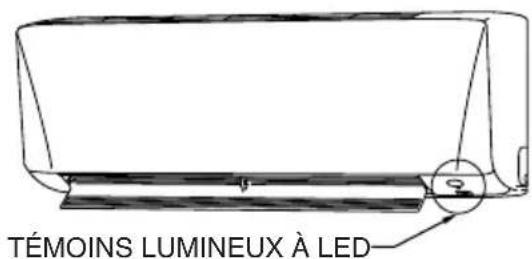
text_image
TÉMOINS LUMINEUX À LEDnatural_image
Illustration of hands holding a grid-based tablet with a tool, no text or symbols presentnatural_image
Simple line drawing of a bowl with a grid-patterned top panel (no text or symbols)natural_image
Diagram of a car air conditioner unit with airflow arrows indicating airflow direction (no text or symbols)natural_image
Technical line drawing of a car air conditioner unit with airflow direction indicator (no text or symbols)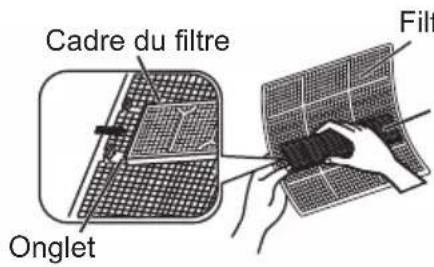
natural_image
Simple line drawing of a bowl containing two textured food items (no text or symbols)natural_image
Illustration of a wall-mounted air conditioner unit with three black arrows indicating airflow or cooling direction (no text or symbols)natural_image
Cartoon illustration of a person reading a book with motion lines (no text or symbols)natural_image
Simple line drawing of two electrical components connected to a battery and plug (no text or symbols)DÉPANNAGE
text_image
2 Three start blocks In the beginning block, I'll be open 4.5x10^3 (in 100%) ① ③ OPEN■ Piller hakkında
flowchart
graph LR
    A["COOL"] --> B["DRY"]
    B --> C["FAN"]
    C --> D["HEAT"]
text_image
1,3 AUTO 2 MODEflowchart
graph LR
    A["Low FAN"] --> B["MEDIUM FAN"]
    B --> C["High FAN"]
text_image
24° 00:00 SWINGECO+ Çalıştırma
natural_image
Simple diagram showing a circle transforming into a ring (no text or symbols)Gösterge ışığı ON
Gösterge ışığı OFF
text_image
24°C 00:00 LED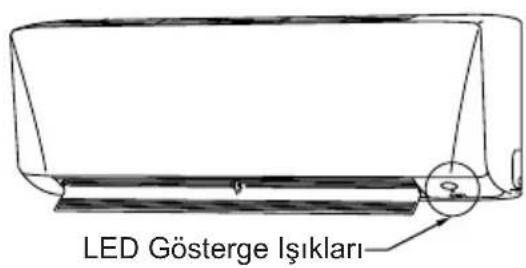
natural_image
Illustration of hands holding a grid-based panel with a tool, no text or symbols presentnatural_image
Simple line drawing of a bowl with a grid on top (no text or symbols)natural_image
Diagram of a car air conditioner unit with airflow arrows indicating airflow direction (no text or symbols)natural_image
Technical line drawing of a car air duct system with airflow direction indicated by arrows (no text or symbols)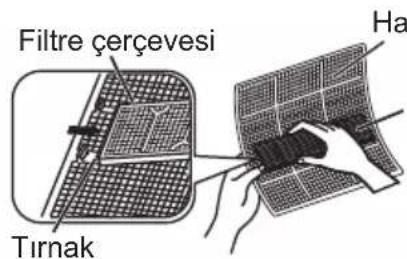
natural_image
Simple line drawing of a bowl containing two rectangular objects, one with a grid pattern and the other with a checkered pattern (no text or symbols)natural_image
Illustration of a wall-mounted air conditioner unit with three black arrows indicating airflow or cooling direction (no text or symbols)natural_image
Cartoon illustration of a person reading a book (no text or symbols present)text_image
Hand-drawn cartoon showing a switch labeled 'ON' and 'OFF' connected to a device with a battery and cable nearby.SORUN GİDERME
text_image
② ① ③ OPEN■ О батарейках
text_image
Technical diagram showing a mechanical assembly with labeled components and directional arrows indicating motion or assembly.flowchart
graph LR
    A["COOL"] --> B["DRY"]
    B --> C["FAN"]
    C --> D["HEAT"]
■ Завершение работы
flowchart
graph LR
    A["Low FAN"] --> B["MEDIUM FAN"]
    B --> C["High FAN"]
text_image
24°C 00:00 SWINGРежимы работы ECO+
natural_image
Simple diagram showing a circle transforming into a ring (no text or symbols)natural_image
Illustration of hands holding a grid-based solar panel with a tool, no text or symbols presentnatural_image
Simple line drawing of a bowl with a grid-patterned top panel (no text or symbols)natural_image
Diagram of a car air conditioner unit with three arrows indicating airflow direction (no text or symbols)natural_image
Technical line drawing of a car air duct system with airflow direction indicated by arrows (no text or symbols)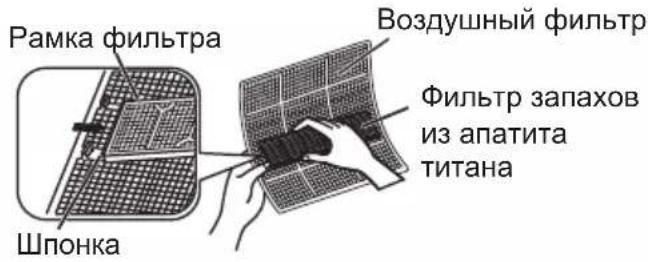
natural_image
Simple line drawing of a bowl containing two textured rectangular objects (no text or symbols)natural_image
Illustration of a wall-mounted air conditioner unit with three black arrows indicating airflow or cooling direction (no text or symbols)text_image
píou ② Analog port, network to the networks of the network the network's network is available for the network's network is available for ① ③ OPENflowchart
graph LR
    A["COOL"] --> B["DRY"]
    B --> C["FAN"]
    C --> D["HEAT"]
flowchart
graph LR
    A["Low FAN"] --> B["MEDIUM FAN"]
    B --> C["High FAN"]
text_image
τήρα. 5 24 00:00 FANtext_image
24°C 00:00 SWINGΛειτουργία ΕСΟ+
natural_image
Illustration of hands holding a grid-based panel with a tool, no text or symbols presentnatural_image
Simple line drawing of a bowl with a grid-patterned top and side plate (no text or symbols)natural_image
Diagram of a car air conditioner unit with three arrows indicating airflow direction (no text or symbols)natural_image
Technical line drawing of a mechanical component with a hand pressing a section (no text or symbols)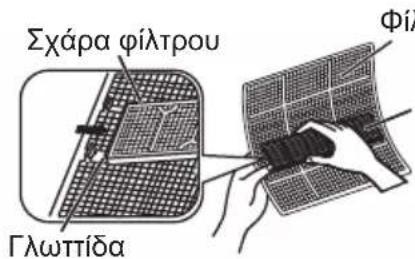
natural_image
Simple line drawing of a bowl containing two rectangular food items, one with a grid pattern and the other empty (no text or symbols)natural_image
Illustration of a wall-mounted air conditioner unit with three black arrows indicating airflow or cooling direction (no text or symbols)natural_image
Cartoon illustration of a smiling car with motion lines indicating speed (no text or symbols)natural_image
Cartoon illustration of two anthropomorphic electrical meters connected to a battery pack (no text or symbols)PROBLEEMOPLOSSING 28
Opmerking:
text_image
2 1 3 OPEN■ Over batterijen
flowchart
graph LR
    A["COOL"] --> B["DRY"]
    B --> C["FAN"]
    C --> D["HEAT"]
■ Om bediening te stoppen
text_image
gen 24 00:00 TEMP 4flowchart
graph LR
    A["Low FAN"] --> B["MEDIUM FAN"]
    B --> C["High FAN"]
text_image
24°C 00:00 SWINGnatural_image
Simple diagram showing a circle transforming into a ring (no text or symbols)natural_image
Illustration of hands holding a grid-based tablet with a pen, no text or symbols presentnatural_image
Simple line drawing of a bowl with a grid-patterned top (no text or symbols)natural_image
Diagram of a car air conditioner unit with three arrows indicating airflow direction (no text or symbols)natural_image
Technical line drawing of an air conditioner unit with airflow direction indicator (no text or symbols)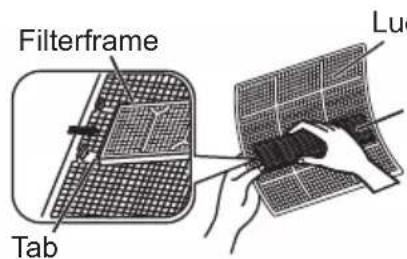
text_image
Filterframe Tab Lucnatural_image
Simple line drawing of a bowl containing two striped objects (no text or symbols)natural_image
Illustration of a wall-mounted air conditioner unit with three black arrows indicating airflow or cooling direction (no text or symbols)natural_image
Cartoon illustration of a smiling face with arms and legs, holding a book (no text or symbols)Para colocar as pilhas
text_image
Counter blocks are connected to or network switches or other uses, likely the address for ② ① ③ OPEN■ Sobre as pilhas
flowchart
graph LR
    A["COOL"] --> B["DRY"]
    B --> C["FAN"]
    C --> D["HEAT"]
flowchart
graph LR
    A["Low FAN"] --> B["MEDIUM FAN"]
    B --> C["High FAN"]
text_image
24°C 00:00 SWINGFuncionamento ECO+
natural_image
Simple diagram showing a circle transforming into a ring (no text or symbols)text_image
gão 24 00:00 LED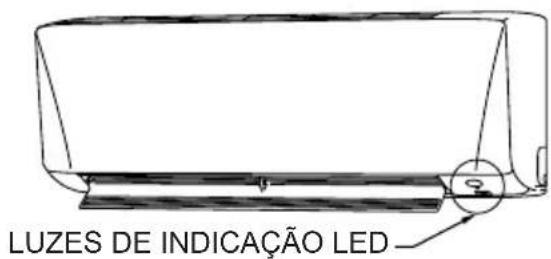
natural_image
Illustration of hands holding a grid-based panel with a tool, no text or symbols presentnatural_image
Simple line drawing of a bowl with a grid-patterned top panel (no text or symbols)natural_image
Diagram of a car air conditioner unit with airflow arrows indicating airflow direction (no text or symbols)natural_image
Technical line drawing of a car air duct system with airflow direction indicator (no text or symbols)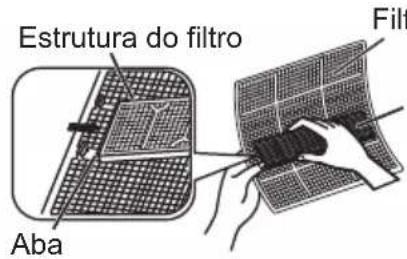
text_image
Estrutura do filtro Aba Filtrnatural_image
Simple line drawing of a bowl containing two rectangular objects, one with a grid pattern and the other empty (no text or symbols)natural_image
Illustration of a wall-mounted air conditioner unit with three downward arrows indicating airflow or cooling direction (no text or symbols)natural_image
Cartoon illustration of a person holding a book with motion lines indicating speed (no text or symbols)text_image
Watches, still - I'm proper to fixed/flowing and clng, then on 1 minute 30 min a week 150 ② ① ③ OTWARTERflowchart
graph LR
    A["Low FAN"] --> B["MEDIUM FAN"]
    B --> C["HIGH FAN"]
text_image
LED INDICATION LIGHTSnatural_image
Technical line drawing of a vehicle interior showing internal compartments and structural elements (no text or labels)Filtr powietrza
natural_image
Two curved, grid-patterned panels with a dot on one panel (no text or symbols)natural_image
Illustration of hands holding a grid-based tablet with a tool, no text or symbols presentnatural_image
Simple line drawing of a bowl with a grid-patterned top (no text or symbols)natural_image
Diagram of a car air conditioner unit with three arrows indicating airflow direction (no text or symbols)natural_image
Technical line drawing of a car air duct system with a hand holding a valve (no text or symbols)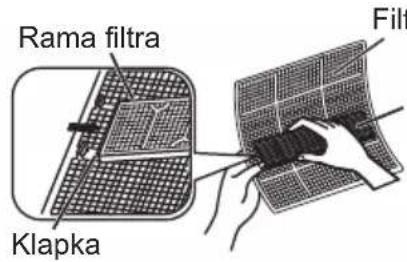
text_image
Rama filtra Klapka Filtnatural_image
Simple line drawing of a bowl containing two textured rectangular objects (no text or symbols)natural_image
Illustration of a wall-mounted air conditioner unit with three black arrows indicating airflow or cooling direction (no text or symbols)P.O.Box 18674, Jebel Ali Free Zone, Dubai-UAE
Email: info@daikinmea.com
Web: www.daikinmea.com
Importer for Turkey
DAIKIN ISITMA ve SOĞUTMA SISTEMLERI SAN TIC A.Ş.
Allianz Plaza-Kucukbakkalkoy Mah.Kayısdagi Cad.No:1 34750
Atasehir-ISTANBUL / TURKIYE
DAIKIN INDUSTRIES, LTD.
Head office:
Umeda Center Bldg., 2-4-12, Nakazaki-Nishi, Kita-ku, Osaka, 530-8323 Japan
Tokyo office:
JR Shinagawa East Bldg., 2-18-1, Konan, Minato-ku, Tokyo, 108-0075 Japan
http://www.daikin.com/global/
DAIKIN MALAYSIA SDN. BHD.
Lot 60334, Persiaran Bukit Rahman Putra 3,
Taman Perindustrian Bukit Rahman Putra,
47000 Sungai Buloh, Selangor Darul Ehsan, Malaysia.
