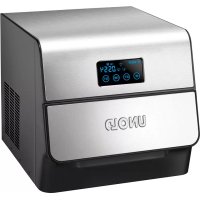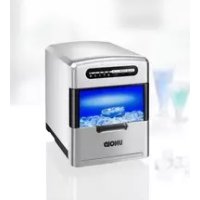
Freeze 48935 - Ice Maker UNOLD - Free user manual and instructions
Find the device manual for free Freeze 48935 UNOLD in PDF.


User questions about Freeze 48935 UNOLD
0 question about this device. Answer the ones you know or ask your own.
Ask a new question about this device
Download the instructions for your Ice Maker in PDF format for free! Find your manual Freeze 48935 - UNOLD and take your electronic device back in hand. On this page are published all the documents necessary for the use of your device. Freeze 48935 by UNOLD.
USER MANUAL Freeze 48935 UNOLD
natural_image
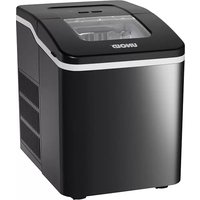
Black UNOLD brand ice cream maker with white trim and clear lid (no visible text or symbols on device body)natural_image
Modern kitchen appliance with digital display and bucket, no visible text or symbols
natural_image
Product photo of a modern wheat bread machine with a side bowl and small kitchen items (no visible text or labels)UNOLD ^®
Care + Style
natural_image
Product photo of a red and black electric toothbrush with a brush holder, next to a black conical clip (no text or symbols visible)
natural_image
Close-up of a pair of hair curlers with metal bands and a white cord (no visible text or symbols)UNOLD ^®
Fan + Heat
natural_image
Close-up of a desktop fan with visible blades and base, no text or symbols present
natural_image
Red electric fan with cooling fan and control panel (no visible text or symbols)INHALTSVERZEICHNIS
Instructions for use Model 48935
Technical specifications ....21
Explanation of symbols....21
For your safety....21
Before first use....25
Controls....26
Water quality for ice cubes 26
Producing ice cubes....27
Draining water from ice cube maker .....28
Cleaning and maintenance ....28
Cleaning function 29
Troubleshooting....30
Guarantee Conditions....32
Waste Disposal/Environmental Protection ..32
Service 20
1 Ice cube shovel
2 Ice cube basket
3 Water tank
4 Control panel
5 Evaporator
6 | Water outlet (at bottom of appliance)
FR Pagina 33
flowchart
graph TD
    A["1"] --> B["ICE FULL"]
    C["2"] --> D["ADD WATER"]
    E["3"] --> F["ICE MAKING"]
    G["4"] --> H["ON/OFF"]
    I["5"] --> J["Clean"]
natural_image
Technical line drawing of a mechanical device with a red circle highlighting a component (no text or symbols present)Dimensions: approx. 22.8 x 32.2 x 30 cm (L/W/H)
Cord length: approx. 120 cm
Weight: approx. 7.7 kg
Housing: Plastic, black
Water tank: capacity 1.6 litres
Features: Produces up to approx. 60 of ice cubes in 1 hour; ice cube basket capacity approx. 700 g; indicators for “Ice Full” and “Add Water”
Accessories: Instruction manual, ice cube scoop
Equipment features, technology, colours and design are subject to change without notice. Errors and omissions excepted

EXPLANATION OF SYMBOLS

This symbol denotes a possible hazard which could cause injury or damage to the appliance.
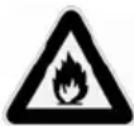
Caution: risk of fire. This symbol indicates a possible fire hazard.
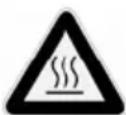
This symbol indicates a potential burning hazard. Please be especially careful at all times here.
FOR YOUR SAFETY
Please read the following instructions and keep them on hand for later reference.
Instructions for persons in the household
-
This appliance can be used by children 8 years and older, as well as by persons with reduced physical, sensory or mental abilities or with lack of experience and/or knowledge, if they are supervised or if they have been instructed with regard to safe use of the appliance and have understood the dangers that can result from use of the appliance.
-
Children must not play with the appliance.
-
Children are not allowed to perform cleaning and user maintenance, unless they are 8 years of age or older and are supervised.
- Keep the appliance and the power cord out of the reach of children under 8 years of age.
Requirements relative to the setup location and operation of the appliance
- Only connect the appliance to an AC power supply with voltage corresponding to the voltage specified on the rating plate.
- This appliance must not be operated with an external timer or a remote control system.
- Never immerse the appliance or the power cord in water or other liquids.
- Do not clean the appliance or power cord in a dish-washer.
- The appliance is intended for household use only, or for similar areas of use, such as,
■ kitchenettes in businesses, offices or other workplaces,
■ Use by guests in hotels, motels or other lodgings,
■ in private guest houses or holiday homes.
- Never touch the appliance or power cord with wet hands.
- For safety reasons, never place the appliance on hot surfaces, a metal tray or on a wet surface.
- Do not place the appliance or power cord near open flames during operation.
- Always use the ice cube maker on a level, uncluttered surface.
- Maintain a distance of at least 15 cm from other objects to ensure sufficient ventilation of the appliance.
- Do not use any electrical devices in the interior of the appliance, unless they have been recommended by the manufacturer.
- Ensure that the power cord does not hang over the edge of the counter-top or table, since this can cause
accidents, for example if small children pull on the cord.
- Do not operate or store the ice cube maker outdoors.
- Use the appliance only after it has been properly assembled.
- Fill the water tank only with clear, cold water.
- Do not insert any objects in the interior of the appliance. Otherwise there is danger of injury.
- After unpacking, do not operate the appliance for at least two hours, to prevent damage to the compressor.
- Do not switch the appliance on and off repeatedly, since this can damage the compressor. The appliance should be operated for at least three minutes.
- Switch off the appliance and unplug it from the power supply before moving it. Otherwise the appliance could be damaged.
- To avoid damage, do not use the appliance with accessories of other manufacturers or brands.
- Unplug the power plug from the electrical outlet after use and before cleaning. Never leave the appliance unattended when the power plug is plugged in.
- Clean the appliance after every use.
- Do not, under any circumstances, attempt to repair the appliance yourself, since this can result in electric shock.
- Check the appliance, the plug and the power cord regularly for wear or damage. In case of damage to the power cord or other parts, please send the appliance for inspection and repair to our customer service department. Unauthorised repairs can result in serious hazards for the user and void the warranty.
- If the power cord of this appliance is damaged, it must be replaced by the manufacturer or by the manufacturer's customer service organisation, or by a person with similar qualifications, to prevent hazards.

Do not open the housing under any circumstances. There is danger of electric shock.
After unpacking, let the appliance stand with opened ice container for at least two hours before placing it in service. The refrigerant in the appliance must first settle, otherwise the compressor could be damaged.
Only fill the appliance with clean drinking water. Never use water with additives or other liquid food products. These clog the lines in the appliance and can damage the appliance.
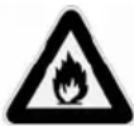
Do not under any circumstances, block the ventilation openings on the appliance cover and within the appliance.
Do not use any mechanical fixtures or aids to accelerate the thawing process, unless they have been recommended by the manufacturer.
Do not damage the refrigerant circuit.
Do not use any electrical devices inside the food compartment of the appliance unless they have been recommended by the manufacturer.
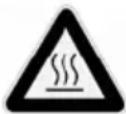
The compressor can become extremely hot in operation – danger of burn injuries!
The manufacturer will not be liable in the event of improper or incorrect use or if repairs are carried out by unauthorized third parties.
BEFORE FIRST USE
When removing the appliance from the packaging, do not tilt it by more than 45^ , as the built-in compressor might otherwise be damaged.
- Remove all packaging and transport safety devices. Keep the packaging material away from children. Choke hazard! Dispose of the packaging material according to the applicable statutory waste disposal regulations.
- Inspect the appliance for damage. If there is visible damage, to not start the appliance but contact our customer service department.
- Check whether all accessories listed in this manual have been shipped with your appliance.
- Clean all parts with a damp cloth, as described in chapter „Cleaning and maintenance“.
- Before using the ice cube maker for the first time, we recommend running the cleaning program described on page 29.
- Check whether the appliance and its components are properly assembled and make sure the appliance is standing on a sturdy and level surface.
- Check the water outlet at the bottom of the appliance near the front to make sure that it is properly sealed with the cap.
- Position the ice cube maker so that there is a distance of at least 15 cm between the appliance and any walls, cabinets and other kitchen appliances.
- After unpacking, do not start the appliance for at least 2 hours, as the compressor might otherwise become damaged.
- Connect the appliance to a suitable power socket (220–240 V\~, 50 Hz). The ice cube maker is now in standby mode and the „Ice Making“ indicator flashes.
CONTROLS
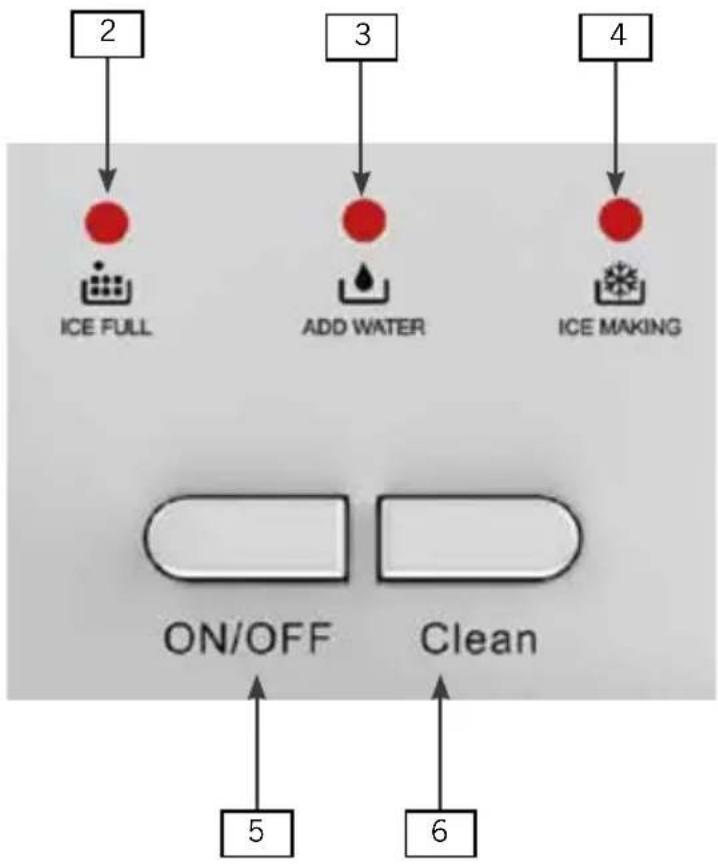
flowchart
graph TD
    A["2"] --> B["ICE FULL"]
    C["3"] --> D["ADD WATER"]
    E["4"] --> F["ICE MAKING"]
    G["5"] --> H["ON/OFF"]
    I["6"] --> J["Clean"]
„Ice Full“ indicator
The ice cube basket is full and needs to be emptied.
Add water the ice cube maker.
„Ice Making“ indicator
The appliance is making ice cubes.
„ON / OFF“ button
Switching ice cube maker on/off
„Clean“ button
Switching cleaning function on
WATER QUALITY FOR ICE CUBES
- The ice cubes must be produced from drinking water. Do not add flavouring or other additives to the water, as they might permanently contaminate the appliance. Do not use demineralised water. When adding the water,
its temperature should be between 7 °C and 35 °C. For best results, we recommend operating the appliance at an ambient temperature of between 15 °C and 38 °C.
- Tip: The ice cubes produced by the appliance tend to be white rather than clear. This does however not in any compromise the quality of the ice, and results from the exceptionally fast freezing processing. To obtain clear cubes, boil and then cool down the drinking water before filling it into the ice cube maker.
PRODUCING ICE CUBES
- Prepare the ice cube maker as described in chapter „Before first use“.
- Remove the ice cube basket by pulling it upwards from the appliance.
- Fill the water tank to the „Max.“ mark with fresh, cold drinking water. Do not exceed the „Max.“ mark to prevent water escaping from the appliance. If you have inadvertently added too much water, drain it off by opening the water outlet at the bottom of the ice cube maker (see chapter „Draining water from ice cube maker“).
- The appliance is not suitable for the production of cube made from fruit juice. The natural acids contained in fruit juice can cause damage to the appliance.
- Place the ice cube basket in the appliance.
- Press the „ON/ OFF“ button.
- The appliance now begins to produce the ice cubes. The first produced cubes are not yet of the correct size, as it takes a few minutes until the appliance reaches the necessary operating temperature. That is why the first cubes are slightly smaller than the other ones.
„Ice Full“ indicator flashing
-
When the ice cube basket is full, the „Ice Full“ indicator flashes.
-
The ice cube maker stops producing ice.
-
Remove the ice cube basket and empty it. Replace the empty basket in the appliance.
„Add Water“ indicator flashing
-
The ice cube maker monitors the water level in the tank. If it drops below the minimum level, the „Add Water“ indicator flashes.
-
The ice cube maker stops producing ice. Add water to the „Max.“ mark, and then press the „ON/OFF“ button.
-
You can stop the ice production at any time by pressing the „ON/OFF“ button.
- When you have produced all the ice you need, switch off the appliance by pressing the „ON/OFF“ button and wait for approx. one minute. Remove the ice cube basket and empty it. If there is any water left in the ice cube maker, drain it off through the water outlet. For instructions, see chapter „Draining water from ice cube maker“.
- Do not leave the ice cubes in the ice cube basket, as they tend to melt quickly. For storage, place the ice cubes in the freezer.
- After use, leave the ice cube maker open to prevent mould and bacterial growth inside the appliance.

For hygiene reasons, replace the water in the ice cube maker latest after 24 hours.
DRAINING WATER FROM ICE CUBE MAKER
- To drain off water from the appliance, proceed as follows:

Switch off the appliance and disconnect the plug from the power socket.
- Hold the device above a large bowl or the kitchen sink.
- Remove the cap from the water outlet (6) near the front at the bottom of the appliance.
- Let all water drain off, and then close the outlet again.
- Avoid tilting the ice cube maker, as the compressor might otherwise be damaged.
CLEANING AND MAINTENANCE

Before cleaning the appliance, switch it off and disconnect the plug from the power socket.
- To clean the appliance or the power cord, never immerse it in water or another liquid. Do not clean the ice cube maker in the dish washer.
- Clean the ice cube maker with a damp cloth. The ice cube basket can be cleaned with warm water and washing-up liquid.
-
If necessary, clean the water tank with a damp cloth.
-
Do not use abrasive cleaners or implements such as steel wool, metal scrapers, hot detergents or disinfectants.
- After use, leave the ice cube maker open to prevent mould and bacterial growth inside the appliance.
- Before starting the appliance, make sure that the ice cube maker and the power plug are completely dry.
- Store the ice cube basket in a dry place and protected against dust, impact and heat.
- Important: If the ice cube maker has not been used for a prolonged period of time, there might be air bubbles in the water pump. If this is the case, the „Add Water“ indicator is lit the moment you power the appliance. Press the „ON/OFF“ button to start the ice cube maker. If the problem persists, contact our customer service department.
CLEANING FUNCTION
- Fill the water tank to half the „Max.“ mark with fresh, clean water and add a few drops of lemon juice or household vinegar.
- Press the „Clean“ button and then the „ON/OFF“ button.
- The appliance runs a cleaning process that takes about 150 seconds. During this time, the „Ice Making“ indicator is lit. For cleaning, the ice cube maker pumps the water through the system, rinsing the water tank in the process.
- While the cleaning process is running, do not switch off the appliance or pull the power plug.
- After cleaning is completed, the ice cube maker returns automatically to standby mode.
- Drain off the water through the water outlet.
- Fill the water tank again to half the „Max.“ mark with fresh, clean water (no additives).
- Repeat the cleaning process to rinse out any residual lemon juice or vinegar.
- When the process is completed, wait for approx. 1 minute and then drain off the water through the water outlet.
TROUBLESHOOTING
natural_image
Technical line drawing of a mechanical device with a highlighted section (no text or symbols)-
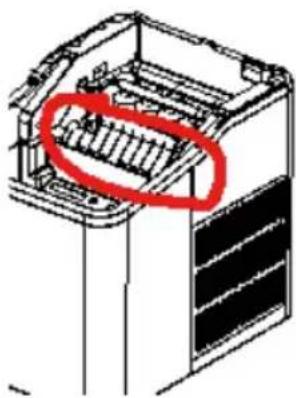
Important: If ice cube production is interrupted, for instance by a power failure, disconnection from power supply or inadvertent pressing of the „ON/OFF“ button, small pieces of ice might form on the ice cube shovel (fig. 1). Pull the plug from the power socket, push the shovel towards the back of the appliance and remove the ice.
-
If the shovel does not transfer the ice cubes into the basket, the water level might be too low. If there is sufficient water in the appliance, carefully push the shovel towards the back, using your fingers, and then restart the appliance.
| Problem Cause Remedy | ||
| Loud noise from compressor. | Voltage too low. | Switch off the appliance and check whether it is correctly connected to a 220–240 V~ power socket. |
| „Add Water“ indicator lit. | Insufficient water in water tank. | Add water to the "Max." mark. |
| Air in pump. | Press the "ON/ OFF" button to start the ice cube maker. | |
| None of the indicators is lit when the ice cube maker is switched on. | The appliance is not connected to the power supply. | Check whether the plug is correctly inserted in the power socket. |
| An appliance component is defective. | Contact our customer service department. | |
| Ice cubesstick to each other | Water is too cold. | Add lukewarm water to the water tank. |
| Ambient temperature too low. | ||
| Ice residue from previous batch left in water tray in the rear section of the appliance housing. | Switch the appliance off, disconnect the plug from the power socket and remove the ice. | |
| The appliance is running, but fails to produce ice cubes. | Compressor or fan defective. | Contact our customer service department. |
| Problems with refrigerant. | ||
| All indicators flash simultaneously. | Water tray in rear section of appliance housing blocked by ice. | Disconnect the plug from the power socket and remove the ice. Reconnect the power plug and press the "ON/OFF" button. The appliance starts automatically after 3 minutes. |
| Appliance running but water is heated rather than cooled. | Solenoid valve defective. | The solenoid valve needs to be replaced. Contact our customer service department. |
| Appliance running but water is heated rather than cooled. | Solenoid valve defective. | The solenoid valve needs to be replaced. Contact our customer service department. |
GUARANTEE CONDITIONS
We grant a 24 months guarantee, and in case of commercial use a 12 months guarantee, starting from the date of purchase for any damage demonstrably due to manufacturing defects and when the appliance has been used according to its intended use. Within the warranty period we will remedy defective materials or workmanship through repair or replacement, at our option. Our warranty terms apply only to appliances sold in Germany and Austria. For other countries, please contact the responsible importer. In the event of a claim for remedy of defects, please send the appliance to our after sales service, properly packaged, together with a copy of the automatically generated sales receipt, which must show the date of purchase, and a description of the defect. You can print out a return receipt on our website www.unold.de/ruecksendung. (only for entries from Germany and Austria). The warranty does not cover damage from normal wear, improper handling and failure to comply with the maintenance and care instructions. The warranty is void if repairs or modifications are made to the appliance by third parties. Any claims of the end consumer vis-à-vis the retailer are not limited by this warranty.
WASTE DISPOSAL / ENVIRONMENTAL PROTECTION
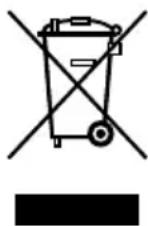
Our appliances are produced on a high quality level for a long lifetime. Regular maintenance and expert repairs by our after-sales service can extend the useful life of the appliance. If an appliance is defective and repair is not possible we ask you to follow the following instructions for disposal. Do not dispose this appliance together with your standard household waste. Please bring this product to an approved collection point for recycling of electric and electronic products. By separate collection and disposal of waste products you help to protect natural resources and ensure, that the product is disposed in an adequate way to protect health and environment.
The instruction booklet is also available for download: www.unold.de
Coolant used: R600a
NOTICE D'UTILISATION MODÈLE 48935
SPÉCIFICATION TECHNIQUE
flowchart
graph TD
    A["2"] --> B["ICE FULL"]
    C["3"] --> D["ADD WATER"]
    E["4"] --> F["ICE MAKING"]
    G["5"] --> H["ON/OFF"]
    I["6"] --> J["Clean"]
Voyant de contrôle „Ice Full“
natural_image
Technical line drawing of a server rack with a highlighted internal component (no text or symbols)CONDITIONS DE GARANTIE
flowchart
graph TD
    A["2"] --> B["ICE FULL"]
    C["3"] --> D["ADD WATER"]
    E["4"] --> F["ICE MAKING"]
    G["5"] --> H["ON/OFF"]
    I["6"] --> J["Clean"]
WATER LATEN WEGLOPEN
natural_image
Technical line drawing of a mechanical device with a highlighted section (no text or symbols)flowchart
graph TD
    A["2"] --> B["ICE FULL"]
    C["3"] --> D["ADD WATER"]
    E["4"] --> F["ICE MAKING"]
    G["5"] --> H["ON/OFF"]
    I["6"] --> J["Clean"]
natural_image
Technical line drawing of a mechanical device with a red oval highlighting a component (no text or symbols present)flowchart
graph TD
    A["2"] --> B["ICE FULL"]
    C["3"] --> D["ADD WATER"]
    E["4"] --> F["ICE MAKING"]
    G["5"] --> H["ON/OFF"]
    I["6"] --> J["Clean"]
Piloto de control „Ice Full“
natural_image
Technical line drawing of a mechanical device with a red circle highlighting a specific component (no text or symbols present)flowchart
graph TD
    A["2"] --> B["ICE FULL"]
    C["3"] --> D["ADD WATER"]
    E["4"] --> F["ICE MAKING"]
    G["5"] --> H["ON/OFF"]
    I["6"] --> J["Clean"]
Kontrolka „Ice Full“