Medicus Family 4 - Blood pressure monitor BOSO - Free user manual and instructions
Find the device manual for free Medicus Family 4 BOSO in PDF.


User questions about Medicus Family 4 BOSO
0 question about this device. Answer the ones you know or ask your own.
Ask a new question about this device
Download the instructions for your Blood pressure monitor in PDF format for free! Find your manual Medicus Family 4 - BOSO and take your electronic device back in hand. On this page are published all the documents necessary for the use of your device. Medicus Family 4 by BOSO.
USER MANUAL Medicus Family 4 BOSO
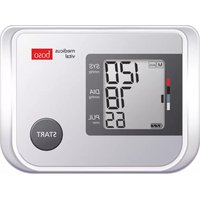
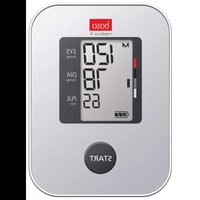
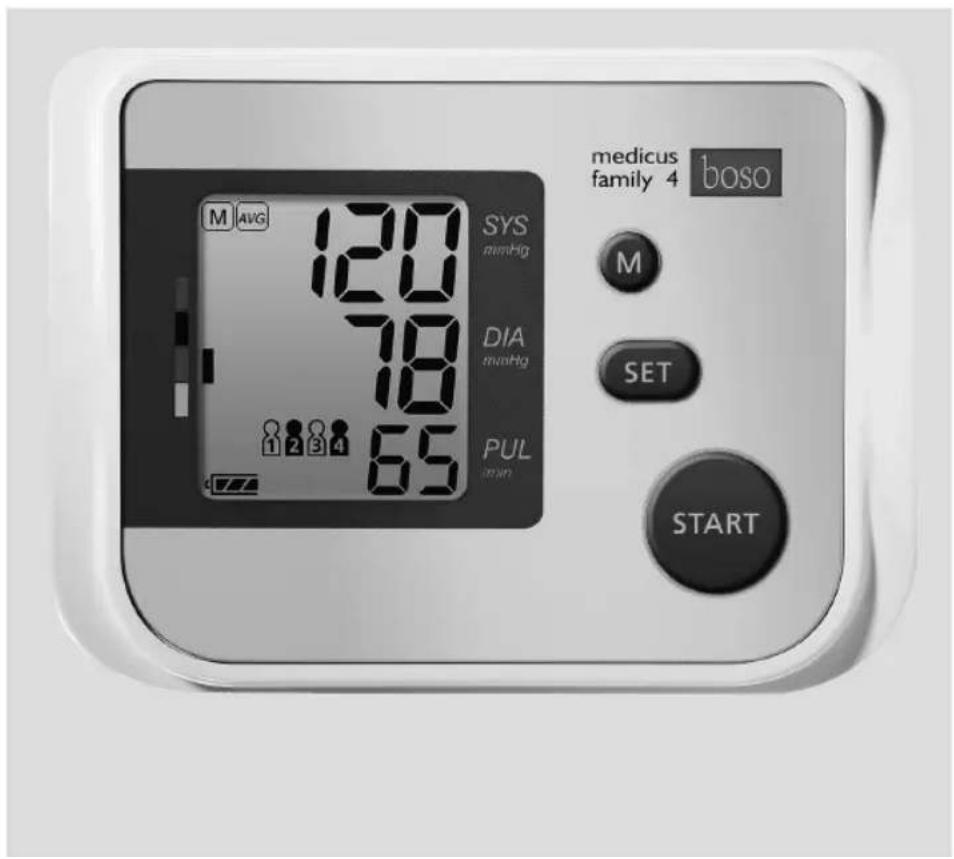
boso medicus family 4
text_image
medicus family 4 boso M AVG 120 SYS mmHg M DIA mmHg SET PUL min 65 STARTtext_image
Scanned document page with Chinese text and four labeled sections, likely a form or checklist with diagrams.1 Blutdruckpass

natural_image
Diagram showing two views of a device with battery and switch, no text or symbols presentnatural_image
Diagram of a car door handle with a curved cable and connector, showing no text or symbolsBild 2
text_image
M AVG. 888 888 1 2 3 4 188 AM PM 8888Bild 5
Blutdruckmessung
Contents of package....45
Symbols on the blood pressure monitor 46
Symbols on the power supply unit 49
Quick guide....50
Introduction......51
Purpose....52
Blood pressure values....53
Systolic and diastolic blood pressure value....53
WHO blood pressure cut-off values....53
Starting up....55
Inserting batteries....55
Battery status....56
Set Time and Date....56
General instructions for self-measurement 58
Preparing to measure your blood pressure....60
Note on cuff sizes....60
Table of contents
Attaching the cuff 61
Select an user....64
Measuring your blood pressure....64
Interrupting a measurement....65
Measurement display....66
Note on guest mode....66
Completing the blood pressure record card / Retrieving the average value and WHO classification....68
Displaying individual stored values....70
Mains operation....71
Error messages....72
Cleaning and Disinfection....74
Warranty Conditions 75
Customer service / Disposal 76
Technical data 77
Calibration checks - Testing instructions
(for trained specialist staff only) 80

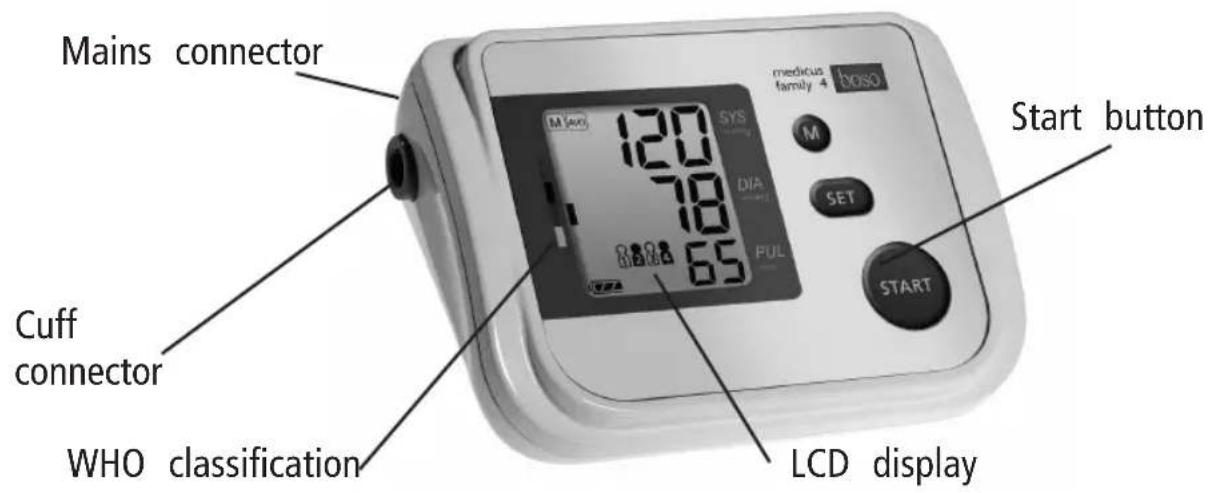
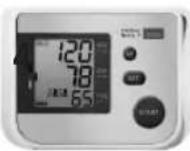
Product features

text_image
Mains connector Cuff connector WHO classification medicus family 4 baso 120 SYS DIA PUL SET START button LCD displayContents of package
1 boso-medicus family blood pressure monitor
WHO classification sticker
text_image
Scanned document page with multiple Chinese text columns and a small diagram of a box, likely illustrating a technical or administrative form.1 Blood pressure record card
Symbols on the blood pressure monitor
| Symbol | Function/meaning |
 | START/STOP button |
 | M button (Memory button) |
 | SET button |
 | Direct current |
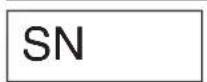 | Serial number |
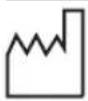 | Year of manufacture |
 | Type BF: The device, cuff and tubing have been designed to protect the patient against electric shock. |
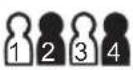 | Select an user |
Symbols on the blood pressure monitor
Symbol Function/meaning
| ♥ | Reading in progress. Flashes as soon as a heartbeat was detected. |
| ((♥) | Cardiac rhythm disorder or movement during reading.. |
| Movement during measurement. | |
| Rate of recurrence of cardiac arrhythmias. | |
| Stored value | |
| AVG. | Display average value |
| Battery fully charged. | |
| Battery partly discharged. | |
| Replace battery as soon as possible. | |
| Flashing! No further reading possible.Replace battery. |
Symbols on the blood pressure monitor

Symbol Function/meaning
| SYS | Systolic blood pressure in mmHg |
| DIA | Diastolic blood pressure in mmHg |
| PUL | Pulse per minute |
| CE0124 | Device complies with the European Medical Devices Directive. |
 | Device must not be discarded with household waste. |
 | Manufacturer |
 | Read instructions for use |
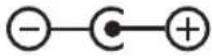 | Polarity of power supply port |
 | Protect against liquids |
Symbols on the power supply unit
Symbol Function/meaning
| Only for use in enclosed spaces. | |
| Protection class II device | |
| Thermal fuse | |
| Fuse | |
| CE | Device complies with the European Medical Devices Directive |
| Polarity of the mains adapter plug |

Quick guide

→Insert batteries, ensure correct positioning (P. 55)
→Connect cuff to monitor (P. 60)
→Attach cuff (P. 61)
→Start (and stop) a measurement by pressing the start button (P. 64)
Measured systolic, diastolic and pulse values are displayed after the measurement is completed (P. 66)
surements together with the WHO classification.
The total number of stored measurements is displayed at the same time, e.g. "A30". Repeated pressing of „M" the individual measurement values are then displayed in sequence.
⚠ This quick guide does not replace the detailed information on the use and safety of the blood pressure monitor featured in the user instructions.
→Retrieving values from memory (P. 68): Press the M-button with the monitor switched off. The first value displayed is the average value of all stored mea-

Please be sure therefore to read the user instructions!
Introduction
Dear Customer,
We are delighted that you have decided time, as correct blood pressure readings to purchase a boso blood pressure mon can only be obtained if the instrument is itor. The boso brand is synonymous with operated correctly.
optimal quality and precision and is alson these user instructions, „→” means an number 1 among professionals: 96% of action by the user.
all German general practitioners, physici-
ans and internists work in practice with To get help concerning usage or mainten-blood pressure instruments from boso ance please contact your dealer or the (API survey conducted by GfK 01/2016). manufacturer (contact details can be The experience gained from decades of found on the back cover of this manual). use by profession-als has also been incor-
porated into all the patient monitors for An unexpected operating condition or an home measurement. incidence which has worsened the health
This instrument has also passed our stricondition or could have worsened the quality control procedures and is your rehealth condition should be reported to the able partner for monitoring your blood manufacturer immediately.
pressure values.

Please read these user instructions
If the instrument is to be sold, ensure that these user instructions are enclosed.
Introduction
Purpose
The boso-medicus family 4 blood pressu monitor is suitable for patients with an upper arm circumference of between 22 and 48 cm.
Non-invasive recording of systolic and diastolic blood pressure and pulse rate in adults. Not suitable for use on newborn babies and infants. The device is suitable for self-measurement at home. The

The use of accessories not referred to in these instructions for use can undermine safety.
ipatient is regarded as the operator.
The instrument can be used with any arm circumference as shown on the corre-
Wireless communication devices, such as sponding cuff. home networking devices, mobile phones, cordless phones and their base stations, walkie-talkies can affect this blood pressure monitor. Therefore, a minimum distance of 11 feet should be kept from such devices.
Blood pressure values
To determine the blood pressure, two ues need to be measured:
Diastolic (lower) blood pressure: This is present when the heart muscle expands and fills with blood again.
●Systolic (upper) blood pressure:
This is produced when the heart muscle blood pressure measurement values are contracts and blood is forced into the expressed in mmHg (mm of mercury). blood vessels.
| The World Health Organization (WHO) has defined the following cut-off values for assessing blood pressure: | ||
| systolic diastolic | ||
| High blood pressure (hypertension) over 140 mmHg over 90 mmHgBorderline normal blood pressure 130 to 139 mmHg 85 to 89 mmHgNormal blood pressure 120 to 129 mmHg 80 to 84 mmHgOptimum blood pressure up to 119 mmHg up to 79 mmHg | ||
Blood pressure values

Whether medical treatment is necessary than at the doctor's. The German depends not only on the blood pressure Hypertension League has therefore defi-but also on the patient's risk profile. Need lower cut-off values for home measu-Please contact your GP if one of the valements: ues (systole, diastole) consistently exceeds the cut-off point for high blood pressure.
Home measurement: 135/85 mmHg
Self-measurement of blood pressure often measurement in the produces somewhat lower values at home doctor's surgery: 140/90 mmHg
Starting up
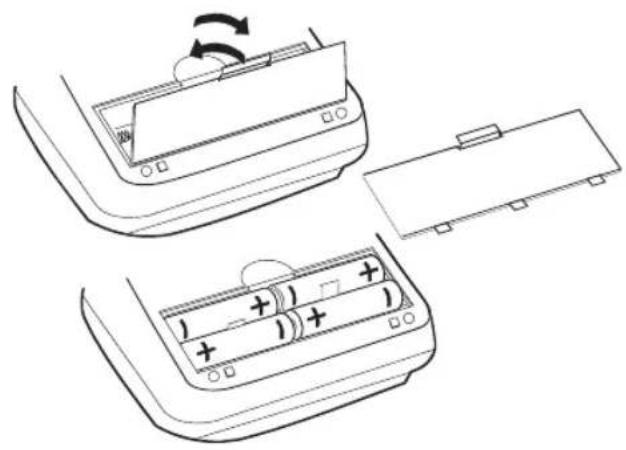
The device must be installed and put into a Never mix old and new batteries or operation in accordance with the instructed different makes. tions in this manual.
natural_image
Diagram showing two views of a device's internal components with battery and switch, no text or symbols presentIllustration 1
⚠️If the batteries are not inserted correctly, the monitor will not work and this may cause the batteries to heat up and leak, damaging the monitor.
→Inserting the batteries
The battery compartment is located on the underside of the monitor. Insert batteries in the battery compartment as shown in illustration 1.
→Remove the batteries if the monitor is not to be used for any length of time.
→Use only high quality leak-proof batteries of the correct specifications (see "Technical data" P. 77).
⚠ Batteries that are short-circuited can become hot and cause burning.
Starting up
Set Time and Date
The monitor has a battery status displayYour device boso-medicus family 4 has a clock function. (see P. 47)
Battery fully charged.
Battery partially charged.
Replace battery soon.
Flashing! No further measurements possible. Replace battery.
To select date and time setting, press the
→Press
⚠️Care for the environment
Do not dispose of used batteries and charger units in domestic waste.
You can take these to collection sites used batteries or special waste.
Contact your local authority for information.
→briefly press

Set Time and Date
→briefly press
→briefly press
→briefly press
→briefly press
consumption, and so is recommended only within running the device on mains power.
→Briefly press

General instructions for self-measurement

- Fluctuations in blood pressure are quite normal. Even when measurements are repeated, there can be marked differences. Single or irregular measurements do not provide reliable information about the actual blood pressure. A
reliableevaluation isonly possibleif reg-5. ular measurements are taken under comparableconditionsandthemeasurement values entered in the blood pressure record card.
Incorrect measurements can also occur in patients with a weak pulse (possibly in patients wearing a pacemaker, for example). The blood pressure monitor itself has no effect on the pacemaker.
The device has not been validated for use on pregnant women. - ⚠️Self-testing does not mean self-treatment. Do not on any account change the dose of medicine prescribed by your doctor of your own accord.
Always take the measurement in a calm and relaxed state.
You are recommended to check your blood pressure twice a day—inthemorning on getting up and in the evening once you have relaxed after work. - Always measure your blood pressure
- Irregular heartbeats can affect the accu-from the arm with the higher blood racy of the monitor or result in incorrect pressure values (where not required measurements (see page 73). otherwise (see page 62)).
General instructions for self-measurement
To do this, measure the blood pressure first in both arms and thereafter always from the arm with the higher blood pressure.

Preparing to measure your blood pressure
Note on cuff sizes:
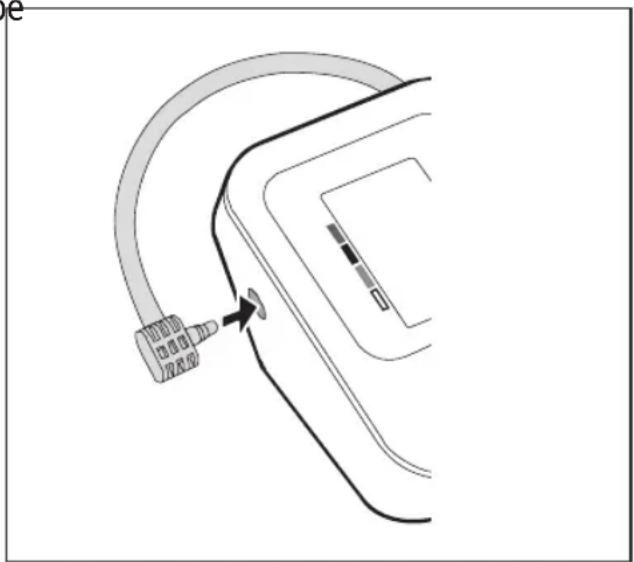
Attach the cuff to the monitor by pressing the plug (click) into the socket on the left
The monitor may only be used with side of the unit. (See illustration 2).
the following cuff types. These should be chosen according to the upper arm circumference printed on them.

| Type | Arm Order numbercircumference | |
| CA01 | 22 – 32 cm | 143-4-764 |
| CA02 | 32 – 48 cm | 143-4-757 |
| CA04 | 22 – 42 cm | 143-4-765* |
* Universal cuff supplied as standard.
natural_image
Diagram of a medical device with a curved tube and connector, showing no text or symbolsIllustration 2
Preparing to measure your blood pressure
Observe the following instructions Attaching the cuff
when measuring your blood pressure:
The measurement should be taken from

Avoid smoking or drinking coffeethe bare upper arm.
for one hour before measuring your blood pressure.
⚠ In the case of tightly fitting outer clothing, ensure that the blood supply to

Sit comfortably for the blood prethe arm is not cut off when the sleeve sure measurement. Support your rolled up (if necessary remove the article of back and arms. Do not cross your clothing before taking the measurement).
legs. Place your feet flat on the floor.
Relax for 5 minutes before taking a measurement.
Do not move during the measurement.
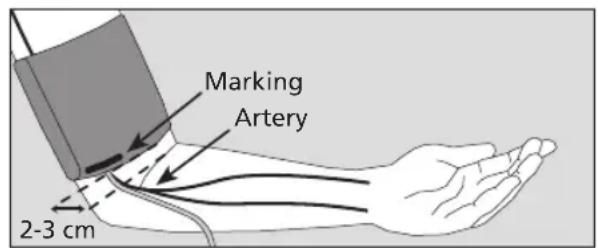
→Open out the cuff into the shape of a g ring and slide it over the upper arm until the bottom edge of the cuff is e- about 2-3 cm above the elbow. The cuff must be positioned so that the marking is over the artery (see illustration 3).
Preparing to measure your blood pressure

text_image
Marking Artery 2-3 cmIllustration 3
⚠️During the measurement, medical apparatus that are being used on the same arm at the same time, may malfunction.
⚠ The cuff must not be too tight. There should be enough space to fit roughly two fingers between arm and cuff.
⚠️Do not attach the cuff over wounds this can cause further injuries.
⚠ Ensure that the cuff is not attached an arm where arteries or veins are und going or have undergone medical treatment (e.g. shunt).
⚠ For women who have had a breast amputated, do not attach the cuff to the arm on the amputated side of the body.
As The metal ring should never lie over the artery (see illustration 3) as this may produce a false reading.
Grasp the end of the cuff that feeds though the metal ring and wrap it around the outside of your arm. Attach the Velcro fastener by applying gentle pressure.
Preparing to measure your blood pressure
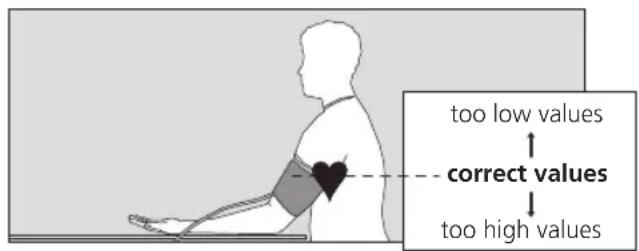
→Place your arm with the cuff attached⚠️The blood pressure measurement on the table, holding it relaxed and should not prevent the flow of blood for an slightly bent so that the cuff is levelunnecessary length of time (> 2 minutes). with your heart. If the monitor fails to function correctly, re-
text_image
too low values correct values too high valuesIllustration 4
Excessive frequent measurements can cause injury by restricting blood flow.
⚠ The device may not be used by unsupervised children.
⚠️Do not use the device near infants. This can lead to accidents or damage.
⚠️Do not start the device without putting on the cuff.
There are small parts that may cause a choking hazard if swallowed by mistake by infants.

Do not talk during the measurement.
⚠️Check that the air tube is not kinked during the measurement. This could cause congestion of the blood flow and subsequent injury.
Measuring your blood pressure
⚠️If the ambient temperature changes →Start the measurement with the start significantly, leave the device about an button hour to adapt to the new ambient temperature before using it.

The performance of the device can affected by excessive temperature, humidity or altitude.
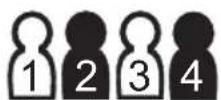
Select an user
Your device boso-medicus family 4 has memories for 4 persons.
Pressing the
Then press
Now hold the arm absolutely still and do not talk.
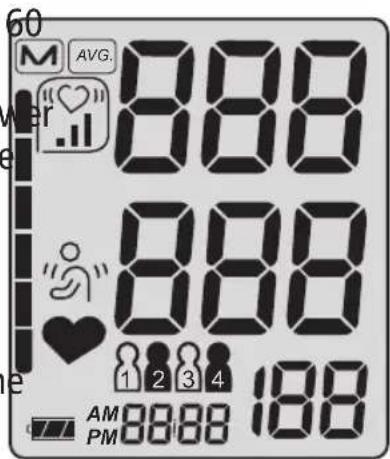
All the items on the LCD display appear briefly to indicate that the monitor is now ready for use (see illustration 5).
text_image
60 M AVG. 888 888 1 2 3 4 188 AM 8888 188 PMIllustration 5
easuring your blood pressure
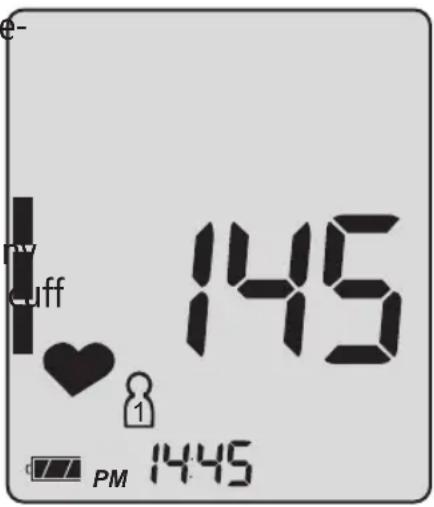
The pump starts to inflate the cuff. During the measurement phase the descending cuff pressure and the flashing
The monitor has an intelligent automatic♥ symbol are displayed (see illustrainflation system for gentle inflation to thion 6).
correct cuff pressure.
The increasing cuff pressure is displayed. Please keep your arm still if the symbol appears while a measurement is being
When the required pressure is reached.
the pump switches off and the air is released slowly from the cuff.
⚠️Interrupting a measurement:
A measurement can be interrupted at a stage by pressing the start button; the deflates automatically.
text_image
TV Cuff 145 1 PM 14:45Illustration 6
Measurement display
After the end of the measurement, the built valve opens automatically and the cuff deflates rapidly.
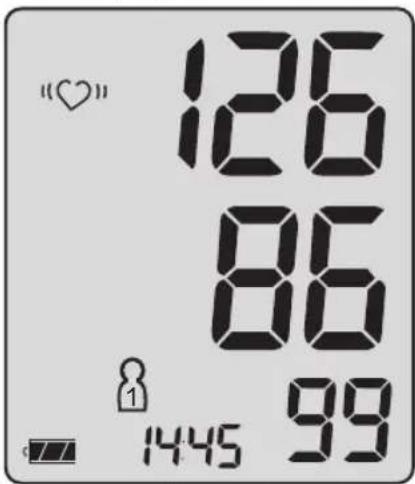
The measured blood pressure values (systole, diastole, pulse) and time and are displayed. see illustration 7).
The measurement is stored automatically (except for guest mode, see below). If the memory store is full (60 measurements), the oldest measurement is deleted and the current one stored. date

text_image
"♥" 126 86 1445 99Systole mmHg
Diastole mmHg
Pulse/min.
Alternating time and date are displayed. Illustration 7
Note on guest mode:
If a measurement value is not be kept, press „M“ while the measured values are still on display.
Invalid measurements with an "Err" message (see page 72) are not stored.
Measurement display
If the symbol ^he appears after the measurement, it is recommended that the measurement is repeated, holding the arm completely still. If the symbol appears again even with the arm held this may be an indication of an irregular heartbeat. Please discuss this with your doctor at your next visit.
→If the measurement result is obviously wrong, repeat the measurement.
The unit switches itself off automatically after about 1 min. To repeat a measurement, press the start button again briefly.

Allow at least two minutes between measurements.

The "symbol" indicates that the arm moved during measurement. You are advised to take another measurement.
→If no further measurement is required, ed remove the cuff from the arm.
Blood pressure is a dynamic parameter and can be affected by the patient's position, e.g. sitting, standing, lying, moving, before or during the measurement, physical condition (stress, disease, etc.).
Completing the blood pressure record card Retrieving the average value and WHO classification
→To recall the stored press the M key If there is no measurement in the memory, with the device switched off. "0" is displayed for systole, diastole and pulse.
The average values of all stored measurements (systolic, diastolic and pulse) are displayed. If measurements were recorded with irregular heart beat, there is an additional symbol showing the prevalence of cardiac
→Pressing the
memory-recall allows to select one of the users.
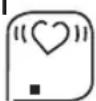
appears when up to 25% of the measurements have irregular heart beat.
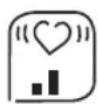
appears when between 25% and 50% of the measurements have irregular heart beat.
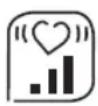
appears when more than 50% of the measurements have irregular heart beat.

Completing the blood pressure record card Retrieving the average value and WHO classification
A dark rectangle appears on the left of the screen(seeillustration8), indicating the level of the average blood pressure value. Use the accompanying evaluation scale (see illustration 9) to identify the range within which your blood pressure falls under the WHO classification (see page 53).
→For your information, attach the sticker (WHO classification) supplied, to the back of your unit.

text_image
M AVG. 126 86 99Illustration 8
Average value Systole mmHg
Average value Diastole mmHg
Pulses/min.
WHO classification
high blood pressure (hypertension)
borderline normal blood pressure
normal blood pressure
□ optimum blood pressure
Illustration 9
Displaying individual stored values and clearing the memory store
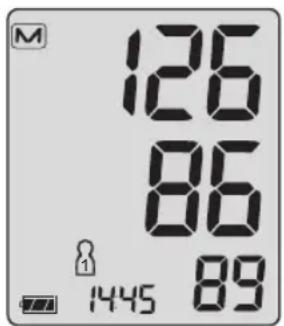
→Recall the last measurement stored in the mem→Repeated pressing of „M“ ory by pressing „M“ again after having recalled will now successively dis-the average value. The number of the measure-play all measurements comment appears in the display (see illustration 10). tained in the memory as described above.
The corresponding measurement value appears after 3 seconds (see illustration 11).
→Pressing the START button switches off the device.
EN
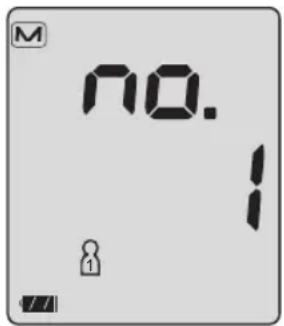
text_image
M NO. 1Illustration 10
text_image
M 126 86 1445 89Alternating time and date are displayed.
Illustration 11
Systole mmHg
Diastole mmHg
Pulses/min.
If no button is pressed, the device automatically switches off after 60 seconds.
Clearing the memory store Press „M“ and hold for 5 seconds until the symbol M starts to flash. The memory of the currently selected user is erased.
Mains operation
The mains connection socket is located the rear of the monitor.
Do not touch the batteries, the power supply unit socket and the patient at the
Where required, use only the boso power time.
supply unit (order number 410-7-150).
This power supply unit produces a rectified Remove the power supply unit plug output of the correct polarity. Other conform the blood pressure monitor when it is
mercially available power supply units cannot in use.
cause damage to the electronic compo-
nents, which will invalidate the warranty.
There is also a risk of fire with these other
power supply units.

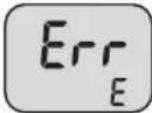
Error messages
If any problems occur during the measurement, the display will show an error mess instead of a blood pressure reading.
Meaning of error messages:

| Cause of Err message: Troubleshooting: | ||
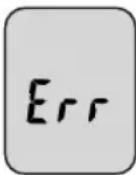 | Excessive variation in cuff pressure during measurement | Hold arm still. |
| No valid pulse readings Check | position of cuff (see page 61) and repeat measurement. | |
| Systole – diastole difference Check position of cuff (see page 61 too small: and repeat measurement. Systole – diastole 10 mmHg | ||
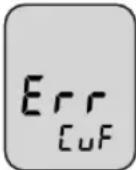 | Incorrectly inflated Cuff possibly | too loose, attach cuff more firmly (see page 61) |
Error messages
| Cause of Err message: Troubleshooting: | ||
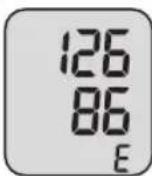 | The pulse value could check position of cuff not be determined and repeat measurement. correctly. | |
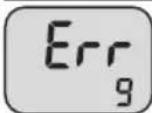 | Internal Error | Remove the batteries and briefly press START ton. Put the batteries back into the monitor. error persists, return the instrument for repairs to the manufacturer. |
 | ||
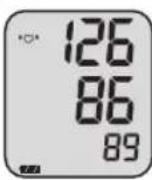 | “♡” Display: Troubleshooting: | |
| Repeat measurement recommended, holding the arm absolutely still.If the Symbol appears again, even with the arm held still, this may be an indication of an irregular heartbeat.Please discuss this with your doctor at your next visit. | ||
Cleaning and Disinfection
Cleaning Monitor:
Use a soft, dry cloth to clean your m
Cleaning Cuff:
Small stains on the cuff can be remo carefully with a proprietary washing-up liquid.
Disinfection Cuff:
nFloor.disinfectant wipes (at least 5 minutes exposure time) of the device and the cuff, we recommend the disinfectant antifect lieduid (Schülke & Mayr). To disinfect the cuff, we recommend spray disinfection.
In particular, if the device is used on multiple users is to pay attention to regular cleaning and disinfections of the cuff.

Warranty Conditions
We give 3 years warranty from the date of claims for damages against us are sub-purchase. The purchase date has to be substantiated by the warranty.
ven by the invoice. Within the warranty pe-
period defects are eliminated free of charge. the case of justified warranty claims the After repairs the warranty period is not device has to be sent along with the originated on the whole unit, but only to the invoice to:
replaced components.
BOSCH + SOHN GMBH U. CO. KG,
Excluded from the warranty are parts subBahnhofstr. 64, D-72417 Jungingen.
ject to normal wear and tear (e.g. cuff), transport damages and any damage caused by improper handling (e.g. non-compliance with the instructions for use). Damages due to disassembly by unauthorized persons are also excluded from warranty.

Customer service
Disposal

Customer service:
Warranty and repair work must be under
taken by trained and authorised personnel.
Do not modify this equipment without horization of the manufacturer.
Send the monitor, carefully packaged an
with sufficient postage, to your authorised
dealer or directly to:
Do not dispose of monitors and batteries in the domestic waste.
AAt- the end of its lifespan, the monitor must be taken to a collection site for obsolete
ndelectronic items.
Please note that batteries and rechargeable batteries must be disposed of separately (local authority collection site).
Expected operational lifetime of the equipment: 5 years (using the unit 6 times a day)
Expected operational lifetime of the cuff: 2 years (using the unit 6 times a day).
Technical data
Measurement principle: oscillometric
Measurement range: Systolic: 60 to 279 mmHg Diastolic: 40 to 200 mmHg Pulse: 40 to 180 per minute
Cuff pressure: 0 to 299 mmHg
Memory store: 4 x 60 measurements
Display: LCD
Operating conditions: environmental temperature +10°C to +40°C Relative humidity 15 to 85% Air pressure 800 hPa to 1060 hPa
Transport/ environmental temperature -20^ to +60^ Storage conditions: Relative humidity 10 to 95% Air pressure 700 hPa to 1060 hPa

Technical data
Power supply: DC 6 V (4 x 1.5 V Mignon IEC LR 6 alkaline manganese batteries)
Alternative special option: DC 6 V power supply unit, Order No. 410-7-150

Typical battery life: 700 measurement cycles (depending on inflation pressure and frequency of use).
Battery check: symbol display in LCD window
Weight: 282 g without batteries
Dimensions (WxHxD): 140 mm x 60 mm x 106 mm
Classification: Medical device with internal energy source (in battery operation) / class II (in power supply unit operation), continuous operation mode
Applied part: Type BF ( )
Technical data
Protection against solid IP20
objects and water: IP classification is the degree of protection provided by enclosures in accordance with IEC 60529. This device is protected against solid foreign objects of 12mm diameter and greater such as fingers. This device is not protected against water.
Clinical test: Accuracy complies with the requirements
of ISO 81060 Part 2
Maximum deviation of cuff ± 3 mmHg or 2% of the reading
pressure measurement: (whichever is greater)
Maximum deviation of ± 5%
pulse rate display:
Applicable standard: IEC 80601-2-30 : "Particular requirements for basic safety and essential performance of automated non-invasive sphygmomanometers"

Calibration checks - Testing instructions
(for trained specialist staff only)
Calibration checks – every 2 years at the latest – must be performed by the following institutions or persons:
- Manufacturer
– Trade measurements authorities - Persons who fulfil the requirements of the legislation governing the operation of medical devices.
Note:
When the pressure in measurement mode increases above 299 mmHg, the quick release valve is triggered and the pressure circuit opens. When the pressure in test mode increases above 320 mmHg, the measured value display flashes.
b) For the calibration checks a special test plug must be used. The test plug is available for a fee from the manufacturer.
A) Function testing
Function testing of the monitor can only be carried out on a person or with a suitable simulator.
A pump ball must also be introduced into the pressure circuit.
B) Testing of pressure circuit integrity and deviation of pressure display

Calibration checks - Testing instructions
(for trained specialist staff only)
Testing
5.) Switch off monitor by pressing the START button again.
1.) Remove batteries.
⚠ The device must not undergo service
2.) Hold start button pressed down and/or maintenance while it is in use. insert batteries.
3.) Release start button.
The monitor is now ready for testing;
the current pressure is displayed in the
SYS and DIA fields.
4.) Perform test for deviation of pressure display and pressure circuit integrity (observe setting time for cuff – at least 30 seconds) in the usual manner.

Table des matières
Introduction......91
Destination 92
text_image
Scanned document page with multiple numbered sections containing Chinese text and a small diagram, likely from a technical or administrative form.1 carnet de suivi

natural_image
Technical line drawing of a device interior showing battery and switch mechanism (no text or symbols)Figure 1
natural_image
Diagram of a car door handle with a cable and connector, no text or symbols presentFigure 2
text_image
AVG. 888 888 1 2 3 4 188 AM PM 8888Figure 5

text_image
"♥" 126 86 1445 99Date / Heure en
Systole mmHg
Diastole mmHg
Pouls/min.
text_image
Scanned document with multiple form fields and a small diagram, likely from a technical or administrative report.natural_image
Diagram showing battery charging process with one panel and two battery cells, no text or symbols presentFig. 1
natural_image
Diagram of a car rear panel with a curved cable and connector, showing no text or symbolsFig. 2

text_image
M AVG. 888 888 1 2 3 4 188 AM 888 PMFig. 5

text_image
"♥" 126 86 1445 99P. sistolica mmHg
P. diastolica mmHg
Polso/min.
text_image
Scanned document page with Chinese text, tables, and a small diagram showing a 3D object with labeled sections.natural_image
Technical line drawing showing a device's internal components with battery and switch, no text or symbols presentFigura 1
text_image
ia em- I sion, ul- edi- aza- 14:50 PM 14:45Figura 6

text_image
"♥" 126 86 1445 99Sístole mmHg
Diástole mmHg
Pulsaciones/ minuto