Bosotherm Diagnostic - Thermometer BOSO - Free user manual and instructions
Find the device manual for free Bosotherm Diagnostic BOSO in PDF.


User questions about Bosotherm Diagnostic BOSO
0 question about this device. Answer the ones you know or ask your own.
Ask a new question about this device
Download the instructions for your Thermometer in PDF format for free! Find your manual Bosotherm Diagnostic - BOSO and take your electronic device back in hand. On this page are published all the documents necessary for the use of your device. Bosotherm Diagnostic by BOSO.
USER MANUAL Bosotherm Diagnostic BOSO
natural_image
Digital thermometer device with digital display showing temperature reading of 36.5°C, no visible text or symbols beyond the display and button.bosotherm diagnostic
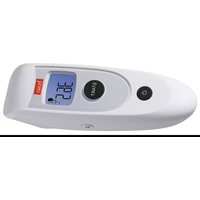
Non-Contact IR Thermometer GB User Instructions
natural_image
White remote control device with digital display and rotary button (no visible text or symbols)natural_image
Black textured object with white earband and label 'SARO' (no readable text or symbols beyond label)flowchart
graph LR
    A["Single Object"] --> B["Two Shape 1"]
    B --> C["Two Shape 2"]
natural_image
Simple line drawing of a rectangular shape with a dashed line and a small circular mark on top (no text or symbols)→ ⏻-Taste drücken
text_image
OFF
natural_image
Close-up of a baby bottle with a dropper inserted, showing liquid level measurement (no text or symbols visible)text_image
Diagram showing three stages of a process with temperature indicators and directional arrows, likely illustrating a thermal or chemical process.Referenznormen: ASTM E 1965-98
IEC 60601-1
IEC 60601-1-2
IEC 60601-1-11
ISO 80601-2-56
Congratulations on your purchase of the boso infrared thermometer, bosotherm diagnostic. This digital, infrared thermometer is a quality, state of the art product.
With its unique technology, the bosotherm diagnostic enables stable measurement values with every measurement which are free of any disruptive thermal influences. The device performs an auto-test each time it is activated in order to ensure the specified measurement accuracy.
Intended Use
Determination of the body temperature of people through non-contact measurement of the surface temperature of the forehead, as well as the determination of the temperature of objects.

Carefully read these instructions before using the device and store them in a secure location.
In order to get help with commissioning, use or maintenance, please contact your retailer or the manufacturer.
An unexpected operating state or an occurrence which worsens or could worsen a health condition must be reported to the manufacturer immediately.
By affixing the CE marking, the manufacturer confirms that the product is in conformity with the applicable European Medical Device Directive 93/42/EEC. The four-digit identification number identifies the notified body.
Contents
Device Overview / Display 26
Scope of Delivery....27
Important Safety Instructions 28
Device Properties 32
Operation of the Device....33
Error Messages and Troubleshooting 39
Cleaning and Maintenance 41
Warranty / Customer Service 43
Technical Data 44
Disposal....45
The device must be installed and commissioned according to the information in these user instructions.
Wireless communication devices, such as wireless home networking devices, cell phones, cordless telephones and their base stations and walkie-talkies can influence this thermometer. Therefore, a clearance of at least 3.3 meters should be maintained from such devices.
Device Overview
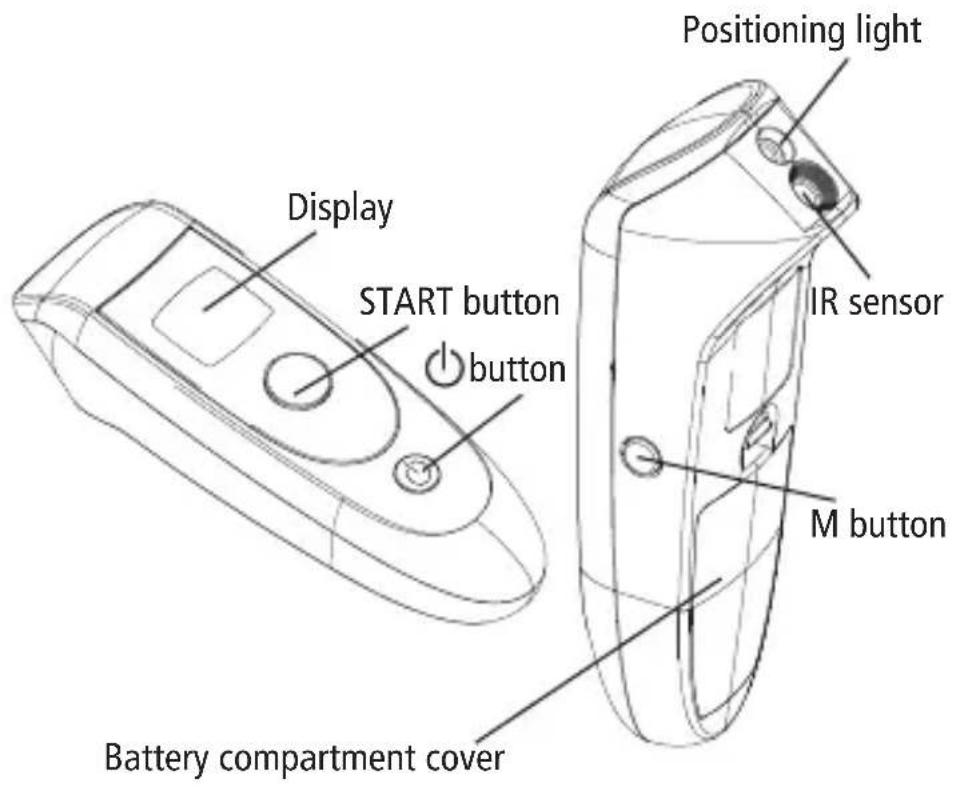
text_image
Display START button button Positioning light IR sensor M button Battery compartment coverDisplay
text_image
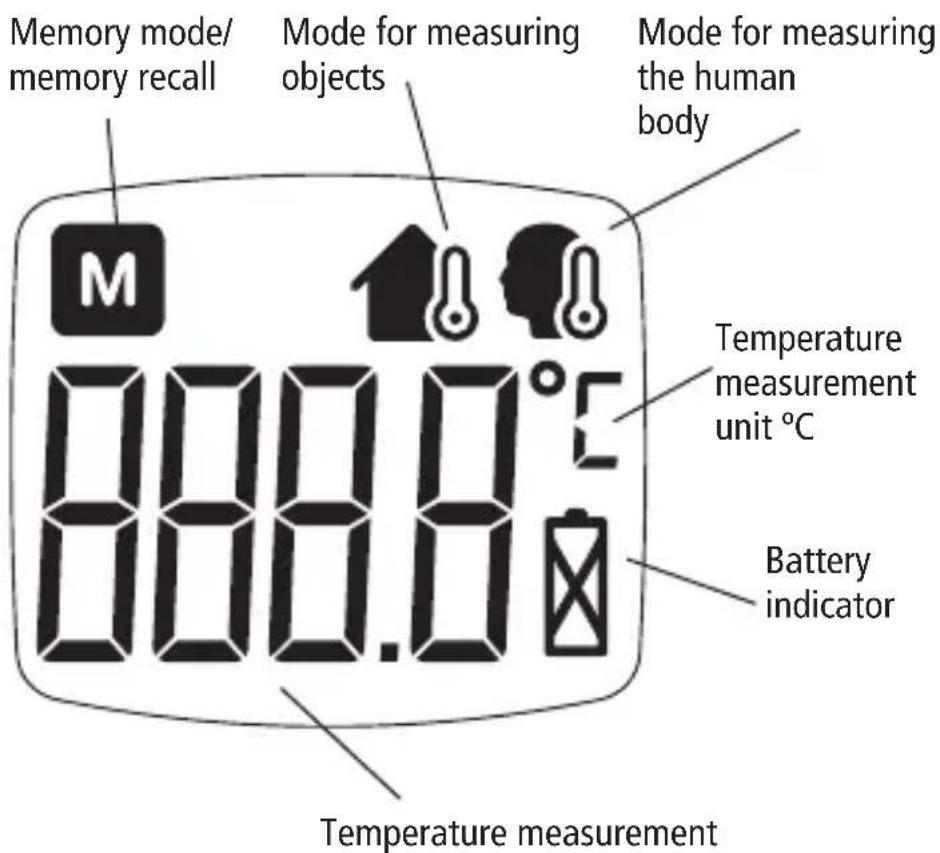
Memory mode/ memory recall Mode for measuring objects Mode for measuring the human body 000.0°C 888.0 Temperature measurement unit °C Battery indicator Temperature measurementScope of Supply
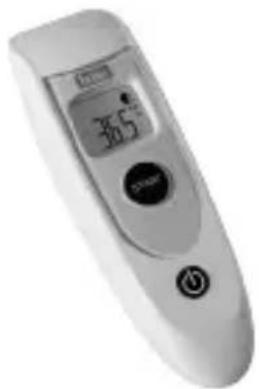
1 IR Thermometer bosotherm diagnostic
natural_image
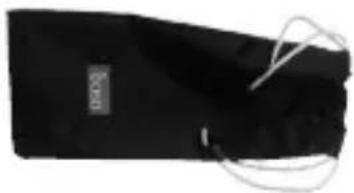
White remote control device with digital display and control buttons (no visible text or symbols)1 Storage bag
natural_image
Black textured object with white connectors and a small label (no readable text or symbols)2 LR03 batteries (AAA) (inserted in device)

1 User instructions

text_image
bosotherm diagnostic des: Bosos 10. Bocotaxo Bocotaxo is not a way des: Bosos 10. Bocotaxo Bocotaxo is not a way dysentis: Bosos 10. Bocotaxo dysentis is not a way dysentis is not a way dysentis is not a way dysentis is not a way dysentis is not a way dysentis is not a way dysentis is not a way dysentis is not a way dysentis is not a way dysentis is not a way dysentis is not a way dysentis is not a wayImportant Safety Instructions

Attention
- This device can be used at home and in hospital.
- The user should be at least 11 years old.
- The patient can be the user.
- Don't use the thermometer in high humidity environments.
- This device cannot replace a doctor's visit or a medical diagnosis.
- Please be aware of the risk of burns after heating objects in the microwave, since a surface measurement can produce a lower temperature than the temperature inside the object.
- Do not use the device if you believe that it is damaged or if you have noticed something unusual.
- The device is not waterproof – do not immerse it in water or other liquids.
- Ensure that this device is not accessible to children in order to prevent swallowing of batteries or the battery compartment cover.
- This device may not be opened, dismantled or modified.
- Before use, the device should be acclimated to the ambient temperature (that is, room temperature). If a change in ambient temperature should occur, such as due to a temperature difference between the storage location and the usage location of the device, you should wait at least 30 minutes before use so that the device can adapt to a stable ambient temperature (usage location)!
- Soiling on the IR sensor must be carefully removed with a dry cloth or a cotton swab. Do not use paper towels or paper tissues to clean the sensor.
- The device contains sensitive electronic components – in order to ensure its capability to perform, it must be used and stored according to the descriptions in the user instructions.
Protect the device from
- Extreme temperatures
- Shocks and vibrations
- Dust
- Direct sunlight
- Extreme humidity
- Please remove the batteries if the device is not used for an extended period of time.
- This device measures the skin temperature on the forehead in order to determine human body temperature. Skin temperature can vary in dependence on various influences, such as due to bathing, swimming or other athletic activities, due to sweating, due to the use of ice packs and the extended effects of high or low temperatures (outdoors). Before taking temperature measurements, please wait at least 30 minutes so that the body can adapt to a stable ambient temperature (room temperature).
- Water, other surface liquids (e.g. sweat) or condensate can negatively influence infrared measurements.
- Please ensure that the skin surface or the surface of the object which is measured, as well as the sensor lens, are dry before performing a temperature measurement, in order to ensure the accuracy of this measurement.
- In the initial stage of a febrile illness, a physiological phenomenon called vasoconstriction (vascular constriction) can occur, which leads to a lower skin temperature. For this reason, a measurement with this thermometer may return an unusually low result.
- If the measurement result should not correspond with the condition of the patient or should be unusually low, the measurement should be repeated at 15 minute intervals or compared to a different measurement of core body temperature.
- Do not use the thermometer immediately after the following:
- Drinking or Eating
- Exercising
- Nursing a baby
Important Notes about Taking Temperature Measurement of Infants & Juveniles!
Doctors recommend rectal measurement for newborn infants within the first 6 months, as all other measuring methods might lead to ambiguous results. If using a non-contact thermometer on infants of this age range, we always recommend verifying the temperature readings with a rectal measurement!
In the following situation it is recommended that three temperatures are taken with the highest one taken as the reading:
- New born infants in the first 100 days.
- Children under age of three with a compromised immune system and for whom the presence or absence of fever is critical.
- When the user is learning how to use the thermometer for the first time, until he/she has familiarized himself/herself with the device and capable of obtaining consistent readings.
- If the measurement is surprisingly low.
Note
Readings from different measurement sites should not be compared because the normal body temperature varies between different measurement sites and the time of the day, being highest in the evening and lowest about one hour before waking up.
Normal body temperature ranges:
- Axillar: 34.7 - 37.3°C
- Oral: 35.5 - 37.5°C
- Rectal: 36.6 - 38.0°C
- bosotherm diagnostic: 35.4 - 37.4°C
- Objects with a low IR emission level can return temperature data which is below the actual object temperature.
- Do not touch the lens of the infrared sensor – contaminations on the lens can cause inaccuracies in the temperature display.
WARNING: The measurement results given by this device is not a diagnosis. It is not replacing the need for the consultation of a physician, especially if not matching the patient's symptoms. Do not rely on the measurement result only, always consider other potentially occurring symptoms and the patient's feedback. Calling a doctor or an ambulance is advised if needed.
Device Properties
Temperature measurements with the bosotherm diagnostic
The bosotherm diagnostic thermometer uses a sensitive sensor technology in order to receive the emission of infrared radiation from the human body or objects and, based on this, to perform precise measurements of the human body temperature or the temperature of objects.
Safe and comfortable
- No direct contact! Temperature measurement without skin contact
- No danger of glass breakage or swallowing mercury
Fast measurement
• Measurements within 1 second
Various measurement methods
- The device enables 2 different methods for measuring 1. human body temperature and
- the temperature of objects
Saving and recall of temperature measurement
- 30 temperature measurements can be saved and recalled with the device.
- Direct access to the recorded temperature measurements of the body or of an object.
Fever alarm\*
- At temperature measurements of ≥ 37.5^ , an acoustic signal automatically sounds in order to indicate an elevated body temperature.
* only for measurements on the human body
Operation of the Device

Before using for the first time
The bosotherm diagnostic device contains 2 X LR03 (AAA) alkaline batteries which are equipped with an isolating strip. This isolating strip must be removed from the battery compartment before using the bosotherm diagnostic for the first time.
Measurement of Human Body Temperature
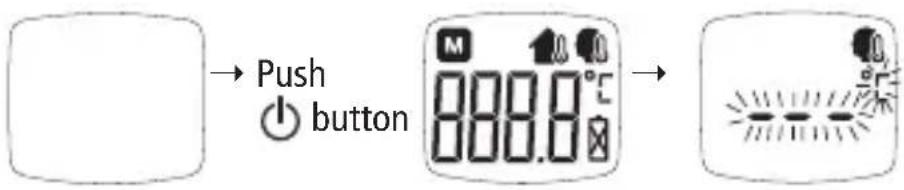
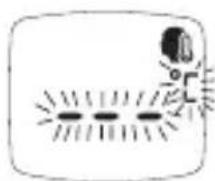
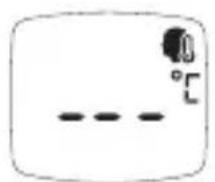
- Press the ⏻ button in order to start the bosotherm diagnostic in body temperature mode. After activating, the device performs a self-test and switches to body temperature mode after a few seconds. When the bosotherm diagnostic is ready for a measurement in body temperature mode, "---" blinks in the display and the symbol for body temperature mode appears.
text_image
Push button 888.0°C →- To measure the temperature of the human body, hold the device at a distance of about 5 cm (or less) in front of the center of the forehead so that the sensor points toward the forehead.
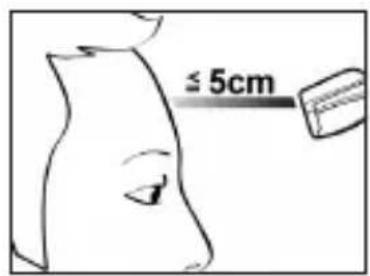
text_image
≤ 5cm- Once the bosotherm diagnostic is in the correct position, press the START button to perform a measurement of the body temperature. The measurement process takes about one second. The display indicates that the measurement is running.
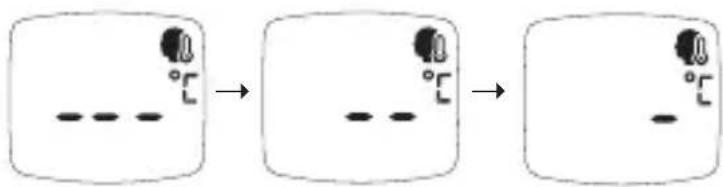
flowchart
graph LR
    A["Single object"] --> B["Two separate shapes with temperature indicators"]
    B --> C["Two separate shapes"]
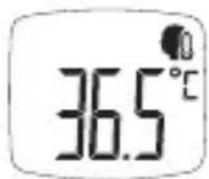
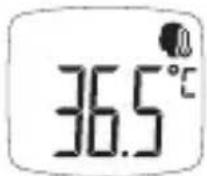
- If the measured body temperature is below 37.5^ C, the measurement result is displayed with a long signal tone.
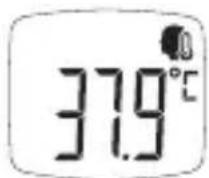
- If the measured body temperature is at or over 37.5^ C (as is the case with a fever), there are 3 short signal tones.
- After performing a temperature measurement, the bosotherm diagnostic shows the measurement result continuously, and switches off after 1 minute. As soon as the device is ready for a new measurement, there is a short signal tone and the "°C" symbol begins to blink. To perform another temperature measurement, press the START button and the bosotherm diagnostic starts a new measurement. Once the new measurement is complete, there is a short signal tone and the new measurement result is displayed.
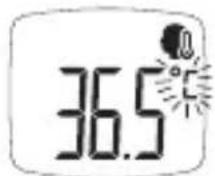
→ Push START button
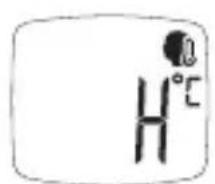
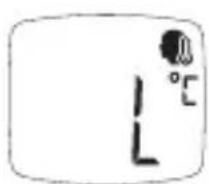
- If the measurement returns a result that is above or below the specific temperature range for this mode, "H" or "L" is shown in the display and three short signal tones are emitted. After about 5 seconds, the bosotherm diagnostic is ready to measure again.
text_image
H°Cor
→
natural_image
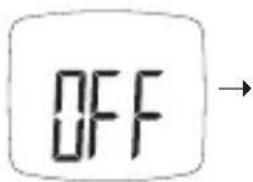
Simple line drawing of a robot with sunburst lines and a small figure, no text or symbols present- Press the ⏻ button in order to switch off the bosotherm diagnostic. The device automatically switches off after 1 minute.
natural_image
Simple line drawing of a rectangular object with a dashed line and a small circular mark on top (no text or symbols)→ Push ◀ button
text_image
OFF
Recall of Last Temperature Measurement in Body Temperature Mode
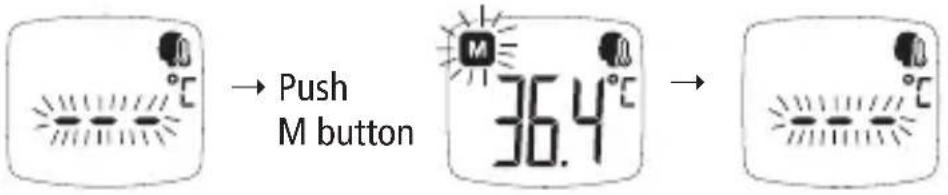
To recall the latest temperature measurement in body temperature mode, press the M button while the bosotherm diagnostic is in body temperature mode. The last body temperature measurement is displayed together with the blinking M symbol for about 5 seconds.
text_image
→ Push M button 36.4°C →Temperature Measurements of Objects
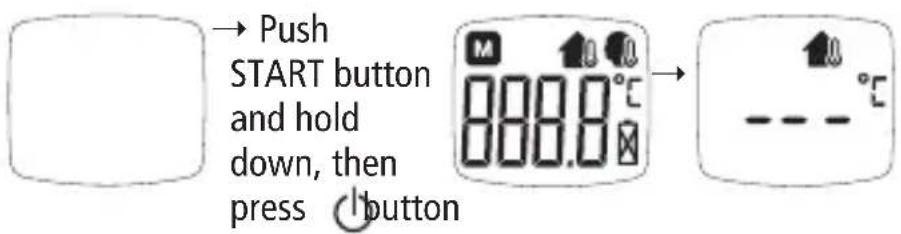
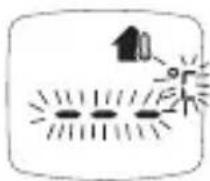
- Press the START button and hold it while activating the bosotherm diagnostic with the ⏻ button. After activating, the device performs a self-test and will be in object mode after a few seconds. When the bosotherm diagnostic is ready for a temperature measurement of an object, the "-" symbol blinks in the display and the symbol for object mode appears.
text_image
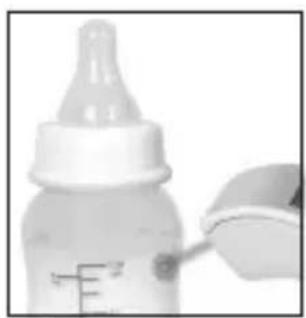
→ Push START button and hold down, then press ⏻ button- To correctly measure the temperature of an object, hold the device at a distance of about 5 cm (or less) in front of the surface so that the sensor points toward the object.
natural_image
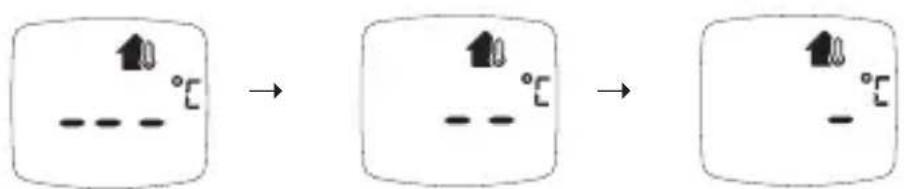
Close-up of a baby bottle with a pipette inserted, showing liquid level (no text or symbols visible)- Once the bosotherm diagnostic is in the correct position, press the START button to perform a measurement of the object's temperature. The measurement process takes about one second. The display indicates that the measurement is running.
text_image
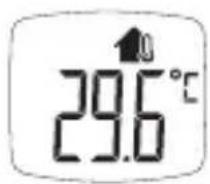
Diagram showing three stages of a process with temperature indicators and directional arrows, likely illustrating a thermal or chemical process.- Once the measurement is complete, there is a long signal tone and the measurement result is displayed.
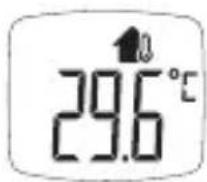
- After performing a temperature measurement, the bosotherm diagnostic shows the measurement result continuously, and switches off after 1 minute. As soon as the device is ready for a new measurement, there is a short signal tone and the "°C" symbol begins to blink. To perform another temperature measurement, press the START button and the bosotherm diagnostic starts a new measurement.
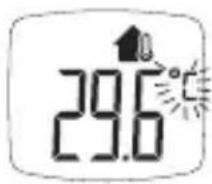
→ Push START button
- If the measurement returns a result that is above or below the specific temperature range for this mode, "H" or "L" is shown in the display and three short signal tones are emitted. After about 5 seconds, the bosotherm diagnostic is ready to measure again.
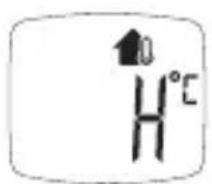
or
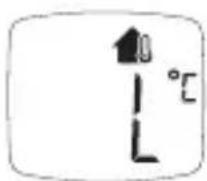
→
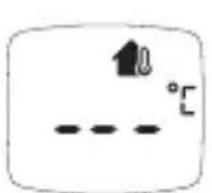
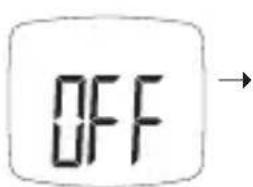
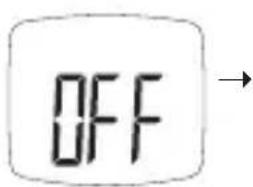
- Press the ⏻ button in order to switch off the bosotherm diagnostic. The device automatically switches off after 1 minute.
text_image
10 -3°C→ Push ◀ button
text_image
OFF
Recall of Last Temperature Measurement in Object Mode
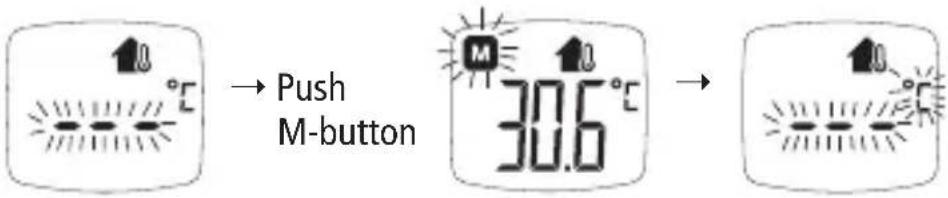
To recall the latest temperature measurement in object mode, press the M button while the bosotherm diagnostic is in object mode. The last temperature measurement is displayed together with the blinking M symbol for about 5 seconds.
text_image
↑8 °C → Push M-button ↑8 30.6 °C → ↑8 °CRecall All Temperature Measurements in Memory Mode
- Press the M button while device is deactivated in order to activate the memory mode. If no measurement results are saved, the bosotherm diagnostic displays "0." If measurement results are saved, the display begins with the latest temperature measurement. "1" appears in the display and automatically changes to display the temperature measurement.
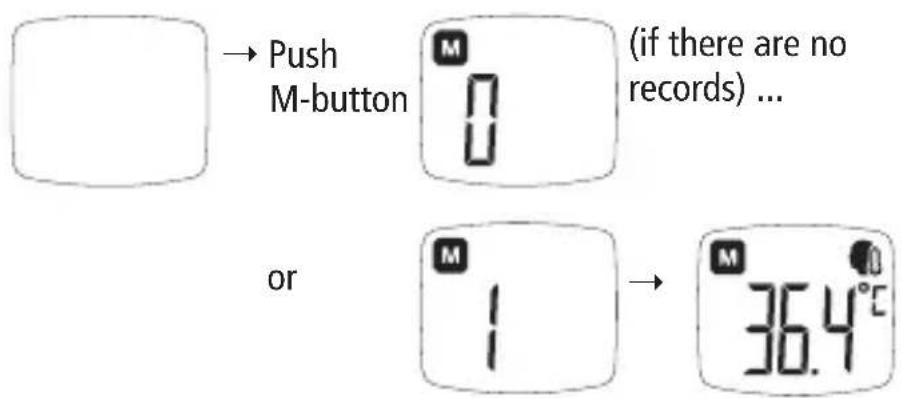
text_image
Push M-button (if there are no records) ... or M 1 36.4°C- Press the M button multiple times in succession to switch to a specific recorded measurement result.
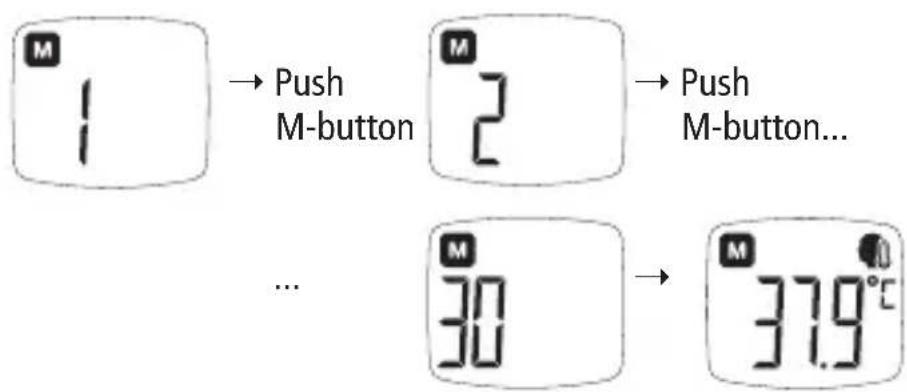
flowchart
graph TD
    A["1"] --> B["Push M-button"]
    B --> C["2"]
    C --> D["Push M-button..."]
    E["30"] --> F["37.9°C"]
- Press the ⏻ button in order to switch off the device. The bosotherm diagnostic switches off automatically after 30 seconds.
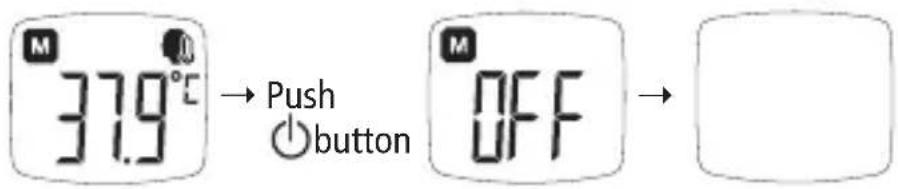
text_image
M 37.9°C → Push ○button M OFF →Clear Measurement Value Memory
To delete all temperature measurements in the memory mode of the bosotherm diagnostic, hold the START button in memory mode for 5 seconds or longer. The bosotherm diagnostic displays "CL" and all saved temperature measurements are deleted. The display then changes to "0."
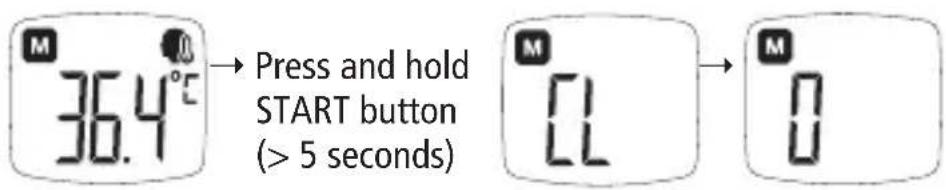
text_image
M 36.4°C → Press and hold START button (> 5 seconds) M 0 M 0Error Messages and Troubleshooting
Self-test
- If the bosotherm diagnostic determines an error during the self-test phase after activation, "ER" is displayed and 3 short acoustic signals are emitted; the device then switches off after 10 seconds.

text_image
M 888.0°C ErTroubleshooting:
Remove the batteries from the device and wait a few minutes before replacing them in the device.
Attempt to activate the device again. If the error message should appear again, contact a local dealer.
Low batteries display
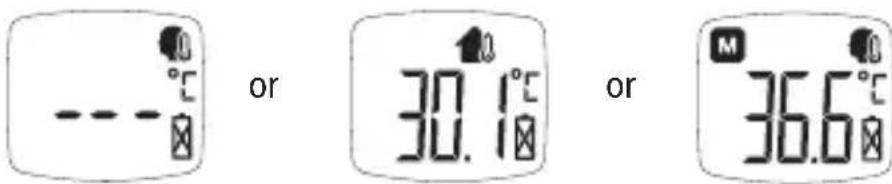
- If the batteries are low, the battery symbol appears. Please change the batteries as quickly as possible.
text_image
or 30.1°C or 36.6°C- If the voltage falls below the value required for the function, the bosotherm diagnostic solely displays a battery symbol after pressing the ⏻ button.
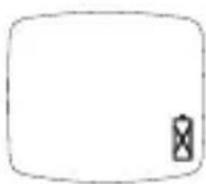
- If the batteries are completely discharged, no display appears after pressing the ⏻ button.

Troubleshooting:
Replace the batteries!
Measurement outside of specified ambient conditions
- The bosotherm diagnostic automatically measures the ambient temperature in body temperature mode and object mode. If the ambient temperature is below or above the defined temperature range, a warning is displayed and the temperature measurement is not carried out.
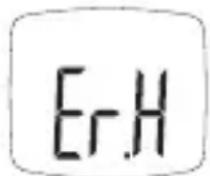
- If the ambient temperature (e.g. room temperature) is >40^ , the warning notice "Er.H" appears and there are 3 short acoustic signals. The bosotherm diagnostic switches off automatically after 10 seconds.
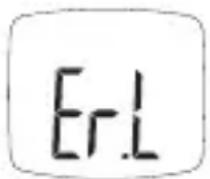
- If the ambient temperature (e.g. room temperature) is low in body temperature mode (ambient temperature < 15^ ) or in object mode (ambient temperature < 5^ ), the warning notice "Er.L" appears and there are 3 short acoustic signals. The bosotherm diagnostic switches off automatically after 10 seconds.
Troubleshooting:
Please only use the bosotherm diagnostic under the specified environmental conditions. Move the device to an environment with the specified conditions and wait 30 minutes before using it.
Cleaning and Maintenance
Storage of the bosotherm diagnostic
- The bosotherm diagnostic contains highly sensitive electronic components. In order to ensure ensure appropriate performance and long service life, the bosotherm diagnostic should be stored in a dry location, out of direct sunlight, and protected from shocks and vibrations.
- Avoid storing in a wet location, or in the vicinity of heat sources.
- Please remove the batteries from the bosotherm diagnostic before storing for an extended period.
Cleaning and disinfection of the bosotherm diagnostic
- Use an alcohol-soaked swab or a cotton cloth moistened with alcohol (70% isopropyl) for cleaning.
- Allow the bosotherm diagnostic to dry completely before using again and before performing more temperature measurements.
- The device is not waterproof – do not immerse it in water or other cleaning fluids.
- Do not use aggressive or corrosive cleaning agents or solutions - this can damage the device.
Changing batteries
- The bosotherm diagnostic is operated by two LR03 (AAA) alkaline batteries. Please replace the old batteries with new ones when the battery symbol blinks.
- Open the battery compartment cover and remove the batteries from the battery compartment. Insert new LR03 batteries and take note of the symbols for the poles in the battery compartment: The (+) pole must correspond with the "+" symbol and the (-) pole with the "-" symbol. Close the battery compartment again after inserting the batteries.
- Saved temperature measurements are retained during a battery change.
- Avoid using new and old batteries from different manufacturers.
- Do not leave old batteries in the bosotherm diagnostic device. This can cause the batteries to leak and can damage the device.
Regular Checks on the Accuracy
Regular checks on the accuracy of the measurement system should be carried out in accordance with the valid directive of the individual countries, governing this issue.
Warranty / Customer Service
We provide a factory warranty for 2 years from the date of purchase for this product. The purchase date must be substantiated by receipt.
Within the warranty period, defects resulting from material or production errors will be resolved free of charge.
As a result of warranty service, no extension of the warranty period is applied to the entire device, but rather only to the replaced components.
Abrasion due to wear, transport damages as well as any damages caused by improper use (e.g. failure to comply with usage instructions) or by the actions of unauthorized parties are excluded from the warranty coverage. No damage compensation claims against us are justified by the warranty.
Legal defect claims of the purchaser according to § 437 BGB are not restricted. In case of warranty claim, send the device with the original purchase receipt to:
BOSCH + SOHN GMBH U. CO. KG Bahnhofstr. 64, D-72417 Jungingen
Technical Data
Measuring range:
- Range for measurement of body temperature 34^ 42.2^
- Range for measurement of the temperature of objects: 0.1°C \~ 99.9°C
Resolution: 0.1°C
Measurement accuracy under laboratory reference conditions:
– Accuracy when measuring body temperature:
- Accuracy when measuring the temperature of objects: ± 1.0^ in the range from 0.1^ 99.9^
$$ \begin{array}{l} \pm 0. 2 ^ {\circ} \mathrm{C} \text {in the range from} 3 5 ^ {\circ} \mathrm{C} \sim 4 2 ^ {\circ} \mathrm{C} \ \pm 0. 3 ^ {\circ} \mathrm{C} \text {in the range} < 3 5 ^ {\circ} \mathrm{C} \text {and} > 4 2 ^ {\circ} \mathrm{C} \end{array} $$
Measurement distance: max. 5 cm
Display LCD
Memory: 30 measured values
Backlight: blue
Operating conditions:
– Temperature range: 15^ C \~ 40^ C
- Humidity range: up to 95% relative humidity (no condensation)
Storage and transport:
- Temperature range: -20^ +55^
- Humidity range: up to 95% relative humidity (no condensation)
Automatic shut-off:
- 60 seconds after completing a temperature measurement
- 30 seconds in memory mode
- 10 seconds after error message and in case of deviation in ambient temperature from defined temperature range
Voltage/batteries: 1.5V x 2 AAA (LR03)
Applied part: Type BF (☐)
Service life of batteries: at least 1,000 measurements
Anticipated service life of the device: 10 Years
Dimensions: approx. 140 mm (L) x 43 mm (W) x 47 mm (H)
Weight: approx. 93 g incl. batteries
Protection against penetration by water or solid materials: IP 22
Reference Standards: ASTM E 1965-98
IEC 60601-1
IEC 60601-1-2
IEC 60601-1-11
ISO 80601-2-56
The bosotherm diagnostic conforms to the provisions of the EU Guidelines 93/42/EEC for Class IIa medical devices.
Technical changes reserved.
Disposal
Batteries and electronic devices must be disposed of in accordance with local regulations. Please do not discard batteries or electronic devices in household trash.
natural_image
White handheld medical or thermal device with digital display showing 30.5° angle and control buttons (no readable text beyond branding)1 Sac de rangement
natural_image
Black fabric item with white earband and label 'MOC' (no readable text or symbols)text_image
Diagram showing a sequence of three stages with small circular symbols and dashed lines, likely illustrating a process or transformation.natural_image
Simple line drawing of a device with three vertical lines and a circular icon (no text or symbols)natural_image
Close-up of a baby bottle with a dropper and measurement scale (no visible text or symbols)text_image
Diagram showing three stages of a process with temperature indicators and directional arrows, likely illustrating a thermal or chemical process.text_image
Simple diagram with a plus sign and angle markings, likely indicating a directional or geometric concept.→ touche ⊕
text_image
OFF
text_image
OU 30.1°C OU 36.6°Cnatural_image
White handheld electronic device with digital display and control buttons (no visible text or symbols)1 borsa di custodia
natural_image
Black fabric with white earband and label 'CNC' (no other text or symbols visible)text_image
Diagram showing a transformation process with labeled components and directional arrowsnatural_image
Simple line drawing of a stick figure with a circular head and radiating lines, no text or symbols present.natural_image
Simple line drawing of a rounded rectangle with three horizontal lines and a small circular mark on the top right corner (no text or symbols)natural_image
Close-up of a baby bottle with a dropper, showing liquid level measurement (no text or symbols visible)text_image
Diagram showing a transformation from a square with an upward arrow to a square with an upward arrow and a downward arrow, both labeled with degrees.text_image
Diagram showing a temperature indicator with upward arrow and °C label, likely representing temperature change or thermal state.natural_image
White handheld electronic device with a digital display and control buttons (no visible text or symbols)natural_image
Black fabric item with white earwinds and a small label '060' on the left side (no readable text or symbols)text_image
Diagram showing a transformation from a simple diagram with two circular elements to an abstract shape, labeled with degrees and dashed lines.natural_image
Simple line drawing of a rounded rectangle with dashed lines and a small circular mark on the top right corner (no text or symbols)natural_image
Close-up of a baby bottle with a dropper partially visible, no text or symbols present.text_image
Diagram showing temperature change from a square to a larger square, with arrows indicating direction and temperature labels.text_image
Simple diagram with a house icon and angle markings, likely indicating orientation or positioning.→ Oprimir la tecla (1)
text_image
OFF1