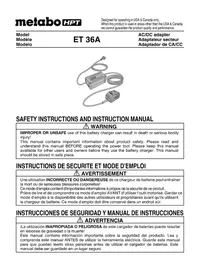
ET36A - Battery charger HiKOKI - Free user manual and instructions
Find the device manual for free ET36A HiKOKI in PDF.


| Product Type | Battery Charger / AC Adapter |
| Brand | HiKOKI (formerly Metabo HPT) |
| Model | ET36A |
| Input Power | Single-phase AC 120 V, 60 Hz |
| Output Voltage | 36 V DC |
| Operating Temperature Range | 14°F to 140°F (-10°C to 40°C) |
| Weight (Adapter) | 0.8 kg (1.8 lbs) |
| Weight (Power Supply Unit) | 1.2 kg (2.6 lbs) |
| Applications | Power source for 36 V tools compatible with MultiVolt battery |
| Protection Functions | Overload, overheat, short-circuit protection |
| LED Indication (Adapter) | Green power LED: flashes in standby, steady on when powered; red error LED: slow flash (overheat), fast flash (overload) |
| LED Indication (Power Supply Unit) | Red error LED flashing slowly in case of internal overheating |
| Cooling | Built-in internal fan |
| Pollution Degree | PD2 (non-conductive environment, temporary condensation tolerated) |
| Compatibility | 36 V tools from HiKOKI/Metabo HPT range (e.g., C3610DRA). Do not use with 18 V tools. |
| Maintenance | Clean with a dry soft cloth or slightly damp (soapy water). Do not use solvents. |
| Storage | Temperature below 40°C, out of reach of children |
| Maximum recommended extension cord length | 30 m (according to gauge, see Table 1 in the manual) |
| Warranty | See supplier terms (repairs by authorized center only) |
Frequently Asked Questions - ET36A HiKOKI
User questions about ET36A HiKOKI
0 question about this device. Answer the ones you know or ask your own.
Ask a new question about this device
Download the instructions for your Battery charger in PDF format for free! Find your manual ET36A - HiKOKI and take your electronic device back in hand. On this page are published all the documents necessary for the use of your device. ET36A by HiKOKI.
USER MANUAL ET36A HiKOKI
natural_image
Illustration of two electrical components with coiled wires and connectors (no text or symbols)SAFETY INSTRUCTIONS AND INSTRUCTION MANUAL
WARNING
IMPROPER OR UNSAFE use of this battery charger can result in death or serious bodily injury!
This manual contains important information about product safety. Please read and understand this manual BEFORE operating the power tool. Please keep this manual available for other users and owners before they use the battery charger. This manual should be stored in safe place.
INSTRUCTIONS DE SECURITE ET MODE D'EMPLOI
AVERTISSEMENT
IMPORTANT SAFETY INSTRUCTIONS
Read and understand all of the safety precautions, warnings and operating instructions in the instruction manual before operating or maintaining this battery charger.
Most accidents that result from battery charger operation and maintenance are caused by the failure to observe basic safety rules or precautions. An accident can often be avoided by recognizing a potentially hazardous situation before it occurs, and by observing appropriate safety procedures.
Basic safety precautions are outlined in the “SAFETY” section of this instruction manual and in the sections which contain the operation and maintenance instructions.
Hazards that must be avoided to prevent bodily injury or machine damage are identified by WARNINGS on the battery charger and in this instruction manual.
NEVER use this battery charger in a manner that has not been specifically recommended by metabo HPT.
MEANINGS OF SIGNAL WORDS
WARNING indicates a potentially hazardous situations which, if ignored, could result in death or serious injury.
CAUTION indicates a potentially hazardous situations which, if not avoided, may result in minor or moderate injury, or may cause machine damage.
NOTE emphasizes essential information.
SAFETY
IMPORTANT SAFETY INSTRUCTIONS FOR AC/DC ADAPTER

WARNING: Death or serious bodily injury could result from improper or unsafe use of AC/DC adapter. To avoid these risks, follow these basic safety instructions:
READ ALL INSTRUCTIONS
- SAVE THESE INSTRUCTIONS: This manual contains important safety and operating instructions for AC/DC adapter Model ET36A.
- Before using AC/DC adapter, read all instructions and cautionary markings on (1) AC/DC adapter and (2) product using AC/DC adapter.
- Do not expose AC/DC adapter to rain or snow.
- Use of an attachment not recommended or sold by the AC/DC adapter manufacturer may result in a risk of fire, electric shock, or injury to persons.
- To reduce risk of damage to electric plug and cord, pull by plug when disconnected DC adapter.
- Make sure cord is located so that it will not be stepped on, tripped over, or otherwise subjected to damage or stress.
- An extension cord should not be used unless absolutely nece extension cord could result in a risk of fire and electric shock.
If extension cord must be used make sure:
a. That blades of extension cord are the same number, size, and shape as those of plug on AC/DC adapter:
b. That extension cord is properly wired and in good electrical condition; and
c. That wire size is large enough for AC ampere rating of AC/DC adapter as specified in Table 1.
Table 1
RECOMMENDED MINIMUM AWG SIZE FOR
EXTENSION CORDS FOR AC/DC ADAPTER
| AC Input rating amperes* | AWG size of cord | ||||
| Equal to or greater than | but less than | Length of cord, feet (Meter) | |||
| 25 (7.5) | 50 (15) | 100 (30) | 150 (45) | ||
| 0 | 2 | 18 | 18 | 18 | 16 |
| 2 | 3 | 18 | 18 | 16 | 14 |
| 3 | 4 | 18 | 18 | 16 | 14 |
* If the input rating of a battery charger is given in watts rather than in amperes, the corresponding ampere rating is to be determined by dividing the wattage voltage rating—for example:
$$ \frac {1 , 2 5 0 \text { watts }}{1 2 5 \text { volts }} = 1 0 \text { amperes } $$
- Do not operate AC/DC adapter with damaged cord or plug-replace them immediately.
- Do not operate AC/DC adapter if it has received a sharp blow, been dropped, or otherwise damaged in any way; take it to a qualified serviceman.
- Do not disassemble AC/DC adapter; take it to a qualified serviceman when service or repair is required. Incorrect reassembly may result in a risk of electric shock or fire.
- To reduce risk of electric shock, unplug AC/DC adapter from receptacle before attempting any maintenance or cleaning.
- This AC/DC adapter is for use only with specific tools, including C3610DRA. The adapter might be suitable for use with other metabo HPT battery operated tools. It is necessary to confirm suitability by referencing the instruction manual or the marking of the specific tool. Failure to confirm suitability before using the adapter with specific tools could result in fire hazard.
IMPORTANT SAFETY INSTRUCTIONS FOR USE OF THE AC/DC ADAPTER
Before using the model ET36A AC/DC adapter, be sure to read all instructions and cautionary statements on it and in this manual.
Follow these instructions to avoid the risk of injury:

WARNING: Improper use of the AC/DC adapter can lead to serious injury. To avoid these injuries:
- NEVER disassemble the AC/DC adapter.
- NEVER incinerate the AC/DC adapter, even if it is damaged or is completely worn out. The AC/DC adapter can explode in a fire.
- NEVER short the adapter terminals.
- NEVER insert any objects into the AC/DC adapter's air vents. Electric shock or damage to the AC/DC adapter may result.
- NEVER use when the temperature is below 14^ F ( -10^ C) or above 104^ F ( 40^ C).
- NEVER connect two AC/DC adapters together.
- NEVER insert foreign objects into the hole for the AC/DC adapter.
- NEVER use a booster transformer.
-
NEVER store the AC/DC adapter in places where the temperature may reach or exceed 104^ F ( 40^ C).
-
ALWAYS operate AC/DC adapter on standard household electrical power (120 volts). Using the AC/DC adapter on any other voltage may overheat and damage the charger.
-
ALWAYS disconnect the power cord from its receptacle when the AC/DC adapter is not in use.
- ALWAYS use with the applicable cordless tools. (See P. 7 SPECIFICATIONS) Use with non-applicable cordless tools may cause abnormal heating and damage cordless tool.
- ALWAYS use the appropriate cordless tool for the job. Also, make sure to carefully read in the instruction manual for the cordless tool in use.
- Do not expose to rain.
- Do not use the product if the tool or the AC/DC adapter terminals (AC/DC adapter mount) are deformed.
Installing the AC/DC adapter could cause a short circuit that could result in smoke emission or ignition.
- Keep the tool's terminals (AC/DC adapter mount) free of swarf and dust.
Prior to use, make sure that swarf and dust have not collected in the area of the terminals.
During use, try to avoid swarf or dust on the tool from falling on the AC/DC adapter.
When suspending operation or after use, do not leave the tool in an area where it may be exposed to falling swarf or dust.
Doing so could cause a short circuit that could result in smoke emission or ignition.
- The product is intended for Use in Pollution Degree 2 or PD2 environments.
Operate only in areas of non-conductive pollution. A temporary conductivity caused by condensation is normally expected. - This is a precision machine so do not drop or expose to impact.
- Do not use this product near a pacemaker or other similar implanted device, which may be affected by a magnetic field produced by this product.
- The adapter, power supply box and the inside of the DC cord generates a boosted high voltage of 380 V so please be careful of the following.
○ Do not disassemble the product.
○ Do not drop or expose to impact.
In the event the product is damaged from strong impact, do not use the product.
○ Do not use the product in areas exposed to rain, snow, iron powder or wet condition.
○ Do not touch the product with wet hands.
○ Do not spill or pour liquid onto the product.
○ Do not pull the cord with excessive force.
○ Use the product in a well-ordered work environment.
CAUTION:
- When the mesh of the vent is plugged by objects such as wood shavings, try to keep the objects out when you clear the mesh.
(If not properly maintained, the temperature protective feature could shut the product off)
- When the temperature protective feature frequently cuts the power off, do not overload the machine with continued work, but let the machine rest for a little before continuing operation.
- The machine does get hot. However, this does not indicate an abnormality.
Keep the electricity running and operate the internal fan to cool the machine before carrying it elsewhere.
When carrying the product, the case may be hot so please be careful.
- During use, do not pull the cord to move the Box. Doing so may result in damage.
-
Do not use more that a single cord reel of 30 meters. Doing so may result in damage.
-
During use, if the machine stops running after the Box's LED lamp blinks, confirm the power supply environment.
- Do not drag the cord when using or carrying the machine.
Doing so may tear the cord insulation or break the cord which could result in electric shock.
- Do not stretch the cord out any more than required.
When using tools such as gardening clippers or circular saws, always make a power cord's position to avoid cutting the cord during operation.
- To use the AC/DC adapter after it shuts down due to high temperature, disconnect the box's power plug, wait for the LED lamp to go out and then reconnect the box's power plug. If the machine cuts off even after sufficiently cooling it off with the built-in fan, discontinue use as there may be a problem with the machine.
- Do not use this product near a radio. Doing so could cause noise from the radio, making it difficult to listen to a broadcast.
- This is a power source for multi volt products. Do not use with 18 V products or chargers. Doing so could result in damage.
- Overload behavior may differ when compared with BSL36B18 battery use. With the battery where the LED should blink on the main unit, the LED on the AC/DC adapter may blink instead.
PRECAUTIONS FOR AC/DC ADAPTER
The adapter equips with the protection function to stop the output. In the cases of 1 to 2 described below, when using this product, even if you are pulling the switch, the motor may stop. This is not the trouble but the result of protection function.
- If the tool is overloaded, output may stop. In this case, release the switch of tool and eliminate causes of overloading.
- If the adapter is overheated under overload work, output may stop. In situations like this, discontinue use of the adapter and detach it from the tool. Allow the adapter to cool in a location such as a shaded area with good air circulation.
SAVE THESE INSTRUCTIONS AND
MAKE THEM AVAILABLE TO
OTHER USERS
AND
OWNERS OF THIS TOOL!
The information contained in this instruction manual is designed to assist you in the safe operation and maintenance of the AC/DC adapter.
NEVER operate, or attempt any maintenance on the AC/DC adapter unless you have first read and understood all safety instructions contained in this manual.
Some illustrations in this instruction manual may show details or attachments that differ from those on your own AC/DC adapter.
MODEL
ET36A
NAME OF PARTS
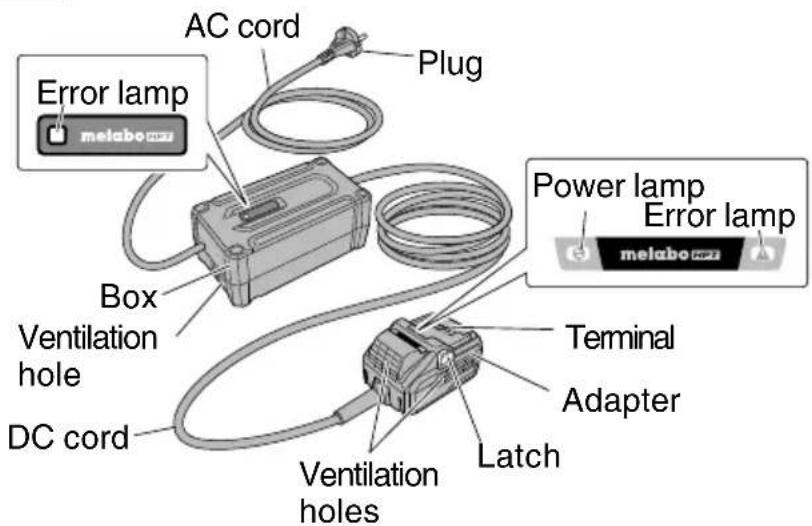
Fig. 1
SPECIFICATIONS
| Model ET36A | |
| Input power source Single phase: AC 120 V 60 Hz | |
| Output voltage 36 V | |
| Operating temperature range 14°F - 140°F (-10°C - 40°C) | |
| Weight | Adapter : 1.8 lbs. (0.8 kg)Box : 2.6 lbs. (1.2 kg) |
APPLICATIONS
Power source for 36V products compatible with multi volt battery
BEFORE USE
- Check the work area to make sure that it is clear of debris and clutter.
Clear the area of unnecessary personnel. Ensure that lighting and ventilation are adequate. - To prevent electric shock, connect to a power source equipped with a ground fault circuit breaker.
- Prior to use, make sure that the DC cord insulation is not torn or that the case is not cracked.
Do not use the product if there is a break in the DC cord, the insulation is torn, or the case is damaged. - Before starting operation, make sure that the vicinity of the box's vent wood shavings or iron powder.
Also, do not use in locations where iron powder is abundant, or in areas where there is rain, snow or other water sources that could wet the product. - Make sure there are no solid metal material or liquid in the adapter box. Failure to do so may result in damage.
- Be careful not to step on the box. Also, make sure the box is placed in a location where it won't be stepped on. Do not place in a location where the box could be immersed in water when it rains.
REMOVAL AND INSTALLATION METHOD OF ADAPTER
NOTE: Before plugging into the receptacle, make sure the following points.
○ The power source voltage is stated on the nameplate.
○ The cord is not damaged.
- The power source voltage is stated on the nameplate. - The cord is not damaged.

WARNING: Do not use at voltage higher than indicated on the nameplate. If charged at voltage higher than indicated on the nameplate, the AC/DC adapter will burn up.
- Connect the AC/DC adapter's power cord to the receptacle.
When connecting the plug of the adapter to a receptacle, the power lamp will lights in green.
natural_image
Black-and-white icon of a hand with a lightning bolt symbol, no text or labels present
WARNING: Do not use the electrical cord if damaged. Have it repaired immediately.

CAUTION: Never short-circuit the battery.
- Insert the adapter into the tool.
Firmly insert the adapter into the tool as shown in Fig. 2.
- Adapter removal
Hold the handle tightly and push the battery latch to remove the adapter (see Fig. 2).
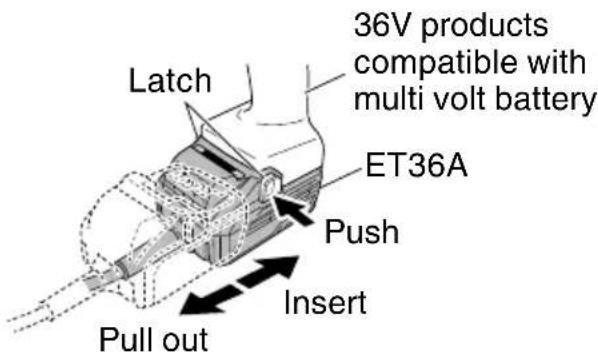
Fig. 2
Table 2
| Indications of the indicator lamp | |||||
| Status | Power Lamp (GREEN) | Error lamp (RED) | Indicates | ||
| Adapter | Before use | Blinks  | Light off  | Plugged into power source | |
| Power on | Lights 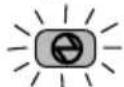 | Light off  | Tool can be used | ||
| Power suspended | Blinks Lights | Blinks 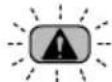 | Lights for 0.5 seconds. Does not light for 0.5 seconds. (off for 0.5 seconds) | Adapter cannot be used due to high temperature. (Can be used once the adapter is cooled) | |
| Lights for 0.1 seconds. Does not light for 0.1 seconds. (off for 0.1 seconds) | Overload | ||||
| Box | Power suspended | Blinks | Lights for 0.5 seconds. Does not light for 0.5 seconds. (off for 0.5 seconds) | Cannot be used because the temperature in the box is too high (Can be used once the box is cooled) | |
MAINTENANCE AND INSPECTION

CAUTION: Pull out AC/DC adapter before doing any inspection or maintenance.
- Check the screws
Loose screws are dangerous. Regularly inspect them and make sure they are tight.

CAUTION: Using this AC/DC adapter with loosened screws is extremely dangerous.
- Check for dust
Dust may be removed with a soft cloth or a cloth dampened with soapy water.
Do not use bleach, chlorine, gasoline or thinner, for they may damage the plastics.
- Inspection of terminals (tool and battery)
Check to make sure that swarf and dust have not collected on the terminals.
On occasion check prior, during and after operation.

CAUTION:
Remove any swarf or dust which may have collected on the terminals.
Failure to do so may result in malfunction.
MODIFICATIONS
metabo HPT power tools are constantly being improved and modified to incorporate the latest technological advancements.
Accordingly, some parts may be changed without prior notice.
STORAGE
Storing in a place below 104^ F ( 40^ C) and out of the reach of children.
SERVICE AND REPAIRS
All quality power tools will eventually require servicing or replacement of parts because of wear from normal use. To assure that only authorized replacement parts will be used, all service and repairs must be performed by a metabo HPT AUTHORIZED SERVICE CENTER, ONLY.
NOTE: Specifications are subject to change without any obligation on the part of the metabo HPT.
TROUBLESHOOTING GUIDE
WARNING
- To avoid injury from an accidental start, turn the switch OFF and remove the plug from the power source and remove the AC/DC adapter from the tool before making any adjustments.
● All electrical or mechanical repairs should be done only by qualified service technicians. Contact metabo HPT Authorized Service Center.
| Problem Possible Cause Possible Solution | ||
| The adapter's error lamp is blinking red and the tool does not operate when switched on. | Output is suspended because the tool or the AC/DC adapter is overheated. | Allow the tool and AC/DC adapter to sufficiently cool down. |
| The adapter's error lamp rapidly blinks red and the motor does not operate when the tool is switched on. | Output is suspended because the tool is overloaded. | Remove the cause of the overload. |
CONSIGNES DE SÉCURITÉ IMPORTANTES
natural_image
Black and white illustration of a hand with a lightning bolt symbol (no text or numbers)
AVERTISSEMENT:
natural_image
Black and white illustration of a hand with a lightning bolt symbol (no text or numbers)Please contact KOKI HOLDINGS AMERICA LTD. at 1-800-59-TOOLS (toll free), or metabo HPT AUTHORIZED POWER TOOL SERVICE CENTER regarding COLLECTION.
Pour le RAMASSAGE, contacter KOKI HOLDINGS AMERICA LTD. au 1-800-59-TOOLS (appel gratuit), ou UN SERVICE APRÈS-VENTE D'OUTILS ÉLECTRIQUE AGRÉÉ PAR metabo HPT.
Shinagawa Intercity Tower A, 15-1, Konan 2-chome, Minato-ku, Tokyo 108-6020, Japan
Distributed by
Koki Holdings America Ltd.
1111 Broadway Ave, Braselton, Georgia, 30517
Koki Holdings America Ltd. Canadian Branch
3405 American Drive, Units 9-10, Mississauga, ON, L4V 1T6
- SAFETY INSTRUCTIONS AND INSTRUCTION MANUAL
- WARNING
- INSTRUCTIONS DE SECURITE ET MODE D'EMPLOI
- AVERTISSEMENT
- IMPORTANT SAFETY INSTRUCTIONS
- MEANINGS OF SIGNAL WORDS
- SAFETY
- IMPORTANT SAFETY INSTRUCTIONS FOR AC/DC ADAPTER
- READ ALL INSTRUCTIONS
- IMPORTANT SAFETY INSTRUCTIONS FOR USE OF THE AC/DC ADAPTER
- WARNING: Improper use of the AC/DC adapter can lead to serious injury. To avoid these injuries:
- CAUTION:
- PRECAUTIONS FOR AC/DC ADAPTER
- SAVE THESE INSTRUCTIONS AND
- MAKE THEM AVAILABLE TO
- OTHER USERS
- AND
- OWNERS OF THIS TOOL!
- MODEL
- NAME OF PARTS
- SPECIFICATIONS
- APPLICATIONS
- BEFORE USE
- REMOVAL AND INSTALLATION METHOD OF ADAPTER
- MAINTENANCE AND INSPECTION
- MODIFICATIONS
- STORAGE
- SERVICE AND REPAIRS
- TROUBLESHOOTING GUIDE
- CONSIGNES DE SÉCURITÉ IMPORTANTES
- Koki Holdings America Ltd.
- Koki Holdings America Ltd. Canadian Branch
Brand : HiKOKI
Model : ET36A
Category : Battery charger