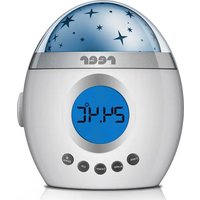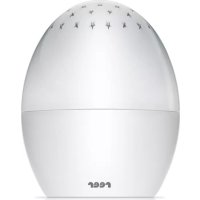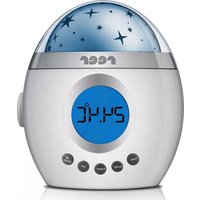
MyMagicStarLight 52050 - Night lamp Reer - Free user manual and instructions
Find the device manual for free MyMagicStarLight 52050 Reer in PDF.


| Product type | Night light / Sleep aid |
| Brand | Reer |
| Model | MyMagicStarLight 52050 |
| Power supply | 3 AA batteries (included) or DC 5V/500mA power adapter (optional) |
| Light source type | 4 LED |
| Rated power | 3 W |
| LED lifespan | Approximately 100 hours |
| Rated voltage | 5 V |
| Protection rating | IP20 |
| Main functions | Projection of changing stars (red, green, blue), built-in speaker, alarm with 15 melodies/nature sounds, time and temperature display, adjustable auto-off (15/30/60 min), snooze function (5 min) |
| Display | Digital screen with time, temperature, icons |
| Connectivity | LINE IN input for external player (smartphone, MP3, PC) |
| Settings | Volume, sound selection, light and sound on/off, color lock |
| Care and cleaning | Soft dry cloth or alcohol wipe; do not immerse |
| Safety | Do not use near water, avoid extreme heat, do not open device (risk of electric shock), keep batteries out of reach of children, do not mix battery types |
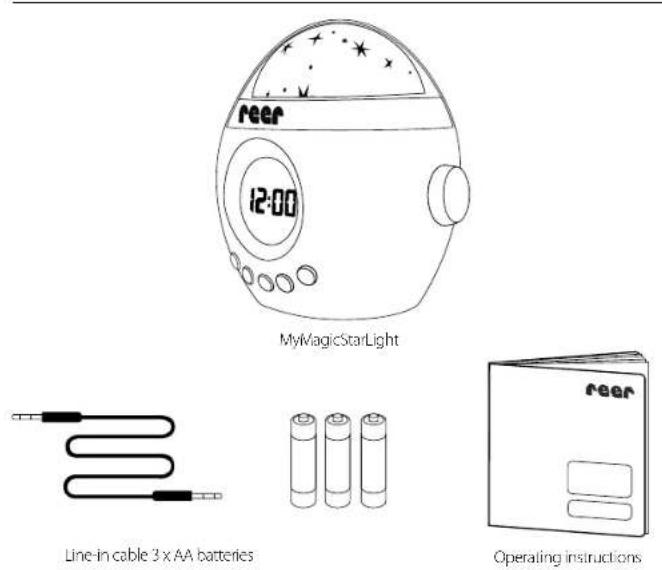
| Package contents | 1 MyMagicStarLight night light, 3 AA batteries, 1 LINE IN cable, 1 instruction manual |
| Warranty | Legal warranty from the retailer |
Frequently Asked Questions - MyMagicStarLight 52050 Reer
User questions about MyMagicStarLight 52050 Reer
0 question about this device. Answer the ones you know or ask your own.
Ask a new question about this device
Download the instructions for your Night lamp in PDF format for free! Find your manual MyMagicStarLight 52050 - Reer and take your electronic device back in hand. On this page are published all the documents necessary for the use of your device. MyMagicStarLight 52050 by Reer.
USER MANUAL MyMagicStarLight 52050 Reer
text_image
reer 12:00reer
We would like to thank you for choosing the MyMagicStar light, highlight from rear. It gently accompanies your child while falling asleep with soothing natural tones and a changing stary sky. The MyMagicStarLight can also be used as an alarm clock, or, thanks to the excellent sound quality, as a speaker for your mobile telephone, MP3 player or PC. We are sure you and your family will enjoy the quality of our product for many years to come.
Contents
General safety instructions....13
Scope of delivery, Technical data ..... 14
Before first use 15
Installing the battery 16
Functions 16
Setting the clock....16
Alarm function 17
Room temperature display.....18
Star projection 18
Sounds and melodies....19
Play music....19
Automatic shut-off function.....19
Cleaning and maintenance ..... 20
Disposal instructions 20
Warranty, Troubleshooting ..... 21
Please read the following items carefully and follow the instructions before you operate the nightlight. Please keep the instruction manual in a safe place for future reference.
IMPORTANT:
You will only be able to use the MyMagicStarLight with confidence if all of the following points mentioned have been checked.
- Check the unit for visible damage before each use. If you detect any damage, do not use the unit
- Do not use the device near water or in humid areas.
- Avoid extreme heat and direct sunlight.
- Do not subject the device to physical shocks.
• Children should not use the device without help from adults.
- Except for the battery compartment cover, never open the unit, as there is a risk of electric shock. If a unit does not work correctly, please do NOT try to fix the problem yourself. Please contact your dealer with any problems.
- Avoid bringing the battery and/or electrical connection contacts on the unit into contact with metal objects.
- Keep the battery out of the reach of children. Risk of swallowing!
• Used batteries do not belong in the house trash and must be properly disposed of.
- The batteries included must not be recharged or reactivated by other means, may not be disassembled or exposed to fire or short-circuited.
- The power lead must be secured out of the reach of children to avoid any risk of strangulation. Do not use extension cables.
- Do not mix alkaline, standard or rechargeable batteries in the device.
- If batteries have leaked, use chemical resistant protective gloves and protective glasses.
Scope of delivery
Technical data
- 3 x AA batteries
- Nominal output: 3 W
- Nominal voltage: 5 V
- Illuminant type: 4 LEDs
• Lifetime LED: approx. 100 hours
• Protection category: IP20
Before first use
text_image
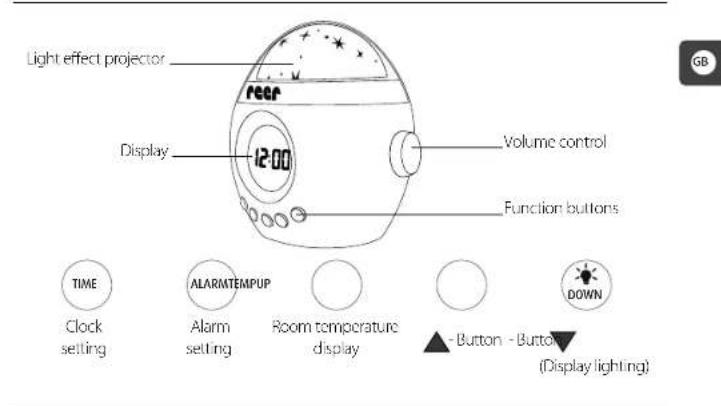
Light effect projector rear Display 12:00 Volume control Function buttons TIME Clock setting ALARMTEMPUP Alarm setting Room temperature display - Button - Button (Display lighting)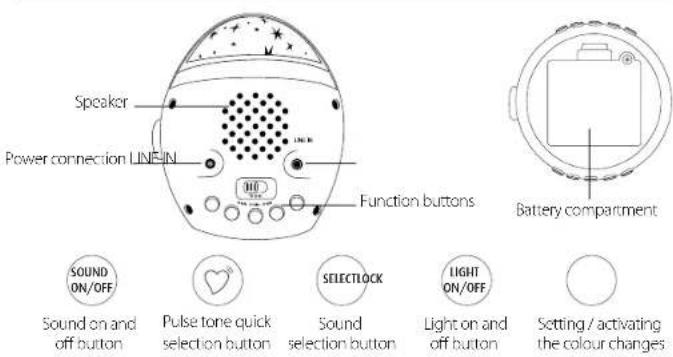
text_image
Speaker Power connection LINE IN Function buttons Battery compartment SOUND ON/OFF Sound on and off button Pulse tone quick selection button SELECTLOCK LIGHT ON/OFF Sound on and off button Light on and off button Setting / activating the colour changesInstalling the battery (Note on the power supply: optionally with DC 5V/500mA adapter)
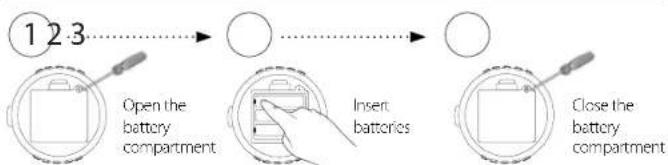
flowchart
graph LR
    A["1 2 3"] --> B["Open the battery compartment"]
    B --> C["Insert batteries"]
    C --> D["Close the battery compartment"]
ATTENTION: Dissimilar battery types or new and used batteries may not be used together. Batteries must be inserted with the correct polarity. Please remove batteries during prolonged periods of non-use.
Setting the clock // Steps 1-8
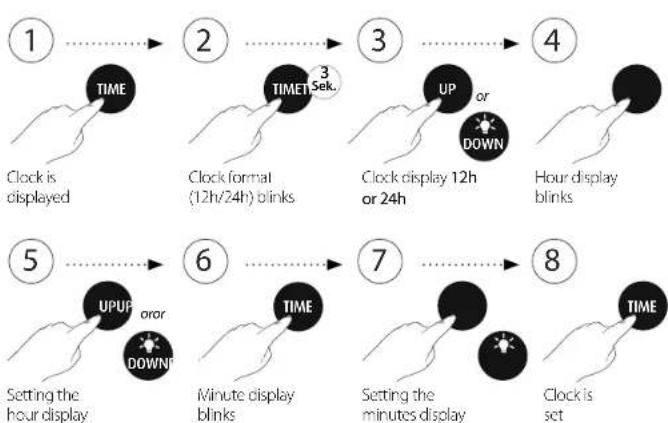
flowchart
graph TD
    1["Clock is displayed"] --> 2["Clock format (12h/24h) blinks"]
    2 --> 3["Clock display 12h or 24h"]
    3 --> 4["Hour display blinks"]
    5["Setting the hour display"] --> 6["Minute display blinks"]
    6 --> 7["Setting the minutes display"]
    7 --> 8["Clock is set"]
Setting the alarm // Steps 1–6
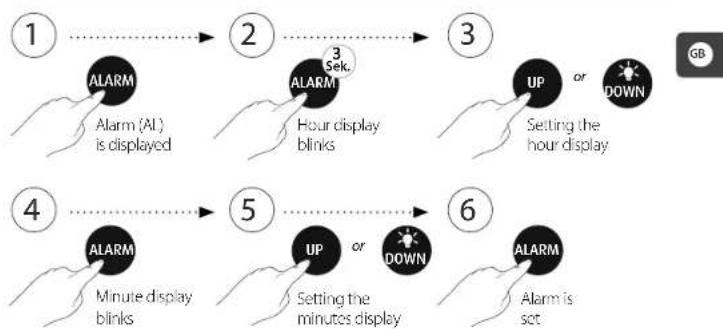
flowchart
graph TD
    1["1 ALARM"] --> 2["2 ALARM"]
    2 --> 3["3 UP or DOWN Setting the hour display"]
    3 --> 4["4 ALARM"]
    4 --> 5["5 UP or DOWN Setting the minutes display"]
    5 --> 6["6 ALARM"]

    A["Minute display blinks"] --> B["Setting the minutes display"]
    B --> C["Alarm is set"]
Snooze function
As soon as the alarm music sounds, you can press the alarm button to shut it off for a moment. Then the alarm music will be automatically reactivated once after 5 minutes. If you want to shut off the alarm music entirely, press the Up button when the alarm melody sounds again. The bell symbol will disappear from the display.
The alarm melody can be selected from a total of 15 different melodies and nature sounds.
Setting the alarm music
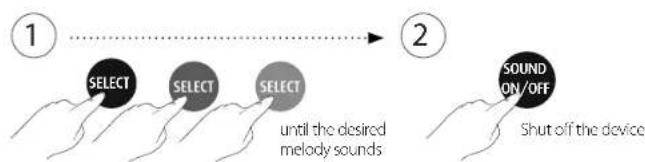
flowchart
graph LR
    A["1"] --> B["SELECT"]
    B --> C["SELECT"]
    C --> D["SELECT"]
    D --> E["2"]
    E --> F["SOUND ON/OFF"]
    F --> G["Shut off the device"]
Activating the alarm function
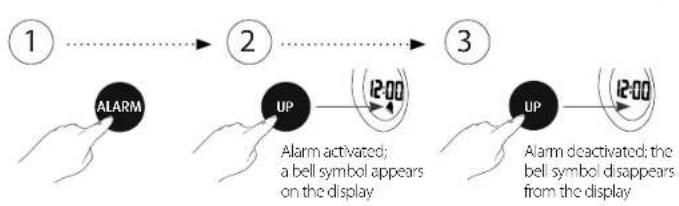
flowchart
graph LR
    1["1"] --> 2["2"]
    2 --> 3["3"]

    A["ALARM"] --> B["UP"]
    B --> C["12:00"]

    D["Alarm activated; a bell symbol appears on the display"] --> B

    E["UP"] --> F["12:00"]

    G["Alarm deactivated; the bell symbol disappears from the display"] --> F
Room temperature display
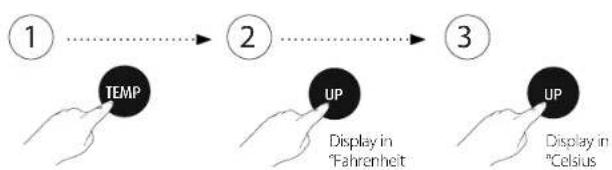
flowchart
graph LR
    1["1"] --> 2["2"]
    2 --> 3["3"]
    A["TEMP"] --> B["UP"]
    B --> C["UP"]
    style A fill:#f9f,stroke:#333
    style B fill:#ccf,stroke:#333
    style C fill:#cfc,stroke:#333
Star projection*
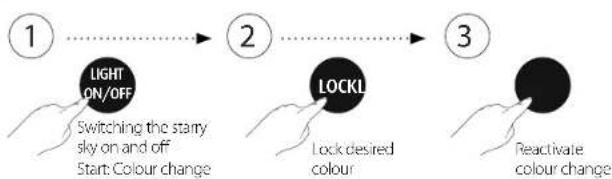
flowchart
graph LR
    A["Light ON/OFF"] --> B["Switching the starty sky on and off Start: Colour change"]
    B --> C["LOCKL"]
    C --> D["Lock desired colour"]
    D --> E["Reactivate colour change"]
* The starry sky changes from colour combinations of red, green and blue.
Sounds and melodies
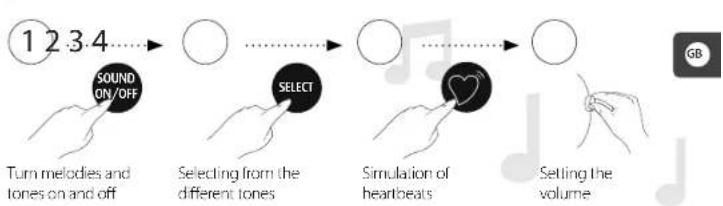
flowchart
graph LR
    A["1 2 3 4"] --> B["SOUND ON/OFF"]
    B --> C["SELECT"]
    C --> D["Selecting from the different tones"]
    D --> E["Simulation of heartbeats"]
    E --> F["Setting the volume"]
Play music
You can also use the nightlight as a speaker unit for external data carriers, e.g. mobile telephones, MP3-players or PCs.
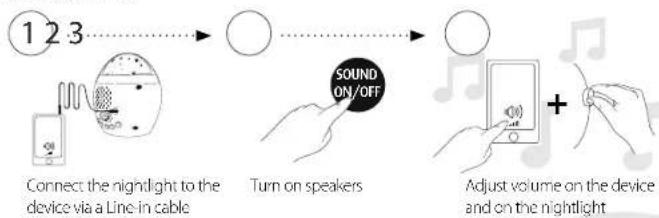
flowchart
graph LR
    A["Connect the nightlight to the device via a Line in cable"] --> B["Turn on speakers"]
    B --> C["SOUND ON/OFF"]
    C --> D["Adjust volume on the device and on the nightlight"]
Automatic shut-off function
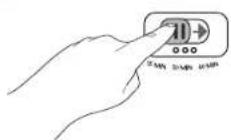
The automatic shut-off function switches the nightlight (music and starry sky) off after the desired time (15 min, 30 min, or 60 min).
Cleaning and maintenance
A soft, dry cloth or alcohol pad is recommended for cleaning. The nightlight is not water-proof and thus must not be immersed in water or exposed to direct humidity. This product does not require any special maintenance. Repairs to the unit must be carried out by skilled personnel only.
Disposal instructions
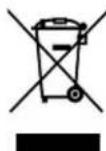
General: Disused electronic equipment is a commodity and must not be disposed of with domestic waste. At the end of its life, this equipment must be disposed of properly in accordance with statutory regulations. Batteries/rechargeable batteries must not be disposed of with domestic waste. Consumers have a legal obligation to dispose of batteries properly. For this purpose, batteries can be disposed of free of charge in designated containers in shops, at mail order warehouses and in communal collection points. Used batteries contain precious raw materials,
which can be re-used. This is a valuable contribution toward environmental conservation. Batteries/rechargeable batteries containing hazardous substances are marked with the symbol shown here to indicate that they must not be disposed of with domestic waste.
Warranty
Please retain your receipt, the user manual and part number. Claims under warranty or under warranty commitments are to be processed by the dealer alone.
The technical specification, information and characteristics of the product described herein have been compiled to the best of our knowledge and belief and are correct at the time of printing. Any information provided by reer should be correct and authoritative. Nevertheless, reer does not accept liability for potential errors in this document and reserves the right to make changes to the product design and/or specifications without prior notice. Reproduction and disclosure of information contained in this copyright-protected document, in any form or by any means - graphical, electronic or mechanical by photocopying, recording on tape or storage in a data retrieval system (even in part), require prior written consent from reer.
Troubleshooting
The nightlight does not switch on
Please check the power connection or replace the batteries.
The nightlight does not play any music
The volume control may be on the lowest setting. Turn the volume control to check.
The nightlight doesn't play my songs from the PC, mobile or MP3 player
Check whether the LINE IN cable is correctly connected and the external device is connected.
The nightlight switches off after 15 minutes
Please check whether the automatic shut-off controller is set to .15 minutes*. In this case, slide the controller to the desired time (30 or 60 minutes).