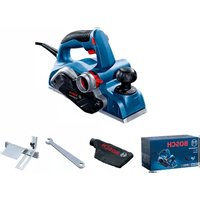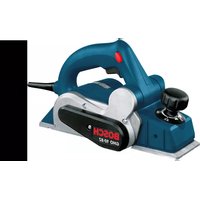
GHO 10-82 Professional - Plane BOSCH - Free user manual and instructions
Find the device manual for free GHO 10-82 Professional BOSCH in PDF.


User questions about GHO 10-82 Professional BOSCH
0 question about this device. Answer the ones you know or ask your own.
Ask a new question about this device
Download the instructions for your Plane in PDF format for free! Find your manual GHO 10-82 Professional - BOSCH and take your electronic device back in hand. On this page are published all the documents necessary for the use of your device. GHO 10-82 Professional by BOSCH.
USER MANUAL GHO 10-82 Professional BOSCH
OHJ DOKU-7536-003,fm Page 1 Monday, October 23, 2017 12:16 PM
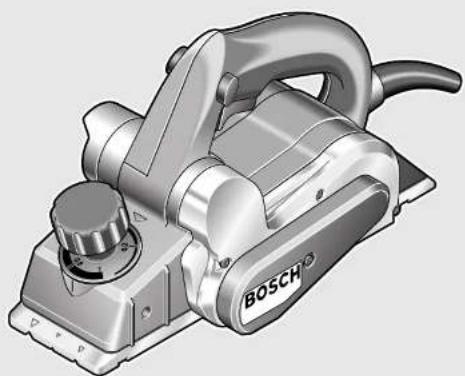
natural_image
Illustration of a Bosch electric plow with handle and control knob (no text or symbols)Robert Bosch Power Tools GmbH
70538 Stuttgart
GERMANY
www.bosch-pt.com
160992A41E(2017.10)0/83
GHO 10-82 Professional
HEAVY DUTY

BOSCH
en Original Instructions
fr Notice originale
pt Manual original
es Manual original
pt Manual original - Brasil
cn 正本使用说明书
tw原始使用說明書
th หนังติดต์บริการใช้งานฉบับด้วยแบบ
Id Petunjuk-Petunjuk untuk Penggunaan Orisinal
vi Bán pốc huàng dān sù dung
ar
fa Label (slaim) ajiā

2|
English Page 7
Français Page 15
text_image
A 11 HSS 12 13 8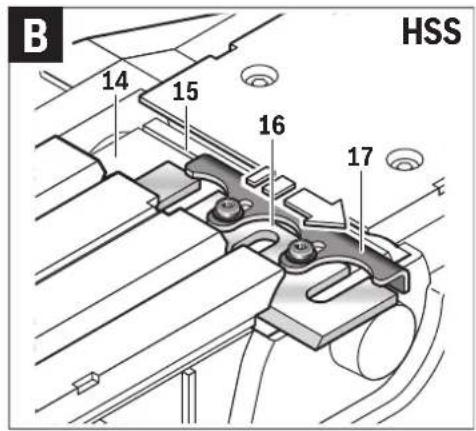
text_image
B 14 15 16 17 HSS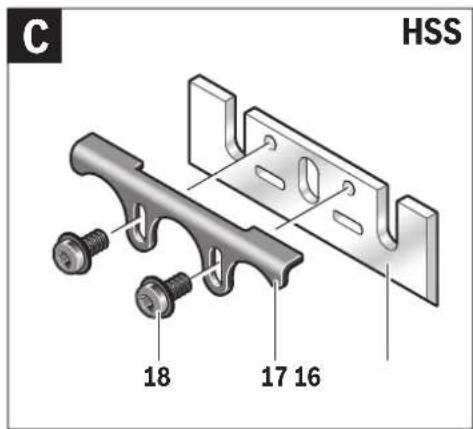
text_image
C HSS 18 17 16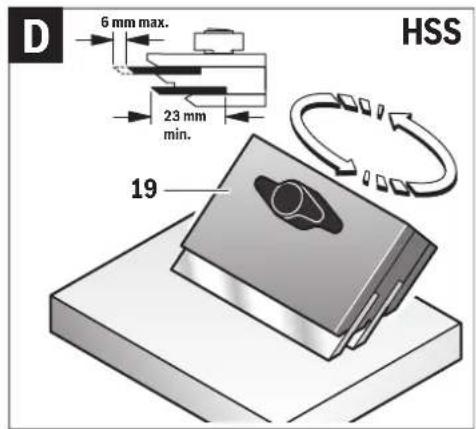
text_image
D 6 mm max. 23 mm min. 19 HSS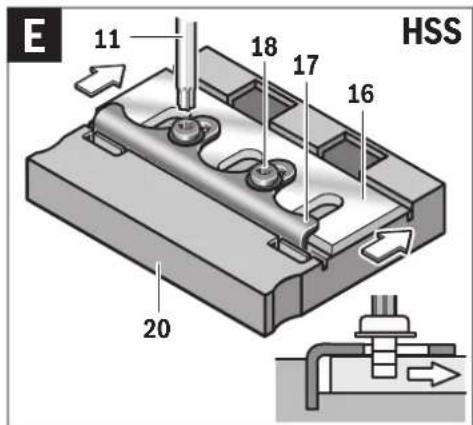
text_image
E 11 18 17 16 HSS 20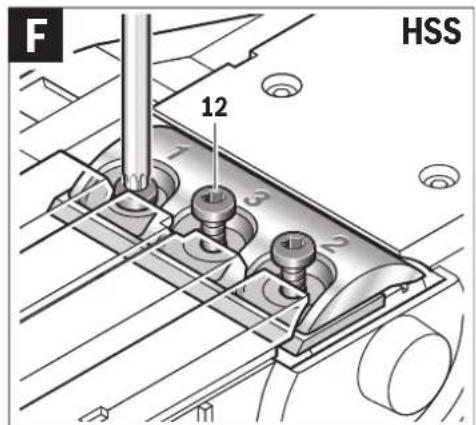
text_image
F 12 HSS1 609 92A 41E | (23.10.17) Bosch Power Tools
text_image
G 11 TC 12 13 8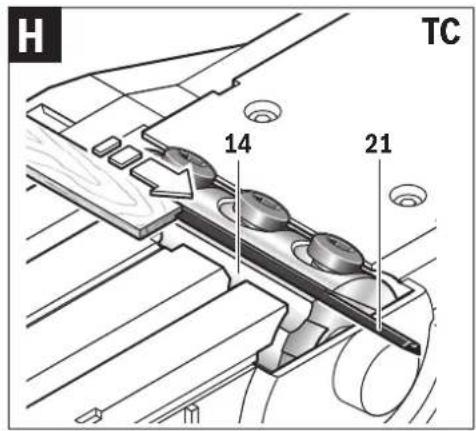
text_image
H TC 14 21
natural_image
Technical diagram of a mechanical assembly with no visible text or symbols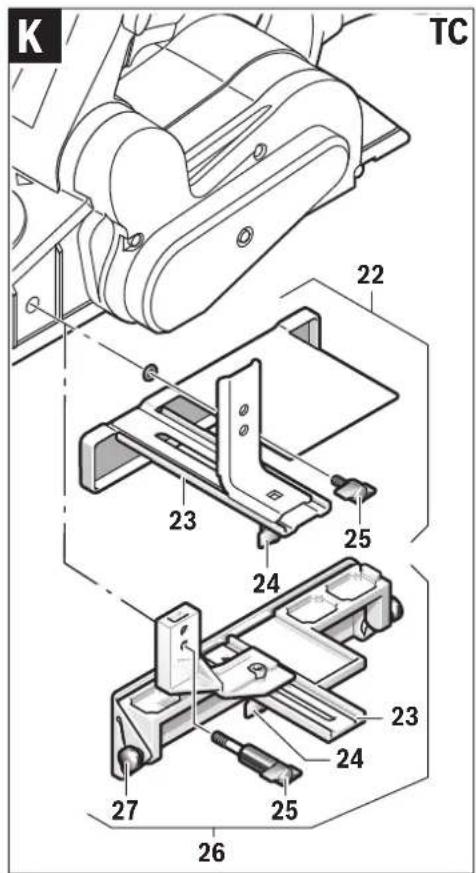
text_image
K TC 22 23 24 25 26 27 23 24 25 26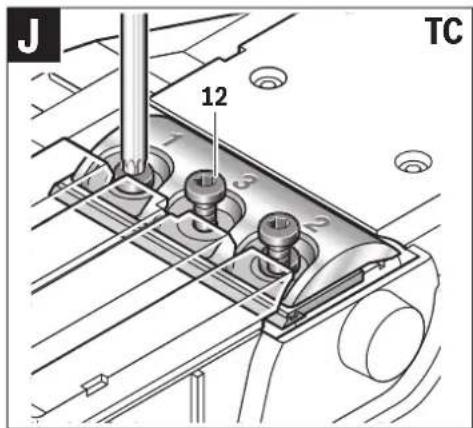
text_image
J 12 TCBosch Power Tools 1 609 92A 41E | (23.10.17)
6|
text_image
L 28 29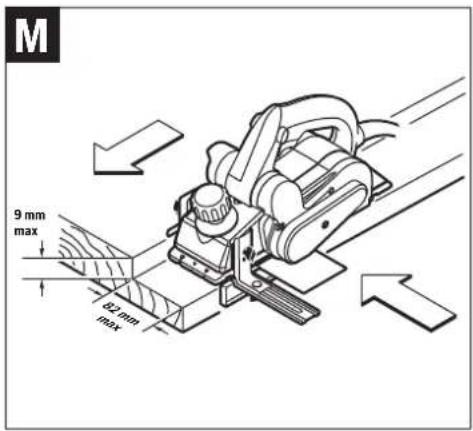
text_image
M 9 mm max 82 mm max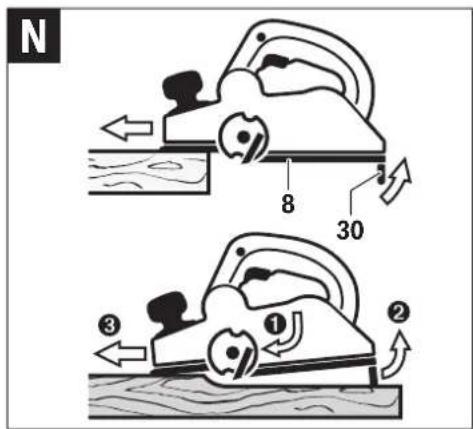
text_image
N 8 30 ① ② ③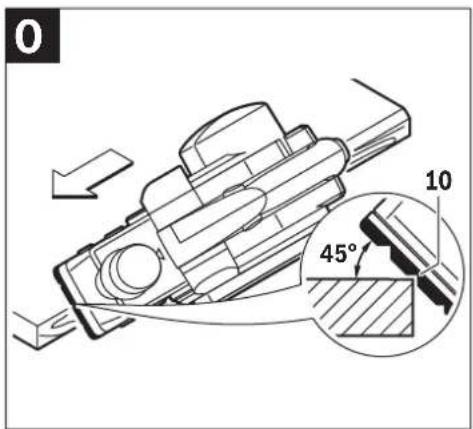
text_image
0 10 45°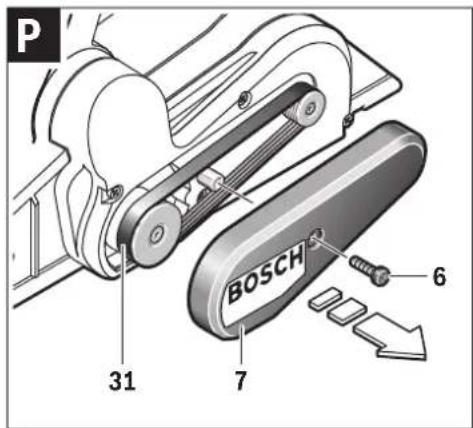
text_image
P 31 7 BOSCH 6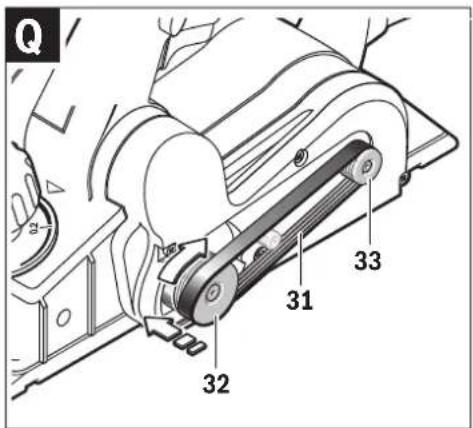
text_image
Q 31 32 33English | 7
English
Safety Notes
General Power Tool Safety Warnings

WARNING
Read all safety warnings and all instructions. Failure to follow the warnings and
instructions may result in electric shock, fire and/or serious injury.
Save all warnings and instructions for future reference.
The term "power tool" in the warnings refers to your mains-operated (corded) power tool or battery-operated (cordless) power tool.
Work area safety
- Keep work area clean and well lit. Cluttered or dark areas invite accidents.
▶ Do not operate power tools in explosive atmospheres, such as in the presence of flammable liquids, gases or dust. Power tools create sparks which may ignite the dust or fumes. - Keep children and bystanders away while operating a power tool. Distractions can cause you to lose control.
Electrical safety
▶ Power tool plugs must match the outlet. Never modify the plug in any way. Do not use any adapter plugs with earthed (grounded) power tools. Unmodified plugs and matching outlets will reduce risk of electric shock.
- Avoid body contact with earthed or grounded surfaces, such as pipes, radiators, ranges and refrigerators. There is an increased risk of electric shock if your body is earthed or grounded.
▶ Do not expose power tools to rain or wet conditions. Water entering a power tool will increase the risk of electric shock.
▶ Do not abuse the cord. Never use the cord for carrying, pulling or unplugging the power tool. Keep cord away from heat, oil, sharp edges and moving parts. Damaged or entangled cords increase the risk of electric shock.
- When operating a power tool outdoors, use an extension cord suitable for outdoor use. Use of a cord suitable for outdoor use reduces the risk of electric shock.
▶ If operating a power tool in a damp location is unavoidable, use a residual current device (RCD) protected supply. Use of an RCD reduces the risk of electric shock.
Personal safety
Stay alert, watch what you are doing and use common sense when operating a power tool. Do not use a power tool while you are tired or under the influence of drugs, alcohol or medication. A moment of inattention while operating power tools may result in serious personal injury.
▶ Use personal protective equipment. Always wear eye protection. Protective equipment such as dust mask, non-skid safety shoes, hard hat, or hearing protection used for appropriate conditions will reduce personal injuries.
▶ Prevent unintentional starting. Ensure the switch is in the off-position before connecting to power source and/or battery pack, picking up or carrying the tool. Carrying power tools with your finger on the switch or energising power tools that have the switch on invites accidents.
Remove any adjusting key or wrench before turning the power tool on. A wrench or a key left attached to a rotating part of the power tool may result in personal injury.
▶ Do not overreach. Keep proper footing and balance at all times. This enables better control of the power tool in unexpected situations.
▶ Dress properly. Do not wear loose clothing or jewellery. Keep your hair, clothing and gloves away from moving parts. Loose clothes, jewellery or long hair can be caught in moving parts.
▶ If devices are provided for the connection of dust extraction and collection facilities, ensure these are connected and properly used. Use of dust collection can reduce dust-related hazards.
Power tool use and care
Do not force the power tool. Use the correct power tool for your application. The correct power tool will do the job better and safer at the rate for which it was designed.
▶ Do not use the power tool if the switch does not turn it on and off. Any power tool that cannot be controlled with the switch is dangerous and must be repaired.
▶ Disconnect the plug from the power source and/or the battery pack from the power tool before making any adjustments, changing accessories, or storing power tools. Such preventive safety measures reduce the risk of starting the power tool accidentally.
▶ Store idle power tools out of the reach of children and do not allow persons unfamiliar with the power tool or these instructions to operate the power tool. Power tools are dangerous in the hands of untrained users.
- Maintain power tools. Check for misalignment or binding of moving parts, breakage of parts and any other condition that may affect the power tool's operation. If damaged, have the power tool repaired before use. Many accidents are caused by poorly maintained power tools.
▶ Keep cutting tools sharp and clean. Properly maintained cutting tools with sharp cutting edges are less likely to bind and are easier to control.
▶ Use the power tool, accessories and tool bits etc. in accordance with these instructions, taking into account the working conditions and the work to be performed. Use of the power tool for operations different from those intended could result in a hazardous situation.
Service
▶ Have your power tool serviced by a qualified repair person using only identical replacement parts. This will ensure that the safety of the power tool is maintained.
8 | English
Planer Safety Rules
▶ Wait for the cutter to stop before setting the tool down. An exposed rotating cutter may engage the surface leading to possible loss of control and serious injury.
Hold the power tool by insulated gripping surfaces only, because the cutter may contact its own cord. Cutting a "live" wire may make exposed metal parts of the power tool "live" and could give the operator an electric shock.
▶ Use clamps or another practical way to secure and support the workpiece to a stable platform. Holding the work by your hand or against the body leaves it unstable and may lead to loss of control.
▶ Use suitable detectors to determine if utility lines are hidden in the work area or call the local utility company for assistance. Contact with electric lines can lead to fire and electric shock. Damaging a gas line can lead to explosion. Penetrating a water line causes property damage or may cause an electric shock.
▶ Do not reach into the chip ejector with your hands. They could be injured by rotating parts.
▶ Apply the machine to the workpiece only when switched on. Otherwise there is danger of kickback when the cutting tool jams in the workpiece.
When working, always hold the planer in such a manner that the planer base plate faces flat on the workpiece. Otherwise the planer can become wedged and lead to injuries.
▶ Never plane over metal objects, nails or screws. The planer blade and the blade shaft can become damaged and lead to increased vibrations.
Products sold in GB only: Your product is fitted with an BS 1363/A approved electric plug with internal fuse (ASTA approved to BS 1362).
If the plug is not suitable for your socket outlets, it should be cut off and an appropriate plug fitted in its place by an authorised customer service agent. The replacement plug should have the same fuse rating as the original plug.
The severed plug must be disposed of to avoid a possible shock hazard and should never be inserted into a mains socket elsewhere.
Product Description and Specifications

Read all safety warnings and all instructions. Failure to follow the warnings and instructions may result in electric shock, fire and/or serious injury.
Intended Use
The machine is intended for planing of firmly supported wooden materials, such as beams and boards. It is also suitable for beveling edges and rebating.
Product Features
The numbering of the product features refers to the illustration of the machine on the graphics page.
1 Planing depth scale
2 Depth adjustment knob (insulated gripping surface)
3 Chip ejector(0 601 594 037 with two-sided chip ejector)
4 Lock-off button for On/Off switch(0 601 594 037)
4 Lock-on button for On/Off switch
5 On/Off switch
6 Screw for belt cover
7 Belt cover
8 Planer base plate
9 Handle (insulated gripping surface)
10 V-grooves
11 Torx key*
12 Fastening screw for clamping jaw
13 Clamping jaw
14 Blade drum
15 Guide groove for planer blade
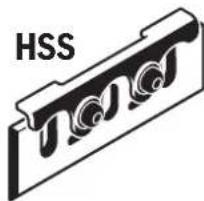
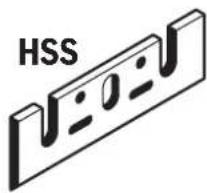
16 HSS planer blade
17 HSS planer-blade retainer
18 Fastening screw for HSS planer-blade retainer
19 Sharpening device for HSS planer blade*
20 Setting gauge for HSS planer blade*
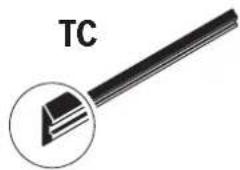
21 Carbide blade (TC)
22 Parallel guide*
23 Scale for rebating width
24 Locking nut for adjustment of rebating width
25 Fastening bolt for parallel and beveling guide
26 Angle stop*
27 Locking nut for angle adjustment
28 Fastening bolt for rebating depth stop
29 Rebating depth stop*
30 Park rest
31 Drive belt
32 Large pulley
33 Small pulley
*Accessories shown or described are not part of the standard delivery scope of the product. A complete overview of accessories can be found in our accessories program.
English|9
Technical Data
| Planer GHO 10-82 | ||
| Article number | 0 601 594 0..0 601 594 A.. | |
| Rated power input | W | 710 |
| Output power | W | 400 |
| No-load speed | min^-1 | 16500 |
| Planing depth | mm 0–1.0 | |
| Rebating depth | mm 0–9 | |
| Planing width, max. | mm 82 | |
| Weight according to EPTA-Procedure 01:2014 kg 2.5 | ||
| Protection class | ☐/II | |
| The values given are valid for a nominal voltage [U] of 230 V. For different voltages and models for specific countries, these values can vary. | ||
Noise/Vibration Information
Sound emission values determined according to EN 60745-2-14.
Typically the A-weighted noise levels of the product are: Sound pressure level 84 dB(A); Sound power level 95 dB(A). Uncertainty K=3 dB.
Wear hearing protection!
Vibration total values a_h (triax vector sum) and uncertainty K determined according to EN 60745-2-14: a_h=7.8m/s^2, K=1.5m/s^2
The vibration level given in this information sheet has been measured in accordance with a standardised test given in EN 60745 and may be used to compare one tool with another. It may be used for a preliminary assessment of exposure. The declared vibration emission level represents the main applications of the tool. However if the tool is used for different applications, with different accessories or insertion tools or is poorly maintained, the vibration emission may differ. This may significantly increase the exposure level over the total working period.
An estimation of the level of exposure to vibration should also take into account the times when the tool is switched off or when it is running but not actually doing the job. This may significantly reduce the exposure level over the total working period.
Identify additional safety measures to protect the operator from the effects of vibration such as: maintain the tool and the accessories, keep the hands warm, organisation of work patterns.
Assembly
▶ Before any work on the machine itself, pull the mains plug.
Planer Blade Selection
The power tool can be fitted with different planer blade types. By using conversion kits (accessory), either planer blade type (HSS or TC carbide blades) can be used, depending on the standard equipment of the power tool.
When replacing planer blades, always replace both blades; otherwise an imbalance can generate vibrations, which can reduce the service life of the power tool.
Changing HSS Planer Blades
▶ Be cautious when replacing the planer blades. Do not grasp the planer blades by the cutting edges. Possible danger of injury due to the sharp cutting edges of the planer blades.
Disassembling the Planer Blade(s) (see figures A - C)
- To reverse the planer blades, rotate the blade drum 14 until the clamping jaw 13 is parallel to the planer base plate 8.
- Unscrew the 3 fastening screws 12 with the Torx key 11 and remove the clamping jaw 13.
- Slide the planer-blade retainer 17 together with the planer blade 16 out of the guide groove 15 of the blade drum 14.
- Turn the blade drum by 180^ and disassemble the 2nd planer blade.
Note: Before replacing or resharpening the planer blades, remove the HSS planer-blade retainer 17 by loosening the fastening screws 18.
Resharpening HSS Planer Blades (see figure D)
Worn or dull HSS planer blades can be resharpened with the sharpening device 19 (accessory) and a commercially available whetstone.
Insert both planer blades into the sharpening device and clamp them by tightening the wing bolt. Make sure that both planer blades are completely inserted to the stop.
Move the sharpening device with the inserted planer blades uniformly and with light pressure across the whetstone.
Note: Never regrind the planer blades by more than 6 mm, based on a minimum width of 23 mm. Thereafter, both planer blades must be replaced.
Assembling the Planer Blade(s) (see figures E-F)
Before reinserting new or resharpened planer blades, clean the blade drum 14 and the planer blades 16, if required, as well as the HSS planer-blade retainer 17. Clean heavily gummed planer blades with spirits or petroleum.
Note: Before assembling new or resharpened planer blades, their correct height setting must be adjusted first.
The setting gauge 20 (accessory) is used for adjusting the height of the planer blades. Place the planer blade 16 and the blade retainer 17 on the setting gauge. Make sure that the blade retainer 17 engages in the groove intended for this purpose. Press the planer blade 16 against the stop and lock the blade retainer 17 in this position with the fastening screws 18. This will automatically adjust the correct height. Each planer blade must be assembled and aligned centered to the planer base plate 8. Afterwards, tighten the three fastening screws 12 with the Torx key 11, ensuring the correct tightening sequence (①②③) on the clamping jaw 13.
Note: Before starting operation, check the fastening screws 12 for tight seating. Rotate the blade head 14 manually and ensure that the planer blades do not graze.
10 | English
Replacing Carbide Blades (TC)
▶ Be cautious when replacing the planer blades. Do not grasp the planer blades by the cutting edges. Possible danger of injury due to the sharp cutting edges of the planer blades.
Use only original Bosch carbide blades (TC).
The carbide planer blades (TC) have two cutting edges, which can be reversed. When both cutting edges are dull, the planer blades 21 must be replaced. Carbide blades (TC) may not be resharpened.
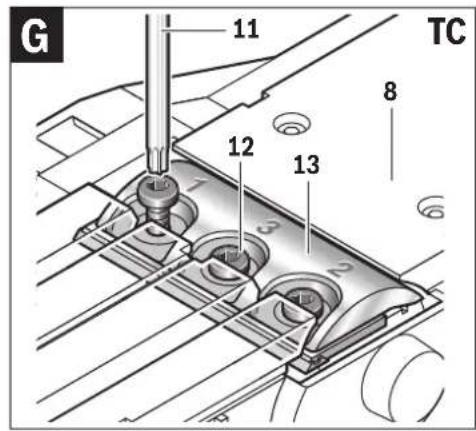
Disassembling the Planer Blade(s) (see figures G - H)
- To reverse or replace the planer blades, rotate the blade drum 14 until the clamping jaw 13 is parallel to the planer base plate 8.
- Loosen the three fastening screws 12 with the Torx key 11 by approx. 1 - 2 turns. The clamping jaw 13 does not have to be removed.
- Rotate the blade drum a little and push the planer blade 21 sidewards out of the blade drum 14 with a piece of wood.
- Turn the blade drum by 180^ and disassemble the 2nd planer blade.
Assembling the Planer Blade(s) (see figures I - J)
The guide groove of the planer blade always ensures continuous height adjustment when replacing or reversing it.
If required, clean the blade seat in the blade drum 14 and the planer blade 21.
When assembling the planer blade, ensure that it is seated properly in the blade holder of the blade drum 14.
Each planer blade must be assembled and aligned centered to the planer base plate 8. Afterwards, tighten the three fastening screws 12 with the Torx key 11, ensuring the correct tightening sequence (①②③) on the clamping jaw 13.
Note: Before starting operation, check the fastening screws 12 for tight seating. Rotate the blade head 14 manually and ensure that the planer blades do not graze.
Using Conversion Kits
Converting from HSS to TC
With the conversion kit 2 607 001 399 (see accessories), planers equipped with HSS planer blades can be converted to TC planer blades.
- Loosen and remove the clamping jaw 13.
- Slide the planer-blade retainer 17 together with the planer blade 16 out of the guide groove 15 of the blade drum 14.
- Insert the conversion kit 2 607 001 399 into the guide groove 15.
- Reattach the clamping jaw 13 and screw in the fastening screws 12, but do not tighten them yet.
- Insert the TC planer blade from the side into the planer blade seat.
- Each planer blade must be assembled and aligned centered to the planer base plate 8. Afterwards, tighten the three fastening screws 12 with the Torx key 11, ensuring the correct tightening sequence (①②③) on the clamping jaw 13.
Converting from TC to HSS
With the conversion kit 2 607 001 398 (see accessories), planers equipped with TC planer blades can be converted to HSS planer blades.
- Unscrew the 3 fastening screws 12 with the Torx key 11 and remove the clamping jaw 13.
- Slide the planer-blade retainer 17 together with the planer blade 16 out of the guide groove 15 of the blade drum 14.
- Insert the conversion kit 2 607 001 398 into the guide groove 15 and align it centered to the planer base plate 8.
- Reattach the clamping jaw 13 and tighten the three fastening screws 12 with the Torx key 11. Ensure the correct tightening sequence (①②③) on the clamping jaw 13.
Dust/Chip Extraction
▶ Dust from materials such as lead-containing coatings, some wood types, minerals and metal can be harmful to one's health. Touching or breathing-in the dust can cause allergic reactions and/or lead to respiratory infections of the user or bystanders.
Certain dust, such as oak or beech dust, is considered carcinogenic, especially in connection with wood-treatment additives (chromate, wood preservative). Materials containing asbestos may only be worked by specialists.
- As far as possible, use a dust extraction system suitable for the material.
- Provide for good ventilation of the working place.
- It is recommended to wear a P2 filter-class respirator. Observe the relevant regulations in your country for the materials to be worked.
Operation
Operating Modes
Adjusting the Planing Depth
With the adjustment knob 2, the planing depth can be adjusted variably from 0–1.0 mm using the planing depth scale 1 (scale graduation = 0.2 mm).
Park Rest (see figure N)
The park rest 30 allows the machine to be set down directly after operation, without danger of damaging the working surface or the planer blade. While planing, the park rest 30 is tilted upwards thus enabling full contact of the rear part of the planer base plate 8.
Starting Operation
▶ Observe correct mains voltage! The voltage of the power source must agree with the voltage specified on the nameplate of the machine. Power tools marked with 230 V can also be operated with 220 V.
Products sold in AUS and NZ only: Use a residual current device (RCD) with a rated residual current of 30 mA or less.
English | 11
Switching On and Off
To save energy, only switch the power tool on when using it. To start the machine, press the On/Off switch 5 and keep it pressed.
To lock the pressed On/Off switch 5, press the lock-on button 4.
To switch off the machine, release the On/Off switch 5 or when it is locked with the lock-on button 4, briefly press the On/Off switch 5 and then release it.
0 601 594 037:
To start the machine, first push the lock-off button for the On/Off switch 4 and then press the On/Off switch 5 and keep it pressed.
To switch off the machine, release the On/Off switch 5. Note: For safety reasons, the On/Off switch 5 cannot be locked; it must remain pressed during the entire operation.
Working Advice
▶ Before any work on the machine itself, pull the mains plug.
Planing (see figure N)
Set the required planing depth and place the front part of the planer base plate 8 against the workpiece.
▶ Apply the machine to the workpiece only when switched on. Otherwise there is danger of kickback when the cutting tool jams in the workpiece.
Switch the machine on and guide the machine with even feed over the surface to be planed.
To achieve high-grade surfaces, work only with low feed and apply pressure on the centre of the planer base plate.
When machining hard materials (e.g. hardwood) as well as when utilising the maximum planer width, set only low planing depths and reduce planer feed, as required.
Excessive feed reduces the surface quality and can lead to rapid clogging of the chip ejector.
Only sharp blades achieve good cutting capacity and give the machine longer life.
The integrated park rest 30 also allows for continued planing at any given location on the workpiece after an interruption:
- With the park rest folded down, place the machine on the location of the workpiece where the planing is to be continued.
- Switch on the machine.
- Apply the supporting pressure onto the front part of the planer base plate and slowly push the machine forward (1). This tilts the park rest upward (2) so that the rear part of the planer base plate faces on the workpiece again.
- Guide the machine over the surface to be planed (③) with even feed.
Beveling Edges (see figure O)
The V-grooves in the front planer base plate allow quick and easy beveling of workpiece edges. Depending on required bevel width, use the corresponding V-groove. For this, place the planer with the V-groove onto the edge of the workpiece and guide it along the edge.
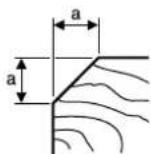
Groove to be used Dimension a (mm)
none 0-4 small 2-6 medium 4-9 large 6-10
Planing with Parallel/Beveling Guide (see figures K - M)
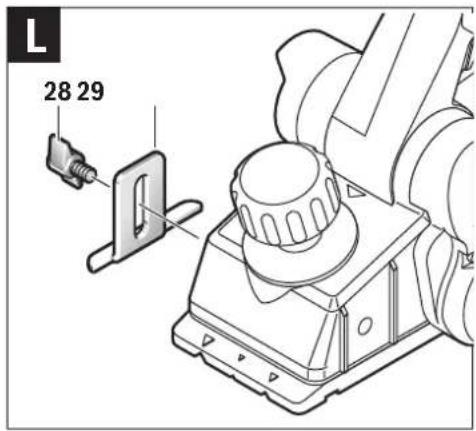
Mount the parallel guide 22 or beveling guide 26 to the machine using the corresponding fastening bolt 25. Depending on the application, mount the rebating depth stop 29 with fastening bolt 28 to the machine.
Loosen the locking nut 24 and adjust the requested rebating width on the scale 23. Tighten the locking nut 24 again.
Adjust the requested rebating depth accordingly with the rebating depth stop 29.
Carry out the planing procedure several times until the requested rebating depth is reached. Guide the planer applying sideward supporting pressure.
Beveling with the Beveling Guide
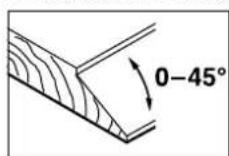
When beveling rebates and surfaces, adjust the required slope angle with the angle adjustment 27.
Maintenance and Service
Maintenance and Cleaning
▶ Before any work on the machine itself, pull the mains plug.
▶ For safe and proper working, always keep the machine and ventilation slots clean.
Ensure easy operation of the park rest 30 and clean it regularly.
When the carbon brushes wear below acceptable service tolerances, the machine will automatically cut out. The machine must be sent to customer service for maintenance (for address, see the "After-sales Service and Application Service" section).
If the replacement of the supply cord is necessary, this has to be done by Bosch or an authorized Bosch service agent in order to avoid a safety hazard.
Replacing the Drive Belt (see figures P - Q)
Unscrew screw 6 and take off the belt cover 7. Remove the worn drive belt 31.
Before assembling a new drive belt 31, clean both pulleys 32 and 33.
Place the new drive belt 31 on the small pulley 33 first and then work the drive belt 31 onto the large pulley 32 by hand while rotating it.
12 | English
Make sure that the drive belt 31 runs exactly in the longitudinal grooves of the pulleys 32 and 33.
Reattach the belt cover 7 and tighten with the screw 6.
After-sales Service and Application Service
Our after-sales service responds to your questions concerning maintenance and repair of your product as well as spare parts. Exploded views and information on spare parts can also be found under:
www.bosch-pt.com
Bosch's application service team will gladly answer questions concerning our products and their accessories.
In all correspondence and spare parts orders, please always include the 10-digit article number given on the nameplate of the product.
Cambodia
Robert Bosch (Cambodia) Co., Ltd
Unit 8BC, GT Tower, 08th Floor, Street 169,
Czechoslovakia Blvd, Sangkat Veal Vong
Khan 7 Makara, Phnom Penh
VATTIN: 100 169 511
Tel.: +855 23 900 685
Tel.: +855 23 900 660
www.bosch.com.kh
People's Republic of China
China Mainland
Bosch Power Tools (China) Co., Ltd.
567, Bin Kang Road
Bin Jiang District 310052
Hangzhou, P.R.China
Tel.: 4008268484
Fax: (0571) 87774502
E-Mail: contact.ptcn@cn.bosch.com
www.bosch-pt.com.cn
HK and Macau Special Administrative Regions
Robert Bosch Co. Ltd
21st Floor, 625 King's Road
North Point, Hong Kong
Customer Service Hotline: +852 2101 0235
Fax: +852 2590 9762
E-Mail: info@hk.bosch.com
www.bosch-pt.com.hk
India
Bosch Service Center
69, Habibullah Road, (Next to PSBB School), T. Nagar
Chennai-600077
Phone: (044) 64561816
Bosch Service Center Rishyamook
85A, Panchkuin Road
New Delhi-110001
Phone: (011) 43166190
Bosch Service Center
79, Crystal Bldg., Dr. Annie Besant Road, Worli
Mumbai-400018
Phone: (022) 39569936 / (022) 39569959 /
(022) 39569967 / (022) 24952071
Indonesia
PT Robert Bosch
Palma Tower 10 ^th Floor
Jalan RA Kartini II-S Kaveling 6
Pondok Pinang, Kebayoran Lama
Robert Bosch Middle East FZE – Pakistan Liaison Office
2nd Floor Plaza # 10, CCA Block, DHA Phase 5
Lahore, 54810
Phone: +92(303)4444311
Email: Faisal.Khan@bosch.com
Philippines
Robert Bosch, Inc.
28th Floor Fort Legend Towers,
3rd Avenue corner 31st Street,
Fort Bonifacio, Global City,
1634 Taguig City
Tel.: (632) 8703871
Fax: (632) 8703870
www.bosch-pt.com.ph
Singapore
Powerwell Service Centre Ptd Ltd
Bosch Authorised Service Centre (Power Tools)
4012 Ang Mo Kio Ave 10, #01-02 TECHplace
Singapore 569628
Tel.: 6452 1770
Fax: 6452 1760
E-Mail: ask@powerwellsc.com
www.powerwellsc.com
www.bosch-pt.com.sg
Thailand
Robert Bosch Ltd.
Liberty Square Building
No. 287, 11 Floor
Silom Road, Bangrak
Bangkok 10500
Tel.: 02 6393111
Fax: 02 2384783
Robert Bosch Ltd., P. O. Box 2054
Bangkok 10501
www.bosch.co.th
English | 13
Bosch Service – Training Centre
La Salle Tower Ground Floor Unit No.2
10/11 La Salle Moo 16
Srinakharin Road
Bangkaew, Bang Plee
Samutprakarn 10540
Tel.: 02 7587555
Fax: 02 7587525
Vietnam
Branch of Bosch Vietnam Co., Ltd in HCMC
Floor 10, 194 Golden Building
473 Dien Bien Phu Street
Ward 25, Binh Thanh District, Ho Chi Minh City
Tel.: (08) 6258 3690
Fax: (08) 6258 3692
Hotline: (08) 6250 8555
www.bosch-pt.com.vn
Armenia, Azerbaijan, Georgia, Kyrgyzstan, Mongolia, Tajikistan, Turkmenistan, Uzbekistan
TOO "Robert Bosch" Power Tools, After Sales Service
Rayimbek Ave., 169/1
050050, Almaty, Kazakhstan
Service Email: service.pt.ka@bosch.com
Official Website: www.bosch.com, www.bosch-pt.com
Bahrain
Hatem Al Juffali Technical Equipment Establishment.
Kingdom of Bahrain, Setra Highway, Al Aker Area
Phone: +966126971777-311
Fax: +97317704257
Email: h.berjas@eajb.com.sa
Egypt
Unimar
20 Markaz kadmat
El tagmoa EL Aoul - New Cairo
Phone: +20 2224 76091-95
Phone: +20 2224 78072-73
Fax: +20 2224 78075
Email: adelzaki@unimaregypt.com
Iran
Robert Bosch Iran
3rd Floor, No 3, Maadiran Building
Aftab St., Khodami St., Vanak Sq.
Tehran 1994834571
Phone: +9821-86092057
Iraq
Sahba Technology Group
Al Muthana airport road
Baghdad
Phone: +9647901906953
Phone Dubai: +97143973851
Email: bosch@sahbatechnology.com
Jordan
Roots Arabia - Jordan
Nasser Bin Jameel street, Building 37 Al Rabiah
11194 Amman
Phone: +962 6 5545778
Email: bosch@rootsjordan.com
Kuwait
Al Qurain Automotive Trading Company
Shuwaikh Industrial Area, Block 1, Plot 16, Street 3rd
P.O. Box 164 - Safat 13002
Phone: 24810844
Fax: 24810879
E-mail: josephkr@aaalmutawa.com
Lebanon
Tehini Hana & Co. S.A.R.L.
P.O. Box 90-449
Jdeideh
Dora-Beirut
Phone: +9611255211
Email: service-pt@tehini-hana.com
Libya
El Naser for Workshop Tools
Swanee Road, Alfalah Area
Tripoli
Phone: +218 21 4811184
Oman
Malatan Trading & Contracting LLC
P.O. Box 131
Ruwi, 112 Sultanate of Oman
Phone: +968 99886794
Email: malatanpowertools@malatan.net
Qatar
International Construction Solutions W L L
P. O. Box 51, Doha
Phone: +974 40065458
Fax: +974 4453 8585
Email: csd@icsdoha.com
Saudi Arabia
Juffali Technical Equipment Co. (JTECO)
Kilo 14, Madinah Road, Al Bawadi District
Jeddah 21431
Phone: +966 2 6672222 Ext. 1528
Fax: +966 2 6676308
Email: roland@eajb.com.sa
Syria
Dallal Establishment for Power Tools
P.O. Box 1030
Aleppo
Phone: +963212116083
Email: rita.dallal@hotmail.com


14 | English
United Arab Emirates
Central Motors & Equipment LLC, P.O. Box 1984
Al-Wahda Street - Old Sana Building
Sharjah
Phone: +971 6 593 2777
Fax: +971 6 533 2269
Email: powertools@centralmotors.ae
Yemen
Abualrejal Trading Corporation
Sana'a Zubiery St. Front to new Parliament Building
Phone: +967-1-202010
Fax: +967-1-279029
Email: tech-tools@abualrejal.com
Ethiopia
Forever plc
Kebele 2,754, BP 4806,
Addis Ababa
Phone: +251 111 560 600
Email: foreverplc@ethionet.et
Ghana
C.WOERMANN LTD.
Nsawam Road/Avenor Junction, P.O. Box 1779
Accra
Phone: +233 302 225 141
Kenya
Robert Bosch East Africa Ltd
Mpaka Road P.O. Box 856
00606 Nairobi
Nigeria
Robert Bosch Nigeria Ltd.
52-54 Isaac John Street P.O. Box
GRA Ikeja - Lagos
Republic of South Africa
Customer service
Hotline: (011) 6519600
Gauteng - BSC Service Centre
35 Roper Street, New Centre
Johannesburg
Tel.: (011) 4939375
Fax: (011) 4930126
E-Mail: bsctools@icon.co.za
KZN - BSC Service Centre
Unit E, Almar Centre
143 Crompton Street
Pinetown
Tel.: (031) 7012120
Fax: (031) 7012446
E-Mail: bsc.dur@za.bosch.com
Western Cape - BSC Service Centre
Democracy Way, Prosperity Park
Milnerton
Tel.: (021) 5512577
Fax: (021) 5513223
E-Mail: bsc@zsd.co.za
Bosch Headquarters
Midrand, Gauteng
Tel.: (011) 6519600
Fax: (011) 6519880
E-Mail: rbsa-hq.pts@za.bosch.com
Tanzania
Diesel & Autoelectric Service Ltd.
117 Nyerere Rd., P.O. Box 70839
Vingunguti 12109, Dar Es Salaam
Phone: +255 222 861 793/794
Australia, New Zealand and Pacific Islands
Robert Bosch Australia Pty. Ltd.
Power Tools
Locked Bag 66
Clayton South VIC 3169
Customer Contact Center
Inside Australia:
Phone: (01300) 307044
Fax: (01300) 307045
Inside New Zealand:
Phone: (0800) 543353
Fax: (0800) 428570
Outside AU and NZ:
Phone: +61 3 95415555
www.bosch-pt.com.au
www.bosch-pt.co.nz
Disposal
The machine, accessories and packaging should be sorted for environmental-friendly recycling.

Do not dispose of power tools into household
waste!
Only for EC countries:
According to the European Guideline 2012/19/EU for Waste Electrical and Electronic Equipment and its implementation into national right, power tools that are no longer usable must be collected separately and disposed of in an environmentally correct manner.
Subject to change without notice.
Français | 15
Français
Robert Bosch Morocco SARL
53, Rue Lieutenant Mahroud Mohamed
20300 Casablanca
E-Mail: sav.outillage@ma.bosch.com
Tunisia
Robert Bosch Tunisie SARL
Đơn nguyên 8BC, GT Tower, Tâng 08,
Đường 169, Tiếp Khắc Blvd, Sangkat Veal Vong,
Khan 7 Makara, Phnom Penh
VAT TIN : 100 169 511
Tel.: +855 23 900 685
Tel.: +855 23 900 660
www.bosch.com.kh
Thải bô
Central Motors & Equipment LLC
1984: البريد
Malatan Trading & Contracting LLC
131:البريد
سلطنة عمان
+968 99886794: هاتف
International Construction Solutions W L L
البريد: 51 الدوحة
قطر
+974 40065458: ماتف
+974 4453 8585:فاكس
natural_image
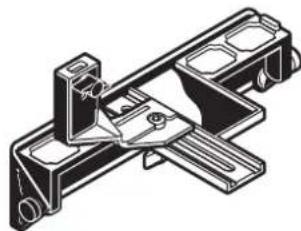
Technical line drawing of a mechanical bracket or mounting bracket (no text or symbols)2 607 000 102
natural_image
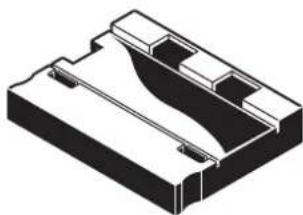
Technical line drawing of a mechanical bracket assembly (no text or symbols)2 607 001 077 (45°)
natural_image
Isometric technical drawing of a mechanical housing or bracket (no text or symbols)2 607 970 002

natural_image
Pure diagram of a mechanical component with no text or symbols
natural_image
Pure mechanical component diagram without any text, numbers, or symbols2 607 001 399 (2x)
natural_image
Simple line drawing of a tool with a circular annotation highlighting a triangular feature (no text or symbols)2 607 000 194 (2x)
natural_image
Isometric view of a mechanical component with three curved slots and a label 'HSS' (no other text or symbols)2 607 001 398 (2x)
text_image
HSS2 607 000 193 (2x)

2 608 133 002
| I | CE | |||
| en | EU Declaration of ConformityPlaner Article number | We declare under our sole responsibility that the stated products comply with all applicable provisions of the directives and regulations listed below and are in conformity with the following standards.Technical file at: * | ||
| es | Declaración de conformidad UECepillo N° de artículo | Declaramos bajo nuestra exclusiva responsabilidad, que los productos nombrados cumplen con todas las disposiciones correspondientes de las Directivas y los Reglamentos mencionados a continuación y están en conformidad con las siguientes normas.Documentos técnicos de: * | ||
| pt | Declaração de Conformidade UEPlaina N.° do produto | Declaramos sob nossa exclusiva responsabilidade que os produtos mencionados cumprem todas as disposições e os regulamentos indicados e estão em conformidade com as seguintes normas.Documentação técnica pertencente à: * | ||
| fr | Déclaration de conformité UERabot N° d'article | Nous déclarons sous notre propre responsabilité que les produits décrits sont en conformité avec les directives, règlements normatifs et normes énumérés ci-dessous.Dossier technique auprès de: * | ||
| GHO 10-82 | 0 601 594 0..0 601 594 A.. | 2006/42/ECEN 60745-1:2009+A11:20102014/30/EUEN 60745-2-14:2009+A2:20102011/65/EUEN 55014-1:2006+A1:2009+A2:2011EN 55014-2:1997+A1:2001+A2:2008EN 61000-3-2:2014EN 61000-3-3:2013EN 50581:2012 | ||
| BOSCH* Robert Bosch Power Tools GmbH (PT/ECS)70538 StuttgartGERMANY | ||||
| Henk BeckerHelmut HeinzelmannExecutive Vice PresidentHead of Product CertificationEngineering and ManufacturingJohn Bao i.v. H. u. | ||||
| Robert Bosch Power Tools GmbH, 70538 Stuttgart, GERMANYStuttgart, 23.10.2017 | ||||