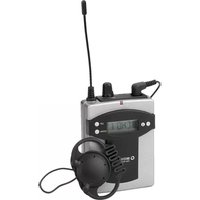
TXA-800R - Receiver Monacor - Free user manual and instructions
Find the device manual for free TXA-800R Monacor in PDF.


| Product type | Receiver for audio transmission system |
| Brand | Monacor |
| Model | TXA-800R |
| Radio frequency range | 863.1 - 864.9 MHz, 16 PLL channels |
| Power supply | 2 R6 batteries (1.5 V) or 2 R6 rechargeable batteries (1.2 V) |
| Dimensions (W × H × D) | 64 × 175 × 37 mm (with antenna and belt clip) |
| Weight | 200 g (with batteries/rechargeable batteries) |
| Operating temperature | 0 °C to 40 °C |
| Connections | 1 mono earphone output (stereo 3.5 mm jack), 1 mono line output (stereo 3.5 mm jack) |
| Supplied accessories | 1 dynamic mono earphone 32 Ω with 1.2 m cable |
| LED indicator | Red: no radio signal; Green: radio signal received |
| Display | Indicates channel and battery/rechargeable battery charge status |
| Settings | Volume (earphone), line output level (HI/MID/LOW), channel selection (16 channels) |
| Intended use | Indoors only, for guided tours, multilingual presentations |
| Maintenance and cleaning | Dry, soft cloth; no chemicals or water |
| Safety | Use two batteries/rechargeable batteries of the same type; remove if not used for extended periods; do not dispose of batteries in household waste |
| Spare parts and accessories | Earphone ES-16, chargers TXA-800PS (2 slots), TXA-12C (12 slots), TXA-36C (36 slots) |
| Transmitter compatibility | ATS-16T, TXA-800HSE, TXA-800HT, TXA-800ST, TXA-802CD, TXA-1022CD |
| Warranty | Void in case of improper use or repair by unauthorized persons |
Frequently Asked Questions - TXA-800R Monacor
User questions about TXA-800R Monacor
0 question about this device. Answer the ones you know or ask your own.
Ask a new question about this device
Download the instructions for your Receiver in PDF format for free! Find your manual TXA-800R - Monacor and take your electronic device back in hand. On this page are published all the documents necessary for the use of your device. TXA-800R by Monacor.
USER MANUAL TXA-800R Monacor
TXA-800R
English ...... Page 7
Français....Page 10
Italiano ...... Pagina 13
Receiver for Audio Transmission System
These instructions are intended for users without any specific technical knowledge. Please read the instructions carefully prior to operation and keep them for later reference.
All operating elements and connections described can be found on the fold-out page 3.
1 Operating Elements and Connections
1 Jack EAR. for connecting the earphone supplied
2 Power and reception LED, with the receiver switched on it shows
- red when no radio signal is received
- green when a radio signal is received
3 On /off switch of the receiver and volume control for the earphone
4 Switch for adjusting the level (three steps: high, mid, low) for the output signal at the jack AUX OUT (5)
5 Mono output AUX OUT with line signal level (via 3.5 mm stereo jack) for connecting an amplifier
6 Buttons and to adjust the channel
7 Display, will show the channel selected and the battery status during operation
8 Button ☐ to briefly indicate the radio frequency (keep the button pressed)
9 Belt clip
10 Battery compartment cover
2 Important Notes
This unit corresponds to all relevant directives of the EU and is therefore marked with €€.
- The unit is suitable for indoor use only. Protect it against humidity and heat (admissible ambient temperature range: 0–40°C).
-
For cleaning only use a dry, soft cloth; never use water or chemicals.
● Always insert two batteries of the same type. -
If the unit is not used for a longer period, remove the batteries as a precaution to prevent any damage to the unit due to battery leakage.
- No guarantee claims for the unit and no liability for any resulting personal damage or material damage will be accepted if the unit is used for other purposes than originally intended, if it is not correctly operated or not repaired in an expert way.
If the unit is to be put out of operation definitively, take it to a local recycling plant for a disposal which is not harmful to the environment.
3 Applications
This PLL multifrequency receiver operates in the UHF range 863.1 – 864.9 MHz, divided into 16 channels. In combination with one receiver or several receivers and a suitable transmitter tuned to the same radio frequencies, a wireless audio transmission system (e.g. for guided tours or multilingual lectures) can be set up.
The receiver can be combined with the following MONACOR transmitters:
| Unit Type | |
| ATS-16T pocket | transmitter |
| TXA-800HSE pocket | transmitter |
| TXA-800HT hand-held microphone with transmitter | |
| TXA-800ST mains-operated transmitter | |
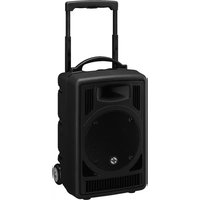
| TXA-802CD | battery-operated active speaker system with transmitter |
| TXA-1022CD | battery-operated active speaker system with transmitter |
3.1 Conformity and approval
Herewith, MONACOR INTERNATIONAL declare that the receiver TXA-800R complies with the directive 2014/53/EU. The EU declaration of conformity is available on the Internet:
www.monacor.com
The receiver is generally approved for operation in EU and EFTA countries; it is licence-free and requires no registration.
4 Inserting (Rechargeable) Batteries
1) Slightly press down the marked area on the battery compartment cover (10) and pull down the cover to remove it.
2) Insert two (rechargeable) batteries of size AA into the battery compartment. Observe the correct polarity (in imprint in the compartment).
3) Replace the cover and make sure it engages.
Hint: For quick and easy charging of the rechargeable batteries used in TXA-800R and TXA-800HSE, MONACOR offers special chargers:
- TXA-800PS
charging station for charging the batteries of up to 2 units at the same time - TXA-12C
charging case for charging the batteries of up to 12 units at the same time - TXA-36C
charging case for charging the batteries of up to 36 units at the same time
Never put batteries in the household waste; always take them to a special waste disposal, e. g. collection container at your retailer.
5 Operation
1) Connect the earphone supplied (ES-16, also available as a separate item) to the jack EAR. (1) and fasten the earphone to your ear.
For reproducing the sound via an amplifier system, connect the input of the amplifier via a 3.5 mm plug to the jack AUX OUT (5).
2) Advance the control VOL. (3) in clockwise direction until the receiver is switched on. When it is switched on, the LED (2) shows red as long as no radio signal is received from the transmitter.
The display (7) briefly shows Ωn then the transmission channel adjusted and a symbol indicating the current charging status of the batteries in several steps ( 1 fig. 2). The display background illumination will be extinguished after 5 seconds if no button is pressed on the receiver.
3) Adjust the transmission channel for the receiver and the corresponding transmitter (chapter 5. "Adjusting the channel").
4) When the transmitter is switched on and set to the same channel as the receiver, the LED (2) will change from red to green to indicate that a radio signal is received.
5) With the control VOL. (3), adjust the desired volume for the earphone.
When the receiver is connected to an amplifier system, the switch (4) allows to adjust the level of the signal fed to the amplifier in three steps (HI, MID, LOW): If the sound reproduced via the system is too low, increase the level; if the sound reproduced is too high or if it is distorted, select a lower step.
6) The receiver can be fastened to your clothes via its belt clip (9).
7) After operation, turn back the control VOL. (3) in counter-clockwise direction until the receiver is switched off. The display (7) will briefly show before it is extinguished.
5.1 Adjusting the channel
As some frequencies may already be used by other wireless transmission systems at the place of application, it is recommended to leave the transmitter switched off while the channel of the receiver is adjusted in order to make sure that the transmission channel selected is free and no interference will occur.
1) Adjust the channels with the arrow buttons (6): button for channel selection UP, button for channel selection DOWN. (For quickly going through the channel numbers, keep the button pressed).
If the LED (2) shows green after the channel adjustment when the transmitter is switched off, interference signals or signals from transmitters of other wireless systems are received. In this case, set the receiver to a different channel.
2) When an interference-free channel has been selected for the receiver, switch on the transmitter and set it to the same channel (operating instructions of the transmitter).
Note: In case of transmitter ATS-16T, the channels are marked 0 to F:
Channel 0 corresponds to channel 01,
Channel 1 corresponds to channel 02,
Channel F corresponds to channel 16.
During operation it is possible to briefly indicate the radio frequency for the channel adjusted: As long as the button ① (8) is kept pressed, the display will indicate the frequency instead of the channel.
Note concerning multichannel operation:
The number of channels to be used in parallel depends on the conditions at the place of application (e.g. on interference due to other wireless systems or high-frequency sources such as fluorescent lamps). In ideal conditions, up to four channels can be operated at the same time without mutual interference. Two examples of a suitable channel selection for four wireless transmission paths:
Example 1:
channel 01 – channel 03 – channel 06 – channel 12
Example 2:
channel 06 – channel 09 – channel 15 – channel 16
6 Specifications
Radio frequency range:. 863.1–864.9 MHz, divided into 16 channels (table below)
Accessory: .... 1 mono earphone, dynamic 32 Ω system with 1.2 m cable
Connections: .... 1 mono earphone output via 3.5 mm stereo jack, 1 mono line output via 3.5 mm stereo jack
Power supply:....2 × 1.5V battery of size AA or 2 × 1.2V rechargeable battery of size AA
Ambient temperature: . 0–40 °C
Dimensions
(W × H × D): ..... 64 × 175 × 37 mm (with antenna and belt clip)
Weight: 200 g (with batteries)
6.1 Radio frequencies
| Channel | Frequency | Channel | Frequency |
| 01 | 863.1 MHz | 09 | 863.2 MHz |
| 02 | 864.1 MHz | 10 | 864.2 MHz |
| 03 | 863.6 MHz | 11 | 863.7 MHz |
| 04 | 864.6 MHz | 12 | 864.7 MHz |
| 05 | 863.3 MHz | 13 | 863.4 MHz |
| 06 | 864.3 MHz | 14 | 864.4 MHz |
| 07 | 863.8 MHz | 15 | 863.9 MHz |
| 08 | 864.8 MHz | 16 | 864.9 MHz |
Subject to technical modification.
All rights reserved by MONACOR® INTERNATIONAL GmbH & Co. KG. No part of this instruction manual may be reproduced in any form or by any means for any commercial use.


- TXA-800R
- RECEIVER FOR AUDIO TRANSMISSION SYSTEM
- 1 OPERATING ELEMENTS AND CONNECTIONS
- 2 IMPORTANT NOTES
- 3 APPLICATIONS
- 3.1 CONFORMITY AND APPROVAL
- 4 INSERTING (RECHARGEABLE) BATTERIES
- 5 OPERATION
- 5.1 ADJUSTING THE CHANNEL
- NOTE CONCERNING MULTICHANNEL OPERATION
- EXAMPLE 1
- EXAMPLE 2
- 6 SPECIFICATIONS
- 6.1 RADIO FREQUENCIES
Brand : Monacor
Model : TXA-800R
Category : Receiver