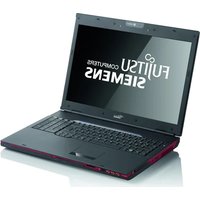
Amilo Xa 3530 - Laptop FUJITSU - Free user manual and instructions
Find the device manual for free Amilo Xa 3530 FUJITSU in PDF.


| Product Type | Laptop |
| Brand | Fujitsu |
| Model | Amilo Xa 3530 |
| Dimensions (W x D x H) | 398 mm x 295 mm x 37.7 / 44.5 mm |
| Weight (with battery) | Approximately 3.6 kg |
| Power Supply | AC adapter 90 W or 120 W, input 100-240 V, output 20 V |
| Processor | AMD (depending on configuration) |
| RAM | Not specified (probably 2 to 4 GB) |
| Storage | SATA hard drive, possibility of RAID 0/1 with second drive |
| Display | 15.4 inches (probably) |
| Connectivity | 3 USB ports, 1 eSATA/USB combo, FireWire, HDMI, VGA, LAN, WLAN, infrared |
| Audio | Stereo speakers, line-in, microphone, headphone |
| Optical Drive | CD/DVD reader/writer, depending on configuration Blu-ray |
| Multimedia | Integrated webcam, digital microphones, TV tuner (depending on model) |
| Card Reader | 5-in-1 (multi-format) |
| Graphics | Hybrid Graphics technology (integrated + dedicated card) |
| Security | Kensington Lock, BIOS password protection |
| Operating System | Windows Vista preinstalled |
| Operating Temperature | 5 °C to 35 °C |
| Included Accessories | AC adapter, power cord, user manual |
Frequently Asked Questions - Amilo Xa 3530 FUJITSU
User questions about Amilo Xa 3530 FUJITSU
0 question about this device. Answer the ones you know or ask your own.
Ask a new question about this device
Download the instructions for your Laptop in PDF format for free! Find your manual Amilo Xa 3530 - FUJITSU and take your electronic device back in hand. On this page are published all the documents necessary for the use of your device. Amilo Xa 3530 by FUJITSU.
USER MANUAL Amilo Xa 3530 FUJITSU
Fujitsu Serrana Company Corp
As right be reserved, the using intellectual property rights. Technical data subject to most countries and many subjects is usually easy. Any liability of the data are not known as something actual or correct is excluded. Des Publerors may be representative of any means of the property must be used. The law of which by this paper can be from your purposes may enlarge the rights of such laws, but rather otherwise see the "World-class government" principle of League.
1960049210

AMILO Notebook Xa 3530
Getting started
English
Deutsch
Français
Español
Italiano
Nederlands
Português

Quick Start Guide
1 2
natural_image
Product photo of a white electronic device with attached cables and accessories (no visible text or symbols)
natural_image
Four identical 3D-rendered diagrams showing a device with directional arrows, no text or symbols present.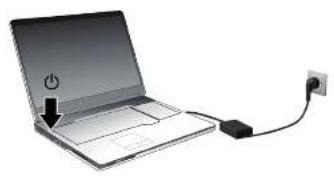
natural_image
Illustration of a laptop connected to a power plug and cable (no text or symbols)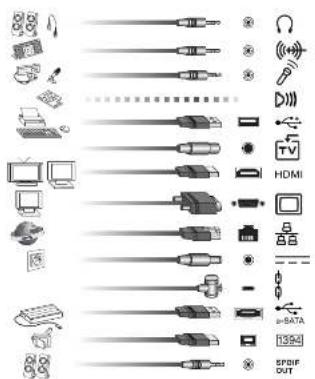
natural_image
Illustration of a laptop with a Wi-Fi signal icon and function keys (Fn, F1) on the front panel (no text or symbols on the device itself)AMILONotebook Xa 3530
English
Deutsch
Français
Español
Italiano
First-timesetup
Nederlands
Português
Microsoft,MS WindowsandWindowsVistaareregisteredtrademarksoftheMicrosoftCorporation.
AdobeReaderis atrademarkofAdobeSystemsIncorporated.
MultiMediaCard isaregisteredtrademarkofInfineonTechnologiesAG
SonyandMemory StickareregisteredtrademarksofSonyElectronics,Inc.
Allothertradem arksreferencedaretrademarksorregisteredtrademarksoftheir respectiveown ers,whoseprotectedrightsareacknowledged.
Copyright©Fuji tsuSiemensComputersGmbH2008
Allrightsreserved, including rightsoftranslation, reproductionbyprinting, copying or similar methods, either in partorin whole.
Non-compliancei ssubjecttocompensationfordamages.
Allrightsreserved, including rights created by patent grantor registration of a utility model or design.
Subjecttoavaila bilityandtechnicalmodifications.
Contents
Innovativetechnology .... 1
Hybridgraphics 2
SecondharddriveinRAIDgroup .... 2 StarttheAMDRAIDXpertprogramandcalluptheHelpfunction....
Furtherinformation 3
"AMILO Notebook" Operating Manual 3
Portsandcontrols 4
Importantnotes 5
Preparingyournotebookforuse 6
Unpacking and checking your notebook 6
Selectingthelocation 7
Connecting the mains adapter 7
Switching the notebook on for the first time 8
Technicaldata 9
Notebook....9
Mains adapter 9
Innovativetechnology
... and ergonomic design make your AMILO Xa 3530 Notebook a reliable and convenient notebook.
If you have purchased a notebook with a Microsoft Windows operating system, this is pre-installed and optimally configured for you. The notebook is ready to use immediately the first time you switch it on.
Yournotebookfeaturestheverylatesttechnologysothatyougetthebest performancefromyourcomputingexperience.
- adriveforreadingandwritingCDs/DVDsand,dependingonyourparticular model,forreadingBlu-raydiscs
- threeUSBports,providingsimpleexpansionoptionsforgamepads,printersandmore
- acombinedeSATA/USBconnectionforconnectinganexternalSATA harddiskoranotherUSBdevice
- Dependingonthedevice,theremaybesecondharddrivesoyoucanoperate yournotebookwithtwoharddrivesinaRAIDgroup.
•LANandwirelessLANforInternetandnetworkaccess
•aFireWireportforfastdataexchangewithmultimediadevices
•anHDMIportforall-digitaltransferofaudioandvideodata
•anintegratedwebcamanddigitalmicrophonesforawidevarietyofmultimediaapplications
- amulti-formatcardreaderforquicktransferofdigitalphotos,musicand videoclipsontoyournotebook
- an integrated audio controller and stereo speakers for true listening pleasure
•additionalinputsandoutputsforhighqualityaudioaccessories
•dependingontheequipmentlevel,aTVtunerforreceivingterrestrialtelevisionchannels
- akeyboardwithseparatenumerickeypad
- anon-screendisplayforvisualcontroloverthekeysettingsofyournotebook
- hybridgraphicsforfullperformanceandbattery-savingworkingmode forlessdemandingapplications
The user-friendly "BIOS Setup Utility" offers powerful password protection functions which can be used to control your notebook's hardware and protect your system better against unauthorised use.
ThisOperatingManualtellsyouhowtogetyourAMILOnotebookupand runningandhowtooperateitindailyuse.
Hybridgraphics
Yournotebookisequippedwithahybridgraphicssystem.

Thegraphicsunitintegratedinthechipsetisusedforapplicationswhichare less graphics-intensive, such as video playback, e-mail and Internet surfing. This reducesheatgeneration, noiselevelsandpowerconsumption. As a result, batterylifeisincreased(batterysavermode).
However, if more graphics power is needed - such as for games - then the additional graphics card is used. Both graphics cards are used simultaneously (performance mode).
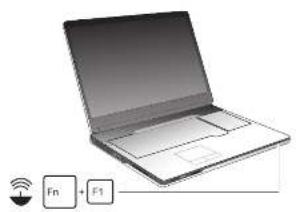
▶ Youcanchoosebetweenbatterysavermodeandperformancemode(depending onthestatusoftheACadapter)eitherviatheQuickStartbutton(hybridkey)or viathehardwaredriver(ATICatalystControlCenter).
SecondharddriveinRAIDgroup

Removalandinstallationofthesecondharddiskmustonlybeperformedby authorised service agents of Fujitsu Siemens Computers GmbH. Unauthorised removalandinstallationwillinvalidateyourwarranty.
For further information and addresses of four service partners, please see "http://www.fujitsu-siemens.com/support".
RAID(RedundantArrayofIndependentDisks, also: DiskArray)isaprocedurefor combiningtwoharddiskstocreatealogicalunit.
A so-called disk array can be used advantageously to improve performance or alternatively to improve error tolerance (dataprotection).
Error tolerance is facilitated by means of data redundancy. If one drive malfunctions, adifferentdrivecontainsanexactcopyofthedata.Thiscanpreventanoperating systemfrommalfunctioningordatafrombeinglost.
The operating system detects all hard disks in a disk array as a single physical hard disk. The individual disk drives in a disk array are called "members". Member configuration information is recorded in the reserved sector of the hard disk. With this informationtheharddiskcanbeidentifiedasamember.
Thereareusuallyafewmethodsbywhichharddiskscanbecombined. These methods are referred to as different RAID levels. The different RAID levels represent different performance and security levels as well as implementation costs.

Dependingonthesizeoftheharddisk,theprocessforcombiningtwo harddrivestocreateaRAIDgroupcantakeseveralhours.Duringthis timeperiod,yourscreenwillturnblack.
StarttheAMDRAIDXpertprogramandcallup theHelpfunction.
▶ Call up the AMD RAIDXpert program by choosing Start - All Programs - AMD - RAID - RAIDXpert.
▶ Confirm the confirmation prompt by clicking Continue.
▶ Enter"admin"forboththeloginIDandthepassword.
▶ Pressthe"Enter"key.
→ TheAMDRAIDXpertprogramstarts.
▶ Click the Help button at the top right-hand corner of your screen.
→ The Help function for the AMD RAIDXpert program is called up.
Furtherinformation

GeneralinformationaboutyourAMILONotebookcanbefoundinthe "AMILONotebook"operatingmanual.
TheWindowsVistadriversforyourAMILOnotebookareavailabletodownload from our website. This computer is not designed to support any other operating systems.FujitsuSiemensComputersacceptsnoliabilityforconsequences arisingfromtheuseofotheroperatingsystems.
Software-related portion of this manual related to Microsoft products if they are included with your AMILONotebook.
Pleaserefertotherelevantmanufacturer'soperatinginstructionswhen installingothersoftwareproducts.
"AMILONotebook"OperatingManual
The "AMILO Notebook" Operating Manual can be found in the Windows Start menu oronthelInternetat"www.fujitsu-siemens.com/support".
Portsandcontrols
Thischapterpresentstheindividualhardwarecomponentsofyournotebook.ltgivesan overviewofthedisplaysandconnectionsonthenotebook.Pleasefamiliariseyourself withthesecomponentsbeforeyoustartusingyournotebook.
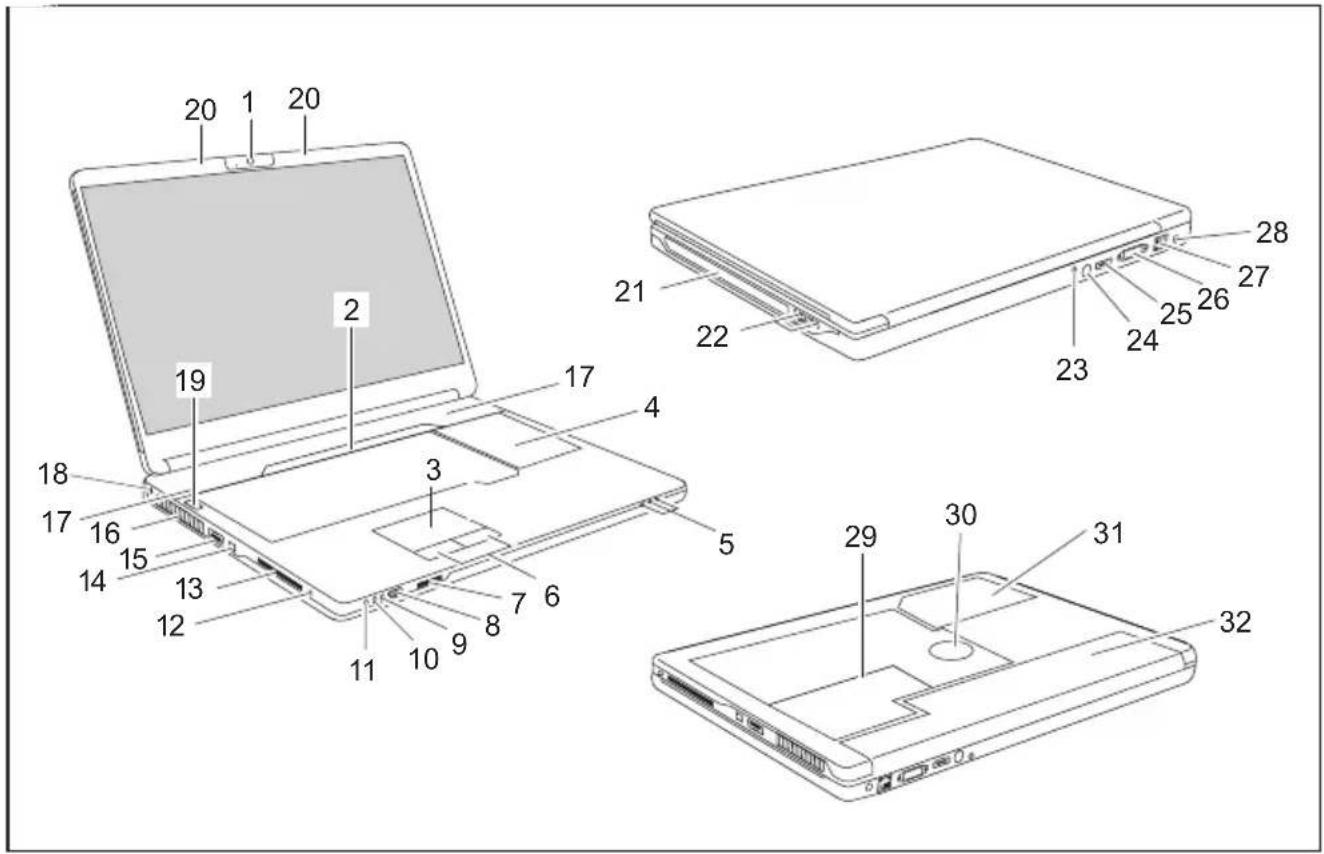
1 =Webcam
2 =Multimediaboard
3 =Touchpad
4 = Keyboard with separate number block
5 =Statusindicators
6 = Touchpadbuttons
7 =5-in-1cardreader
8 = Infrared interface for remote control
9 =LineInport
10 = Microphoneport
11=Headphone port
12 =SPDIF/LineOutport
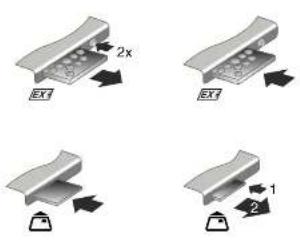
13 = ExpressCardslotwithmultimedia remote control
14 =FireWireport
15 = CombinedeSATA/USBport
16 = Ventilationslots
17 = Loudspeaker
18 =Kensington Lock
19 = ON/OFF switch
20 = Microphone
21 =CD/DVD drive
22 =USB ports
23 = Combinedaudio/videoport
24 = Antenna cable port (device-dependent)
25 = HDMIport
26 =Monitorport(VGA)
27 = Network port
28 =DCinputconnector(DCIN)
29 = Servicecompartmentformemory andhard disk1
30 = Subwoofer
31 = Service compartment for hard disk 2
32 =Battery
Importantnotes

Pleasereadandobservethesafetyinstructionsinthe"Safety"manual andinthe"AMILONotebook"operatingmanual.
When connecting a coaxial cable to the TV tuner, pleasemakesure that it is correctly connected to the ear thingsystem of the building.
Preparingyournotebookforuse

If yournotebook comes with a Windows operating system then allofthenecessary hardwaredrivers and the supplied software will already be pre-installed.
With the operating system Microsoft Vista, it may take up to 20 minutes to prepare your notebook for use depending on the hardware fitted and the software supplied.
When you switch on the notebook for the first time it will perform a system check. Anumberofdifferentmessagesmaybedisplayed. In the process, the display may flickerordarkentemporarily.
Pleasefollowtheinstructionsonthescreen.
It is very important that you donot switch then notebook off during this initial set-up process.
Before you can use your notebook for the first time you will need to charge the battery.
Ondelivery, the battery can be found in the battery compartment or in the accessories kit. The battery must be charged if you want to operate your notebook with the battery.
When not plugged into main socket, then notebook run on its built-in battery. You can increase the battery's life by enabling the system's energy saving functions.
If you use the notebook in at home or in an office, we recommend you use themainsadapterinsteadofthebattery.
Pleaserefertothe"AMILONotebook"operatingmanualforinstructionsonhowtoconnect externaldevices(e.g.amouseoraprinter)tothenotebook..
Unpackingandcheckingyournotebook

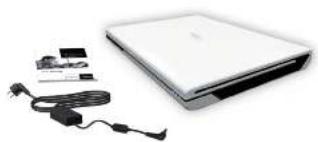
Should you discover any damage incurred during transportation, notify your locals sales outlet immediately!
▶ Unpackalltheindividualparts.
▶ Check your notebook for damage incurred during transportation.

Werecommendthatyoukeeptheoriginalpackagingmaterial.
Youmayneedthepackaginginthefutureifyouneedtotransportyourdevice.
Selectingthelocation

Selectasuitablelocationforthenotebookbeforesettingitup.Consider thefollowingpointswhenselectingalocation:
- Neverplacethenotebookandthemainsadapteronaheat-sensitive surface. This could damage the surface.
- Never place the notebook on a soft surface (e.g. carpeting, upholstered furniture, bed). This can block the air vents and caused damaged duetooverheating.
- Donotplacethenotebookdirectlyonyourlegsforextendedperiods. The undersideofthenotebookheatsupduringnormaloperation.Extendedcontact withtheskincanbecomeunpleasantorevenresultinburns.
- Place the notebook on a stable, flat, non-slip surface. Please note that therubberfeetmaymarkcertaintypesofsurfaces.
- Keepotherobjects100mmawayfromthenotebookanditsmains adaptertoensureadequateventilation.
- Nevercovertheventilationslotsonthenotebook.
- Donotexposethenotebooktoextremeenvironmentalconditions.Protect thenotebookagainstdust,humidityandheat.
Connectingthemainsadapter

Pleaseobservethesafetyprecautionsintheenclosed"Safety"manual.
Thesuppliedmainscableconformstotherequirementsofthecountryinwhich youpurchasedyournotebook.Makesurethatthemainscableisapproved foruseinthecountryinwhichyouintendtouseit.
Themainscableofthemainsadaptermustonlybeconnectedtoamains socketifthenotebookisconnectedtothemainsadapter.
Makesurethattheratedcurrentofthemainsadapterisnothigherthanthat ofthepowersystemtowhichyouconnectthemainsadapter(refertothe "TechnicalData"section,"Mainsadapter",Page9).
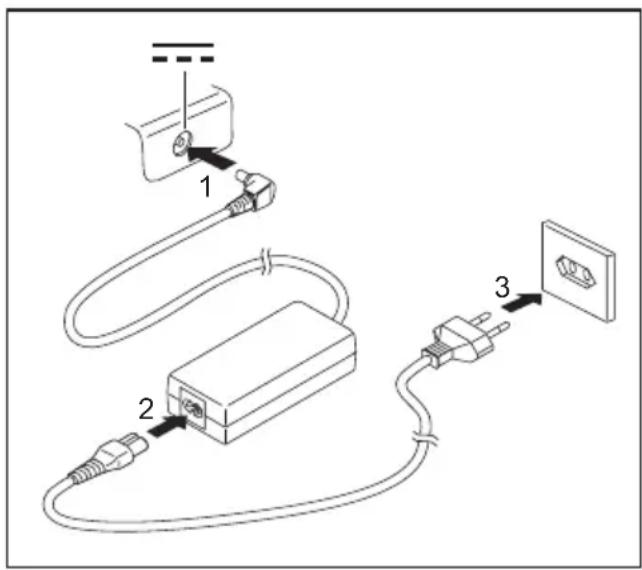
▶ Connect the mains adapter cable (1) to the DCjack(DCIN)onthenotebook.
▶ Connectthemainscable(2)tothe mainsadapter.
▶ Plug the mains cable (3) into a mains outlet.
Switchingthenotebookonforthefirsttime

Werecommendthatthenotebookissuppliedwithpowerthrough themainsadapterduringthisprocedure.
When you switch your notebook on for the first time, the supplied software is installed and configured. Because this installation procedure must not be interrupted, you should set asideenought time for it to be fully completed and connect then notebook to themains outlet using themains adapter.
Duringinstallation,thenotebookmustonlyberebootedwhenyouarerequestedtodoso!
Youwillbepromptions to create a backup copy of the pre-installed operating system. This backup copy can be used later to restore your notebook to its delivery configuration.
You can find information on how to restore the operating system, drivers, manuals and special software in the Recovery Process manual.
Youroperatingsystemispre-installedontheharddisktohelpyouwhenyoustartusingyournotebookforthefirsttime.
natural_image
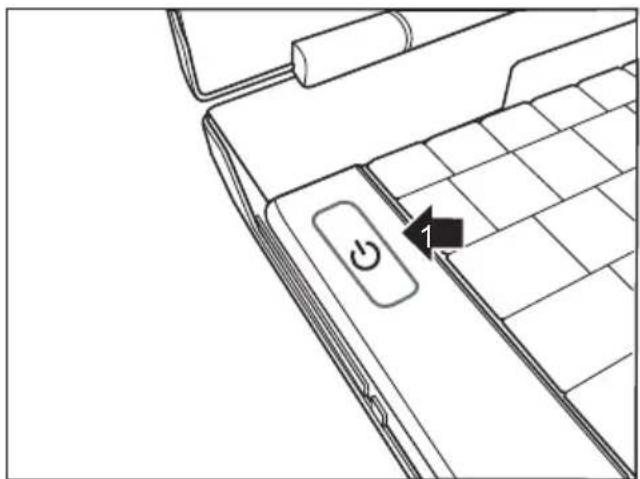
Line drawing of a laptop keyboard with a power button and cursor arrow (no text or symbols)▶ Switchthenotebookon(1).
▶ Duringinstallation,followtheon-screeninstructions.
Consult the operating system manual if anything is unclear about the requested input data.

If a Windows operating system is installed on your notebook, you will find additional informationonthesystemanddrivers,helpprogrammes,updates,manualsetc.on your notebook or on the Internet at "www.fujitsu-siemens.com/support".
Technicaldata
Notebook
| Ambientconditions | |
| Operatingtemperature5°C–35°C | |
| Dimensions | |
| WidthxDepthxHeight(front/back)398mmx295mmx | 37.7/44.5mm |
| Weight(includingbattery) | Approx.3.6kg |

Thedatasheetforthisnotebookcontainsfurthertechnicaldata. Thedata sheetcanbefoundonyournotebook,oralternativelyitisalsoavailableto downloadfromtheInternetat"www.fujitsu-siemens.com".
Mainsadapter
| Electricaldata | |
| Primary(device-dependent) | 90Wor120W |
| Ratedvoltage | 100V–240V(automatic) |
| Ratedfrequency50Hz–60Hz(automatic) | |
| Secondary | |
| Ratedvoltage20V | |
| Maximumratedcurrent(device-dependent) | 4.5Aor6.0A |
Anadditionalmainsadapterorpowercablecanbeorderedatanytime.
AMILONotebook Xa 3530
English
Deutsch
Français
Español
Italiano
Erstinbetriebnahme
Nederlands
Português
Microsoft,MS WindowsandWindowsVistaareregisteredtrademarksoftheMicrosoftCorporation.
AdobeReaderis atrademarkofAdobeSystemsIncorporated.
MultiMediaCard isaregisteredtrademarkofInfineonTechnologiesAG
SonyandMemory StickareregisteredtrademarksofSonyElectronics,Inc.
Allothertradem arksreferencedaretrademarksorregisteredtrademarksoftheir respectiveown ers,whoseprotectedrightsareacknowledged.
Copyright©Fuji tsuSiemensComputersGmbH2008
Allrightsreserved, including rightsoftranslation, reproductionbyprinting, copying or similar methods, either in partorin whole.
Non-compliancei ssubjecttocompensationfordamages.
Allrightsreserved, including rights created by patent grantor registration of a utility model or design.
Subjecttoavaila bilityandtechnicalmodifications.
Inhalt
InnovativeTechnologie .... 1
Hybrid-Grafik 2
InnovativeTechnologie
natural_image
Line drawing of a laptop keyboard with a power button and cursor arrow (no text or symbols)Allrightsreserved, including rightsoftranslation, reproductionbyprinting, copying or similar methods, either in partorin whole.
Non-compliancei ssubjecttocompensationfordamages.
Allrightsreserved, including rights created by patent grantor registration of a utility model or design.
Subjecttoavaila bilityandtechnicalmodifications.
Sommaire
Grâceàunetechnologienovatrice....1
TechnologieHybridGraphics.... 2
1 =Webcam
2 =Carte Multimédia
3 = Surface tactile
12 = Port SPDIF/Line Out
28 = Prisedetension continue(DCIN)
29=Compartimentdeservicemémoire etdisquedur1
30=Subwoofer
31=Compartimentdeservicedisquedur2
32=Accumulateur
Remarquesimportantes

natural_image
Line drawing of a laptop keyboard with a power button and a numbered move indicator (no text or symbols)▶ MettezleNotebooksoustension(1).
Allrightsreserved, including rightsoftranslation, reproductionbyprinting, copying or similar methods, either in partorin whole.
Non-compliancei ssubjecttocompensationfordamages.
Allrightsreserved, including rights created by patent grantor registration of a utility model or design.
Subjecttoavaila bilityandtechnicalmodifications.
Contenido
1=Webcam
2=Tarjeta Multimedia
▶ Conecteelcabledeladaptadordered(1) alconectorhembradetensióncontinua (DCIN)delordenadorportátil.
▶ Enchufeelcabledealimentación(2) aladaptadordered.
▶ Enchufeelcabledealimentación(3) aunatomadecorriente.

natural_image
Line drawing of a laptop keyboard with a power button and a numbered move indicator (no text or symbols present)▶ Conecteelordenadorportátil(1).
Allrightsreserved, including rightsoftranslation, reproductionbyprinting, copying or similar methods, either in partorin whole.
Non-compliancei ssubjecttocompensationfordamages.
Allrightsreserved, including rights created by patent grantor registration of a utility model or design.
Subjecttoavaila bilityandtechnicalmodifications.
Contenuto
Grazieallatecnologiainnovativa 1
Grafica ibrida 2
natural_image
Line drawing of a laptop keyboard with a power button and cursor arrow (no text or symbols)▶ Accendereilnotebook(1).
Allrightsreserved, including rightsoftranslation, reproductionbyprinting, copying or similar methods, either in partorin whole.
Non-compliancei ssubjecttocompensationfordamages.
Allrightsreserved, including rights created by patent grantor registration of a utility model or design.
Subjecttoavaila bilityandtechnicalmodifications.
Inhoud
Dankzijinnoverendetechnologie .... 1
HybridGraphics.... 2
1 =Webcam
2 =Multimediaboard
3 =Touchpad
natural_image
Line drawing of a laptop keyboard with a power button and a numbered move indicator (no text or symbols present)▶ Schakelhetnotebookin(1).
Allrightsreserved, including rightsoftranslation, reproductionbyprinting, copying or similar methods, either in partorin whole.
Non-compliancei ssubjecttocompensationfordamages.
Allrightsreserved, including rights created by patent grantor registration of a utility model or design.
Subjecttoavaila bilityandtechnicalmodifications.
Índice
Tecnologiainovadora....1
Gráfico híbrido 2
natural_image
Line drawing of a laptop keyboard with a power button and a numbered move indicator (no text or symbols)▶ LigueoNotebook(1).

- 2
- AMILONotebook Xa 3530
- Contents
- Innovativetechnology .... 1
- Portsandcontrols 4
- Importantnotes 5
- Preparingyournotebookforuse 6
- Technicaldata 9
- Innovativetechnology
- Hybridgraphics
- SecondharddriveinRAIDgroup
- StarttheAMDRAIDXpertprogramandcallup theHelpfunction.
- Furtherinformation
- "AMILONotebook"OperatingManual
- Portsandcontrols
- Importantnotes
- Preparingyournotebookforuse
- Unpackingandcheckingyournotebook
- Selectingthelocation
- Connectingthemainsadapter
- Switchingthenotebookonforthefirsttime
- Technicaldata
- Notebook
- Mainsadapter
- Inhalt
- InnovativeTechnologie .... 1
- InnovativeTechnologie
- Sommaire
- Grâceàunetechnologienovatrice....1
- Remarquesimportantes
- Contenido
- Contenuto
- Grazieallatecnologiainnovativa 1
- Inhoud
- Dankzijinnoverendetechnologie .... 1
- Índice
- Tecnologiainovadora....1
Brand : FUJITSU
Model : Amilo Xa 3530
Category : Laptop