
32PG6000 - Television LG - Free user manual and instructions
Find the device manual for free 32PG6000 LG in PDF.



| Product type | Plasma TV |
| Screen size | 32 inches (approx. 81 cm) |
| Weight with stand | 18.0 kg |
| Weight without stand | 16.3 kg |
| Power supply | Alternating current (AC), 110-240 V, 50/60 Hz |
| Connectivity | HDMI (x2), Component, RGB (PC), SCART (AV1/AV2), S-Video, Audio/Video, USB, RS-232C, Optical digital audio output, RF antenna, PCMCIA slot |
| Main functions | Automatic channel memory, Multilingual OSD menu, Home/Store mode, Teletext, USB reader (JPEG/MP3), Anti-burn-in protection |
| Maintenance and cleaning | Unplug before cleaning; screen: soft cloth slightly damp (warm water + softener); body: dry lint-free cloth |
| Safety | Stable installation on a flat surface; avoid heat sources, humidity, direct light; wall mount recommended; do not expose to water; do not open the device |
| General information | User manual included on CD-ROM (PDF format); printed manual available; serial number on rating plate |
Frequently Asked Questions - 32PG6000 LG
User questions about 32PG6000 LG
0 question about this device. Answer the ones you know or ask your own.
Ask a new question about this device
Download the instructions for your Television in PDF format for free! Find your manual 32PG6000 - LG and take your electronic device back in hand. On this page are published all the documents necessary for the use of your device. 32PG6000 by LG.
USER MANUAL 32PG6000 LG
| User's Guide Specification | ||||||
| 1. Model Description | JMJ08.01.04 | KIM JONG OK08.01.04 | ||||
| MODEL | 42/50PG6000-ZA50/60PG7000-ZB | BRAND | LG | Part No. | MFL41425802(0804- REVO4) | |
| SUFFIX | EU | Product Name | 42/50PG6000-ZA50/60PG7000-ZB | |||
| 2. Printing Specification | ||||||
| 1. Trim Size (Format): 185mm x 260 mm2. Printing Colors• Cover: 1 COLOR (BLACK)• Inside: 1 COLOR (BLACK)3. Stock (Paper)• Cover: Coated paper, S/W 150 g/Inside: Uncoated paper, 60 g/4. Printing Method: Off-set5. Bindery: Perfect bind6. Language: EN/GE/FR/IT/SP/PO/NE/GR/HU/PL/CZ/SK/RO/BU/SW/NO/DA/FI/ES/LAT/LITH /SV/SER/CRO/TUR (25)7. Number of pages: 404 | ||||||
| NOTES | "This part contain Eco-hazardous substances (Pb, Cd, Hg, Cr6+, PBB, PBDE, etc.) within LG standard level, Details should be followed Eco-SCM management standard[LG(56)-A-2524].Especially, Part should be followed and controlled the following specification.(1)Eco-hazardous substances test report should be submitted when Part certification test and First Mass Production.(2) Especially, Don't use or contain lead(Pb) and cadmium(Cd) in ink. | |||||
| 3. Special Instructions | ||||||
| (1) Origin Notification* LGEIN: Printed in Indonesia * LGEWA: Printed in U.K.* LGESP: Printed in Brazil * LGEMX: Printed in Mexico* LGEND: Printed in China * LGEIL: Printed in India* LGEMA: Printed in Poland | ||||||
| 4. Changes | ||||||
| 10 | ||||||
| 9 | ||||||
| 8 | ||||||
| 7 | ||||||
| 6 | ||||||
| 5 | ||||||
| 4 | Apr.11.08 | Jeon Mi Jeong | S8-16567 | 1. Added the Language(SER,CRO,TUR). 2. Added the 50PG4000-ZA | ||
| 3 | Feb.29.08 | Jeon Mi Jeong | S8-11666 | Added the contents of "Schemi elettrici e norme di taratura disponibili nel CD ROM" on Italy cover. | ||
| 2 | Feb.14.08 | Jeon Mi Jeong | S8-09690 | Updated the contents of "Select mode". | ||
| 1 | Jan.19.08 | Jeon Mi Jeong | S8-06759 | Updated the contents of OSD , weight. | ||
| REV.NO. | MM/DD/YY | SIGNATURE | CHANGE NO. | CHANGE CONTENTS | ||
**Pagination sheet**
| Front cover <EN> | 2 | ...... | ...... | ...... | 16 | Uk ONLY | Back cover |
| P/no. | |||||||
| Front cover <GE> | 2 | ...... | ...... | ...... | ...... | 15 | Back cover |
| Front cover <FR> | 2 | ...... | ...... | ...... | ...... | 15 | Back cover |
| Front cover <IT> | 2 | ...... | ...... | ...... | ...... | 15 | Back cover |
| Front cover <SP> | 2 | ...... | ...... | ...... | ...... | 15 | Back cover |
| Front cover <PO> | 2 | ...... | ...... | ...... | ...... | 15 | Back cover |
| Front cover <NE> | 2 | ...... | ...... | ...... | ...... | 15 | Back cover |
| Front cover <GR> | 2 | ...... | ...... | ...... | ...... | 15 | Back cover |
| Front cover <HU> | 2 | ...... | ...... | ...... | ...... | 15 | Back cover |
| Front cover <PL> | 2 | ...... | ...... | ...... | ...... | 15 | Back cover |
**Pagination sheet**



**Pagination sheet**


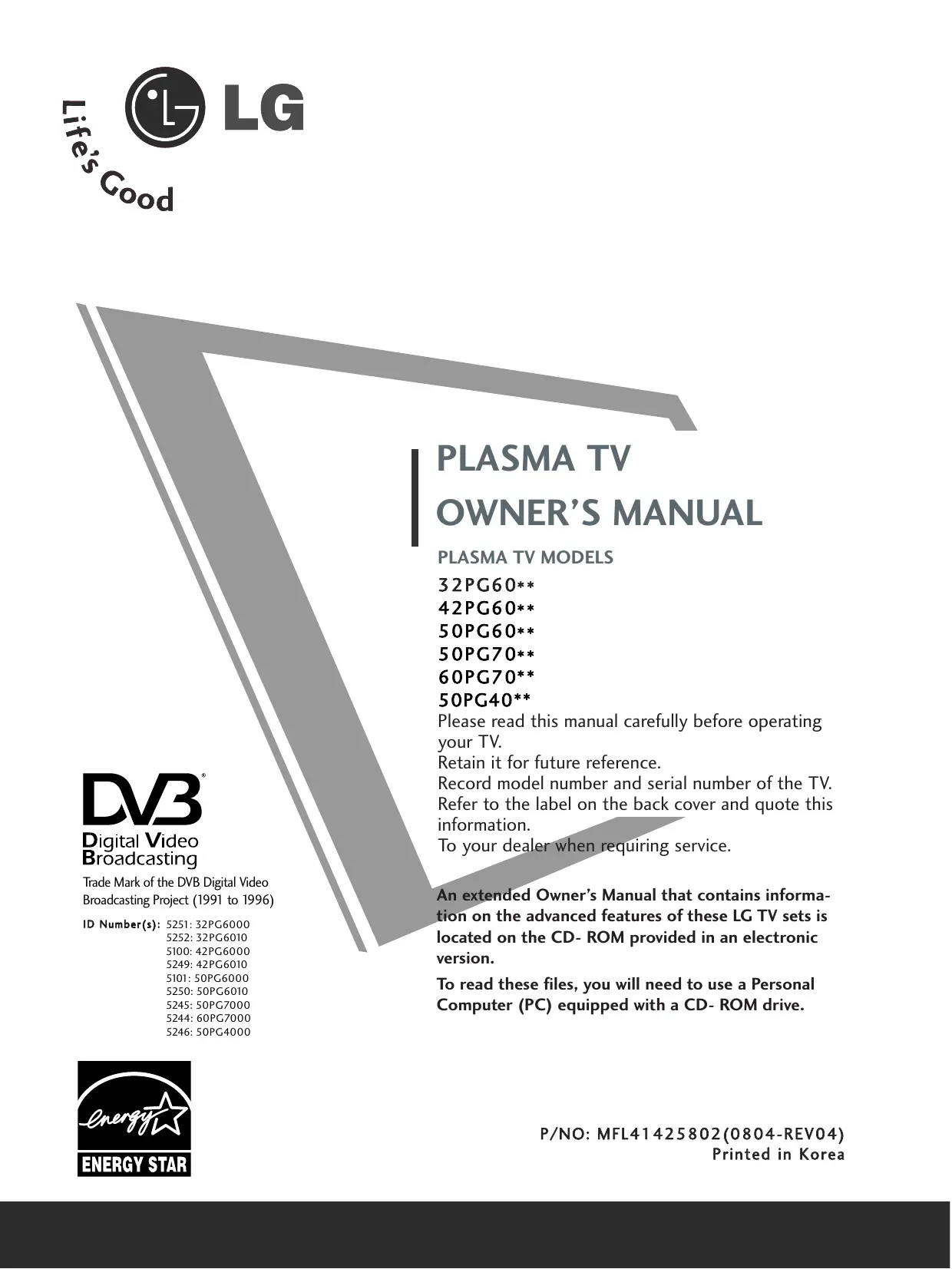
PLASMA TV OWNER'S MANUAL
PLASMA TV MODELS
32PG60**
42PG60**
50PG60**
50PG70**
60PG70**
50PG40**
Please read this manual carefully before operating your TV.
Retain it for future reference.
Record model number and serial number of the TV. Refer to the label on the back cover and quote this information.
To your dealer when requiring service.
DVB
Digital Video Broadcasting
Trade Mark of the DVB Digital Video
Broadcasting Project (1991 to 1996)
ID Number(s): 5251:32PG6000
5252:32PG6010
5100:42PG6000
5249:42PG6010
5101:50PG6000
5250:50PG6010
5245:50PG7000
5244:60PG7000
5246:50PG4000
An extended Owner's Manual that contains information on the advanced features of these LG TV sets is located on the CD-ROM provided in an electronic version.
To read these files, you will need to use a Personal Computer (PC) equipped with a CD-ROM drive.
Connecting your Unit
Here shown may be somewhat different from your set.

DVD/STB
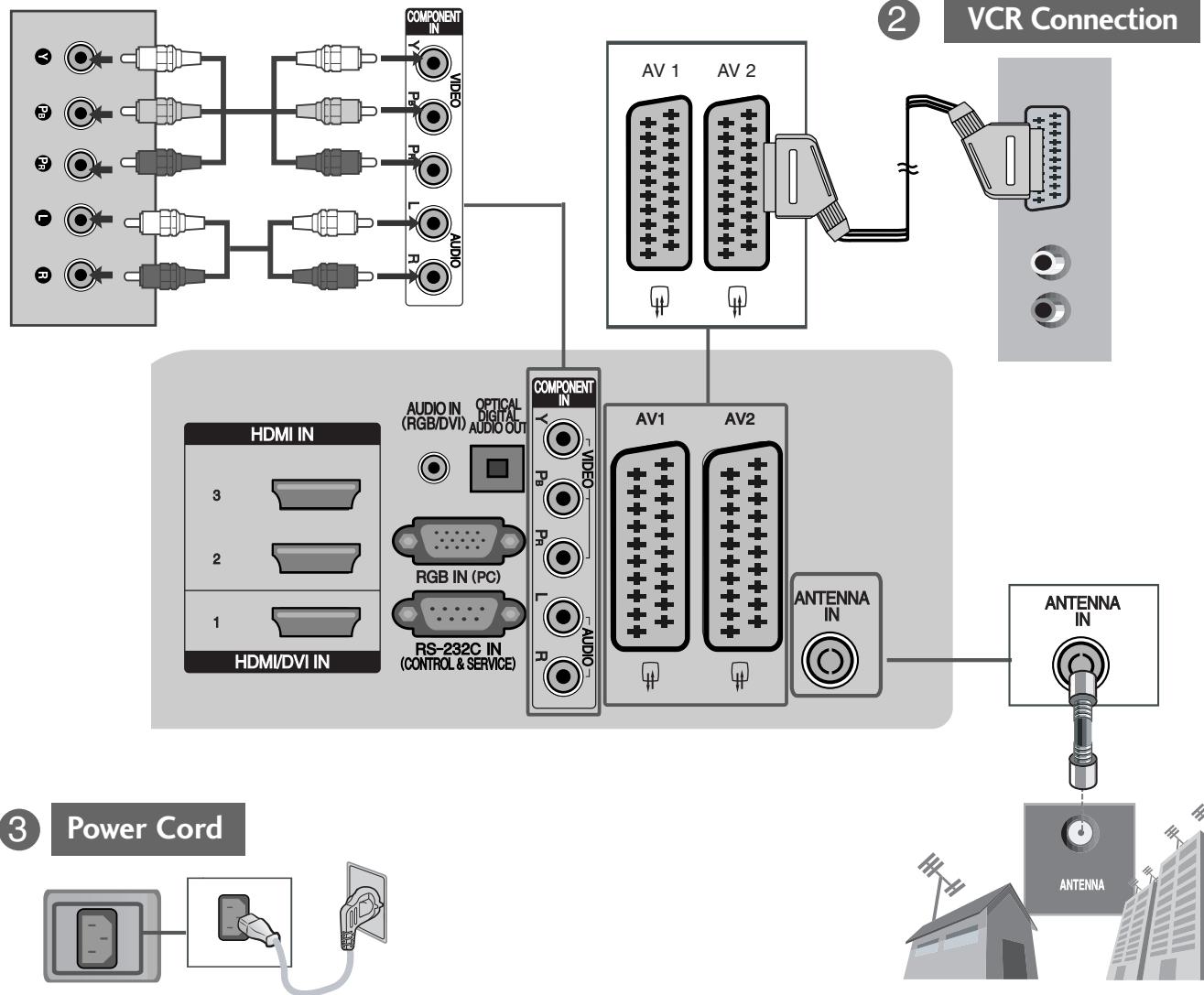
DVD/STB Back
1
Antenna Connection
-
To connect an additional equipment, see the External equipment Setup section in CD Manual.
-
Please read these safety precautions carefully before using the product.
- In this manual, the illustration may be somewhat different from your product because it is just example to help the instruction.

WARNING If you ignore the warning message, you may be seriously injured or there is a possibility of accident or death.

CAUTION If you ignore the caution message, you may be slightly injured or the product may be damaged.
Precaution in Installing the Product

WARNING
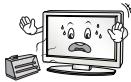
Keep away from heat sources like electrical heaters.
- Electrical shock, fire, malfunction or deformation may occur.
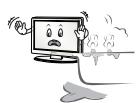
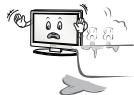
Do not use the product in damp place such as a bathroom or any place where it is likely to get wet.
- This may cause a fire or could give an electric shock.
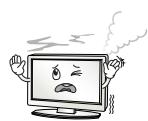
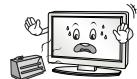
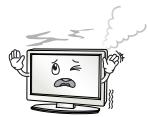
If you can smell smoke or other odors or hear a strange sound unplug the power cord and contact the service center.
- If you continue to use without taking proper measures, electrical shock or fire can occur.

CAUTION
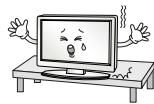
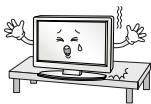
Install the product on a flat and stable place that has no risk of dropping the product.
- If the product is dropped, you may be injured or the product may be broken.
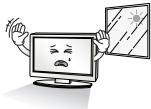
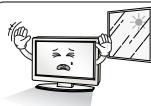
Keep the product away from direct sunlight.
- The product can be damaged.
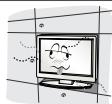
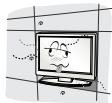
Do not place the product in a built-in installation such as bookcase or rack.
- Ventilation required.
Electrical Power Related Precautions

WARNING
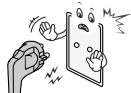
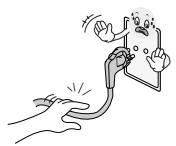
Make sure to connect the power cable to the grounded current.
- You may be electrocuted or injured.
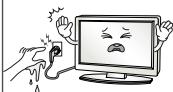
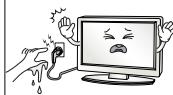
Do not touch the power plug with wet hands. Additionally, it the cord pin is wet or covered with dust, dry the power plug completely or wipe dust off.
- You may be electrocuted due to excess moisture.
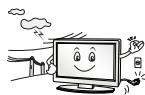
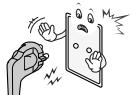
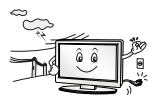
During a thunder or lightning storm, unplug the power cable or signal cable.
- You may be electrocuted or a fire can break out.

CAUTION
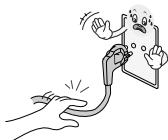
Protect the power cord from physical or mechanical abuse, such as being twisted, kinked, pinched, closed in a door, or walked upon. Pay particular attention to plugs, wall outlets, and the point where the cord exits the appliance.
Precautions in Moving the Product

WARNING
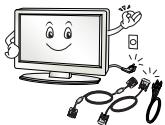
Make sure to turn off the product.
Make sure to remove all cables before moving the product.
- You may be electrocuted or the product can be damaged.

CAUTION
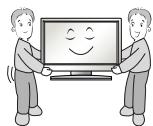
Do not shock the product when moving it.
- You may be electrocuted or the product can be damaged.
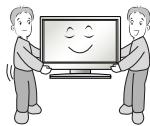
Make the panel face forward and hold it with both hands to move.
- If you drop the product, the damaged product can cause electric shock or fire. Contact with the service center for repair.
Precautions in Using the Product

WARNING
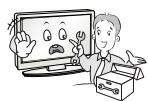
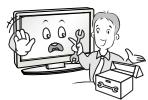
Do not disassemble, repair or modify the product at your own discretion.
- Fire or electric shock accident can occur.
- Contact the service center for check, calibration or repair.
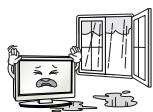
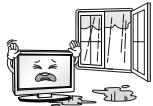
To reduce the risk of fire or electric shock, do not expose this apparatus to rain or moisture.
Apparatus shall not be exposed to dripping or splashing and no objects filled with liquids, such as vases, shall be placed on the apparatus.

CAUTION
Refer all servicing to qualified service personnel. Servicing is required when the apparatus has been damaged in any way, such as power supply cord or plug is damaged, liquid has been spilled or objects have fallen into the apparatus, the apparatus has been exposed to rain or moisture, does not operate normally, or has been dropped.

Do not keep a still image on the screen for an extended period (e.g. by pausing a video) as the fixed image may remain visible on the screen. This is known as image burn. Image burn is not covered under the manufacturer's warranty.

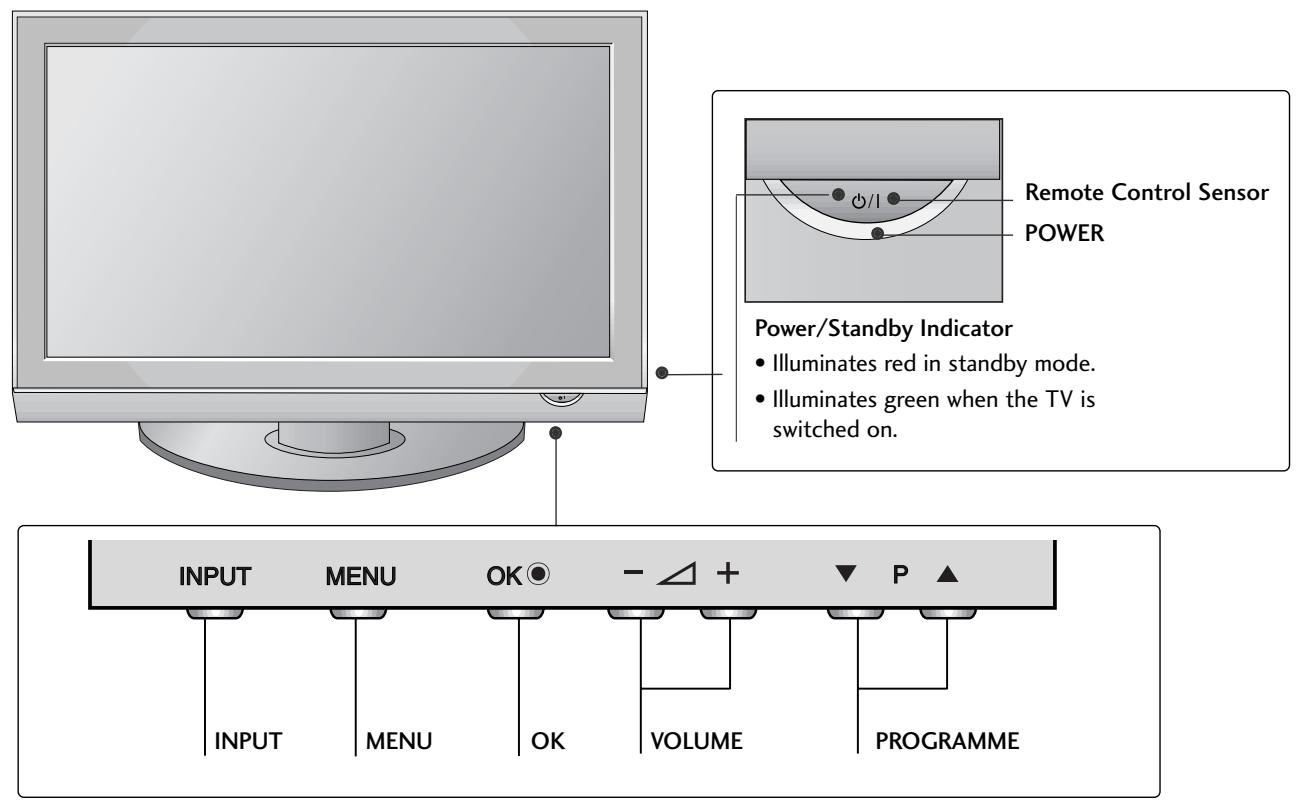
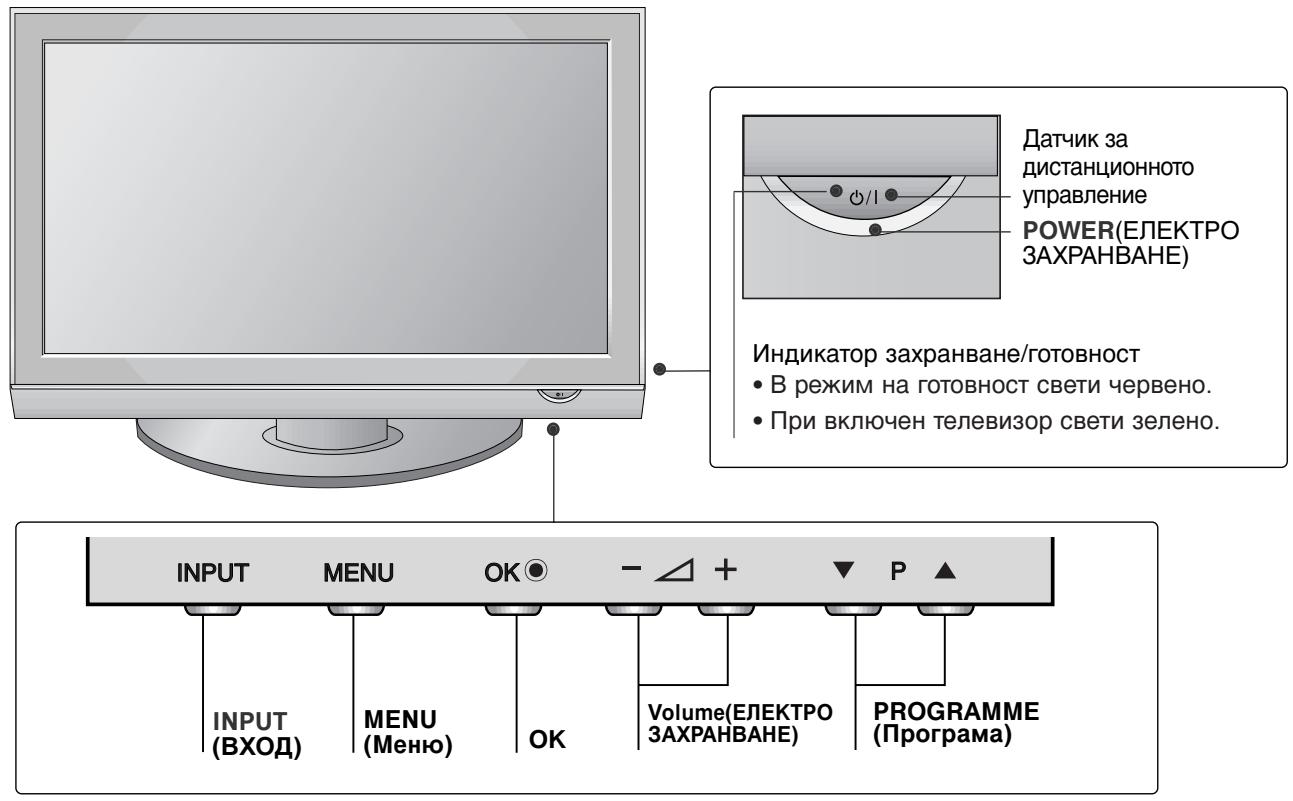
FRONT PANEL CONTROLS
Image shown may differ from your TV
If your TV has a protection film attached, remove the film and then wipe the product with a polishing cloth.
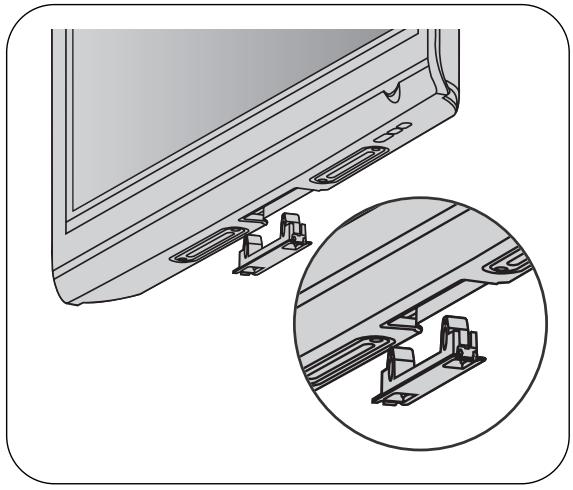
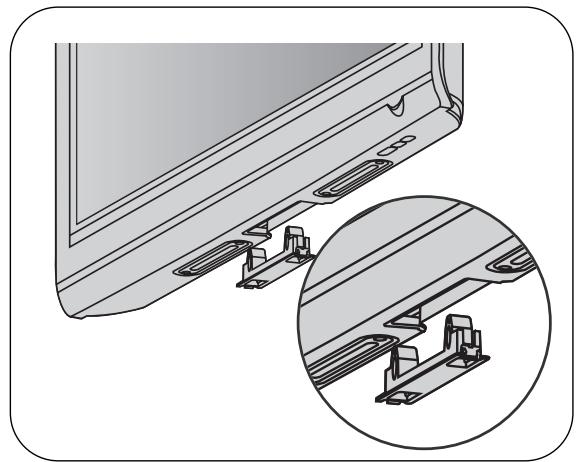
NOT USING THE DESK-TYPE STAND
Image shown may differ from your TV.
When installing the wall-mounted unit, use the protection cover for desk-type stand installation.
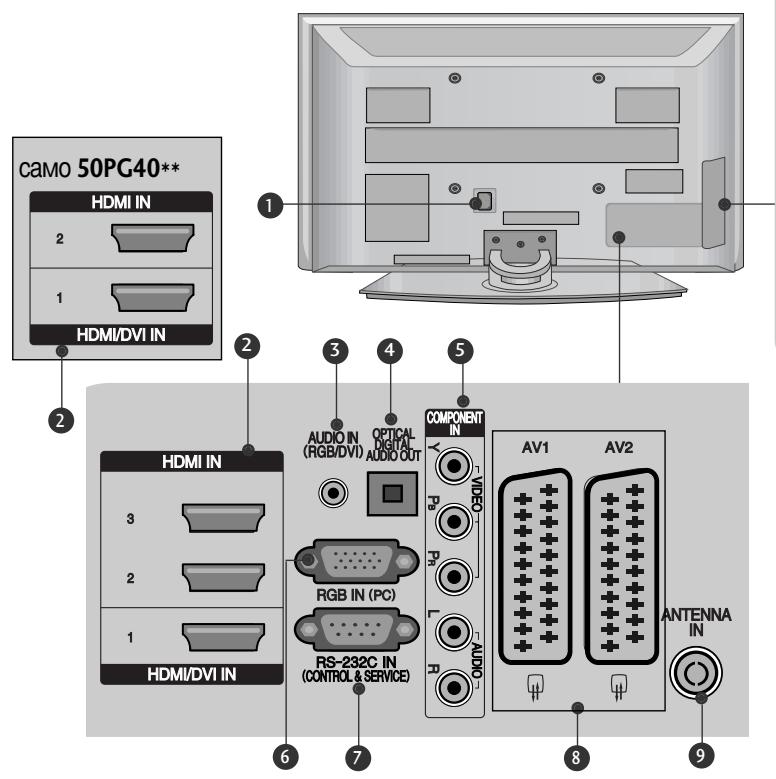
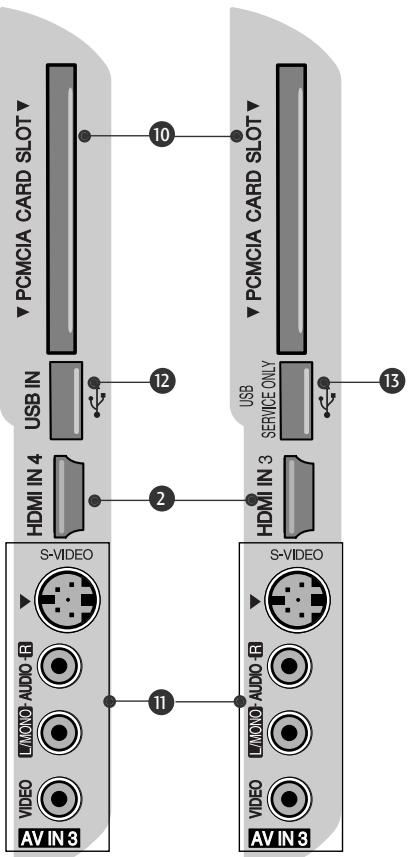
BACK PANEL INFORMATION
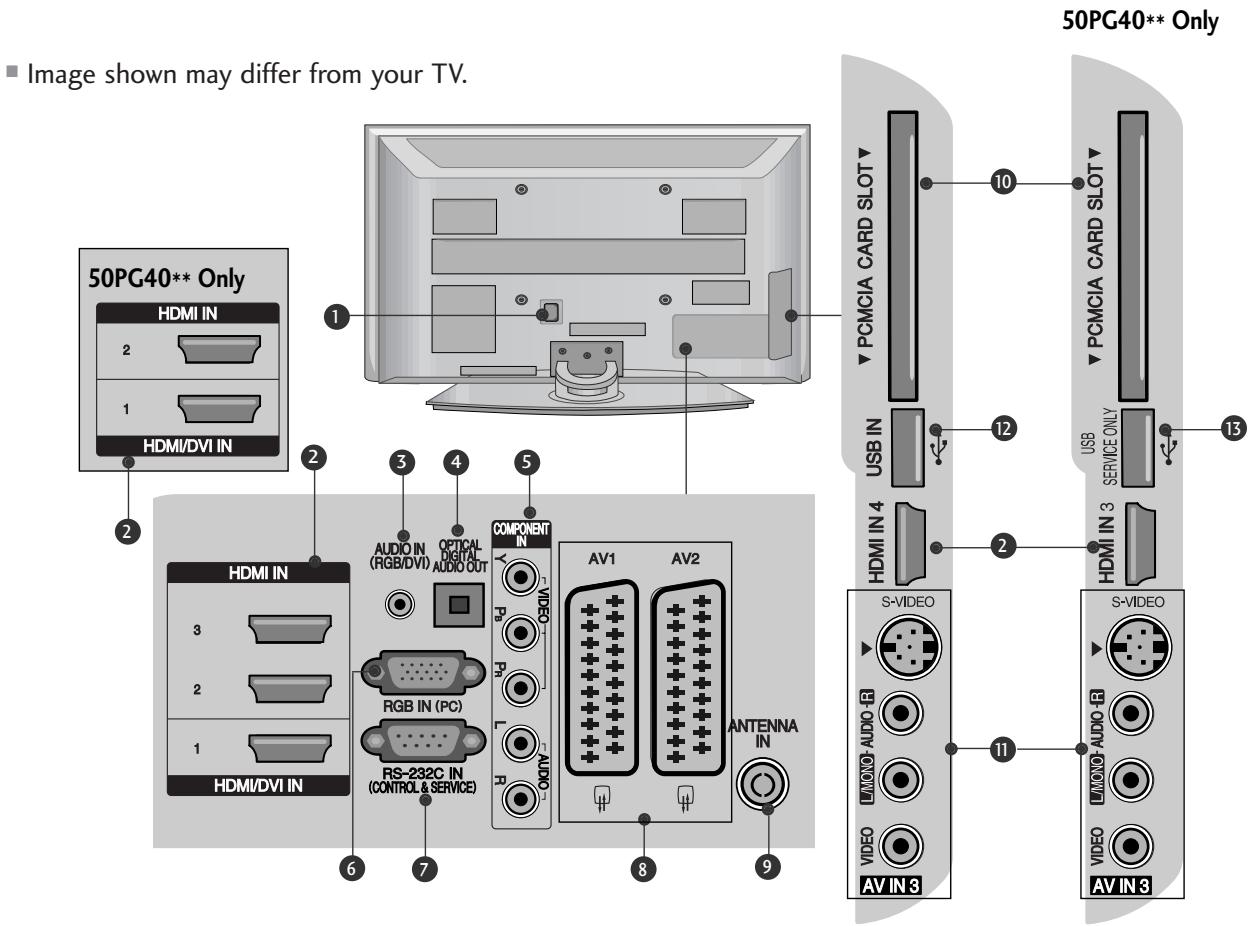
Power Cord Socket
This TV operates on an AC power. The voltage is indicated on the Specifications page. Never attempt to operate the TV on DC power.
HDMI Input
Connect a HDMI signal to HDMI IN.
Or DVI(VIDEO)signal to HDMI/DVI port with DVI to HDMI cable.
RGB/DVI Audio Input
Connect the audio from a PC or DTV.
OPTICAL DIGITAL AUDIO OUT
Connect digital audio from various types of equipment.
Note: In standby mode, these ports do not work.
Component Input
Connect a component video/audio device to these jacks.
RGB Input
Connect the output from a PC.
RS-232C IN (CONTROL & SERVICE) PORT Connect to the RS-232C port on a PC.
Euro Scart Socket (AV1/AV2)
Connect scart socket input or output from an external device to these jacks.
Antenna Input
Connect RF antenna to this jack.
10 PCMCIA (Personal Computer Memory Card International Association) Card Slot
(This feature is not available in all countries.)
S-Video Input
Connect S-Video out from an S-VIDEO device. Audio/Video Input
Connect audio/video output from an external device to these jacks.
USB Input
15 SERVICE ONLY PORT
PLEASE SET IT UP CAREFULLY SO THE PRODUCT DOESN'T FALL OVER.
- You should purchase necessary components to fix the TV to the wall on the market.
Position the TV close to the wall to avoid the possibility of it falling when pushed.
The instructions shown below are a safer way to set up the TV, which is to fix it to the wall, avoiding the possibility of it falling forwards if pulled. This will prevent the TV from falling forward and causing injury. This will also prevent the TV from damage. Ensure that children do not climb or hang from the TV.
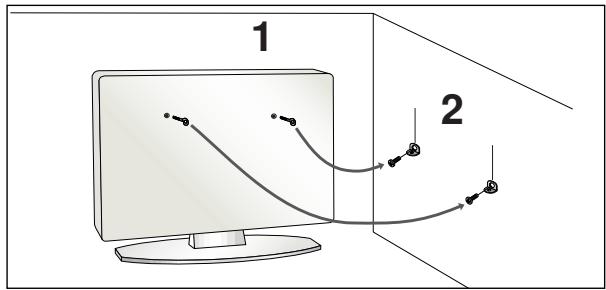
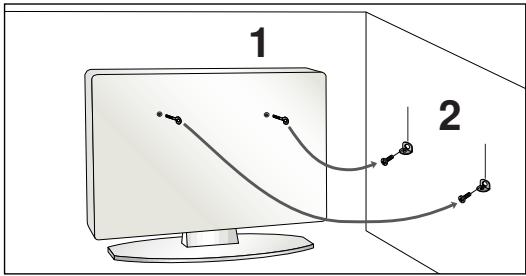
Use the eye-bolts or TV brackets/bolts to fix the product to the wall as shown in the picture. (If your TV has bolts in the eyebolts, loosen them bolts.)
- Insert the eye-bolts or TV brackets/bolts and tighten them securely in the upper holes.
2 Secure the wall brackets with the bolts on the wall. Match the height of the bracket that is mounted on the wall.
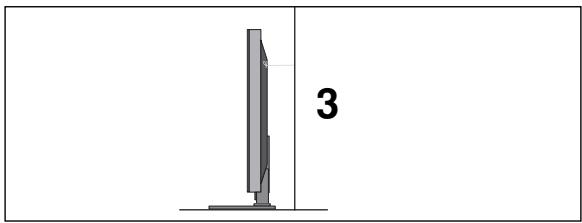
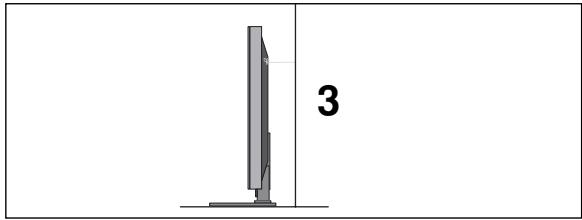
Use a sturdy rope to tie the product. It is safer to tie the rope so it becomes horizontal between the wall and the product.
NOTE
When moving the TV undo the cords first.
Use a platform or cabinet strong and large enough to support the size and weight of the TV.
To use the TV safely make sure that the height of the bracket on the wall and on the TV is the same.
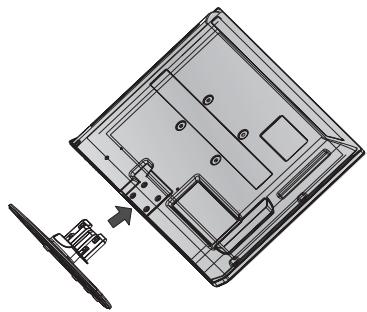
STAND INSTALLATION
32PG60** Only
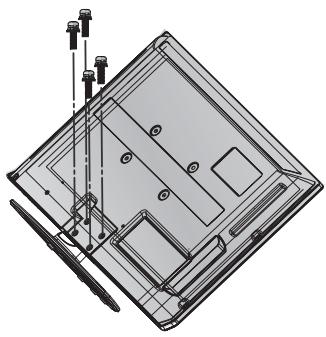
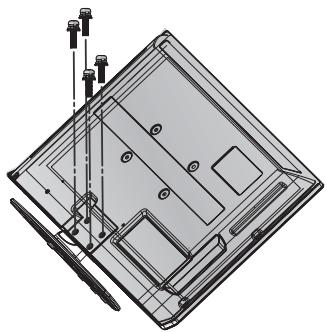
- Image shown may differ from your TV When assembling the desk type stand, check whether the bolt is fully tightened. (If not tightened fully, the product can tilt forward after the product installation.) If you tighten the bolt with excessive force, the bolt can deviate from abrasion of the tightening part of the bolt.
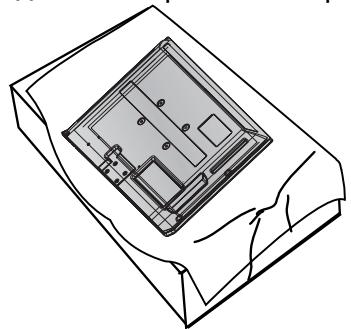
1 Carefully place the TV screen side down on a cushioned surface to protect the screen from damage.
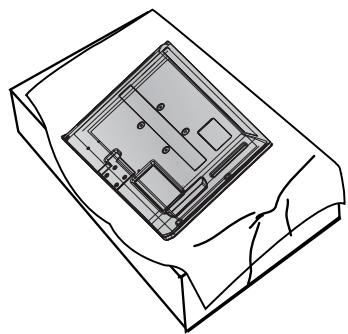
2 Assemble the TV as shown.
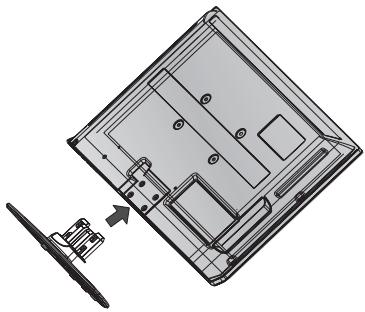
Fix the 4 bolts securely using the holes in the back of the TV.
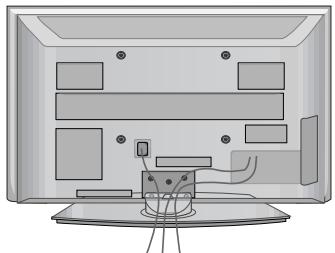
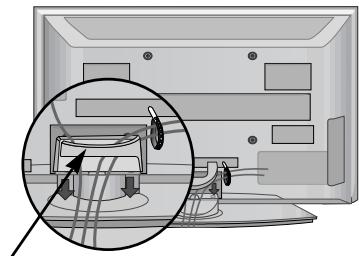
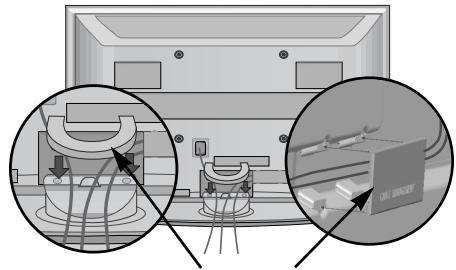
BACK COVER FOR WIRE ARRANGEMENT
Image shown may differ from your TV.

Connect the cables as necessary.
To connect additional equipment, see the External equipment Setup section.
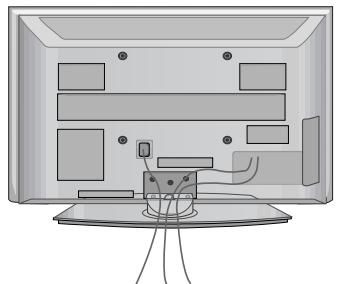

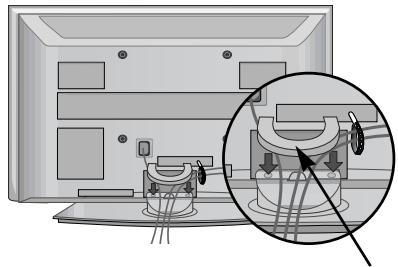
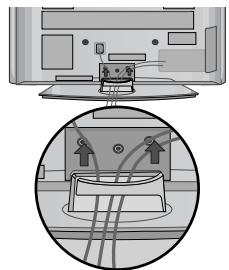
Install the CABLE MANAGEMENT CLIP as shown.
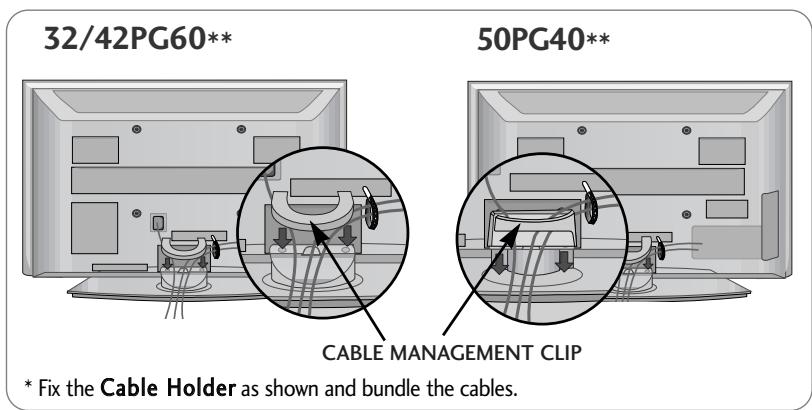
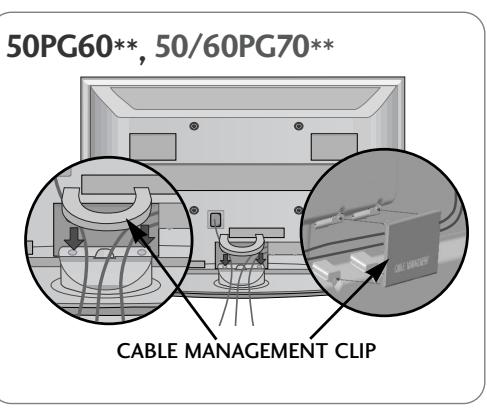
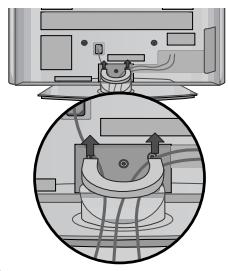
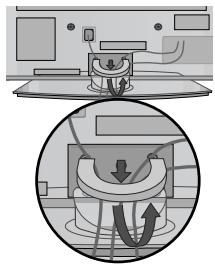
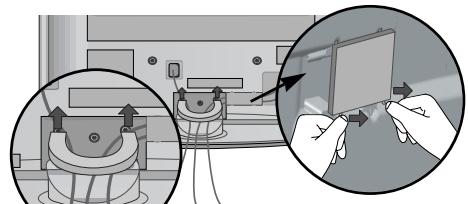
How to remove the cable management clip
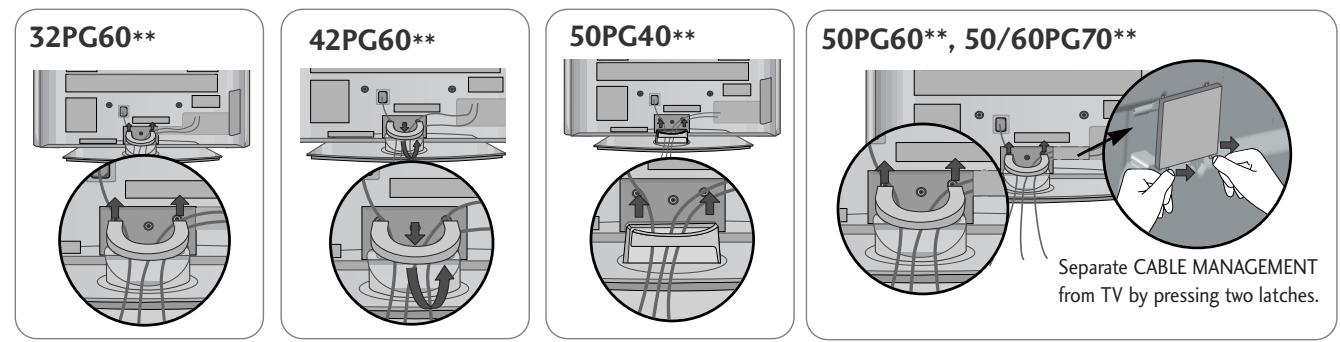
Hold the CABLE MANAGEMENT CLIP with both hands and pull it upward.
For the 42PG60** model, press the center of the CABLE MANAGEMENT CLIP and then lift it.

NOTE
Do not use the CABLE MANAGEMENT CLIP to lift the TV.
- If the TV is dropped, you may be injured or the TV may be damaged.
The TV can be installed in various ways such as on a wall, or on a desktop etc.
The TV is designed to be mounted horizontally.
EARTHING
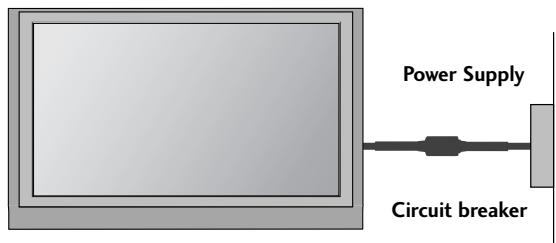
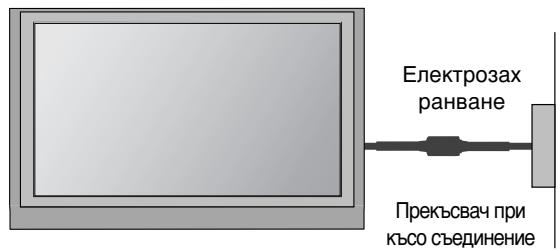
Ensure that you connect the earth wire to prevent possible electric shock. If grounding methods are not possible, have a qualified electrician install a separate circuit breaker.
Do not try to earth the TV by connecting it to telephone wires, lightening rods or gas pipes.
DESKTOP PEDESTAL INSTALLATION
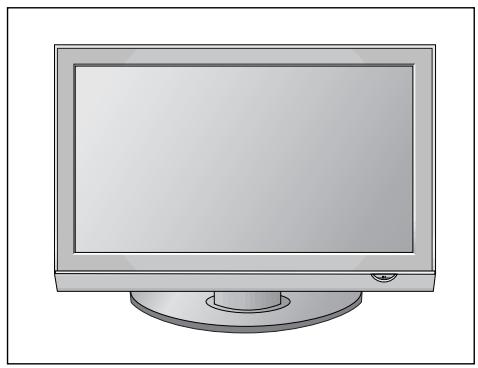
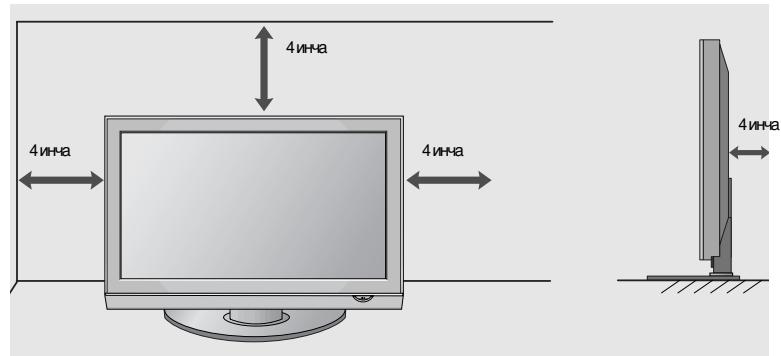
For adequate ventilation allow a clearance of 4 (10cm) all around the TV.
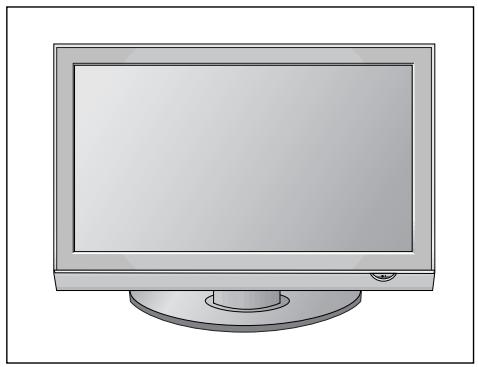
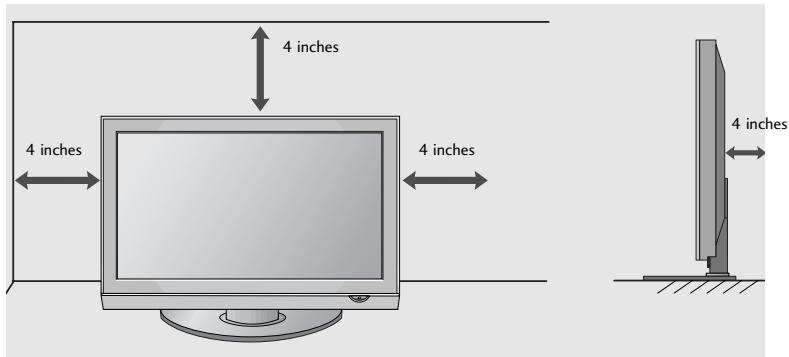
WALL MOUNT: HORIZONTAL INSTALLATION
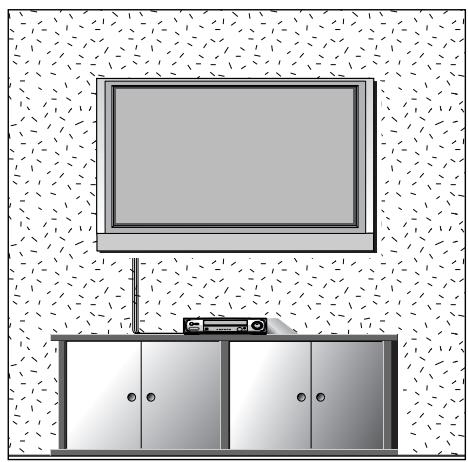
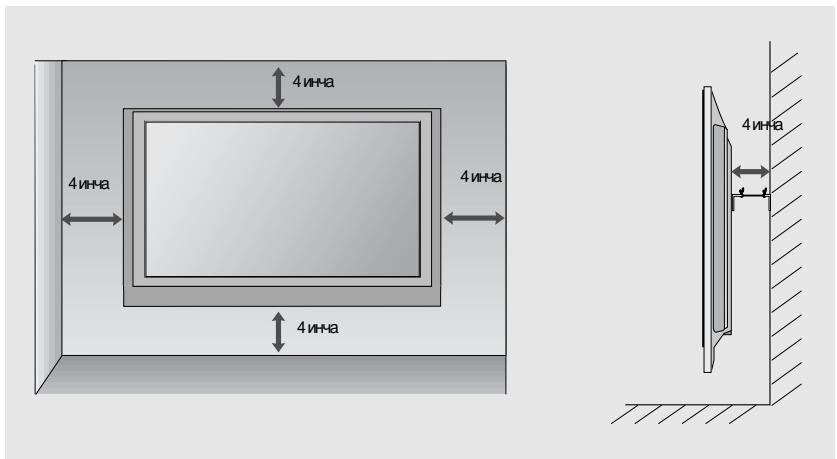
For adequate ventilation allow a clearance of 4" (10cm) all around the TV. We recommend that you use a wall mounting bracket of LG brand when mounting the TV to a wall.
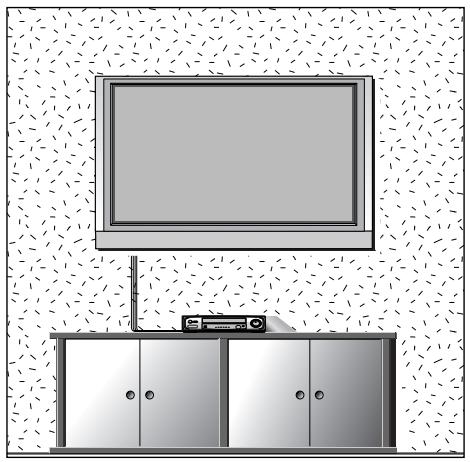
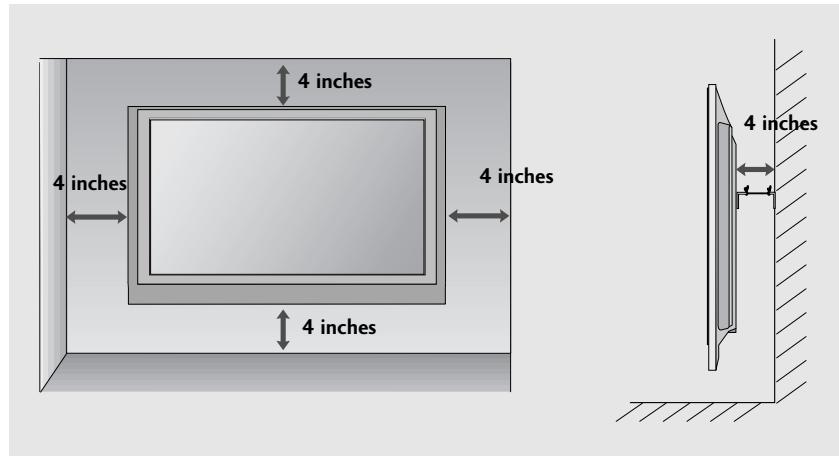
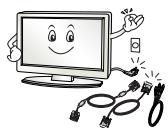
To prevent damage do not connect to the mains outlet until all connections are made between the devices.
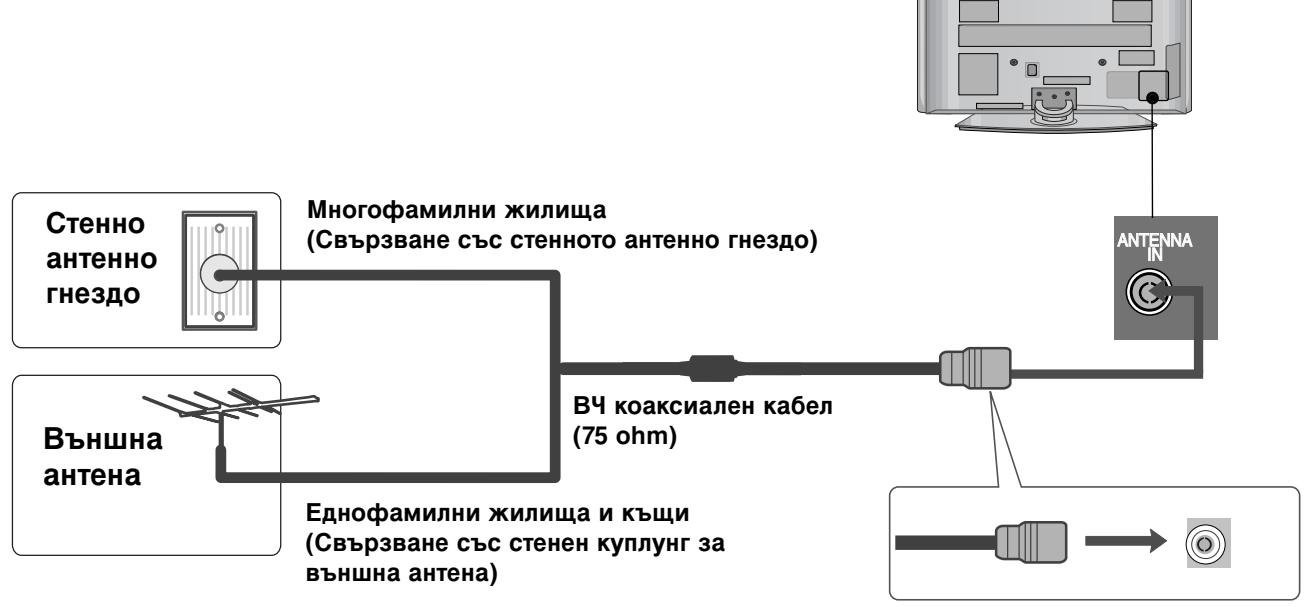
ANTENNA CONNECTION
For optimum picture quality, adjust antenna direction.
An antenna cable and converter are not supplied.
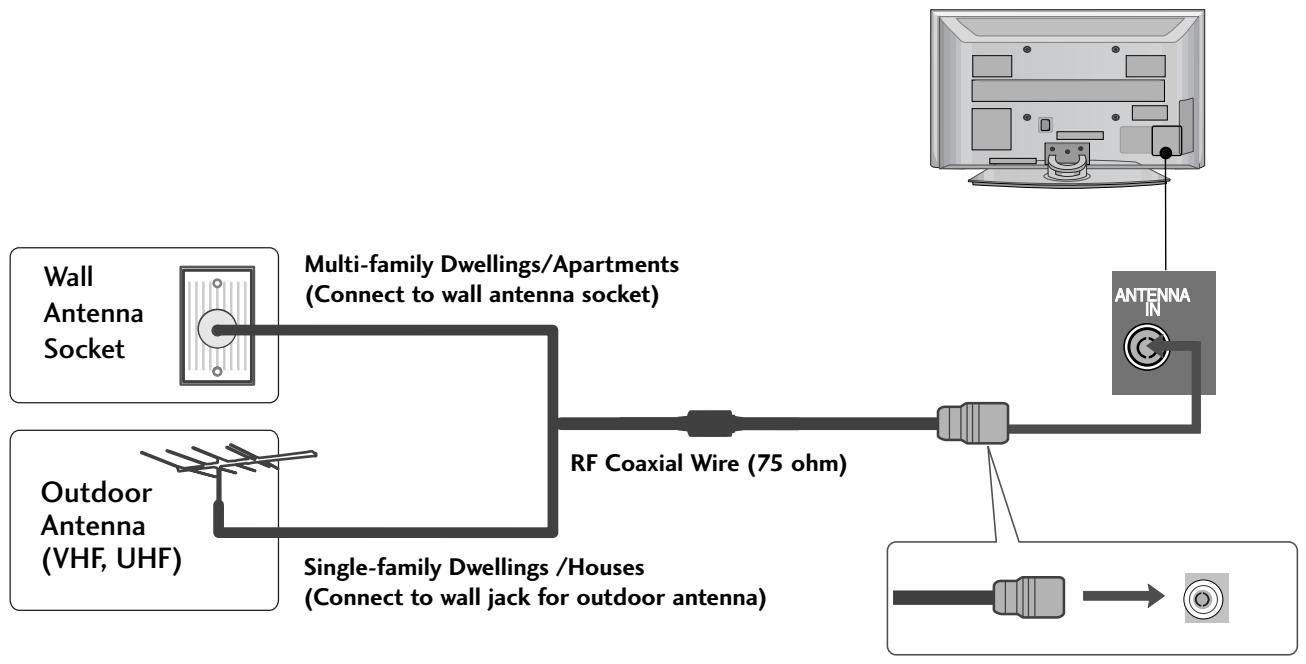

In poor signal areas, to achieve better picture quality it may be necessary to install a signal amplifier to the antenna as shown above.
If signal needs to be split for two TVs, use an antenna signal splitter for connection.
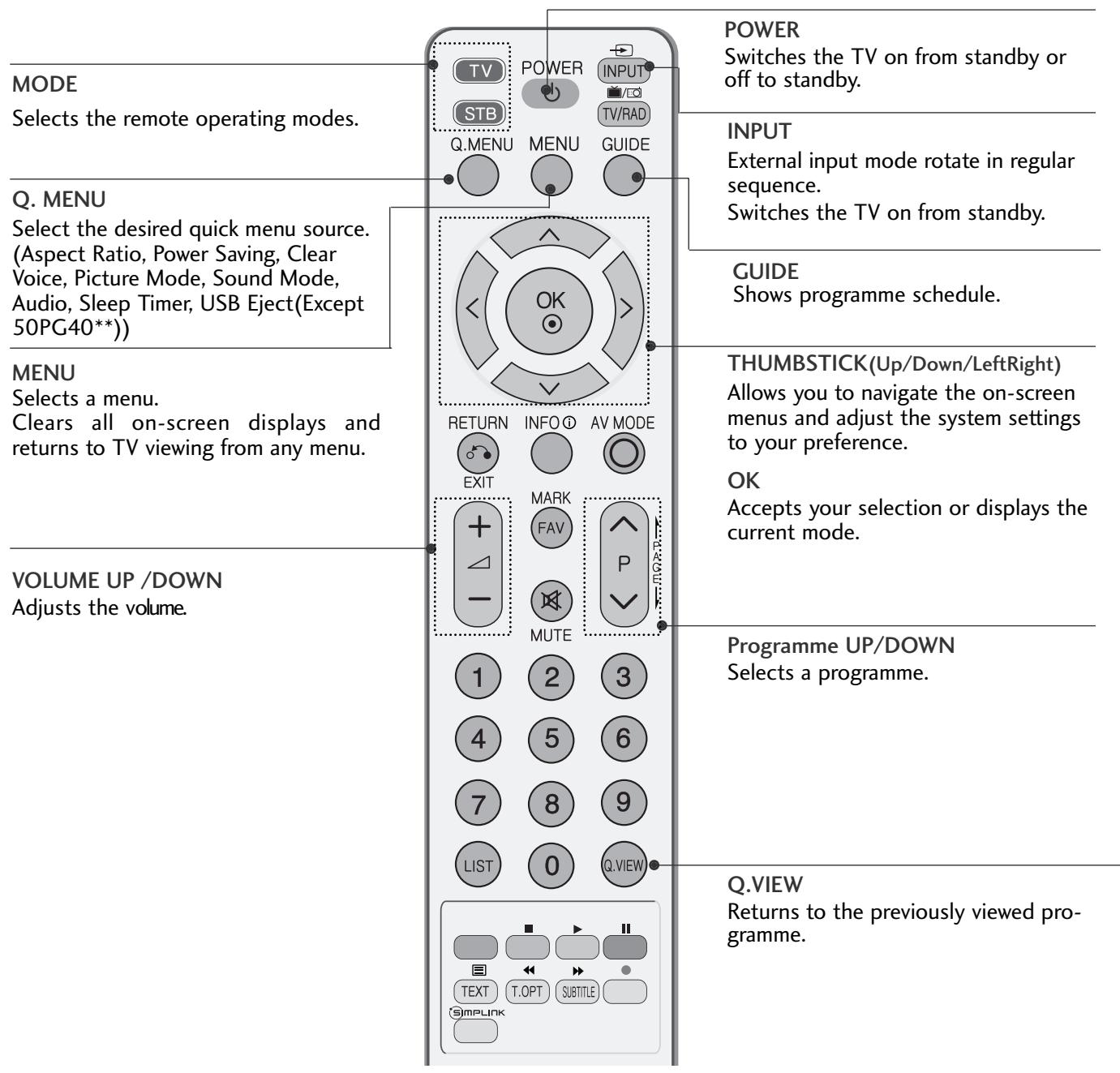
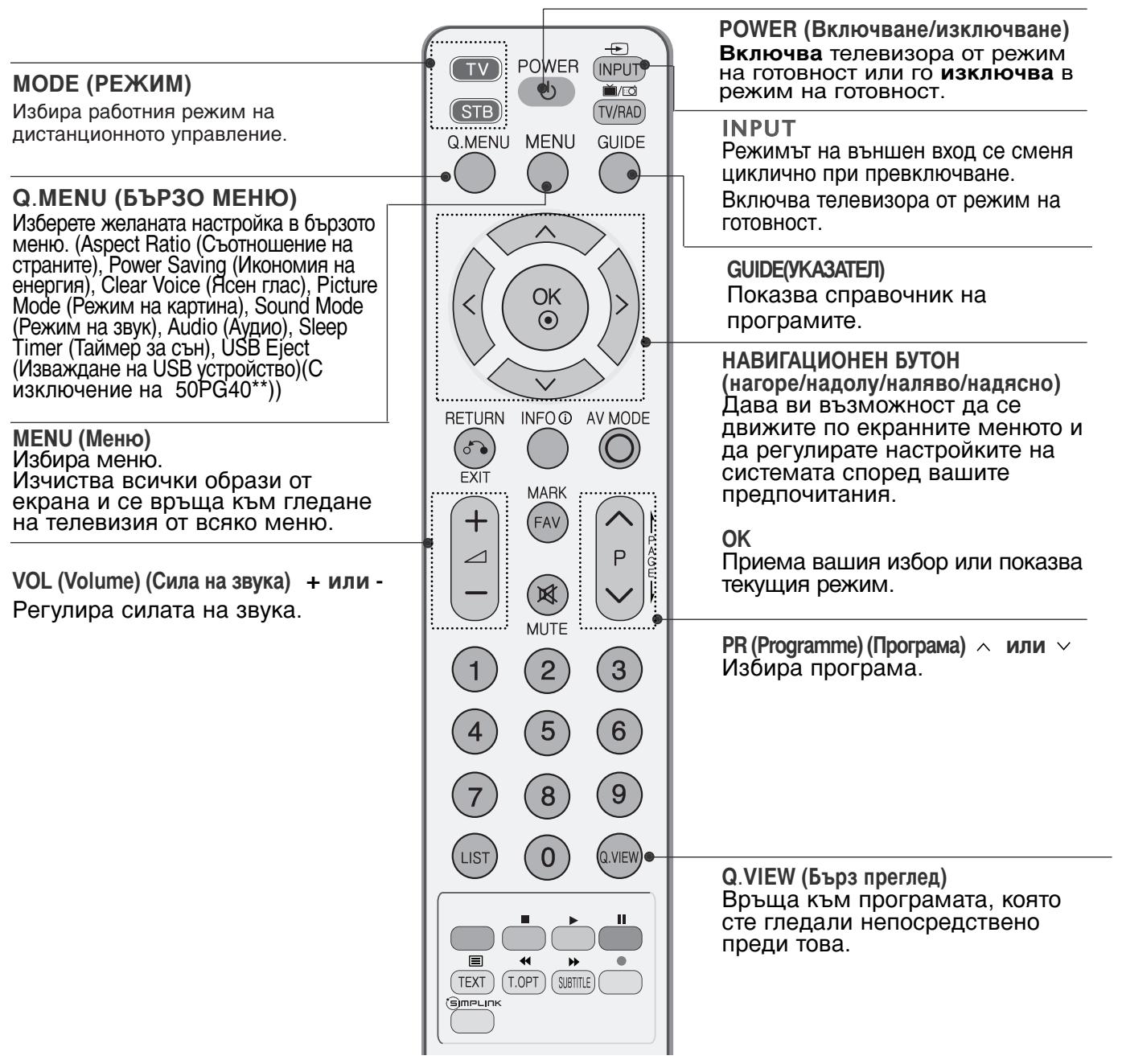
REMOTE CONTROL KEY FUNCTIONS
When using the remote control, aim it at the remote control sensor on the TV.
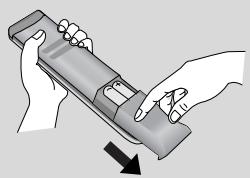
Installing Batteries
- Open the battery compartment cover on the back and install the batteries matching correct polarity (+with +,-with -).
Install two 1.5V AAA batteries. Do not mix old or used batteries with new ones.
Close cover.
TURNING ON THE TV
- When your TV is turned on, you will be able to use its features.
1 Firstly, connect the power cord correctly.
At this stage, the TV switches to standby mode.
In standby mode to turn TV on, press the φ / I , INPUT or P ▲▼ (or P ∧ ∨) button on the TV or press the POWER, INPUT, P ∧ ∨ or NUMBER button on the remote control and the TV will switch on.
Initializing setup
If the OSD (On Screen Display) is displayed on the screen after turning on the TV, you can adjust the Language, Select Mode, Country, Time Zone, Auto programme tuning.
Note:
a. It will automatically disappear after approx. 40 seconds unless a button is pressed.
b. Press the RETURN button to change the current OSD to the previous OSD.
c. For those countries without confirmed DTV broadcasting standards, some DTV features might not work, depending on the DTV broadcasting environment.
d "Home" mode is the optimal setting for home environments, and is the TV's default mode.
e. "In Store" mode is the optimal setting for store environments. If a user modifies image quality data, "In Store" mode initializes the product to the image quality set by us after a certain period of time.
f. The mode (Home, In Store) can be changed by executing Factory Reset in the OPTION menu.
ON-SCREEN MENU LANGUAGE / COUNTRY SELECTION
The installation guide menu appears on the TV screen when it is switched on for the first time.
Select your desired language.
Select your country.
- If you want to change Language/ Country selection
Select OPTION.
Select your desired language or country.
Select Menu Language or Country.
Save.
NOTE
If you do not finish the set-up Installation Guide by pressing RETURN or if you time out on the OSD (On Screen Display) the installation menu will continuously appear until the set up is completed whenever the TV is switched on
If you select the wrong local country, teletext may not appear correctly on the screen and some problems may occur during teletext operation.
The CI (Common Interface) function may not be applied based on country broadcasting circumstances.
DTV mode control buttons may not function based on country broadcasting circumstances.
In country that Digital broadcasting regulation isn't fixed, some DTV function may not work depending on digital broadcasting circumstances.
ON SCREEN MENUS SELECTION AND ADJUSTMENT
Your TV's OSD (On Screen Display) may differ slightly from that shown in this manual.
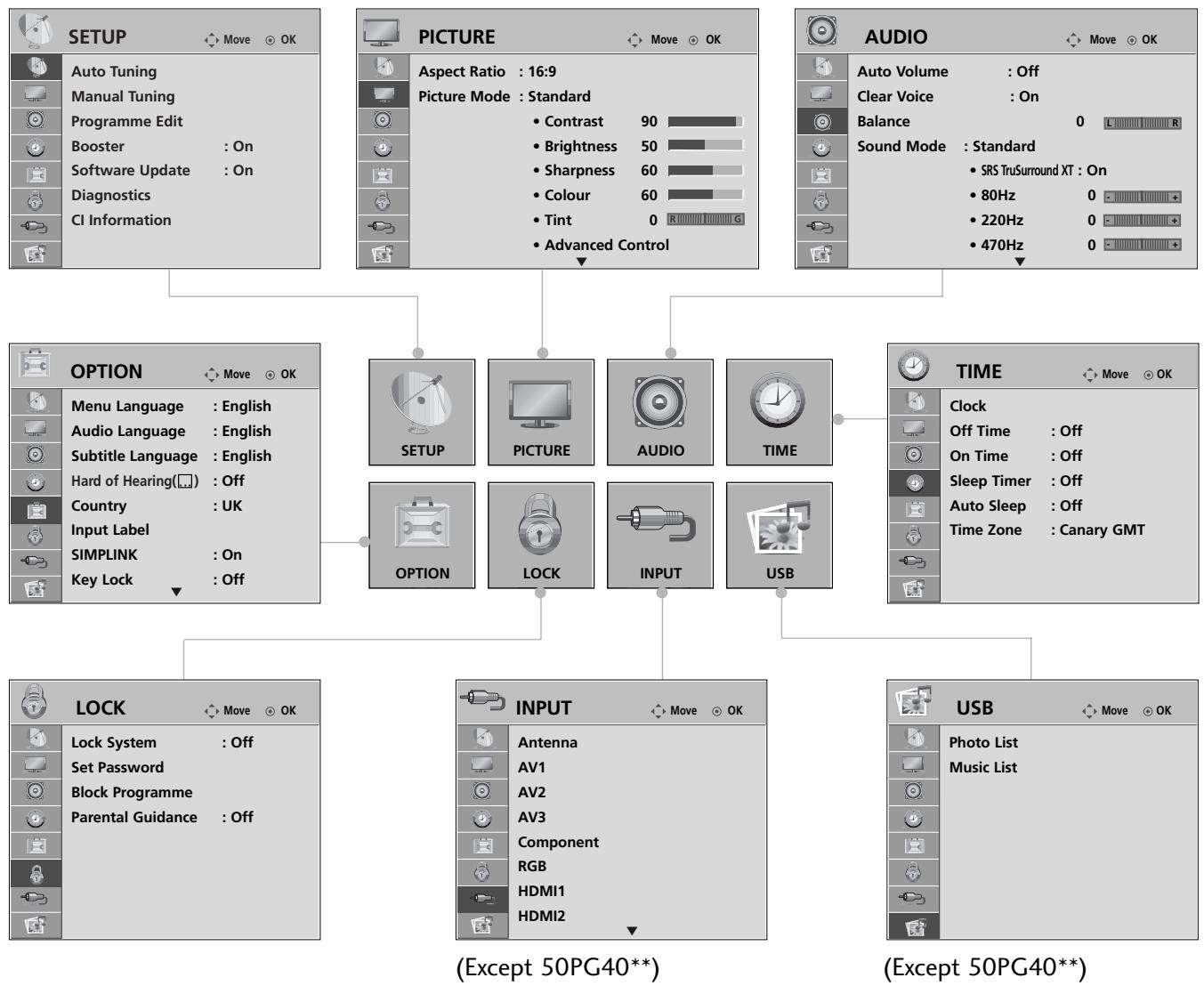
Display each menu.
Select a menu item.
Move to the pop up menu.
- Press the MENU button to return to normal TV viewing.
- Press the RETURN button to move to the previous menu screen.

NOTE
It is not possible to use CI Information and Booster in Analogue mode.
In 50PG40** models, INPUT and USB will not be displayed.
AUTO PROGRAMME TUNING
Use this to automatically find and store all available programmes.
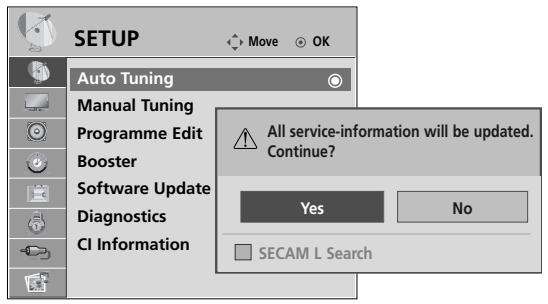
When you start auto programming, all previously stored service information will be deleted.
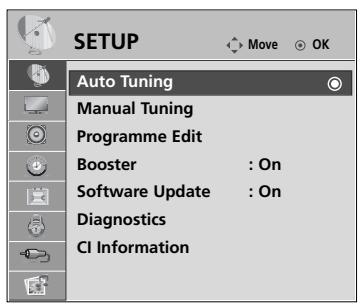

Select SETUP.
Select Auto Tuning.
-
Use NUMBER buttons to input a 4-digit password in Lock System 'On'.
-
If you wish to keep on auto tuning select YES using the < button. Then, press the OK button. Otherwise select NO.
Select Yes.
Run Auto tuning.
WHEN CONNECTING THE USB DEVICE
It is not possible to use USB function in 50PG40** models.
When you connect a USB device, this screen is displayed, automatically.
In USB device, you can not add a new folder or delete the existing folder.
1 Connect the USB device to the USB IN jacks on the side of TV.
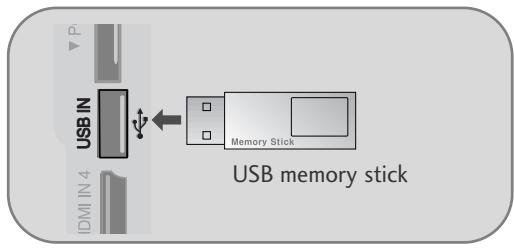
- It doesn't support USB HDD
- This TV Supports on JPEG and MP3.
When removing the USB device
Select the USB EJECT menu before removing the USB device.
Select USB Eject
MAINTENANCE
Early malfunctions can be prevented. Careful and regular cleaning can prolong the life of your new TV.
Caution: Be sure to switch the power off and unplug the power cord before you begin any cleaning.
Cleaning the Screen
A good way to keep the dust off your screen for a while is to wet a soft cloth in a mixture of lukewarm water and a little fabric softener or dish washing detergent. Wring the cloth until it is almost dry, and then use it to wipe the screen.
2 Ensure there is no excess water on the screen. Allow any water or dampness to evaporate before switching on.
Cleaning the Cabinet
To remove dirt or dust, wipe the cabinet with a soft, dry, lint-free cloth.
Do not to use a wet cloth.
Extended Absence
CAUTION
If you expect to leave your TV dormant for prolonged periods (such as a holiday), unplug the power cord to protect against possible damage from lightning or power surges.
TO VIEW THE USER'S GUIDE ON THE CD-ROM
To view the User's guide on the CD-ROM, Adobe Acrobat Reader must be installed on your PC.
The "ACRORD" folder on the CD-ROM contains the installation program for Acrobat Reader.
If you want to install Acrobat Reader, Open "My Computer" → Open the folder "LG" → Open the folder "ACRORD"
→ double-click your language.
To view the User's guide
The User's guide files are included in the supplied CD-ROM.
Load the supplied CD-ROM into the CD-ROM drive of your PC.
After a while, the web page of the CD-ROM will open automatically.(Windows users only)
If the web page does not appear automatically, open the User's guide file directly.
Open "My computer" → Open the folder "LG" → Double click the "index.htm" file.
WEIGHT
| MODELS | 32PG60** | 42PG60** | 50PG60** | |
| 32PG6000-ZA | 42PG6000-ZA | 50PG6000-ZA/ 50PG6000-ZY | ||
| 32PG6010-ZE | 42PG6010-ZE | 50PG6010-ZE | ||
| Weight | with stand | 18.0 kg / 39.7 lbs | 28 kg / 61.7 lbs | 43.65 kg / 96.2 lbs |
| without stand | 16.3 kg / 35.9 lbs | 25 kg / 55.1 lbs | 39.7kg / 87.5lbs | |
| MODELS | 50PG70** | 60PG70** | 50PG40** | |
| 50PG7000-ZB | 60PG7000-ZB | 50PG4000-ZA | ||
| Weight | with stand | 45.65 kg / 100.6 lbs | 62.4kg / 137.6 lbs | 42.3 kg / 93.3 lbs |
| without stand | 41.7kg / 91.9lbs | 54.9 kg / 121.0 lbs | 38.3 kg / 84.5 lbs | |
The specifications shown above may be changed without prior notice for quality improvement.
TROUBLESHOOTING
The TV does not operate properly.
| The remote control does not work | ■Check to see if there is any object between the TV and the remote control causing an obstruction. Ensure you are pointing the remote control directly at the TV. ■Ensure that the batteries are installed with correct polarity (+ to +, - to -). ■Ensure that the correct remote operating mode is set : TV, STB etc. ■Install new batteries. |
| Power is suddenly turned off | ■Is the sleep timer set? ■Check the power control settings. Has the Power supply been interrupted. ■Is Auto sleep activated on this station? |
The video function does not work.
| No picture & No sound | ■ Check whether the TV is switched on. ■ Try another channel. The problem may be with the broadcast. ■ Is the power cord inserted correctly into the mains? ■ Check your antenna direction and/or location. ■ Test the mains outlet by plugging another TV into the same outlet. |
| Picture appears slowly after switching on | ■ This is normal, the image is muted during the TV startup process. Please contact your service centre, if the picture has not appeared after five minutes. |
| No or poor colour or poor picture | ■ Adjust Colour in menu option. ■ Allow a sufficient distance between the TV and the VCR. ■ Try another channel. The problem may be with the broadcast. ■ Are the video cables installed properly? ■ Activate any function to restore the brightness of the picture. |
| Horizontal/vertical bars or picture shaking | ■ Check for local interference such as an electrical appliance or power tool. |
| Poor reception on some channels | ■ Station or cable channel experiencing problems, tune to another station. ■ Station signal is weak, reposition the antenna to receive weaker stations. ■ Check for sources of possible interference. |
| Lines or streaks in pictures | ■ Check antenna (Change the position of the antenna). |
| No picture when connecting HDMI | ■ Check HDMI cable over version 1.3. If the HDMI cables don't support HDMI version 1.3, it can cause flickers or no screen display. In this case use the latest cables that support HDMI version 1.3. |
The audio function does not work.
Picture OK & No sound
Press the + or - button.
Sound muted? Press MUTE button.
Try another channel. The problem may be with the broadcast.
Are the audio cables installed properly?
No output from one of the speakers
Adjust Balance in menu option.
Unusual sound from inside the TV
A change in ambient humidity or temperature may result in an unusual noise when the TV is switched on or off and does not indicate a fault with the TV.
No sound when connecting HDMI or USB
Check HDMI cable over version 1.3.
Check USB cable over version 2.0.
*This feature is not available for all models.
There is a problem in PC mode. (Only PC mode applied)
The signal is out of range (Invalid format)
Adjust resolution, horizontal frequency, or vertical frequency.
Vertical bar or stripe on background & Horizontal Noise & Incorrect position
Check the input source.
Screen colour is unstable or single colour
Use Auto configure or adjust clock, phase, or H/V position. (Option)
Check the signal cable.
Reinstall the PC video card.
(UK only)
Keep this important information about how to re-tune your TV during the digital TV switchover
Keep this leaflet and your instruction manual safe - you'll need them
get set for digital
Television in the UK is going digital, bringing us all more choice and new services. Starting in late 2007 and ending in 2012, television services in the UK will go completely digital, TV region by TV region.
Please see overleaf to find out when your area switches to digital.
Digital UK is the independent, non-profit organisation leading the process of digital TV switchover in the UK. Digital UK provides impartial information on what people need to do to prepare for the move to digital, and when they need to do it.
How the switchover affects your TV equipment:
Your new TV has a digital tuner built in, which means it is ready to receive the Freeview signal by simply plugging it into your aerial socket (check if you can get digital TV through your aerial now, or whether you'll have to wait until switchover, at www.digitaluk.co.uk).
When the TV switchover happens in your area, there are at least two occasions when you will need to re-tune your TV in order to continue receiving your existing TV channels, and also to pick up new ones. Digital UK, the body leading the digital TV switchover, will advise you when you need to re-tune during the switchover.
If you choose to connect your TV to satellite or cable with a digital box then it will not be affected by switchover, and you won't need to re-tune.
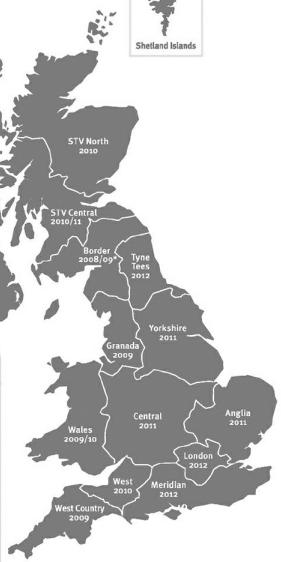
When does switchover happen?
*Copeland switches on October 17, 2007

Shetland Islands
The exact date you switch depends on the transmitter you are served by. To check when you switch, go to Digital UK's postcode checker on www.digitaluk.co.uk
Check your ITV news service or look at Teletext page 106 to see what TV region you're in.
Visit us at digitaluk.co.uk call us on 0845 6 50 50 50†
Calls charged at BT rate of 3p per minute daytime and 1p per minute evenings and weekends. Rates may vary for calls from non-BT lines.
How to re-tune:
To find out how to re-tune your TV, check your manufacturer's instructions for details. Or see below for a typical sequence:
- With your TV in digital TV mode, press 'Menu' on your remote control. (Some TVs will ask you for a code. If you have not already changed it, the default code is usually 0000, or check your instruction book.)
- From the Menu options on screen, select 'SETUP'. Select 'Auto Tuning' to re-tune your digital TV (not 'add channels'). You may have to wait a couple of minutes for the re-tune to complete.
Also sometimes referred to as 'Update', 'Rescan', 'Replace', 'Auto-Tuning', 'Channel Search', 'First Time Install', or 'Store Channels'. - If you do not re-tune your channels when advised to do so by Digital UK, you may lose some or all of your channels until you do re-tune. You should re-tune your TV every few months to check for any new channels.
If you are missing any channels, it may be that they are not available in your area, or that your aerial needs upgrading.
If you have any questions, please contact your
equipment supplier or call Digital UK on 084565050 or visit www.digitaluk.co.uk
LG Electronics Inc.
PLASMA TV
Bedienungsanleitung
PLASMA TV-MODELLE
32PG60**
42PG60**
50PG60**
50PG70**
60PG70**
50PG40**
13 PORTA APENAS PARA ASSISTÊNCIA
POR FAVOR, INSTALE-O CUIDADOSAMENTE, PARA QUE O PRODUCTO NÃO CAIA.
CYFROWE WYJSCIE AUDIO (OPTYCZNE)
Modely plazmovych TV
32PG60**
42PG60**
50PG60**
50PG70**
60PG70**
50PG40**
OPTICAL DIGITAL AUDIO OUT (OPTICKY DIGITALNY VYSTUPNY AUDIOOKEKTOR)
(Personal Computer Memory Card International Association)
BnKTe HaIINCa BbPxy 3aHOTo KaIaue I rO cbo6IeTe Ha npOaBaYa, KOrato BN nOtpr6Ba cepBN3.
Pa3ширени рькововоство за собстveнka, KOETO sbдьржадпьнгелни Функшин на te3и телевизорng LG ce hamupa ha CD-ROM-a веilektpoнha Форma.
3aДа ro npoyeTe, Heo6xOJMo eДа OTBOpHTe n36paHn ФайLOBE ot Baшия KOMПOTbP chAbdEN cIc CD-ROM yctpoiCTBO.
Yka3aHn8 3a 6e3OpaCHOCT
- MoJ, npOyETe BHNMaTeJIHO Te3n npEJa3Hm MepKn, npEi Da nOJI3BaTe npOdyKtA.
- INHCTpaunraTbTOBa pKOBODCTBO MOKe IOHKeBde Da ce pa3nUaBA OT BaUNI npOyKT, 3aIoTO e IpOcTo daeHa 3a npIMep B NOMOu Ha yKa3aHnraT.

IPEUYIPEXDEHNE

BHIMAHHE
Ako He obpheTe BHIMAHHe Na npedynpeHteHNo CbOeHne, MOKe cepno3HO da noctpadaTe, a MOKe da HMA BepoarTHoCT OT 3JIOJNYka INI CMbPT.
Ako He oBpHete BnImaHne Ha CbOeHne 3a BnImaHne, MoKe IeKO Da NocTpaIaTe IIN IpOyKTbT da Ce IOBpeN.
PpeIpa3Hm MepKn npn HnctaInpaHe Ha npOdyKta

PNEyIpyEKDEHME
ДрьжтпpoуктдалочOTиTOHnHaHaToJIHa,нанчмерОТПЛTeHnUyepu.
-Te Morat da noBedaT do ToKOB ynap, noXkap, noBpea nn DeOpMaun.
He non3baIte npOdykTA BbB BlaXKn NOMeUeHn, Kato 6aHa HapPImep, INI Ha MeCTa, KbJeTO Ima BEPOrTHoCT ToJ Da CE N3MOKD.
-ToBaMOKe Da pIuHHn Hoxkap nn da DOBeDe Do TOKOB ydAp.
Ako yceuate Mnpnc Ha dmHnHa HeIpoIyO nIyBaTe CTPAHN IyMoBE, 3xpaHbuaa KaBcIOT KOtAKTa I Ce ObaTe B CebDn3a.
-AkO IpONbJNKeT Da NpON3BATE IpONyKTa, 6e3 Da B3eMETe CbOTBETHnTE MepKN,MOKE Da IocneDeBa TOKOB Udap INI NOpKap.

BHHMAHNE
HCTaIpaIte npOyKtHa paBHO cTa6JIHO MRCTO, KbDETo HMA ONaCHO T NaJaHe.
-AKo prodykTBt 6bIe n3nychat, moKe da ce hapaHnTe mIn da ro CuynTe.
He n3Jaarai Te npOyKta Ha npRka CbHueBa CBETnHa.
TMOXKe Da ro NOBpeuN.
He noctabraye npodykta BbB Brpadeha HnCTaJaun, HanpImep 6n6JInoteKa nI IN Cekuia.
- Heo6xOДиMa e BeHTnlaIaIaIaI.
PpeIpa3Hm MepKn IIO OTHoSeHne Ha eIeKtpo3axpaHbAHeTo

IPEyIPEXDEHME
3axpaHbauT Kaben Tp6Ba da bJe Cbbp3aH KbM 3a3eMeHa Bepira.
-MoKe Da Bn yIapu TOK mIa Ce HapaHnTe.
He nnaite 1e9cena c mokpn pue. Ocben ToBa, aKo uHnDf Ha 1e9cena e MOKbp nn 3anpauen, noDCywe Tcncena n3qno nn n36bpuete npaxa.
-П配电МернатаВлагаМождпричинТOKВуар.
IIO Bpeme Ha rpbMOTeBnUHa 6pyr N3KKnOChTe 3axpaHbAaNn aHTEHn Ka6en.
-MoKeJaBaBnUpaNTOKnInDaN36yXHeNoxap.

BHIMAHNE
3aunntete kabena ot pfniueckn mnn MexanuHnybpejdaunne deiCTBna Kato ycKbaHe, npertbHa,npelunBaHe, 3atnuKaHe C bpata nHauctbnBaHe.
O6pbuatae oco6eHO BnIMaHne Ha uenceIInTe, KOHTAKTNE I TOkata, OT KOrTO Ka6eBt N3JIN3a OTo ypeia.
PpeJna3Hm MepKn npn MeCTeHe Ha npOdyKTo

PNEUYNPEXDEHME
IpoodykTbT Tpa6Ba da Ba de n3KnHoueHO.
Ipei Da MeCTIte IpoDyKta, BcNcKn Ka6eJI NTpa6Ba da 6bDat N3BaDeHn.
-MoKe Da Bn YdApn TOK NIn npOyKbT Da ce nobpeu.

BHIMAHNE
He ynpaIte npOdykta, kOrato ro MeCTne.
-MoKe Da Bn Ydapn TOK NIn npOdyKbT Da ce noBpeN.
Panahtp6Ba da bde o6bphat Hanpei na Ce bpxnc dBe pue np MeCTHe.
-AKIO3NpyCHETI npOyKTa, NOBpeDENHHT npOyKT MoKe Da npEeIN3BnKA TOKOB yUAP nIu NOKAp.C BbPXDETCE CbCcBpBN3a peMOHT.
Ppea3Hm MepKn pni nol3BaHe Ha npodyKta

IPEyIPEXDEHME
He pa3rIIO6BaBnTe, He peMOHTnpaTne n He npabete IPOIN3BOJHn IN3MeHENn IO npOdykTa.
- Toba MÖKÉ Deutsche PénéidinéB冈ka ToKap ININ 3IOnIONyKa OT TOKOB yUap.
-CbpxkeTe cBeCc cepBn3a 3a npOBepka, KaIN6pnpaHe NnI pEmoHT.
3a Da HamaJIITE ONaCHOCTTa OT NIOJAP INI NTOKOB yUap, He I3JIarAte TOBA YCTPOICTBO HA DbXkD INI BNara.
YctpoCTBTO He 6bMa da 6bDe n3laRaHO Ha KaIKn I npbCKN H NkKaBn PbLnH C TeuHOCTn PnpdMETn, B3n HApPImep, He 6bMa da 6bDat NoCTaBHN Bbpxy HERO.

BHHMAHNE
3a BCaKaBn peMOHTHn DeHocTn Ce o6pbIaJIte KbM KBaIcnPcIuPnA cepBn3eH nepcoHaJ. C cepB3HO 06CnyKBAHe e HEO6XoDMIO, KOrato anapatbTe bNl NOBpeDeH nO HKAkbB NaHH, HApimep NobpeDeH 3axpaHbaU, Ka6eN iNn UenCeI, INTEkNa TeYHOCHT iNn IaNdHaN iNpEmdTe B anapata, anaparTbTe bNl INLIOJKeH na DbXkd, INN Bnara, He pa6OTn HopMaIIHO INe E bN lIN3pyckAH.
He 3aIbprkaIte IbIro BpeMe HEnoDbJxHcO6pa3Ha ekpHa (HaNP. pnp cIarAne Ha cIyIM Ha npay3a), TbI KaTO HEnoDbJxHTo I3ObpaXeHne MOKe Da OCTaH da Ce BVxJa Ha ekpHa. Toba e N3BecTHo KaTO "IporapAHe" Ha o6pa3a. "PporapAHyTo" Ha o6pa3a He ce nokpBaO rTepaHcIyTa Ha npoiN3BODInTeIa.

OPRAHn 3A UYPABJEHNE HA JINCEBnY IaHEJI
Ioka3aHOTOMOKe da ce pa3nUyaba OT Baunr TeJeBu3Op.
Ako Bbpy Bauny ypei mHa NoctaBeHOn ppeIpa3Ho fOJINo, OTCTpaHeTe fOJIInOTn CJIeI TOBa n36bpyte Upeia c Kbpna 3a NOUcTBAHe.
AKO HE ИЗПОЛ3ВATE HACTОЛHATA CTОИKA
Ioka3aHOTOMOKeJacepa3JIuHaBaOTBaUINTeJIeBn3Op.
Korato MOHTnpate n3dJIneTo Ha cTeHa, 3aTbPHeTe HactoHnHaTa cToiKa, 3a Da r IpeDnA3nte.
ИнфОРMAЦЯHAЗДНЯПАHEЛ
camo 50PG40**
■ Poka3aHOTOMOKeIa ce pa3nUaBa OT Baunr TeJeBu3Op.
1 THe3do 3a Ka6eJ 3a eJeKtpo3axpaHbaHe To3n TeLeBn3Op pa60tn C npOMeHnVB TOK. HanpeXeHneTO eYka3aHO Ha CTpaHnCATA CbC CneUΦmKaunTA. HkORA He CE ONITBAIte Da N3IOJI3BaTe TeLeBn3Opa CbC 3axpaHbAHe C NOCTOJHEH TOK.
HDMI (Интуг佩ис за меду CBNcOKa pa3dJIteJIHa cnocO6hOCT) CbpxKeTe HDMICnIHANKBMHDMI IN. IIN DVI (VIDEO) cnIHAN KBM npota HDMI/DVI cKa6eJ OT DVI KbM HDMI.
3 Ayno Bxod RGB/DVI Cbpxte aynoTO OT KOMnHtbp nIN DTV.
ONTNUHEN3XOD3AUNΦPOBO AYINOCBbpr3BaHe Ha UNΦPOBO ayno OT pa3nuchuTINOBe anapatypa.3a6eJekKa:BpeKmHa rotOBHOCT Te3nIopTOBe He paBOTAT.
5 Bxod 3a KomnoHeHTHO BnDeo KbM Te3n IHe3da MOKeTe Da CBbPKeTe yCTpOJCTBO C KOMNOHeHTeH ayDIO/BnDeo CnRHaJI.
RGB BxOJ CbByKxeI3XoJa OT KOMnHOTbp.
RS-232C BXOJEH (KOHTPOJ/CEPBNU3) NOPT Cbþkæte cepnHnI nopT ha ynpaBnIBaUTo yCTPOIcTBo KbM RS-232C KOHeKTopa Ha TEJIeBN3opa.
8 THe3do Euro Scart (AV1/AV2) KbM Te3n THe3da MoKTe Da Cbbp3BaTe Upe3 Scart BxOJaI nn I3XoJaI, CnHaJI KbM BbHsHO yCTpoiCTBO.
BxOa aHTeHa CbpxKe RF aHTeHa KbM TO3N I3BOJ.
CLOT 3a Kapta PCMCIA (Personal Computer Memory Card International Association). (TazhiФункиЯ He e HajiUnHa 3a BCnUKN CTpaHn.)
1BxoD S-Video 3a cBbP3BaHe Ha n3XoJaCnHnA l S-Video ot SVIDEO yctpoiCTBO. BxoD Audio/Video (Aydno/BnIeo) KbM Te3n rHe3da MoKeTe Da CbBp3BaTe Ype3 ayDIO/BnIEO n3XoJaCnHaJ ON BbHnHO yCTPOICTBO.
USB BxOa
CAMO CEPBn3EH IOPT
MHCTAJINPAIte IOBHIMATEJIHO, TAKA YE DA HЯMABb3MOXKHOCT 3A PAdAHE.
Tp6Ba Da 3aKynIte Ha nazapa KpeJexHnTe eJeMeHTN, Heo6xOIMM 3a 3aKpeBbHe HA TeJIeBn3Opa KbM CTeHaT.
CnojTe TeIeBn3opa 6JIu3KO IO CTeHaT, 3a Da I36ErHeTe onaCHOCTTA OT nadahe, aKo 6bJe 6yTHaT.
B INCHCTpyKUINTE NO-DOJy e DaJeH No-6e3OncEn HaunH 3a HnCTaJIpaHe Ha TeLEBn3OpA, KOITo Ce CbCTOn B 3aKpenBaHe KbM CTehATA, Taka Ye ypeBt Da He NaIHe HapPe, Ako 6bDe npBnHAT. Taka Ue Ce npTeOTbPaTn PanaHeTo HA TeLEBn3OpA HApPe, KoETO MoKe Da DoBeDe Do HapaHraBe Ha Xopa.OcBeH ToBA, Taka Ue npTeODTbPaTne NOBpeDaTa Ha TeLEBn3OpA. BzEmeTe MepKn Ha TeLEBn3OpA Da He CE KaCbAt N Da He BnCrt DeLa.
1 ⅢnON3BaIte 6oNTOBeTe C yxo nnn KOH3OJIne/6oNTOBeTe 3a TeJIeBn3Opa, 3a da 3aKpeIInTe yPeDa KaM CTeHaTa, KaKTo e POKa3aHO Ha nIIIOCTpaunraTa. (Ako shapHnprHnTe 6oNTOBe Ha TeJIeBn3Opa Bn He ca pa3XnaOeHN, pa3BbPTeTe r.) * PbXhTe 6oNTOBeTe C yxo nnn KOH3OJIne/6oNTOBeTe 3a TeJIeBn3Opa N rN 3aTeRHeTe 3dpaBO B TropHnTe DynKn.
2 3akpenete cTeHHnTE KOH3OJIN C 6oJIIOBete 3a CTeHaTa. TPOBa Da HAJNaCInTE BUCOUnHaTa Cb0Opa3HO KOH3OJaTAt, MOHTnpaHa Ha CTeHaTa.
3 I3noI3BaIte 3IpaB0 BbXe, 3a Da BbpxKeTe ypeDa. Pio-6e3Oancho e da BbpxKeTe BbXeTo NO TaKbB HauH, ye da 3aCTaHe XOpN3OHTaJIHo MExJy CTehata n ypeDa.
!BEJIEXKKA
Korato npemecTBate ypeHa Ha pyro Macto, nbpBO OTkayete BbXeTata.
N3noJ3BaIte NOCTaBka 3a anapaTpa NIN shKaΦ, KOnTO Ca IOCTaTBUHO TOrEmN I 3IpaBN, 3a Da N3NbPjKAT pa3Mepa N TerIIOTo Ha npOdykTa.
3aДаИЗПОЛЗВATEурда6e3OпасHo,ce IOrpnxKteTeTgIOTO,KoToMOJKeДaИЗДьрЖa KOH3OЛATA,Дa eCbUTO,KaKToTeTgIOTOHa ypeDA.
MOHTAX HA CTOIKA
Camo 32PG60**
Ioka3aHOTo MOKe Da ce pa3nUaBa OT Baunr TeNeBn3Op.
Korato MoHTnpaTe HAcToJHaTa CToiKa, npOBepTe DaJIb 6OJTbT e HaNbInHO 3aTeHAt. (Ako He e 3aTeHAT Do6pe, ypeJbT MOKe Da ce HAKLOHn HApPeD CJeD MOHTaxa.) Ako 3aTeHETe 6OJTa PpeKaJIeHO CuINHO, Toi MOKe Da Ce N3MeThe IopaDN N3TpNBaHe Ha npITraaTa My Yact.
1 NocTaBTe BnMaTeJHo TeJeBn3Opa c ekpaHa NaOJy Bbpxy MeKa IOBbpxHOCT, 3a Da npedna3nte ekpHa oT NOBpeJa.
2 NocTaBte TeJIeBn3Opa, KaKTo e nOKa3aHO.
3aTeHHeTe HaJeXdNo 4-Te 6oJTa Ha rpb6a Ha TeLeBn3Opa B ppeDvIeHInTe OTbOpN.
3AДЕН KANAK 3A ПОДPEЖДАСЕ HA KABELITE
Ioka3aHOTOMOKeJaCEpa3JIuYabaOTBa山NTeJIeBN3Op.
1 Cbpxe Te Ka6eIte KaKTo e Heo6xOdmo.
3a da CBbpxkTe DoIbJIHnTeJIHo 06OpyDbaHe, BIXKTe pa3dela ,INCTaJIIPAHe Ha BbHsHO 06OpyDbaHe".
2 IHCtajnpaTe OPGAHN3ATOPA HA KABEJI, KaKTo e noKa3aHo.
32/42PG60**
50PG40**
Opran3aTop Ha Ka6eIi
*IocTabete Bpb3kata 3a Ka6eJnte (nnn Dbpxkaaya 3a Ka6eJnte),KaKTo e noka3aHO, INpncTeHETe Ka6eJnte.
50PG60, 50/60PG70
Opran3aTop Ha Ka6eIi
Kak da cBaJIte opraHn3aTopa Ha ka6eJIn
XbaHTe OPGAHN3ATOPA HA KABEJIc dBe pIe n ro n3dbpnaTe harope.
3a MoIeI 42PG60** - HaTnCHeTe cpeIaTa Ha OPIAHN3ATOPA HA KABEJI N cIeI TOBa rO nobDnHete Harope.
32PG60**
42PG60**
50PG40**
50PG60, 50/60PG70
OTdeneoTe TeneBn3opa
OPTAHIM3ATOPA HA KABEJIIN.
KATO HATINCHETE DBeTE KIIIOUaJIKN.
! BEJIEXKKA
He n3noJI3BaIte OPGAHN3ATOPA HA KABEJI 3a npemeCTBaHe Ha TeJIeBn3opa.
-Ako npoodykTB 6bde n3nychaT, MoKe da ce hapaHnte nn da ro cuynnte.
TeIeBn3OpbT MoKe Ia 6bJe MOHTnpaH nO pa3JIuHn HaunHn, HApnPmEp, Ha CTeHa, BbPx y 6Iopo n dp.
TeIeBn3OpbTe npedHa3NaueH 3a XOpN3OHTaJIeH MOHTaX.
3A3EMBAHE
YBepTe Ce, Ye CBbp3BaTe JnCa 3a 3a3eMBAHe, 3a Da npedOTbpaTne TOKOB yap. Ako He e Bb3MOxHO da Ce HApabN 3a3eMBAHe, NOBkaIte KBaIIncuipan EJektpOTexHnK Da IHCTaInpa OTdelen NpeKbcBaH Na Bepurata. He ce ONITBaIte Da 3a3emITE anapaTa Ype3 CBbp3BaHe KbM TeJeΦoHH Ka6JIi, rpbMOOTBOU INI rA3OpPOBOn.
Mohtax Ha HactoJhata CToiKa
3a da mma do6po oxlaqdahe, octabeTe pa3ctoHnE 10 cm MeKdy BcKa cTpaHa n CteHaTa.
Стень монтуж:Хорионлноюпocтаванe
3a da ima do6po oxlaqdahe, octabeTe pa3ctoHne 10 cm meKdy Bcra Ka cTpaHa n CteHa. IpeOpbVbMe BV da u3noJ3BaTe KOH3OJa 3a OKaUbaHe Ha cTeHa c Mapkata LG, KOrato MOHTnpate TeJeBn3opa Ha CTeHaTa.
3a da n36eHHeTe NOBpeDa Ha yCtpoiCTBaTa, He BKNIOuBaIte HnKaKBN 3axpaHbaUc Ka6eIN, npEIN da cTe npNKIOuHIn Cbbp3BaHTo Ha BCNUKyCTpoiCTBa.
Свьрзван ha aHTeHa
PereynipaTe nocokata Ha aHTeHaTa 3a Hau-Do6po KaueCTBO Ha o6pa3a.
AHTeHn Ka6en n npoeobpa3yBaTeJ He ca BKJIIOueHn B IOCTaBkata.

B 30Hn, B KOnTO CnRHaJIbTe cIa6, 3a No-IO6po KaueCTBO Ha o6pa3a MOHTnpaIte aHTeHeH yCINBaTeI KbM aHTeHaTa, KaKTo e NOKa3aHO BdRACHO.
Ako cnHnblr Tp6Ba da 6bJe pa3deneH MeKdy IBa TeIeBn3opa, 3a Cbbp3BaHe nOJI3BaIte aHTeHeh cPInTeP.
Функции на сытонту на дистанцноното упразвленье
Korato n3noJI3BaTe DCtAHcIOHHO ynpaBHeHne, HAcOyBaIeTo FO KbM cEH3Opa Ha TeJIeBn3Opa.
Пос天堂 на застуше
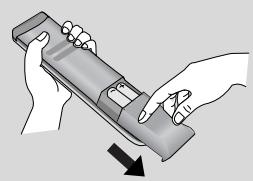
OTbOpete KaNaKa Ha rHe3doTo 3a 6aTePNn OT 3aHaTa CTpaHa.
- Пocтавete Дve баери 1,5V AAA, кato спаЗвate поярhoeТа (+с +,-c-)。He smecBaIte CTapи Или унOTpeбЯВаньаери C HOВИ TAKINBA.
3aTbOpTe KaNaKa.
ГLEДАНЕ HA TEЛEBИЗЯ /УПРавЛЕHМЕ HA ПОГРAMNTE
ВКЛЮУBAHE HA TEJIEBN3OPA
Korato TeIeBn3OpbT Bn e BKJIoueH, MoKeTe Da Ce Bb3NoJ3BaTe OT cyHKUInTE My.

PbBO, CBpKTe npaBnHo Ka6ena 3a eJekTpo3axpaHbaHeTo.
B To3n MOMeHT TeIeBn3OpbT npemHaba B pexkM Ha rTOOBHOCT

OT pexim Ha rotobhoct, 3a da BkJIOHTe TeJeBn3Opa HATNCHEte 6yToH φ /I, INPUT nIN P ▲▼ (nn
P ) Na TeLeBn30pa, iJIn HaTnCHeTe 6yToH POWER(ENEKTPO3AXPAHBAHE), INPUT(BXoI), P
IINIuOBoN 6yToHn(0~9) aINCtAHUoHHTO, IN TeJIeBUN3OpbT LcE Ce BKJIIOHy.
HnuaJn3npaHe He HacTpoKata
Ако след, Вклювано на телевизора на ekрара се пожке OSD (On Screen Display, ekpanно Meню), можete за насточе Language (Eзик), Select Mode (Избор на реким), Country (Ства), Time Zone (Часова зона), Auto programme (Авто MATчна насточа на погамп).
BENEXKA
a. EkpahHTo MeHIO ABtOMaTHUHO Iue N3Ye3He OTe Ekpaha CneI OKOJI 40 CEkyHnI, aKo He 6bJe HATnCHat 6yTOH.
b. Hatnche 6ytoHa RETURN, 3a da CMeHnTe TeKyuToE ekpaHHo MeHIO Ha npeduHIO ekpaHHO MeHIO.
c. 3a CTpaHnTE 6e3 NOTBbPdEHN CTaHApTn 3a DTV n3JIbYBaHe, HЯKoI DTV φyHKUIM MOKe u da He pa6OHT, KOeTo 3aBmCn OT HaUNHa Ha DTV n3JIbYBaHe.
d. Pěkúm Home (ДOM.) e ontmánlhata hactpoíka 3a ДOMaùHa ObctaHOBKa I TOBa e pejKIMbT NO pOДpa3öpɑnæ He 3a TěneBùNópa.
e Pekim In Store (Marasin) e ONTIMANHata HacTroika 3a n3non3BaHe B Marasin. Ako daen HOTpe6nteI npomEni daHHnte 3a KaueCTBOTO Ha o6pa3a, Cnei n3BeCTeH nepNoID OT BpeMe peXIM In Store (Marasin) BpbUca KaueCTBOTO Ha o6pa3a Ha n3denneto KbM HAcTroikata, 3adaena HTac.
f. Pekimblr (Home (Dom.), In Store (Mara3nH)) Moke da bde npomeHN ype3 Factory Reset (Bb3ctahOBBAhe Ha fa6pnuHnte HacTpoKu) B MeHIO OPTION (ONLUN).
E3nk Ha ekpaHHOTO MeHIO/ N36Op Ha nbpXkaBa
Korato TeLeBn3OpbT Ce BkHouN 3a IIpbN IIbT, Ha ekpaHa Ce NOBBA MeHOTo Ha pkoBOcTBOTO 3a IHCTaIIpaHe.
I36epete XeJahnO T Bac e3NK.
N36epeTe BaWata cTpaHa.
* Ako peшпто за поменITE ИЗБОРа на e3нК / Дьржава:
I36epete OPLNA.
I36epTe JekanHnO T BaceNk NnCtpaHa.
I36epete E3nk Ha MeHIOTo IIN CtpaHa.
3anomheTe.

BENEKKKA
Ako nHCTaJauTHa Ha Installation guide (PbKOBOcTBOTo 3a nHCTaJnpaHe) He 6bJe 3aBbPseHa ype3 HaTnCKaHe Ha 6byTOH EXIT nIN CNeI n3TuHa He BaPeMeTo 3a n3uKaBaHe Ha ekpaHHn IINCJIeN, To ige Ce NOBBA BCEKn nBT, KOrato BKNIOUHTe ypeDa.
Ako cTe n36paJIIN NOrpeUHIO cTpaHaTAt, TeJIeTEKCTbT MOKe dA He Ce NOKa3Ba IpaBUNHO Ha ekpaHa n IO BpeMe Ha pa6Ota C TeJIeTEKCT MOKe dA CE NORBt HAKON pno6JIemn.
ΦυHKUηRA TcI (O6u, uHTeppeic) MoKe Da He e npNJIOXkMa B 3aBnCIMoCT OT yCJIOBnTa Ha N3JIbYBaHe B CTPaHaTa.
BytoHte 3a ynpabJeHne Ha peKm DTV MoKe Ja He pa6OT B 3aBncMoCT OT ycIOBnTa Ha n3JIbUbaHe B CTpaHaT.
B cTpaHn, B KOnTo He ca npneTn pa3npopeD6n 3a LcΦpOBo N3JIbYBaHe, HraKoN DTV φyHKcIM MoKe Da He pa60TAT B 3aBNCIMOCT OT KOHKpeTHnte YCJIOBn Ha LcΦpOBO To N3JIbYBaHe.
Ioka3Ba BcAko MeHIO.
U36upa eJemeHrOT MeHHO.
PpexbprHe B n3ckaayoTo MeHIO.
- Hatnche 6byoHa MENU (MEHIO), 3a da ce BbphETe HOpMaJIHOTo rIeJaHe Ha TeJeBn3n.
- HatncheTe 6yToHa RETURN (BPbLlAHE), 3a da ce BbPHeTe KbM IpeDnHnE ekpaH Ha MeHIO.
! BEJIEXKKA
He e Bb3MOxHo da n3no3BaTe Cl Information (O6u nHTeppeic) u Booster (UcunBaHe) b peXm Analogue (AHaIoroba TeJeBn3n).
Pn mojelte 50PG40** INPUT (BXOД) n USB hma da ce nokaKaT.
ГLEДАНЕ HA TEЛEBИЗЯ /УПРавЛЕнE HA ПОГРAMNTE
UcpoiCTBOTO He pa6oTn HopmaJIHO.
Xopn3oHTaJIHn JINBepTnKaJIHn NbIcN, JINTpTeHe Ha KapTHHaTa
IpoBepete daJIHn HabIN3O mMa CmUaBAuN yCTPOJCTBa - eNEKTPoYpeN, 6OpMaunHn n npyRn pOnOBn nHCTpyMeHTn.
OPTICAL DIGITAL AUDIO OUT (OPTISK DIGITAL LYD UT)
Kjør Aut. innstilling.
Abn "My computer" → abn "LG" → abn filen "index.htm".
VAEGT (NETTO)
| MODELLER | 32PG60** | 42PG60** | 50PG60** | |
| 32PG6000-ZA | 42PG6000-ZA | 50PG6000-ZA/ 50PG6000-ZY | ||
| 32PG6010-ZE | 42PG6010-ZE | 50PG6010-ZE | ||
| Vægt (netto) | med sukkel | 18,0 kg / 39,7 lbs | 28 kg / 61,7 lbs | 43,65 kg / 96,2 lbs |
| uden sukkel | 16,3 kg / 35,9 lbs | 25 kg / 55,1 lbs | 39,7kg / 87,5lbs | |
| MODELS | 50PG70** | 60PG70** | 50PG40** | |
| 50PG7000-ZB | 60PG7000-ZB | 50PG4000-ZA | ||
| Vægt (netto) | med sukkel | 45,65 kg / 100,6 lbs | 62,4 kg / 137,6 lbs | 42,3 kg / 93,3 lbs |
| uden sukkel | 41,7kg / 91,9 lbs | 54,9 kg / 121,0 lbs | 38,3 kg / 84,5 lbs | |
Ovenstaende specifikationer kan ændres utden forudgande varsel, for sa vidth angar kvalitetsforbedringer.
FEJLFINDING
KAUKOSÄÄTIMEN NÄPPÄINTOIMINNOT
Avage "My computer" -> avage "LG" -> avage"index.htm" fail.
KAAL
| MUDELID | 32PG60** | 42PG60** | 50PG60** | |
| 32PG6000-ZA | 42PG6000-ZA | 50PC6000-ZA/ 50PG6000-ZY | ||
| 32PG6010-ZE | 42PG6010-ZE | 50PG6010-ZE | ||
| Kaal | koos alusega | 18,0 kg / 39,7 naela | 28 kg / 61,7 naela | 43,65 kg / 96,2 naela |
| ilma aluseta | 16,3 kg / 35,9 naela | 25 kg / 55,1 naela | 39,7kg / 87,5 naela | |
| MUDELID | 50PG70** | 60PG70** | 50PG40** | |
| 50PG7000-ZB | 60PG7000-ZB | 50PG4000-ZA | ||
| Kaal | koos alusega | 45,65 kg / 100,6 naela | 62,4 kg / 137,6 naela | 42,3 kg / 93,3 naela |
| ilma aluseta | 41,7kg / 91,9 naela | 54,9 kg / 121,0 naela | 38,3 kg / 84,5 naela | |
SUMONTUOKITE ATIDZIAI, KAD GAMINYS NEAPVIRSTU.a
Prijungus USB jrenginj
USB fungcija 50PG40** modeliuose negalima.
Kai prijungiate USB jrenginj, sis ekranas parodomas automatiskai.
Atjungiant USB jrenginj
Pries atjungdami USB jrenginj, pasirinkite menui USB EJECT (USB ATJUNGIMAS).
Pasirinkite USB Eject (USB atjungimas).
TECHNÈ PriežIURA
Tinkamos prieziuros deka galima isvengti jvairiu gedimu. Kruopschiai ir reguliariai valykite televizoriu -tokiu budu prailginsite jo tarnavimo laikaj.
BEZBEDNOSNA UPUTSTVA
- Molimo vas da pažljivo pročitate ove mere prestostrožnosti pre upotrebe proizvoda.
- U ovom uputstvu ilustracije mogu neznatno odstupati od Vašeg proizvoda jer služe samo kao pomoćni primer u uputstvu.
UPOZORENJE
Ako zanemarite poruku upozorenja, moze se desiti da budete ozbiljno povrejeni ili pak postoji mogucnost nasrece il smrti.
OPREZ
Ako zanemarite poruku upozorenja, mozda cete se neznatno povrediti ili proizvod moze da se ošeteti.
Mera prestrožnosti kod instaliranja proizvoda

UPOZORENJE
Držite dalje od vručih izvora kao što su elektricne grejalice.
- Moze doci do elektricnog udara, pozara, neis-pravnosti ili deformacione.
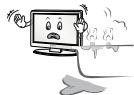
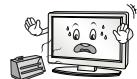
If you expect to leave your TV dormant for prolonged periods (such as a holiday), unplug the power cord to protect against possible damage from lightning or power surges.
KULLANICI KILAVUZUNU CD-ROM'DA GÖRÜNTÜLEMEK
- PAGINATION SHEET
- PLASMA TV OWNER'S MANUAL
- DVB
- CONNECTING YOUR UNIT
- DVD/STB
- PRECAUTION IN INSTALLING THE PRODUCT
- WARNING
- CAUTION
- ELECTRICAL POWER RELATED PRECAUTIONS
- PRECAUTIONS IN MOVING THE PRODUCT
- PRECAUTIONS IN USING THE PRODUCT
- FRONT PANEL CONTROLS
- NOT USING THE DESK-TYPE STAND
- BACK PANEL INFORMATION
- PLEASE SET IT UP CAREFULLY SO THE PRODUCT DOESN'T FALL OVER
- NOTE
- STAND INSTALLATION
- 32PG60** ONLY
- BACK COVER FOR WIRE ARRANGEMENT
- HOW TO REMOVE THE CABLE MANAGEMENT CLIP
- EARTHING
- DESKTOP PEDESTAL INSTALLATION
- WALL MOUNT: HORIZONTAL INSTALLATION
- ANTENNA CONNECTION
- REMOTE CONTROL KEY FUNCTIONS
- TURNING ON THE TV
- INITIALIZING SETUP
- ON-SCREEN MENU LANGUAGE / COUNTRY SELECTION
- ON SCREEN MENUS SELECTION AND ADJUSTMENT
- AUTO PROGRAMME TUNING
- WHEN CONNECTING THE USB DEVICE
- WHEN REMOVING THE USB DEVICE
- MAINTENANCE
- CLEANING THE SCREEN
- CLEANING THE CABINET
- EXTENDED ABSENCE
- TO VIEW THE USER'S GUIDE ON THE CD-ROM
- WEIGHT
- TROUBLESHOOTING
- THE TV DOES NOT OPERATE PROPERLY
- THE VIDEO FUNCTION DOES NOT WORK
- THE AUDIO FUNCTION DOES NOT WORK
- THERE IS A PROBLEM IN PC MODE. (ONLY PC MODE APPLIED)
- (UK ONLY)
- KEEP THIS IMPORTANT INFORMATION ABOUT HOW TO RE-TUNE YOUR TV DURING THE DIGITAL TV SWITCHOVER
- HOW THE SWITCHOVER AFFECTS YOUR TV EQUIPMENT
- WHEN DOES SWITCHOVER HAPPEN
- VISIT US AT DIGITALUK.CO.UK CALL US ON 0845 6 50 50 50†
- HOW TO RE-TUNE
- LG ELECTRONICS INC
- PLASMA TV
- BEDIENUNGSANLEITUNG
- POR FAVOR, INSTALE-O CUIDADOSAMENTE, PARA QUE O PRODUCTO NÃO CAIA
- YKA3AHN8 3A 6E3OPACHOCT
- IPEUYIPEXDEHNE
- BHIMAHHE
- PPEIPA3HM MEPKN NPN HNCTAINPAHE HA NPODYKTA
- PNEYIPYEKDEHME
- BHHMAHNE
- PPEIPA3HM MEPKN IIO OTHOSEHNE HA EIEKTPO3AXPAHBAHETO
- IPEYIPEXDEHME
- BHIMAHNE
- PPEJNA3HM MEPKN NPN MECTEHE HA NPODYKTO
- PNEUYNPEXDEHME
- PPEA3HM MEPKN PNI NOL3BAHE HA NPODYKTA
- OPRAHN 3A UYPABJEHNE HA JINCEBNY IAHEJI
- AKO HE ИЗПОЛ3ВATE HACTОЛHATA CTОИKA
- ИНФОРMAЦЯHAЗДНЯПАHEЛ
- MHCTAJINPAITE IOBHIMATEJIHO, TAKA YE DA HЯMABB3MOXKHOCT 3A PADAHE
- BEJIEXKKA
- MOHTAX HA CTOIKA
- CAMO 32PG60
- 3AДЕН KANAK 3A ПОДPEЖДАСЕ HA KABELITE
- 1 CBPXE TE KA6EITE KAKTO E HEO6XODMO
- 2 IHCTAJNPATE OPGAHN3ATOPA HA KABEJI, KAKTO E NOKA3AHO
- KAK DA CBAJITE OPRAHN3ATOPA HA KA6EJIN
- 3A3EMBAHE
- MOHTAX HA HACTOJHATA CTOIKA
- СТЕНЬ МОНТУЖ:ХОРИОНЛНОЮПOCТАВАНE
- СВЬРЗВАН HA AHTEHA
- ФУНКЦИИ НА СЫТОНТУ НА ДИСТАНЦНОНОТО УПРАЗВЛЕНЬЕ
- ПОС天堂 НА ЗАСТУШЕ
- ГLEДАНЕ HA TEЛEBИЗЯ /УПРАВЛЕHМЕ HA ПОГРAMNTE
- ВКЛЮУBAHE HA TEJIEBN3OPA
- HNUAJN3NPAHE HE HACTPOKATA
- BENEXKA
- E3NK HA EKPAHHOTO MEHIO/ N36OP HA NBPXKABA
- AKO PEШПТО ЗА ПОМЕНITE ИЗБОРА НА E3НК / ДЬРЖАВА
- BENEKKKA
- ГLEДАНЕ HA TEЛEBИЗЯ /УПРАВЛЕНE HA ПОГРAMNTE
- UCPOICTBOTO HE PA6OTN HOPMAJIHO
- XOPN3OHTAJIHN JINBEPTNKAJIHN NBICN, JINTPTEHE HA KAPTHHATA
- VAEGT (NETTO)
- FEJLFINDING
- KAUKOSÄÄTIMEN NÄPPÄINTOIMINNOT
- KAAL
- SUMONTUOKITE ATIDZIAI, KAD GAMINYS NEAPVIRSTU.A
- PRIJUNGUS USB JRENGINJ
- ATJUNGIANT USB JRENGINJ
- TECHNÈ PRIEŽIURA
- BEZBEDNOSNA UPUTSTVA
- MERA PRESTROŽNOSTI KOD INSTALIRANJA PROIZVODA
- UPOZORENJE
- KULLANICI KILAVUZUNU CD-ROM'DA GÖRÜNTÜLEMEK
Brand : LG
Model : 32PG6000
Category : Television