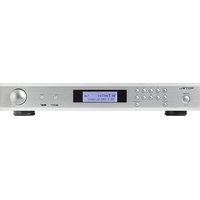
T11V02 - Talkie Walkie ROTEL - Free user manual and instructions
Find the device manual for free T11V02 ROTEL in PDF.


| Product type | FM/DAB Tuner |
| Brand | Rotel |
| Model | T11V02 |
| Dimensions (W x H x D) | 430 x 73 x 330 mm |
| Front panel height | 60 mm |
| Power supply | 120 V / 60 Hz (US version) or 230 V / 50 Hz (CE version) |
| Power consumption | 10 watts |
| Standby power consumption | < 0.5 watt |
| FM reception band | 87.5 – 108 MHz |
| DAB reception band | Band III (174 – 240 MHz) |
| Number of presets | 30 (FM and DAB) |
| Functions | FM stereo reception, DAB/DAB+, RDS, scrolling text display, manual and automatic tuning, mono/stereo selection |
| Connectivity | Stereo analog output (RCA), FM/DAB antenna input (75 ohms, F connector), RS-232 port |
| Analog output level | 2.1 V at 0 dBFS (DAB); 1 V (FM) |
| FM signal-to-noise ratio | 63 dB (mono) / 60 dB (stereo) |
| FM harmonic distortion | 0.2% (mono) / 0.3% (stereo) |
| FM frequency response | 10 Hz – 15 kHz, ±3 dB |
| FM stereo separation | 40 dB at 100 Hz; 37 dB at 1 kHz |
| DAB sensitivity | -80 dBm |
| DAB audio bit rate | 224 Kbps max |
| DAB frequency response | 20 Hz – 20 kHz, ±1 dB |
| Maintenance | Clean with a dry cloth or vacuum. Do not use liquids. |
| Safety | Double insulation. Do not expose to moisture. Disconnect during thunderstorms. |
| Spare parts and repairability | Contact an authorized Rotel dealer. Do not open, no user-serviceable parts. |
Frequently Asked Questions - T11V02 ROTEL
User questions about T11V02 ROTEL
0 question about this device. Answer the ones you know or ask your own.
Ask a new question about this device
Download the instructions for your Talkie Walkie in PDF format for free! Find your manual T11V02 - ROTEL and take your electronic device back in hand. On this page are published all the documents necessary for the use of your device. T11V02 by ROTEL.
USER MANUAL T11V02 ROTEL
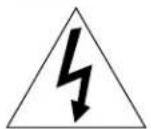
This symbol is to alert the user to the presence of uninsulated dangerous voltages inside the product's enclosure that may constitute a risk of electric shock.

This symbol is to alert the user to important operating and maintenance (service) instructions in this manual and literature accompanying the product.
APPLICABLE FOR USA, CANADA OR WHERE APPROVED FOR THE USAGE
CAUTION: TO PREVENT ELECTRIC SHOCK, MATCH WIDE BLADE OF PLUG TO WIDE SLOT. INSERT FULLY.
ATTENTION: POUR EVITER LES CHOCS ELECTRIQUES, INTRODUIRE LA LAME LA PLUS LARGE DE LA FICHE DANS LA BORNE CORRESPONDANTE DE LA PRISE ET POUSSER JUSQU AU FOND.
This Class B digital apparatus complies with Canadian ICES-003.
This symbol means that this unit is double insulated. An earth connection is not required.

CE

Rotel products are designed to comply with international directives on the Restriction of Hazardous Substances (RoHS) in electrical and electronic equipment and the disposal of Waste Electrical and Electronic Equipment (WEEE). The crossed wheelie bin symbol indicates compliance and that the products must be appropriately recycled or processed in accordance with these directives.
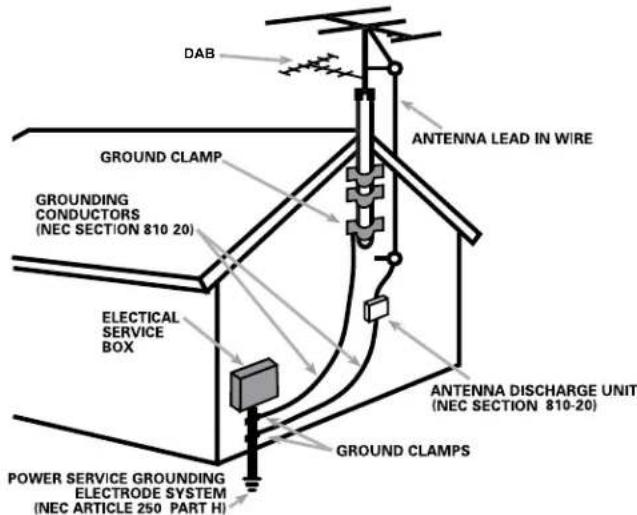
ANTENNA GROUNDING ACCORDING TO NATIONAL ELECTRICAL CODE INSTRUCTIONS SECTION 810: "RADIO AND TELEVISION EQUIPMENT"
Notice
The rear RS232 connection should be handled by authorized persons only.
FCC Information
This equipment has been tested and found to comply with the limits for a Class B digital device, pursuant to Part 15 of the FCC Rules. These limits are designed to provide reasonable protection against harmful interference in a residential installation. This equipment generates, uses and can radiate radio frequency energy and, if not installed and used in accordance with the instruction, may cause harmful interference to radio communications.
However, there is no guarantee that interference will not occur in a particular installation. If this equipment does cause harmful interference to radio or television reception, which can be determined by turning the equipment off and on, the user is encouraged to try to correct the interference by one or more of the following measures:
Reorient or relocate the receiving antenna.(TV, radio, etc.)
- Increase the separation between the equipment and receiver.
- Connect the equipment to an outlet on circuit different from that to which the receiver is connected.
- Consult the dealer or an experienced radio/TV technician for additional help.
Caution
This device complies with part 15 of the FCC Rules. Operation is subject to the following to conditions: (1) This device may not cause harmful interference, and (2) this device must accept any interference received, including interference that may cause undesired operation.
NOTE TO CATV SYSTEM INSTALLER: Call the CATV system or antenna installer's attention to Article 820-40 of the NEC. This provides guidelines for proper grounding and, in particular, specifies that the cable ground shall be connected to the grounding system of the building, as close to the point of cable entry as practical. See installation diagram.
NOTE: This equipment has been tested and found to comply with the limits for a Class B digital device, pursuant to Part 15 of the FCC Rules. These limits are designed to provide reasonable protection against interference in a residential installation. This equipment generates and can radiate radio frequency energy and, if not installed and used in accordance with the instructions, may cause interference to radio or TV communications. There is no guarantee that interference will not occur in a particular installation. If this equipment does cause interference to radio or television reception, which can be determined by turning the equipment off and on, try to correct the interference by one or more of the following measures:
Reorient or relocate the receiving antenna.
- Increase the separation between the unit and the television tuner.
- Connect the unit to an AC power outlet on a different electrical circuit.
- Consult your authorized Rotel retailer for assistance.
Important Safety Instructions
WARNING: There are no user serviceable parts inside. Refer all servicing to qualified service personnel.
WARNING: To reduce the risk of fire or electric shock, do not expose the unit to moisture or water. Do not expose the unit to dripping or splashing. Do not place objects filled with liquids, such as vases, on the unit. Do not allow foreign objects to get into the enclosure. If the unit is exposed to moisture, or a foreign object gets into the enclosure, immediately disconnect the power cord from the wall. Take the unit to a qualified service person for inspection and necessary repairs.
Read these instructions.
Keep these instructions.
Heed all warnings.
Follow all instructions.
Do not use this apparatus near water.
Clean only with dry cloth.
Do not block any ventilation openings. Install in accordance with the manufacturer's instructions.
Do not install near any heat sources such as radiators, heat registers, stoves, or other apparatus (including amplifiers) that produce heat.
Do not defeat the safety purpose of the polarized or grounding-type plug. A polarized plug has two blades with one wider than the other. A grounding type plug has two blades and a third grounding prong. The wide blade or the third prong are provided for your safety. If the provided plug does not fit into your outlet, consult an electrician for replacement of the obsolete outlet.
Protect the power cord from being walked on or pinched particularly at plugs, convenience receptacles, and the point where they exit from the apparatus.
Only use attachments/accessories specified by the manufacturer.
Use only with the cart, stand, tripod, bracket, or table specified by the manufacturer, or sold with the apparatus. When a cart is used, use with caution when moving the cart/ apparatus combination to avoid injury from tip-over.

Unplug this apparatus during lightning storms or when unused for long periods of time.
Refer all servicing to qualified service personnel. Servicing is required when the apparatus has been damaged in any way, such as power-supply cord or plug is damaged, liquid has been spilled or objects have fallen into the apparatus, the apparatus has been exposed to rain or moisture, does not operate normally, or has been dropped.
The apparatus should be used in non tropical climate.
The ventilation should not be impeded by covering the ventilation openings with items, such as newspapers, table-cloths, curtains, etc.
No naked flame sources, such as lighted candles, should be placed on the apparatus.
Touching uninsulated terminals or wiring may result in an unpleasant sensation.
WARNING: The rear panel power cord connector is the mains power disconnect device. The device must be located in an open area that allows access to the cord connector.
The unit must be connected to a power supply only of the type and voltage specified on the rear panel. (USA: 120 V/60Hz, EC: 230V/50Hz)
Connect the component to the power outlet only with the supplied power supply cable or an exact equivalent. Do not modify the supplied cable. Do not use extension cords.
The mains plug is the disconnect of the unit. In order to completely disconnect the unit from the supply mains, remove the main plug from the unit and the AC power outlet. This is the only way to completely remove mains power from the unit.
The batteries in the remote control should not be exposed to excessive temperature such as sunshine, fire or other heat sources. Batteries should be recycled or disposed as per state and local guidelines.
This device complies with Part 15 of the FCC Rules. Operation is subject to the following to conditions: (1) This device may not cause harmful interference, and (2) this device must accept any interference received, including interference that may cause undesired operation.
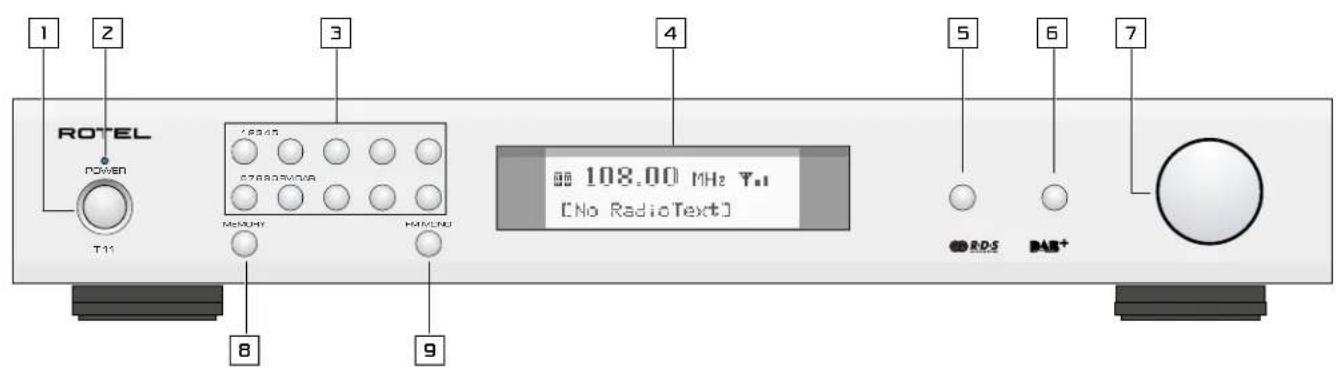
Figure 1: Controls and Connections Commandes et Branchements Bedienelemente und Anschlüsse Controles y Conexiones
Bedieningselementen en aansluitingen
Controllie concessioni
Funktioner och ansluitingar
Oprahby npabneHn pa3beMbl

Figure 2: RR-T98 Remote Control
Telekomande RR-T98
Fernbedienung RR-T98
Mando a Distancia RR-T98
Afstandsbediening RR-T98
Telekomando RR-T98
Fjarrkontrollen RR-T98
Пульт ДУ RR-T98
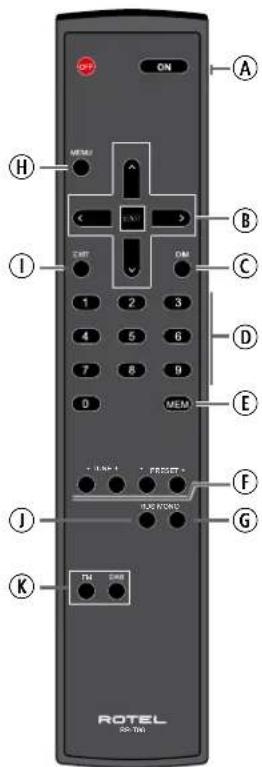
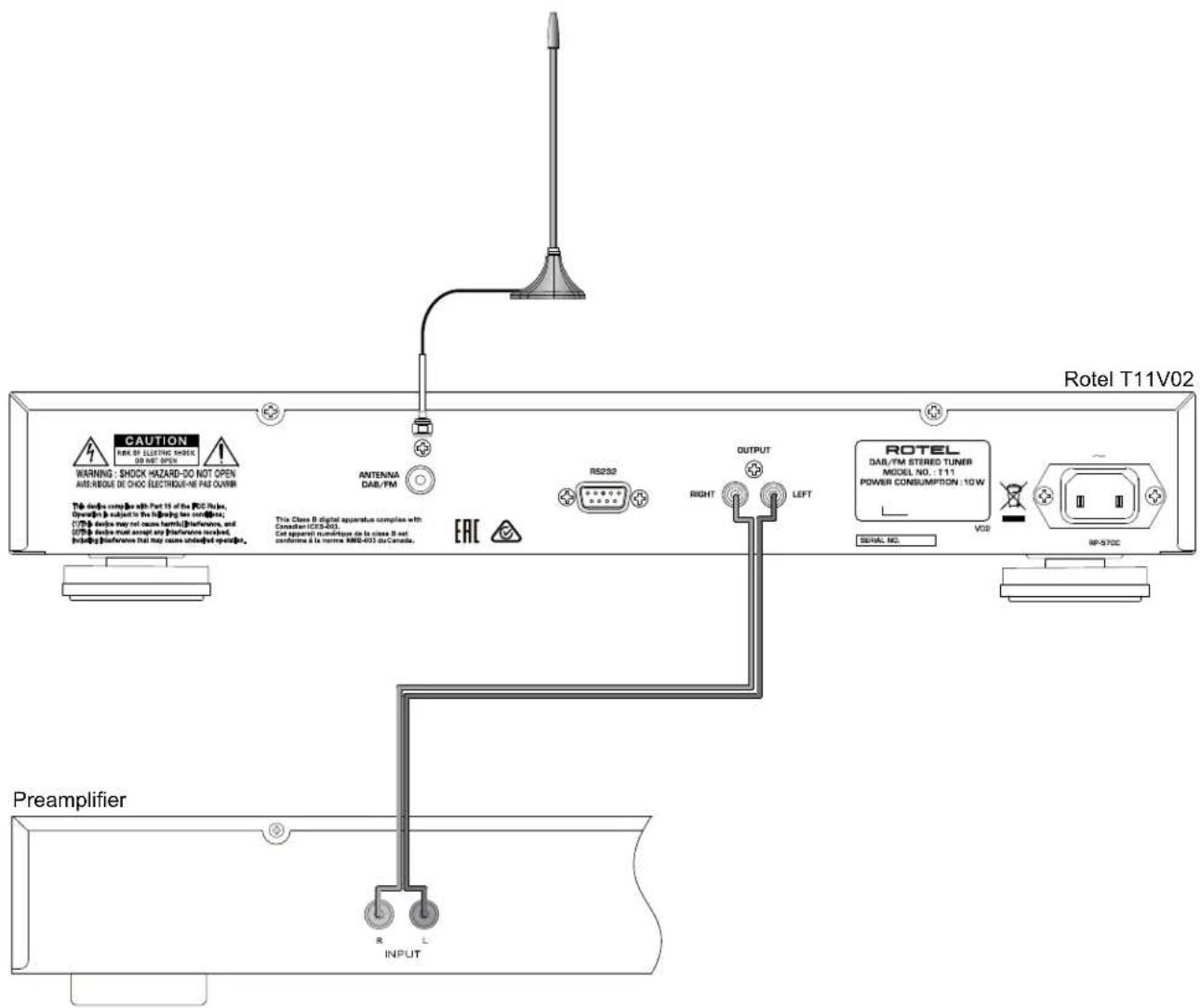
Figure 3: Hook-up Illustration Branchements Principaux Anschlussdiagramm Ilustracion del Conexionado Aansluten Afbeelding Collegamenti Inkoppling Cxema nodkluuehenia
Important Notes
When making connections be sure to:
Turn off all the components in the system before hooking up any components, including loudspeakers.
Turn off all components in the system before changing any of the connections to the system.
It is also recommended that you:
Turn the volume control of the amplifier all the way down before the amplifier is turned on or off.
Remarques importantes
Important Safety Instructions 3
Figure 1: Controls and Connections 4
Figure 2: RR-T98 Remote Control 4
Figure 3: Hook-up Illustration 5
Important Notes 6
About Rotel. 7
Getting Started 8
A Few Precautions 8
Key Features 8
Placement
AC Power and Control 8
AC Power Input 13
Power Switch 1 and Power Indicator 2
Connection Overview 8
DAB/FM Broadcasting
RS232 Connector 111 8
OUTPUT 12 8
FM RADIO. 8
FM Radio Station Playing 8
Storing a radio station in a preset 9
Playing a preset radio station 9
FM Settings Menu 9
RDS Broadcast Reception 9
RDS Button ①① 9
MONO Button ⑤⑥ 9
DAB RADIO 10
DAB Radio Station Playing 10
Storing a DAB station in a preset 10
Playing a preset DAB station 10
DAB Settings Menu 10
Remote Unit Advanced Buttons 10
Troubleshooting 11
Power Indicator Is Not Illuminated 11
NoSound 11
Cannot Tune to DAB/DAB+ Preset Station 11
Specifications 11
About Rotel
Our story began over 60 years ago. Over the decades, we have received hundreds of awards for our products and satisfied hundreds of thousands of people who take their entertainment seriously - like you!
Rotel was founded by a family whose passionate interest in music led them to manufacture high-fidelity components of uncompromising quality. Through the years, that passion has remained undiminished and the family goal of providing exceptional value for audiophiles and music lovers, regardless of their budget, is shared by all Rotel employees.
Rotel's engineers work as a close team, listening to, and fine tuning, each new product until it reaches their exacting musical standards. They are free to choose components from around the world in order to make that product the best they can. You are likely to find capacitors from the United Kingdom and Germany, semiconductors from Japan or the United States, while toroidal power transformers are manufactured in Rotel's own factory.
We all have concerns about our environment. And, as more and more electronics are produced it is especially important for a manufacturer to do all it can to engineer products that have a minimum impact on the environment.
At Rotel, we are proud to do our part. We have reduced the lead content in our products by using special lead-free ROHS solder and components.
Our engineers continually strive to improve power supply efficiency without compromise to quality. When in standby mode Rotel products use minimal power to meet global Standby Power Consumption requirements.
The Rotel factory is also doing their part to help the environment through constant improvements to product assembly methods for a cleaner and greener manufacturing processes.
All of us at Rotel thank you for buying this product. We are sure it will bring you many years of enjoyment.
Getting Started
Thank you for purchasing the Rotel Tuner. When used in a high-quality music or home theater system, your Rotel Tuner will provide years of musical enjoyment.
A Few Precautions
WARNING: To avoid potential damage to your system, turn off ALL the components in the system when connecting or disconnecting components. Do not turn the system components back on until you are sure all the connections are correct and secure.
Please read this manual carefully. In addition to basic installation and operating instructions, it provides valuable information on various unit system configurations as well as general information that will help you get the optimum performance from your system. Please contact your authorized Rotel dealer for answers to any questions you might have. In addition, all of us at Rotel welcome your questions and comments.
Save the unit shipping carton and all enclosed packing material for future use. Shipping or moving the unit in anything other than the original packing material may result in severe damage to your unit and void the warranty.
If included in the box please complete the owner's registration card or register on line. Also be sure to keep the original sales receipt. It is your best record of the date of purchase, which you will need in the event warranty service is ever required.
Key Features
- Listen to FM and DAB/DAB+ broadcasts.
- 30 Station Presets for memorizing your favorite DAB/DAB+, FM stations.
- RDS (Radio Data System) capability.
- DAB/DAB+ (Digital Audio Broadcast), a digital transmission available throughout Europe and other parts of world.
Placement
Place the unit on a solid, level surface away from sunlight, heat, moisture, or vibration.
AC Power and Control
AC Power Input 国
Your unit is configured at the factory for the proper AC line voltage in the country where you purchased it (USA: 120 volts/60 Hz, Europe: 230 volts/50 Hz). The AC line configuration is noted on a label on the back panel.
NOTE: Should you move your unit to another country, it may be possible to reconfigure it for use on a different line voltage. Do not attempt to perform this conversion yourself. Opening the enclosure of the unit exposes you to dangerous voltages. Consult a qualified service person or the Rotel factory service department for information.
The T11V02 unit should be plugged directly into a 2-pin polarized wall outlet or into the switched outlet on another component in your audio system. Do not use an extension cord.
Be sure the POWER SWITCH 1 in the front panel of the unit is turned off (in the "out" position). Then, connect the supplied power cord to the Power Connector 2 in the rear of the unit and the AC power outlet.
If you are going to be away from home for an extended period of time such as a month-long vacation, it is a sensible precaution to unplug the unit (as well as other audio and video components) while you are away.
Power Switch and Power Indicator
The power switch is located on the left side of the front panel. To turn the unit ON, push the switch in.
The indicator light above the switch will light, indicating that the unit is turned on. To turn the unit off, push the button again and return it to the "out" position.
Connection Overview
Before continuing further to other sections in the manual, please make sure all the cable connections are made properly. Refer to figure 3.
DAB/FM Broadcasting
Please use the supplied indoor antenna to connect the DAB and FM connector on the rear panel. Experiment with different positions to maximize reception.
RS232 Connector
The unit can be controlled via RS232 for integration with automation systems. The RS232 input accepts a standard straight DB-9 Male-to-Female cable.
For additional information on the connections, software, and operating codes for computer control of the unit, contact your authorized Rotel dealer.
OUTPUT 1212
The unit outputs a stereo analog signal. Use the supplied audio cable to connect it with input jacks of your pre-amplifier or processor. Be careful and make sure that connections correspond to each other. Right channel output must be connected to right channel of pre-amplifier's or processor's right channel and vice versa.
FM RADIO
Before listening to FM radio, make sure that the antenna has been properly connected.
FM Radio Station Playing
- Select FM Button from the source buttons display will show as below.
95.25 MHz [RDS TEXT]
-
Turn the knob 3 the front panel or use the up/down arrow buttons on the remote control to change the frequency of radio station. Turning the knob on the front panel or using the up/down arrow buttons on the remote control one step at a time changes the frequency one step.
-
To auto scan for an FM station, you can choose any of the steps below:
-
Press and hold the up/down arrow buttons on the remote control.
- Press the fast-forward/backward buttons on the remote control.
Storing a radio station in a preset
While a radio station is playing, push the memory button 8 press the number of preset assigned from numeric keypad 3 display will show preset saved. Up to 30 preset FM radio stations may be stored.
Playing a preset radio station
When a radio station is playing, you can switch to a preset station in one of the following ways.
- From the numeric keypad 3 pres preset number of the desired station.
- Press the PRESET +/-按钮 on the remote control to view preset numbers and corresponding station. Press the up/down B arrow buttons or the PRESET +/- F button on the remote control or turn the knob 7 7 on the front panel to select the desired station, then press the ENT B button on the remote control to select. Press the FM 5 button again to exit the preset menu and go back to playing status.
FM Settings Menu
Press the FM 5 button and toggle to the FM settings Menu. There are
3 sub-menus under FM setting.
- SCAN SETTINGS: Select between STRONG STATIONS ONLY or ALL STATIONS.
FM SETUP > STRONG STATIONS ONLY ALL STATIONS
- AUDIO SETTINGS: Allow Stereo or Forced Mono.
FM SETUP STEREO OR MONOMONO ONLY
- FM PRESET: Displays all 30 of the FM preset stations and allows tuning to the selected preset by pressing the ENT button on the remote control.
To make changes in the FM settings menu, turn the knob 73n the front panel or use the up/down Brow buttons on the remote control. To make a change press the ENT B button on the remote control.
RDS Broadcast Reception
This Rotel unit is equipped with RDS (Radio Data Systems) reception capabilities. The RDS broadcast system provides additional functionality to FM radio reception by transmitting encoded information along with the radio signal. This signal is decoded by an RDS receiver and can provide a range of informational features including:
- A display of the station's identifying name (e.g. BBC1).
- A display of the station's program content (e.g. ROCK or NEWS).
- Traffic information broadcasts.
- A scrolling text display for announcements or information.
- Current time and date.
RDS broadcasting has been widely available in many European markets for years. There are a large number of RDS stations and most users will be familiar with the features and operation.
NOTE: The RDS features are entirely dependent on the broadcaster sending properly encoded signals. Thus, they will only be available in markets where RDS is currently implemented and where stations are broadcasting these data signals.
RDS Button ①①
The RDS button on the remote control steps through the various displays. Press the RDS button on the remote control to step through the following displays.
- Radio Text.
- Name of station.
- PTY, or the type of content.
- Today's date and current time.
MONO Button ⑥
The MONO button on the remote control changes the FM mode from stereo reception to mono reception. In stereo mode, a stereo signal will be heard if the station is broadcasting a stereo signal and there is sufficient signal strength.
NOTE: Switching to mono mode can be a useful way to improve the reception of weak or distant FM signals. Less signal strength is required for clean mono reception than for stereo reception.
DAB RADIO
Make sure that your local area can receive Digital Audio Broadcast (DAB) broadcasting signal.
Press the DAB button on the front of the panel, or remote K
DAB channels are categorized into ensembles, which are also known as multiplexes. Each multiplex provides a number of stations and each service contains a primary service that can contain secondary services. DAB technology allows broadcasters to transmit additional data along with the audio, which can include other audio channels, text and even images and computer data in the future.
DAB Radio Station Playing
- SelectDAB button from the front panel and the unit will scan for available stations. After scanning you will see the following menu.
Station List
BBC 1
BBC 2
- Press the ENT button on the remote control to select the station and start playing the station.
Storing a DAB station in a preset
While a DAB station is playing, push the memory button press the number of preset assigned from numeric keypad 30 preset DAB radio stations may be stored.
Playing a preset DAB station
When a DAB station is playing, you can switch to a preset station in one of the following ways.
- From the numeric keypad [3] the preset number of the desired station.
- Press the PRESET +/-按钮 on the remote to view preset numbers and corresponding station. Press the up/down arrow buttons or the PRESET +/-按钮 on the remote control or turn the knob the front panel to choose the desired station, then press the ENT button on the remote control.
DAB Settings Menu
Press the DAB the front panel or remote toggle to the DAB settings Menu. Turn the knob on the front panel or use the up/down arrow buttons on the remote control to go through each sub-menu.
STATION LIST: Shows station list.
- LOCAL SCAN: Start a limited scan of available stations by pressing the ENT button on the remote control. (Not available in all markets).
FULL SCAN: Start a full range scan of available stations by pressing the ENT button on the remote control.
- MANUAL TUNE: Press the ENT button on the remote control and select stations manually by turning the knob on the front panel or using the up/down arrow buttons on the remote control.
- DRC, Dynamic Range Control: Select between "High", "Low" and "Off". Press the ENT button on the remote control and turn the knob on the front panel or use the up/down arrow buttons on the remote control to change.
- STATION ORDER: Display station order as either "Alphanumeric", "Ensemble" or "Valid".
- PRUNE STATION: Select between "Yes" or "No". The Prune setting allows you to remove stations that are not active or can not be received.
NOTE: Prune will remove unavailable stations from both the Station List and the DAB Preset List.
- DABPRESET: Displays all 30 of the DAB/DAB+ preset stations and allows tuning to the selected preset by pressing the ENT button on the remote control.
Remote Unit Advanced Buttons
SETUP
To enter the setup menu, press the MENU button on the remote control and you will see the following display:
SETUP
DISPLAY DIMMER
POWER LED DIMMER
- DISPLAY DIMMER: Changes the display brightness.
- POWER LED DIMMER: Changes the Power LED brightness.
NOTE: These settings are stored permanently even after the T11V02 is powered off.
- VERSION: Shows the software version loaded in the unit.
- FACTORY DEFAULT: Sets the unit into the original state as when it left the factory. Presets will be lost.
- EXIT: Exits the setup menu.
DIMButtonC
Remote Only
Press the DIM button repeatedly to change the DISPLAY brightness.
NOTE: Adjustment made using the DIM button is temporary only and not saved after powering off the T11V02.
EXIT Button ①①
Remote Only
Pressing the EXIT button will revert from any menu and back to now playing status.
Troubleshooting
Most difficulties in audio systems are the result of incorrect connections, or improper control settings. If you encounter problems, isolate the area of the difficulty, check the control settings, determine the cause of the fault and make the necessary changes. If you are unable to get sound, refer to the suggestions for the following conditions:
Power Indicator Is Not Illuminated
The power Indicator should be illuminated whenever the unit is plugged into the wall power outlet and the power button is pushed in. If it does not light, test the power outlet with another electrical device, such as a lamp. Be sure the power outlet being used is not controlled by a switch that has been turned off.
No Sound
Check the cables between the output and the pre-amplifier inputs, be sure they are connected properly. Refer to Fig. 3.
Cannot Tune to DAB/DAB+ Preset Station
Some stations may become unavailable and will be displayed in the Station List with a "?" character in front of the station name. These stations are no longer broadcasting or received by the T1 V02 unit. Presets that are set to these stations will not function and if selected the T1 V02 unit will display the DAB menu. To remove stations no longer transmitting use the PRUNE function in the DAB Menu. This will remove these stations from the Station List and from the Preset list.
Specifications
FM TunerFM Tuner
Usable Sensitivity Usable Sensitivity 22.2 dBf
50dB Quieryng Sensitivity 50dB Quieting Sensitivity 27.2 dBf (mono)
Signal to Noise Ratio Signal to Noise Ratio (at 65 dBf)
MONO 63 dBf
STEREO 60 dBf
Harmonic Distortion Harmonic Distortion (at 65 dBf)
MONO 0.2%
STEREO 0.3%
Frequency Response Frequency Response 10Hz - 15kHz, ±3dB
Stereo Separation Stereo Separation 40dB/37dB
(100Hz/1kHz)
Output level 1.0 V
Antenna Input 75 ohms F connector
DAB Tuner
Sensitivity -80 dBm
Tuning Range Band III (174 - 240MHz)
Audio Data Rate 224kbps (Max)
Frequency Response Frequency Response 20 - 20k Hz +/- 1.0 dB
Analog Output 2.1V at 0 dBFS
Antenna Input 75 ohms F connector
General
Power Consumption 10 watts
Standby Power Consumption < 0.5 watts
BTU (at 5 watts) 17 BTU/h
Power Requirements (AC)
USA: 120V, 60Hz
Europe: 230V, 50Hz
Dimensions (W× H× D) 430× 73× 330mm
(17x2 7/8x13in)
Front panel height 60 mm
Weight (net) 4.3 kg (9.48 lbs)
All specifications are accurate at the time of printing.
Rotel reserves the right to make improvements without notice
Rotel and the Rotel Hifi logo are registered trademarks of The Rotel Co., Ltd. Tokyo, Japan.
CAUTION
RISK OF ELECTRIC SHOCK DO NOT OPEN

WARNING: SHOCK HAZARD-DO NOT OPEN
AVIS: RISOUE DE CHOC ÉLECTRIQUE-NE PAS OUVRIR
This Class B digital apparatus complies with Canadian ICES-003.
Reception radio DAB/FM 15
Prise RS-232 15
SORTIE 16
RADIO FM. 16
Lecture de stations de radio FM 16
Poids (net) 4,3 kg (9,48 lbs)
This Class B digital apparatus complies with Canadian ICES-003.
95.25 MHz [RDS TEXT]
This Class B digital apparatus complies with Canadian ICES-003.
95.25 MHz [RDS TEXT]
This Class B digital apparatus complies with Canadian ICES-003.
95.25 MHz [RDS TEXT]
This Class B digital apparatus complies with Canadian ICES-003.
Antenna radio DAB/FM 10
95.25 MHz [RDS TEXT]
Premendo Anything to do.
Rispostin frequenziRispostain frequency 10 Hz-15k Hz,±3dB
This Class B digital apparatus complies with Canadian ICES-003.
95.25 MHz [RDS TEXT]
- Vrid pa ratten 7a frontpanele erer anvander UPP/NER-knapparna 8a fjarrkontrollen for att byta frekvens bland radiostationerna. Vrid pa ratten 7a frontpanele erer anvander UPP/NER-knapparna 9a fjarrkontrollen et steg i taget anders frekvensen stegis.
-
Gör námgot av foljande for att leta after en FM-station automatiskt:
-
Hallinne UPP/NED-knapparna fjarrkontrollen.
Tryck pa spelora framat-ller spelola bakatknapparnfjarrkontrollen.
Lagra en radiostation i minnet
The Rotel Co. Ltd, Tokyo, Japan.
CAUTION
RISK OF ELECTRIC SHOCK DO NOT OPEN

WARNING: SHOCK HAZARD-DO NOT OPEN
AVIS: RISOUE DE CHOC ÉLECTRIQUE-NE PAS OUVRIR
N3o6paXeHne MOHN B paBHOCTOpOHem
TpeYOrbHnke npDeynpExJaTe NOnb3ObaTeNa
O HAnHHN BHYTpK OKPnCy IA3NeiEN
HE3OIOPOBAHnHO HApRAJEXHn, BBNMnHA
KOTOPORo MOKeT COzDaBaTb OnaCHOctb
NOPaHXHe YNoBEKa 3JKeKTpHcECKTM KOKOM.

M36paJHexHe BocknUaTeIbHoro 3HaKaB aPabHOCTOPOHHE TpeYOrbHKe npeyIpyKdAeT NOJIb3OBeTAJIr O HAIHNB CCONPOBOXDAIOU ANNAPAT DOKyMeHTaUN BAKhBxH NHCtpyKuNo KcKNyatauN M TECHNuCeKOMyOBcNyKbAHMo.
JNAKAHAADI IN DPYTNX CTPAH, TDE YCTPOINCTBO OIOBPEHO K NCIIOJIb3OBAHNI.
CAUTION: TO PREVENT ELECTRIC SHOCK, MATCH WIDE BLADE OF PLUG TO WIDE SLOT. INSERT FULLY.
ATTENTION: POUR EVITER LES CHOCSE ELECTRIQUES, INTRODUIRE LA LAME LA PLUS LARGE DE LA FICHE DANS LA BORNE CORRESPONDANTE DE LA PRESE ET POUSSER JUSQU AU FOND.
3TOT uΦpOBoAnnapApTa KlaCca B cooTBeTCTByET Tpe6oBaHnAaKaHaDcKOrO cTaHdApTa ICES-003.
BaXhble HnCTpyKcunn no 6e3oNaChocTu
IPEIOCTEPEXHEHNE:BHTPNHETaCtTe,DOCTyINbIXDnO6cnyKbAHnNOlb3OBaTeMe.ObepbTe 06cnyKbAHnke KBaInmOpobAHHom My MaTepy.
PNEOCTEPEKHEWE:Jn CHKHeHn OAnCHoTbB03rOpAHn HnnpaKeHn 3NeKtpueckm TokOM He nOBeBaPrAe DnHHn Anapat B03dEChBnOdoKn HnBnH. He npOyckai Te nonadHn NoctopoHNHX PneMetBbHTpyknpya. EcnBHytpb KpOpyCa nonana Blara nnocToPOHHn PneMet, HemeJeHNO BbHbTe BNky uHpyaPiTHANN3 pOEtKn. Octabte annapa K KBaHnHnpuBohHomny CneuNaHcy T dnnOcMTpaN BO3MOxHO rpoMHTa.
IpoountaiBCEHCTpyKzM.
CoxpaHte3To pykoBOCTBO.
06paataeBHMnHHeHa Bce npedynpexdHnA.
CnedyTe Bcem HNCHTpyKuam No kcnnyataaun.
HeHcnoIb3yIe 3To yCTpoIcTBO B6n3M BOIa.
OuMaaiTe Kopnyc ToBko npn nmoOnu cyxoh TpAnKn Hnn bInecocm.
He ctabte annapa H KaPobatb, DnBaH, KOBep Hnnoo6hyo Markyo Nobepxhoctb, Kotopar moKet 3aIopOaHTb BENTHmuaHnHbe OTEbpCTHa. Ecnn annapat BcTpaBaeTc B WkaΦn Dpyro Kopnyc, 3OT KopnycdoJenKe HBeTHmnpoBaTc pna oecneuehenoxnaJeDHH annapata.
JepKnte annapat noanbue oT paHnatopob otponnne, oObrpebaTeen, neei nno6bx npyTHX yctpoiCTB, BduJIaONuIX TENNO.
IionpH3ObaHHb IHTeep HMeET DBA HOKeBbIX KOHTAa, OINH 3KOTopbX IIpe npyToro. 3aemnlouim IHTeep HMeET DBA HOKeBbIX KOHTAa N Tpetn 3a3emnlooiiu nTbpb. OHn o6eCneuBaHOt BAUY 6e0anachOctb. E ToK3bIaIBaTePcOT Me pE 6e0anacOCTH, PpeOCTabReMaBX 3a3emnlouim HnI IONPAHOBABHHM IHTeepoKem. EcnH NOCTaBmE MHTeep He NOxDmT K bawe po3eTke, o6paTHteC K 3eektpkY dnn 3aMeHb YcTapeBwe p03eTKN.
He npoknabibaIte cTeBoiMhpyTAMrEohMOKeT6bIbpa3dABneH,NpeKAt,ckpyeH,NoDBepHTY B03eCTBNO TEIIaNNIOBpeKJHekKIMNIOBOcOcO6OM.0bpaJIaTEOC6OE BNMMHNE HcTeBEO mhypBbHN WtkepeHaTAMrEohBXoDITB3aNDHO NaneHb yCtpoiCTBA.
IcnoIb3yIteToIbKO npHaadJeXHoCTH, yKa3aHHbIe IpoH3BoUHTeNEM.
NcIb3yIe ToIbKo TeneKHy,ToaBKy,ToHKy,KpOHeTKe HnII NOn KpO DcTaTOHO CInbHbM,ITc06bIbDcpKeTaB 3OTn I3dENa. BybTe OcTOPOKHNbPi nepemeeHNi PnpObaHa NoTcTaBKe HnIO KeTo BnI6EkaHNa PAHEnHn II NpOBpeKHNs I3dENa.

CeteboIuHyp cneayet oToeDMHbTb ot CTehHOI pOeTKB O BpEmra Ipo3blnn enn npH6op octabne HEMCNOB3yEBM M DHTENbHO BpEMr.
HMeIeHHeNo npekpatte McnoB3oBaHne KOMnoHenta H nepeDaTe Ha o6cneObaHne H/nnn 06cbnyKbAHBe NKBaHnHmPoBaHBOHn PemOHTHoR opraH3aUmeE cIn: ceteBOuHyp HnN WtEkep 6bln NOBpeKdEe; BHTbp npi6bpa yOHNn pnpDMtBu nnPpONn HKnKocTB; np6bOp No6b1an noDdoJEM; npi6op demOnTbpnyet pN3NaHn HEhopMaBHO npabTo; np6bOp yOHNn HnN NobpeHn NIO6bIM dpyrHM CNO6OBM.
Annapat cneyet hnoj308aB b HETponueckom klmate.
He cIeDyET npEnrTCTBOBaTB BEHTMIAUH,3aKpbBaB EHTMIAUHOHHbIe OTBePcTHraKMMnpEIMTaAM, KaKa3eTbI,CKaTePTh,UIToPbI r.Ⅱ.
Ha yctpoCTbe He doJIKNHO 6bIb HcTOUHNKOB OTKpbITOrO rHn, TaKHX KaK 3aJKeHHbe CBeH.
PnKoCHOBeHne K HeH3OJInpoBaHHbIM KHeMMaM Hn NpOBoDke MoXeT PnBecTH K HeNpHrTHbIM OuYUeHNAM.
IPEIOCTEPEKHEIe: CeteBoi pa3bem Ha 3aDHei NaHEni NpeDHa3HaueHdIg 6bIcTPOo TcoEaHHeHn yctpoCTBa O tJeKTPueckO ceTn. YcTpoCTBO DOJNkHO o6ecNeuHBaTB cbo6OdbHIO DCtyn K3aDHe naHEni, YTO6bI cTeBoi Ka6eB MoKHO 6bJI0 bIcTPO BbIepHyTb.
CetbeoHaanpIaKeHHe, KOTOPOMyNOIcoeIHNAETcAnnapaT, DOnKHOoCBTCTBOBaTb Tpe6OBAHnM, yka3aHHbIM Ha 3aDne HaneHn annapata. (CUSA: 120 B, 60 T, EC 230 B, 50 T)
NIOOcEOHNHOIe K NIOHOeH T KO HIOAOe PO3eK ToNBO npn NMOoH cTeBoro UHpya M3 KOMNIeKTA NOCTABKN, NIN ERO TOUHO R KEBNAJEHTa HE nepeDenbAte NoctabMnBmHyp. HE NcONBByTE YDNIHHTENB NTAHN.
OchOBHn BUNKa cTeBOro shHypa cnHyMt Ira OTKHoueHN annapata ot cetm. JnnaonHoro OTKHOHn H3dENOT NtAIOUcE CETn, BUNKy cTeBOrO KaBeN CnEyETOCoeHNbT ot cTeBOM pOeTKn nepemEHNO ToK a TAKKe H3dENr. 3To eHNCTBeHNb nCnOc6, YTObI NOHcTBOn ydaJIbT cTeBOE NTaHNe TO H3dENr.
Batape Bynbte NCTaHnHOHHoro YnpabneHna (Jy) He doJIKNb IooBepraTbCBAO3deICTBNIO H3NJHrero Tena, TaKOro KAK CoJIHeHb CBeT, OOrHb n.T.I.
3To yctpoiTHBOydoBnTEbopRte Tpe6oBaHHaCTn Part 15 npabH FCC n ABnEeTc cy6BeKtOM cneDyoUHXyCIOBN: (1)3ToCyTOPTHO THE MOKeT BbBbTaBbPeBHe NOMEx, n (2)3ToYcTOIeKTO DOHNKHO BbDEpHKBaTbN BoNbbe PInNHMaEMbE NOMEx, BkIOuA TaKHe NOMEx, KOTOpBe MOrTy PnIBeTH K HeKeNaTeBbMm OTKHOHeMeM MT OHpMaBho PaOBoTb.
Copepkanhe
Pcynok 1: OprahbIy npaBnHn npa3bEmb4
Pcynok2:IynbT DY RR-T984
Pcynok3:Cxema nOdkIouenHm5
Baxkhble 3ameyHn6
Baxhhe HcTpyKnn no 6e3oNaChocn. 55
O KomrnaHn Rotel 56
PpucrynaKeknnyara.. 57
Hekotopbile Mepbipnpedocptopoxhoctm57
OchOBhBxepaKTepeHnKu 57
Pa3MeueHne 57
ynpabneHne nHTaHnem 57
BxD nITAHn NEpeMeHHOR TOKa 157
BbIKHouateIbIHTAHINHHIMKaTOp257
063op coeMHHeHm. 57
PAnoBeeaHne DAB/FM 97
Pa3bem RS232 157
BbXoD - OUTPUT
FMpaio 58
Bocnpn3BeJeHne FM paDIOCTaHnn 58
CoxpaHHe paDIOCTaHmB AueKe npEpaTbeHoHaCTpoKn 58
Bocnpn3BeHne npceToB paHocTaHn 58
MeHIOyCTaHOBOK FM 58
IppemRDS 59
KhoKaRDS 58
Khonka MONO 58
DAB padno 59
Bocpoon3BeDHe DAB padnoctaun 59
CoxpaHHepe padmoctaHnD AB B ayeke npdeBaPntbHn HactpoKn (npceTe) 59
Bocnpn3BeDHeHne ppeCetOB DAB padnoctanu 59
MeHIO yCTaHOBOK DAB 59
KhoNpaacnpeHHbixyHKmnylba.59
Bo3MOXHbIe HcnpabHOCTH 60
He roput HndkaTop nHTaHn 60
0TcyTCTByet 3ByK 60
HeBo3MoXHO HAcTpoNTbCnHa npeCtB DAB/DAB+ CTAHnn 60
TexHHueckHe xapaKTepuCTuKN 60
O kompanu Rotel
Haia nctopnHaayanac6oone 60 net Ha3ad. H npotjkehen DecaTneTm, MblnoytncoTHnHarpa3Haansn3deNnU yDobnetBOPnIcOTHbICrA IIOJe, KOtOpble Tak Jke cepbe3HO OTHOCATcK CBOIM pa3BNeueHnM, KaK NBl!
KOMnHaHrROTEL 6bIJa OCHoBaHa CeMbEi, KOtOpaI 13-3a CtpAcTHoi IIO6Bm K My3bIke 3aHraIacb IIPOUN3BODCTBOM hi-fi KOMnHOHTOB 6eCKOMnPOMNCCHORO KaHeCTBa. C rOdAMN 3a TcPaTb He yTHXla, H cEROnHr CTpeMJIeHne CEMbN K oBeCneueHIO ayDnOΦmIoB N MeNoMAHO, HE3aBNCUMO OT IX ΦINHaHCOBOrO nONKeHnA, annapatypo BbICoAHwero KaHeCTBa, pa3dEnIOT BCE COTpyDnIKR ROTEL.
IpyKHa KOMaHdA HnHexeHOB PpocnyuBaETnTaTeNbHO HAcTpaNBAeTKKaJDo HOBOE N3dene, NOKA OHO He 6yEt COOTBeTCTBOBaTb Nx Tpe6oBaTeNbHbIM My3bKaHbMCTaHdpTAM. IMnpEOCTaBHeCA Bo6Oda Bb6OpaKOMnIeKTyOuixN NO BCEMMyMPy, UTo6bCEnaTb AnnapaT KaMKHOyUHe.BepoTHO, BbCMoxTe HaHTN KOHeHcATOpby IN3 BeNkO6puTahnn IN EpMaHH, NOynpOboDnHKn IN3 AOnHNn IN CUSA, A TaKxe TopoJaIbHbe CInNoBte TpaHcΦopMaTOpbl, IN3rTOBLeHHBe Ha Co6CTBeHHom 3aBoDE ROTEL.
BceMb3a60tMc6OxpaHeOkpyKaioeIcpebl.No Mepe TOro,Kak Bce 60nbwe 3NEKTPoHHbIX yCTpOCTB BMpe BbyNcKaETCA,anocne OKOHuaHn CPOKA cnykbblb6paCbBAeTcra,nnPon3BOMDTeRAOC6EHBO BaxHO npn KOHCTpyuPoBaHNPiOdyKTOBcEaTb BCE BO3MOXHO,HTo6bl OHHaHocnn MNHMmaBbHbYuepe6Zemne HNCTOHHKAM BObl.
MbB KOMnAHm Rotel, ropIMCBA CBOHM BkIaDM Bo6uee DeNo.Bo-nerbIX, Mbl cokpatINu COepXaHHe CBNUa CBoeNtPOHKe, 3a cuETNCIObn3OBAHn npinno, oTBeauoero Tpe6oBaHnM ROHS. Hauu INxkeHepbI NOCTHO CTpeMaTc ynyuWntb K.I.P. 6JOKOB NITAHNA, 6e3 yuep6a INaueCTBa 3ByaHnA. HaxoRb B pexKIme OxuaHnA standby npodKytb Rotel nCOnlb3yOT MNHmAbHoe KOInueCTBO 3HEprn, 4TO6bYIOBnTBPOpNT RIO6aJIbHbIM Tpe6oBaHnM Ha notpe6JeHne B pexKIme OxuaHnA.
Фбрka RotelТакke BHCNT CBW BKnlaB Bуnyшпс oxpaHbOxpykaioue CpeblIyTmTOcTOrHHORo COBepJIeHCTBOBaHnI pON3BOJCTBeHHbIXpOceCCOB,ДелЯnxBce6OJIee YNCTbIMN IN «3eJIeHbIMN».
BcMbB KOMnAHm Rotel 6naOapum Bac 3a npno6peHne 3toro annapata. MbyybepeHb, yTO OH nOapIT Bam DoJIme rObl HacnaKdHn.
PpncTypaKeknpyatau
BlaoradapimBac3aPnO6peHHe Ctepeo TIOhepa Rotel.PnpNCnoJb3OBAHIN B BbICOKKaueCTBeHHoMy3bKaIbHO CNCTeMe INI DomaHHeTeaTpe,BaDAB/ FM Ctepeo TIOhep Rotel oecneHTMHOne rdo My3bKaIbHOr HacnaJdeHn.
HeKoTOpbIe MepblippeJocToPoxKHOCTN
PIMMEYAHNE: Bo u36ekahue 803moKHO2O noBpeKeHnue KOMnoHeHmou cucmembI, BCE nodcoedunehu U omcoedunehu npou3bodume npu 8bkyloeHHom numahu. Ipexke Yem BkIOyamb numaue, y6edumecb, ymo coedunehu BblonHe bnpabunbHo u Hadexho.
IoxanyiCTa, BHIMATEbHIO npouHTaTE 3TO pykoBDcTB0. B donoJIHeHne K OCHOBHbIM INHCTpyKUINr NO yCTaHOBKe IynpaBleHIO, OHO daET BaxHyO IHΦopMauNIO o pa3nHbIX KOHfrypauqnx CnCTeMbI Ha 6a3e T11V02, a TaKxE O6UYIOHΦopMaUINO, KOTOPA NOMOKeT Bam NOnyUHTb ONTMAbHoE KaueCTBO OT BaWei CNCTeMbI. IoxanyiCTa, OBpaTIteCb K BaWemy ABTopn3oBaHHomy DInepy Rotel 3a OTBetAMn HIo6bIe BO3MOXhble BONPocbl. KpOME TOR, BCE cotpydNHKn KOMNaHHn Rotel npNBETcBYtO BAHN BonPoCbl i KOMMeHTapmI.
CoxpaHnTE TpAHCnOpTHyIO KapToHHyIO Kopo6ky I Bce BNoKeHHbIe yNaKOBouHbIe MaTePnAbI dy nCnObl3oBaHnB B 6dyuem. IpeEcblka nn nepeBo3ka T11V02 B cHm-To dpyrom, KpOme OpunHaNbHorO yNaKOBouHOrO MaTePnAna, MoKet npInBeCTN K cepE3HOMy NOBpeJdHIO BaUero npIn6opa.
Ecn OHO BkIOUeHO B KOpO6Ky, NOXaIyIcTa, 3AnONHITpe prrctpaunOHky KAPTOUY BnAeNBua NIN 3apeNCTpnpTyTecb OHnaH. CoxpanHTe Yek O npdaJe. OH ABnETcnyuIM NcBMeHHbIM NOtBepXdHEm DaTb npno6peTeHn, KOtOpoe NoHaO6ntcBA Bm B Cnyae, eCn KOrJa-1n6o notpe6yETcRAPaHTnHoe 0cbNyKuBaHne.
OchOBhbieXapaKTepcntkU
-Посушване Вцаня DAB/DAB+ FM padnoctanm.
- PamaTb Ha 30 npedctahOBok dna Baunx nIOmbix paNocTaHn DAB/DAB+, FM.
- Ппем Информацьи RDS (Radio Data System).
LlΦpoBoe paIIO DAB/DAB+ (Digital Audio Broadcast),Takne nepeaun doCTynHbNo BceI EbPone (KpOme Pocnn, noka).
Pazmeuenie
UctaHOBInTe UcTpoINCTBO Ha TBePdoi, rOpN3OHTaIbHOJ NOBepXHOCTn BdaJI NOT COJIHeuHORo CBeta, TeNa, BlaIaN NII IN B6paun.
YnpaBJIeHne NHTaHHeM
Bxod nntaHn npemehnHO ToKa 13
BawyctpoCTBOCKOHpynpoBaHOHa3aBoeDn npabInbHoro HanpaeHnCeTn nepemehHoro ToKa B Toi CTpaHe, rBe bIe er npno6peN (CUSA:120B/60 Tc, Ebponeckn coio3:230B/50Tc).KOnHpyraCaHn CeTn nepemehHoro ToKa yka3aHa Ha NaKeJe, Ha 3aNeH naHEn BaWero np6opa.
PIMMEYAHNE: Ecnu Bb nepeedeme 8 dpzyio cmpany, moxno npucnocobmb ycunmene K dpzomy cemebomy Hanpexnho. Odnako, ne bimaumecb cdenam 3mo camu. Omkpbaan Kopnyc bbl noDBepzaemecb onacnoMu blicokoz0Hanpaxhenu. Obpamumecb K KBaunuupoabHOMy macmepy uui b cepbuuchny Cnykby Rotel.
IPIMUEAHHE: HekomopbIe npodykMbI npdeHa3NaYeHbI dny npodaku 6olee yemB oDhoU cmpaH e u no3mOy nocmaeJIOmc c Heckonbkmu cemeBmu Ka6eMaMu. IcnoIb3yUme monko mom Ka6en, Komopbu nodxodum dny bauezo peuoha.
T11V02 cneayet BKNIOUaTb npAIMO B DByXKOHTaKTHyI HaCTeHNYo po3ETky INB KOMMYTINpyeMyIO po3ETky Ha pYROM KOMNOHEHe BaWe ayDIO CnCTEmbl. He nOJIb3yInTEcb ydINHNITeJAMN NITAHIN.
Y6eHNTecb, YTO nepeKIOUaTeB nHTaHnIPOWER SWITCH 1 HnepeHne HnEHN T11V02 HaxoNDTcB NNOJKeHm «BbIKHOeHO».NocNE 3TORBOCTABBe OIN KOHeu SHypa B pAsbEM NITAHnI NEpeMeHHORO OKa Ha 3aDHei NaHei np6opA. BCTABte Dpyroon KOHeu cTeBOro SHypa COOTBEcTBHyouy opo3eTKy nepeMeHHORO TOKa.
Ecnn Bbl co6npaetebc yexaTb n3 doma Ha nnntelbHoe Bpem, paaymnoi npedoctopoxhoctb6ydeTOTcoeHNHTB bau ctepeo TIOhep T11V02 (a TaKke dpyrne ayuio n BuDeo KOMNOHeHTbl) OTcTu.
BbIKIOaTeNb NHTAHNA HINHIMKATOP 2
BbKIOUaTeNbPiTaHnPaCpNoIooKeH CReBaHa nepeDHe NaHeN. YTo6bl BkIOuHTb Pnp6Op, HaxMITE Ha nepeKIOUaTeNb.
3aropntc HnndkaTOp CBepx nepeKIOuTaTeY, yKa3bBa, YTO np6Op BKIOUeH. T06bl BkIOUHTb np6Op, HaxMITE KHOIky eue pa3 N BO3BpaNTe ee B OTkaote NOIOKeHne.
0630p coeHHeHn
IpeTeM, kaknepeiTuK npyTm pa3dJeam pykoBocCTBa, noxanyuCTa, y6eDInTeCb, TTO BCE ka6eIbHbIe CoeINHeHn BblIOJIHeHbI DOJXHbIM O6pa3OM. 06paTInTeCb K pncyHky 3.
PaNoBeeaHne DAB/FM 10
PoxanyuCTa,ncnoB3yTeKOMHaTHyIO aHTeHHy dIraNoCoEINHeHH naHpa3bemaDABnFMha3adneHnaHEn.10aKcnpImeHTpyteCpa3nHbIMn pNOJKeHNMnIgMAkCMm3aun npHmAmeroCrtHana.
Pa3bem RS232 11 11
TIOHEPOM T11V02 MoXHO ynpabnBTo No nocIeIOBaTebHOH WHe RS232 DnI INTERpaunrero B CNTEmy ATOMaTHaCm. Pa3bem RS232 npHUMae CTAndApThbKabeBcBNIKOHB-9 (Male-to-Female).
IynoHnIOHnTeBHOHnHOpMaUNoCoEINHeHM, nporpaMMHOmy o6ecneHNO HKOaM KOMaHdT11V02,CBAJNTecb CBaAMABTOpN3ObaHHbIM dInepom Rotel.
BbIXoA-OUTPUT12
TIOHEP BbIaET aHAnorOBbl cTepeo CnHAN. NcNOnb3yIe npnnaRaembl aydno Ka6enb Iyra CoeHNHeHraero CBXOHNbIMpa3BeMaMn PpeynCInTeJIu npouecoppa.ByBte BNIMATEbHbI y6eINTEcb YTO CoeHNHeHra COOTBECTBYOT dpyr Dpyry. BByxO npaboro KaHala DoJKeH 6bITb CoeHNHeH C BXODm npaboro KaHala npdeynCInTeJIu nnnnpocccopaHaabopot.
FMpaiano
Ipeep npocnyuBaHnem FM paNocTahn, y6eHTecb, yTO aHTenHa noDcoeHNHeHa DoJKNbIM o6pa3OM.
Bocnpoun3BeDeHne FM paHnOCTaHcHm
- Bb6epnte KhoNky FM ceneKtopa c nepedne naneHn Ha dncnnee noBNTc coo6eHne BPOe CneDyUero.
95.25 MHz [RDS TEXT]
-
NOBOPaHBaIe pyKy? HnpeJeHne naHeH nHn HaxmMaTe KHOKN UP/DOWN 8 Ha nyIbTe naHeH nAcToPoiKn dJa I3MeHeHn yAcTObTb paNIOCTaHn. NOBOPoT pyKy? HnpeJeHne nHn HaxmMaTe KHOKN UP/DOWN B Ha nyIbTe Ha ODNH WaR MeHReT qAcToTy TaKke Ha ODNH WaR.
3.ДЯвТOMATUчecKOrO cKaHnPOBAHn FM padnoctaHm BbI6epNte OdINH m3peXIMOB.: -
Hακμπeι ηγερχπeι Κκονηι Σρ/DOWN (B) ha πηλβε.
Hakmte KhoKn6bIcTpo nepemotkn fast-forward/backward Hnybte.
CoxpaHeHne paAnocTaHcIMN B JaYeKe IpeDbapntbHoi NaCTPOKn
Noka BOCPON3BODITcpaJIOCTAHU, ydepKJBaIte HaxaTOH KONKY naMTn 3aTEM HAXMITEHOmepAueeKN,Ha3NaHeHHb CUNPOBOI KnaBnATpyb DnCnIe NOKAKET COXPAeHNbI pceet. MoxHO coxPARbDo 30 npeCeTob npEdbapTeBHO HAcTPOeHNbIX FM paIOCTAHU.
Bocnpoun3BeDHeIpeCeTobpaNocTanu
Korda Bocnpon3BODHTcpaNIOCTaHcHb, BblMOKeTepeKeIIOUHTbcHa nppyyO npedBapnteNo coXpaHeHHyO paNIOCTaHcHIO OHNIM N0nCaHHbx HnHex cnoocob.
- Haxmte Ha zu npobn KnabnaType D Homep rueeKn Jenaemop paioctaHnn.
- HaxMITE KhoNkY PRESET +/- F Ha IyIbTe IJn BbI3OBA HOMePOB IpeCeTOB IN COOTBeCTByIOUx paIIOCTaHcIIN. KpOME TOrO, MOXHO HAXIMATb KHONKUP/DOWN B IINI KhoNkY PRESET +/- F Ha IyIbTe IJn IOBOPOT pyCKInepeHHe NaHEIn IJNA BbI6Op JKeJaEMo PAIOCTaHcIIN, a 3ATEMaHaKaTb Ha KhoNkY ENT B Ha IyIbTe IJn NOITBepKdEHN BbI6Op. HaxMITE KhoNkY FM eJe pa3 IJN BbIXOda N3 MeHIO IpeCeTOB IN BO3BpaTa KBOcPOn3BeDeHIn OpaIOCTaHcIIN.
MeHIO yCTaHOBOK FM
Haxmnte Ha KhoNky FM n nepeknoytecb MeHIO yctaHObOK FM. B hem OTKpoETc TPN NOMeHIO:
- SCAN SETTINGS: BB6oppeXmMa cKaHIpOBaHnM, MeKdY ALL STATION (Bce CTahu) n STRONG STATIONS ONLY (ToIbKO cTaHUn C CInbHbIM CnHrHaNoM).
FM SETUP
STRONG STATIONS ONLY ALL STATIONS
- AUDIO SETTINGS: bbl6op pekma npneMa, mekdy Allow Stereo (pa3peuHtB ctepeo) mni Forced Mono (npnHydntbHoe MOHO).
FM SETUP
STEREO OR MONO *
MONO ONLY
- FM PRESET: BbBODnHT Ha nncnneB BCE 30 npcecotBF paNocTahn m No3BOJnE T HAcTpaNBaTbcra Ha BbIbpaHHbI npcecet HaxaTmem Ha KhoNkY ENT BHa nyIbTe.
TtO6bI BHeCTn 3MmEHeHn B MeHIOyCTaHOBOK FM dnaIana3oHa, NOBepHInTe pyuKy 7 HnepeHneH nIeHn IIN HAKIMaIte KhoNk UP/DOWN B Ha npIbTe. TtO6bI BHeCTn 3MmEHeHn B nAmrTa, HAKMITE Ha KhoNk ENT B Ha npIbTe.
Прием RDS
3TOTIOHEP Rotel o60pyoBaH cnCTeMoI paNIOaHnBix RDS (Radio Data Systems). FM paNIOCTaHcII, BEEaOuIe B 3ToI CNCTeMe, nepeaIOT dOnONHtEnbIbe daHHbIe, KOtOpIe DeKoINpYIOITc RDS-TIOHePOM nNo3BOJAIOT noJyHTb pa3JIHyIO DonOIHNTeBHyIO NHOpMaIIO, BKIOUaIa:
- BvBeCTn Ha DCNpIe NsBaHne cTaHcNn (HaNPmEp, BBC1).
- BbIeCTn HaIcPneT TIN npOrpaMMbl, nepeDaBaemO tAHcnei (HaNPmep, ROCK nnn NEWS).
3.Перетаунобобтоновке на doporax(tpaфиke). - BbIeCTn Ha nCnIe I nepeDabAeMbI paIIOCTaHcIeN TeKCT (O6bABHeHn T.n.) B pexime 6eryue cTpOKn.
- BbIeCTn Ha dncnne TeKyuuee BpeM n DaTy.
CnCTema paIIOdaHbIX RDS yke MHOrne roIbI IuPoko pacnpocTapeHa B CtpaHax EbpOnbl.MHOrne eBpOeNckne paIIOCTaHm np6oTaIOT B CnCTeMe RDS, IN 60JIbIshnCTBO IOJIb3OBaTeNe 3HaKOMbl cee fYHKUIMM N BO3MOxHOCTMa.
PpimmuHHe:Ha6oppeaun3yembIXpyHKnRDSnonHOCTbIO3ABNCITOT nepeaioeI cTAHm. EcnBBAWEMpernoHEHTRDS-padnoctAHm, TIOHE 6yET pa6oTaB, KaKobHyhPiMeMHNK.
Khoinka RDS ①
KhONKa RDS Ha nyIbTe No3B0JnEe nepe6uPaTb pa3IuHbIe BapnaHTb BbBOda HnOpaMaun Ha DCnPne. HaxmaiTe KhONky RDS Ha nyIbTe nI naarOBOrO nepe6oPa CnEduOux BapnaHTOB OTo6paxenHa:
1.Tekt,peepabaembpaanoctaHnei(RADIO TEXT),Bwde6erye cTpokn.
2. H3BaHne paIIOCTaHcIM.
3. TIN nporpammbi PTY u3 cncka cTahdapThbix TINOB.
4. Tekyüee Bpemn iceroDnHnnaData.
KhONKa MONO ⑥
KhoKa MONO Ha npIbTe MeHReT B dIana3oHe FM pExnMpneMa co cTepeo HA MOHO. B cTepeo pExnme 6ydt CbliWeH cTepeo cnHa, eCNI paNIOCTaHcna nepedaet cTepeo cnHa n Cnla cnHa n DoCTaTOHa nIra erO pInema.
PIMMEAHHE: NepeKIOUeHue e pexum MOHO MoXem OKa3ambcn noJIe3bIM dIyIyUweHua KauecMea 3Byka npu cna6m cu2Hane om ydaenHHx FM padoucmau.ДЯ npEuMa 6e3 nomex b pexume moHO mpe6yemca zopa3do Mehhuu ypoebHc uehana, qem dIa cmepeo.
DABpaiano
Y6eINTEcB, YTO B BaWEM perNOHE MOXHO pNHHMaTb BeaTeNbHbN CnHaI DAB (uΦpOBoE padNoBEaHne).
Haxmnte KhoNky DAB nepeHne naHn nn Ha npIbTe K.
KaHaBbDABoprAHHoBaHbBpynnb(aHcAm6n),KOTOpbIeTaKHeN3BeCTHbKaM MybTnTneKcb. KaJbMybTnTneKc ObecneuBaet pRd cTAnu, n KaKaDa Cnyk6a Coepxnt NepBnuHyO Cnyk6y, KOTopar MoKet CoepxabT BTOpUHbte Cnyk6bl. TexHONorra DAB no3BOJare PaNDOBueaTeNbHbIM KOMNaHNrpepeBaT DonOJIHTenBHyIO NHOpMaUNIO BMeCTe C 3BYKOBBIM CNHANOM, KOtOPaMoKET BKNIOaTb Dpyrne ayINO KaHaBb, TeKT N B 6dyUem DaKe H3O6paXehn I KOMNbIoTePbIe daHHbe.
Bocnpoun3BeedeHne DAB paadinocTaHcui
- Bb6epnte KhoNky DAB3 HepeDHe nHaEnn uCTpoCtBO HaHET cKaHnpoBaTb BCE DoCTyNtBle paNocTaHcunn DAB. Iocne cKaHnpoBaHnB bI yBnITe CNeIyIOoee MeHO.
Station List
BBC1
BBC2
- HauKMTe KhoNky ENT Ha NylbTe, YTO6bI Bb16paTb CTAHIO HAaTaB Bocppon3BeDeHne.
CoxpaHene paAnocTaun DAB B JueKe npedBapntbHn HacTpoiKn (npceTe)
Ioka Bocnpon3BODNTcpaNIOCTaHUNDA,ByepKnBaTe HaxaToK KNHkny nAMrTu 8,3aTEM HAXMITE HOmeP JaeyKe,Ha3HaYeHHb C cHpPOBoi KlaBnATypbl T11V02 MoKet coXpaHrtb Do 30 npedBapnteBHO hAcTpoEHbIX paNIOCTaHUNDA.B
Bocnpoun3BeDeneHne npceToB DAB paAnoctaun
Korda Bocnpon3BODnTcD ADB paIOCTaHcN, Bb MOKeTe nepeKIOuHTbcHa npTyIO npEdbapntelbHO coXpaHeHHyIO paIOCTaHcNIO OHIM N3 OINCAHHbx Hnke cnoc6OB.
- Haxmte Ha zuΦpOBoi KnaBnAtpyE HOMep aueKn Jenaemoi paiooctaHnn.
- HauKMITE KhoNkpy PRESET + / - FHa nyIbTe DnI BblOBA HOMePOB npeCetOB IN COOTBETCTBYOUHx paDIOCTaHcIM. MoXHO HauKMaTb KhoNk UP/DOWN 8 INN KhoNkpy PRESET + / - FHa nyIbTe INN NOBOPt pyKy 7 NapeDHeIN naHEIN dIyBbOpa HyKHO CTaHcIM, 3aTeM HauKMITE ENT 8 Ha nyIbTe, 4TO6bl BblpaTb npeCer.
MeHIO yCTaHObOK DAB
HaKMTe Ha KhoNky DAB Ha nepeDnei naHEni nn HnyIbTe, YTO6bi nepeKIOUHTcB MEHO yCTAHOBOK DAB. NOBOPaUNBaTE pyuKy Ha nepeDnei naHei nn nCOnb3yIe KhoNk UP/DOWN Ha nyIbTe, YTO6bi nepeMeuaTbcra no KaKdOmy I3 NOmEHO.
-
STATION LIST:ПокаЗыБаET спсOK стани.
-
LOCAL SCAN: 3anyckaet lokaibhoe cKaHnpoBaHne dnaana30Ha hXaTneM KhoKnENT Ha nyIbte (OctynHO He Ha Bcex pbHKax).
- FULL SCAN:3anyckaert nonHoe cKaHnpoBaHne dnaana3OHa HkaTmem KhoKnENT Ha npIbTe.
MANUAL TUNE:HaKmnte Ha KONky ENT BHa npbte N Bbl6paTte CTaHnBpyHyIO,NCnonb3y KaONKnUp/Down BHa npbte Nn NobopoT pyKy 7Ha nepeDne NaHEn.
DRC: Bb6p pexmOrpaHcHnHaHmUeckoro dana3oHa - Dynamic Range Control Mexy "off", "high" n "low". HaxMnte Ha KhoNkY ENT 8 Ha npIbTe nncnoB3yte KhoNkUp/Down 8 Ha npIbTe nIn nobOpot nobOpOT pyKky nepeHne naHemn DnA CMeHbI peXmMa. - STATION ORDER: Пораядок следовашистанци - дусят: «Alphanumeric», «Ensemble» «Valid».
- PRUNE STATION: BbI6epnte «Yes» mnn «No», HactpoiKa Prune no3BOnaTe ydaJIaTb CTaHcIM, KOTOpbIe He aKTHBbI IIN Jne He MoYr 6bITb npnHaTbI.
IPNIMEYAHVE:Prune ydanem cmaHuu He monbko u3 cncka Station List, Ho u3 cncka npecemob DAB Preset List.
DAB PRESET: BbIOBHT Ha DCNneB BCE 30 npecetOB DAB/DAB+ cTahn m no3BOJAEt HAcTpaIBaTbCra Ha Bb6paHHbI npecet HaxaTneM KhoKn ENT 8 Ha npIbTe.
KhoNpacuHpeHHbIX yHKun nyIbTa Dy
MehIO hAcToPoiKu
YTO6bI BOITN B MEHIO HAcTPOIKN, HAKMNTe KHONKY MENU HHa nyIbTe Dy, n Bbl yBUNITE CnEduOuIN 3KpaH:
SETUP
DISPLAY DIMMER
POWER LED DIMMER
Bo3MOxHbIe HeuCnpaBHOCTN
BoIbIbnHCTBO 3aTpdyHeHn B ayDIO CnCTeMAX ABNIAOTc pe3yIbTaOM HnnpabINbHbIX CoEInHeHn, IIN6o HnnpabINbHbIMn HAcTPOkAMn YnpabNeHn. EcBn Bbl CTOKKHyINCB c npO6nEMAMn, INOJIpyTe o6NaCTb 3aTpdyHeHn, npoBepbTe HAcTPOkN ynpabNEHn, ONpeDenITE npuynHy c6oN iCenaiTe Heo6xOdMble N3MeHeHn. EcBn Bbl He MoKeTe NOJyHTb Ha BbIXOde 3ByK, O6paNTecb K COBETAM DnCneYIOUX CnTyauN:
He roput uHdukatop nHTaHn
HnDnKATOp nHTAnHa DOJKeH Ropeb BcAky pa3, KOrda yCTpoiCTBO BCTaBHeo BV CTehHyIO po3eKy INpeekNIOuATEb NITAHy Haxat. EcnOH He rOtpnt, npOBepBe cTeByIO PO3eTKI PnI NOMOUI DpyrTO eNeKTpOpiNbopa, TAKORO KAk NaMna. Y6eINTECB, YoICNObl3yEma CeTeBa PO3eTKa HE ABnReTcKOMMYTIPyEmo, I ne peekNIOUATEb HE BbIKIOueH.
OTCYTCTByET 3BYK
PpOBepeKabeMmEkyBbIXoDMyCTpoNCTBaN BxOaAMnIpeBapnteHbHorO yCInTeJy6eDNTecb,yTO OHnIOCoEHNHeHbI DOnXhBIM O6pa3OM. O6paTInTecb K pncyHKy 3.
Hebo3moXHO HAcTpoNTbCHa HpeCeTbDAB/DAB+ctaHcui
HekotopbIe cTAnuM MOry tCtB HeNcOCTynhMbIMn 6dyT OTo6paKaTaBcHa
Dncnnee B Cnncke Station List c CmBONom «?» nepeH hBaBHeM cTAnuM.
Takne CTAnuM nIN 60JIbe He BeUaOT, INn H e MorY 6bIT npInrAe TIOhePOM
T11V02.Pecetb, yctAHOBHeHHBe IIN TAKNX CTAnuH, He 6dyT pAbotab N
ecn IN b6PaTb, To T11V02 BByeTeH a EKpAH MeHO DAB. YTO6bl ydaNTb
CTAnuM, KOTOpbIe 60JIbe He BeUaOT, nCOnb3yTe fHyKcUIO PRUNE B MeHO
DAB Menu. 3To No3BOJNTyDaANbTcAnuN n3 cnNcKa Station List n n3 Preset List.
TexHnueckne xapaKTepeNtNKn
FM TIOLEFMTOHEP
| Faußbrenner yuycBttenbHocbpeaBnBa yUcBttenbHocb 22,2 dbΦ | |
| 50 dbu npoc uanu yUcBttenbHocb 50-d6 noporobaa yUcBttenbHocb 27,2 dbΦ (MOH) | |
| OTHOSEHNE CnTHA/ψym (npu 65 dbφ) 63 dbΦ (MOHO), | |
| 60 dbΦ (CTepeo) | |
| TarpMOHHeCKne NcKaxeHnna (npu 65 dbφ) 0,2% (MOHO) | |
| 0,3% (CTepeo) | |
| Dinana3OH cHaTOT 10 Γu - 15 KΓu, ±3 db | |
| PaZdelenHe nKaHAnOB 40 d6/37 db | |
| (100 zu/1 Kfu) | |
| BbIXOHDn yPObEh 1,0 B | |
| ANTeHHbB BXoJ 75 OM, F-pa3bEm |
DAB TioHeP
2-114, Nakane, Meguro-ku,
Tokyo, 152-0031
Japan
Rotel USA
Sumiko
11763 95th Avenue North
Maple Grove, MN 55369
USA
Phone: (510) 843-4500 (option 2)
Rotel Canada
Kevro International
902 McKay Rd. Suite 4
Pickering, ON L1W 3X8
Canada
Tel: +1 905-428-2800
Rotel Europe
Dale Road
Worthing, West Sussex BN11 2BH
England
Phone: +44 (0)1903 221 710
Fax:+44(0)1903221525
www.rotel.com
- APPLICABLE FOR USA, CANADA OR WHERE APPROVED FOR THE USAGE
- CE
- Notice
- FCC Information
- Caution
- Important Safety Instructions
- Important Notes
- When making connections be sure to:
- It is also recommended that you:
- Remarques importantes
- About Rotel
- Getting Started
- A Few Precautions
- Key Features
- Placement
- AC Power and Control
- AC Power Input 国
- Power Switch and Power Indicator
- Connection Overview
- DAB/FM Broadcasting
- RS232 Connector
- OUTPUT 1212
- FM RADIO
- FM Radio Station Playing
- Storing a radio station in a preset
- Playing a preset radio station
- FM Settings Menu
- RDS Broadcast Reception
- RDS Button ①①
- MONO Button ⑥
- DAB RADIO
- DAB Radio Station Playing
- Station List
- Storing a DAB station in a preset
- Playing a preset DAB station
- DAB Settings Menu
- Remote Unit Advanced Buttons
- SETUP
- DIMButtonC
- EXIT Button ①①
- Troubleshooting
- Power Indicator Is Not Illuminated
- No Sound
- Cannot Tune to DAB/DAB+ Preset Station
- Specifications
- DAB Tuner
- General
- This Class B digital apparatus complies with Canadian ICES-003.
- Antenna radio DAB/FM 10
- Lagra en radiostation i minnet
- JNAKAHAADI IN DPYTNX CTPAH, TDE YCTPOINCTBO OIOBPEHO K NCIIOJIb3OBAHNI.
- BaXhble HnCTpyKcunn no 6e3oNaChocTu
- Copepkanhe
- O kompanu Rotel
- PpncTypaKeknpyatau
- HeKoTOpbIe MepblippeJocToPoxKHOCTN
- OchOBhbieXapaKTepcntkU
- Pazmeuenie
- YnpaBJIeHne NHTaHHeM
- Bxod nntaHn npemehnHO ToKa 13
- BbIKIOaTeNb NHTAHNA HINHIMKATOP 2
- 0630p coeHHeHn
- PaNoBeeaHne DAB/FM 10
- Pa3bem RS232 11 11
- BbIXoA-OUTPUT12
- FMpaiano
- Bocnpoun3BeDeHne FM paHnOCTaHcHm
- CoxpaHeHne paAnocTaHcIMN B JaYeKe IpeDbapntbHoi NaCTPOKn
- Bocnpoun3BeDHeIpeCeTobpaNocTanu
- MeHIO yCTaHOBOK FM
- FM SETUP
- Прием RDS
- Khoinka RDS ①
- KhONKa MONO ⑥
- DABpaiano
- Bocnpoun3BeedeHne DAB paadinocTaHcui
- CoxpaHene paAnocTaun DAB B JueKe npedBapntbHn HacTpoiKn (npceTe)
- Bocnpoun3BeDeneHne npceToB DAB paAnoctaun
- MeHIO yCTaHObOK DAB
- KhoNpacuHpeHHbIX yHKun nyIbTa Dy
- MehIO hAcToPoiKu
- Bo3MOxHbIe HeuCnpaBHOCTN
- He roput uHdukatop nHTaHn
- OTCYTCTByET 3BYK
- Hebo3moXHO HAcTpoNTbCHa HpeCeTbDAB/DAB+ctaHcui
- TexHnueckne xapaKTepeNtNKn
- FM TIOLEFMTOHEP
- DAB TioHeP
- Rotel USA
- Rotel Canada
- Rotel Europe
Brand : ROTEL
Model : T11V02
Category : Talkie Walkie