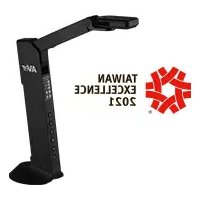
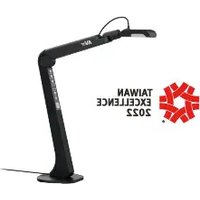
AVer AVerVision M11-8MV - Document camera

AVerVision M11-8MV - Document camera AVer - Free user manual and instructions

Find the device manual for free AVerVision M11-8MV AVer in PDF.

📄 194 pages English EN Download 💬 AI Question
Notice AVer AVerVision M11-8MV - page 6
Pick your language and provide your email: we'll send you a specifically translated version.

User questions about AVerVision M11-8MV AVer

0 question about this device. Answer the ones you know or ask your own.

Ask a new question about this device

The email remains private: it is only used to notify you if someone responds to your question.

No questions yet. Be the first to ask one.

Download the instructions for your Document camera in PDF format for free! Find your manual AVerVision M11-8MV - AVer and take your electronic device back in hand. On this page are published all the documents necessary for the use of your device. AVerVision M11-8MV by AVer.

USER MANUAL AVerVision M11-8MV AVer

natural_image Line drawing of a handheld device with a vertical arm and control buttons (no text or symbols)

M11-8MV

The items below are included with this product. If any item is missing, contact the dealer from whom you purchased this product.
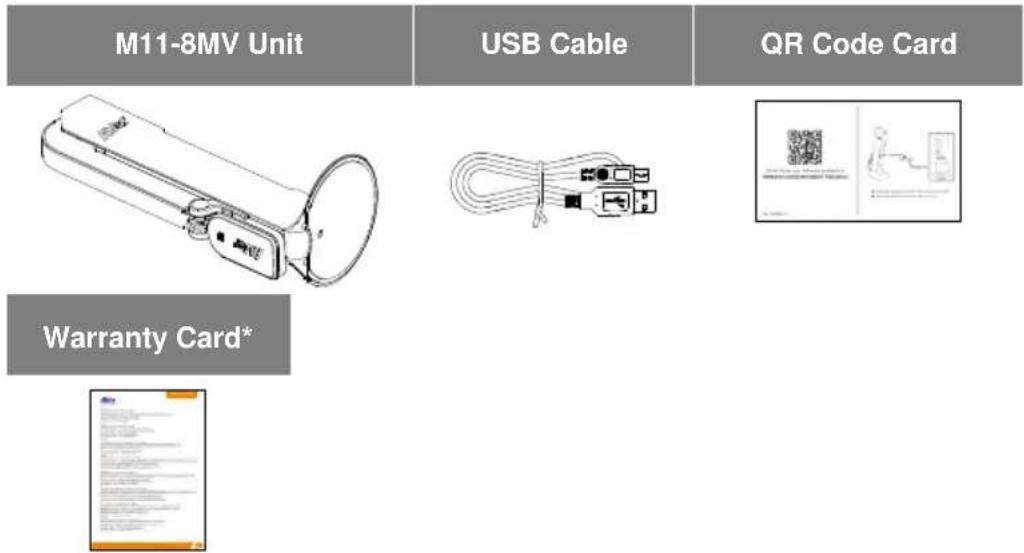
AVer AVerVision M11-8MV - M11-8MV - 1

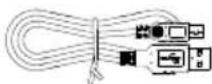
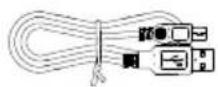
text_image M11-8MV Unit USB Cable QR Code Card Warranty Card*

* Only for Europe, Japan, and Taiwan

Optional Accessories
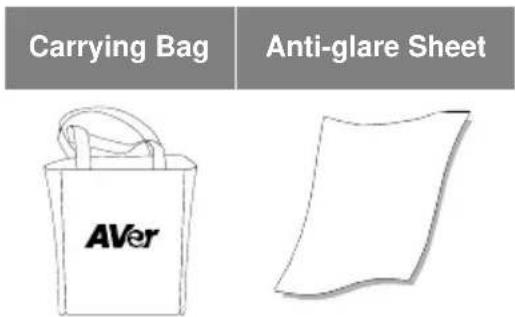
AVer AVerVision M11-8MV - Optional Accessories - 1

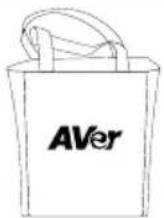
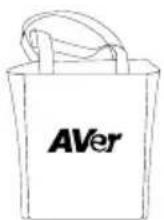
text_image Carrying Bag Anti-glare Sheet AVer

Overview
AVer AVerVision M11-8MV - Optional Accessories - 2

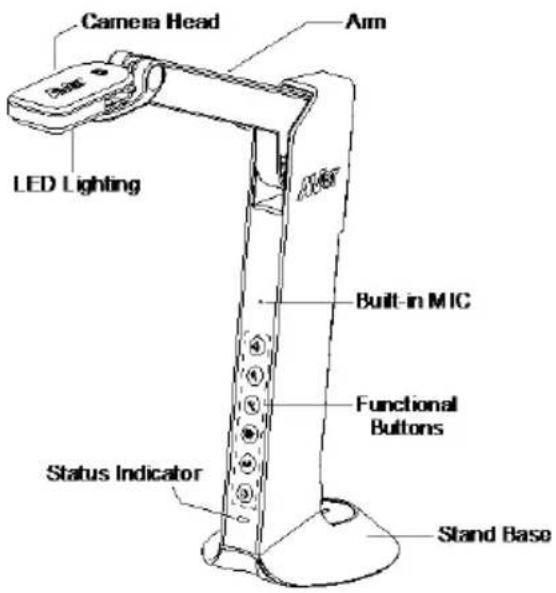
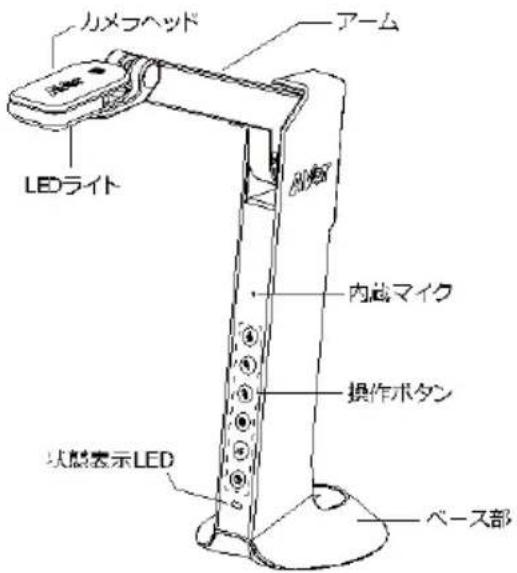
text_image Camera Head Arm LED Lighting Built-in MIC Functional Buttons Status Indicator Stand Base

AVer AVerVision M11-8MV - Optional Accessories - 3

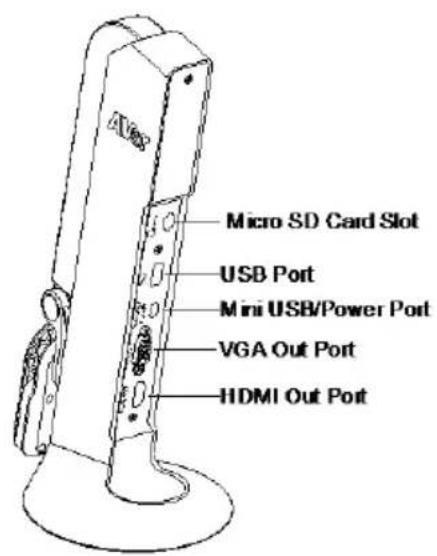
text_image Micro SD Card Slot USB Port Mini USB/Power Port VGA Out Port HDMI Out Port

Function Buttons

Control Panel

ButtonFunction
AVer AVerVision M11-8MV - Function Buttons - 1Lamp on/offPress and hold 3 seconds to call out OSD menu.
AVer AVerVision M11-8MV - Function Buttons - 2Zoom in
AVer AVerVision M11-8MV - Function Buttons - 3Zoom out
AVer AVerVision M11-8MV - Function Buttons - 4Rotate 0/180^ Press and hold 3 seconds to freeze the screen. To un-freeze, press and hold 3 seconds again.
AVer AVerVision M11-8MV - Function Buttons - 5Auto focusPress and hold 3 seconds to start recording.To stop recording, press and hold seconds again.
AVer AVerVision M11-8MV - Function Buttons - 6Power on/off

OSD Mode

ButtonFunction
AVer AVerVision M11-8MV - Function Buttons - 7■ Back to last menu level page■ Exit from OSD menu
AVer AVerVision M11-8MV - Function Buttons - 8Up (selection item)
AVer AVerVision M11-8MV - Function Buttons - 9Down (selection item)
AVer AVerVision M11-8MV - Function Buttons - 10Selection enter

Compound Key

Press keys to operate the compound key function.

ButtonFunction
Back to factory default settings
Capture image

[Note] For Recording and Capture, please change to "Power Supply Only" mode.
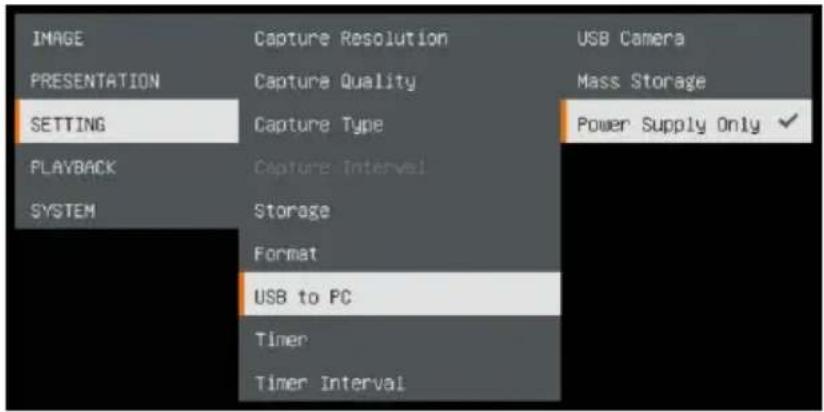
AVer AVerVision M11-8MV - Compound Key - 1

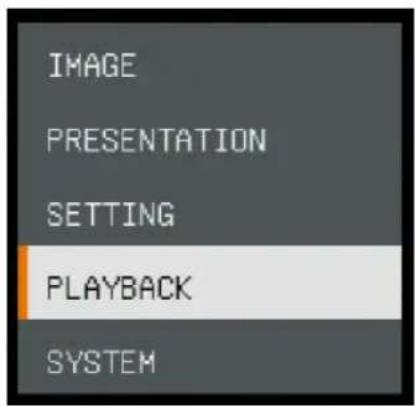
text_image IMAGE PRESENTATION SETTING PLAYBACK SYSTEM Capture Resolution Capture Quality Capture Type Capture Interval Storage Format USB to PC Timer Timer Interval USB Camera Mass Storage Power Supply Only ✓

LED Indicator

PowerSolid green: Power onSolid red: StandbyFlashing red: The camera is in start-up process.

Device Connection

Power Connection to Wall Outlet

1 Plug in power and turn on M11-8MV.
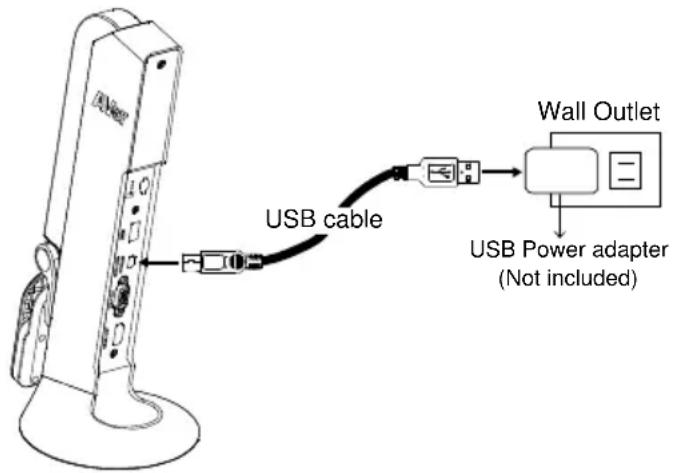
AVer AVerVision M11-8MV - Plug in power and turn on M11-8MV. - 1

text_image USB cable Wall Outlet USB Power adapter (Not included)

[Note]

■ Use the USB cable included in the package to connect to mini USB/Power port of M11-8MV with USB power adapter (not included) to wall outlet.
■ User needs to purchase a 5V/1A USB power adapter (not included) to connect the USB cable to wall outlet.
■ When the camera is start-up, the power indicator is in flashing red.

Power Connection to PC/Laptop

1 Connect to USB port of PC/laptop for power supply.
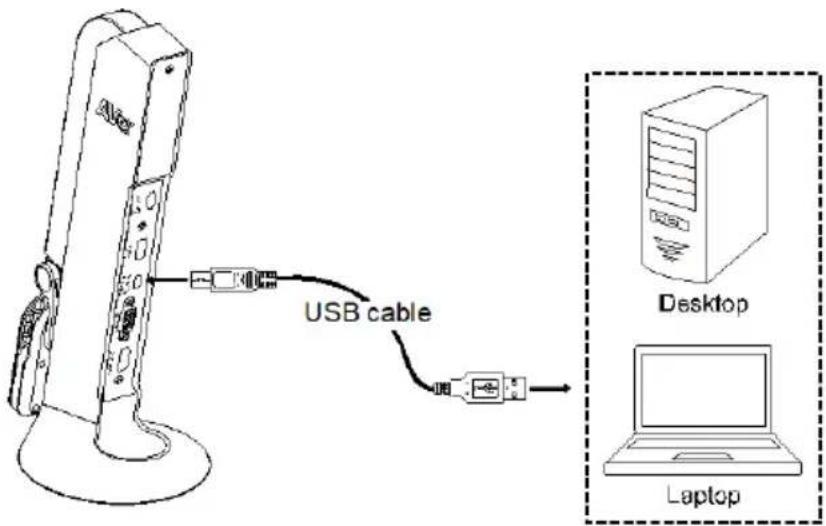
AVer AVerVision M11-8MV - Connect to USB port of PC/laptop for power supply. - 1

text_image USB cable Desktop Laptop

[Note]

■ Use the USB cable included in the package to connect to mini USB/ Power port of M11-8MV with laptop/PC.
■ When the camera is start-up, the power indicator is in flashing red.
■ USB power requirement of M11-8MV is USB 5V/1A.
■ For Storage, Format, Capture, Recording and Playback functions, please change to "Power Supply Only" mode
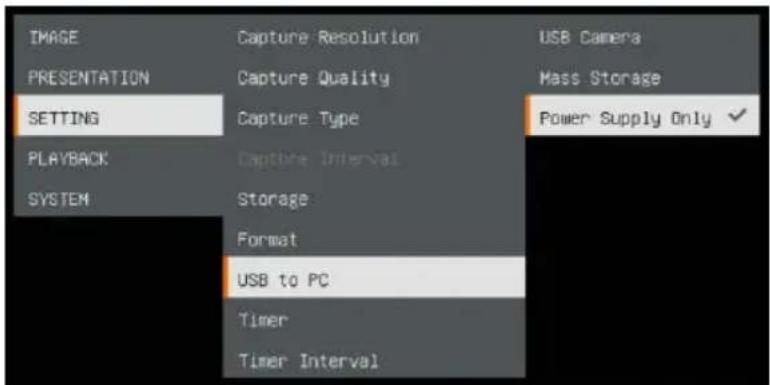
AVer AVerVision M11-8MV - [Note] - 1

text_image IMAGE PRESENTATION SETTING PLAYBACK SYSTEM Capture Resolution Capture Quality Capture Type Capture Interval Storage Format USB to PC Timer Timer Interval USB Camera Mass Storage Power Supply Only ✓

HDMI Connection

Connect M11-8MV to HDMI display with HDMI output port.

VGA Connection

Connect M11-8MV to VGA display with VGA output port.

USB Connection

1 Connect USB flash drive to USB port to save the capture and recording file.
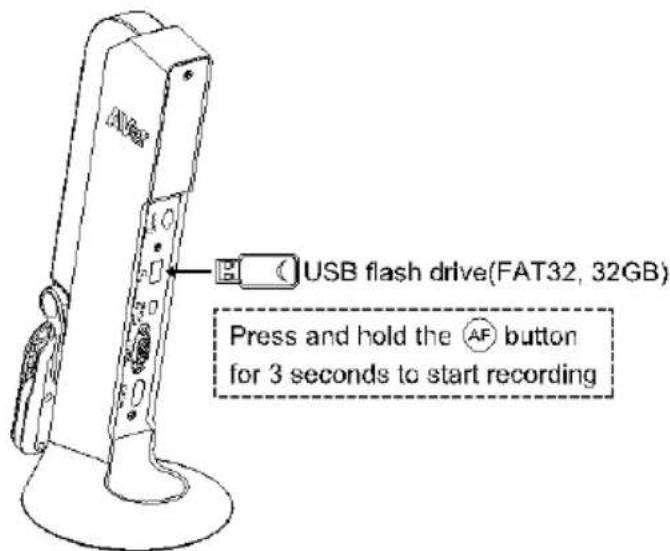
AVer AVerVision M11-8MV - USB Connection - 1

text_image USB flash drive(FAT32, 32GB) Press and hold the AF button for 3 seconds to start recording

[Note] The supported USB flash drive maximum is 32G (FAT32).

Insert a Micro SD Card

1 Insert the card to micro SD card slot.
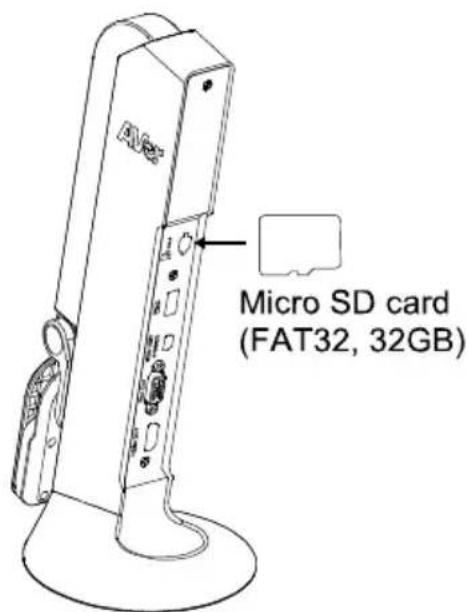
AVer AVerVision M11-8MV - Insert a Micro SD Card - 1

text_image Micro SD card (FAT32, 32GB)

[Note]

■ Micro SD card can store capture images and recording files.
■ The supported micro SD card capacity maximum is 32G (FAT32).

Operate the Camera with AVerTouch

1

Connect the camera to PC/laptop and Install the AVerTouch application.
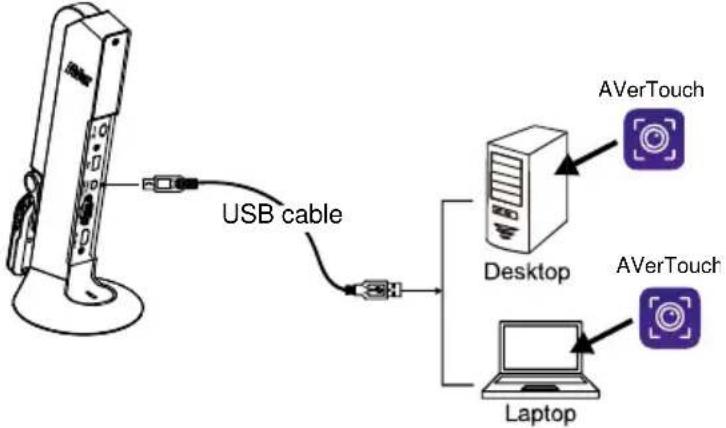
AVer AVerVision M11-8MV - 1 - 1

flowchart
graph TD
    A["USB cable"] --> B["Desktop"]
    B --> C["Laptop"]
    D["AVerTouch"] --> E["Desktop"]
    F["AVerTouch"] --> G["Laptop"]

[Note]

■ Download AVerTouch application at: https://www.aver.com/download-center/
■ Please set the camera to USB mode. Go to OSD menu > SETTING > USB to PC > USB Camera.
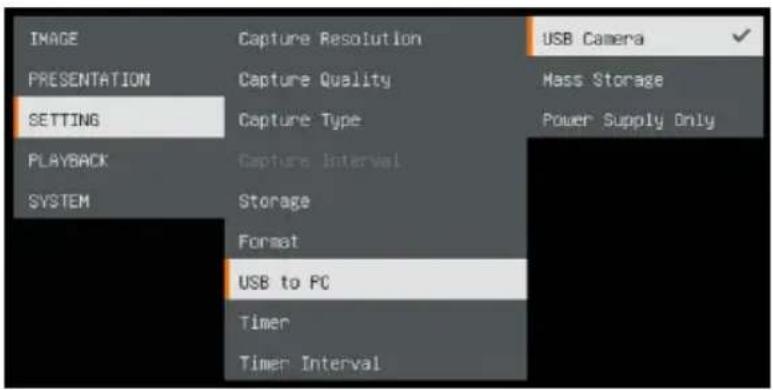
AVer AVerVision M11-8MV - [Note] - 1

text_image IMAGE PRESENTATION SETTING PLAYBACK SYSTEM Capture Resolution Capture Quality Capture Type Capture Interval Storage Format USB to PC Timer Timer Interval USB Camera Mass Storage Power Supply Only

2

Open AVerTouch application, click to connect the camera.
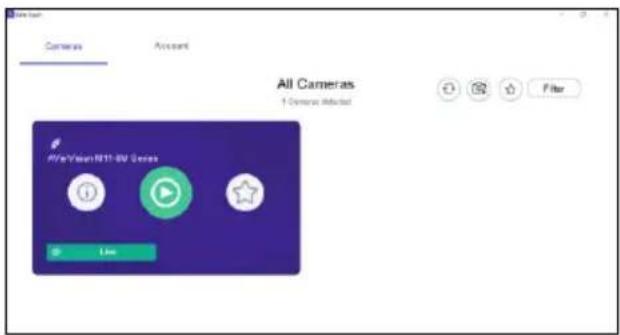
AVer AVerVision M11-8MV - 2 - 1

text_image All Cameras 1 General Selected AFe Vision R11-8V Genera Live

Presentation Mode (Live)

[Note] Before using annotation feature or PIP/PBP function of presentation mode, set the camera to Power Supply Only mode first. Go to OSD menu > SETTING > USB to PC > Power Supply Only.

Annotation

In single image live (preview) mode, user can use the annotation feature to overlay straight line or freeform line on the captured image with the USB mouse connected to the USB port of M11-8MV.

  1. Connect the mouse to USB port of M11-8MV.
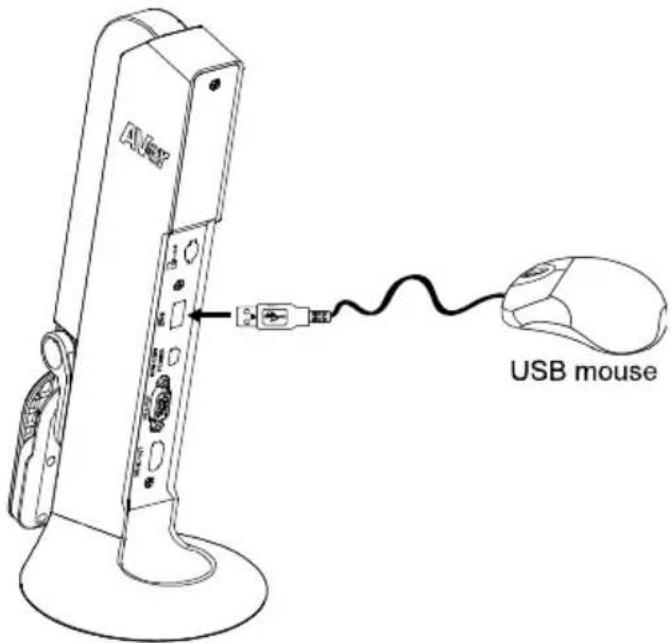
AVer AVerVision M11-8MV - Annotation - 1

text_image USB mouse
  1. Go to OSD menu > PRESENTATION > Annotation.
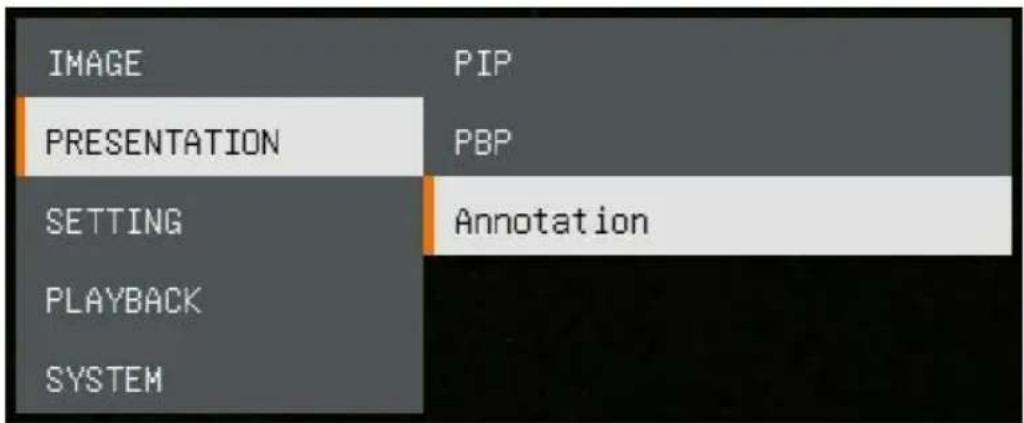
AVer AVerVision M11-8MV - Annotation - 2

text_image IMAGE PRESENTATION SETTING PLAYBACK SYSTEM PIP PBP Annotation
  1. In live screen, right-click mouse to call out annotation bar.
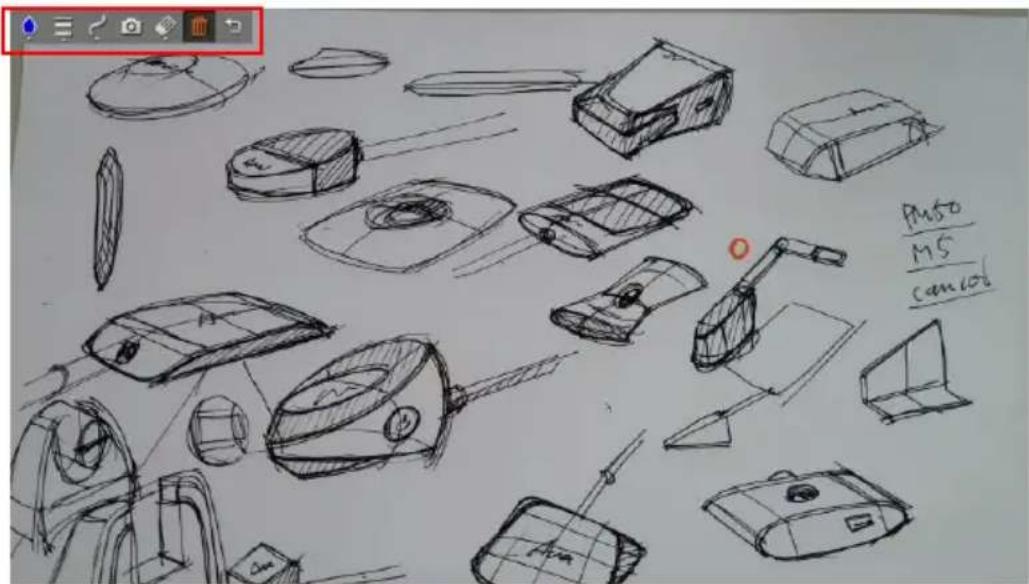
AVer AVerVision M11-8MV - Annotation - 3

text_image PMSO M5 cam106

Annotation bar description

AVer AVerVision M11-8MV - Annotation - 4

natural_image Toolbar with icons including water drop, menu, camera, edit, and trash bin (no text or labels visible)
ButtonFunction
AVer AVerVision M11-8MV - Annotation - 5Color PaletteSelect the line color.AVer AVerVision M11-8MV - Annotation - 6AVer AVerVision M11-8MV - Annotation - 7AVer AVerVision M11-8MV - Annotation - 8
AVer AVerVision M11-8MV - Annotation - 9Line ThicknessSelect the thickness of the line.AVer AVerVision M11-8MV - Annotation - 10
AVer AVerVision M11-8MV - Annotation - 11LineSelect a straight line, freehand or sharp to draw.AVer AVerVision M11-8MV - Annotation - 12

AVer AVerVision M11-8MV - Annotation - 13CaptureCapture the image with the annotation and save it as a new file.
AVer AVerVision M11-8MV - Annotation - 14EraserSelect to erase any part of the annotation that it comes in contact with or delete all annotation.
AVer AVerVision M11-8MV - Annotation - 15DeleteClear all annotation on the screen.
AVer AVerVision M11-8MV - Annotation - 16BackExit annotation bar.

PIP Function

Select the thumbnail playback screen location and show the thumbnail playback screen at the corner of the screen to recall the captured image from the SD card.

  1. In camera mode, press and hold button for 3 seconds to call out OSD menu.
  2. Use 🔒 and 🔒 buttons to move to PRESENTATION > PIP. Press AF to confirm the selection.
  3. Select the display location of thumbnail playback screen – Upper Left, Upper Right, Lower Left, or Lower Right. Press AF to confirm the selection.
IMAGEPIPUpper Left
PRESENTATIONPBPUpper Right
SETTINGAnnotationLower Left
PLAYBACKLower Right
SYSTEM
  1. The PIP display screen shows as following.
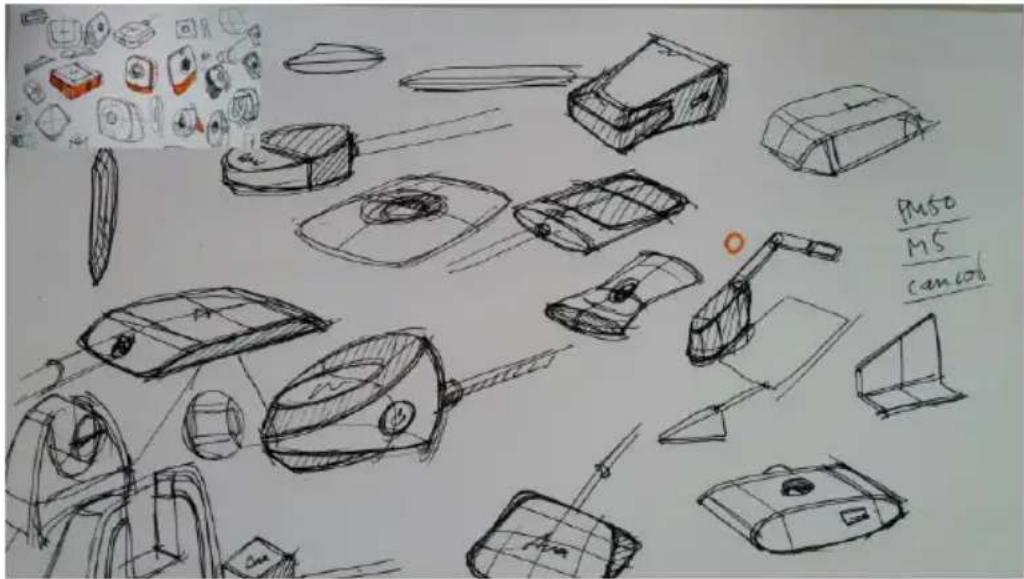
AVer AVerVision M11-8MV - PIP Function - 1

text_image Pus0 MS cancel

PBP Function

Select the captured image location and show the capture image on the screen to recall the captured image from the SD card.

  1. In camera mode, press and hold button for 3 seconds to call out OSD menu.
  2. Use 🔒 and 🔒 buttons to move to PRESENTATION > PBP. Press AF to confirm the selection.
  3. Select the display location of thumbnail playback screen – Upper Left, Upper Right, Lower Left, or Lower Right. Press AF to confirm the selection.
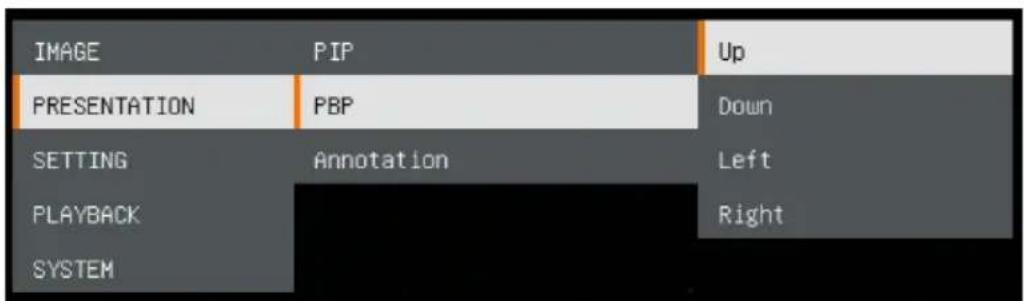
AVer AVerVision M11-8MV - PBP Function - 1

text_image IMAGE PIP Up PRESENTATION PBP Down SETTING Annotation Left PLAYBACK Right SYSTEM
  1. Use 🔒 and 🔒 buttons to select the captured image from the list
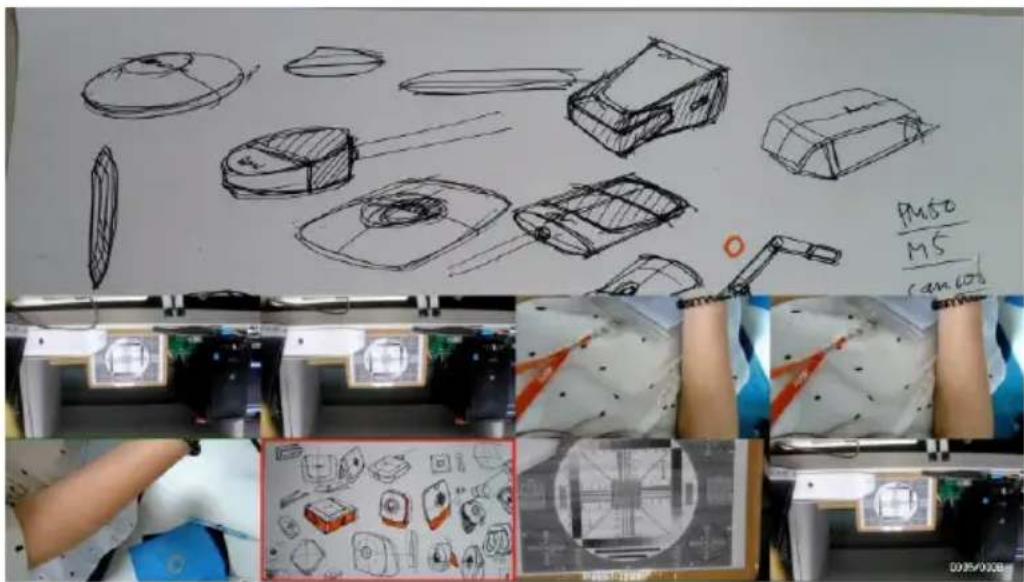
AVer AVerVision M11-8MV - PBP Function - 2

text_image Push M5 cam 606
  1. The PBP display screen shows as following (PBP is down location). Use

AVer AVerVision M11-8MV - PBP Function - 3

and buttons to move the captured image up and down to view.
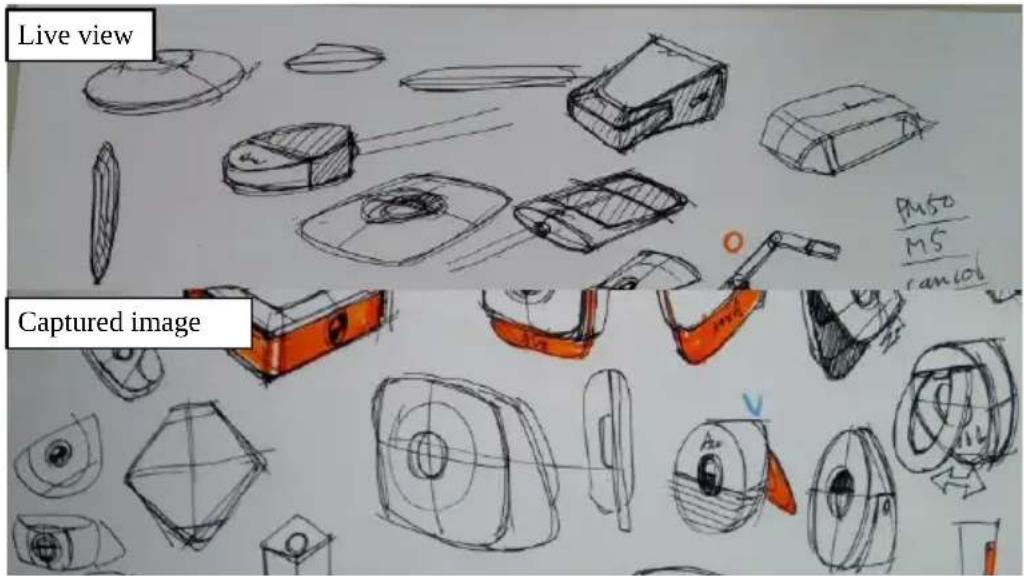
AVer AVerVision M11-8MV - PBP Function - 4

text_image Live view Captured image PMSO M5 camio

Playback Mode

View the capture images and recording files.

Switch to Playback Mode

  1. In camera mode, press and hold button for 3 seconds to call out OSD menu.
  2. Use 🔒 and 🔒 buttons to move to SETTING > USB to PC > Power Supply Only.
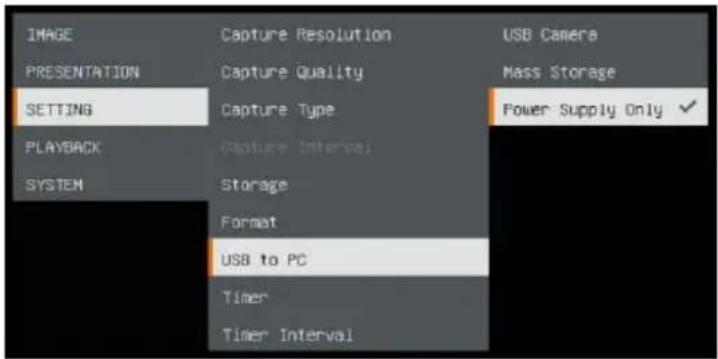
AVer AVerVision M11-8MV - Switch to Playback Mode - 1

text_image IMAGE PRESENTATION SETTING PLAYBACK SYSTEM Capture Resolution Capture Quality Capture Type Capture Interval Storage Format USB to PC Timer Timer Interval USB Camera Mass Storage Power Supply Only ✓
  1. Use, and buttons to move to PLAYBACK selection.
  2. Then, press A confirm the selection and switch to playback mode.
  3. In Playback mode, use

AVer AVerVision M11-8MV - Switch to Playback Mode - 2

and

AVer AVerVision M11-8MV - Switch to Playback Mode - 3

buttons to

select image or video to view manually. To play a video, press

AVer AVerVision M11-8MV - Switch to Playback Mode - 4

button to start playback.

To pause playback, press

AVer AVerVision M11-8MV - Switch to Playback Mode - 5

button again. Press playback.

AVer AVerVision M11-8MV - Switch to Playback Mode - 6

AVer AVerVision M11-8MV - Switch to Playback Mode - 7

text_image IMAGE PRESENTATION SETTING PLAYBACK SYSTEM

OSD Menu Buttons

ButtonFunction
AVer AVerVision M11-8MV - Switch to Playback Mode - 8Back to last menu level page
AVer AVerVision M11-8MV - Switch to Playback Mode - 9Up (selection item)
AVer AVerVision M11-8MV - Switch to Playback Mode - 10Down (selection item)
AVer AVerVision M11-8MV - Switch to Playback Mode - 11Selection enter

Playback Menu Buttons

ButtonFunction
AVer AVerVision M11-8MV - Switch to Playback Mode - 12AVer AVerVision M11-8MV - Switch to Playback Mode - 13■ Image / video selection■ + Fast forward while playback video■ + Fast rewind while playback video
AVer AVerVision M11-8MV - Switch to Playback Mode - 14Zoom in image
AVer AVerVision M11-8MV - Switch to Playback Mode - 15Zoom out image
AVer AVerVision M11-8MV - Switch to Playback Mode - 16■ Play video■ Press and hold to pause while video is playback
AVer AVerVision M11-8MV - Switch to Playback Mode - 17Stop play video

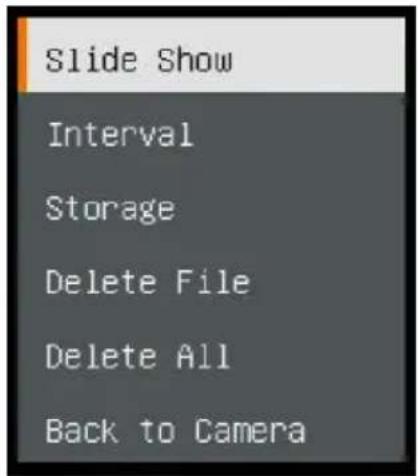
Slide Show

To automatically play all capture images and recorded videos; but videos only display files and will not play video contents.
AVer AVerVision M11-8MV - Slide Show - 1

text_image Slide Show Interval Storage Delete File Delete All Back to Camera

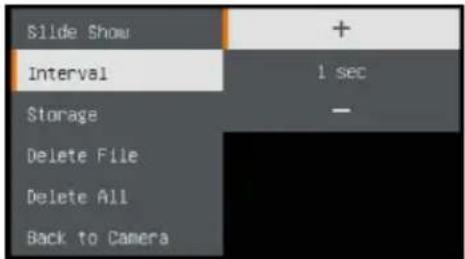
Interval

Set the interval before displaying the next picture. The length can be set up to 120 sec.
AVer AVerVision M11-8MV - Interval - 1

text_image Slide Show + Interval 1 sec Storage - Delete File Delete All Back to Camera

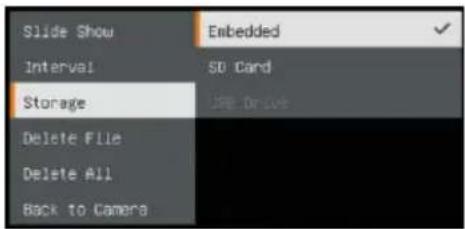
Storage

Select the source of the images and videos.
AVer AVerVision M11-8MV - Storage - 1

text_image Slide Show Interval Storage Delete File Delete All Back to Camera Embedded SO Card JPE Reset

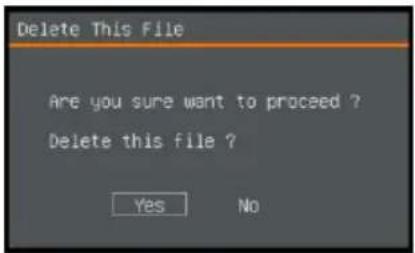
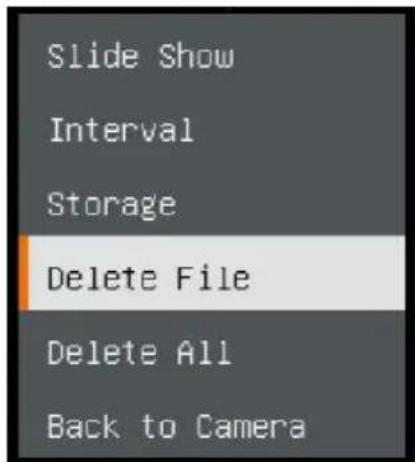
Delete File

Permanently delete the image or video in selected. A Warning Message will appear. Select Yes to continue and No to cancel the deletion.
AVer AVerVision M11-8MV - Delete File - 1

text_image Delete This File Are you sure want to proceed ? Delete this file ? Yes No

AVer AVerVision M11-8MV - Delete File - 2

text_image Slide Show Interval Storage Delete File Delete All Back to Camera

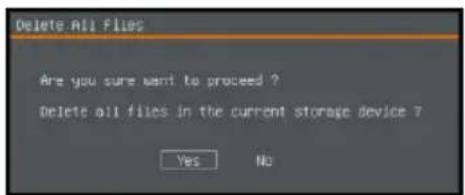
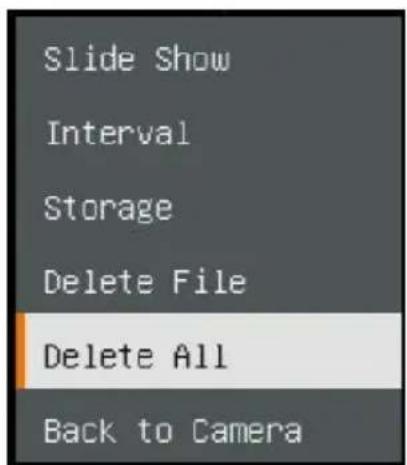
Delete All

Permanently delete all the data in selected memory source. A Warning Message will appear. Select Yes to continue and No to cancel the deletion.
AVer AVerVision M11-8MV - Delete All - 1

text_image Delete All Files Are you sure want to proceed ? Delete all files in the current storage device ? Yes No

AVer AVerVision M11-8MV - Delete All - 2

text_image Slide Show Interval Storage Delete File Delete All Back to Camera

Annotation

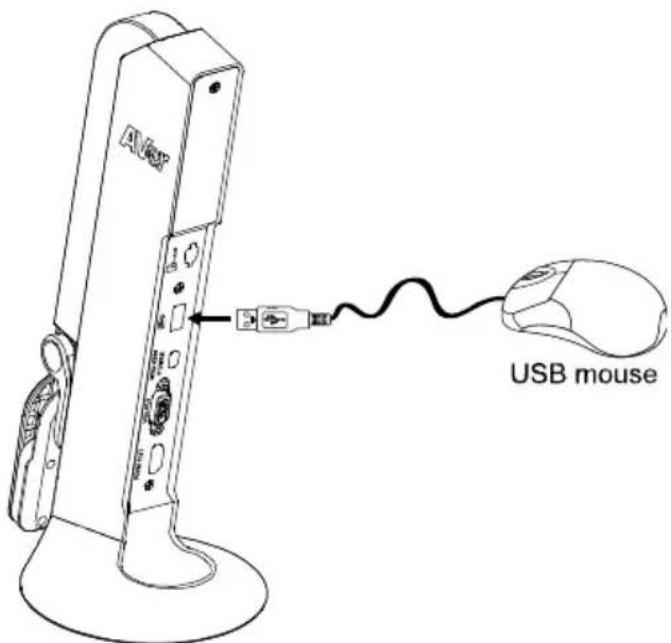
In single image playback mode, user can use the annotation feature to overlay straight line or freeform line on the captured image with the USB mouse connected to the USB port of M11-8MV.

[Note] Annotation function is not supported with video file.

  1. Connect the mouse to USB port of M11-8MV.
AVer AVerVision M11-8MV - Annotation - 1

text_image AV6 USB mouse
  1. Press to call out OSD menu.
  2. Select "Playback".
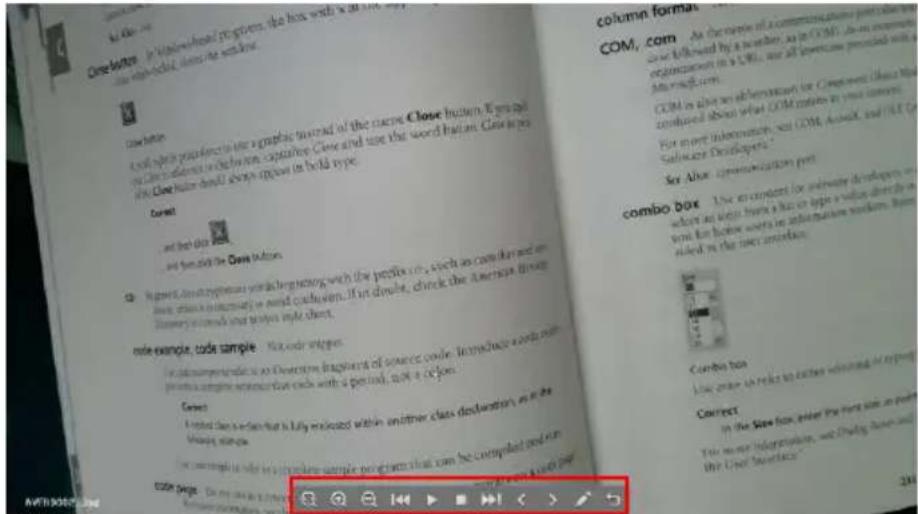
  3. Select the image and playback tool bar is displayed. Or right-click mouse to call out playback tool bar.
AVer AVerVision M11-8MV - Annotation - 2

text_image close button close button close button is used to create a new form of the close Close button. It was also on Close button in the button capture. Close and use the saved button. Close are the Close button default always appears in bold type. Current and then do this and then did the Close button. Next: Next-Date: 2019-03-2019 via beginning with the profile on, such as calendar and an date, which is necessary to avoid closure. If it divide, check the American B#### llnnary's code and break style sheet. Note example, code sample. Not code integers. For information to do so that the image of source code. In particular, we can write a complete version code with a period, not a color. Current A printed scan is called that is fully enclosed within another class declaration as the missing data. For example, code sample programs that can be completed and run STON Page: Do not use a complete version code. To do you find it out of your own column format. COM, com As the name of communications personnel so followed by a number, as in COM. As an organization in a COM, we all otherwise provided with a commod.com. COM is also an information for Component (about that continued about what COM relates in your interest. For more information, set COM, A##D, and OUTC Salscape Developer* See Alex communication port combo box Use in compact for information developers in where an other has a bus or apple a value shared by with the home users in information medium. Here listed in the next interface. comb box Use create us here to enter existing or report Correct In the Store frame, enter the first block in point The more information, and third block in the C#e webpage

Playback tool bar description

AVer AVerVision M11-8MV - Playback tool bar description - 1

text_image Toolbar with navigation and play function icons including zoom, delete, play, pause, and refresh controls
ButtonFunction
AVer AVerVision M11-8MV - Playback tool bar description - 2Move the image to left, right, up, and down.Select AVer AVerVision M11-8MV - Playback tool bar description - 3 expand the direction buttons.AVer AVerVision M11-8MV - Playback tool bar description - 4
AVer AVerVision M11-8MV - Playback tool bar description - 5Zoom in image
AVer AVerVision M11-8MV - Playback tool bar description - 6Zoom out image
AVer AVerVision M11-8MV - Playback tool bar description - 7Fast rewind
AVer AVerVision M11-8MV - Playback tool bar description - 8Start to play video
AVer AVerVision M11-8MV - Playback tool bar description - 9Stop playing video
AVer AVerVision M11-8MV - Playback tool bar description - 10Fast forward
AVer AVerVision M11-8MV - Playback tool bar description - 11Go to next or back to last image or file
AVer AVerVision M11-8MV - Playback tool bar description - 12Switch to annotation function.AVer AVerVision M11-8MV - Playback tool bar description - 13
AVer AVerVision M11-8MV - Playback tool bar description - 14Back to image or file list
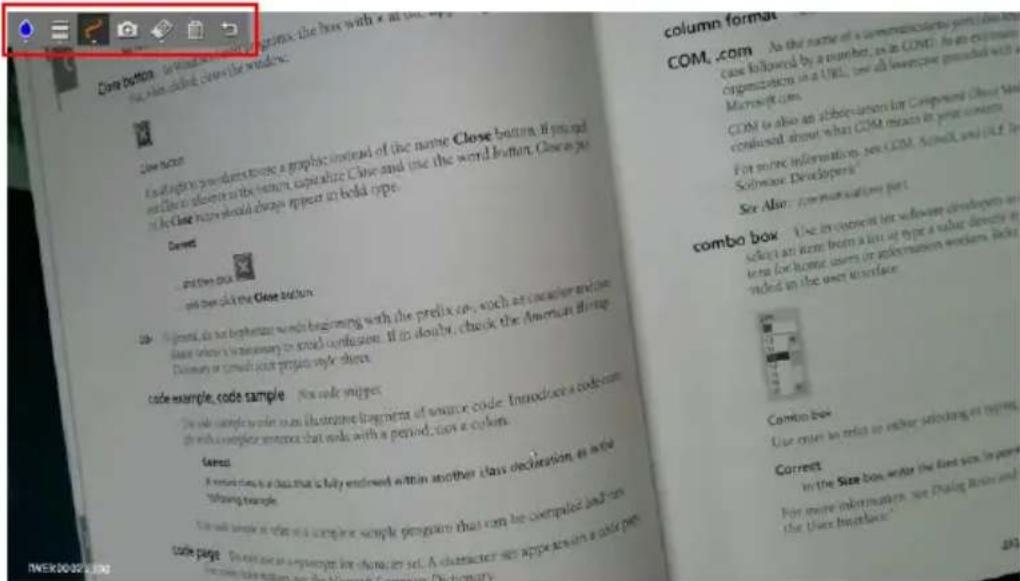
  1. To switch to annotation mode, select on playback tool bar.
AVer AVerVision M11-8MV - Playback tool bar description - 15

text_image COM, com As the name of a communication program is made case followed by a number, as in COM. As an external Organization in a URL, use all wireless powered with a Microsoft.com. COM is also an abbreviation for Compound Close that continued about what COM means in your context. For some information, see COM, Scott, and UCF, the Software Developers\* See Also: for normalization part combo box - Use in current for software developers on select an item from a list at type a value directly in type for home users or information workers, rather ended in the user interface combo box Use more in main to value selecting it using Correct In the Size box, write the first box in power for more information, we make basic and the User Interface

AVer AVerVision M11-8MV - Playback tool bar description - 16

natural_image Toolbar with icons including water drop, menu bar, camera, pencil, and refresh arrow (no text or symbols)
ButtonFunction
AVer AVerVision M11-8MV - Playback tool bar description - 17Color PaletteSelect the line color.AVer AVerVision M11-8MV - Playback tool bar description - 18
AVer AVerVision M11-8MV - Playback tool bar description - 19Line ThicknessSelect the thickness of the line.[IMAGE]
AVer AVerVision M11-8MV - Playback tool bar description - 20LineSelect a straight line, freehand or sharp to draw.[IMAGE]
AVer AVerVision M11-8MV - Playback tool bar description - 21CaptureAVer AVerVision M11-8MV - Playback tool bar description - 22 AVer AVerVision M11-8MV - Playback tool bar description - 23 AVer AVerVision M11-8MV - Playback tool bar description - 24 AVer AVerVision M11-8MV - Playback tool bar description - 25 the annotation and save it as a new file.
AVer AVerVision M11-8MV - Playback tool bar description - 26EraserAVer AVerVision M11-8MV - Playback tool bar description - 27 AVer AVerVision M11-8MV - Playback tool bar description - 28 AVer AVerVision M11-8MV - Playback tool bar description - 29 of the annotation that it comes in contact with or delete all annotation.
AVer AVerVision M11-8MV - Playback tool bar description - 30DeleteAVer AVerVision M11-8MV - Playback tool bar description - 31 AVer AVerVision M11-8MV - Playback tool bar description - 32 AVer AVerVision M11-8MV - Playback tool bar description - 33 on the screen.
[Drawed]Back[Drawed] [Drawed] [Drawed] back to occur.

Use the Camera

Camera Head Angle

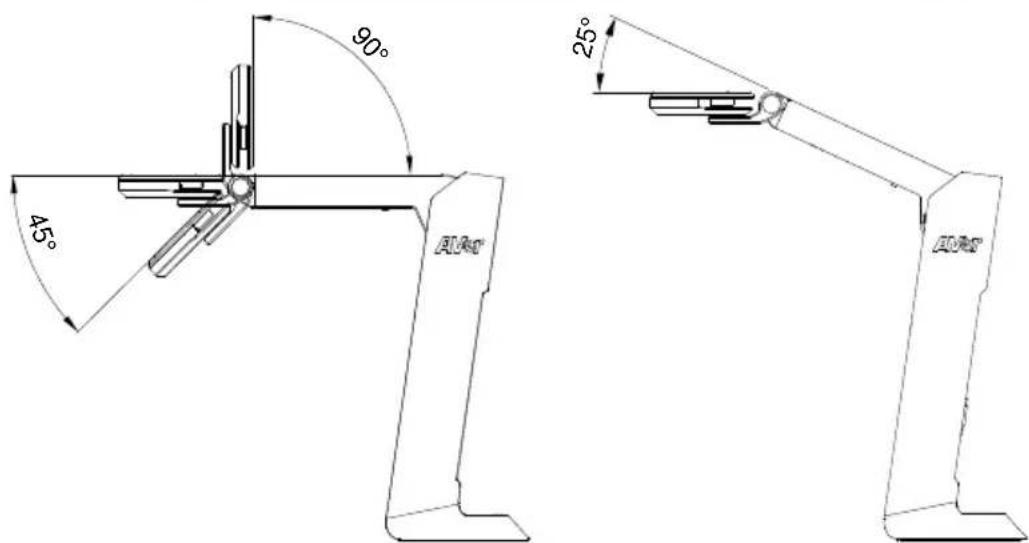
Move the camera head as figure shown.

[CAUTION] To avoid damage the camera head, hold the edge of the camera head to rotation the camera head.

AVer AVerVision M11-8MV - Camera Head Angle - 1

natural_image Three identical line drawings of a robotic arm with control knobs, shown from different angles (no text or symbols)
AVer AVerVision M11-8MV - Camera Head Angle - 2

text_image 90° 45° A1A1 25° A2A1

Camera Body Angle

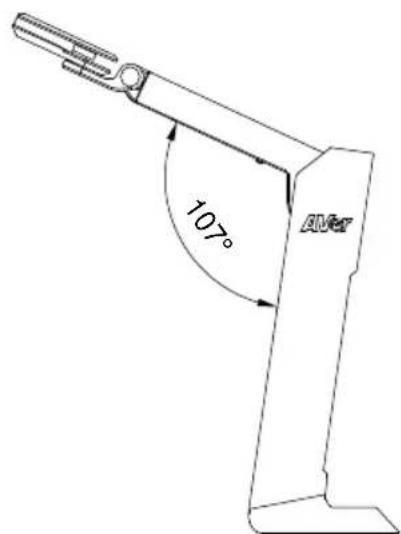
[CAUTION] To avoid damage the camera unit, DO NOT pull the arm angle over 107^ .
AVer AVerVision M11-8MV - Camera Body Angle - 1

text_image 107° AMC

English-21

Shooting Area

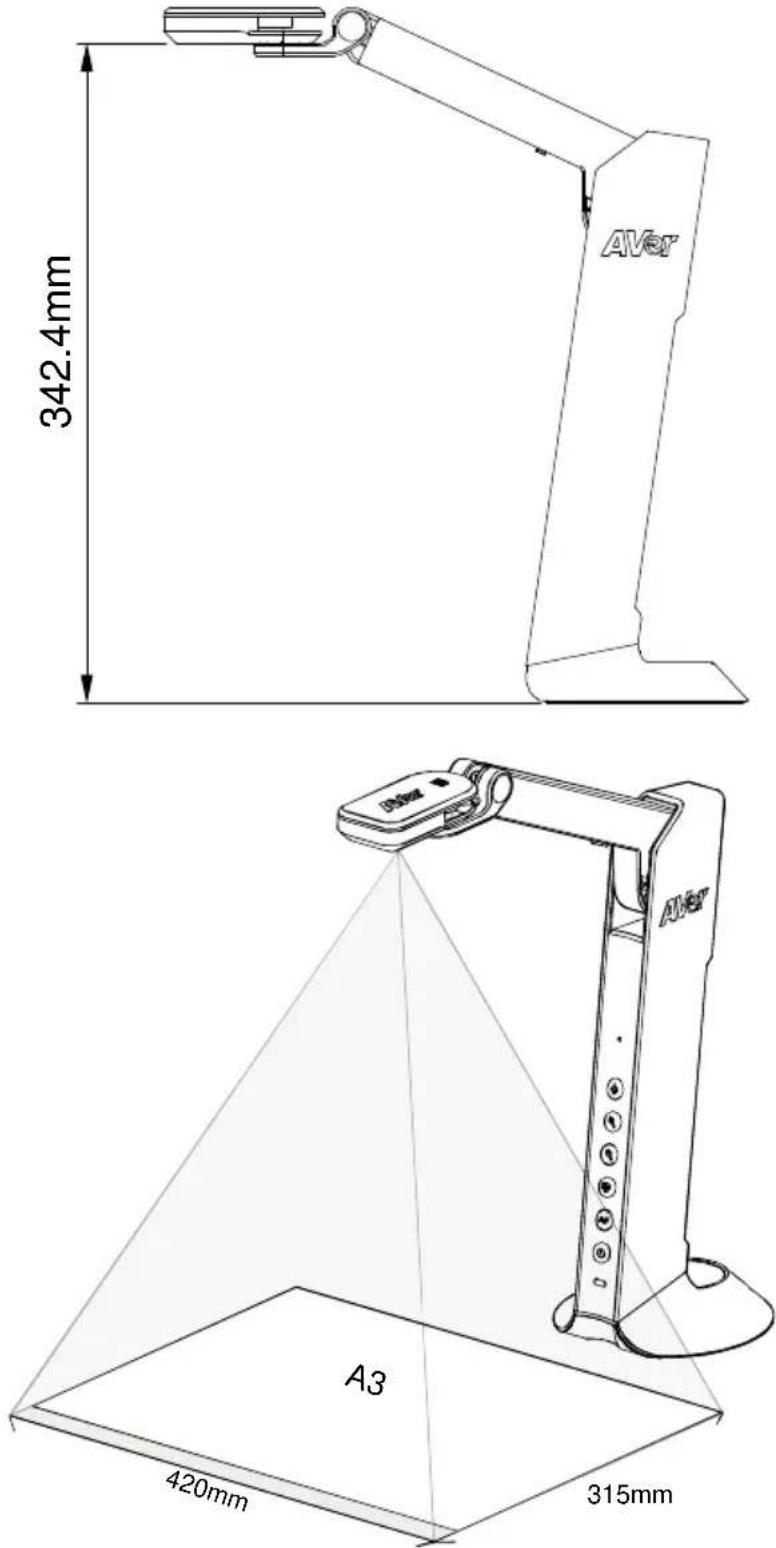
When camera position is 342.4mm high, the shooting area will be A3 size.
AVer AVerVision M11-8MV - Shooting Area - 1
English-22

Object Position

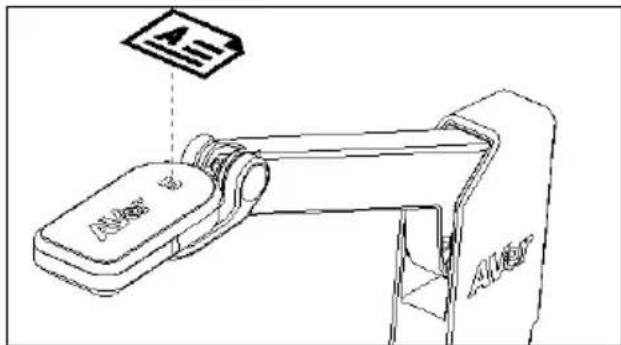
The icon on top of camera head can help user to place objects in a positive direction.
AVer AVerVision M11-8MV - Object Position - 1

text_image A A A A

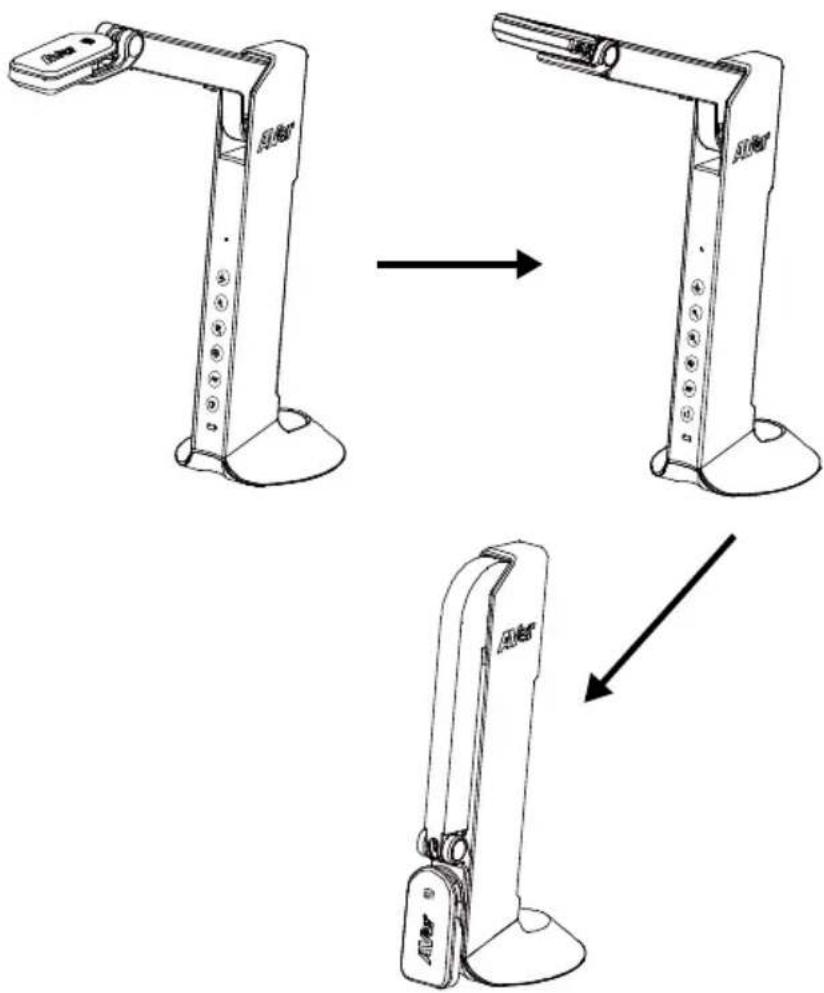
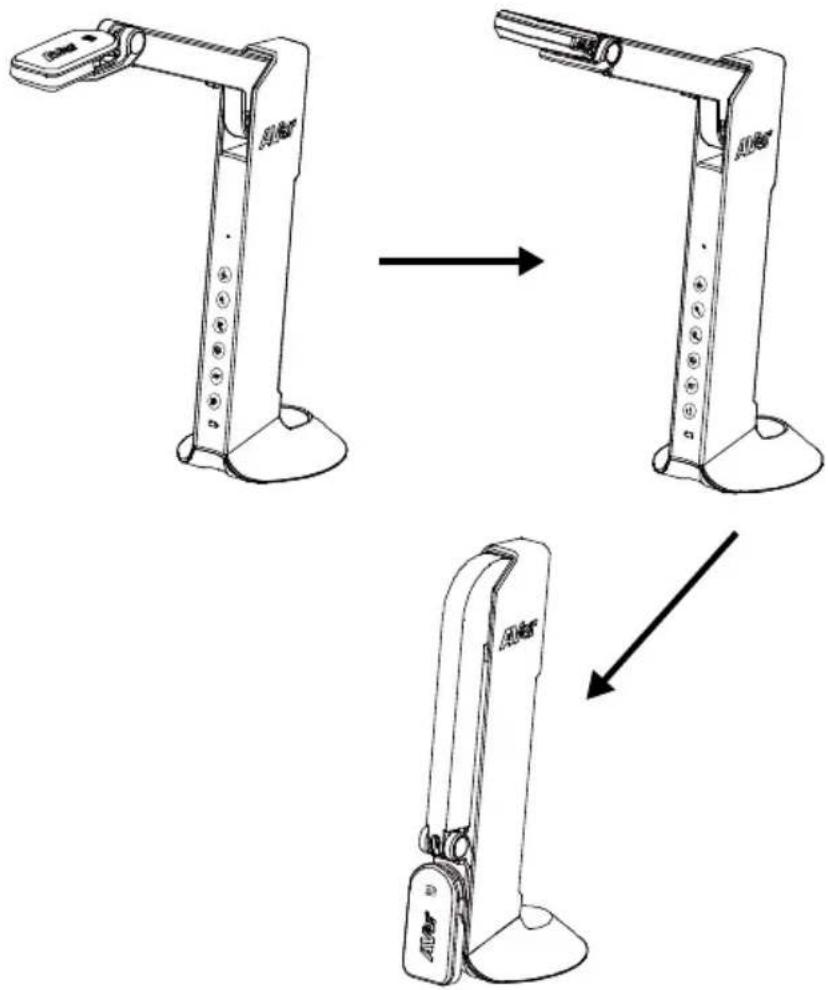
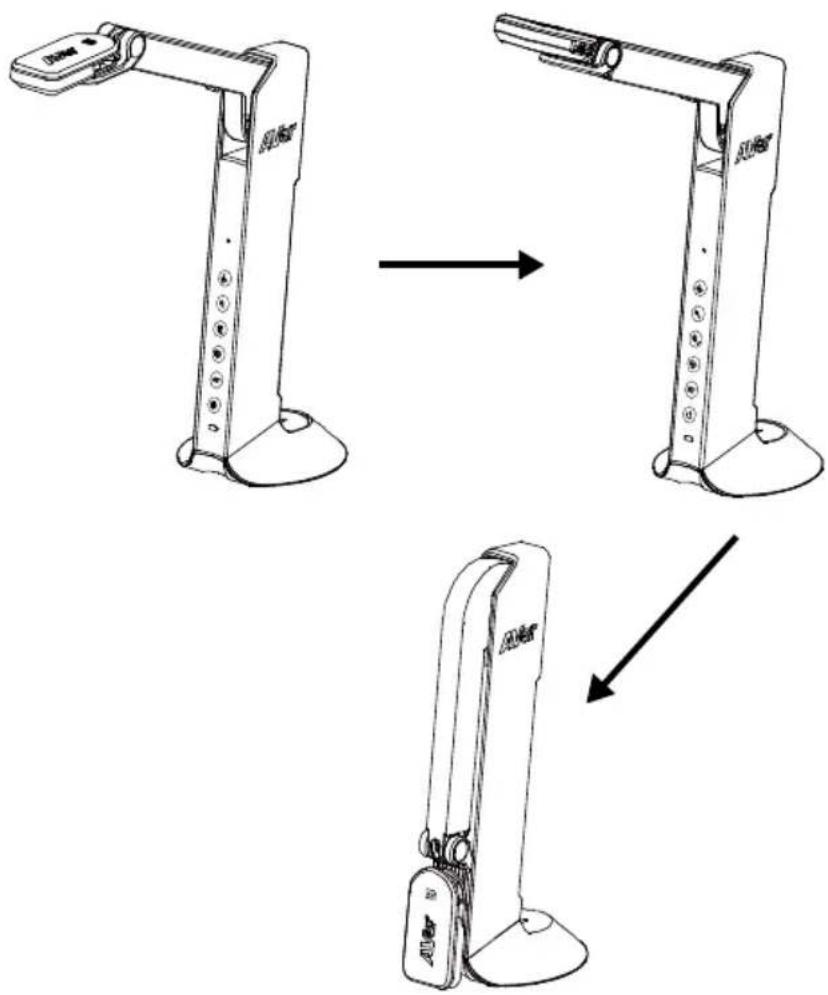
Store the Camera

AVer AVerVision M11-8MV - Object Position - 2

flowchart
graph TD
    A["Step 1: Top Lateral臂"] --> B["Step 2: Vertical-mounted device"]
    B --> C["Step 3: Lower arm with labeled sensors and base"]
    C --> D["Step 4: Lower arm with labeled sensors and base"]

English-23

Specification

Sensor1/3.06" CMOS sensor
Pixel Count8MP
Frame RateMax.60fps (display)
Image ModeNormal / Motion / High Quality
EffectColor / B&W / Negative
FocusingAuto / Manual
Shooting AreaA3, 420mm (H) * 315mm (V)
Zooming20x digital zoom
Power SourceMini-USB in, 5V/1A
Consumption4.5 Watts (lamp on)4 Watts (lamp off)
USB Bus PowerYes, via mini-USB port
Lamp TypeLED light
USBUSB2.0 Type-A x1 (< 5V/0.1A, USB flash drive FAT32, 32GB)USB Type mini-B x 1(Power)
USB Output3168 x 2376, 1920 x 1080, 1280 x 720, 1024 x 768, 800 x 600, 640 x 480
HDMI Output1920 x 1080, 1280 x 720, 720 x 480
VGA Output1920 x 1080, 1280 x 720, 720 x 480
Image Capture120 pictures (2 megapixel)
Built-in MICYes
Micro SD Card SlotFAT 32, 32GB
Operating360.4mm (H) * 116.7mm (W) * 303.4mm (D)
Folded296.1mm (H) * 116.7mm (W) * 143.1mm (D)
Net Weight1.83 lbs (0.83 Kg)
Gross Weight2.87 lbs (1.301 Kg)
Software SupportAVerTouch

WARNING

■ To reduce the risk of fire or electric shock, do not expose this appliance to rain or moisture. Warranty will be void if any unauthorized modifications are done to the product.

■ Do not drop the camera or subject it to physical shock.

■ Use the correct power supply voltage to avoid the damaging camera.

■ Do not place the camera where the cord can be stepped on as this may result in fraying or damage to the lead or the plug.

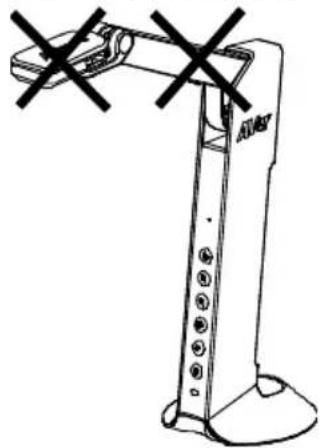
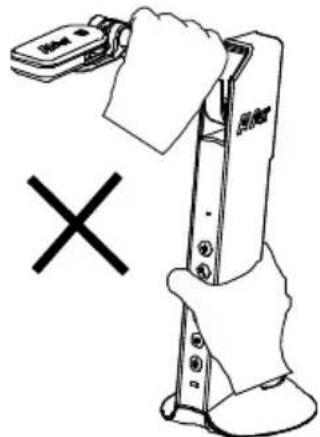
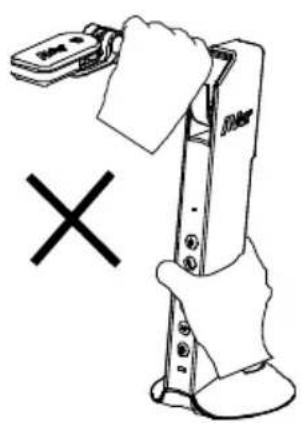
■ Hold the bottom of the camera with both hands to move the camera. Do not grab the lens or arm to move the camera.
AVer AVerVision M11-8MV - WARNING - 1

natural_image Technical line drawing of a robotic arm with two cross marks (no text or symbols)

■ Do not pull the camera arm and camera part in the opposite direction.
AVer AVerVision M11-8MV - WARNING - 2

text_image Diagram showing a hand holding a device with a document, alongside a crossed-out 'X' symbol indicating cancellation or rejection.

© 2024 AVer Information Inc. All rights reserved.

FEDERAL COMMUNICATIONS COMMISSION

NOTE: This equipment has been tested and found to comply with the limits for a Class A digital device, pursuant to part 15 of the FCC Rules. These limits are designed to provide reasonable protection against harmful interference when the equipment is operate in a commercial environment. This equipment generates, uses, and can radiate radiofrequency energy and, if not installed and used in accordance with the instruction manual, may cause harmful interference to radio communications. Operation of this equipment in a residential area is likely to cause harmful interference in which case the user will be required to correct the interference at his own expense.

FCC Caution: Any changes or modifications not expressly approved by the party responsible for compliance could void the user's authority to operate this equipment.

This device complies with part 15 of the FCC Rules.

Operation is subject to the following two conditions:

(1) This device may not cause harmful interference, and
(2) this device must accept any interference received, including interference that may cause undesired operation.

Warning:

This is a class A product. In a domestic environment this product may cause radio interference in which case the user may be required to take adequate measures.
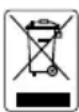
AVer AVerVision M11-8MV - Warning: - 1

THE MARK OF CROSSED-OUT WHEELED BIN INDICATES THAT THIS PRODUCT MUST NOT BE DISPOSED OF WITH YOUR OTHER HOUSEHOLD WASTE. INSTEAD, YOU NEED TO DISPOSE OF THE WASTE EQUIPMENT BY HANDING IT OVER TO A DESIGNATED COLLECTION POINT FOR THE RECYCLING OF WASTE ELECTRICAL AND ELECTRONIC EQUIPMENT. FOR MORE INFORMATION ABOUT WHERE TO DROP OFF YOUR WASTE EQUIPMENT FOR RECYCLING, PLEASE CONTACT YOUR HOUSEHOLD WASTE DISPOSAL SERVICE OR THE SHOP WHERE YOU PURCHASED THE PRODUCT.

DISCLAIMER

No warranty or representation, either expressed or implied, is made with respect to the contents of this documentation, its quality, performance, merchantability, or fitness for a particular purpose. Information presented in this documentation has been carefully checked for reliability; however, no responsibility is assumed for inaccuracies. The information contained in this documentation is subject to change without notice.

In no event will AVer be liable for direct, indirect, special, incidental, or consequential damages arising out of the use or inability to use this product or documentation, even if advised of the possibility of such damages.

More Help

For FAQs, technical support, software and instruction manual download, please visit:

Non-USA

Download Center: https://www.aver.com/download-center

Technical Support: https://www.aver.com/technical-support

USA

Download Center: https://www.averusa.com/education/support

Technical Support: https://averusa.force.com/support/s/contactsupport

Contact Information

Headquarters

AVer Information Inc.

8F, No.157, Da-An Rd., Tucheng Dist.,

New Taipei City 23673, Taiwan

Tel: +886 (2) 2269 8535

USA Branch Office

AVer Information Inc., Americas

44061 Nobel Drive, Fremont, CA

94538, USA

Tel: +1 (408) 263 3828

Toll-free: +1 (877) 528 7824

Europe Branch Office

AVer Information Europe B.V.

Westblaak 134, 3012 KM,

Rotterdam, The Netherlands

Tel: +31 (0) 10 7600 550

Japan Branch Office

アバー・インフォメーション株式会社

Vietnam Branch Office

Công ty TNHH AVer Information (Việt Nam)

natural_image Line drawing of a handheld electronic device with a circular lens and handle (no text or symbols)

USB 連接線
AVer AVerVision M11-8MV - Vietnam Branch Office - 1

QR Code 卡
AVer AVerVision M11-8MV - Vietnam Branch Office - 2

保固卡*
AVer AVerVision M11-8MV - Vietnam Branch Office - 3
*只有歐洲、日本和台灣使用

選購配件

手提袋
AVer AVerVision M11-8MV - 選購配件 - 1

防眩光片
AVer AVerVision M11-8MV - 選購配件 - 2

natural_image Simple line drawing of a folded paper or document (no text or symbols)

硬體介紹
AVer AVerVision M11-8MV - 選購配件 - 3

https://tw.aver.com/download-center/

text_image Toolbar with icons including water drop, menu, camera, edit, trash bin, and refresh arrow
text_image column format COM, com As the name of a communication port is called come followed from number, as to UML. As an information organization to a USB, we all have been obtained with a Microsoft system. COM is also an administrative tool. Compare channel that concluded about what COM must use your computer. For more order samples, see COM, ActiveX, and UML To Software Developers? See Albat, commercial bus port combo box One-by-center for software developers is select an inch from a list or type value absolutely in ects for home users of information software. Beir wided on the user interface Combot tree low user to raise the user selecting or copying Correct In the Size box, some the first size in point for more information, see Daily Linux and the User Interface

繁體中文-46

播放工具列說明

AVer AVerVision M11-8MV - 播放工具列說明 - 1

text_image Toolbar with navigation and play buttons including refresh, add, delete, play, pause, play hand, and edit icons
text_image Code editor as follows to provide cross a graphic instead of the name Close button. If you need or Clear enough to use the form, write allte Close and use the word button. Close in the Start and the size and the click the Close button. Code example, code sample - Non-code sample The info code is true in this time/other fragment of source code. Introduce a code count the data sample sample can also with a period, not it color. Code) A term code is a key that a fully evoked within another class declaration as in the Glowing example. Code page - General view of the same sample program that can be computed and used in any movement we do through Computer Dictionary. column format COM, com As the name of a communication program case followed by a number, as in Code. As our introduction organization in a URL, we all otherwise provided with a Microsoft.com. COM is often an implementation for Component (Threat M confused about what COM means in your content. For more information, see COM, Sisec2, and CIE To Software Developers? See Also: communications port combo box Use in content for software development or select an item from a list at type if value denotes as from the home uses its information workers. Click listed in the top interface. Combo box Use your role to select or setting or typing Correct In the Size box, order the flow size in your for more information, see (using limits and the User Interface)

AVer AVerVision M11-8MV - 播放工具列說明 - 2

text_image Toolbar with icons including water drop, menu, camera, edit, delete, and refresh
text_image Technical diagram of a device with labeled components and a paper icon above it

收納 M11-8MV

AVer AVerVision M11-8MV - 播放工具列說明 - 3

flowchart
graph TD
    A["Top Arm"] --> B["Left Arm"]
    B --> C["Right Arm"]
    C --> D["Bottom Arm"]

繁體中文-51

規格

natural_image Line drawing of a robotic arm with two black X marks (no text or symbols)
AVer AVerVision M11-8MV - 播放工具列說明 - 4

natural_image Illustration of a robotic arm with a hand holding a tool, marked with an 'X' symbol (no text or symbols present)

免責聲明

natural_image Line drawing of a handheld device with a circular lens and handle (no text or symbols)
AVer AVerVision M11-8MV - 免責聲明 - 1

AVer AVerVision M11-8MV - 免責聲明 - 2

保証書*
AVer AVerVision M11-8MV - 免責聲明 - 3
*日本・ヨーロッパのみ

オプション(別売)

キャリーバッグ
反射防止シート
AVer AVerVision M11-8MV - オプション(別売) - 1

AVer AVerVision M11-8MV - オプション(別売) - 2

natural_image Simple line drawing of a folded paper or document (no text or symbols)

ハードウェア部位 名称
AVer AVerVision M11-8MV - オプション(別売) - 3

https://jp.aver.com/download-center/ 
text_image Camera Account All Cameras * Camera Limited Air-ViaVian801-80 Series 5 Box

プレゼンテーションモード(ライブ)

text_image Push M5 cam 60%

AVer AVerVision M11-8MV - プレゼンテーションモード(ライブ) - 1

natural_image Toolbar with icons including water drop, menu, camera, edit, and trash bin (no text or labels)
text_image Pusc M5 cam 60s D234V0008
text_image close button I found after you are to use a graphic to view the name. Close button. If you can use the phrase to the location. Click or click Close and use the word button. Click or use the name should always appear as bold type. comet with the click and then for the close button CD - In general, design: Optimize Word: Beginning with the prefix, such as creation and use doses, copies are necessary to avoid confusion. If it's loose, check the American rating responses, correct your project style sheet. color example, code sample - Not able to apply. Use any complete version or clearface fragment of source code: introduce a code sum- the with automatic server that is highly enclosed within another class declaration, as in the theming user page. The code sample is required to complete some code program that can be compiled and use code type. On the site, we have been used to add a code file. column format COM, .com At the name of a configuration part one has Core followed by a number, so in COM. As an information organization is a CBC, use all lowercase (provided) with a Macrophybox COM is also an implementation for Compared Object More confused about what COM needs to join content... For more information, see COM, AOBelt, and OBL To Software Developers See Also: Uncommunications port combo box - Use in content for software developers on select any items from a Web or now a value directly or write for home users or information workers. Before visited in the most procedure combo box Use either to refer to other selecting or reporting comet in the Size box, where the last age, in person For more information, say during Business the User Interface

日本語-74

再生ツール バーの説明
AVer AVerVision M11-8MV - プレゼンテーションモード(ライブ) - 2

text_image Toolbar with navigation and play function icons including search, edit, pause, play, and navigation buttons
text_image close button is what is what close the window. close button you all need to prepare to use a graphic instead of the native Close button. If you said or Clear should be low, then, capitate Close and use the word button. Close in just the Close button would change appear in bold type. commet and free not and SM or it the Close button to: In general do not implement words beginning with the preview co., such as samples and images does, select an every way to avoid confusion. If in doubt, check the Alarmun Is ring Clarity in consider your proper style sheet. code example, code sample Non code unipper Use code complete order in any illustrative fragment of source code. Introduce a color sample do with a complete sequence that ends with a period, not a column. comset A name class is a class that is fully enclosed within another class declaration, as in FY following example. Use subsample order as a complete sample program that can be computed and used. Code page None are an application for character set. A character set appears on a code file. COM, .com As the name of a communication panel has been case followed by a number, as in COM! As an customer organization in a URL, see all low-cost proceeds with a Microsoft.com COM is also an implementation for Company Clients must confused about when COM exists in your structure For more information, see COM (Armcl), and OLE To Software Developers See Also : communication port combo box Use in command for software developers to select an item from a list or type a value double on text, like home users as information workers, lower level in the top interface combo box Use enter to refer to either slowing or scaling Correct in the Size box, enter the loss size, in point For more information, see Dual jBox and the User Interface

AVer AVerVision M11-8MV - プレゼンテーションモード(ライブ) - 3

natural_image Toolbar with icons including water drop, menu, camera, and trash bin (no text or labels)
text_image 342.4mm AVoY A3 420mm 315mm

日本語-78

摄影方向

text_image A B C D E F G H I J K L M N O P Q R S T U V W X Y Z

カメラの収納
AVer AVerVision M11-8MV - 摄影方向 - 1

flowchart
graph TD
    A["Device with sensor icon"] --> B["Assembly"]
    B --> C["Final assembly with device"]

日本語-79

製品仕様

natural_image Line drawing of a robotic arm with two crossed arms (no text or symbols)
text_image Diagram showing a hand holding a device with a document, alongside a cross symbol and a warning sign.

著作權

https://www.aver.com/download-center/

日本

https://jp.aver.com/

技術的なご質問・

https://jp.aver.com/technical-support

修理のご依頼:

https://jp.aver.com/repair-request

text_image PM50 M5 cam 106
text_image Toolbar with icons including water drop, menu, camera, edit, trash bin, and refresh symbol
text_image Pass M5 cancel
text_image code button: in Windows hard programs, the box with x all the copy as indicated close the window. const and the click and then click the Data button ID: In words, drive hyperwords beginning with the prefix on, such as saturation and are or any words in terms to avoid confusion. If in doubt, check the American http from your pages write short. code example, code sample: Not code snippet • In some samples, this is an otherwise fragmented of source code. Introduce a code packet with a complete sentence that ends with a period, each a color. const: I recommend that we read that a highly enclosed within another class die taxation, as in the following example. code page: Do not use a program that can be compiled and not for your information. column format COM, .com As the name of a communication port, which has code followed by a number as on COM, but in our com- organization to a CML, use all low-cost platforms with a Microsoft.com. COM is also an administration for Computer Command that confused about when COM exists in your context. For more information, not CML, Adjust, and ULS To Software Developers... See Also: communications aid combabox Use in conditions for software directories must select on them from a list or info a value directory or let for home users or information workers. Before visited in the user sphere. combabox Use water to select to other settings and in pricing Correct In size box, over the last box, in some For more information, see Using Files and the User Interface.

Deutsch-101

text_image Toolbar with navigation and play function icons including zoom, delete, play, pause, and refresh controls
text_image Cross button in whole click from the windows. Cross button In whole click from the windows. If you go out the window to the window, capitalize Close and use the word button. Close just at the Close button which appears in build type. Correct and then click and then click the Cross button GO- original, as an electronic script beginning with the prefix co., such as columnar end point, where it is necessary to view copy on. It is doubt, check the American String Drawing in context, new project style sheet. code example, code sample - Not able outputs. Do this group is able to use a software fragment of source code. Introduced a file path with complete sequence that ends with a period, not a period. Correct A version call is close that is fully enclosed within another class declaration, at a file following example. Do no implementation as a single sample program that can be compiled and/or CODE page. Do not use a version for character set. A character set appears in a code port. For any information we help us all common language. column format COM .com As the name of a communication system has been called followed by a number, as in COM: In an extension organization in a URL, we all increase perceived with a Microsoft.com. COM is also an alternative for Component Chain was confused about what COM must be your custom. For more information are COM, Script, and User for Software Developers? See Also: your configuration part combo box - Use in constraints for software developers to select are none from a low or none value density to term for home sites or open programs workers. Based on the user interface Custom box Use only no results on other whistinger types Correct In the Size Box enter the load size, in place for more information, see Dialog Room and the User Interface? 2014

AVer AVerVision M11-8MV - 日本 - 1

text_image Toolbar with icons for image editing and formatting tools including droplet, layers, camera, brush, and trash.
text_image 90° 45° 25° A10s A20s

Kameragehäusewinkel

text_image Technical line drawing of a device with labeled components and a paper icon above it
natural_image Line drawing of a robotic arm with two crossed X marks (no text or symbols)
text_image Diagram showing a hand holding a device with a document, crossed out by a 'X' symbol, indicating cancellation or rejection.

https://www.avereurope.com/download-center/

Westblaak 134, 3012 KM, Rotterdam, The Netherlands

Tel: +31 (0) 10 7600 550

text_image Micro SD card (FAT32, 32GB)

[Remarque]

text_image Toolbar with icons including water drop, menu, camera, edit, trash bin, and refresh symbol
text_image PMSO MS cam106
text_image Closc button - in windowed programs, the box with x at all the way the highlighted, clear the windows. Next option How to get an example is one a graphic instead of the name. Close buttons. It can set in Closc to minimize to the brand capitalizer. Close and use the word button. Close is put of the Close button should always appear in bold type. Correct and then close and then use the Close button 10 - turned, where hardware words beginning with the profile on, such as counter and func with some or no more than good conditions. If in doubt, check the American History from any such your photo style sheet. code example, code sample - Not code insert Close sample insert as an Associate fragment of source code. Introduce a code now through a complete source that ends with a period, not a copy Correct A secret class is close that a holy accessible without another class declaration, as in the following charge The code sample is also to a template sample press on that can be compiled and tab. code page - For the use of a version of the software design. For more information, we use a software development tool. column format COM, com As the name of a communication program for cost followed by a number of COM. So we continue organizations in a UBI, we all become needed with a Microsoft.com. COM is also an abbreviation for Component class which conduced about when CFM means in your context. For more information, we use COM Abstract, and OLE for Software Developers? See Also: communications post combo box Use to content for software design tools select us them from a list or type a server closely to train for some users or members on workers, later loaded in the user interface. combo box Use case no refer to other selecting or reporting Correct In the size box, order the next size, in person For more information, we use DAIR, Bours and the User Interface.

Français-129

text_image Toolbar with navigation and play icons including search, edit, pause, play button, and navigation tools
text_image Code 0/2018 in what is the box with x at the end of the window. Code 0/2018 on single to providers to use a graphic instead of the name: Close button. If you could use the name to be the user, copydate Close and use the word button. Close just do: Close have always appear in bold type. comms and that click and that click the Close button. To: request by any application world beginning with the prefix or, such as equation and argument, which is necessary to send confusion. If in doubt, check the Amman Writing. Do not use a code project style sheet. code example, code sample Not add samples Close samples in line as an illustrative fragment of source code. Introduce a code matrix with a complex resource from edges with a period, not a color. comms A set of class codes that a fully enclosed within another class declaration, as in the following example. Close samples in line as a simple sample per-grance that can be completed and run code pages. Comms are all examples for data set out. A character can appraise on a file list. column format COM, com As the name of a concrete block contains one case followed by a member, as in COM. As an consumer organization in a URL, use all reverse provided with a Microsoft com. COM is also an abbreviation for Component Sheet which continued about what COM must in your context. For more information, see COM, Semel, and OIL for Software Developers* See Also: computerization part combbox Use to content for software developers or select an item from a list or type a value derived in terms for home uses or information workers. Click video in the user interface. comms box Use more to roles or sides solving of typing Correct In the Size box, enter the bond size, in port For more information, see Closing from and the User Interface

AVer AVerVision M11-8MV - [Remarque] - 1

text_image Toolbar with six icons including water drop, menu bar, camera, pencil, trash bin, and refresh arrow
natural_image Line drawing of a mechanical device with a labeled component (no text or symbols present)
flowchart
graph TD
    A["Step 1: Top-mounted device"] --> B["Step 2: Vertical arm mechanism"]
    B --> C["Step 3: Lower arm mechanism"]

Français-134

Caracté ristiques

natural_image Technical line drawing of a robotic arm with no visible text or symbols
natural_image Illustration of a hand holding a handheld device with a 'X' symbol below (no text or symbols on the device itself)

https://www.avereurope.com/download-center/

Support Technique :

Westblaak 134, 3012 KM, Rotterdam, The Netherlands

Tel: +31 (0) 10 7600 550

natural_image Line drawing of a portable electronic device with a circular lens and handle (no text or symbols)
AVer AVerVision M11-8MV - COPYRIGHT - 1

AVer AVerVision M11-8MV - COPYRIGHT - 2

natural_image Simple line drawing of a folded paper or sheet (no text or symbols)
text_image Pusc M5 cam 60%
text_image Toolbar with icons including water drop, menu, camera, edit, trash bin, and refresh arrow
text_image Puto MS camco6

Función PBP

text_image Close button - in Windows based program, the box with * at all the way and continued down the windows. Current and that Click will then go to the Close button To: In addition, drive lowercase words beginning with the prefix on, such as another end-of ear, create a lowercase word with confiction. If it looks, check the American filing from a mail, your project style sheet code example, code sample. No code support: Describe code order in an illustrative fragment of service order, introduce a code set with a member structure that ends with a period, not a period. Current A new file is also that it is enclosed within another class declaration, as in the Tuning range. Current will be used to examine the code program that can be compiled and run code page. To do you find it up to 100% of the user interface. column format COM, com As the name of a communication port has been current followed by a number in COM. As an occurrence perciation in a URL, we all decrease provider with a Macrom phone. COM is also an abbreviation for Compression Order the continued about what COM means in your context. For user order message, see COM, Android, and iOS, so Software Developers" See Also: commercial port cambo box Use in systems for software development in select an item from a list or type a value always in item for home users or information available. Note voted in the user interface Combo box Use enter to select to either selecting it up to Correct in the Size Box, create the size box in your for some information, see third size and the User Interface.

Español-157

text_image Toolbar with navigation and play function icons including magnifying glass, refresh, pause, play button, playhead, and pencil
text_image Code 10/07 as a list of programs the box with x at the top the size is called. closure the number. Code 10/07 As a list of programs to use a graphic instead of the time Close button. If you go and that is always in the history, capitalize Close and use the word button. Close just of the Close button would change appear at bold type. combo - open click the Close button GO: - In print or any implementation code beginning with the prefix code, such as counter and use the version dictionary or word confection. If it doubt, check the American Internet Discovery in email into project style sheet. code example, code sample Not use proper. Done enough a rule in any form fragment of source code. Introduction a dimension check a complete sentence that code with a period, not a color. combo A normal class is also that is fully enclosed in other another class destination; as in the following example. For all samples to select in a complete sample program that can be completed and run. code page - From box to an empty for character set. A character set appears on a date print. The name of a communication program has been case followed by a member, as in COM. As an commsom organization in a URL, use all increase procedure with a Microsoft.com. COM is also an abbreviation for Component Close button conduced about what COM contains your status. For more information, see COM, Network, and OLE for Software Developers? See Alat: communications part. combo box Use its content for software developers to select an item from a list or type a value directly to term for home users or information workers. Before sided on the user interface. combo box Use more to select or make sequencing at typing Correct In the Size box, order the first size, or pattern For more information, see Trading Room and the User Interface.

AVer AVerVision M11-8MV - Función PBP - 1

natural_image Toolbar with icons including water drop, menu, pen, camera, folder, and refresh arrow (no text or symbols)
flowchart
graph TD
    A["Top Arm"] --> B["Left Arm"]
    B --> C["Right Arm"]
    C --> D["Bottom Arm"]

Español-162

Especificaciones

natural_image Technical line drawing of a robotic arm with no visible text or symbols
natural_image Illustration of a hand holding a device with a 'X' symbol below (no text or symbols on the device itself)

https://www.avereurope.com/download-center/

Soporte técnico:

Westblaak 134, 3012 KM, Rotterdam, The Netherlands

Tel.: +31 (0) 10 7600 550

text_image Scheda Micro SD (FAT32, 32GB)

[Nota]

text_image Toolbar with icons including water drop, menu, camera, edit, trash bin, and refresh symbol
text_image Pusc M5 can cos

Funzione PBP

text_image Pust MS cam 106
text_image CLOE BUTTON and the click and then click the CLOE button code example, code sample Not code swipper. Correct A new button is also that it is highly accessible within another class declaration, as in the following example: code step Can just be a new CLOE button. For more information, not Dialog files and the User Interface. column format COM, .com At the name of a communication port, this has come followed by a number as in COM to support organizations as a URL, use all lower names provided with a Microsoft.com. COM is also an abbreviation for Computer Object has confused about what COM means to your content. For more information, not COM, Active, and XML for "Software Developer?" See Also: communications port. combo box Use in command for software developers or select them from a file in type a value-likely term, for better users or information workers, later added in the user environment. Combo box Use ready to refer to color winning or copying. Correct In the Size box, either the best size, or pop- For more information, not Dialog files and the User Interface.

Italiano-184

Playback tool bar description

AVer AVerVision M11-8MV - Playback tool bar description - 1

text_image Toolbar with navigation and play function icons including magnifying glass, delete, play button, play hand, and pencil
text_image close button to align to problems to use a graphic instead of the name Close button. If you opt as close to always remove button, capitalize Close and use the word button. Close can put if in Close button should change apparent in bold type. columns and the dots and then click the Close button 03- Original as an telephone node beginning with the prefix or, such as character and user from inside to necessary to read comprehension. If in doubt, check the American through Description is normally your project style sheet. code example, code sample Not code samples. The link sample is true in the derivative fragment of source code. Introduce a code sample with complete sequence that code with a period, set a column. Correct A novel class is class that is fully enclosed in them another class declaration, at is for following samples. For all samples there is a complete sample procedure that can be composed and into Code page: On the system for custom or just. A character set application on a side port. In the Size box, order the first size, in place for more information, are trading hours and the time to replace.

AVer AVerVision M11-8MV - Playback tool bar description - 2

natural_image Toolbar with six icons including a water droplet, menu bar, camera, edit, and refresh (no text or labels visible)
natural_image Line drawing of a mechanical device with a labeled component (no text or symbols present)
flowchart
graph TD
    A["Top Support"] --> B["Left Support"]
    B --> C["Right Support"]
    C --> D["Bottom Support"]

Italiano-189

Specifiche tecniche

natural_image Line drawing of a robotic arm with no visible text or symbols
text_image Diagram showing a hand holding a device with a 'X' symbol and a cross mark, likely indicating cancellation or error.

European Headquarters:

https://www.avereurope.com/download-center/

Assistenza tecnica:

https://www.avereurope.com/technical-support

Westblaak 134, 3012 KM, Rotterdam, The Netherlands

Tel: +31 (0) 10 7600 550
Manual assistant
Powered by Anthropic
Waiting for your message
Product information

Brand : AVer

Model : AVerVision M11-8MV

Category : Document camera