DWV905H - Vacuum Cleaner DEWALT - Free user manual and instructions
Find the device manual for free DWV905H DEWALT in PDF.


| Product type | Industrial construction dust vacuum |
| Brand | DEWALT |
| Model | DWV905H |
| Voltage (230 V model) | 230 V AC |
| Voltage (115 V model) | 115 V AC |
| Rated power | 1400 W |
| Maximum power | 3600/3000 W (230 V) / 1840 W (115 V) |
| Frequency | 50 Hz |
| Protection rating | IPX4 |
| Tank capacity | 38 L |
| Maximum liquid capacity | 18.4 L |
| Max air flow (blower) | 75 l/s (230 V) / 71 l/s (115 V) |
| Max negative pressure (blower) | 25 kPa (230 V) / 24 kPa (115 V) |
| Air flow (EN60335-2-69) | 41 l/s (230 V) / 39 l/s (115 V) |
| Negative pressure (EN60335-2-69) | 22.6 kPa (230 V) / 21.6 kPa (115 V) |
| Filter area | 0.3 m² |
| Hose length | 4.6 m |
| Hose diameter | 32 mm |
| Weight | 15 kg |
| Dust class | H (for hazardous dust) |
| Sound pressure level (L_PA) | 72 dB(A) |
| Sound power level (L_WA) | 85 dB(A) (230 V) / 86 dB(A) (115 V) |
| Automatic filter cleaning | Yes, every 30 seconds |
| Wireless Tool Control™ remote control | Yes, with remote (CR2032 battery) |
| Parking brake | Yes, on one wheel |
| Telescopic handle | Yes |
| Power tool socket | Yes, with Auto mode |
| Power variator | Yes |
| Supplied filters | 2 long-life filters (class H) |
| Included accessories | Hose ∅32 mm, connection kit, remote control, class H sticker, manual |
Frequently Asked Questions - DWV905H DEWALT
User questions about DWV905H DEWALT
0 question about this device. Answer the ones you know or ask your own.
Ask a new question about this device
Download the instructions for your Vacuum Cleaner in PDF format for free! Find your manual DWV905H - DEWALT and take your electronic device back in hand. On this page are published all the documents necessary for the use of your device. DWV905H by DEWALT.
USER MANUAL DWV905H DEWALT
English (original instructions) 26
natural_image
Technical line drawing of a mechanical component with a circular base and vertical frame structure (no text or symbols)Fig. G
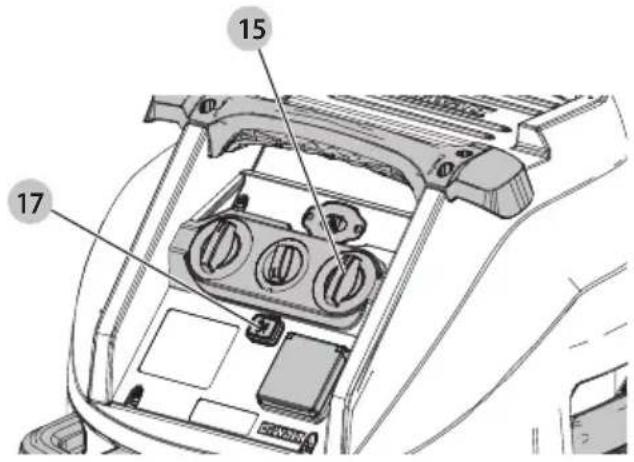
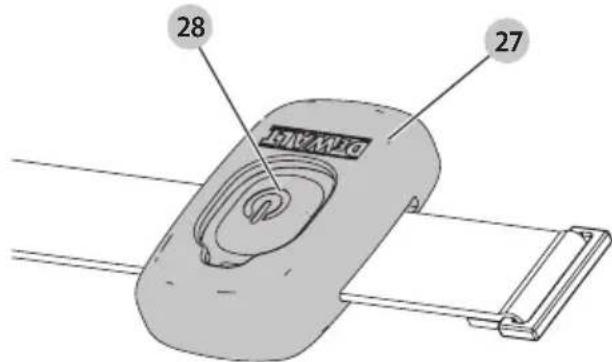
Fig. H
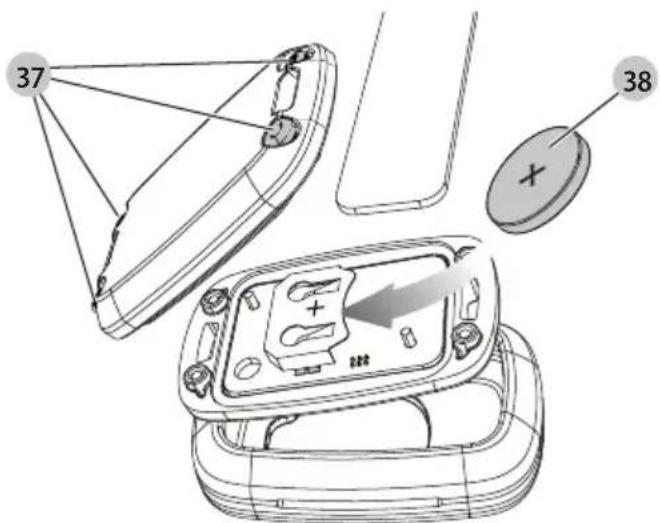
Fig.1
natural_image
Technical line drawing of a mechanical device with a numbered component (30), no readable text or symbols present.Fig. J
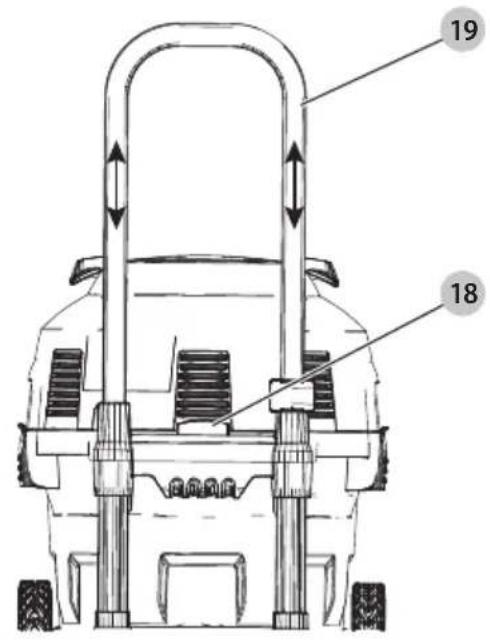
Fig. K
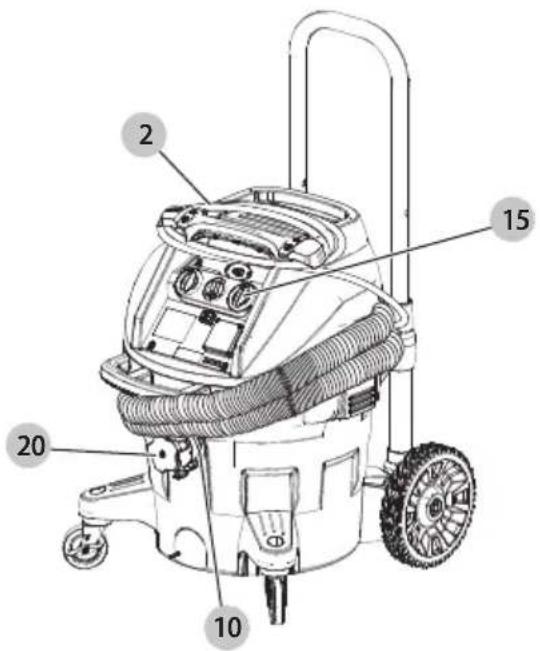
Fig. L
DWV905H Only
natural_image
Technical line drawing of a mechanical assembly with cylindrical components and a suspended device (no text or symbols)Fig. M
natural_image
Diagram of a mechanical component with hands and an arrow indicating rotation or movement (no text or symbols present)Fig. N
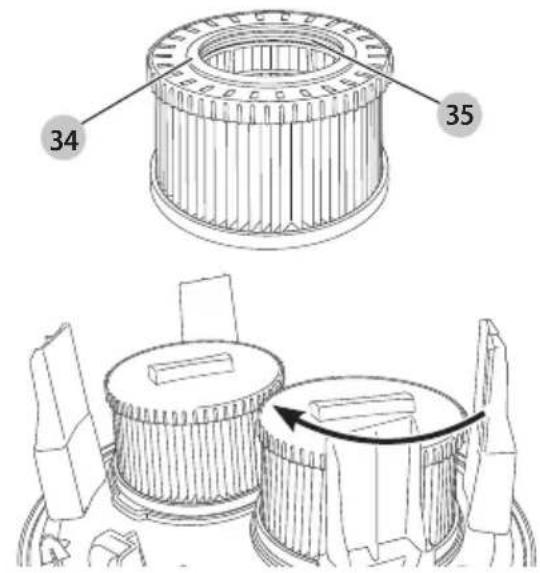
Fig. O
EKSTRA KRAFTIG BYGGEPLADSST∅VSUGER DWV905M, DWV905H
Tillykke!
Vice-President Engineering, PTE-Europe
DWV9401-XJ Papirpose
DWV9400-XJ Plastforing
DWV9402-XJ Skindpose
DWV9500-XJ Vac Rack
DWV9345-XJ ToughSystem®, TSTAK®
Vac Rack
DEWALT AirLock-system
DWV9000 Drejelås tilslutning
DWV9110 29-35 mm konisk gummiadapter
DWV9120 35-38 mm trindelt gummiadapter
DWV9130 35 mm OD adapter
DWV9150 35 mm OD vinkeladapter
Vice-President Engineering, PTE-Europe
DWV9120 gestufter Gummiadapter, 35–38 mm
DWV9130 OD-Adapter, 35 mm
DWV9150 OD-Winkeladapter, 35 mm
DWV9210 Set für Baustellen (DWV9000 + DWV9120 + DWV9130)
You have chosen a DEWALT tool. Years of experience, thorough product development and innovation make DEWALT one of the most reliable partners for professional power tool users.
Technical Data
| DWV905M | DWV905M | ||
| DWV905H | DWV905H | ||
| QS/GB | LX | ||
| Voltage | V_AC | 230 | 115 |
| UK & Ireland | V_AC | 230 | 115 |
| Type | 2 | 2 | |
| Rated power W 1400 1400 | |||
| Max power W 3600/3000 1840 | |||
| Frequency Hz 50 50 | |||
| Protective class IPX4 IPX4 | |||
| Container capacity I 38 38 | |||
| Filling quantity (liquid) I 18.4 | 18.4 | ||
| Flow rate (max at blower) | I/s 75 71 | ||
| Negative pressure (max at blower) | kPa | 25 | 24 |
| Flow rate (EN60335-2-69) | I/s 41 39 | ||
| Negative pressure (EN60335-2-69) | kPa | 22.6 | 21.6 |
| Filter surface | m^2 | 0.3 | 0.3 |
| Power connection data of power tool | W | 2200/1600 | 440 |
| Hose length | m | 4.6 | 4.6 |
| Hose diameter | mm | 32 32 | |
| Weight | kg 15 15 | ||
| Wireless Tool ControlTM remote: | N547456 | ||
| Voltage | V_DC | 3 | |
| Battery Type | CR2032 | ||
| Frequency Band | MHz | 433 | |
| Max Power (EIRP) | mW | 0.03 | |
Noise values and/or vibration values (triax vector sum) according to EN60335-2-69:
| L_PA | (emission sound pressure level) | dB(A) | 72 | 72 |
| L_WA | (sound power level) | dB(A) | 85 | 86 |
| K | (uncertainty for the given sound level) | dB(A) | 2 | 2 |
EC-Declaration of Conformity
Machinery Directive and Radio Equipment Directive

Universal Dust Extractor
DWV905M, DWV905H
DEWALT declares that these products described under
Technical Data are in compliance with:
2006/42/EC, EN 60335-1:2012 + AC:2014 + A11:2014 +
A13:2017 + A1:2019 + A2:2019 + A14:2019 + A15:2021;
EN60335-2-69:2012.
These products also comply with Directive 2014/53/EU; and 2011/65/EU. For more information, please contact DEWALT at the following address or refer to the back of the manual.
The undersigned is responsible for compilation of the technical file and makes this declaration on behalf of DEWALT.
Markus Rompel
Vice-President Engineering, PTE-Europe
D-65510, Idstein, Germany
28.04.2023
DECLARATION OF CONFORMITY
THE SUPPLY OF MACHINERY (SAFETY)
REGULATIONS 2008 AND RADIO EQUIPMENT
REGULATION 2017

Universal Dust Extractor
DWV905M, DWV905H
DEWALT declares that these products described under Technical Data are in compliance with:
The Supply of Machinery (Safety) Regulations, 2008, S.I.
2008/1597 (as amended), EN 60335-1:2012 + AC:2014 +
A11:2014 + A13:2017 + A1:2019 + A2:2019 + A14:2019 +
A15:2021; EN60335-2-69:2012.
These products conform to the following UK Regulations:
The Radio Equipment Regulations, 2017, S.I.2017/1206 (as amended).
The Restriction of the Use of Certain Hazardous Substances in Electrical and Electronic Equipment Regulations 2012, S.I. 2012/3032 (as amended).
For more information, please contact DEWALT at the following address or refer to the back of the manual.
The undersigned is responsible for compilation of the technical file and makes this declaration on behalf of DEWALT.
Karl Evans
Vice President Professional Power Tools EANZ GTS
DEWALT UK, 270 Bath Road, Slough
Berkshire, SL1 4DX
England
28.04.2023

WARNING: To reduce the risk of injury, read the instruction manual.
Definitions: Safety Guidelines
The definitions below describe the level of severity for each signal word. Please read the manual and pay attention to these symbols.
DANGER: Indicates an imminently hazardous situation which, if not avoided, will result in death or serious injury.
WARNING: Indicates a potentially hazardous situation when, if not avoided, could result in death or serious injury.
CAUTION: Indicates a potentially hazardous situation which, if not avoided, may result in minor or moderate injury.
NOTICE: Indicates a practice not related to personal injury which, if not avoided, may result in property damage.
Diagnates risk of electric shock.
Depotes risk of fire.
Important Safety Instructions
WARNING! Read all safety warnings and all instructions. Failure to follow the warnings and instructions may result in electric shock, fire and/or serious injury.
SAVE ALL WARNINGS AND INSTRUCTIONS FOR FUTURE REFERENCE
BEFORE USING THIS APPLIANCE, READ AND FOLLOW ALL INSTRUCTIONS.
WARNING: Operators shall be adequately instructed on the use of these appliances.
WARNING: To reduce the risk of electric shock. Do not escape to rain. Store indoors.
- Before use, operators shall be provided with information, instruction and training for the use of the appliance and the
substances for which it is to be used, including the safe method of removal and disposal of the material collected.
- Operators should observe any safety regulations appropriate to the materials being handled.
- This device may contain dust that is harmful to health. Cleaning and maintenance work, including disposal of the filters, dust bags and emptying of the dust collection container, may only be carried out by professionals wearing the appropriate protective equipment.
- Do not leave the appliance when it is connected to a power source. Unplug it from outlet when not in use and before servicing.
- Do not use vacuum without filters in place, except as described in the Wet Pickup Application section.
- This product is not intended for use by persons (including children) suffering from diminished physical, sensory or mental abilities; lack of experience and knowledge.
• Children should be supervised to ensure that they do not play with the appliance. - Use this appliance ONLY as described in the manual. Use only DEWALT recommended attachments.
- If the appliance is not working correctly, or if it has been dropped or damaged, return it to a service centre.
- Do not handle the plug, or appliance with wet hands.
- Do not put any objects into the openings of the appliance. Do not use the appliance with any opening blocked; keep free of dust, lint, hair and anything else that may reduce air flow.
- Keep hair, loose clothing, fingers, and all body parts away from the openings and moving parts.
- Turn off all controls before unplugging appliance.
- Use extra care when cleaning on stairs.
- Do not use the appliance to pick up flammable or combustible liquids, such as gasoline, or use in areas where flammable or combustible liquids are present.
- Static shocks are possible in dry areas or when the relative humidity of the air is low. This is only temporary and does not affect the use of the vacuum.
- To avoid spontaneous combustion, empty tank contents after each use.
- Switch OFF and unplug the dust extractor in unsafe situations.
SAVE THESE INSTRUCTIONS
Additional Safety Rules
- Do not pick up anything that is burning or smoking, such as cigarettes, matches or hot ashes.
- This tool is splashproof according to protection class IPX4. Do not submerge the tool in water.
- Do not use to vacuum combustible explosive materials, such as coal, grain or other finely divided combustible material.
- Some wood contains preservatives which can be toxic. Take extra care to prevent inhalation and skin contact when working with these materials. Request and follow any safety information available from your material supplier.
-
Do not use vacuum as a step ladder.
-
Do not place heavy objects on vacuum.
- For dust extractors it is necessary to provide for an adequate air change rate L in the room if the exhaust air is returned to the room.
(NOTE: Reference to National Regulations is necessary.)
Electrical Safety
The electric motor has been designed for one voltage only. Always check that the power supply corresponds to the voltage on the rating plate.
If the supply cord is damaged, it must be replaced only by DEWALT or an authorised service organisation.
When operating the dust extractor in a humid environment, use a residual current device (RCD) protected power supply. The use of a residual current circuit breaker reduces the risk of an electric shock.
Mains Plug Replacement (U.K. & Ireland Only)
If a new mains plug needs to be fitted:
• Safely dispose of the old plug.
- Connect the brown lead to the live terminal in the plug.
- Connect the blue lead to the neutral terminal.
Follow the fitting instructions supplied with good quality plugs. Recommended fuse: 13 A.
WARNING: 115 V units have to be operated via a fail-safe isolating transformer with an earth screen between the primary and secondary winding.
Using an Extension Cable
If an extension cable is required, use an approved 3-core extension cable suitable for the power input of this tool (see
Technical Data). The minimum conductor size is 1.5 mm ^2 ; the maximum length is 30 m.
When using a cable reel, always unwind the cable completely.
Package Contents
The package contains:
1 Dust extractor
1 Hose; diameter 32mm
1 Connector kit
2 Filters
1 Wireless Tool Control™ remote
1 Sticker with dust class H warnings (DWV905H)
1 Instruction manual
- Check for damage to the tool, parts or accessories which may have occurred during transport.
• Take the time to thoroughly read and understand this manual prior to operation.
Markings on Dust Extractor
The following pictograms are shown on the appliance:

Read instruction manual before use.


WARNING: This appliance contains harmful dust. The emptying and maintenance, including the removal of the dust bag, may only be executed by trained personnel wearing suitable protection equipment. Do not switch on until the complete filter system has been installed.
DWV905M

DWV905H
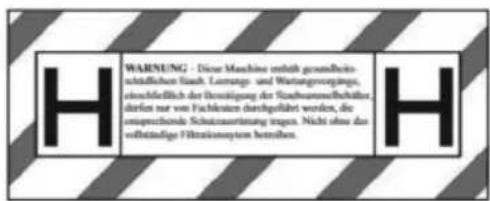
WARNING: Never modify the power appliance or any part of it. Damage or personal injury could result.
1 Top handle/cord wrap
2 Power cord
3 Vacuum head
4 Canister latch
5 Wheel
6 Canister
7 Suction hose
8 Casters (one equipped with parking brake)
9 Filters
10 Twist-lock hose inlet
11 Hose clip
12 Front handle
13 Outlet for power tools
14 Variable suction dial
15 On/off tool control switch
16 Three-position switch
17 Wireless Tool Control™ pairing button
18 Telescoping handle release button
19 Telescoping handle
20 Inlet plug
21 Bag
23 Date code
24 Dust class warning label
22 DWV9210-XJ connector kit (includes DWV9000, DWV9120, DWV9130)
Intended Use
This industrial dust extractor cleaner is intended for wet and dry vacuum cleaning applications.
DWV905M
This appliance can be used as industrial vacuum cleaner and dust extractor for mobile operations to take up all types of dry, non-combustible dusts up to dust Class M with limit values for occupational exposure greater than or equal to 0.1 mg/m^3 . Do not use to vacuum toxic or carcinogenic materials, and asbestos or pesticide.
DWV905H
This appliance can be used as industrial vacuum cleaner and dust extractor for mobile operations to take up all types of dry, non-combustible dusts up to dust Class H with limit values for occupational exposure smaller than 0.1 mg/m ^2 . Do not use to vacuum asbestos or pesticide.
DO NOT use under wet conditions or in the presence of flammable liquids or gases.
These heavy-duty vacuums are for professional use.
DO NOT let children come into contact with the tool.
Supervision is required when inexperienced operators use this tool.
DO NOT use the dust extractor for combustible dust.
DO NOT use the dust extractor in explosive atmospheres.
NOTE: This appliance is suited for the commercial use, e.g. in hotels, schools, hospitals, factories, shops, offices, rental companies, and on construction sites.
- Young children and the infirm. This appliance is not intended for use by young children or infirm persons without supervision.
- This product is not intended for use by persons (including children) suffering from diminished physical, sensory or mental abilities; lack of experience, knowledge or skills unless they are supervised by a person responsible for their safety. Children should never be left alone with this product.
Date Code Position (Fig. A)
The production date code 23 consists of a 4-digit year followed by a 2-digit week and is extended by a 2-digit factory code.
ASSEMBLY AND ADJUSTMENTS
WARNING: To reduce the risk of injury, turn appliance off and disconnect appliance from power source before installing and removing accessories, before adjusting or changing set-ups or when making repairs. An accidental start-up can cause injury.
Before the First Commissioning
- Open the canister latches 4 and remove the Vacuum head 3 of the machine.
- Remove the accessories from the canister 6 and the packaging!
- DWV905H: Cover the text field of the dust class warning label 24 with the supplied adhesive label in your national language.
WARNING: The filters 9 must always be in place while vacuuming, except as described under Wet Pick Up
Applications under Operation. When vacuuming fine dust, you may also use an additional paper bag or fleece bag to make emptying the canister easier.
WARNING: Dust collection bags must be used for dust C#M. For Class H, Dust Collection Bag DWV9400 must be used but can be combined with DWV9402 Fleece Bag.
- If optional paper, plastic, or fleece bag 21 is to be used, install as shown in Figure B. Refer to the Accessory section to select the correct filter.
NOTE: Be careful not to tear the bag. Place bag securely onto inlet 10 to provide a tight seal for maximum dust collection performance. - Place the vacuum head 3 onto the canister and secure it by closing the canister latches 4.
- Insert end of hose 7 into twist-lock hose inlet and rotate counterclockwise to lock in place as shown in Figure C.
Insert Dust Collection Bag (Fig. B)
When you insert the plastic bag, make sure you remove the air between the tank and the bag as much as possible. Try to avoid large wrinkles in the sealing between the head and the tank.
Remove / Change Used Dust Collection Bag
WARNING: Appropriate personal protective equipment like dust mask and gloves should be used while handling used dust bags.
- Turn off vacuum and unplug cord from outlet.
- To remove the suction hose, close the twist-lock hose inlet 10 with the inlet plug 20.
- Unlatch canister latches 4 and remove vacuum head 3
- Pull the collection bag carefully from inlet.
- Seal the collection bag opening tightly with adhesive tape or a cable tie (not included) when removing it from the machine.
- Dispose of collection bag in appropriate container according to statutory provisions.
OPERATION
Dry Vacuum Operation (Fig. E)
WARNING: Always observe the safety instructions and applicable regulations. WARNING: To reduce the risk of injury, turn appliance off and disconnect appliance from power source before installing and removing accessories, before adjusting or changing set-ups or when making repairs. An accidental start-up can cause injury.
- Plug the power cord into an appropriate outlet.
- Set the three-position switch 16 to the diameter of the connected hose.
- Turn the on/off tool control switch 15 to the ON position I).
- Set the variable suction dial 14 to the desired position. This feature allows the user to control the vacuum's power, suction and noise.
NOTE: This setting also controls the level of suction. This is very useful in applications where the vacuum creates unacceptable levels of drag to the work piece.
- Follow the direction under Connecting to Power Tools to connect to the power tool to be used.
NOTE: Refer to Pairing the Dust Extractor with a Tool using Wireless Tool Control™ Mode to use the dust extractor with a Wireless Tool Control™ equipped tool or remote.
Filter Care
Class H filters must not be cleaned manually. If the filter is clogged, it must be disposed of.
The filters included with this vacuum are long life filters. To be effective in minimizing dust recirculation, the filters MUST be installed correctly and in good condition.
WARNING: Appropriate personal protective equipment like cast mask and gloves should be used while handling the filters.
WARNING: Dispose of the used filter in accordance with legal regulations.
Hose Diameter Adjustment (Fig. E)
Adjust the three-position switch 16 to the correct hose (or tube) inside diameter size (32mm or 20mm) or accessory diameter referring to the largest section. The chosen diameter of the adjustment control must be equal or bigger as the largest diameter of the used hose/tube/ accessories. The hose supplied is 32 mm inside diameter. An acoustic alarm will sound if the flow rate falls below 20 m/s. The system has a time delay to reduce unintended alarms.
NOTE: Set the hose diameter regulator only to the yellow marked diameter ranges of the connected suction hose.
If the alarm sounds when there is no apparent blockage:
- Ensure that the adjustment control is set to the correct diameter.
- If the flow rate adjustment is set below the maximum, increase this level until sufficient flow through the hose causes the alarm to stop.
- If the alarm still continues to sound, remove hose and check that it is clear. Remove and replace dust bag if full or blocked and check filter condition and replace where necessary.
If the alarm continues to sound contact your local DEWALT service agent.
Connecting to Power Tools (Fig. C, D)
WARNING: Only use the outlet for purposes specified in the instructions.
WARNING: Before setting the switch to position "Tool C#ol", make sure that the connected tool is switched off.
WARNING: The maximum load of the power tool shall exceed the rated maximum outlet power rating at the socket outlet.
NOTE: Some Brushless AC tools can start the Vacuum in auto mode without turning on the power tool.
-
Plug the vacuum power cord into an appropriate outlet.
-
Turn on/off tool control switch 15 to the ACTIVATION position ^8 . This allows the vacuum to be turned on and off automatically by the power tool. The minimum power of the tool must be larger than 250 watts for the Vacuum to be controlled via the socket?
NOTE: The vacuum cleaner starts automatically within 0.5 seconds and continues to run for 7 seconds after the power tool has been turned off. Afterrun can vary when used with a power generator.
- To switch back to manual mode, turn the on/off tool control switch 15 to the ON position Ⅰ). In manual mode the tool and the vacuum are turned on and off independent of each other.
- Your DEWALT construction dust extractor is fitted with the DEWALT AirLock connection system. The AirLock allows for a fast, secure connection between the suction hose 7 and power tool. The AirLock connector 25 connects directly to DEWALT compatible tools or through the use of an AirLock adapter (available from your local DEWALT supplier). Refer to the Accessories section for detail on available adapters.
NOTE: If using an adapter ensure it is firmly attached to the tool outlet before following the steps below.
a. Ensure the collar on the AirLock connector is in the unlock position. Align notches 26 on collar and AirLock connector as shown for unlock and lock positions.
b. Push the AirLock connector onto the adapter connector point.
c. Rotate the collar to the locked position.
NOTE: The ball bearings inside collar lock into slot and secure the connection. The power tool is now securely connected to the dust extractor.
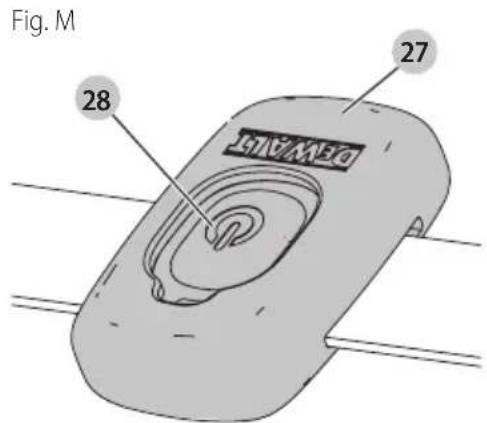
Pairing the Dust Extractor with a Tool using Wireless Tool Control™ Mode (Fig. A, M)
CAUTION: When the dust extractor is being controlled with the remote or paired power tool it may start or stop without warning.
WARNING: Do not attach the remote strap to matching parts.
To Pair with a DEWALT Remote or Wireless Tool Control™ Tool
- Turn the on/off tool control switch 15 to the position.
- Press and hold the Wireless Tool Control™ pairing button 17 on the extractor and pull the trigger on the Wireless Tool Control™-equipped-tool, or press the remote button 28 on the Wireless Tool Control™ remote 27 at the same time.
- The LED above the Wireless Tool Control™ pairing button will be steadily illuminated to indicate a successful pairing.
CAUTION: Do not activate the Wireless Tool Control at the dust of the dust extractor hose is not connected to the dust extraction port of the tool.
NOTE: Only one transmitter can be paired to the DWV905 at a time. If the unit is already paired the previous transmitter will be overridden.
To Unpair with a Wireless Tool Control™ Tool or Remote
- Turn the on/off tool control switch to the I position and pull the trigger on the Wireless Tool Control™ equipped tool or press the button on the remote at the same time.
- The LED above the Wireless Tool Control™ pairing button will flash slowly to indicate a successful unpairing.
CAUTION: To prevent unintentional switch-on after the end to switch the On/Off switch 15 to the OFF (O) position. or unpair the Wireless Tool Control of tool or remote.
LED FLASH PATTERN
In pairing mode No device is paired Device is successfully paired
Replacing the Coin Cell Battery in the Remote Control (Fig. H)

DANGER: DO NOT INGEST BATTERY; CHEMICAL BURN HAZARD. This product contains a coin / button cell battery. If the coin / button cell battery is swallowed, it can cause severe internal burns in just 2 hours and can lead to death.

WARNING: KEEP NEW AND USED BATTERIES AWAY
FROM CHILDREN. If the battery compartment does not close securely, stop using the product and keep it away from children. If you think batteries might have been swallowed or placed inside any part of the body, seek immediate medical attention.
WARNING: WHEN REPLACING BATTERY, REPLACE IT WITH THE SAME OR EQUIVALENT TYPE CR2032. Observe correct polarity (+ and −) when replacing batteries. Do not store or carry batteries so that metal objects can contact exposed battery terminals.
WARNING: ENSURE THAT COIN CELL REPLACEMENT IS CARRIED OUT PROPERLY. There is a risk of explosion.
- When replacing battery, replace it with the same or equivalent type CR2032. Do not use any other coin cells or other forms of electrical power supply.
- Do not attempt to recharge the coin cell battery and do not short circuit the coin cell battery. The coin cell battery may leak, explode, catch fire and cause personal injury.
-
Do not overheat the coin cell or throw it into fire. The coin cell may leak, explode, catch fire and cause personal injury.
-
Do not damage the coin cell and do not disassemble the coin cell. The coin cell may leak, explode, catch fire and cause personal injury.
- Do not allow damaged coin cells to come into contact with water. Leaking lithium may mix with water to create hydrogen, which could cause a fire, an explosion, or personal injury.
- Do not dispose of the button cell battery with normal household waste. Contact your local waste disposal department to dispose of the device/batteries in accordance with applicable local laws and regulations.
- Remove and dispose of drained coin cell correctly. Drained coin cell may leak and damage the product or cause personal injury.
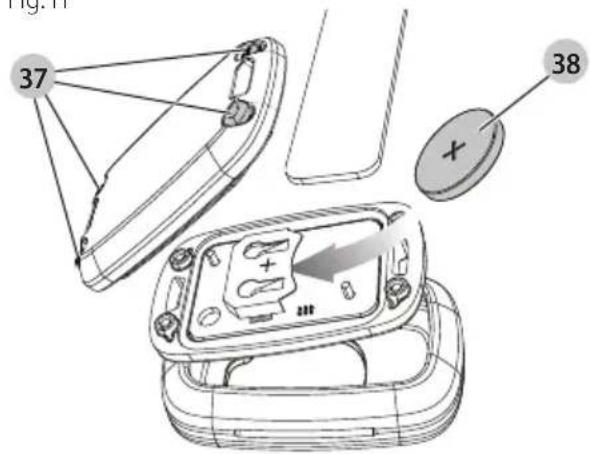
To open the housing remove the 4 screws 37 from the rear panel with a T10 torx screwdriver.
- Pull out sideways the discharged coin cell battery from the battery holder.
- Insert sideways the new coin cell battery 38 into the battery holder, pay attention to the orientation of the battery in terms of polarity.
- Replace the back cover, insert the screws and tighten.
Fig. H
Automatic Filter Cleaning System
This vacuum has a highly effective filter cleaning system which minimizes filter clogging. Every 30 seconds, one of the two filters gets automatically cleaned. The cleaning process alternates between the filters and continues through the life of the unit.
nOTE: After starting the vacuum, both filters get cleaned within the first 15 seconds.
nOTE: It is normal to hear a clicking sound during this process.
nOTE: After many hours of operation the automatic filter cleaning system may not be effective. When this happens, see clause Filter under Maintenance.
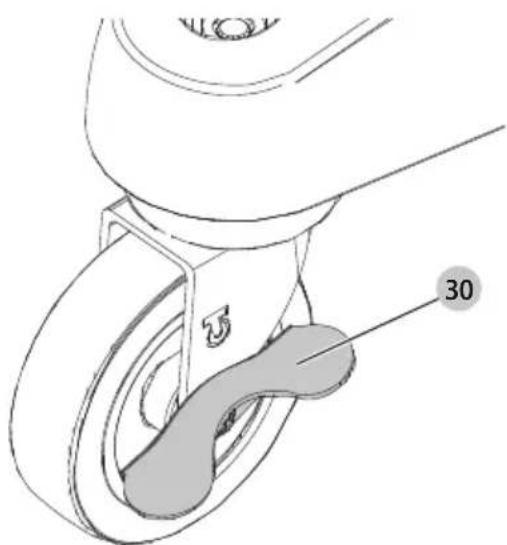
Parking Brake (Fig. I)
The parking brake will lock one wheel in place to prevent vacuum from rolling.
- To engage parking brake, depress the brake 30 to snap the brake into the locked position.
- To disengage parking brake, depress the brake button and brake will snap into the unlocked position.
Wet Pick Up Applications (Fig. F)
WARNING: DO NOT connect power tools to outlet 13 when using the vacuum for wet pick up.
WARNING: Plug vacuum into residual current device (PLA) protected outlet when using the vacuum for wet pick up.
WARNING: If foam or liquid escapes from the machine, switch off immediately.
CAUTION: Clean the water level limiting device regularly and examine it for signs of damage.
NOTICE: DO NOT remove ball float 31, doing so will cause damage to the vacuum. The ball float keeps water from entering the motor.
Before using the vacuum for wet pick up:
- Turn off vacuum and unlug power cord 2 from outlet.
- Unlatch canister latches 4 and remove the vacuum head.
- Remove the dust bag 21 (see the Remove / Change Used Dust Collection Bag section).
- Remove filter (see clause "To Remove Filter".
- Wipe the inside of the canister using a damp cloth.
- Replace the motor head and close the latches.
- Plug vacuum into a RCD protected outlet.
WARNING: Do not use the machine with this set up for dust class M and H.
To Empty Canister (Fig. A, F)
The ball float valve 31 will block air to the motor when the canister is full and the sound of the motor will change at once. When the motor has a high pitched sound and air/water flow stops, empty the canister.
- Turn off vacuum and unplug cord from outlet.
- Unlatch canister latches 4 and remove vacuum head 3.
- Empty contents of canister 6 into a suitable container or drain.
To Convert Back to Dry Vacuum Operation
- Empty canister, refer to To Empty Canister instructions.
- Place canister upside down position until dry. DO NOT use wet canister for dry pick up.
- Place vacuum head 3 on a level surface until dry.
- Reinstall filters when vacuum head is dry. See Filters under Maintenance.
- When canister is dry place the vacuum head onto the canister and secure it by closing the canister latches 4.
Telescoping Handle (Fig. J)
Press release button 18 to raise and lower the telescoping handle 19.
Shut Down (Fig. E)
- Turn on/off tool control switch 15 to the OFF position (☐)
- Unplug the unit.
Transporting (Fig. K)
CAUTION: Risk of injury and damage! Pay attention to the eight of the device when transporting it. Secure the device against unintentional movement.
- For dust-free transport, remove the dust bags from the canister or after suction of liquids, drain liquids from the canister.
- Remove the hose and close the twist-lock hose inlet 10 with the inlet plug 20.
- Put the ends of the suction hose together to prevent dirt particles from escaping.
- Store the power cord 2 and suction hose.
- When transporting in vehicles, secure the machine from movement and tip over.
MAINTENANCE
Your DEWALT appliance has been designed to operate over a long period of time with a minimum of maintenance.
Continuous satisfactory operation depends upon proper appliance care and regular cleaning.
If you experience a loss of suction performance due to a clogged filter, turn the unit off, close the twist-lock hose inlet 10 with the inlet plug 20, start the unit, and wait 15 seconds until you here the clicking sound of the filter cleaning two times. If the suction performance is still not sufficient, the filters must be changed.
DANGER: Dust hazardous to health. Always wear disposable clothing and respirators of class P2 or higher when carrying out maintenance work (e.g. changing filters).
WARNING: To reduce the risk of injury, turn appliance off and disconnect appliance from power source before installing and removing accessories, before adjusting or changing set-ups or when making repairs. An accidental start-up can cause injury.
WARNING: For user servicing, the machine must be dismantled, cleaned and serviced, as far as is reasonably practicable, without causing risk to the maintenance staff and others. Suitable precautions include, decontamination before dismantling, provision for local filtered exhaust ventilation where the machine is dismantled, cleaning of the maintenance area and suitable personal protection.
- The manufacturer, or an instructed person, shall perform a technical inspection at least annually, consisting of, for example, inspection of the filter for damage, air tightness of the machine and proper function of the control mechanism.
- In addition, on class H machines, the machine filtration efficiency should be tested at least annually, or more frequently as may be specified by national requirements. The test method that can be used to verify the machine's filter efficiency is specified in 22.AA.201.2. If the test fails, it shall be repeated with a new filter.
- When carrying out service or repair operations, all contaminated items which cannot be satisfactorily
cleaned, are to be disposed of; such items shall be disposed of in impervious bags in accordance with any current regulation for the disposal of such waste.
- Remove the outside of the machine. It should be decontaminated by vacuum cleaning methods and wiped clean or treated with sealant before being taken out of a hazardous area. All the machine parts shall be regarded as contaminated when removed from the hazardous area and appropriate action taken to prevent dust dispersal.
Filter
To Remove Filters (Fig. L, M)
- Turn on/off tool control switch 15 to the OFF position (●) and unplug cord from outlet.
- Release canister latches 4 and remove vacuum head 3 from canister. Place vacuum head on a level surface upside down.
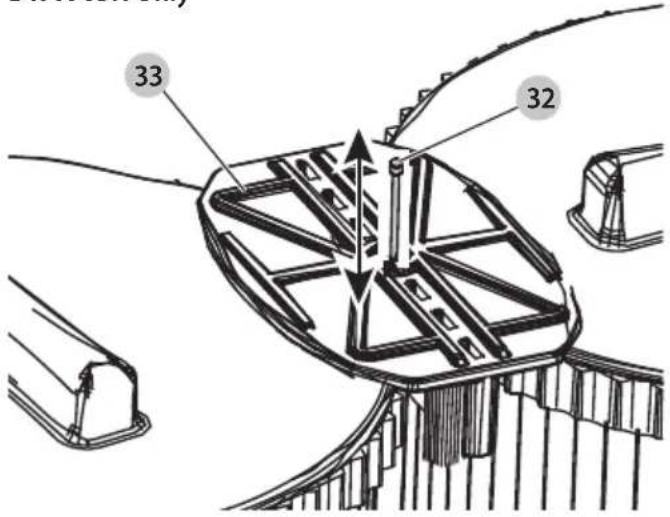
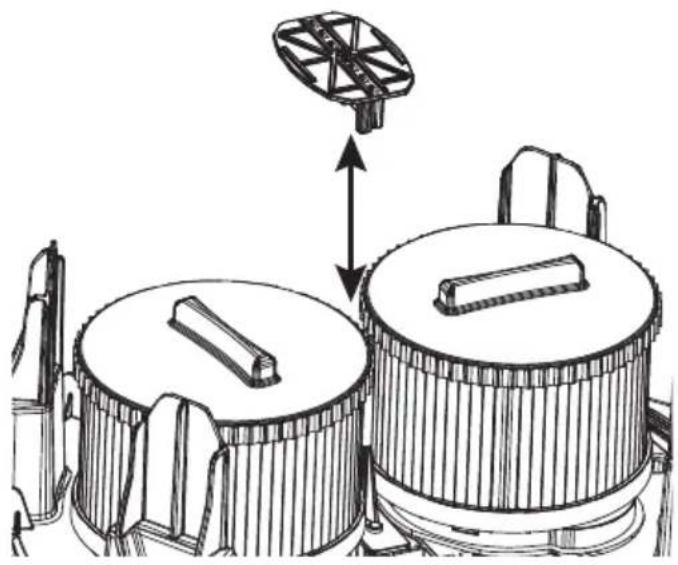
- For DWV905H, loosen the 2.5 mm socket head screw 32 using a T-10 bit, then remove the filter plate 33 from the filters as shown in Fig. L. Do not reuse the Class H main filter element after it has been removed from the unit.
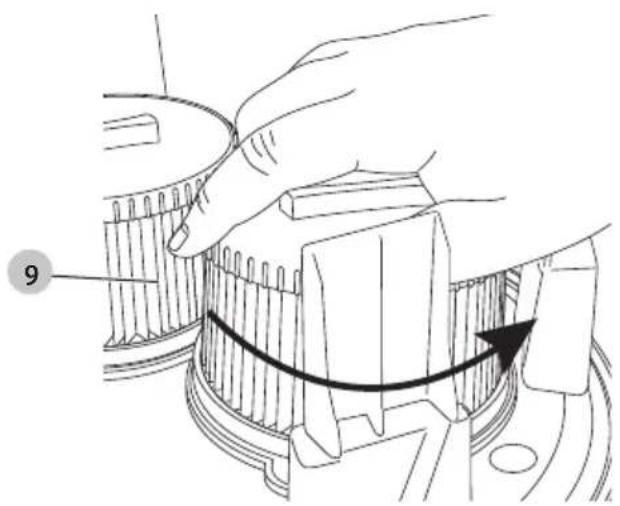
- Turn each filter 9 counterclockwise by gripping it on the plastic end cover as shown in Fig. M, and carefully remove from head, ensuring debris does not fall into mounting hole. NOTE: Use care to not damage filter material.
- If the bottom side of the vacuum head needs to be cleaned, use a cloth dampened with water and mild soap and allow it to dry. Dispose of cloth in an appropriate container.
- Inspect filters for wear, tears or other damage.
WARNING: If there is any doubt on the condition of the filters, they MUST be replaced. DO NOT continue use if filters are damaged. Class H filters should not get cleaned manually outside of the unit.
WARNING: Never use compressed air or a brush to clean filters, otherwise damage to the filter membrane will occur which will allow dust to pass through the filter. If needed, gently tap against a hard surface or rinse with room temperature water and let air dry. Cleaning of the filters is typically unnecessary, even if the filter is covered with dust. The automatic filter cleaning system will maintain maximum performance and continue to function. If visual damage to the filter membrane exists, replace filters. Filters typically last between six and twelve months depending on use and care.
To Install Filters (Fig. L, N)
- Ensure filter seal 34 is in place and is secure
- Line up filter threads 35 to vacuum head threads and using moderate force, turn filter clockwise until tight.
NOTE: Use care to not damage filter material. - For DWV905H, replace the filter plate 33 and tighten the screw 32 on top of the plate.
- Place the vacuum head 3 onto the container and secure it by closing the canister latches 4.
Lubrication
Your dust extractor requires no additional lubrication.
Cleaning
WARNING: Never use solvents or other harsh chemicals for cleaning the non-metallic parts of the appliance. These chemicals may weaken the materials used in these parts. Never let any liquid get inside the machine; never immerse any part of the appliance into a liquid.
- Vacuum the outside of the dust extractor. For further cleaning use a cloth dampened only with water and mild soap if necessary.
- After use dispose of cloth in an appropriate container.
Storage (Fig. K)
CAUTION: Turn on/off tool control switch 15 to the OFF position (O). Disconnect from the power supply.
- Empty the canister, refer to To Empty Canister under Operation.
- Clean the vacuum inside and outside.
- Clean or replace filters, refer to Filters.
- Remove the hose 7 from the twist-lock hose inlet 10 and close the inlet with the inlet plug 20
- Put the ends of the suction hose together to prevent dirt particles from escaping.
- Store the suction hose and the power cord as shown in the illustration. Place the unit in a dry room and secure it from unauthorized use.
NOTE: Plug inlet plug into inlet to keep debris inside canister when suction hose is removed. You can also attach the ends of the hose together and lock together with the twist-lock end.
NOTE: After wet applications, the internal parts of the liquid container must be dried before storage.
Accessories
WARNING: Since accessories, other than those offered by DEWALT, have not been tested with this product, use of such accessories with this appliance could be hazardous. To reduce the risk of injury, only DEWALT recommended accessories should be used with this product.
ACCESSORIES
DWV9340 Dust Class M Filter
DWV9345 Dust Class H Filter
DWV9315 Crush-proof hose
DWV9316 Anti-static hose;
diameter 32 mm
DWV9350 Floor Cleaning Kit
DWV9401 Paper bag
DWV9400 Plastic liner
DWV9402 Fleece bag
DWV9500 Vac Rack
DWV9510 ToughSystem®, TSTAK®
Vac Rack
DEWALT AirLock System
DWV9000 Twist-Lock connection
DWV9110 29–35 mm tapered rubber adapter
DWV9120 35–38 mm stepped rubber adapter
DWV9130 35 mm OD adapter
DWV9150 35 mm OD angle adapter
DWV9210 Construction Kit (DWV9000 + DWV9120 + DWV9130)
DWV9220 Woodworking Kit (DWV9000 + DWV9130 × 3 + DWV9120 + DWV9150 + Cable Hose Clip)
DWV9470 Y Splitter Hose Kit
Vac Rack Installation (Fig. M)
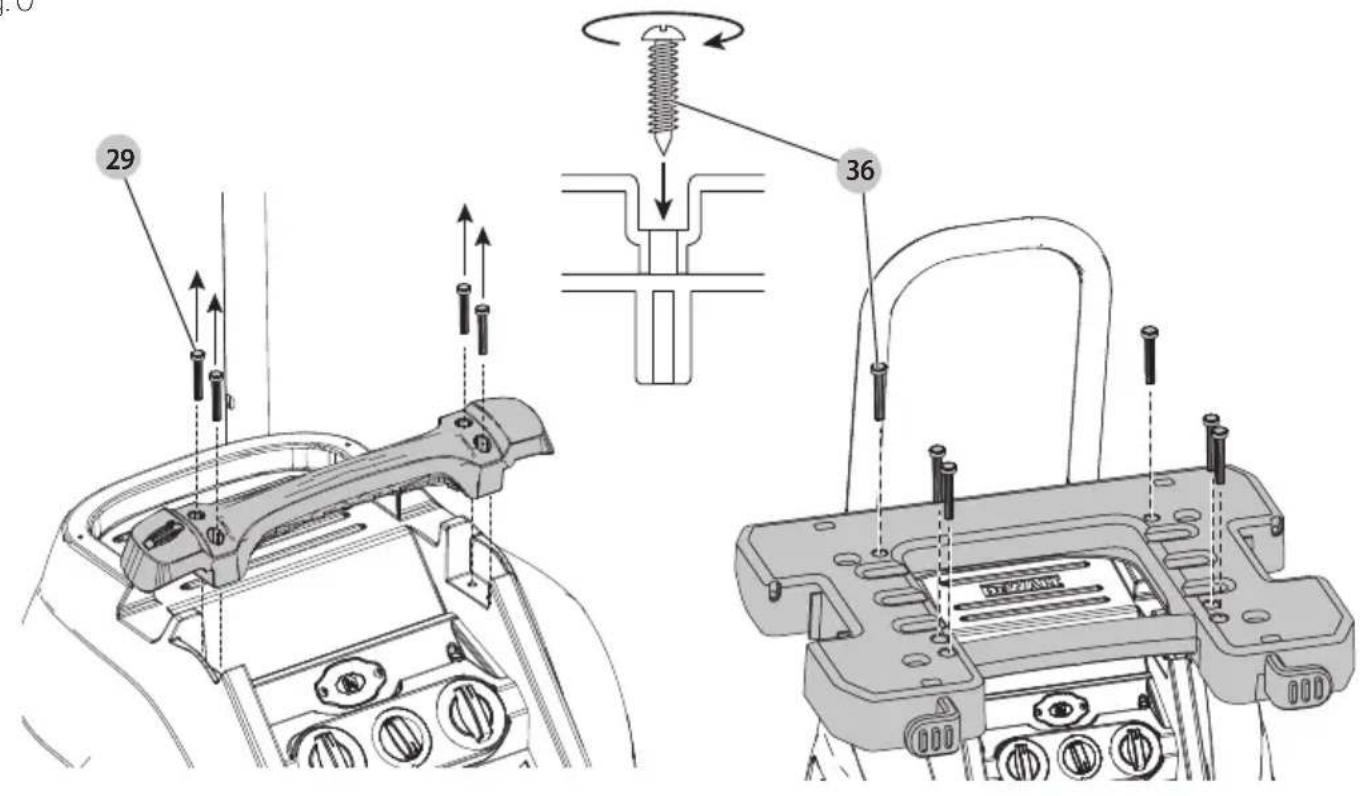
- Remove the 4 carry handle screws 29 using a T-25 star bit and remove the carry handle.
- Install the vac rack reusing the carry handle screws. Put them back in their original holes and tighten.
- Use the 2 screws 36 provided by placing them in the rear holes of the vac rack. Push down and turn each screw to break through the material and into the hidden screw boss below. Tighten.
CAUTION: Do not exceed 9 kg (30kg for model DWV9510)
i with 14 liter storage unit, maximum 2 storage units per dust extractor. Do not exceed 18 kg in a 28 liter storage unit, 1 storage unit per dust extractor. Exceeding the recommended height and/or weight could result in an unstable dust extractor would could cause injury or damage. For model DWV9510, the recommended height is 40 cm.
CAUTION: Do not carry the dust extractor at the handles of a mounted storage units.
NOTICE: Do not remove dust extractor head from tank with T-stack storage units attached. Doing so could result in damage to the dust extractor filter.
NOTICE: The carry handle should be stored for possible dismantling.
If the rack is to be removed again, this is done in reverse order. The handle must be refitted and the two rear screws 36 must be screwed back into the motor head enclosure, to close the screw holes.
Securing the Power Cord to the Hose
(Fig. A)
The power cord 2 can be secured to the suction hose 7 using the D279058CL hose clip (available from your local DEWALT supplier).
Consult your dealer for further information on the appropriate accessories.
Troubleshooting
| Problem Solution | |
| Motor does not run | Check power cord, plugs and outlet. |
| Ensure the on/off /tool control switch is in the ON position ☐. | |
| Suction capacity decreases | Remove blockages in the suction nozzle, suction tube, suction hose or filters. |
| Replace the paper or fleece bag. | |
| Check for proper installation of the filters. | |
| Clean or replace the filters. | |
| Empty canister, refer to Empty Canister under Operation. | |
| Vacuum stops running | Thermal overload has been tripped:1. Turn the vacuum off and disconnect vacuum cleaner from power source.2. Empty the canister, if needed.3. Allow the unit to cool.4. Plug the power cord into an appropriate outlet and turn on/off/tool control switch to the ON position ☐) to test. If vacuum will not restart contact your seller or check the location of your nearest authorised DEWALT repair agent in the DEWALT catalogue or contact your DEWALT office at the address indicated in this manual. |
| Dust comes out while vacuuming | Check for proper installation of the filters. |
| Ensure filters are not damaged; replace if necessary. | |
| Ensure filter seals are in place and are secure. | |
| Automatic filter cleaning is not working | Listen for the solenoid clicking to ensure the filter cleaning mechanism is working. |
| Power tool does not turn on. | Ensure the on/off/tool control switch is in the ACTIVATION position ☐~ |
| Dust extractor is not turned on by Wireless Tool ControlTM equipped power tool or remote. | 1. Move three-position switch 16 to Wireless Tool ControlTM mode. Confirm LED is illuminated. If LED is not illuminated with the selector in Wireless Tool ControlTM mode, contact DEWALT service centre.2. Remote/power tool is not paired to dust extractor. Follow pairing steps.3. Remote/power tool is out of range of dust extractor. Move dust extractor closer to remote/power tool.4. Wireless Tool ControlTM remote coin cell is dead. Replace coin cell and retry.5. Ensure paired tool's battery is fully charged and fully inserted.6. If tank is full of liquid and sense circuit is tripped:a. Turn the three-position switch to the Off (0) position and disconnect from power source.b. Empty tank. |
Protecting the Environment
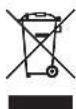
Separate collection. Products marked with this symbol must not be disposed of with normal household waste.
Products contain materials that can be recovered or recycled, reducing the demand for raw materials. Please
recycle electrical products according to local provisions. Further information is available at www.2helpU.com.
Service
nOTE: If the dust extractor must be sent or returned for repair:
- Contact the DEWALT service centre before sending or returning in equipment to clarify possible hazards from extracted hazardous materials. DEWALT service centre may require only the vacuum head to be sent or returned. If applicable, the DEWALT service centre will provide you a protective packaging.
- Observe the following instructions for personal protection during transport and in the service centre:
a. Clean the tool thoroughly inside and out.
b. Remove the filter/disposal bag.
c. Apply the cleaning and disposal directions that are given under Transportation, Maintenance and Cleaning sections in the manual.
d. Please use the provided protective packaging, ensuring that the plastic bag is sealed properly and is fully airtight
e. Attach a list of extracted hazardous materials to the outside of the provided protective packaging.
ToughSystem®, TSTAK®
DWV9000 Raccord verrouillable
$$ (D W V 9 0 0 0 + D W V 9 1 3 0 $$
$$ \times 3 + D W V 9 1 2 0 + $$
$$ D W V 9 1 5 0 + C l i p $$
$$ \text { fermatubo) } $$
Universele stofafzuiging DWV905M, DWV905H
22 DWV9210-XJ connector kit (inclusief DWV9000, DWV9120, DWV9130)
Bedoeld gebruik
WAARSCHUWING: VERZEKER DAT HET VERVANGEN VAIDE KNOOPCELBATTERIJ JUIST WORDT
KRAFTIG BYGG-ST∅VSUGER DWV905M, DWV905H
Gratulerer!
Vice-President Engineering, PTE-Europe
DWV9401-XJ Papirpose
DWV9400-XJ Plastforing
DWV9402-XJ Fleece-pose
DWV9500-XJ Vac Rack
DWV9345-XJ ToughSystem®, TSTAK® Vac Rack
DEWALT AirLock System
DWV9000 Vri-lås tilkopling
DWV9110 29–35 mm konisk gummiadapter
DWV9120 35–38 mm trinnvis gummiadapter
DWV9130 35 mm OD adapter
DWV9150 35 mm vinkel adapter
DWV9210 Byggesett (DWV9000 +
$$ D W V 9 1 2 0 + D W V 9 1 3 0) $$
DWV9220 Trebearbeidingssett
$$ (D W V 9 0 0 0 + D W V 9 1 3 0 $$
$$ \times 3 + D W V 9 1 2 0 + $$
$$ D W V 9 1 5 0 + \text { Cable } $$
$$ \text { Hose Clip) } $$
DWV9470 Y-splitter slangesett
$$ (D W V 9 0 0 0 + D W V 9 1 3 0 $$
$$ \times 3 + D W V 9 1 2 0 + $$
$$ D W V 9 1 5 0 + \text { braçadeira } $$
$$ \text { para mangueiras) } $$
DWV9470 Conjunto de divisores
de mangueira em Y
DWV9345-XJ ToughSystem®, TSTAK®
Vac Rack
Vice-President Engineering, PTE-Europe