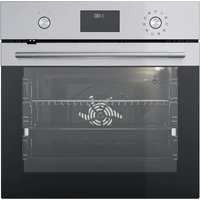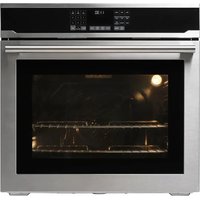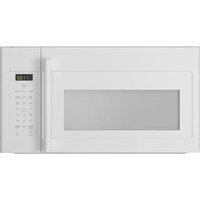
LAGAN 504.692.93 - Oven IKEA - Free user manual and instructions
Find the device manual for free LAGAN 504.692.93 IKEA in PDF.


User questions about LAGAN 504.692.93 IKEA
0 question about this device. Answer the ones you know or ask your own.
Ask a new question about this device
Download the instructions for your Oven in PDF format for free! Find your manual LAGAN 504.692.93 - IKEA and take your electronic device back in hand. On this page are published all the documents necessary for the use of your device. LAGAN 504.692.93 by IKEA.
USER MANUAL LAGAN 504.692.93 IKEA
natural_image
Line drawing of a rectangular electronic device with internal components and mounting brackets (no text or symbols)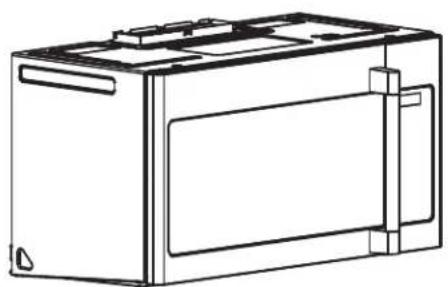
natural_image
Line drawing of a rectangular electronic device with internal components and mounting brackets (no text or symbols)
natural_image
Technical line drawing of a rectangular battery pack with internal compartments and mounting points (no text or symbols)
text_image
IKEAPlease record your model and serial numbers below for reference.
Please refer to the last page of this manual for the full list of IKEA appointed After Sales Service Provider and relative national phone numbers.
Please attach sales receipt here for future reference.
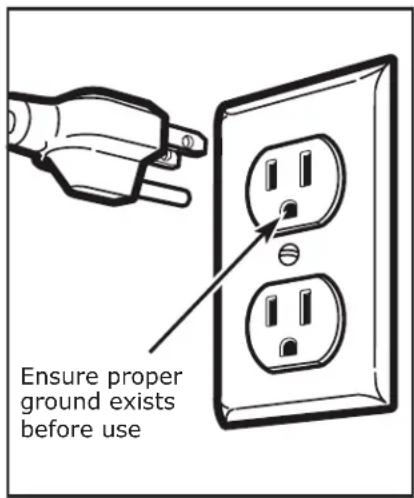
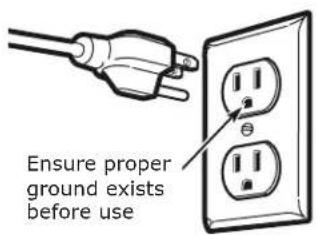
This product requires a three-prong grounded outlet. The installer must perform a ground continuity check on the power outlet box before beginning the installation to ensure that the outlet box is properly grounded. If not properly grounded, or if the outlet box does not meet electrical requirements noted (under ELECTRICAL REQUIREMENTS), a qualified electrician should be employed to correct any deficiencies.
natural_image
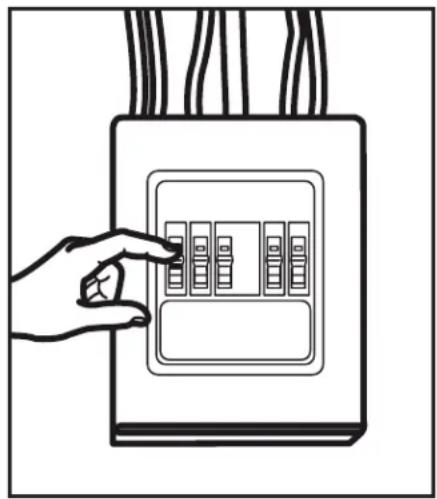
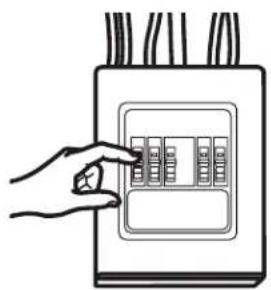
Line drawing of a hand pointing at an electrical outlet with multiple switches (no text or symbols)CAUTION: For personal safety, remove house fuse or open circuit breaker before beginning installation to avoid severe or fatal shock injury.
CAUTION: For personal safety, the mounting surface must be capable of supporting the cabinet load, in addition to the added weight of this 63-85 pound (28.5-38.5 kg) product, plus additional oven loads of up to 50 pounds (22.7 kg) or a total weight of 113-135 pounds (51.3-61.2 kg).
CAUTION: For personal safety, this product cannot be installed in cabinet arrangements such as an island or a peninsula. It must be mounted to BOTH a top cabinet AND a wall.
NOTE: For easier installation and personal safety, it is recommended that two people install this product. IMPORTANT - PLEASE READ CAREFULLY. FOR PERSONAL SAFETY, THIS APPLIANCE MUST BE PROPERLY GROUNDED TO AVOID SEVERE OR FATAL SHOCK.
text_image
Ensure proper ground exists before useThe power cord of this appliance is equipped with a three-prong (grounding) plug which mates with a standard three-prong (grounding) wall receptacle to minimize the possibility of electric shock hazard from this appliance.
You should have the wall receptacle and circuit checked by a qualified electrician to make sure the receptacle is properly grounded.
Where a standard two-prong wall receptacle is encountered, it is very important to have it replaced with a properly grounded three-prong wall receptacle, installed by a qualified electrician.
DO NOT, UNDER ANY CIRCUMSTANCES, CUT, DEFORM OR REMOVE ANY OF THE PRONGS FROM THE POWER CORD. DO NOT USE WITH AN EXTENSION CORD.
ELECTRICAL REQUIREMENTS
Product rating is 120 volts AC, 60 Hertz, 15 amps and 1.6 kilowatts. This product must be connected to a separate and dedicated supply circuit of the proper voltage and frequency. Wire size must conform to the requirements of the National Electrical Code or the prevailing local code for this kilowatt rating.
The power supply cord and plug should be brought to a separate and dedicated 15- to 20- ampere branch circuit single grounded outlet. The outlet box should be located in the cabinet above the microwave oven. The outlier box and supply circuit should be installed by a qualified electrician and conform to the National Electrical Code or the prevailing local code.
DAMAGE-SHIPMENT/ INSTALLATION
- If the unit is damaged in shipment, return the unit to the store in which it was bought for repair or replacement.
- If the unit is damaged by the customer, repair or replacement is the responsibility of the customer.
- If the unit is damaged by the installer (if other than the customer), repair or replacement must be made by arrangement between customer and installer.
PARTS INCLUDED
HARDWARE PACKET
| PART | QUANTITY | |
| Wood Screws ( ^1/_4 " x 2") | 2 | |
| Toggle Bolts (and wing nuts) ( ^3/_16 " x 3") | 2 | |
| Self-Aligning Machine Screws ( ^1/_4 "-28 x 3^1/_4 ") | 3 | |
| Nylon Grommet (for metal cabinets) | 1 | |
You will find the installation hardware contained in fitting bag with the unit. Check to make sure you have all these parts.
NOTE: Some extra parts are included.
ADDITIONAL PARTS
| PART | QUANTITY | |
| Top Cabinet Template | 1 | |
| Rear Wall Template | 1 | |
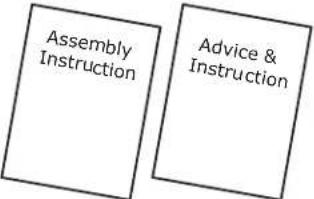 | Assembly Instruction | 1 |
| Advice & Instruction | 1 | |
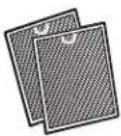 | Separately Packed Grease Filters | 2 |
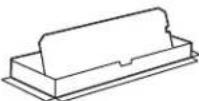 | Exhaust adaptor | 1 |
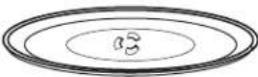 | Glass Tray 1 | |
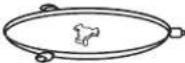 | Turntable Ring | 1 |
For UPPSEENDE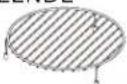 | Convection wire rack | 1 |
For UPPSEENDE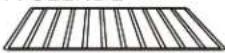 | Shelf 1 | |
For UPPSEENDE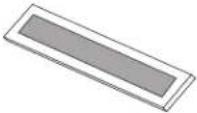 | Charcoal Filter | 1 |
Tools you will need:
- Tape measure
- Hole saw
- Stud finder or hammer
- Level
• Duct and masking tape - Scissors
-
1 Phillips screw driver
- Electric drill
• 3/16", 1/2", 5/8" drill bit - Filler wood blocks for recessed bottom cabinets
- Tin snips
- Safety googles
text_image
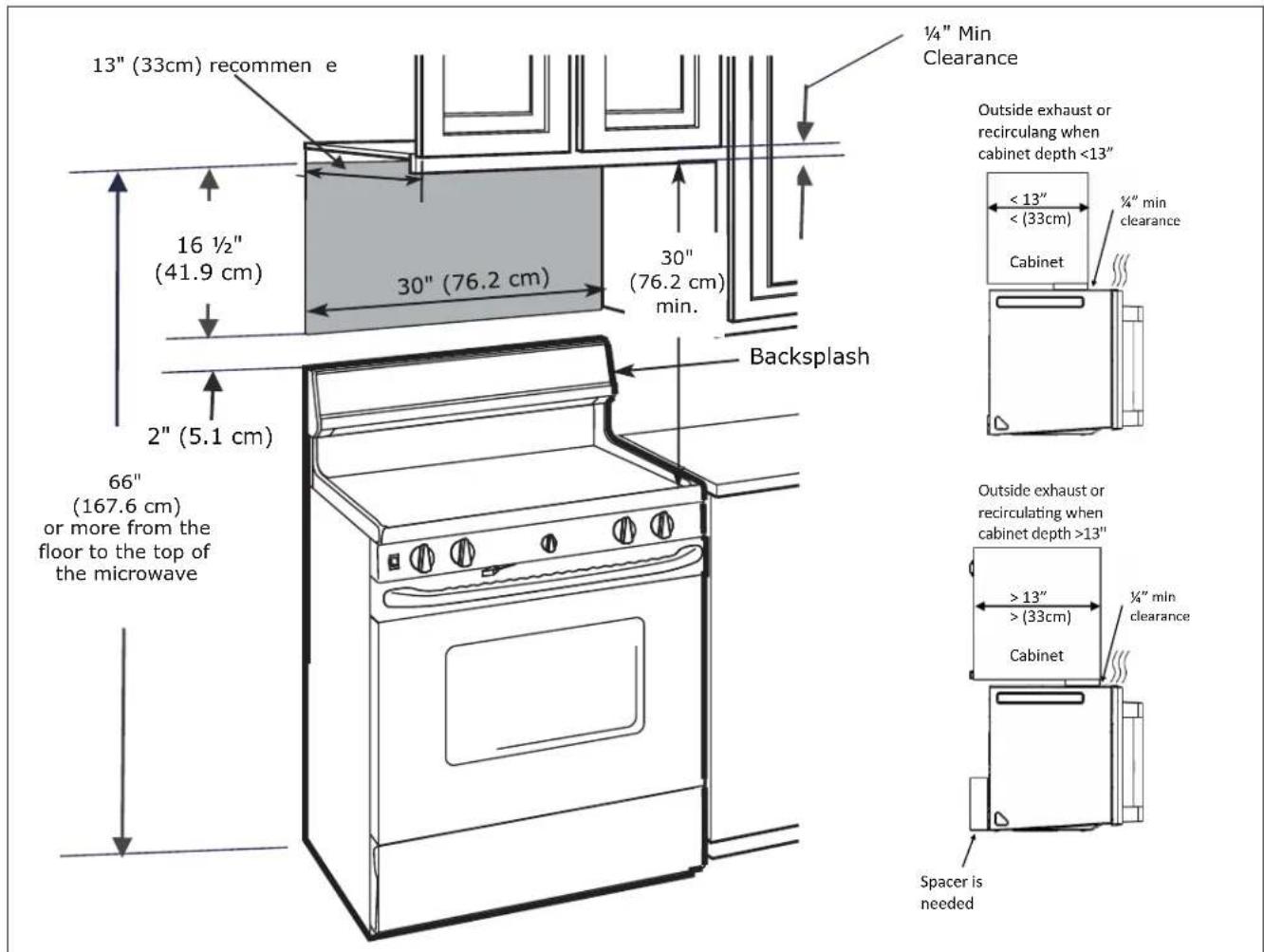
13" (33cm) recommend e 16 ½" (41.9 cm) 30" (76.2 cm) 30" (76.2 cm) min. ½" Min Clearance Outside exhaust or recirculating when cabinet depth <13" < 13" < (33cm) ¼" min clearance Cabinet Backsplash 2" (5.1 cm) 66" (167.6 cm) or more from the floor to the top of the microwave Outside exhaust or recirculating when cabinet depth >13" > 13" > (33cm) ¼" min clearance Cabinet Spacer is needed- The space between the cabinets must be 30" (76.2 cm) wide and free of obstructions.
- If you are going to vent your microwave oven to the outside, see Hood Exhaust Section for exhaust duct preparation
- When installing the microwave oven beneath smooth, flat cabinets, be careful to follow the instructions on the top cabinet template for power cord clearance.
- As a guide to installation, see page 22 for Mounting Template Information.
- If the cabinet depth, including the cabinet doors, is more than 13", then the unit must be spaced out from wall using adequate materials supporting 150 lbs to allow proper top vent air exhaust/intake.
1 PLACEMENT OF THE MOUNTING PLATE
A. REMOVING THE MICROWAVE OVEN FROM THE CARTON/ REMOVING THE MOUNTING PLATE
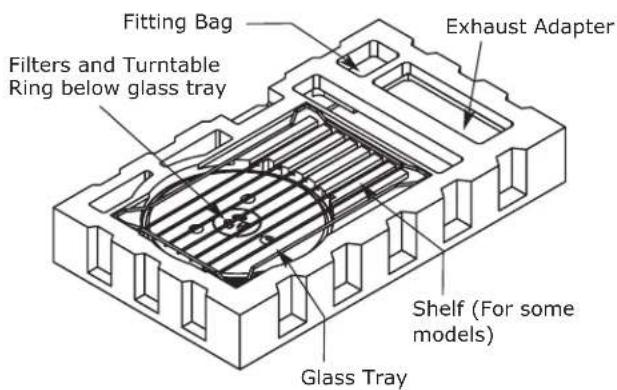
- Remove the installation instructions, use and care, exhaust adapter, turntable ring, shelf, filters, glass tray and the small hardware bag. Do not remove the Styrofoam protecting the front of the oven.
text_image
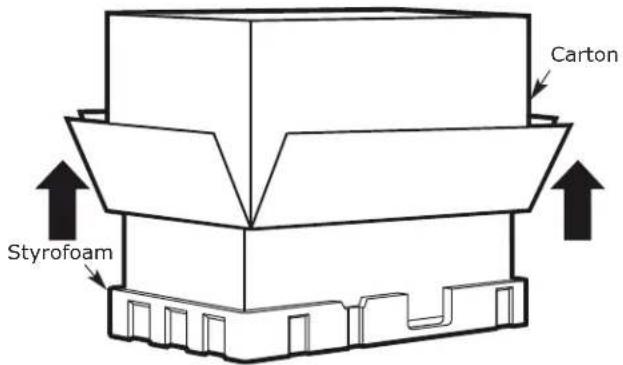
Fitting Bag Filters and Turntable Ring below glass tray Exhaust Adapter Shelf (For some models) Glass Tray- Fold back all 4 carton flaps fully against carton sides. Then carefully roll the oven and carton over onto the top side. The oven should be resting in the Styrofoam.
text_image
Carton Styrofoam- Pull the carton up and off the oven.
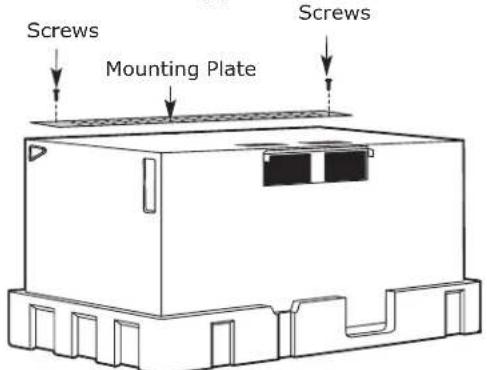
- Cut the middle of the outer protective plastic bag to remove the mounting plate.
text_image
Screws Mounting Plate Screws- Remove the screws from each end of the mounting plate. This plate will be used as the rear wall template bag, and for mounting. Reinstall the screws into the holes where they were removed.
B. FINDING THE WALL STUDS
text_image
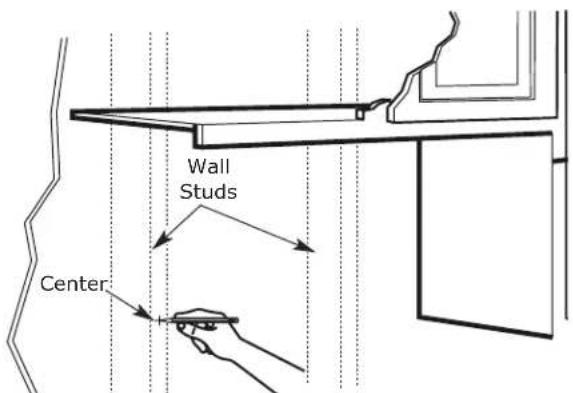
Wall Studs Center- Find the studs, using one of the following methods:
A. Stud finder - a magnetic device which locates nails.
B. Use a hammer to tap lightly across the mounting surface to find a solid sound. This will indicate a stud location.
-
After locating the stud(s), find the center by probing the wall with a small nail to find the edges of the stud. Then place a mark halfway between the edges. The center of any adjacent studs should be 16" (40.6 cm) or 24" (61 cm) from this mark.
-
Draw a line down the center of the studs.
THE MICROWAVE MUST BE CONNECTED TO AT LEAST ONE WALL STUD.
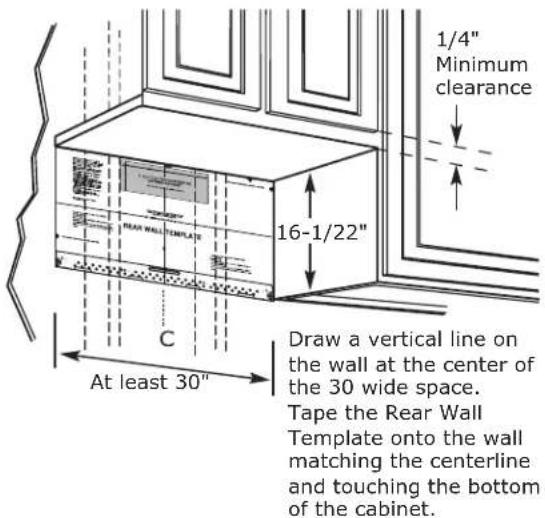
C. DETERMINING WALL PLATE C. LOCATION UNDER YOUR CABINET
Plate position-beneath flat bottom cabinet
text_image
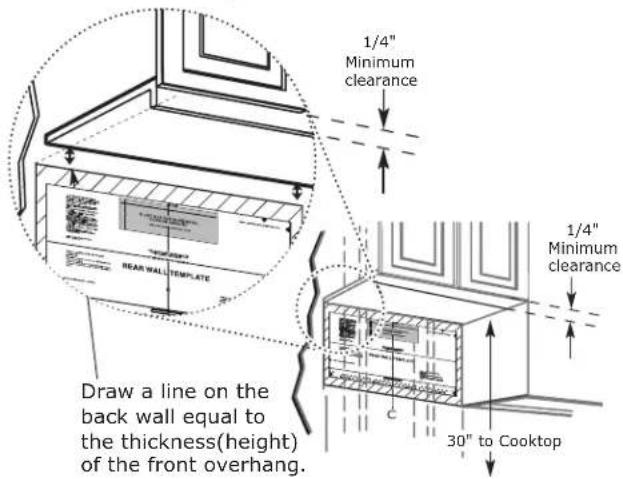
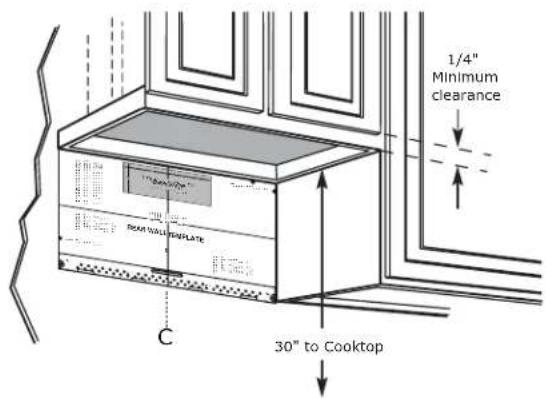
1/4" Minimum clearance 16-1/22" C At least 30" Draw a vertical line on the wall at the center of the 30 wide space. Tape the Rear Wall Template onto the wall matching the centerline and touching the bottom of the cabinet.Plate position-beneath recessed bottom cabinet with front overhang
text_image
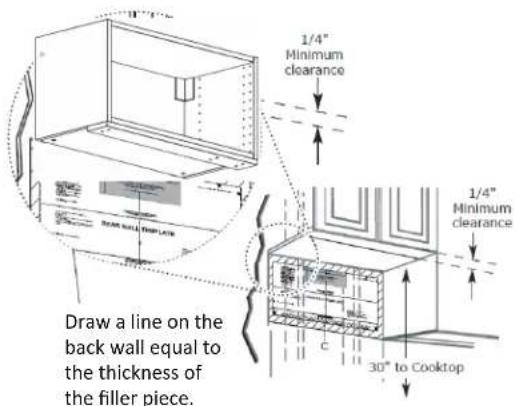
1/4" Minimum clearance 1/4" Minimum clearance REAR WALL TEMPLATE Draw a line on the back wall equal to the thickness(height) of the front overhang. 30" to CooktopPlate position-beneath smooth flat cabinet with filler piece
text_image
1/4" Minimum clearance Draw a line on the back wall equal to the thickness of the filler piece. 1/4" Minimum clearance 30° to CooktopEN
Plate position-beneath framed recessed cabinet bottom
text_image
1/4" Minimum clearance "Barrelator" Roar Wall Template 30" to Cooktop CDraw a vertical line on the wall at the center of the 30" space.
Tape the Rear Wall Template onto the wall matching the centerline and touching the bottom cabinet frame.
D. ALIGNING THE WALL PLATE
Your cabinets may have decorative trim that interferes with the microwave installation. Remove the decorative trim to install the microwave properly and to make it level.
Use a level to make sure the cabinet bottom is level. If the cabinets have a or front filler piece, only, with no back or side frame, install the mounting plate down the same distance as the front overhang or front filler piece thickness. This will keep the microwave level.
- Measure the inside depth of the or front filler piece.
- Draw a horizontal line on the back wall an equal distance below the cabinet bottom as the inside depth of the or front filler piece.
- For this type of installation with front overhang only, align the mounting tabs with this horizontal line, not touching the cabinet bottom as described in Step D.
text_image
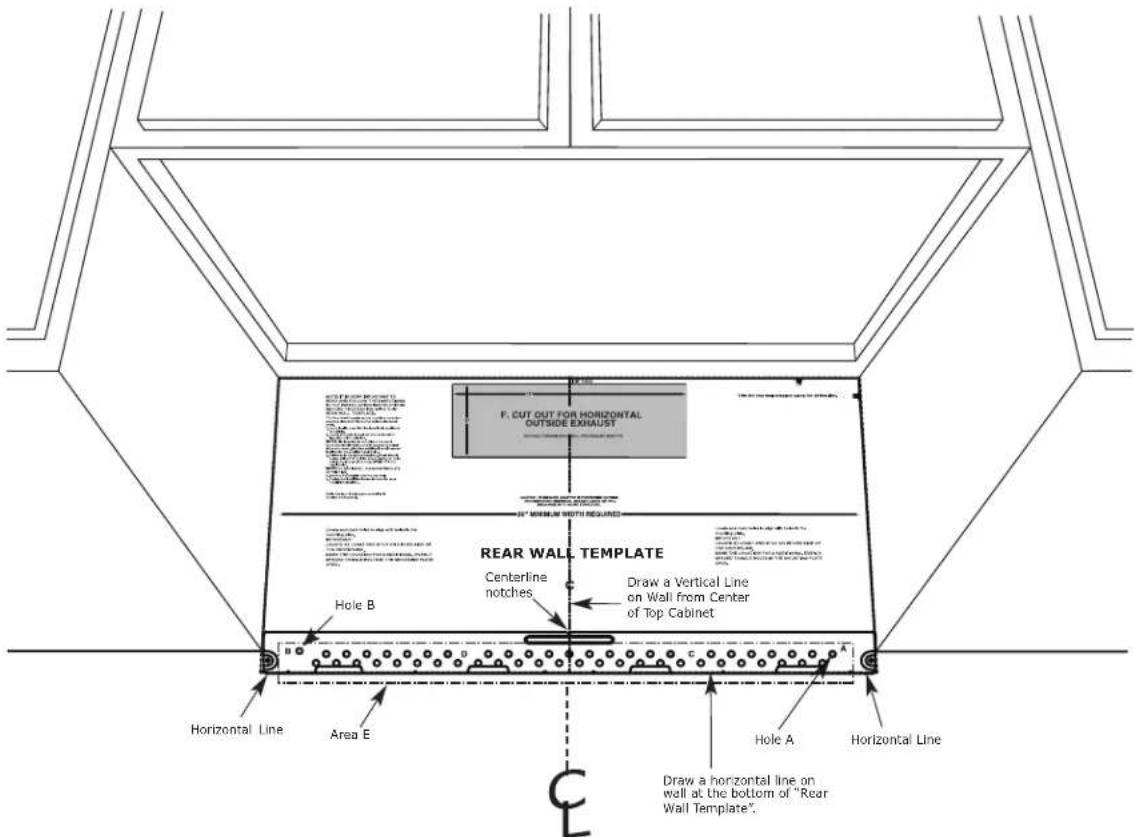
F. CUT OUT FOR HORIZONTAL OUTSIDE EXHAUST REAR WALL TEMPLATE Centerline notches Draw a Vertical Line on Wall from Center of Top Cabinet Hole B Horizontal Line Area E Hole A Horizontal Line Draw a horizontal line on wall at the bottom of "Rear Wall Template". C- Draw a vertical line on the wall at the center of the 30" wide space.
- Draw a horizontal line on the wall at the bottom of "Rear Wall Template".
- Find a wall stud in area "E" of mounting plate Refer to section 1B. Finding the wall studs.
- For attaching the mounting plate into stud drill a 3/16" hole into wood stud. Drill a 5/8" hole for toggle bolt in 1 other location (Hole A or Hole B)
NOTE: DO NOT MOUNT THE PLATE AT THIS TIME.
NOTE: Holes A and B are inside area E. If neither of Holes A and B are not in a stud, find a stud somewhere in area E and draw a circle to line up with the stud. It is important to have at least one wood screw mounted firmly in a stud to support the weight of the microwave. Set the mounting plate aside.
2 INSTALLATION TYPES (Choose A, B or C)
This microwave oven is designed for adaptation to the following three types of ventilation:
A. Recirculating (Non-Vented Ductless)
B. Outside Back Exhaust (Horizontal Duct)
C. Outside Top Exhaust (Vertical Duct)
NOTE: This microwave is shipped assembled for Recirculating. Select the type of ventilation required for your installation and proceed to that section.
A. RECIRCULATING (NON-VENTED DUCTLESS)
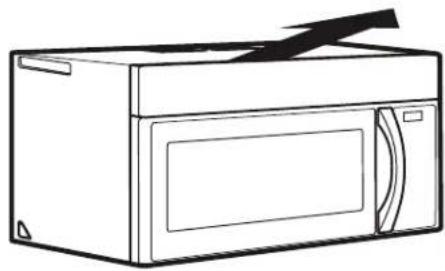
natural_image
Line drawing of a microwave oven with lid and door (no text or symbols)See page 8
Models are shipped for recirculating exhaust. Some models have a disposable charcoal filter installed to help remove smoke and odors.
B. OUTSIDE BACK EXHAUST (HORIZONTAL DUCT)
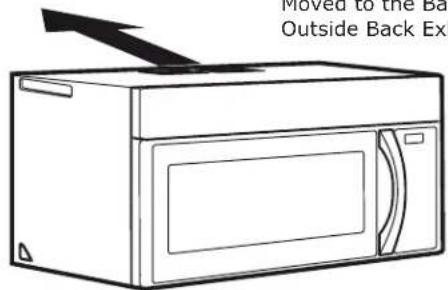
natural_image
Line drawing of a microwave oven with a handle and lid, no text or symbols presentSee page 14
C. OUTSIDE TOP EXHAUST (VERTICAL DUCT)
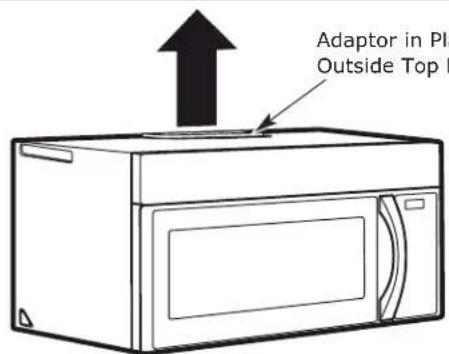
text_image
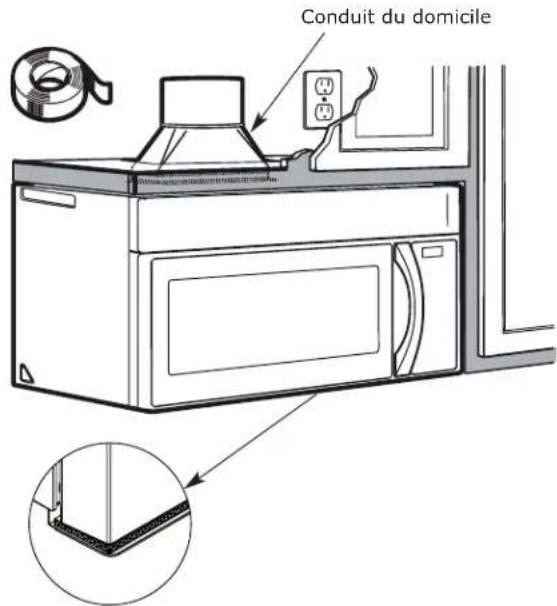
Adaptor in Plate Outside Top BoxSee page 17
NOTE: Read the pages 14-20 only if you plan to vent your exhaust to the outside. If you plan to recirculate the air back into the room, proceed to page 8.
A. RECIRCULATING (Non-Vented Ductless)
INSTALLATION OVERVIEW
A1. Attach Mounting Plate to Wall
A2. Prepare Top Cabinet
A3. Check Blower Plate
A4. Mount the Microwave Oven
A5. Install or change Charcoal Filter
IMPORTANT NOTES:
- Make sure the screws for the blower motor and blower plate are securely tightened when they are reinstalled. This will help to prevent excessive vibration.
- Make sure the motor wiring has been properly routed and secured, and that the wires are not pinched.
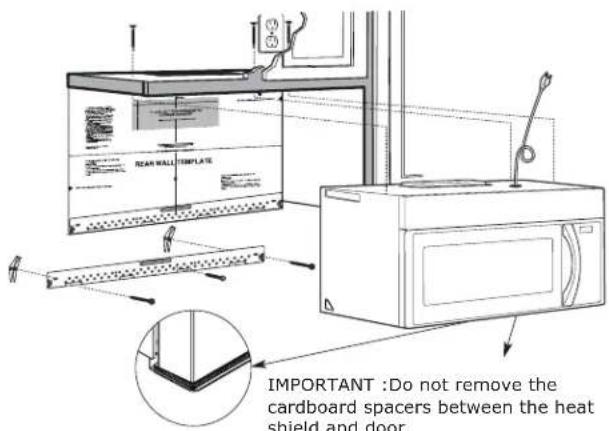
text_image
REAR WALL TEMPLATE IMPORTANT : Do not remove the cardboard spacers between the heat shield and door.EN
A1. ATTACH THE MOUNTING PLATE TO THE WALL
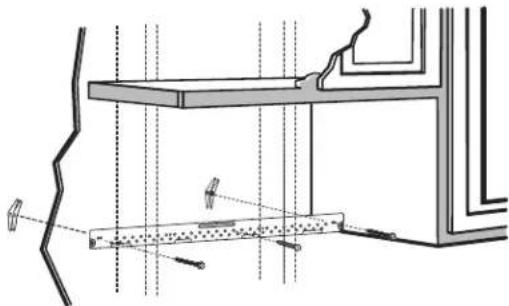
natural_image
Architectural cross-section diagram showing structural components and lighting fixtures (no text or labels)Attach the plate to the wall using toggle bolts. At least one wood screw must be used to attach the plate to a wall stud.
NOTE: If the cabinet depth, including the cabinet doors, is more than 13", then the unit must be spaced out from wall using adequate materials supporting 150 lbs to allow proper top vent air exhaust/intake.
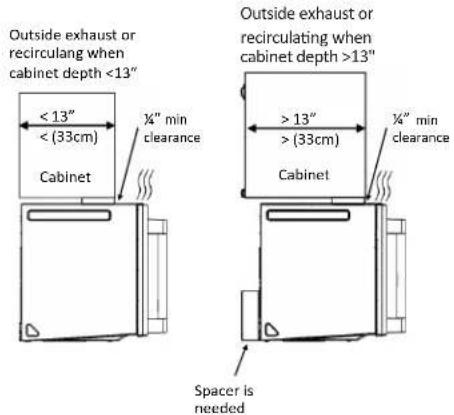
text_image
Outside exhaust or recirculating when cabinet depth <13" < 13" < (33cm) Cabinet ¼" min clearance Cabinet Outside exhaust or recirculating when cabinet depth >13" > 13" > (33cm) ¼" min clearance Spacer is needed-
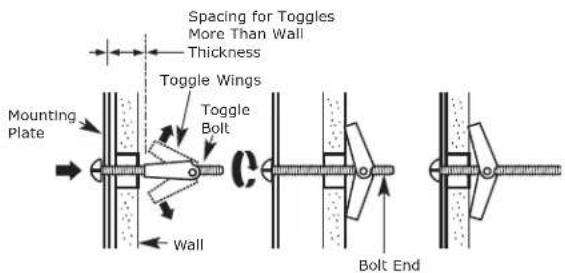
Remove the toggle wings from the bolts.
-
Insert the bolts into the mounting plate through the holes designated to go into drywall and reattach the toggle wings to 34 " (19 mm) onto each bolt.
To use toggle bolts:
text_image
Spacing for Toggles More Than Wall Thickness Toggle Wings Mounting Plate Toggle Bolt Wall Bolt End- Place the mounting plate against the wall and insert the toggle wings into the holes in the wall to mount the plate.
NOTE: Before tightening toggle bolts and wood screw, make sure the bott m of the mounting plate touch the bottom of the cabinet when pushed flush against the wall and that the plate is properly centered under the cabinet.
CAUTION: Be careful to avoid pinching fingers between the back of the mounting plate and the wall.
- Tighten all bolts. Pull the plate away from the wall to help tighten the bolts.
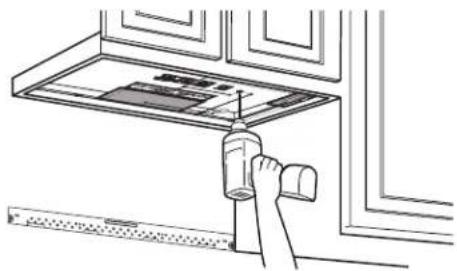
A2. USE TOP CABINET TEMPLATE FOR PREPARATION OF TOP CABINET
You need to drill holes for the top support screws and a hole large enough for the power cord to fit through.
natural_image
Line drawing of a hand using a tool to clean or install a ceiling-mounted device (no text or symbols visible)- Read the instructions on the TOP CABINET TEMPLATE.
- Tape it underneath the top cabinet.
NOTE: Adjust top template accordingly if the microwave is being spaced out from the wall due to cabinet depth (including cabinet doors) of more than 13".
- Drill the holes, following the instructions on the TOP CABINET TEMPLATE.
CAUTION: Wear safety goggles when drilling holes in the cabinet bottom.
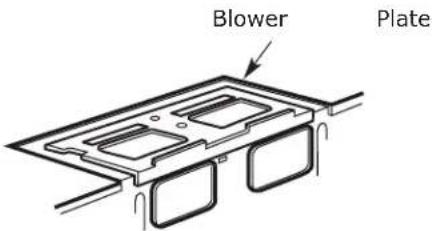
A3. CHECK BLOWER PLATE
text_image
Blower Plate- Place the microwave in its upright position, with the top of the unit facing up.
- Check to see that the blower plate is correctly installed on the unit.
A4. MOUNT THE MICROWAVE OVEN
natural_image
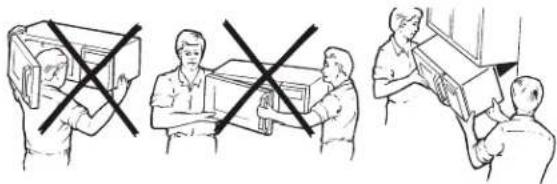
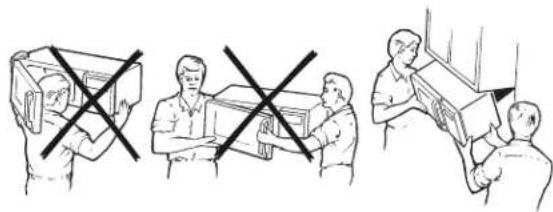
Three-panel line drawing showing a person handling boxes, with one crossed out and others holding boxes (no text or symbols)FOR EASIER INSTALLATION AND PERSONAL SAFETY, WE RECOMMEND THAT TWO PEOPLE INSTALL THIS MICRO-WAVE OVEN.
IMPORTANT: Do not grip or use the handle or heat shield during installation. Do not remove the cardboard spacers between the heat shield and door.
NOTE: If your cabinet is metal, use the nylon grommet around the power cord hole to prevent cutting of the cord.
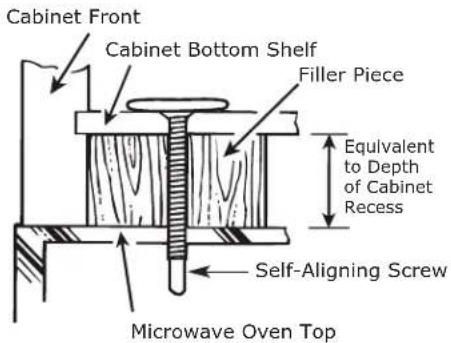
NOTE: We recommend using filler blocks if the cabinet front hangs below the cabinet bottom shelf.
IMPORTANT: If filler blocks are not used, case damage may occur from overtightening screws.
NOTE: When mounting the microwave oven, thread power cord through hole in bottom of top cabinet. Keep it tight throughout Steps 1–3. Do not pinch cord or lift oven by pulling
cord.
- Lift microwave, tilt it forward, and hook slots at back bottom edge onto four lower tabs of mounting plate.
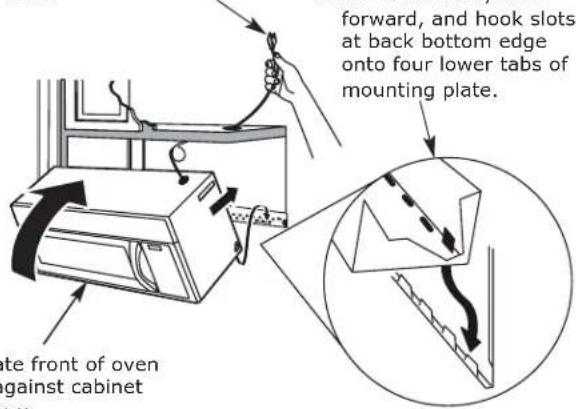
text_image
forward, and hook slots at back bottom edge onto four lower tabs of mounting plate. te front of oven gainst cabinet om-
Rotate front of oven up against cabinet bottom.
-
Insert a self-aligning screw through top center cabinet hole. Temporarily secure the oven by turning the screw at least two full turns after the threads have engaged. (It will be completely tightened later.) Be sure to keep power cord tight. Be careful not to pinch the cord, especially when mounting flush to bottom of cabinet.
text_image
Cabinet Front Cabinet Bottom Shelf Filler Piece Equivalent to Depth of Cabinet Recess Self-Aligning Screw Microwave Oven Top-
Attach the microwave oven to the top cabinet.
-
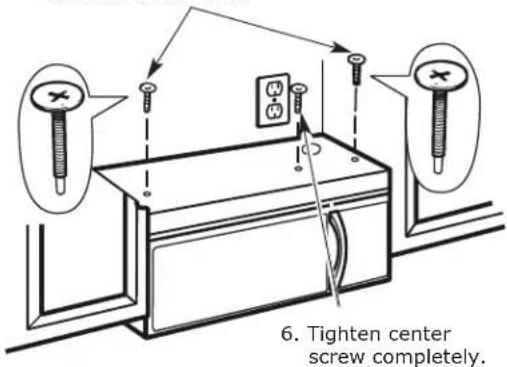
Insert 2 self-aligning screws through outer top cabinet holes. Turn two full turns on each screw.
text_image
6. Tighten center screw completely.- Tighten the outer two screws to the top of the microwave oven. (While tightening screws, hold the microwave oven in place against the wall and the top cabinet.)
natural_image
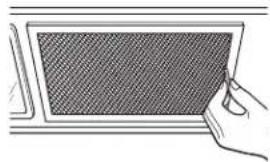
Simple line drawing of a hand holding a rectangular panel with a mesh pattern (no text or symbols)- Install grease filters. See the Advice & Instructions packed with the microwave.
A5. INSTALLING OR CHANGE THE CHARCOAL FILTER (LAGAN and MEDELNIVÅ)
NOTE: The charcoal filter is factory installed in UPPSEENDE. Refer to the Advisee & ydnistrictatory installed and for replacement information.
For models without the recirculation filter access door, follow these steps to replace or install a charcoal filter.
A5.1 Unplug microwave oven or disconnect power.
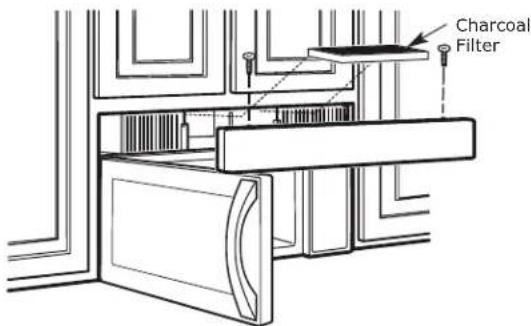
A5.2 Open the microwave door and remove the two vent mounting screws I; ocated on top of the microwave using a #1 Phillips screwdriver.
text_image
Charcoal FilterA5.3 Remove the charcoal filter by pushing the top of the filter inwards, then pull it forward out from the unit.
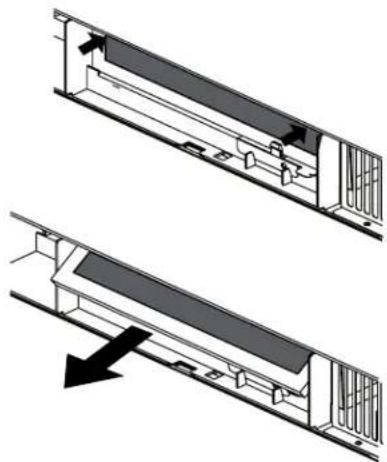
natural_image
Technical diagram showing two views of a mechanical or electrical component with internal structure and directional arrow (no text or symbols)EN
A5.4 Slide the top of the new charcoal filter into the top of the filter cavity.
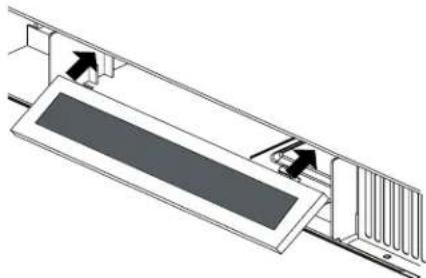
natural_image
Technical diagram of a mechanical assembly with arrows indicating motion or force direction (no text or symbols present)A5.5 Press the bottom of charcoal filter to place it into the correct position.
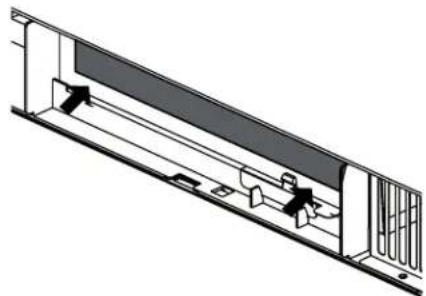
natural_image
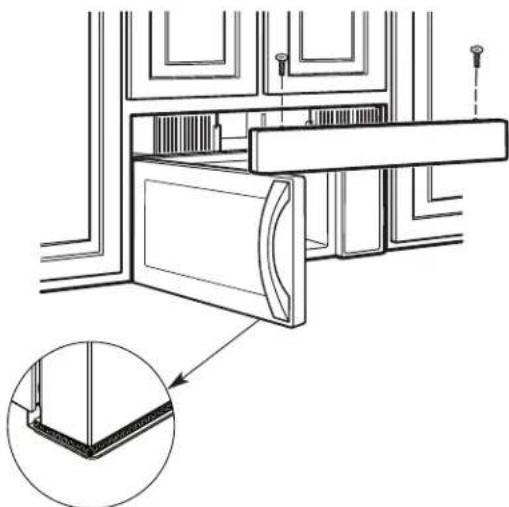
Technical line drawing of a mechanical assembly with no visible text or symbolsA5.6 Reinstall the vent by sliding the bottom of the vent into place. Push the vent top into position and slide right into place. Replace the two vent mounting screws located on top of the microwave using a #1 Phillips screwdriver.
natural_image
Technical line drawing of a door frame assembly with an inset showing a close-up detail (no text or symbols)A5.7 Close the microwave door. Plug in microwave oven or reconnect power.
IMPORTANT: Remove the cardhoard spacers between heat shield and door.
A6. INSTALLING OR CHANGE THE CARBON FILTER (OTRFILTER1) (OPTIONAL)
A6.1 Remove the carbon filter (OTRFILTER1) from the packaging and shake filter to remove excess carbon.
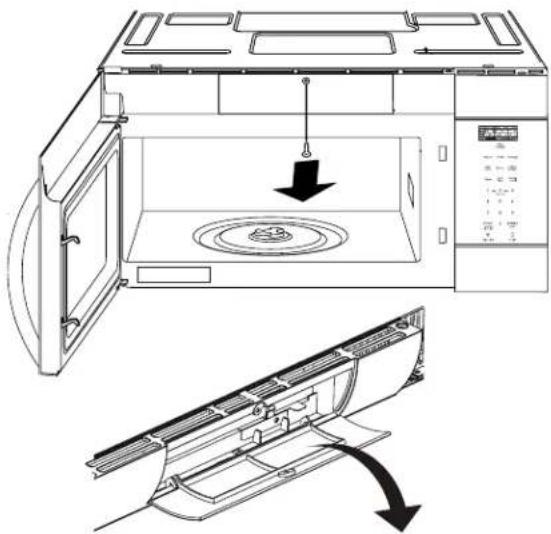
A6.2 Use a Phillips head screwdriver to unscrew the carbon filter (OTRFILTER1) access door.
A6.3 Operthe filter access door.
natural_image
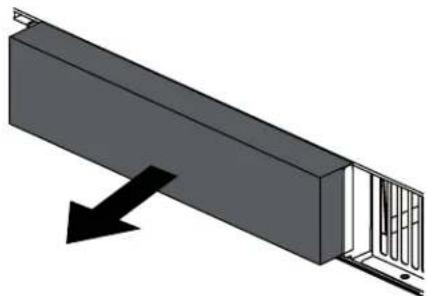
Line drawing of a microwave oven with internal components and airflow direction arrows (no text or symbols)A6.4 Remove the existing carbon filter (OTRFILTER1) (if installed) by pulling forward out from the unit.
natural_image
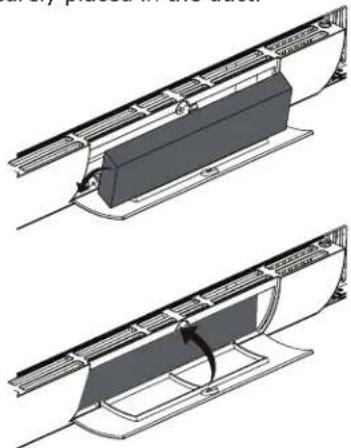
3D diagram of a mechanical assembly with a black arrow indicating direction (no text or symbols)A6.5 Place the new carbon filter (OTRFILTER1) into the slot behind the door at an angle until it's upright and securely placed in the duct.
natural_image
Technical line drawing of two mechanical components with no visible text or symbolsA6.6 Make sure the carbon filter (OTRFILTER1) is nested vertically in the slot. Close access door, tighten screw and the carbon filter (OTRFILTER1) is ready to use.
A7. FILTER ACCESS DOOR CHARCOAL FILTER (UPPSEENDE)
NOTE: The charcoal filter is factory installed in UPPSEENDE. Refer to the Advice & Instructions to see if yours is factory installed and for replacement information.
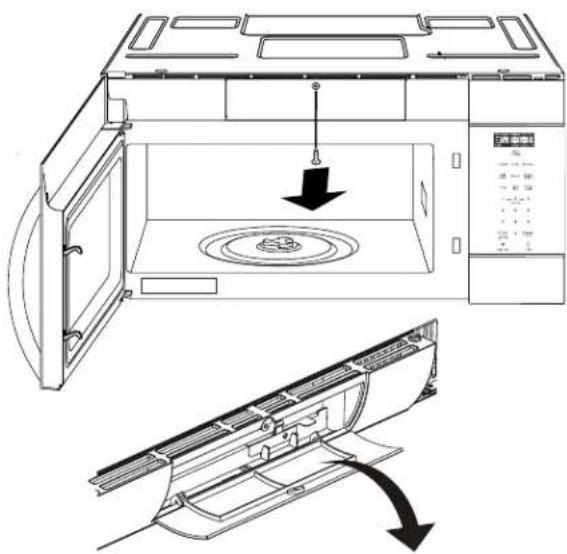
text_image
Technical diagram of a microwave oven with labeled components and airflow direction arrowsA7.1 Remove the charcoal filter by pushing the top of the filter inwards, then pull it forward out from the unit.
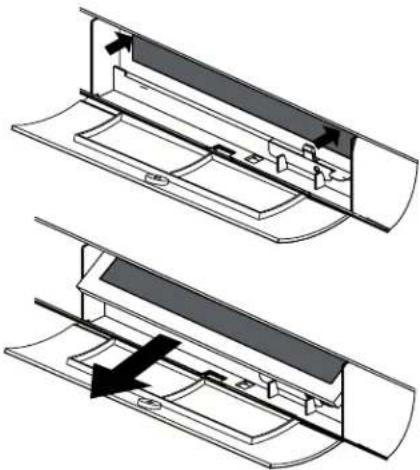
natural_image
Technical diagram showing two views of a mechanical component with internal parts and directional arrows (no text or symbols)A7.2 Slide the top of the new charcoal filter into the top of the filter cavity.
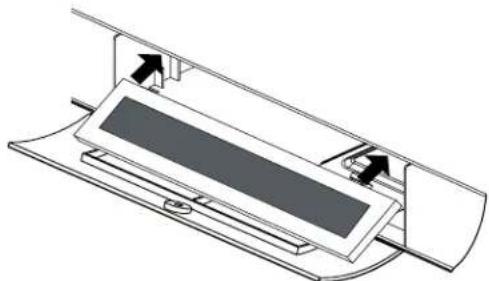
natural_image
Diagram of a mechanical device with internal components and directional arrows indicating movement (no text or symbols)A7.3 Press the bottom of charcoal filter to place it into the correct position.
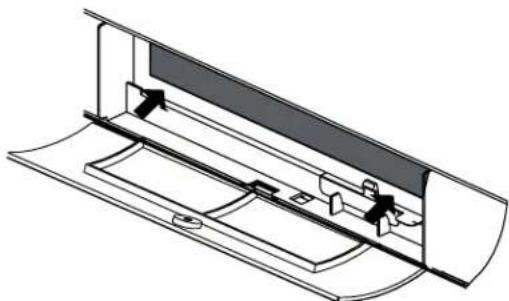
natural_image
Technical line drawing of a mechanical component with internal parts and directional arrows (no text or symbols)A7.4 Close access door.tighten screw and charcoal filter is ready to use.
3. INSTALLATION INSTRUCTIONS FOR EXTERNAL EXHAUST DUCTING
NOTE: If you need to install ducts, note that the total duct length of 3^1/4 " x 10" (8.2 x 25.4 cm) rectangular or or 5" (12.7 cm) diameter/6" (15.2 cm) diameter round duct should not exceed 120 equivalent feet (36.5 m).
Outside ventilation requires an EXTERNAL EXHAUST DUCT. Read the following carefully.
NOTE: It is important that venting be installed using the most direct route and with as few elbows as possible. This ensures clear venting of exhaust and helps prevent blockages. Also, make sure dampers swing freely and nothing is blocking the ducts.
Exhaust connection:
The exhaust adaptor has been designed to mate with a standard 3/4" x 10" (8.2 x 25.4 cm) rectangular duct.
If a round duct is required, a rectangular-to-round transition adaptor must be used. A 5" (12.7cm)/ 6" (15.2cm) diameter duct is acceptable to use.
Maximum duct length:
For satisfactory air movement, the total duct length of 3/4" x 10" (8.2 x 25.4 cm) rectangular or 5" (12.7 cm) diameter/6" (15.2 cm) diameter round duct should not exceed 120 equivalent feet (36.5 m).
Elbows, transitions, wall and roof caps, etc., present additional resistance to airflow and are equivalent to a section of straight duct which is longer than their actual physical size. When calculating the total duct length, add the equivalent lengths of all transitions and adaptors plus the length of all straight duct sections. The chart below shows you how to calculate total equivalent ductwork length using the approximate feet of equivalent length of some typical ducts.
| DUCT PIECES EQUIVALENT | LENGTH x NUMBER USED = | EQUIVALENT LENGTH | ||
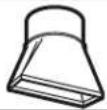 | Rectangular-to-Round Transition Adaptor* | 5 Ft. (1.5 m) x () = Ft. or m | ||
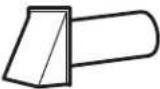 | Wall Cap 40 Ft. (12.2 m) x () = Ft. or m | |||
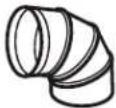 | 90° Elbow 10 Ft. (3 m) x () = Ft. or m | |||
 | 45° Elbow 5 Ft. (1.5 m) x () = Ft. or m | |||
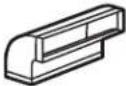 | 90° Elbow 25 Ft. (7.6 m) x () = Ft. or m | |||
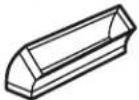 | 45° Elbow 5 Ft. (1.5 m) x () = Ft. or m | |||
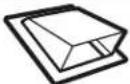 | Roof Cap 24 Ft. (7.3 m) x () = Ft. or m | |||
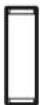 | Straight Duct 6" (15.2 cm) Round or 31⁄4" x 10" (8.2 x 25.4 cm Rectangular) | 1 Ft. (0.3 m) x () = Ft. or m | ||
| Total Ductwork = Ft. or m | ||||
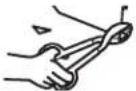 | * IMPORTANT: If a rectangular-to-round transition adaptor is used, the bottom corners of the damper will have to be cut to fit, using the tin snips, in order to allow free movement of the damper. Equivalent lengths of duct pieces are based on actual tests and reflect requirements for good venting performance with any vent hood. | |||
EXTERNAL EXHAUST DUCTING
OUTSIDE TOP EXHAUST (EXAMPLE ONLY)
The following chart describes an example of one possible ductwork installation.
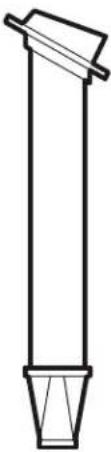 | DUCT PIECES | EQUIVALENT LENGTH | x | NUMBER USED | = | EQUIVALENT LENGTH | |
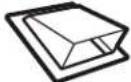 | Roof Cap | 24 Ft. (7.3 m) | x | (1) | = | 24 Ft. (7.3 m) | |
| 12 Ft. (3.6 m) Straight Duct (6"/15.2 cm Round) | 12 Ft. (3.6 m) | x | (1) | = | 12 Ft. (3.6 m) | ||
| Rectangular-to-Round Transition Adaptor* | 5 Ft. (1.5 m) | x | (1) | = | 5 Ft. (1.5 m) | ||
| Equivalent lengths of duct pieces are based on actual tests and reflect requirements for good venting performance with any vent hood. | 41 Ft. (12.5 m) | ||||||
| * IMPORTANT: If a rectangular-to-round transition adaptor is used, the bottom corners of the damper will have to be cut to fit, using the tin snips, in order to allow free movement of the damper. | |||||||
OUTSIDE BACK EXHAUST (EXAMPLE ONLY)
The following chart describes an example of one possible ductwork installation.
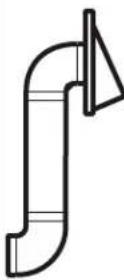 | DUCT PIECES | EQUIVALENT | NUMBER LENGTH x USED = | EQUIVALENT LENGTH |
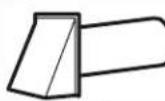 | Wall Cap 40 Ft. (12.2 m) x (1) = 40 Ft. (12.2 m) | |||
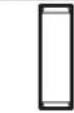 | 3 Ft. Straight Duct (3 ^1 / _4 " x 10"/8.2 x 25.4 cm Rectangular) | 3 Ft. (0.9 m) x (1) = 3 Ft. (0.9 m) | ||
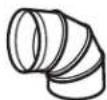 | 90° Elbow 10 Ft. (3 m) x (2) = 10 Ft. (3 m) | |||
| Equivalent lengths of duct pieces are based on actual tests and reflect requirements for good venting performance with any vent hood. | Total Length = 63 Ft. (19.2 m) | |||
| * IMPORTANT: For back exhaust, care should be taken to align exhaust with space between studs, or wall should be prepared at the time it is constructed by leaving enough space between the wall studs to accommodate exhaust. | ||||
B OUTSIDE BACK EXHAUST (Horizontal Duct)
INSTALLATION OVERVIEW
B1. Prepare Rear Wall
B2. Remove Blower Plate
B3. Attach Mounting Plate to Wall
B4. Prepare Top Cabinet
B5. Adjust Blower
B6. Mount the Microwave Oven
IMPORTANT NOTES:
- Make sure the screws for the blower motor and blower plate are securely tightened when they are reinstalled. This will help to prevent excessive vibration.
- Make sure the motor wiring has been properly routed and secured, and that the wires are not pinched.
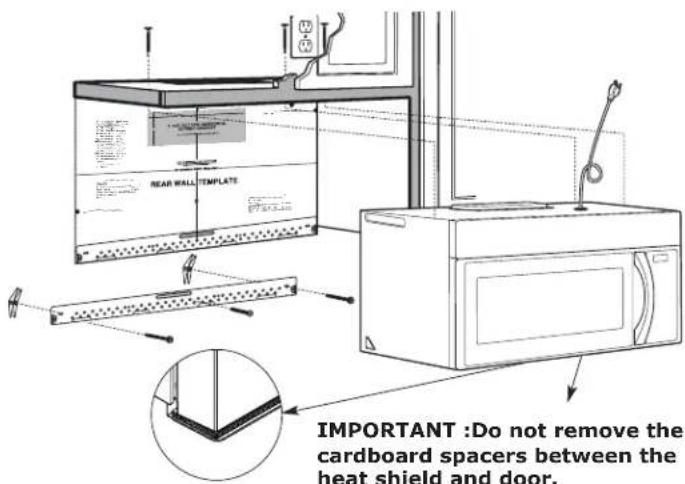
text_image
REAR WALL TEMPLATE IMPORTANT :Do not remove the cardboard spacers between the heat shield and door.B1. PREPARING THE REAR WALL FOR OUTSIDE BACK EXHAUST
You need to cut an opening in the rear wall for outside exhaust.
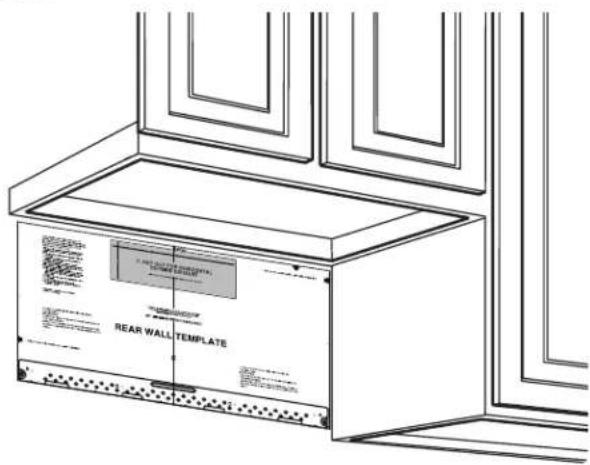
text_image
REAR WALL TEMPLATE- Read the instructions on the REAR WALL TEMPLATE.
- Tape it to the rear wall.
- Cut the opening, following the instructions of the REAR WALL TEMPLATE.
EN
B2. REMOVE BLOWER PLATE
Remove and save the screw that holds the blower plate to the microwave. Lift off the blower plate.
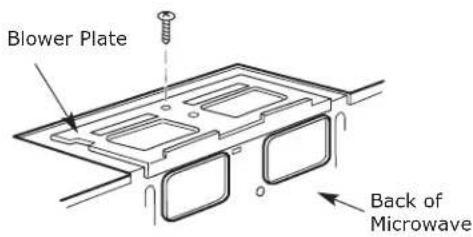
text_image
Blower Plate Back of MicrowaveB3. ATTACH THE MOUNTING PLATE TO THE WALL
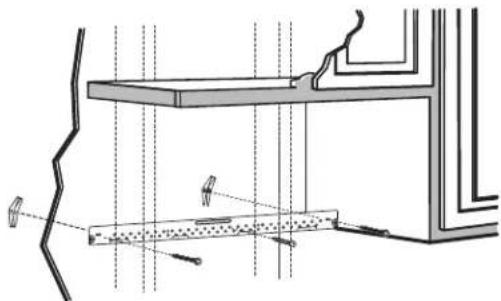
natural_image
Technical line drawing of a structural assembly with beams, columns, and supports (no text or symbols)Attach the plate to the wall using toggle bolts. At least one wood screw must be used to attach the plate to a wall stud.
- Remove the toggle wings from the bolts.
- Insert the bolts into the mounting plate through the holes designated to go into drywall and reattach the toggle wings to 34 " (19 mm) onto each bolt.
To use toggle bolts:
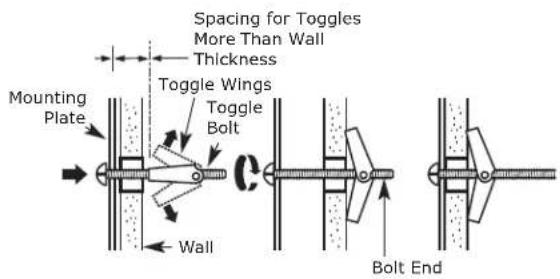
text_image
Spacing for Toggles More Than Wall Thickness Mounting Plate Toggle Wings Toggle Bolt Wall Bolt End- Place the mounting plate against the wall and insert the toggle wings into the holes in the wall to mount the plate.
NOTE: Before tightening toggle bolts and wood screw, make sure the bottom of the mounting plate touch the bottom of the cabinet when pushed flush against the wall and that the plate is properly centered under the cabinet.
CAUTION: Be careful to avoid pinching fingers between the back of the mounting plate and the wall.
- Tighten all bolts. Pull the plate away from the wall to help tighten the bolts.
B4. USE TOP CABINET TEMPLATE FOR PREPARATION OF TOP CABINET
You need to drill holes for the top support screws and a hole large enough for the power cord to fit through.
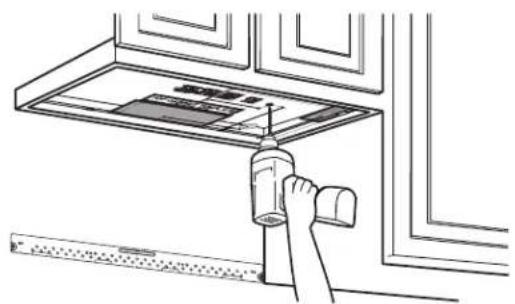
natural_image
Line drawing of a hand inserting a plastic bottle into a rack (no text or symbols)- Read the instructions on the TOP CABINET TEMPLATE.
• Tape it underneath the top cabinet. - Drillthe holes, following the instructions on the TOP CABINET TEMPLATE.
CAUTION: Wear safety goggles when drilling holes in the cabinet bottom.
B5. ADAPTING MICROWAVE BLOWER FOR OUTSIDE BACK EXHAUST
- Remove and save screw that holds blower motor to microwave.
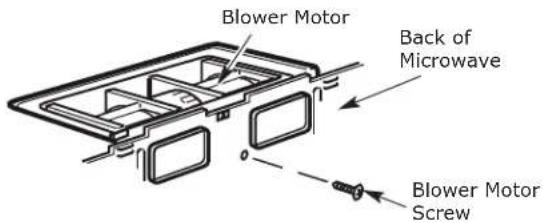
text_image
Blower Motor Back of Microwave Blower Motor Screw- Carefully pull out the blower unit. The wires will extend far enough to allow you to adjust the blower unit.
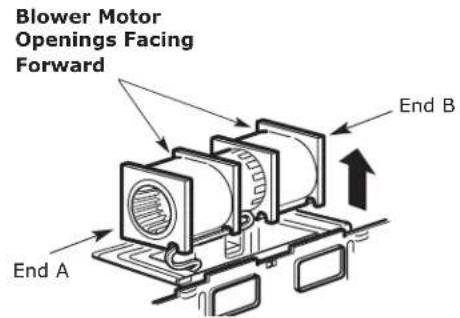
text_image
Blower Motor Openings Facing Forward End A End B- Roll the blower unit 90°
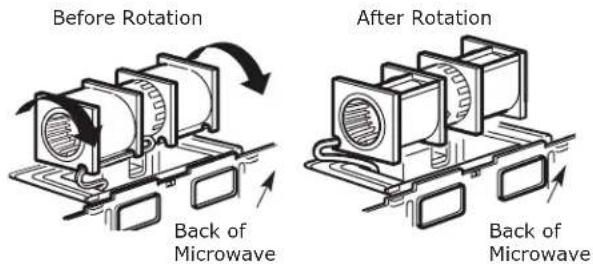
text_image
Before Rotation Back of Microwave After Rotation Back of Microwave- Rotate blower unit counterclockwise 180°.
Before Rotation After Rotation
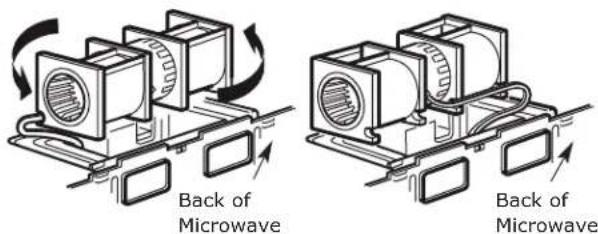
text_image
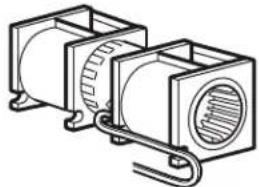
Back of Microwave Back of Microwave- Gently remove the wires from the grooves. Reroute the wires through grooves on other side of the blower unit.
Before Rerouting
natural_image
Technical line drawing of two rectangular electronic components with internal circuitry and metal brackets (no text or symbols)After Rerouting
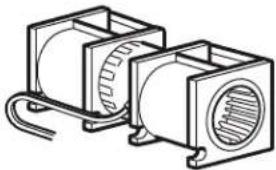
natural_image
Technical line drawing of two rectangular electronic components with internal circuitry (no text or symbols)Wires Routed Through Right Side
Wires Routed Through Left Side
- Roll the blower unit 90° so that fan blade openings are facing out the back of the microwave.
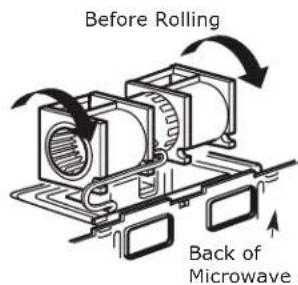
text_image
Before Rolling Back of Microwave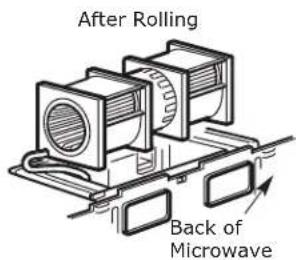
text_image
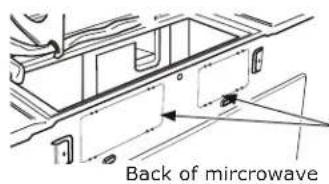
After Rolling Back of Microwave- Remove the knockout plates in the back of the unit with snips. (For some models)
text_image
Back of microwaveKnockout Plates:
Snip all 4 webs on each knockout panel and remove the metal knockouts for rear airflow.
Please take care to remove any sharp edges created from removing the knockout plates.
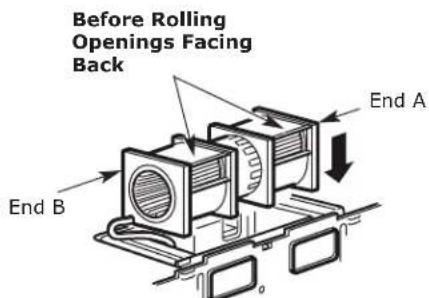
- Place the blower unit back into the opening.
text_image
Before Rolling Openings Facing Back End A End BCAUTION: Do not pull or stretch the blower unit wiring. Make sure the wires are not pinched, and that they are properly secured.
NOTE: The blower unit exhaust openings should match exhaust openings on rear of microwave oven.
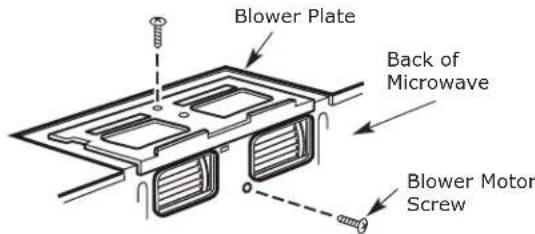
- Secure the blower unit to the microwave with the original screw.
text_image
Blower Plate Back of Microwave Blower Motor Screw-
Replace the blower plate in the same position as before with the screw. Make sure the screw is tight.
-
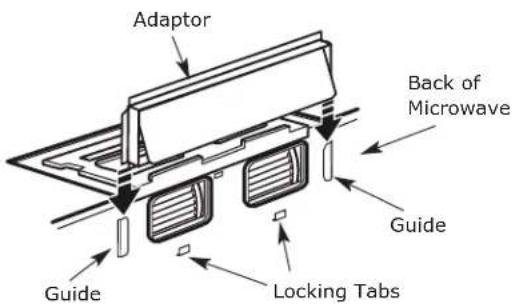
Attach the exhaust adaptor to the rear of the oven by sliding it into the guides at the top center of the back of the oven.
text_image
Adaptor Back of Microwave Guide Guide Locking TabsPush in securely until it is in the lower locking tabs. Take care to assure that the damper hinge is installed so that it is at the top and that the damper swings freely.
B6. MOUNT THE MICROWAVE OVEN
natural_image
Illustration showing three scenes of people handling boxes, with no visible text or symbolsFOR EASIER INSTALLATION AND PERSONAL SAFETY, WE RECOMMEND THAT TWO PEOPLE INSTALL THIS MICRO-WAVE OVEN. IMPORTANT: Do not grip or use the handle or heat shield during installation. Do not remove the card-board spacers between the heat shield and door.
NOTE: If your cabinet is metal, use the nylon grommet around the power cord hole to prevent cutting of the cord.
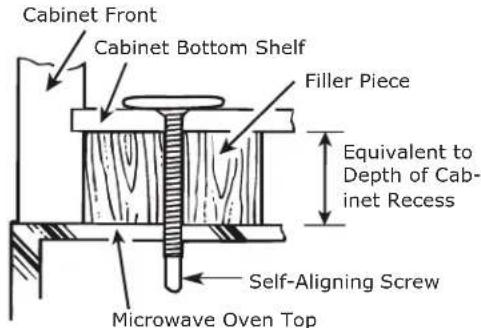
NOTE: We recommend using filler blocks if the cabinet front hangs below the cabinet bottom shelf.
IMPORTANT: If filler blocks are not used, case damage may occur from overtightening screws.
EN
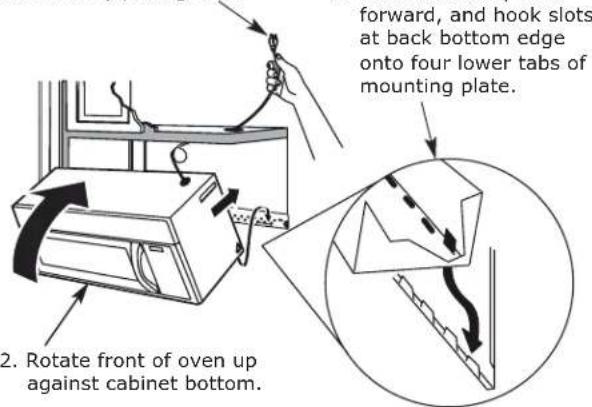
NOTE: When mounting the microwave oven, thread power cord through hole in bottom of top cabinet. Keep it tight throughout Steps 1-3. Do not pinch cord or lift oven by pulling cord. 1.
text_image
forward, and hook slots at back bottom edge onto four lower tabs of mounting plate. 2. Rotate front of oven up against cabinet bottom.- Insert a self-aligning screw through top center cabinet hole. Temporarily secure the oven by turning the screw at least two full turns after the threads have engaged. (It will be completely tightened later.) Be sure to keep power cord tight. Be careful not to pinch the cord, especially when mounting flush to bottom of cabinet.
text_image
Cabinet Front Cabinet Bottom Shelf Filler Piece Equivalent to Depth of Cab- inet Recess Self-Aligning Screw Microwave Oven Top- Attach the microwave oven to the top cabinet.
text_image
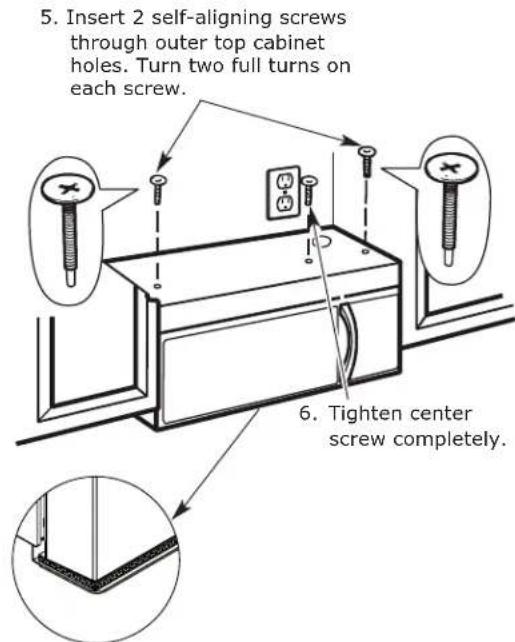
5. Insert 2 self-aligning screws through outer top cabinet holes. Turn two full turns on each screw. 6. Tighten center screw completely.- Tighten the outer two screws to the top of the microwave oven. (While tightening screws, hold the microwave oven in place against the wall and the top cabinet.)
natural_image
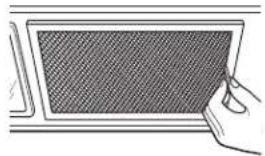
Illustration of a hand holding a rectangular device with a mesh screen (no text or symbols visible)- Install grease filters. See the Advice & Instructions packed with the microwave.
IMPORTANT: Remove the cardboard spacers between heat shield and door.
C OUTSIDE TOP EXHAUST (Vertical Duct)
INSTALLATION OVERVIEW
C1. Attach Mounting Plate to Wall
C2. Prepare Top Cabinet
C3. Adapting Microwave Blower for Outside Top Exhaust
C4. Check Damper Operation
C5. Mount Microwave Oven
C6. Adjust Exhaust Adaptor
C7. Connect Ductwork
IMPORTANT NOTES:
- Make sure the screws for the blower motor and blower plate are securely tightened when they are reinstalled. This will help to prevent excessive vibration.
- Make sure the motor wiring has been properly routed and secured, and that the wires are not pinched.
text_image
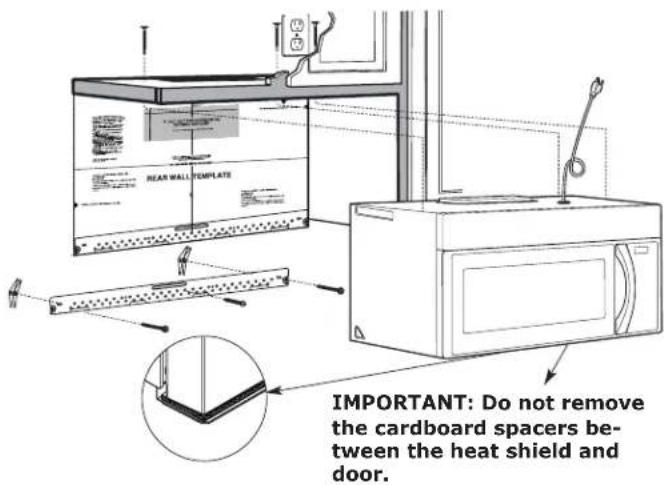
REAR WALL TEMPLATE IMPORTANT: Do not remove the cardboard spacers be- tween the heat shield and door.C1. ATTACH THE MOUNTING PLATE TO THE WALL
natural_image
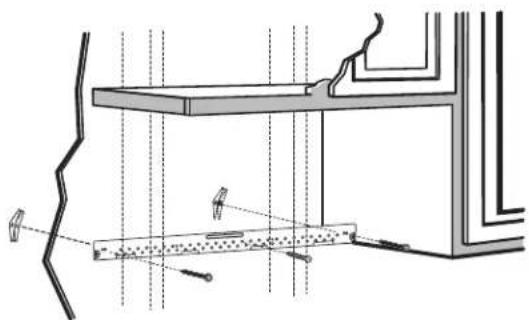
Architectural cross-section diagram showing structural layers and window connections (no text or labels)Attach the plate to the wall using toggle bolts. At least one wood screw must be used to attach the plate to a wall stud.
- Remove the toggle wings from the bolts.
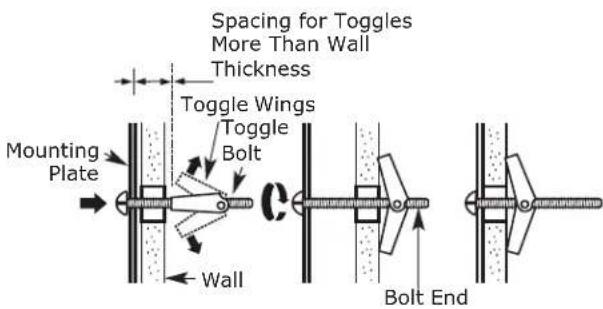
- Insert the bolts into the mounting plate through the holes designated to go into drywall and reattach the toggle wings to 34 " (19 mm) onto each bolt.
To use toggle bolts:
text_image
Spacing for Toggles More Than Wall Thickness Toggle Wings Toggle Bolt Mounting Plate Wall Bolt End- Place the mounting plate against the wall and insert the toggle wings into the holes in the wall to mount the plate.
NOTE: Before tightening toggle bolts and wood screw, make sure the bottom of the mounting plate touch the bottom of the cabinet when pushed flush against the wall and that the plate is properly centered under the cabinet.
CAUTION: Be careful to avoid pinching fingers between the back of the mounting plate and the wall.
- Tighten all bolts. Pull the plate away from the wall to help tighten the bolts.
C2. USE TOP CABINET TEMPLATE FOR PREPARATION OF TOP CABINET
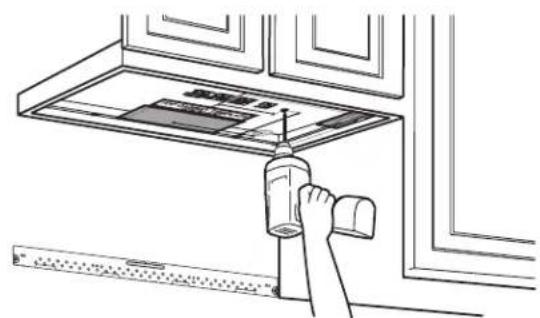
You need to drill holes for the top support screws, a hole large enough for the power cord to fit through, and a cut-out large enough for the exhaust adaptor.
natural_image
Line drawing of a hand using a tool to press or install a wall-mounted device (no text or symbols visible)- Read the instructions on the TOP CABINET TEMPLATE.
- Tape it underneath the top cabinet.
- Drill the holes, following the instructions on th TOP CABINET TEMPLATE.
CAUTION: Wear safety goggles when drilling holes in the cabinet bottom.
C3. ADAPTING MICROWAVE BLOWER FOR OUTSIDE TOP EXHAUST
- Place the microwave in its upright position, with the top of the unit facing up.
text_image
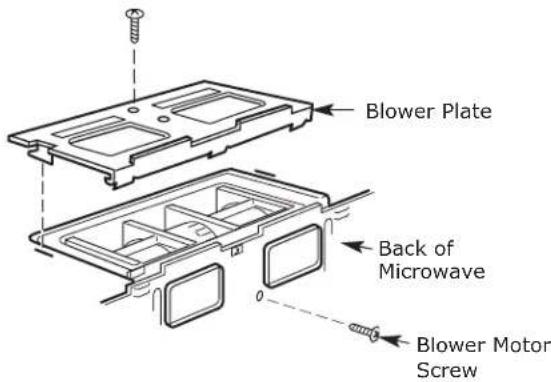
Blower Plate Back of Microwave Blower Motor ScrewRemove the screw that holds the blower plate to the microwave. Remove and save the screw holding the blower motor to the microwave.
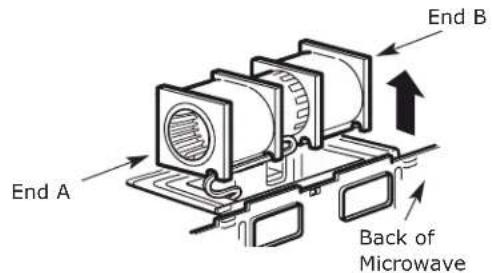
- Carefully pull out the blower unit. The wires will extend far enough to allow you to adjust the blower unit.
text_image
End A Back of Microwave End BEN
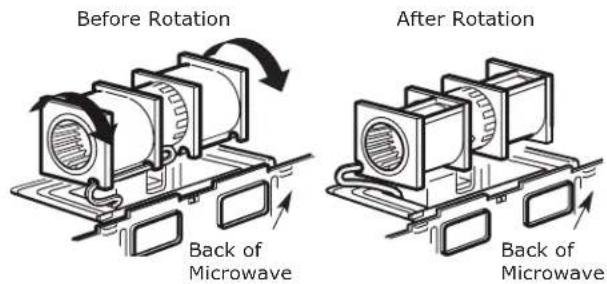
- Roll the blower unit 90° so that fan blade openings are facing out the top of the microwave.
text_image
Before Rotation Back of Microwave After Rotation Back of Microwave- Place the blower unit back into the opening.

text_image
AFTER: Fan Blade Openings Facing Top Back of MicrowaveCAUTION: Do not pull or stretch the blower unit wiring. Make sure the wires are not pinched, and that they are properly secured.
- Secure blower unit to microwave with the screw removed in Step 1. Make sure the screw is tight.
- Replace blower plate with the screw removed in Step 1. Make sure the screw is tight.
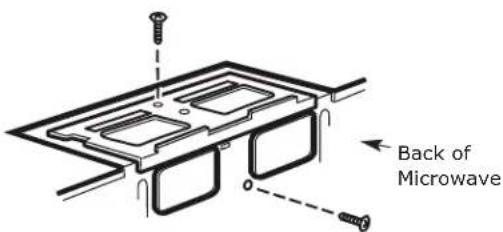
text_image
Back of Microwave- Attach the exhaust adaptor to the top of the blower plate by sliding it into the guides of the blower plate.
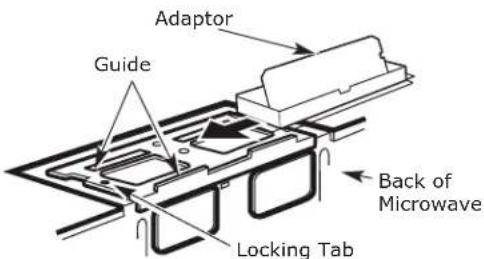
text_image
Adaptor Guide Back of Microwave Locking TabPush in securely until it is in the locking tabs. Take care to assure that the damper hinge is installed so that the damper swings freely.
text_image
Before Rotation Exhaust Adaptor Damper Back of Microwave• Make sure tape securing damper is removed and damper pivots easily before mounting microwave.
- You will need to make adjustments to assure proper alignment with your house exhaust duct after the microwave is installed.
natural_image
Illustration showing three scenes of people handling boxes, with no visible text or symbolsFOR EASIER INSTALLATION AND PERSONAL SAFETY, WE RECOMMEND THAT TWO PEOPLE INSTALL THIS MICRO-WAVE OVEN.
IMPORTANT: Do not grip or use the handle or heat shield during installation. Do not remove the cardboard spacers between the heat shield and door.
NOTE: If your cabinet is metal, use the nylon grommet around the power cord hole to prevent cutting of the cord. NOTE: We recommend using filler blocks if the cabinet front hangs below the cabinet bottom shelf.
IMPORTANT: If filler blocks are not used, case damage may occur from overtightening screws.
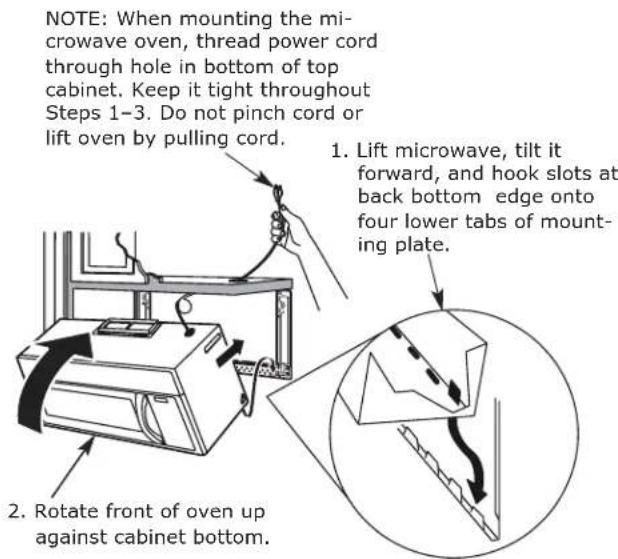
text_image
NOTE: When mounting the microwave oven, thread power cord through hole in bottom of top cabinet. Keep it tight throughout Steps 1-3. Do not pinch cord or lift oven by pulling cord. 1. Lift microwave, tilt it forward, and hook slots at back bottom edge onto four lower tabs of mounting plate. 2. Rotate front of oven up against cabinet bottom.- Insert a self-aligning screw through top center cabinet hole. Temporarily secure the oven by turning the screw at least two full turns after the threads have engaged. (It will be completely tightened later.) Be sure to keep power cord tight. Be careful not to pinch the cord, especially when mounting flush to bottom of cabinet.
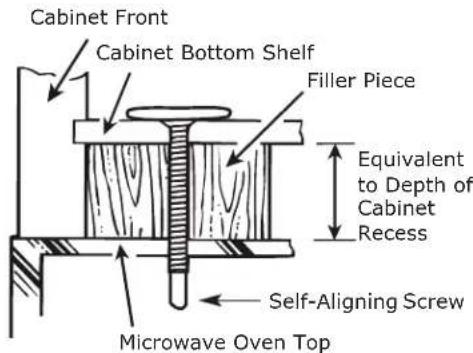
text_image
Cabinet Front Cabinet Bottom Shelf Filler Piece Equivalent to Depth of Cabinet Recess Self-Aligning Screw Microwave Oven Top- Attach the microwave oven to the top cabinet.
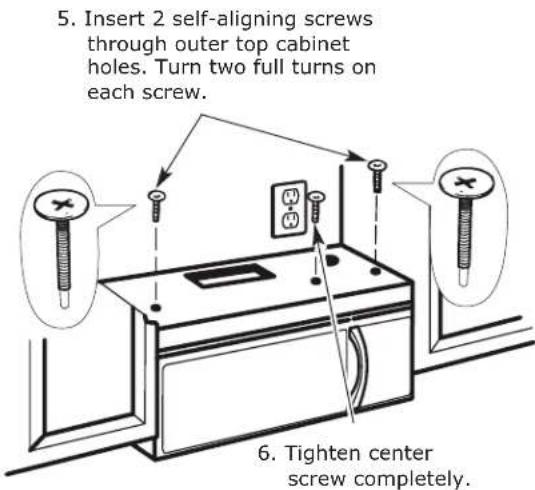
text_image
5. Insert 2 self-aligning screws through outer top cabinet holes. Turn two full turns on each screw. 6. Tighten center screw completely.- Tighten the outer two screws to the top of the microwave oven. (While tightening screws, hold the microwave oven in place against the wall and the top cabinet.)
natural_image
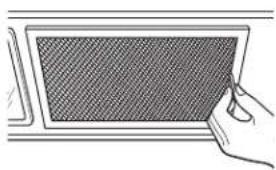
Line drawing of a hand holding a textured rectangular object (no text or symbols)- Install grease filters. See the Advice & Instructions packed with the microwave.
C6. ADJUST THE EXHAUST ADAPTOR
Open the top cabinet and adjust the exhaust adaptor to connect to the house duct.
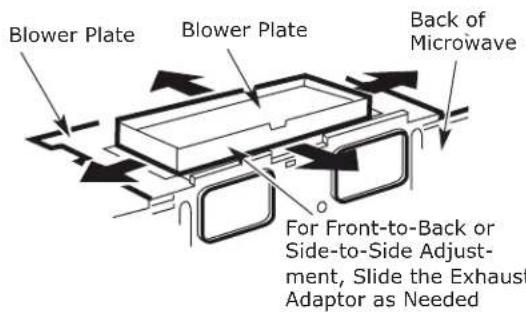
text_image
Blower Plate Blower Plate Back of Microwave For Front-to-Back or Side-to-Side Adjustment, Slide the Exhaust Adaptor as NeededC7. ADJUST THE EXHAUST ADAPTOR
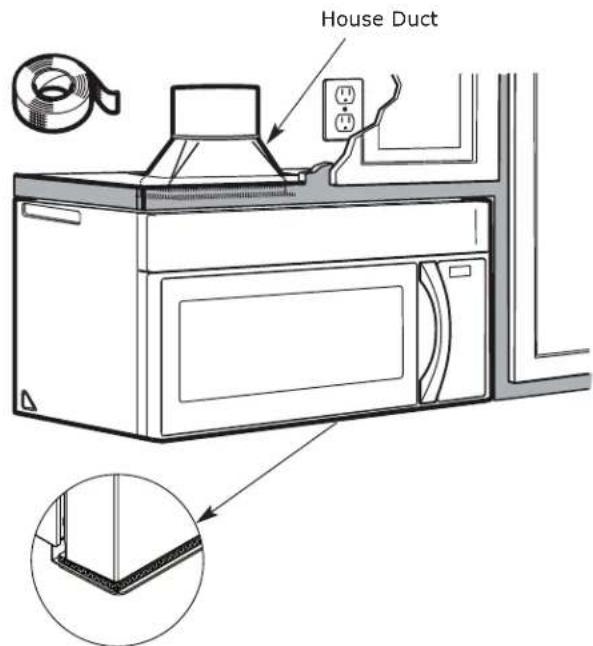
text_image
House Duct- Extend the house duct down to connect to the exhaust adaptor.
- Seal exhaust duct joints using furnace duct tape for high temperature applications.
IMPORTANT: Remove the cardboard spacers between heat shield and door.
EN
- Make sure the microwave oven has been installed according to Assembly Instructions.
text_image
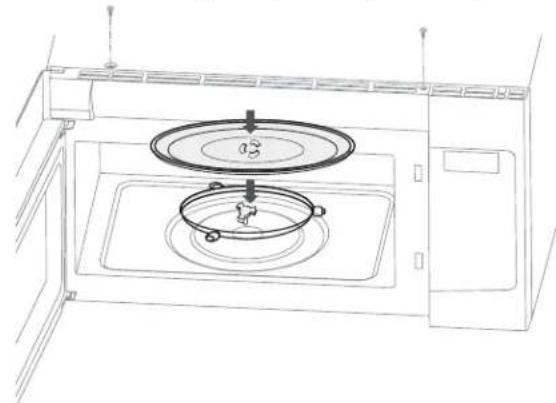
Assembly Instructions- Remove all packing material from the microwave oven.
- Install turntable ring and glass tray in cavity.
natural_image
Line drawing of a microwave oven with a circular lid and a pot, showing internal components (no text or symbols)- Plug power cord into a separate and dedicated 15- to 20-amp electrical outlet.
text_image
Ensure proper ground exists before use- Replace house fuse or turn breaker back on.
natural_image
Hand placing a button on an electrical outlet panel (no text or symbols visible)- Read the Advice & Instructions.
text_image
Advice & Instructions- KEEP ASSEMBLY INSTRUCTIONS FOR THE LOCAL INSPECTOR'S USE.
text_image
ASSEMBLY INSTRUCTIONS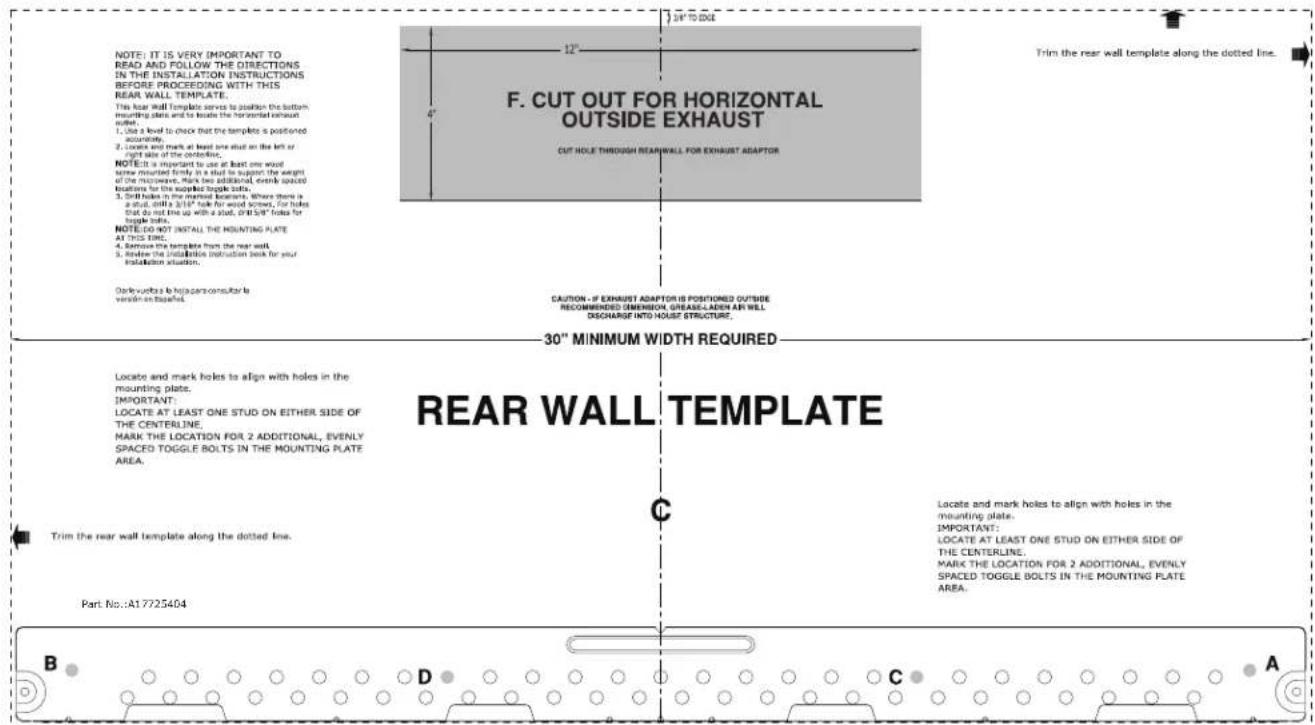
text_image
NOTE: IT IS VERY IMPORTANT TO READ AND FOLLOW THE DIRECTIONS IN THE INSTALLATION INSTRUCTIONS BEFORE PROCEEDING WITH THIS REAR WALL TEMPLATE. This rear wall template serves to position the bottom mounting plane and to locate the horizontal exhaust soilet. 1. Use a level to check that the template is positioned acquately. 2. Locks and marks at least one stud on the left or right side of the connection. NOTE: It is important to use at least one wood screw mounted firmly in a stud to support the weight of the microwave. Mark two additional events spaced locations for the supplied toggle bolts. 3. Still holes in the nominal location. Where there is a stud, until a 3/16" hole for wood screws. For holes that do not line up with a stud, 0/15/8" holes for topple balls. NOTE:DO NOT INSTALL THE MOUNTING PLATE AT THIS LINE. 4. Remove the template from the rear wall. 5. Remove the installation instruction back for your polarization situation. Don't be able to keep any consider to version on topallet. F. CUT OUT FOR HORIZONTAL OUTSIDE EXHAUST CUT HOLE THROUGH REAR WALL FOR EXHAUST ADAPTOR CAUTION - IF EXHAUST ADAPTOR IS POSITIONED OUTSIDE RECOMMENDED DIMENSION, GRADE-LADEN ARE WILL DISCHARGE INTO HOUSE STRUCTURE. 30" MINIMUM WIDTH REQUIRED REAR WALL TEMPLATE LOCATE and mark holes to align with holes in the mounting plate. IMPORTANT: LOCATE AT LEAST ONE STUD ON EITHER SIDE OF THE CENTERLINE. MARK THE LOCATION FOR 2 ADDITIONAL, EVENLY SPACED TOGGLE BOLTS IN THE MOUNTING PLATE AREA. Trim the rear wall template along the dotted line. Locate and mark holes to align with holes in the mounting plate. IMPORTANT: LOCATE AT LEAST ONE STUD ON EITHER SIDE OF THE CENTERLINE. MARK THE LOCATION FOR 2 ADDITIONAL, EVENLY SPACED TOGGLE BOLTS IN THE MOUNTING PLATE AREA. Part No.:A17725404 B D C A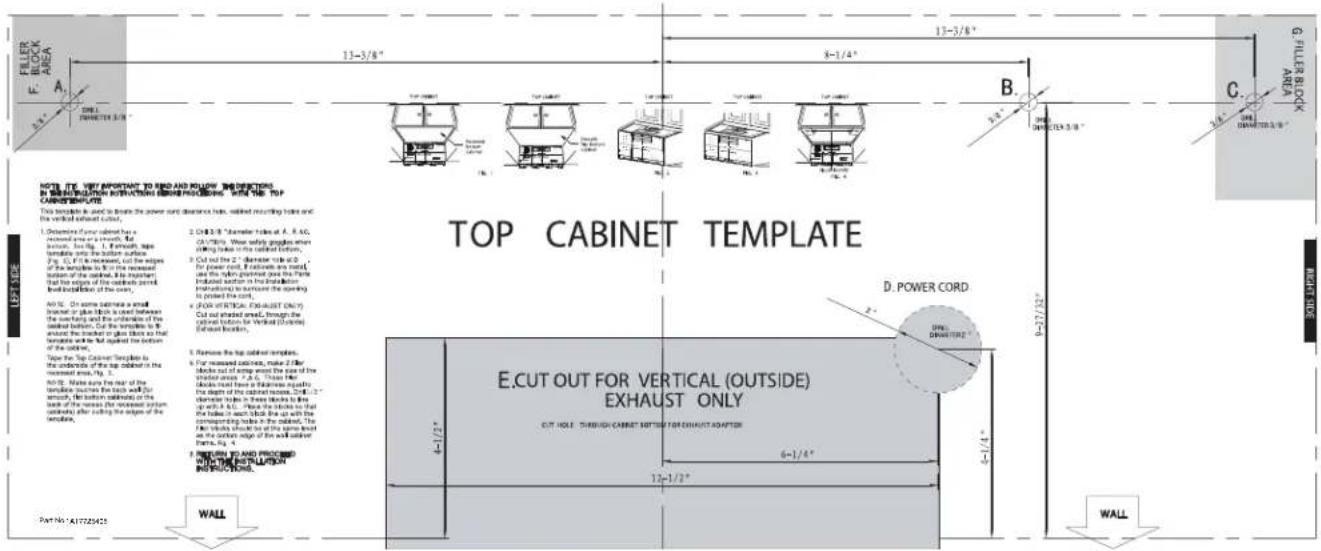
text_image
FILLER BLOCK AREA A 13-3/8" 8-1/4" B C G. FILLER BLOCK AREA NOTE: IT'S VET IMPORTANT TO FIND AND PULTRY. INSERTED IN REARROWTH INTRAVELATION AND BEQUIPING WITH THE TOP CABINET TEMPLATE. This length is 6" and to break the power cord distance bars, connected recording holes and the vertical outlet button. TOP CABINET TEMPLATE 1. Descriptive for your cabinet has a increased area on a wall. But bouvier, Lee Fig. 1. It is enough, type formative only the bottom surface. Fig. C: If the increase, cut the edges of the template to B or the increased bottom of the cabinet, it is important that the region of the outlet should be in installation of the corner. 2. CHS 2/8" Parameter blocks at A, B, AC, CA 70/80". We use safety packages when closing holes to the outlet's bottom. 3. Cut out the 2" parameter blocks at D for power cord, if blocks are set off, and the layout proposed just the frame induced section in the installation. instructions to outside the opening is posted the corner. 4. FOR OTTOAC, CHS-UST (CHS-UT) Cut out installed area, through the outwall buttons for Vertical (ChADS) Extruded corners. 5. Remove the top outlet template. 6. For measured outlets, make 2/8or blocks set out setting around the side of the vertical section >2.6". These lines blocks must have a flatness against the depth of the cabinet section. CHS 2/8" parameter blocks in these blocks follow up to 8.6". Please the blocks so that the hole is not about the size up with the conresponding holes in the cabinet. The first blocks should be on the same level as the corner edge of the wall adjacent frame, Fig. 4. 7. RETURN TO AND PROCESSED WITH THE INSTALLATION INSTRUCTIONS. E.CUT OUT FOR VERTICAL (OUTSIDE) EXHAUST ONLY CUT HOLE THROUGH CABINET SÜPTITION FOR EXHAUST ADAPTER 12-1/2" WALL PART NO.:1417225425 WALLnatural_image
Line drawing of a hand pointing at an electrical outlet with multiple switches (no text or symbols)• Broca de 3/16 ", 1/2", 5/8 "
natural_image
Line drawing of a microwave oven with lid and front panel (no text or symbols)natural_image
Architectural cross-section diagram showing structural components and lighting fixtures (no text or labels)natural_image
Line drawing of a hand using a spray gun to clean or store items on a kitchen counter (no text or symbols)natural_image
Three-panel line drawing showing people handling boxes, with no visible text or symbolsnatural_image
Hand holding a grid-patterned rectangular object with a small pointer (no text or symbols visible)natural_image
Diagram showing two mechanical assembly steps with arrows indicating motion direction (no text or symbols)natural_image
Technical diagram of a mechanical assembly with directional arrows indicating movement or force (no text or symbols present)natural_image
Technical line drawing of a mechanical assembly with no visible text or symbolsnatural_image
Technical line drawing of a door frame assembly with an inset showing a close-up detail (no text or symbols)natural_image
Line drawing of a microwave oven with open door and internal fan, showing airflow direction (no text or symbols)natural_image
Diagram of a mechanical component with a downward arrow indicating force or direction (no text or symbols)natural_image
Technical line drawing of two mechanical components with no visible text or symbolstext_image
Technical diagram of a microwave oven with labeled control panel and airflow direction arrowsnatural_image
Technical diagram showing two views of a mechanical component with internal parts and directional arrows (no text or symbols)natural_image
Technical diagram of a mechanical assembly with arrows indicating motion or force direction (no text or symbols)natural_image
Technical line drawing of a mechanical component with internal parts and directional arrows (no text or symbols)text_image
REAR WALL TEMPLATEnatural_image
Architectural cross-section diagram showing structural components and lighting fixtures (no text or labels)natural_image
Line drawing of a hand holding a small object above a window (no text or symbols)natural_image
Technical line drawing of two rectangular electronic components with internal circuitry and mounting brackets (no text or symbols)natural_image
Technical line drawing of two rectangular electronic components with internal circuitry (no text or symbols)natural_image
Illustration showing three scenes of people handling boxes, with no visible text or symbolsES
natural_image
Line drawing of a hand holding a tablet with a mesh screen (no text or symbols)natural_image
Technical line drawing of a structural assembly with beams and supports, no visible text or symbolsnatural_image
Line drawing of a hand using a tool to clean or install a wall-mounted device (no text or symbols visible)natural_image
Illustration of three scenes showing people handling boxes with crossed-out arrows, no text or symbols presentnatural_image
Simple line drawing of a hand holding a grid-patterned rectangular object (no text or symbols)natural_image
Line drawing of a microwave oven with a circular lid and lid, showing internal components (no text or symbols)natural_image
Line drawing of a hand inserting a cable into an electrical outlet (no text or symbols)natural_image
Line drawing of a hand pointing at an electrical outlet with multiple switches (no text or symbols)text_image
Montants CentreDraw a vertical line on the wall at the center of the 30" space.
Tape the Rear Wall Template onto the wall matching the centerline and touching the bottom cabinet frame.
A. RECYCLAGE D'AIR (ÉVACUATION SANS CONDUIT)
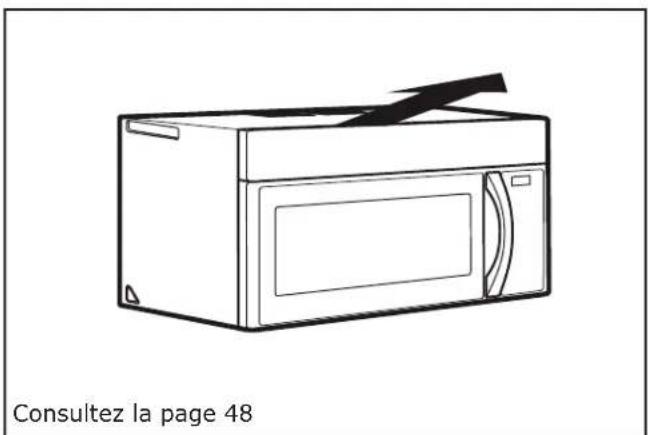
natural_image
Line drawing of a microwave oven with a black clip attached (no text or symbols on the device itself)natural_image
Technical line drawing of a structural assembly with beams and supports, no visible text or symbolsnatural_image
Line drawing of a hand using a tool to press or install a cabinet panel (no text or symbols visible)natural_image
Technical line drawing of a mechanical component with mounting holes and a directional arrow (no text or symbols)natural_image
Three-panel line drawing showing a person handling boxes, with no visible text or symbols.POUR VOTRE SÉCURITÉ ET POUR FACILITER L'INSTALLATION, L'INSTALLATION DE CE FOUR DOIT ÊTRE EFFECTUÉE PAR DEUX PERSONNES.
natural_image
Simple line drawing of a hand holding a grid-patterned rectangular object (no text or symbols)natural_image
Diagram showing two views of a mechanical or structural component with arrows indicating direction (no text or symbols present)natural_image
Technical diagram of a mechanical assembly with directional arrows indicating motion or force (no text or symbols present)natural_image
Technical line drawing of a mechanical assembly with no visible text or symbolsnatural_image
Architectural line drawing of a window with a door and wall, showing structural details (no text or symbols)natural_image
Technical line drawing of a microwave oven with internal components and airflow direction arrows (no text or symbols)natural_image
3D diagram of a mechanical component with a black arrow indicating direction (no text or symbols)natural_image
Technical illustration of two mechanical components with internal structure and rotation arrows (no text or symbols)natural_image
Technical line drawing of a microwave oven with internal components and airflow direction arrows (no text or symbols)natural_image
Technical illustration of two mechanical components with arrows indicating motion or assembly (no text or symbols)natural_image
Technical diagram of a mechanical component with arrows indicating direction (no text or symbols)natural_image
Technical line drawing of a mechanical component with internal channels and mounting holes (no text or symbols)text_image
REAR WALL TEMPLATEnatural_image
Technical line drawing of a structural assembly with beams and supports, showing no text or symbolsnatural_image
Line drawing of a hand using a tool to clean or install a wall-mounted device (no text or symbols visible)natural_image
Illustration showing three scenes of people handling boxes, with no visible text or symbolsFR
POUR VOTRE SÉCURITÉ ET POUR FACILITER L'INSTALLATION, L'INSTALLATION DE CE FOUR DOIT ÊTRE EFFECTUÉE PAR DEUX PERSONNES.
natural_image
Illustration of a hand holding a grid-patterned tablet device (no text or symbols visible)natural_image
Technical line drawing of a structural assembly with beams and supports, showing no text or symbols- Tighten all bolts. Pull the plate away from the wall to help tighten the bolts.
C2. UTILISATION DU GABARIT POUR ARMOIRE SUPÉRIEURE POUR LA PRÉPARATION DE L'ARMOIRE SUPÉRIEURE
natural_image
Line drawing of a hand using a tool to lift a wall-mounted device (no text or symbols visible)- Place the microwave in its upright position, with the top of the unit facing up.
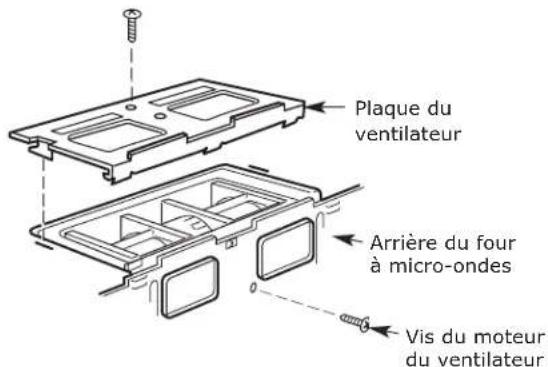
text_image
Illustration showing three scenes of people exchanging boxes, marked with 'X' symbols indicating prohibition or exclusion.POUR VOTRE SÉCURITÉ ET POUR FACILITER L'INSTALLATION, L'INSTALLATION DE CE FOUR DOIT ÊTRE EFFECTUÉE PAR DEUX PERSONNES
natural_image
Line drawing of a hand holding a textured rectangular object (no text or symbols)C7. CONNEXION AU CONDUIT