305902 - Weather Station Bearware - Free user manual and instructions
Find the device manual for free 305902 Bearware in PDF.


User questions about 305902 Bearware
0 question about this device. Answer the ones you know or ask your own.
Ask a new question about this device
Download the instructions for your Weather Station in PDF format for free! Find your manual 305902 - Bearware and take your electronic device back in hand. On this page are published all the documents necessary for the use of your device. 305902 by Bearware.
USER MANUAL 305902 Bearware
text_image
QR code image containing encoded data, no visible human-readable textENG: Current drivers, user manuals and other relevant documents for this product can be found on our homepage.
text_image
AM 7:30 PM 25°C 25.3 74% ① ② ③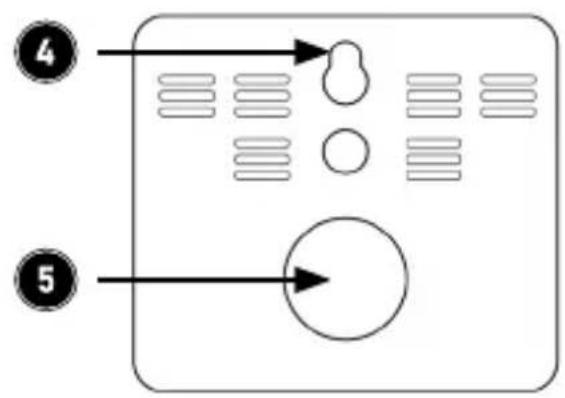
flowchart
graph TD
    A["④"] --> B["Arrow"]
    C["⑤"] --> D["Arrow"]
flowchart
graph TD
    A[" "] --> B[" "]
    A --> C[" "]
    D[" "] --> E[" "]
    D --> F[" "]
    G[" "] --> H[" "]
    I[" "] --> J[" "]
    K[" "] --> L[" "]
Thank you for choosing an BEARWARE product. Please read the following user manual carefully so as to get the most from the product that you have purchased. Before using the product, first check that the delivered item is complete, accurate and undamaged.
1. Scope of delivery
- Weather station
- User manual
2. Technical data
| Power supply CR2025 3 V button cell | |
| Measurement ranges | Temperature: -10°C - 88° CHumidity: 10 - 99% |
| Features | Temperature displayHumidity displayTime display |
| Update rate 10 seconds | |
| Ambient temperature 0°C to +60°C | |

3. Additional information about this device
Check if the product and the components are intact and if the device is working properly when using it for the first time. Do not use this device if it is damaged. Do not expose it to extreme temperature fluctuations, direct sunlight, moisture, sand or dust and protect it from electric shock. The device is intended only for private use and not for medical purposes or for public information.

Caution!
Keep the batteries and the device out of the reach of children. Batteries contain harmful acids. Weak batteries should be replaced as soon as possible to prevent leakage! Never use new and old batteries or batteries of different types together. Never throw batteries into a fire and do not short-circuit them. Do not recharge the batteries or take them apart. There is a risk of explosion!
4. Product details
text_image
AM 7:30 PM 25°C 74% 25.3 1 2 3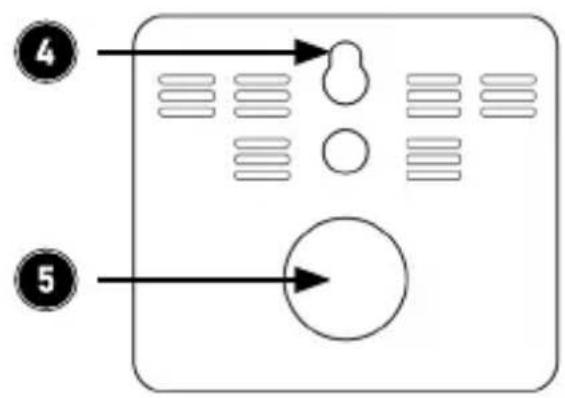
flowchart
graph TD
    A["④"] --> B["Arrow"]
    C["⑤"] --> D["Arrow"]
flowchart
graph TD
    A[" "] --> B[" "]
    A --> C[" "]
    D[" "] --> E[" "]
    D --> F[" "]
    G[" "] --> H[" "]
    G --> I[" "]
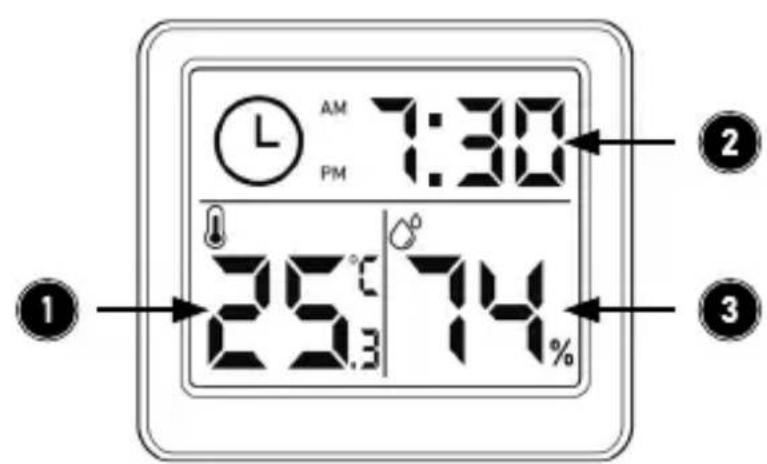
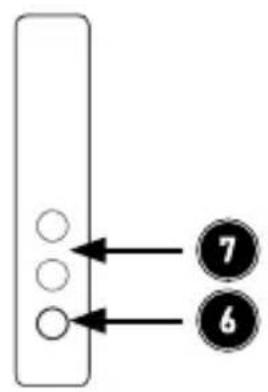
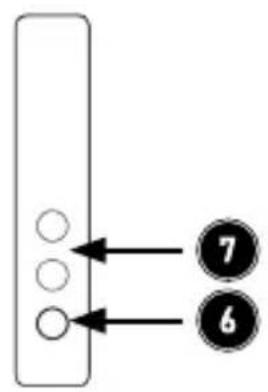
| 1 Temperature display |
| 2 Time display |
| 3 Humidity display |
| 4 Mounting unit |
| 5 Battery compartment |
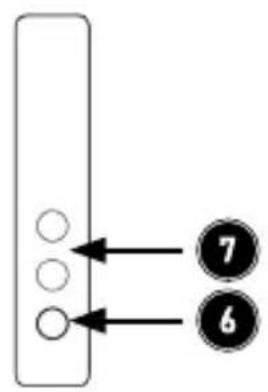
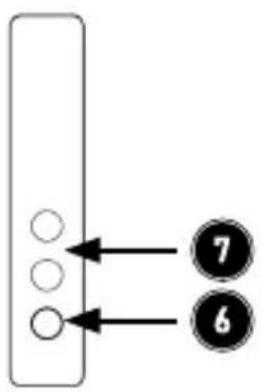
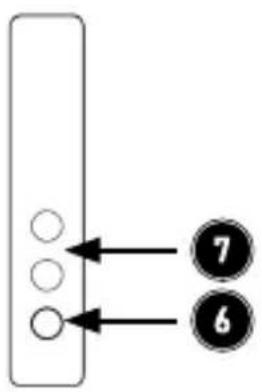
| 6 "SET" button |
| 7 Sensor |
5. Function display
The weather station displays the time, current room temperature and humidity.
6. Initial use
Please take the product out of the package and remove all the packaging material.
Remove the plastic strip from the battery compartment on the back to start using the device.
7. Time setting
To set the time, press the "SET" button on the side of the device. The hour display starts flashing. By pressing the "SET" button you can set the Hour. Press and hold the button to make the setting faster. Please wait about 5 seconds after setting the correct hour. The device automatically goes to the Minutes setting. Press and hold the button to make the setting faster. Please wait again for about 5 seconds after setting the correct minute. Now the device automatically returns to time setting.
8. Replacing the battery
If the brightness of the display decreases and is not as bright as before, then the battery level is low. Replace the battery promptly in such cases.
Open the battery cover at the back of the device. Remove the empty button cell battery and insert a new CR2032 button cell into the battery compartment with the proper polarity (+) and (-). Close the battery compartment cover.
9. Safety instructions and disclaimer
Never try to open the device to repair or make modifications. Avoid contact with the mains voltage. Do not short-circuit the product. The device is not waterproof, therefore please use it only in dry surroundings. Protect it from high humidity, water and snow. Keep the product away from high temperatures. Do not expose the device to sudden changes in temperature or strong vibrations, as this could damage the electronic components. Check the device for damage before using it.
The product should not be used if it was subject to impact or has been damaged in some other manner. Please follow the local regulations and restrictions.
Do not use the product for purposes other than those described in the user manual. This product is not a toy. Keep it out of the reach of children or mentally disabled persons. Any repair or modification to the device, which is not carried out by the original supplier, will void any warranty and guarantee claims. The device should only be used by those who have read and understood this user manual. The specifications of the device may be changed without any special prior notification.
10. Disposal instructions
In line with the European WEEE directive, electrical and electronic products should not be disposed of along with domestic waste. Their components have to be separately sent for recycling or disposal, because improper disposal of toxic and dangerous components may permanently damage the environment. According to the electrical and electronic equipment act (ElektroG), you are obliged (as a consumer) to return (free of charge) electrical and electronic devices to the manufacturer, the point of sale or the public collection points set up for this purpose at the end of their service life. The relevant local laws regulate the details in this regard. The symbol displayed on the product, in the user manual or/and on the packaging refers to these regulations. With this manner of sorting, recycling and disposal of used products, you make an important contribution towards protecting our environment.
11. Instructions for battery disposal
In conjunction with the sale of batteries along with the supply of devices that include batteries, the supplier is obliged to point out the following to the customer: The customer is legally obliged to return used batteries. The customer can return used batteries which the supplier offers or has offered as new batteries in his assortment free of charge to the supplier's dispatch warehouse (shipping address). The symbols shown on the batteries indicate the following: Pb = battery contains more than 0.004 percent lead by weight, Cd = battery contains more than 0.002 percent cadmium by weight, Hg = battery contains more than 0.0005 percent mercury by weight.

The symbol of the crossed-out dustbin means that the battery should not be disposed of in household waste.

WEEE directive 2012/19/EU
WEEE Register no.: DE 67896761
The company WD Plus GmbH hereby certifies that the product 305902 complies with the fundamental requirements and all other relevant stipulations. A complete conformity statement can be obtained from: WD Plus GmbH, Wohlenbergstraße 16, 30179 Hannover
text_image
AM 7:30 PM 25°C 74% 25.3 1 2 3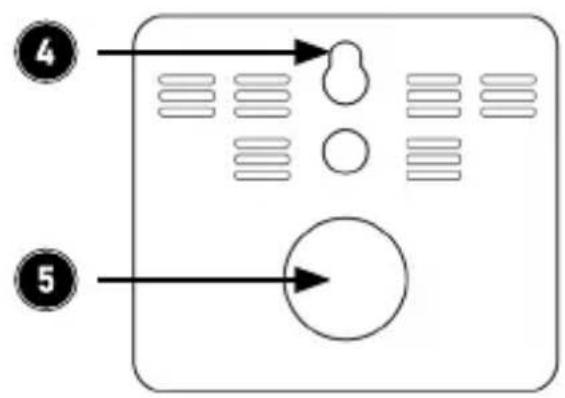
flowchart
graph TD
    A["④"] --> B["Arrow"]
    C["⑤"] --> D["Arrow"]
flowchart
graph TD
    A[" "] --> B[" "]
    A --> C[" "]
    D[" "] --> E[" "]
    D --> F[" "]
    G[" "] --> H[" "]
    G --> I[" "]
text_image
AM 7:30 PM 25°C 25.3 74% ① ② ③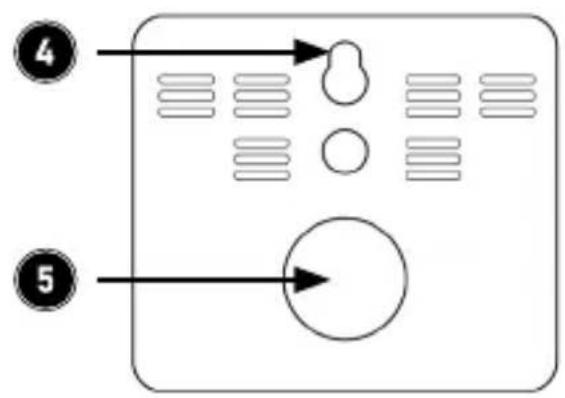
flowchart
graph TD
    A["④"] --> B["Arrow pointing to a circular shape"]
    C["⑤"] --> D["Arrow pointing to a circle"]
flowchart
graph TD
    A[" "] --> B[" "]
    A --> C[" "]
    D[" "] --> E[" "]
    D --> F[" "]
    G[" "] --> H[" "]
    I[" "] --> J[" "]
    K[" "] --> L[" "]
text_image
AM 7:30 PM 25°C 74% 25.3%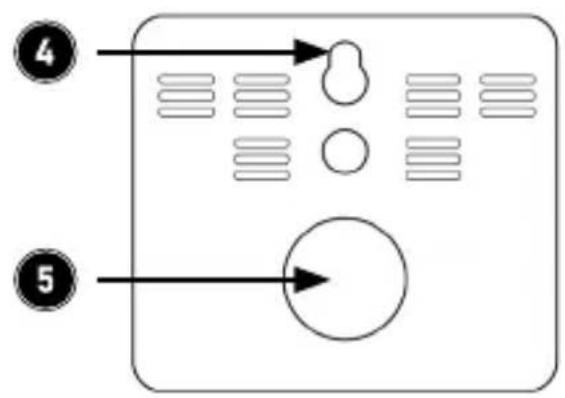
flowchart
graph TD
    A["④"] --> B["Arrow"]
    C["⑤"] --> D["Arrow"]
flowchart
graph TD
    A[" "] --> B[" "]
    A --> C[" "]
    D[" "] --> E[" "]
    F[" "] --> G[" "]
    style A fill:#fff,stroke:#000
    style B fill:#fff,stroke:#000
    style C fill:#fff,stroke:#000
    style D fill:#fff,stroke:#000
    style E fill:#fff,stroke:#000
    style F fill:#fff,stroke:#000
    style G fill:#fff,stroke:#000
MO-FR 9:30am - 18pm CET

text_image
QR code image containing encoded data, no visible human-readable textdownloads.ganzeinfach.de
WD Plus GmbH