303455 - Earphones CSL - Free user manual and instructions
Find the device manual for free 303455 CSL in PDF.


| Product type | Mono Bluetooth headset |
| Brand / Model | CSL / 303455 |
| Bluetooth version | V4.1 with CSR 8615 chipset |
| Maximum range | Up to 10 meters |
| Supported protocols | HSP, HFP, A2DP, AVRCP |
| Multipoint | Yes, connection up to 2 devices simultaneously |
| Integrated battery | 3.7 V / 180 mAh (headset) |
| Battery life (approximate) | Up to 10 hours in communication or music |
| Weight (headset) | Approx. 54 g |
| Weight (charging base) | Approx. 176 g |
| Dimensions (headset) | 155 x 160 x 45 mm |
| Dimensions (base) | 31 x 77 x 70 mm |
| Speaker diameter | Approx. 23 mm |
| Operating temperature | 0°C to 40°C |
| Emission frequency | 2402 - 2480 MHz (power 2.35 dBm) |
| Power supply | 5 V DC via microUSB (charger or USB port) |
| LED indicator | Red (charging / low battery), Blue (connection / standby) |
| Main functions | Hands-free calls, music, voice commands, call rejection, redial |
| Delivery contents | Headset, charging base, microUSB cable |
| Care and cleaning | Wipe with a dry cloth; do not use harsh chemicals |
| Safety instructions | Do not open, protect from moisture and high temperatures |
| Disposal | Comply with WEEE directive; do not dispose with household waste |
| Warranty | Legal warranty; unauthorized repairs void warranty |
Frequently Asked Questions - 303455 CSL
User questions about 303455 CSL
0 question about this device. Answer the ones you know or ask your own.
Ask a new question about this device
Download the instructions for your Earphones in PDF format for free! Find your manual 303455 - CSL and take your electronic device back in hand. On this page are published all the documents necessary for the use of your device. 303455 by CSL.
USER MANUAL 303455 CSL
MON-FRI 9:30am - 18pm CET
https://downloads.ganzeinfach.de/
Table of contents
- Deutsch .... 3
- English....10
- Français 17
- Italiano 24
- Español....31
Thank you for choosing a CSL product. Please read the following user manual carefully so as to get the most from the product you have purchased. Before using the product, first check if the delivered item is complete, accurate and undamaged.
1. Scope of delivery
- Bluetooth headset
- Charging station/base
- Charging cable (USB type A to microUSB)
2. Technical data
| Bluetooth version V4.1 | |
| Chipset CSR 8615 | |
| Range <10 m | |
| Transmission power (EIRP) | 2.35 dBm |
| Frequency range 2402 MHz - 2480 MHz | |
| Battery 3.7V / 180 mAh (built-in) | |
| Bluetooth protocols HSP, HFP, A2DP, AVRCP | |
| Weight | Base: approx. 176 gHeadset: approx. 54 g |
| Ambient temperature + 0-3°C until 35-40°C | |
| Driver diameter approx. | 23 mm |
| Dimensions (H x W x D) | Base: 31 mm x 77 mm x 70 mmHeadset: 155 mm x 160 mm x 45 mm |
| Features | “Multipoint” (connection of up to two devices)Multi-functional buttonMono earphone |
3. Product details
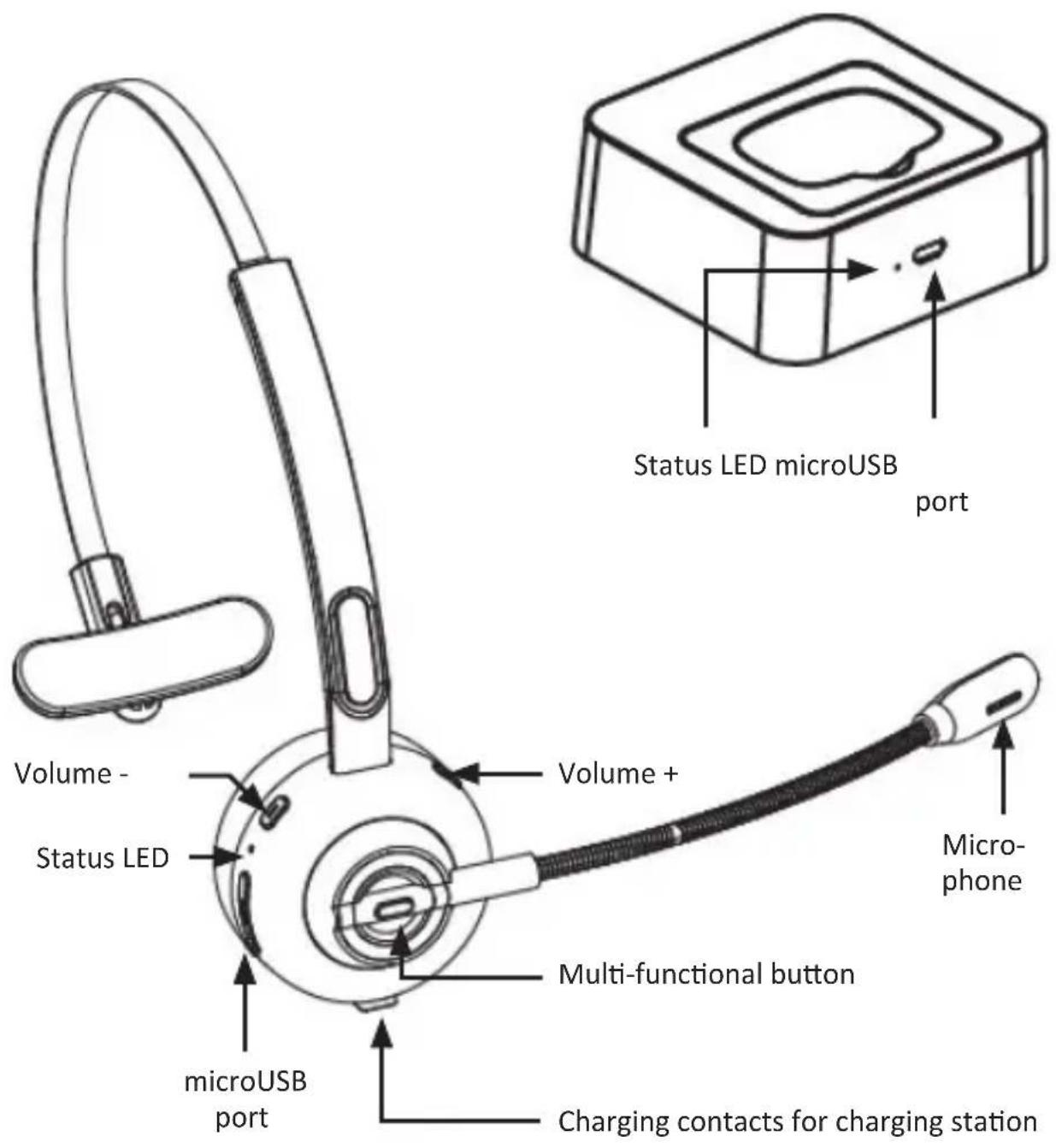
4. Commissioning
Take the device out of the package and remove all the packaging material. Check that the product and the components are intact and that the device is working properly when using it for the first time.
- Key functions
| Button Function | Execution | |
| Multi-functional button | Switching on | When switched off, press the button for 1-3 seconds in order to switch on the device |
| Switching off | When switched on, press the button for 5 seconds in order to switch off the device | |
| Pairing | When switched off, press the button for 5-8 seconds or twice in unconnected standby mode in order to enter pairing mode | |
| Play/Pause Press shortly to play music | ||
| Redialling | Press the multi-functional button quickly twice in succession to redial the last called contact | |
| Voice command Press and hold for approx. 1 second | ||
| Accept a call | Short press (for incoming calls) | |
| Hang up Short press (during a call) | ||
| Rejecting calls | Long press for approx. 1 second (for incoming calls) | |
| Volume + | • Volume + • Next track | • Short press • Long press for 1 second |
| Volume - | • Volume - • Previous track | • Short press • Long press for 1 second |
Press the multifunction button for approx. 2-3 seconds until you hear a short beep, then the mute function is activated. To deactivate the mute function, repeat the procedure.
6. Establish Bluetooth connection (pairing)
- Press the "Multi-functional button" for 5-8 seconds when switched off to establish the connection. The "status LED" flashes alternately red & blue.
- Enable the Bluetooth search on your mobile phone and open the Bluetooth environment. Search and connect with "CSL-303455". The status LED changes to blue and flashes after successful connection. If you need a password, try "0000", "8888", "1111" or "1234".
- You may use, e.g., the buttons "Multi-functional button"/"Volume +" and "Volume -" on the headset. Use them as described under point 5 "Button functions".

Please note that the headset has its own volume control, which can be set irrespective of the paired end device.
7. Connect with two devices at the same time (multipoint)
- Connect the first device as described in chapter "6. Establish Bluetooth connection" and switch off the Bluetooth function of the telephone.
- Then press the "Multi-functional button" twice to switch back to pairing mode. The "status LED" flashes alternately red & blue.
- Enable the Bluetooth search on your mobile phone and open the Bluetooth environment. Search and connect with "CSL-303455". The status LED changes to blue and flashes after successful connection.
- Then enable the Bluetooth function of the first telephone, click in the list of paired Bluetooth devices on "CSL-303455" to establish the connection. The headset is now alternatively connected to two telephones.

Note: Music can be played from only one device. If you want to play music from the other device, you must pause or close the music from the previous device. The sample principle also applied to calls.
8. Status LED
| Mode Status LED | |
| Switch on the device Blue LED flashes for a second | |
| Switch off the device Red LED flashes for a second | |
| Pairing mode Blue and red LED flash alternately | |
| Standby mode without connection Blue LED flashes every 2 seconds | |
| • Standby mode with connection• Device is connected | Blue LED flashes every 5 seconds |
| Delete paired devices Blue and red LED glow simultaneously | |
| Charging Red LED glows continuously | |
| Fully charged Blue LED glows continuously | |
| Low battery level Red LED flashes | |
9. Charging
When the red LED flashes, the battery level is low and the battery must be charged. During the charging process, the LED lights up continuously red. Once the device is fully charged, the blue LED flashes continuously.
You can charge the headset by connecting the microUSB cable to a free USB port of your computer or to a 5V USB charger and then by connecting it directly to the charging station or the headset.
When you connect the microUSB cable with the charging station, you can place the headset with the charging contacts on the charging station and charge it.
Any USB car charger, power bank or USB port (e.g., computer or laptop) with an output voltage of 5V DC and a charging current of over 500mA can be used.

11. Safety instructions and disclaimer
Never try to open the device to undertake any repairs or modifications. Avoid contact with the mains voltage. Do not short-circuit the product. The device is not approved for outdoor use. Please use it only in dry places. Protect it from high humidity, water and snow. Do not expose the device to high temperatures.
Do not expose the device to sudden changes in temperature or strong vibrations, as this could damage the electronic components. Check the device for any damage before using it. The device should not be used if it was subject to impact or has been damaged in some other manner. Please comply with the local regulations and restrictions. Do not use the device for purposes other than those described in the user manual. This product is not a toy.
Keep it out of the reach of children or mentally disabled persons. Any repair or modifications to the device, which is not carried out by the original supplier, will void any warranty and guarantee claims. The device should be used only by persons who have read and understood this user manual. The specifications of the device may be changed without prior notification.
12. Disposal instructions
In line with the European WEEE directive, electrical and electronic devices should not be disposed of along with domestic waste. Their components must be recycled or disposed of separately, since toxic and hazardous components can cause lasting damage to the environment if they are disposed of in improper manner. According to the electrical and electronic equipment act (ElektroG), you are obliged (as a consumer) to return (free of charge) all electrical and electronic devices to the manufacturer, the point of sale, or public collection points at the end of their service life. The relevant local laws regulate the details in this regard. The symbol displayed on the product, in the user manual or/and on the packaging refers to these regulations. With this manner of sorting, recycling and disposal of used devices, you make an important contribution towards protecting our environment.
13. Instructions for battery disposal
In conjunction with the sale of batteries along with the supply of devices that include batteries, the supplier is obliged to point out the following to the customer:
The customer is legally obliged to return used batteries. The customer can return used batteries which the supplier offers or has offered as new batteries in his assortment free of charge to the supplier's dispatch warehouse (shipping address). The symbols shown on the batteries mean the following: Pb = battery contains more than 0.004 percent lead by weight, Cd = battery contains more than 0.002 percent cadmium by weight, Hg = battery contains more than 0.0005 percent mercury by weight.

The symbol of the crossed-out dustbin means that the battery must not be disposed of in household waste.
WEEE Guideline: 2012/19/EU WEEE Register no.: DE 67896761
The company WD Plus GmbH hereby certifies that the device 303455 complies with the fundamental requirements and all other relevant stipulations of the guideline 2014/53/EC. A complete conformity statement can be obtained from: WD Plus GmbH, Wohlenbergstraße 16, 30179 Hannover, http://downloads.ganzeinfach.de/search/model/303455