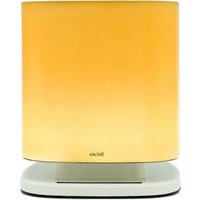
BRUKSANVISNINGBellaria - Range hood FALMEC - Free user manual and instructions
Find the device manual for free BRUKSANVISNINGBellaria FALMEC in PDF.


| Product type | Extractor hood |
| Brand | Falmec |
| Model | Bellaria |
| Power supply | 100-230 V, 50/60 Hz, 30 W |
| Power consumption | 30 W |
| Recommended room volume | 40-50 m³ |
| Operating temperature | 10-35 °C |
| Operating humidity | 40-80 % |
| Anti-dust filter | Washable, monthly cleaning recommended |
| Honeycomb charcoal filter HP | Regeneration every 36 months (200 °C, 2 h), replacement after 9 years |
| Ionizer | Blue LED indicating operation |
| Lighting | LED with intensity control (dimmer) |
| Air quality indicator | 3 LED leaves: green (optimal), yellow (presence of pollutants) |
| Speeds | 3 speeds + automatic cycle |
| Automatic cycle | Activation in presence of pollutants, deactivation after 3 hours without pollutants |
| Cleaning external surfaces | Damp cloth with neutral detergent or denatured alcohol |
| Glass cleaning | Specific non-corrosive detergent, soft cloth |
| Power supply | Mains adapter supplied |
| Disposal | WEEE, do not dispose with household waste |
| Warranty | Consult the retailer or manufacturer |
Frequently Asked Questions - BRUKSANVISNINGBellaria FALMEC
User questions about BRUKSANVISNINGBellaria FALMEC
0 question about this device. Answer the ones you know or ask your own.
Ask a new question about this device
Download the instructions for your Range hood in PDF format for free! Find your manual BRUKSANVISNINGBellaria - FALMEC and take your electronic device back in hand. On this page are published all the documents necessary for the use of your device. BRUKSANVISNINGBellaria by FALMEC.
USER MANUAL BRUKSANVISNINGBellaria FALMEC
natural_image
Illustration of a square-shaped container with a lid, no text or symbols presentIT LIBRETTO ISTRUZIONI
UK INSTRUCTIONS BOOKLET
The Manufacturer reserves the right to make changes to the equipment at any time and without prior notice.
Printing, translation and reproduction, even partial, of this manual are bound by the Manufacturer's authorisation.
Technical information, graphic representations and specifications in this manual are for information purposes and cannot be divulged.
This manual is written in Italian. The Manufacturer is not responsible for any transcription or translation errors.
FR
UK - Remove the cover
3
natural_image
Technical line drawing of a mechanical component with grid and mounting base (no text or symbols)4
UK - Check the position of the filters
natural_image
Technical line drawing of a mechanical device with grid and component components (no text or symbols)5
UK - Put the glass back in place
6
UK - Put the cover back in place
natural_image
Illustration of hands placing a tray into a container with a downward arrow, no text or symbols present7
UK - Electrical connection
natural_image
3D rendering of a rectangular mechanical component with internal compartments (no text or symbols)natural_image
Isometric illustration of a rectangular electronic component with grid pattern and mounting bracket (no text or symbols)natural_image
Diagram of a device interior with grid layout and highlighted component (no text or symbols)(Guarantee conditions are valid only for Italy).
DECRETO LEGISLATIVO DEL 30/06/2003 N. 196 - ART. 7
Before installing the hood, check the integrity and function of each part. Should anomalies be noted, do not proceed with installation and contact the Dealer.
Do NOT install the device if an aesthetic defect has been detected; put it back into its original package and contact the Dealer. No claim can be made for aesthetic defects once it has been installed.
Do not install the device outdoors and do not expose it to weathering (rain, wind, etc.).
Do not modify the electrical, mechanical and functional structure of the equipment.
DO NOT use BELLARIA if the power supply cable or other components are damaged: disconnect the device from the electrical power supply and contact the Dealer or an authorised Servicing Department for repairs.
Do not personally try to carry out repairs or replacements. Interventions carried out by incompetent and unauthorised persons can cause damage, even serious, to things and/or persons not covered by the Manufacturer's warranty.
ELECTRICAL SAFETY

The electrical system to which the device is connected must comply with all standards and must be earthed in compliance with the safety regulations in the Country of use; it must also with European standards on electromagnetic compatibility.
the electrical system is compliant with law and can withstand the load of the device (refer to the technical specifications on the identification nameplate mounted on the device);
Any changes to the electrical system must be carried out by a qualified electrician.
USER WARNINGS

These warnings have been drawn up for your personal safety and those of others. You are kindly asked to read the bookfully in its entirety before using the equipment or carrying out operations.
The Manufacturer declines all responsibility for any damage caused directly, or indirectly, to persons, things and pets as a consequence of failing to comply with the safety warnings indicated in this booklet. It is imperative that this instructions booklet is kept together with the equipment for any future consultation.
If the device is sold or transferred to another person, make sure that the manual is also supplied so that the new user can be made aware of the device's operation and relative warnings. Insist on original spare parts.
INTENDED USE
The BELLARIA home air purifier is intended exclusively for treating air in 40-50m ^3 volume environments.
Any use other than this is improper, it can cause damage to persons, properties and pets and exempts the Manufacturer from any liability. The equipment can be used by children above the age of 8 and by persons with reduced physical, sensory and mental abilities, or with no experience or knowledge, as long as they do so under supervision or after having received relative instructions regarding safe use of the equipment and understanding of the dangers connected to it. Children are not to play with the equipment. Cleaning and maintenance by the user must not be carried out by children without supervision.
INSTALLATION

Before installing the device, read the "Safety instructions and warnings" chapter carefully.
TECHNICAL FEATURES
The technical specifications are shown on a label mounted on the device: 100÷230V 50/60Hz 30W.
POSITIONING
The device is free-standing and can be placed anywhere within the home, in typical household temperature and humidity conditions. T=10÷35°C
H=40÷80%
Avoid sources of heat and high humidity environments.
ELECTRICAL CONNECTION

The product should be used only with the power supply unit provided.
Before connecting the equipment to the electrical mains power supply, check that:
the mains voltage corresponds to that specified on the label on the power supply unit provided
To avoid overloading, do not share the same power outlet with too many appliances.
once connected, the plug and cable do not come into contact with hot parts having temperatures that exceed 70^ C;
Do not place any connecting cable where it can be stepped on or disconnected.
Do not place heavy objects on it, to prevent its ends from being damaged.
The socket used for connection is within reach with the device installed. Grasp the plug and not the cables for disconnection from the socket.
The Manufacturer declines all responsibility for failure to comply with the safety regulations.
In the BELLARIA, the air passes through the dust filter and activated carbon filter and then through the ioniser which acts against the pollutants present in the home, ionising and purifying the air that is fed back into the environment.
OPERATION

| Key | Description | |
 | Switches off and reduces speed |  Speed 1 Speed 1 |
 | Switching on and increases speed from 1 to 3 | [+/-] Speed 2  Speed 3 (+" LED flashing) Speed 3 (+" LED flashing) |
 | If pressed for 4 seconds, it activates the automatic cycle: BELLARIA will be activated only in the presence of pollutants. The function is disabled if: 3 hours. and are pressed. |  and and  flashing flashing |
| [7H3S] | Light ON/OFF When the light is ON, press the button to reduce the light intensity. | |
AIR QUALITY

The air quality is displayed by the colour of the 3 leaves.
Green = optimum quality.
Yellow = presence of pollutants.
The more pollutants present, the more intense the colour yellow.
WHICH SPEED IS TO BE SELECTED?
- 1st speed: keeps the air clean with low noise (green leaves).
- 2nd speed: normal conditions of use. (moderately yellow leaves).
- 3rd speed: high presence of pollutants (yellow leaves).
LIGHTING
BELLARIA is equipped with high-efficiency, low-consumption LEDs, very long life and "dimmer" function. (see OPERATION)
MAINTENANCE

Before carrying out any cleaning or maintenance operations, disconnect from the power supply.
Do not use detergents containing abrasive, acidic or corrosive substances or abrasive cloths.
Regular maintenance guarantees proper operation and performance over time.
Particular attention should be paid to the dust filter and honeycomb carbon filter: cleaning the filters frequently reduces deposits of dust or other particulate matter.
CLEANING OF EXTERNAL SURFACES
It is recommended to clean the exterior surfaces of the BELLARIA periodically: clean using a damp cloth slightly dampened with mild liquid detergent or denatured alcohol. Finish off cleaning by rinsing well and drying with soft cloths.

Do not use too much water next to the push button control panel and lighting devices in order to prevent humidity from reaching electronic parts.
The glass can only be cleaned with specific, non-corrosive or non-abrasive detergents using a soft cloth.
The Manufacturer declines all responsibility for failure to comply with these instructions.
CLEANING OF INTERNAL SURFACES

It is forbidden to clean electrical parts, or parts related to the motor or ioniser, with liquids or solvents.
For the internal metal parts, see the previous paragraph.
DUST FILTERS
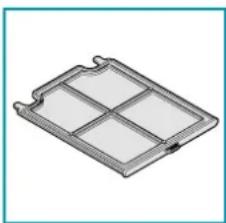
natural_image
3D rendering of a rectangular mechanical component with internal divisions (no text or symbols)For this reason it is recommended to clean the filter frequently (at least every month) using compressed air or by washing in a basin with warm water and a mild detergent. Rinse it well and wait for it to be completely dry before reassembling.
natural_image
Isometric illustration of a rectangular electronic component with grid pattern and mounting bracket (no text or symbols)The HONEYCOMB carbon filter is intended to retain odours found in the air flow passing through it:
With normal use, we recommend restoring the filter every 36 months and replacing it after 9 years. To restore it, simply put it into an ordinary domestic oven set at 200°C for about 2 hours.
Wait for the filter to cool before reassembling it. The honeycomb carbon filter cannot be washed.

The honeycomb carbon filter is held in place by two magnets placed inside the device: pull gently to remove it.
Dispose of the honeycomb carbon filters in compliance with the regulations in force in the Country of use.
IONISER
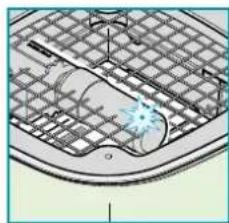
natural_image
Diagram of a kitchen sink with a grater and a handle, showing no text or symbolsThe maintenance of the ioniser cannot be performed directly.
You can vacuum through the grating to remove the dust or other particulate matter that settles over time.
The ioniser is equipped with a blue LED to indicate operation.
With BELLARIA working:
blue LED on: ioniser working.
blue LED off: the ioniser is broken or not connected properly. In this case contact the dealer or authorised service centre.
INSTRUCTIONS FOR DISPOSAL AT THE END OF SERVICE LIFE
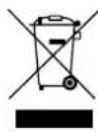
The crossed-out wheeled bin symbol on the appliance means that the product is WEEE, i.e. "Waste electrical and electronic equipment", accordingly it must not be disposed of with unsorted waste (i.e. with "mixed household waste"), but it must be disposed of separately so that it can
undergo specific operations for its re-use, or a specific treatment, to remove and safely dispose of any substances that may be harmful to the environment and remove the raw materials that can be recycled.
Proper disposal of these products contributes to saving valuable resources and avoid potential negative effects on personal health and the environment, which may be caused by inappropriate disposal of waste.
You are kindly asked to contact your local authorities for further information regarding the designated waste collection points nearest to you.
Penalties for improper disposal of such waste can be applied in compliance with national regulations.
INFORMATION ON DISPOSAL IN COUNTRIES OF THE EUROPEAN UNION
The EU WEEE Directive was implemented differently in each country, accordingly, if you wish to dispose of this appliance we suggest contacting your local authorities or dealer to find out what the correct method of disposal is.
INFORMATION ON DISPOSAL IN COUNTRIES OUTSIDE THE EUROPEAN UNION
The crossed-out wheeled bin symbol is only valid in the European Union: if you wish to dispose of this appliance in other countries, we suggest contacting your local authorities or dealer to find out what the correct method of disposal is.
natural_image
Isometric view of a rectangular metal tray or holder with internal compartments (no text or symbols)natural_image
Isometric illustration of a rectangular electronic device with grid pattern and a handle (no text or symbols)natural_image
Diagram of a car interior with grid layout and a highlighted blue star (no text or symbols)natural_image
Isometric view of a rectangular metal tray or holder with internal compartments (no text or symbols)natural_image
Isometric illustration of a rectangular electronic component with a grid pattern and a handle (no text or symbols)natural_image
Diagram of a device interior with grid layout and a highlighted component (no text or symbols)natural_image
Isometric view of a rectangular metal frame with four vertical slots (no text or symbols)natural_image
Isometric illustration of a rectangular tray with a grid pattern and a handle (no text or symbols)natural_image
Diagram of a car interior with grid pattern and a highlighted blue star (no text or symbols)natural_image
3D rendering of a rectangular mechanical component with internal compartments (no text or symbols)natural_image
Isometric illustration of a rectangular electronic component with a grid pattern and a handle (no text or symbols)natural_image
Technical diagram of a grid-patterned structure with a central blue star-like feature (no text or symbols)natural_image
3D rendering of a rectangular mechanical component with internal grid structure (no text or symbols)natural_image
Isometric illustration of a rectangular electronic device with grid pattern and a handle (no text or symbols)natural_image
Diagram of a car interior with grid pattern and a highlighted blue object (no text or symbols)natural_image
3D rendering of a rectangular metal tray or filter structure with internal compartments (no text or symbols)natural_image
Isometric illustration of a rectangular electronic component with a grid pattern and a handle (no text or symbols)natural_image
Diagram of a mechanical component with grid pattern and highlighted part (no text or symbols)natural_image
3D rendering of a rectangular mechanical component with internal compartments (no text or symbols)natural_image
Isometric illustration of a rectangular tray with a grid pattern and a handle (no text or symbols)natural_image
Diagram of a car interior with grid pattern and a highlighted blue star (no text or symbols)HVILKEN HASTIGHED SKAL MAN VÄLGE?
natural_image
3D rendering of a rectangular mechanical component with internal divisions (no text or symbols)natural_image
Isometric illustration of a rectangular electronic device with a grid pattern and a handle (no text or symbols)natural_image
Technical diagram of a mechanical component with grid lines and a highlighted section (no text or symbols)natural_image
Isometric view of a rectangular metal frame with four panes (no text or symbols)natural_image
Isometric illustration of a rectangular electronic device with a grid pattern and a handle (no text or symbols)natural_image
Diagram of a car interior with grid pattern and a highlighted blue star (no text or symbols)natural_image
3D rendering of a rectangular mechanical component with internal divisions (no text or symbols)natural_image
Isometric illustration of a rectangular electronic component with a grid pattern and a handle (no text or symbols)natural_image
Technical diagram of a device interior with grid layout and central component (no text or symbols)natural_image
Isometric view of a rectangular device with internal compartments (no text or symbols)natural_image
Isometric illustration of a rectangular electronic device with grid pattern and handle (no text or symbols)natural_image
Technical line drawing of a mechanical component with grid lines and a central hub (no text or symbols)natural_image
Illustration of a square-shaped container with a lid, no text or symbols presentBellaria
falmec
FALMEC S.p.A.