USER MANUAL Genius Boost+ GB40 NOCO
Failure to follow the instructions may result in ELECTRICAL SHOCK, EXPLOSION, or FIRE, which may result in SERIOUS INJURY, DEATH, DAMAGE TO DEVICE or PROPERTY. Do not discard this information.
Welcome. Thank you for buying the NOCO Genius® Boost™ GB40. Read and understand the User Guide before operating the product. For questions regarding our jump starter, view our comprehensive support information at www.no.co/support. To contact NOCO for personalized support (not available in all areas), visit www.no.co/connect.
What's In The Box.
• GB40 Lithium Jump Starter
- Micro USB Cable
• 12V USB Charger
• X Connect HD Battery Clamps
- User Guide & Information Guide and Warranty
Phone: 1.800.456.6626
Email: support@no.co
Mailing Address: 30339 Diamond Parkway, #102
Glenwillow, OH 44139
United States of America
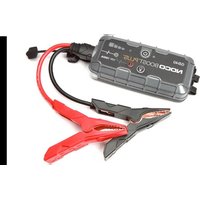
About GB40. The NOCO Genius® Boost™ GB40 is an ultra-compact and portable lithium-ion jump starter for cars, boats, motorcycles, ATVs, lawn mowers, RVs, tractors, trucks and more. It’s extremely safe for anyone to use. It features spark proof technology and reverse polarity protection. The GB40 can instantly jump start most single-battery applications, up to 20 times on a single charge. The GB40 is also equipped with a USB battery pack and LED flashlight, making it the ultimate emergency tool.
Getting Started. The GB40 comes partially charged out of the box and needs to be fully charged prior to use. Carefully read and understand the vehicle owner's manual on specific precautions and recommended methods for jump starting the vehicle. Make sure to determine the voltage and chemistry of the battery by referring to your battery owner's manual prior to using this product. The GB40 is for jump starting 12-volt lead-acid batteries only.
Connecting to the Battery.
Before connecting to the battery, verify that you have a 12-volt lead-acid battery. The GB40 is not suitable for any other type of battery. Identify the correct polarity of the battery terminals on the battery. The positive battery terminal is typically marked by these letters or symbol (POS,P,+).
The negative battery terminal is typically marked by these letters or symbol (NEG,N,-). Do not make any connections to the carburetor, fuel lines, or thin, sheet metal parts. The below instructions are for a negative ground system (most common). If your vehicle is a positive ground system (very uncommon), follow the below instructions in reverse order.
1.) Connect the positive (red) HD battery clamp to the positive (POS,P,+) battery terminal.
2.) Connect the negative (black) HD battery clamp to the
negative (NEG,N,-) battery terminal or vehicle chassis.
3.) When disconnecting, disconnect in the reverse sequence, removing the negative first (or positive first for positive ground systems).
Jump Starting.
1.) Verify the voltage and chemistry of the battery.
2.) Confirm the HD battery clamps are connected to the correct polarity battery terminals.
3.) Connect the HD X Connector to the GB40.
4.) Make sure all of the vehicle's power loads (headlights, radio, air conditioning, etc.) are turned off before attempting to jump start the vehicle.
5.) Press the Power Button to begin jump starting. All LEDs will flash, indicating that all LEDs are properly functioning. If you are properly connected to the battery, the White Boost LED will illuminate. If the battery clamps are connected in reverse, the Red Error LED will illuminate. Reverse the connections to clear this error and then the White Boost LED will illuminate. The White Boost LED is illuminated, when the GB40 is ready to jump start your vehicle.
6.) Try starting the vehicle. Most vehicles will immediately start. Some vehicles may require the GB40 to be connected for up to 30 seconds before starting. If the vehicle does not start right away, wait 20-30 seconds and try again. Do not attempt more than five (5) consecutive jump starts within a fifteen (15) minute period. Allow the GB40 to rest for fifteen (15) minutes before attempting to jump start the vehicle again.
7.) Once you have started your vehicle, disconnect the battery clamps, and remove the GB40.
Low Voltage Batteries & Manual Override
The GB40 is designed to jump start 12-volt lead-acid batteries down to 2-volts. If your battery is below 2-volts, the Boost LED will be “Off”. This is an indication that the GB40 can not detect a battery.
If you need to jump start a battery below 2-volts there is a Manual Override feature, which allows you to force “On” the jump start function.
CAUTION. USE THIS MODE WITH EXTREME CARE. THIS MODE IS FOR 12-VOLT LEAD-ACID BATTERIES ONLY. BOTH THE SPARK PROOF AND REVERSE POLARITY PROTECTION FEATURES ARE DISABLED. PAY VERY CLOSE ATTENTION TO THE POLARITY OF THE BATTERY BEFORE USING THIS MODE. DO NOT ALLOW THE POSITIVE AND NEGATIVE BATTERY CLAMPS TO TOUCH OR CONNECT TO EACH OTHER AS THE PRODUCT WILL GENERATE SPARKS. THIS MODE USES VERY HIGH CURRENT (UP TO 1000 AMPS) THAT CAN CAUSE SPARKS AND HIGH HEAT IF NOT USED PROPERLY. IF YOU ARE UNSURE ABOUT USING THIS MODE, DO NOT ATTEMPT AND SEEK PROFESSIONAL HELP.
Before using the Manual Override feature, make sure the HD battery clamps are connected to the correct polarity battery terminals and the HD X Connect is connected to the GB40. To use the Manual Override feature, press and hold the Manual Override Button (a red exclamation point icon inside a red circle) for three (3) seconds. The White Boost LED will flash “On” and “Off” indicating you have successfully entered into Manual Override and it is ready to jump start your vehicle. If connected in reverse polarity, the Red Error LED will illuminate and the unit will not operate.
CAUTION: POWER THE GB40 "OFF" BEFORE DISCONNECTING THE BATTERY CLAMPS. THIS WILL ENSURE YOUR SAFETY. REMEMBER BOTH THE SPARK PROOF AND REVERSE POLARITY PROTECTION FEATURES ARE DISABLED.
Most vehicles will immediately start. Some vehicles may require the GB40 to be connected for up to 30 seconds
before starting. If the vehicle does not start right away, wait 20-30 seconds and try again. Do not attempt more than five (5) consecutive jump starts within a fifteen (15) minute period. Allow the GB40 to rest for fifteen (15) minutes before attempting to jump start the vehicle again.
Understanding Charge LEDs.
The GB40 has four (4) Charge LEDs - 25%, 50%, 75% and 100%. These Charge LEDs indicate the internal battery's state-of-charge (SOC). See below:
| LED Explanation |
25%Red LED25% 50% 75% 100% | The 25% Charge LED will ‘breath’ on/off while charging and will be solid Red when the internal battery is 25% charged. |
50%Red LED25% 50% 75% 100% | The 50% Charge LED will ‘breath’ on/off while charging and will be solid Red when the internal battery is 50% charged. |
75%Yellow LED25% 50% 75% 100% | The 75% Charge LED will ‘breath’ on/off while charging and will be solid Yellow when the internal battery is 75% charged. |
100%Green LED25% 50% 75% 100% | The 100% Charge LED will ‘breath’ on/off while charging and will be solid Green when the internal battery is fully charged.When connected to a USB charger, no other charge LEDs will be illuminated. Once disconnected from the charger, all four (4) Charge LEDs will be illuminated when the internal battery is between 75%-100%, and the unit is powered “ON”. |
User Interface.
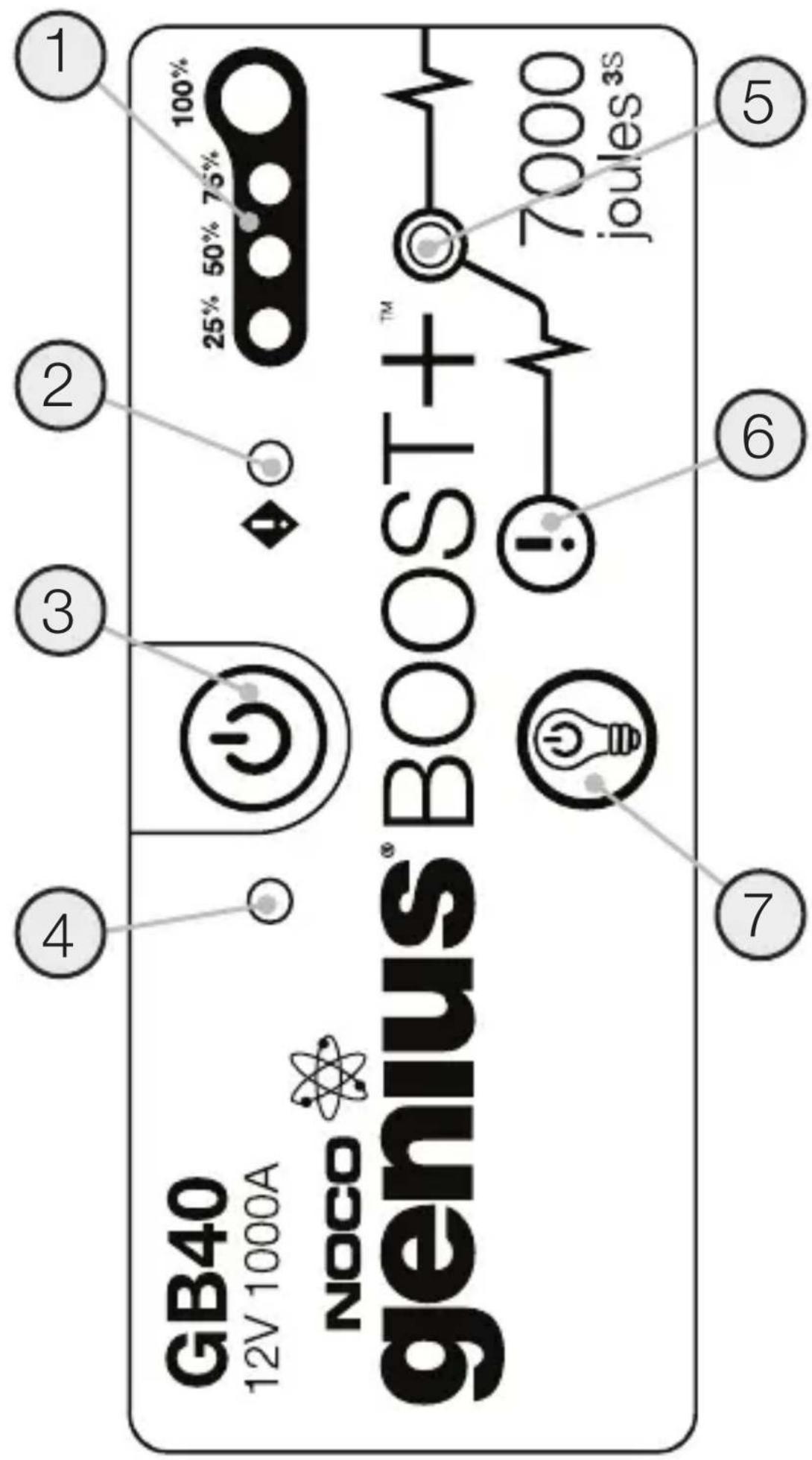
1. Internal Battery Level
Indicates the charge level of the internal battery.
2. Error LED
Illuminates Red if reverse polarity is detected, or blinks "On" and "Off" when the internal battery temperature is too high.
Push to turn unit "On" & "Off".
4. Power LED
Illuminates White when unit is "On".
5. Boost LED
Illuminates White when Boost is active. If the unit is connected properly to a battery, the GB40 will automatically detect a battery and go into Boost mode (LED flashes White when Manual Override feature is active).
To enable, push and hold for three (3) seconds.
WARNING: Disables safety protection and manually forces Boost “On”. Only for use when a battery is too low to be detected.
Toggles the ultra-bright LED light through 7 light modes: 100 % > 50 % > 10 % > SOS > Blink > Strobe > Off
When Recharging the GB40.
| LED Explanation |
25%Red LED25% 50% 75% 100% | The 25% Charge LED will slowly pulse “On” and “Off”, when the battery is less than 25% charged. When the battery is 25% charged, the Red Charge LED will be solid. |
50%Red LED25% 50% 75% 100%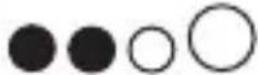 | The 50% Charge LED will slowly pulse “On” and “Off”, when the battery is less than 50% charged. When the battery is 50% charged, the Red Charge LED will be solid. |
75%Yellow LED25% 50% 75% 100%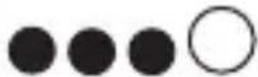 | The 75% Charge LED will slowly pulse “On” and “Off”, when the battery is less than 75% charged. When the battery is 75% charged, the Yellow Charge LED will be solid. |
100%Green LED25% 50% 75% 100% | The 100% Charge LED will slowly pulse “On” and “Off”, when the battery is less than 100% charged. When the battery is fully charged, the Green LED will be solid, and the 25%, 50% and 75% Charge LEDs will turn “Off”. |
Understanding Error Conditions.
The GB40 shall display an Error Condition when a reverse polarity condition is present, a battery below two (2) volts, or the internal battery overheating. When one of these Error Conditions are present, the following will happen:
| Error Reason/Solution |
| Error LEDSolid Red | Reverse polarity/Reverse the battery connections. |
| Error LED Blinking Red w/Cables Connected Properly | The internal battery is too hot/ Allow the unit to cool. Bring the unit into cooler environment. |
| Boost Light Does Not Come On w/Cables Connected Properly | Connected battery is below 2-volts/ Remove all loads, and try again, or use Manual Override Mode. |

Charging the GB40.
Connect the GB40 using the included USB Charge Cable to the USB IN port and the USB car charger. It can also be recharged from any USB powered port, like an AC adapter, car charger, laptop and more. The USB IN port is rated at 2.1 Amps to ensure safe and efficient charging of the internal lithium battery. Due to FCC regulations, we recommend not to charge and discharge the unit at the same time.
Charging Times.
The time to recharge a GB40 will differ based on the discharge level and the power source used. Actual results may vary due to battery conditions.
| USB Charger Rating |
| .5A | 1A | 2A |
| Time | 12hr | 6hr | 3hr |
Charging Your USB Devices.
You can recharge virtually any USB device, like a smartphone. Connect the included USB Charge Cable to the USB OUT port and connect to your USB device.
The number of times you can recharge a USB device will vary between devices. For recharge times, contact your device manufacturer.
LED Flashlight.
The GB40 has an integrated ultra-bright LED flashlight. It has seven (7) light modes that effect its performance and longevity: 100%, 50%, 10%, SOS, Blink, Strobe, and Off.
To turn the flashlight “On” and “Off”, use the Power button with the light bulb icon. Press once to turn the flashlight “On” at 100% luminosity, again for 50% luminosity (within 3 seconds), again for 10% luminosity (within 3 seconds), again for SOS (within 3 seconds), again for Blink (within 3 seconds), again for Strobe (within 3 seconds) and again for “Off”. If a light mode is not selected within 3 seconds, it will remain “On” in the current light mode, and the next selection will turn the flashlight “Off”.
Depending on the mode selection, the GB40 will have various levels of output and runtime. Selecting a lower power level when using the GB40 for extended periods of time will prolong battery life.
Modes:
$$
100\% > 50\% > 10\% > \text{SOS} > \text{Blink} > \text{Strobe} > \text{Off}
$$
Energy Saving Auto Shut Off.
The GB40 has a built in energy saving feature that will automatically turn the unit off after seven (7) hours. To continue using, simply power on the unit again.
Technical Specifications.

| Internal Battery: | Lithium Ion |
| Peak Current Rating: | 1000A |
| joules3S: | 7000+ |
| Operating Temperature: | -30°C to +50°C |
| Charging Temperature: | 0°C to +40°C |
| Storage Temperature: | -20°C to +50°C (Avg Temp.) |
| Micro USB (Input): | 5V, 2.1A |
| USB (Output): | 5V, 2.1A |
| Housing Protection: | IP65 (w/Ports Closed) |
| Cooling: | Natural Convection |
| Dimensions (L x W x H): | 6.7 x 3.2 x 1.7 Inches |
| Weight: | 2.4 Pounds |
Français
NOCO genius® BOOST+
GB40
United States of America
United States of America
United States of America
United States of America
United States of America
Sobre GB40. O NOCO Genius® Boost™ GB40
住所:30339 Diamond Parkway, #102
Glenwillow, OH 44139
United States of America
Mailing Address: 30339 Diamond Parkway, #102
Glenwillow, OH 44139
United States of America
Postadress: 30339 Diamond Parkway, #102
Glenwillow, OH 44139
United States of America
United States of America
United States of America
6Two-day day to-day the money money. Sow of day to-day must money money will be done in GB40, 30 days. You'd not to-day. You'd not to-day. You'd not to-day. You'd not to-day. You'd not to-day. You'd not to-day. You'd not to-day. You'd not to-day. You'd not to-day. You'd not to-day. You'd not to-day. You'd not to-day. You'd not to-day. You'd not to-day. You'd not to-day. You'd not to-day. You'd not to-day. You'd but not to-day. You'd not to-day. You'd not to-day. You'd not to-day. You'd not to-day. You'd not to-day. You'd not to-day. You'd not to-day. You'd not to-day. You'd not to-day. You'd not to-day. You'd not to-day. You'd not to-day. You'd not to-day. You'd not to-day. You'd not to-day. You'd not to-day.
Three days: Monday's day (5) from Monday's day (15) from Monday's day (15) from Monday's day (15) from Monday's day (15) from Monday's day (15) from Monday's day (15) from Monday's day (15) from Monday's day (15) from Monday's day (15) from Monday's day (15) from Monday's day (15) from Monday's day (15) from Monday's day (15)
Three days: Tuesday's day (5) from Tuesday's day (15) from Tuesday's day (15) from Tuesday's day (15) from Tuesday's day (15) from Tuesday's day (15) from Tuesday's day (15) from Tuesday's day (15) from Tuesday's day (15)
Three days: Wednesday's day (5) from Wednesday's day (15) from Wednesday's day (15) from Wednesday's day (15) from Wednesday's day (15) from Wednesday's day (15) from Wednesday's day (15)
Three days: Thursday's day (5) from Thursday's day (15) from Thursday's day (15) from Thursday's day (15) from Thursday's day (15) from Thursday's day (15) from Thursday's day (15)
Three days: Friday's day (5) from Friday's day (15) from Friday's day (15) from Friday's day (15) from Friday's day (15) from Friday's day (15) from Friday's day (15)
Three days: Saturday's day (5) from Saturday's day (15) from Saturday's day (15) from Saturday's day (15) from Saturday's day (15) from Saturday's day (15)
Three days: Sunday's day (5) from Sunday's day (15) from Sunday's day (15) from Sunday's day (15) from Sunday's day (15)
Three days: Monday's day (5) from Monday's day (15) from Monday's day (15) from Monday's day (15) from Monday's day (15)
Three days: Tuesday's day (5) from Tuesday's day (15) from Tuesday's day (15) from Tuesday's day (15) from Tuesday's day (15)
Three days: Wednesday's day (5) from Wednesday's day (15) from Wednesday's day (15) from Wednesday's day (15)
Three days: Thursday's day (5) from Thursday's day (15) from Thursday's day (15)
Three days: Friday's day (5) from Friday's day (15) from Friday's day (15)
Three days: Saturday's day (5) from Saturday's day (15) from Saturday's day (15)
Three days: Sunday's day (5) from Sunday's day (15)
Three days: Monday's day (5) from Monday's day (15)
Three days: Tuesday's day (5) from Tuesday's day (15)
Three days: Wednesday's day (5) from Wednesday's day (15)
Three days: Thursday's day (5) from Thursday's day (15)
Three days: Friday's day (5) from Friday's day (15)
Three days: Saturday's day (5) from Saturday's day (15)
Three days: Sunday's day (5) from Sunday's day (15)
Three days: Monday's day (5) from Monday's day (15)
Three days: Tuesday's day (5) from Tuesday's day (15)
Three days: Wednesday's day (5) from Wednesday's day (15)
Three days: Thursday's day (5) from Thursday's day
(7): Monday's Day
(8): Tuesday's Day
(9): Wednesday's Day
(10): Thursday's Day
(11): Friday's Day
(12): Saturday's Day
(13): Friday's Day
(14): Thursday's Day
(15): Friday's Day
(16): Friday's Day
(17): Friday's Day
(18): Friday's Day
(19): Friday's Day
(20): Friday's Day
(21): Friday's Day
(22): Friday's Day
(23): Friday's Day
(24): Friday's Day
(25): Friday's Day
(26): Friday's Day
(27): Friday's Day
(28): Friday's Day
(29): Friday's Day
(30): Friday's Day
(31): Friday's Day
(32): Friday's Day
(33): Friday's Day
(34): Friday's Day
(35): Friday's Day
(36): Friday's Day
(37): Friday's Day
(38): Friday's Day
(39): Friday's Day
(40): Friday's Day
(41): Friday's Day
(42): Friday's Day
(43): Friday's Day
(44): Friday's Day
(45): Friday's Day
(46): Friday's Day
(47): Friday's Day
(48): Friday's Day
(49): Friday's Day
(50): Friday's Day
(51): Friday's Day
(52): Friday's Day
(53): Friday's Day
(54): Friday's Day
(55): Friday's Day
(56): Friday's Day
(57): Friday's Day
(58): Friday's Day
(59): Friday's Day
(60): Friday's Day
(61): Friday's Day
(62): Friday's Day
(63): Friday's Day
(64): Friday's Day
(65): Friday's Day
(66): Friday's Day
(67): Friday's Day
(68): Friday's Day
(69): Friday's Day
(70): Friday's Day
(71): Friday's Day
(72): Friday's Day
(73): Friday's Day
(74): Friday's Day
(75): Friday's Day
(76): Friday's Day
(77): Friday's Day
(78): Friday's Day
(79): Friday's Day
(80): Friday's Day
(81): Friday's Day
(82): Friday's Day
(83): Friday's Day
(84): Friday's Day
(85): Friday's Day
(86): Friday's Day
(87): Friday's Day
(88): Friday's Day
(89): Friday's Day
(90): Friday's Day
(91): Friday's Day
(92): Friday's Day
(93): Friday's Day
(94): Friday's Day
(95): Friday's Day
(96): Friday's Day
(97): Friday's Day
(98): Friday's Day
(99): Friday's Day
United States of America
1.800.456.6626
support@no.co
30339 Diamond Parkway, #102
Glenwillow, OH 44139
United States of America
no.co
GB40.03222015A