BC18AC2301IKF - Air Conditioning Be Cool - Free user manual and instructions
Find the device manual for free BC18AC2301IKF Be Cool in PDF.


User questions about BC18AC2301IKF Be Cool
0 question about this device. Answer the ones you know or ask your own.
Ask a new question about this device
Download the instructions for your Air Conditioning in PDF format for free! Find your manual BC18AC2301IKF - Be Cool and take your electronic device back in hand. On this page are published all the documents necessary for the use of your device. BC18AC2301IKF by Be Cool.
USER MANUAL BC18AC2301IKF Be Cool
natural_image
White and black electric air purifier with grid screen (no visible text or symbols)HERZLICHEN GLÜCKWUNSCH!
text_image
QR code image containing encoded data, no visible human-readable textnatural_image
Illustration of a container with liquid inside a container, placed on a surface (no text or symbols)FERNBEDIENUNG
natural_image
Diagram showing three stages of a device: battery pack, internal grid, and porous material with a magnified view of the final component (no text or symbols)natural_image
White and black electric air purifier with grid screen and ventilation slots (no visible text or symbols)FÉLICITATIONS !
MERCI D'AVOIR CHOISI UN PRODUIT BE COOL.
BE COOL

text_image
QR code image containing encoded data, no visible human-readable textVEUILLEZ LIRE ATTENTIVEMENT LE MODE D'EMPLOI AVANT DE COMMENCER L'INSTALLATION, L'UTILISATION OU L'ENTRETIEN. PROTÉGEZ-VOUS ET PROTÉGEZ LES AUTRES EN RESPECTANT LES CONSIGNES DE SÉCURITÉ. LE NON-RESPECT DES INSTRUCTIONS POURRAIT ENTRAÎNER DES DOMMAGES CORPORELS ET/OU MATÉRIELS ET/OU LA PERTE DU DROIT À LA GARANTIE !
INFORMATIONS IMPORTANTES SUR LA SÉCURITÉ, L'EMPLACEMENT ET LE RACCORDEMENT ÉLECTRIQUE

text_image
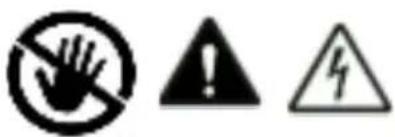
Warning symbols including a hand holding an exclamation mark, an exclamation sign, and a lightning bolt symboltext_image
BE COOL ● Turbo ● High ● Mosquito ● Mid ● Cool ● Arisan ● Humidity ● Low ● Swing ● Power COOL SPECIAL HUMIDY SPEED SWING ON/OFF MIK-18EXnatural_image
Illustration of a container being poured into a rack, with no visible text or symbolsTÉLÉCOMMANDE
PRÉPARER LA TÉLÉCOMMANDE - INSÉRER OU REMPLACER LES PILES
natural_image
Technical line drawing of a cylindrical device with internal compartments and mounting holes (no text or symbols)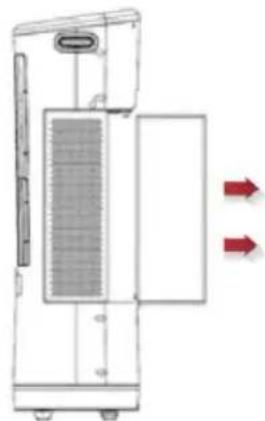
natural_image
Diagram of a device with a grating and two red arrows indicating direction (no text or symbols)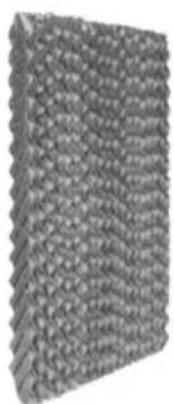
natural_image
Close-up of a textured, woven fabric or mesh material with no visible text or symbols
natural_image
Simple black-and-white icon of a magnifying glass with a curved line inside, no text or symbols present.natural_image
White and black electric air purifier with grid screen and ventilation slots (no visible text or symbols)CONGRATULAZIONI!
GRAZIE PER AVER SCELTO UN PRODOTTO BE COOL.
BE COOL


text_image
QR code image containing encoded data, no visible human-readable textLEGGERE ATTENTAMENTE LE ISTRUZIONI PER L'USO PRIMA DI INIZIARE L'INSTALLAZIONE, IL FUNZIONAMENTO O LA MANUTENZIONE. PROTEGGERE SE STESSI E GLI ALTRI SEGUENDO LE ISTRUZIONI DI SICUREZZA. LA MANCATA OSSERVANZA DELLE ISTRUZIONI PUÒ CAUSARE LESIONI PERSONALI E/O DANNI MATERIALI E/O LA PERDITA DELLA COPERTURA DELLA GARANZIA!
IMPORTANTI INFORMAZIONI SULLA SICUREZZA, L'UBICAZIONE E IL COLLEGAMENTO ELETTRICO

text_image
Warning symbols including a hand crossed out, an exclamation mark, and a lightning bolt symbolnatural_image
Technical line drawing of a vertical cylindrical device with internal grating and mounting base (no text or symbols)Filtro a nido d'ape
text_image
BE COOL ● Turbo ● High ● Mosquito ● Mid ● Coal ● Anion ● Humidity ● Low ● Swing ● Power COOL SPECIAL HUMIDITY SPEED SWING ON/OFF MIK-18EXnatural_image
Illustration of a water droplet being poured into a container (no text or symbols)CONTROLLO REMOTO
PREPARARE IL TELECOMANDO - INSERIRE O SOSTITUIRE LE BATTERIE
natural_image
Diagram showing three stages of a device: battery pack, grid panel, and textured surface with a magnified view of the final component (no text or symbols)(1) PULIZIA DEL FILTRO ANTIPOLVERE:
natural_image
White and black electric air purifier with grid screen and ventilation slots (no visible text or symbols)GEFELICITEERD!
BEDANKT VOOR HET KIEZEN VAN EEN PRODUCT VAN BE COOL.
BE COOL

text_image
QR code image containing encoded data, no visible human-readable textLEES DE BEDIENINGSINSTRUCTIES ZORGVULDIG DOOR VOORDAT U BEGINT MET DE INSTALLATIE, HET GEBRUIK OF HET ONDERHOUD. BESCHERM UZELF EN ANDEREN DOOR DE VEILIGHEIDSINSTRUCTIES OP TE VOLGEN. HET NIET OPVOLGEN VAN DE INSTRUCTIES KAN LEIDEN TOT PERSOONLIJK LETSEL EN/OF MATERIËLE SCHADE EN/OF VERLIES VAN DE GARANTIEDEKKING!
BELANGRIJKE INFORMATIE OVER VEILIGHEID, LOCATIE EN ELEKTRISCHE AANSLUITING


BESCHRIJVING VAN HET APPARAAT
natural_image
Illustration of a kitchen sink with a blue pot and bag, no text or symbols presentAFSTANDSBEDIENING
AFSTANDSBEDIENING VOORBEREIDEN - BATTERIJEN PLAATSEN OF VERVANGEN
flowchart
graph LR
    A["Front Panel"] --> B["Side Panel"]
    B --> C["Internal Component"]
    C --> D["Bottom Panel with Internal Components"]
BE COOL
SCHAKEL HET APPARAAT IN
natural_image
Cross-sectional diagram of a cylindrical device with internal compartments and mounting points (no text or symbols)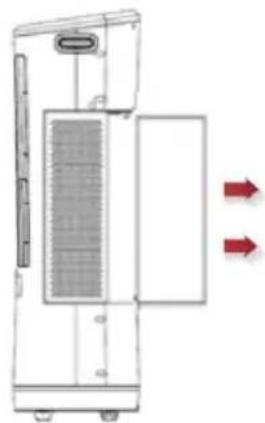
natural_image
Diagram of a device with internal grid structure and two red arrows indicating flow or movement (no text or symbols)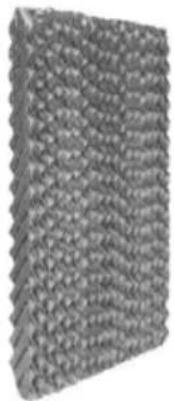
natural_image
Close-up of a textured, woven material with no visible text or symbols
natural_image
Simple black-and-white icon of a magnifying glass with a pointing hand inside, no text or symbols present.(1) STOFFILTER REINIGEN:
natural_image
White and black industrial air purifier with grid-patterned ventilation grille (no visible text or symbols)¡ENHORABUENA!
GRACIAS POR ELEGIR UN PRODUCTO DE BE COOL.
BE COOL


text_image
QR code image containing encoded data, no visible human-readable textnatural_image
Technical line drawing of a vertical cylindrical device with internal grating and mounting base (no text or symbols)Filtro de panal
text_image
BE COOL ● Turbo ● High ● Mosquito ● Mid ● Coal ● Anion ● Humidity ● Low ● Swing ● Power COOL SPECIAL HUMIDITY SPEED SWING ON/OFF MIK-18EXnatural_image
Illustration of a container with liquid being poured into a container (no text or symbols)MANDO A DISTANCIA
PREPARE EL MANDO A DISTANCIA - COLOQUE O CAMBIE LAS PILAS
flowchart
graph LR
    A["Top Left Panel"] --> B["Side Panel"]
    B --> C["Side Panel with Pin 1"]
    C --> D["Side Panel with Pin 2"]
    D --> E["Bottom Right Panel"]
    E --> F["Bottom Left Panel with Pin 3"]
    F --> G["Bottom Right Panel with Pin 4"]
natural_image
Technical line drawing of a cylindrical device with internal compartments and mounting points (no text or symbols)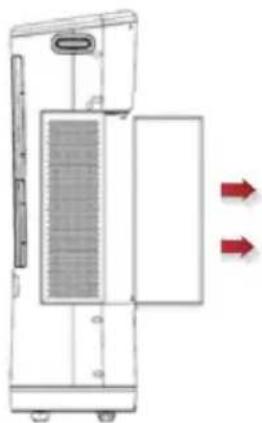
natural_image
Diagram of a device with a grid-patterned panel and two red arrows indicating flow or movement (no text or symbols)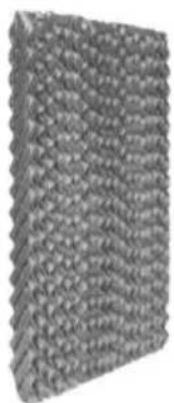
natural_image
Close-up of a textured, woven material with no visible text or symbols
natural_image
Abstract black-and-white graphic of a magnifying glass with a curved line inside, no text or symbols present.(1) LIMPIEZA DEL FILTRO DE POLVO:
natural_image
White and black electric air purifier with grid screen and control panel (no visible text or symbols)GRATULUJEME!
DĚKUJEME, ŽE JSTE SI VYBRALI PRODUKT OD SPOLEČNOSTI BE COOL.
BE COOL

text_image
QR code image containing encoded data, no visible human-readable textPŘED ZAHÁJENÍM INSTALACE, PROVOZU NEBO ÚDRŽBY SI POZORNĚ PŘEČTĚTE NÁVOD K OBSLUZE. DODRŽOVÁNÍM BEZPEČNOSTNÍCH POKYNŮ CHRAŇTE SEBE I OSTATNÍ. NEDODRŽENÍ POKYNŮ MŮŽE MÍT ZA NÁSLEDEK ZRANĚNÍ OSOB A/NEBO POŠKOZENÍ MAJETKU A/NEBO ZTRÁTU ZÁRUČNÍHO KRYTÍ!
DŮLEŽITÉ INFORMACE O BEZPEČNOSTI, UMÍSTĚNÍ A ELEKTRICKÉM PŘIPOJENÍ
text_image
Warning symbols including a hand holding an exclamation mark, a warning triangle with an exclamation mark, and a lightning bolt symbol.natural_image
Illustration of a container with liquid inside a container, no text or symbols presentDÁLKOVÉ OVLÁDÁNÍ
PŘÍPRAVA DÁLKOVÉHO OVLÁDÁNÍ - VLOŽENÍ NEBO VÝMĚNA BATERIÍ
flowchart
graph LR
    A["Top Panel"] --> B["Side Panel"]
    B --> C["Internal Component"]
    C --> D["Bottom Panel with Internal Components"]
natural_image
White and black electric air purifier with grid screen and control panel (no visible text or symbols)GRATULUJEME!
ĐAKUJEME, ŽE STE SI VYBRALI PRODUKT OD SPOLOČNOSTI BE COOL.
BE COOL


text_image
QR code image containing encoded data, no visible human-readable textPRED ZAČATÍM INŠTALÁCIE, PREVÁDZKY ALEBO ÚDRŽBY SI POZORNE PREČÍTAJTE NÁVOD NA OBSLUHU. DODRŽIAVANÍM BEZPEČNOSTNÝCH POKYNOV CHRÁNTE SEBA AJ OSTATNÝCH.
NEDODRŽANIE POKYNOV MÔŽE MAŤ ZA NÁSLEDOK ZRANENIE OSÔB A/ALEBO POŠKODENIE MAJETKU A/ALEBO STRATU ZÁRUČNÉHO KRYTIA!
DÔLEŽITÉ INFORMÁCIE O
BEZPEČNOSTI, UMIESTNENÍ A ELEKTRICKOM PRIPOJENÍ


natural_image
Illustration of a container with liquid being poured into a container (no text or symbols)DIAL'KOVÉ OVLÁDANIE
PRÍPRAVA DIAL'KOVÉHO OVLÁDANIA - VLOŽENIE ALEBO VÝMENA BATÉRIÍ
natural_image
White and black electric air purifier with grid screen and control panel (no visible text or symbols)FELICITĂRI!
VĂ MULȚUMIM CĂ AȚI ALES UN PRODUS BE COOL.
BE COOL


text_image
QR code image containing encoded data, no visible human-readable textVĂ RUGĂM SĂ CITIȚI CU ATENȚIE INSTRUCTIUNILE DE UTILIZARE ÎNAINTE DE A ÎNCEPE INSTALAREA, FUNCTIONAREA SAU ÎNTREȚINEREA. PROTEJAȚI-VĂ PE DUMNEAVOASTRĂ ȘI PE CEILALȚI RESPECTÂND INSTRUCTIUNILE DE SIGURANȚĂ. NERESPECTAREA INSTRUCTIUNILOR AR PUTEA DUCE LA VĂTĂMĂRI CORPORALE ȘI/SAU DAUNE MATERIALE ȘI/SAU PIERDEREA ACOPERIRII GARANȚIEI!
INFORMATII IMPORTANTE PRIVIND SIGURANTA, AMPLASAREA ŞI CONEXIUNEA ELECTRICĂ


natural_image
Illustration of a bag pouring liquid into a container, with no visible text or symbolsCONTROL DE LA DISTANTĂ
natural_image
White and black electric air purifier with grid screen and ventilation slots (no visible text or symbols)GRATULACJE!
DZIEKUJEMY ZA WYBRANIE PRODUKTU OD BE COOL.
BE COOL


text_image
QR code image containing encoded data, no visible human-readable textPRZED ROZPOCZEĘCIEM INSTALACJI, OBSŁUGI LUB KONSERWACJI NALEŻY UWAŻNIE PRZECZYTAĆ INSTRUKCJĘ OBSŁUGI. NALEŻY CHRONIĆ SIEBIE I INNYCH POPRZEZ PRZESTRZEGANIE INSTRUKCJI BEZPIECZEŃSTWA. NIEPRZESTRZEGANIE INSTRUKCJI MOŻE SKUTKOWAĆ OBRAŻENIAMI CIAŁA I/LUB USZKODZENIEM MIENIA I/LUB UTRATĄ GWARANCJI!
WAŻNE INFORMACJE
DOTYCZĄCE
BEZPIECZEŃSTWA,
LOKALIZACJI I POŁĄCZEŃ
ELEKTRYCZNYCH
text_image
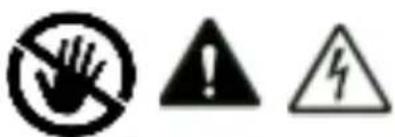
Warning symbols including a hand crossed out, an exclamation mark, and a lightning bolt symbolBE COOL
text_image
BE COOL ● Turbo ● High ● Mosquito ● Mid ● Cool ● Arisan ● Humidity ● Low ● Swing ● Power COOL SPECIAL HUMIDITY SPEED SWING ON/OFF MIK-18EXŚwiatło robocze
BE COOL
text_image
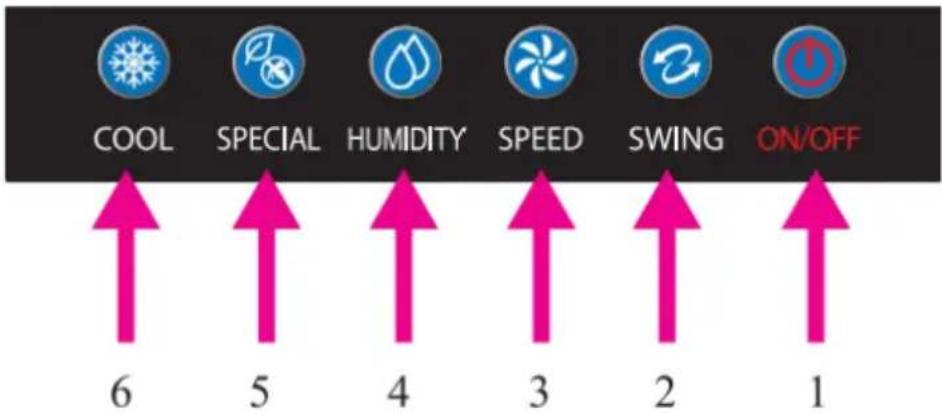
COOL SPECIAL HUMIDITY SPEED SWING ON/OFF 6 5 4 3 2 1- ZASILANIE (WŁ./WYŁ.)
2) SWING
natural_image
Illustration of a bucket pouring liquid into a container, with no visible text or symbolsZDALNE STEROWANIE
PRZYGOTOWAĆ PILOTA ZDALNEGO STEROWANIA - WŁOŻYĆ LUB WYMIENIĆ BATERIE
natural_image
Diagram showing three stages of a device: battery pack, grid panel, and porous material with a magnified view of the final component (no text or symbols)(1) CZYSZCZENIE FILTRA PRZECIWPYŁOWEGO:
natural_image
White and black electric air purifier with grid screen and ventilation slots (no visible text or symbols)ČESTITAMO!
HVALA, KER STE IZBRALI IZDELEK BE COOL.
BE COOL


Aktualna navodila za uporabo in drugi jeziki
text_image
QR code image containing encoded data, no visible human-readable textPRED ZAČETKOM NAMESTITVE, DELOVANJA ALI VZDRŽEVANJA NATANČNO PREBERITE NAVODILA ZA UPORABO. Z UPOŠTEVANJEM VARNOSTNIH NAVODIL ZAŠČITITE SEBE IN DRUGE. NEUPOŠTEVANJE NAVODIL LAHKO POVZROČI TELESNE POŠKODBE IN/ALI MATERIALNO ŠKODO IN/ALI IZGUBO GARANCIJSKEGA KRITJA!
POMEMBNE VARNOSTNE INFORMACIJE, INFORMACIJE O LOKACIJI IN ELEKTRIČNEM PRIKLJUČKU
text_image
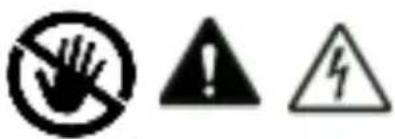
Warning symbols including a hand holding a circle, an exclamation mark, and a lightning bolt symboltext_image
BE COOL Delovna luč ● Turbo ● High ● Mid ● Mosquito ● Coal ● Anion ● Humidity ● Low ● Swing ● Power COOL SPECIAL HUMIDITY SPEED SWING ON/OFF MIK-18EXBE COOL
text_image
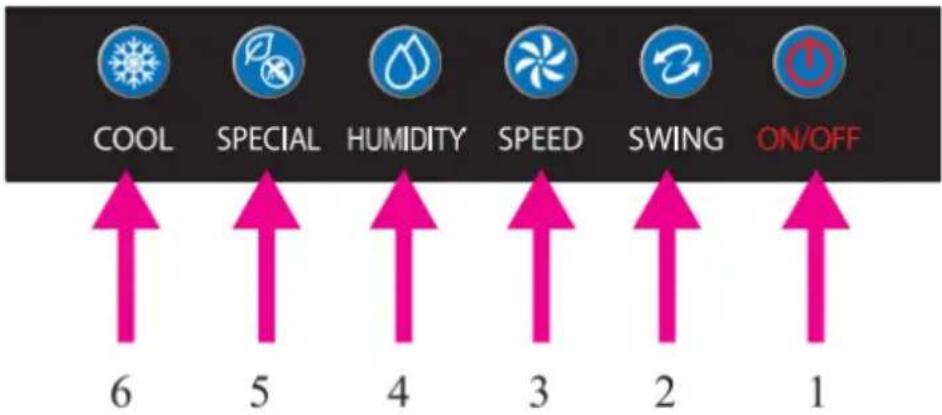
COOL SPECIAL HUMIDITY SPEED SWING ON/OFF 6 5 4 3 2 1- NAPAJANJE (VKLOP/IZKLOP)
- SWING
- Hitrost (nizka - srednja - visoka - turbo)
natural_image
Illustration of a container with liquid being poured into a container (no text or symbols visible)DALJINSKI NADZOR
PRIPRAVITE DALJINSKI UPRAVLJALNIK - VSTAVITE ALI ZAMENJAJTE BATERIJE
Sledite spodnjim navodilom:
Začetno delovanje:
natural_image
White and black electric air purifier with grid screen and control panel (no visible text or symbols)UVJETI ČESTITAMO!
PUNO ZAHVALJUJUĆI, DA ONA SEBE ZA A PROIZVOD IZ BE COOL.
BE COOL


Aktualni korisnički priručnici i drugi jezici
Preuzmite aktualne upute za uporabu na raznim jezicima putem poveznice www.becool.at/downloads ili skenirajte prikazani QR kod. Slijedite upute na web stranici.

text_image
QR code image containing encoded data, no visible human-readable textMOLIMO VAS, PAŽLJIVO PROČITAJTE UPUTE ZA KORISNIKE PRIJE UGRADNJE, RADA ILI ODRŽAVANJA. ZAŠTITITE SEBE I DRUGE PRIDRŽAVANJEM SIGURNOSNIH UPUTA. NEPRIDRŽAVANJE UPUTA MOŽE REZULTIRATI OSOBNIM I/ILI ŠTETAMA NA IMOVINI I/ILI PONIŠTENJEM JAMSTVA!
VAŽNA INFORMACIJA DO SIGURNOST, MJESTO I ZA ELEKTRIČNI PRIKLJUČAK

text_image
Warning symbols including a hand crossed out, an exclamation mark, and a lightning bolt symboltext_image
BE COOL Radno svjetlo ● Turbo ● High ● Mosquito ● Mid ● Cool ● Anion ● Humidity ● Low ● Swing ● Power COOL SPECIAL HUMDITY SPEED SWING ON/OFF MIK-18EXBE COOL
text_image
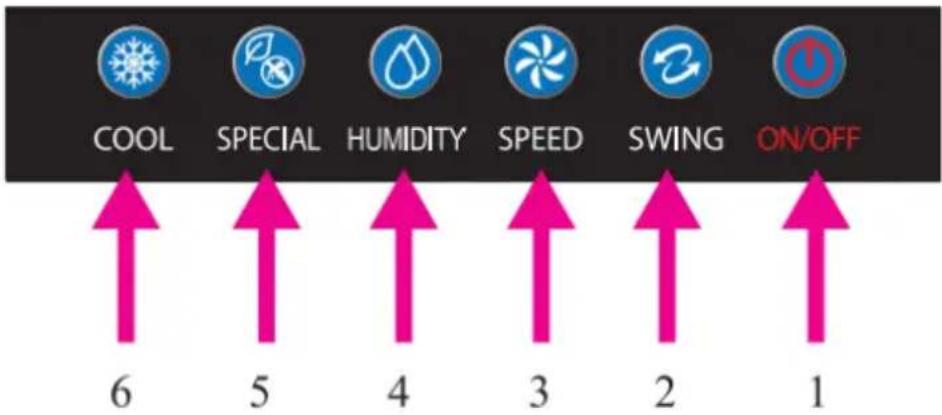
COOL SPECIAL HUMIDITY SPEED SWING ON/OFF 6 5 4 3 2 1-
NAPAJANJE (ON/OFF)
-
LJULJAČKA
-
BRZINA (niska - srednja - velika - turbo )
-
VLAŽNOST
-
SPECIJAL (repelent protiv komaraca / ioni)
-
OHLADITI
MONTAŽA
PRIJE PRVE UPOTREBE
Raspakirajte uređaj
- Otvorite kutiju i uklonite uređaj.
natural_image
Illustration of a container pouring liquid into a container with a handle, next to a mesh structure (no text or symbols)DALJINSKI UPRAVLJAČ
PRIPREMITE DALJINSKI UPRAVLJAČ - UMETNITE ILI ZAMIJENITE BATERIJE
Air cooler BC18AC2301IKF
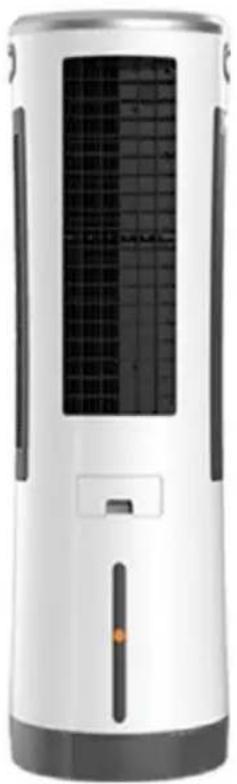
natural_image
White and black electric air purifier with grid screen and control panel (no visible text or symbols)CONGRATULATIONS!
THANK YOU FOR CHOOSING A PRODUCT FROM BE COOL.
BE COOL


Current operating instructions and other languages
Download the latest operating instructions in various languages via the link www.becool.at/downloads or scan the QR code shown. Follow the instructions on the website.

text_image
QR code image containing encoded data, no visible human-readable textPLEASE READ THE OPERATING INSTRUCTIONS CAREFULLY BEFORE STARTING INSTALLATION, OPERATION OR MAINTENANCE. PROTECT YOURSELF AND OTHERS BY FOLLOWING THE SAFETY INSTRUCTIONS. FAILURE TO FOLLOW INSTRUCTIONS COULD RESULT IN PERSONAL INJURY AND/OR PROPERTY DAMAGE AND/OR LOSS OF WARRANTY COVERAGE!
IMPORTANT SAFETY, LOCATION AND ELECTRICAL CONNECTION INFORMATION


- This appliance is intended solely for cooling domestic living spaces and must not be used for any other
BE COOL
purpose.
-
The unit is not suitable for continuous or precision operation and should not be used for cooling electrical systems (e.g.: in server rooms).
-
Remove the packaging and make sure that the unit is not damaged. If in doubt, do not use the unit and contact the service centre or your dealer.
-
If the unit has a defect, switch it off and contact your dealer or the customer hotline.
-
If the power supply cable is damaged, it must be replaced by the manufacturer or an authorised service centre to avoid all possible risks.
-
Always and only contact customer service centres authorised by the manufacturer for any repairs. You can find the customer service centres online at www.becool.at.
-
Before connecting the appliance to the mains, check that the type of current and mains voltage correspond to the specifications on the appliance type plate.
-
The electrical socket in which you connect the unit must not be defective or loose and must be suitable for the required current load and, above all, reliably earthed. If in doubt, have your electrical installation checked by a qualified electrician.
-
Avoid using an extension cord as it could overheat and cause a fire.
-
It is forbidden to adapt or modify the characteristics of this appliance in any way and use only spare parts and accessories recommended by the manufacturer (failure to do so will invalidate the guarantee and warranty).
-
Children must not play with the appliance.
-
Do not let children play with the packaging - THERE IS
BE COOL
A DANGER OF CHICKENING IF SMALL PARTS ARE SPILLED!
-
Children under the age of 8 and persons with reduced physical, mental, sensory or spiritual capabilities or lack of experience and knowledge should not use this appliance unless they have been given supervision or instruction concerning use of the appliance in a safe way and understand the hazards involved.
-
Do not operate the unit unattended. If you leave the room, always switch off the unit.
-
Do not twist or bend the mains cable.
-
Do not use the appliance with wet hands.
-
Do not use the unit outdoors.
-
Never cover the unit.
-
Never operate the unit in rooms where gas, oil or sulphur are present.
-
Do not use the unit near water or high humidity, e.g. in damp basements, next to swimming pools, bathtubs or showers. Make sure that no water enters the unit.
-
Do not place the unit near heat sources (e.g.: next to heating systems) and avoid direct sunlight.
-
Keep a minimum distance of at least 50 cm from flammable substances (e.g. alcohol) or pressurised containers (e.g. spray containers).
-
Do not place heavy or hot objects on the appliance.
-
Place the unit on a stable and level surface.
-
Never insert fingers, pens or other objects into the unit and make sure that the air inlet and outlet are never blocked.
-
Change the water regularly.
-
Always fill the water tank above the minimum and never above the maximum.
BE COOL
- Do not move the appliance quickly when there is water in the water tank to prevent the water from leaking or splashing.
- Do not use the unit in "COOL" mode for a long time in an enclosed area without ventilation to avoid high humidity.
- The cooling batteries are not toys - keep children and animals away from them.
- Never try to open the cooling batteries. The liquid inside can be harmful to your health.
- Unplug the appliance and empty the water tank when not in use.
- Always switch off the appliance before unplugging it from the mains.
- Do not pull on the mains cable to disconnect the appliance from the mains power. Always pull on the plug to unplug the mains cable.
- Do not touch the plug with wet hands to avoid electric shock. Store the appliance vertically in a safe, dry place out of reach of children when not in use and do not cover the appliance with plastic packaging.
- Keep the unit in good condition by maintaining and cleaning the unit. If you have any questions about maintenance, you can contact the customer hotline/service centre authorised by the manufacturer.
BE COOL
Recycling, disposal, declaration of conformity
 | RECYCLINGThe packaging materials can be recycled. Therefore, it is recommended to dispose of them in sorted waste. |
 | DISPOSALThe symbol "crossed-out dustbin" requires the separate disposal of waste electrical and electronic equipment (WEEE). Electrical and electronic equipment may contain hazardous and environmentally dangerous substances. Therefore, do not dispose of this in unsorted residual waste, but at a designated collection point for waste electrical and electronic equipment. By doing so, you will help to protect resources and the environment. For more information, please contact your dealer or local authorities. Directive 2012/19/EU |
 | BATTERY DISPOSALIn accordance with Legislative Decree 188 of 20 November 2008 transposing Directive 2006/66/EC on batteries, accumulators and related waste, the crossed-out wheeled bin symbol on the battery indicates that it is prohibited to dispose of waste batteries in household waste.Batteries and accumulators contain highly polluting substances. The user is obliged to dispose of used batteries at the collection points in the municipality or in the appropriate containers. The service is free of charge. In this way, the legal requirements are met and the environment is protected.You will find these signs on batteries:Li = Battery contains lithiumAl = Battery contains alkaliMn = battery contains manganeseCR 2025 (Li); AA (Al, Mn); AAA (Al, Mn) |
 | DECLARATION OF CONFORMITYWe hereby confirm that this article complies with the basic requirements, regulations and directives of the EU. You can view the detailed declaration of conformity at any time under the following link:https://www.schuss-home.at/downloads |
Errors and technical modifications excepted.
BE COOL
SCOPE OF DELIVERY
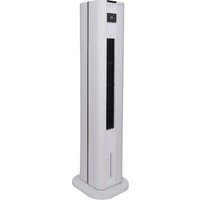
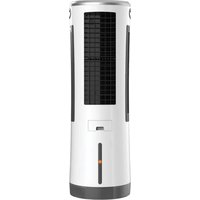
In the scope of delivery of the BE COOL cooler you will receive:
- 1x air cooler
- 1x remote control
• 1x instruction manual
DESCRIPTION OF THE DEVICE
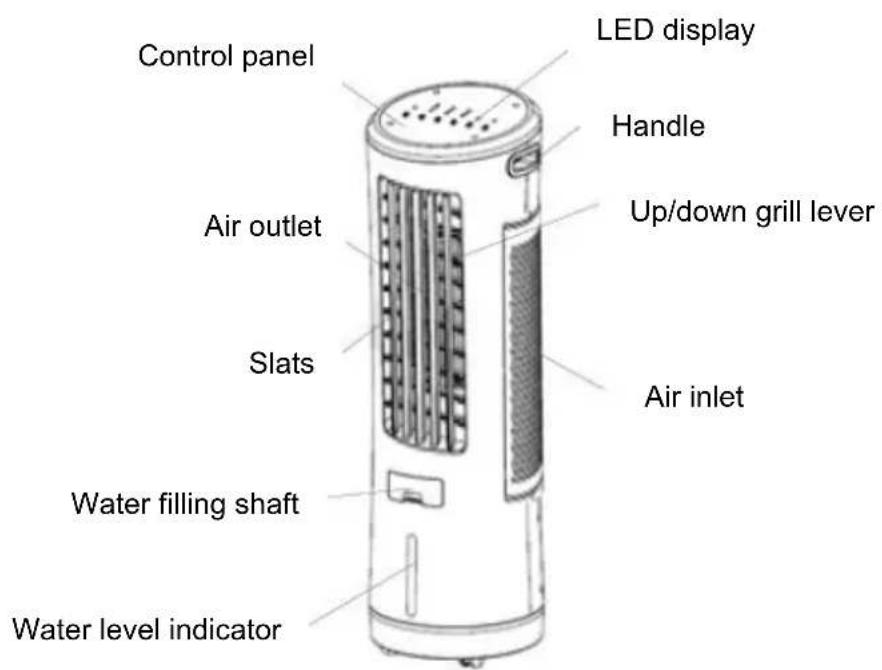
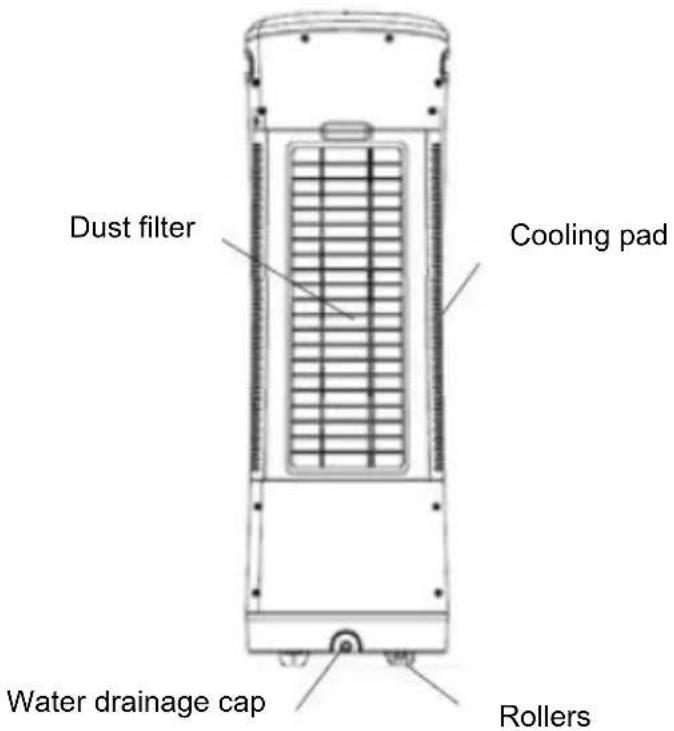
Designation of the individual parts
text_image
Control panel LED display Handle Air outlet Up/down grill lever Slats Air inlet Water filling shaft Water level indicatorBE COOL
text_image
Dust filter Cooling pad Water drainage cap RollersIndicators and controls
text_image
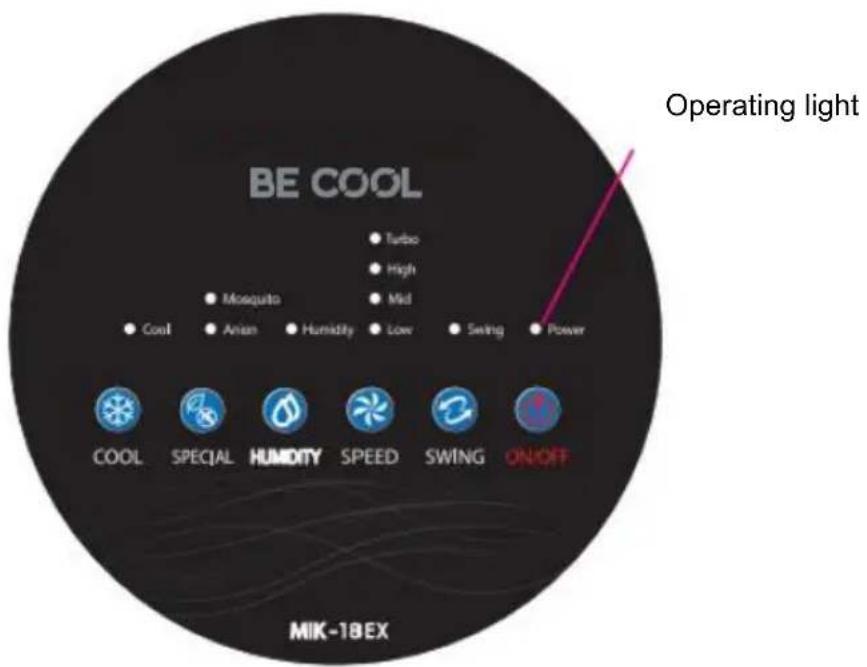
BE COOL ● Turbo ● High ● Mosquito ● Mid ● Cool ● Anion ● Humidity ● Low ● Swing ● Power COOL SPECIAL HUMIDITY SPEED SWING ON/OFF MIK-18EX Operating lightBE COOL
text_image
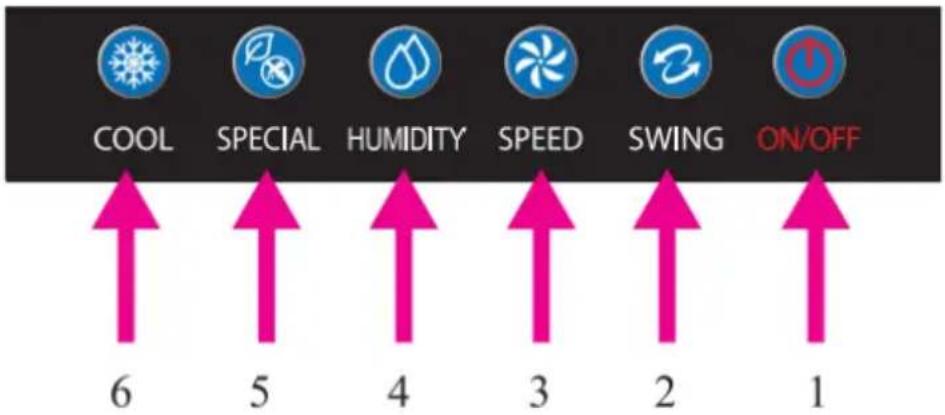
COOL SPECIAL HUMIDITY SPEED SWING ON/OFF 6 5 4 3 2 1-
POWER (ON/OFF)
-
SWING
-
SPEED (Low - Medium - High - Turbo)
4 HUMIDITY
-
SPECIAL (Mosquito repellent / Ions)
-
COOL
COMMISSIONING
BEFORE THE FIRST COMMISSIONING
Unpack the unit
- Open the box and remove the unit.
- Remove the packaging completely from the unit.
- Unwind the mains cable completely, taking care not to damage it.
INSTALLATION
Please note the following points during installation.
- Place the appliance on a level and firm surface so that
• the unit has a firm stand. - The distance to walls or other objects must be at least 50 cm.
- Before using the unit, make sure that both the air inlet and the air outlet are free of obstacles and not blocked.
- Connect the unit to an earthed socket.
BE COOL
FILLING THE WATER TANK
Please note the following when filling the water tank:
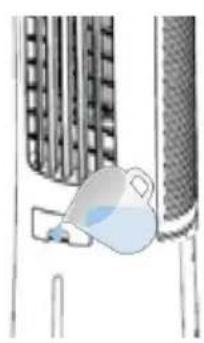
- Pull out the water tank on the front of the air cooler.
- Carefully fill the water tank with clean water using a watering can or similar container. Pay attention to the level on the front of the water tank:
MIN mark: The water tank must be filled above the MIN mark for the pump to work properly.
MAX mark: The water tank must not be filled above the MAX mark, as otherwise water could get inside the appliance and damage electronic parts.
- Make sure that the outside of the unit is not damp or wet and wipe it down if necessary.
- Then push the water tank back into the machine.
natural_image
Illustration of a hand holding a blue object near a textured wall (no text or symbols)REMOTE CONTROL
PREPARE REMOTE CONTROL - INSERT OR REPLACE BATTERIES
Please follow the instructions below:
Initial operation:
To operate the remote control for the first time, please pull out the plastic protector from the battery compartment on the back of the remote control.
Change battery:
- Pull out the battery holder on the back of the remote control and remove the old battery from the holder:

flowchart
graph LR
    A["Top Left Panel"] --> B["Side Panel"]
    B --> C["Side Panel"]
    C --> D["Bottom Right Panel"]
    D --> E["Bottom Left Panel"]
    style A fill:#f9f,stroke:#333
    style B fill:#ccf,stroke:#333
    style C fill:#cfc,stroke:#333
    style D fill:#fcc,stroke:#333
    style E fill:#cff,stroke:#333
- Now insert a new CR2025 battery, always paying attention to the polarity markings (+/-) on the battery and the battery holder.
- Then push the battery holder fully back into the remote control.
BE COOL
NOTE
The buttons on the remote control are marked as shown in the illustration below.
All functions of the remote control work identically to the manual operation on the unit.
CORRECT USE OF THE REMOTE CONTROL
Point the remote control directly at the front of the unit, making sure that there are no obstacles between the remote control and the unit.
| ON/OFF button | COOL | ||
| SPEED | SWING | ||
| SPECIAL (lions/ Repel insects Function) | HUMIDITY CONTROL |
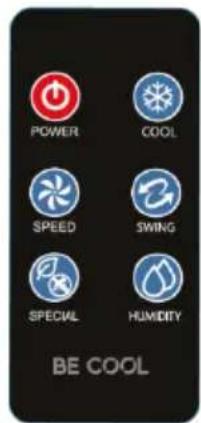
The control panel of the unit has the same buttons as on the remote control, so you can set all functions directly on the unit as well as using the remote control.
SWITCH ON THE UNIT
- Press the " " button to switch on the unit. The respective indicator lights up.
- As soon as you switch on the unit, it runs in "fan speed "1".
- If you want to put the unit into standby mode - press the" "button again.
BE COOL
NOTE
Never switch off the air cooler by pulling the plug directly from the mains. Always press the ON/OFF button to switch off and wait a few minutes before disconnecting the unit from the mains. This allows the unit to run through a cycle of checks to verify its functionality.
SWING
- Use the "SWING" key to activate the swing function of the unit the respective indicator lights up.
- Press the button again to deactivate the function.
- The horizontal alignment can be adjusted with the levers on the grille.
NOTE
This function distributes the discharged air to the left and right. This way you achieve a horizontal air distribution in the room.
SET SPEED
- Use the "SPEED" button to set the speed of the fan.
- The respective indicator on the display lights up:
1x press → low speed → "1" indicator lights up 2x press → medium speed → "2" indicator lights up Press 3x → high speed → "3" indicator lights up 4x press → Turbo speed → "4" indicator lights up
HUMIDITY CONTROL
- Press the " " button on the control panel or on the remote control to activate the humidity control.
- As soon as the relative humidity reaches over 85%, the indicator "lights up and the cooling mode is switched off while the fan is still operating.
- When the relative humidity is below 70%, the " " button lights up and automatically switches the cooling mode back on.
BE COOL
- Press the " " button again to switch off the humidity control.
(SPECIAL) ANION / INSECT REPELLENT FUNCTION
- Use the " 🔍 " key to start the "IONEN" function → the respective indicator lights up.
- The unit now starts to distribute ionised air into the room. The atoms and molecules created serve to eliminate odours and disinfect the air.
- Also use the " " key to start the "MOSQUITO" function → the respective indicator lights up.
- The device emits ultrasonic waves that repel mosquitoes and other flying insects.
- Press the button again to deactivate the function.
COOLING MODE
- Use the "COOL" button to start the COOL MODE function → the respective indicator lights up.
- The unit now starts pumping water out of the water tank to create cold air, which is then blown out of the unit. The colder the water in the tank, the colder the air that flows out of the unit.
NOTE
Make absolutely sure that the water level indicator is above the MIN.
If the speed is set to MID, HIGH or TURBO when Cooling mode is activated, the fan runs on LOW for 30 seconds and then continues operation at the previously set speed level.
BE COOL
TIPS FOR CORRECT APPLICATION
Find here some hints to achieve the optimal performance of the air cooler:
| Protect the room from direct sunlight with curtains, blinds or shutters. This will save you energy. | 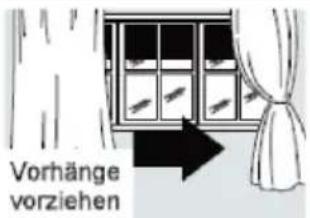 |
| Do not place any objects on the appliance and do not cover the air outlet. | |
| Make sure that no heat sources are operating in the room. | |
| Never use the appliance in very humid rooms (e.g. laundry rooms). | |
| Do not use the appliance outdoors. | |
MAINTENANCE AND CLEANING

ATTENTION!
Before cleaning, switch off the appliance, wait a few minutes and then unplug the appliance to disconnect it from the mains.
CLEAN DUST FILTER & COOLING PAD
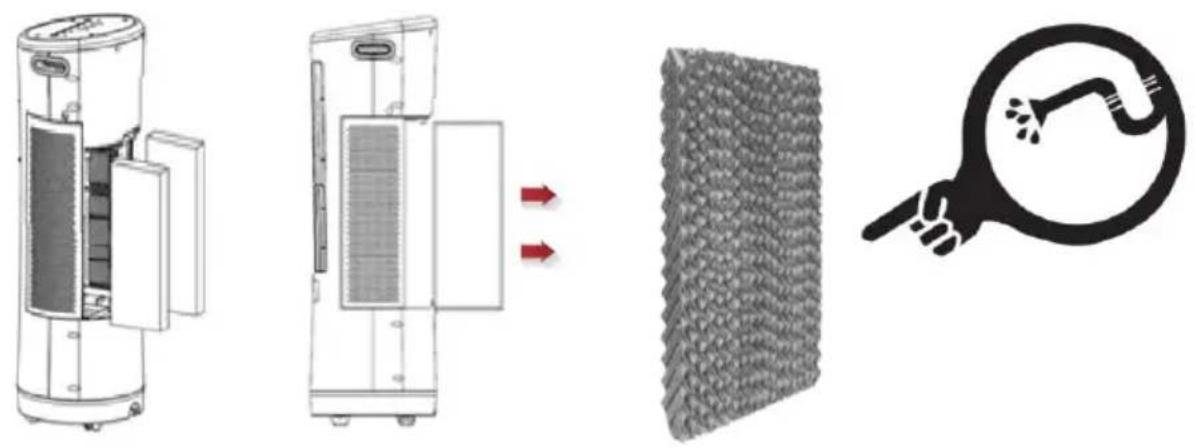
To ensure efficient operation of the air cooler, clean the dust filter and water filter after each week of operation.
- Unscrew the screws fixed to the ventilation grilles using a Phillips screwdriver to loosen it.
- Now remove the cover grilles, the dust filters and the water filters underneath.
BE COOL
(1) CLEANING DUST FILTER:
• To remove the dust accumulated in the filter, use a hoover.
- If the filter is very dirty, immerse it in warm water and rinse it several times - however, the water temperature should not exceed 40^ C .
(2) CLEANING COOLING PAD
- Clean the filters with lukewarm water and a soft brush.
• After washing, let the filters dry out well and then reinsert them.
CLEAN WATER TANK
It is recommended to clean the water tank every 2-3 weeks during use.
- Remove the silicone seal at the bottom of the water tank to drain the water and clean the water tank with a soft brush.
CLEANING OF THE HOUSING
- Clean the unit with a moderately damp cloth and then wipe it with a dry cloth.
- Never use petrol, alcohol or solvents to clean the appliance - these could be dangerous.
- Do not spray insecticides or similar agents on the air cooler.
BE COOL
ACTIVITIES AT THE BEGINNING/END OF THE SEASON
END OF SEASON ACTIVITIES
- Switch off the unit and disconnect the mains plug.
• Empty and carefully clean the water tank. - Clean the filter and replace it after drying (see section "Cleaning the dust filter").
- Pack the unit and store it in a cool, dry place.
CONTROLS AT THE BEGINNING OF THE SEASON
- Check that the power supply cable is OK and that the earthing is functional.
- Follow the installation and safety instructions carefully.
TROUBLESHOOTING
| PROBLEM | POSSIBLE CAUSE | SOLUTION |
| The air cooler does not switch on. | You are using the wrong button | You can switch the unit on and off with the ON/OFF button either on the button. Remote control or directly on the Switch on the unit |
| Power failure | Wait for the power supply to be restored | |
| The unit is not connected to the power supply | Connect/plug in the unit to the power supply Wait 30 minutes! | |
| The battery in the remote control is empty | Please change the battery. |
BE COOL
| No air flows out of the unit while the machine is in operation | Damaged engine | Repair / Replace the motorWith another of the same model |
| Incorrect motor connection or unstable motor connection | Determine whether the motor is OK with connections or not | |
| Overheating protection inside the motor | Leave the unit switched off until the fan motor is cool enough to be used as usual | |
| The pump works, but it is not cool enough | The dust filters are clogged or dirty | Clean or replace dust filter |
| The cooling pads are clogged | Clean or replace the cooling pads | |
| The cooling pads are dry or contain too little water while the evaporative air cooler is working. | Check the upper water distribution tray to see if there is a blockage.Determine if the pump is working properly. | |
| Relative humidity too high | When the evaporative cooler is used for a long period of time, the room humidity is very high, so the evaporative cooler cannot lower the temperature as much as when the humidity in the room is lower. Turn the cooling mode off |
BE COOL
| The pump does not work and does not deliver Cooling | Damaged pump | Repair or replace the pump with a pump of the same model |
| Loose pump motor connection | Tighten connection | |
| The pump works, but does not circulate water, or the cooling pads contain too little water | Clogged upper water distribution tray | Clean the upper water distribution system |
| Loose or poor pump motor connection | Clean the water hose Or remove the particles Clogged at the pump strainer | |
| Water spits out of the appliance | Cooling pads remain out of position | Place the cooling pad in the correct position |
| Clogged upper water distribution tray | Clean the water tank And the cooling pads | |
| Unwanted odour | The unit is located in a Area in which undesirable Odours are present or algae are present in the water tank | Clean the water tank and the cooling pad |
| White sediments in the water tank | Water has a high salt content | Empty the tank and clean the cooling pads More frequent |
BE COOL
| Technical information | |||
| Rated voltage | 220 V~ 240 V | ||
| Frequency | 50/60 Hz | ||
| Rated input power | 110W | ||
| Water tank capacity | 18 L | ||
| Speed levels | 4 | ||
| Air circulation | 1600m /hour ^2 | ||
| Product dimensions | 345 x 345 x 1120 mm | ||
| Net weight | 11.4 kg | ||
| Information requirements of Regulation (EU) No. 206/2012 | |||
| Article | BC18AC2301IKF | ||
| Nominal | 220 – 240V | ||
| Protection | II | ||
| Power consumption when switched off (POFF) | - | ||
| Seasonal power consumption (Q) | 29.024 kWh/a | ||
| Designation | Symbol | Value | Unit |
| Maximum volume flow | F | 53.95 | m ^3 /min |
| Fan power consumption | P | 90.1 | W |
| Service ratio | Sv | 0.60 | (m ^3 /min)/W |
| Power consumption in standby mode | PSB | 0.171 | W |
| Fan sound power level | LWA | 68.8 | dB(A) |
| Maximum air velocity | c | 4.1 | m |
| Measurement standard for determining the service ratio | IEC 60879:2019 | ||
| Contact addresses for further information and service line: | Schuss Home Electronic GmbHScheringgasse 3, A-1140 ViennaTel: +43 (1) 97 0 21 - 0www.becool.atFB-No: 23697 4 t / FB-Court: Vienna | ||
BE COOL
GUARANTEE
With this quality product from BE COOL, you have made a decision for innovation, durability and reliability.
For this BECOOL appliance we grant a guarantee period of 2 years from the date of purchase, valid in Austria! If, contrary to expectations, service work should nevertheless be necessary on your appliance during this period, we hereby guarantee to repair it free of charge (spare parts and labour) or (at the discretion of Schuss) to exchange the product. Should neither repair nor exchange be possible for economic reasons, we reserve the right to issue a current value credit note.
In the case of air conditioners, please contact the customer hotline as a first step (see sticker on the unit or cover page of the operating instructions), in the case of fans, please contact your specialist dealer or us directly. We would like to point out that repair work that has not been carried out by the authorised contract workshop in Austria will immediately terminate the validity of this warranty.
This warranty does not cover:
• We do not accept any liability for consequential damage in the event of improper use.
• Repair or replacement of parts due to normal wear and tear
• Damage due to non-observance of the operating instructions
• Devices that are used - even only partially - for commercial purposes
• equipment mechanically damaged by external influence (fall, impact, breakage, improper use, etc.) as well as wear and tear of an aesthetic nature.
• Equipment that has been improperly handled
• Units that have not been opened by our authorised service workshop.
- Damage caused as a result of improperly closed condensation drain valves of air conditioners or improperly inserted water tank.
• Consumer expectations not met.
• Damage caused by force majeure, water, lightning, overvoltage.
- Units where the type designation and/or serial number on the unit has been changed, deleted, made illegible or removed.
• Services outside our authorised workshops, the transport costs to an authorised workshop or to us and back, and the associated risks.
We expressly point out that within the warranty period, a lump sum of € 60,- (indexed basis CPI 2010, June 2015) will be charged in case of operating errors or if no error was detected.
The provision of warranty service (repair or replacement of the appliance) does not extend the absolute warranty period of 2 years from the date of purchase.
The 2-year warranty is only valid on presentation of the purchase receipt (must contain the name and address of the dealer as well as the complete designation of the unit) and the corresponding warranty certificate, on which the type of unit as well as the serial number (visible on the box and on the back or bottom of the unit) must be noted! Without the warranty certificate, only the legal warranty applies!
We expressly point out that the statutory warranty rights are not affected by this guarantee and continue undiminished. Schuss Home Electronic GmbH and its vicarious agents shall only be liable for damages in the event of gross negligence or intent. Liability for loss of profit, expected but not realised savings, consequential damage and damage from third party claims is excluded in any case. Damages to or for recorded data are always excluded from the liability for damages.
Congratulations on your choice. We hope you enjoy your BE COOL appliance!
ADDRESS
Schuss Home Electronic GmbH
A-1140 Vienna, Scheringgasse 3
Tel.: +43 (0)1/ 970 21
Type designation: ....
Serial number: ....
In the event of a warranty claim, this warranty certificate must be handed over to the authorised service centre together with the unit.