Electronic Scale XL - Bathroom scale LANAFORM - Free user manual and instructions
Find the device manual for free Electronic Scale XL LANAFORM in PDF.


| Product type | Electronic scale |
| Brand | Lanaform |
| Model | Electronic Scale XL |
| Maximum capacity | 150 kg |
| Graduations (accuracy) | 100 g |
| Display | LCD screen |
| Units of measurement | kg / lb (selectable) |
| Power supply | 1 CR2032 battery (3 V) included |
| Dimensions (L x W x H) | 30.2 x 30.2 x 1.7 cm |
| Net weight | 1.46 kg |
| Operating temperature | 5 °C to 35 °C |
| Storage temperature | 0 °C to 55 °C |
| Automatic shutdown | Yes, after a few seconds of inactivity |
| Low battery indicator | "LO" display |
| Overload indicator | "Err" display |
| Position error indicator | "C" display |
| Maintenance | Clean with a soft, damp cloth; do not use abrasive detergents; remove batteries if not used for an extended period |
| Safety instructions | Do not exceed 150 kg; use on a hard, flat, and level surface; do not immerse; do not use near water; keep away from heat sources and electromagnetic waves |
| Warranty | 2 years (limited) |
| Included accessories | CR2032 battery |
| Country of origin | Belgium |
Frequently Asked Questions - Electronic Scale XL LANAFORM
User questions about Electronic Scale XL LANAFORM
0 question about this device. Answer the ones you know or ask your own.
Ask a new question about this device
Download the instructions for your Bathroom scale in PDF format for free! Find your manual Electronic Scale XL - LANAFORM and take your electronic device back in hand. On this page are published all the documents necessary for the use of your device. Electronic Scale XL by LANAFORM.
USER MANUAL Electronic Scale XL LANAFORM
Accurate and easy to use, it measures your weight and also brightens up your home with its colourful design.
PLEASE READ ALL THE INSTRUCTIONS BEFORE USING YOUR «ELECTRONIC SCALE XL», ESPECIALLY THIS BASIC SAFETY INFORMATION:
- The scales are not suitable for people weighing over 150 kg. Overloading may cause damage to the scales.
- Always place the «Electronic Scale XL» on a hard, flat, horizontal surface, away from sources of heat such as stoves, radiators etc.
- Do not use this device in a room in which aerosols (sprays) are used or in a room in which oxygen is administered.
- Do not use the device near wet areas, such as the bath, sink etc.
- Do not immerse the device in water or any other liquid.
- When using the scales, keep them away from sources of electromagnetic waves such as microwave ovens, mobile telephones and wireless networks, as this may affect the measurement.
• To avoid electrocution, do not try to repair the device yourself. - In case of electrostatic failure, install the batteries again to resume normal performance.
- If the screen is showing an «Err» error message, switch off the scales. Then power up again and follow the instructions.
- Never leave anything on the scales platform when not in use.
- When not in use, the scales switch off automatically after a few minutes.
- This device is not intended for use by people, including children, with limited physical, sensory or mental abilities, or by people lacking experience or knowledge, unless they have been supervised or instructed beforehand on how to use the device by someone responsible for their safety. Children should be supervised to make sure they do not play with the device.
- Only use the «Electronic Scale XL» for its intended purpose, as described in the manual.
1. TECHNICAL FEATURES:
Capacity: 5 to 150 kg.
- Scale markings: 100 grams.
- LCD screen
- Change measuring unit function (kg/lb) «LO» alert when the battery is low.
- Automatic switch-off.
- Batteries : 1 x 3V (CR2032 - supplied).
- Screen size: 7.4 (L) x 4 (W) cm.
- Device size: 30.2 (L) x 30.2 (W) x 1.7 (H) cm.
- Net weight of device: 1.46 kg.
- Storage environment: 0°C to 55°C.
- Operating environment: 5°C to 35°C.
2. INSTALLATION AND BATTERY REPLACEMENT :
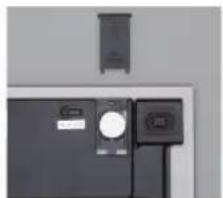
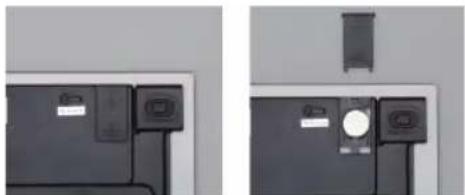
1) Remove the cover of the battery compartment underneath the scales.
Remove the plastic protection on top of the battery provided with the scales or insert 1 new CR2032 (3V) battery. Replace the cover.
natural_image
Two-panel image showing front and side views of a device with buttons and connectors (no visible text or symbols)2) Place the scales on a hard, flat, horizontal surface.
3) Before you get on the scales, make sure that the surface of the scales is completely dry and not slippery.
3. UNIT SELECTOR FUNCTION:
1) Step onto the scales to switch them on.
2) Press the button on the back of the scales to select the measuring unit you require «kg» or «lb».
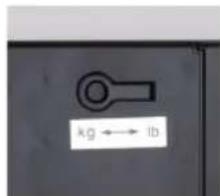
3) The weight unit selected will be displayed the next time the scales are switched on.
4. INSTRUCTIONS FOR USE:
1) Step onto the scales to switch them on.
2) «0.0» and the «kg» or «lb» measuring unit will be displayed on the screen.
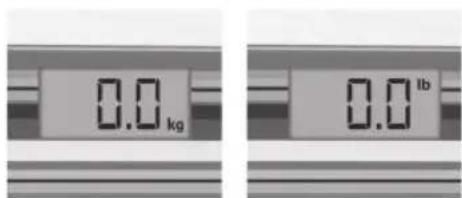
3) The scales will calculate your weight. The calculated weight will flash 3 times and will then be displayed for a few seconds.
4) The scales will switch off automatically.
5) «Err» will be displayed if the scales are overloaded.
6) «LO» will be displayed if the battery is low.
7) «C» will be displayed if the scales or the person are not correctly positioned.
EN
5. MAINTENANCE AND STORAGE:
- Use a soft, damp cloth to clean the scales.
- Do not use abrasive detergents.
- In case of prolonged lack of use of the device, remove the batteries.
- Store the device in a dry, safe place.
ADVICE REGARDING THE DISPOSAL OF WASTE

- All the packaging is composed of materials that pose no hazard for the environment and which can be disposed of at your local sorting centre to be used as secondary raw materials. The cardboard may be disposed of in a paper recycling bin. The packaging film must be taken to your local sorting and recycling centre.
- When you have finished using the device, please dispose of it in an environmentally friendly way and in accordance with the law. Prior to disposal, please remove the battery and dispose of it at a collection point so that it can be recycled.
Please note: under no circumstances should spent batteries be disposed of with household waste!!!
LIMITED WARRANTY
LANAFORM® guarantees this product against any material or manufacturing defect for a period of two years from the date of purchase, except in the circumstances described below.
The LANAFORM ^® guarantee does not cover damage caused as a result of normal wear to this product. In addition, the guarantee covering this LANAFORM ^® product does not cover damage caused by abusive or inappropriate or incorrect use, accidents, the use of unauthorized accessories, changes made to the product or any other circumstance, of whatever sort, that is outside LANAFORM ^® 's control.
LANAFORM® may not be held liable for any type of circumstantial, indirect or specific damage.
All implicit guarantees relating to the suitability of the product are limited to a period of two years from the initial date of purchase as long as a copy of the proof of purchase can be supplied.
On receipt, LANAFORM® will repair or replace your appliance at its discretion and will return it to you. The guarantee is only valid through LANAFORM®'s Service Centre®. Any attempt to maintain this product by a person other than LANAFORM®'s Service Centre will render this guarantee void.
The photographs and other images of the product in this manual and on the packaging are as accurate as possible, but do not claim to be a perfect reproduction of the product.
MANUEL D'INSTRUCTION
natural_image
Close-up of a black printer or printer with a small inset showing internal components (no visible text or symbols)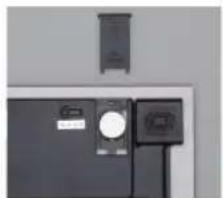
natural_image
Exterior view of a black electronic device with a circular button and two connected ports (no visible text or symbols)natural_image
Close-up of a black electronic device with a small circular button and label (no visible text or symbols)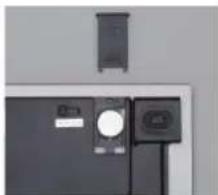
natural_image
Exterior view of a modern office building (no signage)natural_image
Two black electronic devices with attached cables, one showing a display and the other a speaker (no visible text or symbols)natural_image
Two-panel image showing front and side views of a device with buttons and connectors (no visible text or symbols)BESCHRÄNKTE GARANTIE
natural_image
Close-up of a black electronic device with a small circular button and label (no visible text or symbols)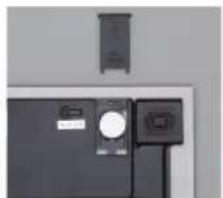
natural_image
Close-up of a black electronic device with a circular button and a small rectangular component, mounted on a wall (no visible text or symbols)natural_image
Two-panel image showing a black electronic device with attached cables and a small device mounted on top, against a plain wall (no text or symbols visible)natural_image
Close-up of a black printer or printer with a small inset showing internal components (no visible text or symbols)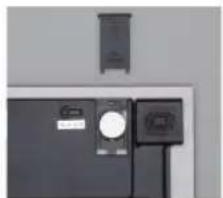
natural_image
Exterior view of a black electronic device with a circular button and two connected ports (no visible text or symbols)natural_image
Close-up of a black electronic device with a small screen and label (no visible text or symbols)
natural_image
Exterior view of a modern office building (no signage)natural_image
Close-up of a black electronic device with a small screen and label (no visible text or symbols)
natural_image
Exterior view of a black electronic device with a circular component and a separate display unit (no visible text or symbols)2) Tehtnico postavite na trdno, ravno in vodoravno površino.
3) Preden stopite na tehtnico, preverite, ali je njena površina popolnoma suha in nedrseča.
3. FUNKCIJA ZA IZBOR MERSKE ENOTE:
natural_image
Close-up of a black electronic device with a small circular component and a label, next to a wire (no visible text or symbols)
natural_image
Exterior view of a black electronic device with a wall-mounted display and a separate control panel (no visible text or symbols)natural_image
Close-up of a black electronic device with a small circular component and a label (no visible text or symbols)
natural_image
Exterior view of a black electronic device with a circular component and a separate display unit (no visible text or symbols)natural_image
Close-up of a black electronic device with a small screen and label (no visible text or symbols)
natural_image
Exterior view of a modern office building (no signage)natural_image
Close-up of a black electronic device with a small display unit and a separate control panel (no visible text or symbols)