Thermo-Hygrometer - Thermometer hygrometer LANAFORM - Free user manual and instructions
Find the device manual for free Thermo-Hygrometer LANAFORM in PDF.


User questions about Thermo-Hygrometer LANAFORM
0 question about this device. Answer the ones you know or ask your own.
Ask a new question about this device
Download the instructions for your Thermometer hygrometer in PDF format for free! Find your manual Thermo-Hygrometer - LANAFORM and take your electronic device back in hand. On this page are published all the documents necessary for the use of your device. Thermo-Hygrometer by LANAFORM.
USER MANUAL Thermo-Hygrometer LANAFORM
DIGITALE THERMOHYGROMETER
DIGITALES THERMOHYGROMETER
CYFROWY HIGROMETR TERMICNY
DIGITALNI TEPELNY VLHKOMER
TELOTNY DIGITALNY VLHKOMER
DIGITALNI HIGROTERMOMETER
EN Installation and battery replacement, 6.
FR Installation et remplacement de la batterie, 8.
NL Plaatsing en verranging van de batterij, 11.
DE Batterien einsetzen und auswechseln, 15.
PL Wkladanie i wymiana baterii,18.
cs Vkladani a vymena bateri,22.
sk Instalacia a vymena baterie,5.
SL Vstavitev in zamenjava baterije,28.
1
Digital Thermo-Hyrometer LANAFORM 3/32
EN Instruction manual
The photographs and other images of the product in this manual and on the packaging are as accurate as possible, but do not claim to be a perfect reproduction of the product.
Thank you for choosing the Digital Thermo-Hygrometer by LANAFORM.
PLEASE READ ALL THE INSTRUCTIONS BEFORE USING YOUR DEVICE, ESPECIALLY THIS BASIC SAFETY INFORMATION
- Do not expose the digital thermo hygrometer to direct sunlight, or expose it to high temperatures (oven radiator), humidity, dust, chemical products or dirt.
- Do not immerse the device in water.
-
Do not drop the device and do not use it if it is damaged.
-
Do not try to repair the device yourself.
If there is a problem with your device, please contact your reseller. - This unit is not intended for use by people (including children) with reduced physical, sensory or mental capabilities, or persons with lack of experience or knowledge, unless a person responsible for their safety can supervise or instruct them beforehand on how to use the device. Children should be supervised to make sure they do not play with the device.
-
Use this device only for its intended purpose, as described in these instructions for use.
The device is not a medical device. Do not use it for medical purposes or for publishing results of measurements.
The device is not a toy. Keep out of the reach of children. -
If the ambient conditions change, you will have to wait 15 minutes before the thermo hygrometer provides reliable measurements.
BATTERY INFORMATION
- Remove flat batteries from the device immediately. Increased risk of leakage.
- Avoid any contact with skin, eyes and mucous membranes! If you come into contact with the electrolyte, rinse every area concerned immediately with plenty of clean water and consult a doctor immediately!
If a battery is swallowed, consult a doctor immediately! - Remove the battery if the device is not to be used for a long period.
- Keep the battery out of the reach of children.

Do not recharge the batteries! Do not short-circuit them! Do not throw them on the fire! Explosion hazard!
DESCRIPTION OF THE DEVICE
INDOOR CLIMATE CONTROL
- Indoor temperatures from -10^ to +50^ ( 14^ - 122^ )
- Relative humidity from 20% to 90%
- Displays the time
- Dual mode time display (12 hrs/24 hrs)
- Daily alarm (wake-up) function
-
Comfort zones in the form of "smiling emoticons":
-
appears if the indoor temperature is between 18^ and 25^ (64°F to 77°F) and humidity is between 40% HR and 65% HR.
-
appears if room temperatures and humidity are different.
- Retractable stand.
Built-in magnet for attaching to metal.
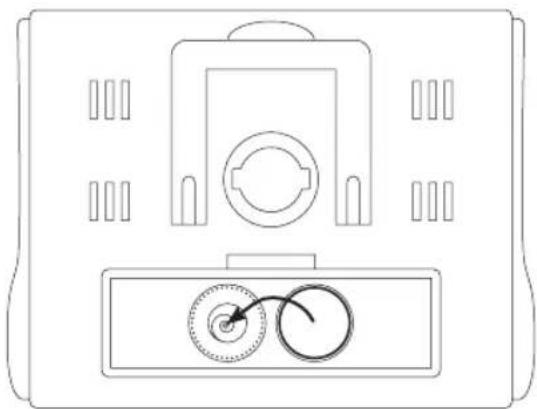
INSTALLATION AND BATTERY REPLACEMENT, 3
A 1.5V (LR44) battery is included in the device.
1 Open the battery compartment and place the battery in its compartment.
2 Replace the cover.
3 The device then indicates the temperature and relative humidity.
If an abnormal indication is displayed on the screen, remove the battery and wait 2 seconds before replacing it. The display returns to normal.
If the display problem persists, replace the battery. In this case, make sure the polarity matches when replacing it.
INSTRUCTIONS FOR USE DISPLAY THE TIME
1 Press MODE for 2 seconds.
2 Select the 12 hr/24 hr mode by pressing SET
3 Press MODE once to confirm this selection.
4 Adjust the time and minutes using the SET button, press MODE after each selection and to return to the normal time display.
MAX AND MIN TEMPERATURE DISPLAY AT ANY TIME
The max sym MIP appear
alongside the when you press the MAX / MIN button and show the maximum and minimum temperatures as well as the time at which they were detected.
The time is displayed again normally after 15 seconds.
EN FR NL DE PL CS SK SL
ALARM(A/L)
1 Press SET then MODE and the AL symbol will appear. The alarm time can be shown.
2 Press the MODE button for 2 seconds in order to adjust the times with the SET button and with the MODE confirmation between each selection. To do this, go back to and finish by pressing MODE
3 Press one last time on SET to trigger the alarm.
4 You can enable or disable the alarm using this same SET button =
MAINTENANCE AND CLEANING
Clean using only a slightly damp cloth. Never use chemical products or corrosive cleaning agents.
Keep in a clean, dry place, having removed the battery.
ADVICE REGARDING THE DISPOSAL OF WASTE
All the packaging is composed of materials that pose no hazard for the environment and which can be disposed of at your local sorting centre to be used as secondary raw materials. The cardboard may be disposed of in a paper recycling bin. The packaging film must be taken to your local sorting and recycling centre.
When you have finished using the device, please dispose of it in an environmentally friendly way and in accordance with the law.
Under no circumstances should spent batteries be disposed of with household waste.
LIMITED WARRANTY
LANAFORM guarantees this product against any material or manufacturing defect for a period of two years from the date of purchase, except in the circumstances described below.
The LANAFORM guarantee does not cover damage caused as a result of normal wear to this product. In addition, the guarantee covering this LANAFORM product does not cover damage caused by abusive or inappropriate or incorrect use, accidents, the use of unauthorized accessories, changes made to the product or any other circumstance, of whatever sort, that is outside LANAFORM's control.
LANAFORM may not be held liable for any type of circumstantial, indirect or specific damage.
6/32 LANAFORM Digital Thermo-Hygrometer EN Instruction manual

EN FR NL DE PL CS SK SL
All implicit guarantees relating to the suitability of the product are limited to a period of two years from the initial date of purchase as long as a copy of the proof of purchase can be supplied.
On receipt, LANAFORM will repair or replace your appliance at its discretion and will return it to you. The guarantee is only valid through LANAFORM's Service Centre. Any attempt to maintain this product by a person other than LANAFORM's Service Centre will render this guarantee void.