XE1201 - Power bank Xtorm - Free user manual and instructions
Find the device manual for free XE1201 Xtorm in PDF.


| Product Type | Portable battery (Power Bank) |
| Brand | Xtorm |
| Model | XE1201 |
| Battery capacity | 10000 mAh (estimated) |
| Charging input | USB-C (Power Delivery 15W recommended) |
| Charging output | USB-A (automatic charging) |
| Battery charging time | About 8 hours with 15W PD charger |
| Level indicator | LED (4 levels, each LED = 25%) |
| Power button | Yes, to display battery level |
| Included cable | USB-C to USB-A cable |
| Charging compatibility | Smartphones, tablets, USB devices (adapter cable required for Lightning/Micro USB) |
| Dimensions | Not specified in manual (estimated: 140 x 70 x 15 mm) |
| Weight | Approximately 220 g (estimated) |
| Material | Flame-retardant ABS plastic |
| Safety | Protection against overcharging, overheating and short circuits |
| Care and cleaning | Wipe with a soft, dry cloth. Do not use chemical products. |
| Recycling | Follow WEEE procedures. Contact local recycling organization. |
| Warranty | Manufacturer warranty (details in manual) |
Frequently Asked Questions - XE1201 Xtorm
User questions about XE1201 Xtorm
0 question about this device. Answer the ones you know or ask your own.
Ask a new question about this device
Download the instructions for your Power bank in PDF format for free! Find your manual XE1201 - Xtorm and take your electronic device back in hand. On this page are published all the documents necessary for the use of your device. XE1201 by Xtorm.
USER MANUAL XE1201 Xtorm
natural_image
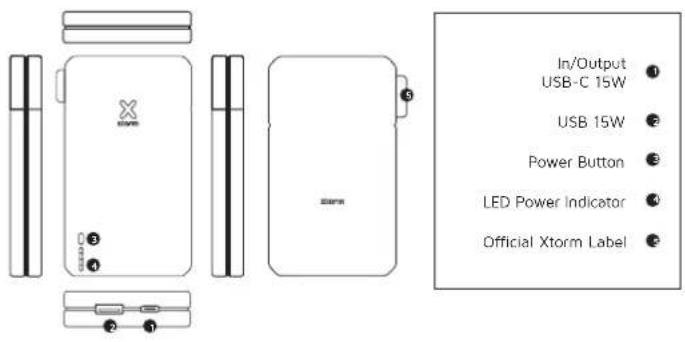
Line drawing of a rectangular electronic device with ports and a 'X' mark on top (no text or symbols beyond branding)1 SPECIFICATIONS PRODUCT OVERVIEW
20.000 mAh Li-ion / 74Wh
1x USB-C 15W (5V-3A) 1x USB-A 15W (5V-3A)
142x68x28 mm
425 grams
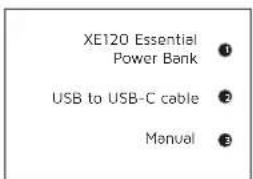
+ 1x USB to USB-C cable 1x Manual
3 CHARGING YOUR DEVICE
natural_image
Diagram showing a smartphone, a connector labeled B, and a side-view of a device with labeled ports A and C (no text or symbols present)
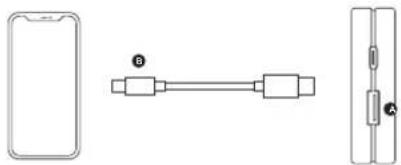
3A Connect the USB end of the charging cable to the USB-A output of the Power Bank and the other end to the input of your device. The charging will start automatically.
3B Charging some devices requires a charging cable other than the one supplied. E.g. an Apple Lightning or a Micro USB cable
RECHARGING THE POWER BANK 4
natural_image
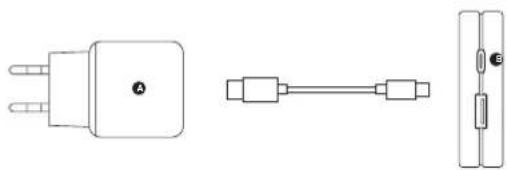
Three technical line drawings of electronic components: a three-pin plug, a connector pin, and a rectangular connector (no text or symbols)4A Connect the USB-C end of the charging cable to output 1 of the Power Bank and the USB end to a wall charger.
4B For the fastest charging possible use a 15W charger. This will fully recharge the Power Bank within 8 hours.
LED POWER INDICATOR5
IN THE BOX 6
natural_image
Front view of a rectangular electronic device with labeled ports (no readable text or symbols beyond branding)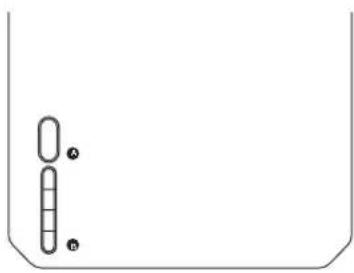
natural_image
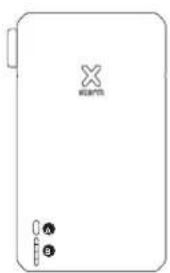
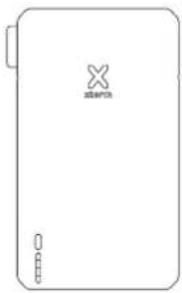
Simple line drawing of a container with two vertical cylindrical objects and three small circles inside (no text or symbols)5A Press the Power Button once to display the battery level remaining in the Power Bank via the LED display.
5B. Each lit LED light indicates 25% remaining energy in the Power Bank. At 4 lit lights, the Power Bank is fully charged.
natural_image
Blank rectangular device with a small logo and three small icons on the sides (no text or symbols visible)1

•

●
EN - ENGLISH
1 SPECIFICATIONS
2 PRODUCT OVERVIEW
3 CHARGING YOUR DEVICE
3.A Connect the USB end of the charging cable to the USB-A output of the Power Bank and the other end to the input of your device. The charging will start automatically.
3.B Charging some devices requires a charging cable other than the one supplied. E.g. an Apple Lightning ^4 or a Micro USB cable.
4 RECHARGING THE POWER BANK
4.A Connect the USB-C end of the charging cable to output 1 of the Power Bank and the USB end to a wall charger.
4.B For the fastest charging possible use a 15W USB-C PD charger. This will fully recharge the Power Bank within 8 hours.
5 LED POWER INDICATOR
5.A Press the Power Button once to display the battery level remaining in the Power Bank via the LED display.
5.B Each lit LED light indicates 25% remaining energy in the Power Bank. At 4 lit lights, the Power Bank is as good as fully charged.
6 IN THE BOX
NL - NEDERLANDS
1 SPECIFICATIES
2 PRODUCT OVERZICHT
3 OPLADEN VAN JOUW APPARAAT
EN When recycling this product, please follow WEEE battery recycling procedures. Contact your local recycling organization for more information.
XTORM SAFETY CHECK WARNINGS


- TEMPERATURE CONTROL
Provided with a temperature control chip that prevents overheating.

- OVERLOAD PROTECTION
Protects both the internal battery as well as the battery of the attached device from overcharging.

- SECURED POWER MANAGEMENT
Automatically picks the correct charging speed and efficiently devides power between attached devices.

- SHORT CIRCUIT PROTECTION
Breaks the circuit automatically when an overcurrent is detected. This protects the Xtorm charger and your device from short circuit damage.

- A-CLASS BATTERY CELLS
We only use the best battery cells that provide the fast charging you need and meet all safety requirements.

- HIGH EFFICIENCY
Our power products are built to power your device as efficient as possible. This ensures the least possible loss of energy during the charging process.
EN Warnings
Don't crop, dissemba or attempt to repair the charger by yourself. Avoid exposure to water or high humidity. Don't expose to any heat source. Keep out of reach of children. Don't use in the presence of flammobia gas. The warranty will lease in the avail of improper use. Talco Accessories has tested the product in a test environment. All statements/declarations made by Talco Accessories about the operation of the product are based on the results obtained from such tests. These results/statements/declarations cannot be guaranteed, for example in case of evolving or injudicious use and/or use in a different environment.
NL Waarschuwingen
EU DECLARATION OF CONFORMITY